SQL Databases: SQLite vs PostgreSQL
SQLite or PostgreSQL for your project? We put the same 2,000 real estate listings in both, on real servers: SQLite saves 'call us' as a price and PostgreSQL refuses it, STRICT tables, Jess connecting from her own PC, 'database is locked' vs a row lock, 10,000 lookups timed, and permission denied, then four questions to pick the right one.
Same insert, two answers
SQLite or PostgreSQL: which database should your project use? Joe runs the listings site for a small real estate office. His price column holds whole numbers, but one new listing's price is the words call us. Watch what happens when the same line of SQL goes to both. SQLite saves it, without a word. PostgreSQL refuses: that's not a whole number. Same SQL, two very different databases. By the end, you'll know which one fits your project, and what picking the wrong one would cost you.
sqlite3 listings.db "INSERT INTO listings (address, price) VALUES ('12 Elm St', 'call us');"
psql listings -c "INSERT INTO listings (address, price) VALUES ('12 Elm St', 'call us');"ERROR:  invalid input syntax for type integer: "call us"
LINE 1: ...TO listings (address, price) VALUES ('12 Elm St', 'call us')...
                                                             ^
A file, or a server
Why so different? Look at Joe's server. The SQLite database is just this file, about 60 kilobytes, and its first bytes say what it is. PostgreSQL is a set of programs that keep running all the time, waiting for other programs to connect on port 5432: a numbered door on the network. SQLite has nothing running and no port: just a file that a program opens when it needs it.
ls -ltotal 68
-rw-r--r-- 1 joe joe   722 Nov 24 15:44 add_listing.py
-rw-r--r-- 1 joe joe 61440 Nov 24 15:50 listings.db
-rw-r--r-- 1 joe joe   731 Nov 24 15:50 lookups.py
head -c 16 listings.db; echoSQLite format 3
ps -e -o user,cmd | grep -E '^(postgres|USER)' | head -8USER     CMD
postgres /usr/bin/perl -wT /usr/bin/pg_ctlcluster 16 main start
postgres /usr/lib/postgresql/16/bin/postgres -D /var/lib/postgresql/16/main -c config_file=/etc/postgresql/16/main/postgresql.conf
postgres postgres: 16/main: checkpointer
postgres postgres: 16/main: background writer
postgres postgres: 16/main: walwriter
postgres postgres: 16/main: autovacuum launcher
postgres postgres: 16/main: logical replication launcher
ss -ltnState     Recv-Q    Send-Q       Local Address:Port         Peer Address:Port    Process
LISTEN    0         200                0.0.0.0:5432              0.0.0.0:*
LISTEN    0         4096            127.0.0.11:38649             0.0.0.0:*
LISTEN    0         200                   [::]:5432                 [::]:*
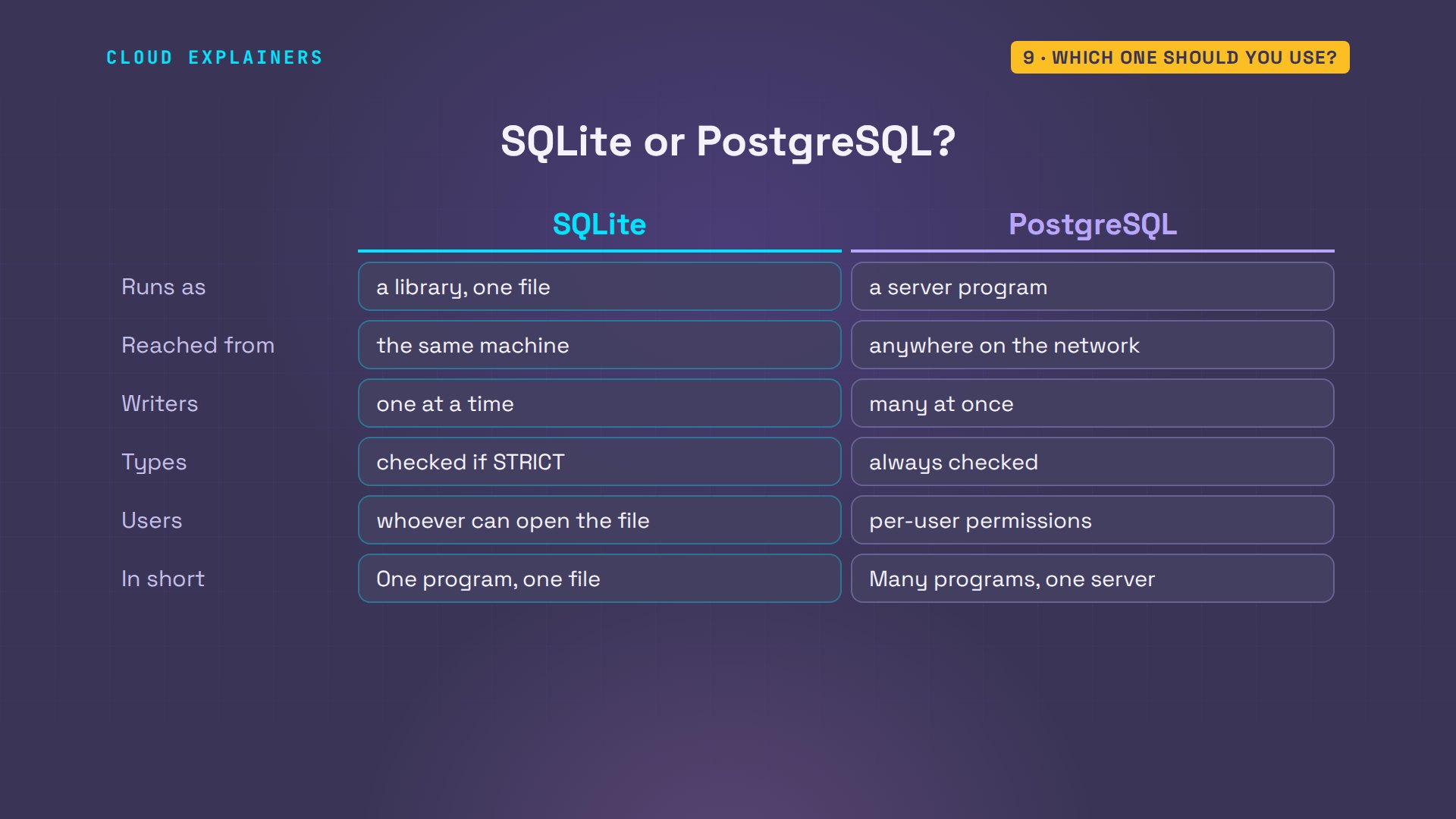
So SQLite isn't a program you start. It's a library, code built into Joe's own program, that reads and writes the file. PostgreSQL is a separate server program that owns its data. Other programs connect to it, from this machine or from a coworker's PC across the network, and each one signs in as a user.
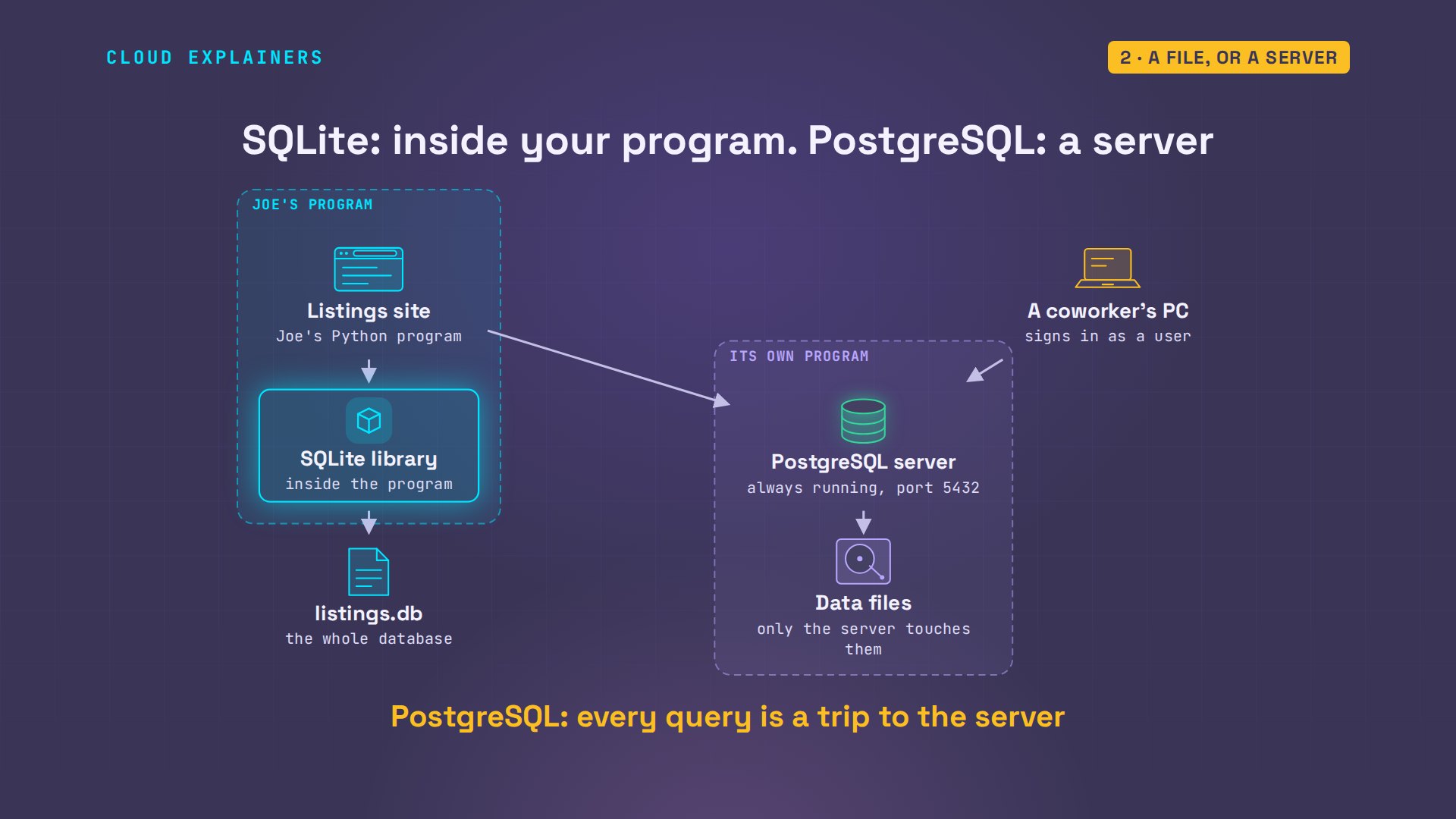
Think of a home kitchen and a restaurant kitchen. At home there's nothing to open and no staff: you just start cooking, one cook at the stove at a time. A restaurant kitchen is staffed all day, takes orders from many tables, lets several cooks work at once, and a manager decides who may do what.
What each one lets in
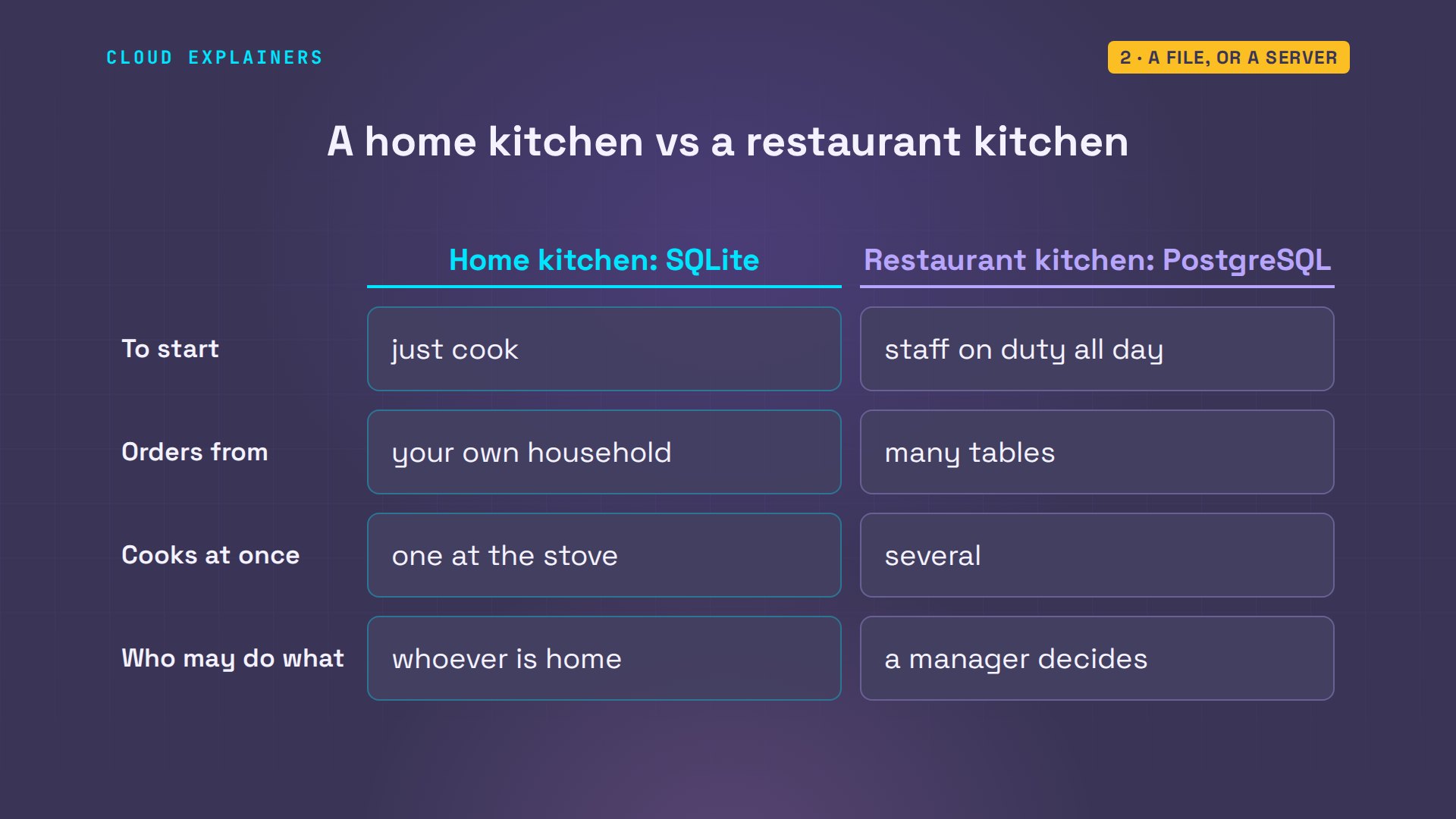
Back to call us. Ask SQLite what it stored: the price column says integer, meaning whole number, but this value is stored as text. SQLite turns what you give it into a number when it can, and if it can't, it just keeps the words. Now Joe's site lists the most expensive homes first. Guess first: which one is on top? Call us. SQLite treats any text as bigger than every number, so when you sort from the highest price down, call us lands on top, and 12 Elm St is now the priciest home in town.
sqlite3 listings.db "SELECT address, price, typeof(price) FROM listings WHERE address = '12 Elm St';"12 Elm St|call us|text
sqlite3 -table listings.db "SELECT address, price FROM listings ORDER BY price DESC LIMIT 3;"+--------------+---------+
|   address    |  price  |
+--------------+---------+
| 12 Elm St    | call us |
| 29 Cedar Ln  | 1248500 |
| 819 Birch Rd | 1248000 |
+--------------+---------+
That's the first real difference. PostgreSQL checks every value against the column's type on the way in, so bad data never gets stored. SQLite trusts your program to check, which is handy for quick scripts, and a trap when the data comes from people typing into forms.
SQLite can be strict too, since version 3.37. When you create the table, add one word at the end: STRICT.
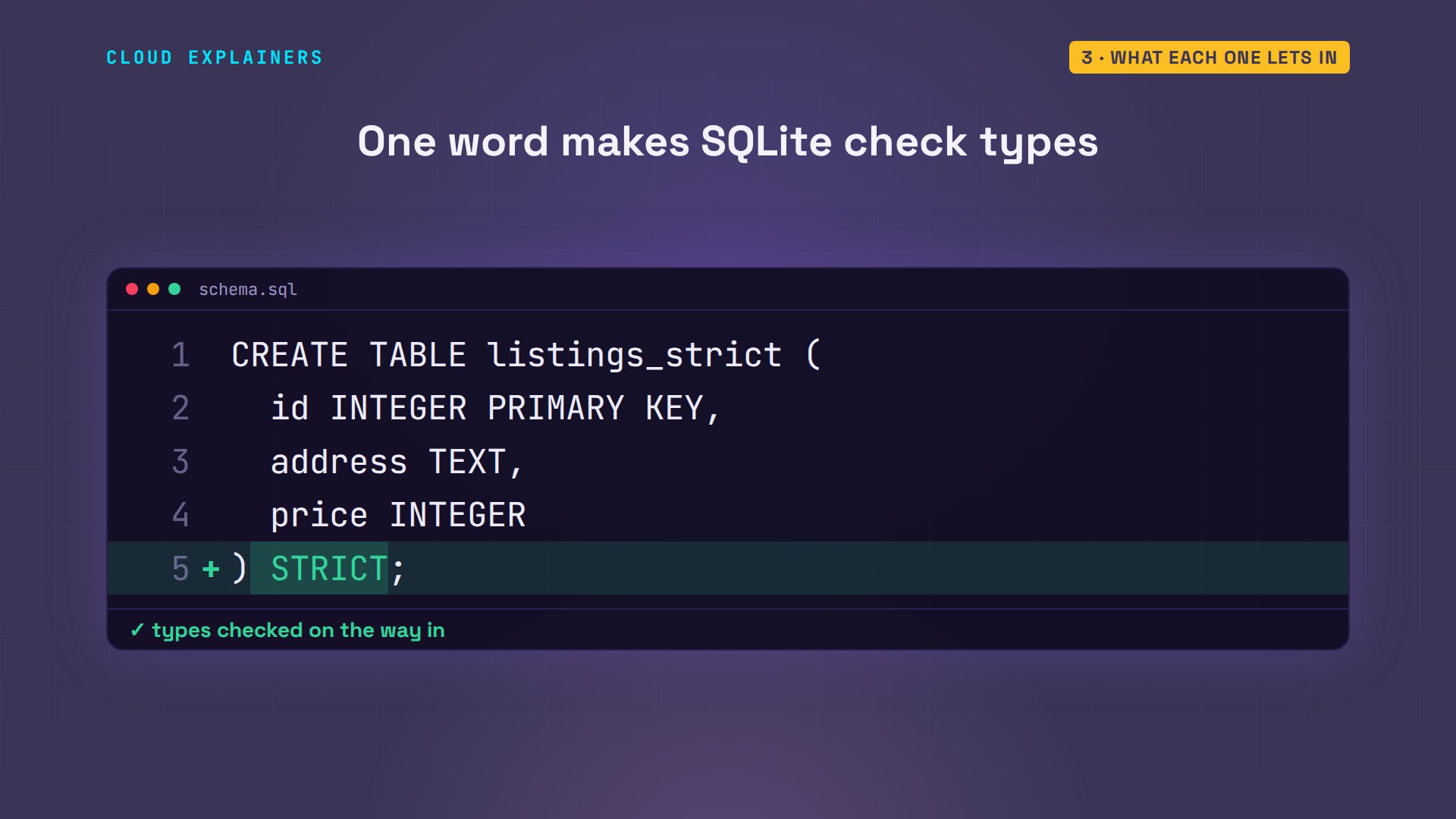
Now the same call us price is refused, much like PostgreSQL: cannot store text in an integer column. If you pick SQLite, make your tables strict.
sqlite3 listings.db "CREATE TABLE listings_strict (id INTEGER PRIMARY KEY, address TEXT, price INTEGER) STRICT; INSERT INTO listings_strict (address, price) VALUES ('12 Elm St', 'call us');"Error: stepping, cannot store TEXT value in INTEGER column listings_strict.price (19)
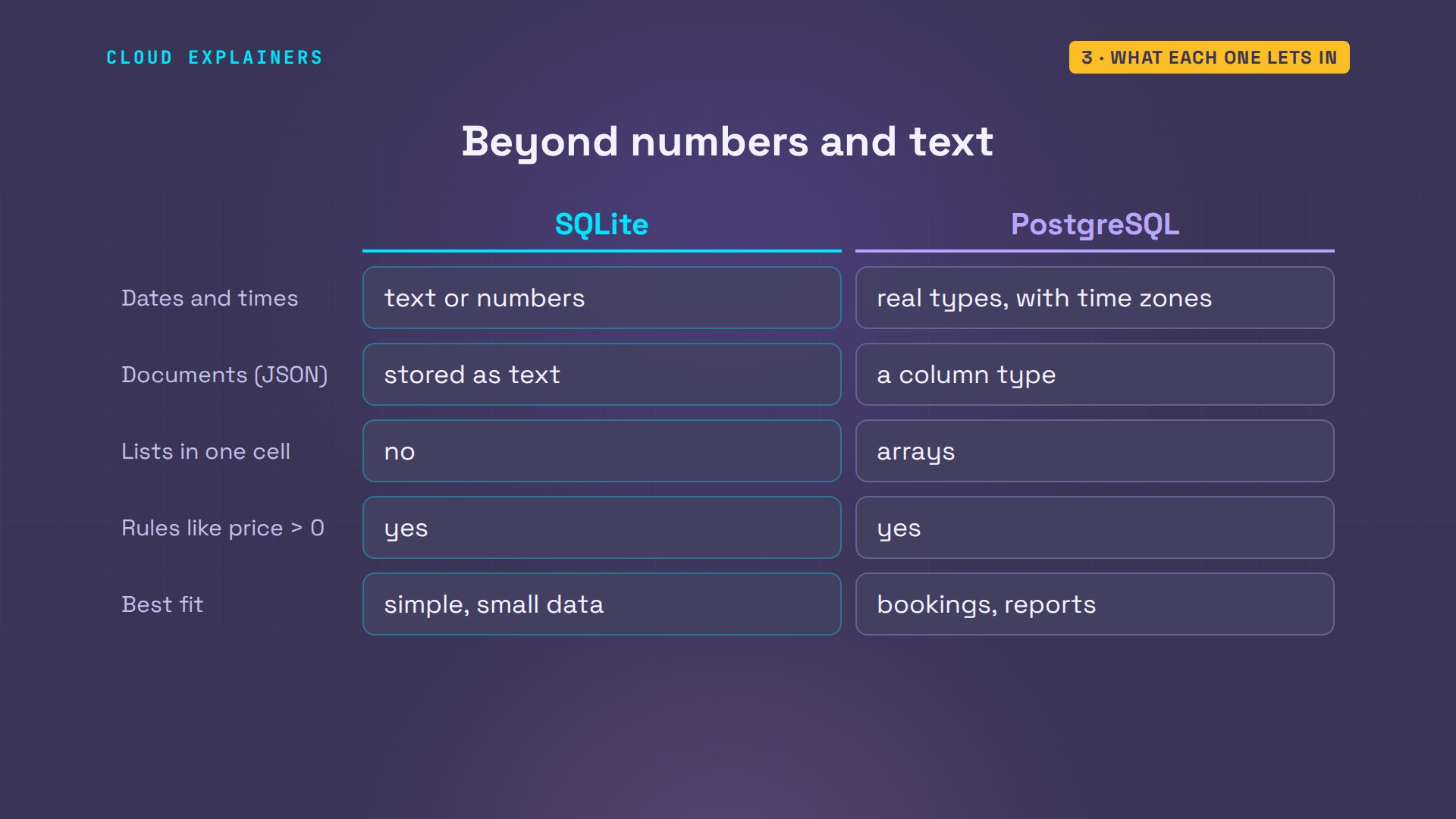
PostgreSQL has more types, too. It has real dates with time zones. It can store whole documents, or a list of values, in one cell. And you can attach rules to a column, like price must be above zero. SQLite keeps things small: a date is just stored as text or a number. For a listings site that's plenty; for booking systems and reports, PostgreSQL's types save work.
Reaching it from another PC
Now Jess, an agent in the office, wants the listings on her own PC. With PostgreSQL, she connects to the office server by its name, and sees all 2,000 listings. She adds one too. With SQLite there's nothing to connect to. The data is a file on Joe's server, and only programs on that server should open it.
psql -h office -d listings -c "SELECT count(*) FROM listings;"count ------- 2000 (1 row)
psql -h office -d listings -c "INSERT INTO listings (address, price, beds) VALUES ('9 Lake Rd', 415000, 3);"INSERT 0 1
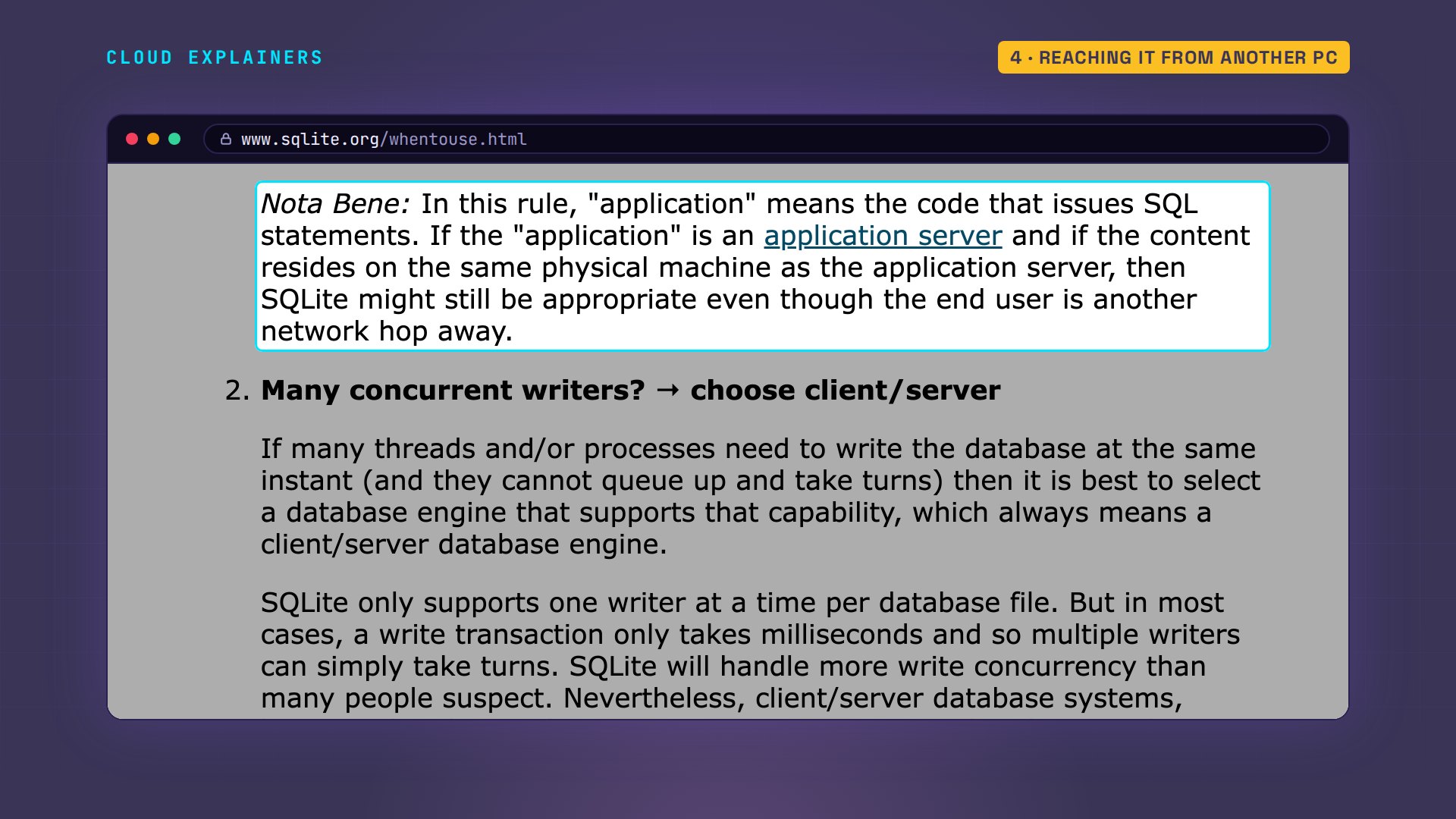
SQLite's own guide says it plainly. Is the data separated from the program using it by a network? Then choose a database that runs as its own server, like PostgreSQL. Sharing the SQLite file over a network drive works badly, and can even corrupt it. Where the guide says application, it means the program sending the SQL. Joe's site runs right next to its file, so the visitors browsing it don't count.
Two writers at the same moment
What happens when the site saves a listing while a slow import is still writing? In one window, Joe starts an SQLite change and leaves it open, the way a slow import script would. In a second window, the site tries to save a new listing. It waits, because Python's SQLite module waits up to five seconds by default. After 5.2 seconds it gives up: database is locked. SQLite lets one writer at a time change the file. Everyone else waits their turn.
sqlite3 listings.dbSQLite version 3.45.1 2024-01-30 16:01:20
Enter ".help" for usage hints.
sqlite> BEGIN IMMEDIATE;
sqlite> UPDATE listings SET price = price - 5000 WHERE id = 1;
time python3 add_listing.py sqlite '4 Oak Ave' 389000Traceback (most recent call last):
  File "/home/joe/site/add_listing.py", line 8, in <module>
    cur = conn.execute("INSERT INTO listings (address, price) VALUES (?, ?)", (address, price))
          ^^^^^^^^^^^^^^^^^^^^^^^^^^^^^^^^^^^^^^^^^^^^^^^^^^^^^^^^^^^^^^^^^^^^^^^^^^^^^^^^^^^^^
sqlite3.OperationalError: database is locked

real	0m5.239s
user	0m0.022s
sys	0m0.006s
Same test on PostgreSQL. Joe's open change holds a lock on one row, listing 1. The site's new listing is saved in 21 milliseconds. PostgreSQL locks rows, not the whole database, so many programs can write at once, and only two changes to the same row wait for each other.
psql listingspsql (16.15 (Ubuntu 16.15-0ubuntu0.24.04.1))
Type "help" for help.
listings=> BEGIN;BEGIN
listings=> UPDATE listings SET price = price - 5000 WHERE id = 1;UPDATE 1
time python3 add_listing.py postgres '4 Oak Ave' 389000saved listing 2002: 4 Oak Ave

real	0m0.021s
user	0m0.013s
sys	0m0.006s
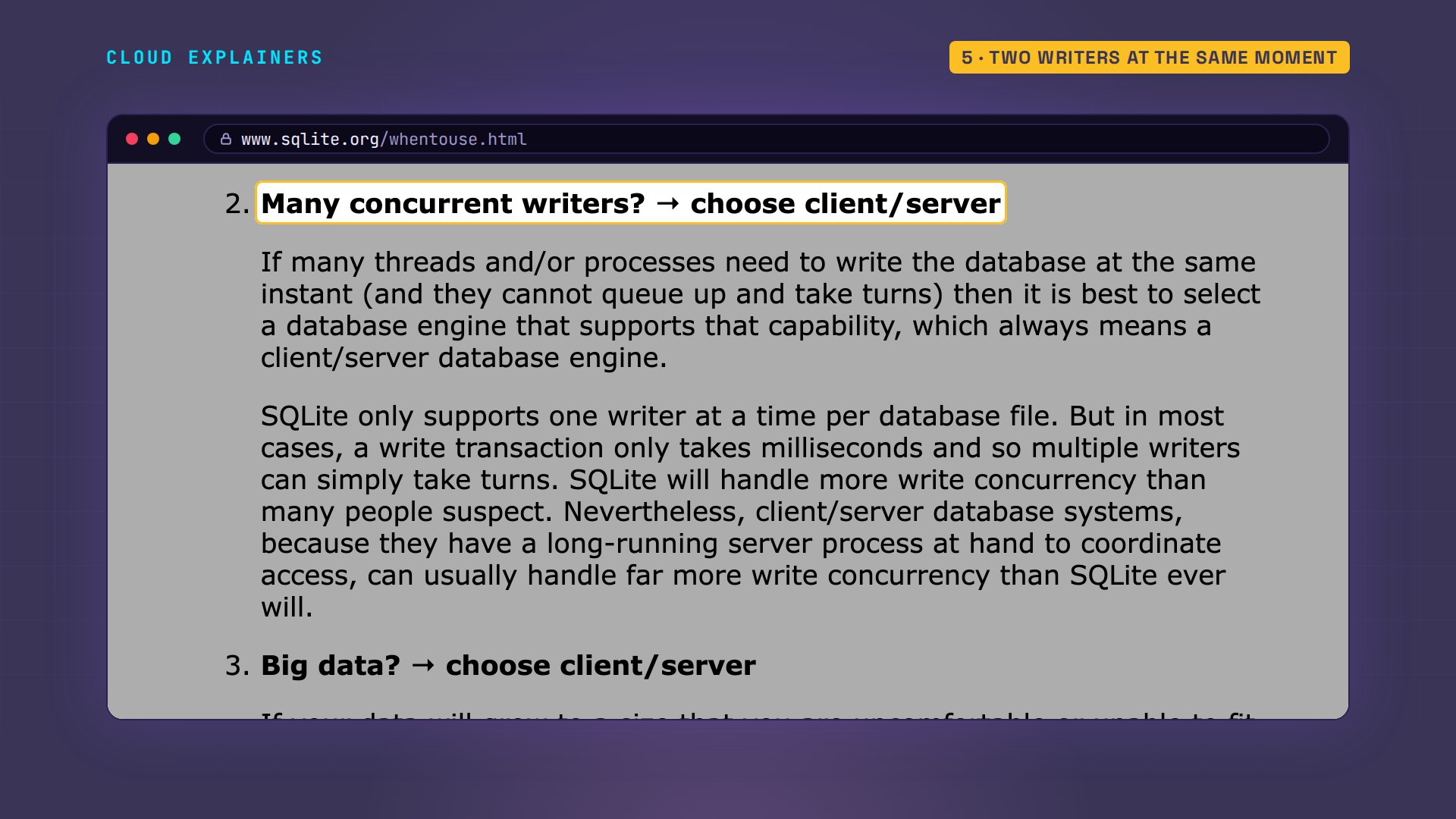
Is that a problem for SQLite? Usually not. Its guide says a write usually takes milliseconds, so writers simply take turns. It becomes a problem when many programs must write at the same instant, all day long.
Which one is faster?
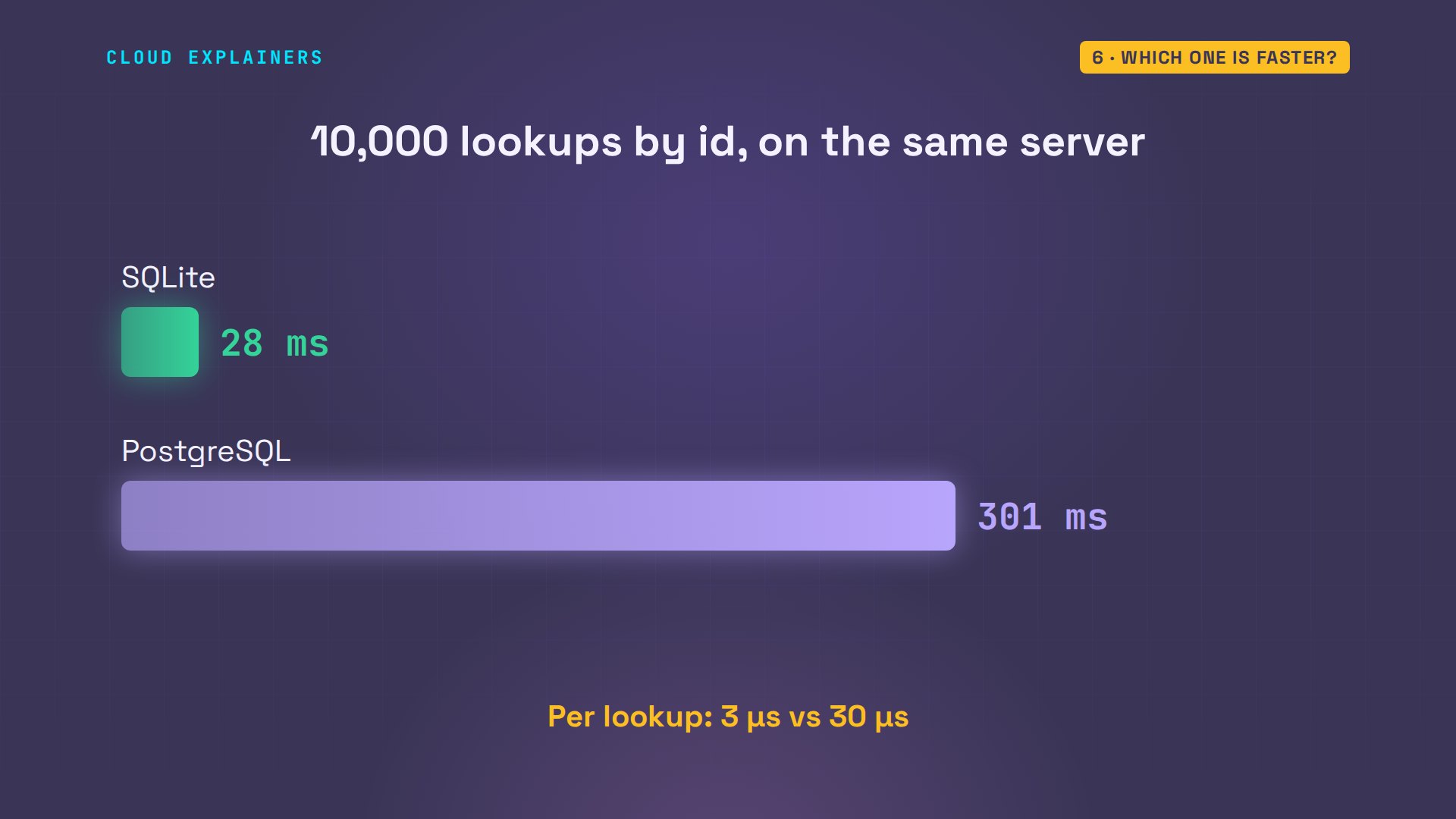
So which one is faster? Joe's script looks up 10,000 listings by id, one query each, first in SQLite, then in PostgreSQL on the same server. Guess first: how do they compare? SQLite: 28 milliseconds. PostgreSQL: 301. About 11 times faster for SQLite.
python3 lookups.pySQLite:     10,000 lookups in 0.028 s
PostgreSQL: 10,000 lookups in 0.301 s
Why? An SQLite lookup happens right inside Joe's program, reading the file directly. A PostgreSQL lookup is a message to another program, and an answer back, even on the same machine. That works out to about 3 millionths of a second per lookup for SQLite, and 30 millionths for PostgreSQL. A page that runs ten queries won't notice either one. Speed is rarely the reason to choose.
Who may do what
What stops Jess from deleting every listing by mistake? On PostgreSQL, the server does. Joe gave Jess permission to read listings and to add new ones, and nothing else. When she tries to delete every listing, the server refuses: permission denied. SQLite has no users at all. Whoever can read the file can read every row, and whoever can write it can change anything.
psql -h office -d listings -c "DELETE FROM listings;"ERROR: permission denied for table listings
Backing it up
If Joe's server dies tonight, every listing is gone unless he has a copy, and a careless copy, like cp on the live files, can catch a write halfway and end up half old, half new. So how do you back each one up safely? SQLite's backup command copies the database into another file, safely, even while the site is using it. PostgreSQL's pg_dump asks the server for everything, and Joe saves it as one file of SQL. That file holds the tables, the rows, even Jess's permissions. Both end up as one file you can copy somewhere safe.
sqlite3 listings.db '.backup listings-copy.db'
pg_dump listings > listings.sql
ls -l listings-copy.db listings.sql-rw-r--r-- 1 joe joe 65536 Nov 24 15:51 listings-copy.db
-rw-rw-r-- 1 joe joe 54914 Nov 24 15:51 listings.sql
grep -m 3 -E '^(CREATE TABLE|COPY|GRANT)' listings.sqlCREATE TABLE public.listings (
COPY public.listings (id, address, price, beds) FROM stdin;
GRANT SELECT,INSERT ON TABLE public.listings TO jess;
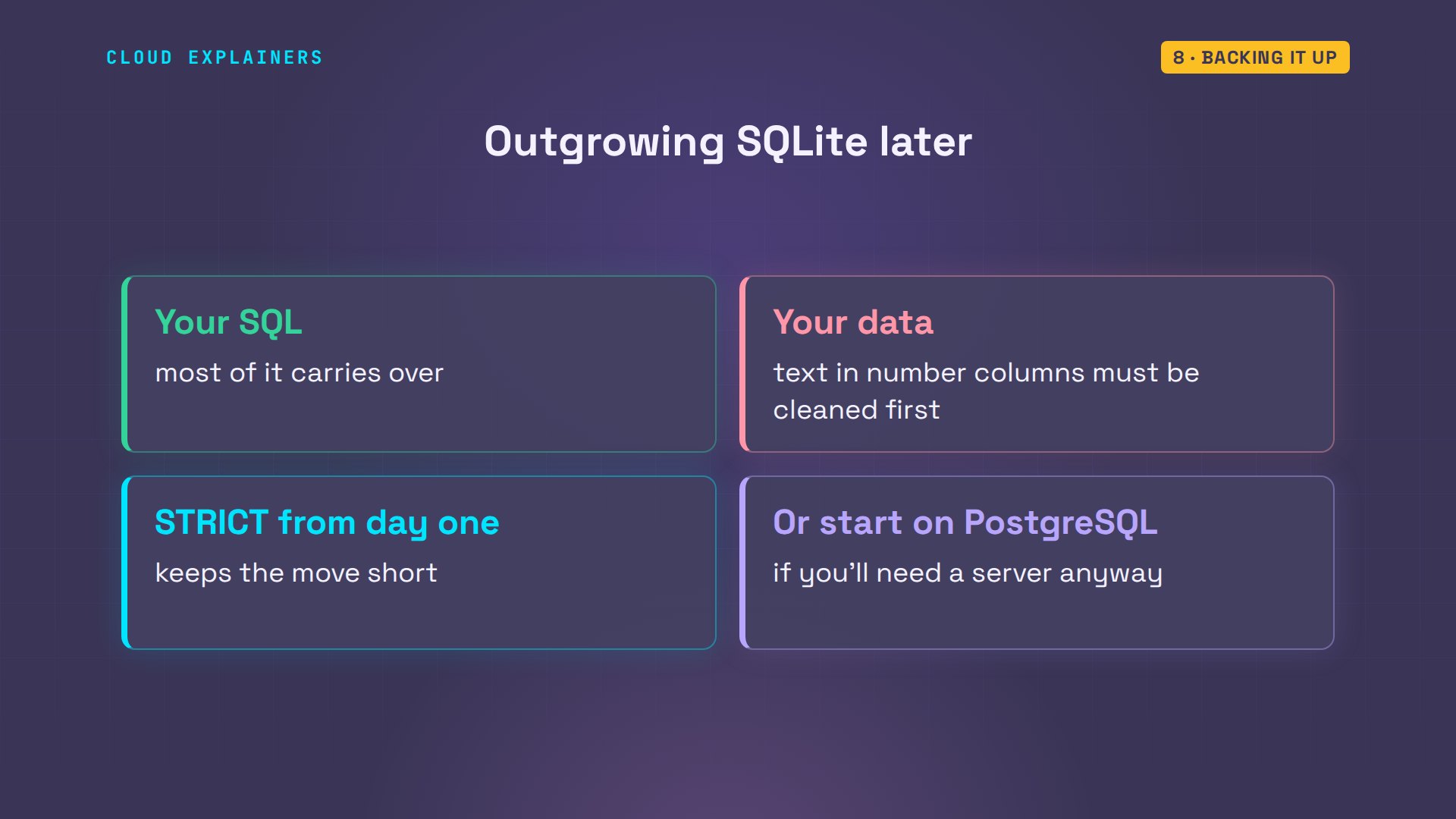
And if you start on SQLite and outgrow it? Moving to PostgreSQL later is common, and most of your SQL carries over. The pain is the data: every call us hiding in a number column has to be cleaned up before PostgreSQL will take it. Strict tables from day one keep that move short. And if you already know you'll need a server, just start on PostgreSQL.
Which one should you use?
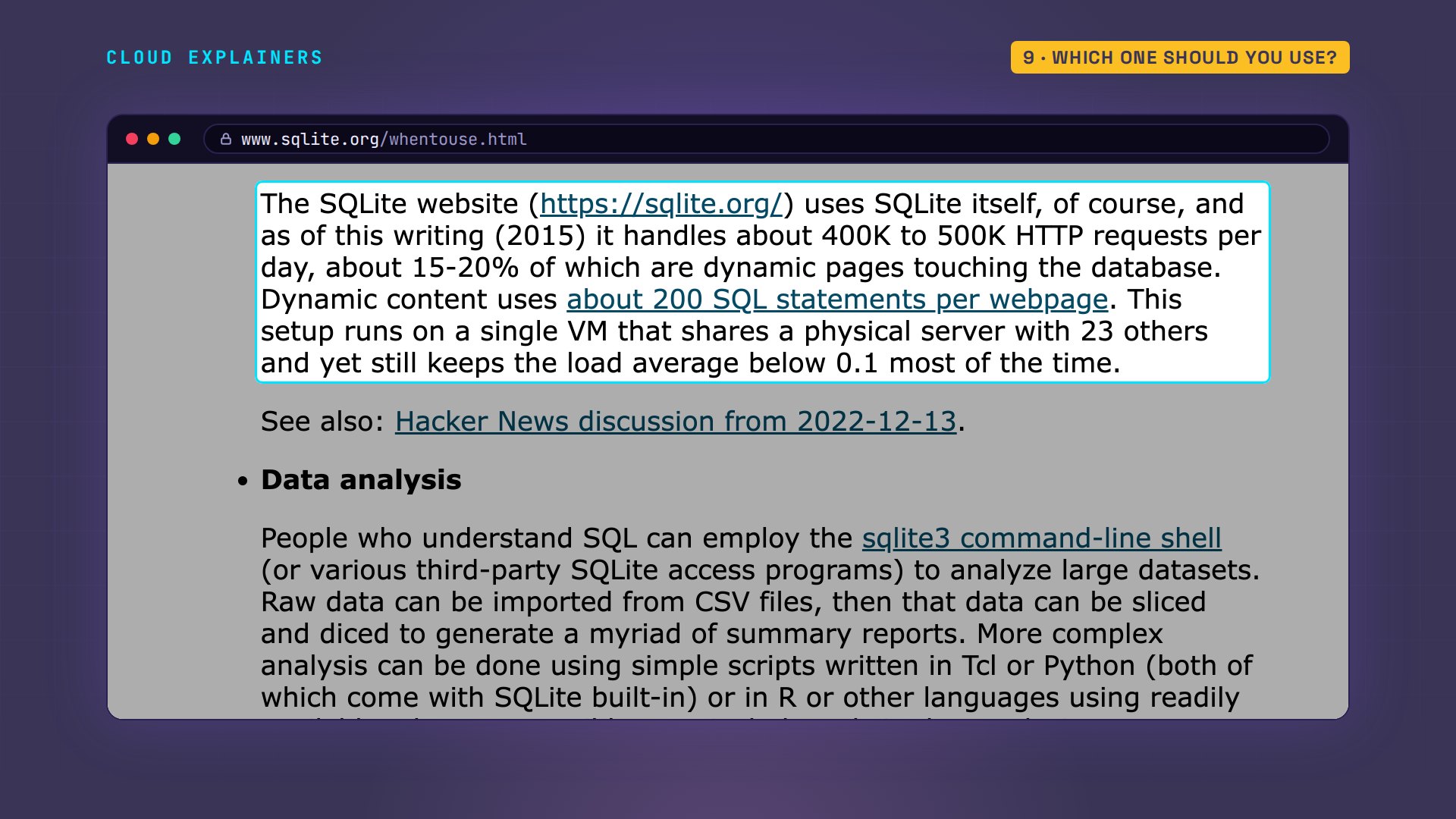
So is SQLite only for toys? No. Its guide says that any site with fewer than 100,000 hits a day, and that's most websites, should work fine on SQLite. That counts every page load and request. The guide says it's a cautious number, and many sites handle more. It copes with many gigabytes too, though data heading toward terabytes belongs on a server. The SQLite website itself runs on SQLite. It also runs inside every phone, every major web browser, and countless desktop apps.
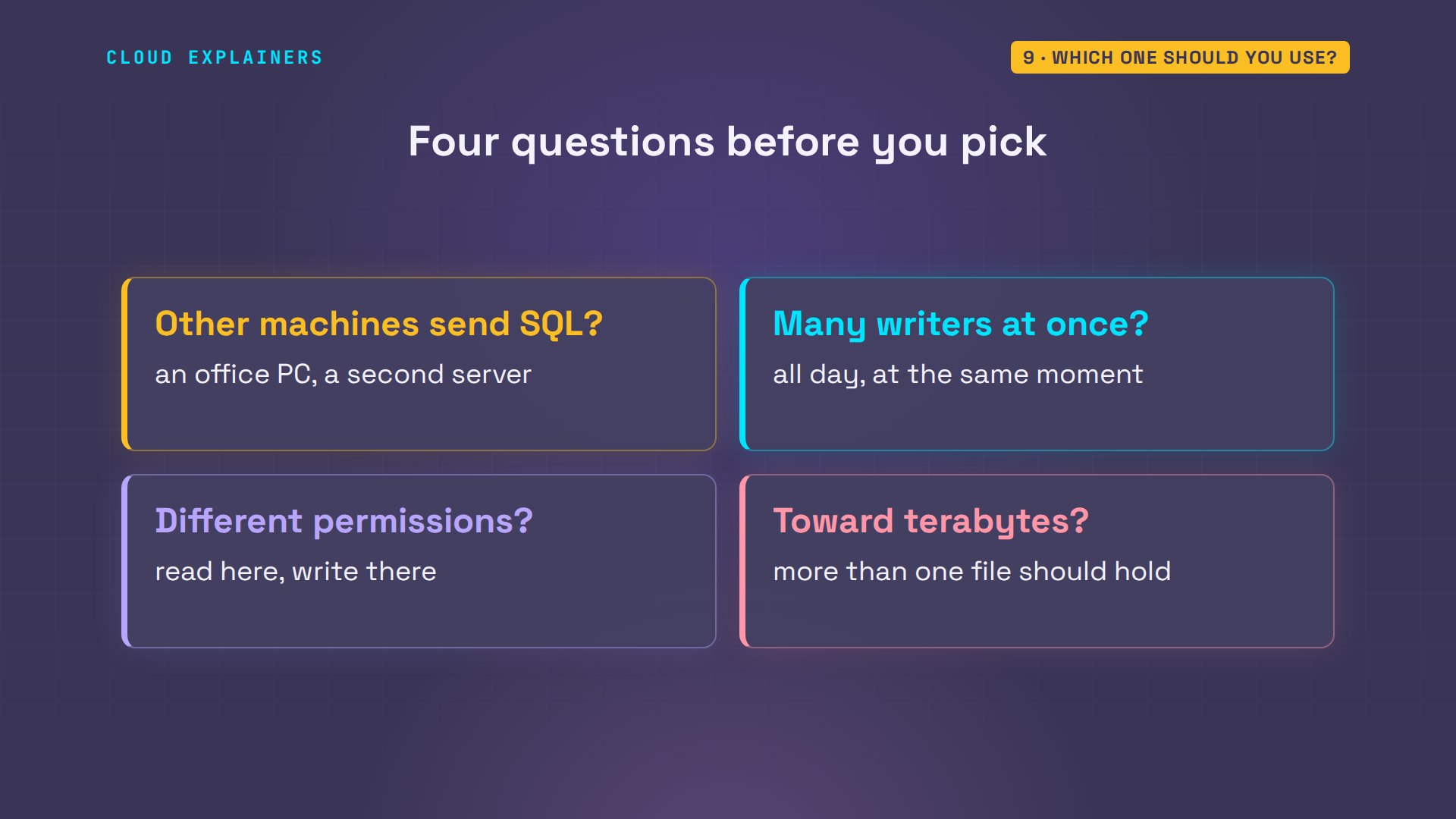
Before you pick, ask four questions. Will programs on other machines send it SQL? Will many programs write at the same moment, all day? Do different people need different permissions? Will the data grow toward terabytes, more than one file should hold? All no: SQLite, with strict tables. Any yes: PostgreSQL.
So which one? For Joe's office, Jess needs the listings on her own PC. That's a yes to the first question, so the listings move to PostgreSQL, the restaurant kitchen. An app, a tool, or a small site that owns its own data stays in the home kitchen: SQLite.
Recap
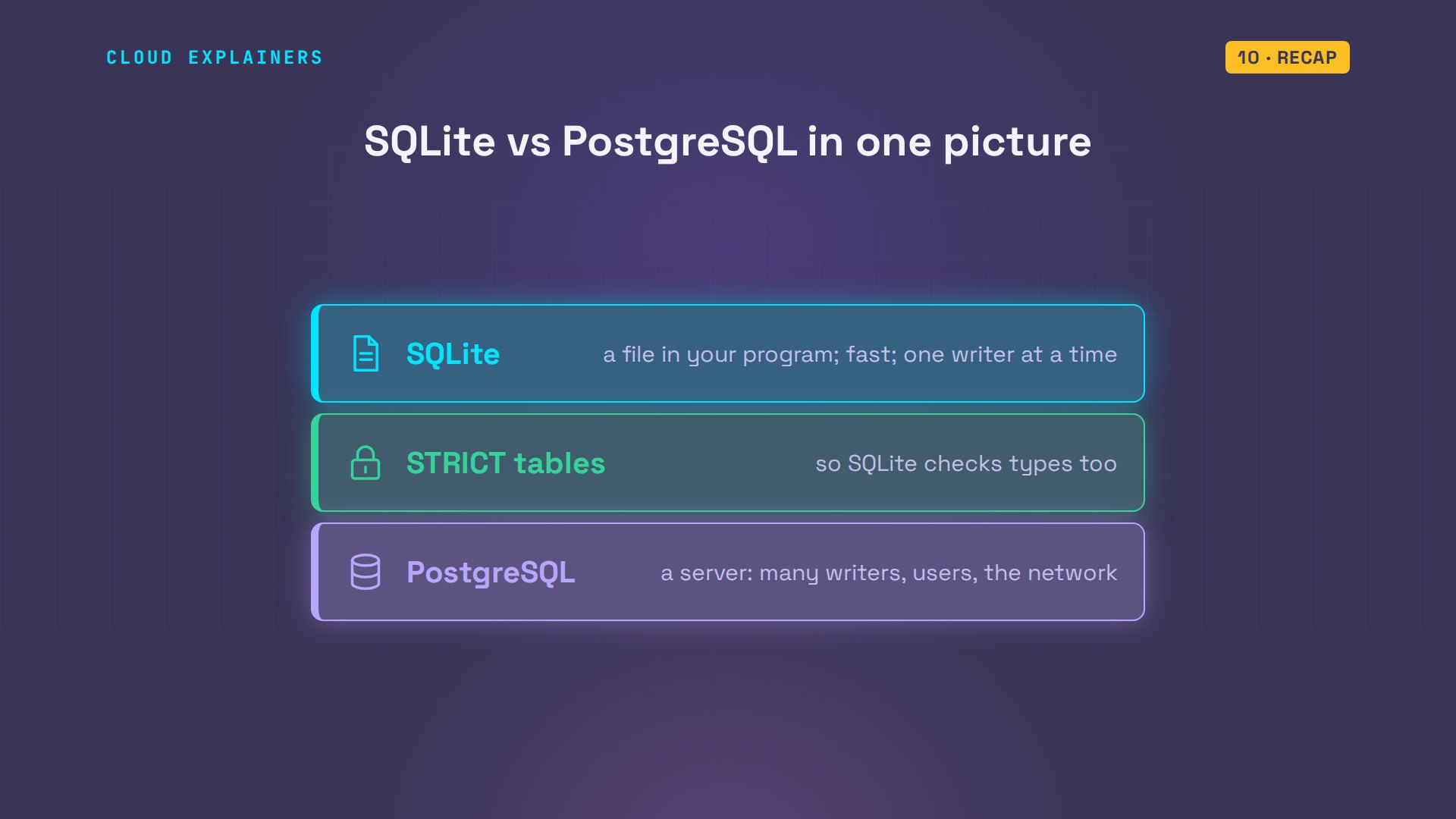
So: SQLite runs inside your program and keeps everything in one file: no setup, very fast, one writer at a time. PostgreSQL is a server: it checks every type, lets many programs write at once, and gives each user their own permissions, even across the network.
If this settled your project's database, a like helps another beginner find it, and subscribing brings more side-by-side tests on real servers.
Every error and time in this video came from real runs, on SQLite 3.45.1 and PostgreSQL 16.15, and every command and the lab files are linked in the description. Thanks for watching Cloud Explainers.
Sources
Demos: two containers on our own Mac standing in for an office server and a PC; the office, agents and listings are made up. Every error and time was real. Watch the full video on YouTube.
More videos
Every PostgreSQL Setting to Change After You Install It

What Happens When You Install Docker on Ubuntu

How to Fix Python 'Address Already in Use' Errors
Golang Interfaces and Mocks in 5 Minutes
How to Fix Git 'Detached HEAD' State

Linux Firewall with ufw: Full Tutorial for Beginners
Golang defer Statements in 5 Minutes

How to Fix OAuth 'invalid_grant' Errors

The SQL Roadmap for Beginners
Golang make() for Slices and Maps in 5 Minutes
How to Fix Network 'No Route to Host' Errors on Linux
How to Fix Linux 'Too Many Open Files' Errors

Every Django Concept a Beginner Needs to Know
SSH on Linux: Full Tutorial for Beginners

Golang for range Loops in 5 Minutes
The Django Roadmap for Beginners

Golang Structs in 5 Minutes

Redis: Full Tutorial for Beginners

Golang context.Context in 5 Minutes
How to Fix MySQL Database Error 1045: Access Denied for User
Golang Method Receivers in 5 Minutes
How to Fix Python SSL: CERTIFICATE_VERIFY_FAILED Errors

How to Fix Django Static Files Not Loading in Production

OpenRouter vs Direct API Keys: Which One Should You Use?
Golang if err != nil Checks in 5 Minutes

How to Fix Golang 'go.mod File Not Found' Errors

MCP Servers: Full Tutorial for Beginners

Golang Error Return Values in 5 Minutes

How to Fix Python ModuleNotFoundError: No Module Named
Golang Pointers in 5 Minutes
How to Fix a Kubernetes Pod Stuck in CrashLoopBackOff
How to Fix a Homelab ESXi Host Not Responding
PostgreSQL: Full Tutorial for Beginners
How a Load Balancer Works with HAProxy

How Python Virtual Environments Work
How to Fix Cloudflare Tunnel Errors in a Homelab
How to Fix API CORS Errors: No 'Access-Control-Allow-Origin'
How Authenticator App Login Codes Work (TOTP)

Git and GitHub: Full Tutorial for Beginners
How a Homelab Hypervisor Works (VMware ESXi)

How to Fix Kubernetes ImagePullBackOff Errors
How to Fix DNS 'Temporary Failure in Name Resolution' on Linux
How to Fix AWS CLI 'Unable to Locate Credentials'
Proxmox vs ESXi for Your Homelab: When Each One Wins
PostgreSQL UUID vs Auto Increment: Which Primary Key Should You Use?
Kubernetes: Full Tutorial for Beginners

How TCP Sockets Work

How to Fix PostgreSQL 'Could Not Connect to Server'
Claude Code Hooks Will Finally Make Sense After This
DevOps with Ansible Will Finally Make Sense After This

How SNMP Network Monitoring Works

How to Fix GitHub 'Permission Denied (publickey)' Errors
Docker: Full Tutorial for Beginners
How to Fix PostgreSQL 'Password Authentication Failed'
Why One Linux Server Handles More Users Than You Think
How to Fix Network 'Connection Refused' Errors
DevOps Pipelines: Jenkins vs GitHub Actions
Linux Nginx Reverse Proxy: Full Tutorial for Beginners
Every Networking Term a Beginner Needs in 12 Minutes
How to Fix Docker 'Permission Denied' on docker.sock
How to Fix Git 'Updates Were Rejected' When You Push

How to Fix nginx 502 Bad Gateway Errors on Linux
How to Fix Linux apt 'Could Not Get Lock' Errors (Ubuntu)

How Email Works on the Internet (SMTP) in 10 Minutes

The Python Roadmap for Beginners

Golang REST API with Gin: Full Tutorial for Beginners
How a WireGuard VPN Network Works

Linux Makefiles Will Finally Make Sense After This

SAML vs OAuth vs OpenID Connect: What's the Difference?
How to Fix Python cron Jobs That Never Run
Linux Bash Scripting: Full Tutorial for Beginners
How PXE Network Boot Works

How Active Directory Works

How to Fix a Linux systemd Service That Won't Start
Linux Logs: syslog vs journald
JWT vs Session Cookies: Which One Should You Use?
Docker vs Docker Compose: Which One Should You Use?
How to Fix Docker Compose Containers That Can't Talk to Each Other

Django Full Tutorial for Beginners

How Linux systemd Works

How to Fix 'Windows Cannot Access' Network Share Errors (SMB)
REST vs gRPC: Which One Should You Use?
How to Fix SSL Certificate Chain Errors (Missing Intermediate)

Every Python Concept for Beginners in 10 Minutes
Every SQL Join Type in 10 Minutes
Why OpenRouter Free Models Hit Their Limit So Fast
Why Your Gemini API Free Tier Runs Out So Fast

OpenRouter Will Finally Make Sense After This
How Redis Caching Works
Gemini API vs Vertex AI: Which One Should You Use?
How to Fix a Leaked Gemini API Key
Why Golang Uses Goroutines Instead of Threads
How to Fix Gemini API Error 429: Resource Exhausted
Claude Token Pricing Will Finally Make Sense After This
Why Python Web Scraping Returns Nothing (and the Fix)
Python uv vs pip: Which One Should You Use?

Python Automation: Full Tutorial for Beginners
How OAuth Login Works

Google AI Studio Will Finally Make Sense After This
What Happens When You Run a Docker Container
How to Fix Claude Code Billing Your API Key Instead of Your Plan
Why Passkeys Can't Be Phished Like Passwords
PowerShell vs Bash: Which One Should You Learn?
The Linux Roadmap for Beginners
Django vs FastAPI: Which One Should You Use?
Why SQLite Is the Most Used Database in the World
How a NoSQL Database Like MongoDB Works

How to Fix Python pip error: externally-managed-environment
How to Fix MySQL Too Many Connections Database Errors
Golang Concurrency Will Finally Make Sense After This
How Amazon S3 Works
How Kubernetes Works
How Git Works
How to Fix Docker Port Already Allocated Errors
How PostgreSQL Works
How to Fix Git Merge Conflicts
How to Fix No Space Left on Device in Linux
How the Internet Works
SQL vs NoSQL: When Each One Wins
How to Fix JWT Token Expired Errors (401 Unauthorized)
Claude API vs Claude Pro: Why Your Subscription Doesn't Include It

Why AI Agent Skills Beat Giant Prompts

Linux Cron Jobs Will Finally Make Sense After This

Security Logs Will Finally Make Sense After This
How to Fix a Security Leak: An API Key Pushed to GitHub
DNS Will Finally Make Sense After This
Never Ignore a Security Update
Two-Factor Authentication Will Finally Make Sense
Never Expose a Database to the Internet
SSH Keys vs Passwords: Which Is Safer for Security?
The 5 Levels of Linux Boot: From Power On to Login
The 5 Levels of Network Firewalls
Password Security: Why Hackers Crack Weak Passwords
Why Your Linux Server Runs Out of Memory
HTTP vs HTTPS: What Actually Changes on Your Network

Every Linux File Permission You Need to Know
Linux Processes vs Threads: When Each One Wins

The OSI Model Will Finally Make Sense After This

The 7 Levels of Git
Every Network Troubleshooting Command You Need
Hashing vs Encryption in Cybersecurity: When Each One Wins
Why the Internet Ran Out of IP Addresses
Linux Package Managers: apt vs Snap vs Flatpak
Why Python Is Slow (and When It Doesn't Matter)
TCP vs UDP: When Each One Wins

Stop Running Linux as Root (Do This Instead)

Linux Users and Groups Will Finally Make Sense

Why Phishing Beats Good Security (and How to Spot It)

The 7 Levels of Docker

AI Agents Will Finally Make Sense After This
Stop Using git push --force (Use This Instead)
Agent Skills vs MCP: When Each One Wins

Networking Will Finally Make Sense After This

Every Linux Command You Actually Need
The 7 Levels of Cybersecurity

Every System Design Concept You Need, in One Diagram