
How Redis Caching Works
Redis makes a slow page fast by keeping a copy of the answer in memory. We built it for real in a small tea shop: cache-aside with PostgreSQL behind it, expiry, a stale price, a full cache, and fifty visitors arriving the second a key expires.

The same slow answer
Your page asks the database the same question on every single visit, and waits for the same answer every time. Here's Ana's tea shop: the best sellers page takes 289 milliseconds. Run it again: the same five teas, the same wait. Nothing changed, but the database did all the work again.
python3 shop.py bestsellers --no-cachefrom PostgreSQL (no cache): 289.2 ms
1. Sencha           1,789,066 sold
2. Assam              739,497 sold
3. Earl Grey          567,389 sold
4. Jasmine Pearls     478,273 sold
5. Darjeeling         421,785 sold
python3 shop.py bestsellers --no-cachefrom PostgreSQL (no cache): 289.0 ms
1. Sencha           1,789,066 sold
2. Assam              739,497 sold
3. Earl Grey          567,389 sold
4. Jasmine Pearls     478,273 sold
5. Darjeeling         421,785 sold
The usual answer is: put Redis in front of it. And the usual worry comes right after. On Hacker News, back in 2011, people asked exactly that: if Redis keeps a copy, how do you keep that copy in step with the database?
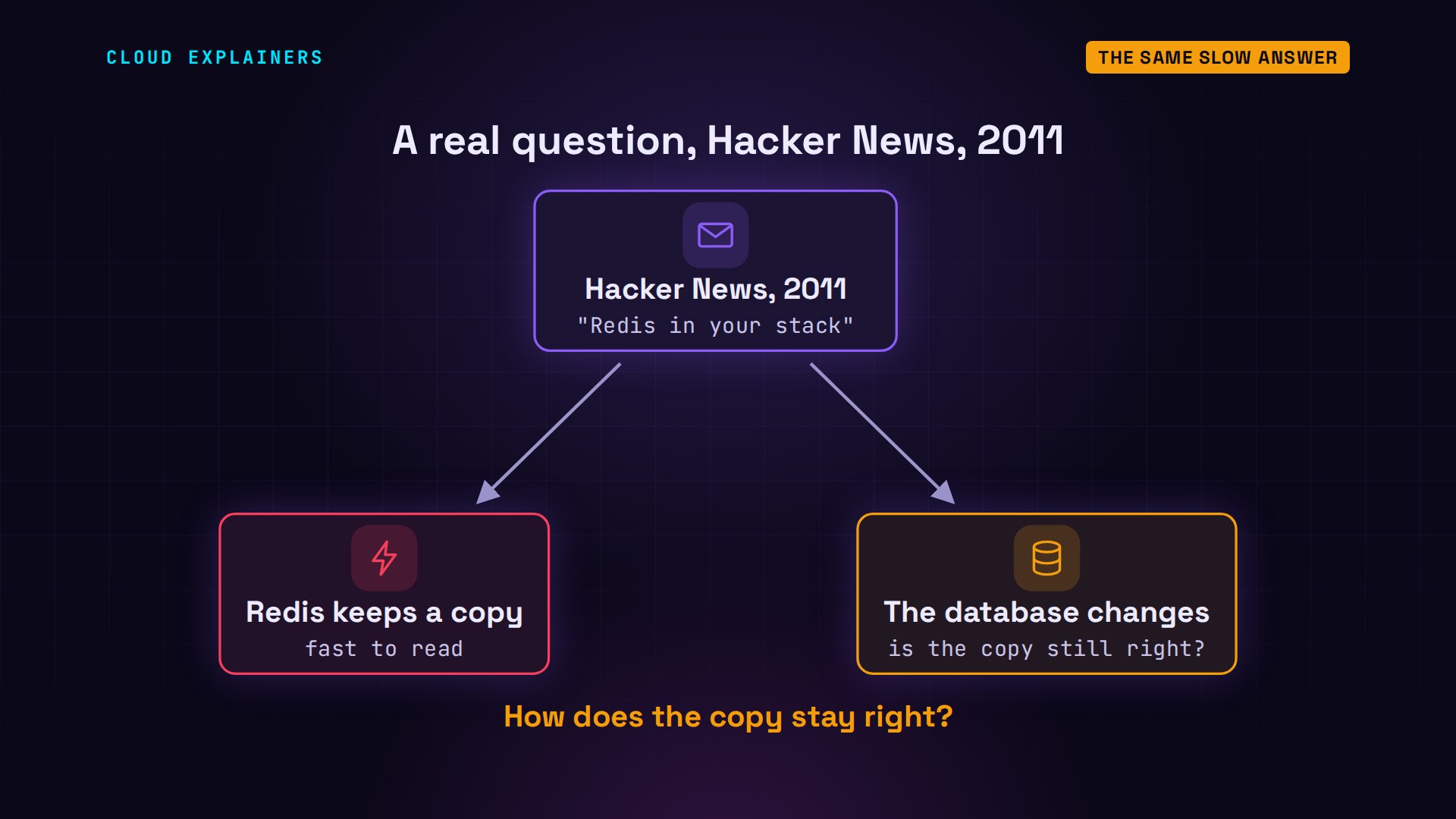
So we'll build it, piece by piece: the visitors, Ana's shop app, PostgreSQL, and Redis beside it. We'll take that page from 289 milliseconds to under one, make the copy go wrong on purpose, and fill the cache until it's full. And one question to keep in mind: when does a cache make the database's day worse instead of better?
What Redis is
Why is the page slow? To find the best sellers, PostgreSQL reads all 4,000,000 orders, adds up each tea, and sorts them. That's real work, every visit, for an answer that barely changes.

Redis is a separate server program that keeps data in memory. You give it a key, a name, and a value, any text, and it gives the value back when you ask for that key. Memory is far faster to read than a disk, and Redis doesn't add up anything: it just hands back what it was given.
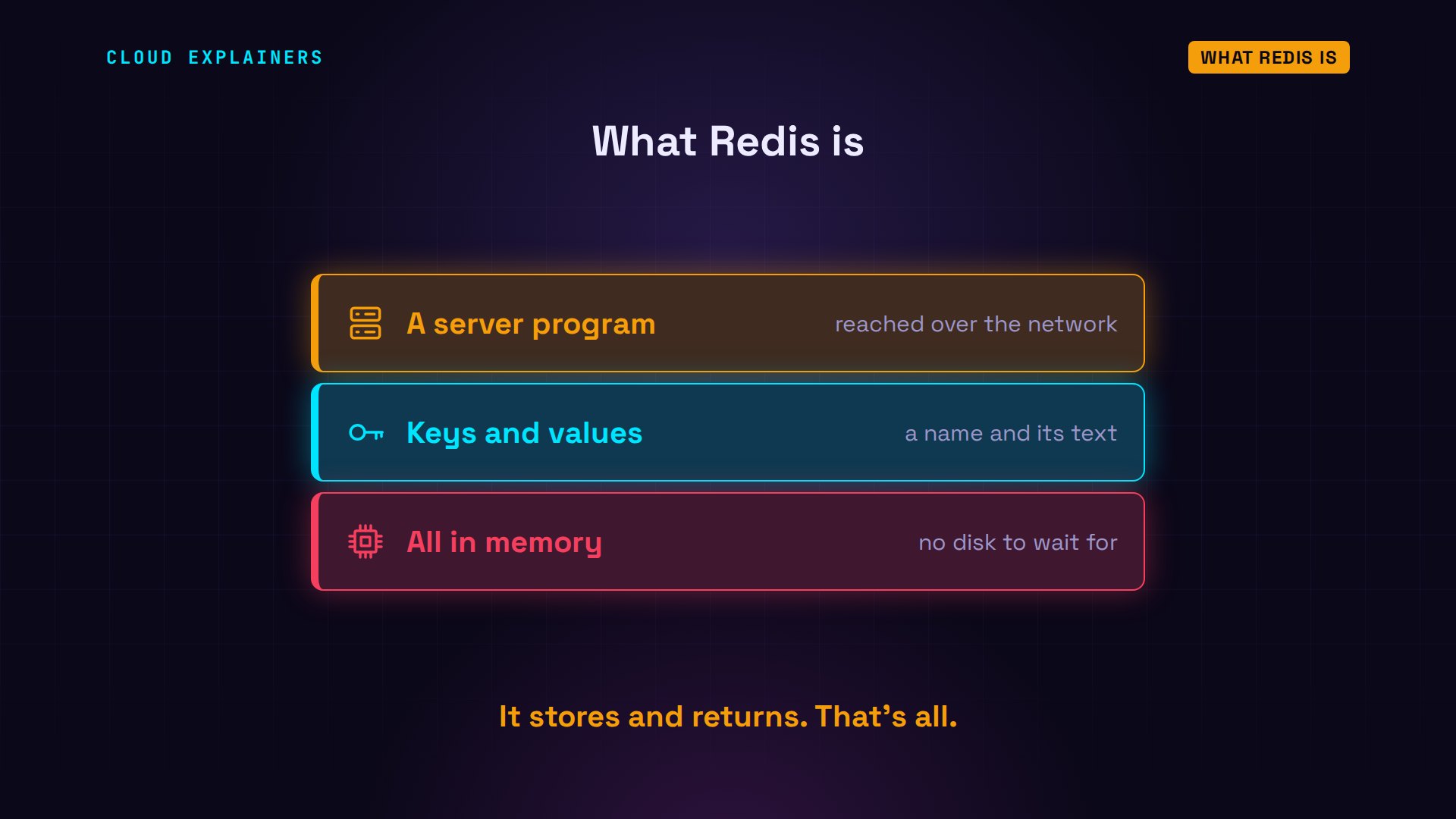
Here it is, from Ana's laptop. PING: it answers PONG. redis-cli is Redis's own command line tool, and dash h cache says which server to talk to. SET greeting hello: OK, stored. GET greeting gives hello back. And a key that was never set gives nil: nothing there.
redis-cli -h cache PINGPONG
redis-cli -h cache SET greeting helloOK
redis-cli -h cache GET greeting"hello"
redis-cli -h cache GET nothing-here(nil)
Ask the cache first
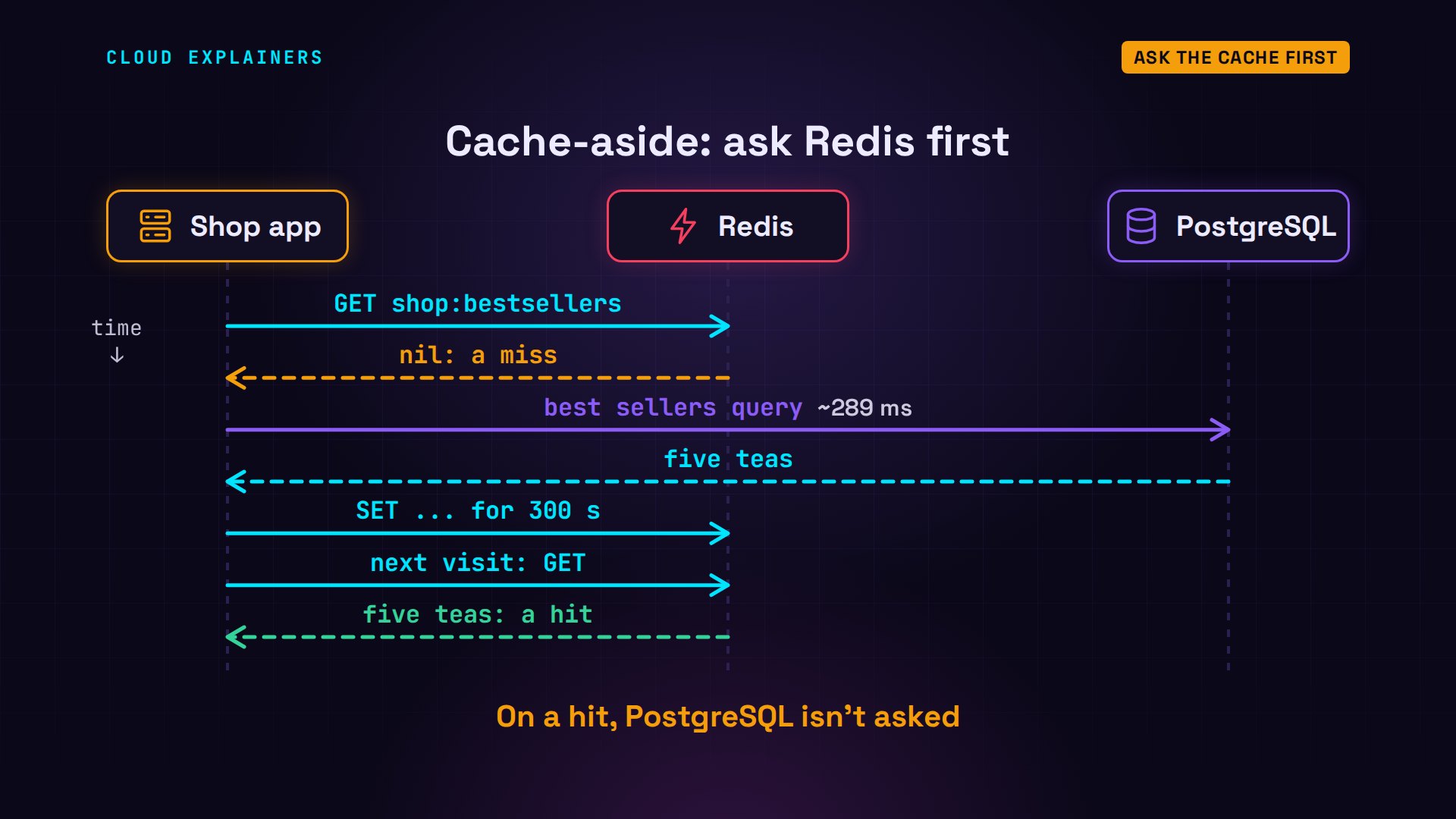
Now the shop uses it. The pattern is called cache-aside. On each visit, the app asks Redis first. If the key isn't there, that's a cache miss: the app asks PostgreSQL, gets the five teas, and stores them in Redis for 300 seconds. The next visit is a cache hit: Redis has the answer, and PostgreSQL isn't asked at all.
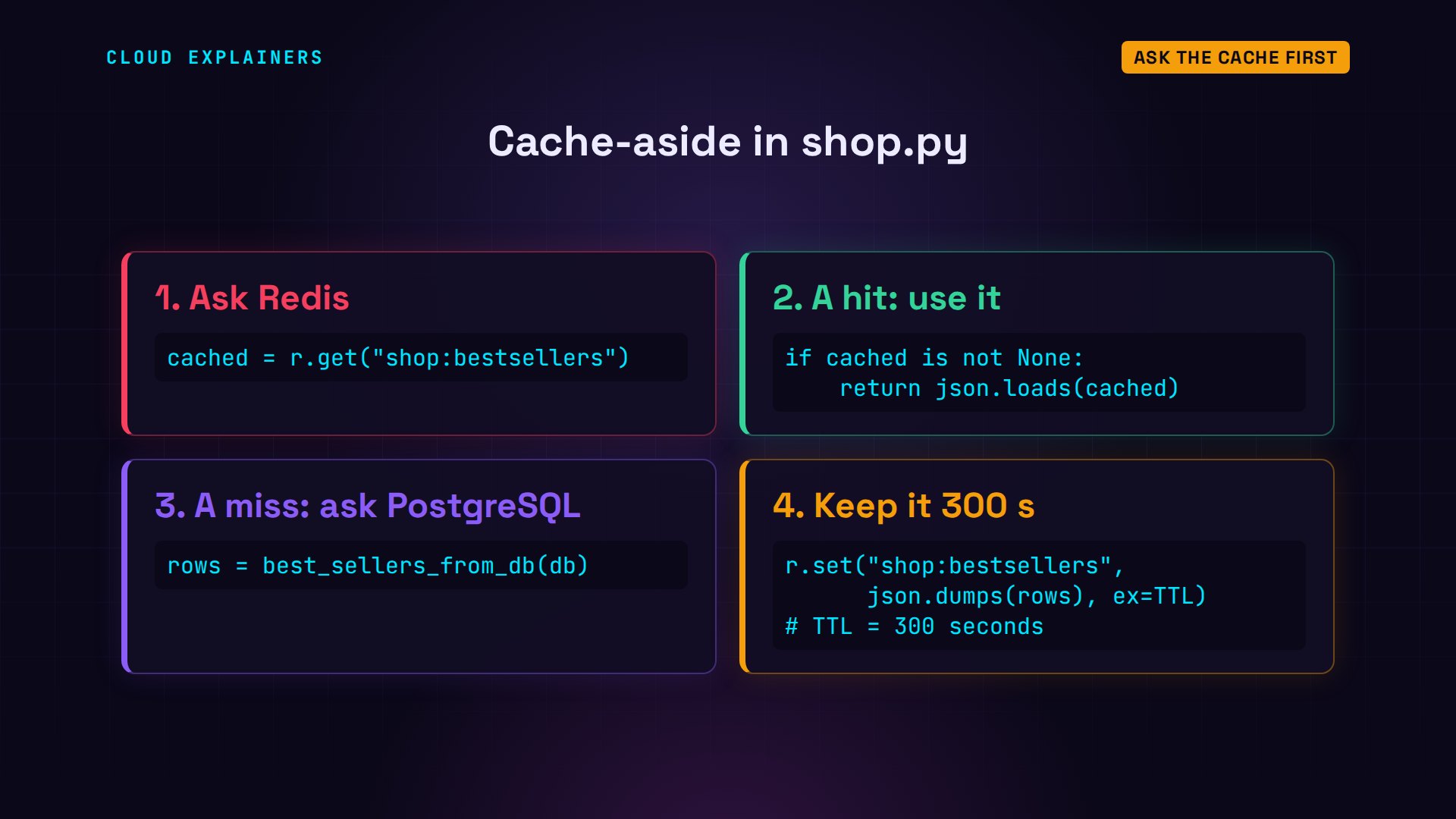
In Ana's code, that's four steps. Get the key from Redis. If something came back, use it. If not, run the slow query. Then SET the answer with ex equals 300: expire after 300 seconds. What Redis stores is the five teas written out as JSON, plain text.
First visit: a cache miss, 299 milliseconds, the same work as before, and the answer goes into Redis. Now the second visit. Guess first: how long will it take? 0.6 milliseconds, from Redis, the same five teas, and the database never even heard about this visit.
python3 shop.py bestsellersfrom PostgreSQL (cache miss): 298.7 ms
1. Sencha           1,789,066 sold
2. Assam              739,497 sold
3. Earl Grey          567,389 sold
4. Jasmine Pearls     478,273 sold
5. Darjeeling         421,785 sold
python3 shop.py bestsellersfrom Redis (cache hit): 0.6 ms
1. Sencha           1,789,066 sold
2. Assam              739,497 sold
3. Earl Grey          567,389 sold
4. Jasmine Pearls     478,273 sold
5. Darjeeling         421,785 sold
Side by side: 299 milliseconds from PostgreSQL, 0.6 from Redis. About 500 times faster, and the database does nothing at all on a hit.

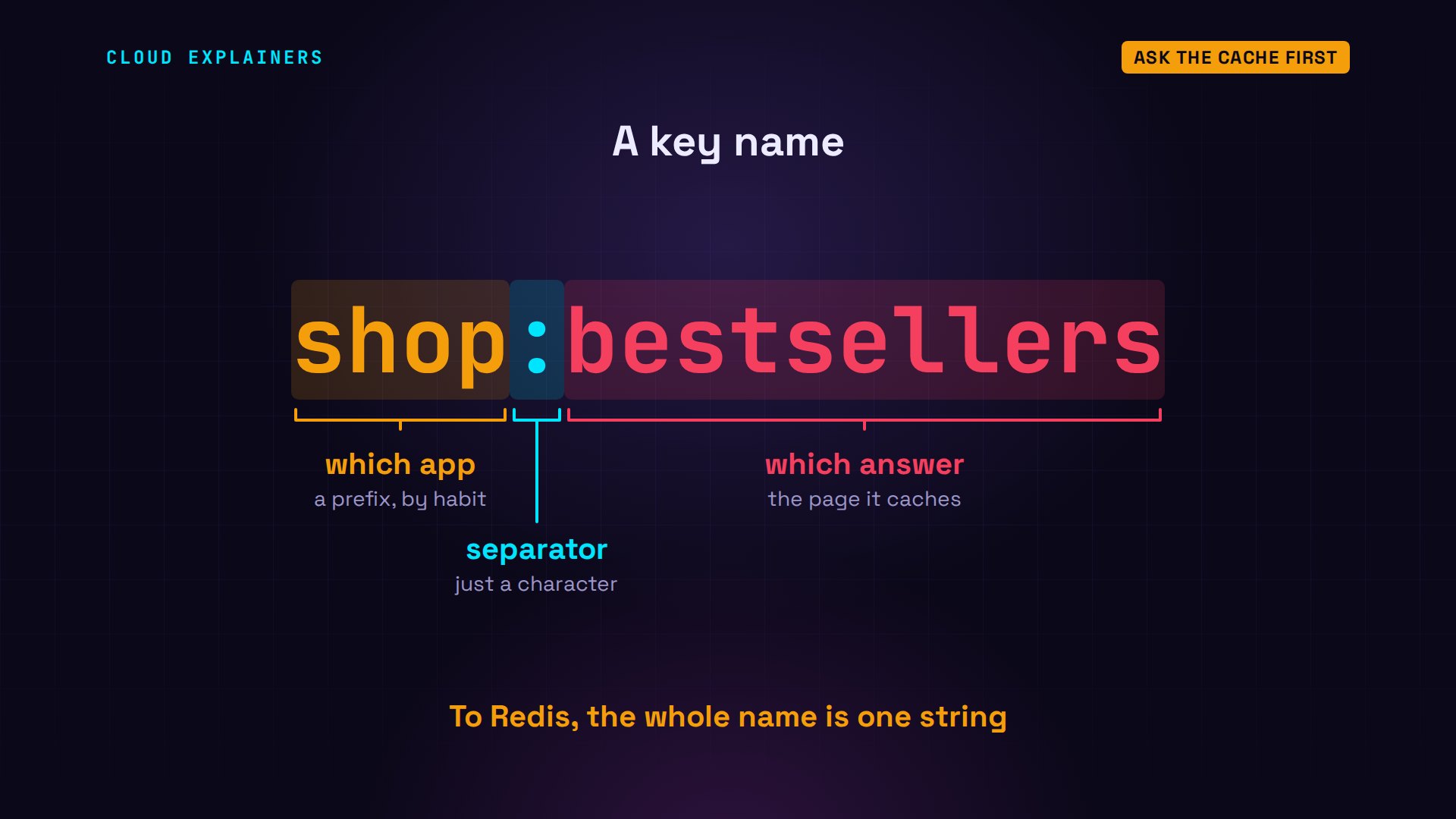
That name is worth a moment. shop, colon, bestsellers. The colon means nothing to Redis: it's a habit, so every key the shop makes starts with shop, and you can tell at a glance which app a key belongs to.
Answers that expire
Why expire it at all? Because orders keep coming in, and the best sellers should catch up eventually. Redis can tell you how long a key has left: the TTL command, time to live. Right after that first visit, it said 297 seconds, counting down.

So the copy in Redis has a clock on it. Every visit inside those five minutes gets a cache hit. When the clock runs out, Redis deletes the key by itself, and the next visit is a miss that asks PostgreSQL for a fresh answer.
We waited the real five minutes. TTL now says minus 2: the key doesn't exist any more. So the next visit is a miss again, 294 milliseconds, and Redis has a new copy for the next five minutes.
redis-cli -h cache TTL shop:bestsellers(integer) -2
python3 shop.py bestsellersfrom PostgreSQL (cache miss): 293.6 ms
1. Sencha           1,789,066 sold
2. Assam              739,497 sold
3. Earl Grey          567,389 sold
4. Jasmine Pearls     478,273 sold
5. Darjeeling         421,785 sold
When the copy is wrong
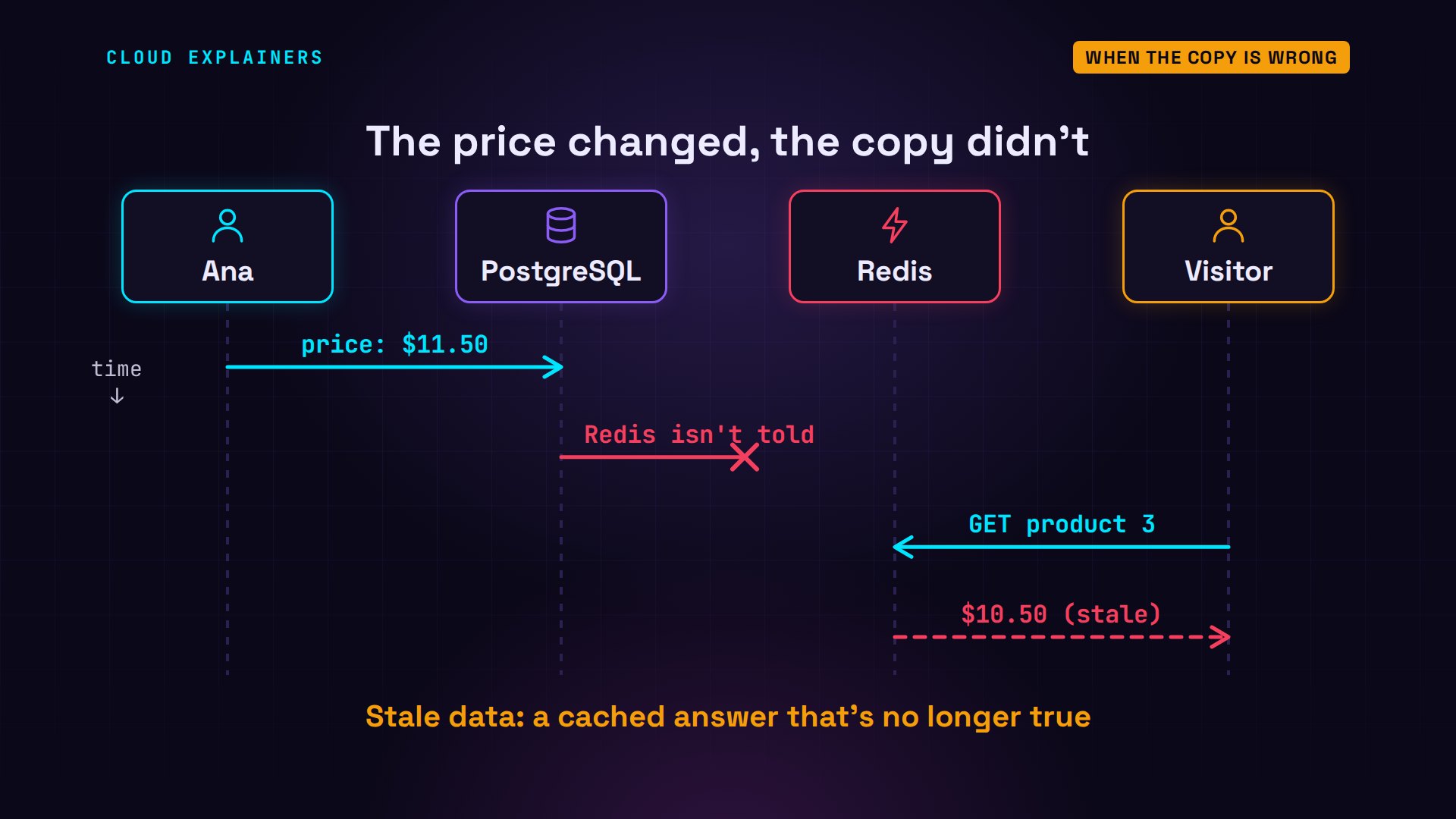
Now the worry from Hacker News. The shop also caches each tea's page. Earl Grey: $10.50, a miss, so that page is in Redis now. Ana raises the price to $11.50 in the database. Guess first: what does the next visitor see? The old price, $10.50, straight from Redis, with 297 seconds still to go.
python3 shop.py price 3Earl Grey: $10.50 (from PostgreSQL (cache miss))
python3 shop.py set-price 3 11.50database: product 3 now $11.50
python3 shop.py price 3Earl Grey: $10.50 (from Redis (cache hit))
redis-cli -h cache TTL shop:product:3(integer) 297
Here's why. The update went to PostgreSQL only. Redis was never told, so it keeps serving its copy until the TTL runs out. That's stale data: a cached answer that's no longer true.
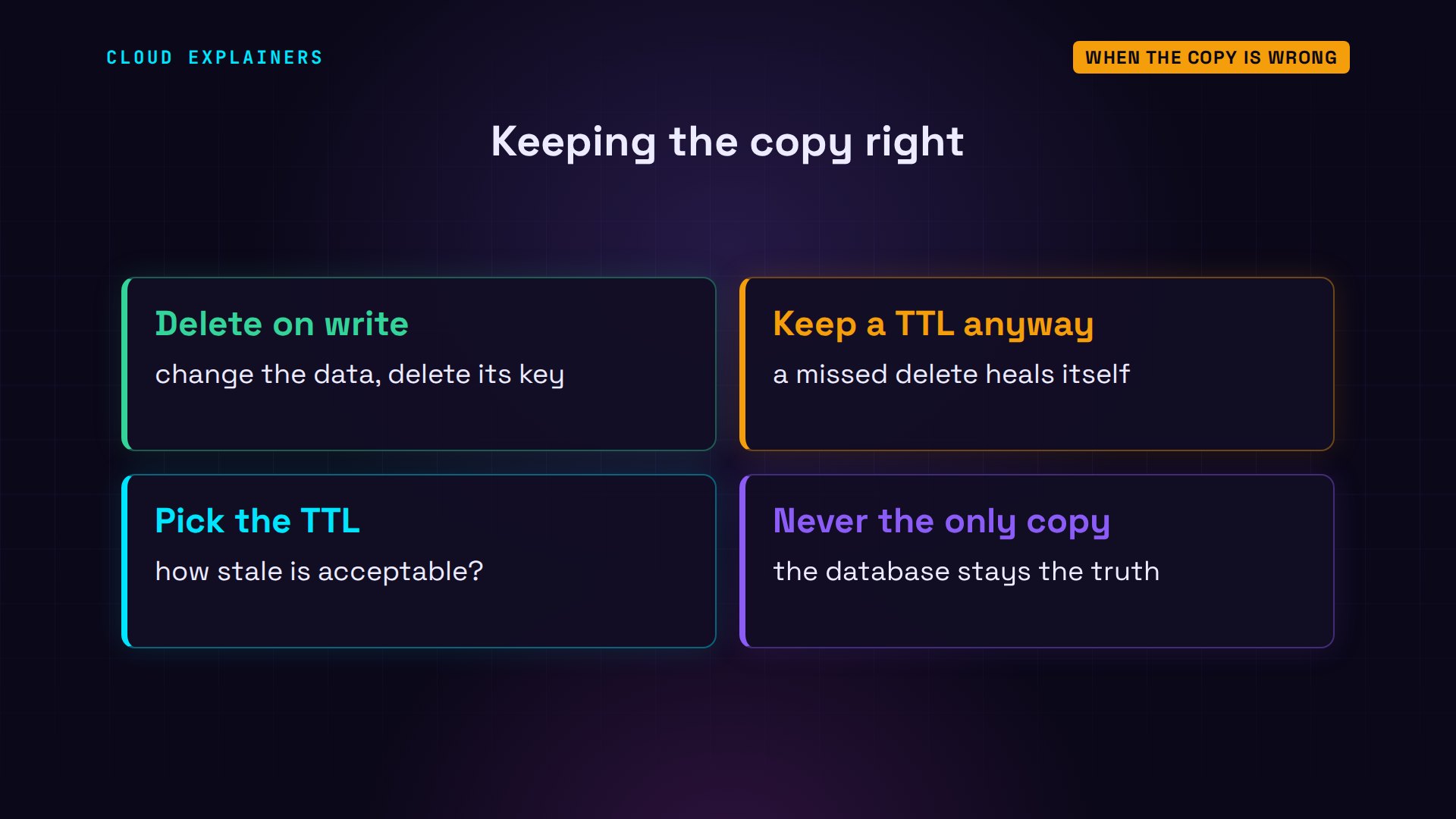
The fix: when you change the data, delete the cached copy too. Ana's admin page now does both: it updates PostgreSQL, then deletes the key. The next visit is a miss, and it reads the new price, $11.50.
python3 shop.py set-price 3 11.50 --clear-cachedatabase: product 3 now $11.50
redis: deleted 1 key
python3 shop.py price 3Earl Grey: $11.50 (from PostgreSQL (cache miss))
So there are two safety nets, and most shops use both. Delete the key whenever you write, and keep a TTL anyway, so that a write you forgot to handle can only be wrong for a few minutes. And pick the TTL from the question: how long could this answer be out of date before anyone minds?
When memory runs out
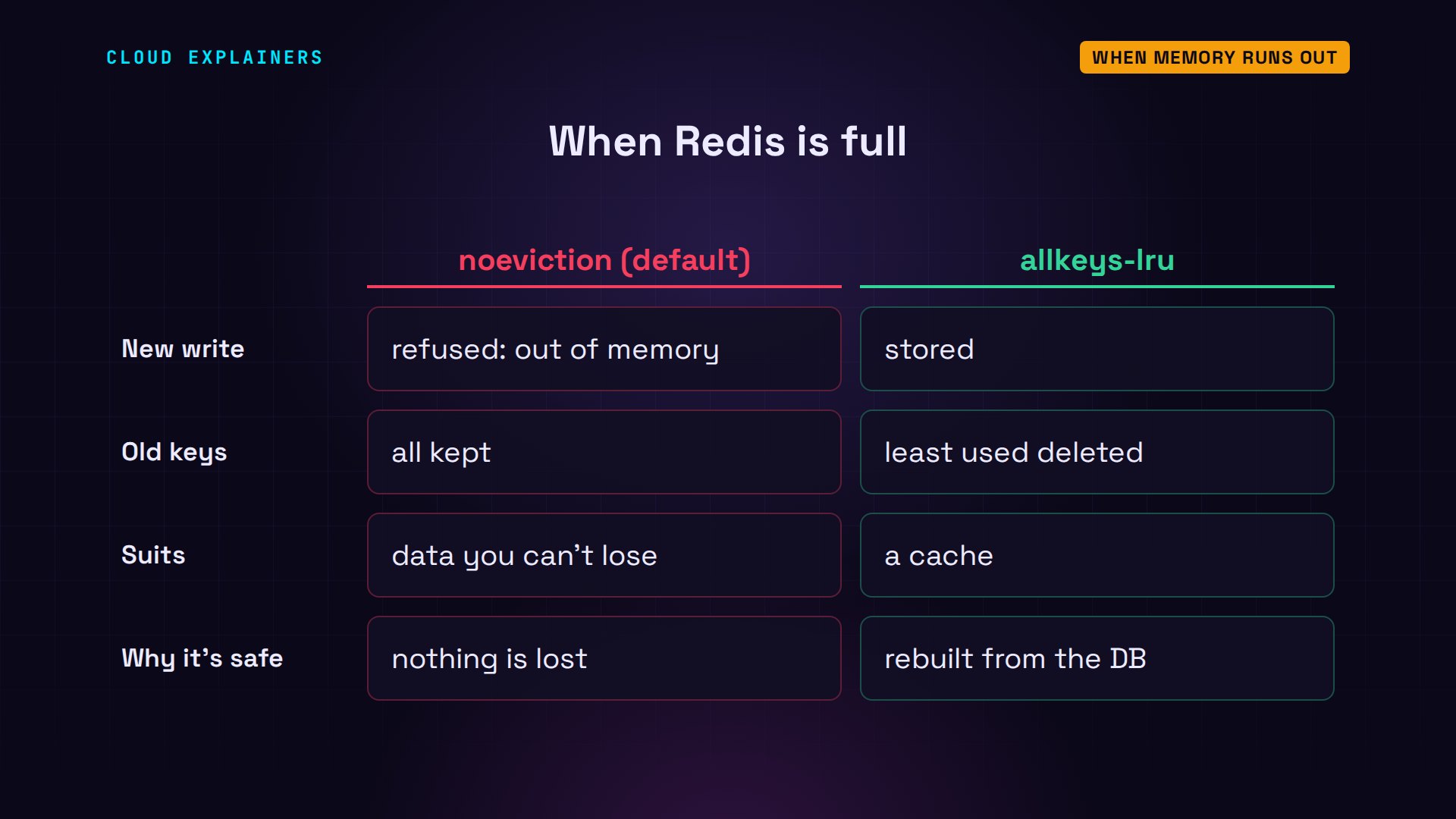
Memory is fast, but it's small and expensive, so you tell Redis how much it may use. We started this one with a limit of 20 megabytes: maxmemory. And a policy says what happens when it's full. Redis's default is noeviction: keep everything, and see what happens next.

Here are both settings. Now Ana caches a page for every product in a big catalogue: 40,000 pages, a kilobyte each. Page 17,376 fails: command not allowed when used memory is over maxmemory. With noeviction, a full Redis refuses new writes. It's at 19.87 megabytes, right at its limit.
redis-cli -h cache CONFIG GET maxmemory1) "maxmemory"
2) "20971520"
redis-cli -h cache CONFIG GET maxmemory-policy1) "maxmemory-policy"
2) "noeviction"
python3 shop.py fill 40000page 17,376 failed: command not allowed when used memory > 'maxmemory'.
redis-cli -h cache INFO memory | grep used_memory_humanused_memory_human:19.87M
For a cache, there's a better policy: allkeys-lru, least recently used. Same 40,000 pages: all stored. To make room, Redis evicted 22,619 keys. The first page is gone, the newest is there.
redis-cli -h cache CONFIG SET maxmemory-policy allkeys-lruOK
python3 shop.py fill 40000cached 40,000 pages
redis-cli -h cache INFO stats | grep evicted_keysevicted_keys:22619
redis-cli -h cache EXISTS shop:page:1(integer) 0
redis-cli -h cache EXISTS shop:page:40000(integer) 1
The rule behind it is least recently used: when memory is full, delete the key nobody has touched for the longest. A key that's read all the time counts as just used, so a busy page stays. The page written a moment ago stays too. Page 20,000, written a while ago, is next in line. And page 1, untouched the longest, goes first. Redis doesn't sort every key to find the oldest: it checks a small sample and evicts the oldest of those, which is close enough, and fast.

So noeviction keeps everything and refuses new writes, which suits data you can't lose. allkeys-lru always accepts the write and forgets old keys, which suits a cache, because every key can be rebuilt from the database.
Fifty visitors at once
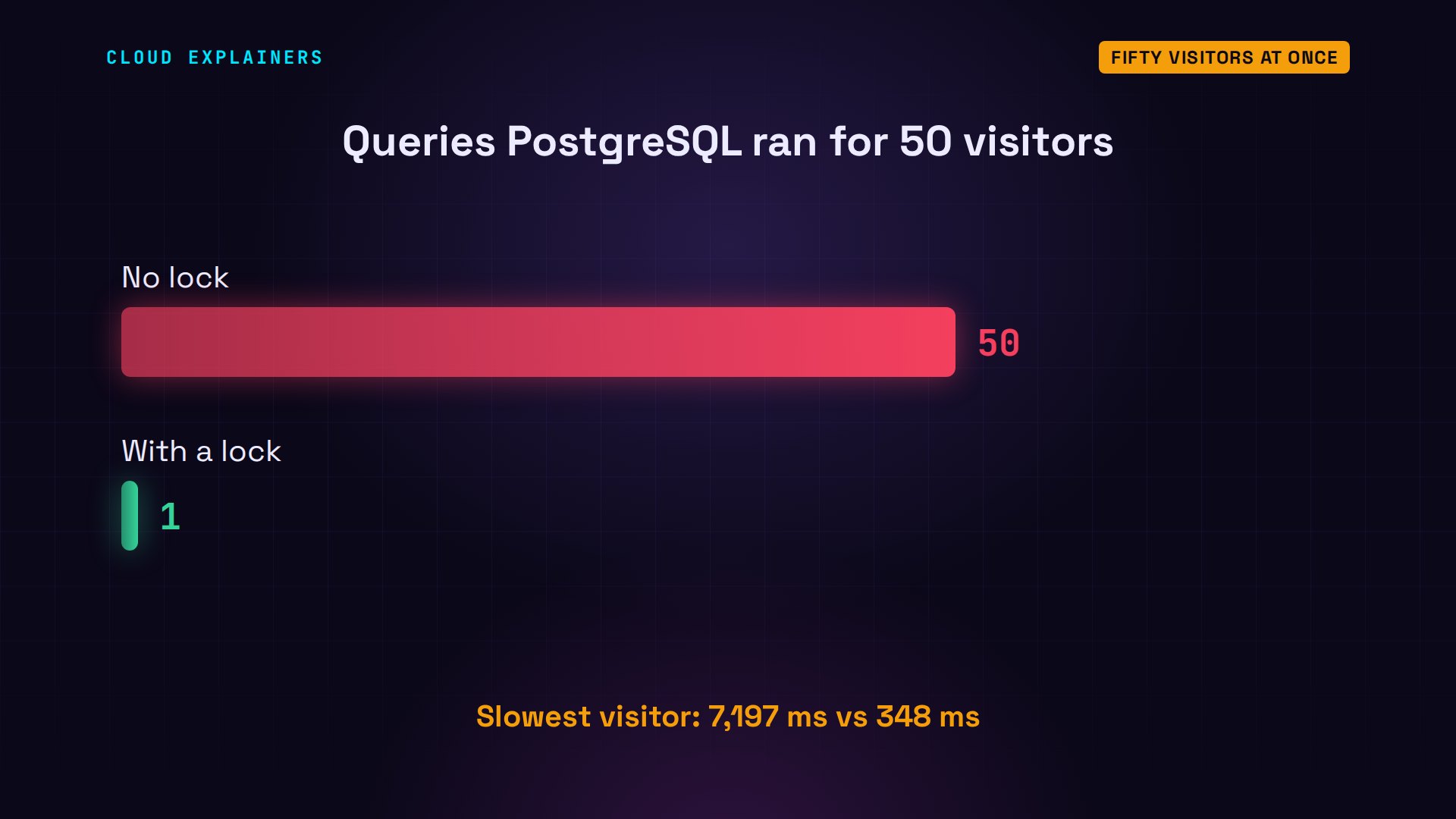
Now the question from the start: when does a cache make the database's day worse? The second a popular key expires. Fifty visitors open the best sellers page at the same moment, all of them miss, and 50 of them ask PostgreSQL the same slow question at once. The slowest waited 7,197 milliseconds.
python3 shop.py rush 5050 visitors at once
asked PostgreSQL: 50
served by Redis:  0
slowest visitor:  7,197 ms
This is called a cache stampede. While the cache was warm, PostgreSQL rested, so nobody noticed how heavy the query was. Then one expiry sends everyone through at once, and each query gets slower because the others are running too.
The fix is a lock, kept in Redis itself. Each visitor that misses tries SET with nx: only if the key doesn't exist yet. Exactly one visitor gets OK, and runs the query. Everyone else gets nil, waits a moment, and asks Redis again. The lock has its own ten-second TTL, so a crashed visitor can't hold it forever.
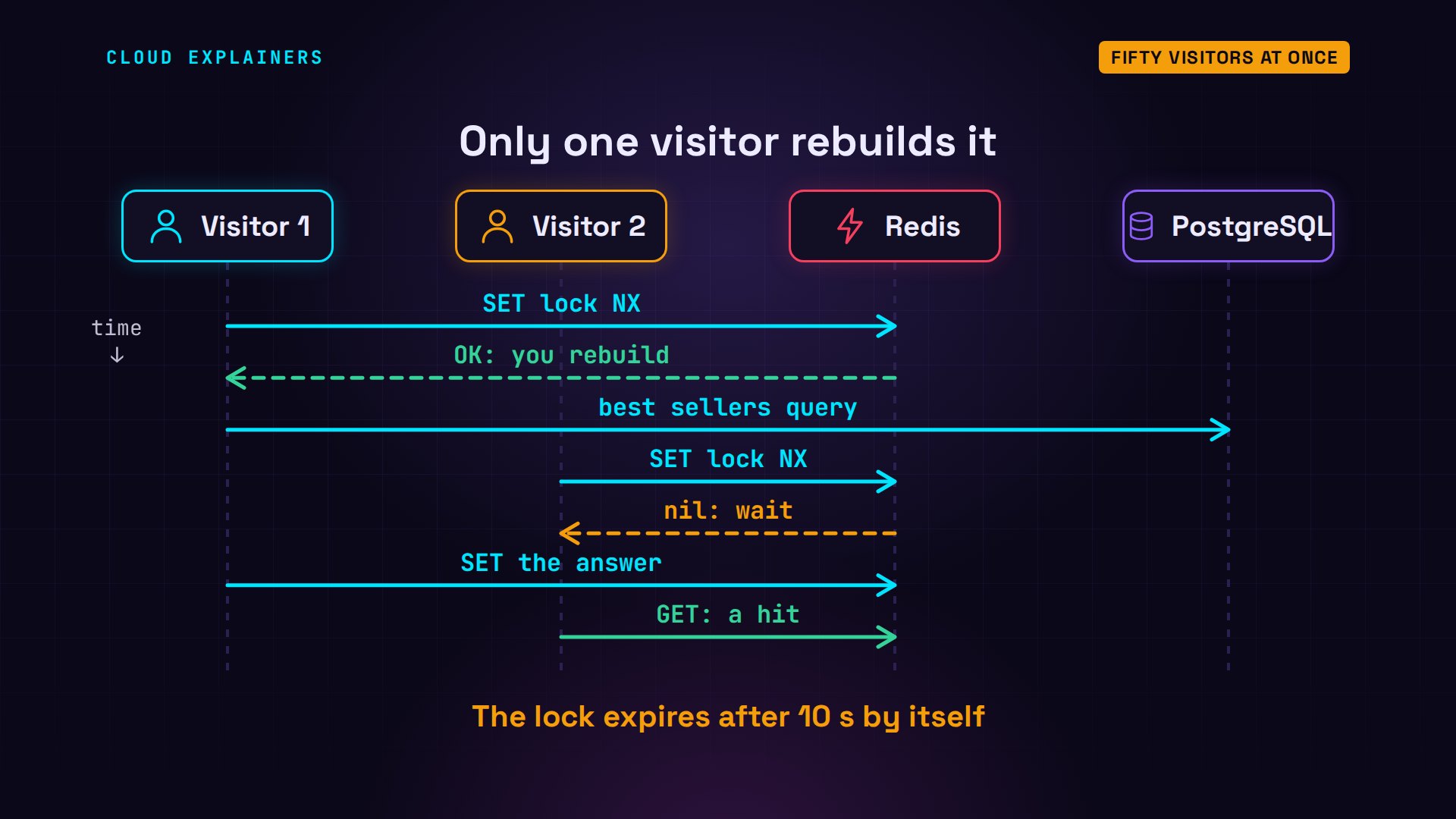
Same fifty visitors, with the lock. This time the database was asked just once. The other 49 got the answer from Redis, and the slowest waited 348 milliseconds instead of 7,197.
python3 shop.py rush 50 --lock50 visitors at once (with a lock)
asked PostgreSQL: 1
served by Redis:  49
slowest visitor:  348 ms
In numbers: 50 slow queries became one.
Caching in real life
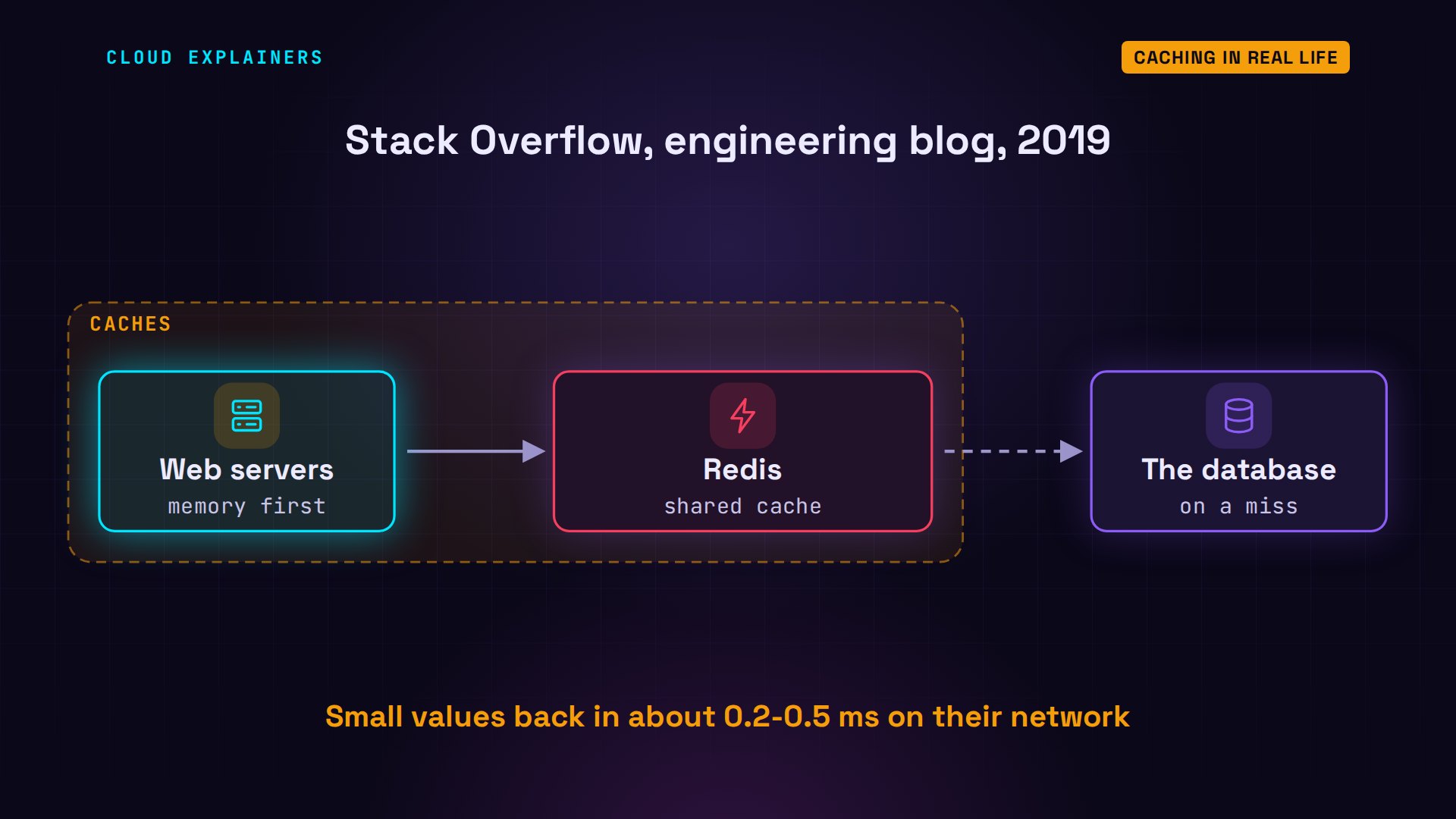
Big sites do exactly this. Stack Overflow describes it on its engineering blog: Redis for shared caching behind their web servers. Each server checks its own memory first, then Redis. In 2019 they measured about 1.6 billion Redis commands a day, with small values back in a fraction of a millisecond.
And remember what a cache is: a copy. FLUSHALL wipes every key in Redis. The next visit is slow once, 286 milliseconds, and still correct, because PostgreSQL still has everything.
redis-cli -h cache FLUSHALLOK
python3 shop.py bestsellersfrom PostgreSQL (cache miss): 285.8 ms
1. Sencha           1,789,066 sold
2. Assam              739,497 sold
3. Earl Grey          567,389 sold
4. Jasmine Pearls     478,273 sold
5. Darjeeling         421,785 sold
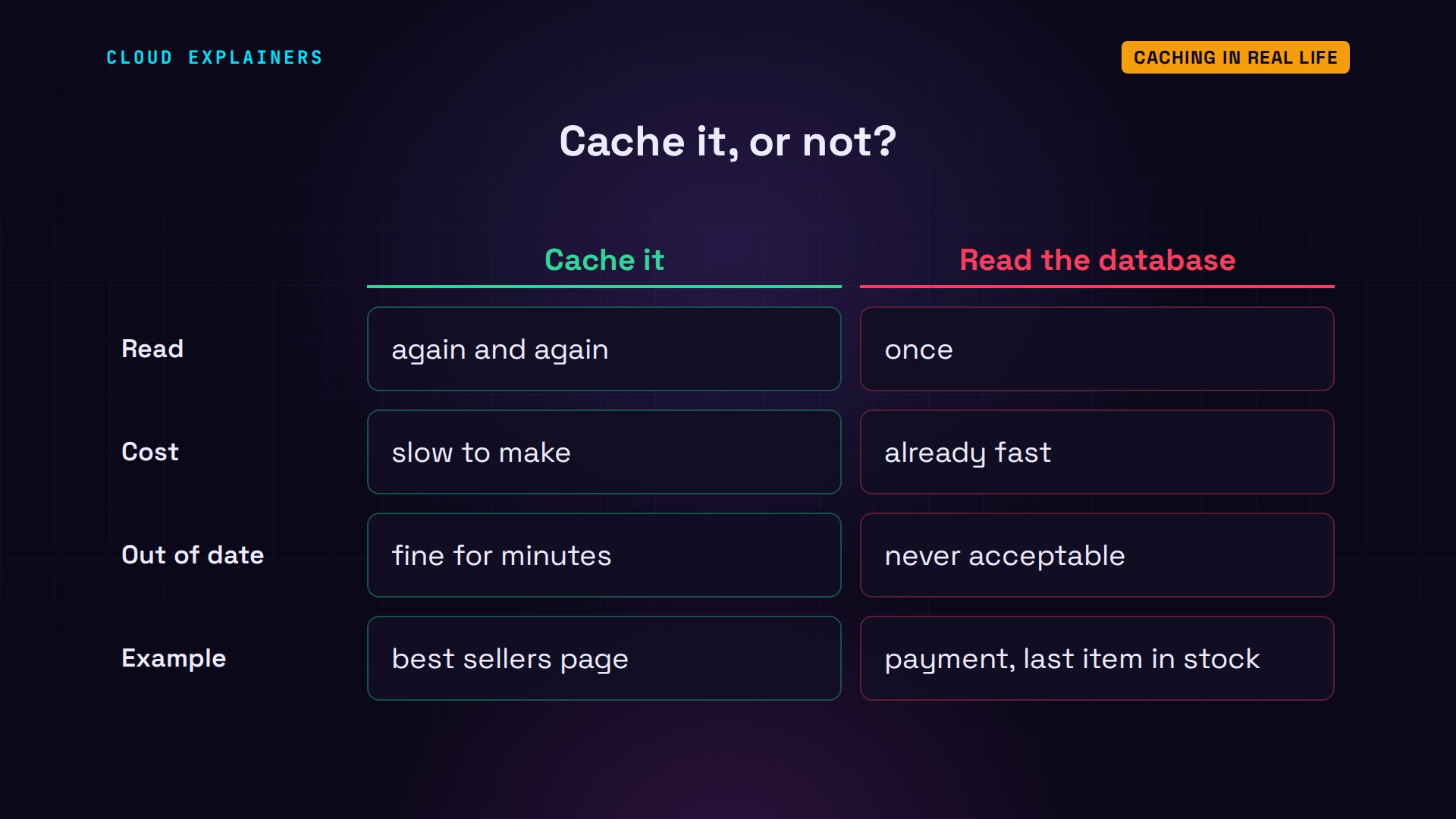
So when should you cache? When the same answer is read again and again, it's slow to make, and being a little out of date is fine. Not for the moment money or stock changes hands: there, read the database.
Ana's whole lab, the shop code plus every command, is linked in the description, so you can run the cache yourself.

Recap
So: ask Redis first, fill it on a miss with a TTL, delete on write, let it evict when it's full, and lock the rebuild of a busy key.
If this made caching click, subscribing gets you the next one, where we take another piece of the stack apart.
Every number here came from Ana's real shop. Thanks for watching Cloud Explainers.
Sources
- Hacker News, How to take advantage of Redis just adding it to your stack (2011)
- Stack Overflow blog, How Stack Overflow Caches Apps for a Multi-Tenant Architecture (Nick Craver, 2019)
- Redis docs, key eviction (maxmemory, noeviction is the default, allkeys-lru)
- Redis docs, EXPIRE (keys with a time to live)
- Redis docs, TTL (-2 when the key does not exist)
- Redis docs, SET (EX and NX options)
Demos: containers on our own lab server standing in for Ana's shop and laptop; the tea shop is made up. Watch the full video on YouTube.
More videos

Linux Makefiles Will Finally Make Sense After This

SAML vs OAuth vs OpenID Connect: What's the Difference?

How to Fix Python cron Jobs That Never Run

Linux Bash Scripting: Full Tutorial for Beginners

How PXE Network Boot Works

How Active Directory Works

How to Fix a Linux systemd Service That Won't Start

Linux Logs: syslog vs journald

JWT vs Session Cookies: Which One Should You Use?

Docker vs Docker Compose: Which One Should You Use?

How to Fix Docker Compose Containers That Can't Talk to Each Other

Django Full Tutorial for Beginners

How Linux systemd Works

How to Fix 'Windows Cannot Access' Network Share Errors (SMB)

REST vs gRPC: Which One Should You Use?

How to Fix SSL Certificate Chain Errors (Missing Intermediate)

Every Python Concept for Beginners in 10 Minutes

Every SQL Join Type in 10 Minutes

Why OpenRouter Free Models Hit Their Limit So Fast

Why Your Gemini API Free Tier Runs Out So Fast

OpenRouter Will Finally Make Sense After This

Gemini API vs Vertex AI: Which One Should You Use?

How to Fix a Leaked Gemini API Key

Why Golang Uses Goroutines Instead of Threads

How to Fix Gemini API Error 429: Resource Exhausted

Claude Token Pricing Will Finally Make Sense After This

Why Python Web Scraping Returns Nothing (and the Fix)

Python uv vs pip: Which One Should You Use?

Python Automation: Full Tutorial for Beginners

How OAuth Login Works

Google AI Studio Will Finally Make Sense After This

What Happens When You Run a Docker Container

How to Fix Claude Code Billing Your API Key Instead of Your Plan

Why Passkeys Can't Be Phished Like Passwords

PowerShell vs Bash: Which One Should You Learn?

The Linux Roadmap for Beginners

Django vs FastAPI: Which One Should You Use?

Why SQLite Is the Most Used Database in the World

How a NoSQL Database Like MongoDB Works

How to Fix Python pip error: externally-managed-environment

How to Fix MySQL Too Many Connections Database Errors

Golang Concurrency Will Finally Make Sense After This

How Amazon S3 Works

How Kubernetes Works

How Git Works

How to Fix Docker Port Already Allocated Errors

How PostgreSQL Works

How to Fix Git Merge Conflicts

How to Fix No Space Left on Device in Linux

How the Internet Works

SQL vs NoSQL: When Each One Wins

How to Fix JWT Token Expired Errors (401 Unauthorized)

Claude API vs Claude Pro: Why Your Subscription Doesn't Include It

Why AI Agent Skills Beat Giant Prompts

Linux Cron Jobs Will Finally Make Sense After This

Security Logs Will Finally Make Sense After This

How to Fix a Security Leak: An API Key Pushed to GitHub

DNS Will Finally Make Sense After This

Never Ignore a Security Update

Two-Factor Authentication Will Finally Make Sense

Never Expose a Database to the Internet

SSH Keys vs Passwords: Which Is Safer for Security?

The 5 Levels of Linux Boot: From Power On to Login

The 5 Levels of Network Firewalls

Password Security: Why Hackers Crack Weak Passwords

Why Your Linux Server Runs Out of Memory

HTTP vs HTTPS: What Actually Changes on Your Network

Every Linux File Permission You Need to Know

Linux Processes vs Threads: When Each One Wins

The OSI Model Will Finally Make Sense After This

The 7 Levels of Git

Every Network Troubleshooting Command You Need

Hashing vs Encryption in Cybersecurity: When Each One Wins

Why the Internet Ran Out of IP Addresses

Linux Package Managers: apt vs Snap vs Flatpak

Why Python Is Slow (and When It Doesn't Matter)

TCP vs UDP: When Each One Wins

Stop Running Linux as Root (Do This Instead)

Linux Users and Groups Will Finally Make Sense

Why Phishing Beats Good Security (and How to Spot It)

The 7 Levels of Docker

AI Agents Will Finally Make Sense After This

Stop Using git push --force (Use This Instead)

Agent Skills vs MCP: When Each One Wins

Networking Will Finally Make Sense After This

Every Linux Command You Actually Need

The 7 Levels of Cybersecurity

Every System Design Concept You Need, in One Diagram
