
How to Fix a Security Leak: An API Key Pushed to GitHub
How to fix an API key you pushed to GitHub (or any Git server) by mistake, for complete beginners, in a real lab: Ana pushes her payment key, deletes the file and pushes again, and a stranger's clone still finds the key in an old commit and uses it. The fix, in order: revoke and replace the key, check what it was used for, rewrite the history with git filter-repo and force push, then block the next leak with .gitignore and a gitleaks pre-commit hook.
The key that didn't go away
You pushed an API key to Git, then deleted it. But anyone who clones the repository can still read it. This is a stranger's machine pulling Ana's key out of a commit she thought she had undone.
git log --onelinef9f8ddb (HEAD -> main, origin/main, origin/HEAD) Remove .env
f2971eb Connect the payment service
31510f0 Create the shop homepage
git show f2971eb:.envPAYMENTS_API_KEY=kp_live_J55duHp5x8I1x3ir3W46dmqv
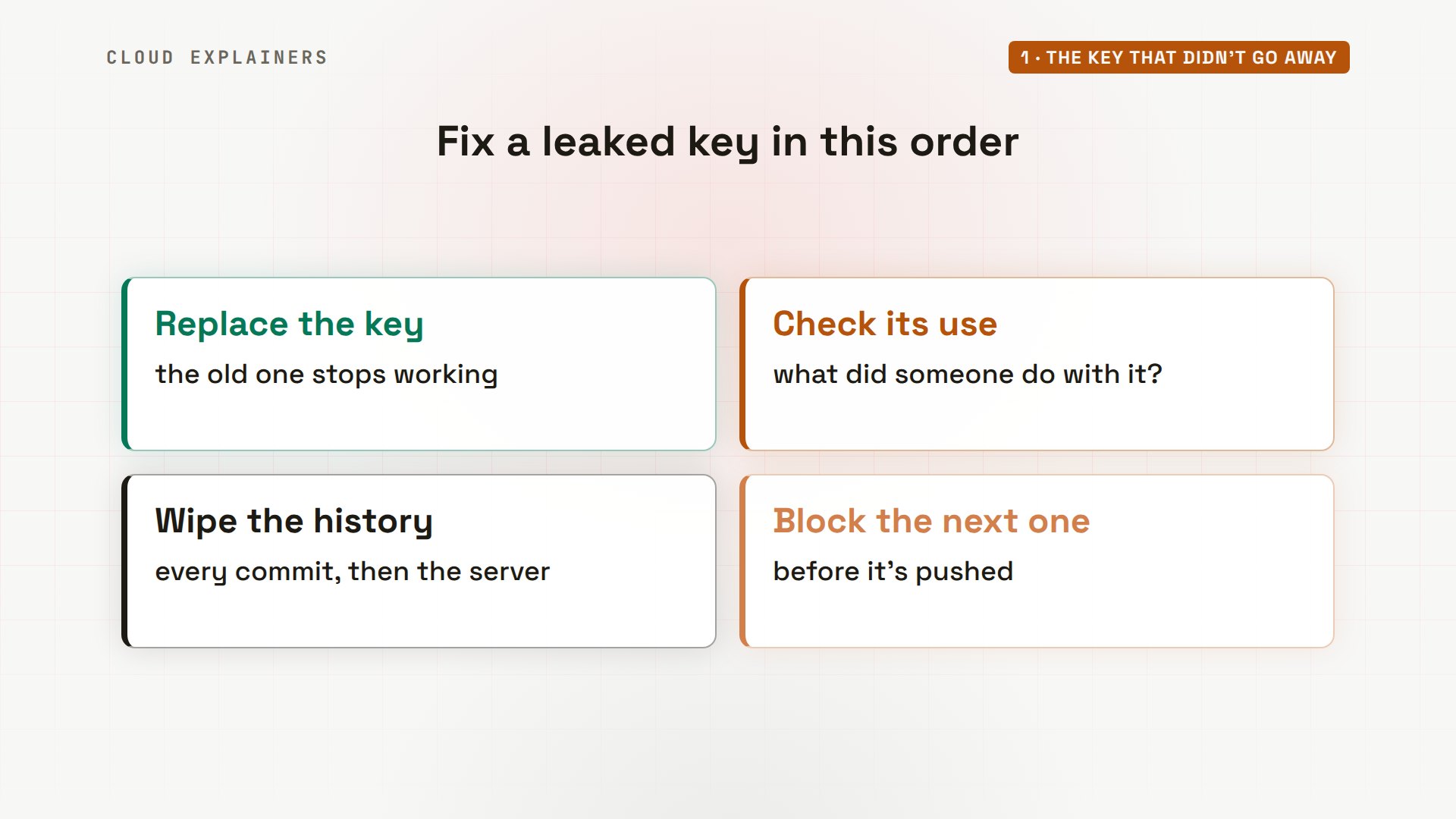
Here's how to fix it, in the right order. Make the key useless, see what it was used for, wipe it from the history, and stop the next one before it's pushed.
Everything here runs for real on four small machines in our lab. A Git server standing in for GitHub, Ana's laptop with her kettle shop's code, a payment service of our own, and a stranger's machine. The key only opens our lab's payment service.
How the key got out
Ana is connecting her shop to a payment service. Git shows two new files: payments.py, her code, and.env, a small settings file with the service's API key. She adds everything, and commits: a commit is a saved snapshot of the project. Git's summary even lists.env.
git status --short?? .env
?? payments.py
cat .envPAYMENTS_API_KEY=kp_live_J55duHp5x8I1x3ir3W46dmqv
git add .
git commit -m "Connect the payment service"[main f2971eb] Connect the payment service
 2 files changed, 12 insertions(+)
 create mode 100644 .env
 create mode 100644 payments.py
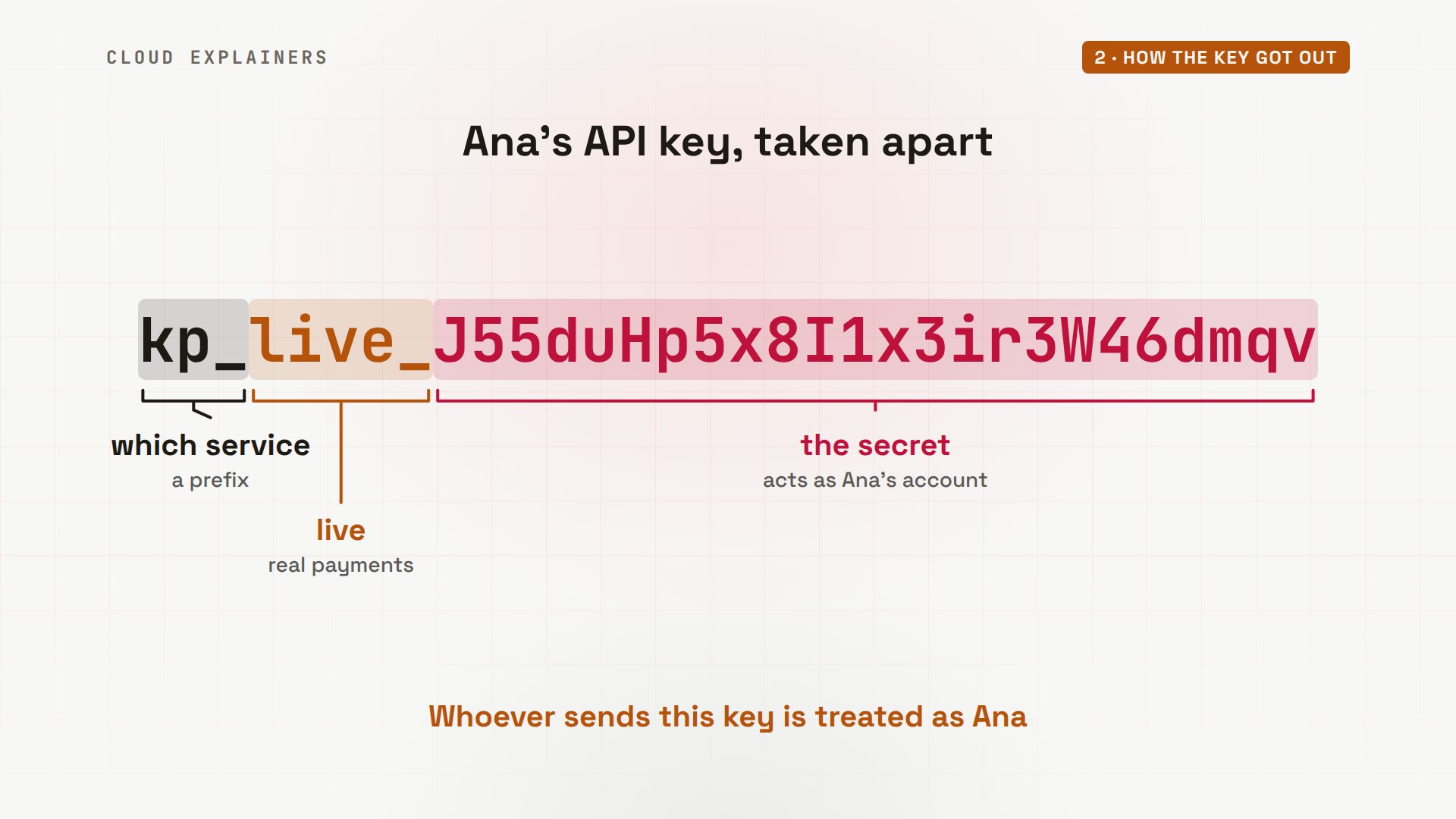
Here's that key, taken apart. An API key works like a password for programs: whoever sends it acts as Ana's account. Its start says which service it's for. Live means real payments, not a test key. And the rest is the secret.
She pushes, then spots the key in that list. So she removes the file with git rm, commits, and pushes again. Her folder now has no.env at all.
git pushEnumerating objects: 5, done.
Counting objects: 100% (5/5), done.
Delta compression using up to 10 threads
Compressing objects: 100% (4/4), done.
Writing objects: 100% (4/4), 614 bytes | 614.00 KiB/s, done.
Total 4 (delta 0), reused 0 (delta 0), pack-reused 0 (from 0)
To git-server:kettle-shop.git
   31510f0..f2971eb  main -> main
git rm .envrm '.env'
git commit -m "Remove .env"[main f9f8ddb] Remove .env
 1 file changed, 1 deletion(-)
 delete mode 100644 .env
git pushEnumerating objects: 3, done.
Counting objects: 100% (3/3), done.
Delta compression using up to 10 threads
Compressing objects: 100% (2/2), done.
Writing objects: 100% (2/2), 211 bytes | 211.00 KiB/s, done.
Total 2 (delta 1), reused 0 (delta 0), pack-reused 0 (from 0)
To git-server:kettle-shop.git
   f2971eb..f9f8ddb  main -> main
ls -a. .. .git index.html payments.py
Why deleting it isn't enough
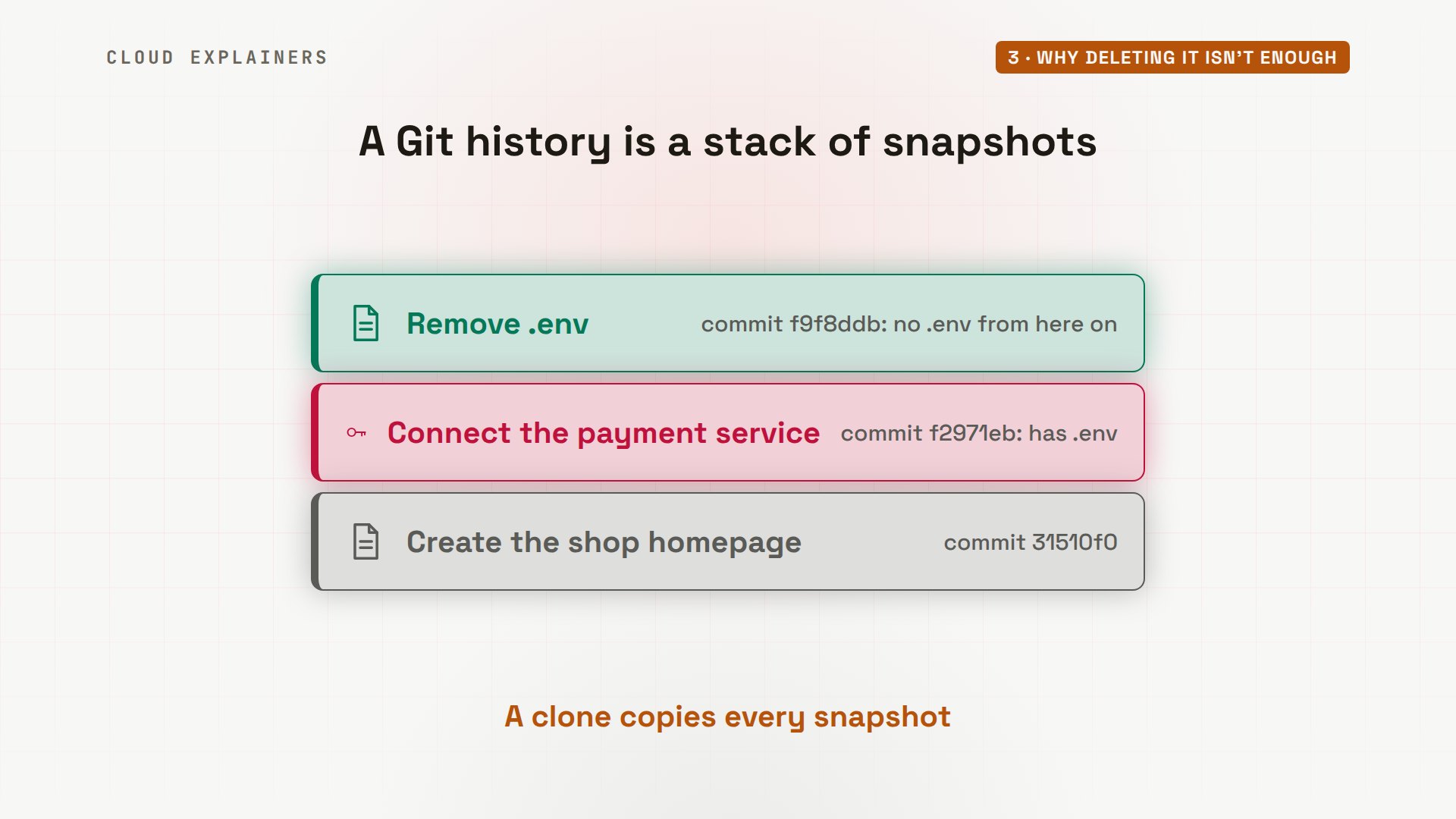
Why isn't that enough? Git keeps every commit, like a stack of snapshots. The newest one says.env is gone from now on. But the snapshot under it still holds.env, key and all. And anyone who clones the repository gets the whole stack.
The repository is public, so the stranger clones it. There's no.env in the folder. So it runs gitleaks, a free tool that searches every commit for anything that looks like a key. It finds one: a generic API key, in.env, line 1, inside the commit that added it. Tools like this scan public code all day.
git clone git://git-server/kettle-shop.gitCloning into 'kettle-shop'...
remote: Enumerating objects: 9, done.
remote: Counting objects: 100% (9/9), done.
remote: Compressing objects: 100% (7/7), done.
Receiving objects: 100% (9/9), done.
remote: Total 9 (delta 1), reused 0 (delta 0), pack-reused 0 (from 0)
Resolving deltas: 100% (1/1), done.
cd kettle-shop
ls -a. .. .git index.html payments.py
gitleaks git -v○ │╲ │ ○ ○ ░ ░ gitleaks 7:07PM INF Unknown SCM platform. Use --platform to include links in findings. host=git-server Finding: PAYMENTS_API_KEY=kp_live_J55duHp5x8I1x3ir3W46dmqv Secret: kp_live_J55duHp5x8I1x3ir3W46dmqv RuleID: generic-api-key Entropy: 4.413910 File: .env Line: 1 Commit: f2971eb4f180fc6eff30b41b0575e3d90fc72853 Author: Ana Email: ana@example.com Date: 2026-10-31T19:07:14Z Fingerprint: f2971eb4f180fc6eff30b41b0575e3d90fc72853:.env:generic-api-key:1 7:07PM INF 2 commits scanned. 7:07PM INF scanned ~423 bytes (423 bytes) in 32.3ms 7:07PM WRN leaks found: 1
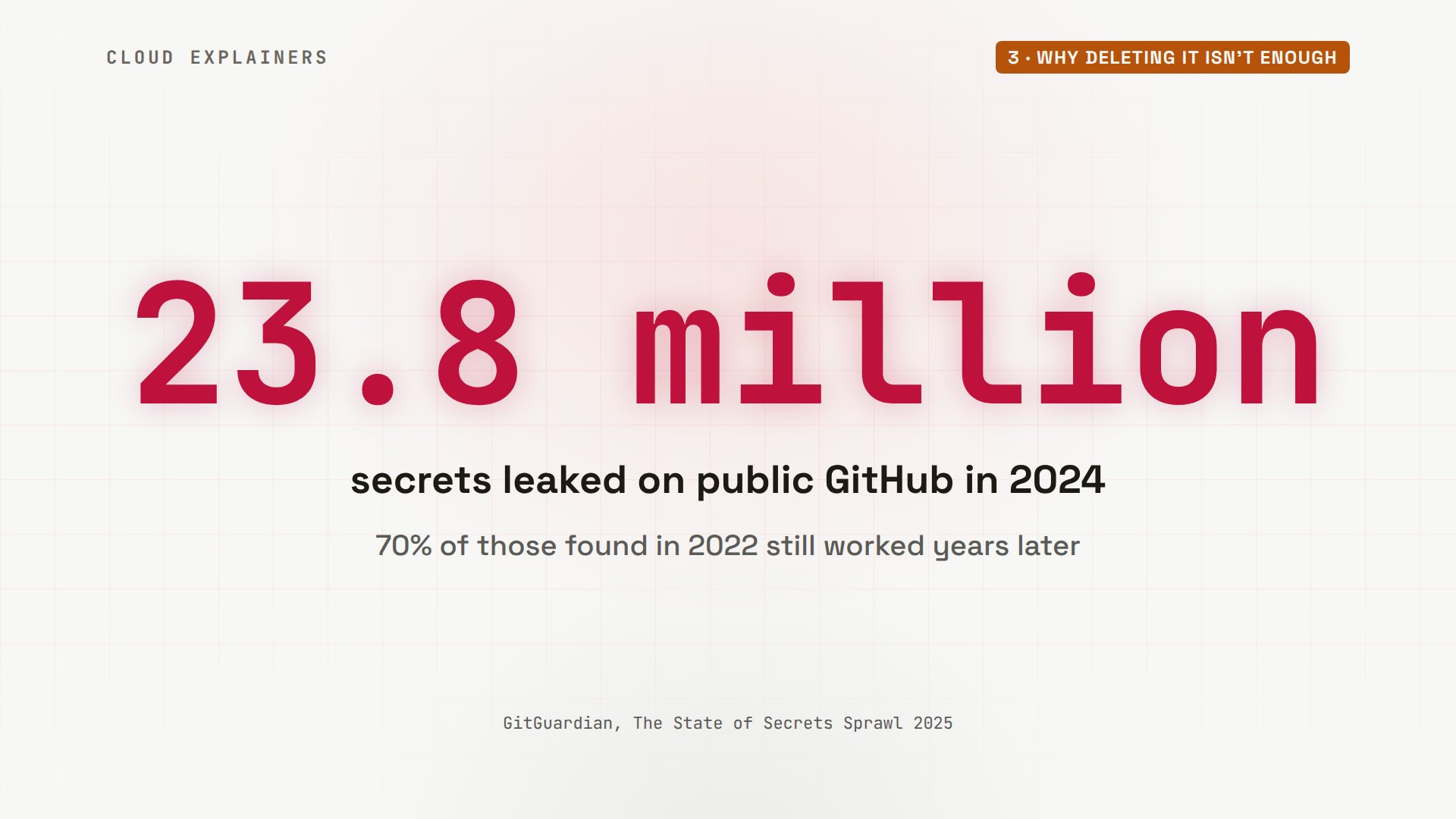
It happens a lot. GitGuardian, a company that scans GitHub for leaked keys, counted 23.8 million secrets pushed to public repositories in 2024 alone. And 70 percent of the ones it found in 2022 were still working years later.
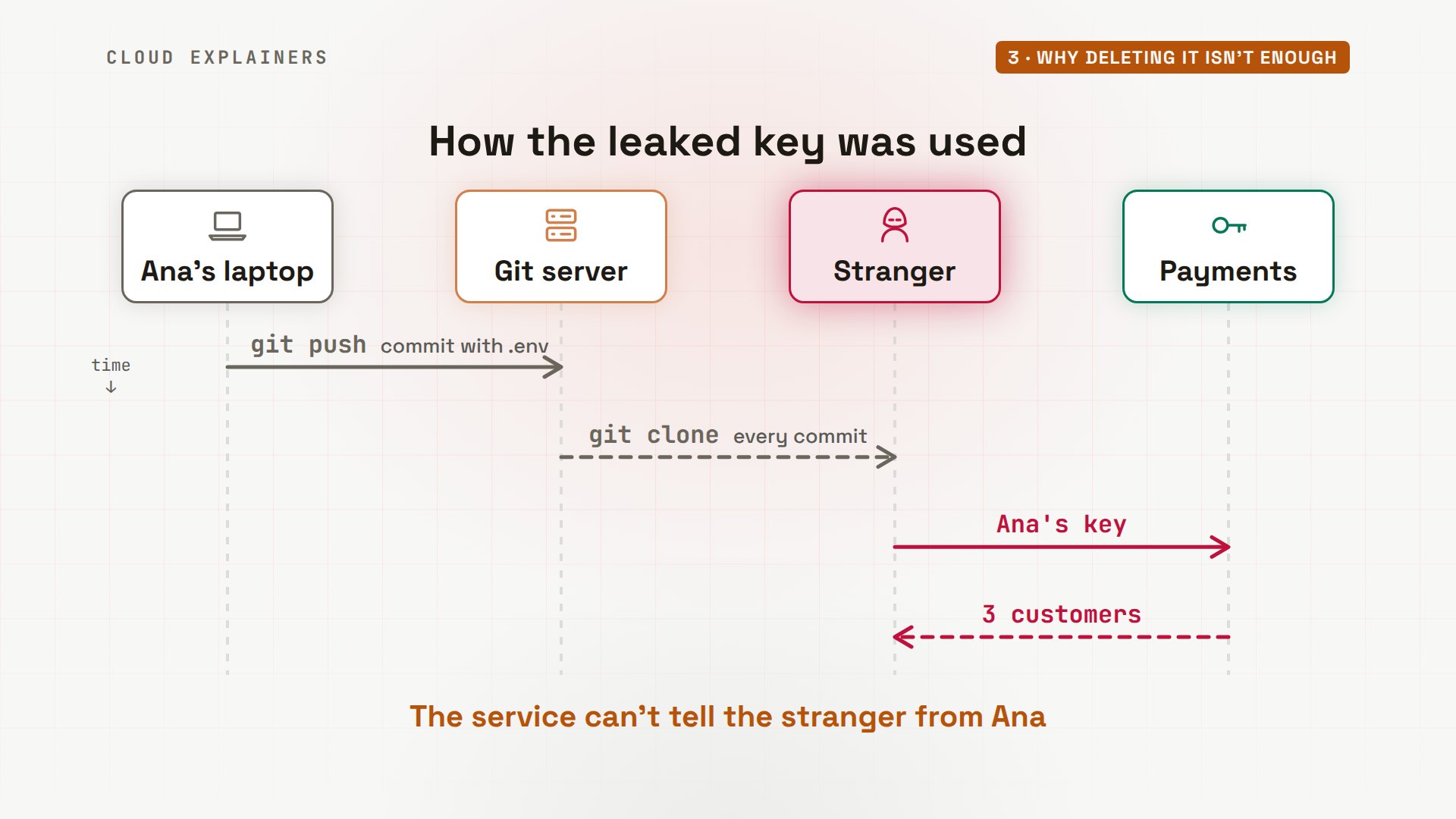
One command prints the old file from that commit. The next one keeps only the key. Then curl, a tool that sends web requests, asks the payment service for Ana's customers, with her key attached. It answers: names, emails, and the last digits of each payment card.
KEY=$(git show f2971eb:.env | cut -d= -f2)
curl -s -H "Authorization: Bearer $KEY" payments/v1/customers{
  "data": [
    {
      "name": "Maya Chen",
      "email": "maya@example.com",
      "card": "visa ...4242"
    },
    {
      "name": "Omar Haddad",
      "email": "omar@example.org",
      "card": "mastercard ...4444"
    },
    {
      "name": "Lena Novak",
      "email": "lena@example.net",
      "card": "visa ...1881"
    }
  ]
}
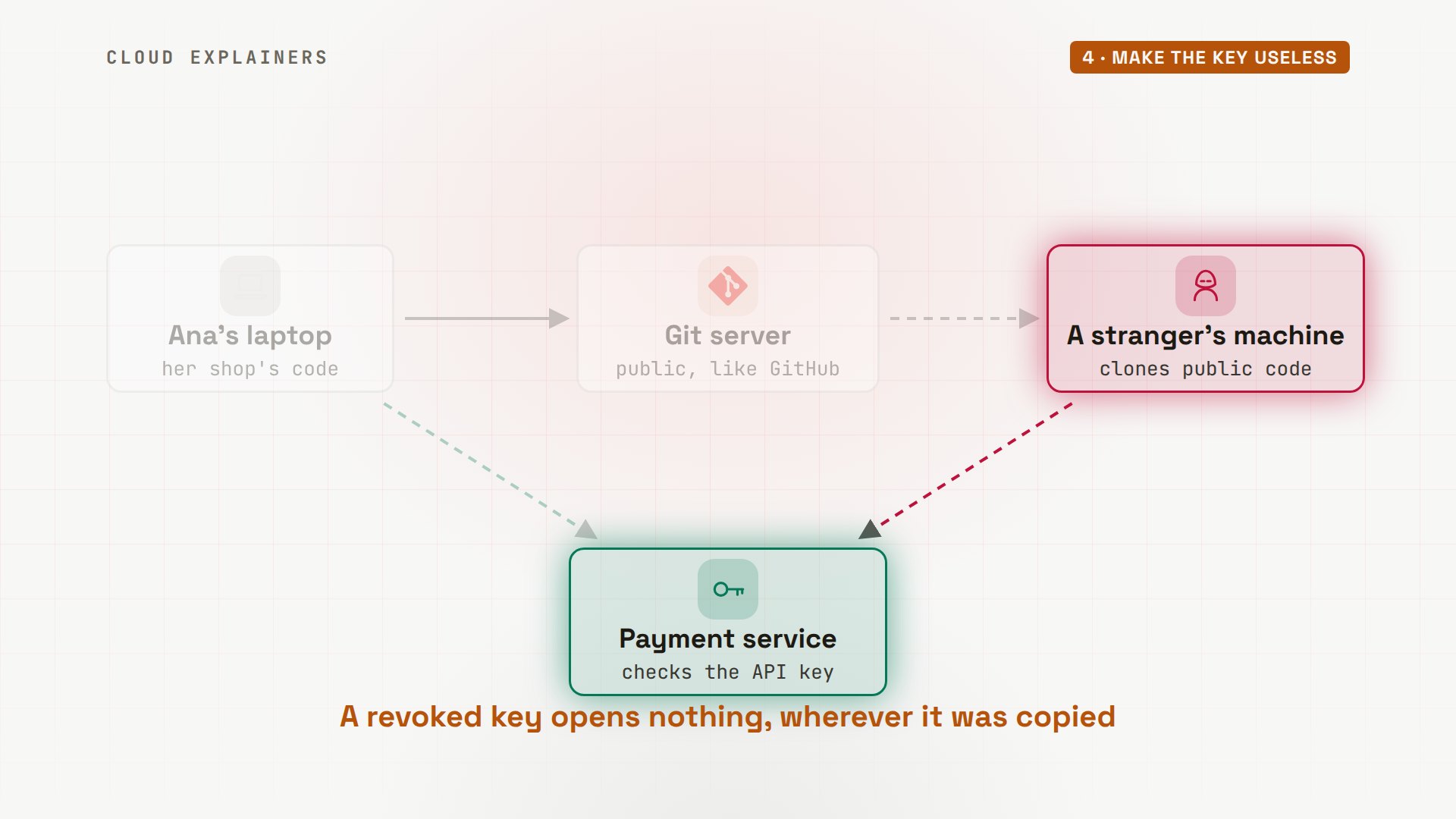
So the whole leak took four steps. Ana pushed. The stranger cloned, and got every commit. It sent her key to the payment service, and the service did what the key allowed.
Make the key useless
Step one is the key itself. Copies are already out, and you can't take them back. What you can do is make every copy worthless: revoke the key, and use a new one.
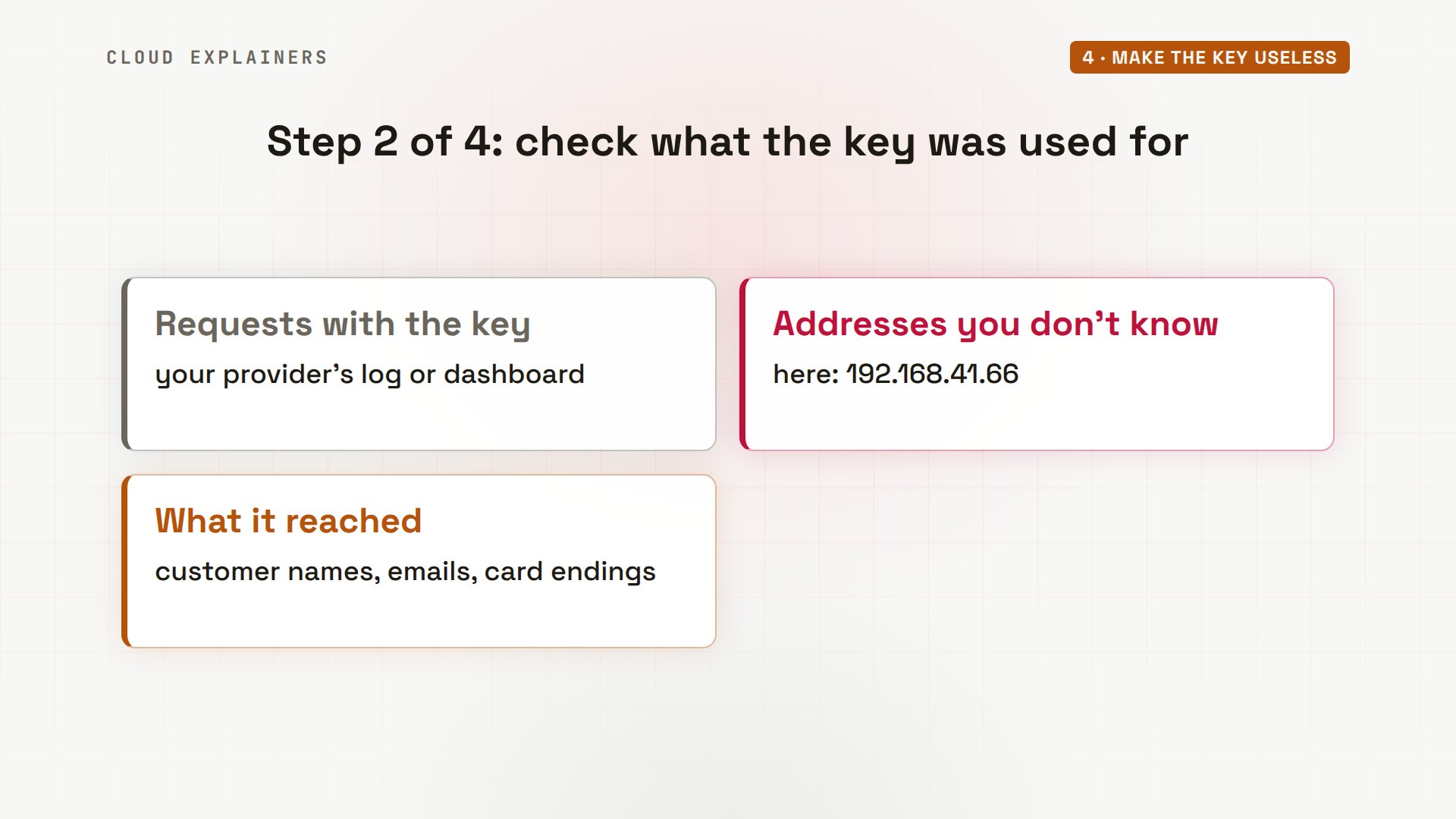
Ana opens paylab, the tool for her account on our lab's payment service. Real providers like Stripe show the same in their dashboards. Her key was last used from an address that isn't hers. The log for that key shows two requests: her own shop checking its balance from her laptop, and the stranger reading her customer list.
paylab keysID        KEY              STATUS   LAST USED  FROM
key_c58b  kp_live_...dmqv  active   19:07      192.168.41.66
paylab log key_c58bTIME      FROM           REQUEST            RESULT
19:07:14  192.168.41.10  GET /v1/balance    200
19:07:14  192.168.41.66  GET /v1/customers  200
Now the fix that matters most. Rolling the key revokes it on the spot, and saves a new one into.env. Ana's shop restarts with the new key. The list now shows the old key as revoked, and the new one used only from her laptop.
paylab roll key_c58b --save .envRevoked key_c58b: it stops working now.
New key key_f5b8 (kp_live_...IB74) saved to .env
paylab keysID        KEY              STATUS   LAST USED  FROM
key_c58b  kp_live_...dmqv  revoked  19:07      192.168.41.66
key_f5b8  kp_live_...IB74  active   19:07      192.168.41.10
On the stranger's side, the same request that returned her customers now gets one line back: API key revoked.
curl -s -H "Authorization: Bearer $KEY" payments/v1/customers{
  "error": "API key revoked"
}
That log is step two: what was the key used for? Here, the customer list was read. For a real shop, that's customers' personal data, and it may mean telling them.
The new key sits in a.env file again, and Git sees it as a new file, ready to be added. One line in.gitignore tells Git never to track it. Now Git lists only.gitignore itself, and Ana commits that.
git status --short?? .env
echo ".env" >> .gitignore
git status --short?? .gitignore
git add .gitignore && git commit -m "Keep .env out of Git"[main 8e0f95d] Keep .env out of Git
 1 file changed, 1 insertion(+)
 create mode 100644 .gitignore
Wipe it from history
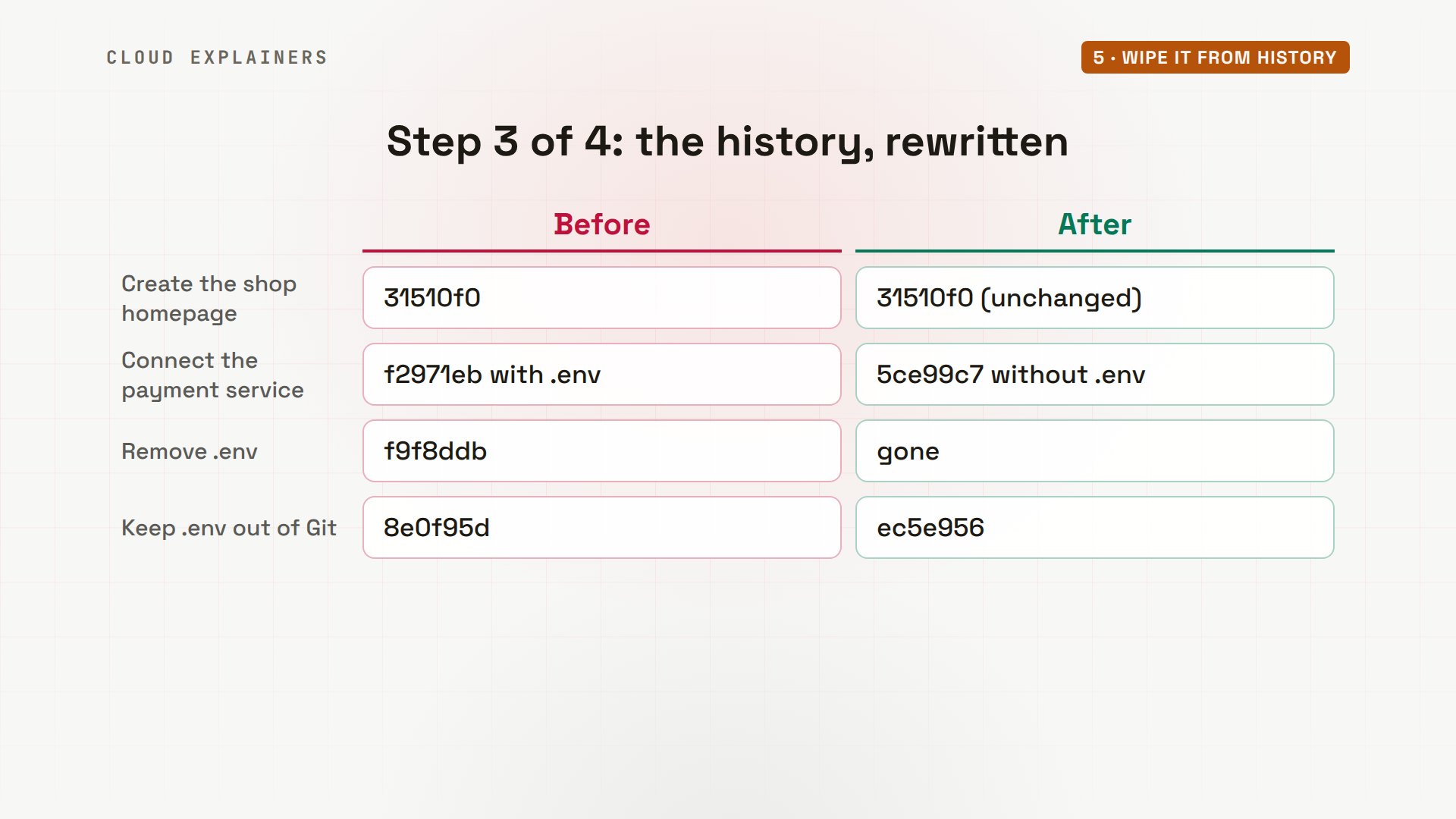
Step three: take the key out of the history. That means rewriting it. Every commit from the leak onward is made again without.env, so each gets a new ID. The commit that only removed.env has nothing left to do, so it disappears.
GitHub's guide uses git filter-repo, on a fresh clone, so no old local copy gets mixed in. So Ana clones the repository again, and tells filter-repo to remove.env from every commit, in its sensitive data removal mode. It rewrote 3 of 4 commits, and names the first one it changed: the leak.
git clone git@git-server:kettle-shop.git shop-cleanCloning into 'shop-clean'...
remote: Enumerating objects: 12, done.
remote: Counting objects: 100% (12/12), done.
remote: Compressing objects: 100% (9/9), done.
remote: Total 12 (delta 1), reused 0 (delta 0), pack-reused 0 (from 0)
Receiving objects: 100% (12/12), done.
Resolving deltas: 100% (1/1), done.
cd shop-clean
git filter-repo --sensitive-data-removal --invert-paths --path .envNOTICE: Fetching all refs from origin to make sure we rewrite
        all history that may reference the sensitive data, via
      git fetch -q --prune --update-head-ok --refmap "" origin +refs/*:refs/*
Parsed 4 commits
New history written in 0.14 seconds; now repacking/cleaning...
You rewrote 3 (of 4) commits.

NOTE: First Changed Commit(s) is/are:
  f2971eb4f180fc6eff30b41b0575e3d90fc72853
NOTE: LFS object orphaning not checked (LFS not in use)

Repacking your repo and cleaning out old unneeded objects
HEAD is now at ec5e956 Keep .env out of Git
Enumerating objects: 9, done.
Counting objects: 100% (9/9), done.
Delta compression using up to 10 threads
Compressing objects: 100% (6/6), done.
Writing objects: 100% (9/9), done.
Total 9 (delta 0), reused 6 (delta 0), pack-reused 0 (from 0)
Completely finished after 0.20 seconds.

NEXT STEPS FOR YOUR SENSITIVE DATA REMOVAL:
  * If you are doing your rewrite in multiple steps, ignore these next steps
    until you have completed all your invocations of git-filter-repo.
  * See the "Sensitive Data Removal" subsection of the "DISCUSSION" section
    of the manual for more details about any of the steps below.
  * Inspect this repository and verify that the sensitive data is indeed
    completely removed from all commits.
  * Force push the rewritten history to the server:
      git push --force --mirror origin
  * Contact the server admins for additional steps they need to take; the
    First Changed Commit(s) may come in handy here.
  * Have other colleagues with a clone either discard their clone and reclone
    OR follow the detailed steps in the manual to repeatedly rebase and
    purge the sensitive data from their copy.  Again, the First Changed
    Commit(s) may come in handy.
  * See the "Prevent repeats and avoid future sensitive data spills" section
    of the manual.
The log now has three commits, with new IDs. Asking for any commit that touched.env returns nothing. Then she pushes the new history to the server, with force.
git log --onelineec5e956 (HEAD -> main) Keep .env out of Git
5ce99c7 Connect the payment service
31510f0 Create the shop homepage
git log --all --oneline -- .env
git push --force --mirror originEnumerating objects: 9, done.
Counting objects: 100% (9/9), done.
Delta compression using up to 10 threads
Compressing objects: 100% (6/6), done.
Writing objects: 100% (9/9), 1012 bytes | 1012.00 KiB/s, done.
Total 9 (delta 0), reused 9 (delta 0), pack-reused 0 (from 0)
To git-server:kettle-shop.git
 + 8e0f95d...ec5e956 main -> main (forced update)
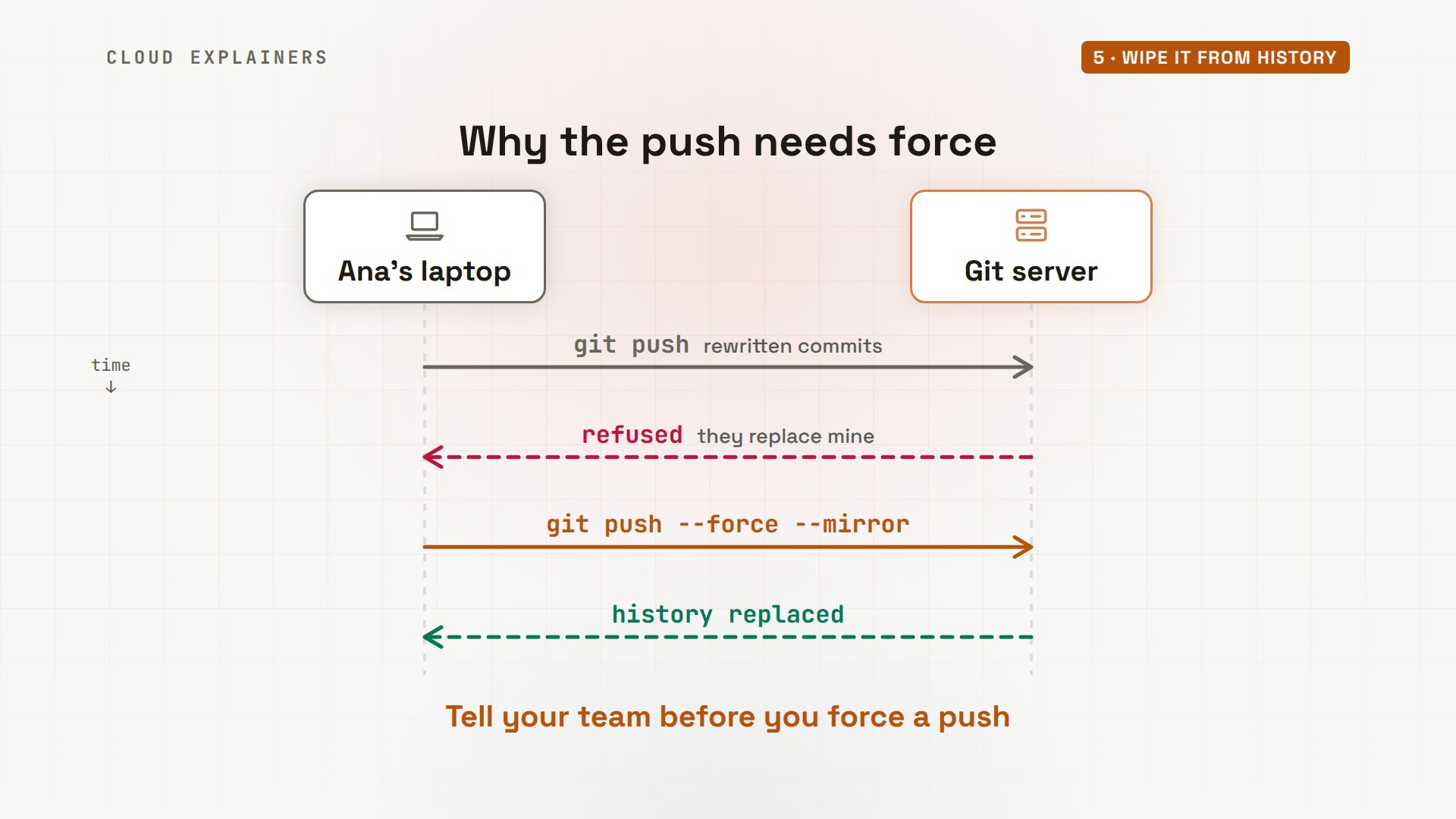
Why force? A normal push would be refused, because these commits replace the ones on the server. Forcing tells the server to take them anyway. That's normally risky, because it can erase other people's work. Here that's the point, so tell your team first.
A fresh clone is clean now: gitleaks finds no leaks. But the stranger's old clone still has the key, and so would any fork, a copy on someone else's account. That's why revoking came first. The copy is still out there, but it opens nothing.
git clone git://git-server/kettle-shop.git freshCloning into 'fresh'...
remote: Enumerating objects: 9, done.
remote: Counting objects: 100% (9/9), done.
remote: Compressing objects: 100% (6/6), done.
Receiving objects: 100% (9/9), done.
remote: Total 9 (delta 0), reused 0 (delta 0), pack-reused 0 (from 0)
cd fresh
gitleaks git -v○ │╲ │ ○ ○ ░ ░ gitleaks 7:07PM INF Unknown SCM platform. Use --platform to include links in findings. host=git-server 7:07PM INF 3 commits scanned. 7:07PM INF scanned ~378 bytes (378 bytes) in 31ms 7:07PM INF no leaks found
cd ~/kettle-shop
git show f2971eb:.envPAYMENTS_API_KEY=kp_live_J55duHp5x8I1x3ir3W46dmqv
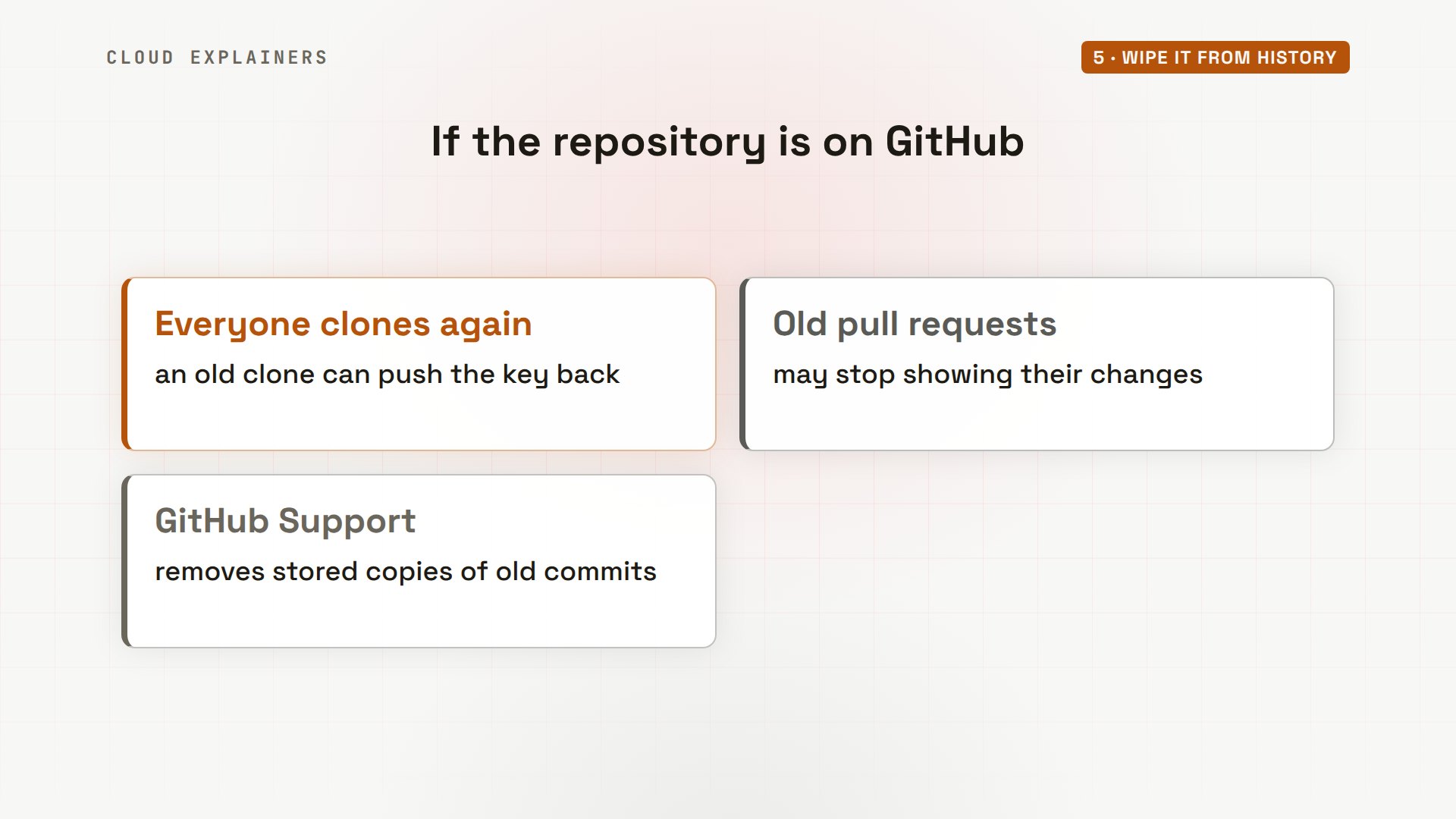
On GitHub, a few more things. Everyone who cloned should delete their copy and clone again, or the old commits come back the next time they push. Old pull requests, the changes teammates proposed, may stop showing their diffs. And GitHub Support can remove the copies of old commits that GitHub still keeps.
Stop the next leak
Last, stop the next leak before it leaves the laptop. A pre-commit hook is a script Git runs before every commit. Ana's runs gitleaks on the changes she's about to commit. If it finds a key, the script fails, and Git refuses the commit.
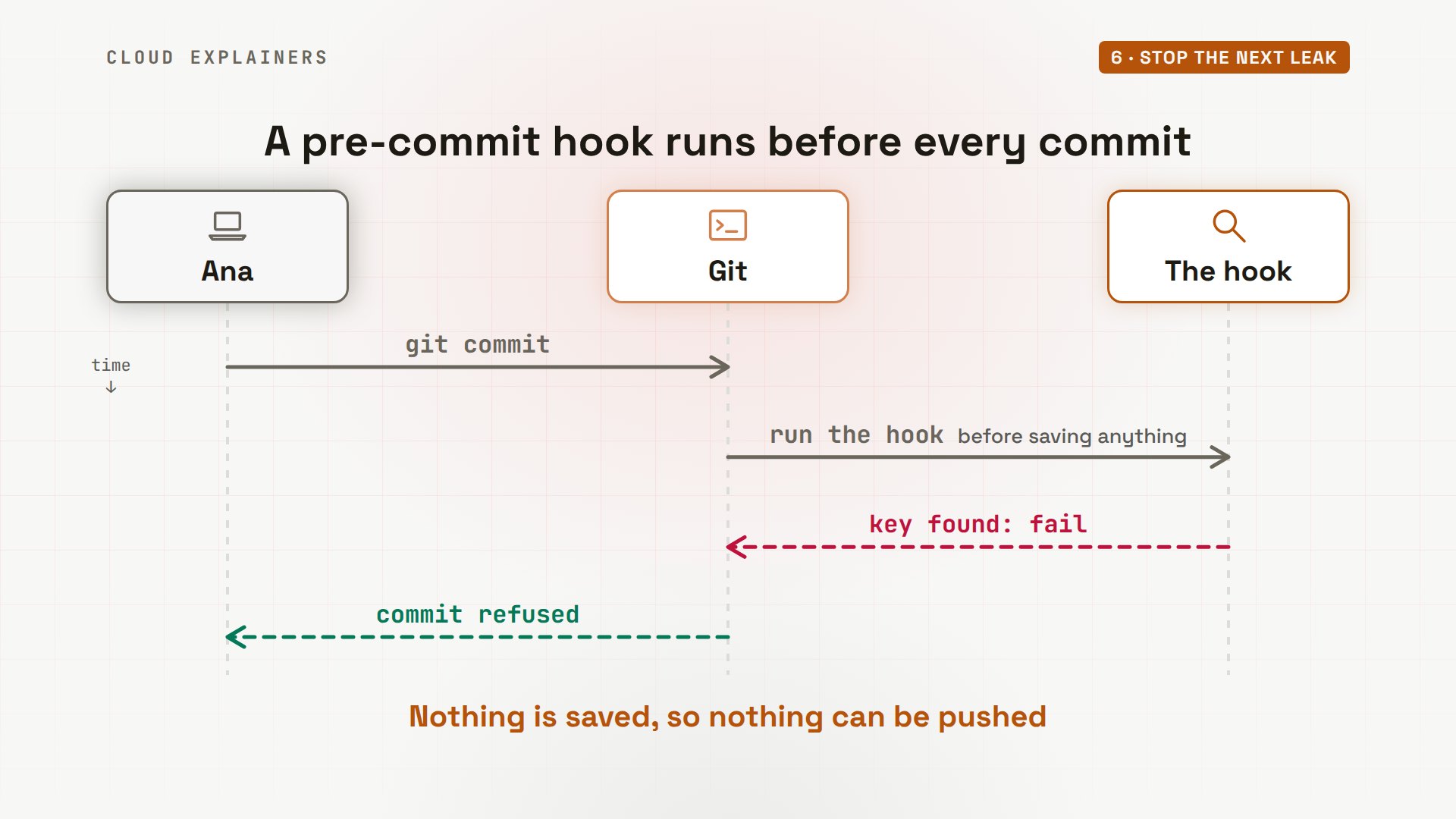
Her hook is a two-line file in the hooks folder, inside the hidden.git folder of the project. With redact, the report hides any key it finds. She pastes the new key into a settings file for a quick test, and tries to commit it. gitleaks finds the key, shows it as redacted, and Git refuses the commit. Her newest commit is still the one from before.
cat .git/hooks/pre-commit#!/bin/sh
exec gitleaks git --pre-commit --staged --redact -v
git add settings.py
git commit -m "Quick test"○ │╲ │ ○ ○ ░ ░ gitleaks Finding: PAYMENTS_API_KEY = "REDACTED" # just for a quick... Secret: REDACTED RuleID: generic-api-key Entropy: 4.476410 File: settings.py Line: 1 Fingerprint: settings.py:generic-api-key:1 7:07PM INF 0 commits scanned. 7:07PM INF scanned ~79 bytes (79 bytes) in 30.3ms 7:07PM WRN leaks found: 1
git log --oneline -1ec5e956 (HEAD -> main, origin/main) Keep .env out of Git
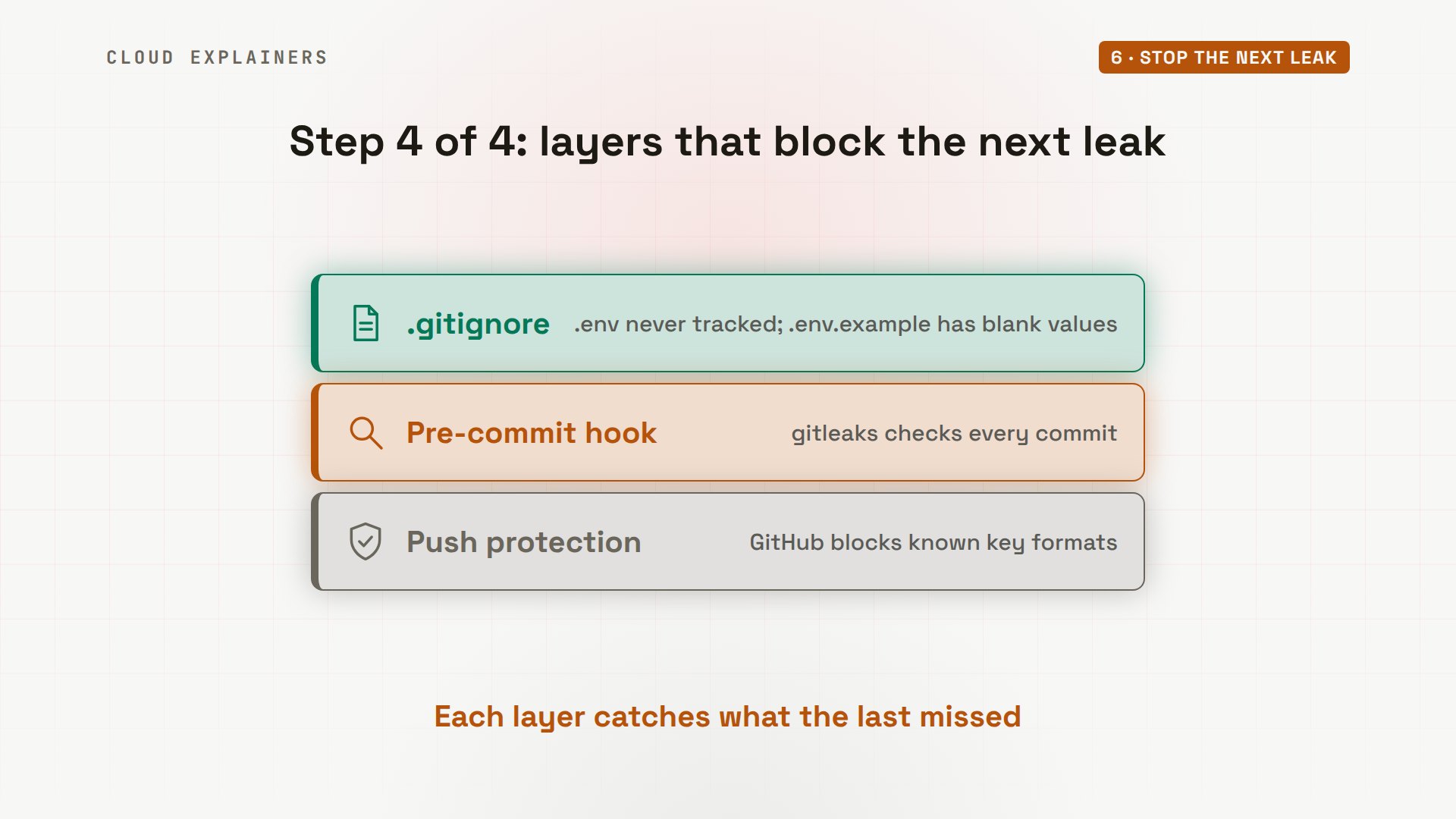
So the protection comes in layers. On the laptop,.env stays in.gitignore, with an example file of blank values for teammates. Each commit passes the pre-commit hook. And GitHub's push protection checks every push, and blocks many known key formats.
Recap
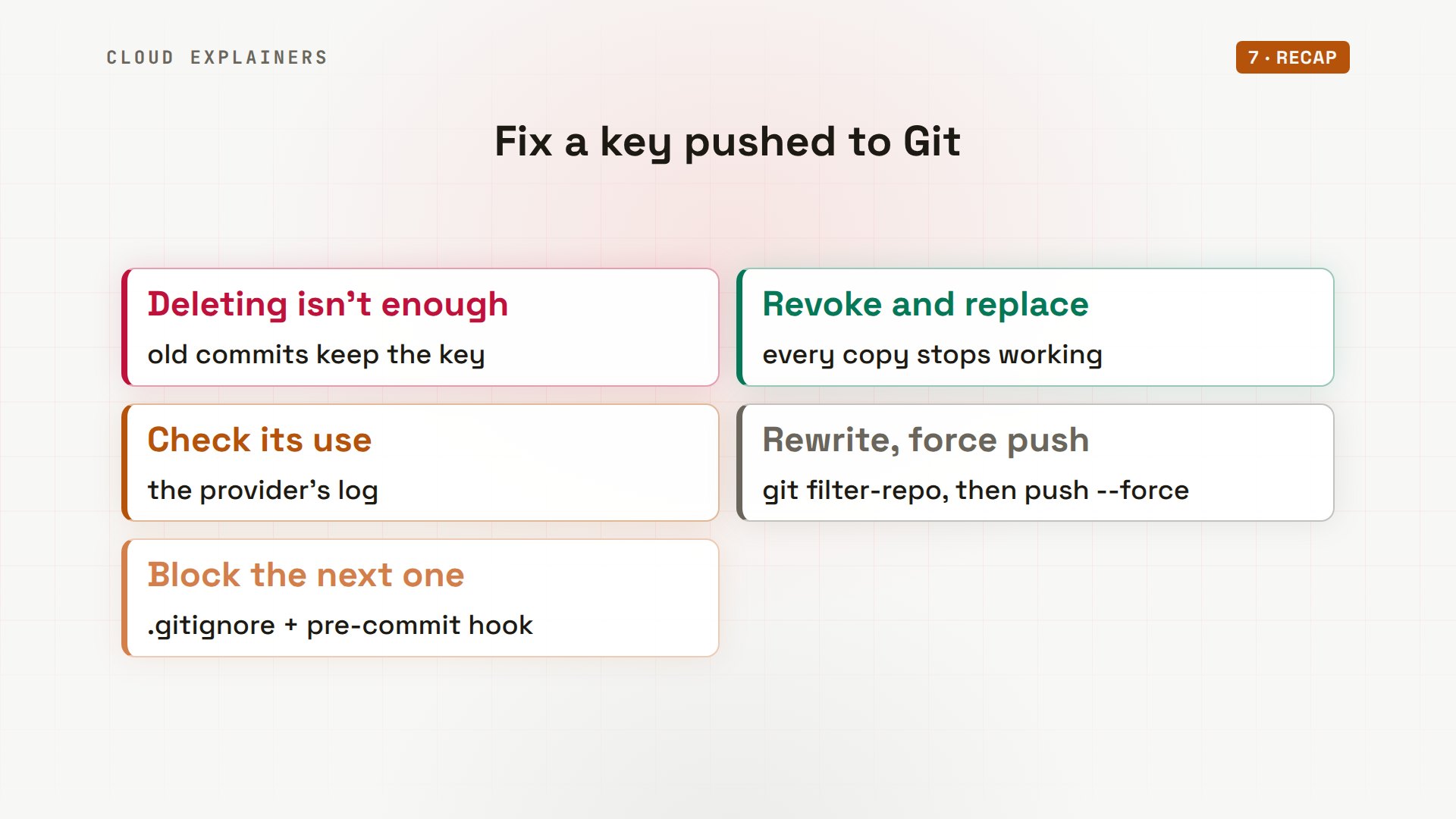
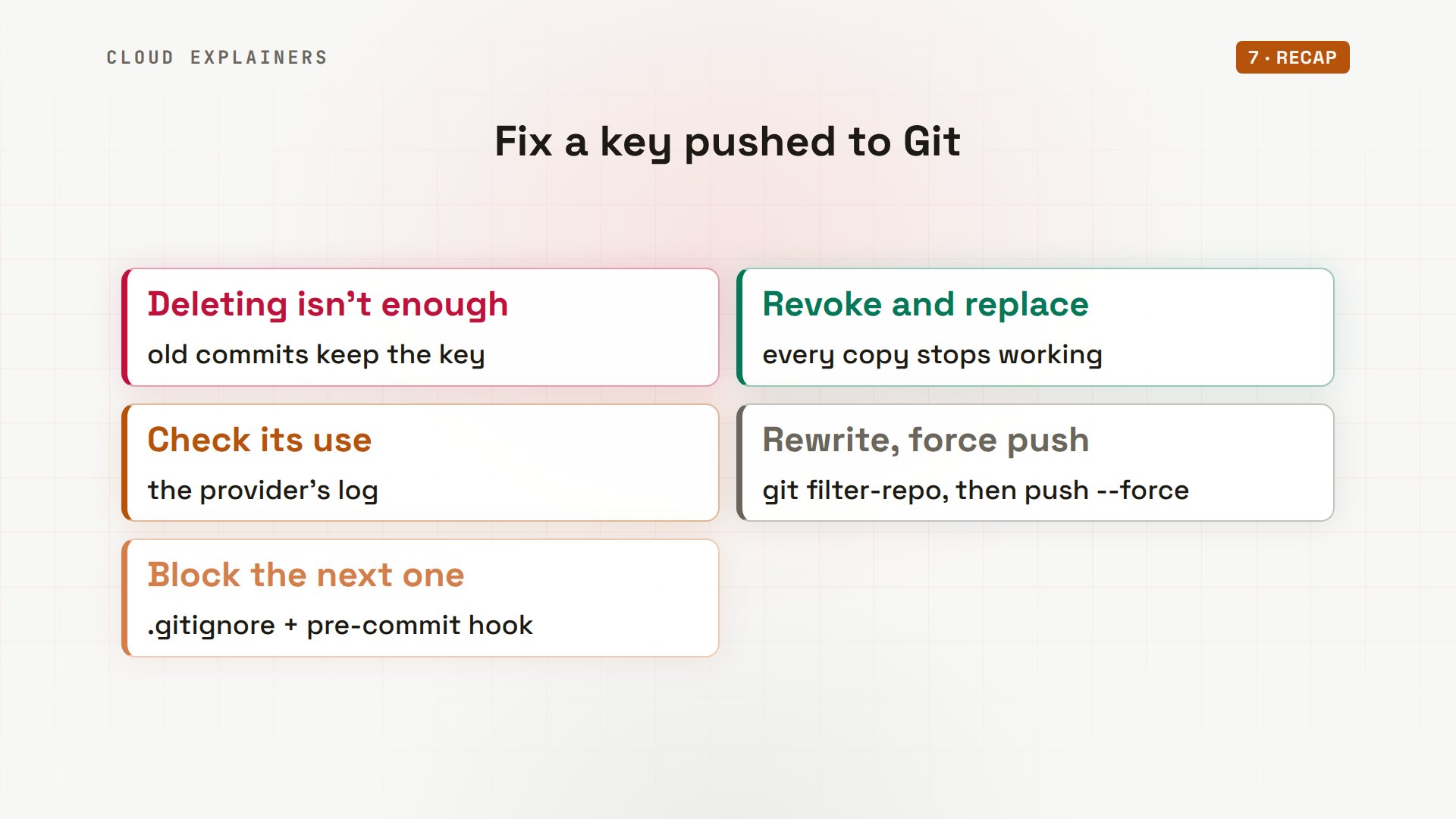
Let's recap. Deleting a key in a new commit leaves it in the old one. So first, revoke it and use a new key. Then check what it was used for. Rewrite the history with filter-repo, and force push. And block the next one with.gitignore and a pre-commit hook.
If watching that key go from working to revoked was useful, subscribing helps more beginners find fixes like this.
Every command and number in this video came from a real run in our lab. Thanks for watching Cloud Explainers.
Sources
Demos: real output from four containers on a private network on our own machine. The key is a lab key for our own small payment service; it opens nothing outside the lab. Watch the full video on YouTube.
More videos
DNS Will Finally Make Sense After This
Never Ignore a Security Update
Two-Factor Authentication Will Finally Make Sense
Never Expose a Database to the Internet
SSH Keys vs Passwords: Which Is Safer for Security?
The 5 Levels of Linux Boot: From Power On to Login
The 5 Levels of Network Firewalls
Password Security: Why Hackers Crack Weak Passwords
Why Your Linux Server Runs Out of Memory
HTTP vs HTTPS: What Actually Changes on Your Network

Every Linux File Permission You Need to Know
Linux Processes vs Threads: When Each One Wins

The OSI Model Will Finally Make Sense After This

The 7 Levels of Git
Every Network Troubleshooting Command You Need
Hashing vs Encryption in Cybersecurity: When Each One Wins
Why the Internet Ran Out of IP Addresses
Linux Package Managers: apt vs Snap vs Flatpak
Why Python Is Slow (and When It Doesn't Matter)
TCP vs UDP: When Each One Wins
Stop Running Linux as Root (Do This Instead)
Linux Users and Groups Will Finally Make Sense
Why Phishing Beats Good Security (and How to Spot It)

The 7 Levels of Docker

AI Agents Will Finally Make Sense After This
Stop Using git push --force (Use This Instead)
Agent Skills vs MCP: When Each One Wins
Networking Will Finally Make Sense After This

Every Linux Command You Actually Need

The 7 Levels of Cybersecurity

Every System Design Concept You Need, in One Diagram
