How Authenticator App Login Codes Work (TOTP)
How authenticator app login codes (TOTP) work, on real machines: a site shares one secret with your phone through a QR code, both sides cut time into 30-second steps, and HMAC-SHA1 turns the secret and the step into the same six digits, so the phone never needs a network. We work a code out by hand, then see why a 36-second-old code still works, why the same code can't be used twice, why a phone clock 3 minutes fast breaks it, and what a code can't stop.
No signal, still a code
You type a six-digit code from an authenticator app, and you'd think the website sent it to your phone. Ana's phone has no network at all. A quick network test, called ping, says it's unreachable. Her authenticator still shows a code, with 28 seconds left. She types it on her laptop, and the dive shop's booking site lets her in. The phone has never once spoken to the dive shop. It still gets the code right. So where does the code come from? And if it never travels, can anyone steal it?
ping -c 1 -W 2 1.1.1.1ping: connect: Network is unreachable
authenticator21:27:32 Dive Shop (ana) 188 299 (28 s left)
curl -s shop/login -d user=ana -d password=coral-reef-9 -d code=188299Welcome back, Ana. You're signed in.
Same secret, same clock
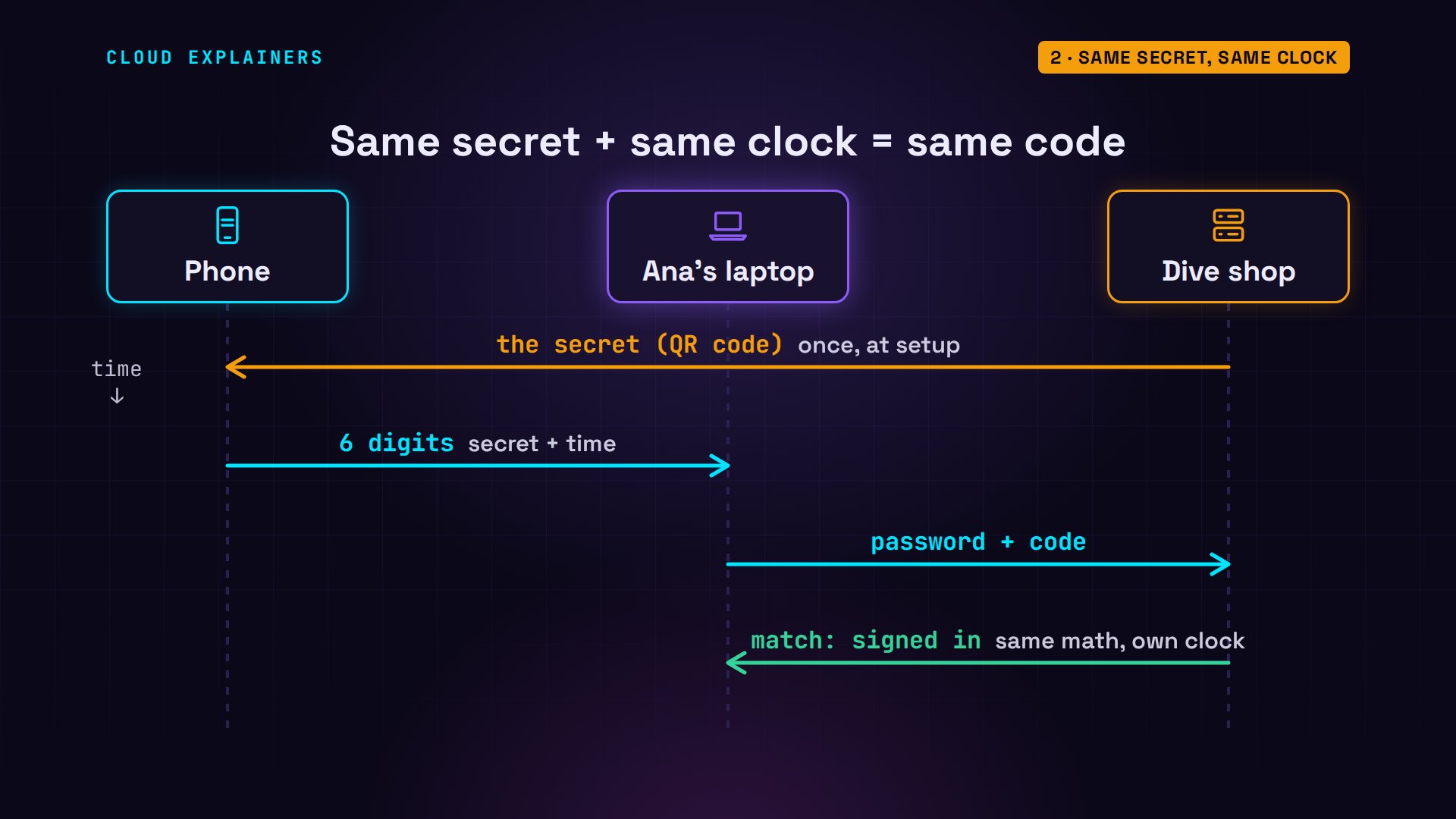
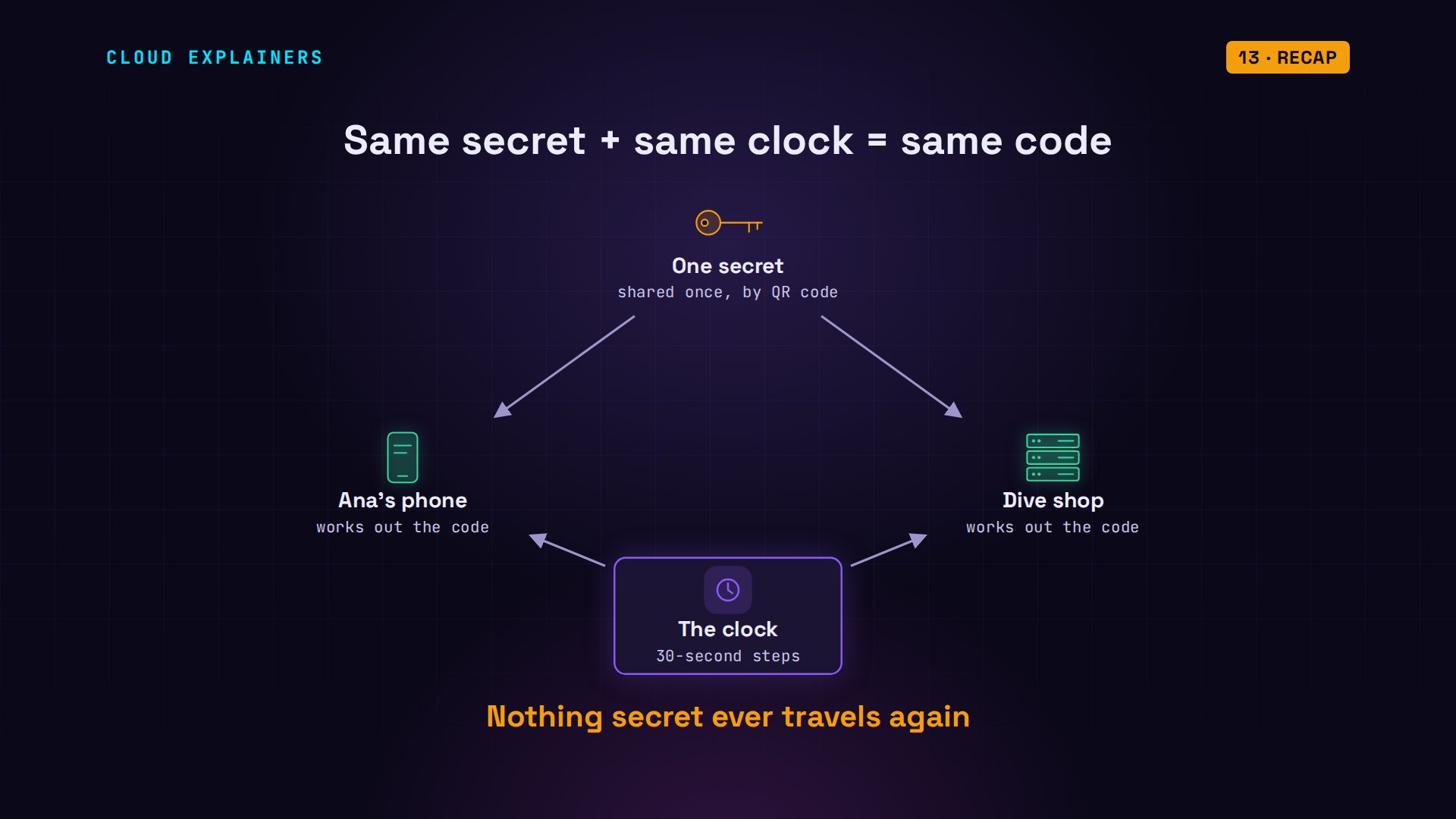
Here's the trick: the phone and the shop share a secret, and they both know the time. That's all a code is. The name for this is TOTP, a time-based one-time password, and it's the second step in two-step login, so a stolen password alone isn't enough. The shop gives the phone the secret once, when Ana turns on two-step login. From then on, the phone mixes that secret with the current time to make a code. Ana types it with her password, the shop does the same math with its copy of the secret and its own clock, and if the two match, she's in.
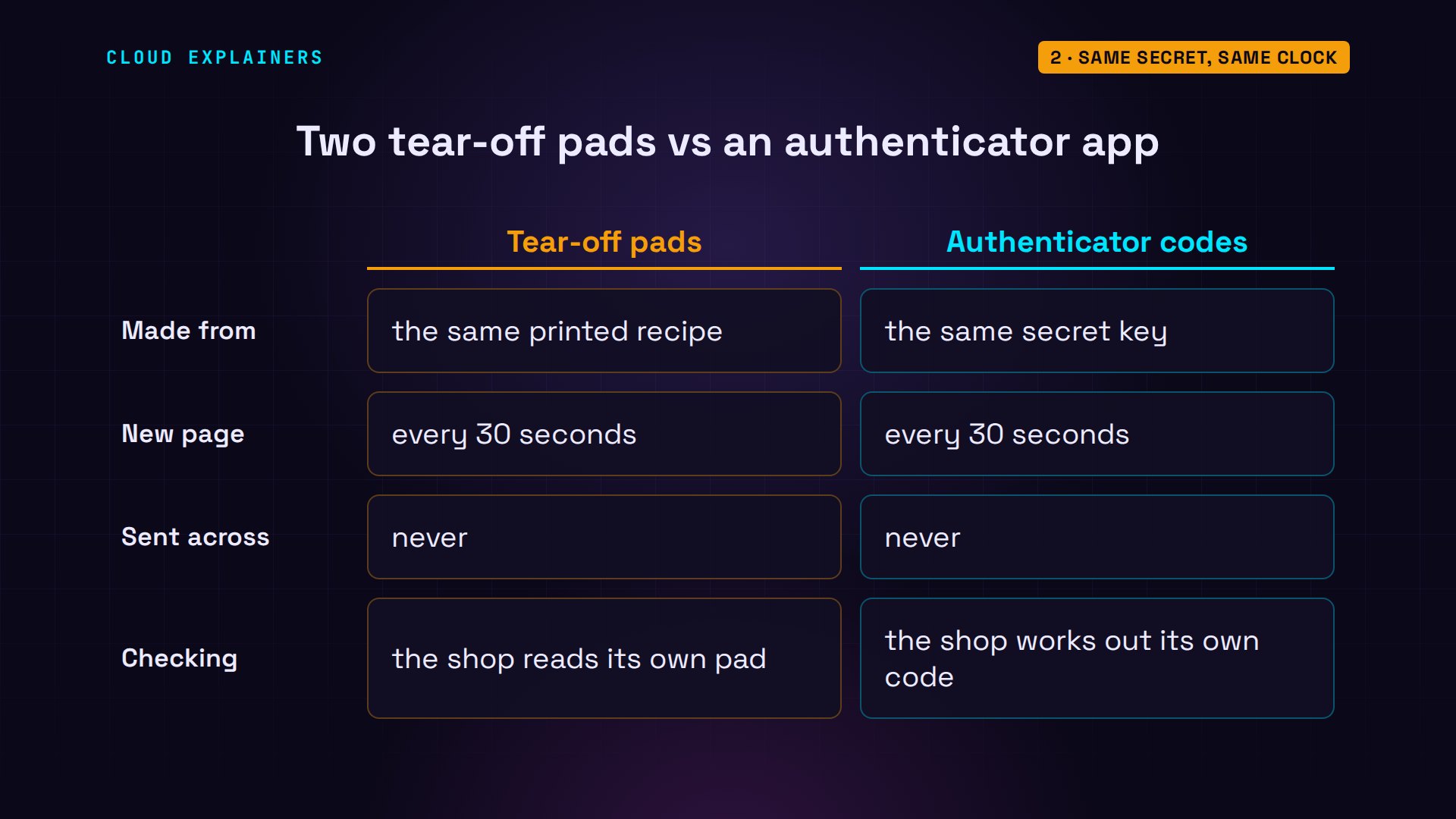
Picture two identical tear-off pads, one in Ana's pocket and one at the shop's desk. Both were printed from the same secret recipe, and every thirty seconds, both tear off a page. Nobody ever sends a page across. When Ana reads hers out, the shop just checks its own pad.
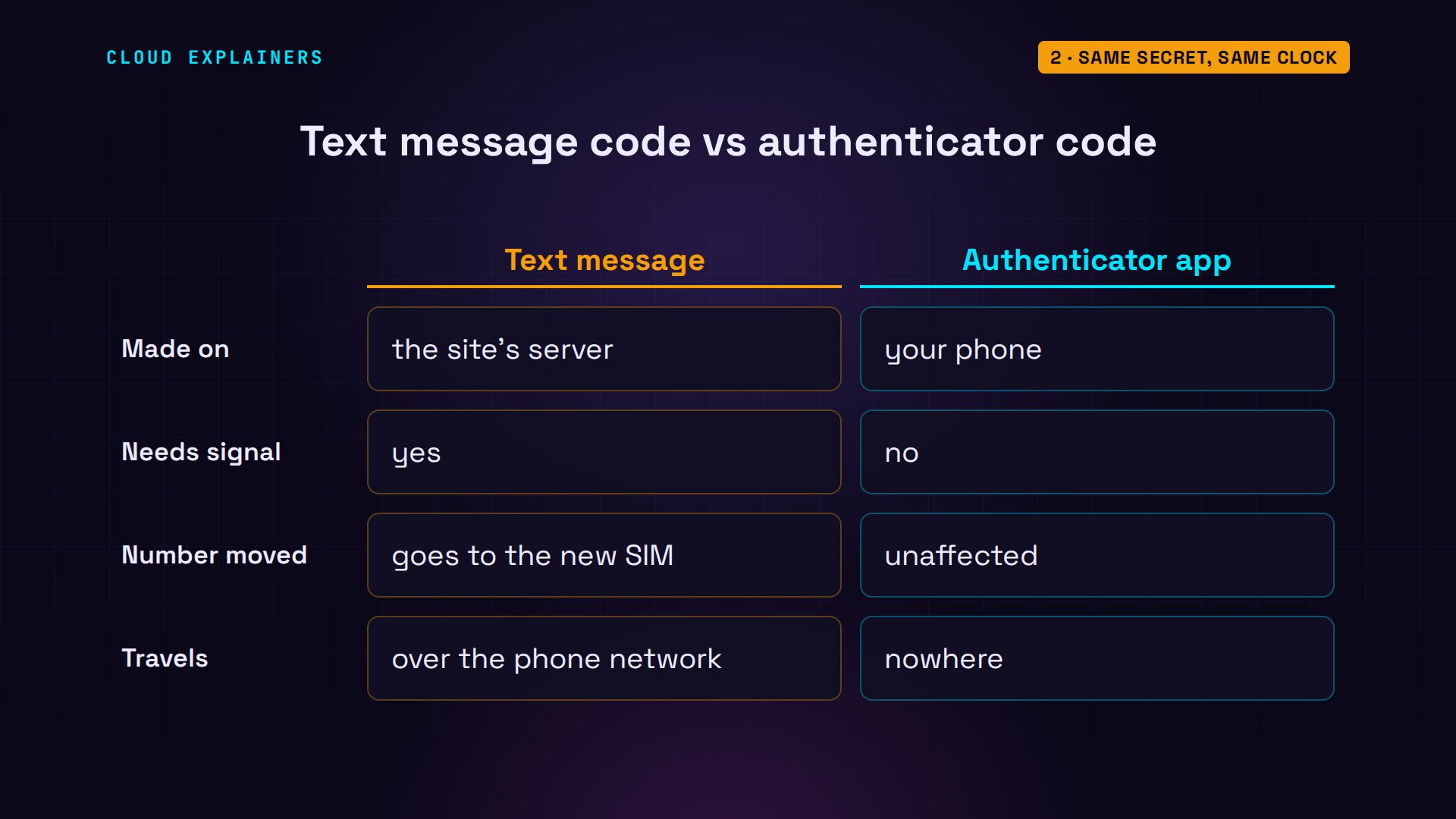
That's also why it isn't like a code sent by text message. A text is made on the site's server and carried to your phone by the phone network, so it needs signal. And if a scammer talks your phone company into moving your number to their phone, your text codes follow it. An authenticator code is made on the phone itself. Nothing is sent at all.
The QR code is the secret
So the secret has to get to the phone first. When Ana turns on two-step login, the shop makes a random secret and shows it as a QR code, with the same key typed out underneath, for phones that can't scan. This is the one moment the secret travels: from the shop's screen, into the phone's camera.
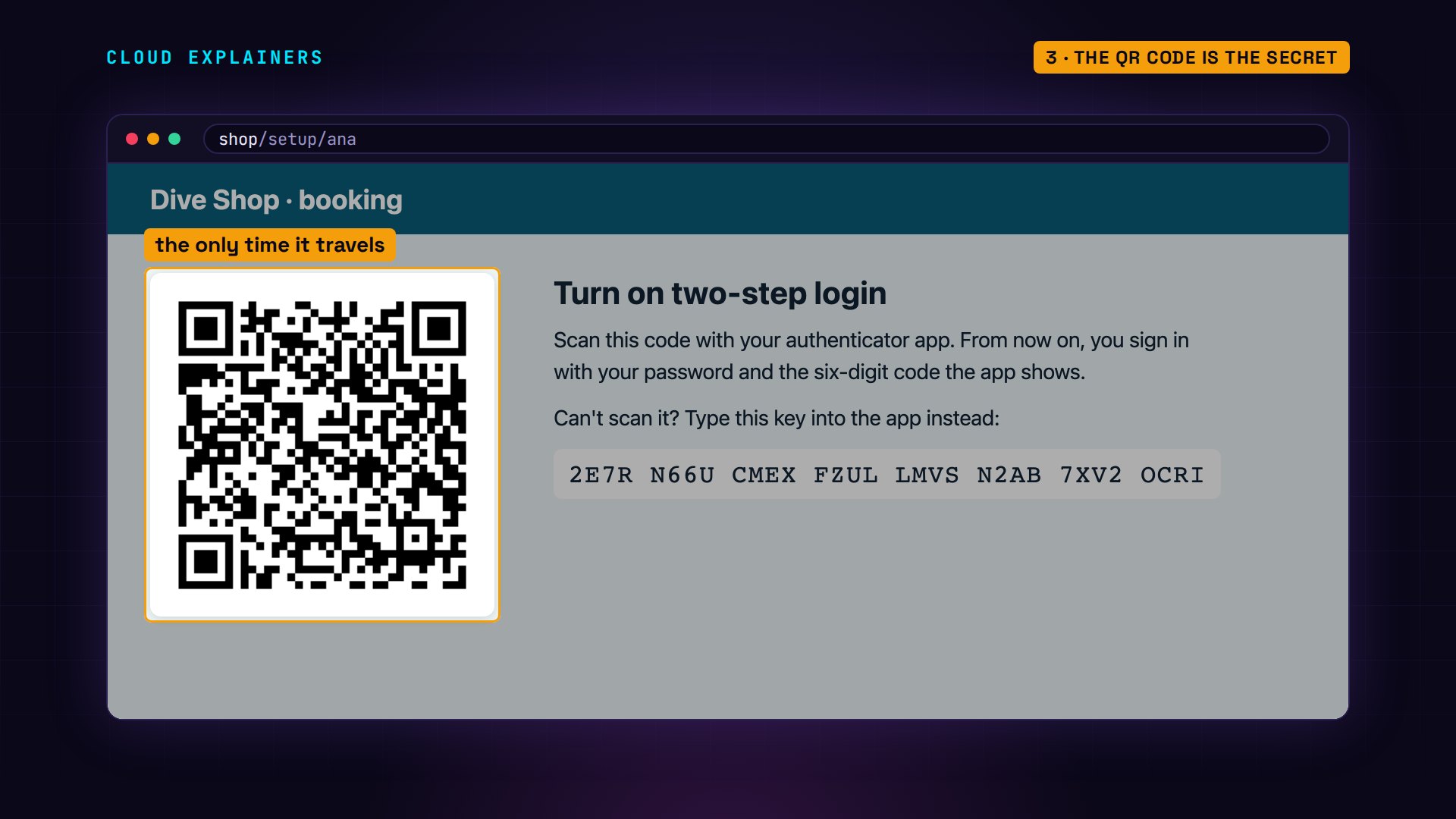
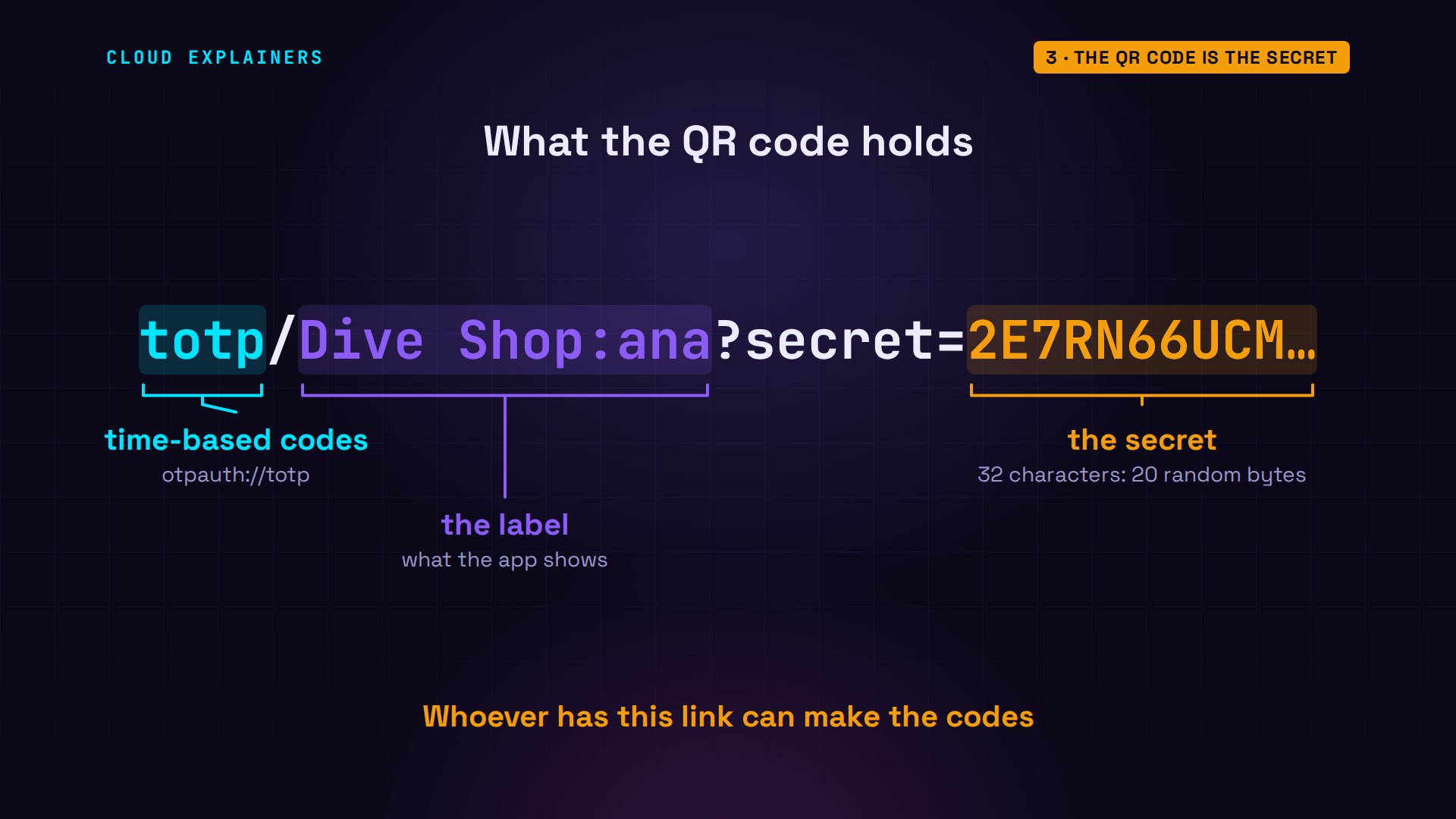
On the phone, a little script stands in for the authenticator app. It reads the QR code and adds the account. Read that QR code yourself, and it's just a link: otpauth, then the shop and the user, then the secret itself.
authenticator scan qr.pngAdded: Dive Shop (ana)
zbarimg -q --raw qr.pngotpauth://totp/Dive%20Shop:ana?secret=2E7RN66UCMEXFZULLMVSN2AB7XV2OCRI&issuer=Dive%20Shop
Here it is in parts. totp says time-based. Dive Shop and ana are just the label the app shows. The secret is 32 random capital letters and digits. Under the hood that's twenty random bytes, spelled out in a simple alphabet called base32. Anyone who photographs that QR code can make Ana's codes forever.
Thirty-second steps
But the phone and the shop never talk. So how do they agree on which page of the pad they're on? They both just look at the clock. Both machines count seconds since January 1970, the way computers keep time. Divide by thirty, drop the remainder, and you get the time step: the page number on the pad. The phone and the dive shop's server, with no connection between them, land on exactly the same number.
date +%s; echo $(( $(date +%s) / 30 ))1795123682
59837456
date +%s; echo $(( $(date +%s) / 30 ))1795123682
59837456
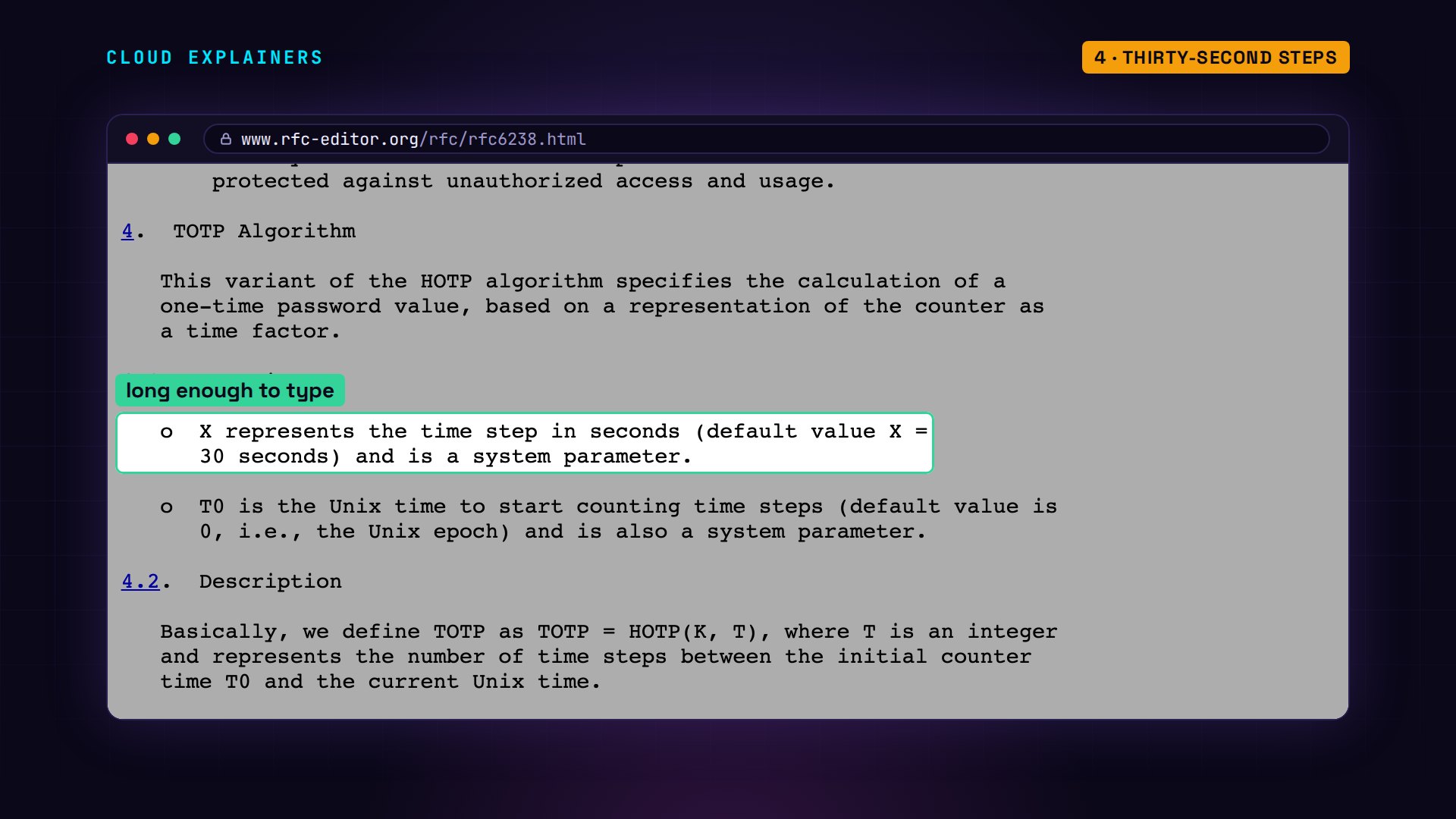
Thirty seconds isn't a habit of one app. It's the default in the standard itself, RFC 6238. Long enough to type a code, short enough that an old one is soon useless.
From secret to six digits
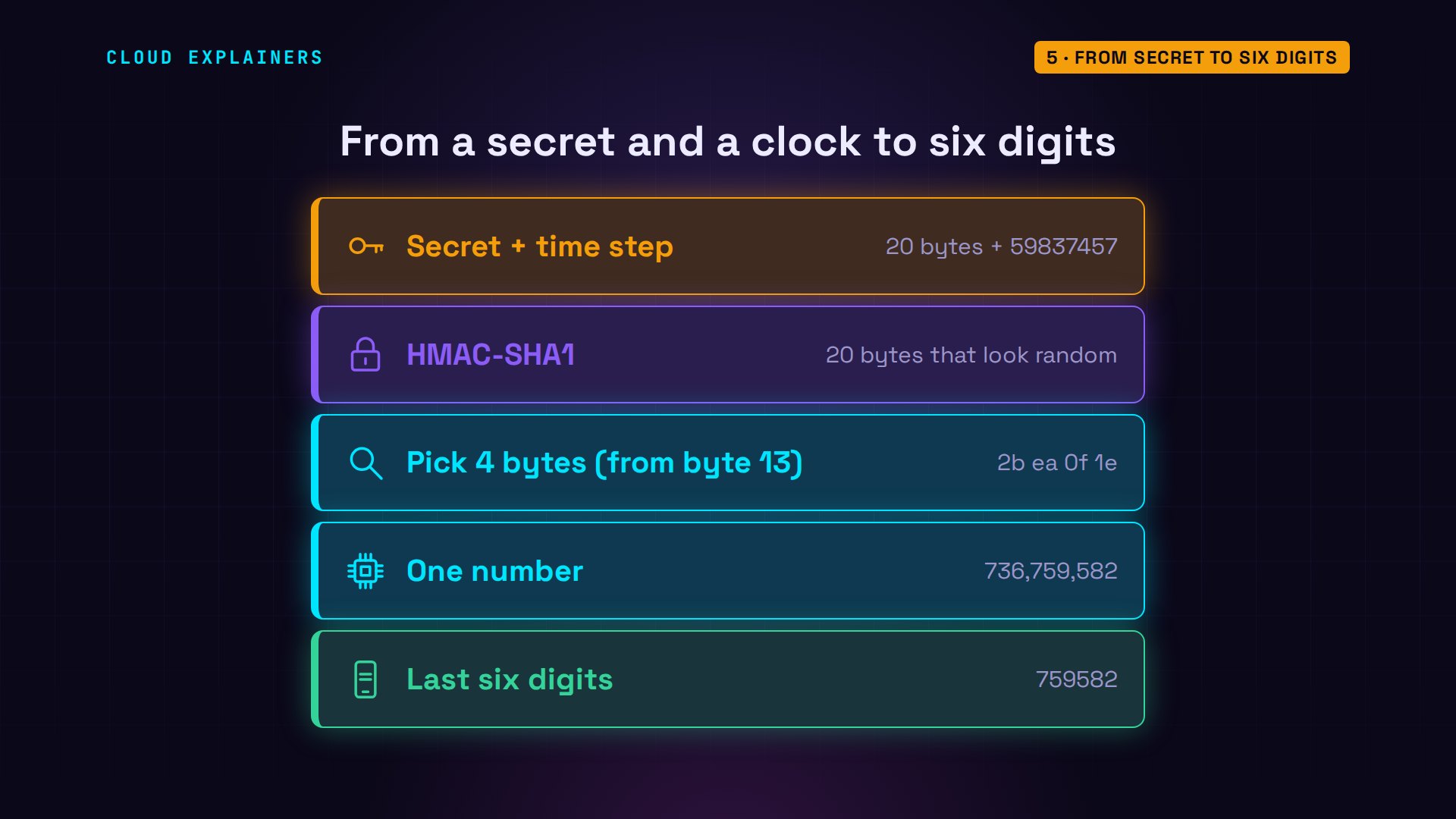
Now the mixing, on the shop's server, one step at a time. First, the secret and the current time step. Then a function called HMAC-SHA1 mixes them into twenty bytes that look random. And you can't run it backwards to get the secret. The last of those twenty bytes is used as a pointer: it says where to start reading. Read four bytes from there as one big number, keep its last six digits, and that's the code. The phone, at the same moment, shows the same six digits.
sudo totp-steps ana1. secret:      20 bytes from the key
2. time now:    1795123712 seconds since 1970
3. time step:   1795123712 / 30 = 59837457
4. HMAC-SHA1:   2d 1c ab 19 9c 9a e0 c0 1f 87 7c 93 e9 2b ea 0f 1e cc 25 0d
5. last digit:  d, so start at byte 13
6. four bytes:  2b ea 0f 1e = 736,759,582
7. last six:    759582
authenticator21:28:32 Dive Shop (ana) 759 582 (28 s left)
Change the secret or the time step even slightly, and the six digits come out completely different.
What the shop keeps
That math needs the secret itself, on both sides. Look at the shop's user file. Ana's password is stored scrambled, as a hash the shop can check but never read back. The secret is stored as it is, because the shop has to use it every time. So a shop must guard that file like a key cabinet.
sudo jq -r '.ana.password[:40], .ana.totp_secret' /var/lib/diveshop/users.jsonscrypt:32768:8:1$YpMu5VIKO2zb2rkq$4295d7
2E7RN66UCMEXFZULLMVSN2AB7XV2OCRI
How old can a code be?
Codes change every thirty seconds, so what about a code that just expired? Ana's phone shows a code at 21:29:02. She waits, and types it thirty-six seconds later. Guess first: does the shop accept it? It does. The shop's log says the code matched the step before the current one.
authenticator21:29:02 Dive Shop (ana) 878 306 (28 s left)
date +%T; curl -s shop/login -d user=ana -d password=coral-reef-9 -d code=87830621:29:38
Welcome back, Ana. You're signed in.
journalctl -u diveshop -o cat -n 1login ana: code 878306 matches time step 59837458 (now 59837459)
That's on purpose. People type slowly and clocks drift a little, so the shop also accepts the code from one step before, and one step after, in case the phone's clock is a little ahead. Two steps back is too far. Typed sixty seconds after it appeared, the code is refused: wrong code.
authenticator21:29:38 Dive Shop (ana) 778 132 (22 s left)
date +%T; curl -s shop/login -d user=ana -d password=coral-reef-9 -d code=77813221:30:38
Wrong code.
One code, one login
So a code lives for about a minute. What if someone sees Ana type it? She signs in with a fresh code, then the same code goes in again, ten seconds later. Guess first: what happens? Refused: that code was already used.
authenticator21:30:38 Dive Shop (ana) 475 814 (22 s left)
curl -s shop/login -d user=ana -d password=coral-reef-9 -d code=475814Welcome back, Ana. You're signed in.
curl -s shop/login -d user=ana -d password=coral-reef-9 -d code=475814That code was already used. Wait for the next one.
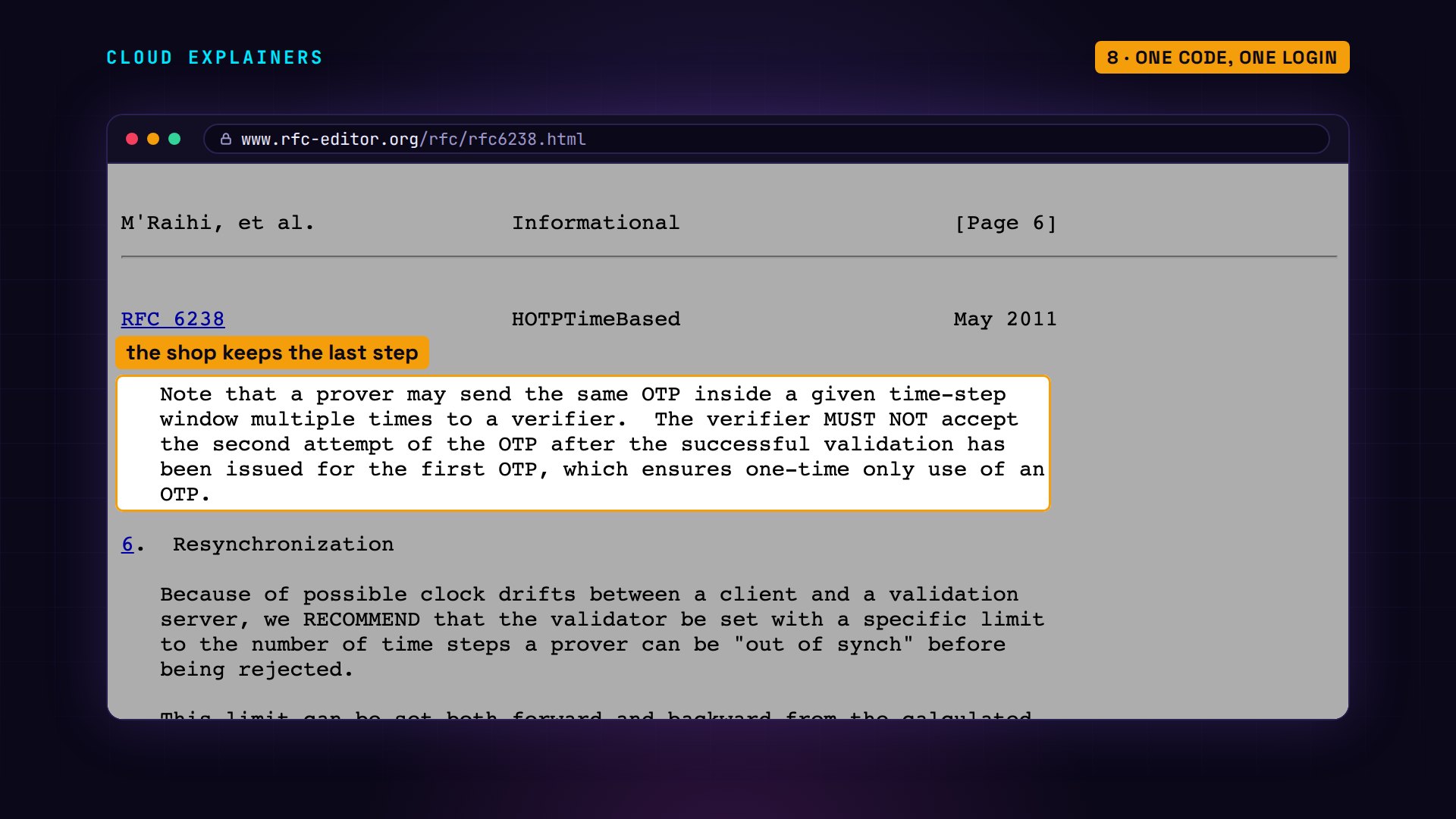
The TOTP standard says it plainly: the server must not accept the same code twice. The shop remembers the last step Ana used, and only takes a newer one.
A phone with the wrong time
Now the most common way these codes fail. This time, Ana's phone clock runs three minutes fast: it says 21:34:04, while her laptop, on the shop's time, says 21:31:04. Her phone makes a perfectly good code, just for the wrong moment. Three minutes is six steps ahead, and the shop only allows one. Wrong code. The fix isn't in the app: set the phone to take its time from the network automatically, and the next code works.
authenticator21:34:04 Dive Shop (ana) 073 930 (26 s left)
date +%T; curl -s shop/login -d user=ana -d password=coral-reef-9 -d code=07393021:31:04
Wrong code.
curl -s shop/login -d user=ana -d password=coral-reef-9 -d code=020773Welcome back, Ana. You're signed in.
Guessing six digits
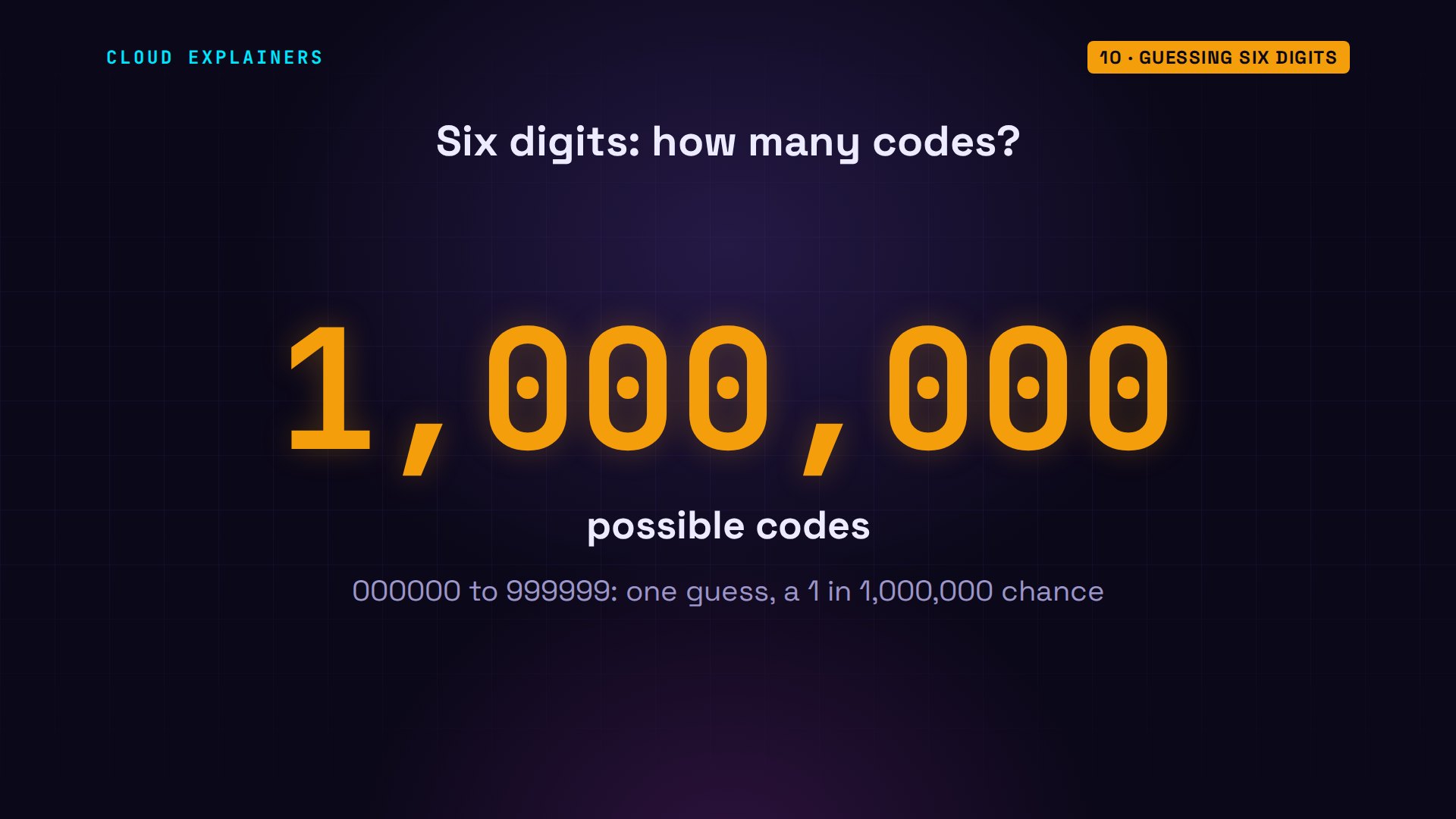
What about guessing? Six digits is a million possible codes, so one guess has a one in a million chance. Small, unless nothing stops a program from trying them all.
So the dive shop counts wrong codes. Six guesses in a row. The first five are just wrong. By the sixth, the account is locked for five minutes. Even Ana's real code is refused until then. Five guesses every five minutes is slow. And remember, the shop accepts the previous, current and next code, so three codes work at any moment. Even so, a program would need about seven months, on average, to hit one.
for c in 111111 222222 333333 444444 555555 666666; do curl -s shop/login -d user=ana -d password=coral-reef-9 -d code=$c; doneWrong code.
Wrong code.
Wrong code.
Wrong code.
Wrong code.
Too many wrong codes. Try again in 5 minutes.
curl -s shop/login -d user=ana -d password=coral-reef-9 -d code=741739Too many wrong codes. Try again in 5 minutes.
What a code can't stop
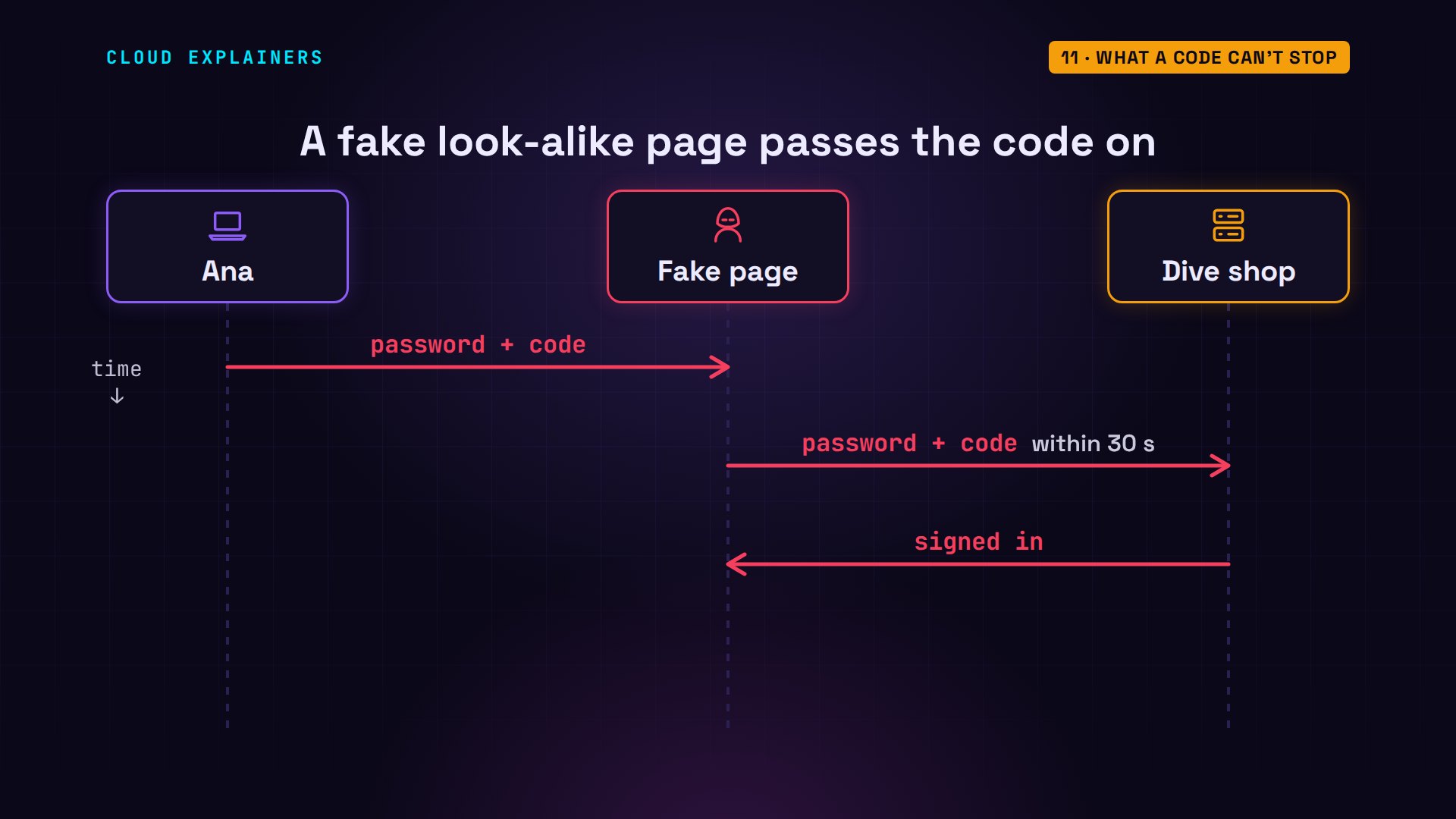
Remember the question: can a code still be stolen? Yes, by asking for it. A fake page that looks like the dive shop takes Ana's password and her code, and types both into the real shop within the same thirty seconds. The code can't tell which page Ana typed it into. Passkeys, a newer way to sign in, fix this: your device checks the site's real address, and only answers the genuine shop.
Before you rely on it
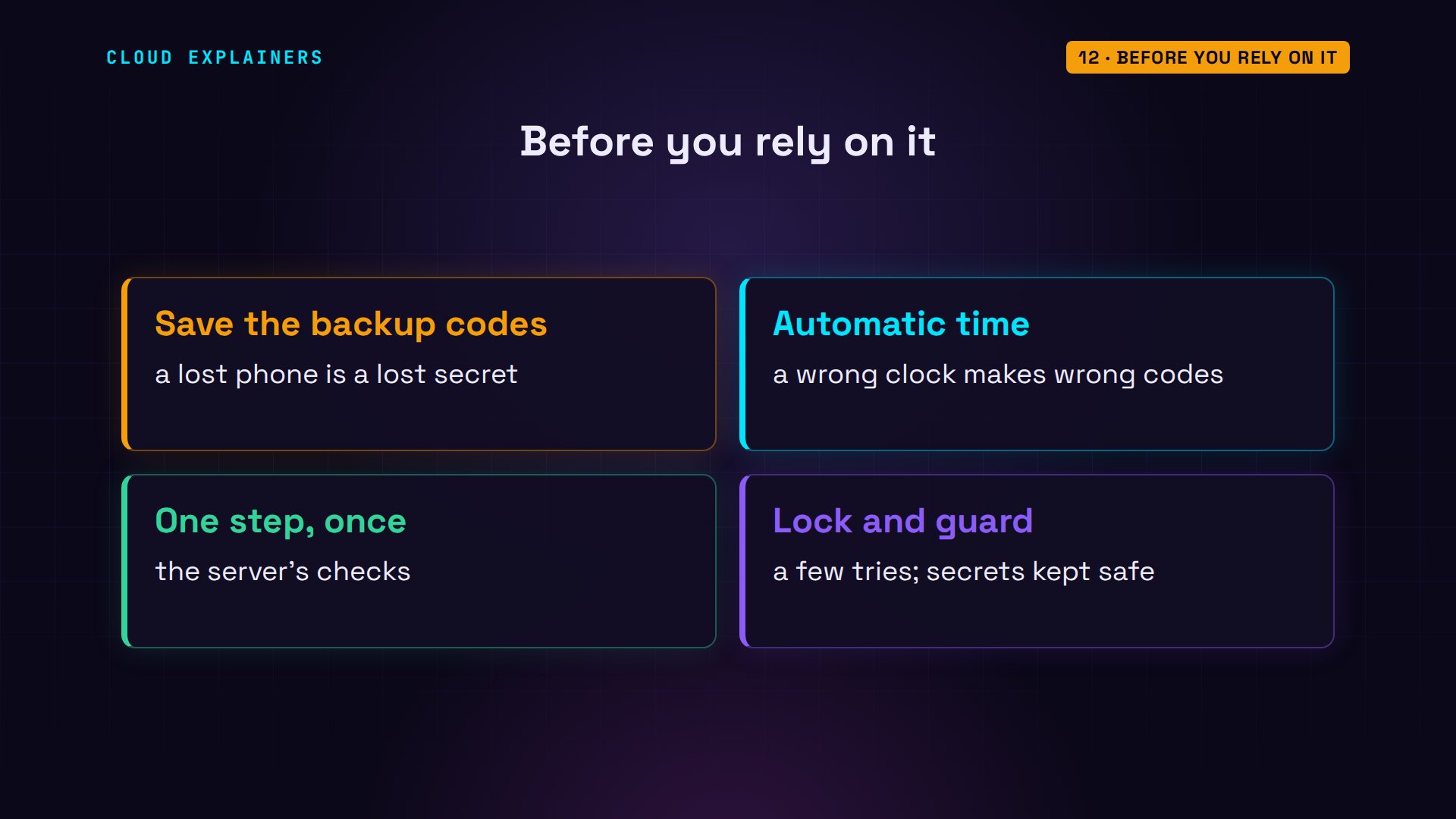
Before you rely on it, save the backup codes a site gives you. They're one-time codes for the day you lose your phone, because the secret goes with it, and without them you can't get back in. Keep your phone's time set automatically. And if you run the site: allow one step either side, accept each code only once, lock the account after a few wrong tries, and guard the stored secrets, because whoever steals them can make every future code.
Recap
So: the QR code shares one secret, once. The clock gives both sides the same step every thirty seconds. HMAC turns them into six digits. The shop does the same math and compares.
If six digits make sense now, subscribing brings more security, explained on real machines.
Every code, login and log line in this video came from real machines, and every command and the lab files are linked in the description. Thanks for watching Cloud Explainers.
Sources
- RFC 6238, TOTP: Time-Based One-Time Password Algorithm (30-second steps, one step of delay, one-time use)
- RFC 4226, HOTP: An HMAC-Based One-Time Password Algorithm (HMAC-SHA1, dynamic truncation, six digits, throttling)
- RFC 4648, Base32 encoding
- Key Uri Format for otpauth:// links (Google Authenticator wiki)
- pyotp documentation
- oathtool manual
Demos: three containers on our own Mac standing in for a dive shop's server, Ana's laptop and her phone (a short script using oathtool stands in for the authenticator app); the shop, its password and its secrets are made up. Every code, login and log line was real. Watch the full video on YouTube.
More videos
How to Fix Python ModuleNotFoundError: No Module Named
Golang Pointers in 5 Minutes
How to Fix a Kubernetes Pod Stuck in CrashLoopBackOff
How to Fix a Homelab ESXi Host Not Responding
PostgreSQL: Full Tutorial for Beginners
How a Load Balancer Works with HAProxy

How Python Virtual Environments Work
How to Fix Cloudflare Tunnel Errors in a Homelab
How to Fix API CORS Errors: No 'Access-Control-Allow-Origin'
Git and GitHub: Full Tutorial for Beginners
How a Homelab Hypervisor Works (VMware ESXi)
How to Fix Kubernetes ImagePullBackOff Errors
How to Fix DNS 'Temporary Failure in Name Resolution' on Linux
How to Fix AWS CLI 'Unable to Locate Credentials'
Proxmox vs ESXi for Your Homelab: When Each One Wins
PostgreSQL UUID vs Auto Increment: Which Primary Key Should You Use?
Kubernetes: Full Tutorial for Beginners

How TCP Sockets Work
How to Fix PostgreSQL 'Could Not Connect to Server'
Claude Code Hooks Will Finally Make Sense After This
DevOps with Ansible Will Finally Make Sense After This
How SNMP Network Monitoring Works
How to Fix GitHub 'Permission Denied (publickey)' Errors
Docker: Full Tutorial for Beginners
How to Fix PostgreSQL 'Password Authentication Failed'
Why One Linux Server Handles More Users Than You Think
How to Fix Network 'Connection Refused' Errors
DevOps Pipelines: Jenkins vs GitHub Actions
Linux Nginx Reverse Proxy: Full Tutorial for Beginners
Every Networking Term a Beginner Needs in 12 Minutes
How to Fix Docker 'Permission Denied' on docker.sock
How to Fix Git 'Updates Were Rejected' When You Push
How to Fix nginx 502 Bad Gateway Errors on Linux
How to Fix Linux apt 'Could Not Get Lock' Errors (Ubuntu)
How Email Works on the Internet (SMTP) in 10 Minutes

The Python Roadmap for Beginners

Golang REST API with Gin: Full Tutorial for Beginners
How a WireGuard VPN Network Works

Linux Makefiles Will Finally Make Sense After This
SAML vs OAuth vs OpenID Connect: What's the Difference?
How to Fix Python cron Jobs That Never Run
Linux Bash Scripting: Full Tutorial for Beginners
How PXE Network Boot Works
How Active Directory Works
How to Fix a Linux systemd Service That Won't Start
Linux Logs: syslog vs journald
JWT vs Session Cookies: Which One Should You Use?
Docker vs Docker Compose: Which One Should You Use?
How to Fix Docker Compose Containers That Can't Talk to Each Other
Django Full Tutorial for Beginners

How Linux systemd Works

How to Fix 'Windows Cannot Access' Network Share Errors (SMB)
REST vs gRPC: Which One Should You Use?
How to Fix SSL Certificate Chain Errors (Missing Intermediate)
Every Python Concept for Beginners in 10 Minutes
Every SQL Join Type in 10 Minutes
Why OpenRouter Free Models Hit Their Limit So Fast
Why Your Gemini API Free Tier Runs Out So Fast
OpenRouter Will Finally Make Sense After This
How Redis Caching Works
Gemini API vs Vertex AI: Which One Should You Use?
How to Fix a Leaked Gemini API Key
Why Golang Uses Goroutines Instead of Threads
How to Fix Gemini API Error 429: Resource Exhausted
Claude Token Pricing Will Finally Make Sense After This
Why Python Web Scraping Returns Nothing (and the Fix)
Python uv vs pip: Which One Should You Use?

Python Automation: Full Tutorial for Beginners
How OAuth Login Works

Google AI Studio Will Finally Make Sense After This
What Happens When You Run a Docker Container
How to Fix Claude Code Billing Your API Key Instead of Your Plan
Why Passkeys Can't Be Phished Like Passwords
PowerShell vs Bash: Which One Should You Learn?
The Linux Roadmap for Beginners
Django vs FastAPI: Which One Should You Use?
Why SQLite Is the Most Used Database in the World
How a NoSQL Database Like MongoDB Works
How to Fix Python pip error: externally-managed-environment
How to Fix MySQL Too Many Connections Database Errors
Golang Concurrency Will Finally Make Sense After This
How Amazon S3 Works
How Kubernetes Works
How Git Works
How to Fix Docker Port Already Allocated Errors
How PostgreSQL Works
How to Fix Git Merge Conflicts
How to Fix No Space Left on Device in Linux
How the Internet Works
SQL vs NoSQL: When Each One Wins
How to Fix JWT Token Expired Errors (401 Unauthorized)
Claude API vs Claude Pro: Why Your Subscription Doesn't Include It
Why AI Agent Skills Beat Giant Prompts

Linux Cron Jobs Will Finally Make Sense After This
Security Logs Will Finally Make Sense After This
How to Fix a Security Leak: An API Key Pushed to GitHub
DNS Will Finally Make Sense After This
Never Ignore a Security Update
Two-Factor Authentication Will Finally Make Sense
Never Expose a Database to the Internet
SSH Keys vs Passwords: Which Is Safer for Security?
The 5 Levels of Linux Boot: From Power On to Login
The 5 Levels of Network Firewalls
Password Security: Why Hackers Crack Weak Passwords
Why Your Linux Server Runs Out of Memory
HTTP vs HTTPS: What Actually Changes on Your Network

Every Linux File Permission You Need to Know
Linux Processes vs Threads: When Each One Wins
The OSI Model Will Finally Make Sense After This
The 7 Levels of Git
Every Network Troubleshooting Command You Need
Hashing vs Encryption in Cybersecurity: When Each One Wins
Why the Internet Ran Out of IP Addresses
Linux Package Managers: apt vs Snap vs Flatpak
Why Python Is Slow (and When It Doesn't Matter)
TCP vs UDP: When Each One Wins
Stop Running Linux as Root (Do This Instead)
Linux Users and Groups Will Finally Make Sense
Why Phishing Beats Good Security (and How to Spot It)
The 7 Levels of Docker

AI Agents Will Finally Make Sense After This
Stop Using git push --force (Use This Instead)
Agent Skills vs MCP: When Each One Wins
Networking Will Finally Make Sense After This
Every Linux Command You Actually Need
The 7 Levels of Cybersecurity
Every System Design Concept You Need, in One Diagram