
How to Fix Python pip error: externally-managed-environment
pip's error: externally-managed-environment, for beginners, fixed on a real Ubuntu 24.04 laptop: Ana's tea shop script needs the requests library and pip refuses to install it. We find the EXTERNALLY-MANAGED file apt put there, then use the three safe fixes the error suggests (the apt package, a virtual environment, pipx for apps) and show what --break-system-packages really did: it deleted apt's copy of requests without telling apt.
externally-managed-environment
You type pip install, and pip refuses: error, externally-managed-environment. Ana just set up a new Ubuntu laptop. She wants to run a small script that prints her tea shop's prices, and it needs one library, requests. pip won't install it, and without it, the script fails. By the end, you'll know why Ubuntu blocks pip, and three safe ways to get your package.
pip install requestserror: externally-managed-environment

× This environment is externally managed
╰─> To install Python packages system-wide, try apt install
    python3-xyz, where xyz is the package you are trying to
    install.

    If you wish to install a non-Debian-packaged Python package,
    create a virtual environment using python3 -m venv path/to/venv.
    Then use path/to/venv/bin/python and path/to/venv/bin/pip. Make
    sure you have python3-full installed.

    If you wish to install a non-Debian packaged Python application,
    it may be easiest to use pipx install xyz, which will manage a
    virtual environment for you. Make sure you have pipx installed.

    See /usr/share/doc/python3.12/README.venv for more information.

note: If you believe this is a mistake, please contact your Python installation or OS distribution provider. You can override this, at the risk of breaking your Python installation or OS, by passing --break-system-packages.
hint: See PEP 668 for the detailed specification.
python3 prices.pyTraceback (most recent call last):
  File "/home/ana/prices/prices.py", line 1, in <module>
    import requests
ModuleNotFoundError: No module named 'requests'
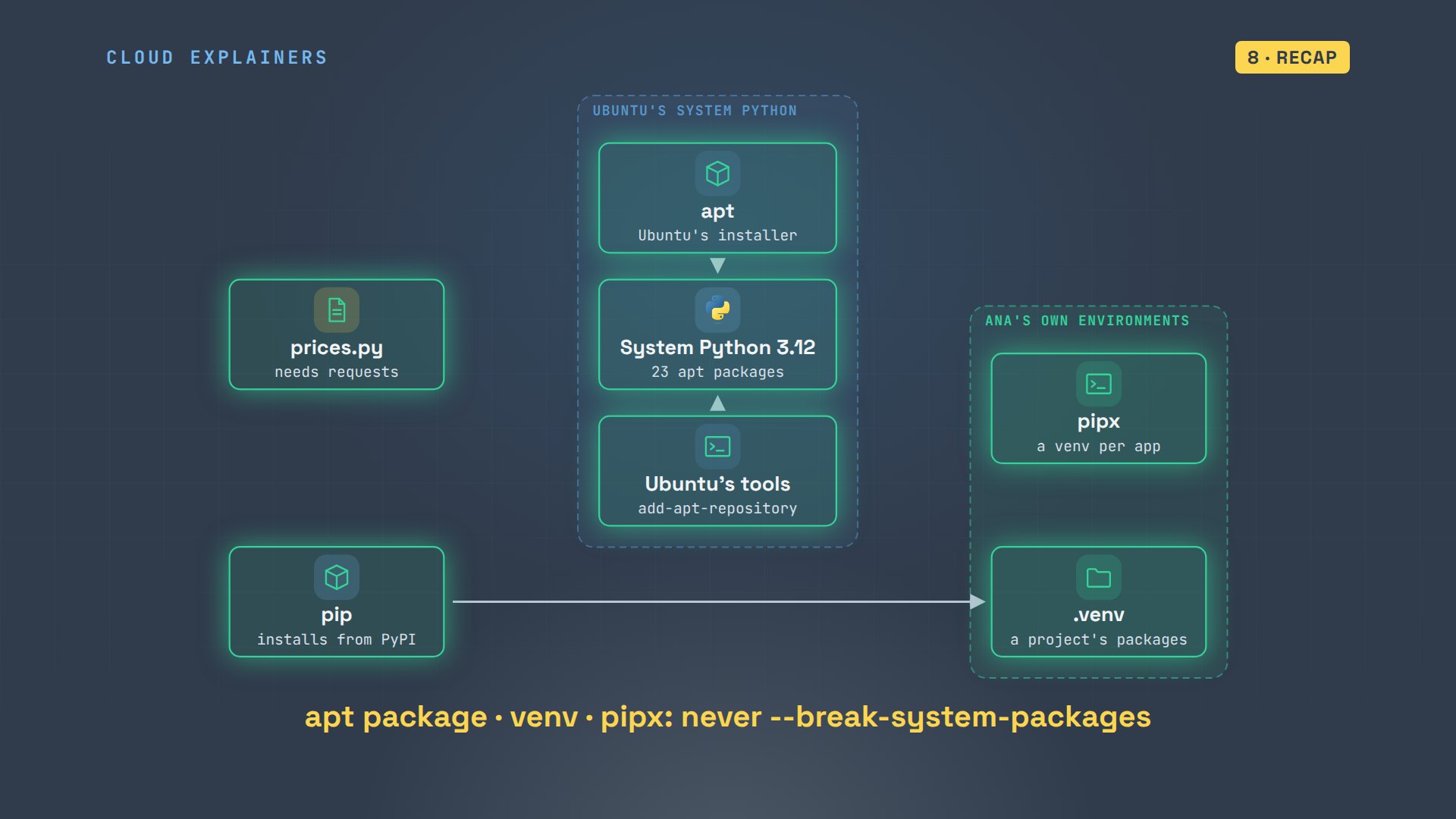
Here's the picture. The script needs requests. pip, the tool that installs Python packages, wants to put it into the Python that came with Ubuntu, Python 3.12. But that Python already has an owner: apt, Ubuntu's package manager.
Why pip says no
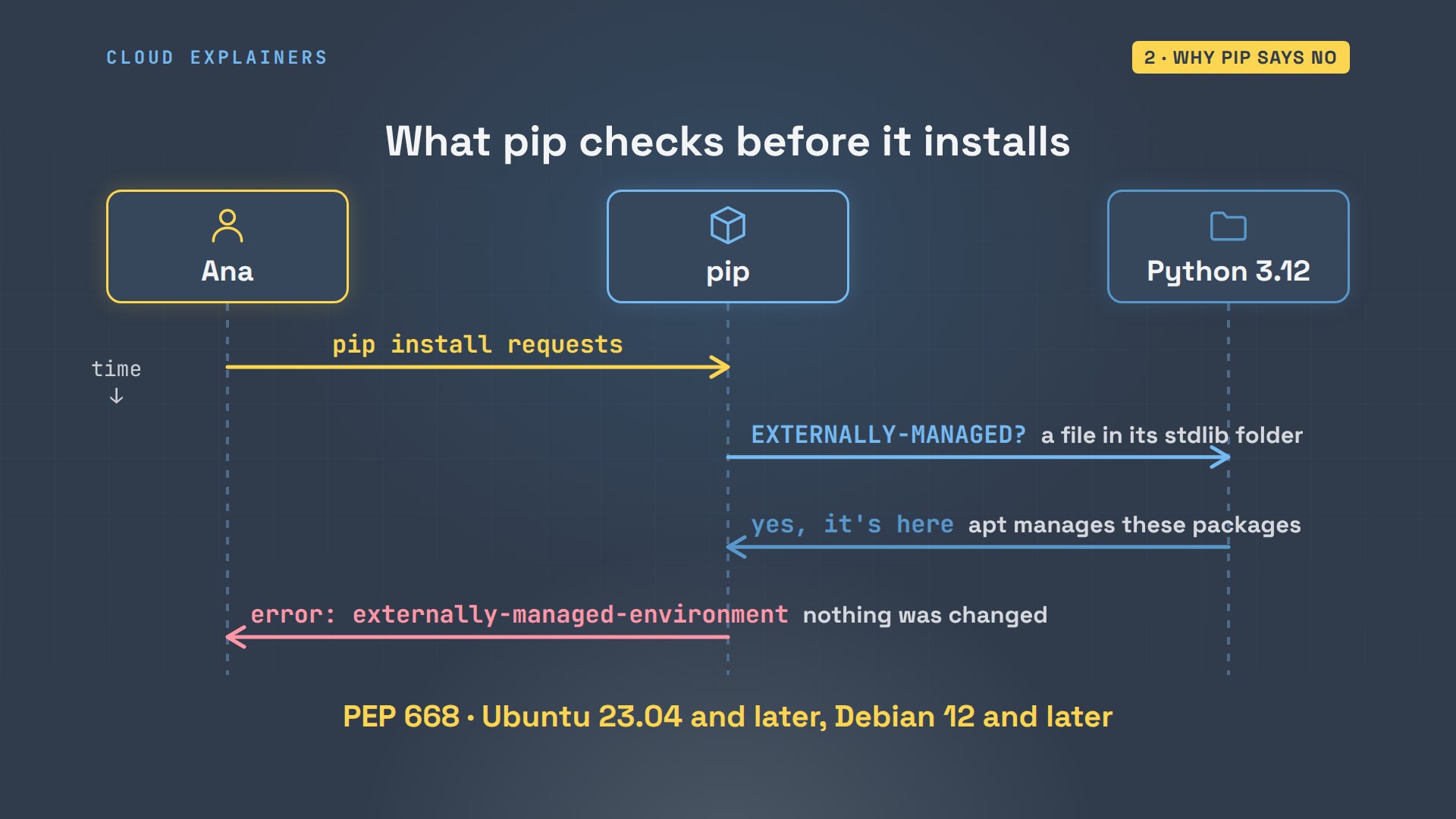
So what happened? Before pip installs anything, it checks the Python it belongs to for one file, called EXTERNALLY-MANAGED. On Ubuntu, that file is there. It means: someone else manages this Python's packages, so pip must not. So pip stops before it changes a thing, and prints the error. This rule is a Python standard, PEP 668, and Ubuntu has followed it since version 23.04.
Here's the file. dpkg, the tool under apt that records every file it installs, says an Ubuntu package put it there. Ask dpkg about the folder where Python packages live, and it names 23 Ubuntu packages that put files in it, even the Python library apt itself uses. And Ubuntu commands like add-apt-repository are Python programs that run on this same Python. You don't need to run these yourself: they only show who owns that folder.
ls /usr/lib/python3.12/EXTERNALLY-MANAGED/usr/lib/python3.12/EXTERNALLY-MANAGED
dpkg -S /usr/lib/python3.12/EXTERNALLY-MANAGEDlibpython3.12-stdlib:amd64: /usr/lib/python3.12/EXTERNALLY-MANAGED
dpkg -S /usr/lib/python3/dist-packagessoftware-properties-common, python3.12, python3-wheel, python3-wadllib, python3-software-properties, python3-six, python3-setuptools, python3-pyparsing, python3-pkg-resources, python3-pip, python3-oauthlib, python3-lazr.uri, python3-lazr.restfulclient, python3-launchpadlib, python3-jwt, python3-httplib2, python3-gi, python3-distro, python3-dbus, python3-cryptography, python3-cffi-backend:amd64, python3-blinker, python3-apt: /usr/lib/python3/dist-packages
head -1 /usr/bin/add-apt-repository#!/usr/bin/python3
That's the real problem: two installers, one folder. apt puts its Python packages there, and Ubuntu's tools are built and tested against exactly those versions. If pip swapped one for a newer version, apt would have no idea, and a tool you rely on could break. Even dash dash user is blocked, because those packages would be loaded by every Python program you run, Ubuntu's included.
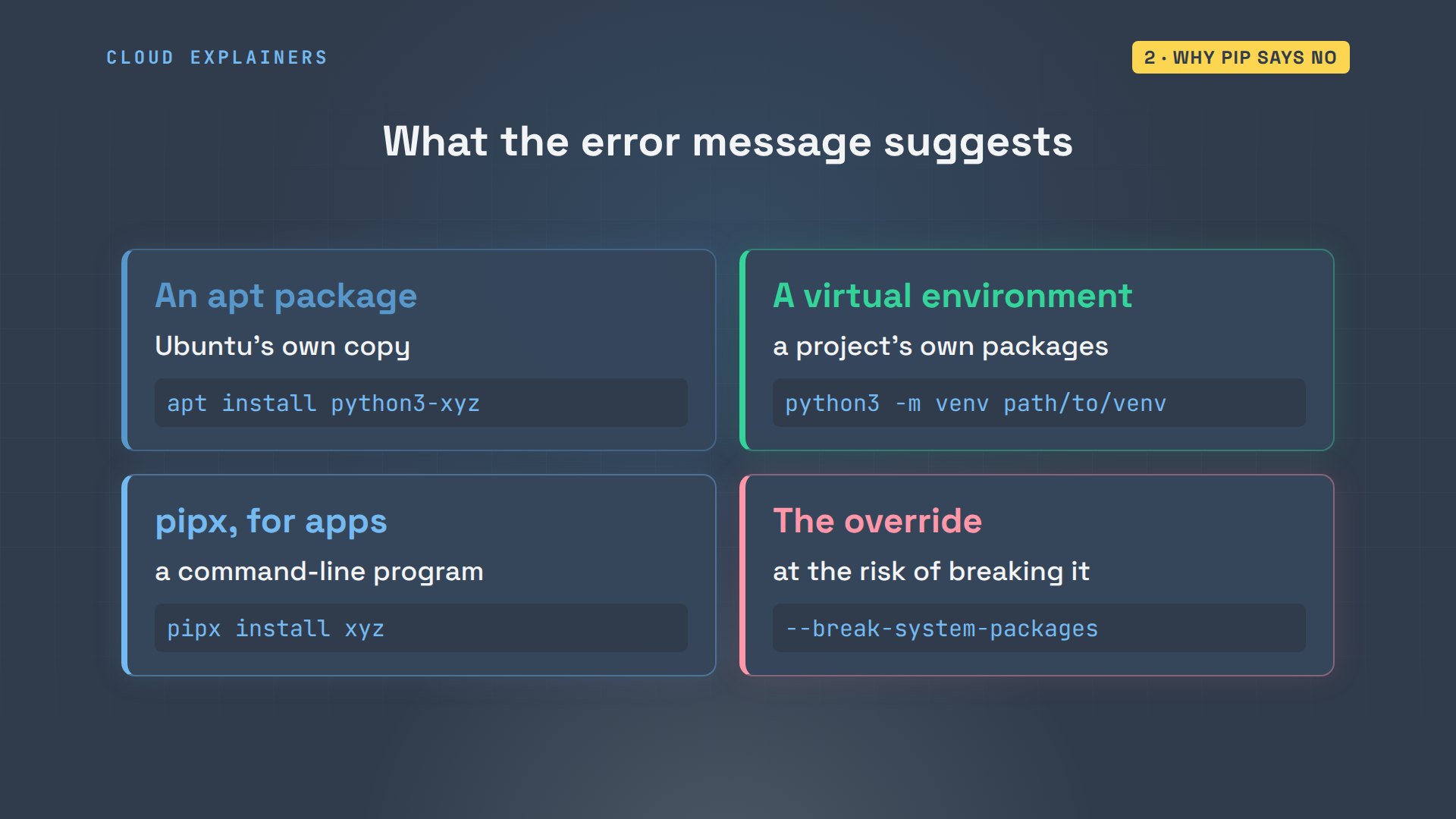
The good news: the error lists the ways out. Install the package from apt. Or make a virtual environment for your project. Or, for a program you run as a command, use pipx. The last line offers an override, and later we'll see what it really does.
The apt package
The first way is the simplest. Ana installs python3-requests with sudo apt. sudo runs a command as the administrator, so it asks for her password. Then she runs her script again. It prints the prices. apt installed requests version 2.31.0.
sudo apt install -y python3-requests[sudo] password for ana:
Reading package lists... Done
Building dependency tree... Done
Reading state information... Done
The following additional packages will be installed:
  python3-certifi python3-chardet python3-idna python3-urllib3
Suggested packages:
  python3-openssl python3-socks python-requests-doc python3-brotli
The following NEW packages will be installed:
  python3-certifi python3-chardet python3-idna python3-requests python3-urllib3
0 upgraded, 5 newly installed, 0 to remove and 5 not upgraded.
Need to get 478 kB of archives.
After this operation, 2556 kB of additional disk space will be used.
Get:1 http://archive.ubuntu.com/ubuntu noble/main amd64 python3-certifi all 2023.11.17-1 [165 kB]
Get:2 http://archive.ubuntu.com/ubuntu noble/main amd64 python3-chardet all 5.2.0+dfsg-1 [117 kB]
Get:3 http://archive.ubuntu.com/ubuntu noble-updates/main amd64 python3-idna all 3.6-2ubuntu0.2 [49.7 kB]
Get:4 http://archive.ubuntu.com/ubuntu noble-updates/main amd64 python3-urllib3 all 2.0.7-1ubuntu0.8 [95.9 kB]
Get:5 http://archive.ubuntu.com/ubuntu noble-updates/main amd64 python3-requests all 2.31.0+dfsg-1ubuntu1.2 [50.8 kB]
Fetched 478 kB in 0s (5237 kB/s)
debconf: delaying package configuration, since apt-utils is not installed

Selecting previously unselected package python3-certifi.
(Reading database ... 10903 files and directories currently installed.)
Preparing to unpack .../python3-certifi_2023.11.17-1_all.deb ...
Unpacking python3-certifi (2023.11.17-1) ...
Selecting previously unselected package python3-chardet.
Preparing to unpack .../python3-chardet_5.2.0+dfsg-1_all.deb ...
Unpacking python3-chardet (5.2.0+dfsg-1) ...
Selecting previously unselected package python3-idna.
Preparing to unpack .../python3-idna_3.6-2ubuntu0.2_all.deb ...
Unpacking python3-idna (3.6-2ubuntu0.2) ...
Selecting previously unselected package python3-urllib3.
Preparing to unpack .../python3-urllib3_2.0.7-1ubuntu0.8_all.deb ...
Unpacking python3-urllib3 (2.0.7-1ubuntu0.8) ...
Selecting previously unselected package python3-requests.
Preparing to unpack .../python3-requests_2.31.0+dfsg-1ubuntu1.2_all.deb ...
Unpacking python3-requests (2.31.0+dfsg-1ubuntu1.2) ...
Setting up python3-chardet (5.2.0+dfsg-1) ...
Setting up python3-certifi (2023.11.17-1) ...
Setting up python3-idna (3.6-2ubuntu0.2) ...
Setting up python3-urllib3 (2.0.7-1ubuntu0.8) ...
Setting up python3-requests (2.31.0+dfsg-1ubuntu1.2) ...
python3 prices.pyEarl Grey    $6.50
Sencha       $8.00
Chai         $5.75
apt list --installed python3-requestsListing... Done
python3-requests/noble-updates,noble-security,now 2.31.0+dfsg-1ubuntu1.2 all [installed]
N: There is 1 additional version. Please use the '-a' switch to see it
Ubuntu packages many libraries this way, named python3 dash and the library's name. On the map, apt did the installing, so the new library lands in the system Python's folder with apt's records up to date. sudo was needed because that folder belongs to the whole system, not to Ana. Her script imports it from there, and Ubuntu's tools keep working.
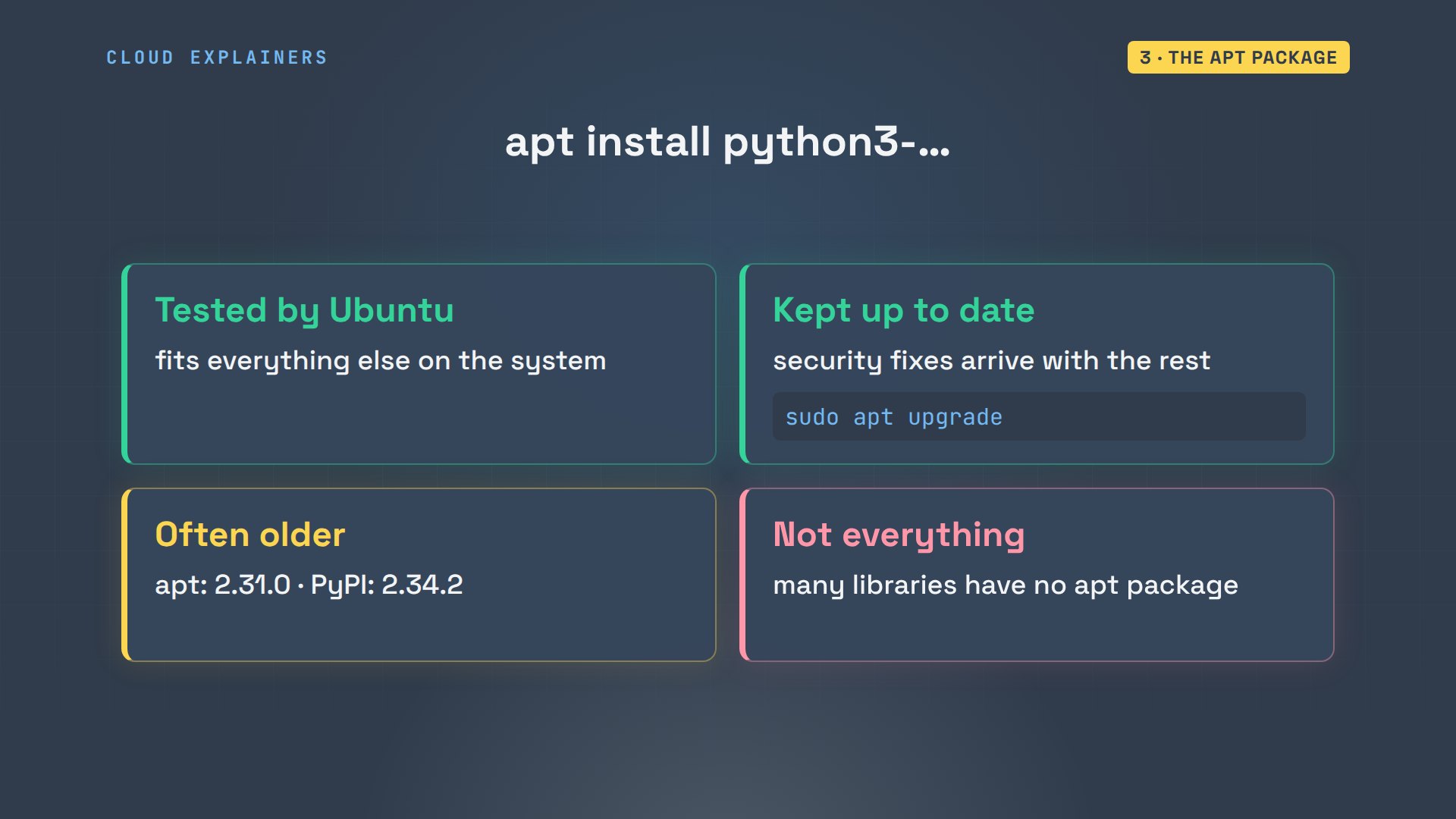
That's the right choice for a script that only needs common libraries. Ubuntu tested this version with everything else it ships, and apt upgrade keeps it patched. The catch: it's often older. PyPI, where pip downloads from, had 2.34.2 that day. And many libraries aren't packaged at all.
A virtual environment
For newer versions, or any library from PyPI, use a virtual environment: a venv. It's just a folder inside your project. It has its own pip, and its own place for packages. It borrows the system's Python program to run, but never touches the packages apt installed. So pip is allowed to install anything there.
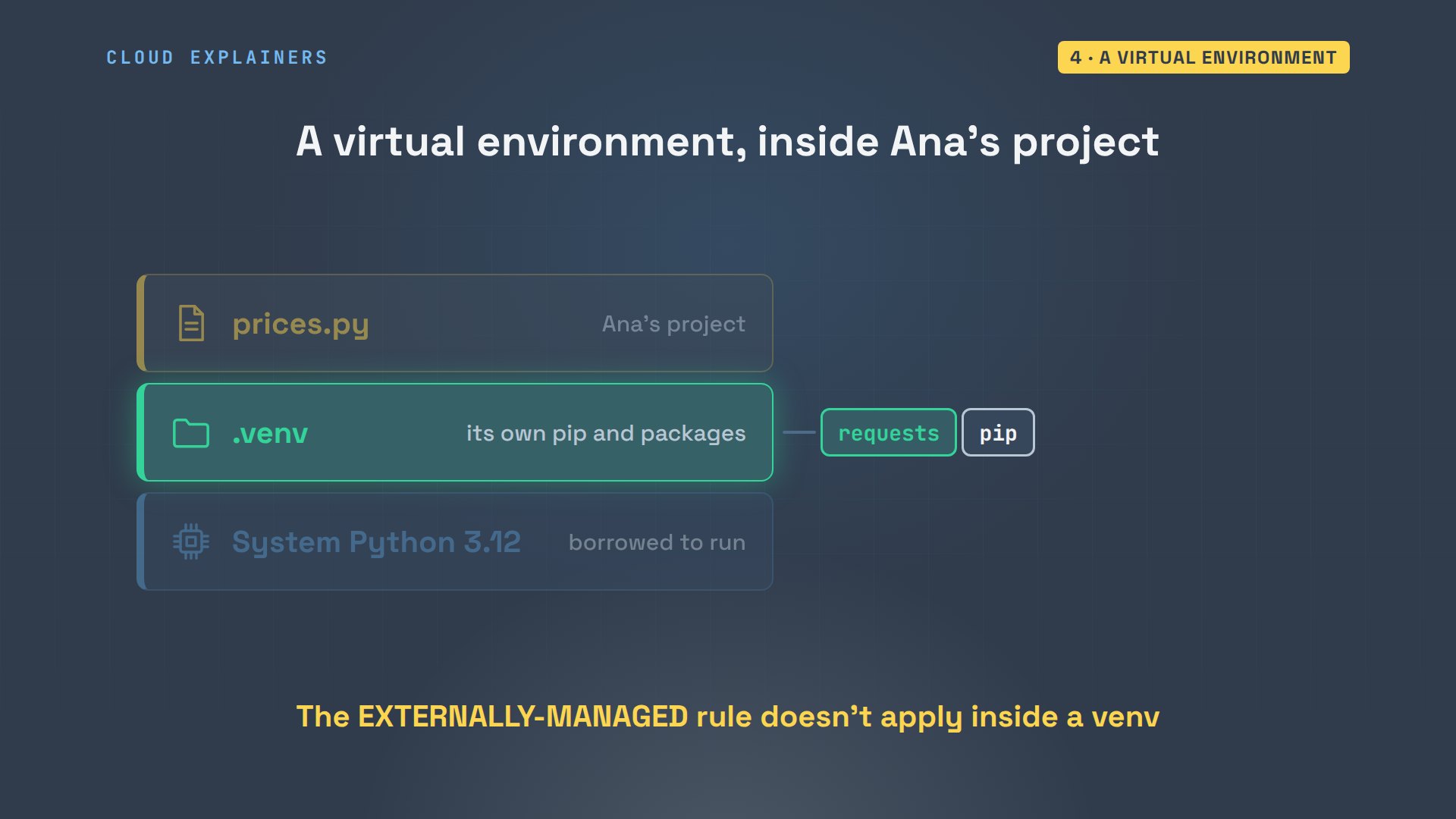
One command makes it. python3 is the system Python. Dash m venv runs its built-in venv module. And dot venv is the folder to create, the name most projects use.

On a fresh Ubuntu, the first try fails too. Ubuntu ships part of the venv module separately, in one more apt package, python3-venv, and the message names it. Ana installs it, with sudo and apt.
python3 -m venv .venvThe virtual environment was not created successfully because ensurepip is not
available.  On Debian/Ubuntu systems, you need to install the python3-venv
package using the following command.

    apt install python3.12-venv

You may need to use sudo with that command.  After installing the python3-venv
package, recreate your virtual environment.

Failing command: /home/ana/prices/.venv/bin/python3
sudo apt install -y python3-venvReading package lists... Done
Building dependency tree... Done
Reading state information... Done
The following additional packages will be installed:
  python3-pip-whl python3-setuptools-whl python3.12-venv
The following NEW packages will be installed:
  python3-pip-whl python3-setuptools-whl python3-venv python3.12-venv
0 upgraded, 4 newly installed, 0 to remove and 5 not upgraded.
Need to get 2430 kB of archives.
After this operation, 2783 kB of additional disk space will be used.
Get:1 http://archive.ubuntu.com/ubuntu noble-updates/universe amd64 python3-pip-whl all 24.0+dfsg-1ubuntu1.3 [1707 kB]
Get:2 http://archive.ubuntu.com/ubuntu noble-updates/universe amd64 python3-setuptools-whl all 68.1.2-2ubuntu1.2 [716 kB]
Get:3 http://archive.ubuntu.com/ubuntu noble-updates/universe amd64 python3.12-venv amd64 3.12.3-1ubuntu0.17 [5684 B]
Get:4 http://archive.ubuntu.com/ubuntu noble-updates/universe amd64 python3-venv amd64 3.12.3-0ubuntu2.1 [1032 B]
Fetched 2430 kB in 1s (2127 kB/s)
debconf: delaying package configuration, since apt-utils is not installed

Selecting previously unselected package python3-pip-whl.
(Reading database ... 11075 files and directories currently installed.)
Preparing to unpack .../python3-pip-whl_24.0+dfsg-1ubuntu1.3_all.deb ...
Unpacking python3-pip-whl (24.0+dfsg-1ubuntu1.3) ...
Selecting previously unselected package python3-setuptools-whl.
Preparing to unpack .../python3-setuptools-whl_68.1.2-2ubuntu1.2_all.deb ...
Unpacking python3-setuptools-whl (68.1.2-2ubuntu1.2) ...
Selecting previously unselected package python3.12-venv.
Preparing to unpack .../python3.12-venv_3.12.3-1ubuntu0.17_amd64.deb ...
Unpacking python3.12-venv (3.12.3-1ubuntu0.17) ...
Selecting previously unselected package python3-venv.
Preparing to unpack .../python3-venv_3.12.3-0ubuntu2.1_amd64.deb ...
Unpacking python3-venv (3.12.3-0ubuntu2.1) ...
Setting up python3-setuptools-whl (68.1.2-2ubuntu1.2) ...
Setting up python3-pip-whl (24.0+dfsg-1ubuntu1.3) ...
Setting up python3.12-venv (3.12.3-1ubuntu0.17) ...
Setting up python3-venv (3.12.3-0ubuntu2.1) ...
Now the venv command works, and makes the folder. source runs the activate script inside this terminal, switching it to the venv, and the prompt now starts with dot venv. which shows that python and pip now mean the copies inside the folder.
python3 -m venv .venv
source .venv/bin/activate
(.venv) ana@laptop:~/prices$ which python pip/home/ana/prices/.venv/bin/python
/home/ana/prices/.venv/bin/pip
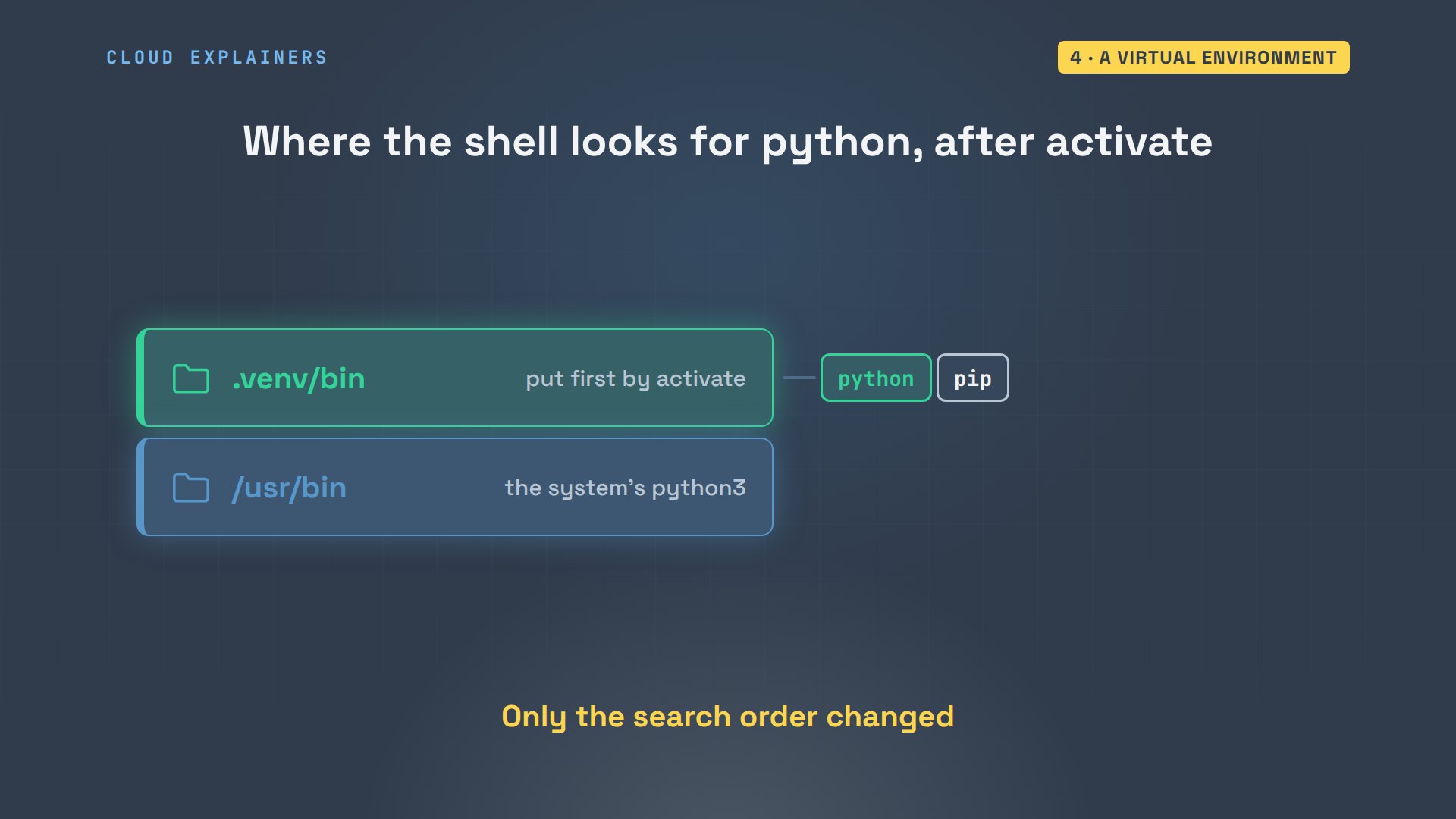
What did activate change? When you type a command, the shell searches a list of folders, called the path, in order. Activate puts the venv's bin folder at the front. So python now finds the venv's copy first, and the system's only after it. Deactivate takes it off again. Nothing was installed or moved.
So the same pip install that failed now just works. pip downloads requests 2.34.2 from PyPI, with 4 libraries it needs. And the script prints the prices.
(.venv) ana@laptop:~/prices$ pip install requestsCollecting requests
  Downloading requests-2.34.2-py3-none-any.whl.metadata (4.8 kB)
Collecting charset_normalizer<4,>=2 (from requests)
  Downloading charset_normalizer-3.5.2-cp312-cp312-manylinux2014_x86_64.manylinux_2_17_x86_64.manylinux_2_28_x86_64.whl.metadata (46 kB)
     ━━━━━━━━━━━━━━━━━━━━━━━━━━━━━━━━━━━━━━━━ 46.4/46.4 kB 1.7 MB/s eta 0:00:00

Collecting idna<4,>=2.5 (from requests)
  Downloading idna-3.20-py3-none-any.whl.metadata (7.2 kB)
Collecting urllib3<3,>=1.26 (from requests)
  Downloading urllib3-2.8.0-py3-none-any.whl.metadata (7.4 kB)
Collecting certifi>=2023.5.7 (from requests)
  Downloading certifi-2026.10.23-py3-none-any.whl.metadata (2.5 kB)
Downloading requests-2.34.2-py3-none-any.whl (73 kB)
   ━━━━━━━━━━━━━━━━━━━━━━━━━━━━━━━━━━━━━━━━ 73.1/73.1 kB 3.3 MB/s eta 0:00:00

Downloading certifi-2026.10.23-py3-none-any.whl (135 kB)
   ━━━━━━━━━━━━━━━━━━━━━━━━━━━━━━━━━━━━━━━━ 135.1/135.1 kB 6.0 MB/s eta 0:00:00

Downloading charset_normalizer-3.5.2-cp312-cp312-manylinux2014_x86_64.manylinux_2_17_x86_64.manylinux_2_28_x86_64.whl (257 kB)
   ━━━━━━━━━━━━━━━━━━━━━━━━━━━━━━━━━━━━━━━━ 257.6/257.6 kB 10.4 MB/s eta 0:00:00

Downloading idna-3.20-py3-none-any.whl (69 kB)
   ━━━━━━━━━━━━━━━━━━━━━━━━━━━━━━━━━━━━━━━━ 69.6/69.6 kB 3.3 MB/s eta 0:00:00

Downloading urllib3-2.8.0-py3-none-any.whl (135 kB)
   ━━━━━━━━━━━━━━━━━━━━━━━━━━━━━━━━━━━━━━━━ 135.7/135.7 kB 5.6 MB/s eta 0:00:00

Installing collected packages: urllib3, idna, charset_normalizer, certifi, requests
Successfully installed certifi-2026.10.23 charset_normalizer-3.5.2 idna-3.20 requests-2.34.2 urllib3-2.8.0
(.venv) ana@laptop:~/prices$ python prices.pyEarl Grey    $6.50
Sencha       $8.00
Chai         $5.75
On the map, pip now writes only into Ana's own folder. Her script runs from the venv, and everything apt installed is untouched. Each project gets its own venv, so two projects can even need different versions of the same library. And if a venv ever gets into a mess, delete the folder and make it again.
Ana saves the exact versions with pip freeze, into a file called requirements.txt. Then she types deactivate, to leave the environment. Outside it, python3 dash c runs one line of Python, and the system Python still has the requests from apt, 2.31.0. Two versions, no conflict.
(.venv) ana@laptop:~/prices$ pip freeze > requirements.txt
(.venv) ana@laptop:~/prices$ cat requirements.txtcertifi==2026.10.23
charset-normalizer==3.5.2
idna==3.20
requests==2.34.2
urllib3==2.8.0
(.venv) ana@laptop:~/prices$ deactivate
python3 -c 'import requests; print(requests.__version__)'2.31.0
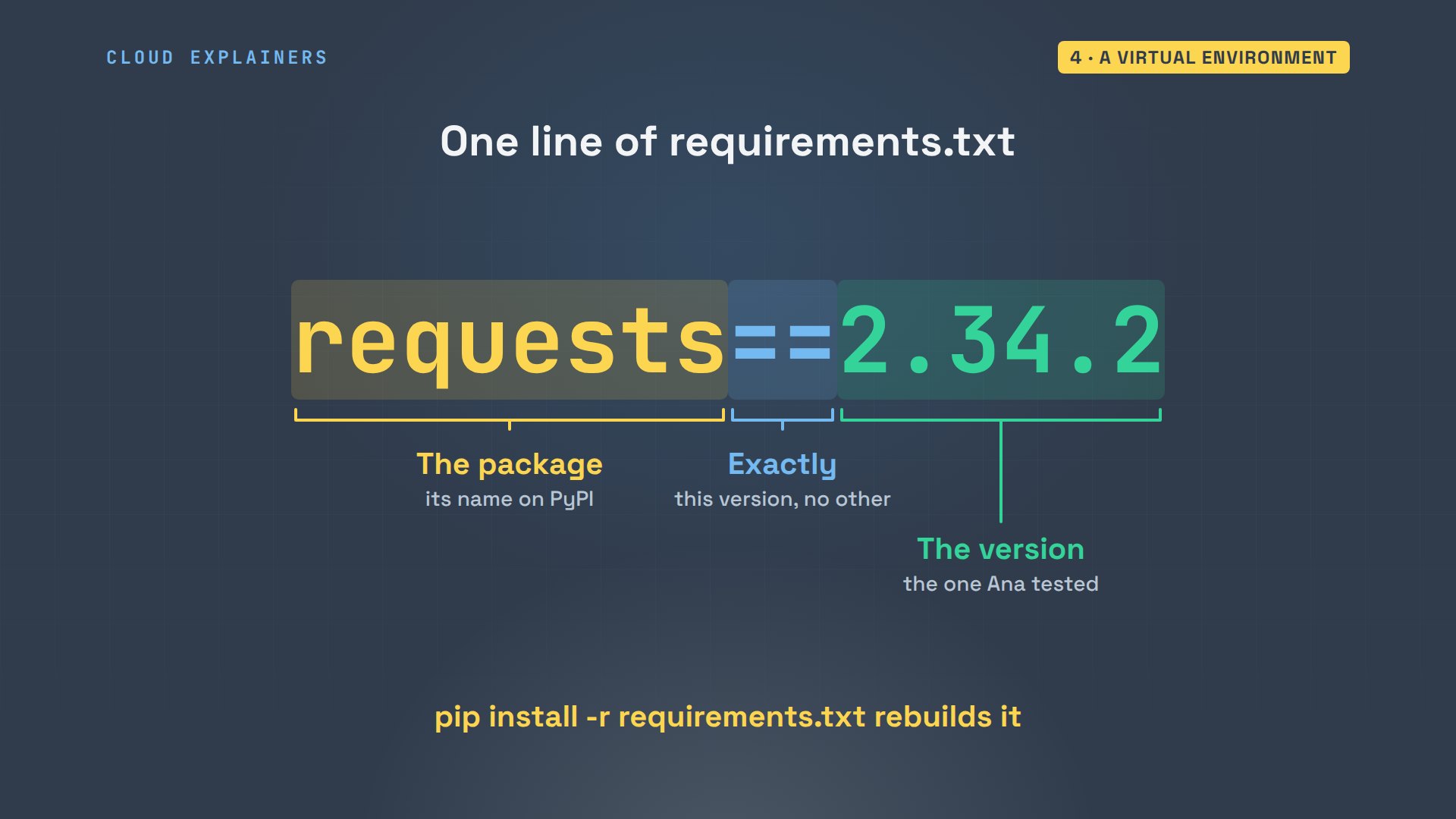
Each line of requirements.txt pins one package to one version. The name, two equals signs, which mean exactly this version, and the version itself. Keep this file with your code, and anyone can rebuild the same environment, including you, on your next laptop.
pipx for apps
The third way, pipx, is for programs you run as commands, not libraries you import. Ana wants httpie, a friendly tool for testing web addresses. pipx gives every app its own hidden venv, then puts the app's command in a bin folder in her home, so she can run it from any terminal.
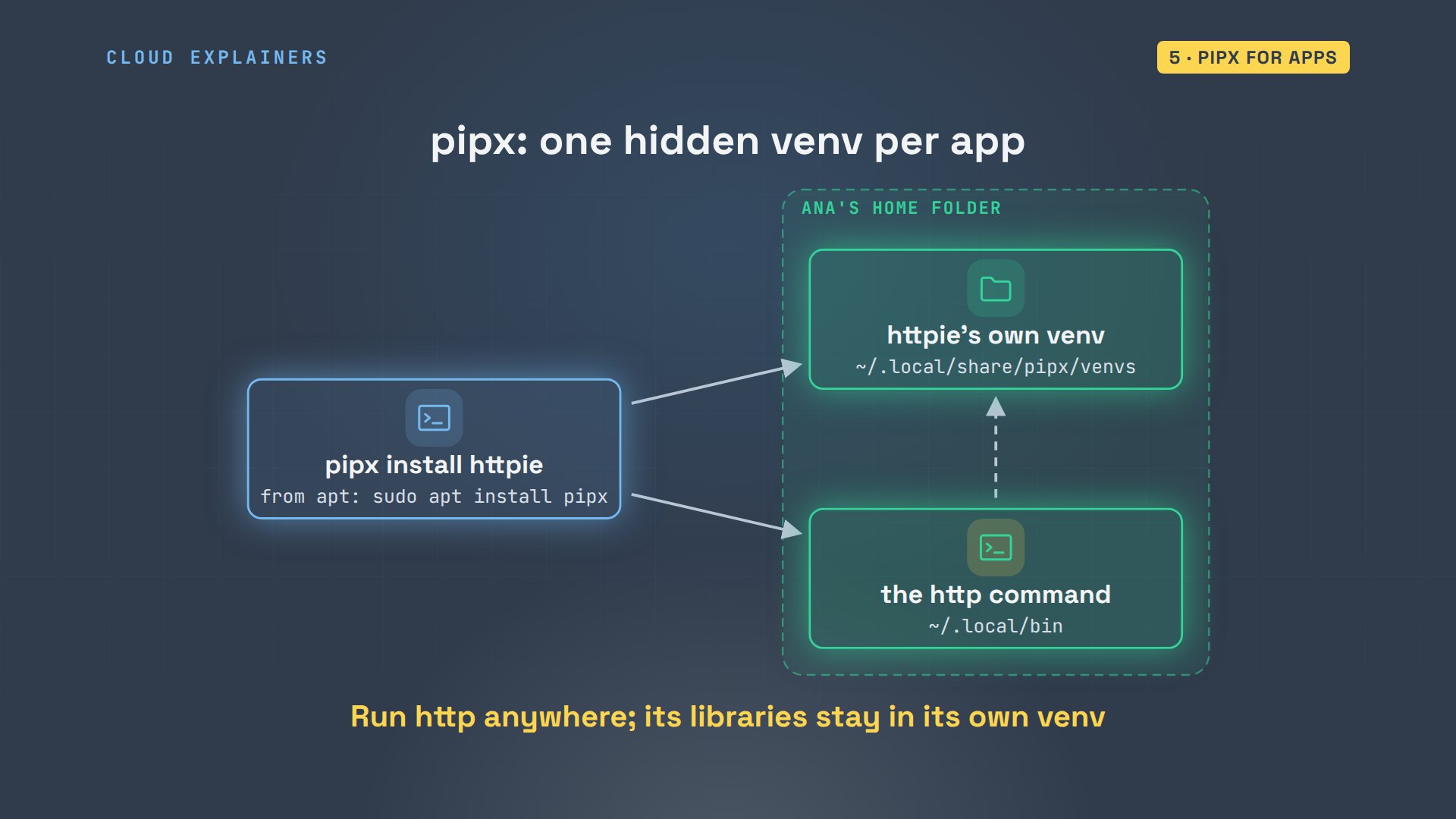
pipx comes from apt. Then she types pipx install httpie. It installs version 3.2.4, and warns that the bin folder isn't on her path yet. pipx ensurepath adds it, and says to open a new terminal.
sudo apt install -y pipxReading package lists... Done
Building dependency tree... Done
Reading state information... Done
The following additional packages will be installed:
  python3-argcomplete python3-click python3-colorama python3-packaging python3-platformdirs
  python3-psutil python3-userpath
The following NEW packages will be installed:
  pipx python3-argcomplete python3-click python3-colorama python3-packaging
  python3-platformdirs python3-psutil python3-userpath
0 upgraded, 8 newly installed, 0 to remove and 5 not upgraded.
Need to get 1194 kB of archives.
After this operation, 5564 kB of additional disk space will be used.
Get:1 http://archive.ubuntu.com/ubuntu noble-updates/universe amd64 python3-argcomplete all 3.1.4-1ubuntu0.1 [33.8 kB]
Get:2 http://archive.ubuntu.com/ubuntu noble/main amd64 python3-packaging all 24.0-1 [41.1 kB]
Get:3 http://archive.ubuntu.com/ubuntu noble/main amd64 python3-platformdirs all 4.2.0-1 [16.1 kB]
Get:4 http://archive.ubuntu.com/ubuntu noble/main amd64 python3-colorama all 0.4.6-4 [32.1 kB]
Get:5 http://archive.ubuntu.com/ubuntu noble/main amd64 python3-click all 8.1.6-2 [79.0 kB]
Get:6 http://archive.ubuntu.com/ubuntu noble/universe amd64 python3-userpath all 1.9.1-1 [9416 B]
Get:7 http://archive.ubuntu.com/ubuntu noble/universe amd64 pipx all 1.4.3-1 [787 kB]
Get:8 http://archive.ubuntu.com/ubuntu noble/main amd64 python3-psutil amd64 5.9.8-2build2 [195 kB]
Fetched 1194 kB in 0s (11.9 MB/s)
debconf: delaying package configuration, since apt-utils is not installed

Selecting previously unselected package python3-argcomplete.
(Reading database ... 11092 files and directories currently installed.)
Preparing to unpack .../0-python3-argcomplete_3.1.4-1ubuntu0.1_all.deb ...
Unpacking python3-argcomplete (3.1.4-1ubuntu0.1) ...
Selecting previously unselected package python3-packaging.
Preparing to unpack .../1-python3-packaging_24.0-1_all.deb ...
Unpacking python3-packaging (24.0-1) ...
Selecting previously unselected package python3-platformdirs.
Preparing to unpack .../2-python3-platformdirs_4.2.0-1_all.deb ...
Unpacking python3-platformdirs (4.2.0-1) ...
Selecting previously unselected package python3-colorama.
Preparing to unpack .../3-python3-colorama_0.4.6-4_all.deb ...
Unpacking python3-colorama (0.4.6-4) ...
Selecting previously unselected package python3-click.
Preparing to unpack .../4-python3-click_8.1.6-2_all.deb ...
Unpacking python3-click (8.1.6-2) ...
Selecting previously unselected package python3-userpath.
Preparing to unpack .../5-python3-userpath_1.9.1-1_all.deb ...
Unpacking python3-userpath (1.9.1-1) ...
Selecting previously unselected package pipx.
Preparing to unpack .../6-pipx_1.4.3-1_all.deb ...
Unpacking pipx (1.4.3-1) ...
Selecting previously unselected package python3-psutil.
Preparing to unpack .../7-python3-psutil_5.9.8-2build2_amd64.deb ...
Unpacking python3-psutil (5.9.8-2build2) ...
Setting up python3-colorama (0.4.6-4) ...
Setting up python3-click (8.1.6-2) ...
Setting up python3-platformdirs (4.2.0-1) ...
Setting up python3-psutil (5.9.8-2build2) ...
Setting up python3-packaging (24.0-1) ...
Setting up python3-argcomplete (3.1.4-1ubuntu0.1) ...
Setting up python3-userpath (1.9.1-1) ...
Setting up pipx (1.4.3-1) ...
pipx install httpieinstalled package httpie 3.2.4, installed using Python 3.12.3 These apps are now globally available - http - httpie - https These manual pages are now globally available - man1/http.1 - man1/httpie.1 - man1/https.1 ⚠️ Note: '/home/ana/.local/bin' is not on your PATH environment variable. These apps will not be globally accessible until your PATH is updated. Run `pipx ensurepath` to automatically add it, or manually modify your PATH in your shell's config file (i.e. ~/.bashrc). done! ✨ 🌟 ✨
pipx ensurepathSuccess! Added /home/ana/.local/bin to the PATH environment variable.

Consider adding shell completions for pipx. Run 'pipx completions' for instructions.

You will need to open a new terminal or re-login for the PATH changes to take effect.

Otherwise pipx is ready to go! ✨ 🌟 ✨
In a new terminal, the http command just works. Ana asks her shop for the price list, and httpie prints the answer: status 200, and the prices.
http localhost:8000/prices.jsonHTTP/1.0 200 OK
Content-Length: 48
Content-type: application/json
Date: Thu, 05 Nov 2026 01:54:32 GMT
Last-Modified: Thu, 05 Nov 2026 01:40:39 GMT
Server: SimpleHTTP/0.6 Python/3.12.3

{
    "Chai": 5.75,
    "Earl Grey": 6.5,
    "Sencha": 8.0
}
On the map, pipx is a separate space of its own. Each app's environment sits in Ana's home folder, away from her project, and away from the system Python. apt only installed pipx itself.
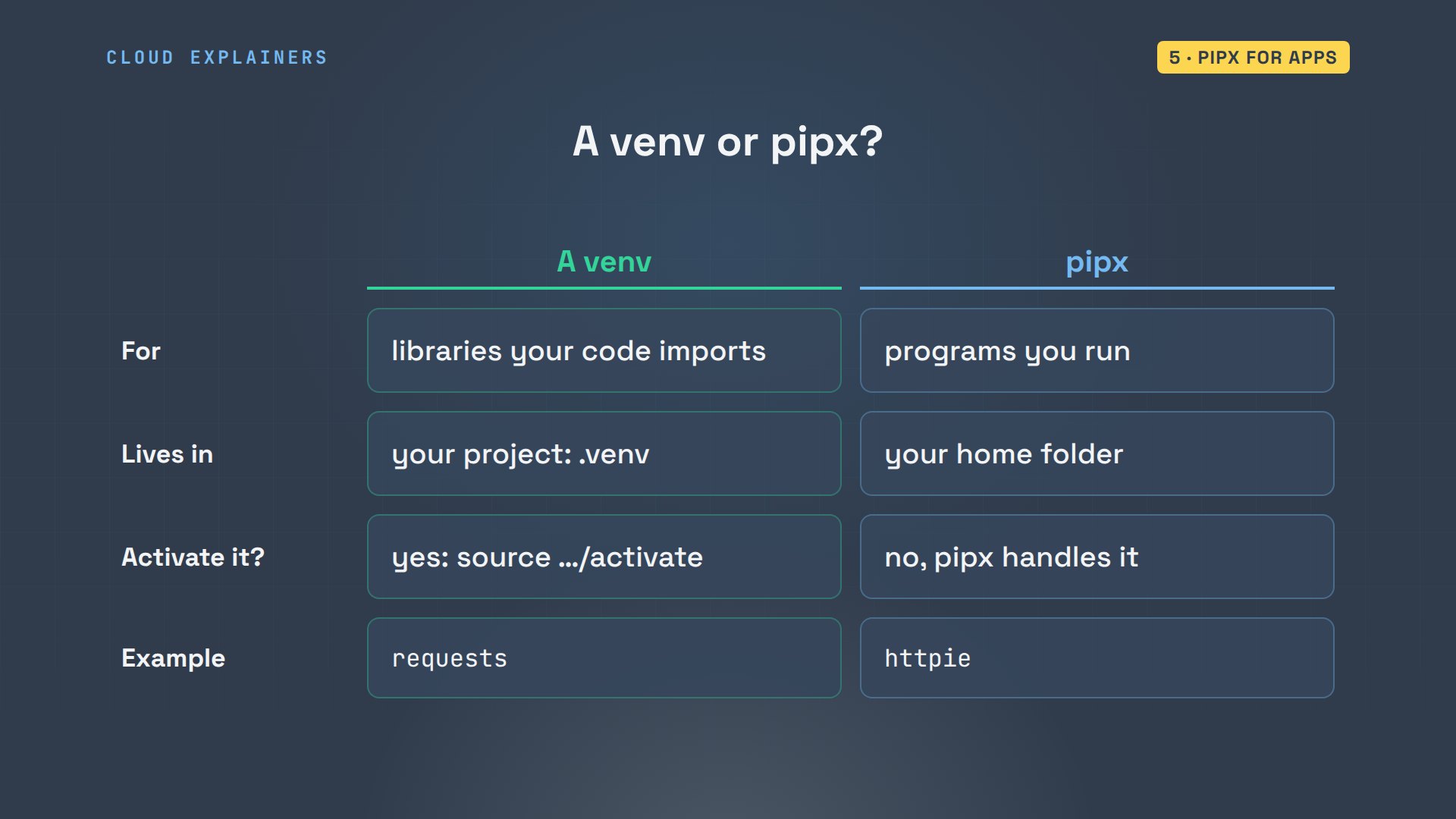
So which one when? A venv is for libraries your own code imports, and it lives in your project. pipx is for programs you run, and it lives in your home. With a venv, you activate it; pipx does that part for you.
Forcing it
Now the override. Many answers online say: add dash dash break system packages. Ana tries it with sudo, to upgrade requests. Read what pip says: it uninstalled requests 2.31.0, the copy from apt, and installed 2.34.2 into user local.
sudo pip install --break-system-packages --upgrade requests[sudo] password for ana:
Requirement already satisfied: requests in /usr/lib/python3/dist-packages (2.31.0)
Collecting requests
  Downloading requests-2.34.2-py3-none-any.whl.metadata (4.8 kB)
Collecting charset_normalizer<4,>=2 (from requests)
  Downloading charset_normalizer-3.5.2-cp312-cp312-manylinux2014_x86_64.manylinux_2_17_x86_64.manylinux_2_28_x86_64.whl.metadata (46 kB)
     ━━━━━━━━━━━━━━━━━━━━━━━━━━━━━━━━━━━━━━━ 46.4/46.4 kB 853.9 kB/s eta 0:00:00

Requirement already satisfied: idna<4,>=2.5 in /usr/lib/python3/dist-packages (from requests) (3.6)
Requirement already satisfied: urllib3<3,>=1.26 in /usr/lib/python3/dist-packages (from requests) (2.0.7)
Requirement already satisfied: certifi>=2023.5.7 in /usr/lib/python3/dist-packages (from requests) (2023.11.17)
Downloading requests-2.34.2-py3-none-any.whl (73 kB)
   ━━━━━━━━━━━━━━━━━━━━━━━━━━━━━━━━━━━━━━━━ 73.1/73.1 kB 1.9 MB/s eta 0:00:00

Downloading charset_normalizer-3.5.2-cp312-cp312-manylinux2014_x86_64.manylinux_2_17_x86_64.manylinux_2_28_x86_64.whl (257 kB)
   ━━━━━━━━━━━━━━━━━━━━━━━━━━━━━━━━━━━━━━━━ 257.6/257.6 kB 4.4 MB/s eta 0:00:00

Installing collected packages: charset_normalizer, requests
  Attempting uninstall: requests
    Found existing installation: requests 2.31.0
    Uninstalling requests-2.31.0:
      Successfully uninstalled requests-2.31.0
Successfully installed charset_normalizer-3.5.2 requests-2.34.2
WARNING: Running pip as the 'root' user can result in broken permissions and conflicting behaviour with the system package manager. It is recommended to use a virtual environment instead: https://pip.pypa.io/warnings/venv
python3 -c 'import requests; print(requests.__version__, requests.__file__)'2.34.2 /usr/local/lib/python3.12/dist-packages/requests/__init__.py
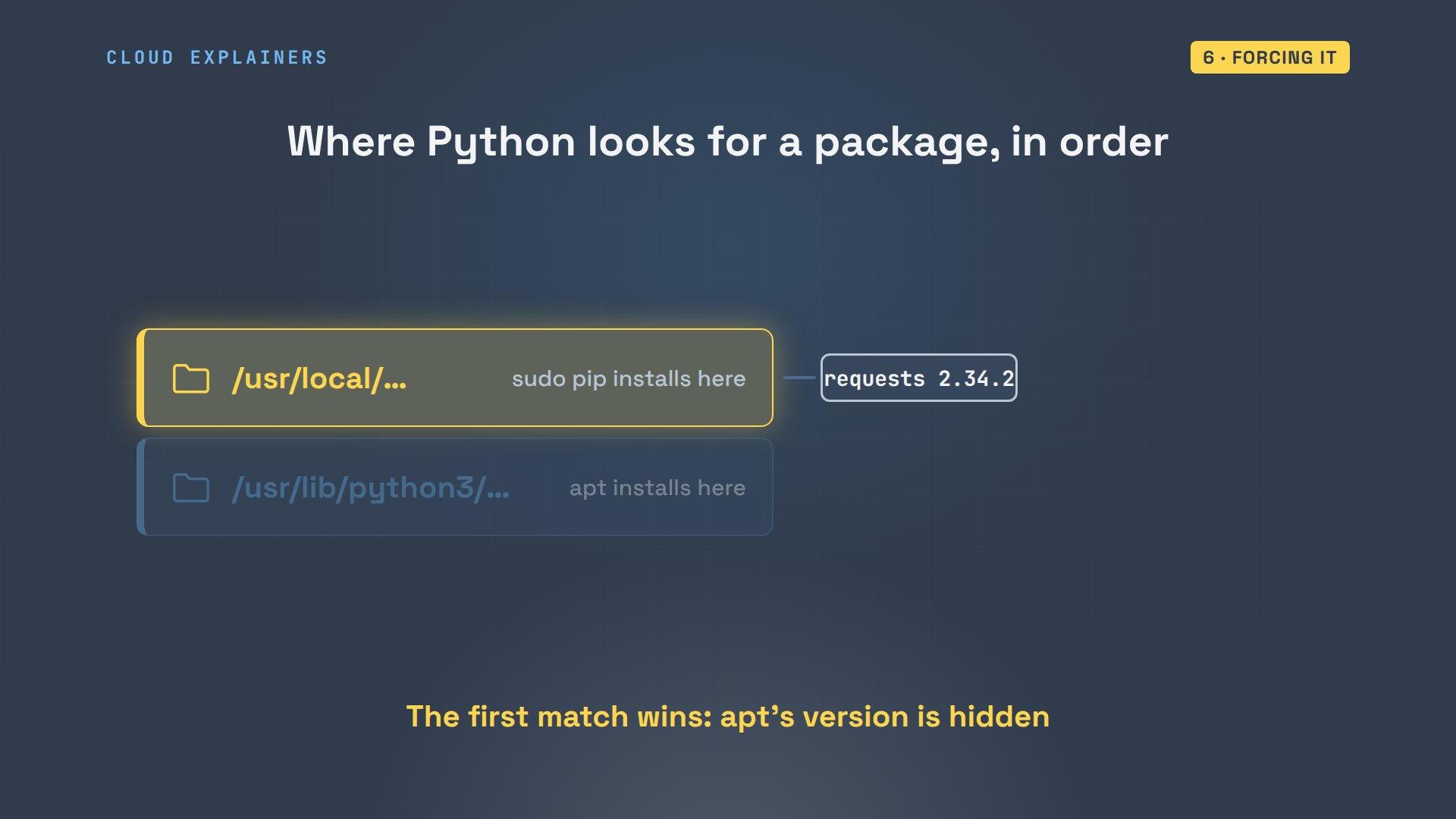
Why did Python pick pip's copy? Python searches its folders in order. On Ubuntu, the folder sudo pip writes to, user local, comes first. the folder apt uses comes after it. So whatever pip puts there quietly wins over what apt installed. Ubuntu's own tools would load it too, a version they were never tested with.
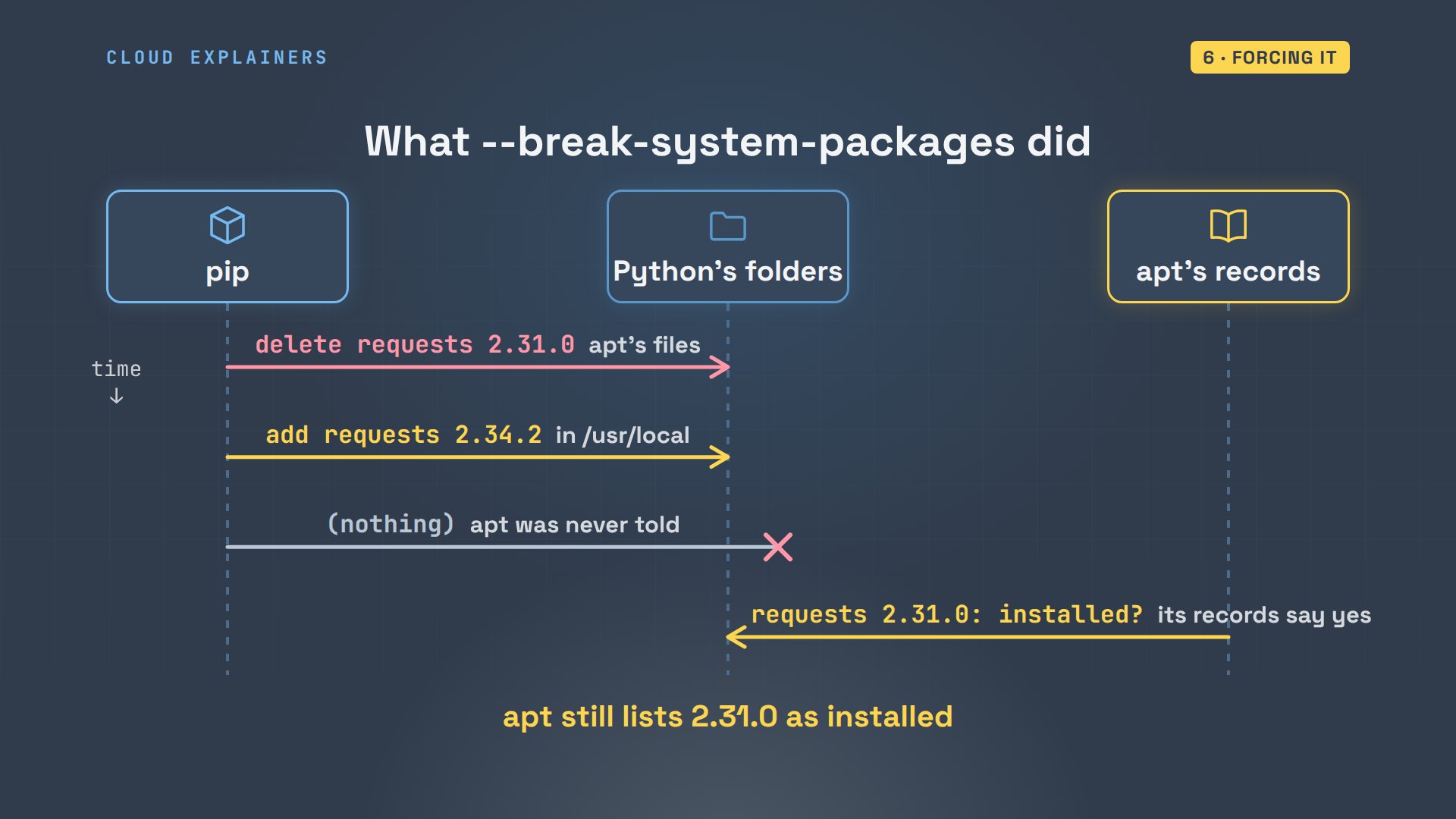
Here's what that did. pip deleted the files apt had installed, and put its own copy somewhere else. apt was never told. Its records still say version 2.31.0 is installed. From now on, the two disagree, and that's how systems quietly break.
Watch it break. Ana changes her mind and uninstalls pip's copy. Now Python can't find requests at all. Yet apt still lists it as installed. dpkg dash dash verify checks the files apt installed against its records, and they're missing.
sudo pip uninstall -y --break-system-packages requestsFound existing installation: requests 2.34.2
Uninstalling requests-2.34.2:
  Successfully uninstalled requests-2.34.2
WARNING: Running pip as the 'root' user can result in broken permissions and conflicting behaviour with the system package manager. It is recommended to use a virtual environment instead: https://pip.pypa.io/warnings/venv
python3 -c 'import requests; print(requests.__version__, requests.__file__)'Traceback (most recent call last):
  File "<string>", line 1, in <module>
ModuleNotFoundError: No module named 'requests'
apt list --installed python3-requestsListing... Done
python3-requests/noble-updates,noble-security,now 2.31.0+dfsg-1ubuntu1.2 all [installed]
N: There is 1 additional version. Please use the '-a' switch to see it
dpkg --verify python3-requests | head -4missing     /usr/lib/python3/dist-packages/requests
missing     /usr/lib/python3/dist-packages/requests/__init__.py
missing     /usr/lib/python3/dist-packages/requests/__version__.py
missing     /usr/lib/python3/dist-packages/requests/_internal_utils.py
To repair it, reinstall the apt package. Python finds 2.31.0 again, in the folder apt uses.
sudo apt install --reinstall -y python3-requestsReading package lists... Done
Building dependency tree... Done
Reading state information... Done
0 upgraded, 0 newly installed, 1 reinstalled, 0 to remove and 5 not upgraded.
Need to get 50.8 kB of archives.
After this operation, 0 B of additional disk space will be used.
Get:1 http://archive.ubuntu.com/ubuntu noble-updates/main amd64 python3-requests all 2.31.0+dfsg-1ubuntu1.2 [50.8 kB]
Fetched 50.8 kB in 0s (143 kB/s)
debconf: delaying package configuration, since apt-utils is not installed

(Reading database ... 11454 files and directories currently installed.)
Preparing to unpack .../python3-requests_2.31.0+dfsg-1ubuntu1.2_all.deb ...
Unpacking python3-requests (2.31.0+dfsg-1ubuntu1.2) over (2.31.0+dfsg-1ubuntu1.2) ...
Setting up python3-requests (2.31.0+dfsg-1ubuntu1.2) ...
python3 -c 'import requests; print(requests.__version__, requests.__file__)'2.31.0 /usr/lib/python3/dist-packages/requests/__init__.py
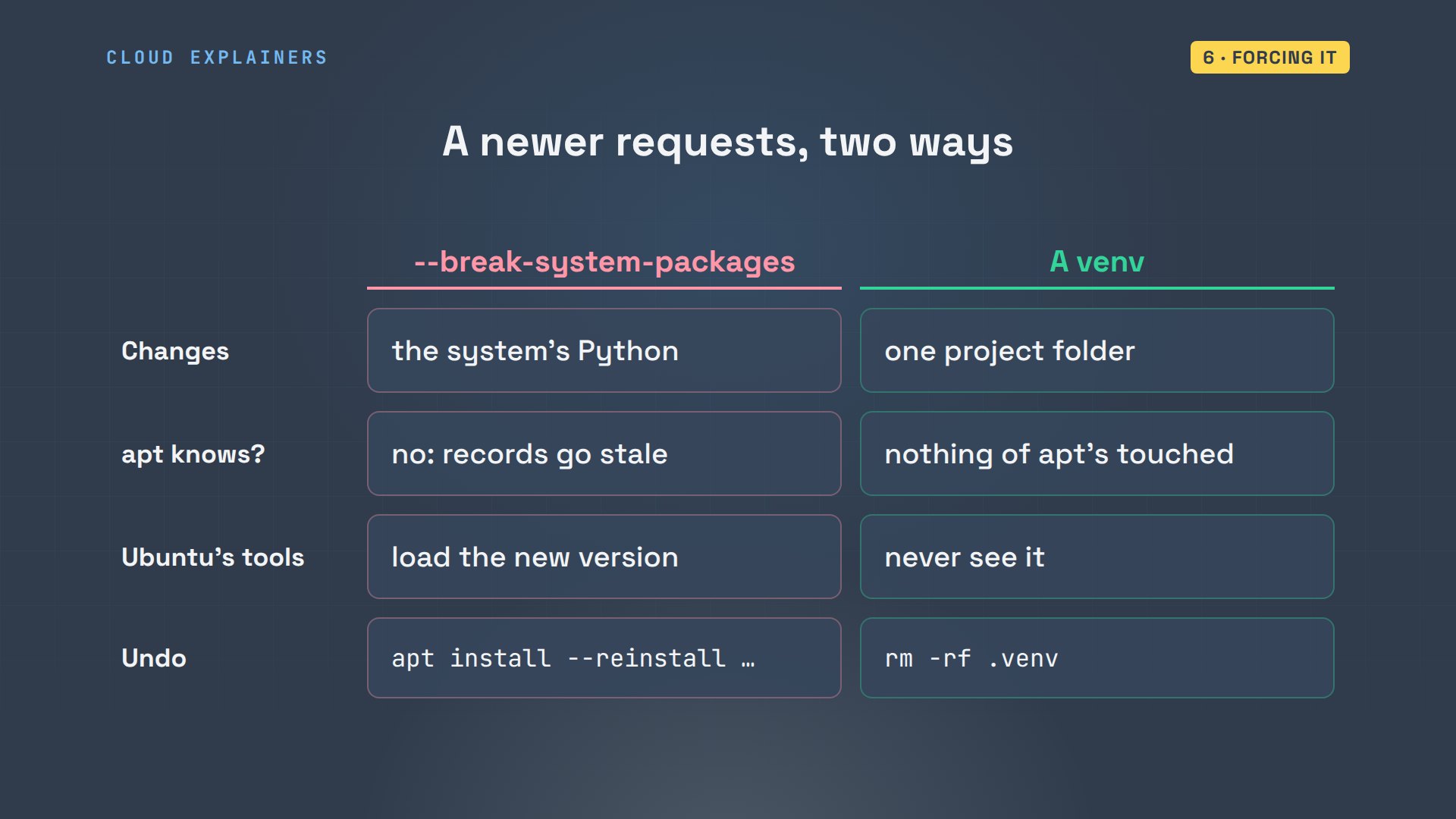
So compare the two ways to get a newer requests. The override changes the Python Ubuntu itself runs on; a venv changes only your folder. The override hides changes from apt; a venv leaves apt in charge. And undoing a mistake in a venv means deleting one folder.
Keep it from coming back
To keep this from coming back, treat the environment as disposable. Ana deletes it, then rebuilds it from requirements.txt in one line. The same versions come back, and the script runs, with the environment's Python. Calling its own pip and python by their path works without activating it.
rm -rf .venv
python3 -m venv .venv && .venv/bin/pip install -r requirements.txtCollecting certifi==2026.10.23 (from -r requirements.txt (line 1))
  Using cached certifi-2026.10.23-py3-none-any.whl.metadata (2.5 kB)
Collecting charset-normalizer==3.5.2 (from -r requirements.txt (line 2))
  Using cached charset_normalizer-3.5.2-cp312-cp312-manylinux2014_x86_64.manylinux_2_17_x86_64.manylinux_2_28_x86_64.whl.metadata (46 kB)
Collecting idna==3.20 (from -r requirements.txt (line 3))
  Using cached idna-3.20-py3-none-any.whl.metadata (7.2 kB)
Collecting requests==2.34.2 (from -r requirements.txt (line 4))
  Using cached requests-2.34.2-py3-none-any.whl.metadata (4.8 kB)
Collecting urllib3==2.8.0 (from -r requirements.txt (line 5))
  Using cached urllib3-2.8.0-py3-none-any.whl.metadata (7.4 kB)
Using cached certifi-2026.10.23-py3-none-any.whl (135 kB)
Using cached charset_normalizer-3.5.2-cp312-cp312-manylinux2014_x86_64.manylinux_2_17_x86_64.manylinux_2_28_x86_64.whl (257 kB)
Using cached idna-3.20-py3-none-any.whl (69 kB)
Using cached requests-2.34.2-py3-none-any.whl (73 kB)
Using cached urllib3-2.8.0-py3-none-any.whl (135 kB)
Installing collected packages: urllib3, idna, charset-normalizer, certifi, requests
Successfully installed certifi-2026.10.23 charset-normalizer-3.5.2 idna-3.20 requests-2.34.2 urllib3-2.8.0
.venv/bin/python prices.pyEarl Grey    $6.50
Sencha       $8.00
Chai         $5.75
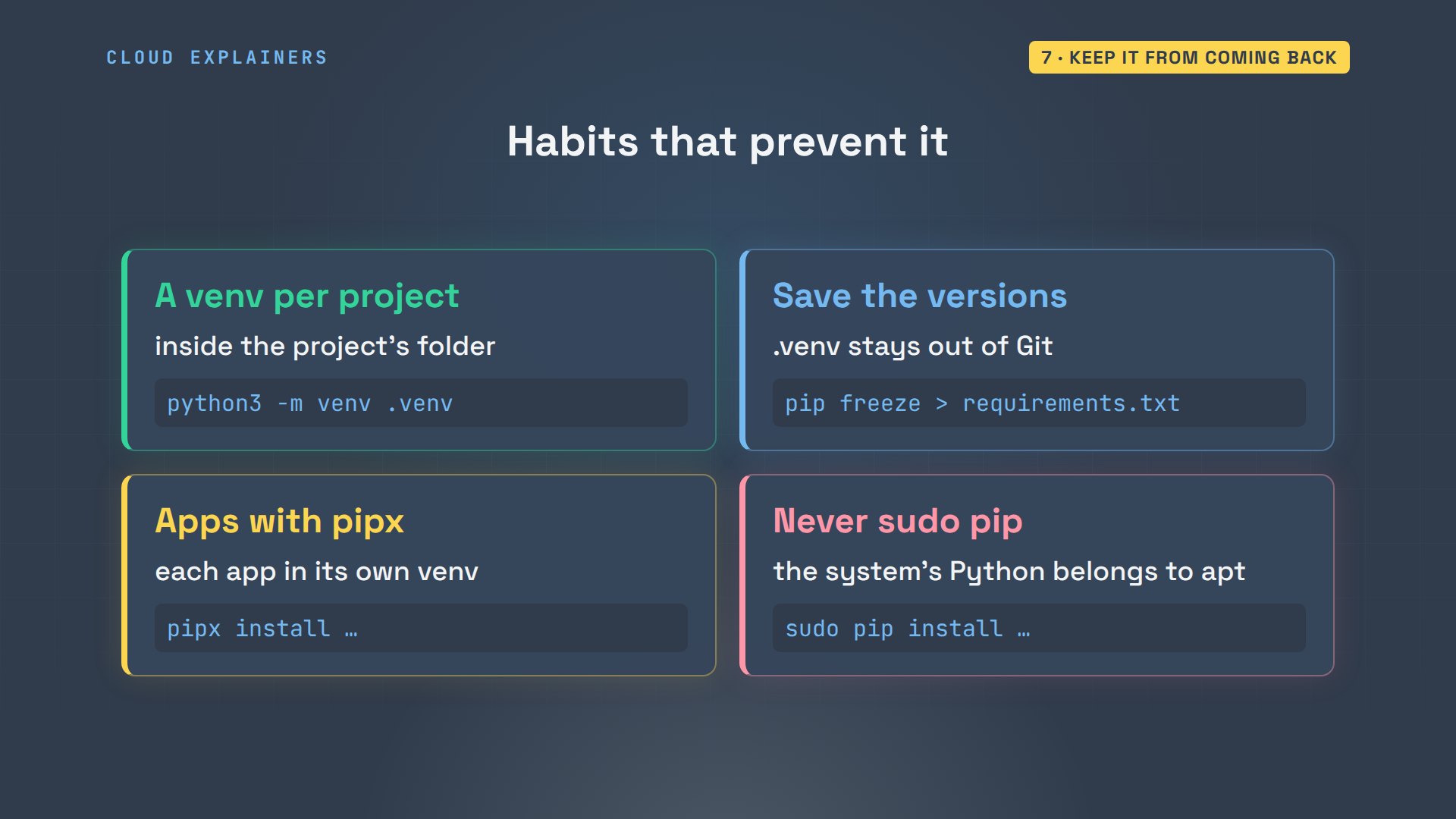
Four habits stop this error for good. Give every project its own virtual environment. Keep requirements.txt with your code, and leave the environment's folder out of Git. Install command-line apps with pipx. And never run sudo pip.
Recap
So: externally managed means apt owns the system's Python, and pip won't fight it. For a common library, install the apt package. For your own projects, use a venv. For command-line apps, use pipx. And leave break system packages alone.
If this got your first pip install working, a subscribe helps us make more real Python demos.
Every command and output in this video came from a real run, on Ubuntu 24.04.5 LTS, with Python 3.12.3. Thanks for watching Cloud Explainers.
Sources
- PEP 668, Marking Python base environments as externally managed
- Python docs, venv: creation of virtual environments
- pip docs, requirements file format
- pipx docs
- Debian 12 release notes, Python interpreters marked as externally managed (PEP 668), the same packaging Ubuntu uses since 23.04
- Debian Python policy, README.venv
Demos: a stock Ubuntu 24.04 container on our own lab machine, standing in for a new laptop; the tea shop and its prices are made up. Watch the full video on YouTube.
More videos
How a NoSQL Database Like MongoDB Works
How to Fix MySQL Too Many Connections Database Errors
Golang Concurrency Will Finally Make Sense After This
How Amazon S3 Works
How Kubernetes Works
How to Fix Docker Port Already Allocated Errors
How PostgreSQL Works

How to Fix Git Merge Conflicts

How to Fix No Space Left on Device in Linux
How the Internet Works
SQL vs NoSQL: When Each One Wins
How to Fix JWT Token Expired Errors (401 Unauthorized)

Claude API vs Claude Pro: Why Your Subscription Doesn't Include It

Why AI Agent Skills Beat Giant Prompts

Linux Cron Jobs Will Finally Make Sense After This

Security Logs Will Finally Make Sense After This

How to Fix a Security Leak: An API Key Pushed to GitHub

DNS Will Finally Make Sense After This

Never Ignore a Security Update

Two-Factor Authentication Will Finally Make Sense

Never Expose a Database to the Internet

SSH Keys vs Passwords: Which Is Safer for Security?

The 5 Levels of Linux Boot: From Power On to Login

The 5 Levels of Network Firewalls

Password Security: Why Hackers Crack Weak Passwords

Why Your Linux Server Runs Out of Memory

HTTP vs HTTPS: What Actually Changes on Your Network

Every Linux File Permission You Need to Know

Linux Processes vs Threads: When Each One Wins

The OSI Model Will Finally Make Sense After This

The 7 Levels of Git

Every Network Troubleshooting Command You Need

Hashing vs Encryption in Cybersecurity: When Each One Wins

Why the Internet Ran Out of IP Addresses

Linux Package Managers: apt vs Snap vs Flatpak

Why Python Is Slow (and When It Doesn't Matter)

TCP vs UDP: When Each One Wins

Stop Running Linux as Root (Do This Instead)

Linux Users and Groups Will Finally Make Sense

Why Phishing Beats Good Security (and How to Spot It)

The 7 Levels of Docker

AI Agents Will Finally Make Sense After This

Stop Using git push --force (Use This Instead)

Agent Skills vs MCP: When Each One Wins

Networking Will Finally Make Sense After This

Every Linux Command You Actually Need

The 7 Levels of Cybersecurity

Every System Design Concept You Need, in One Diagram
