
Python Automation: Full Tutorial for Beginners
A full Python automation tutorial for beginners: one script that does a tea shop's weekly chores, built from an empty folder on a real Ubuntu laptop. Set up a project with uv, sort files with pathlib, total CSV orders with pandas and write a formatted Excel report with openpyxl, read and merge PDF invoices with pypdf, call an API with httpx, drive a website that has no API with Playwright, send the report by email with smtplib, then run it every morning with cron (and Windows Task Scheduler), with secrets in a .env file.
Your weekly chores
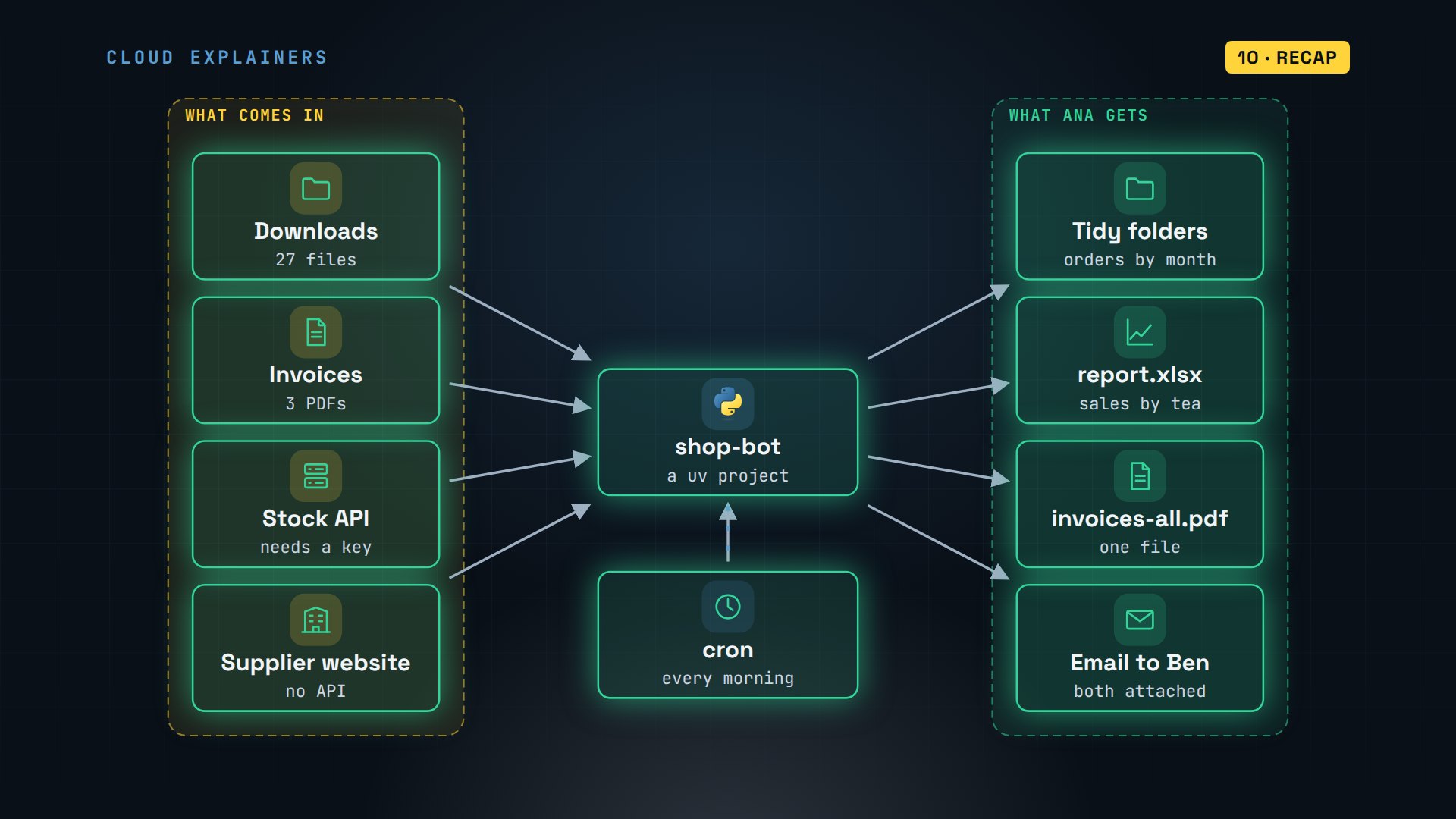
You do the same computer chores every week: sort downloads, total a spreadsheet, copy numbers out of PDFs, and email a report. Ana runs a small tea shop, and that's her Monday morning. Here's the same morning done by one Python script: files sorted, sales totaled in Excel, invoices read and merged, stock checked, a supplier's website clicked through, and the report emailed.
uv run main.pyshop-bot started 2026-11-06 15:19
== tidy
Moved 1 order files and 0 invoices
== report
232 orders in 23 files
                packs   sales
tea
Earl Grey          87  565.50
Sencha             74  536.50
Rooibos            71  408.25
Darjeeling         51  408.00
Masala Chai        67  402.00
Jasmine Pearls     25  237.50
Saved report.xlsx
== excel
('tea', 'packs', 'sales')
('Earl Grey', 87, 565.5)
('Sencha', 74, 536.5)
('Rooibos', 71, 408.25)
('Darjeeling', 51, 408)
('Masala Chai', 67, 402)
('Jasmine Pearls', 25, 237.5)
('Total', None, '=SUM(C2:C7)')
== invoices
invoice-HL-1042.pdf: $257.00
invoice-HL-1057.pdf: $253.50
invoice-HL-1063.pdf: $219.50
Owed to Highland Leaf: $730.00 (merged into invoices-all.pdf)
== stock
Low at Highland Leaf: Sencha, 8 kg left
Low at Highland Leaf: Jasmine Pearls, 3 kg left
== portal
Delivery: HL-1071 | Earl Grey, 5 kg | Shipped | Nov 9
Delivery: HL-1072 | Jasmine Pearls, 1 kg | Packing | Nov 12
Saved prices.csv and portal.png
== send
Sent "This week's tea report" to ben@anas-tea.test
shop-bot done
You'll build that script yourself, from an empty folder, one chore at a time, and at the end it runs every morning on its own. One question to keep in mind: the script will be missing one thing at seven thirty tomorrow morning that it has right now in your terminal. Guess what it is.
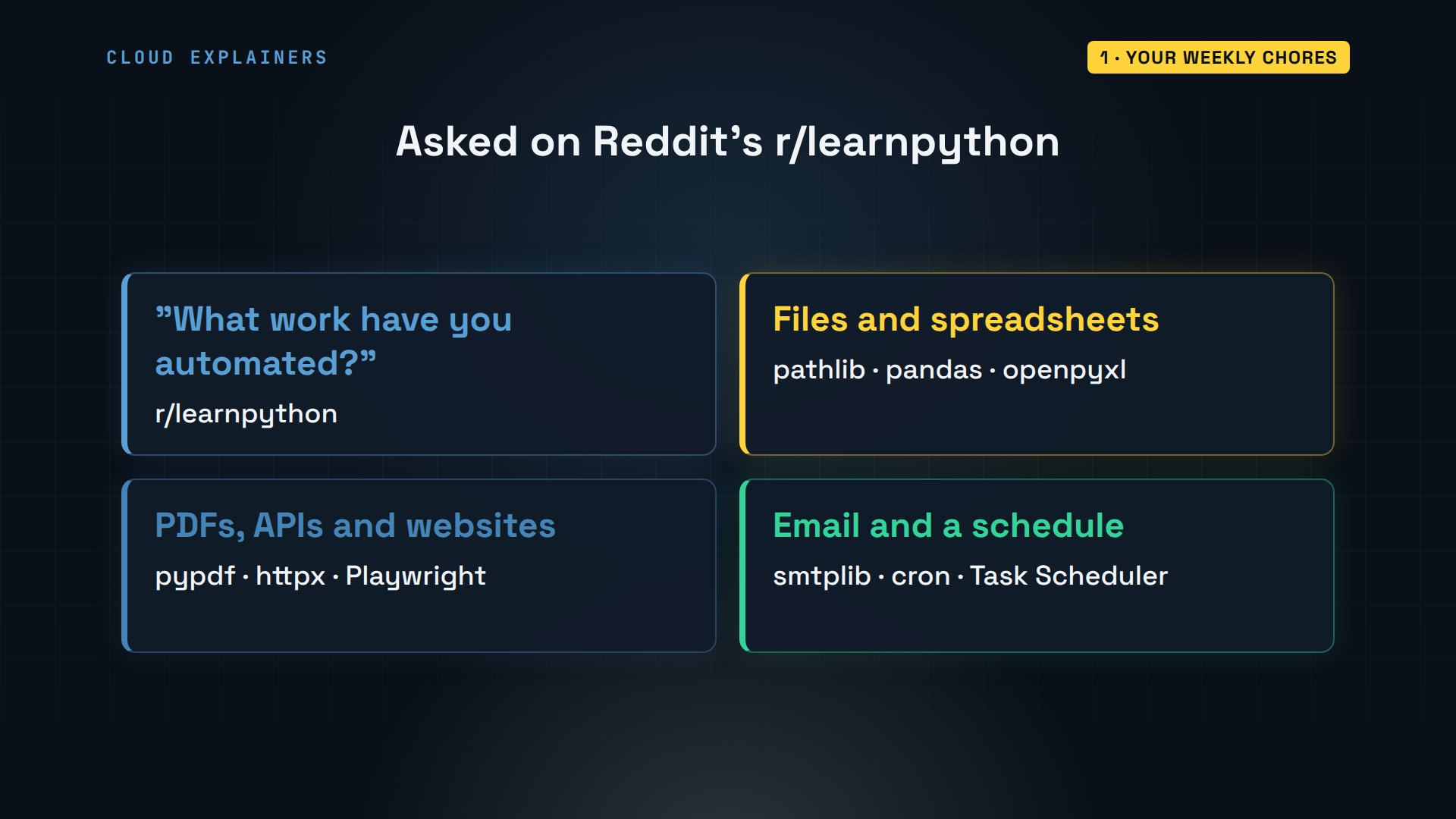
On Reddit's learn Python forum, someone asked: what work have you actually automated? They wanted specifics, not vague answers. So here's one real job, start to finish, using the tools Python people use today.
Set up with uv
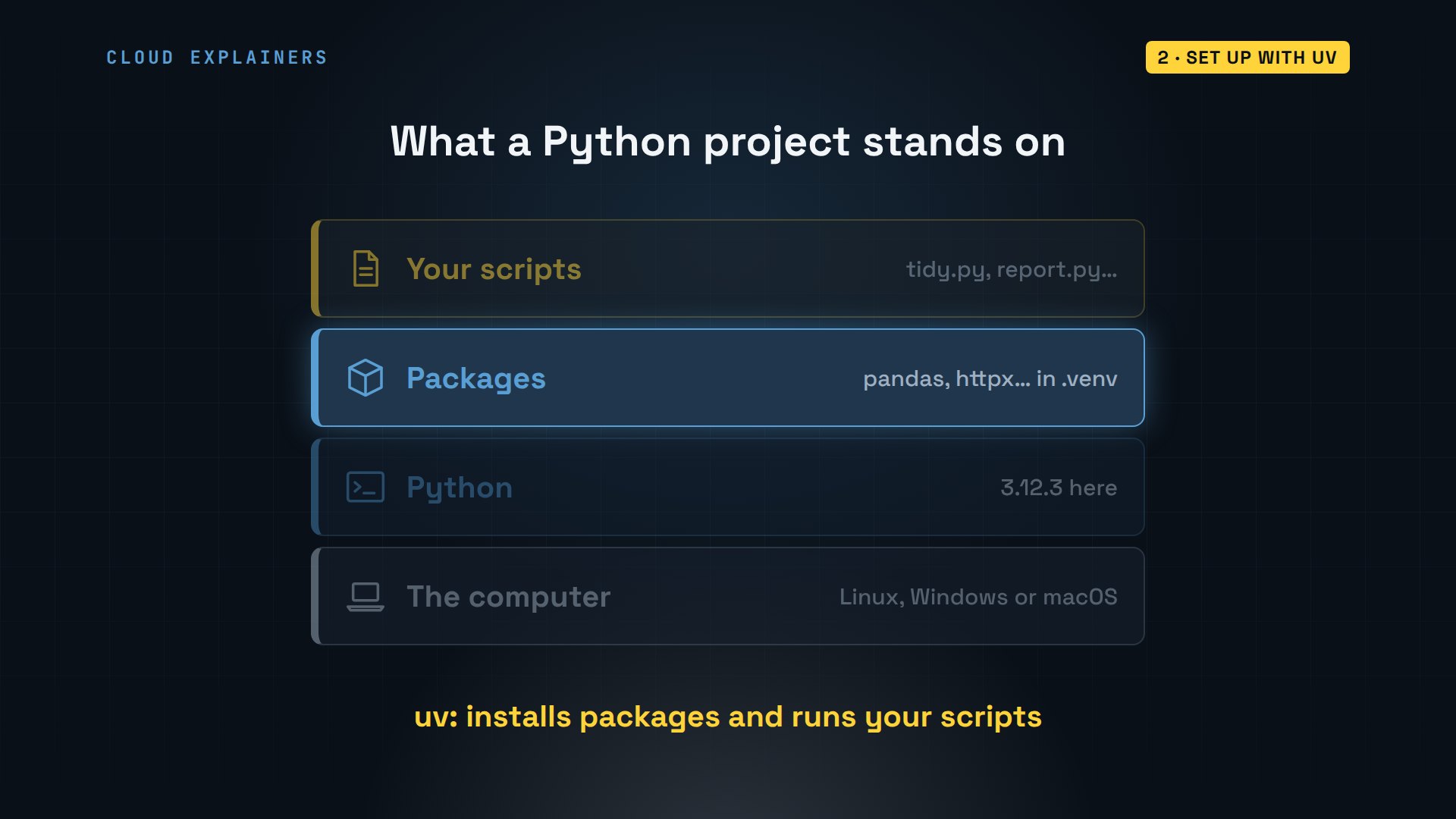
What do you need before the first line of code? Python itself, the language. Packages: code other people wrote that you install, like pandas for tables. And a tool to install them and run your scripts. We'll use uv. It installs packages into a folder that belongs to one project, so projects never mix, and it replaces pip and venv for most everyday work.
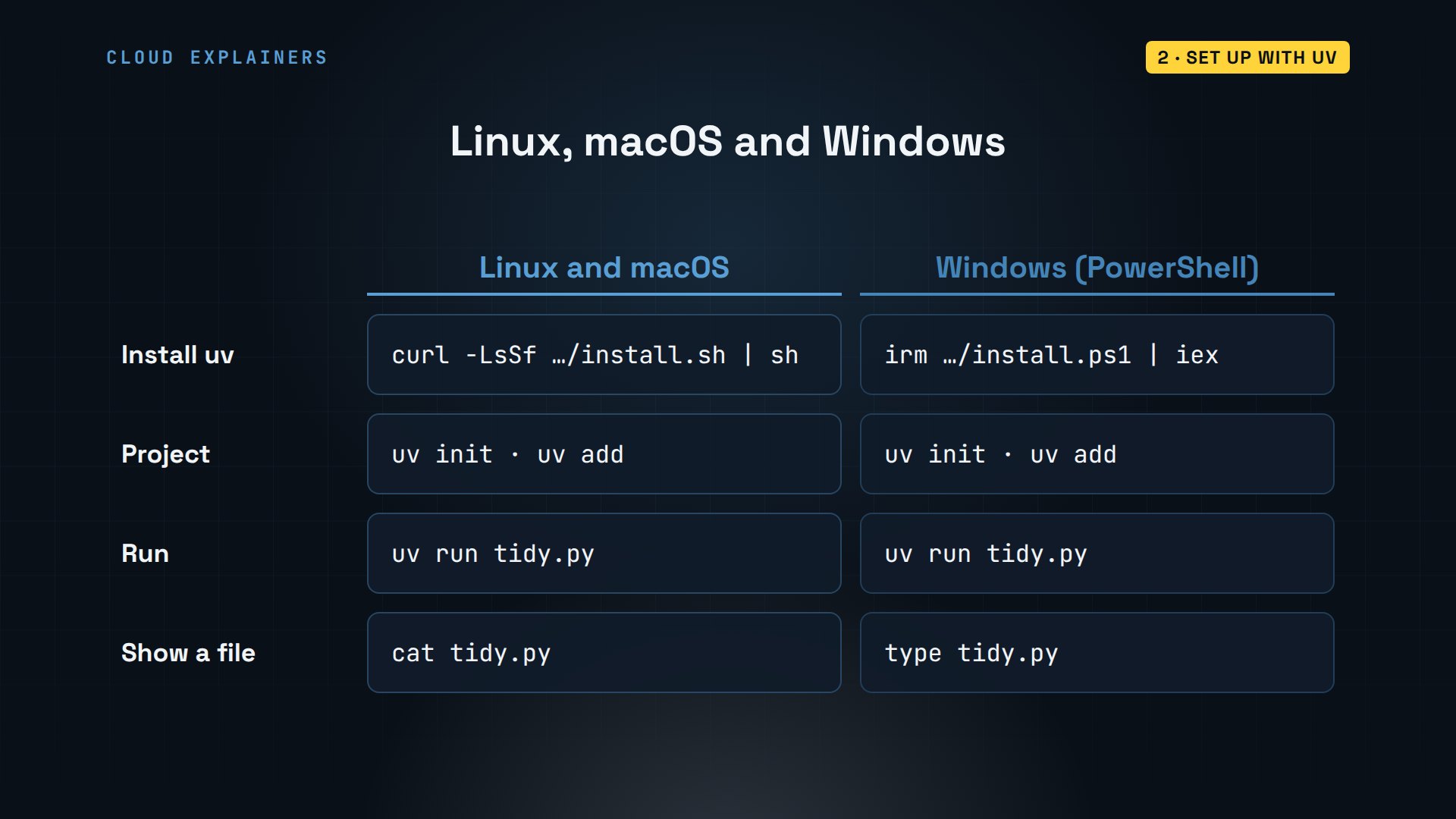
Install uv with one line from its website. On Windows, the line in the title bar does the same in PowerShell. The installer puts uv in a folder your terminal doesn't search yet, so it tells you to run one more command, or open a new terminal. Now uv answers: version 0.13.
curl -LsSf https://astral.sh/uv/install.sh | shdownloading uv 0.13.7 aarch64-unknown-linux-gnu
installing to /home/ana/.local/bin
  uv
  uvx
everything's installed!

To add $HOME/.local/bin to your PATH, either restart your shell or run:

    source $HOME/.local/bin/env (sh, bash, zsh)
    source $HOME/.local/bin/env.fish (fish)
source $HOME/.local/bin/env
uv --versionuv 0.13.7 (aarch64-unknown-linux-gnu)
Now make the project. uv init with no package makes a plain folder for scripts, not a library to publish, called shop-bot. Inside: a settings file, pyproject.toml, a README, and a first script, main.py. uv run main.py runs it. The first time, uv finds Python 3.12.3 on the laptop, makes the project's own folder for packages,.venv, and runs the script. Every command and the lab files are linked in the description.
uv init --no-package shop-botInitialized project `shop-bot` at `/home/ana/shop-bot`
cd shop-bot
ls -A.python-version README.md main.py pyproject.toml
uv run main.pyUsing CPython 3.12.3 interpreter at: /usr/bin/python3.12
Creating virtual environment at: .venv
Hello from shop-bot!
Which packages does Ana need? One for each chore. pandas, for tables of data. openpyxl, for Excel files. pypdf, for PDFs. httpx, to talk to web APIs. And Playwright, to drive a real web browser. One uv add command installs all five.
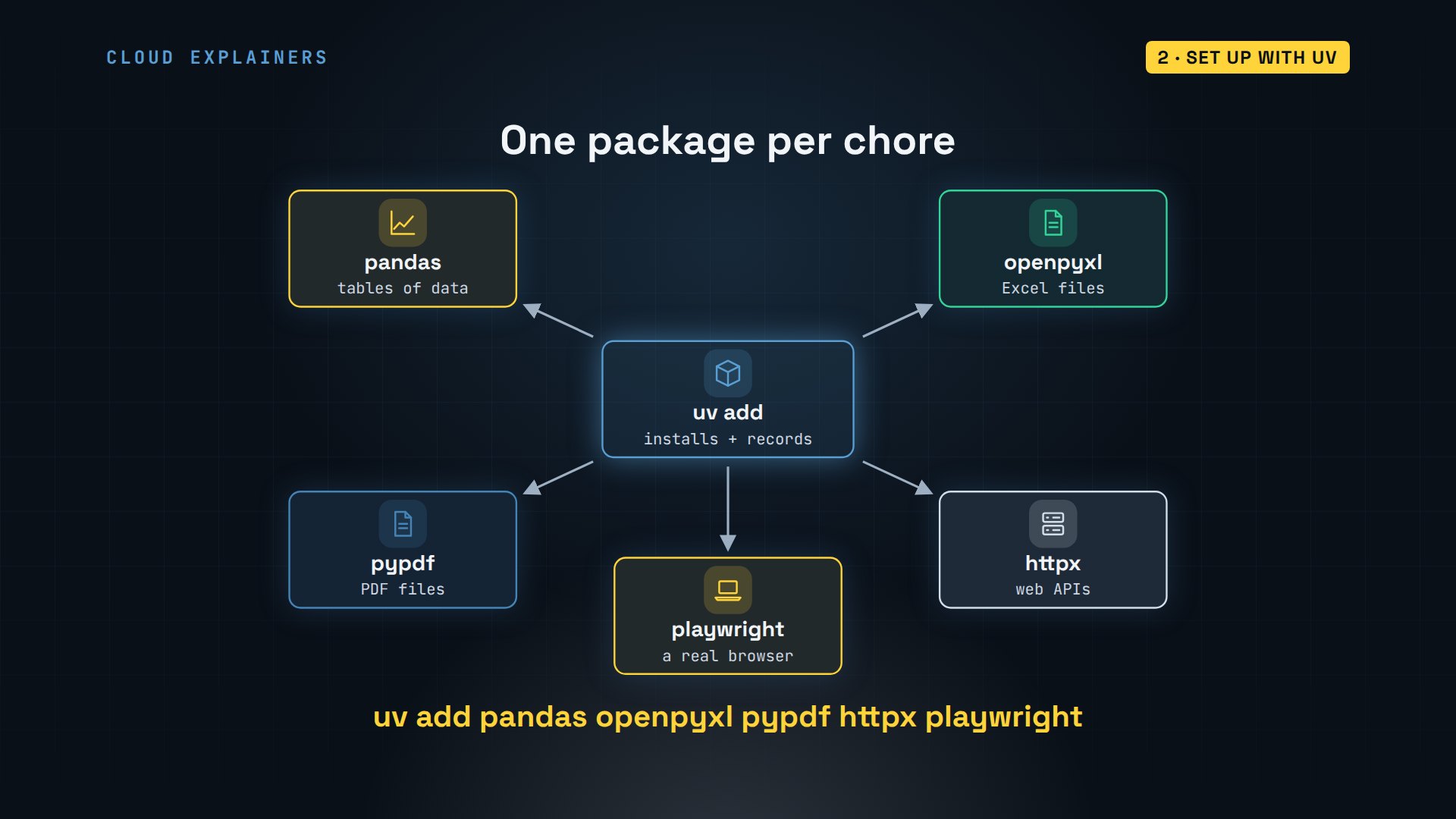
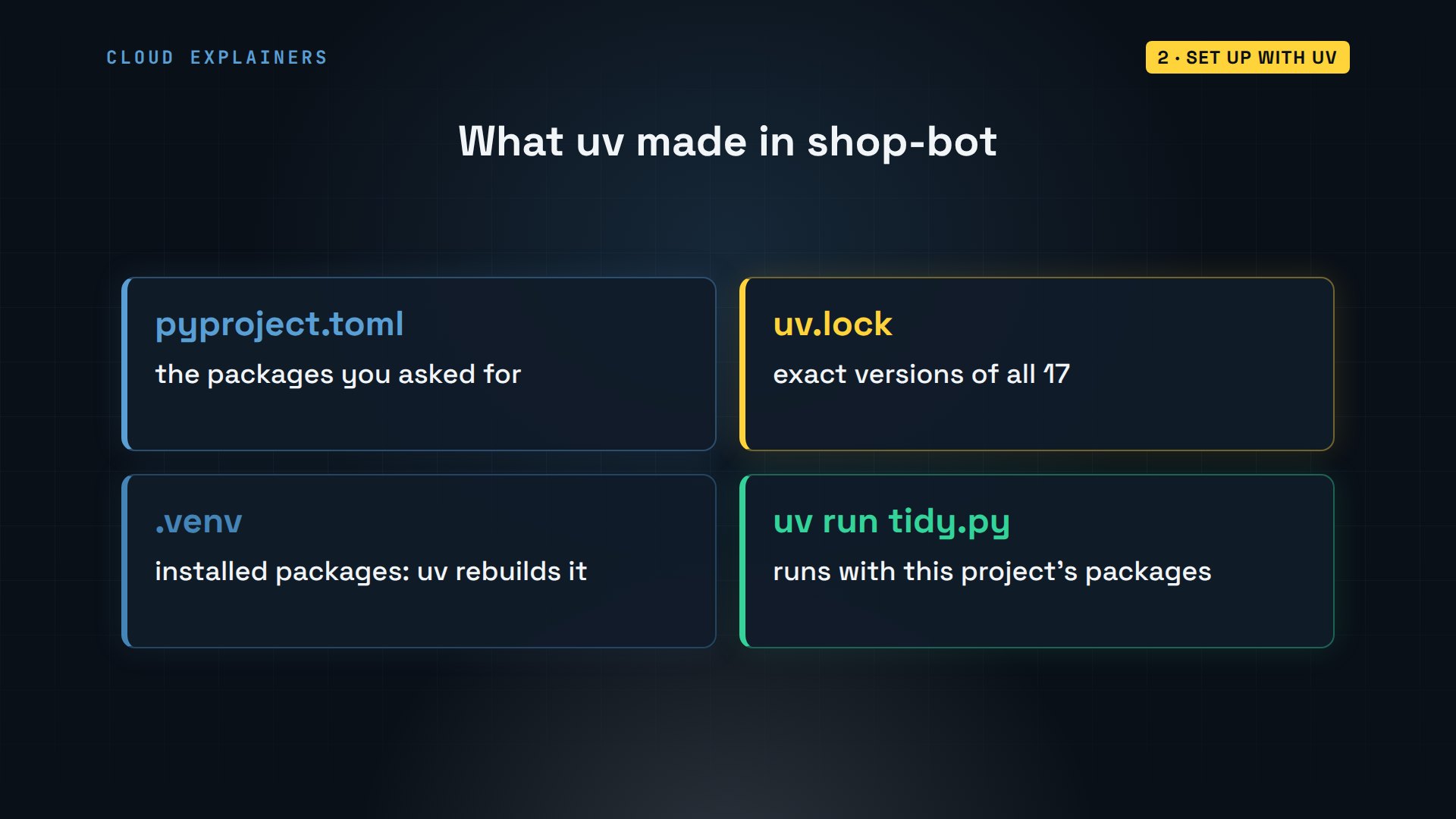
Here it is. uv works out everything those five need too, and installs 17 packages in about two seconds. It writes the five you asked for into pyproject.toml, with their versions, and two new things appear: uv.lock, the exact version of all 17, and.venv, where they're installed.
uv add pandas openpyxl pypdf httpx playwrightResolved 18 packages in 200ms
Downloading pandas (11.0MiB)
Downloading numpy (15.0MiB)
Downloading playwright (45.9MiB)
 Downloaded pandas
 Downloaded numpy
 Downloaded playwright
Prepared 17 packages in 1.46s
Installed 17 packages in 32ms
 + anyio==4.16.0
 + certifi==2026.10.23
 + et-xmlfile==2.0.0
 + greenlet==3.5.6
 + h11==0.16.0
 + httpcore==1.0.9
 + httpx==0.28.1
 + idna==3.20
 + numpy==2.5.4
 + openpyxl==3.1.5
 + pandas==3.1.1
 + playwright==1.64.1
 + pyee==14.0.0
 + pypdf==7.0.0
 + python-dateutil==4.0.0
 + typing-extensions==4.16.0
 + tzdata==2026.6
cat pyproject.toml[project]
name = "shop-bot"
version = "0.1.0"
description = "Add your description here"
readme = "README.md"
requires-python = ">=3.12"
dependencies = [
    "httpx>=0.28.1",
    "openpyxl>=3.1.5",
    "pandas>=3.1.1",
    "playwright>=1.64.1",
    "pypdf>=7.0.0",
]
ls -A.python-version .venv README.md main.py pyproject.toml uv.lock
So what are these files for? pyproject.toml is the list you edit. uv.lock pins every version, so another computer gets exactly the same ones..venv holds the installed packages: never edit it or share it, uv rebuilds it. And uv run always uses this project's packages, with nothing to activate.
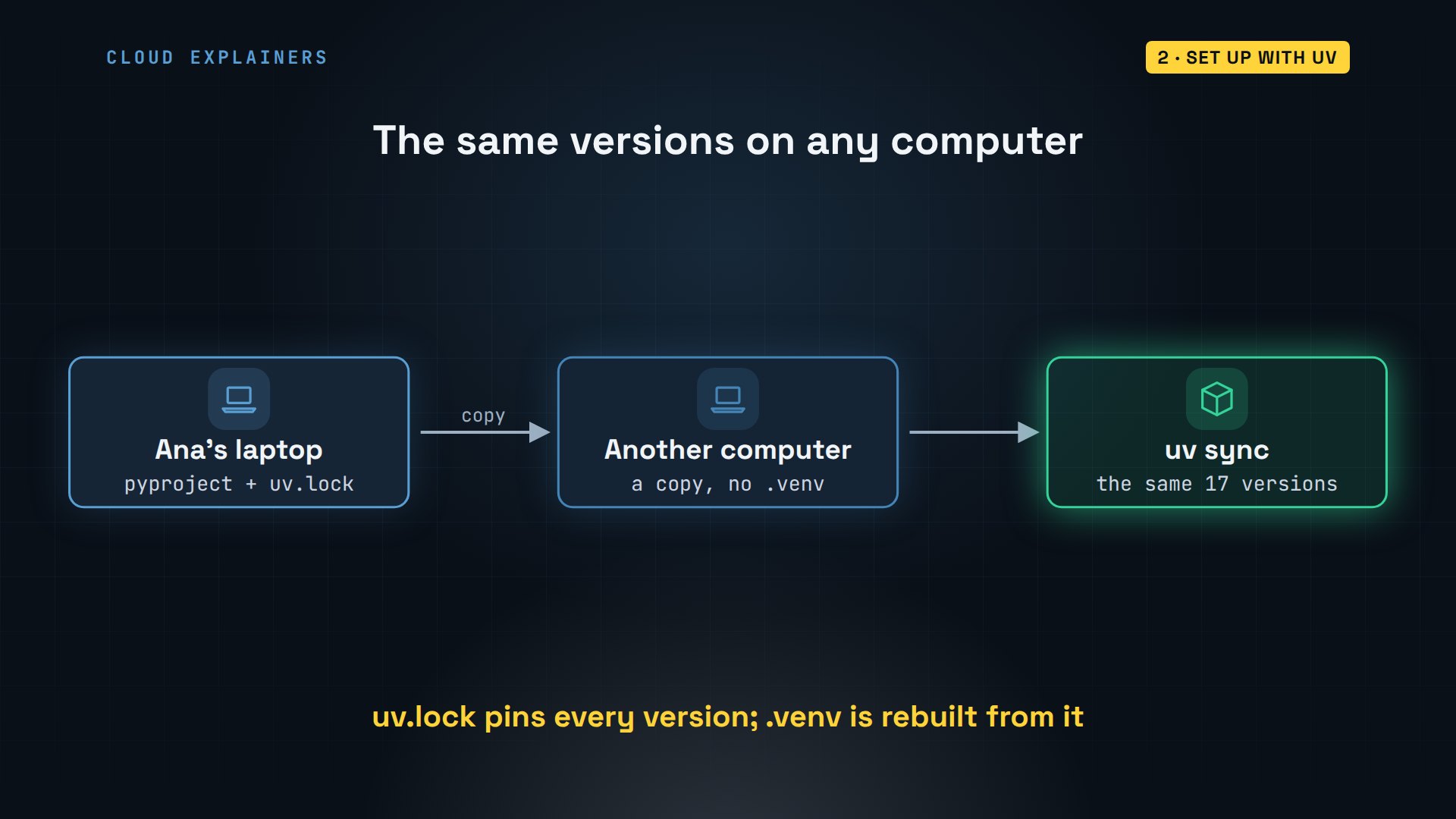
That lock file is what makes the project portable. Copy the folder to another computer without.venv, run uv sync, and uv installs exactly the same versions again. So a script that works today still works next year, even after pandas has moved on.
Does this work the same on Windows and macOS? Only the install line differs. After that, uv init, uv add and uv run are the same on all three, and so is every script in this tutorial. Where a terminal command differs, the Windows version is in the title bar.
Files with pathlib
Where does the time go first? Ana's Downloads folder: 27 files. Every day her online shop exports that day's orders as a CSV file, a plain text table. Her supplier emails invoices as PDFs. And a couple of other files sit in between.
ls ~/Downloads | wc -l27
ls ~/Downloads | head -4invoice-HL-1042.pdf
invoice-HL-1057.pdf
invoice-HL-1063.pdf
notes.txt
ls ~/Downloads | tail -4orders-2026-11-03.csv
orders-2026-11-04.csv
orders-2026-11-05.csv
tea-label-draft.png
Here's the plan. Order files go into a folder per month, invoices into one invoices folder, and anything else stays where it is. The month is already in every file's name.
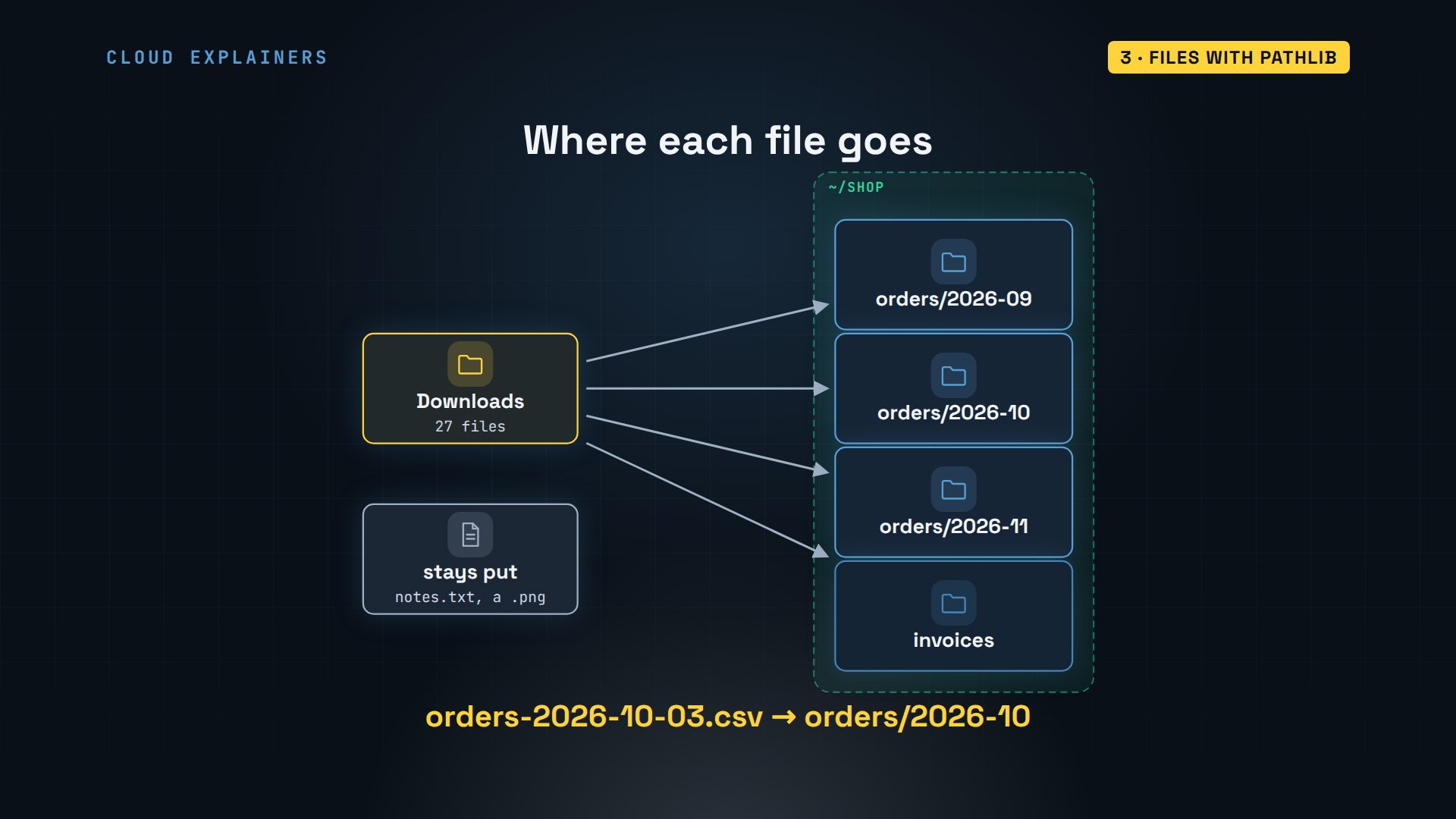
How does the script read the month? Python can cut a piece out of any text by position, counting from zero. The first seven characters are the word orders and a dash. Characters seven up to fourteen are the year and month. So seven colon fourteen, in square brackets, gives 2026-10.
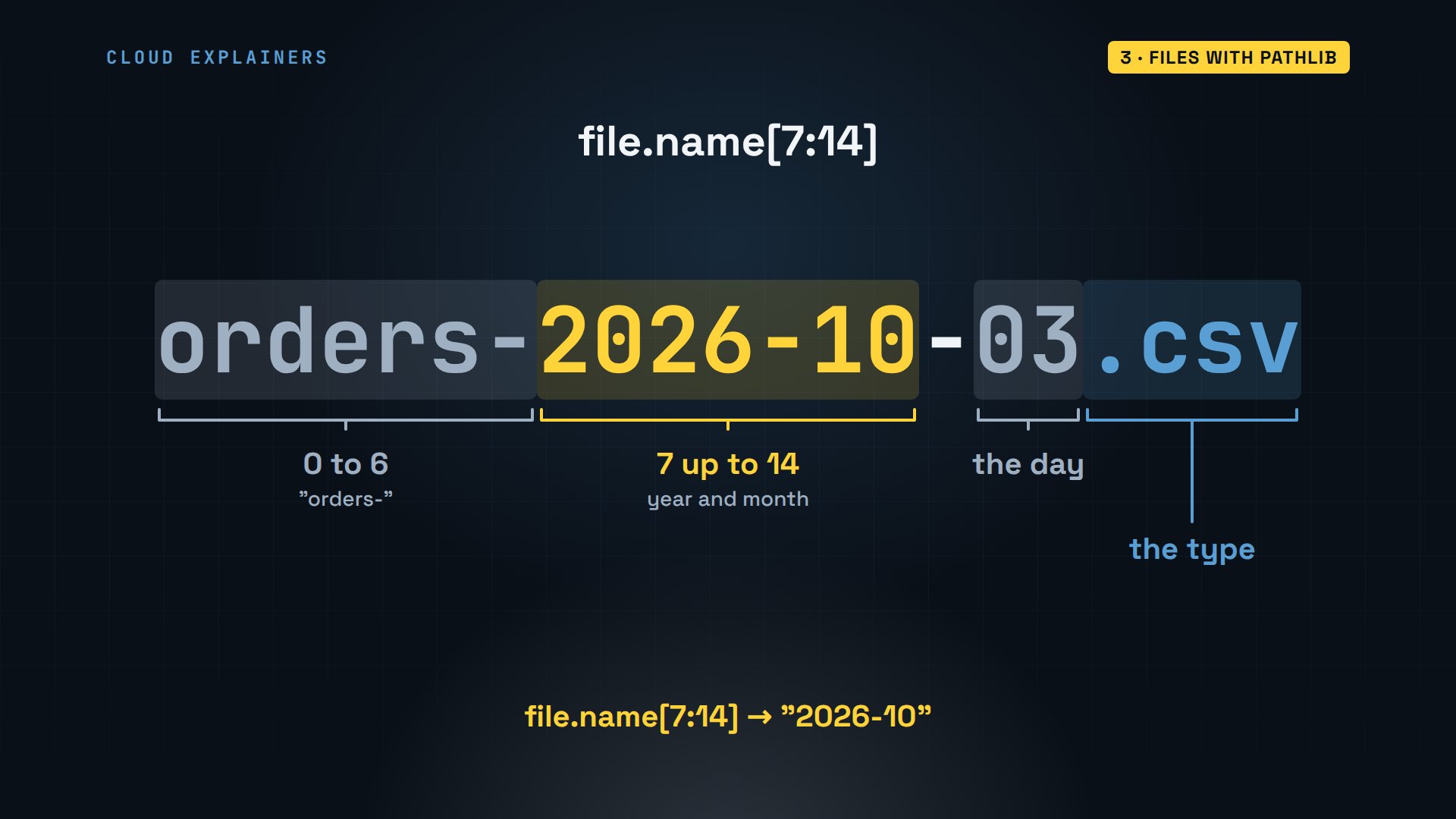
Here's tidy.py, Ana's first script. pathlib is built into Python. Path.home is her home folder, and a slash joins folder names, on Windows too. glob finds every file whose name matches a pattern. For each order file, the script reads the month, makes the folder if it's missing, and rename moves the file there.
cat tidy.pyfrom pathlib import Path

downloads = Path.home() / "Downloads"
shop = Path.home() / "shop"


def move(file, folder):
    folder.mkdir(parents=True, exist_ok=True)  # make it if it's missing
    file.rename(folder / file.name)


def run():
    orders = sorted(downloads.glob("orders-*.csv"))
    for file in orders:
        month = file.name[7:14]  # orders-2026-10-03.csv -> 2026-10
        move(file, shop / "orders" / month)

    invoices = sorted(downloads.glob("invoice-*.pdf"))
    for file in invoices:
        move(file, shop / "invoices")

    print(f"Moved {len(orders)} order files and {len(invoices)} invoices")


if __name__ == "__main__":
    run()
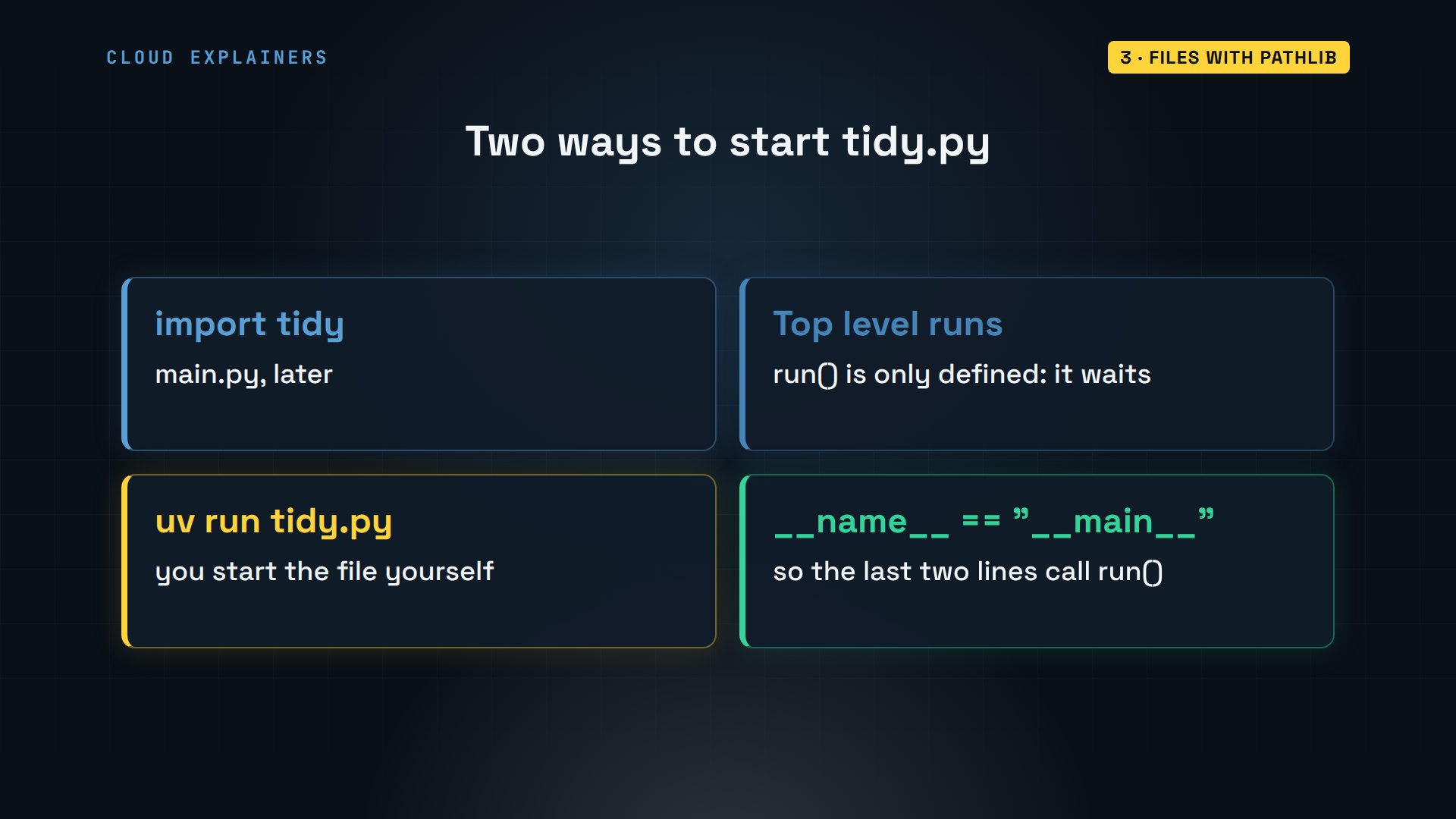
Why is the code inside a function called run? Because later, one main script will import all of Ana's scripts. Importing a file runs its top level, so the work waits inside run until someone calls it. The last two lines call it only when you start this file yourself: then Python sets the name variable to main.
Before we run it: how many files will it move? Take a guess. 22 order files and 3 invoices. The note and the picture stay in Downloads, and the shop folder now has one folder per month.
uv run tidy.pyMoved 22 order files and 3 invoices
ls ~/Downloadsnotes.txt tea-label-draft.png
ls ~/shop ~/shop/orders/home/ana/shop:
invoices  orders

/home/ana/shop/orders:
2026-09  2026-10  2026-11
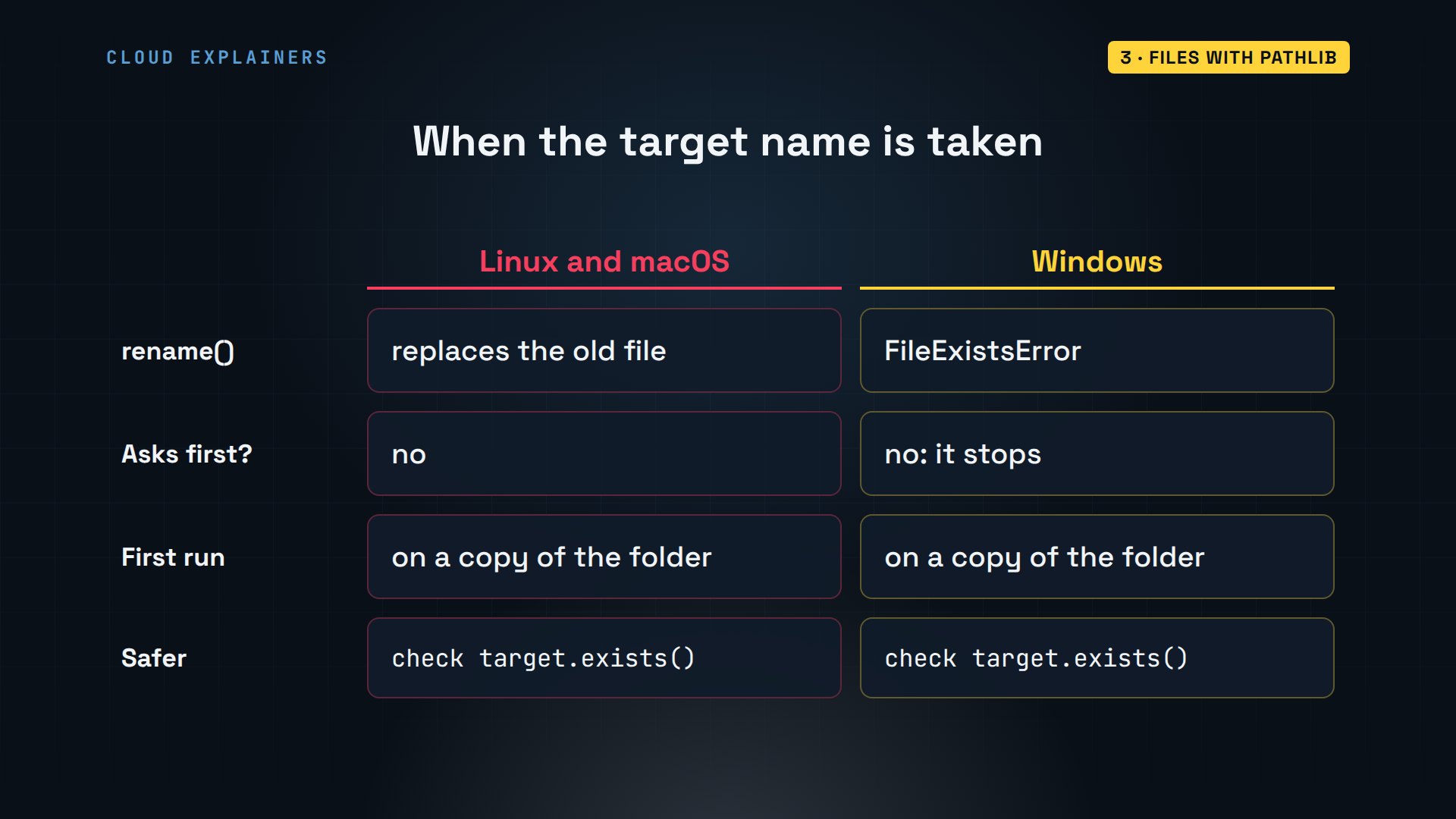
One thing to know before you point this at your own files. On Linux and macOS, rename replaces a file that already has that name, without asking. On Windows, it stops with FileExistsError instead. So try a new script on a copy of the folder first, and check with exists before you move.
The first job is done: Downloads in, tidy folders out, in a script of about twenty lines that runs in under a second.
CSV and Excel
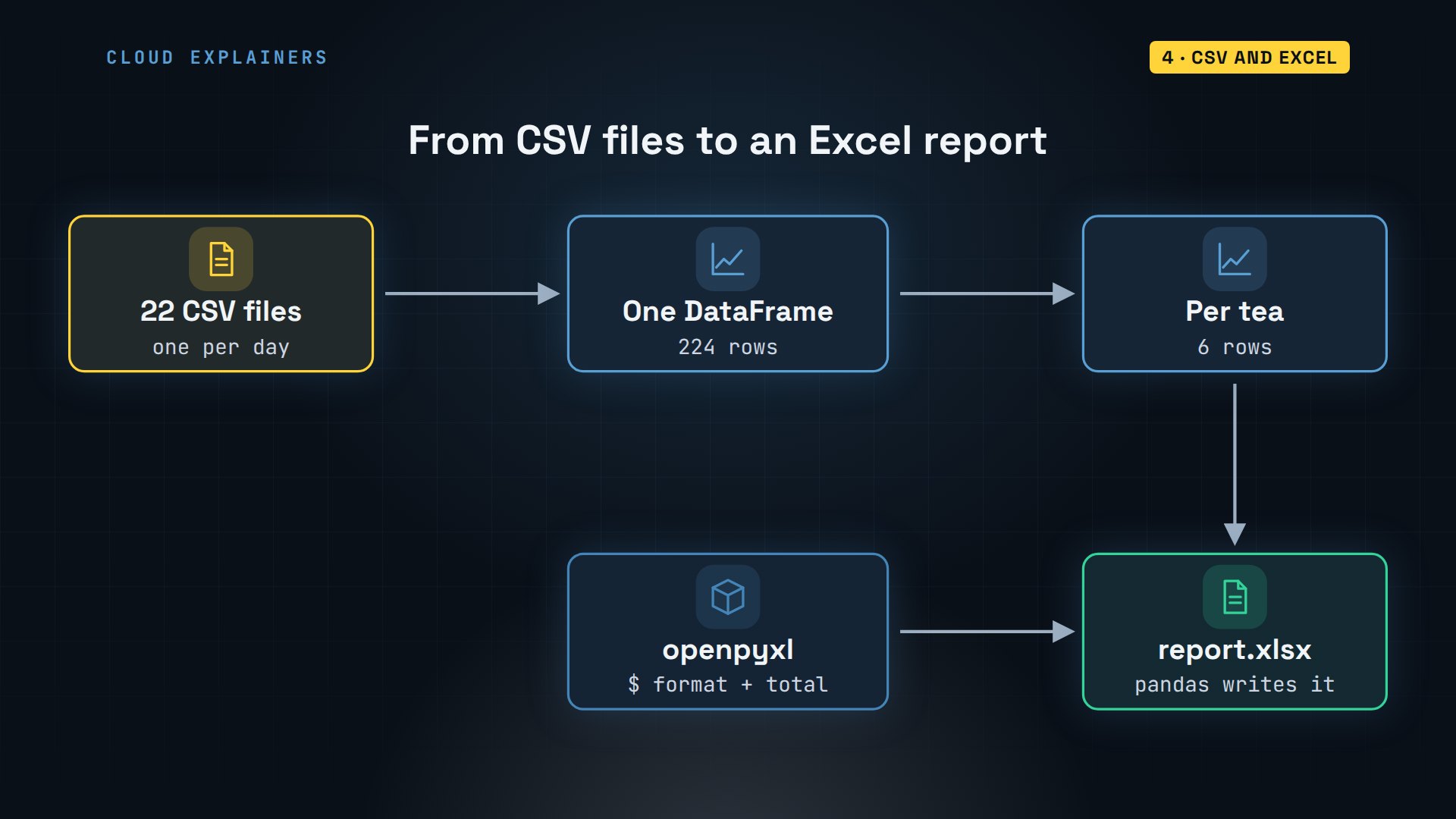
Now, what did Ana sell? The answer is spread over 22 files. pandas reads them all into one table, called a DataFrame, adds up the rows for each tea, and writes the result to an Excel file. Then openpyxl makes that file look like a report: money formatting, and a total.
A CSV file is just text. The first line names the columns: the order, the date, the tea, how many packs, and the price. Each line after that is one order.
head -4 ~/shop/orders/2026-10/orders-2026-10-01.csvorder_id,date,tea,qty,price
A-1061,2026-10-01,Sencha,3,21.75
A-1062,2026-10-01,Sencha,1,7.25
A-1063,2026-10-01,Masala Chai,2,12.00
Here's report.py. It finds every CSV in every month folder, reads each one, and concat stacks them into one table. groupby tea puts each tea's orders together, and agg adds up the packs and the sales. Then the table is sorted, best seller first, and to_excel saves it.
cat report.pyfrom pathlib import Path

import pandas as pd

shop = Path.home() / "shop"


def run():
    files = sorted((shop / "orders").glob("*/*.csv"))
    orders = pd.concat(pd.read_csv(f) for f in files)
    print(f"{len(orders)} orders in {len(files)} files")

    by_tea = orders.groupby("tea").agg(packs=("qty", "sum"),
                                       sales=("price", "sum"))
    by_tea = by_tea.sort_values("sales", ascending=False)
    print(by_tea)

    by_tea.to_excel(shop / "report.xlsx", sheet_name="By tea")
    print("Saved report.xlsx")


if __name__ == "__main__":
    run()
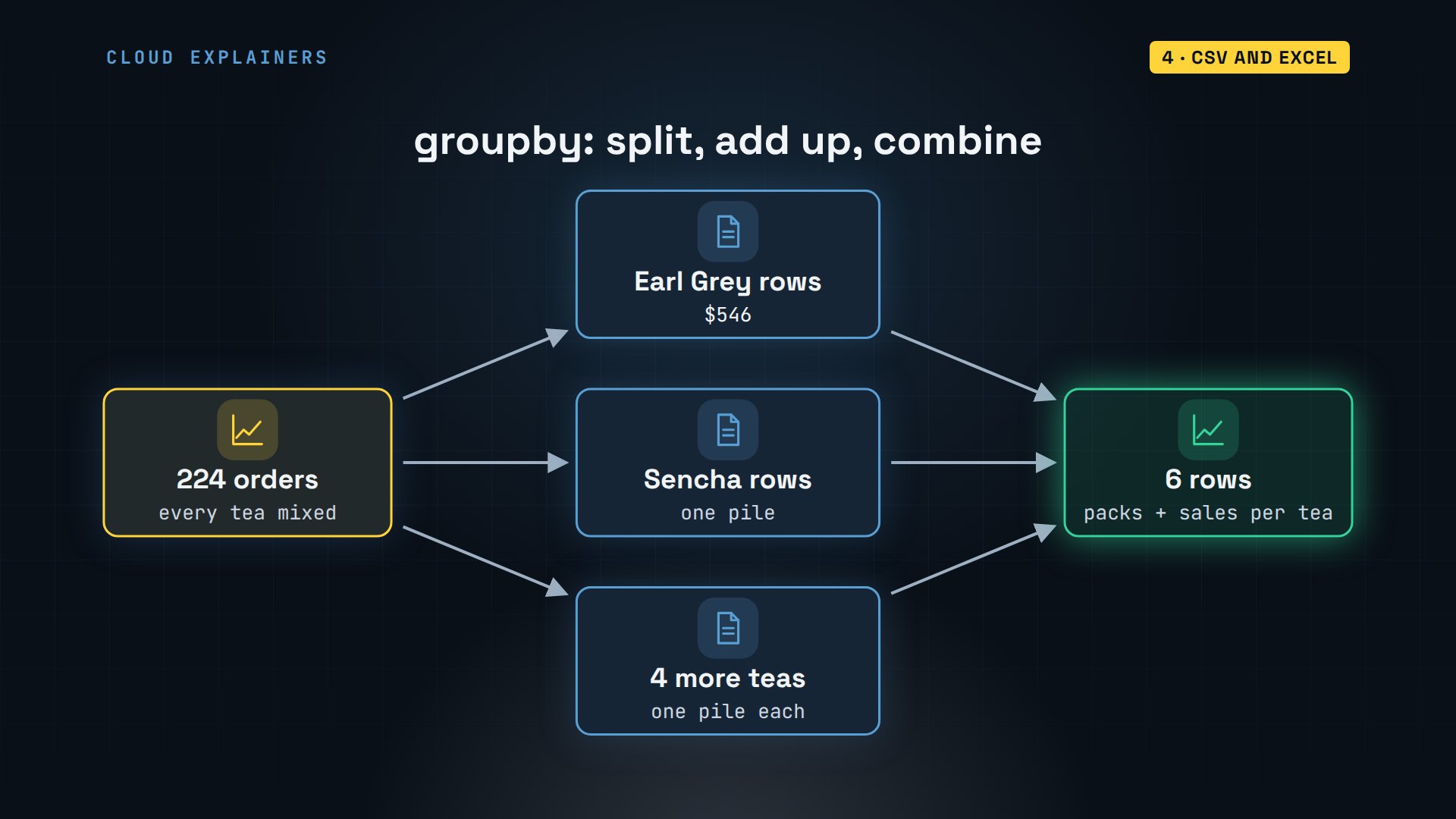
What does groupby actually do? Picture all the rows. It splits them into one pile per tea, adds up each pile's packs and sales, and puts the totals back together as one small table: 224 rows in, six rows out.
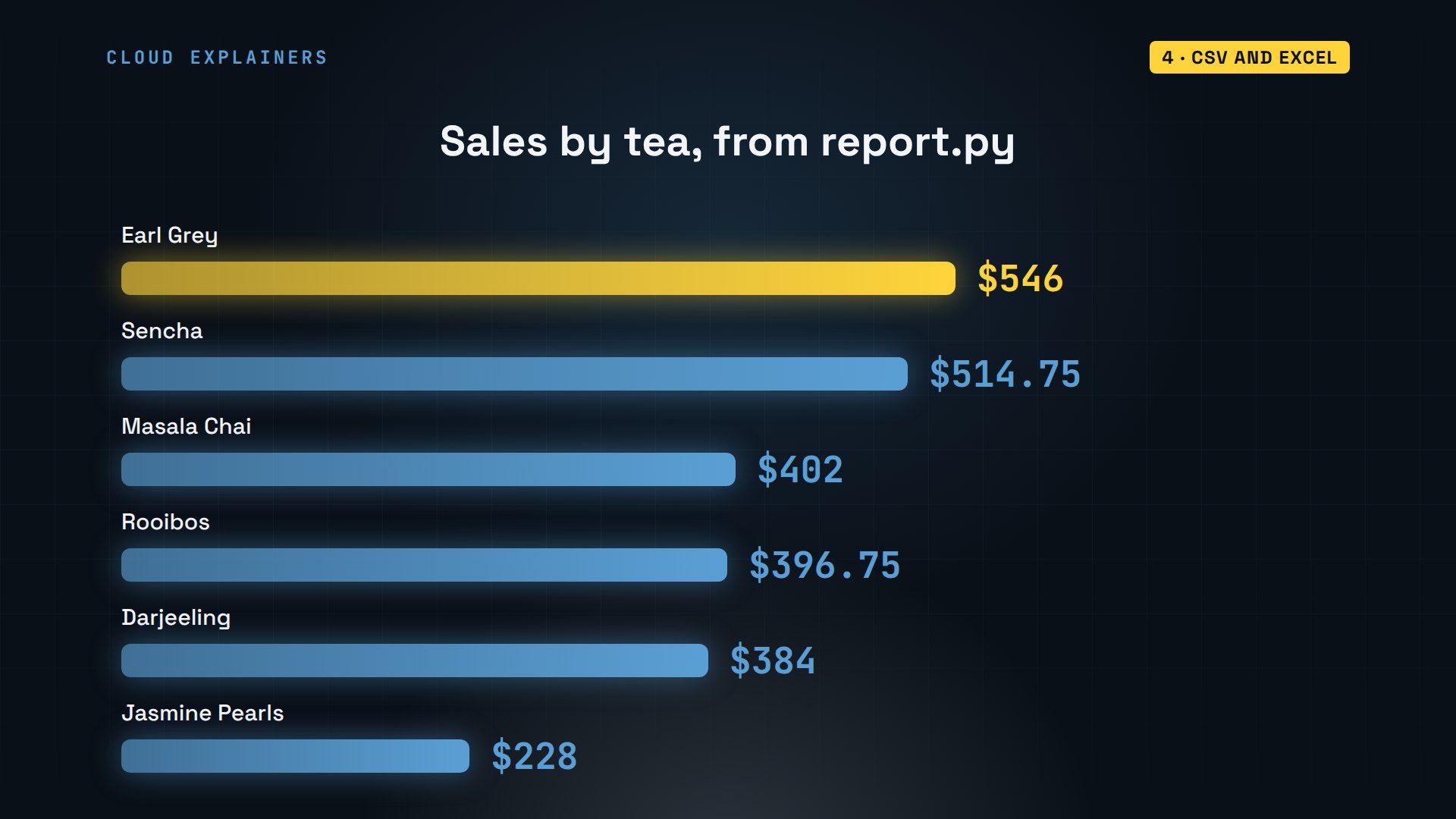
Run it. 224 orders from 22 files, down to six lines. Earl Grey sells the most, Sencha is close behind.
uv run report.py224 orders in 22 files
                packs   sales
tea
Earl Grey          84  546.00
Sencha             71  514.75
Masala Chai        67  402.00
Rooibos            69  396.75
Darjeeling         48  384.00
Jasmine Pearls     24  228.00
Saved report.xlsx
As a picture: Earl Grey at five hundred forty-six dollars, down to Jasmine Pearls at two hundred twenty-eight dollars. The same numbers will be in Ana's Excel file.
pandas saved plain numbers. excel.py opens the file with openpyxl, picks the sheet, widens the first column, and shows every sales cell below the header as money. Then it adds a bold Total row, whose cell holds an Excel formula, SUM, and saves.
cat excel.pyfrom pathlib import Path

from openpyxl import load_workbook
from openpyxl.styles import Font

path = Path.home() / "shop" / "report.xlsx"


def run():
    book = load_workbook(path)
    sheet = book["By tea"]
    sheet.column_dimensions["A"].width = 18
    for cell in sheet["C"][1:]:
        cell.number_format = "$#,##0.00"

    last = sheet.max_row
    sheet.cell(last + 1, 1, "Total").font = Font(bold=True)
    sheet.cell(last + 1, 3, f"=SUM(C2:C{last})").font = Font(bold=True)
    book.save(path)

    for row in sheet.iter_rows(values_only=True):
        print(row)


if __name__ == "__main__":
    run()
It prints the sheet back, row by row. Look at the last row: the total isn't a number, it's the formula. Excel works it out when Ana opens the file, so the total stays right if she edits a row.
uv run excel.py('tea', 'packs', 'sales')
('Earl Grey', 84, 546)
('Sencha', 71, 514.75)
('Masala Chai', 67, 402)
('Rooibos', 69, 396.75)
('Darjeeling', 48, 384)
('Jasmine Pearls', 24, 228)
('Total', None, '=SUM(C2:C7)')
The second job: a sales report Ana used to build by hand, now one Excel file, formatted, with a total that stays right.
Reading PDFs
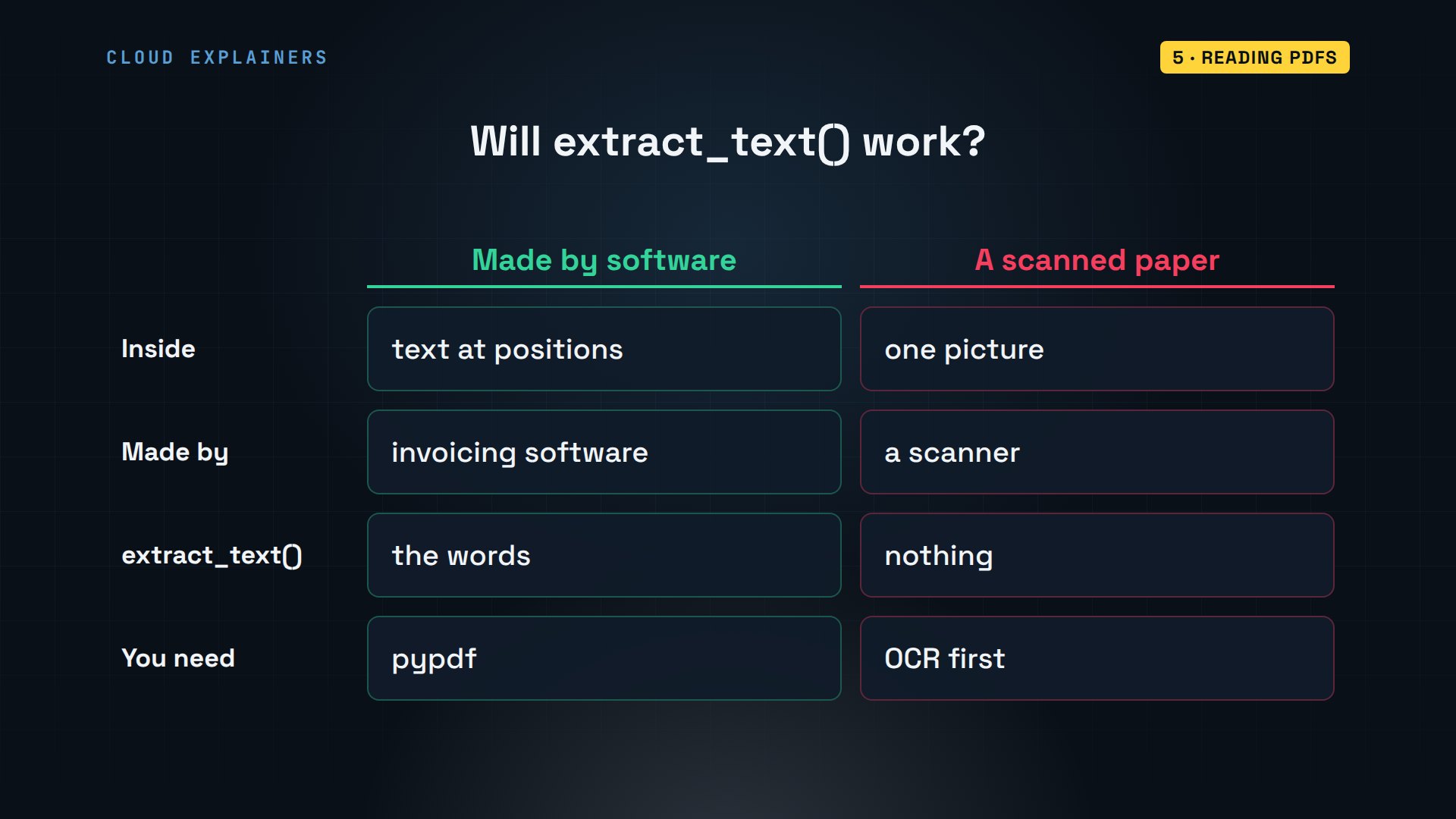
What about the invoices? A PDF looks like a page, but inside it's instructions for drawing text at positions. pypdf follows those instructions and hands back the text. Then a pattern, a regular expression, finds the one number Ana needs.
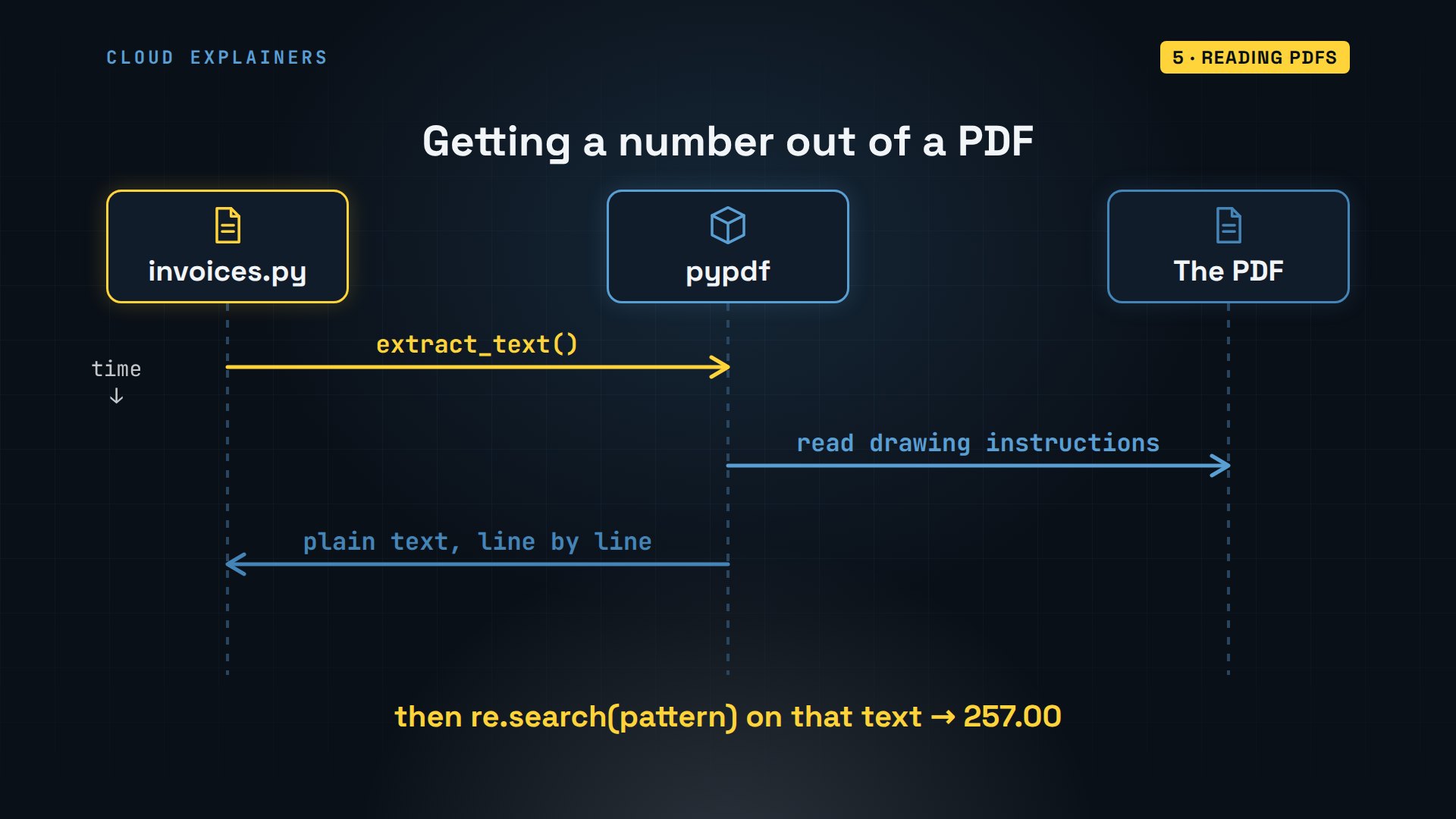
First, see what pypdf gets from one invoice. A tiny script reads the file named after uv run, which Python puts in a list called sys.argv: item zero is the script's own name, so item one is the file. Out comes plain text, and the line Ana wants: Total due, two hundred fifty-seven dollars.
cat read_pdf.pyimport sys

from pypdf import PdfReader

reader = PdfReader(sys.argv[1])
print(reader.pages[0].extract_text())
uv run read_pdf.py ~/shop/invoices/invoice-HL-1042.pdfHighland Leaf Co. - wholesale tea
Invoice HL-1042
Date: 2026-10-06
Bill to: Ana’s Tea Shop
Earl Grey, 5 kg    $140.00
Sencha, 3 kg    $117.00
Total due: $257.00
Payment within 30 days.
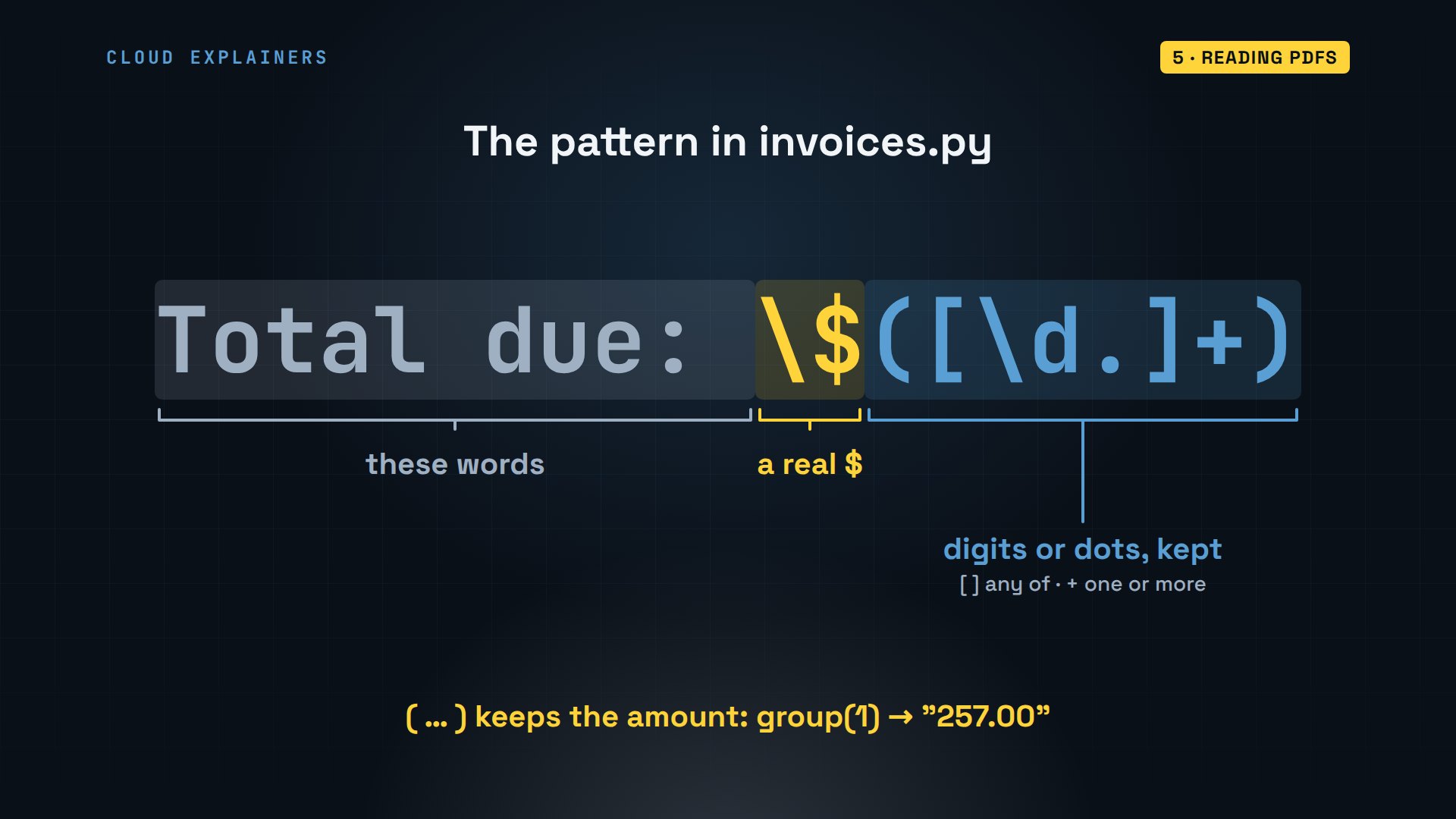
How does the pattern find the number? It starts with the exact words, Total due. A backslash before the dollar sign means a real dollar sign. The square brackets mean any digit or a dot, and the plus means one or more of them. The round brackets keep that part, so group one is just the amount.
Here's invoices.py. For every invoice, it reads page one, finds the total, turns the text into a number with float, and adds it up. It also appends each PDF to a PdfWriter, which writes all of them into one file at the end.
cat invoices.pyimport re
from pathlib import Path

from pypdf import PdfReader, PdfWriter

shop = Path.home() / "shop"


def run():
    merged = PdfWriter()
    owed = 0.0
    for path in sorted((shop / "invoices").glob("invoice-*.pdf")):
        text = PdfReader(path).pages[0].extract_text()
        due = float(re.search(r"Total due: \$([\d.]+)", text).group(1))
        print(f"{path.name}: ${due:.2f}")
        owed += due
        merged.append(path)

    merged.write(shop / "invoices-all.pdf")
    print(f"Owed to Highland Leaf: ${owed:.2f} (merged into invoices-all.pdf)")


if __name__ == "__main__":
    run()
Run it. Three invoices, three totals, and what Ana owes her supplier: seven hundred thirty dollars. The three PDFs are now one file she can forward.
uv run invoices.pyinvoice-HL-1042.pdf: $257.00
invoice-HL-1057.pdf: $253.50
invoice-HL-1063.pdf: $219.50
Owed to Highland Leaf: $730.00 (merged into invoices-all.pdf)
One warning before you try this on your own PDFs. It works when the PDF holds text, like invoices made by software. A scanned paper is only a picture of text, and extract_text gives back nothing. Those need OCR, a tool that reads letters out of images, which is a different job.
The third job: numbers she used to copy out of PDFs by hand, added up, and the files merged into one.
An API with httpx
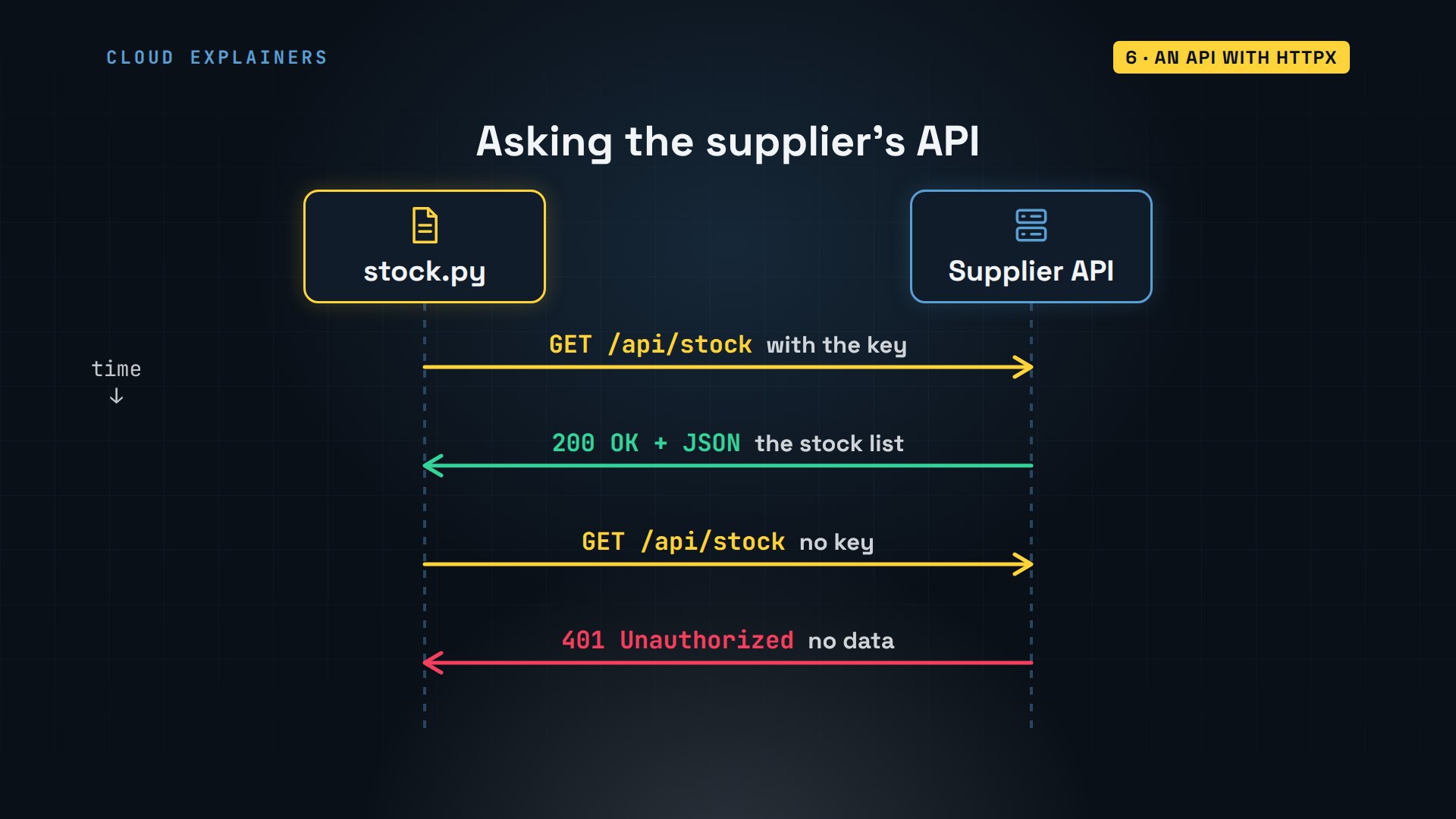
How do you get data from another company's computer? Through its API: web addresses made for programs, not people. Ana's supplier has one for stock. The script asks with a GET request and a key, and the answer comes back as JSON, text that turns into Python lists and dictionaries. Without the key, the answer is a status code instead: 401, unauthorized.
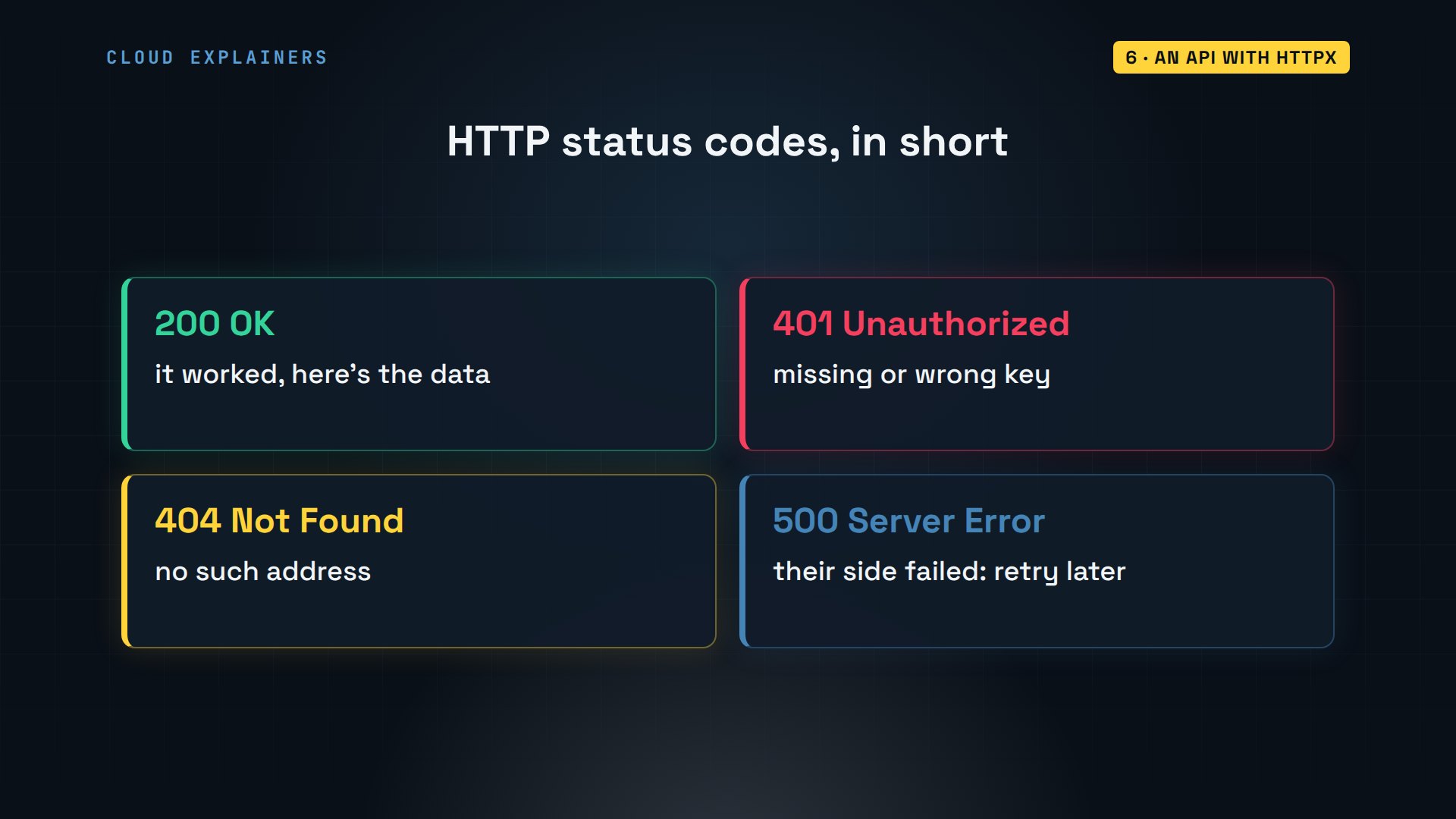
Those status codes are worth knowing. Codes in the two hundreds mean it worked. Four hundreds mean the request was wrong: 401, who are you, 404, no such address. Five hundreds mean the server itself failed, and trying again later can help.
Here's stock.py. It reads the key from an environment variable, never from the code, so the key never ends up in a file you share. httpx.get sends the request, and gives up after ten seconds. raise_for_status stops the script on any error code, and.json turns the answer into a Python list.
cat stock.pyimport os

import httpx

URL = "http://localhost:8000/api/stock"


def run():
    key = os.environ.get("SUPPLIER_KEY", "")
    response = httpx.get(URL, headers={"X-API-Key": key}, timeout=10)
    response.raise_for_status()  # stop here on 401, 404, 500...

    for item in response.json():
        if item["kg"] < 10:
            print(f"Low at Highland Leaf: {item['tea']}, {item['kg']} kg left")


if __name__ == "__main__":
    run()
Ana hasn't set the key yet. What do you think happens? A traceback: Python's report of where it stopped. Read it from the bottom: 401 Unauthorized, raised on the raise_for_status line.
uv run stock.pyTraceback (most recent call last):
  File "/home/ana/shop-bot/stock.py", line 19, in <module>
    run()
  File "/home/ana/shop-bot/stock.py", line 11, in run
    response.raise_for_status()  # stop here on 401, 404, 500...
    ^^^^^^^^^^^^^^^^^^^^^^^^^^^
  File "/home/ana/shop-bot/.venv/lib/python3.12/site-packages/httpx/_models.py", line 829, in raise_for_status
    raise HTTPStatusError(message, request=request, response=self)
httpx.HTTPStatusError: Client error '401 Unauthorized' for url 'http://localhost:8000/api/stock'
For more information check: https://developer.mozilla.org/en-US/docs/Web/HTTP/Status/401
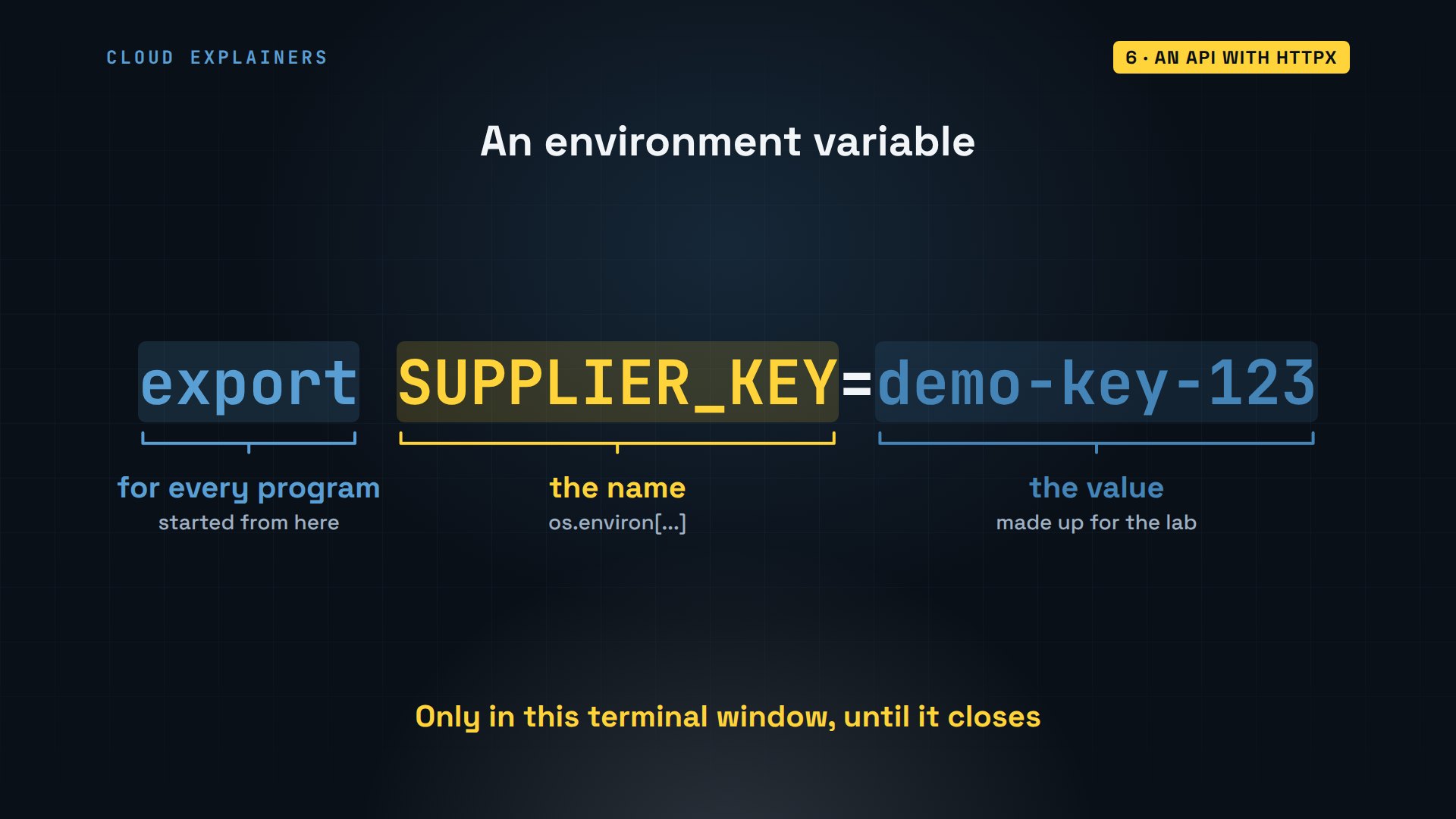
So she sets one. export makes a variable that every program started from this terminal can read. The name is what the script asks for. The value is the key her supplier gave her. It lives only in this terminal window, until it closes.
And how does the script pick out the low teas? The JSON comes back as a list of dictionaries, one per tea. In each one, a key in quotes, then its value. So item, square bracket, kg, is the number of kilograms, and the script prints the teas under ten.
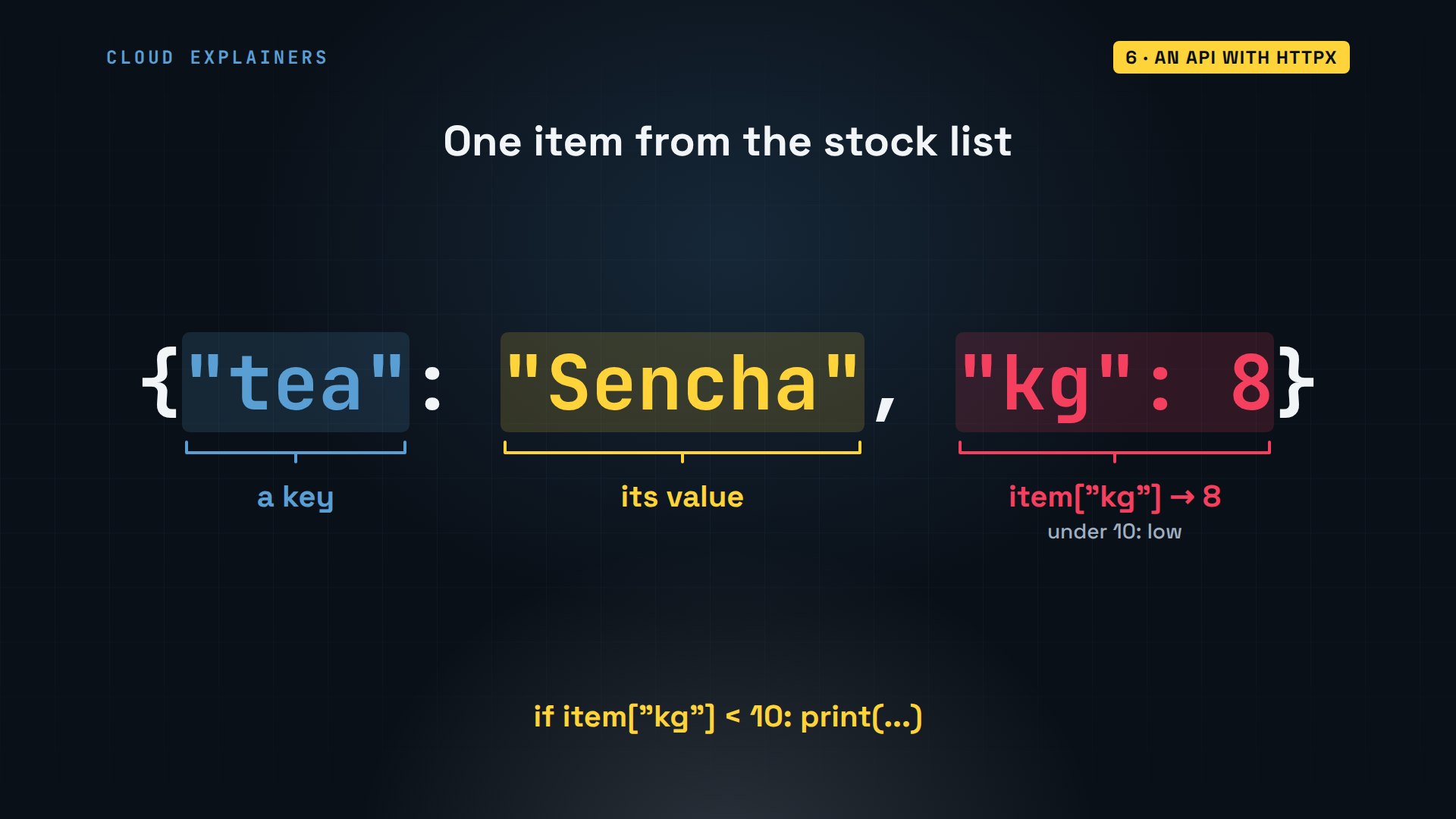
Same command again. This time the API answers, and the script prints only what matters: Sencha and Jasmine Pearls are running low at the supplier.
export SUPPLIER_KEY=demo-key-123
uv run stock.pyLow at Highland Leaf: Sencha, 8 kg left
Low at Highland Leaf: Jasmine Pearls, 3 kg left
The fourth job: stock checked through the supplier's API, with the key kept out of the code.
A website with Playwright
What if there's no API? Ana's supplier has a website where she signs in to see her deliveries and download a price list. Playwright drives a real browser, Chromium, with no window, which is called headless. The script does what Ana would do: open the page, type, click, read, download.
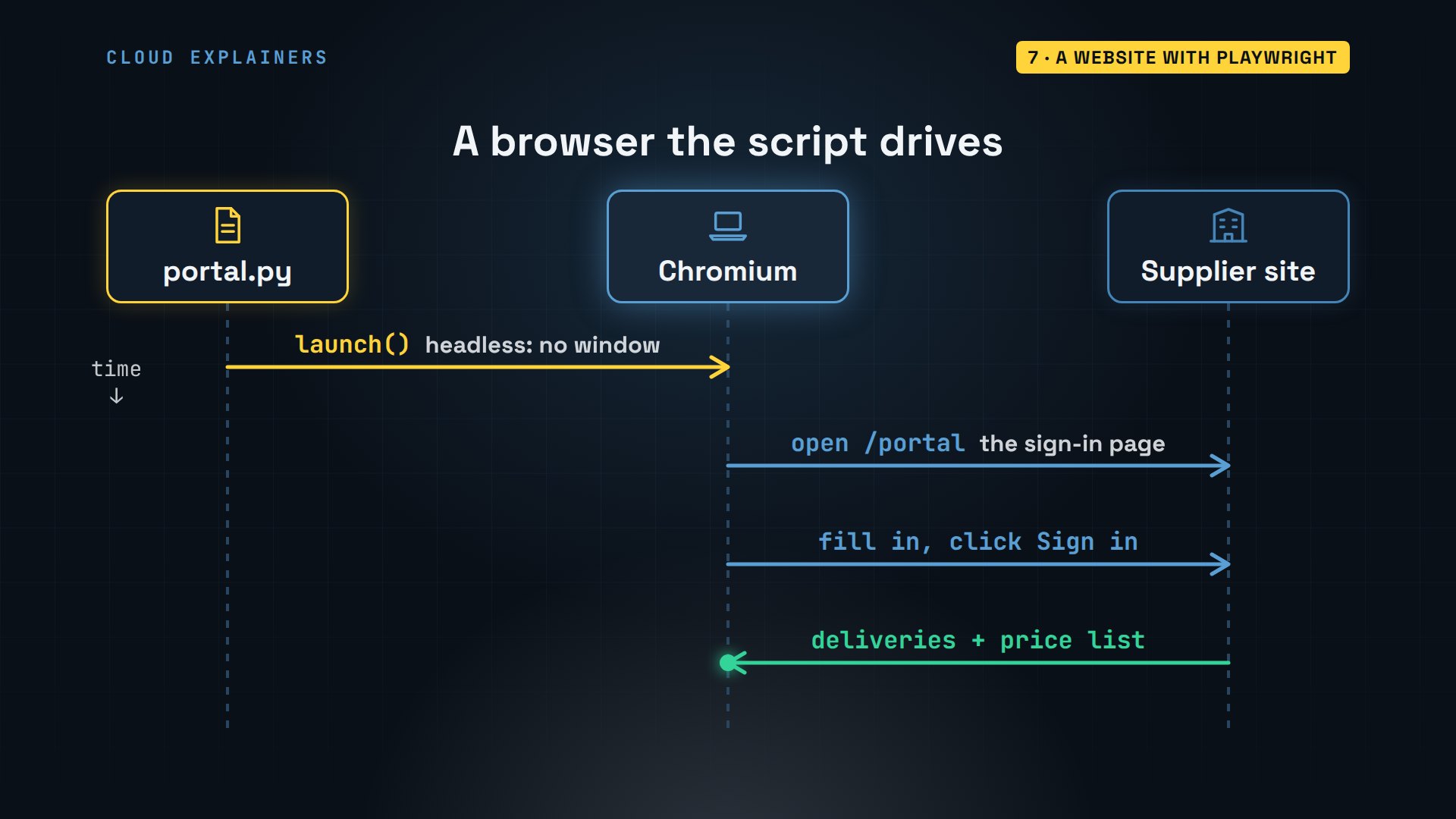
Playwright needs its own copy of the browser. On Linux, with deps also installs the system libraries a browser needs, as root, the administrator, which is why it asks for Ana's password. It doesn't show as she types. 99 small packages, then Chromium itself.
uv run playwright install --with-deps chromiumInstalling dependencies...
Switching to root user to install dependencies...
[sudo] password for ana:
Hit:1 http://ports.ubuntu.com/ubuntu-ports noble InRelease
Hit:2 http://ports.ubuntu.com/ubuntu-ports noble-updates InRelease
Hit:3 http://ports.ubuntu.com/ubuntu-ports noble-backports InRelease
Get:4 http://ports.ubuntu.com/ubuntu-ports noble-security InRelease [126 kB]
Get:5 http://ports.ubuntu.com/ubuntu-ports noble-security/main arm64 Packages [1489 kB]
Fetched 1615 kB in 2s (910 kB/s)
Reading package lists... Done
Reading package lists... Done
Building dependency tree... Done
Reading state information... Done
The following additional packages will be installed:
  at-spi2-common fontconfig fontconfig-config libasound2-data libavahi-client3
  libavahi-common-data libavahi-common3 libbsd0 libdatrie1 libdrm-amdgpu1 libdrm-common
  libedit2 libelf1t64 libfontenc1 libfribidi0 libgl1 libgl1-mesa-dri libglvnd0 libglx-mesa0
  libglx0 libgraphite2-3 libharfbuzz0b libice6 libicu74 libllvm20 libpixman-1-0 libpng16-16t64
  libsensors-config libsensors5 libsm6 libthai-data libthai0 libunwind8 libvulkan1 libx11-data
  libx11-xcb1 libxau6 libxaw7 libxcb-dri3-0 libxcb-glx0 libxcb-present0 libxcb-randr0
  libxcb-render0 libxcb-shm0 libxcb-sync1 libxcb-xfixes0 libxdmcp6 libxfont2 libxi6
  libxkbfile1 libxml2 libxmu6 libxmuu1 libxpm4 libxrender1 libxshmfence1 libxt6t64 libxxf86vm1
  mesa-libgallium x11-common x11-xkb-utils xauth xfonts-encodings xfonts-utils xkb-data
  xserver-common
Suggested packages:
  alsa-utils libasound2-plugins cups-common low-memory-monitor lm-sensors
Recommended packages:
  fonts-ipafont-mincho fonts-liberation-sans-narrow fonts-tlwg-loma alsa-ucm-conf
  alsa-topology-conf at-spi2-core dbus libglib2.0-data shared-mime-info xdg-user-dirs
  mesa-vulkan-drivers | vulkan-icd xfonts-base
The following NEW packages will be installed:
  at-spi2-common fontconfig fontconfig-config fonts-freefont-ttf fonts-ipafont-gothic
  fonts-liberation fonts-noto-color-emoji fonts-tlwg-loma-otf fonts-unifont fonts-wqy-zenhei
  libasound2-data libasound2t64 libatk-bridge2.0-0t64 libatk1.0-0t64 libatspi2.0-0t64
  libavahi-client3 libavahi-common-data libavahi-common3 libbsd0 libcairo2 libcups2t64
  libdatrie1 libdbus-1-3 libdrm-amdgpu1 libdrm-common libdrm2 libedit2 libelf1t64
  libfontconfig1 libfontenc1 libfreetype6 libfribidi0 libgbm1 libgl1 libgl1-mesa-dri
  libglib2.0-0t64 libglvnd0 libglx-mesa0 libglx0 libgraphite2-3 libharfbuzz0b libice6 libicu74
  libllvm20 libnspr4 libnss3 libpango-1.0-0 libpixman-1-0 libpng16-16t64 libsensors-config
  libsensors5 libsm6 libthai-data libthai0 libunwind8 libvulkan1 libx11-6 libx11-data
  libx11-xcb1 libxau6 libxaw7 libxcb-dri3-0 libxcb-glx0 libxcb-present0 libxcb-randr0
  libxcb-render0 libxcb-shm0 libxcb-sync1 libxcb-xfixes0 libxcb1 libxcomposite1 libxdamage1
  libxdmcp6 libxext6 libxfixes3 libxfont2 libxi6 libxkbcommon0 libxkbfile1 libxml2 libxmu6
  libxmuu1 libxpm4 libxrandr2 libxrender1 libxshmfence1 libxt6t64 libxxf86vm1 mesa-libgallium
  x11-common x11-xkb-utils xauth xfonts-cyrillic xfonts-encodings xfonts-scalable xfonts-utils
  xkb-data xserver-common xvfb
0 upgraded, 99 newly installed, 0 to remove and 3 not upgraded.
Need to get 96.6 MB of archives.
After this operation, 363 MB of additional disk space will be used.
Get:1 http://ports.ubuntu.com/ubuntu-ports noble/universe arm64 fonts-ipafont-gothic all 00303-21ubuntu1 [3513 kB]
Get:2 http://ports.ubuntu.com/ubuntu-ports noble-updates/main arm64 libbsd0 arm64 0.12.1-1build1.1 [41.0 kB]
Get:3 http://ports.ubuntu.com/ubuntu-ports noble-updates/main arm64 libdbus-1-3 arm64 1.14.10-4ubuntu4.1 [210 kB]
Get:4 http://ports.ubuntu.com/ubuntu-ports noble-updates/main arm64 libelf1t64 arm64 0.190-1.1ubuntu0.1 [58.4 kB]
Get:5 http://ports.ubuntu.com/ubuntu-ports noble/main arm64 libfribidi0 arm64 1.0.13-3build1 [26.5 kB]
Get:6 http://ports.ubuntu.com/ubuntu-ports noble-updates/main arm64 libglib2.0-0t64 arm64 2.80.0-6ubuntu3.10 [1533 kB]
Get:7 http://ports.ubuntu.com/ubuntu-ports noble-updates/main arm64 libicu74 arm64 74.2-1ubuntu3.1 [10.8 MB]
Get:8 http://ports.ubuntu.com/ubuntu-ports noble-updates/main arm64 libxml2 arm64 2.9.14+dfsg-1.3ubuntu3.10 [736 kB]
Get:9 http://ports.ubuntu.com/ubuntu-ports noble-updates/main arm64 xkb-data all 2.41-2ubuntu1.1 [397 kB]
Get:10 http://ports.ubuntu.com/ubuntu-ports noble-updates/main arm64 libdrm-common all 2.4.125-1ubuntu0.1~24.04.2 [9250 B]
Get:11 http://ports.ubuntu.com/ubuntu-ports noble-updates/main arm64 libdrm2 arm64 2.4.125-1ubuntu0.1~24.04.2 [42.9 kB]
Get:12 http://ports.ubuntu.com/ubuntu-ports noble/main arm64 libedit2 arm64 3.1-20230828-1build1 [97.5 kB]
Get:13 http://ports.ubuntu.com/ubuntu-ports noble-updates/main arm64 libpng16-16t64 arm64 1.6.43-5ubuntu0.7 [187 kB]
Get:14 http://ports.ubuntu.com/ubuntu-ports noble/main arm64 libsensors-config all 1:3.6.0-9build1 [5546 B]
Get:15 http://ports.ubuntu.com/ubuntu-ports noble/main arm64 libsensors5 arm64 1:3.6.0-9build1 [27.0 kB]
Get:16 http://ports.ubuntu.com/ubuntu-ports noble/main arm64 libxau6 arm64 1:1.0.9-1build6 [7264 B]
Get:17 http://ports.ubuntu.com/ubuntu-ports noble/main arm64 libxdmcp6 arm64 1:1.1.3-0ubuntu6 [10.4 kB]
Get:18 http://ports.ubuntu.com/ubuntu-ports noble/main arm64 libxcb1 arm64 1.15-1ubuntu2 [49.4 kB]
Get:19 http://ports.ubuntu.com/ubuntu-ports noble-updates/main arm64 libx11-data all 2:1.8.7-1ubuntu0.1 [116 kB]
Get:20 http://ports.ubuntu.com/ubuntu-ports noble-updates/main arm64 libx11-6 arm64 2:1.8.7-1ubuntu0.1 [651 kB]
Get:21 http://ports.ubuntu.com/ubuntu-ports noble/main arm64 libxext6 arm64 2:1.3.4-1build2 [30.4 kB]
Get:22 http://ports.ubuntu.com/ubuntu-ports noble/main arm64 libxkbcommon0 arm64 1.6.0-1build1 [122 kB]
Get:23 http://ports.ubuntu.com/ubuntu-ports noble/main arm64 libxmuu1 arm64 2:1.1.3-3build2 [9140 B]
Get:24 http://ports.ubuntu.com/ubuntu-ports noble/main arm64 xauth arm64 1:1.1.2-1build1 [25.3 kB]
Get:25 http://ports.ubuntu.com/ubuntu-ports noble/main arm64 at-spi2-common all 2.52.0-1build1 [8674 B]
Get:26 http://ports.ubuntu.com/ubuntu-ports noble-updates/main arm64 libfreetype6 arm64 2.13.2+dfsg-1ubuntu0.2 [393 kB]
Get:27 http://ports.ubuntu.com/ubuntu-ports noble/main arm64 fonts-liberation all 1:2.1.5-3 [1603 kB]
Get:28 http://ports.ubuntu.com/ubuntu-ports noble/main arm64 fonts-freefont-ttf all 20211204+svn4273-2 [5641 kB]
Get:29 http://ports.ubuntu.com/ubuntu-ports noble/main arm64 fontconfig-config arm64 2.15.0-1.1ubuntu2 [37.4 kB]
Get:30 http://ports.ubuntu.com/ubuntu-ports noble/main arm64 libfontconfig1 arm64 2.15.0-1.1ubuntu2 [142 kB]
Get:31 http://ports.ubuntu.com/ubuntu-ports noble/main arm64 fontconfig arm64 2.15.0-1.1ubuntu2 [190 kB]
Get:32 http://ports.ubuntu.com/ubuntu-ports noble-updates/main arm64 fonts-noto-color-emoji all 2.047-0ubuntu0.24.04.1 [9764 kB]
Get:33 http://ports.ubuntu.com/ubuntu-ports noble/universe arm64 fonts-tlwg-loma-otf all 1:0.7.3-1 [107 kB]
Get:34 http://ports.ubuntu.com/ubuntu-ports noble/universe arm64 fonts-unifont all 1:15.1.01-1build1 [2993 kB]
Get:35 http://ports.ubuntu.com/ubuntu-ports noble/universe arm64 fonts-wqy-zenhei all 0.9.45-8 [7472 kB]
Get:36 http://ports.ubuntu.com/ubuntu-ports noble-updates/main arm64 libasound2-data all 1.2.11-1ubuntu0.3 [21.4 kB]
Get:37 http://ports.ubuntu.com/ubuntu-ports noble-updates/main arm64 libasound2t64 arm64 1.2.11-1ubuntu0.3 [387 kB]
Get:38 http://ports.ubuntu.com/ubuntu-ports noble/main arm64 libatk1.0-0t64 arm64 2.52.0-1build1 [55.1 kB]
Get:39 http://ports.ubuntu.com/ubuntu-ports noble/main arm64 libxi6 arm64 2:1.8.1-1build1 [31.9 kB]
Get:40 http://ports.ubuntu.com/ubuntu-ports noble/main arm64 libatspi2.0-0t64 arm64 2.52.0-1build1 [80.9 kB]
Get:41 http://ports.ubuntu.com/ubuntu-ports noble/main arm64 libatk-bridge2.0-0t64 arm64 2.52.0-1build1 [66.3 kB]
Get:42 http://ports.ubuntu.com/ubuntu-ports noble-updates/main arm64 libavahi-common-data arm64 0.8-13ubuntu6.2 [30.0 kB]
Get:43 http://ports.ubuntu.com/ubuntu-ports noble-updates/main arm64 libavahi-common3 arm64 0.8-13ubuntu6.2 [23.3 kB]
Get:44 http://ports.ubuntu.com/ubuntu-ports noble-updates/main arm64 libavahi-client3 arm64 0.8-13ubuntu6.2 [27.3 kB]
Get:45 http://ports.ubuntu.com/ubuntu-ports noble/main arm64 libpixman-1-0 arm64 0.42.2-1build1 [204 kB]
Get:46 http://ports.ubuntu.com/ubuntu-ports noble/main arm64 libxcb-render0 arm64 1.15-1ubuntu2 [16.6 kB]
Get:47 http://ports.ubuntu.com/ubuntu-ports noble/main arm64 libxcb-shm0 arm64 1.15-1ubuntu2 [5876 B]
Get:48 http://ports.ubuntu.com/ubuntu-ports noble/main arm64 libxrender1 arm64 1:0.9.10-1.1build1 [18.8 kB]
Get:49 http://ports.ubuntu.com/ubuntu-ports noble/main arm64 libcairo2 arm64 1.18.0-3build1 [555 kB]
Get:50 http://ports.ubuntu.com/ubuntu-ports noble-updates/main arm64 libcups2t64 arm64 2.4.7-1.2ubuntu7.14 [277 kB]
Get:51 http://ports.ubuntu.com/ubuntu-ports noble/main arm64 libdatrie1 arm64 0.2.13-3build1 [19.2 kB]
Get:52 http://ports.ubuntu.com/ubuntu-ports noble-updates/main arm64 libdrm-amdgpu1 arm64 2.4.125-1ubuntu0.1~24.04.2 [21.9 kB]
Get:53 http://ports.ubuntu.com/ubuntu-ports noble/main arm64 libfontenc1 arm64 1:1.1.8-1build1 [13.9 kB]
Get:54 http://ports.ubuntu.com/ubuntu-ports noble-updates/main arm64 libllvm20 arm64 1:20.1.2-0ubuntu1~24.04.3 [29.3 MB]
Get:55 http://ports.ubuntu.com/ubuntu-ports noble-updates/main arm64 libx11-xcb1 arm64 2:1.8.7-1ubuntu0.1 [7870 B]
Get:56 http://ports.ubuntu.com/ubuntu-ports noble/main arm64 libxcb-dri3-0 arm64 1.15-1ubuntu2 [7196 B]
Get:57 http://ports.ubuntu.com/ubuntu-ports noble/main arm64 libxcb-present0 arm64 1.15-1ubuntu2 [5866 B]
Get:58 http://ports.ubuntu.com/ubuntu-ports noble/main arm64 libxcb-randr0 arm64 1.15-1ubuntu2 [18.4 kB]
Get:59 http://ports.ubuntu.com/ubuntu-ports noble/main arm64 libxcb-sync1 arm64 1.15-1ubuntu2 [9682 B]
Get:60 http://ports.ubuntu.com/ubuntu-ports noble/main arm64 libxcb-xfixes0 arm64 1.15-1ubuntu2 [10.6 kB]
Get:61 http://ports.ubuntu.com/ubuntu-ports noble/main arm64 libxshmfence1 arm64 1.3-1build5 [4938 B]
Get:62 http://ports.ubuntu.com/ubuntu-ports noble-updates/main arm64 mesa-libgallium arm64 25.2.8-0ubuntu0.24.04.4 [12.1 MB]
Get:63 http://ports.ubuntu.com/ubuntu-ports noble-updates/main arm64 libgbm1 arm64 25.2.8-0ubuntu0.24.04.4 [35.0 kB]
Get:64 http://ports.ubuntu.com/ubuntu-ports noble/main arm64 libvulkan1 arm64 1.3.275.0-1build1 [150 kB]
Get:65 http://ports.ubuntu.com/ubuntu-ports noble-updates/main arm64 libgl1-mesa-dri arm64 25.2.8-0ubuntu0.24.04.4 [37.0 kB]
Get:66 http://ports.ubuntu.com/ubuntu-ports noble/main arm64 libxcb-glx0 arm64 1.15-1ubuntu2 [25.5 kB]
Get:67 http://ports.ubuntu.com/ubuntu-ports noble/main arm64 libxxf86vm1 arm64 1:1.1.4-1build4 [9130 B]
Get:68 http://ports.ubuntu.com/ubuntu-ports noble-updates/main arm64 libglx-mesa0 arm64 25.2.8-0ubuntu0.24.04.4 [111 kB]
Get:69 http://ports.ubuntu.com/ubuntu-ports noble-updates/main arm64 libgraphite2-3 arm64 1.3.14-2ubuntu0.24.04.1 [71.1 kB]
Get:70 http://ports.ubuntu.com/ubuntu-ports noble/main arm64 libharfbuzz0b arm64 8.3.0-2build2 [463 kB]
Get:71 http://ports.ubuntu.com/ubuntu-ports noble/main arm64 x11-common all 1:7.7+23ubuntu3 [21.7 kB]
Get:72 http://ports.ubuntu.com/ubuntu-ports noble/main arm64 libice6 arm64 2:1.0.10-1build3 [41.1 kB]
Get:73 http://ports.ubuntu.com/ubuntu-ports noble/main arm64 libnspr4 arm64 2:4.35-1.1build1 [114 kB]
Get:74 http://ports.ubuntu.com/ubuntu-ports noble-updates/main arm64 libnss3 arm64 2:3.98-1ubuntu0.3 [1407 kB]
Get:75 http://ports.ubuntu.com/ubuntu-ports noble/main arm64 libthai-data all 0.1.29-2build1 [158 kB]
Get:76 http://ports.ubuntu.com/ubuntu-ports noble/main arm64 libthai0 arm64 0.1.29-2build1 [18.2 kB]
Get:77 http://ports.ubuntu.com/ubuntu-ports noble/main arm64 libpango-1.0-0 arm64 1.52.1+ds-1build1 [228 kB]
Get:78 http://ports.ubuntu.com/ubuntu-ports noble/main arm64 libsm6 arm64 2:1.2.3-1build3 [15.6 kB]
Get:79 http://ports.ubuntu.com/ubuntu-ports noble-updates/main arm64 libunwind8 arm64 1.6.2-3build1.1 [53.6 kB]
Get:80 http://ports.ubuntu.com/ubuntu-ports noble/main arm64 libxt6t64 arm64 1:1.2.1-1.2build1 [168 kB]
Get:81 http://ports.ubuntu.com/ubuntu-ports noble/main arm64 libxmu6 arm64 2:1.1.3-3build2 [47.5 kB]
Get:82 http://ports.ubuntu.com/ubuntu-ports noble-updates/main arm64 libxpm4 arm64 1:3.5.17-1ubuntu0.24.04.2 [35.3 kB]
Get:83 http://ports.ubuntu.com/ubuntu-ports noble/main arm64 libxaw7 arm64 2:1.0.14-1build2 [183 kB]
Get:84 http://ports.ubuntu.com/ubuntu-ports noble/main arm64 libxcomposite1 arm64 1:0.4.5-1build3 [6336 B]
Get:85 http://ports.ubuntu.com/ubuntu-ports noble/main arm64 libxdamage1 arm64 1:1.1.6-1build1 [6236 B]
Get:86 http://ports.ubuntu.com/ubuntu-ports noble/main arm64 libxfixes3 arm64 1:6.0.0-2build1 [11.2 kB]
Get:87 http://ports.ubuntu.com/ubuntu-ports noble-updates/main arm64 libxfont2 arm64 1:2.0.6-1+deb13u1build0.24.04.2 [89.8 kB]
Get:88 http://ports.ubuntu.com/ubuntu-ports noble/main arm64 libxkbfile1 arm64 1:1.1.0-1build4 [69.4 kB]
Get:89 http://ports.ubuntu.com/ubuntu-ports noble/main arm64 libxrandr2 arm64 2:1.5.2-2build1 [19.6 kB]
Get:90 http://ports.ubuntu.com/ubuntu-ports noble/main arm64 x11-xkb-utils arm64 7.7+8build2 [165 kB]
Get:91 http://ports.ubuntu.com/ubuntu-ports noble/main arm64 xfonts-encodings all 1:1.0.5-0ubuntu2 [578 kB]
Get:92 http://ports.ubuntu.com/ubuntu-ports noble/main arm64 xfonts-utils arm64 1:7.7+6build3 [93.1 kB]
Get:93 http://ports.ubuntu.com/ubuntu-ports noble/universe arm64 xfonts-cyrillic all 1:1.0.5+nmu1 [384 kB]
Get:94 http://ports.ubuntu.com/ubuntu-ports noble/main arm64 xfonts-scalable all 1:1.0.3-1.3 [304 kB]
Get:95 http://ports.ubuntu.com/ubuntu-ports noble-updates/main arm64 xserver-common all 2:21.1.12-1ubuntu1.9 [35.0 kB]
Get:96 http://ports.ubuntu.com/ubuntu-ports noble/main arm64 libglvnd0 arm64 1.7.0-1build1 [60.6 kB]
Get:97 http://ports.ubuntu.com/ubuntu-ports noble/main arm64 libglx0 arm64 1.7.0-1build1 [33.2 kB]
Get:98 http://ports.ubuntu.com/ubuntu-ports noble/main arm64 libgl1 arm64 1.7.0-1build1 [106 kB]
Get:99 http://ports.ubuntu.com/ubuntu-ports noble-updates/universe arm64 xvfb arm64 2:21.1.12-1ubuntu1.9 [873 kB]
Fetched 96.6 MB in 4s (22.6 MB/s)
debconf: delaying package configuration, since apt-utils is not installed
Selecting previously unselected package fonts-ipafont-gothic.
(Reading database ... 7867 files and directories currently installed.)
Preparing to unpack .../00-fonts-ipafont-gothic_00303-21ubuntu1_all.deb ...
Unpacking fonts-ipafont-gothic (00303-21ubuntu1) ...
Selecting previously unselected package libbsd0:arm64.
Preparing to unpack .../01-libbsd0_0.12.1-1build1.1_arm64.deb ...
Unpacking libbsd0:arm64 (0.12.1-1build1.1) ...
Selecting previously unselected package libdbus-1-3:arm64.
Preparing to unpack .../02-libdbus-1-3_1.14.10-4ubuntu4.1_arm64.deb ...
Unpacking libdbus-1-3:arm64 (1.14.10-4ubuntu4.1) ...
Selecting previously unselected package libelf1t64:arm64.
Preparing to unpack .../03-libelf1t64_0.190-1.1ubuntu0.1_arm64.deb ...
Unpacking libelf1t64:arm64 (0.190-1.1ubuntu0.1) ...
Selecting previously unselected package libfribidi0:arm64.
Preparing to unpack .../04-libfribidi0_1.0.13-3build1_arm64.deb ...
Unpacking libfribidi0:arm64 (1.0.13-3build1) ...
Selecting previously unselected package libglib2.0-0t64:arm64.
Preparing to unpack .../05-libglib2.0-0t64_2.80.0-6ubuntu3.10_arm64.deb ...
Unpacking libglib2.0-0t64:arm64 (2.80.0-6ubuntu3.10) ...
Selecting previously unselected package libicu74:arm64.
Preparing to unpack .../06-libicu74_74.2-1ubuntu3.1_arm64.deb ...
Unpacking libicu74:arm64 (74.2-1ubuntu3.1) ...
Selecting previously unselected package libxml2:arm64.
Preparing to unpack .../07-libxml2_2.9.14+dfsg-1.3ubuntu3.10_arm64.deb ...
Unpacking libxml2:arm64 (2.9.14+dfsg-1.3ubuntu3.10) ...
Selecting previously unselected package xkb-data.
Preparing to unpack .../08-xkb-data_2.41-2ubuntu1.1_all.deb ...
Unpacking xkb-data (2.41-2ubuntu1.1) ...
Selecting previously unselected package libdrm-common.
Preparing to unpack .../09-libdrm-common_2.4.125-1ubuntu0.1~24.04.2_all.deb ...
Unpacking libdrm-common (2.4.125-1ubuntu0.1~24.04.2) ...
Selecting previously unselected package libdrm2:arm64.
Preparing to unpack .../10-libdrm2_2.4.125-1ubuntu0.1~24.04.2_arm64.deb ...
Unpacking libdrm2:arm64 (2.4.125-1ubuntu0.1~24.04.2) ...
Selecting previously unselected package libedit2:arm64.
Preparing to unpack .../11-libedit2_3.1-20230828-1build1_arm64.deb ...
Unpacking libedit2:arm64 (3.1-20230828-1build1) ...
Selecting previously unselected package libpng16-16t64:arm64.
Preparing to unpack .../12-libpng16-16t64_1.6.43-5ubuntu0.7_arm64.deb ...
Unpacking libpng16-16t64:arm64 (1.6.43-5ubuntu0.7) ...
Selecting previously unselected package libsensors-config.
Preparing to unpack .../13-libsensors-config_1%3a3.6.0-9build1_all.deb ...
Unpacking libsensors-config (1:3.6.0-9build1) ...
Selecting previously unselected package libsensors5:arm64.
Preparing to unpack .../14-libsensors5_1%3a3.6.0-9build1_arm64.deb ...
Unpacking libsensors5:arm64 (1:3.6.0-9build1) ...
Selecting previously unselected package libxau6:arm64.
Preparing to unpack .../15-libxau6_1%3a1.0.9-1build6_arm64.deb ...
Unpacking libxau6:arm64 (1:1.0.9-1build6) ...
Selecting previously unselected package libxdmcp6:arm64.
Preparing to unpack .../16-libxdmcp6_1%3a1.1.3-0ubuntu6_arm64.deb ...
Unpacking libxdmcp6:arm64 (1:1.1.3-0ubuntu6) ...
Selecting previously unselected package libxcb1:arm64.
Preparing to unpack .../17-libxcb1_1.15-1ubuntu2_arm64.deb ...
Unpacking libxcb1:arm64 (1.15-1ubuntu2) ...
Selecting previously unselected package libx11-data.
Preparing to unpack .../18-libx11-data_2%3a1.8.7-1ubuntu0.1_all.deb ...
Unpacking libx11-data (2:1.8.7-1ubuntu0.1) ...
Selecting previously unselected package libx11-6:arm64.
Preparing to unpack .../19-libx11-6_2%3a1.8.7-1ubuntu0.1_arm64.deb ...
Unpacking libx11-6:arm64 (2:1.8.7-1ubuntu0.1) ...
Selecting previously unselected package libxext6:arm64.
Preparing to unpack .../20-libxext6_2%3a1.3.4-1build2_arm64.deb ...
Unpacking libxext6:arm64 (2:1.3.4-1build2) ...
Selecting previously unselected package libxkbcommon0:arm64.
Preparing to unpack .../21-libxkbcommon0_1.6.0-1build1_arm64.deb ...
Unpacking libxkbcommon0:arm64 (1.6.0-1build1) ...
Selecting previously unselected package libxmuu1:arm64.
Preparing to unpack .../22-libxmuu1_2%3a1.1.3-3build2_arm64.deb ...
Unpacking libxmuu1:arm64 (2:1.1.3-3build2) ...
Selecting previously unselected package xauth.
Preparing to unpack .../23-xauth_1%3a1.1.2-1build1_arm64.deb ...
Unpacking xauth (1:1.1.2-1build1) ...
Selecting previously unselected package at-spi2-common.
Preparing to unpack .../24-at-spi2-common_2.52.0-1build1_all.deb ...
Unpacking at-spi2-common (2.52.0-1build1) ...
Selecting previously unselected package libfreetype6:arm64.
Preparing to unpack .../25-libfreetype6_2.13.2+dfsg-1ubuntu0.2_arm64.deb ...
Unpacking libfreetype6:arm64 (2.13.2+dfsg-1ubuntu0.2) ...
Selecting previously unselected package fonts-liberation.
Preparing to unpack .../26-fonts-liberation_1%3a2.1.5-3_all.deb ...
Unpacking fonts-liberation (1:2.1.5-3) ...
Selecting previously unselected package fonts-freefont-ttf.
Preparing to unpack .../27-fonts-freefont-ttf_20211204+svn4273-2_all.deb ...
Unpacking fonts-freefont-ttf (20211204+svn4273-2) ...
Selecting previously unselected package fontconfig-config.
Preparing to unpack .../28-fontconfig-config_2.15.0-1.1ubuntu2_arm64.deb ...
Unpacking fontconfig-config (2.15.0-1.1ubuntu2) ...
Selecting previously unselected package libfontconfig1:arm64.
Preparing to unpack .../29-libfontconfig1_2.15.0-1.1ubuntu2_arm64.deb ...
Unpacking libfontconfig1:arm64 (2.15.0-1.1ubuntu2) ...
Selecting previously unselected package fontconfig.
Preparing to unpack .../30-fontconfig_2.15.0-1.1ubuntu2_arm64.deb ...
Unpacking fontconfig (2.15.0-1.1ubuntu2) ...
Selecting previously unselected package fonts-noto-color-emoji.
Preparing to unpack .../31-fonts-noto-color-emoji_2.047-0ubuntu0.24.04.1_all.deb ...
Unpacking fonts-noto-color-emoji (2.047-0ubuntu0.24.04.1) ...
Selecting previously unselected package fonts-tlwg-loma-otf.
Preparing to unpack .../32-fonts-tlwg-loma-otf_1%3a0.7.3-1_all.deb ...
Unpacking fonts-tlwg-loma-otf (1:0.7.3-1) ...
Selecting previously unselected package fonts-unifont.
Preparing to unpack .../33-fonts-unifont_1%3a15.1.01-1build1_all.deb ...
Unpacking fonts-unifont (1:15.1.01-1build1) ...
Selecting previously unselected package fonts-wqy-zenhei.
Preparing to unpack .../34-fonts-wqy-zenhei_0.9.45-8_all.deb ...
Unpacking fonts-wqy-zenhei (0.9.45-8) ...
Selecting previously unselected package libasound2-data.
Preparing to unpack .../35-libasound2-data_1.2.11-1ubuntu0.3_all.deb ...
Unpacking libasound2-data (1.2.11-1ubuntu0.3) ...
Selecting previously unselected package libasound2t64:arm64.
Preparing to unpack .../36-libasound2t64_1.2.11-1ubuntu0.3_arm64.deb ...
Unpacking libasound2t64:arm64 (1.2.11-1ubuntu0.3) ...
Selecting previously unselected package libatk1.0-0t64:arm64.
Preparing to unpack .../37-libatk1.0-0t64_2.52.0-1build1_arm64.deb ...
Unpacking libatk1.0-0t64:arm64 (2.52.0-1build1) ...
Selecting previously unselected package libxi6:arm64.
Preparing to unpack .../38-libxi6_2%3a1.8.1-1build1_arm64.deb ...
Unpacking libxi6:arm64 (2:1.8.1-1build1) ...
Selecting previously unselected package libatspi2.0-0t64:arm64.
Preparing to unpack .../39-libatspi2.0-0t64_2.52.0-1build1_arm64.deb ...
Unpacking libatspi2.0-0t64:arm64 (2.52.0-1build1) ...
Selecting previously unselected package libatk-bridge2.0-0t64:arm64.
Preparing to unpack .../40-libatk-bridge2.0-0t64_2.52.0-1build1_arm64.deb ...
Unpacking libatk-bridge2.0-0t64:arm64 (2.52.0-1build1) ...
Selecting previously unselected package libavahi-common-data:arm64.
Preparing to unpack .../41-libavahi-common-data_0.8-13ubuntu6.2_arm64.deb ...
Unpacking libavahi-common-data:arm64 (0.8-13ubuntu6.2) ...
Selecting previously unselected package libavahi-common3:arm64.
Preparing to unpack .../42-libavahi-common3_0.8-13ubuntu6.2_arm64.deb ...
Unpacking libavahi-common3:arm64 (0.8-13ubuntu6.2) ...
Selecting previously unselected package libavahi-client3:arm64.
Preparing to unpack .../43-libavahi-client3_0.8-13ubuntu6.2_arm64.deb ...
Unpacking libavahi-client3:arm64 (0.8-13ubuntu6.2) ...
Selecting previously unselected package libpixman-1-0:arm64.
Preparing to unpack .../44-libpixman-1-0_0.42.2-1build1_arm64.deb ...
Unpacking libpixman-1-0:arm64 (0.42.2-1build1) ...
Selecting previously unselected package libxcb-render0:arm64.
Preparing to unpack .../45-libxcb-render0_1.15-1ubuntu2_arm64.deb ...
Unpacking libxcb-render0:arm64 (1.15-1ubuntu2) ...
Selecting previously unselected package libxcb-shm0:arm64.
Preparing to unpack .../46-libxcb-shm0_1.15-1ubuntu2_arm64.deb ...
Unpacking libxcb-shm0:arm64 (1.15-1ubuntu2) ...
Selecting previously unselected package libxrender1:arm64.
Preparing to unpack .../47-libxrender1_1%3a0.9.10-1.1build1_arm64.deb ...
Unpacking libxrender1:arm64 (1:0.9.10-1.1build1) ...
Selecting previously unselected package libcairo2:arm64.
Preparing to unpack .../48-libcairo2_1.18.0-3build1_arm64.deb ...
Unpacking libcairo2:arm64 (1.18.0-3build1) ...
Selecting previously unselected package libcups2t64:arm64.
Preparing to unpack .../49-libcups2t64_2.4.7-1.2ubuntu7.14_arm64.deb ...
Unpacking libcups2t64:arm64 (2.4.7-1.2ubuntu7.14) ...
Selecting previously unselected package libdatrie1:arm64.
Preparing to unpack .../50-libdatrie1_0.2.13-3build1_arm64.deb ...
Unpacking libdatrie1:arm64 (0.2.13-3build1) ...
Selecting previously unselected package libdrm-amdgpu1:arm64.
Preparing to unpack .../51-libdrm-amdgpu1_2.4.125-1ubuntu0.1~24.04.2_arm64.deb ...
Unpacking libdrm-amdgpu1:arm64 (2.4.125-1ubuntu0.1~24.04.2) ...
Selecting previously unselected package libfontenc1:arm64.
Preparing to unpack .../52-libfontenc1_1%3a1.1.8-1build1_arm64.deb ...
Unpacking libfontenc1:arm64 (1:1.1.8-1build1) ...
Selecting previously unselected package libllvm20:arm64.
Preparing to unpack .../53-libllvm20_1%3a20.1.2-0ubuntu1~24.04.3_arm64.deb ...
Unpacking libllvm20:arm64 (1:20.1.2-0ubuntu1~24.04.3) ...
Selecting previously unselected package libx11-xcb1:arm64.
Preparing to unpack .../54-libx11-xcb1_2%3a1.8.7-1ubuntu0.1_arm64.deb ...
Unpacking libx11-xcb1:arm64 (2:1.8.7-1ubuntu0.1) ...
Selecting previously unselected package libxcb-dri3-0:arm64.
Preparing to unpack .../55-libxcb-dri3-0_1.15-1ubuntu2_arm64.deb ...
Unpacking libxcb-dri3-0:arm64 (1.15-1ubuntu2) ...
Selecting previously unselected package libxcb-present0:arm64.
Preparing to unpack .../56-libxcb-present0_1.15-1ubuntu2_arm64.deb ...
Unpacking libxcb-present0:arm64 (1.15-1ubuntu2) ...
Selecting previously unselected package libxcb-randr0:arm64.
Preparing to unpack .../57-libxcb-randr0_1.15-1ubuntu2_arm64.deb ...
Unpacking libxcb-randr0:arm64 (1.15-1ubuntu2) ...
Selecting previously unselected package libxcb-sync1:arm64.
Preparing to unpack .../58-libxcb-sync1_1.15-1ubuntu2_arm64.deb ...
Unpacking libxcb-sync1:arm64 (1.15-1ubuntu2) ...
Selecting previously unselected package libxcb-xfixes0:arm64.
Preparing to unpack .../59-libxcb-xfixes0_1.15-1ubuntu2_arm64.deb ...
Unpacking libxcb-xfixes0:arm64 (1.15-1ubuntu2) ...
Selecting previously unselected package libxshmfence1:arm64.
Preparing to unpack .../60-libxshmfence1_1.3-1build5_arm64.deb ...
Unpacking libxshmfence1:arm64 (1.3-1build5) ...
Selecting previously unselected package mesa-libgallium:arm64.
Preparing to unpack .../61-mesa-libgallium_25.2.8-0ubuntu0.24.04.4_arm64.deb ...
Unpacking mesa-libgallium:arm64 (25.2.8-0ubuntu0.24.04.4) ...
Selecting previously unselected package libgbm1:arm64.
Preparing to unpack .../62-libgbm1_25.2.8-0ubuntu0.24.04.4_arm64.deb ...
Unpacking libgbm1:arm64 (25.2.8-0ubuntu0.24.04.4) ...
Selecting previously unselected package libvulkan1:arm64.
Preparing to unpack .../63-libvulkan1_1.3.275.0-1build1_arm64.deb ...
Unpacking libvulkan1:arm64 (1.3.275.0-1build1) ...
Selecting previously unselected package libgl1-mesa-dri:arm64.
Preparing to unpack .../64-libgl1-mesa-dri_25.2.8-0ubuntu0.24.04.4_arm64.deb ...
Unpacking libgl1-mesa-dri:arm64 (25.2.8-0ubuntu0.24.04.4) ...
Selecting previously unselected package libxcb-glx0:arm64.
Preparing to unpack .../65-libxcb-glx0_1.15-1ubuntu2_arm64.deb ...
Unpacking libxcb-glx0:arm64 (1.15-1ubuntu2) ...
Selecting previously unselected package libxxf86vm1:arm64.
Preparing to unpack .../66-libxxf86vm1_1%3a1.1.4-1build4_arm64.deb ...
Unpacking libxxf86vm1:arm64 (1:1.1.4-1build4) ...
Selecting previously unselected package libglx-mesa0:arm64.
Preparing to unpack .../67-libglx-mesa0_25.2.8-0ubuntu0.24.04.4_arm64.deb ...
Unpacking libglx-mesa0:arm64 (25.2.8-0ubuntu0.24.04.4) ...
Selecting previously unselected package libgraphite2-3:arm64.
Preparing to unpack .../68-libgraphite2-3_1.3.14-2ubuntu0.24.04.1_arm64.deb ...
Unpacking libgraphite2-3:arm64 (1.3.14-2ubuntu0.24.04.1) ...
Selecting previously unselected package libharfbuzz0b:arm64.
Preparing to unpack .../69-libharfbuzz0b_8.3.0-2build2_arm64.deb ...
Unpacking libharfbuzz0b:arm64 (8.3.0-2build2) ...
Selecting previously unselected package x11-common.
Preparing to unpack .../70-x11-common_1%3a7.7+23ubuntu3_all.deb ...
Unpacking x11-common (1:7.7+23ubuntu3) ...
Selecting previously unselected package libice6:arm64.
Preparing to unpack .../71-libice6_2%3a1.0.10-1build3_arm64.deb ...
Unpacking libice6:arm64 (2:1.0.10-1build3) ...
Selecting previously unselected package libnspr4:arm64.
Preparing to unpack .../72-libnspr4_2%3a4.35-1.1build1_arm64.deb ...
Unpacking libnspr4:arm64 (2:4.35-1.1build1) ...
Selecting previously unselected package libnss3:arm64.
Preparing to unpack .../73-libnss3_2%3a3.98-1ubuntu0.3_arm64.deb ...
Unpacking libnss3:arm64 (2:3.98-1ubuntu0.3) ...
Selecting previously unselected package libthai-data.
Preparing to unpack .../74-libthai-data_0.1.29-2build1_all.deb ...
Unpacking libthai-data (0.1.29-2build1) ...
Selecting previously unselected package libthai0:arm64.
Preparing to unpack .../75-libthai0_0.1.29-2build1_arm64.deb ...
Unpacking libthai0:arm64 (0.1.29-2build1) ...
Selecting previously unselected package libpango-1.0-0:arm64.
Preparing to unpack .../76-libpango-1.0-0_1.52.1+ds-1build1_arm64.deb ...
Unpacking libpango-1.0-0:arm64 (1.52.1+ds-1build1) ...
Selecting previously unselected package libsm6:arm64.
Preparing to unpack .../77-libsm6_2%3a1.2.3-1build3_arm64.deb ...
Unpacking libsm6:arm64 (2:1.2.3-1build3) ...
Selecting previously unselected package libunwind8:arm64.
Preparing to unpack .../78-libunwind8_1.6.2-3build1.1_arm64.deb ...
Unpacking libunwind8:arm64 (1.6.2-3build1.1) ...
Selecting previously unselected package libxt6t64:arm64.
Preparing to unpack .../79-libxt6t64_1%3a1.2.1-1.2build1_arm64.deb ...
Unpacking libxt6t64:arm64 (1:1.2.1-1.2build1) ...
Selecting previously unselected package libxmu6:arm64.
Preparing to unpack .../80-libxmu6_2%3a1.1.3-3build2_arm64.deb ...
Unpacking libxmu6:arm64 (2:1.1.3-3build2) ...
Selecting previously unselected package libxpm4:arm64.
Preparing to unpack .../81-libxpm4_1%3a3.5.17-1ubuntu0.24.04.2_arm64.deb ...
Unpacking libxpm4:arm64 (1:3.5.17-1ubuntu0.24.04.2) ...
Selecting previously unselected package libxaw7:arm64.
Preparing to unpack .../82-libxaw7_2%3a1.0.14-1build2_arm64.deb ...
Unpacking libxaw7:arm64 (2:1.0.14-1build2) ...
Selecting previously unselected package libxcomposite1:arm64.
Preparing to unpack .../83-libxcomposite1_1%3a0.4.5-1build3_arm64.deb ...
Unpacking libxcomposite1:arm64 (1:0.4.5-1build3) ...
Selecting previously unselected package libxdamage1:arm64.
Preparing to unpack .../84-libxdamage1_1%3a1.1.6-1build1_arm64.deb ...
Unpacking libxdamage1:arm64 (1:1.1.6-1build1) ...
Selecting previously unselected package libxfixes3:arm64.
Preparing to unpack .../85-libxfixes3_1%3a6.0.0-2build1_arm64.deb ...
Unpacking libxfixes3:arm64 (1:6.0.0-2build1) ...
Selecting previously unselected package libxfont2:arm64.
Preparing to unpack .../86-libxfont2_1%3a2.0.6-1+deb13u1build0.24.04.2_arm64.deb ...
Unpacking libxfont2:arm64 (1:2.0.6-1+deb13u1build0.24.04.2) ...
Selecting previously unselected package libxkbfile1:arm64.
Preparing to unpack .../87-libxkbfile1_1%3a1.1.0-1build4_arm64.deb ...
Unpacking libxkbfile1:arm64 (1:1.1.0-1build4) ...
Selecting previously unselected package libxrandr2:arm64.
Preparing to unpack .../88-libxrandr2_2%3a1.5.2-2build1_arm64.deb ...
Unpacking libxrandr2:arm64 (2:1.5.2-2build1) ...
Selecting previously unselected package x11-xkb-utils.
Preparing to unpack .../89-x11-xkb-utils_7.7+8build2_arm64.deb ...
Unpacking x11-xkb-utils (7.7+8build2) ...
Selecting previously unselected package xfonts-encodings.
Preparing to unpack .../90-xfonts-encodings_1%3a1.0.5-0ubuntu2_all.deb ...
Unpacking xfonts-encodings (1:1.0.5-0ubuntu2) ...
Selecting previously unselected package xfonts-utils.
Preparing to unpack .../91-xfonts-utils_1%3a7.7+6build3_arm64.deb ...
Unpacking xfonts-utils (1:7.7+6build3) ...
Selecting previously unselected package xfonts-cyrillic.
Preparing to unpack .../92-xfonts-cyrillic_1%3a1.0.5+nmu1_all.deb ...
Unpacking xfonts-cyrillic (1:1.0.5+nmu1) ...
Selecting previously unselected package xfonts-scalable.
Preparing to unpack .../93-xfonts-scalable_1%3a1.0.3-1.3_all.deb ...
Unpacking xfonts-scalable (1:1.0.3-1.3) ...
Selecting previously unselected package xserver-common.
Preparing to unpack .../94-xserver-common_2%3a21.1.12-1ubuntu1.9_all.deb ...
Unpacking xserver-common (2:21.1.12-1ubuntu1.9) ...
Selecting previously unselected package libglvnd0:arm64.
Preparing to unpack .../95-libglvnd0_1.7.0-1build1_arm64.deb ...
Unpacking libglvnd0:arm64 (1.7.0-1build1) ...
Selecting previously unselected package libglx0:arm64.
Preparing to unpack .../96-libglx0_1.7.0-1build1_arm64.deb ...
Unpacking libglx0:arm64 (1.7.0-1build1) ...
Selecting previously unselected package libgl1:arm64.
Preparing to unpack .../97-libgl1_1.7.0-1build1_arm64.deb ...
Unpacking libgl1:arm64 (1.7.0-1build1) ...
Selecting previously unselected package xvfb.
Preparing to unpack .../98-xvfb_2%3a21.1.12-1ubuntu1.9_arm64.deb ...
Unpacking xvfb (2:21.1.12-1ubuntu1.9) ...
Setting up libgraphite2-3:arm64 (1.3.14-2ubuntu0.24.04.1) ...
Setting up libpixman-1-0:arm64 (0.42.2-1build1) ...
Setting up libxau6:arm64 (1:1.0.9-1build6) ...
Setting up libdatrie1:arm64 (0.2.13-3build1) ...
Setting up fonts-noto-color-emoji (2.047-0ubuntu0.24.04.1) ...
Setting up libglvnd0:arm64 (1.7.0-1build1) ...
Setting up x11-common (1:7.7+23ubuntu3) ...
debconf: unable to initialize frontend: Dialog
debconf: (Dialog frontend will not work on a dumb terminal, an emacs shell buffer, or without a controlling terminal.)
debconf: falling back to frontend: Readline
debconf: unable to initialize frontend: Readline
debconf: (Can't locate Term/ReadLine.pm in @INC (you may need to install the Term::ReadLine module) (@INC entries checked: /etc/perl /usr/local/lib/aarch64-linux-gnu/perl/5.38.2 /usr/local/share/perl/5.38.2 /usr/lib/aarch64-linux-gnu/perl5/5.38 /usr/share/perl5 /usr/lib/aarch64-linux-gnu/perl-base /usr/lib/aarch64-linux-gnu/perl/5.38 /usr/share/perl/5.38 /usr/local/lib/site_perl) at /usr/share/perl5/Debconf/FrontEnd/Readline.pm line 8.)
debconf: falling back to frontend: Teletype
invoke-rc.d: could not determine current runlevel
invoke-rc.d: policy-rc.d denied execution of start.
Setting up libsensors-config (1:3.6.0-9build1) ...
Setting up fonts-freefont-ttf (20211204+svn4273-2) ...
Setting up xkb-data (2.41-2ubuntu1.1) ...
Setting up libunwind8:arm64 (1.6.2-3build1.1) ...
Setting up libelf1t64:arm64 (0.190-1.1ubuntu0.1) ...
Setting up libasound2-data (1.2.11-1ubuntu0.3) ...
Setting up libfontenc1:arm64 (1:1.1.8-1build1) ...
Setting up libglib2.0-0t64:arm64 (2.80.0-6ubuntu3.10) ...
No schema files found: doing nothing.
Setting up libasound2t64:arm64 (1.2.11-1ubuntu0.3) ...
Setting up fonts-tlwg-loma-otf (1:0.7.3-1) ...
Setting up libx11-data (2:1.8.7-1ubuntu0.1) ...
Setting up libnspr4:arm64 (2:4.35-1.1build1) ...
Setting up libavahi-common-data:arm64 (0.8-13ubuntu6.2) ...
Setting up libdbus-1-3:arm64 (1.14.10-4ubuntu4.1) ...
Setting up xfonts-encodings (1:1.0.5-0ubuntu2) ...
Setting up libfribidi0:arm64 (1.0.13-3build1) ...
Setting up libpng16-16t64:arm64 (1.6.43-5ubuntu0.7) ...
Setting up libsensors5:arm64 (1:3.6.0-9build1) ...
Setting up libvulkan1:arm64 (1.3.275.0-1build1) ...
Setting up libicu74:arm64 (74.2-1ubuntu3.1) ...
Setting up fonts-ipafont-gothic (00303-21ubuntu1) ...
update-alternatives: using /usr/share/fonts/opentype/ipafont-gothic/ipag.ttf to provide /usr/share/fonts/truetype/fonts-japanese-gothic.ttf (fonts-japanese-gothic.ttf) in auto mode
Setting up libxshmfence1:arm64 (1.3-1build5) ...
Setting up at-spi2-common (2.52.0-1build1) ...
Setting up fonts-liberation (1:2.1.5-3) ...
Setting up libthai-data (0.1.29-2build1) ...
Setting up libbsd0:arm64 (0.12.1-1build1.1) ...
Setting up libdrm-common (2.4.125-1ubuntu0.1~24.04.2) ...
Setting up libxml2:arm64 (2.9.14+dfsg-1.3ubuntu3.10) ...
Setting up fonts-unifont (1:15.1.01-1build1) ...
Setting up libxkbcommon0:arm64 (1.6.0-1build1) ...
Setting up libice6:arm64 (2:1.0.10-1build3) ...
Setting up libxdmcp6:arm64 (1:1.1.3-0ubuntu6) ...
Setting up libxcb1:arm64 (1.15-1ubuntu2) ...
Setting up libxcb-xfixes0:arm64 (1.15-1ubuntu2) ...
Setting up libatk1.0-0t64:arm64 (2.52.0-1build1) ...
Setting up libxcb-render0:arm64 (1.15-1ubuntu2) ...
Setting up fontconfig-config (2.15.0-1.1ubuntu2) ...
Setting up libxcb-glx0:arm64 (1.15-1ubuntu2) ...
Setting up libedit2:arm64 (3.1-20230828-1build1) ...
Setting up libavahi-common3:arm64 (0.8-13ubuntu6.2) ...
Setting up libnss3:arm64 (2:3.98-1ubuntu0.3) ...
Setting up libxcb-shm0:arm64 (1.15-1ubuntu2) ...
Setting up libxcb-present0:arm64 (1.15-1ubuntu2) ...
Setting up libthai0:arm64 (0.1.29-2build1) ...
Setting up libfreetype6:arm64 (2.13.2+dfsg-1ubuntu0.2) ...
Setting up libxcb-sync1:arm64 (1.15-1ubuntu2) ...
Setting up libllvm20:arm64 (1:20.1.2-0ubuntu1~24.04.3) ...
Setting up libdrm2:arm64 (2.4.125-1ubuntu0.1~24.04.2) ...
Setting up libxcb-randr0:arm64 (1.15-1ubuntu2) ...
Setting up libx11-6:arm64 (2:1.8.7-1ubuntu0.1) ...
Setting up libharfbuzz0b:arm64 (8.3.0-2build2) ...
Setting up libfontconfig1:arm64 (2.15.0-1.1ubuntu2) ...
Setting up libxkbfile1:arm64 (1:1.1.0-1build4) ...
Setting up libxcomposite1:arm64 (1:0.4.5-1build3) ...
Setting up libsm6:arm64 (2:1.2.3-1build3) ...
Setting up libxfont2:arm64 (1:2.0.6-1+deb13u1build0.24.04.2) ...
Setting up libavahi-client3:arm64 (0.8-13ubuntu6.2) ...
Setting up libxmuu1:arm64 (2:1.1.3-3build2) ...
Setting up libdrm-amdgpu1:arm64 (2.4.125-1ubuntu0.1~24.04.2) ...
Setting up libxcb-dri3-0:arm64 (1.15-1ubuntu2) ...
Setting up libx11-xcb1:arm64 (2:1.8.7-1ubuntu0.1) ...
Setting up mesa-libgallium:arm64 (25.2.8-0ubuntu0.24.04.4) ...
Setting up fontconfig (2.15.0-1.1ubuntu2) ...
Regenerating fonts cache... done.
Setting up libxdamage1:arm64 (1:1.1.6-1build1) ...
Setting up libxpm4:arm64 (1:3.5.17-1ubuntu0.24.04.2) ...
Setting up libxrender1:arm64 (1:0.9.10-1.1build1) ...
Setting up libgbm1:arm64 (25.2.8-0ubuntu0.24.04.4) ...
Setting up libpango-1.0-0:arm64 (1.52.1+ds-1build1) ...
Setting up libgl1-mesa-dri:arm64 (25.2.8-0ubuntu0.24.04.4) ...
Setting up fonts-wqy-zenhei (0.9.45-8) ...
Setting up libxext6:arm64 (2:1.3.4-1build2) ...
Setting up xfonts-utils (1:7.7+6build3) ...
Setting up libcairo2:arm64 (1.18.0-3build1) ...
Setting up libxxf86vm1:arm64 (1:1.1.4-1build4) ...
Setting up libxfixes3:arm64 (1:6.0.0-2build1) ...
Setting up libxt6t64:arm64 (1:1.2.1-1.2build1) ...
Setting up libxrandr2:arm64 (2:1.5.2-2build1) ...
Setting up xauth (1:1.1.2-1build1) ...
Setting up xfonts-cyrillic (1:1.0.5+nmu1) ...
Setting up libcups2t64:arm64 (2.4.7-1.2ubuntu7.14) ...
Setting up xfonts-scalable (1:1.0.3-1.3) ...
Setting up libxmu6:arm64 (2:1.1.3-3build2) ...
Setting up libglx-mesa0:arm64 (25.2.8-0ubuntu0.24.04.4) ...
Setting up libxi6:arm64 (2:1.8.1-1build1) ...
Setting up libglx0:arm64 (1.7.0-1build1) ...
Setting up libxaw7:arm64 (2:1.0.14-1build2) ...
Setting up libgl1:arm64 (1.7.0-1build1) ...
Setting up libatspi2.0-0t64:arm64 (2.52.0-1build1) ...
Setting up libatk-bridge2.0-0t64:arm64 (2.52.0-1build1) ...
Setting up x11-xkb-utils (7.7+8build2) ...
Setting up xserver-common (2:21.1.12-1ubuntu1.9) ...
Setting up xvfb (2:21.1.12-1ubuntu1.9) ...
Processing triggers for libc-bin (2.39-0ubuntu8.9) ...
Downloading Chrome for Testing 156.0.8078.4 (playwright chromium v1248) from https://cdn.playwright.dev/builds/cft/156.0.8078.4/linux-arm64/chrome-linux-arm64.zip
190.5 MiB [                    ] 0% 0.0s190.5 MiB [                    ] 0% 89.6s190.5 MiB [                    ] 0% 71.8s190.5 MiB [                    ] 0% 52.2s190.5 MiB [                    ] 0% 33.8s190.5 MiB [                    ] 0% 22.4s190.5 MiB [                    ] 0% 12.0s190.5 MiB [                    ] 1% 9.5s190.5 MiB [                    ] 1% 8.8s190.5 MiB [                    ] 2% 6.7s190.5 MiB [=                   ] 2% 7.3s190.5 MiB [=                   ] 3% 5.2s190.5 MiB [=                   ] 5% 4.3s190.5 MiB [=                   ] 5% 4.1s190.5 MiB [=                   ] 6% 3.8s190.5 MiB [=                   ] 6% 3.7s190.5 MiB [==                  ] 7% 3.5s190.5 MiB [==                  ] 8% 3.3s190.5 MiB [==                  ] 9% 3.2s190.5 MiB [==                  ] 9% 3.1s190.5 MiB [==                  ] 10% 3.0s190.5 MiB [==                  ] 11% 3.0s190.5 MiB [==                  ] 11% 2.9s190.5 MiB [==                  ] 12% 2.8s190.5 MiB [===                 ] 13% 2.7s190.5 MiB [===                 ] 14% 2.6s190.5 MiB [===                 ] 15% 2.6s190.5 MiB [===                 ] 16% 2.5s190.5 MiB [===                 ] 17% 2.5s190.5 MiB [====                ] 17% 2.5s190.5 MiB [====                ] 18% 2.4s190.5 MiB [====                ] 19% 2.4s190.5 MiB [====                ] 20% 2.3s190.5 MiB [====                ] 21% 2.3s190.5 MiB [====                ] 22% 2.2s190.5 MiB [=====               ] 23% 2.2s190.5 MiB [=====               ] 24% 2.1s190.5 MiB [=====               ] 25% 2.1s190.5 MiB [=====               ] 26% 2.1s190.5 MiB [=====               ] 26% 2.0s190.5 MiB [=====               ] 27% 2.0s190.5 MiB [======              ] 28% 2.0s190.5 MiB [======              ] 28% 1.9s190.5 MiB [======              ] 29% 1.9s190.5 MiB [======              ] 30% 1.9s190.5 MiB [======              ] 31% 1.9s190.5 MiB [======              ] 32% 1.8s190.5 MiB [=======             ] 32% 1.8s190.5 MiB [=======             ] 33% 1.8s190.5 MiB [=======             ] 34% 1.8s190.5 MiB [=======             ] 35% 1.7s190.5 MiB [=======             ] 36% 1.7s190.5 MiB [========            ] 37% 1.7s190.5 MiB [========            ] 38% 1.6s190.5 MiB [========            ] 39% 1.6s190.5 MiB [========            ] 40% 1.6s190.5 MiB [========            ] 41% 1.5s190.5 MiB [=========           ] 42% 1.5s190.5 MiB [=========           ] 43% 1.5s190.5 MiB [=========           ] 44% 1.4s190.5 MiB [=========           ] 45% 1.4s190.5 MiB [=========           ] 46% 1.4s190.5 MiB [=========           ] 47% 1.4s190.5 MiB [==========          ] 47% 1.4s190.5 MiB [==========          ] 47% 1.5s190.5 MiB [==========          ] 48% 1.5s190.5 MiB [==========          ] 49% 1.5s190.5 MiB [==========          ] 49% 1.4s190.5 MiB [==========          ] 50% 1.4s190.5 MiB [==========          ] 51% 1.4s190.5 MiB [==========          ] 52% 1.4s190.5 MiB [===========         ] 52% 1.4s190.5 MiB [===========         ] 53% 1.3s190.5 MiB [===========         ] 54% 1.3s190.5 MiB [===========         ] 55% 1.3s190.5 MiB [===========         ] 56% 1.2s190.5 MiB [============        ] 57% 1.2s190.5 MiB [============        ] 58% 1.2s190.5 MiB [============        ] 59% 1.2s190.5 MiB [============        ] 59% 1.1s190.5 MiB [============        ] 60% 1.1s190.5 MiB [============        ] 61% 1.1s190.5 MiB [============        ] 62% 1.1s190.5 MiB [=============       ] 62% 1.1s190.5 MiB [=============       ] 63% 1.0s190.5 MiB [=============       ] 63% 1.1s190.5 MiB [=============       ] 64% 1.0s190.5 MiB [=============       ] 65% 1.0s190.5 MiB [=============       ] 66% 1.0s190.5 MiB [==============      ] 67% 1.0s190.5 MiB [==============      ] 68% 0.9s190.5 MiB [==============      ] 69% 0.9s190.5 MiB [==============      ] 70% 0.9s190.5 MiB [==============      ] 71% 0.8s190.5 MiB [===============     ] 72% 0.8s190.5 MiB [===============     ] 73% 0.8s190.5 MiB [===============     ] 74% 0.8s190.5 MiB [===============     ] 74% 0.7s190.5 MiB [===============     ] 75% 0.7s190.5 MiB [===============     ] 76% 0.7s190.5 MiB [===============     ] 77% 0.7s190.5 MiB [================    ] 77% 0.7s190.5 MiB [================    ] 78% 0.6s190.5 MiB [================    ] 79% 0.6s190.5 MiB [================    ] 80% 0.6s190.5 MiB [================    ] 81% 0.6s190.5 MiB [================    ] 81% 0.5s190.5 MiB [================    ] 82% 0.5s190.5 MiB [=================   ] 83% 0.5s190.5 MiB [=================   ] 84% 0.5s190.5 MiB [=================   ] 84% 0.4s190.5 MiB [=================   ] 85% 0.4s190.5 MiB [=================   ] 86% 0.4s190.5 MiB [=================   ] 87% 0.4s190.5 MiB [==================  ] 88% 0.3s190.5 MiB [==================  ] 89% 0.3s190.5 MiB [==================  ] 90% 0.3s190.5 MiB [==================  ] 91% 0.3s190.5 MiB [==================  ] 92% 0.2s190.5 MiB [=================== ] 93% 0.2s190.5 MiB [=================== ] 94% 0.2s190.5 MiB [=================== ] 95% 0.1s190.5 MiB [=================== ] 96% 0.1s190.5 MiB [=================== ] 97% 0.1s190.5 MiB [====================] 98% 0.1s190.5 MiB [====================] 99% 0.0s190.5 MiB [====================] 100% 0.0s
Chrome for Testing 156.0.8078.4 (playwright chromium v1248) downloaded to /home/ana/.cache/ms-playwright/chromium-1248
Downloading FFmpeg (playwright ffmpeg v1013) from https://cdn.playwright.dev/dbazure/download/playwright/builds/ffmpeg/1013/ffmpeg-linux-arm64.zip
1.9 MiB [                    ] 0% 0.0s1.9 MiB [=                   ] 5% 0.3s1.9 MiB [====                ] 20% 0.1s1.9 MiB [===============     ] 73% 0.0s1.9 MiB [====================] 100% 0.0s
FFmpeg (playwright ffmpeg v1013) downloaded to /home/ana/.cache/ms-playwright/ffmpeg-1013
Downloading Chrome Headless Shell 156.0.8078.4 (playwright chromium-headless-shell v1248) from https://cdn.playwright.dev/builds/cft/156.0.8078.4/linux-arm64/chrome-headless-shell-linux-arm64.zip
119.9 MiB [                    ] 0% 0.0s119.9 MiB [                    ] 0% 61.1s119.9 MiB [                    ] 0% 50.6s119.9 MiB [                    ] 0% 38.8s119.9 MiB [                    ] 0% 27.3s119.9 MiB [                    ] 0% 17.5s119.9 MiB [                    ] 0% 10.6s119.9 MiB [                    ] 1% 6.8s119.9 MiB [=                   ] 2% 5.4s119.9 MiB [=                   ] 4% 3.7s119.9 MiB [=                   ] 4% 4.0s119.9 MiB [=                   ] 5% 3.9s119.9 MiB [=                   ] 5% 4.1s119.9 MiB [=                   ] 5% 4.5s119.9 MiB [=                   ] 5% 4.6s119.9 MiB [=                   ] 6% 4.2s119.9 MiB [=                   ] 7% 4.1s119.9 MiB [=                   ] 7% 4.3s119.9 MiB [=                   ] 7% 4.6s119.9 MiB [==                  ] 8% 4.0s119.9 MiB [==                  ] 10% 3.6s119.9 MiB [==                  ] 11% 3.2s119.9 MiB [===                 ] 14% 2.7s119.9 MiB [===                 ] 15% 2.6s119.9 MiB [===                 ] 16% 2.4s119.9 MiB [===                 ] 17% 2.3s119.9 MiB [====                ] 18% 2.2s119.9 MiB [====                ] 19% 2.2s119.9 MiB [====                ] 20% 2.1s119.9 MiB [====                ] 21% 2.0s119.9 MiB [====                ] 22% 2.0s119.9 MiB [=====               ] 23% 1.9s119.9 MiB [=====               ] 24% 1.9s119.9 MiB [=====               ] 25% 1.8s119.9 MiB [=====               ] 26% 1.8s119.9 MiB [=====               ] 27% 1.7s119.9 MiB [======              ] 28% 1.7s119.9 MiB [======              ] 29% 1.6s119.9 MiB [======              ] 30% 1.6s119.9 MiB [======              ] 31% 1.6s119.9 MiB [=======             ] 33% 1.5s119.9 MiB [=======             ] 34% 1.5s119.9 MiB [=======             ] 35% 1.4s119.9 MiB [=======             ] 36% 1.4s119.9 MiB [=======             ] 37% 1.4s119.9 MiB [========            ] 38% 1.4s119.9 MiB [========            ] 39% 1.3s119.9 MiB [========            ] 40% 1.3s119.9 MiB [========            ] 41% 1.3s119.9 MiB [========            ] 42% 1.2s119.9 MiB [=========           ] 43% 1.2s119.9 MiB [=========           ] 44% 1.2s119.9 MiB [=========           ] 45% 1.2s119.9 MiB [=========           ] 46% 1.1s119.9 MiB [=========           ] 47% 1.1s119.9 MiB [==========          ] 47% 1.1s119.9 MiB [==========          ] 48% 1.1s119.9 MiB [==========          ] 49% 1.1s119.9 MiB [==========          ] 50% 1.1s119.9 MiB [==========          ] 51% 1.1s119.9 MiB [==========          ] 52% 1.0s119.9 MiB [===========         ] 53% 1.0s119.9 MiB [===========         ] 54% 1.0s119.9 MiB [===========         ] 55% 0.9s119.9 MiB [===========         ] 56% 0.9s119.9 MiB [===========         ] 57% 0.9s119.9 MiB [============        ] 58% 0.9s119.9 MiB [============        ] 59% 0.9s119.9 MiB [============        ] 60% 0.8s119.9 MiB [============        ] 61% 0.8s119.9 MiB [============        ] 62% 0.8s119.9 MiB [=============       ] 63% 0.8s119.9 MiB [=============       ] 63% 0.7s119.9 MiB [=============       ] 65% 0.7s119.9 MiB [=============       ] 66% 0.7s119.9 MiB [=============       ] 67% 0.7s119.9 MiB [==============      ] 68% 0.6s119.9 MiB [==============      ] 69% 0.6s119.9 MiB [==============      ] 70% 0.6s119.9 MiB [==============      ] 71% 0.6s119.9 MiB [===============     ] 72% 0.5s119.9 MiB [===============     ] 74% 0.5s119.9 MiB [===============     ] 76% 0.5s119.9 MiB [================    ] 78% 0.4s119.9 MiB [================    ] 81% 0.4s119.9 MiB [================    ] 82% 0.3s119.9 MiB [=================   ] 82% 0.3s119.9 MiB [=================   ] 83% 0.3s119.9 MiB [=================   ] 84% 0.3s119.9 MiB [=================   ] 85% 0.3s119.9 MiB [=================   ] 86% 0.3s119.9 MiB [==================  ] 88% 0.2s119.9 MiB [==================  ] 89% 0.2s119.9 MiB [==================  ] 91% 0.2s119.9 MiB [=================== ] 92% 0.1s119.9 MiB [=================== ] 93% 0.1s119.9 MiB [=================== ] 94% 0.1s119.9 MiB [=================== ] 95% 0.1s119.9 MiB [=================== ] 97% 0.1s119.9 MiB [====================] 98% 0.0s119.9 MiB [====================] 99% 0.0s119.9 MiB [====================] 100% 0.0s
Chrome Headless Shell 156.0.8078.4 (playwright chromium-headless-shell v1248) downloaded to /home/ana/.cache/ms-playwright/chromium_headless_shell-1248
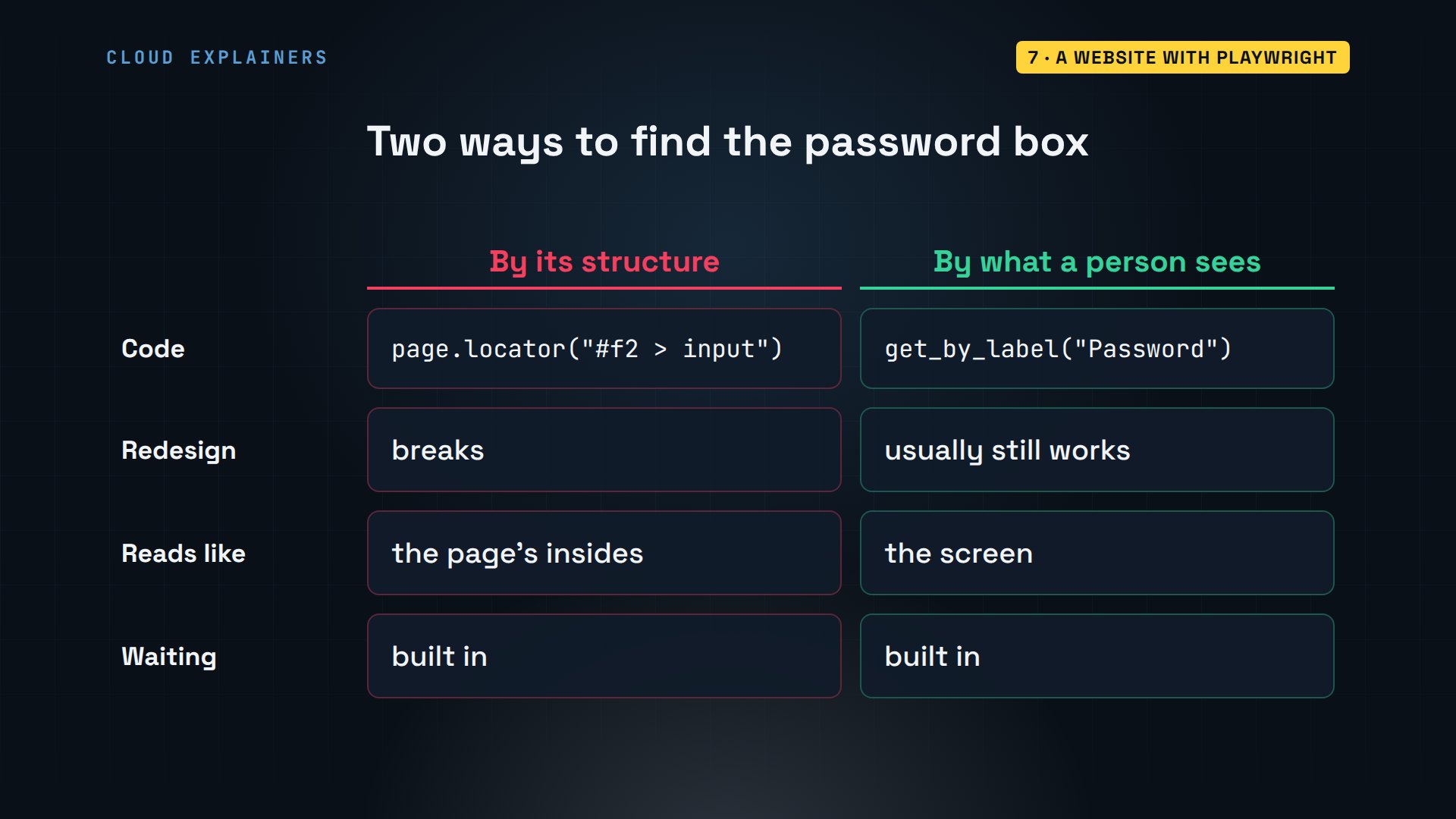
Here's portal.py. launch starts the browser, new_page opens a tab, goto opens the sign-in page. get_by_label finds a box by the words next to it, as a person would, and fill types into it. The password comes from an environment variable again. Then it clicks the button named Sign in.
head -n 17 portal.pyimport os
from pathlib import Path

from playwright.sync_api import sync_playwright

shop = Path.home() / "shop"


def run():
    with sync_playwright() as p:
        browser = p.chromium.launch()  # headless: no window
        page = browser.new_page()
        page.goto("http://localhost:8000/portal")
        page.get_by_label("Username").fill("ana")
        page.get_by_label("Password").fill(os.environ["PORTAL_PASSWORD"])
        page.get_by_role("button", name="Sign in").click()
Why find the box by its label? You could point at the page's hidden structure instead, but that changes whenever the site is redesigned. The words a person reads, like Password or Sign in, change far less often. And Playwright waits for each element to be ready before it types or clicks.
The rest waits for the deliveries page, reads each row of its table, clicks the download link, and saves the file Chromium downloaded. A screenshot keeps proof of what the page looked like.
tail -n +18 portal.pypage.wait_for_url("**/deliveries") for row in page.locator("table tr").all()[1:]: print("Delivery:", row.inner_text().replace("\t", " | ")) with page.expect_download() as download: page.get_by_text("Download price list").click() download.value.save_as(shop / "prices.csv") page.screenshot(path=shop / "portal.png") browser.close() print("Saved prices.csv and portal.png") if __name__ == "__main__": run()
Ana sets the password, and runs it. Her two deliveries, read off the page, the price list saved as a CSV, and a screenshot, all without a window opening.
export PORTAL_PASSWORD=leaf-and-kettle
uv run portal.pyDelivery: HL-1071 | Earl Grey, 5 kg | Shipped | Nov 9
Delivery: HL-1072 | Jasmine Pearls, 1 kg | Packing | Nov 12
Saved prices.csv and portal.png
head -3 ~/shop/prices.csvtea,price_per_kg
Earl Grey,28.00
Sencha,39.00
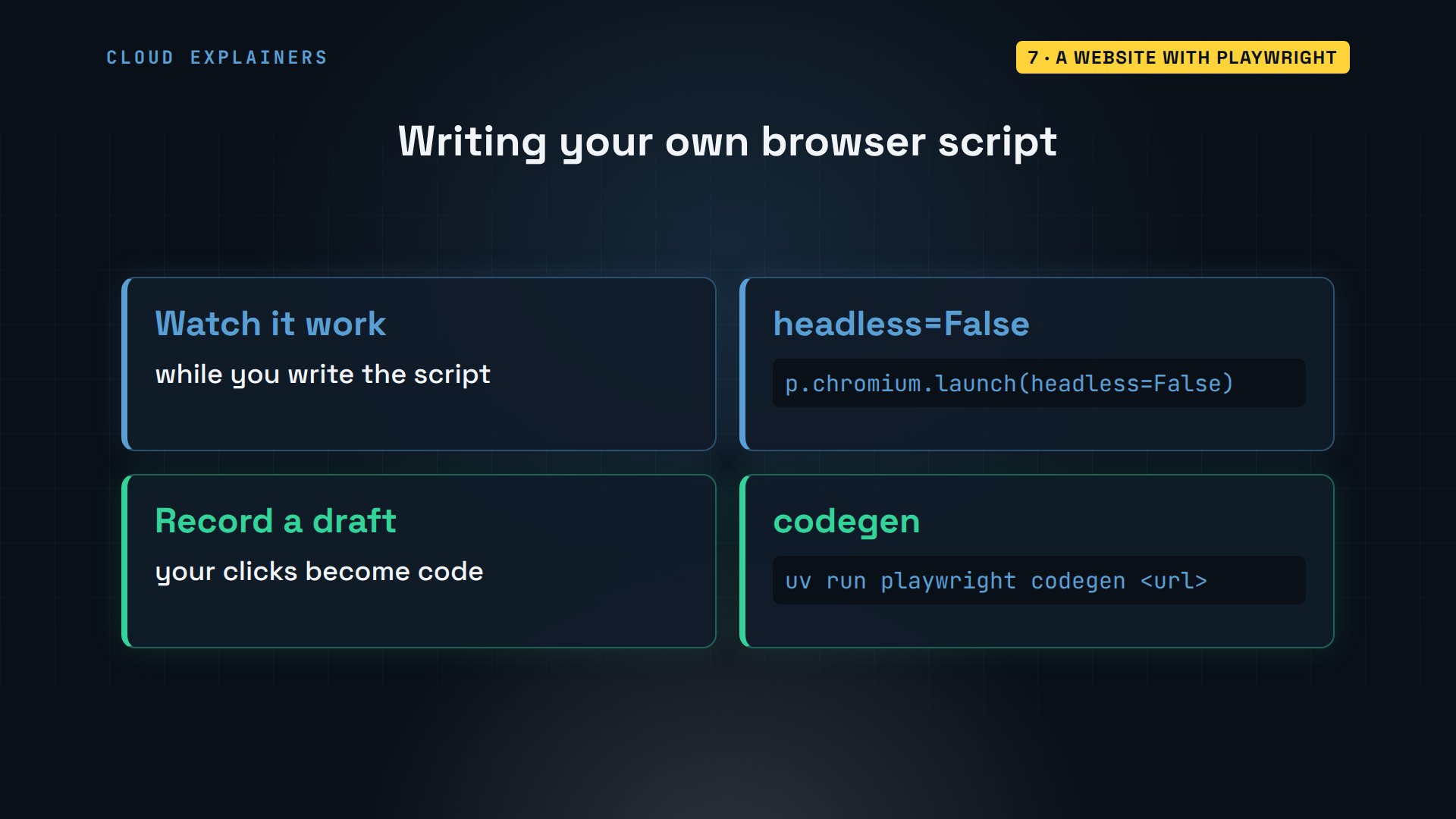
Two tips for writing your own browser script. While you build it, launch with headless equals False, and you'll watch the browser do each step. And Playwright can write a first draft for you: playwright codegen opens a browser, records what you click and type, and prints it as code.
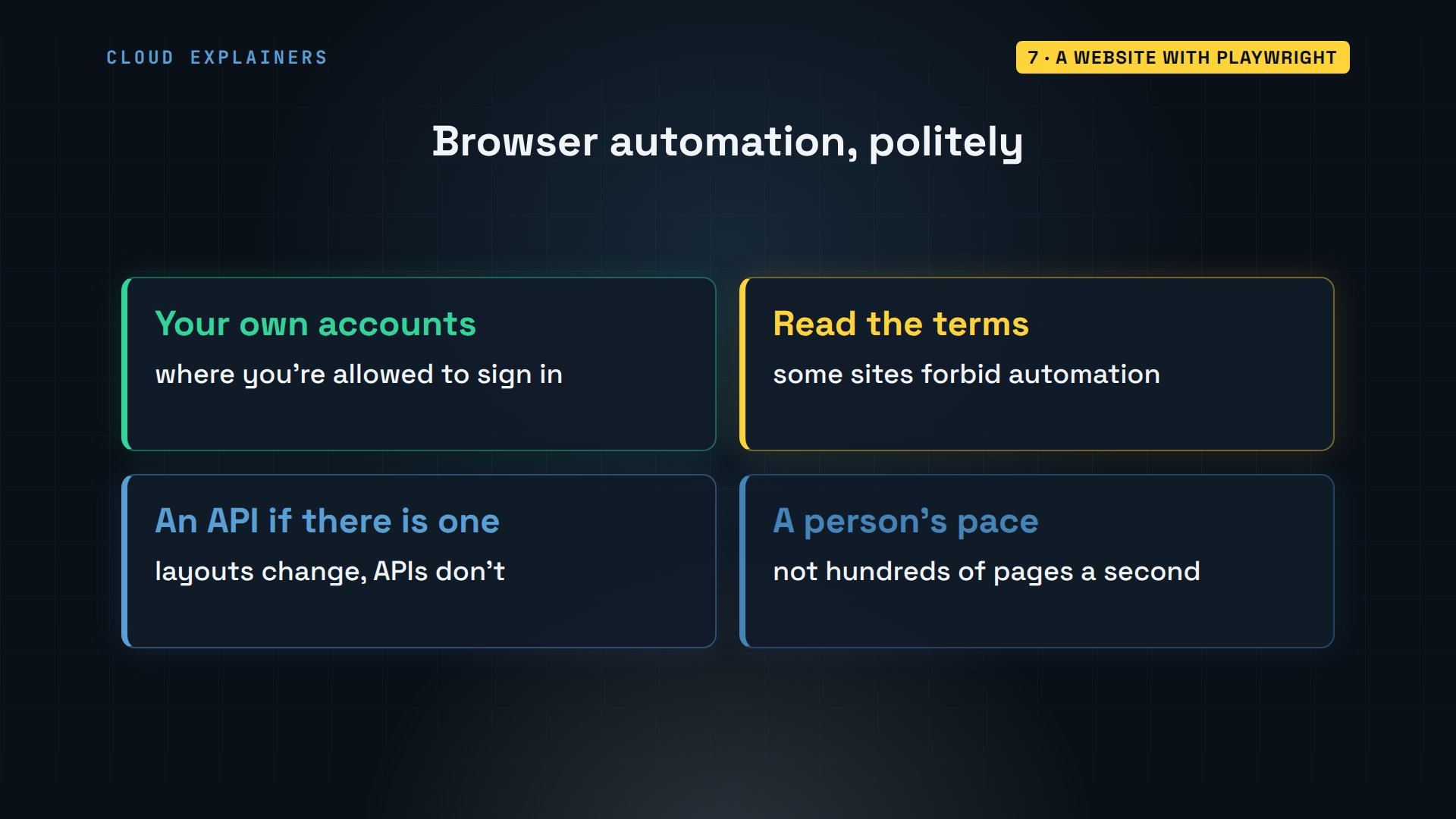
One rule before you point this at other websites. Use it only where you're allowed to sign in and download, and check the site's terms. If there's an API, use the API: it doesn't break when the page's layout changes. And go at a person's pace, not hundreds of pages a second.
The fifth job: a website with no API, signed into and read by a browser nobody watches.
Sending email
How does a script send an email? The same way a mail app does. It connects to a mail server. A real one, like Gmail's, first wants an encrypted connection and a login. Then it hands the message over, with a protocol called SMTP, and the server delivers it. In this lab, the server is a test one on the same laptop, which prints each message instead of delivering it.
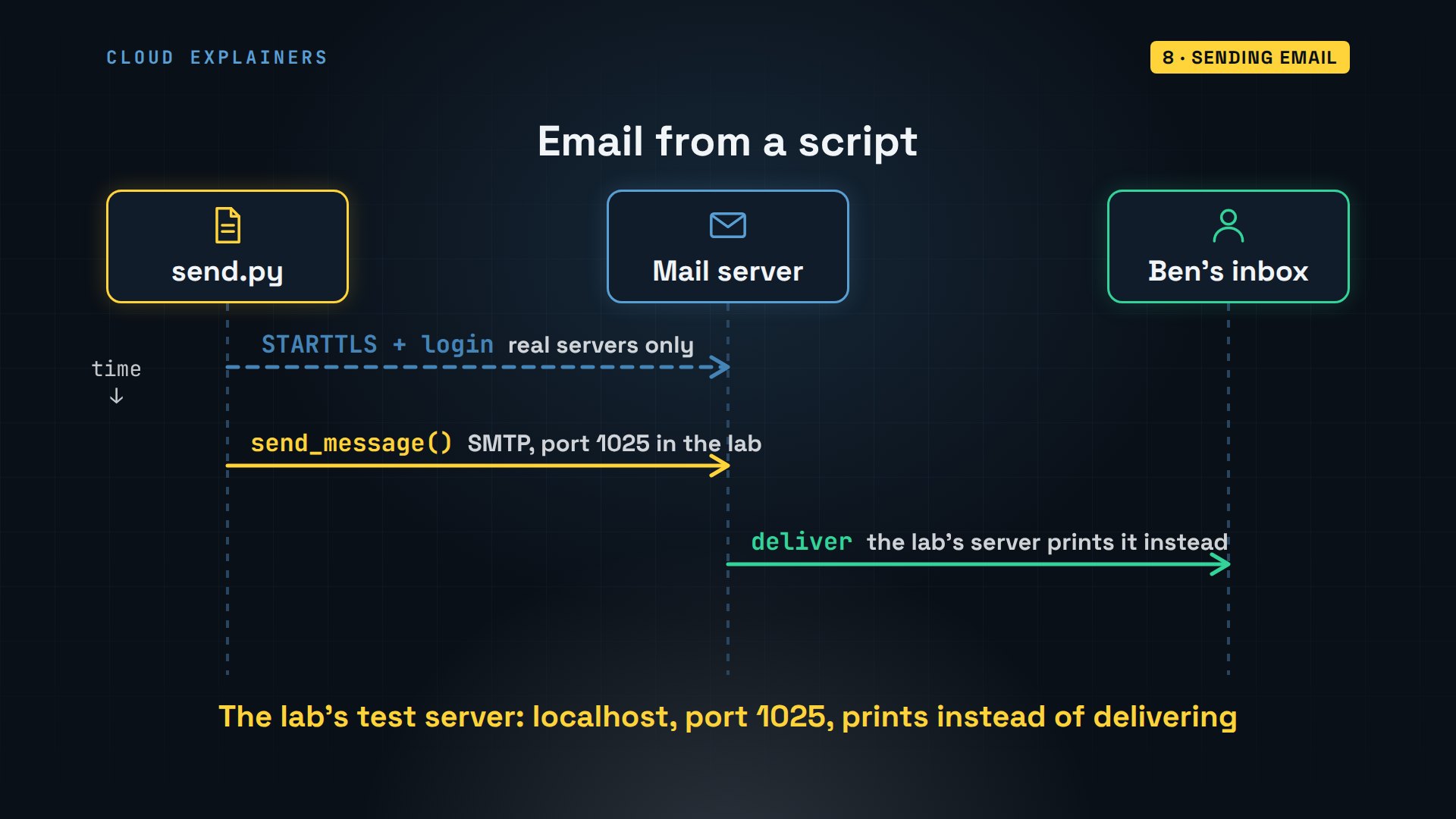
Here's send.py. The server's address and port come from environment variables, with the test server as the default. EmailMessage builds the email: who it's from, who it's to, the subject and the text. Then add_attachment adds the Excel report and the merged PDF.
head -n 20 send.pyimport os
import smtplib
from email.message import EmailMessage
from pathlib import Path

shop = Path.home() / "shop"
HOST = os.environ.get("SMTP_HOST", "localhost")
PORT = int(os.environ.get("SMTP_PORT", "1025"))


def run():
    msg = EmailMessage()
    msg["From"] = "shop-bot@anas-tea.test"
    msg["To"] = "ben@anas-tea.test"
    msg["Subject"] = "This week's tea report"
    msg.set_content("Hi Ben, the sales report and the invoices are attached.")
    for name in ["report.xlsx", "invoices-all.pdf"]:
        data = (shop / name).read_bytes()
        msg.add_attachment(data, maintype="application",
                           subtype="octet-stream", filename=name)
smtplib connects to the server. If a username is set, it switches the connection to encryption with starttls and logs in, the way a real server wants. Then send_message sends it.
tail -n +21 send.pywith smtplib.SMTP(HOST, PORT) as smtp: if os.environ.get("SMTP_USER"): # a real server wants a login smtp.starttls() smtp.login(os.environ["SMTP_USER"], os.environ["SMTP_PASSWORD"]) smtp.send_message(msg) print(f"Sent \"{msg['Subject']}\" to {msg['To']}") if __name__ == "__main__": run()
Run it. Then grep keeps only the header lines of what the test server received: from shop-bot, to Ben, this week's report, with both files attached.
uv run send.pySent "This week's tea report" to ben@anas-tea.test
grep -E '^(From|To|Subject|Content-Disposition):' /srv/mail/inbox.logFrom: shop-bot@anas-tea.test
To: ben@anas-tea.test
Subject: This week's tea report
Content-Disposition: attachment; filename="report.xlsx"
Content-Disposition: attachment; filename="invoices-all.pdf"
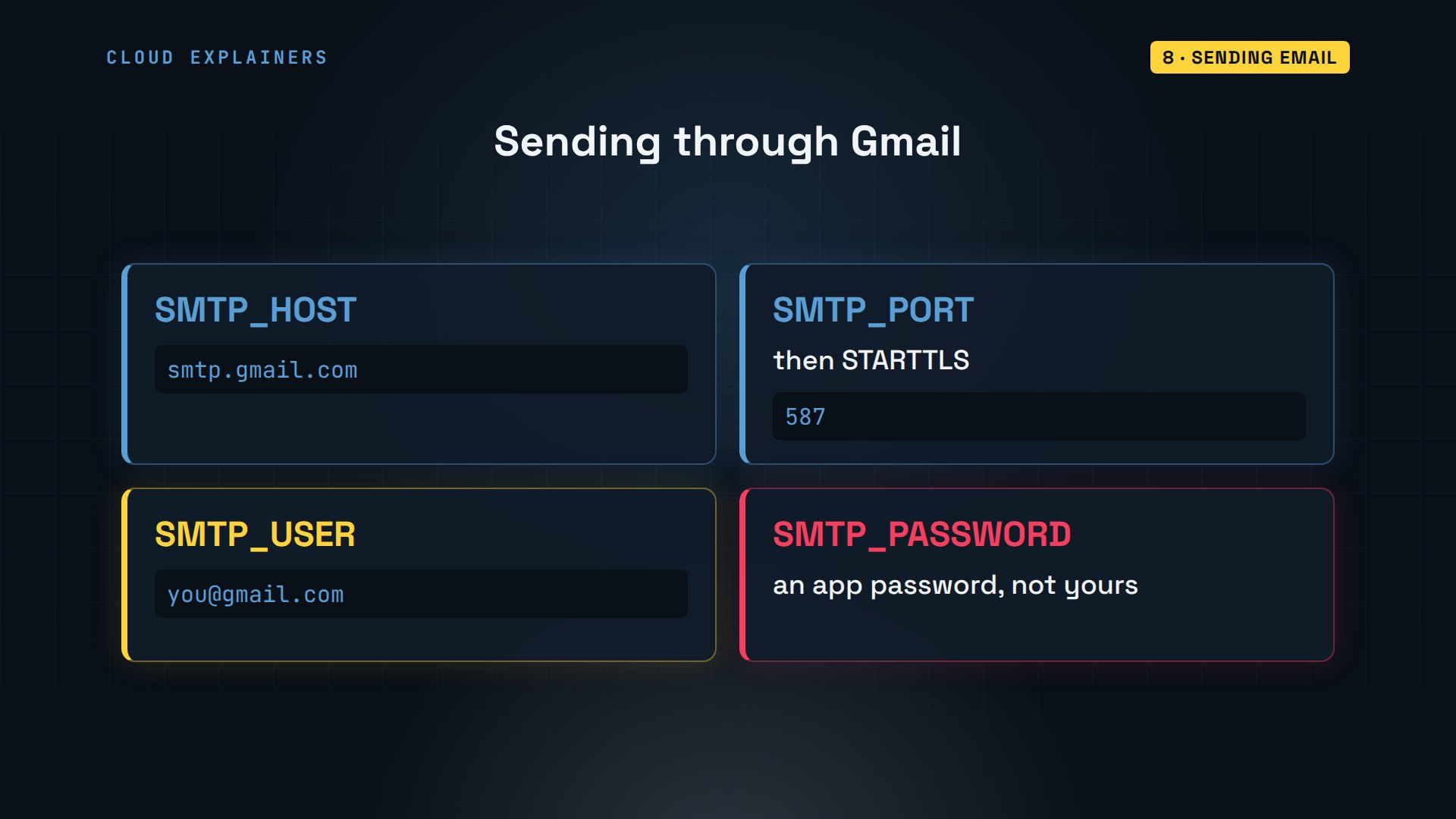
To send for real through Gmail, set the host to smtp.gmail.com and the port to 587. Gmail won't take your normal password from a script: turn on 2-Step Verification and create an app password. Those go in environment variables, never in the code.
The sixth job: the report and the invoices in Ben's inbox, without Ana opening her mail app.
On a schedule
Can all of this run as one command? main.py imports Ana's seven scripts, and runs each one's run function in order. It's the next morning, and one new order file has arrived. One command does the whole chore list.
cat main.pyfrom datetime import datetime

import excel, invoices, portal, report, send, stock, tidy

print("shop-bot started", datetime.now().strftime("%Y-%m-%d %H:%M"))
for step in [tidy, report, excel, invoices, stock, portal, send]:
    print("==", step.__name__)
    step.run()
print("shop-bot done")
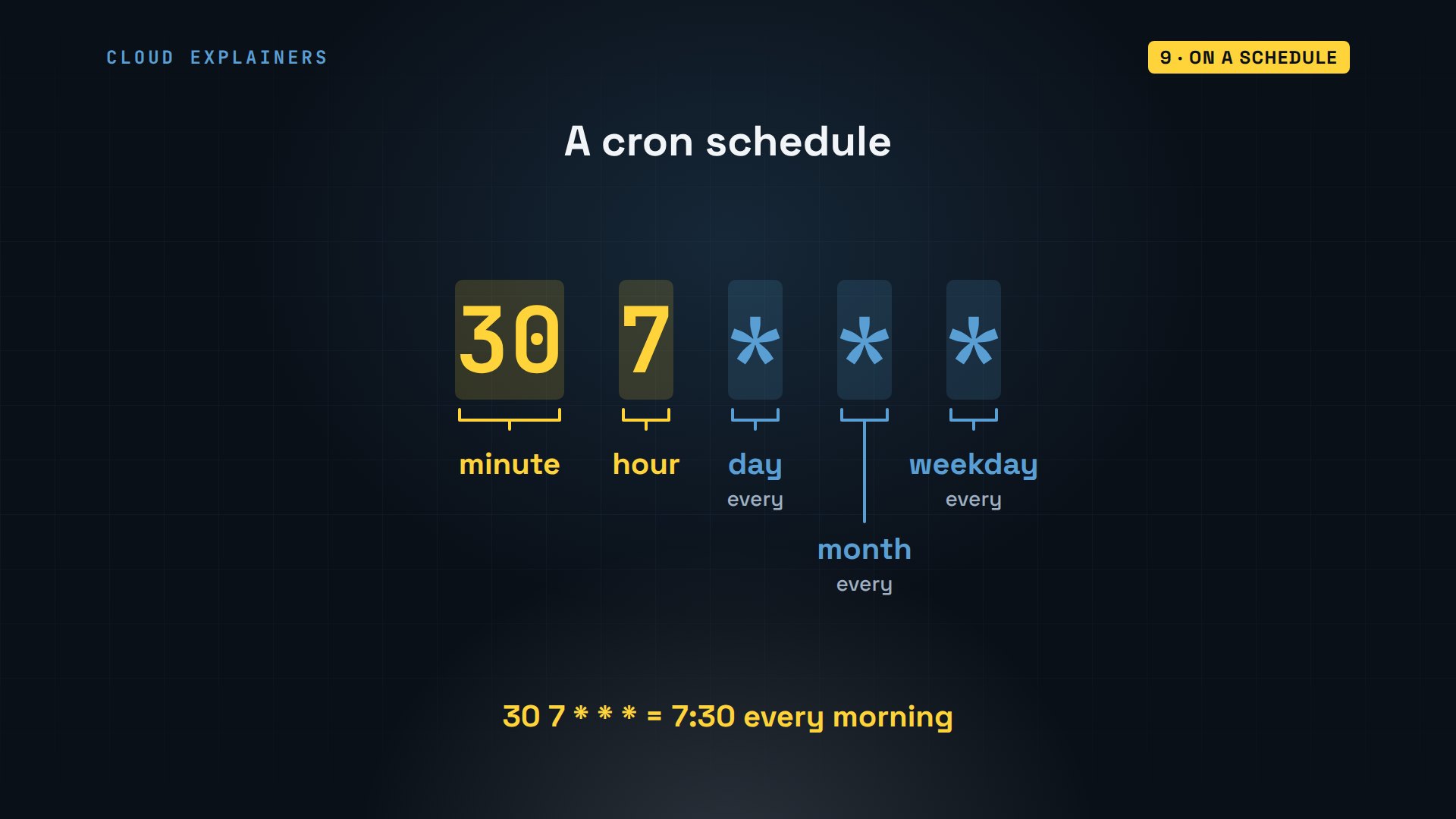
Now make it run without Ana. On Linux and macOS, that's cron: a program that runs commands at set times. Each line starts with five fields: minute, hour, day of the month, month, and day of the week. A star means every. So a thirty in the minute field, a seven in the hour field, and three stars, mean seven thirty every morning.
To watch it happen, we schedule it for one minute from now. The line changes into the project folder first, and calls uv by its full path, which which uv prints, because cron doesn't search the same places your terminal does. The two arrows at the end save everything it prints, errors too, to bot.log. crontab loads the file, and replaces any lines you had before.
which uv/home/ana/.local/bin/uv
cat cron.txt21 15 * * * cd /home/ana/shop-bot && /home/ana/.local/bin/uv run main.py >> bot.log 2>&1
crontab cron.txt
dateFri Nov 6 15:19:58 UTC 2026
A minute later, cron has run it. Remember the question from the start? The log shows it started on time, and the first steps ran, but then: 401 Unauthorized. The supplier key was missing. Ana exported it in her terminal, and cron doesn't run her terminal.
cat bot.logshop-bot started 2026-11-06 15:21
== tidy
Moved 0 order files and 0 invoices
== report
232 orders in 23 files
                packs   sales
tea
Earl Grey          87  565.50
Sencha             74  536.50
Rooibos            71  408.25
Darjeeling         51  408.00
Masala Chai        67  402.00
Jasmine Pearls     25  237.50
Saved report.xlsx
== excel
('tea', 'packs', 'sales')
('Earl Grey', 87, 565.5)
('Sencha', 74, 536.5)
('Rooibos', 71, 408.25)
('Darjeeling', 51, 408)
('Masala Chai', 67, 402)
('Jasmine Pearls', 25, 237.5)
('Total', None, '=SUM(C2:C7)')
== invoices
invoice-HL-1042.pdf: $257.00
invoice-HL-1057.pdf: $253.50
invoice-HL-1063.pdf: $219.50
Owed to Highland Leaf: $730.00 (merged into invoices-all.pdf)
== stock
Traceback (most recent call last):
  File "/home/ana/shop-bot/main.py", line 8, in <module>
    step.run()
  File "/home/ana/shop-bot/stock.py", line 11, in run
    response.raise_for_status()  # stop here on 401, 404, 500...
    ^^^^^^^^^^^^^^^^^^^^^^^^^^^
  File "/home/ana/shop-bot/.venv/lib/python3.12/site-packages/httpx/_models.py", line 829, in raise_for_status
    raise HTTPStatusError(message, request=request, response=self)
httpx.HTTPStatusError: Client error '401 Unauthorized' for url 'http://localhost:8000/api/stock'
For more information check: https://developer.mozilla.org/en-US/docs/Web/HTTP/Status/401
Here's why. Your terminal has everything you exported. cron starts each job with only a few basic variables, none of yours. The fix is to keep the secrets in a file in the project, called.env, and have uv load it with dash dash env file. Now the job gets them every time, whoever starts it.
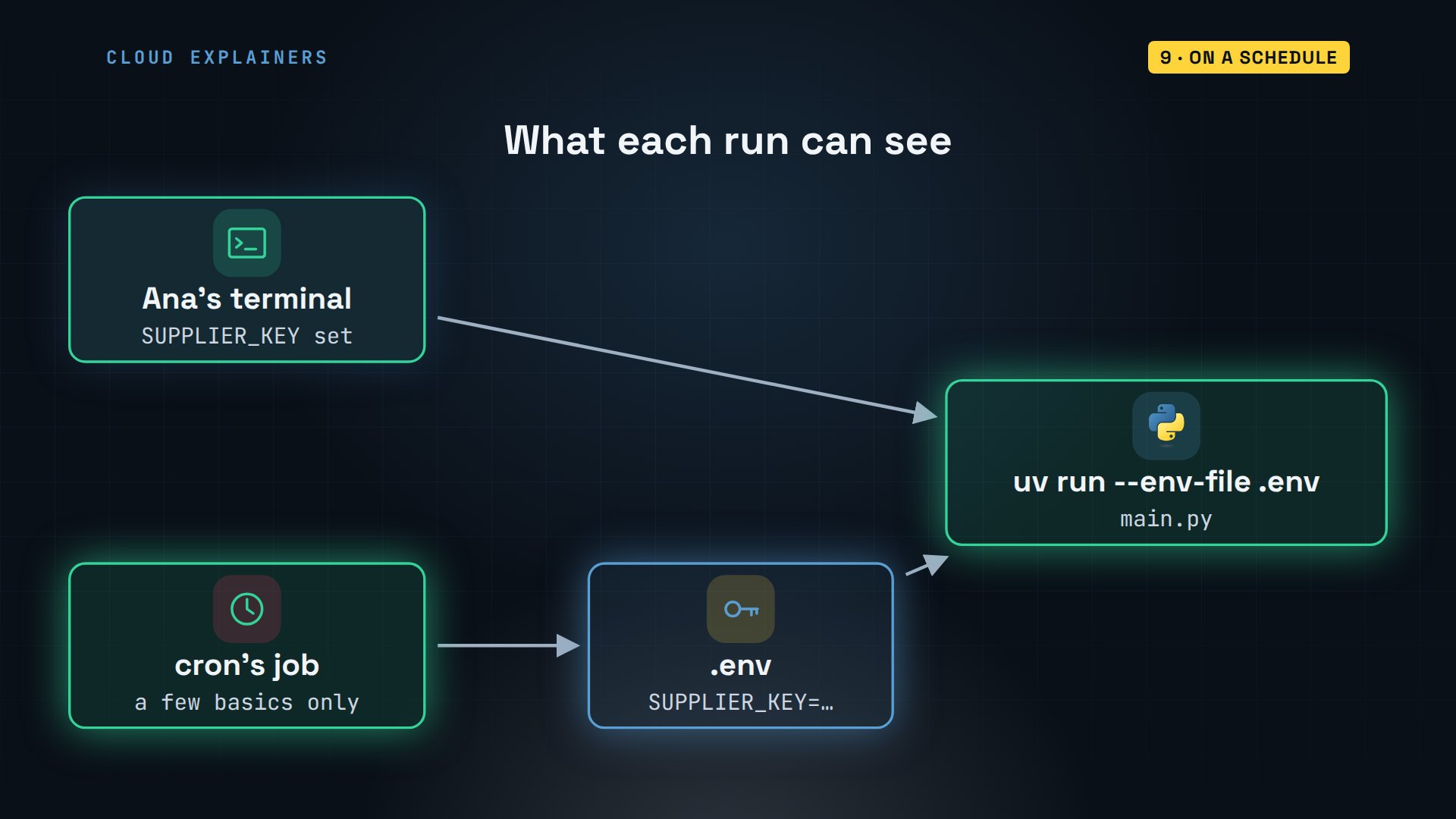
Here's Ana's.env file, with the key and the portal password. Keep it out of Git, and never share it. The new line adds dash dash env file. A minute later, the log ends with shop-bot done, and the test server has its third email.
cat .envSUPPLIER_KEY=demo-key-123
PORTAL_PASSWORD=leaf-and-kettle
cat cron.txt22 15 * * * cd /home/ana/shop-bot && /home/ana/.local/bin/uv run --env-file .env main.py >> bot.log 2>&1
crontab cron.txt
cat bot.logshop-bot started 2026-11-06 15:22
== tidy
Moved 0 order files and 0 invoices
== report
232 orders in 23 files
                packs   sales
tea
Earl Grey          87  565.50
Sencha             74  536.50
Rooibos            71  408.25
Darjeeling         51  408.00
Masala Chai        67  402.00
Jasmine Pearls     25  237.50
Saved report.xlsx
== excel
('tea', 'packs', 'sales')
('Earl Grey', 87, 565.5)
('Sencha', 74, 536.5)
('Rooibos', 71, 408.25)
('Darjeeling', 51, 408)
('Masala Chai', 67, 402)
('Jasmine Pearls', 25, 237.5)
('Total', None, '=SUM(C2:C7)')
== invoices
invoice-HL-1042.pdf: $257.00
invoice-HL-1057.pdf: $253.50
invoice-HL-1063.pdf: $219.50
Owed to Highland Leaf: $730.00 (merged into invoices-all.pdf)
== stock
Low at Highland Leaf: Sencha, 8 kg left
Low at Highland Leaf: Jasmine Pearls, 3 kg left
== portal
Delivery: HL-1071 | Earl Grey, 5 kg | Shipped | Nov 9
Delivery: HL-1072 | Jasmine Pearls, 1 kg | Packing | Nov 12
Saved prices.csv and portal.png
== send
Sent "This week's tea report" to ben@anas-tea.test
shop-bot done
grep -c '^Subject:' /srv/mail/inbox.log3
How do you see what's scheduled? crontab dash l lists your lines. To change them later, crontab dash e opens them in an editor. And to stop the job, delete its line there.
crontab -l22 15 * * * cd /home/ana/shop-bot && /home/ana/.local/bin/uv run --env-file .env main.py >> bot.log 2>&1
On Windows, the same job goes in Task Scheduler. One schtasks command makes a daily task at seven thirty. Like cron, give it uv's full path, which where uv prints, and change into the project folder first. The.env file works the same.
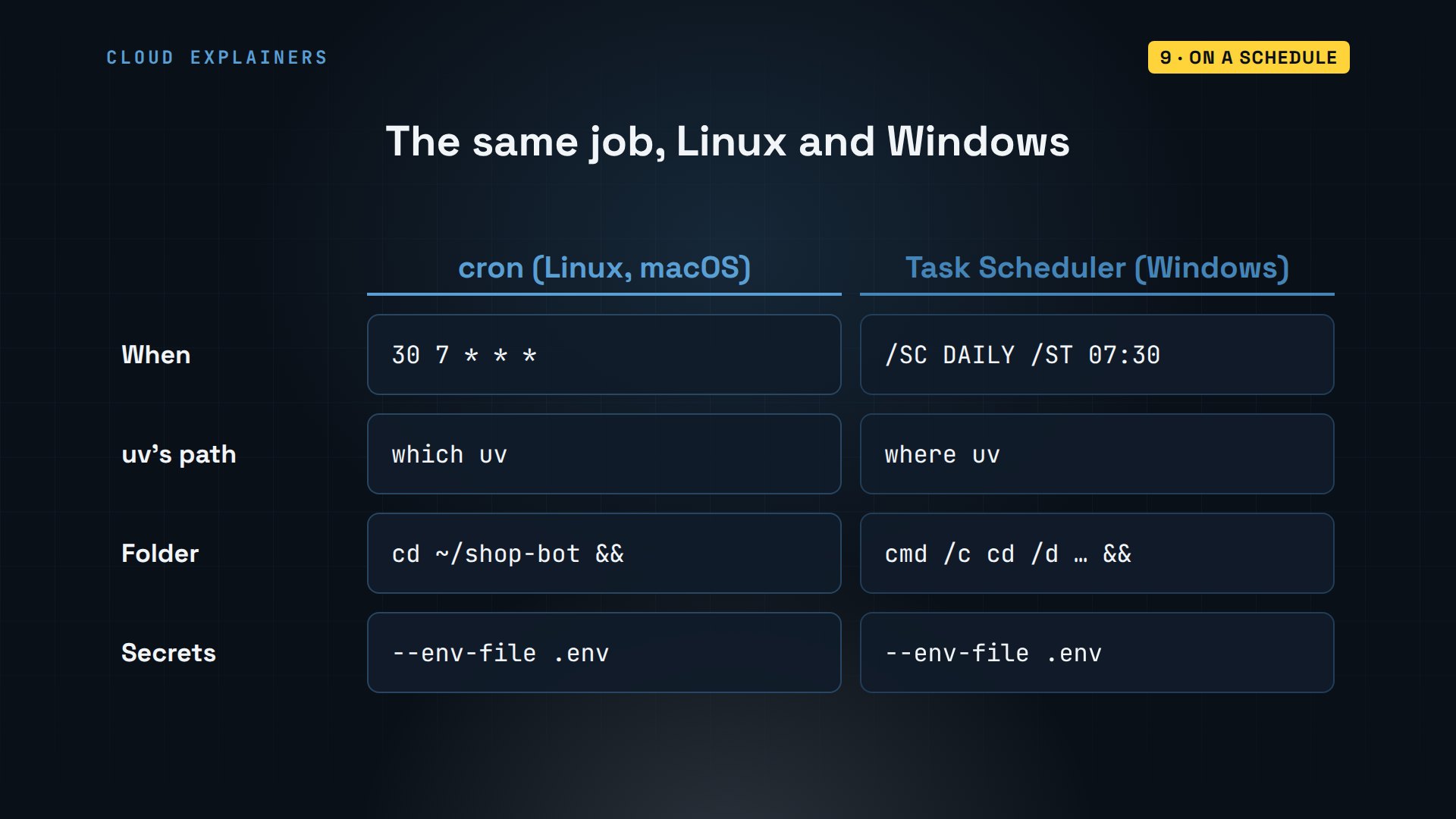
If a scheduled job ever seems to do nothing, check four things. Read its log file first. Use full paths, for uv and for files. Load secrets from the.env file. And check the computer's clock: cron uses the machine's own time zone, and our lab runs on UTC, so schedule in the machine's time.
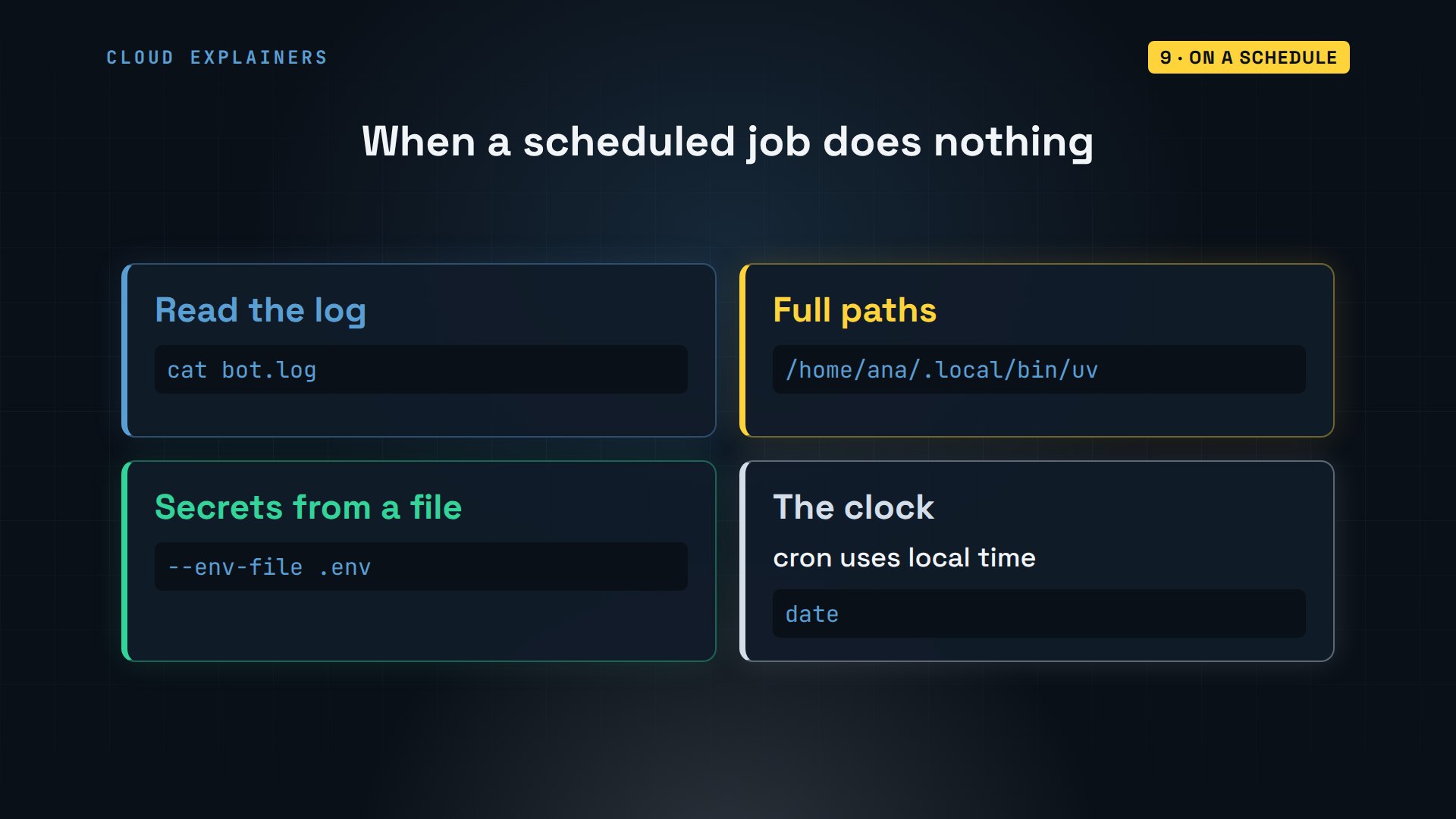
Is this how real companies work? At a much bigger scale, yes. Netflix wrote that its teams use Python for automation, including security tools that find and fix problems on their own. Same idea as the tea shop's script: a chore a person did by hand, written down once, run by a schedule.
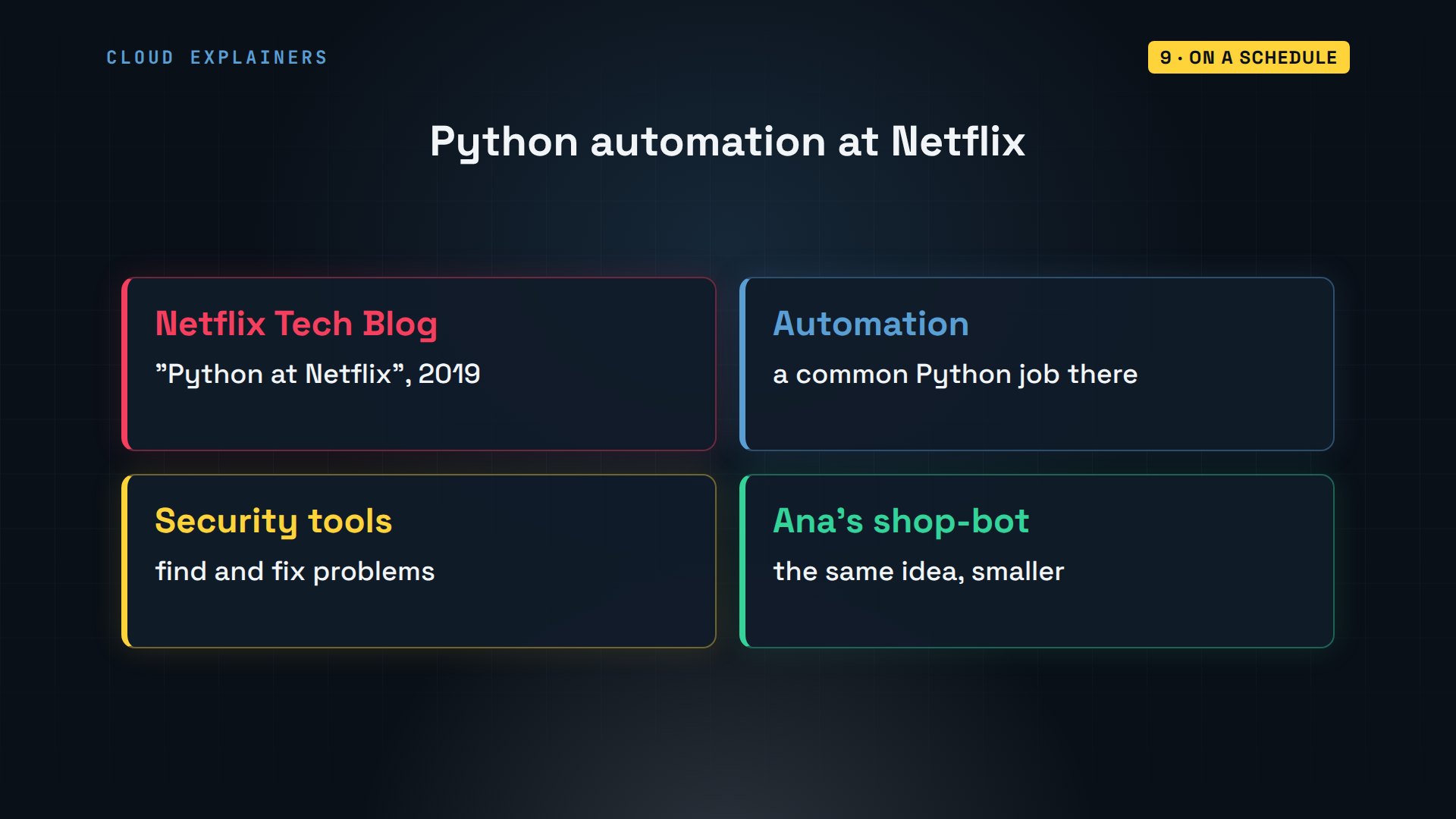
What could you automate with the same pieces? Renaming a folder of photos by date. Merging the PDFs you send your accountant. A spreadsheet from a website's API every Monday. An email when something you track changes. Start with the chore you do most often, and give it its own uv project.
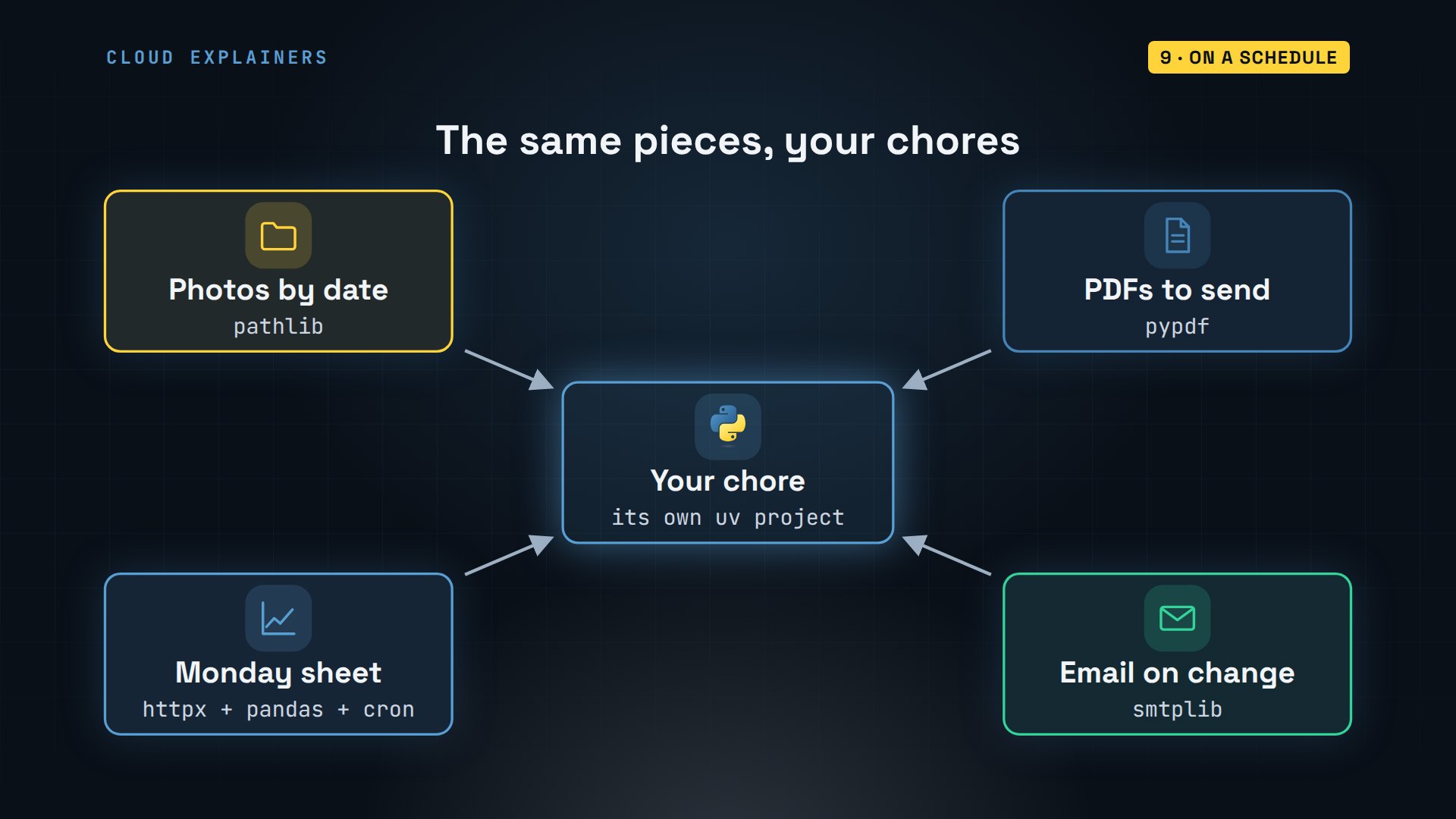
Recap
So: uv for the project. pathlib for files, pandas and openpyxl for spreadsheets, pypdf for PDFs, httpx for APIs, Playwright for websites without one, smtplib for email, and cron or Task Scheduler, with a.env file, to run it every morning.
If you want more full tutorials, subscribing helps a small channel make them.
Every command and output in this tutorial came from a real run, on Ubuntu 24.04.5 LTS, with Python 3.12.3. Thanks for watching Cloud Explainers.
Sources
- uv docs, installation and projects (uv init, uv add, uv run, --env-file)
- Python docs, pathlib
- pandas docs, read_csv, concat, groupby/agg, to_excel
- openpyxl docs
- pypdf docs, extracting text and merging
- HTTPX docs, requests, timeouts and raise_for_status
- Playwright for Python docs, locators, downloads and installing browsers
- Python docs, smtplib and email.message
- Google, Sign in with app passwords (needs 2-Step Verification)
- crontab(5), the cron schedule format
- Microsoft, schtasks create
- The question, r/learnpython, "What work activity have you automated?"
- Netflix Technology Blog, Python at Netflix
Demos: a stock Ubuntu 24.04 container on our own lab machine, standing in for a laptop; the tea shop, its supplier, API, website, keys, passwords and email addresses are made up and run inside the lab. Watch the full video on YouTube.
More videos
Python uv vs pip: Which One Should You Use?
How OAuth Login Works

Google AI Studio Will Finally Make Sense After This
What Happens When You Run a Docker Container
How to Fix Claude Code Billing Your API Key Instead of Your Plan
Why Passkeys Can't Be Phished Like Passwords
PowerShell vs Bash: Which One Should You Learn?
The Linux Roadmap for Beginners
Django vs FastAPI: Which One Should You Use?

Why SQLite Is the Most Used Database in the World
How a NoSQL Database Like MongoDB Works
How to Fix Python pip error: externally-managed-environment
How to Fix MySQL Too Many Connections Database Errors
Golang Concurrency Will Finally Make Sense After This
How Amazon S3 Works
How Kubernetes Works
How Git Works
How to Fix Docker Port Already Allocated Errors
How PostgreSQL Works
How to Fix Git Merge Conflicts
How to Fix No Space Left on Device in Linux
How the Internet Works
SQL vs NoSQL: When Each One Wins
How to Fix JWT Token Expired Errors (401 Unauthorized)

Claude API vs Claude Pro: Why Your Subscription Doesn't Include It

Why AI Agent Skills Beat Giant Prompts

Linux Cron Jobs Will Finally Make Sense After This

Security Logs Will Finally Make Sense After This

How to Fix a Security Leak: An API Key Pushed to GitHub

DNS Will Finally Make Sense After This

Never Ignore a Security Update

Two-Factor Authentication Will Finally Make Sense

Never Expose a Database to the Internet

SSH Keys vs Passwords: Which Is Safer for Security?

The 5 Levels of Linux Boot: From Power On to Login

The 5 Levels of Network Firewalls

Password Security: Why Hackers Crack Weak Passwords

Why Your Linux Server Runs Out of Memory

HTTP vs HTTPS: What Actually Changes on Your Network

Every Linux File Permission You Need to Know

Linux Processes vs Threads: When Each One Wins

The OSI Model Will Finally Make Sense After This

The 7 Levels of Git

Every Network Troubleshooting Command You Need

Hashing vs Encryption in Cybersecurity: When Each One Wins

Why the Internet Ran Out of IP Addresses

Linux Package Managers: apt vs Snap vs Flatpak

Why Python Is Slow (and When It Doesn't Matter)

TCP vs UDP: When Each One Wins

Stop Running Linux as Root (Do This Instead)

Linux Users and Groups Will Finally Make Sense

Why Phishing Beats Good Security (and How to Spot It)

The 7 Levels of Docker

AI Agents Will Finally Make Sense After This

Stop Using git push --force (Use This Instead)

Agent Skills vs MCP: When Each One Wins

Networking Will Finally Make Sense After This

Every Linux Command You Actually Need

The 7 Levels of Cybersecurity

Every System Design Concept You Need, in One Diagram
