How SNMP Network Monitoring Works
How SNMP network monitoring works, on real machines: a manager asks an agent for one value on UDP port 161, every value has an address (an OID) that MIB files name, a link's speed is two counter readings subtracted, and traps on port 162 report changes the moment they happen. On Ubuntu 24.04 with Net-SNMP 5.9.4 we fix a stock agent that answers no one, read a router's internet line, see a wrong community get silence, and compare SNMP version 2c and version 3 on the wire.
No login, still an answer
You want to see how busy your router is, without logging into it. At a craft brewery, the router sits in a back room, and Ana's office PC prints, every five seconds, how fast data comes in from the internet. About 28 megabits a second while a guest streams a video. Nobody logged in. The router just answered, which is more than most printers do. So how does a PC ask a router about itself? And by the end, the router calls Ana first.
wan-rate 421:47:17  internet in:  27.6 Mbit/s
21:47:22  internet in:  27.0 Mbit/s
21:47:28  internet in:  13.7 Mbit/s
21:47:33  internet in:  27.7 Mbit/s
Manager, agent, one question
It works like the electricity meter at your house. The meter never tells anyone your usage. It just counts up. The meter reader writes the number down on each visit, and your bill is the difference. That's most of network monitoring: devices keep counters, and a manager comes by to read them, again and again. That's called polling.
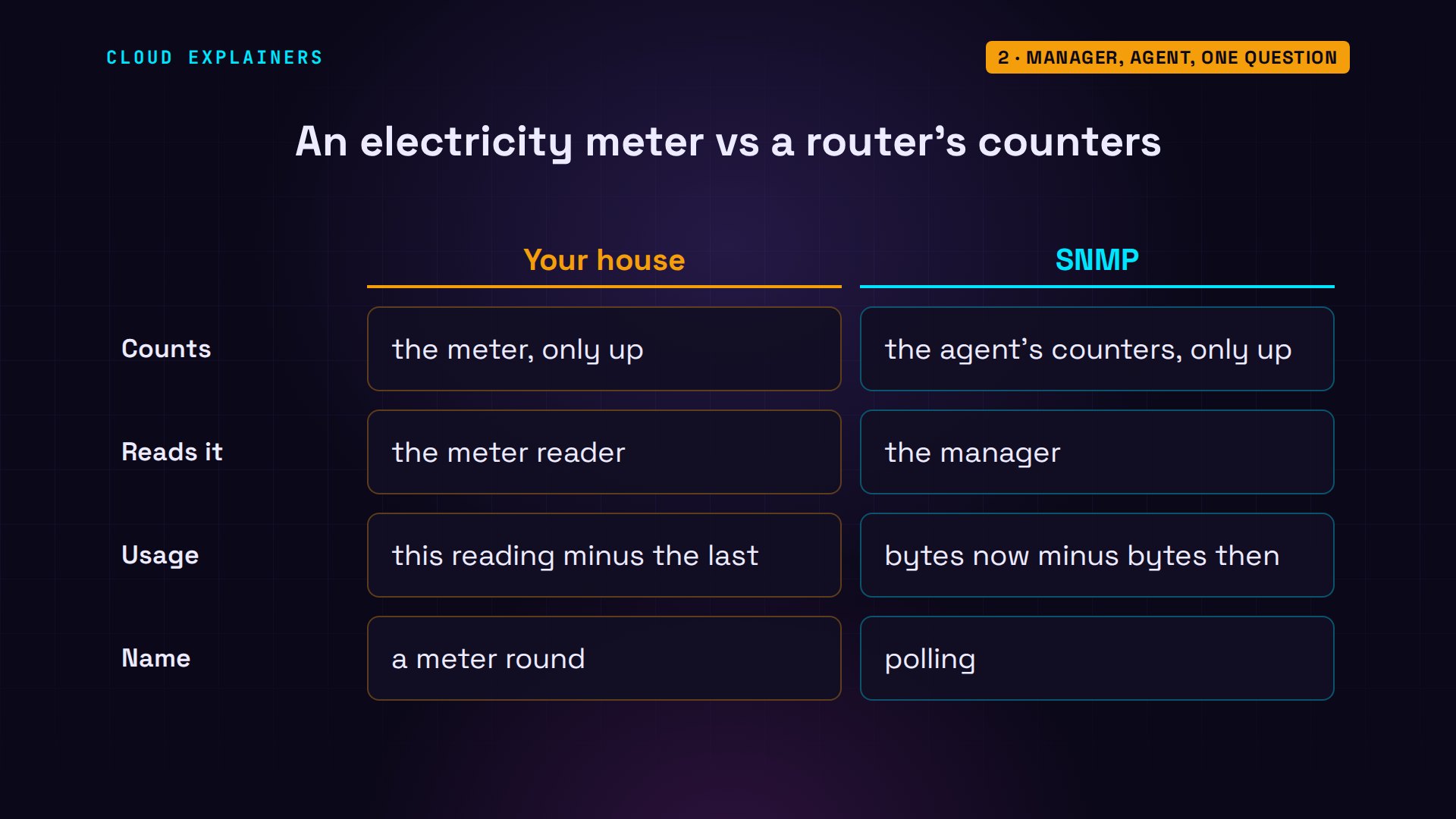
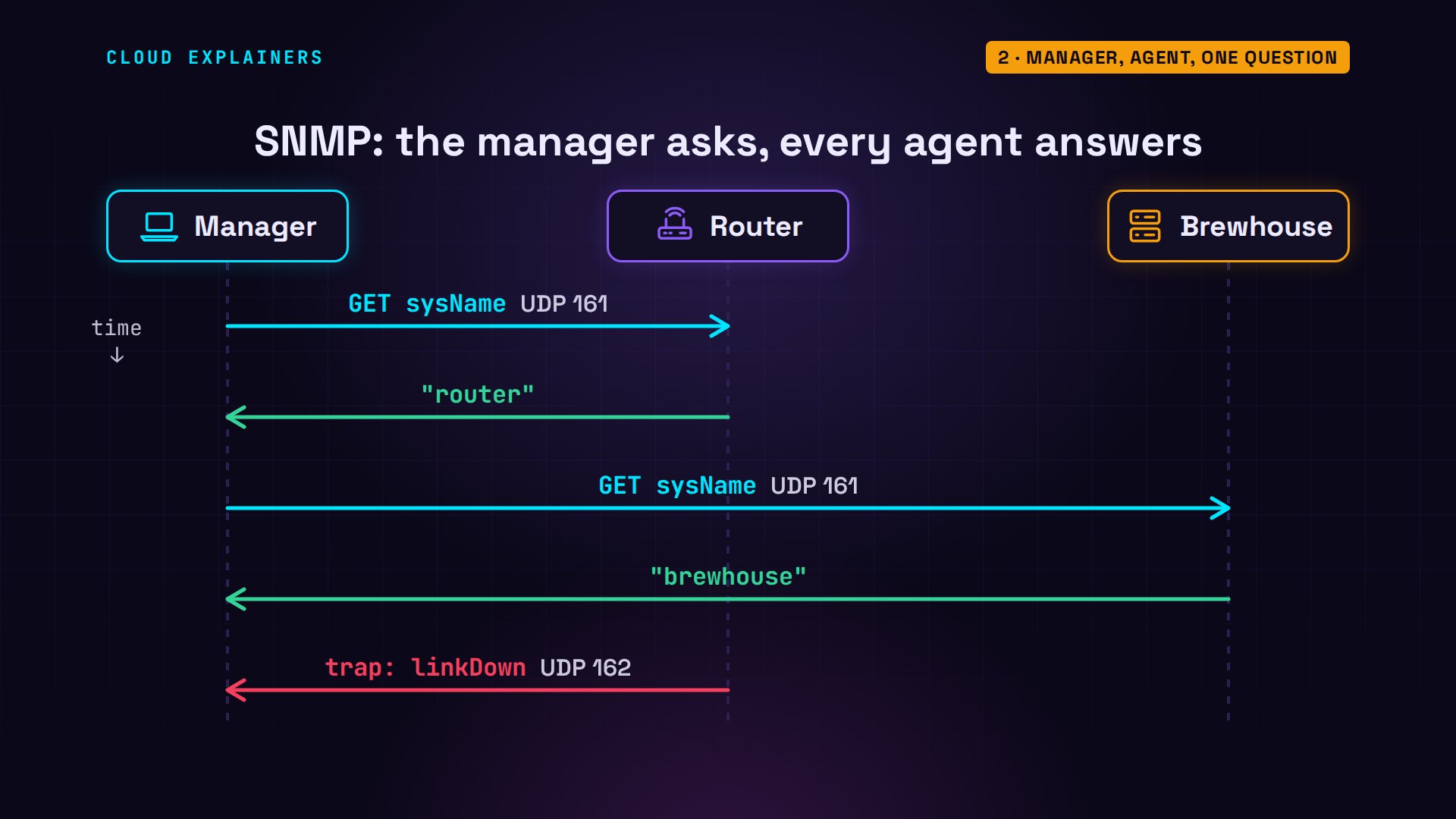
The protocol is SNMP, the Simple Network Management Protocol. It has two roles. The manager, Ana's PC, asks. An agent, a small program on each device, answers. The question is one UDP packet to port 161: give me this value. The answer comes straight back. UDP means no connection to set up first: one packet out, one back, which is why one manager can check on thousands of devices. And when something breaks, the agent can speak first: a trap, sent to the manager's port 162.
A stock agent answers no one
Ana starts from a plain Ubuntu router with Ubuntu's own agent, snmpd. snmpget asks for one value, the router's name, by its number. Dash v picks the version, 2c, and dash c the community, a shared word, here Ubuntu's default, public. Timeout. No response. On the router, ss lists the ports programs are listening on. On port 161, only 127.0.0.1: the router's address for talking to itself.
snmpget -v2c -c public router 1.3.6.1.2.1.1.5.0Timeout: No Response from router.
sudo ss -ulpn | grep :161UNCONN 0 0 127.0.0.1:161 0.0.0.0:* users:(("snmpd",pid=135,fd=6))
UNCONN 0 0 [::1]:161 [::]:* users:(("snmpd",pid=135,fd=7))
Ubuntu ships it that way on purpose: nothing answers the network until you say so. One line in snmpd.conf, the agent address, becomes U D P 161 on every address.
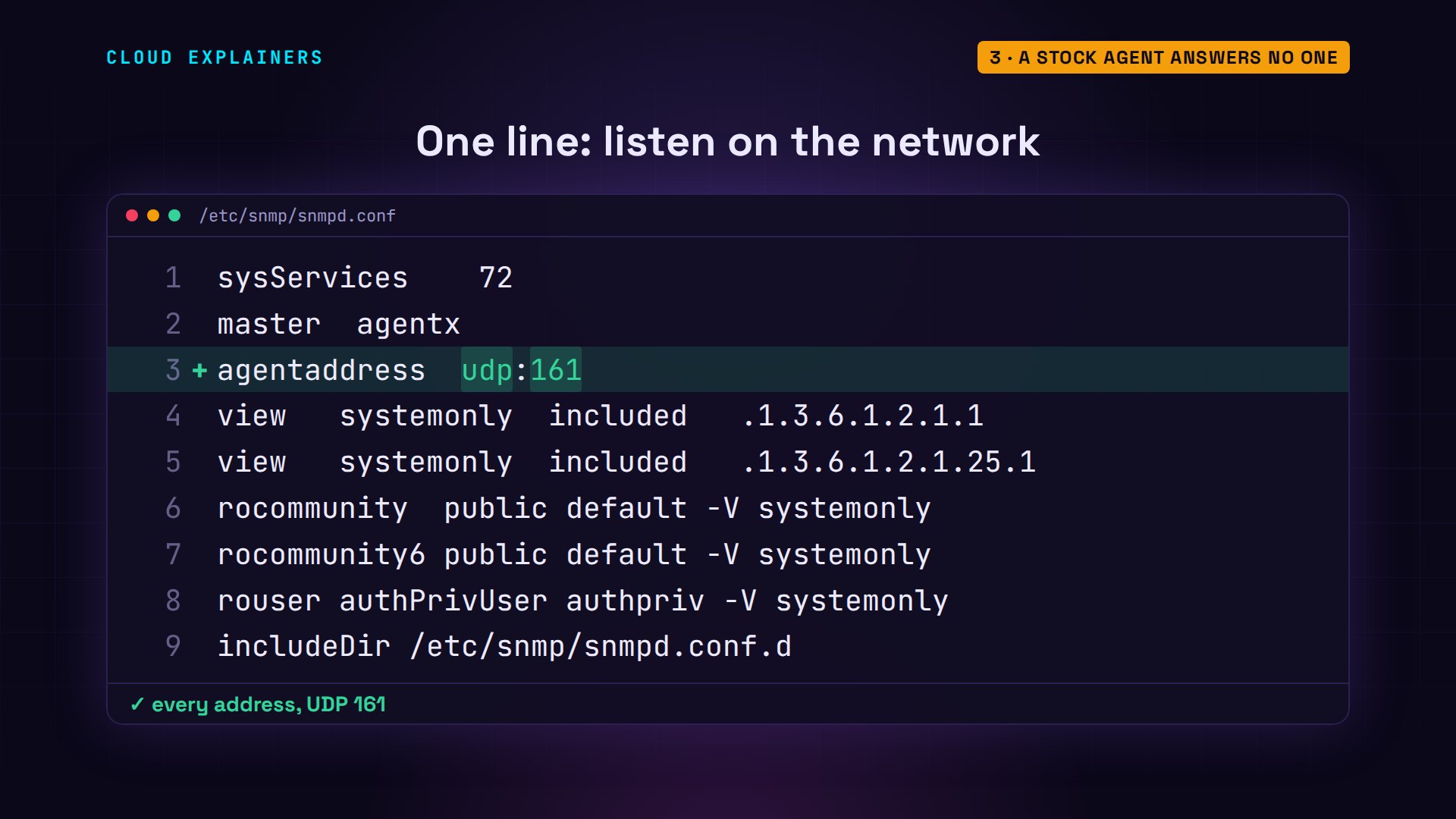
After a restart, it listens on every address, and the same question gets an answer: a long number, then the router's name.
sudo systemctl restart snmpd
sudo ss -ulpn | grep :161UNCONN 0 0 0.0.0.0:161 0.0.0.0:* users:(("snmpd",pid=187,fd=6))
snmpget -v2c -c public router 1.3.6.1.2.1.1.5.0iso.3.6.1.2.1.1.5.0 = STRING: "router"
The long number is an address
That long number is an O I D, an object identifier: an address in one big tree that every SNMP device shares. 1.3.6.1 is the internet branch. 2.1 is the standard management values. The next 1 is the system group, 5 is its name, and the 0 at the end means the one and only copy.
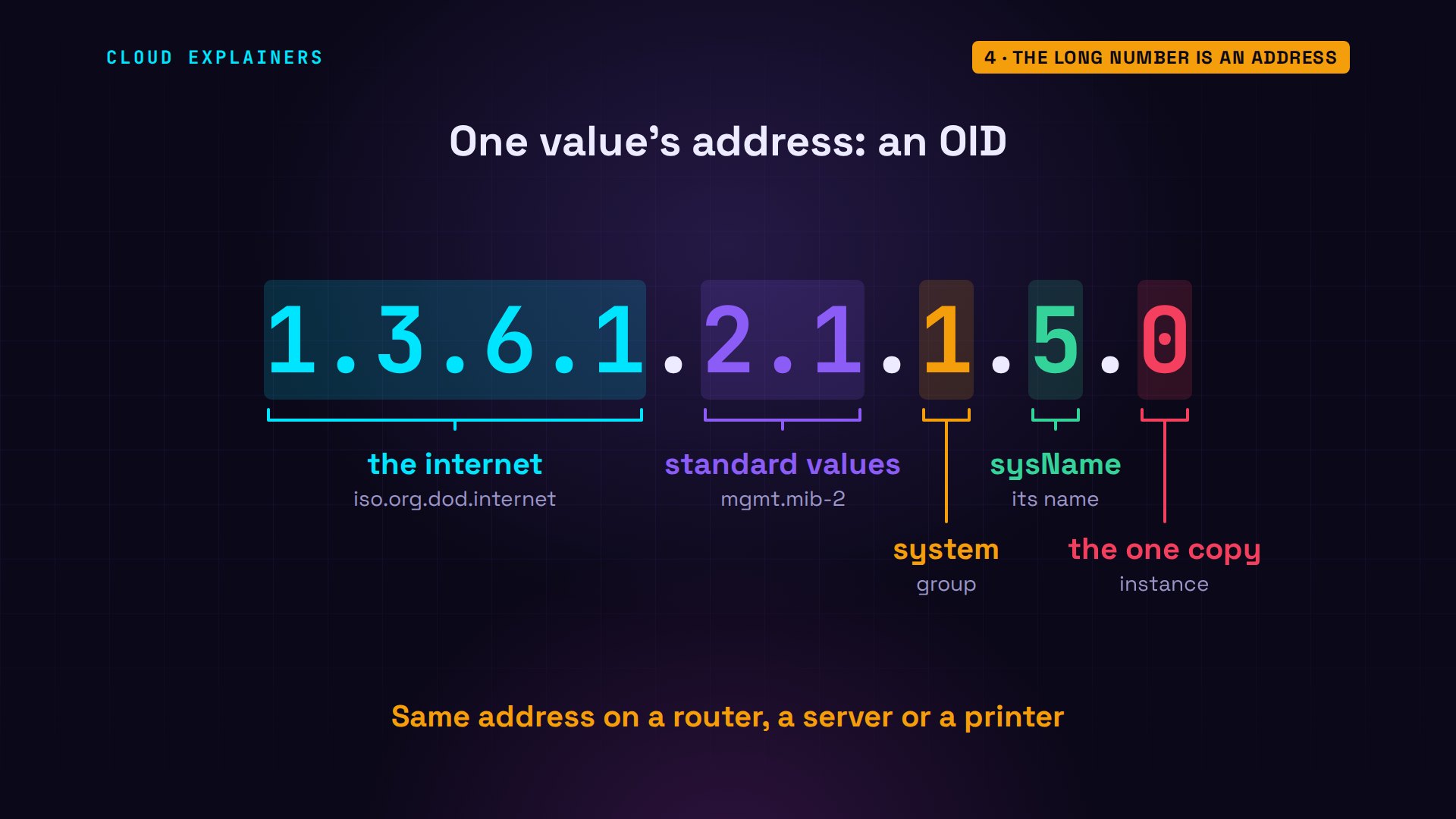
A MIB, a management information base, is the dictionary that names those numbers. snmptranslate looks one up: sysName. Ubuntu ships the tools with names turned off, so she turns on three standard MIBs in the tools' settings file, snmp.conf, with no D. Now the router answers in words: its name, and how long it's been running.
snmptranslate -m SNMPv2-MIB 1.3.6.1.2.1.1.5.0SNMPv2-MIB::sysName.0
echo 'mibs +SNMPv2-MIB:IF-MIB:HOST-RESOURCES-MIB' | sudo tee -a /etc/snmp/snmp.confmibs +SNMPv2-MIB:IF-MIB:HOST-RESOURCES-MIB
snmpget -v2c -c public router sysName.0 hrSystemUptime.0SNMPv2-MIB::sysName.0 = STRING: router
HOST-RESOURCES-MIB::hrSystemUptime.0 = Timeticks: (86265) 0:14:22.65
Who may read what
What about the router's network interfaces? snmpwalk asks for every value under one name, one after another. No such object available on this agent. The router's settings say why. A view is a rule for which branches of the tree a community may read, and public gets only systemonly: the name, the uptime, and little else.
snmpwalk -v2c -c public router IF-MIB::ifDescrIF-MIB::ifDescr = No Such Object available on this agent at this OID
sudo grep -E '^(view|rocommunity)' /etc/snmp/snmpd.confview   systemonly  included   .1.3.6.1.2.1.1
view   systemonly  included   .1.3.6.1.2.1.25.1
rocommunity  public default -V systemonly
rocommunity6 public default -V systemonly
So Ana replaces public with a community only the office knows, brew-mon, accepted only from the office PC's address. Two more lines tell the agent to send its alerts, the traps, to the office. After a restart, the walk works: twelve interfaces. Loopback, nine tunnel placeholders Linux makes by itself, and the two that matter: lan, the taproom side, and wan, the internet line, number twelve.
sudo grep -E '^(rocommunity|trap2sink|authtrapenable)' /etc/snmp/snmpd.confrocommunity  brew-mon 192.168.71.20
trap2sink       192.168.71.20 brew-trap
authtrapenable  1
sudo systemctl restart snmpd
snmpwalk -v2c -c brew-mon router IF-MIB::ifDescrIF-MIB::ifDescr.1 = STRING: lo
IF-MIB::ifDescr.2 = STRING: tunl0
IF-MIB::ifDescr.3 = STRING: gre0
IF-MIB::ifDescr.4 = STRING: gretap0
IF-MIB::ifDescr.5 = STRING: erspan0
IF-MIB::ifDescr.6 = STRING: ip_vti0
IF-MIB::ifDescr.7 = STRING: ip6_vti0
IF-MIB::ifDescr.8 = STRING: sit0
IF-MIB::ifDescr.9 = STRING: ip6tnl0
IF-MIB::ifDescr.10 = STRING: ip6gre0
IF-MIB::ifDescr.11 = STRING: lan
IF-MIB::ifDescr.12 = STRING: wan
Speed is two readings
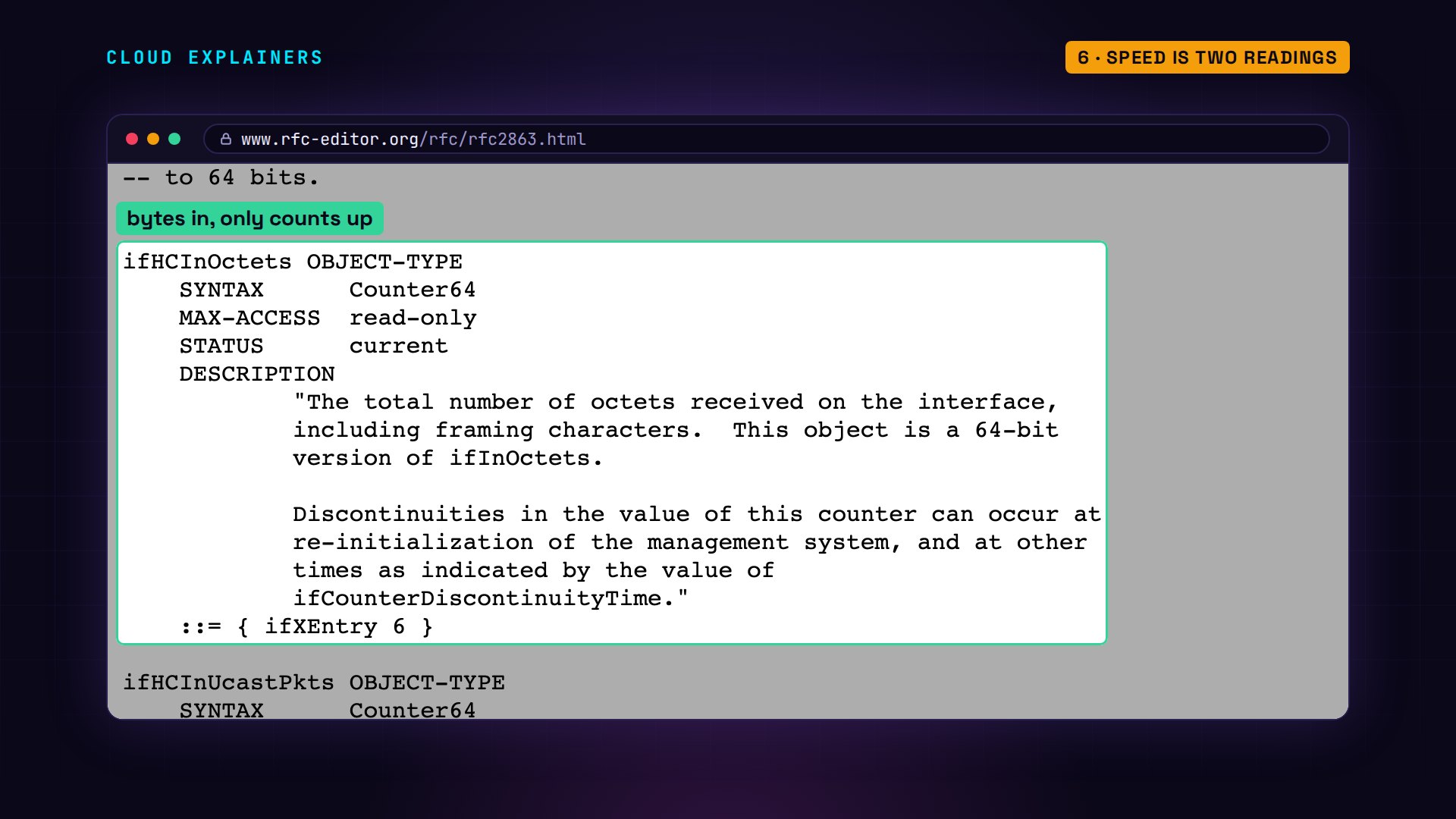
How fast is that line right now? SNMP has no speedometer. RFC 2863, the internet standard for interface values, defines a counter instead: ifHCInOctets, the total number of bytes received on the interface. A 64-bit counter: it only goes up.
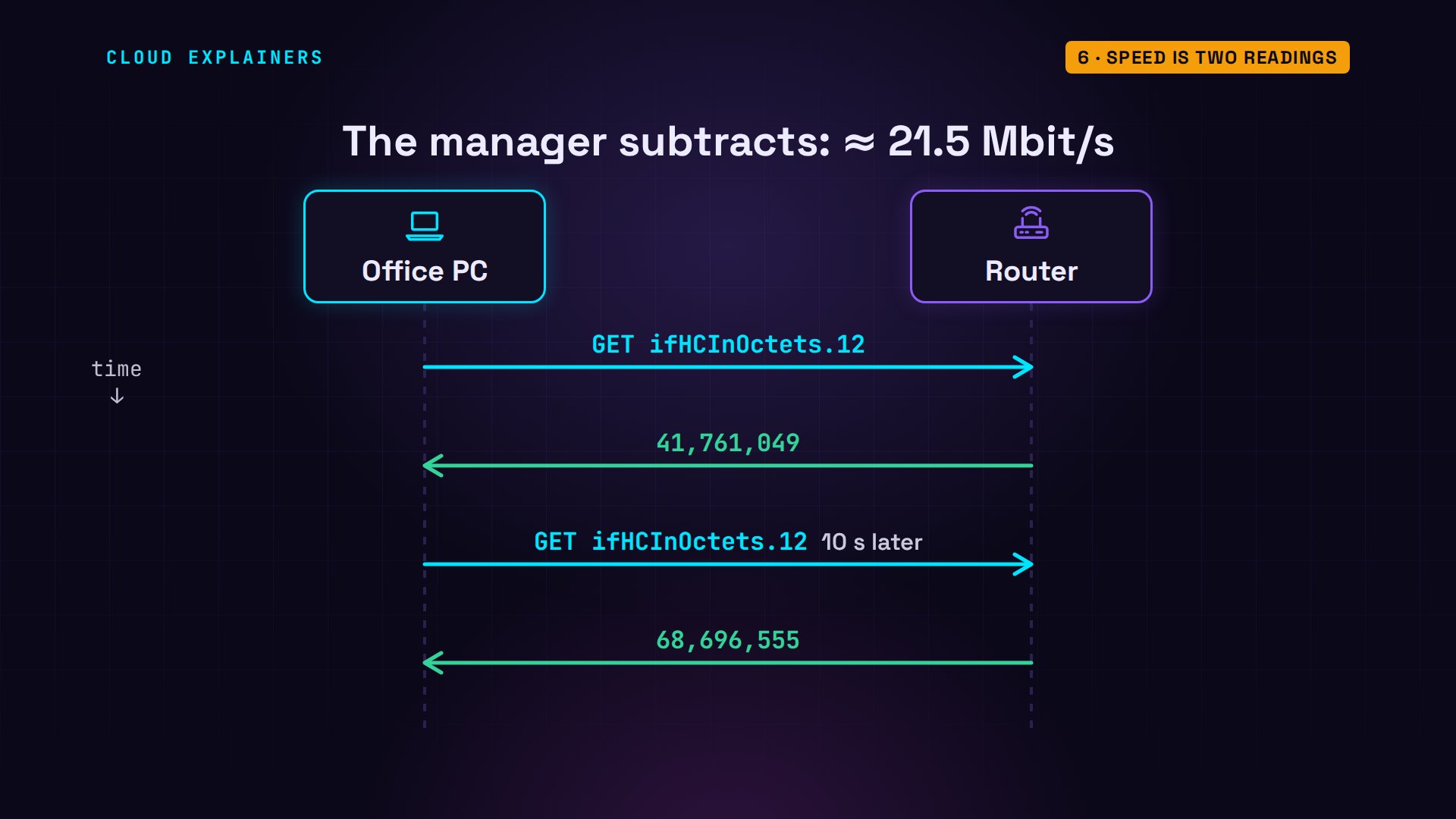
So Ana reads the wan counter, ifHCInOctets dot twelve, for interface twelve, waits ten seconds, and reads it again. forty-two million bytes, then sixty-nine million. Guess first: how fast is the line? About twenty-two megabits a second. The difference is twenty-seven million bytes in ten seconds, times eight for bits.
snmpget -v2c -c brew-mon router IF-MIB::ifHCInOctets.12; sleep 10; snmpget -v2c -c brew-mon router IF-MIB::ifHCInOctets.12IF-MIB::ifHCInOctets.12 = Counter64: 41761049
IF-MIB::ifHCInOctets.12 = Counter64: 68696555
That's the whole trick behind every traffic graph: read, wait, read again, subtract, the meter reader's job. Ana's little script does it every five seconds, and so do monitoring tools like Zabbix and LibreNMS, for hundreds of devices.
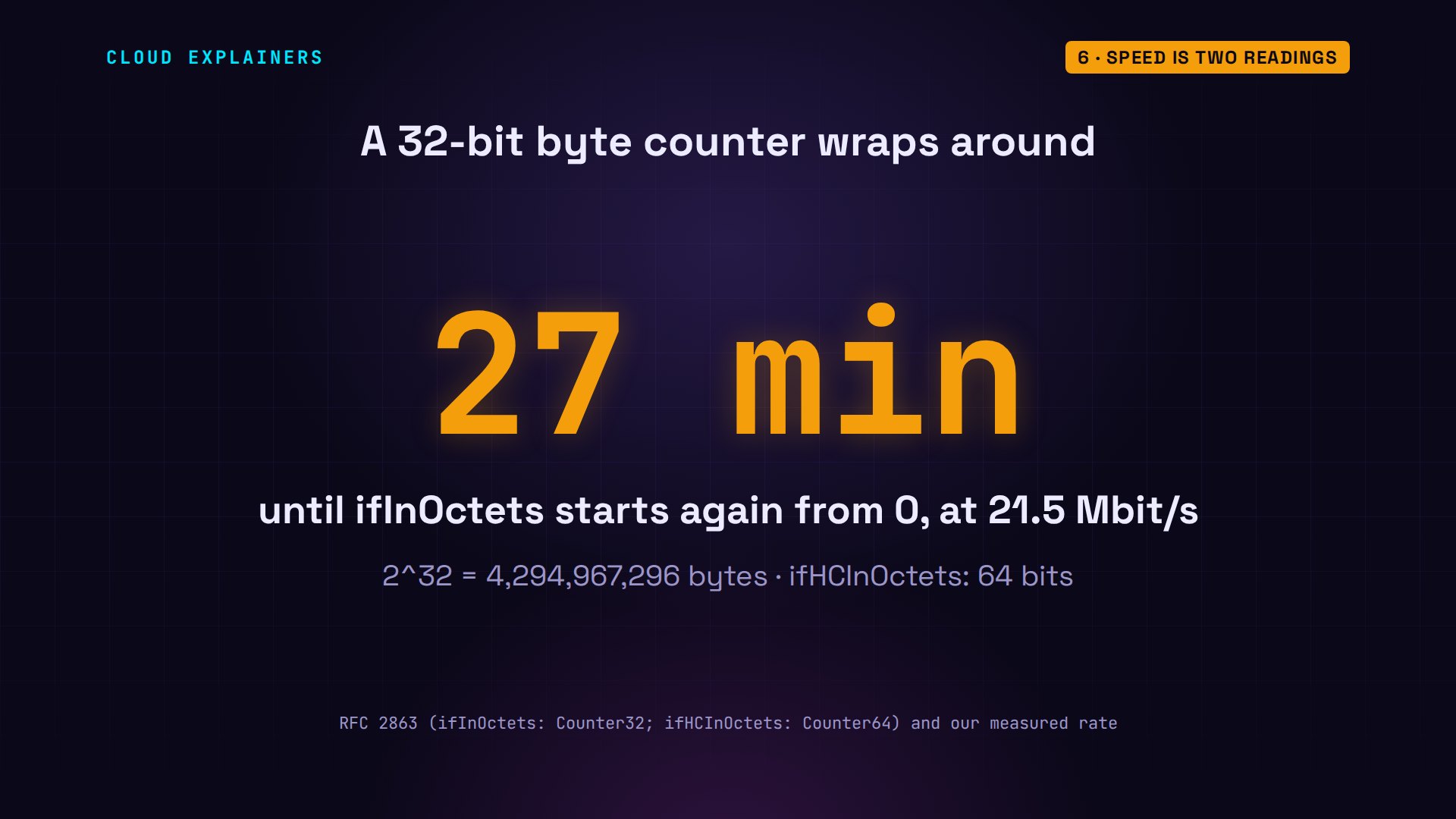
Why the 64-bit counter? The older one, ifInOctets, has 32 bits, so it starts again from zero after about 4.3 billion bytes. At this brewery's 22 megabits a second, that happens every 27 minutes. A manager that reads it less often than that can't tell one lap from two. The 64-bit one won't wrap for thousands of years.
The wrong community
What happens when someone tries the wrong community? From the office, Ana tries the old one, public. Guess first: what comes back? Nothing at all. snmpget waits a second, tries five more times, and gives up after six seconds.
snmpget -v2c -c public router sysName.0Timeout: No Response from router.
The agent never says no, so a stranger can't even tell whether anyone is listening. But it does tell Ana. Her trap log has a new entry from the router: authentication failure.
journalctl -u snmptrapd -o cat -n 421:46:38  trap from UDP: [192.168.71.1]:36134->[192.168.71.20]:162
    SNMPv2-MIB::sysUpTime.0 = Timeticks: (1620) 0:00:16.20
    SNMPv2-MIB::snmpTrapOID.0 = OID: SNMPv2-MIB::authenticationFailure
    SNMPv2-MIB::snmpTrapEnterprise.0 = OID: SNMPv2-SMI::enterprises.8072.3.2.10
Who else can read it
So the community is like a password. Who else can read it? On the router, tcpdump, a packet capture tool, prints the next packet that arrives on port 161. Ana asks for the name again, and there it is: the community, brew-mon, in plain text, for anyone who can see the traffic.
sudo tcpdump -n -v -c 1 -i lan udp port 161tcpdump: listening on lan, link-type EN10MB (Ethernet), snapshot length 262144 bytes
21:46:43.228804 IP (tos 0x0, ttl 64, id 31780, offset 0, flags [DF], proto UDP (17), length 73)
    192.168.71.20.46498 > 192.168.71.1.161:  { SNMPv2c C="brew-mon" { GetRequest(28) R=2147360876  .1.3.6.1.2.1.1.5.0 } }
1 packet captured
1 packet received by filter
0 packets dropped by kernel
snmpget -v2c -c brew-mon router sysName.0SNMPv2-MIB::sysName.0 = STRING: router
SNMP version 3 fixes that with users. Ana makes one with two passwords: one proves who's asking, checked with SHA-256, and one scrambles the contents, with AES encryption. The same question still gets the router's name. On the wire, the packet names the user, ana, and the rest is scrambled.
sudo systemctl stop snmpd && sudo net-snmp-create-v3-user -ro -a SHA-256 -A Hop-Kettle-42 -x AES -X Mash-Tun-77 ana && sudo systemctl start snmpdadding the following line to /var/lib/snmp/snmpd.conf:
   createUser ana SHA-256 "Hop-Kettle-42" AES "Mash-Tun-77"
adding the following line to /etc/snmp/snmpd.conf:
   rouser ana
snmpget -v3 -l authPriv -u ana -a SHA-256 -A Hop-Kettle-42 -x AES -X Mash-Tun-77 router sysName.0SNMPv2-MIB::sysName.0 = STRING: router
sudo tcpdump -n -v -c 3 -i lan udp port 161tcpdump: listening on lan, link-type EN10MB (Ethernet), snapshot length 262144 bytes
21:46:47.929996 IP (tos 0x0, ttl 64, id 36183, offset 0, flags [DF], proto UDP (17), length 92)
    192.168.71.20.50731 > 192.168.71.1.161:  { SNMPv3 { F=r } { USM B=0 T=0 U="" } { ScopedPDU E= C="" { GetRequest(14) R=606196376  } } }
21:46:47.992199 IP (tos 0x0, ttl 64, id 50656, offset 0, flags [DF], proto UDP (17), length 143)
    192.168.71.1.161 > 192.168.71.20.50731:  { SNMPv3 { F= } { USM B=5 T=5 U="" } { ScopedPDU E=_80_00_1f_88_80_e3_e6_21_17_9a_79_fb_6a_00_00_00_00 C="" { Report(31) R=606196376  .1.3.6.1.6.3.15.1.1.4.0=1 } } }
21:46:47.992993 IP (tos 0x0, ttl 64, id 36191, offset 0, flags [DF], proto UDP (17), length 178)
    192.168.71.20.50731 > 192.168.71.1.161:  { SNMPv3 { F=apr } { USM B=5 T=5 U="ana" } { ScopedPDU [!scoped PDU]a3_64_59_3e_51_3e_34_0c_43_cd_3f_06_eb_d0_03_67_82_76_2a_02_f9_c2_e3_18_2d_52_fc_e5_ce_e2_aa_29_59_3f_f7_03_d2_01_d1_2f_2a_5f_61_b9_2e_65_dc_7f_f4_d0_a4_e2_e6} }
3 packets captured
3 packets received by filter
0 packets dropped by kernel
The router speaks first
Polling every five seconds is fine for a graph. But Ana also told the agent to check its own interfaces every five seconds, and send a trap when one changes. Then Ana takes the router's internet line down. Five seconds later, a trap reaches the office: link down, on WAN, the internet line. The router called Ana before she asked.
date +%T; sudo ip link set wan down21:46:48
journalctl -u snmptrapd -o cat -n 721:46:53  trap from UDP: [192.168.71.1]:40229->[192.168.71.20]:162
    SNMPv2-MIB::sysUpTime.0 = Timeticks: (1001) 0:00:10.01
    SNMPv2-MIB::snmpTrapOID.0 = OID: IF-MIB::linkDown
    IF-MIB::ifIndex.12 = INTEGER: 12
    IF-MIB::ifDescr.12 = STRING: wan
    IF-MIB::ifOperStatus.12 = INTEGER: down(2)
    SNMPv2-MIB::snmpTrapEnterprise.0 = OID: SNMPv2-SMI::enterprises.8072.3.2.10
When the line comes back, another trap: link up. Polling tells you how busy things are. Traps tell you the moment something changes. Most setups use both.
journalctl -u snmptrapd -o cat -n 721:46:58  trap from UDP: [192.168.71.1]:40229->[192.168.71.20]:162
    SNMPv2-MIB::sysUpTime.0 = Timeticks: (1501) 0:00:15.01
    SNMPv2-MIB::snmpTrapOID.0 = OID: IF-MIB::linkUp
    IF-MIB::ifIndex.12 = INTEGER: 12
    IF-MIB::ifDescr.12 = STRING: wan
    IF-MIB::ifOperStatus.12 = INTEGER: up(1)
    SNMPv2-MIB::snmpTrapEnterprise.0 = OID: SNMPv2-SMI::enterprises.8072.3.2.10
One manager, every device
And it's the same language on every device. One loop asks the router and the brewhouse server the same two questions, name and uptime, with the same community. A switch, a printer or a UPS answers them too, because every agent shares the same tree of addresses.
for h in router brewhouse; do snmpget -v2c -c brew-mon $h sysName.0 hrSystemUptime.0; doneSNMPv2-MIB::sysName.0 = STRING: router
HOST-RESOURCES-MIB::hrSystemUptime.0 = Timeticks: (91233) 0:15:12.33
SNMPv2-MIB::sysName.0 = STRING: brewhouse
HOST-RESOURCES-MIB::hrSystemUptime.0 = Timeticks: (91242) 0:15:12.42
Before you leave it running
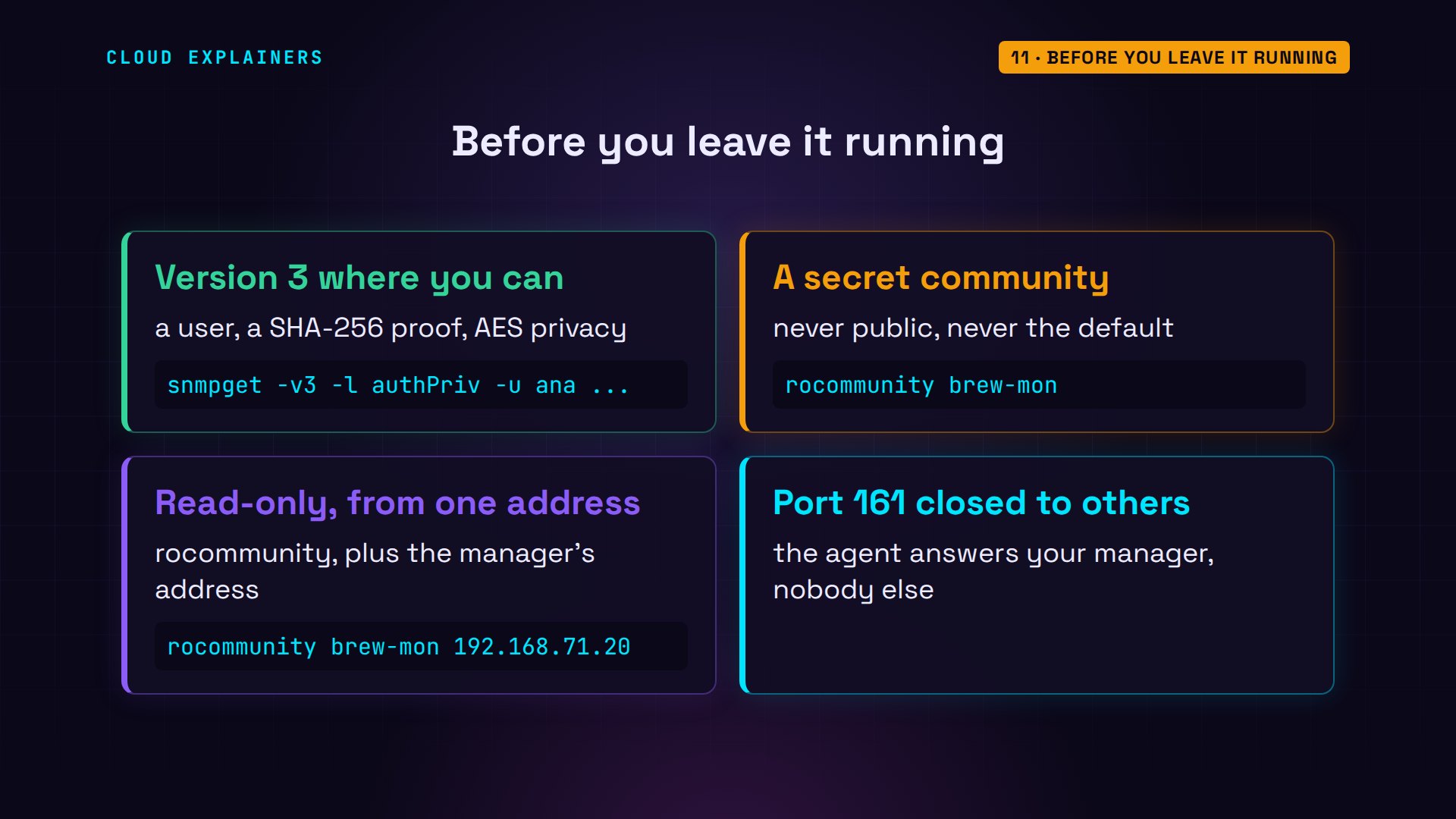
Before you leave it running: use version 3 where your devices support it. If you must use a community, make it secret, read-only, and accepted from your manager's address only. And keep the agent's port, 161, closed to everyone else.
Recap
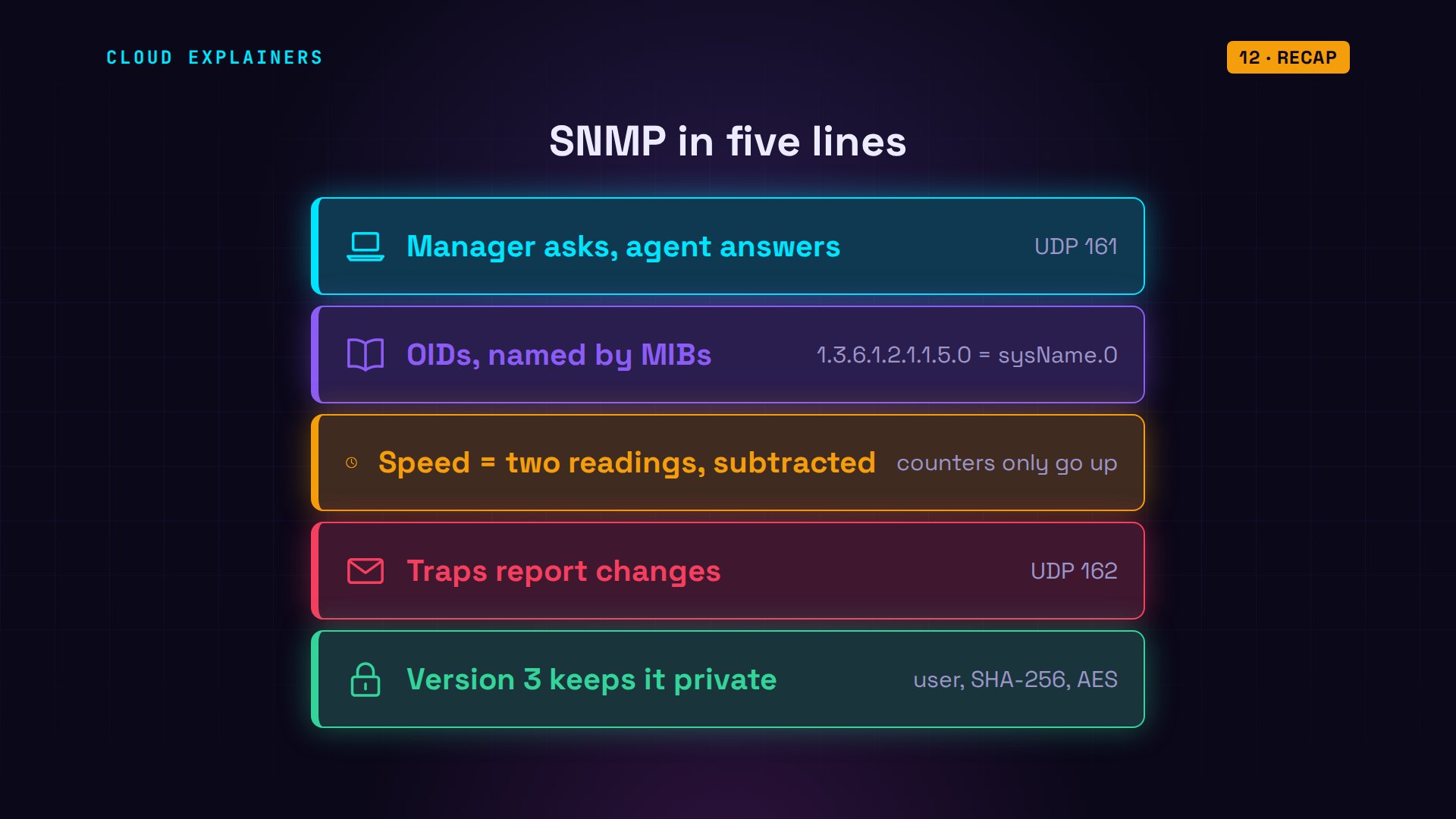
So: the manager asks on port 161, and agents answer. Values have addresses, O I Ds, and MIBs name them. Speed is two counter readings, subtracted. Traps on 162 report changes. And version 3 keeps it private.
If you can read your own router now, a like helps YouTube show this to more beginners, and subscribing brings more networks, explained on real machines.
Every answer, timeout and trap in this video came from real machines, and every command and the lab files are linked in the description. Thanks for watching Cloud Explainers.
Sources
- RFC 3411, An Architecture for Describing SNMP Management Frameworks (managers and agents)
- RFC 3417, Transport Mappings for SNMP (UDP port 161 for requests, 162 for notifications)
- RFC 3418, MIB for SNMP (sysName, sysUpTime, authenticationFailure)
- RFC 2863, The Interfaces Group MIB (ifDescr, ifHCInOctets, linkDown/linkUp)
- RFC 3414, User-based Security Model for SNMPv3 (authentication and privacy)
- Net-SNMP snmpd.conf manual (agentaddress, rocommunity, view, trap2sink, authtrapenable, monitor)
- Net-SNMP snmpcmd manual (-v, -c; 1 second timeout and 5 retries by default)
- Net-SNMP snmp.conf manual (mibs)
Demos: five containers on our own Mac standing in for a craft brewery's router, server and PCs; the brewery and its passwords are made up. Every answer, timeout, trap and packet was real. Watch the full video on YouTube.
More videos
DevOps with Ansible Will Finally Make Sense After This
How to Fix GitHub 'Permission Denied (publickey)' Errors
How to Fix PostgreSQL 'Password Authentication Failed'
Why One Linux Server Handles More Users Than You Think
How to Fix Network 'Connection Refused' Errors
DevOps Pipelines: Jenkins vs GitHub Actions
Every Networking Term a Beginner Needs in 12 Minutes
How to Fix Docker 'Permission Denied' on docker.sock
How to Fix Git 'Updates Were Rejected' When You Push
How to Fix nginx 502 Bad Gateway Errors on Linux
How to Fix Linux apt 'Could Not Get Lock' Errors (Ubuntu)

How Email Works on the Internet (SMTP) in 10 Minutes
The Python Roadmap for Beginners

Golang REST API with Gin: Full Tutorial for Beginners
How a WireGuard VPN Network Works

Linux Makefiles Will Finally Make Sense After This

SAML vs OAuth vs OpenID Connect: What's the Difference?
How to Fix Python cron Jobs That Never Run
Linux Bash Scripting: Full Tutorial for Beginners
How PXE Network Boot Works
How Active Directory Works

How to Fix a Linux systemd Service That Won't Start
Linux Logs: syslog vs journald
JWT vs Session Cookies: Which One Should You Use?
Docker vs Docker Compose: Which One Should You Use?
How to Fix Docker Compose Containers That Can't Talk to Each Other

Django Full Tutorial for Beginners

How Linux systemd Works

How to Fix 'Windows Cannot Access' Network Share Errors (SMB)
REST vs gRPC: Which One Should You Use?
How to Fix SSL Certificate Chain Errors (Missing Intermediate)
Every Python Concept for Beginners in 10 Minutes
Every SQL Join Type in 10 Minutes

Why OpenRouter Free Models Hit Their Limit So Fast
Why Your Gemini API Free Tier Runs Out So Fast
OpenRouter Will Finally Make Sense After This
How Redis Caching Works
Gemini API vs Vertex AI: Which One Should You Use?
How to Fix a Leaked Gemini API Key
Why Golang Uses Goroutines Instead of Threads
How to Fix Gemini API Error 429: Resource Exhausted

Claude Token Pricing Will Finally Make Sense After This
Why Python Web Scraping Returns Nothing (and the Fix)

Python uv vs pip: Which One Should You Use?
Python Automation: Full Tutorial for Beginners
How OAuth Login Works

Google AI Studio Will Finally Make Sense After This
What Happens When You Run a Docker Container
How to Fix Claude Code Billing Your API Key Instead of Your Plan
Why Passkeys Can't Be Phished Like Passwords
PowerShell vs Bash: Which One Should You Learn?
The Linux Roadmap for Beginners
Django vs FastAPI: Which One Should You Use?
Why SQLite Is the Most Used Database in the World
How a NoSQL Database Like MongoDB Works
How to Fix Python pip error: externally-managed-environment
How to Fix MySQL Too Many Connections Database Errors
Golang Concurrency Will Finally Make Sense After This
How Amazon S3 Works
How Kubernetes Works
How Git Works
How to Fix Docker Port Already Allocated Errors
How PostgreSQL Works
How to Fix Git Merge Conflicts
How to Fix No Space Left on Device in Linux
How the Internet Works
SQL vs NoSQL: When Each One Wins
How to Fix JWT Token Expired Errors (401 Unauthorized)
Claude API vs Claude Pro: Why Your Subscription Doesn't Include It

Why AI Agent Skills Beat Giant Prompts

Linux Cron Jobs Will Finally Make Sense After This
Security Logs Will Finally Make Sense After This
How to Fix a Security Leak: An API Key Pushed to GitHub
DNS Will Finally Make Sense After This
Never Ignore a Security Update
Two-Factor Authentication Will Finally Make Sense
Never Expose a Database to the Internet
SSH Keys vs Passwords: Which Is Safer for Security?
The 5 Levels of Linux Boot: From Power On to Login
The 5 Levels of Network Firewalls
Password Security: Why Hackers Crack Weak Passwords
Why Your Linux Server Runs Out of Memory
HTTP vs HTTPS: What Actually Changes on Your Network

Every Linux File Permission You Need to Know
Linux Processes vs Threads: When Each One Wins

The OSI Model Will Finally Make Sense After This
The 7 Levels of Git
Every Network Troubleshooting Command You Need
Hashing vs Encryption in Cybersecurity: When Each One Wins
Why the Internet Ran Out of IP Addresses
Linux Package Managers: apt vs Snap vs Flatpak

Why Python Is Slow (and When It Doesn't Matter)
TCP vs UDP: When Each One Wins
Stop Running Linux as Root (Do This Instead)
Linux Users and Groups Will Finally Make Sense

Why Phishing Beats Good Security (and How to Spot It)

The 7 Levels of Docker

AI Agents Will Finally Make Sense After This
Stop Using git push --force (Use This Instead)
Agent Skills vs MCP: When Each One Wins
Networking Will Finally Make Sense After This
Every Linux Command You Actually Need
The 7 Levels of Cybersecurity
Every System Design Concept You Need, in One Diagram