
How Kubernetes Works
How Kubernetes works, for beginners, proven on a real Kubernetes cluster: a deleted pod comes back by itself, and we follow why through every part: the control plane (API server, etcd, scheduler, controllers), worker nodes with the kubelet and containerd, Deployments, ReplicaSets and pods, a Service that gives changing pods one stable name, a whole worker node switched off (and the 5-minute default wait before its pods are replaced), and a rolling update.
A pod comes back
When your app's container crashes, or the whole server under it dies, who starts it again? On Kubernetes, nobody has to. Ana's tea shop runs as three copies of the same container. We delete one, and a replacement is already starting. By the end, you'll know every part of Kubernetes that made that happen, and what it does when a whole server dies.
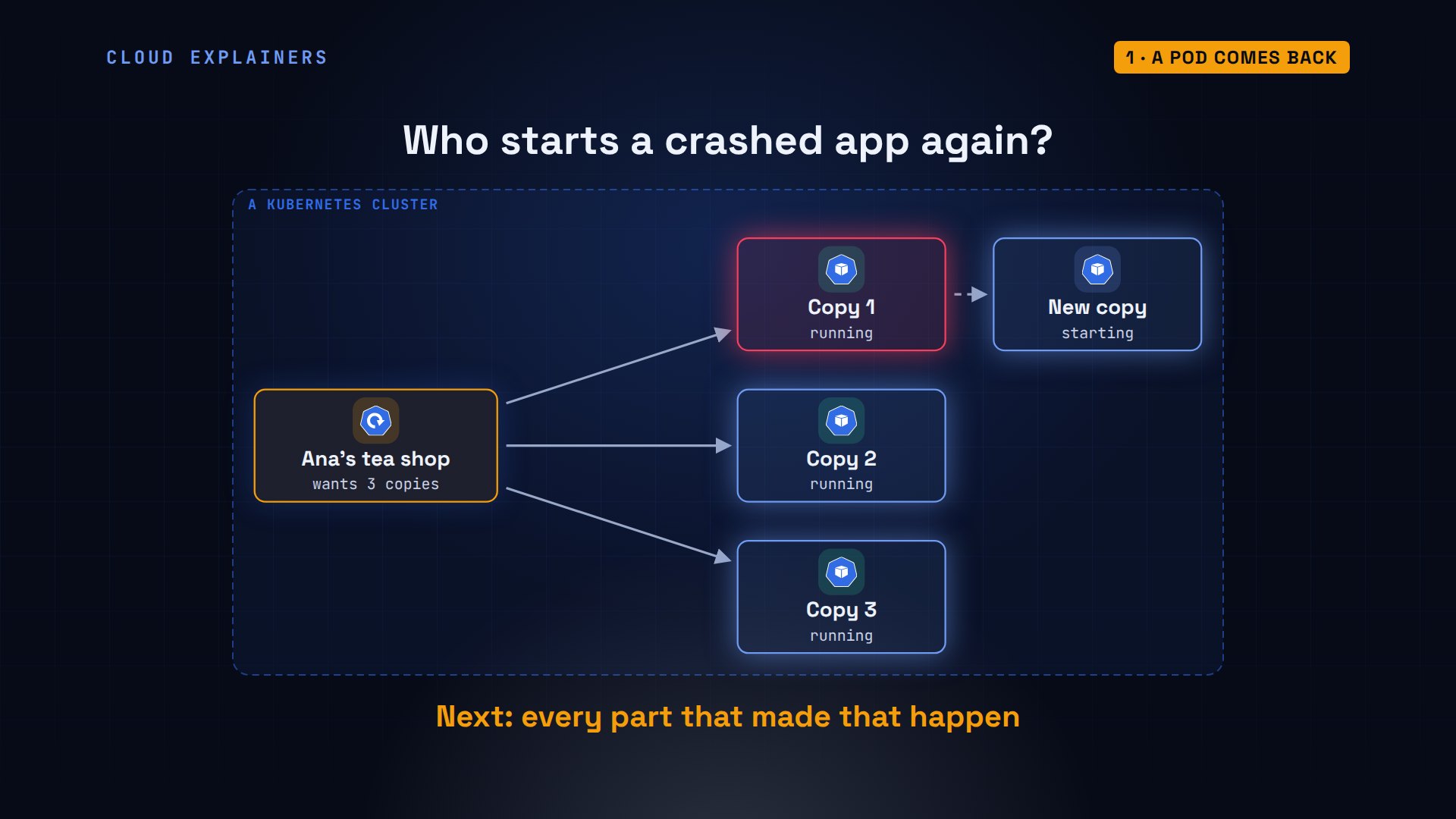
Here's the real thing. Three copies, each one called a pod, all running. Ana deletes the first. Look again: a new pod, 0 seconds old, already creating its container. Three again.
kubectl get pods -l app=shopNAME                   READY   STATUS    RESTARTS   AGE
shop-8f9c4c6b8-2rc5q   1/1     Running   0          23s
shop-8f9c4c6b8-nkhpp   1/1     Running   0          23s
shop-8f9c4c6b8-xmb4q   1/1     Running   0          23s
kubectl delete pod shop-8f9c4c6b8-2rc5qpod "shop-8f9c4c6b8-2rc5q" deleted from default namespace
kubectl get pods -l app=shopNAME                   READY   STATUS              RESTARTS   AGE
shop-8f9c4c6b8-f56gl   0/1     ContainerCreating   0          0s
shop-8f9c4c6b8-nkhpp   1/1     Running             0          23s
shop-8f9c4c6b8-xmb4q   1/1     Running             0          23s
The cluster
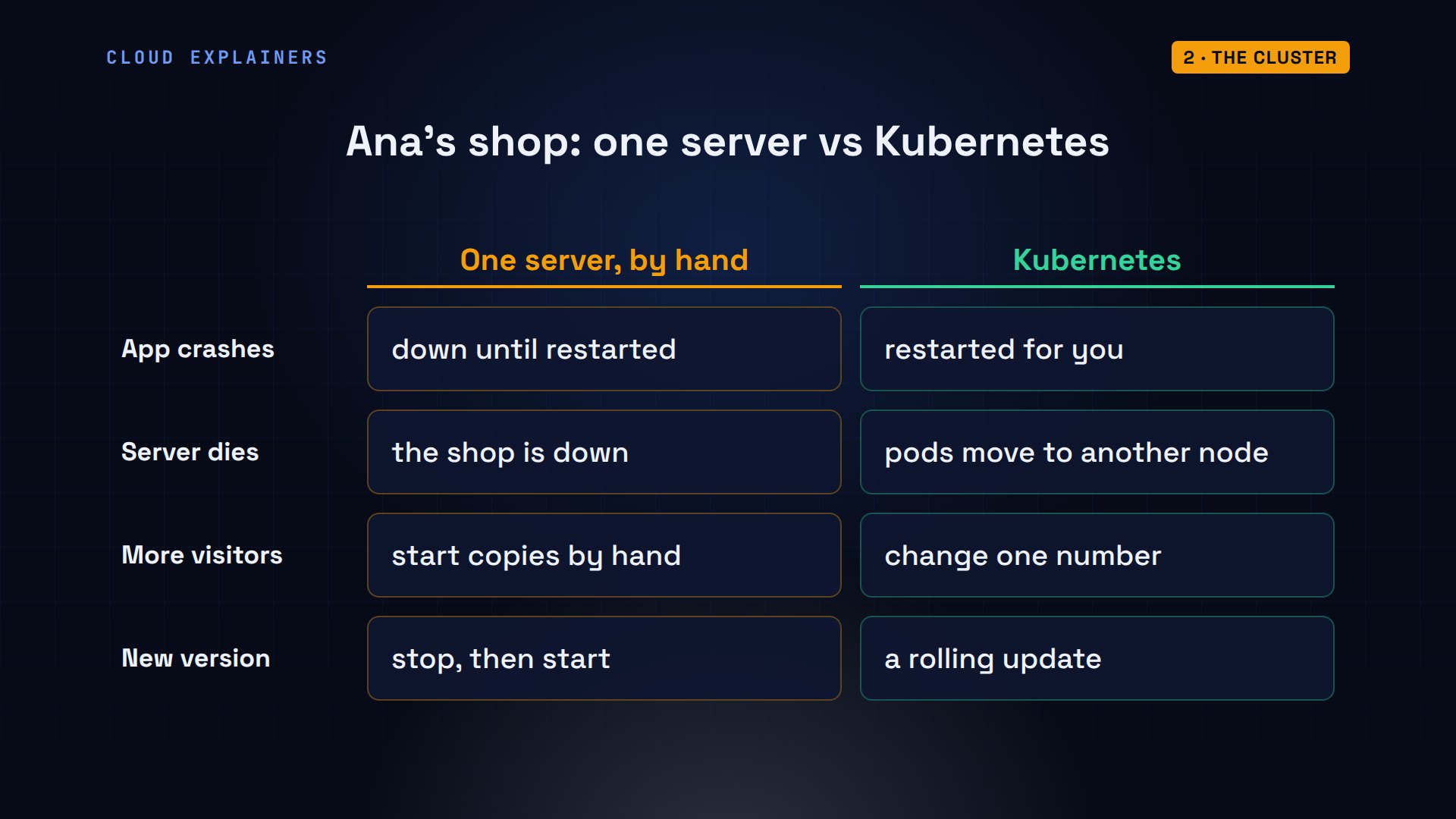
Why not just run the container on one server? Then everything is your job. If the app crashes, it stays down until someone restarts it; Kubernetes restarts it for you. If the server dies, so does the shop; Kubernetes moves the work to another machine. More visitors? You change one number. And new versions roll out without downtime.
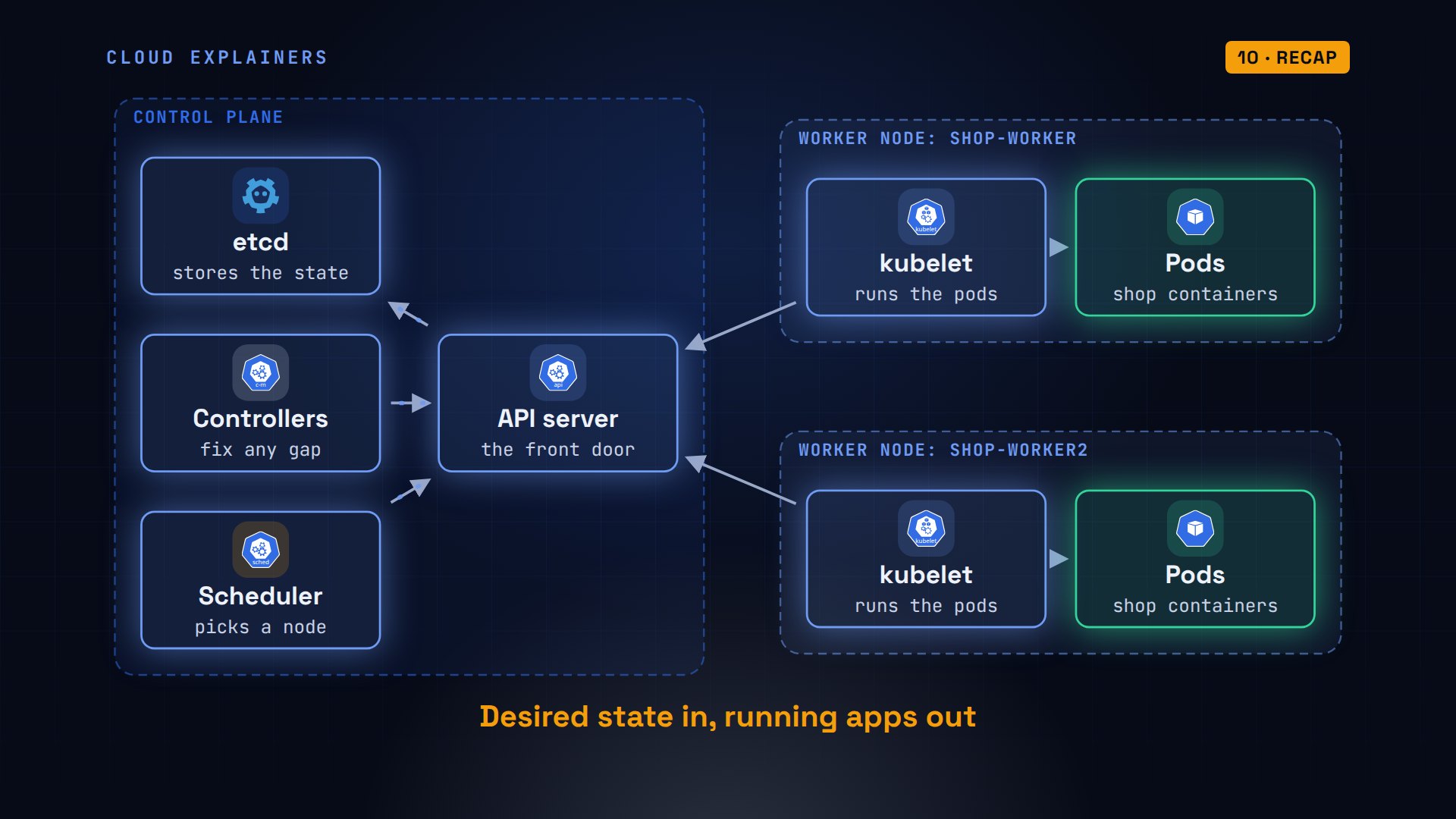
Kubernetes runs on a group of machines called a cluster. Each machine is a node. Worker nodes run your apps. The control plane runs Kubernetes itself: the API server, the front door every request goes through; etcd, a database that stores what the cluster should look like; the scheduler, which picks a node for each new pod; and the controllers, which keep everything the way you asked.
Our cluster is real Kubernetes 1.37, made with a tool called kind, which runs each node as a container on one lab machine. On a real cluster, each node is its own machine. Three nodes: one control plane, two workers. And the control plane's parts are pods too: etcd, the API server, the controller manager and the scheduler, all on the control plane node.
kubectl get nodesNAME                 STATUS   ROLES           AGE   VERSION
shop-control-plane   Ready    control-plane   66s   v1.37.0
shop-worker          Ready    <none>          48s   v1.37.0
shop-worker2         Ready    <none>          48s   v1.37.0
kubectl get pods -n kube-system -o custom-columns=POD:.metadata.name,NODE:.spec.nodeNamePOD                                          NODE
coredns-559f6c778d-7nx6c                     shop-control-plane
coredns-559f6c778d-mzd2v                     shop-control-plane
etcd-shop-control-plane                      shop-control-plane
kindnet-2z86p                                shop-worker
kindnet-44fdw                                shop-control-plane
kindnet-f27hc                                shop-worker2
kube-apiserver-shop-control-plane            shop-control-plane
kube-controller-manager-shop-control-plane   shop-control-plane
kube-proxy-7c9tg                             shop-worker2
kube-proxy-b7w7r                             shop-control-plane
kube-proxy-krclv                             shop-worker
kube-scheduler-shop-control-plane            shop-control-plane
Desired state
Ana never tells Kubernetes to start a container. She describes what she wants, in a file. This one is a Deployment named shop: a description of an app for Kubernetes to keep running. Three replicas, each running the container image kettle-shop, version 1.0, and each labelled app: shop.
cat deployment.yamlapiVersion: apps/v1
kind: Deployment
metadata:
  name: shop
spec:
  replicas: 3
  selector:
    matchLabels:
      app: shop
  template:
    metadata:
      labels:
        app: shop
    spec:
      containers:
      - name: web
        image: kettle-shop:1.0
        ports:
        - containerPort: 8080
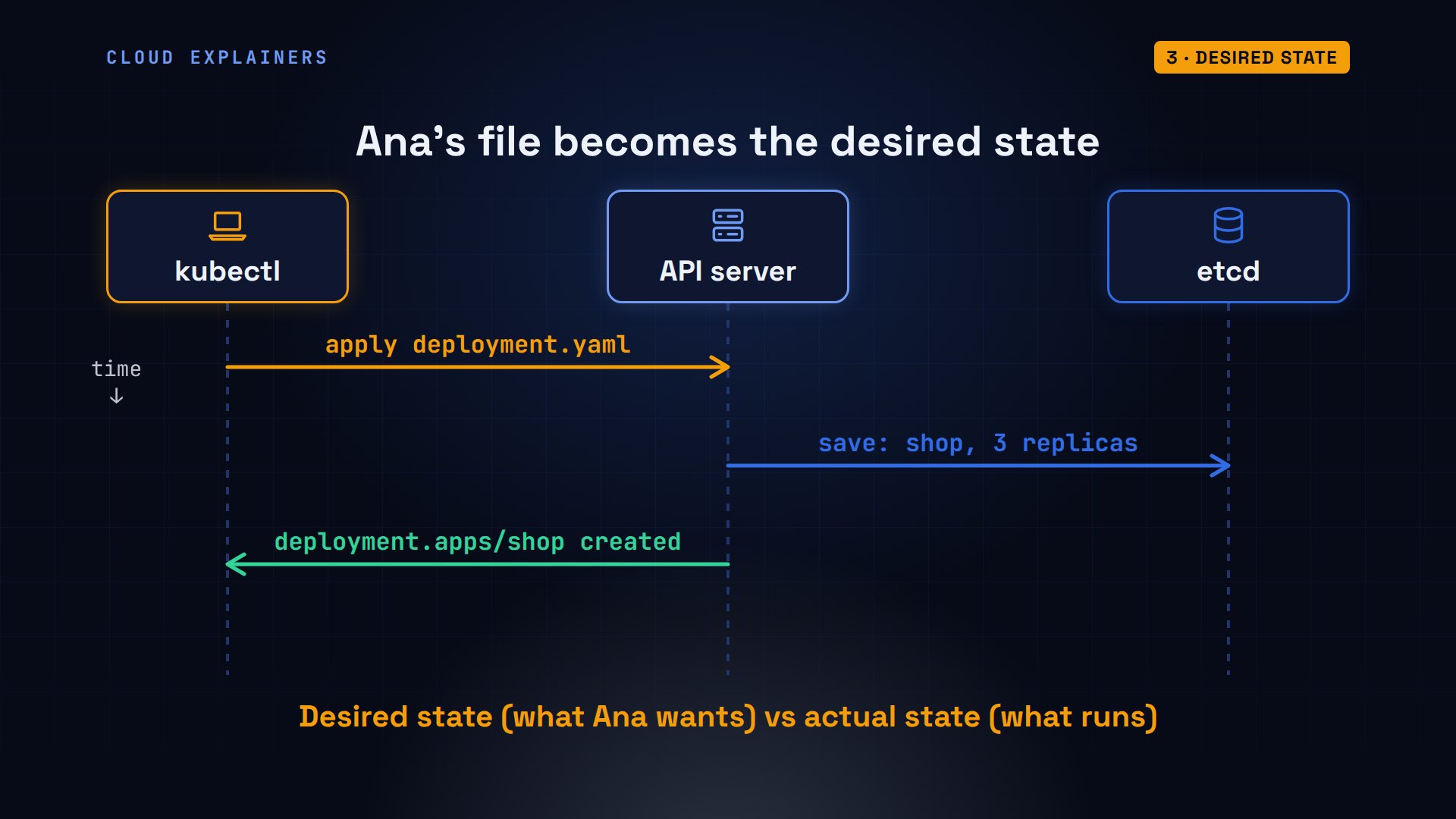
kubectl, the command-line tool for Kubernetes, sends that file to the API server with apply, which checks it and saves it in etcd. That's the desired state: what Ana wants. Nothing has started yet. From here on, Kubernetes compares what's running, the actual state, with what's wanted, and works to close any gap.
Ana applies the same file again: unchanged. What runs already matches what she wants, so there's nothing to do. Now a one-line text replace changes three replicas to five, grep shows the new line, and she applies it: configured. Seconds later, five pods, 3 on shop-worker and 2 on shop-worker2.
kubectl apply -f deployment.yamldeployment.apps/shop unchanged
sed -i 's/replicas: 3/replicas: 5/' deployment.yaml
grep replicas deployment.yamlreplicas: 5
kubectl apply -f deployment.yamldeployment.apps/shop configured
kubectl get pods -o custom-columns=POD:.metadata.name,NODE:.spec.nodeName -l app=shopPOD                    NODE
shop-8f9c4c6b8-dzcp8   shop-worker2
shop-8f9c4c6b8-f56gl   shop-worker
shop-8f9c4c6b8-hp922   shop-worker
shop-8f9c4c6b8-nkhpp   shop-worker2
shop-8f9c4c6b8-xmb4q   shop-worker
The scheduler
But who chose those nodes? A new pod starts with no node at all. The scheduler watches the API server for pods like that. For each one, it checks which nodes have enough free CPU and memory, scores them, and writes the winner into the pod. It never starts anything itself.
Kubernetes records events like these. For one of Ana's new pods: the default scheduler assigned it to shop-worker. Then the kubelet on that node, found the image already there, created the container, and started it.
kubectl events --for pod/shop-8f9c4c6b8-hp922LAST SEEN   TYPE     REASON      OBJECT                     MESSAGE
4s          Normal   Scheduled   Pod/shop-8f9c4c6b8-hp922   Successfully assigned default/shop-8f9c4c6b8-hp922 to shop-worker
4s          Normal   Pulled      Pod/shop-8f9c4c6b8-hp922   Container image "kettle-shop:1.0" already present on machine and can be accessed by the pod
4s          Normal   Created     Pod/shop-8f9c4c6b8-hp922   Container created
4s          Normal   Started     Pod/shop-8f9c4c6b8-hp922   Container started
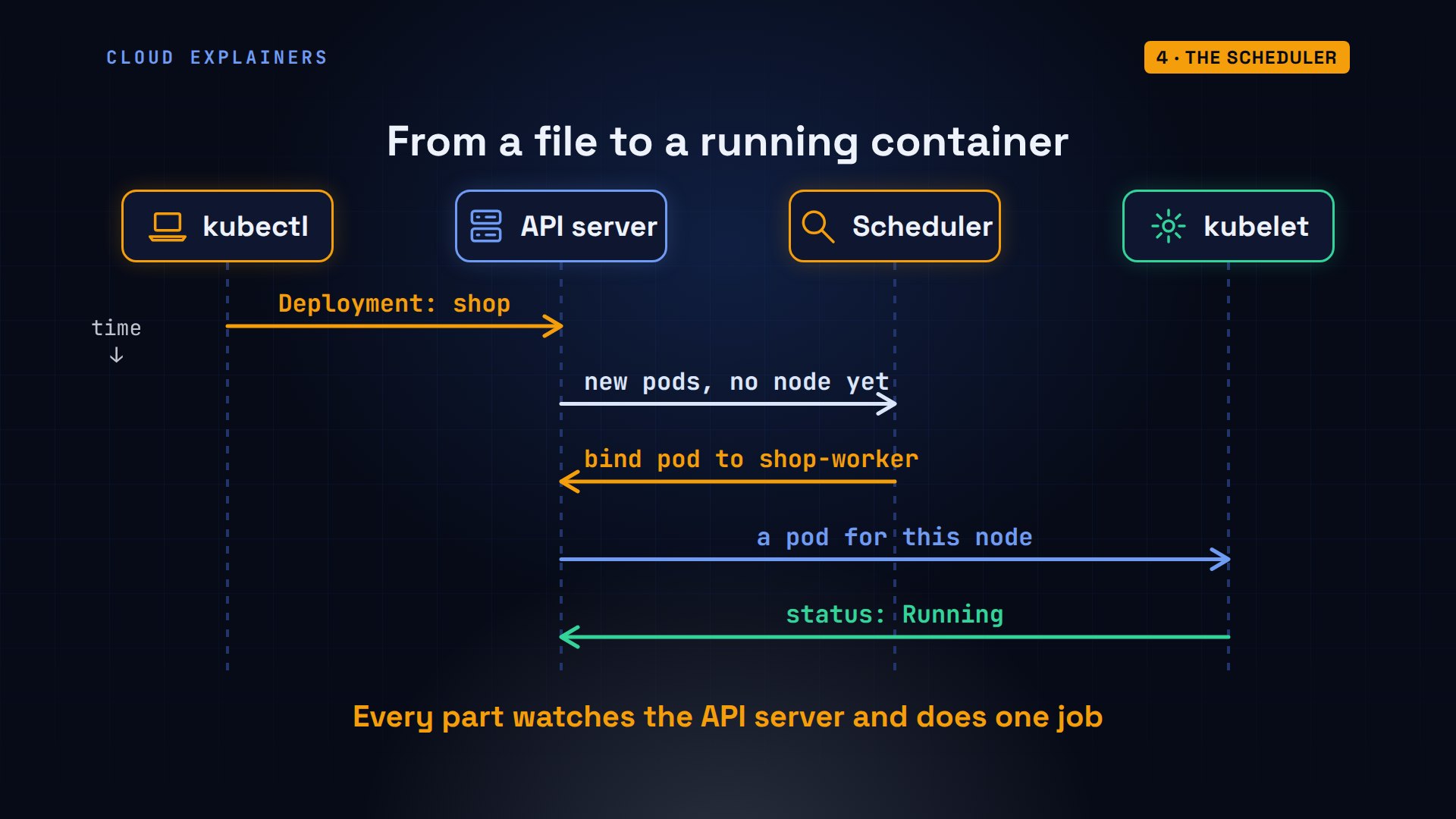
Here's the whole path from a file to a running container. kubectl sends the Deployment to the API server. The controllers turn it into pods with no node yet. The scheduler sees them and binds each one to a node. The kubelet on that node sees a pod assigned to it, starts the container, and reports back: running. No part gives orders to another: each one watches the API server, and does its own job.
On the node
The kubelet is the agent on every node. It watches the API server for pods assigned to its node, and asks the container runtime, here containerd, to start their containers. A pod is one or more containers that share an IP address. And each container is an ordinary process on the node's Linux.
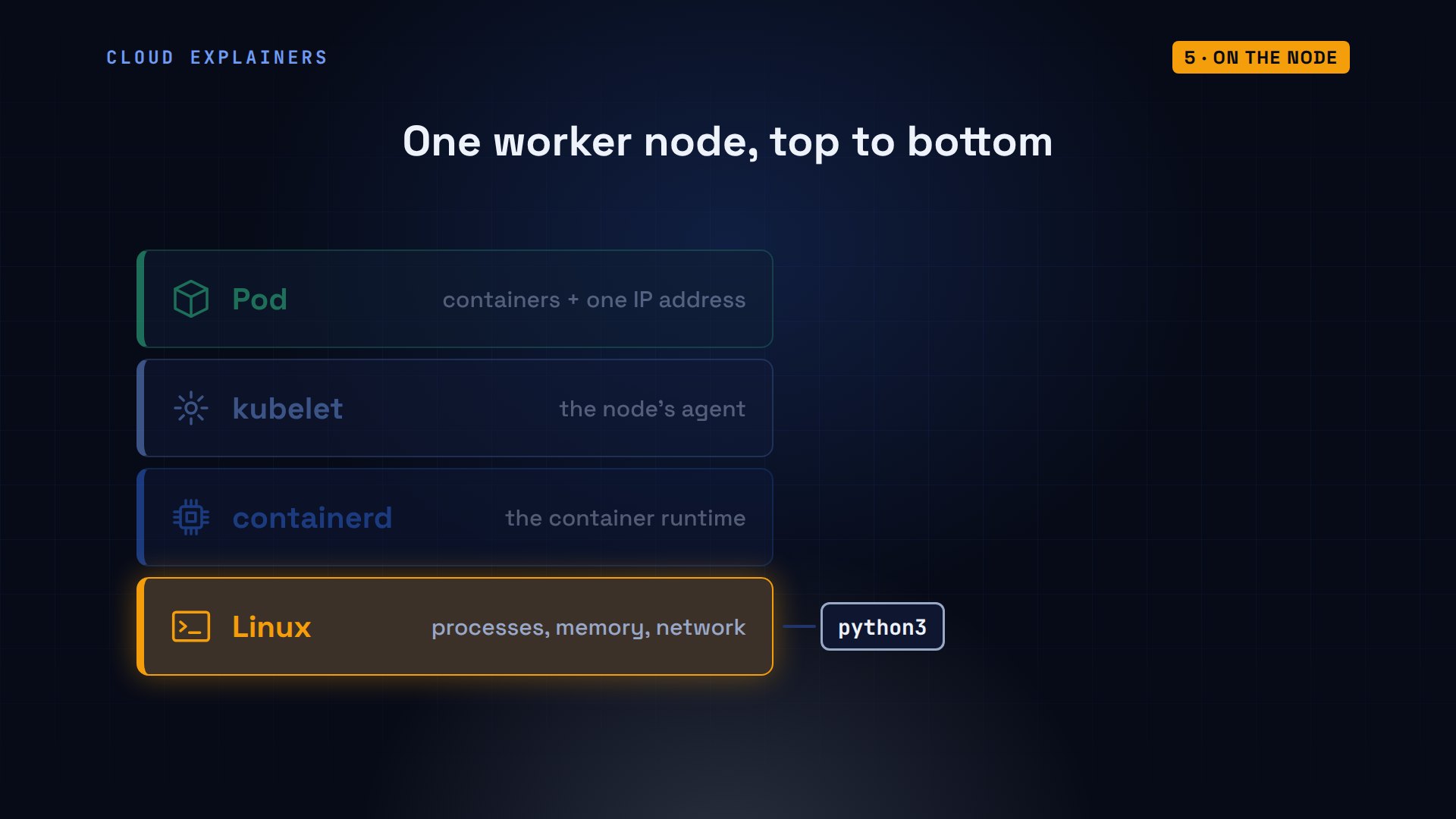
Here's a root shell on shop-worker. The kubelet and containerd are running. And there are Ana's shop containers: 3 Python processes, one for each of the 3 pods on this node.
pgrep -l 'kubelet|containerd$'138 containerd
251 kubelet
pgrep -a python3937 python3 -u /shop.py
1165 python3 -u /shop.py
1276 python3 -u /shop.py
Controllers
So who replaced the pod Ana deleted? A controller. Each controller runs the same loop, over and over: look at the actual state, compare it with the desired state, and act to close the gap. One pod short? Create one. One too many? Delete one. Then look again.
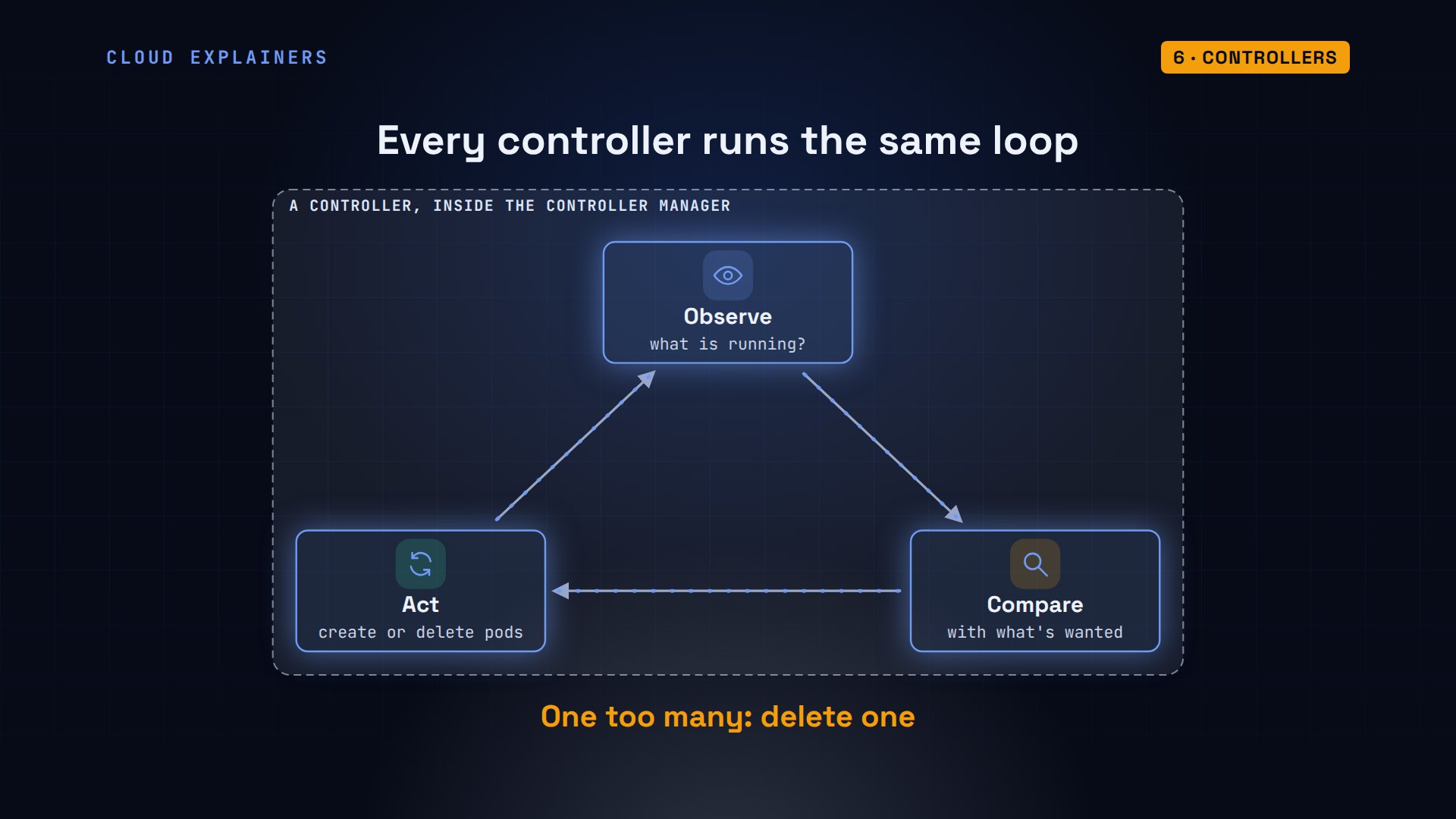
For Ana's shop, two controllers work as a chain. The Deployment controller creates a ReplicaSet, whose only job is to keep a count of identical pods. The ReplicaSet controller then creates or deletes pods to match that count. Her ReplicaSet wants five, has five, and all five are ready.
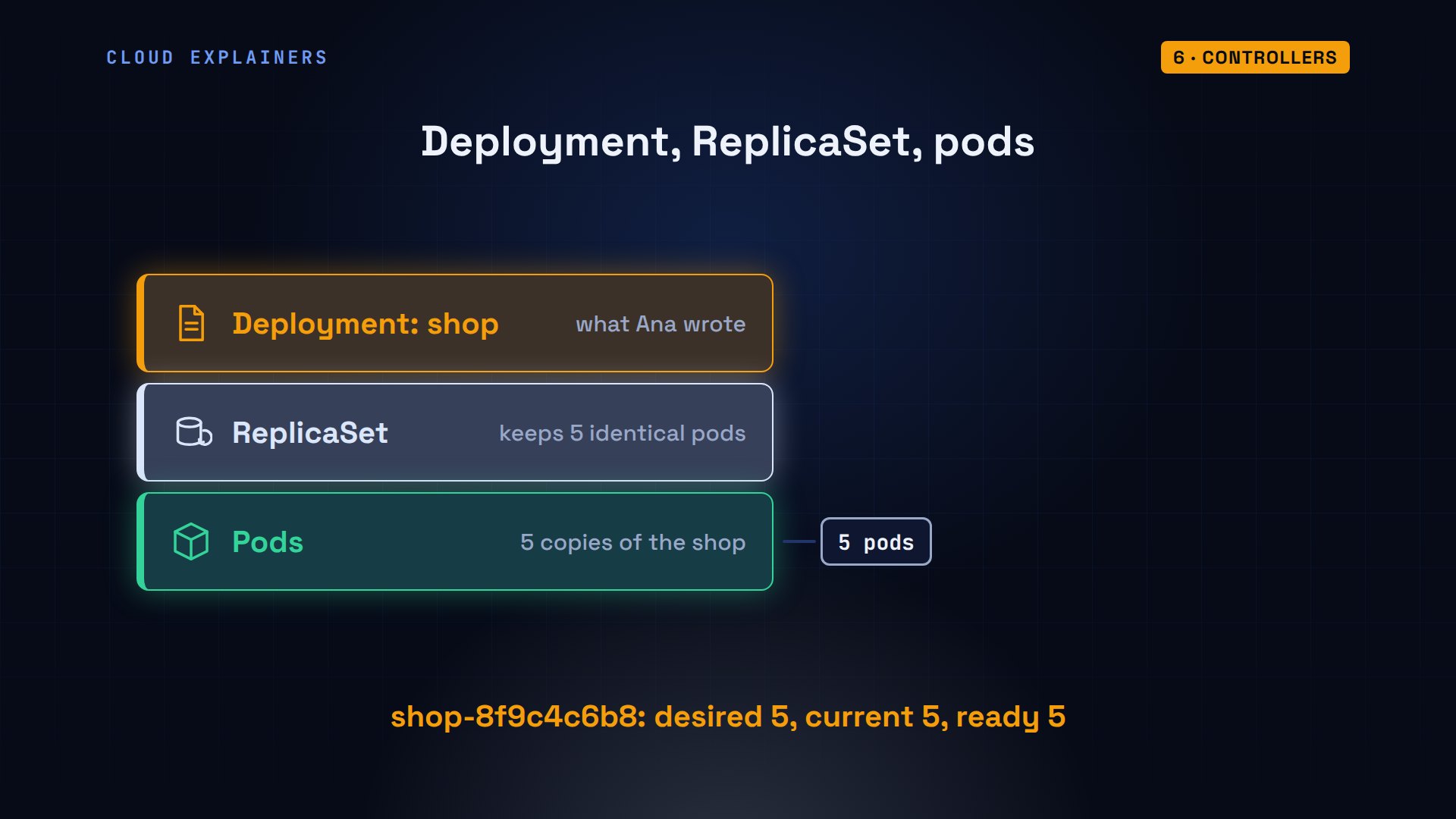
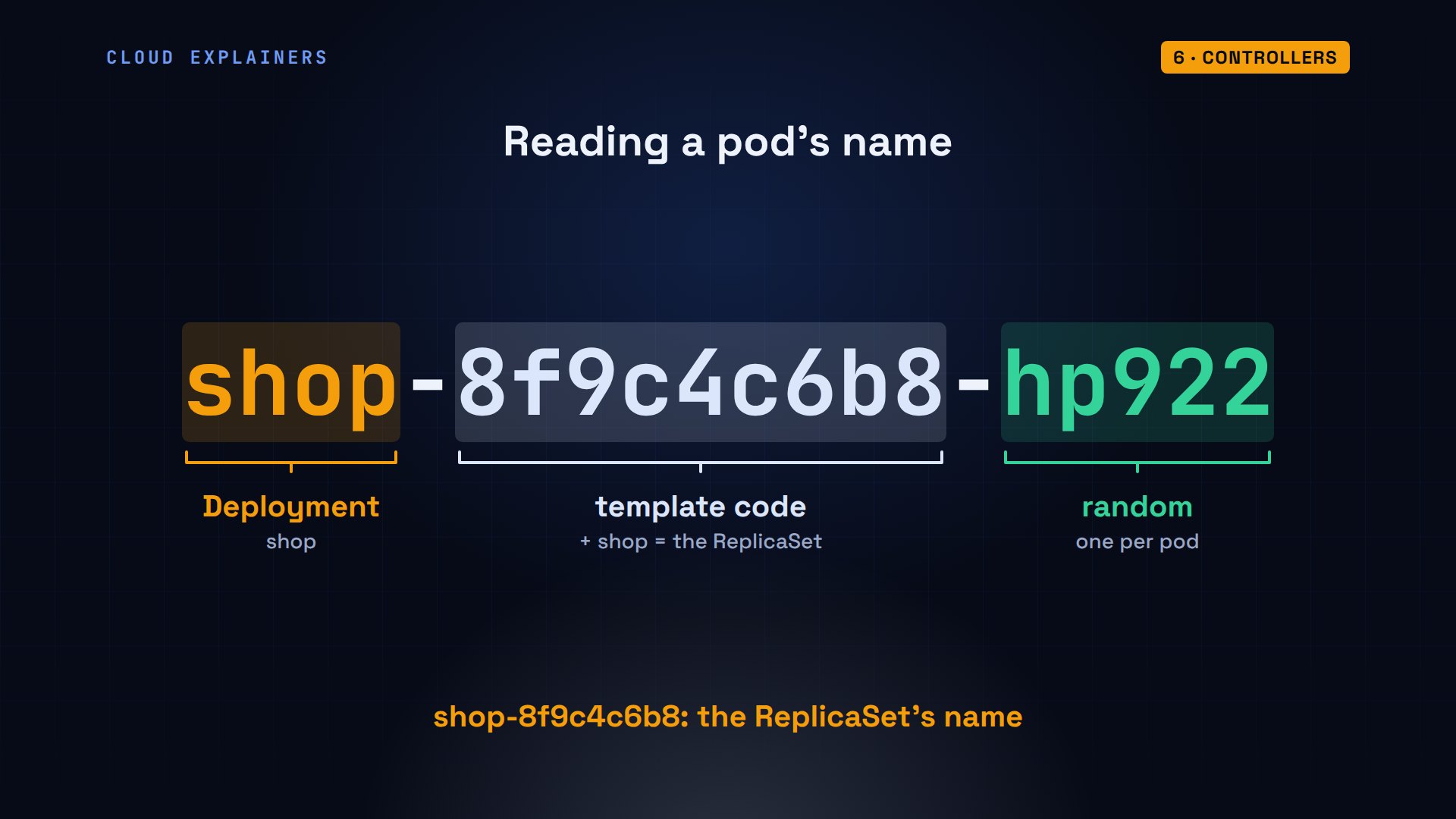
Here it is: desired five, current five, ready five. Its name is the start of every pod's name, which is how you can tell which ReplicaSet made a pod.
kubectl get replicasetNAME             DESIRED   CURRENT   READY   AGE
shop-8f9c4c6b8   5         5         5       29s
Pod names follow the same chain. Take this one. First, the Deployment's name, shop. Then a code made from the pod template, the part of the file that describes each pod: together, that's the ReplicaSet's name. Last, five random characters, so every pod's name is different.
Services
Now, pods come and go, and each new pod gets a new IP address. So how does anything find the shop? With a Service. A Service has one name and one address that never change. Kubernetes keeps a list of the ready pods that carry its label, app: shop, and kube-proxy, a small program on every node, sends each connection to one of them.
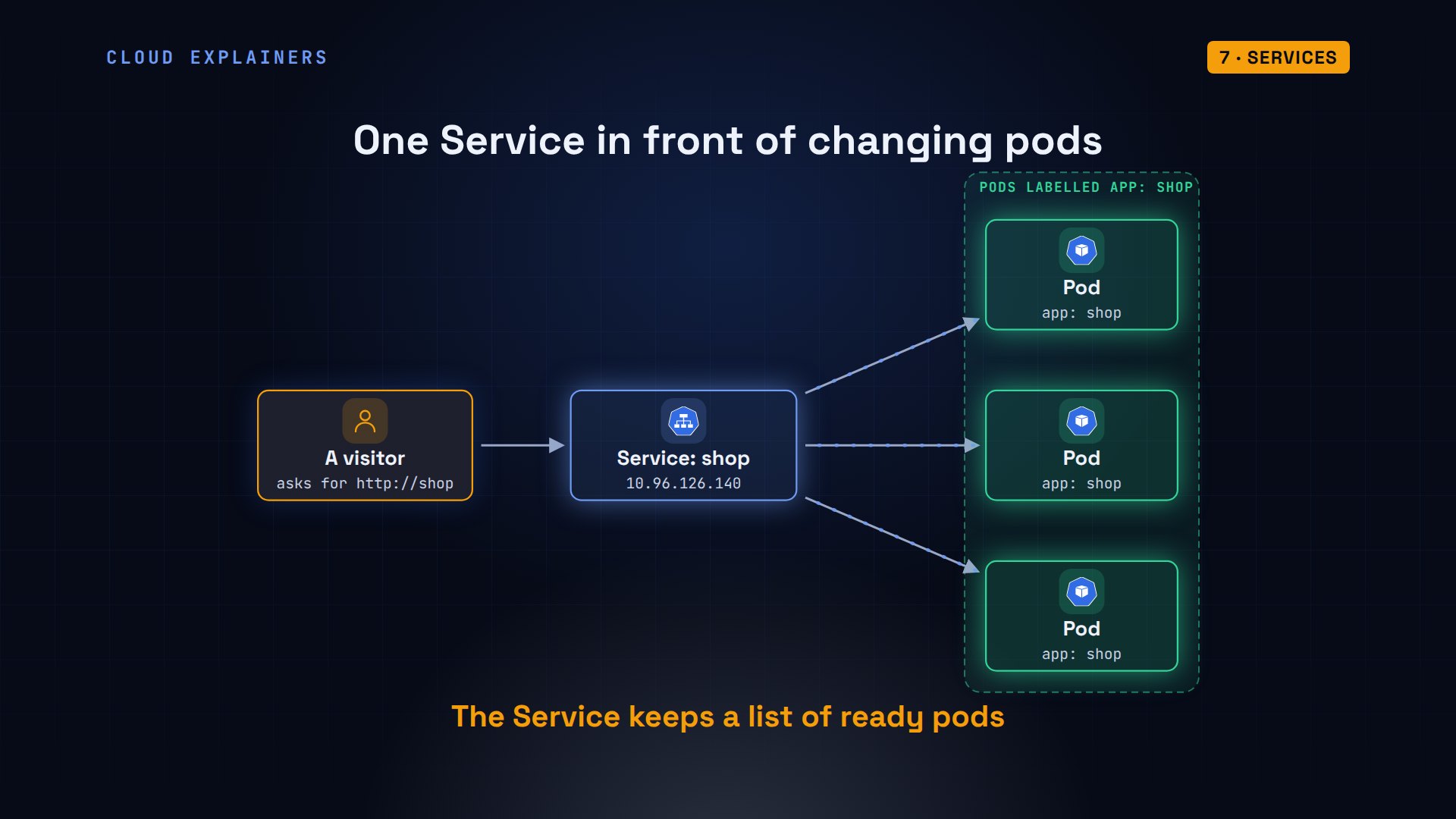
Ana's Service, shop, has its own cluster address. Its list holds five pod addresses. From a small test pod inside the cluster, we ask for http://shop, six times. Same name every time, answered by 4 different pods.
kubectl get service shopNAME   TYPE        CLUSTER-IP      EXTERNAL-IP   PORT(S)   AGE
shop   ClusterIP   10.96.126.140   <none>        80/TCP    29s
kubectl get endpointslices -l kubernetes.io/service-name=shopNAME         ADDRESSTYPE   PORTS   ENDPOINTS                                      AGE
shop-cxx96   IPv4          8080    10.244.2.2,10.244.1.2,10.244.2.4 + 2 more...   30s
kubectl exec client -- sh -c 'for i in 1 2 3 4 5 6; do wget -qO- http://shop; done'Kettle & Bean 1.0, served by shop-8f9c4c6b8-xmb4q
Kettle & Bean 1.0, served by shop-8f9c4c6b8-f56gl
Kettle & Bean 1.0, served by shop-8f9c4c6b8-nkhpp
Kettle & Bean 1.0, served by shop-8f9c4c6b8-xmb4q
Kettle & Bean 1.0, served by shop-8f9c4c6b8-hp922
Kettle & Bean 1.0, served by shop-8f9c4c6b8-xmb4q
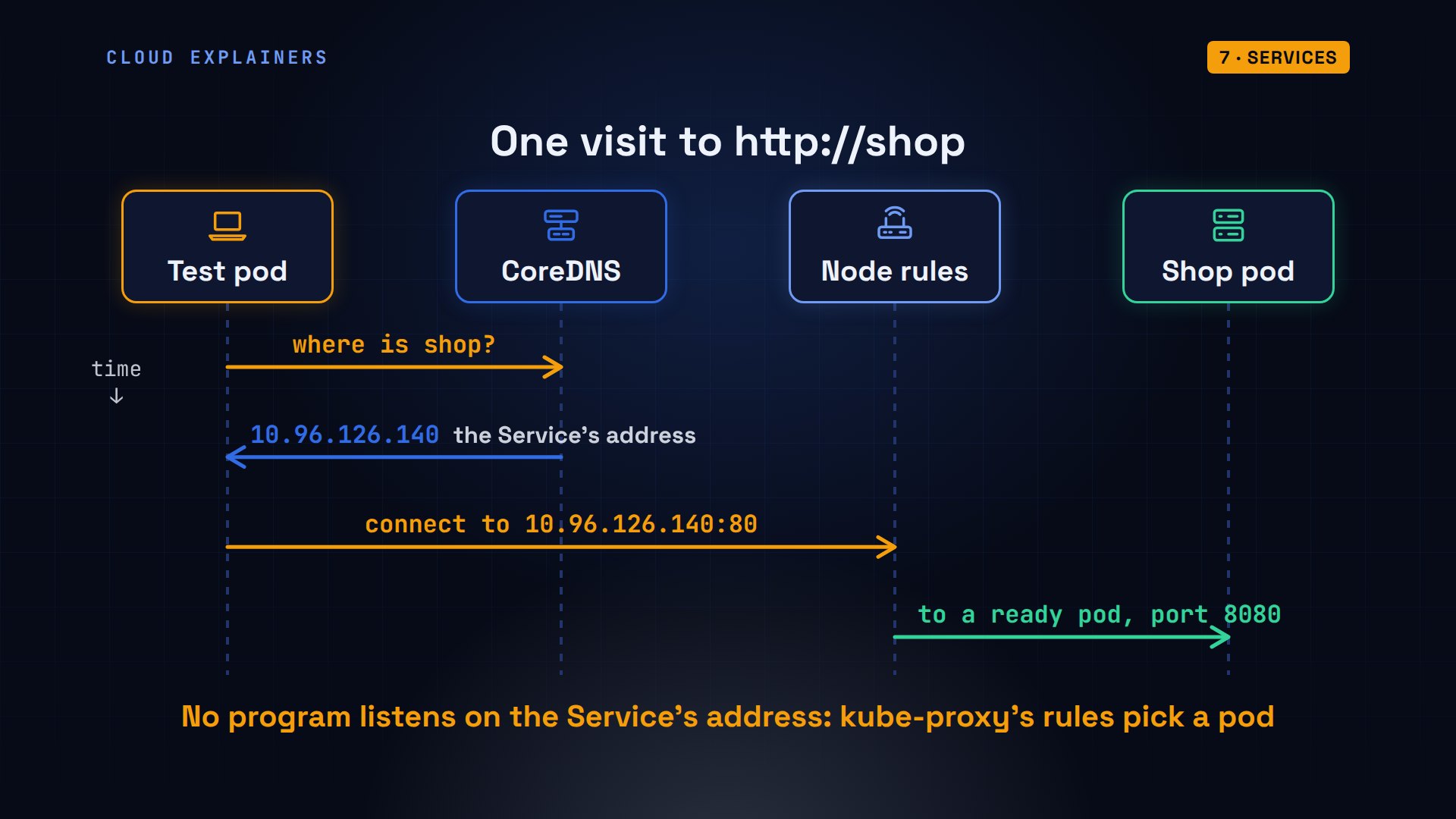
What happened in each of those visits? First, the test pod asked the cluster's own DNS server, CoreDNS, for the name shop, and got the Service's address back. Then it connected to that address. No program listens there: rules that kube-proxy wrote on the node rewrite the connection to one ready pod, a different one from visit to visit.
When a node dies
How does the control plane notice a dead node? Every kubelet checks in with the API server every few seconds, renewing its lease, a small record kept by the API server. When the check-ins stop, the node controller waits. After 50 seconds of silence, the default from Kubernetes 1.32 on, it marks the node NotReady. Older versions waited 40.
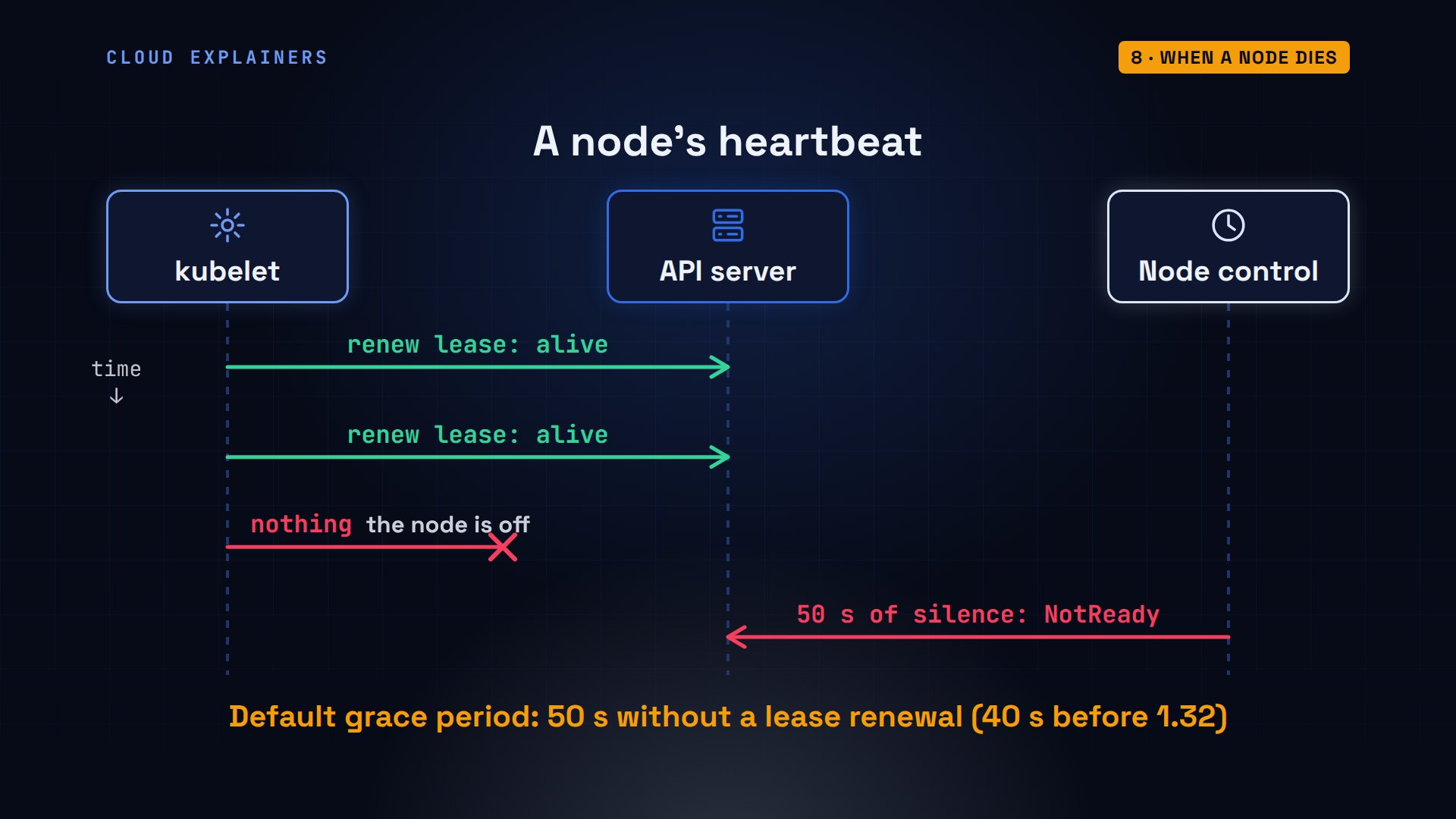
Now the big one. We switch off the whole worker node shop-worker, with 3 of the shop's pods on it. Its kubelet stops reporting in. After 50 seconds of silence, the control plane marks the node NotReady, and its pods are taken out of the Service's list.
shop-worker: NotReady. And the shop? Of six visits, 5 were answered, all by pods on shop-worker2. One failed: for a moment, a node can still send a connection to a pod that's already gone, which is why apps retry.
kubectl get nodesNAME                 STATUS     ROLES           AGE    VERSION
shop-control-plane   Ready      control-plane   2m2s   v1.37.0
shop-worker          NotReady   <none>          104s   v1.37.0
shop-worker2         Ready      <none>          104s   v1.37.0
kubectl exec client -- sh -c 'for i in 1 2 3 4 5 6; do wget -qO- http://shop; done'wget: can't connect to remote host (10.96.126.140): Host is unreachable
Kettle & Bean 1.0, served by shop-8f9c4c6b8-nkhpp
Kettle & Bean 1.0, served by shop-8f9c4c6b8-nkhpp
Kettle & Bean 1.0, served by shop-8f9c4c6b8-nkhpp
Kettle & Bean 1.0, served by shop-8f9c4c6b8-dzcp8
Kettle & Bean 1.0, served by shop-8f9c4c6b8-dzcp8
But Kubernetes doesn't replace the lost pods yet. A node can drop off the network for a moment and come back. So every pod carries a toleration: stay on a node that's not ready, or unreachable, for 300 seconds. That's five minutes by default, and you can change it in the pod's spec.
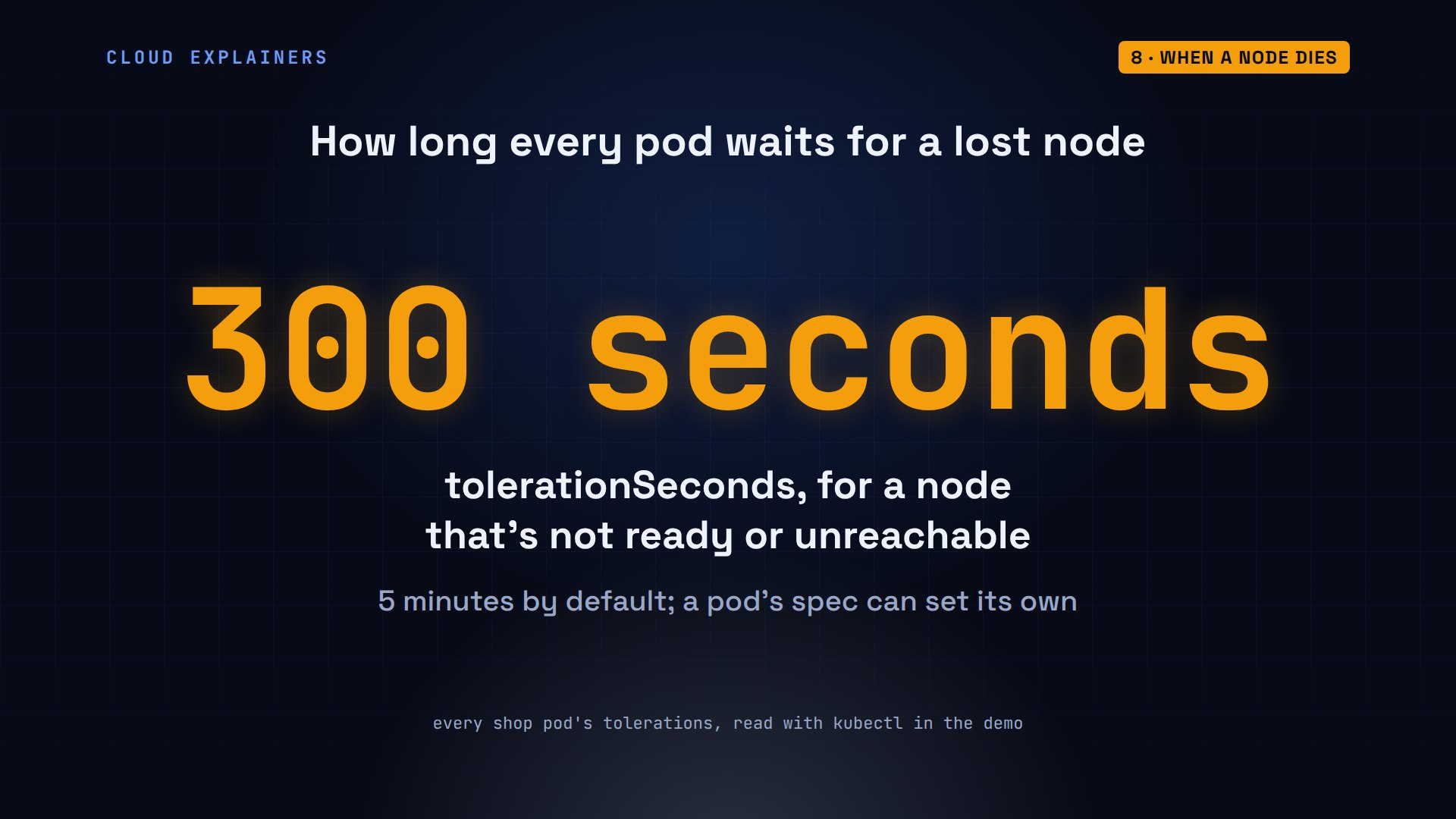
After the wait, the controllers act. 5 minutes and 50 seconds after we switched off shop-worker, 3 new pods are running on shop-worker2. The old ones show as Terminating: that machine is off, so nothing can confirm they've stopped.
kubectl get pods -l app=shopNAME                   READY   STATUS        RESTARTS   AGE
shop-8f9c4c6b8-9644m   1/1     Running       0          4s
shop-8f9c4c6b8-dzcp8   1/1     Running       0          5m59s
shop-8f9c4c6b8-f56gl   1/1     Terminating   0          6m
shop-8f9c4c6b8-hp922   1/1     Terminating   0          5m59s
shop-8f9c4c6b8-kh6hk   1/1     Running       0          4s
shop-8f9c4c6b8-nkhpp   1/1     Running       0          6m23s
shop-8f9c4c6b8-pv6kx   1/1     Running       0          4s
shop-8f9c4c6b8-xmb4q   1/1     Terminating   0          6m23s
kubectl get pods -o custom-columns=POD:.metadata.name,NODE:.spec.nodeName -l app=shopPOD                    NODE
shop-8f9c4c6b8-9644m   shop-worker2
shop-8f9c4c6b8-dzcp8   shop-worker2
shop-8f9c4c6b8-f56gl   shop-worker
shop-8f9c4c6b8-hp922   shop-worker
shop-8f9c4c6b8-kh6hk   shop-worker2
shop-8f9c4c6b8-nkhpp   shop-worker2
shop-8f9c4c6b8-pv6kx   shop-worker2
shop-8f9c4c6b8-xmb4q   shop-worker
Each part did one small job. The control plane noticed the silent node. The controllers saw five pods wanted and only two left, the scheduler placed the new ones on the node that was left, and its kubelet started them.
Rolling updates
One last thing Kubernetes does for you: updates. With shop-worker back on, Ana changes the Deployment's image to version 2.0. The Deployment controller makes a second ReplicaSet for the new version, then grows it and shrinks the old one a few pods at a time, so the shop never goes down.
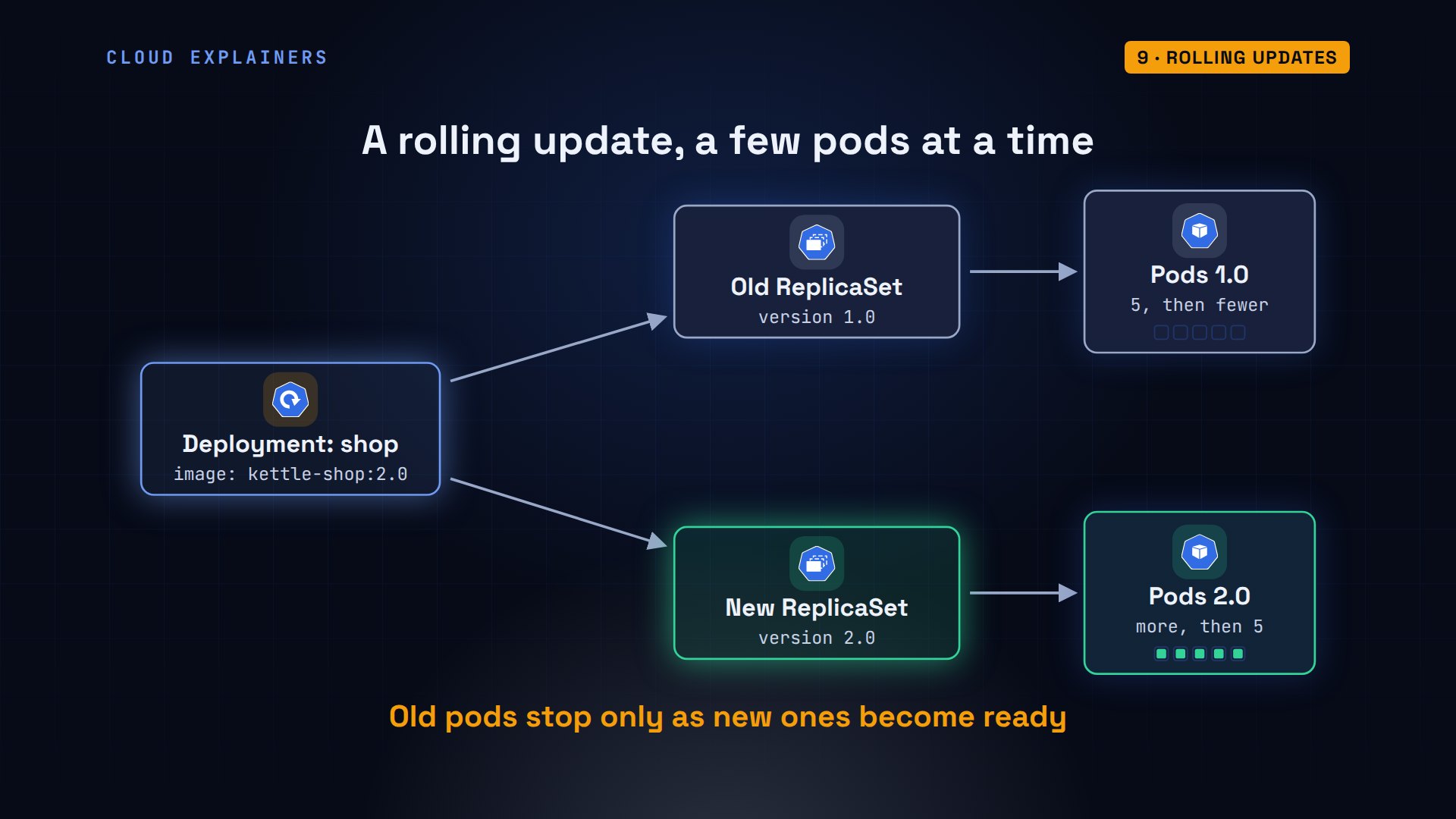
One command sets the new image. Rollout status follows along: new replicas updated, old replicas waiting to stop, then successfully rolled out. Six visits later: every answer says version 2.0.
kubectl set image deployment/shop web=kettle-shop:2.0deployment.apps/shop image updated
kubectl rollout status deployment/shopWaiting for deployment spec update to be observed...
Waiting for deployment "shop" rollout to finish: 2 out of 5 new replicas have been updated...
Waiting for deployment "shop" rollout to finish: 2 out of 5 new replicas have been updated...
Waiting for deployment "shop" rollout to finish: 3 out of 5 new replicas have been updated...
Waiting for deployment "shop" rollout to finish: 3 out of 5 new replicas have been updated...
Waiting for deployment "shop" rollout to finish: 3 out of 5 new replicas have been updated...
Waiting for deployment "shop" rollout to finish: 3 out of 5 new replicas have been updated...
Waiting for deployment "shop" rollout to finish: 3 out of 5 new replicas have been updated...
Waiting for deployment "shop" rollout to finish: 4 out of 5 new replicas have been updated...
Waiting for deployment "shop" rollout to finish: 4 out of 5 new replicas have been updated...
Waiting for deployment "shop" rollout to finish: 4 out of 5 new replicas have been updated...
Waiting for deployment "shop" rollout to finish: 4 out of 5 new replicas have been updated...
Waiting for deployment "shop" rollout to finish: 2 old replicas are pending termination...
Waiting for deployment "shop" rollout to finish: 1 old replicas are pending termination...
Waiting for deployment "shop" rollout to finish: 1 old replicas are pending termination...
Waiting for deployment "shop" rollout to finish: 1 old replicas are pending termination...
Waiting for deployment "shop" rollout to finish: 1 old replicas are pending termination...
Waiting for deployment "shop" rollout to finish: 1 old replicas are pending termination...
Waiting for deployment "shop" rollout to finish: 4 of 5 updated replicas are available...
deployment "shop" successfully rolled out
kubectl exec client -- sh -c 'for i in 1 2 3 4 5 6; do wget -qO- http://shop; done'Kettle & Bean 2.0, served by shop-9c5f595bf-sjzl7
Kettle & Bean 2.0, served by shop-9c5f595bf-8vppp
Kettle & Bean 2.0, served by shop-9c5f595bf-sjzl7
Kettle & Bean 2.0, served by shop-9c5f595bf-8vppp
Kettle & Bean 2.0, served by shop-9c5f595bf-8vppp
Kettle & Bean 2.0, served by shop-9c5f595bf-sjzl7
Recap
So here's how Kubernetes works. You describe what you want, and the API server stores it in etcd. The scheduler picks a node for each pod. The kubelet on that node starts its containers. Controllers keep comparing what runs with what you asked for, and fix any difference, and a Service gives the changing pods one stable name.
If watching a real node fail made Kubernetes less of a mystery, subscribing helps this channel reach more beginners.
Every command and number in this video came from a real Kubernetes 1.37 cluster on our own machine. Thanks for watching Cloud Explainers.
Sources
- Kubernetes documentation, Cluster Architecture
- Kubernetes documentation, Kubernetes Components
- Kubernetes documentation, Controllers
- Kubernetes documentation, Deployments
- Kubernetes documentation, Kubernetes Scheduler
- Kubernetes documentation, Service
- Kubernetes documentation, Taints and Tolerations
- kind (Kubernetes in Docker)
Demos: real output from a Kubernetes cluster made with kind on our own machine, running a made-up shop's website; the failed server is a worker node we switched off on purpose. Watch the full video on YouTube.
More videos
How to Fix Docker Port Already Allocated Errors
How PostgreSQL Works
How to Fix Git Merge Conflicts
How to Fix No Space Left on Device in Linux
How the Internet Works
SQL vs NoSQL: When Each One Wins
How to Fix JWT Token Expired Errors (401 Unauthorized)

Claude API vs Claude Pro: Why Your Subscription Doesn't Include It

Why AI Agent Skills Beat Giant Prompts

Linux Cron Jobs Will Finally Make Sense After This

Security Logs Will Finally Make Sense After This

How to Fix a Security Leak: An API Key Pushed to GitHub

DNS Will Finally Make Sense After This

Never Ignore a Security Update

Two-Factor Authentication Will Finally Make Sense

Never Expose a Database to the Internet

SSH Keys vs Passwords: Which Is Safer for Security?

The 5 Levels of Linux Boot: From Power On to Login

The 5 Levels of Network Firewalls

Password Security: Why Hackers Crack Weak Passwords

Why Your Linux Server Runs Out of Memory

HTTP vs HTTPS: What Actually Changes on Your Network

Every Linux File Permission You Need to Know

Linux Processes vs Threads: When Each One Wins

The OSI Model Will Finally Make Sense After This

The 7 Levels of Git

Every Network Troubleshooting Command You Need

Hashing vs Encryption in Cybersecurity: When Each One Wins

Why the Internet Ran Out of IP Addresses

Linux Package Managers: apt vs Snap vs Flatpak

Why Python Is Slow (and When It Doesn't Matter)

TCP vs UDP: When Each One Wins

Stop Running Linux as Root (Do This Instead)

Linux Users and Groups Will Finally Make Sense

Why Phishing Beats Good Security (and How to Spot It)

The 7 Levels of Docker

AI Agents Will Finally Make Sense After This

Stop Using git push --force (Use This Instead)

Agent Skills vs MCP: When Each One Wins

Networking Will Finally Make Sense After This

Every Linux Command You Actually Need

The 7 Levels of Cybersecurity

Every System Design Concept You Need, in One Diagram
