
Django vs FastAPI: Which One Should You Use?
Django vs FastAPI for beginners, tested side by side on one Ubuntu laptop: Ana builds the same tea shop API both ways. Django sets up a whole project, builds a database from one Python class and gives her logins and an admin site for free; FastAPI is one small file that checks every request and writes its own docs page. Then speed, measured: 50 requests that each wait one second, five ways, including the one line that makes FastAPI almost four times slower than Django. Ends with a table for picking the right one.
Two good choices, one question
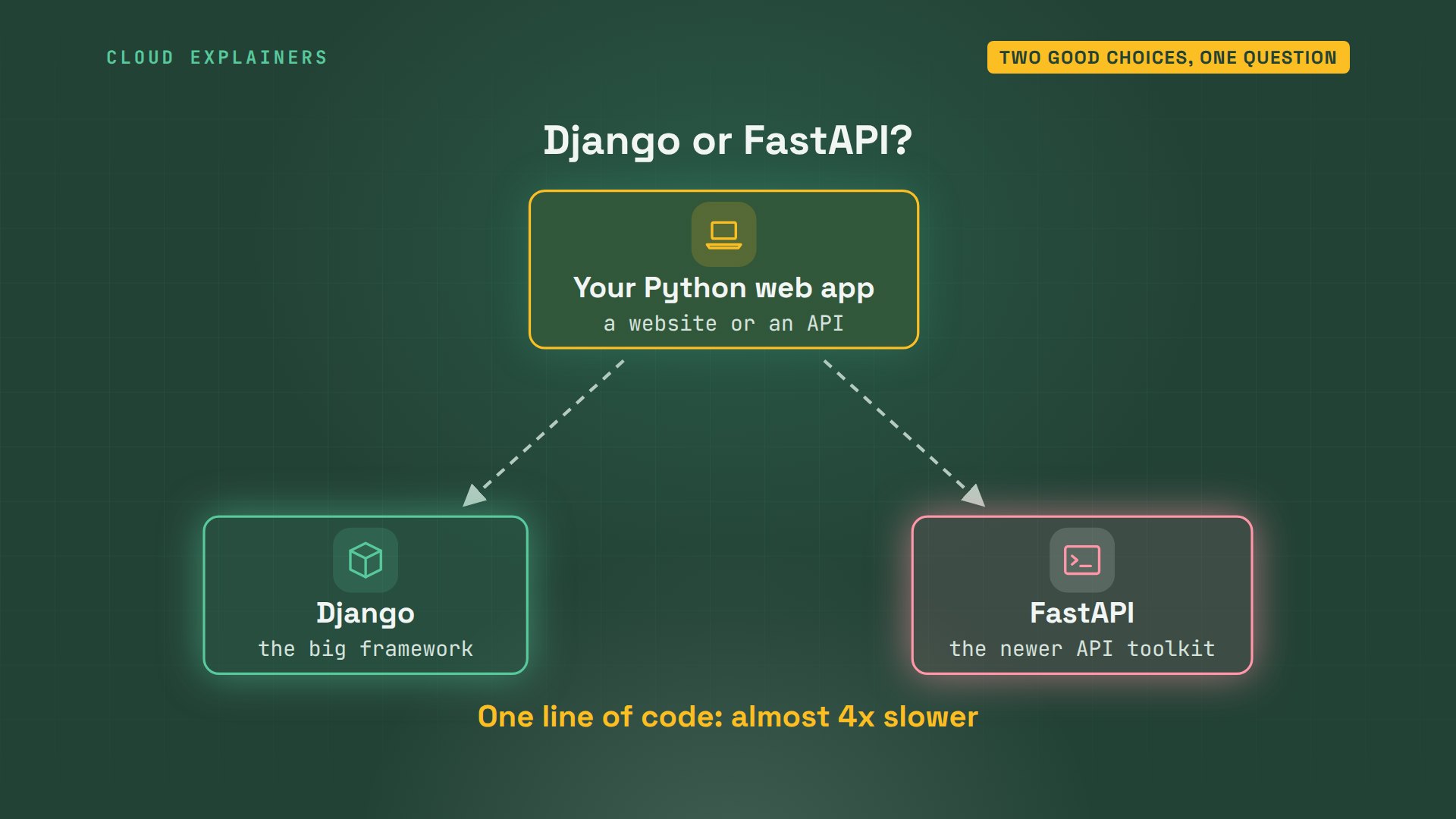
You want to build a web app in Python, and everyone says Django or FastAPI, but nobody says which. Both are free, both are popular, and the advice online argues with itself. So Ana builds the same small tea shop both ways, and we measure. Along the way, we'll find one line of code that makes FastAPI almost four times slower than Django.
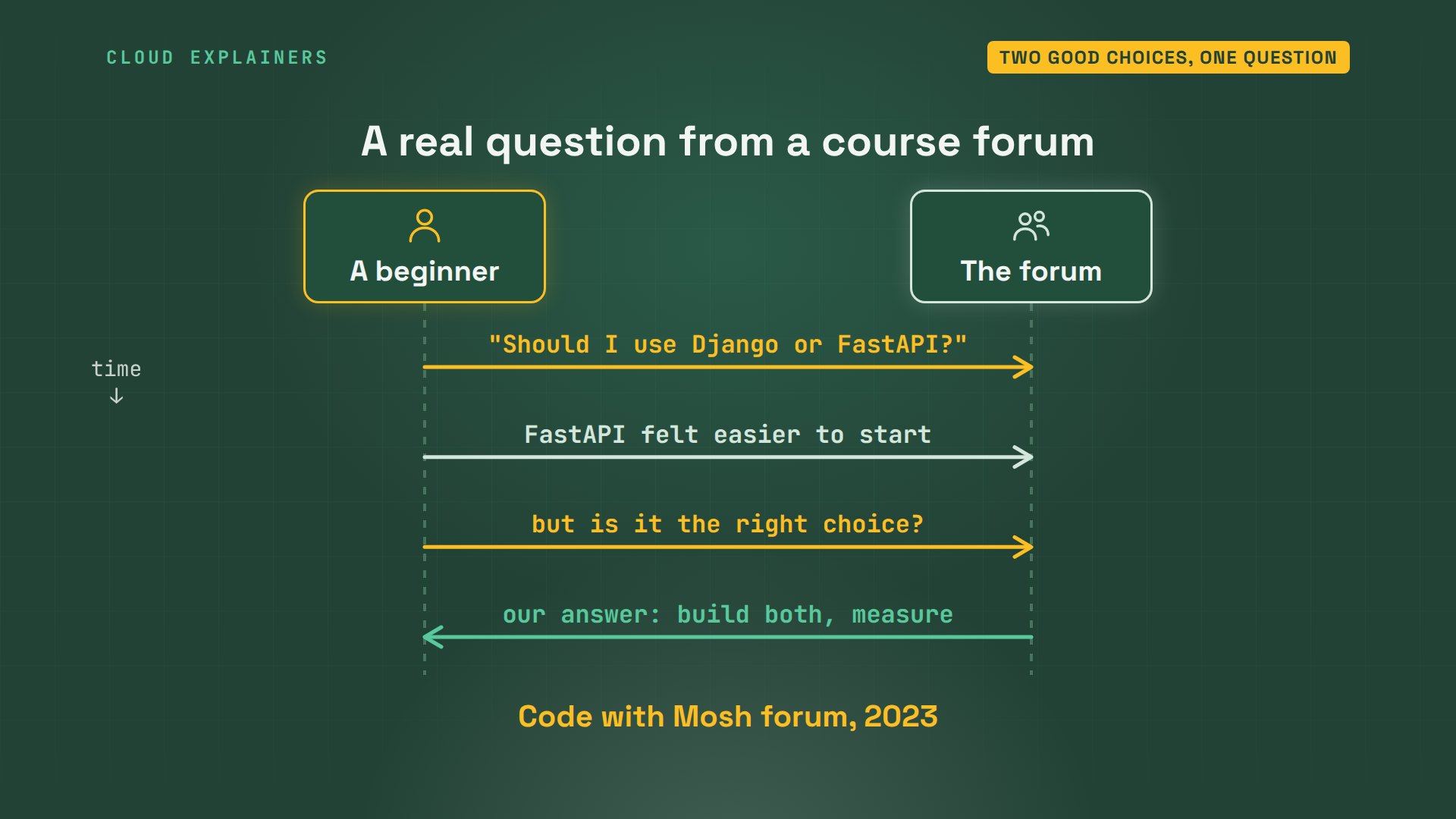
You're not the only one asking. On a programming course forum, a beginner wrote: I am a bit confused about whether I should use Django or FastAPI. They found FastAPI easier to start with, but wanted to know if it was really the right choice. Let's answer that properly, with real numbers.
What each one is
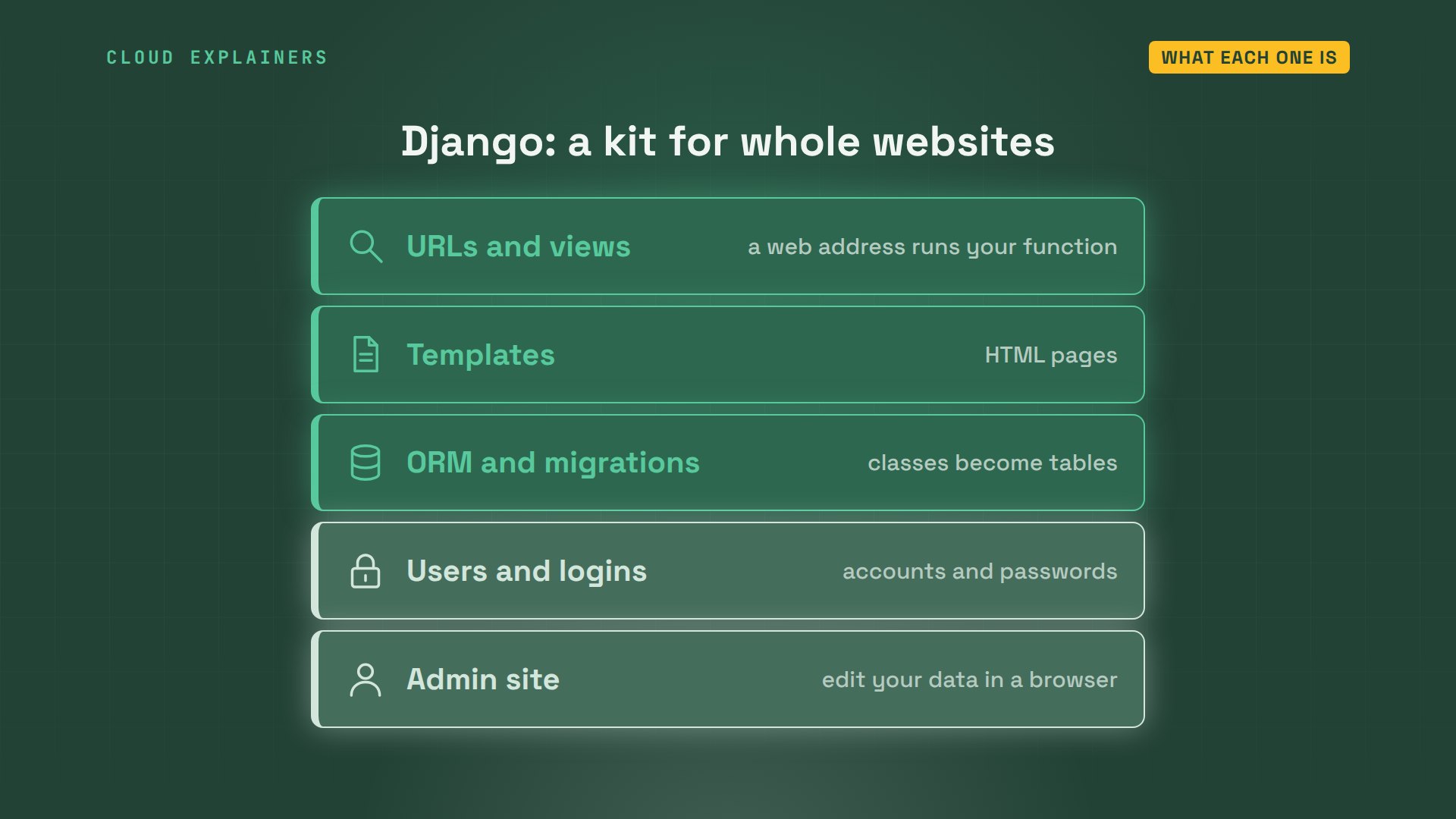
What is Django, exactly? It's a full web framework: a kit for whole websites. It turns web addresses into your Python functions, draws HTML pages from templates, and talks to the database for you. It also ships user logins and a ready-made admin site. Django's own site says it takes care of these right out of the box.
What about FastAPI? It's a smaller toolkit for one job: an API, a web address that answers apps with data, not pages. You write plain Python functions with type hints, labels like price is a number. A library called Pydantic checks every request against those labels, and another, Starlette, does the web parts. A database, logins, and an admin? You pick and add those yourself.
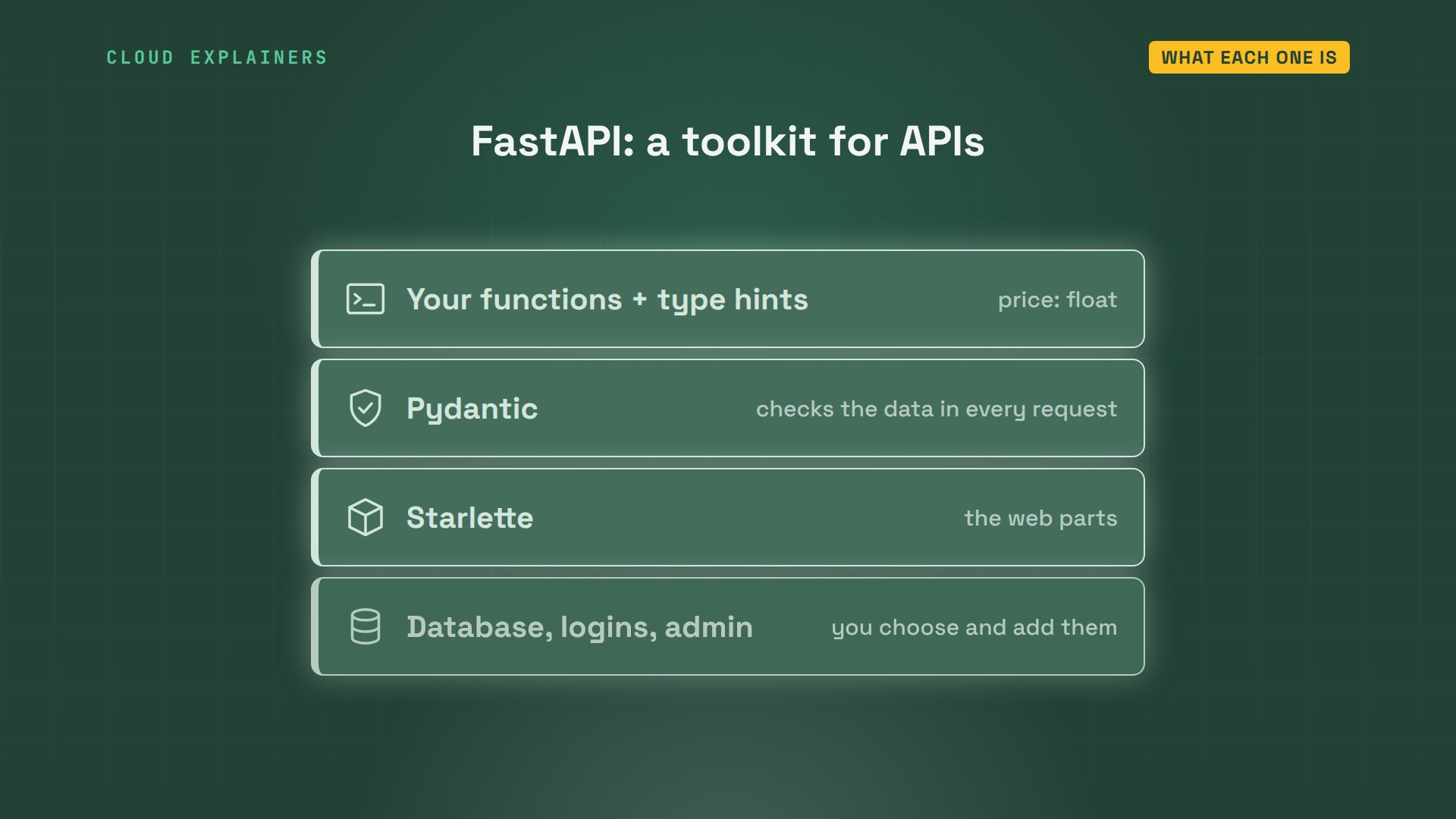
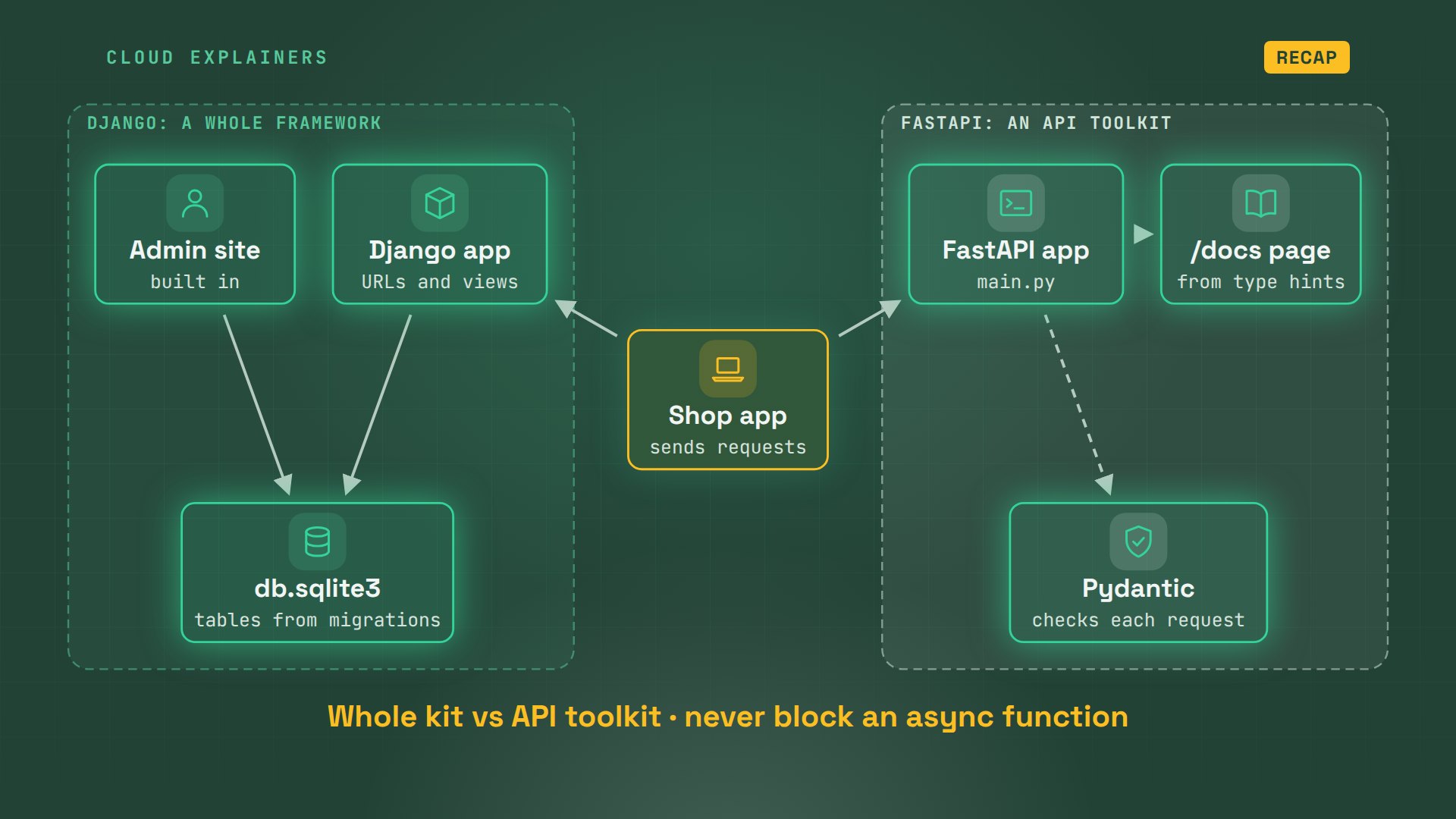
So here's our test. One tea shop, whose website or app asks for the list of teas. On the left, the Django version, with its database and admin site. On the right, the FastAPI version, with Pydantic and its docs page. Same laptop, same requests.
Django: what you get for free
How much does Django set up before Ana writes a line? She makes a project called teashop, and an app inside it called menu. That's already 13 Python files: settings, web addresses, a server entry point, and nearly empty files for her models and views.
(.venv) ana@laptop:~/django-shop$ django-admin startproject teashop .
(.venv) ana@laptop:~/django-shop$ python manage.py startapp menu
(.venv) ana@laptop:~/django-shop$ find . -name "*.py" | wc -l13
(.venv) ana@laptop:~/django-shop$ ls . teashop menu.:
manage.py  menu  teashop

menu:
__init__.py  admin.py  apps.py	migrations  models.py  tests.py  views.py

teashop:
__init__.py  __pycache__  asgi.py  settings.py	urls.py  wsgi.py
In models.py, Ana describes a tea as a Python class: a name, a price, and how many are in stock. She never writes SQL. makemigrations turns that class into a migration: a file of steps that builds the table.
(.venv) ana@laptop:~/django-shop$ cat menu/models.pyfrom django.db import models


class Tea(models.Model):
    name = models.CharField(max_length=50)
    price = models.DecimalField(max_digits=5, decimal_places=2)
    stock = models.IntegerField()
(.venv) ana@laptop:~/django-shop$ python manage.py makemigrations menuMigrations for 'menu':
  menu/migrations/0001_initial.py
    + Create model Tea
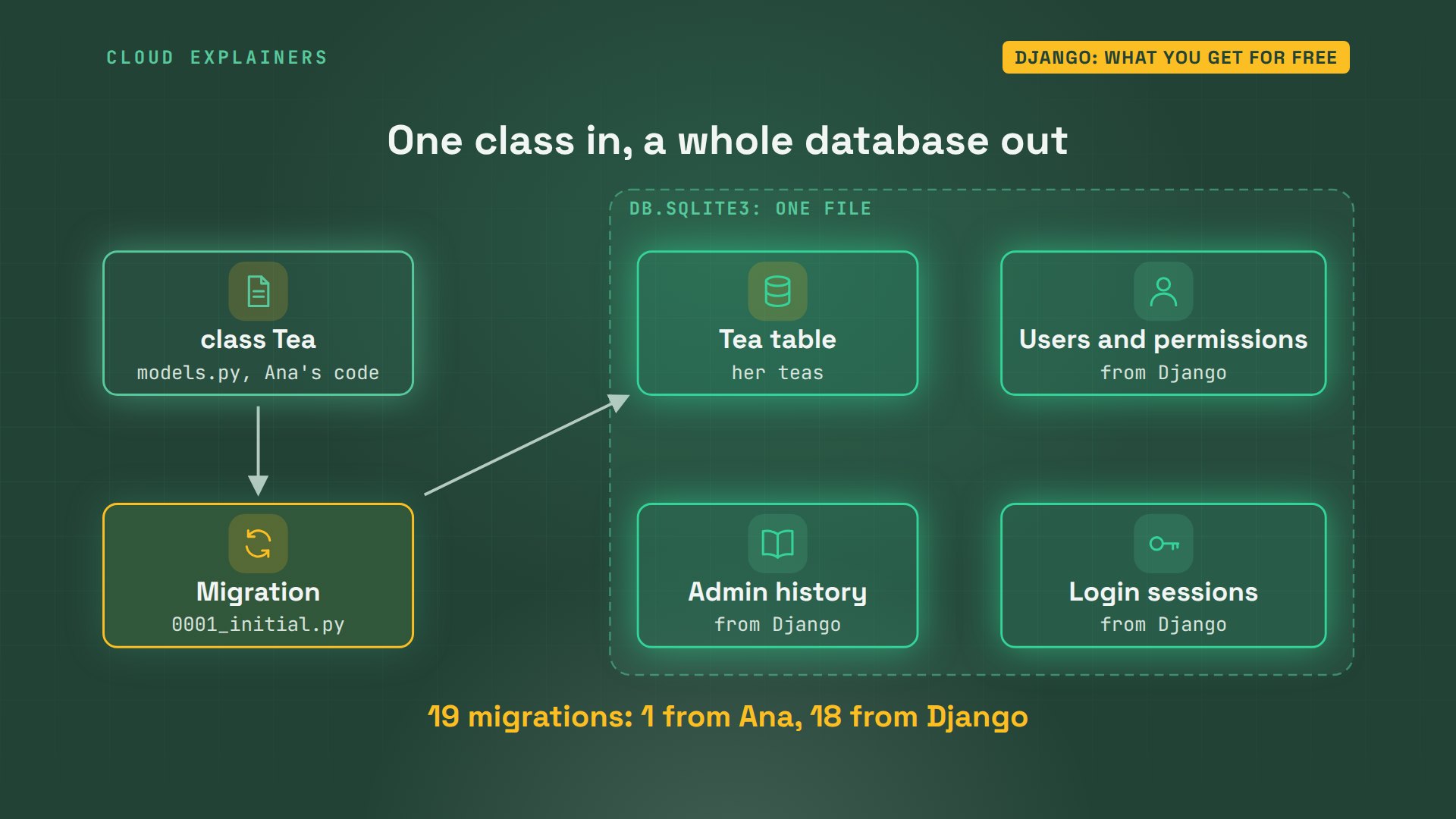
Then migrate runs them. Look at the list: 19 migrations ran, and only one of them is hers. The others build users, permissions, the admin's history, and login sessions. Last, she loads two teas from a file, and the shop's database is ready.
(.venv) ana@laptop:~/django-shop$ python manage.py migrateOperations to perform:
  Apply all migrations: admin, auth, contenttypes, menu, sessions
Running migrations:
  Applying contenttypes.0001_initial... OK
  Applying auth.0001_initial... OK
  Applying admin.0001_initial... OK
  Applying admin.0002_logentry_remove_auto_add... OK
  Applying admin.0003_logentry_add_action_flag_choices... OK
  Applying contenttypes.0002_remove_content_type_name... OK
  Applying auth.0002_alter_permission_name_max_length... OK
  Applying auth.0003_alter_user_email_max_length... OK
  Applying auth.0004_alter_user_username_opts... OK
  Applying auth.0005_alter_user_last_login_null... OK
  Applying auth.0006_require_contenttypes_0002... OK
  Applying auth.0007_alter_validators_add_error_messages... OK
  Applying auth.0008_alter_user_username_max_length... OK
  Applying auth.0009_alter_user_last_name_max_length... OK
  Applying auth.0010_alter_group_name_max_length... OK
  Applying auth.0011_update_proxy_permissions... OK
  Applying auth.0012_alter_user_first_name_max_length... OK
  Applying menu.0001_initial... OK
  Applying sessions.0001_initial... OK
(.venv) ana@laptop:~/django-shop$ python manage.py loaddata teas.jsonInstalled 2 object(s) from 1 fixture(s)
Here's what just happened. Her one class became one table. Django's own apps added the rest, all in one file, db.sqlite3. So out of 19 migrations, Ana wrote one class, and Django built everything else around it.
Now the admin site. createsuperuser makes Ana an admin account, and Django's test server starts. From a second window, she asks for the teas: there's the list, as data. And the login page of a full admin site is already there, where she can add and edit teas in a browser. She wrote one line for it: register Tea.
(.venv) ana@laptop:~/django-shop$ python manage.py createsuperuserUsername (leave blank to use 'ana'):
Email address:
Password:

Password (again):

Superuser created successfully.
(.venv) ana@laptop:~/django-shop$ python manage.py runserverWatching for file changes with StatReloader
Performing system checks...

System check identified no issues (0 silenced).
November 05, 2026 - 19:58:36
Django version 6.1.3, using settings 'teashop.settings'
Starting WSGI development server at http://127.0.0.1:8000/
Quit the server with CONTROL-C.

WARNING: This is a development server. Do not use it in a production setting. Use a production WSGI or ASGI server instead.
For more information on production servers see: https://docs.djangoproject.com/en/6.1/howto/deployment/
(.venv) ana@laptop:~$ curl -s localhost:8000/teas/[{"name": "Sencha", "price": "6.50", "stock": 40}, {"name": "Earl Grey", "price": "5.00", "stock": 25}]
(.venv) ana@laptop:~$ curl -s localhost:8000/admin/login/ | grep -o "<title>.*</title>"<title>Log in | Django site admin</title>
On our map, that's the Django side. A request comes in, the view asks the database through the model, and the admin site works on the same tables. A lot came for free, and it was a lot to learn: projects, apps, settings, and migrations, before the first tea appeared.
FastAPI: one small file
What does the FastAPI version need? One file: main.py, 34 lines. A Tea class that says what a tea must look like, a list of two teas in memory, and two functions: one to list teas, and one to add a tea.
(.venv) ana@laptop:~/fastapi-shop$ lsmain.py
(.venv) ana@laptop:~/fastapi-shop$ wc -l main.py34 main.py
(.venv) ana@laptop:~/fastapi-shop$ cat main.pyimport asyncio
import time

from fastapi import FastAPI
from pydantic import BaseModel

app = FastAPI()


class Tea(BaseModel):
    name: str
    price: float
    stock: int


teas = [Tea(name="Sencha", price=6.5, stock=40),
        Tea(name="Earl Grey", price=5.0, stock=25)]


@app.get("/teas")
def list_teas():
    return teas


@app.post("/teas")
def add_tea(tea: Tea):
    teas.append(tea)
    return tea


@app.get("/supplier")
async def supplier():
    await asyncio.sleep(1)  # wait for the supplier's site
    return {"ok": True}
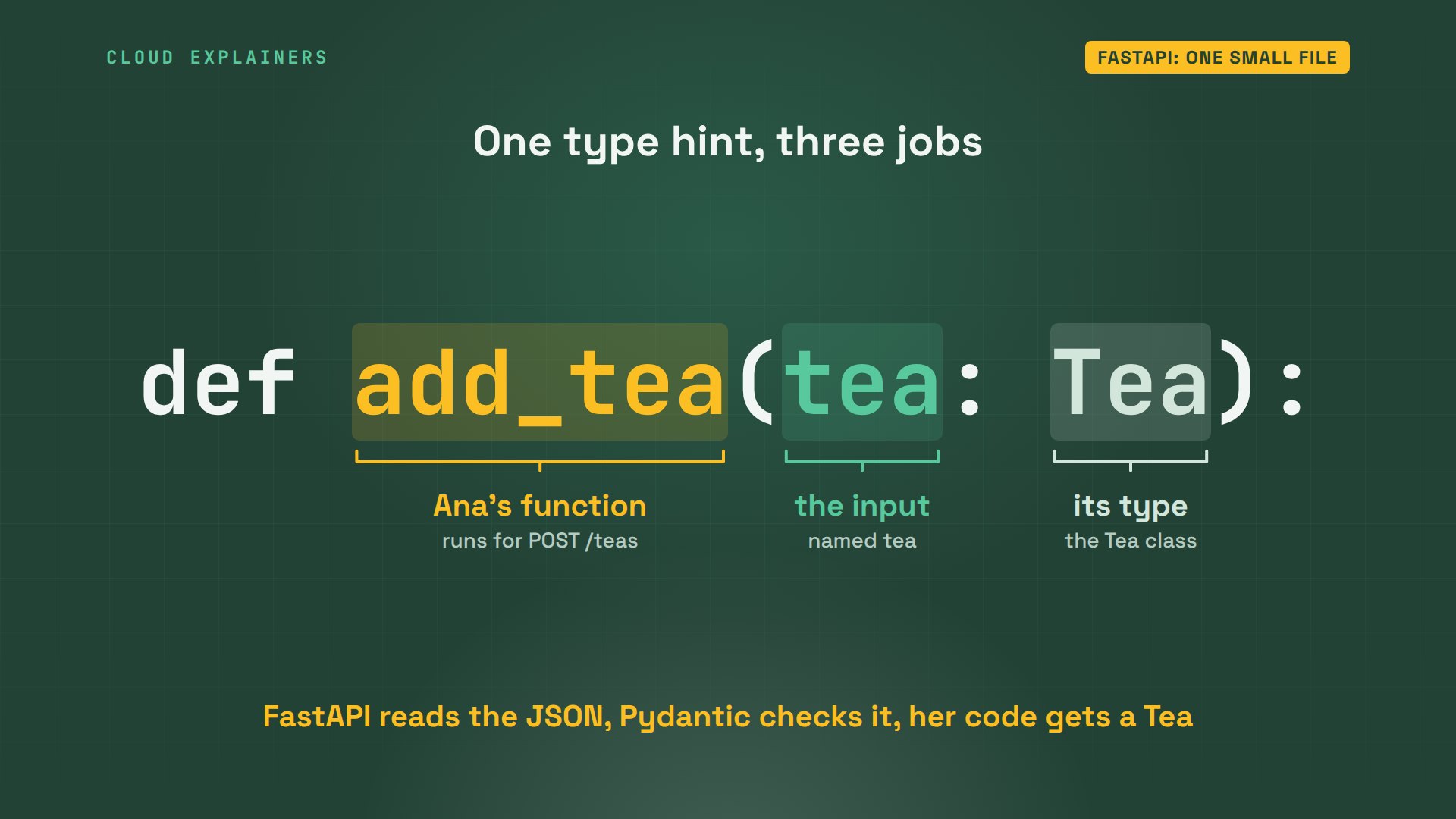
This one line does a lot of work. The function's input is called tea, and its type is Tea. From that type hint, FastAPI knows to read the request's JSON, check every field with Pydantic, and turn it into a Tea, before her code runs.
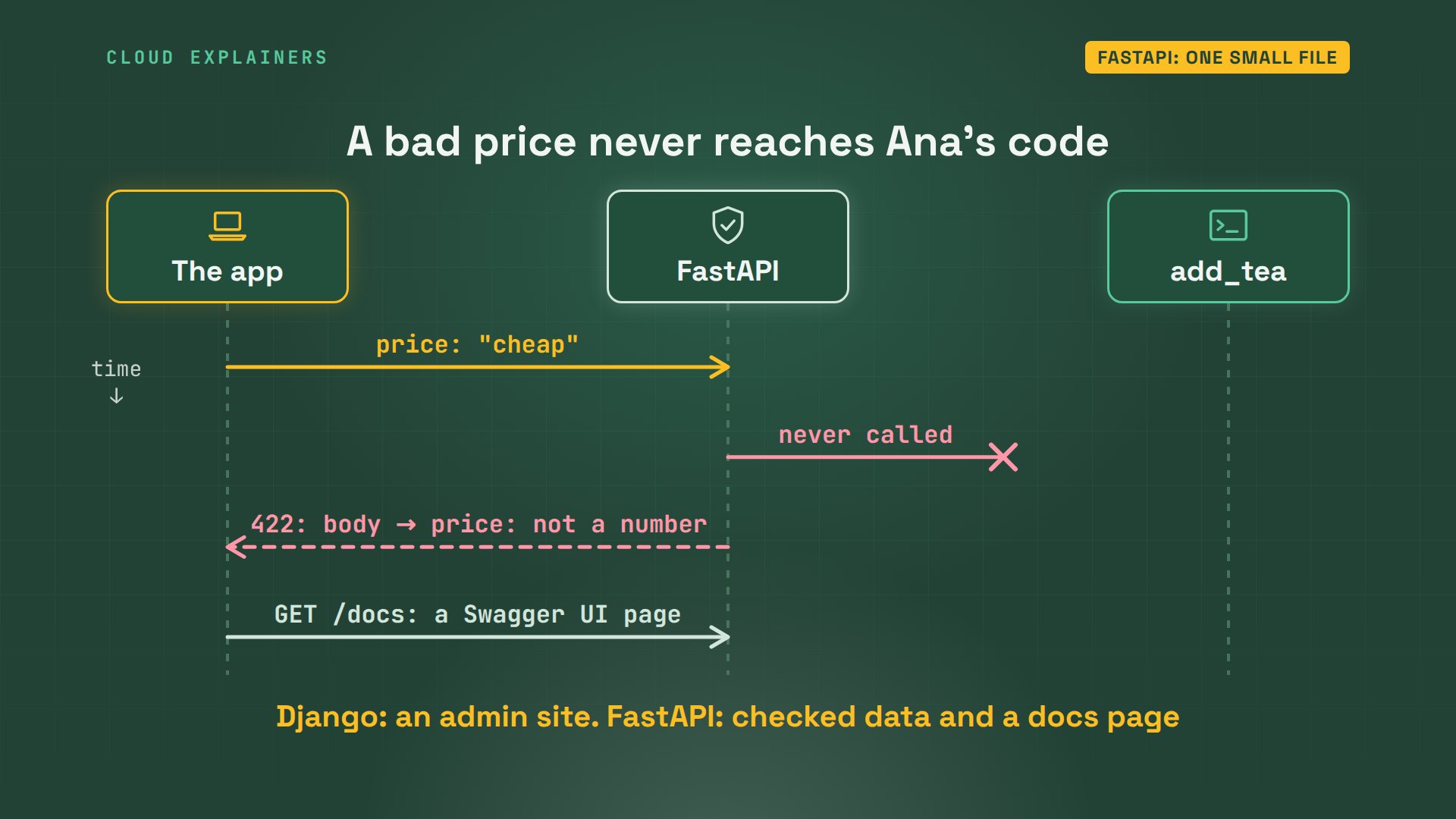
She starts it with Uvicorn, the server FastAPI runs on, and asks for the teas. Then she adds Rooibos at 4.5. Now a typo: the price is the word cheap. Before we send it, guess: will FastAPI accept it? No. It answers 422, input should be a valid number, and her function never ran.
(.venv) ana@laptop:~/fastapi-shop$ uvicorn main:app --port 8001INFO:     Started server process [67]
INFO:     Waiting for application startup.
INFO:     Application startup complete.
INFO:     Uvicorn running on http://127.0.0.1:8001 (Press CTRL+C to quit)
(.venv) ana@laptop:~$ curl -s localhost:8001/teas[{"name":"Sencha","price":6.5,"stock":40},{"name":"Earl Grey","price":5.0,"stock":25}]
(.venv) ana@laptop:~$ curl -s localhost:8001/teas -H "Content-Type: application/json" -d '{"name": "Rooibos", "price": 4.5, "stock": 30}'{"name":"Rooibos","price":4.5,"stock":30}
(.venv) ana@laptop:~$ curl -s -w "\nHTTP %{http_code}\n" localhost:8001/teas -H "Content-Type: application/json" -d '{"name": "Rooibos", "price": "cheap", "stock": 30}'{"detail":[{"type":"float_parsing","loc":["body","price"],"msg":"Input should be a valid number, unable to parse string as a number","input":"cheap"}]}
HTTP 422
Here's that request, step by step. The bad price arrives. Pydantic checks it against the Tea class, and FastAPI sends back a 422 naming the exact field that's wrong. The same type hints also build a docs page at /docs, where you can try every request in a browser. Django gives you an admin. FastAPI gives you this.
So the FastAPI side is small: one file, a checker, and a docs page. Quick to learn, and great when the thing you build is an API. But her teas live in a Python list. Restart the server, and Rooibos is gone, until she picks a database library and wires it in herself.
Which one is faster?
FastAPI's name says fast. Is it? Most web requests spend their time waiting: on a database, or another company's website. So Ana adds a page that waits one second for her tea supplier, and fifty customers ask at the same moment. A server that handles one request at a time makes them queue. One that can wait for many at once doesn't.
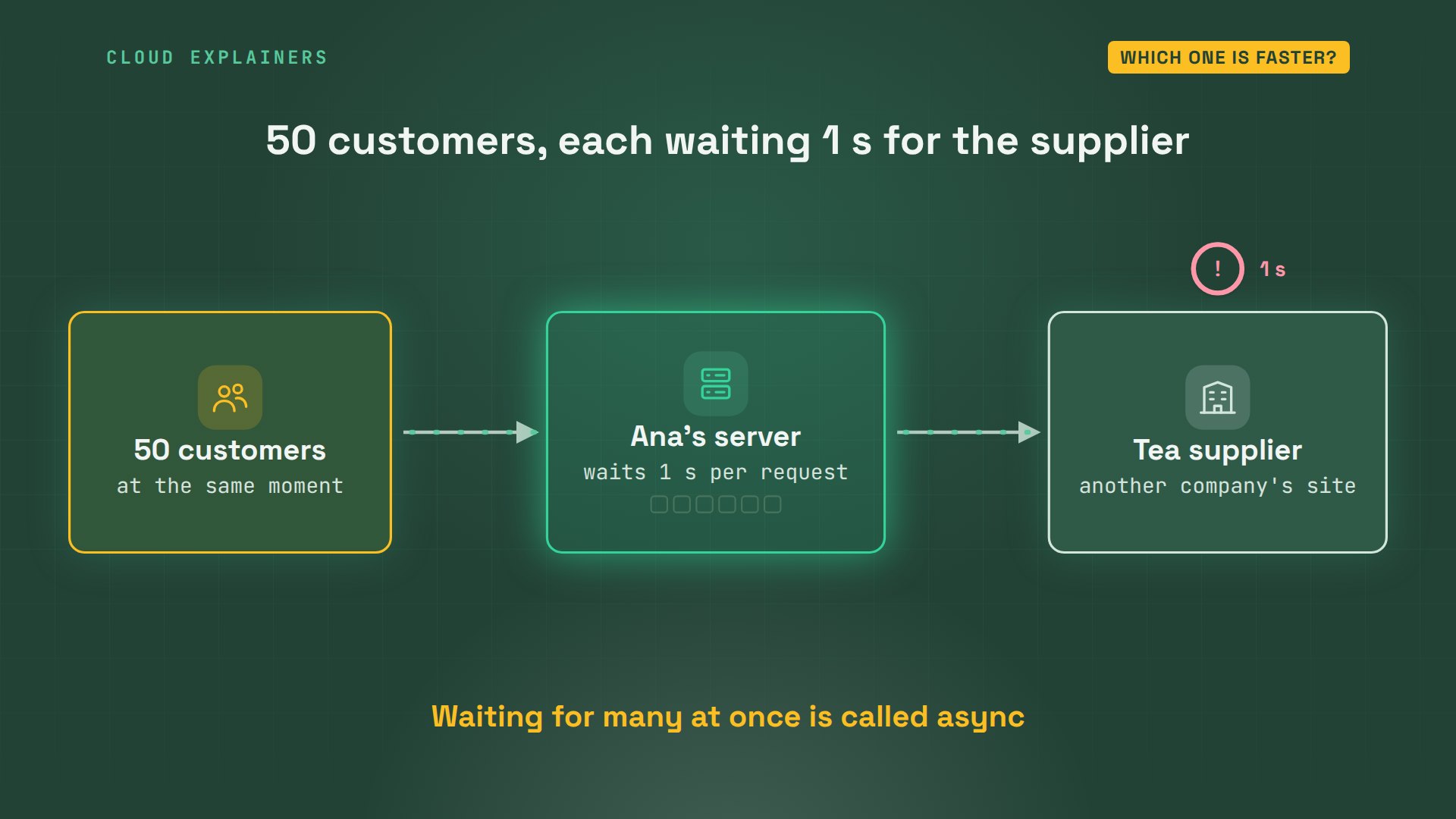
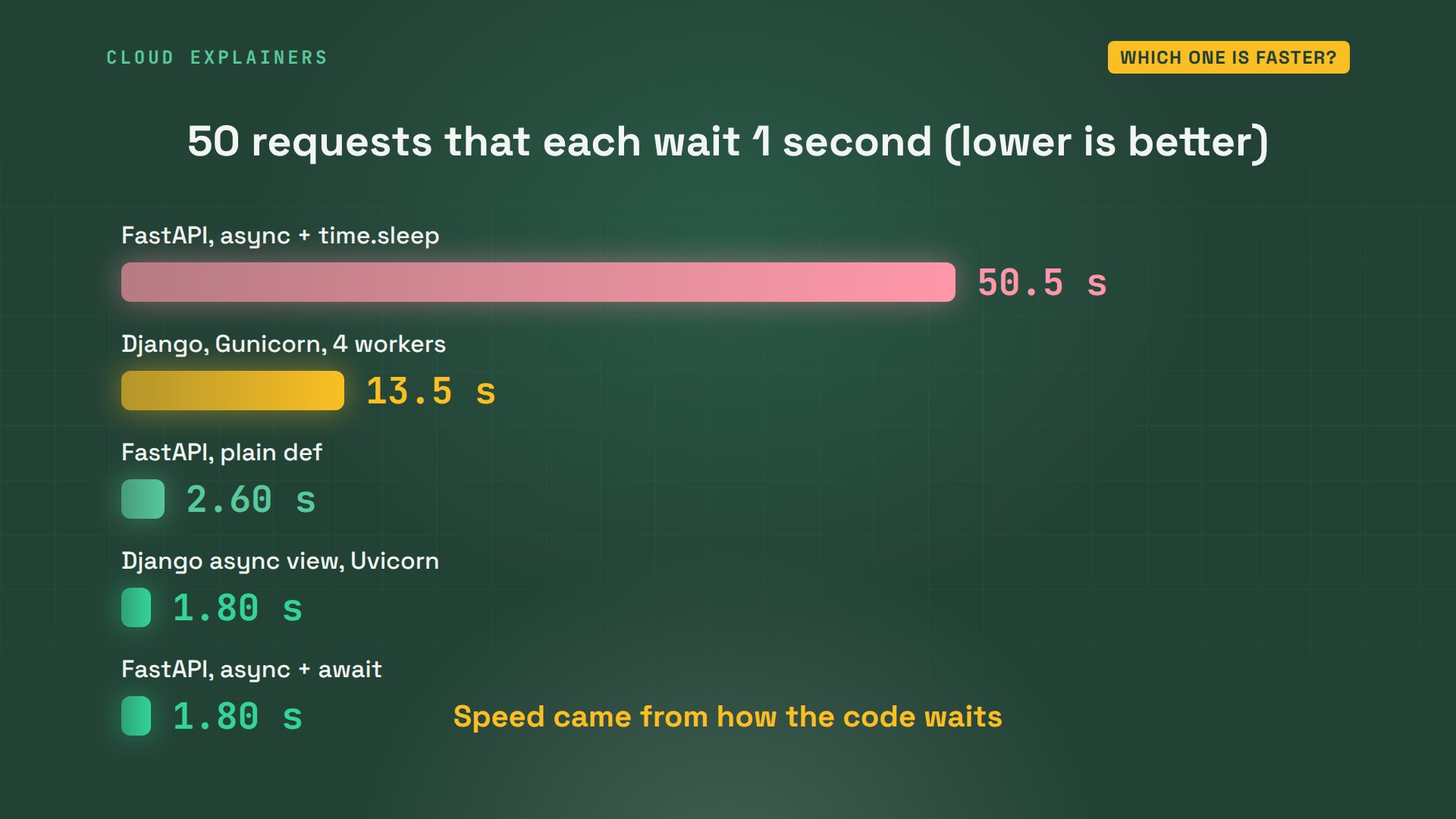
In FastAPI, the waiting page is an async function, and it waits with await. Fifty requests, each waiting one second. How long until all fifty are answered? 1.8 seconds. They all waited together.
(.venv) ana@laptop:~/fastapi-shop$ uvicorn main:app --port 8001 --no-access-logINFO:     Started server process [74]
INFO:     Waiting for application startup.
INFO:     Application startup complete.
INFO:     Uvicorn running on http://127.0.0.1:8001 (Press CTRL+C to quit)
(.venv) ana@laptop:~$ python3 hammer.py localhost:8001/supplier 5050 of 50 requests answered in 1.8 seconds
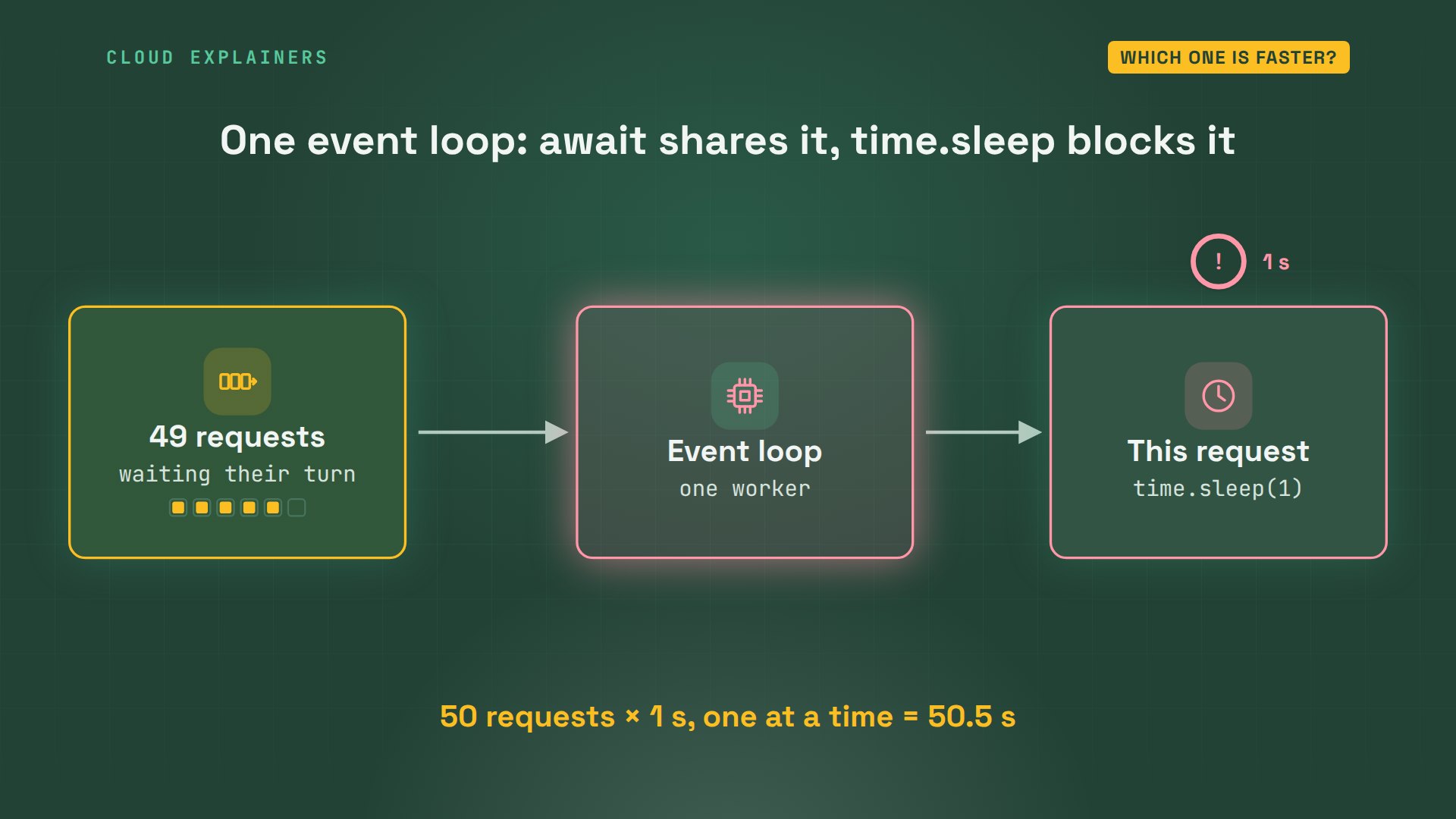
Now the trap from the start. Ana swaps one line: instead of await asyncio.sleep, the usual time.sleep. It's still inside an async function, and it looks harmless. Same fifty requests: 50.5 seconds. One after another, as if fifty people shared one checkout.
(.venv) ana@laptop:~/fastapi-shop$ sed -i 's/await asyncio.sleep(1)/time.sleep(1)/' main.py
(.venv) ana@laptop:~/fastapi-shop$ grep -n -A2 "async def supplier" main.py32:async def supplier():
33-    time.sleep(1)  # wait for the supplier's site
34-    return {"ok": True}
(.venv) ana@laptop:~$ python3 hammer.py localhost:8001/supplier 5050 of 50 requests answered in 50.5 seconds
Why? An async function runs on one event loop: a single worker that juggles every waiting request. await tells it, go help someone else while I wait. time.sleep doesn't. It freezes that one worker for a full second, so the other forty-nine requests stand in line.
The fix, if your code can't await, is to drop the word async. A plain def function runs in a pool of helper threads, so it can't freeze the loop. FastAPI's docs say it plainly: if you don't know, use normal def. 2.6 seconds.
(.venv) ana@laptop:~/fastapi-shop$ sed -i 's/^async def supplier/def supplier/' main.py
(.venv) ana@laptop:~/fastapi-shop$ grep -n -A2 "def supplier" main.py32:def supplier():
33-    time.sleep(1)  # wait for the supplier's site
34-    return {"ok": True}
(.venv) ana@laptop:~$ python3 hammer.py localhost:8001/supplier 5050 of 50 requests answered in 2.6 seconds
And Django? Run the usual way, with Gunicorn: a server that runs four copies of Django side by side, each answering one request at a time: 13.5 seconds. But Django has async views too. Ana's async version, on Uvicorn, the async server from the FastAPI test: 1.8 seconds, the same as FastAPI.
(.venv) ana@laptop:~/django-shop$ gunicorn teashop.wsgi --workers 4 --bind 127.0.0.1:8000[2026-11-05 19:59:37 +0000] [274] [INFO] Starting gunicorn 26.2.0
[2026-11-05 19:59:37 +0000] [274] [INFO] Listening at: http://127.0.0.1:8000 (274)
[2026-11-05 19:59:37 +0000] [274] [INFO] Using worker: sync
[2026-11-05 19:59:37 +0000] [275] [INFO] Booting worker with pid: 275
[2026-11-05 19:59:37 +0000] [276] [INFO] Booting worker with pid: 276
[2026-11-05 19:59:37 +0000] [277] [INFO] Booting worker with pid: 277
[2026-11-05 19:59:37 +0000] [278] [INFO] Booting worker with pid: 278
[2026-11-05 19:59:37 +0000] [274] [INFO] Control socket listening at /home/ana/.gunicorn/gunicorn.ctl
(.venv) ana@laptop:~$ python3 hammer.py localhost:8000/supplier/ 5050 of 50 requests answered in 13.5 seconds
(.venv) ana@laptop:~/django-shop$ uvicorn teashop.asgi:application --port 8000 --no-access-logINFO:     Started server process [331]
INFO:     Waiting for application startup.
INFO:     ASGI 'lifespan' protocol appears unsupported.
INFO:     Application startup complete.
INFO:     Uvicorn running on http://127.0.0.1:8000 (Press CTRL+C to quit)
(.venv) ana@laptop:~$ python3 hammer.py localhost:8000/supplier-async/ 5050 of 50 requests answered in 1.8 seconds
Side by side. The fastest and the slowest were both FastAPI, and Django matched the fastest when it waited the async way. So speed came from how the code waits, not from the framework's name. FastAPI is simply built around async from the start.
Which one should you pick?
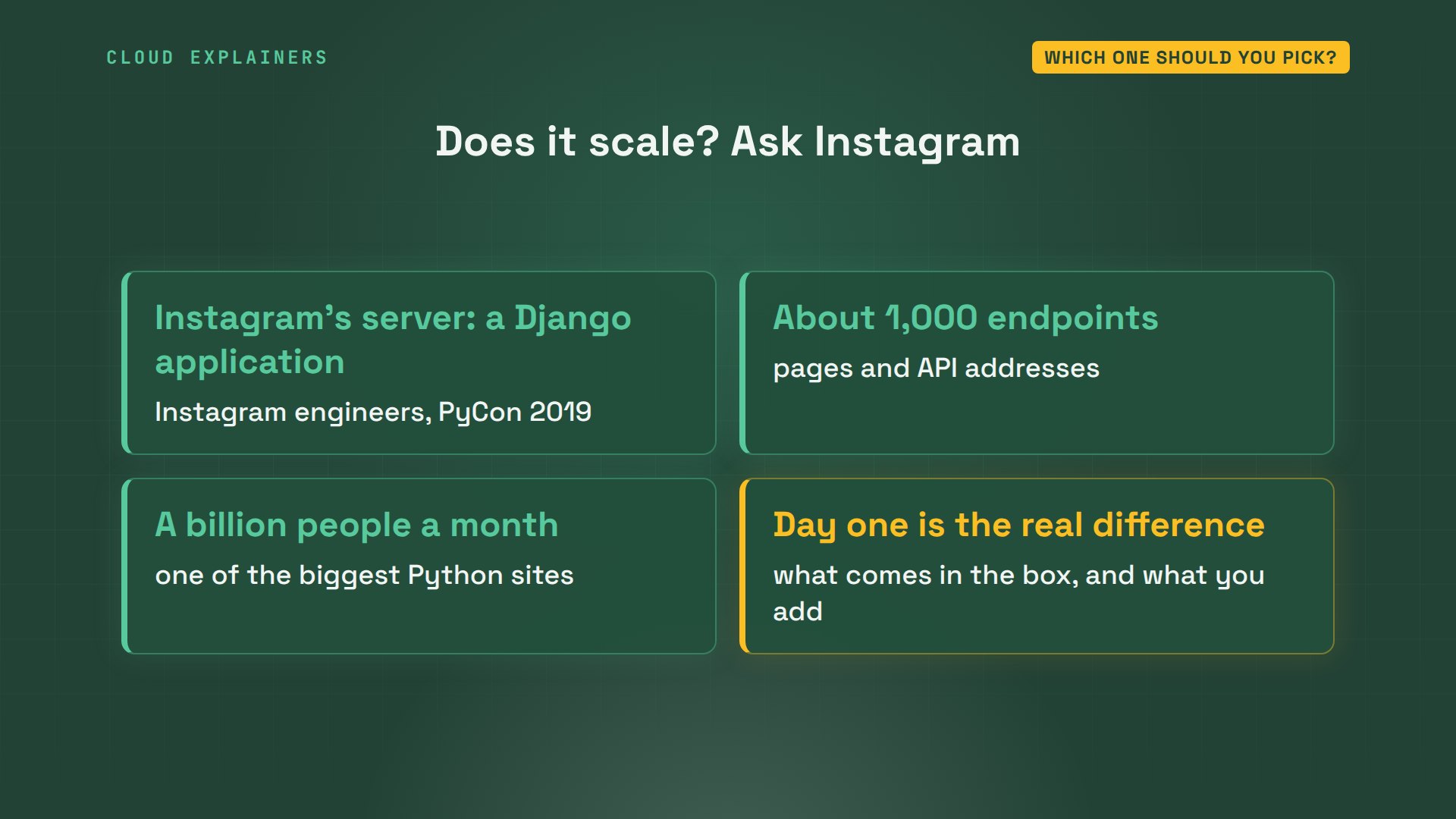
Does Django scale, though? At Instagram, engineers described their server at PyCon in 2019 as a Django application with about a thousand endpoints, serving a billion people a month. So neither choice limits how big you can grow. The difference is what you get on day one.
Here's the choice in one table. Django: a whole website, with a database, logins and an admin built in. FastAPI: an API, with checked data and docs built in, and you choose the rest. Both can wait the async way. Building a site with accounts and pages? Django. Data for an app or a JavaScript front end? FastAPI.
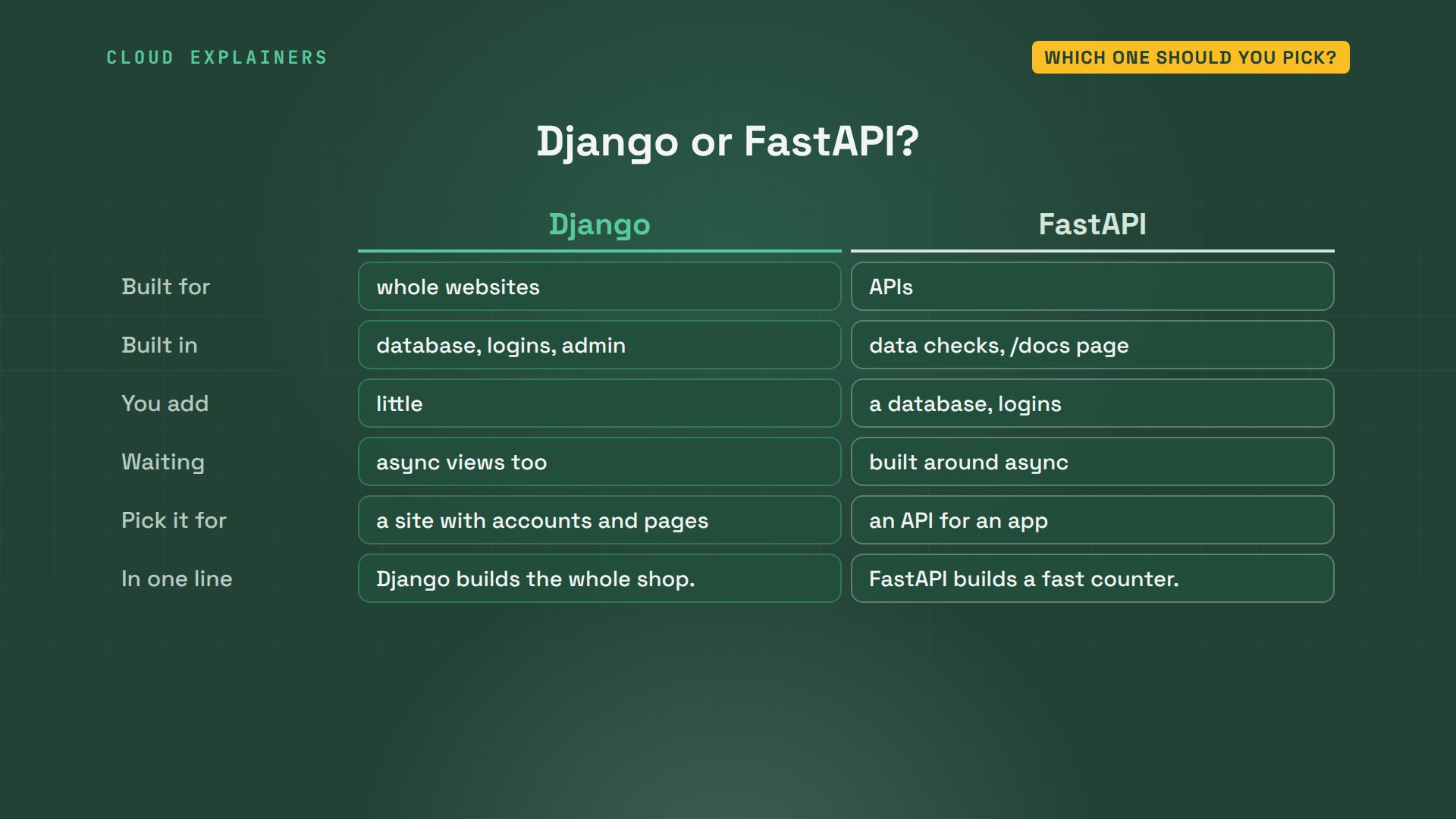
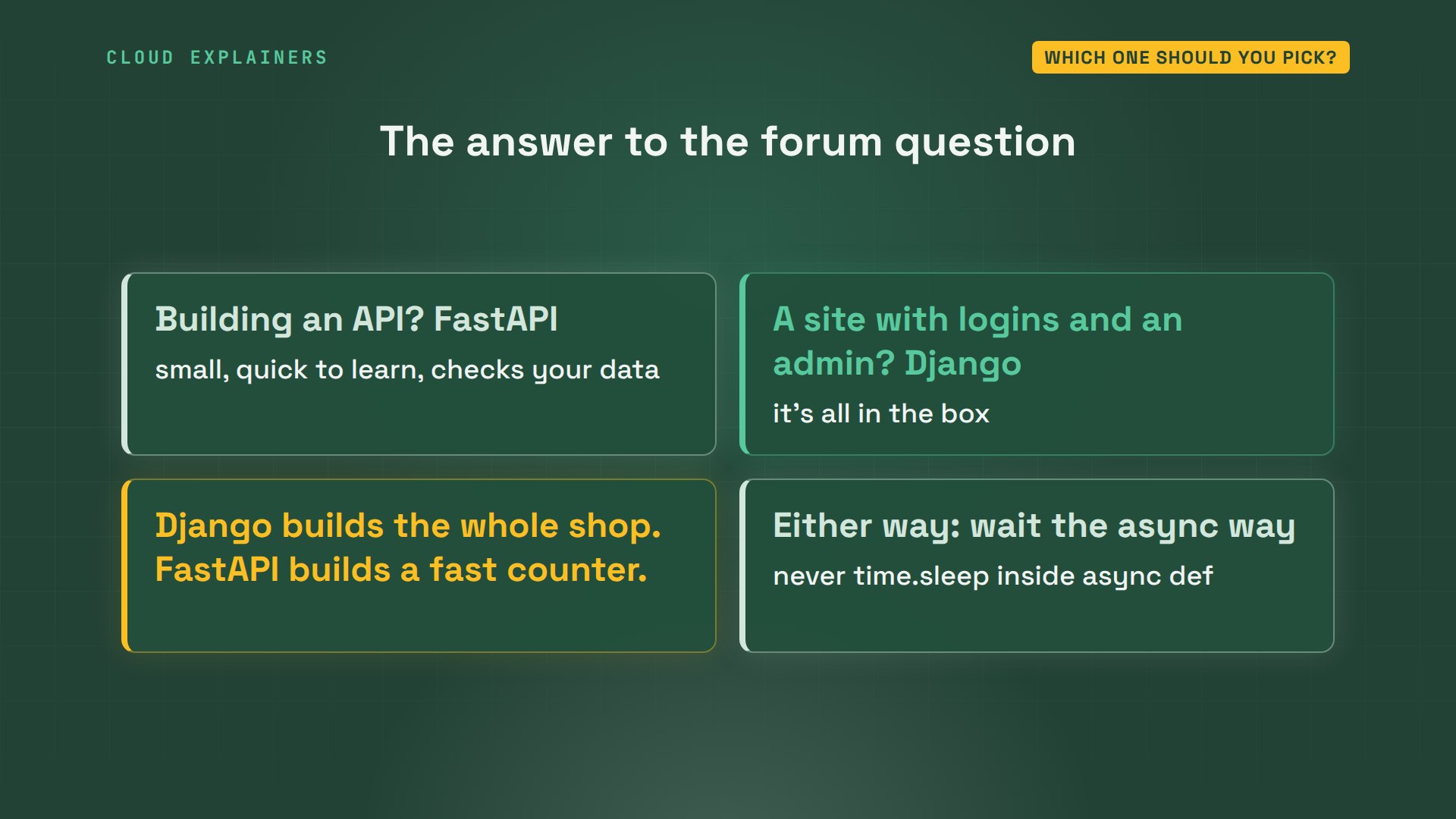
So, to the forum question: if FastAPI feels easier and you're building an API, start there. If you want a site with logins and an admin, Django has them in the box. In one line: Django builds the whole shop. FastAPI builds a fast counter. And either way, learn to wait the async way.
Recap
So: Django is a whole kit, FastAPI is a small fast toolkit for APIs, and speed comes from how your code waits. Never put time.sleep inside an async function.
If you'd like to see the next Python framework tested the same way, subscribing brings it to you.
Every command and output in this video came from a real run, on Ubuntu 24.04.5 LTS, with the Django and FastAPI versions on screen. Thanks for watching Cloud Explainers.
Sources
- The question we open with, Code with Mosh forum, "Should I use Django or FastAPI?" (2023)
- Django overview (authentication, content administration and more, right out of the box)
- Django docs, Migrations
- Django docs, The Django admin site
- Django docs, Asynchronous support (async views, ASGI and WSGI)
- FastAPI (based on standard Python type hints; Starlette for the web parts, Pydantic for the data parts; automatic interactive docs)
- FastAPI docs, Concurrency and async / await (plain def runs in a threadpool; "If you just don't know, use normal def")
- PyCon 2019, "Python @Scale: An Instagram Story" by Instagram engineers (a million-line, thousand-endpoint Django application serving 1 billion monthly users)
Demos: a stock Ubuntu 24.04 container on our own lab machine, standing in for a laptop; the tea shop and its teas are made up. Watch the full video on YouTube.
More videos
The Linux Roadmap for Beginners
Why SQLite Is the Most Used Database in the World
How a NoSQL Database Like MongoDB Works
How to Fix Python pip error: externally-managed-environment
How to Fix MySQL Too Many Connections Database Errors
Golang Concurrency Will Finally Make Sense After This
How Amazon S3 Works
How Kubernetes Works

How Git Works
How to Fix Docker Port Already Allocated Errors
How PostgreSQL Works
How to Fix Git Merge Conflicts

How to Fix No Space Left on Device in Linux
How the Internet Works
SQL vs NoSQL: When Each One Wins
How to Fix JWT Token Expired Errors (401 Unauthorized)

Claude API vs Claude Pro: Why Your Subscription Doesn't Include It

Why AI Agent Skills Beat Giant Prompts

Linux Cron Jobs Will Finally Make Sense After This

Security Logs Will Finally Make Sense After This

How to Fix a Security Leak: An API Key Pushed to GitHub

DNS Will Finally Make Sense After This

Never Ignore a Security Update

Two-Factor Authentication Will Finally Make Sense

Never Expose a Database to the Internet

SSH Keys vs Passwords: Which Is Safer for Security?

The 5 Levels of Linux Boot: From Power On to Login

The 5 Levels of Network Firewalls

Password Security: Why Hackers Crack Weak Passwords

Why Your Linux Server Runs Out of Memory

HTTP vs HTTPS: What Actually Changes on Your Network

Every Linux File Permission You Need to Know

Linux Processes vs Threads: When Each One Wins

The OSI Model Will Finally Make Sense After This

The 7 Levels of Git

Every Network Troubleshooting Command You Need

Hashing vs Encryption in Cybersecurity: When Each One Wins

Why the Internet Ran Out of IP Addresses

Linux Package Managers: apt vs Snap vs Flatpak

Why Python Is Slow (and When It Doesn't Matter)

TCP vs UDP: When Each One Wins

Stop Running Linux as Root (Do This Instead)

Linux Users and Groups Will Finally Make Sense

Why Phishing Beats Good Security (and How to Spot It)

The 7 Levels of Docker

AI Agents Will Finally Make Sense After This

Stop Using git push --force (Use This Instead)

Agent Skills vs MCP: When Each One Wins

Networking Will Finally Make Sense After This

Every Linux Command You Actually Need

The 7 Levels of Cybersecurity

Every System Design Concept You Need, in One Diagram
