
Django Full Tutorial for Beginners
A full Django tutorial for beginners: Ana builds a small tea shop website from an empty folder on a real Ubuntu laptop. Install Django with uv, start a project and an app, write views and URL patterns, define a model and fix the classic 'no such table' error with makemigrations and migrate, use the ORM in Django's shell, get an admin site from one line, add a page per tea with URL parameters, take orders with a ModelForm (and see CSRF protection refuse a forged order), write tests that catch a real stock bug, then run check --deploy before going live.
Your first Django site
You want to build a website with Python, and Django's first command gives you files you didn't write. A settings file, a URLs file, something called W S G I, and nothing that looks like a website. In this tutorial those files become a working tea shop: a page for every tea, an admin site, an order form, and tests.
tree -I .venv.
├── config
│   ├── __init__.py
│   ├── asgi.py
│   ├── settings.py
│   ├── urls.py
│   └── wsgi.py
├── manage.py
├── pyproject.toml
└── uv.lock

2 directories, 8 files
w3m -dump http://localhost:8000/teas/sencha/Ana's Tea Shop

Sencha

$12.50 per bag, 38 in stock.

All teas
uv run manage.py testFound 4 test(s).
Creating test database for alias 'default'...
System check identified no issues (0 silenced).
....
----------------------------------------------------------------------
Ran 4 tests in 0.045s

OK
Destroying test database for alias 'default'...
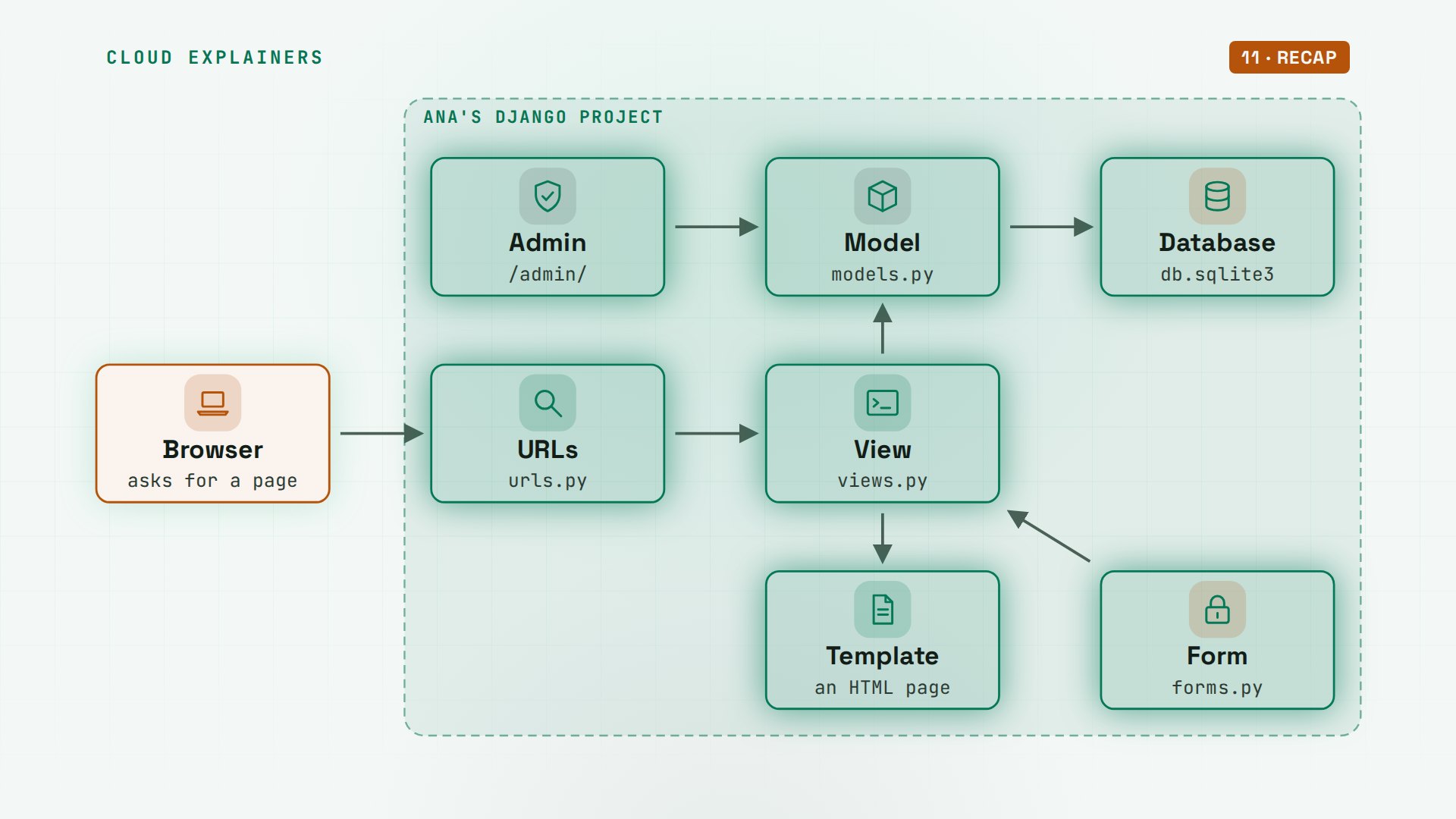
Ana runs a small tea shop, and she builds it here with you, from an empty folder, on a real laptop. Every request takes the same path: a URL picks a view, the view asks a model for data, and a template turns it into a page. One question to keep in mind: the settings Django wrote for you already hold one line that stops a real attack on Ana's order form. Which line? You'll see it refuse an order.
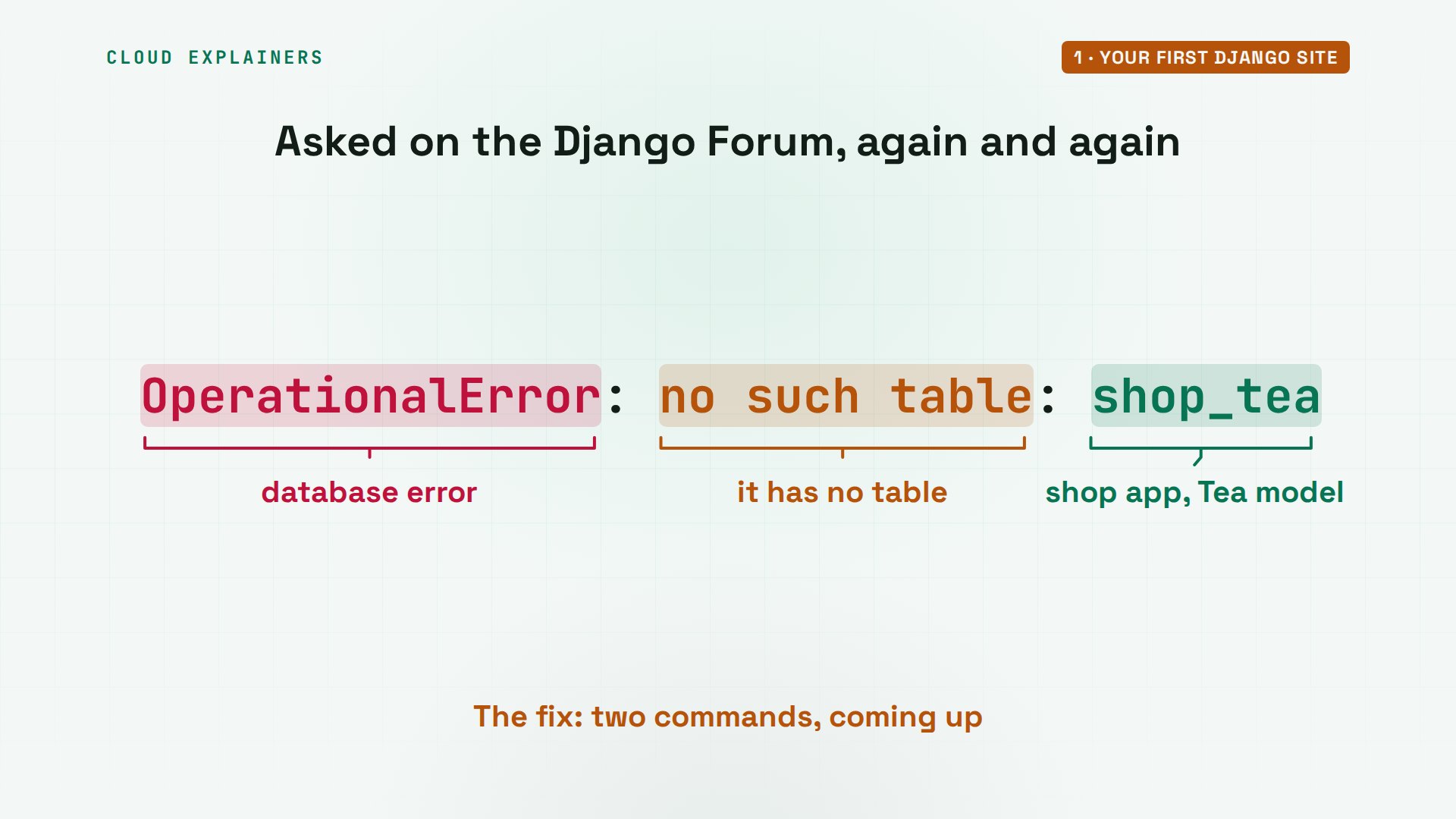
And one question people post on Django's own forum again and again: I made a model, and the page says no such table. You'll get that exact error, see why it happens, and fix it with two commands.
Set up the project
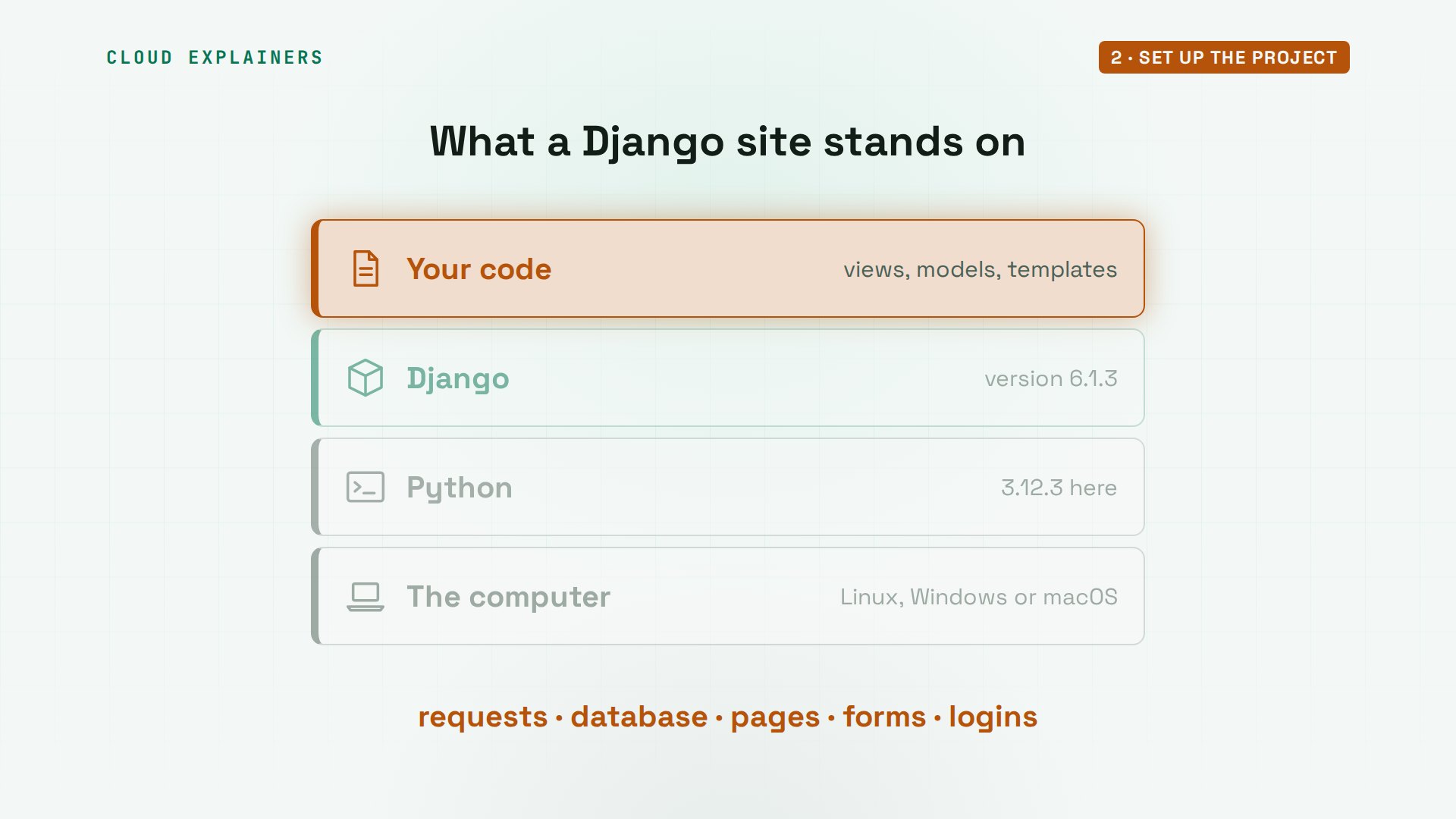
What is Django, exactly? A web framework: Python code that already does the parts every website needs, so you write only what's special about yours. It answers web requests, talks to a database, fills in pages, checks forms, and handles logins. Your code sits on top of all that.
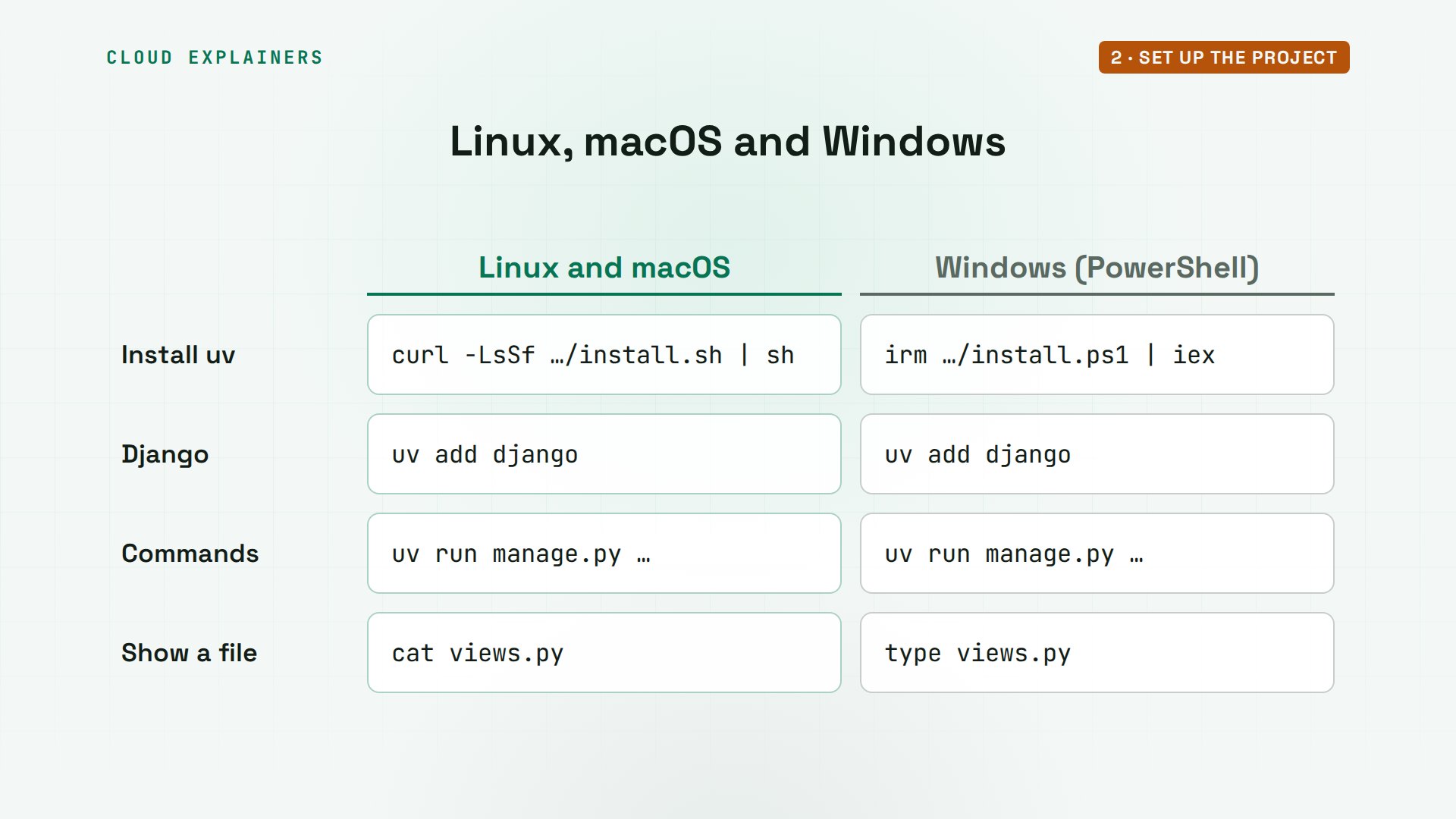
First, a tool to install Python packages: uv. One line from its website installs it. On Windows, the line in the title bar does the same in PowerShell. Then uv init makes a project folder called teashop, and uv add django downloads Django from PyPI, the Python package index: version 6.1.3, and the two small packages it needs.
curl -LsSf https://astral.sh/uv/install.sh | shdownloading uv 0.13.7 x86_64-unknown-linux-gnu
installing to /home/ana/.local/bin
  uv
  uvx
everything's installed!

To add $HOME/.local/bin to your PATH, either restart your shell or run:

    source $HOME/.local/bin/env (sh, bash, zsh)
    source $HOME/.local/bin/env.fish (fish)
source $HOME/.local/bin/env
uv init --bare teashopInitialized project `teashop` at `/home/ana/teashop`
cd teashop
uv add djangoUsing CPython 3.12.3 interpreter at: /usr/bin/python3
Creating virtual environment at: .venv
Resolved 5 packages in 565ms
Downloading django (8.0MiB)
 Downloaded django
Prepared 3 packages in 377ms
Installed 3 packages in 225ms
 + asgiref==3.13.0
 + django==6.1.3
 + sqlparse==0.6.1
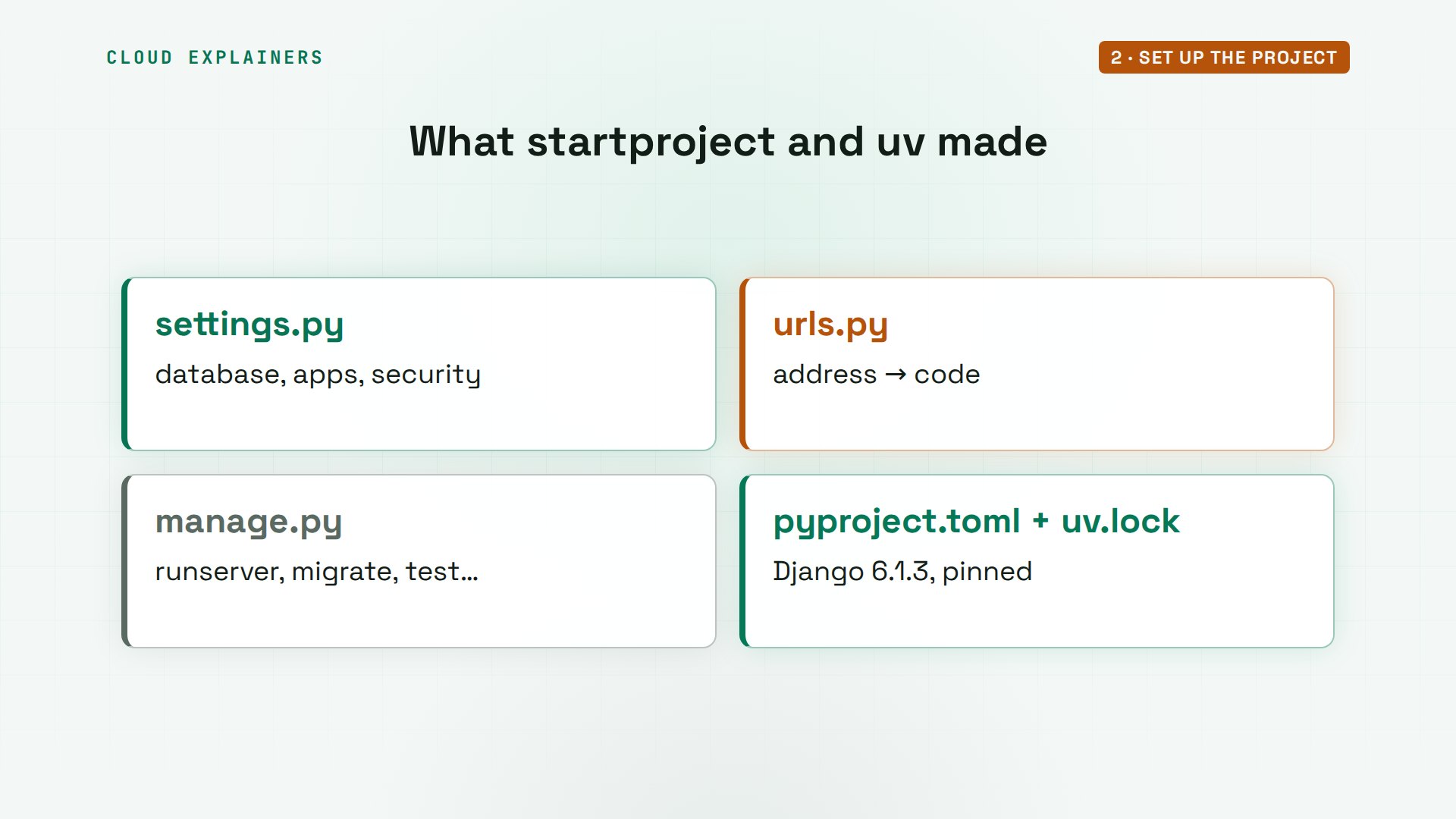
Now the command from the start: django-admin startproject. The name config, and a dot, meaning right here. Here's what it wrote. manage.py is how you give Django commands. And the config folder holds the project's settings, its main list of URLs, and two files that connect it to a real web server later.
uv run django-admin startproject config .
So what does each file do? settings.py: every choice about the project, like which database and which apps. urls.py: which address goes to which code. manage.py: the command you'll type all day. And pyproject.toml with uv.lock: the packages, pinned, so another computer gets the same versions. Every command and the lab files are linked in the description.
Windows or a Mac instead of Linux? Only the install line differs. After that, uv add, uv run and every manage.py command are the same on all three, and so is every file Ana writes. Where a terminal command differs, the Windows version is in the title bar.
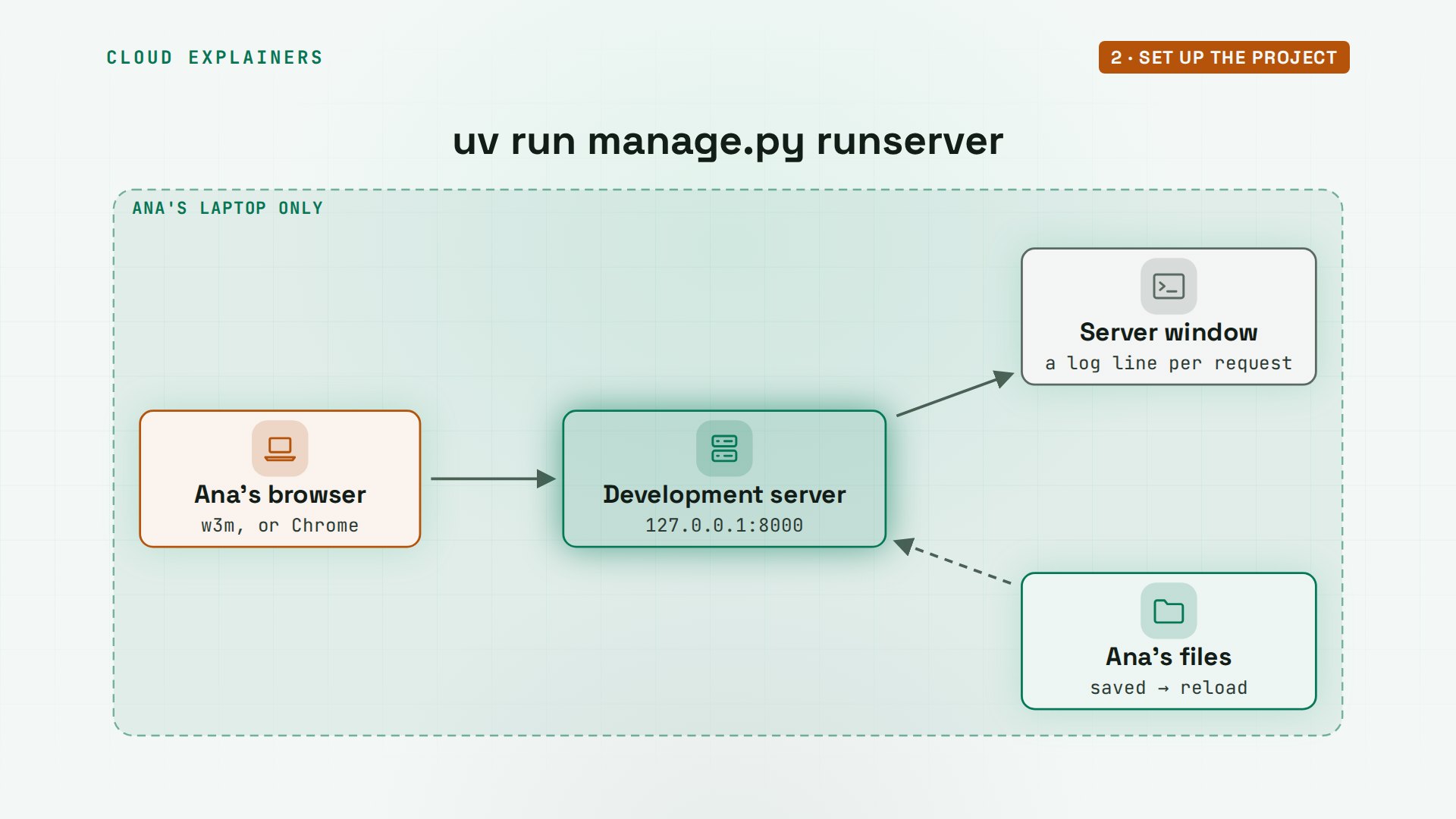
Does it work yet? In a second window, uv run manage.py runserver starts Django's development server. It warns about unapplied migrations: hold on to that word. Then it says where it's listening: port 8000 on this computer. Back in Ana's terminal, w3m, a web browser that runs in the terminal, opens that address: the install worked. In the server window, a log line for every request: GET slash, status 200, okay.
uv run manage.py runserverWatching for file changes with StatReloader
Performing system checks...

System check identified no issues (0 silenced).

You have 18 unapplied migration(s). Your project may not work properly until you apply the migrations for app(s): admin, auth, contenttypes, sessions.
Run 'python manage.py migrate' to apply them.
November 08, 2026 - 02:12:48
Django version 6.1.3, using settings 'config.settings'
Starting WSGI development server at http://127.0.0.1:8000/
Quit the server with CONTROL-C.

WARNING: This is a development server. Do not use it in a production setting. Use a production WSGI or ASGI server instead.
For more information on production servers see: https://docs.djangoproject.com/en/6.1/howto/deployment/
[08/Nov/2026 02:12:50] "GET / HTTP/1.0" 200 12149
Here's that page, as text. It also says why you see it: debug mode is on, and you haven't made any URLs. Debug mode shows helpful error pages while you build. It's on for now, and we switch it off before going live.
w3m -dump http://localhost:8000 | head -n 6The install worked successfully! Congratulations!

View release notes for Django 6.1

You are seeing this page because DEBUG=True is in your settings file and you
have not configured any URLs.
So what is that development server doing? It listens on your own computer only, on port 8000. Each request runs your Django code and gets a log line. And it watches your files: save a change, and it restarts itself within a second, so you never restart it by hand while you build.
Apps, views and URLs
Where does Ana's own code go? Into an app: a folder for one part of the site. A project can hold many apps, say a shop, a blog and accounts, and the project's settings list the apps it uses. Ana starts with one app, called shop.
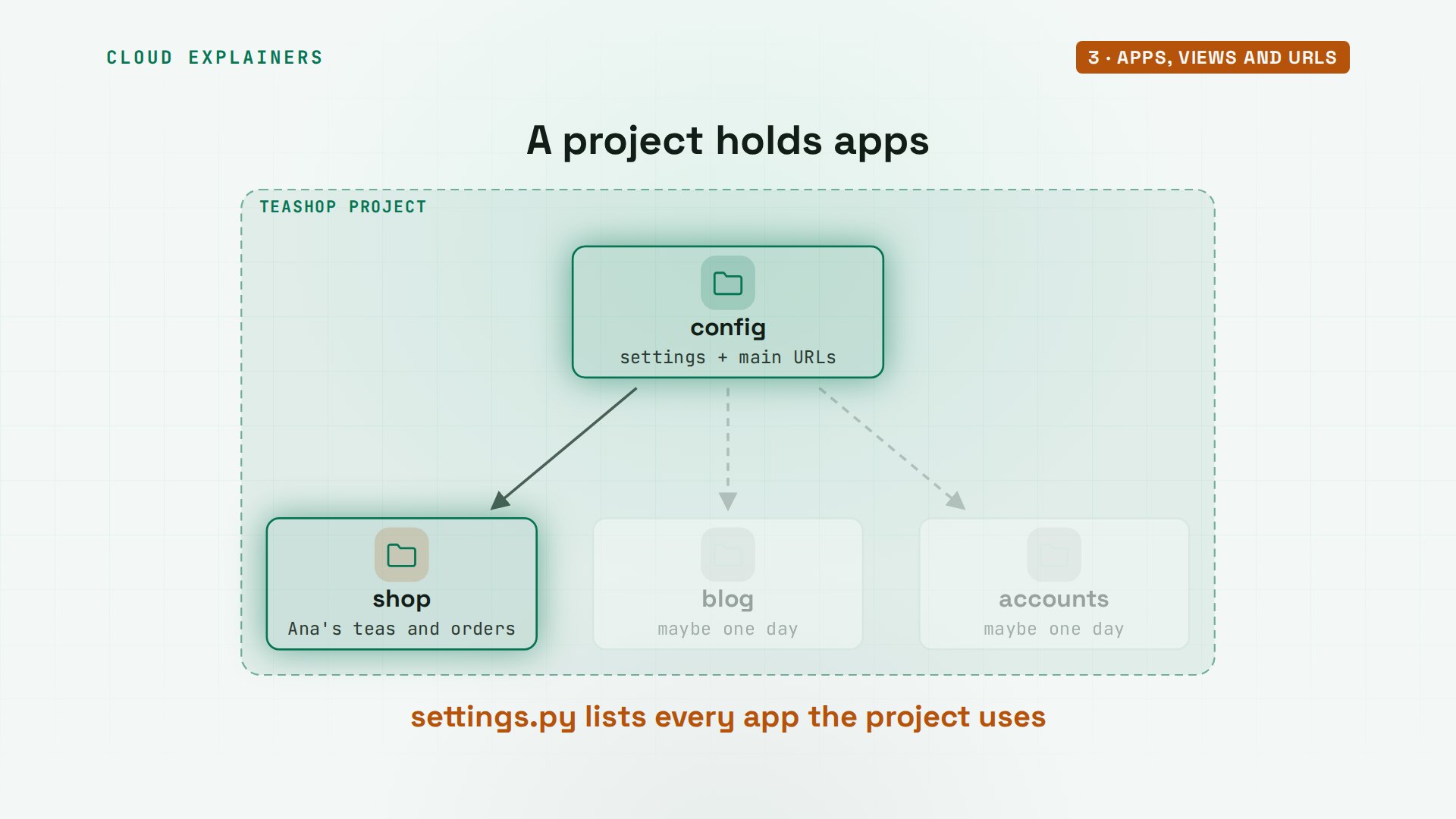
uv run manage.py startapp shop. Django makes the folder, with a file for views, one for models, one for tests, and one for the admin. Then Ana adds shop to the list of installed apps in settings.py, the last line here. Without it, Django ignores the folder.
uv run manage.py startapp shop
tree shopshop
├── __init__.py
├── admin.py
├── apps.py
├── migrations
│   └── __init__.py
├── models.py
├── tests.py
└── views.py

2 directories, 7 files
grep -A 8 "^INSTALLED_APPS" config/settings.pyINSTALLED_APPS = [
    'django.contrib.admin',
    'django.contrib.auth',
    'django.contrib.contenttypes',
    'django.contrib.sessions',
    'django.contrib.messages',
    'django.contrib.staticfiles',
    'shop',
]
A view is a Python function that gets a request and returns a response. Ana's first one is called home. Django hands it the request, and it answers with one line of text, wrapped in an HTTP response.
cat shop/views.pyfrom django.http import HttpResponse


def home(request):
    return HttpResponse("Hello from Ana's tea shop!")
How does a request find that view? Through URL patterns. The shop's own URLs file maps the empty path, the home page, to views dot home, and names it home. The project's main URLs file already sends slash admin to the admin site. Ana adds one line: every other address goes to the shop's patterns, with include.
cat shop/urls.pyfrom django.urls import path

from . import views

urlpatterns = [
    path("", views.home, name="home"),
]
cat config/urls.pyfrom django.contrib import admin
from django.urls import include, path

urlpatterns = [
    path("admin/", admin.site.urls),
    path("", include("shop.urls")),
]
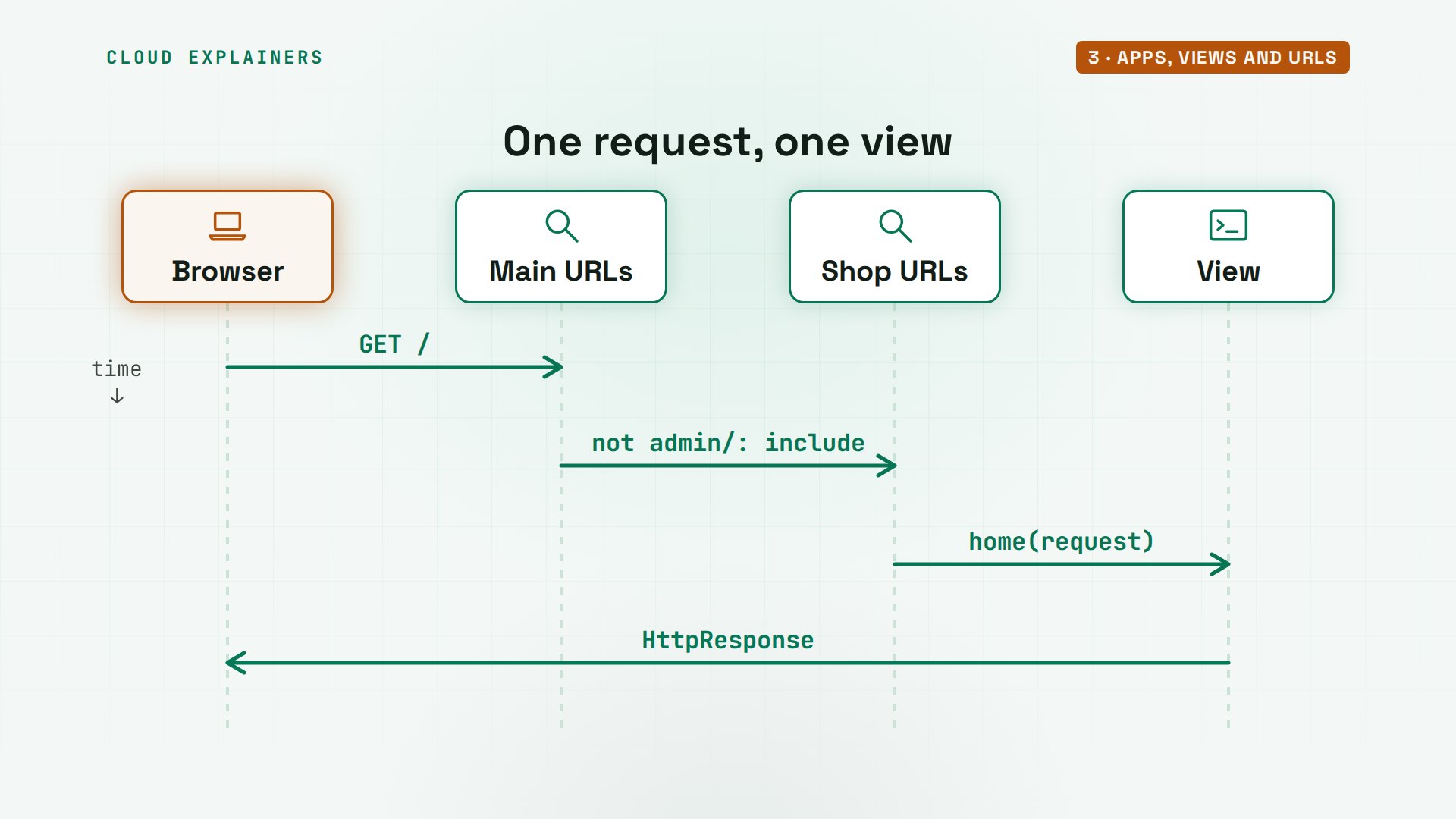
So one request goes like this. The browser asks for slash. Django checks the main URL patterns, top to bottom, then the shop's, finds home, and calls that view. The view's response goes back to the browser.
Ana saves the files. The server notices and reloads itself, and the home page now says hello. And an address nothing matches, like slash teas? A 404, page not found. In debug mode Django even lists the patterns it tried, in order: admin, then home.
w3m -dump http://localhost:8000Hello from Ana's tea shop!
w3m -dump http://localhost:8000/teas/ | head -n 12Page not found (404)

Request Method: GET
 Request URL:   http://localhost:8000/teas/

Using the URLconf defined in config.urls, Django tried these URL patterns, in
this order:

 1. admin/ [namespace='admin']
 2. [name='home']

The current path, teas/, didn’t match any of these.
Here's that path on the map: the browser, the URL patterns, and a view. Every page in this tutorial takes this road. The next pieces, a model, a database and a template, join it after the view.
Models and migrations
A shop needs data: which teas, their prices, how many are left. In Django you describe data with a model: a Python class. Each model becomes a table in the database, each field a column, and each object you save, a row. Ana's project uses SQLite, a database in one file, which is what settings.py chose for her.
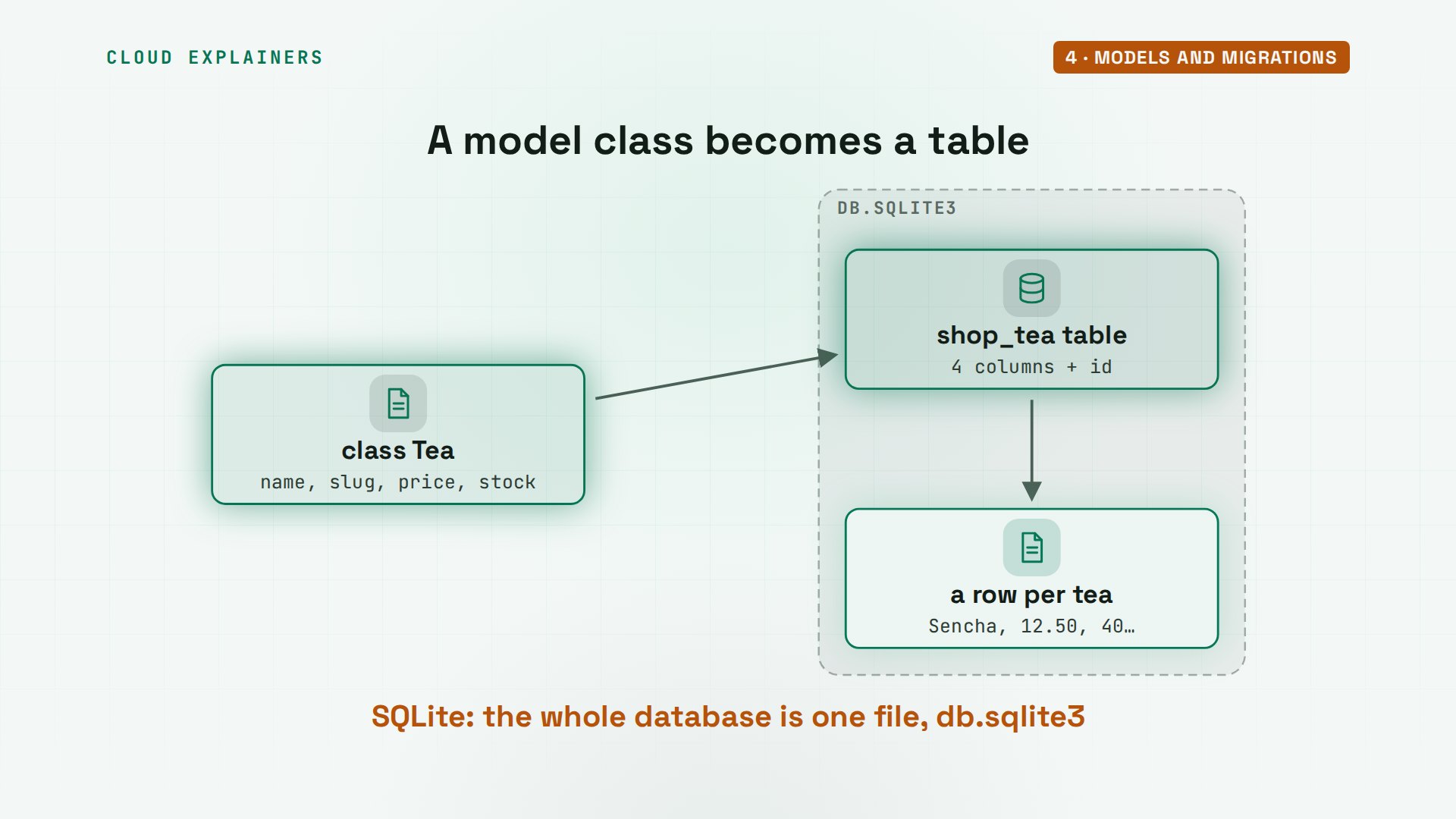
Here's Ana's model, Tea. A name, up to 100 characters. A slug: a short, address-friendly name, unique, so no two teas share one. A price with two decimal places, and stock, a whole number that can't go below zero. The last method says how a tea prints: by its name.
cat shop/models.pyfrom django.db import models


class Tea(models.Model):
    name = models.CharField(max_length=100)
    slug = models.SlugField(unique=True)
    price = models.DecimalField(max_digits=6, decimal_places=2)
    stock = models.PositiveIntegerField(default=0)

    def __str__(self):
        return self.name
Now the home page lists teas. The view asks the model for every tea, ordered by name, and hands them to render, with a template's name. A template is an HTML page with gaps. This one loops over the teas, one list item each, and if there are none, it says so.
cat shop/views.pyfrom django.shortcuts import render

from .models import Tea


def tea_list(request):
    teas = Tea.objects.order_by("name")
    return render(request, "shop/tea_list.html", {"teas": teas})
cat shop/templates/shop/tea_list.html{% extends "shop/base.html" %}

{% block content %}
<ul>
  {% for tea in teas %}
    <li>{{ tea.name }}: ${{ tea.price }}</li>
  {% empty %}
    <li>No teas yet.</li>
  {% endfor %}
</ul>
{% endblock %}
And base.html, the page they share. It has the HTML skeleton, a title block with a default, the shop's name as a heading, and an empty content block, for each page to fill.
cat shop/templates/shop/base.html<!doctype html>
<html>
<head><title>{% block title %}Ana's Tea Shop{% endblock %}</title></head>
<body>
  <h1>Ana's Tea Shop</h1>
  {% block content %}{% endblock %}
</body>
</html>
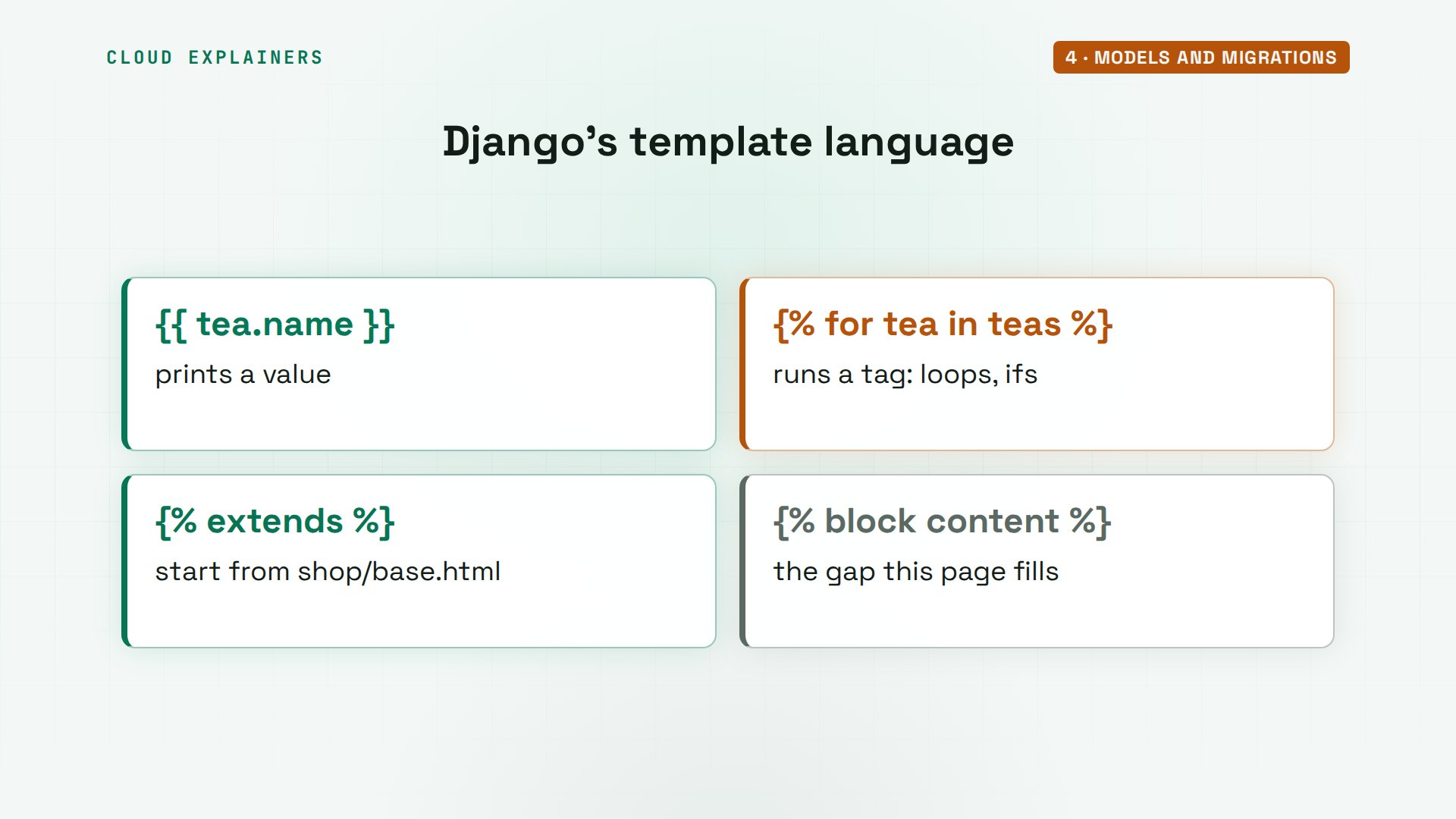
Those curly braces are Django's template language. Double braces print a value. Brace and percent sign run a tag, like for, or extends. Extends means: start from base.html, the page every other page shares, and fill its content block. So the shop's name is written once.
Ana reloads the page. Status 500: the server broke. The server window shows why, at the bottom of a long traceback: operational error, no such table, shop tea. The forum question. The model exists in Python, but the database has never heard of it.
curl -s -o /dev/null -w "%{http_code}\n" localhost:8000500
Internal Server Error: /
Traceback (most recent call last):
  File "/home/ana/teashop/.venv/lib/python3.12/site-packages/django/db/backends/utils.py", line 105, in _execute
    return self.cursor.execute(sql, params)
           ^^^^^^^^^^^^^^^^^^^^^^^^^^^^^^^^
  File "/home/ana/teashop/.venv/lib/python3.12/site-packages/django/db/backends/sqlite3/base.py", line 359, in execute
    return super().execute(query, params)
           ^^^^^^^^^^^^^^^^^^^^^^^^^^^^^^
sqlite3.OperationalError: no such table: shop_tea

The above exception was the direct cause of the following exception:

Traceback (most recent call last):
  File "/home/ana/teashop/.venv/lib/python3.12/site-packages/django/core/handlers/exception.py", line 56, in inner
    response = get_response(request)
               ^^^^^^^^^^^^^^^^^^^^^
  File "/home/ana/teashop/.venv/lib/python3.12/site-packages/django/core/handlers/base.py", line 199, in _get_response
    response = wrapped_callback(request, *callback_args, **callback_kwargs)
               ^^^^^^^^^^^^^^^^^^^^^^^^^^^^^^^^^^^^^^^^^^^^^^^^^^^^^^^^^^^^
  File "/home/ana/teashop/shop/views.py", line 8, in tea_list
    return render(request, "shop/tea_list.html", {"teas": teas})
           ^^^^^^^^^^^^^^^^^^^^^^^^^^^^^^^^^^^^^^^^^^^^^^^^^^^^^
  File "/home/ana/teashop/.venv/lib/python3.12/site-packages/django/shortcuts.py", line 27, in render
    content = loader.render_to_string(template_name, context, request, using=using)
              ^^^^^^^^^^^^^^^^^^^^^^^^^^^^^^^^^^^^^^^^^^^^^^^^^^^^^^^^^^^^^^^^^^^^^
  File "/home/ana/teashop/.venv/lib/python3.12/site-packages/django/template/loader.py", line 62, in render_to_string
    return template.render(context, request)
           ^^^^^^^^^^^^^^^^^^^^^^^^^^^^^^^^^
  File "/home/ana/teashop/.venv/lib/python3.12/site-packages/django/template/backends/django.py", line 107, in render
    return self.template.render(context)
           ^^^^^^^^^^^^^^^^^^^^^^^^^^^^^
  File "/home/ana/teashop/.venv/lib/python3.12/site-packages/django/template/base.py", line 174, in render
    return self._render(context)
           ^^^^^^^^^^^^^^^^^^^^^
  File "/home/ana/teashop/.venv/lib/python3.12/site-packages/django/template/base.py", line 166, in _render
    return self.nodelist.render(context)
           ^^^^^^^^^^^^^^^^^^^^^^^^^^^^^
  File "/home/ana/teashop/.venv/lib/python3.12/site-packages/django/template/base.py", line 1107, in render
    return SafeString("".join([node.render_annotated(context) for node in self]))
                               ^^^^^^^^^^^^^^^^^^^^^^^^^^^^^^
  File "/home/ana/teashop/.venv/lib/python3.12/site-packages/django/template/base.py", line 1068, in render_annotated
    return self.render(context)
           ^^^^^^^^^^^^^^^^^^^^
  File "/home/ana/teashop/.venv/lib/python3.12/site-packages/django/template/loader_tags.py", line 160, in render
    return compiled_parent._render(context)
           ^^^^^^^^^^^^^^^^^^^^^^^^^^^^^^^^
  File "/home/ana/teashop/.venv/lib/python3.12/site-packages/django/template/base.py", line 166, in _render
    return self.nodelist.render(context)
           ^^^^^^^^^^^^^^^^^^^^^^^^^^^^^
  File "/home/ana/teashop/.venv/lib/python3.12/site-packages/django/template/base.py", line 1107, in render
    return SafeString("".join([node.render_annotated(context) for node in self]))
                               ^^^^^^^^^^^^^^^^^^^^^^^^^^^^^^
  File "/home/ana/teashop/.venv/lib/python3.12/site-packages/django/template/base.py", line 1068, in render_annotated
    return self.render(context)
           ^^^^^^^^^^^^^^^^^^^^
  File "/home/ana/teashop/.venv/lib/python3.12/site-packages/django/template/loader_tags.py", line 66, in render
    result = block.nodelist.render(context)
             ^^^^^^^^^^^^^^^^^^^^^^^^^^^^^^
  File "/home/ana/teashop/.venv/lib/python3.12/site-packages/django/template/base.py", line 1107, in render
    return SafeString("".join([node.render_annotated(context) for node in self]))
                               ^^^^^^^^^^^^^^^^^^^^^^^^^^^^^^
  File "/home/ana/teashop/.venv/lib/python3.12/site-packages/django/template/base.py", line 1068, in render_annotated
    return self.render(context)
           ^^^^^^^^^^^^^^^^^^^^
  File "/home/ana/teashop/.venv/lib/python3.12/site-packages/django/template/defaulttags.py", line 202, in render
    len_values = len(values)
                 ^^^^^^^^^^^
  File "/home/ana/teashop/.venv/lib/python3.12/site-packages/django/db/models/query.py", line 455, in __len__
    self._fetch_all()
  File "/home/ana/teashop/.venv/lib/python3.12/site-packages/django/db/models/query.py", line 2287, in _fetch_all
    self._result_cache = list(self._iterable_class(self))
                         ^^^^^^^^^^^^^^^^^^^^^^^^^^^^^^^^
  File "/home/ana/teashop/.venv/lib/python3.12/site-packages/django/db/models/query.py", line 131, in __iter__
    results = compiler.execute_sql(
              ^^^^^^^^^^^^^^^^^^^^^
  File "/home/ana/teashop/.venv/lib/python3.12/site-packages/django/db/models/sql/compiler.py", line 1643, in execute_sql
    cursor.execute(sql, params)
  File "/home/ana/teashop/.venv/lib/python3.12/site-packages/django/db/backends/utils.py", line 122, in execute
    return super().execute(sql, params)
           ^^^^^^^^^^^^^^^^^^^^^^^^^^^^
  File "/home/ana/teashop/.venv/lib/python3.12/site-packages/django/db/backends/utils.py", line 79, in execute
    return self._execute_with_wrappers(
           ^^^^^^^^^^^^^^^^^^^^^^^^^^^^
  File "/home/ana/teashop/.venv/lib/python3.12/site-packages/django/db/backends/utils.py", line 92, in _execute_with_wrappers
    return executor(sql, params, many, context)
           ^^^^^^^^^^^^^^^^^^^^^^^^^^^^^^^^^^^^
  File "/home/ana/teashop/.venv/lib/python3.12/site-packages/django/db/backends/utils.py", line 100, in _execute
    with self.db.wrap_database_errors:
  File "/home/ana/teashop/.venv/lib/python3.12/site-packages/django/db/utils.py", line 94, in __exit__
    raise dj_exc_value.with_traceback(traceback) from exc_value
  File "/home/ana/teashop/.venv/lib/python3.12/site-packages/django/db/backends/utils.py", line 105, in _execute
    return self.cursor.execute(sql, params)
           ^^^^^^^^^^^^^^^^^^^^^^^^^^^^^^^^
  File "/home/ana/teashop/.venv/lib/python3.12/site-packages/django/db/backends/sqlite3/base.py", line 359, in execute
    return super().execute(query, params)
           ^^^^^^^^^^^^^^^^^^^^^^^^^^^^^^
django.db.utils.OperationalError: no such table: shop_tea
[08/Nov/2026 02:13:06] "GET / HTTP/1.1" 500 182624
Why doesn't Django just create the table? Because changing a database is a step you should see and keep. Make migrations compares your models with what it recorded last time, and writes the difference as a migration file. Migrate runs every migration the database hasn't had yet. Two commands, every time a model changes.
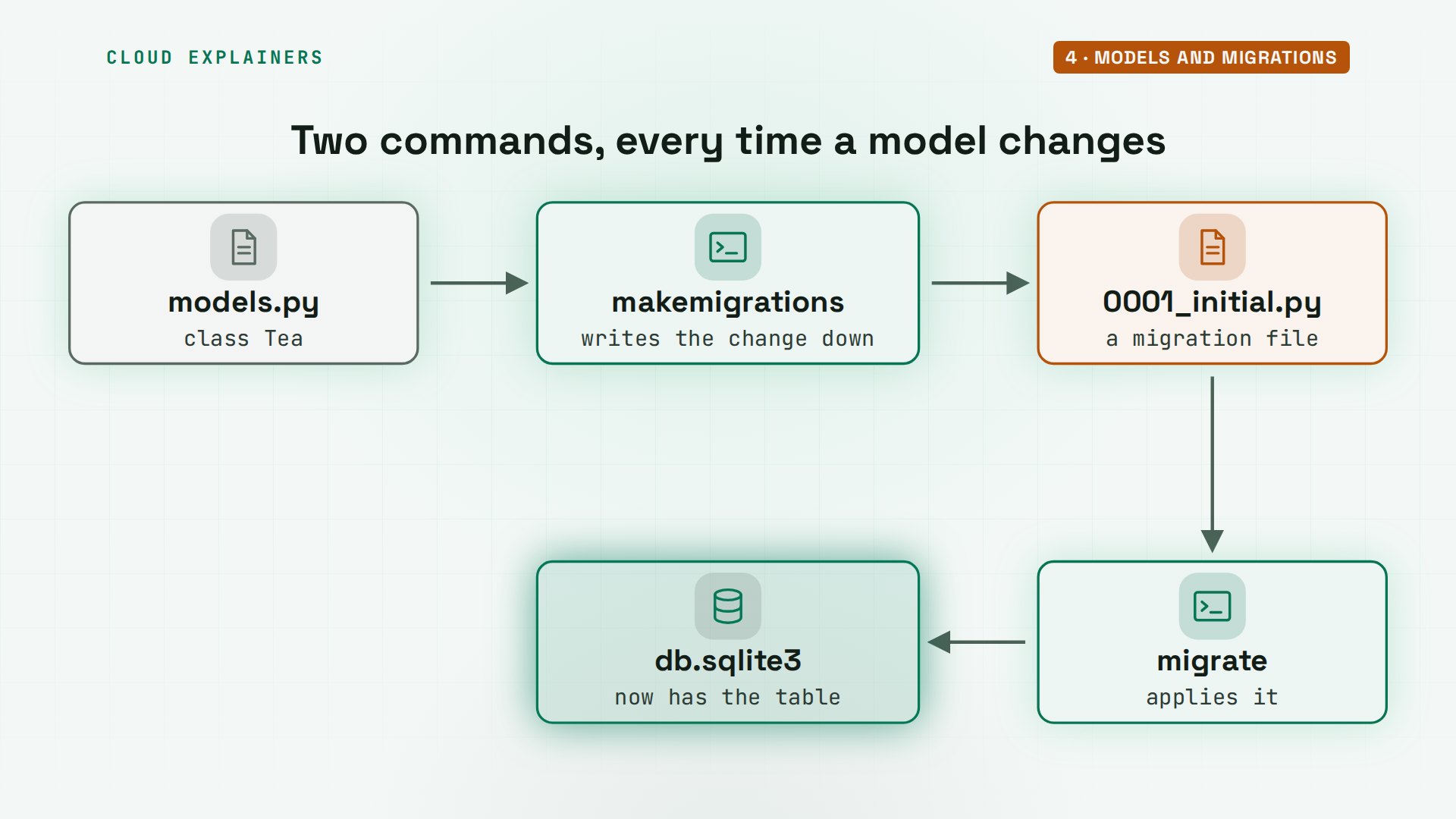
makemigrations: create model Tea, in a new file. It's plain Python Ana can read, and it goes into Git with her code. To see the SQL it will run, sqlmigrate: create table shop tea, with a column for each field, and an id Django added by itself.
uv run manage.py makemigrationsMigrations for 'shop':
  shop/migrations/0001_initial.py
    + Create model Tea
uv run manage.py sqlmigrate shop 0001BEGIN;
--
-- Create model Tea
--
CREATE TABLE "shop_tea" ("id" integer NOT NULL PRIMARY KEY AUTOINCREMENT, "name" varchar(100) NOT NULL, "slug" varchar(50) NOT NULL UNIQUE, "price" decimal NOT NULL, "stock" integer unsigned NOT NULL CHECK ("stock" >= 0));
COMMIT;
What's inside a migration? Plain Python Django wrote: one operation, create model, with every field, plus the id. Next time Ana changes the model, makemigrations writes only the change, in file 2, which depends on file 1, so every copy of the database gets the same steps, in the same order.
cat shop/migrations/0001_initial.py# Generated by Django 6.1.3 on 2026-11-08 02:13

from django.db import migrations, models


class Migration(migrations.Migration):

    initial = True

    dependencies = [
    ]

    operations = [
        migrations.CreateModel(
            name='Tea',
            fields=[
                ('id', models.BigAutoField(auto_created=True, primary_key=True, serialize=False, verbose_name='ID')),
                ('name', models.CharField(max_length=100)),
                ('slug', models.SlugField(unique=True)),
                ('price', models.DecimalField(decimal_places=2, max_digits=6)),
                ('stock', models.PositiveIntegerField(default=0)),
            ],
        ),
    ]
Now migrate. 19 migrations run: the 18 the server warned about, for logins, sessions and the admin, which every new project gets, and Ana's, last. The same page again: no error, and no teas yet. The table exists, and it's empty.
uv run manage.py migrateOperations to perform:
  Apply all migrations: admin, auth, contenttypes, sessions, shop
Running migrations:
  Applying contenttypes.0001_initial... OK
  Applying auth.0001_initial... OK
  Applying admin.0001_initial... OK
  Applying admin.0002_logentry_remove_auto_add... OK
  Applying admin.0003_logentry_add_action_flag_choices... OK
  Applying contenttypes.0002_remove_content_type_name... OK
  Applying auth.0002_alter_permission_name_max_length... OK
  Applying auth.0003_alter_user_email_max_length... OK
  Applying auth.0004_alter_user_username_opts... OK
  Applying auth.0005_alter_user_last_login_null... OK
  Applying auth.0006_require_contenttypes_0002... OK
  Applying auth.0007_alter_validators_add_error_messages... OK
  Applying auth.0008_alter_user_username_max_length... OK
  Applying auth.0009_alter_user_last_name_max_length... OK
  Applying auth.0010_alter_group_name_max_length... OK
  Applying auth.0011_update_proxy_permissions... OK
  Applying auth.0012_alter_user_first_name_max_length... OK
  Applying sessions.0001_initial... OK
  Applying shop.0001_initial... OK
w3m -dump http://localhost:8000Ana's Tea Shop

  • No teas yet.
On the map, the model and the database join the path: the view asks the model, the model asks the database, and the template draws the answer.
The ORM in the shell
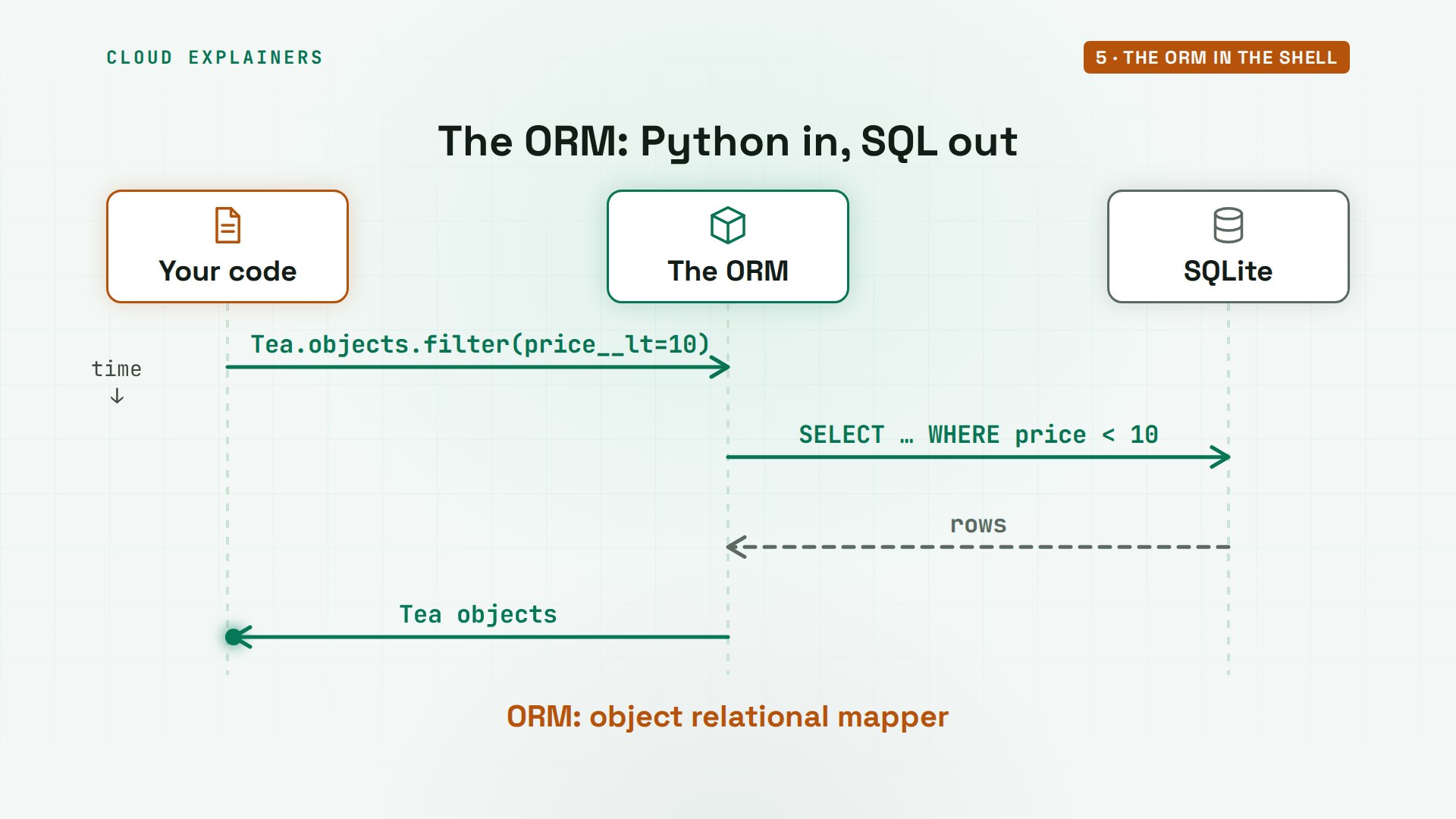
How do teas get into that table? Through the ORM, Django's object relational mapper. You write Python, like Tea dot objects dot filter, and Django writes the SQL, sends it to the database, and turns the rows that come back into Tea objects.
manage.py shell opens Python with the project loaded, and imports the models for you. Ana creates her four teas: Sencha, Earl Grey, Jasmine Pearls, with only 3 left, and Rooibos. Each create saves a row straight away, and prints the tea by its name.
uv run manage.py shell13 objects imported automatically (use -v 2 for details).

Python 3.12.3 (main, Aug 31 2026, 10:18:26) [GCC 13.3.0] on linux
Type "help", "copyright", "credits" or "license" for more information.
(InteractiveConsole)
>>> Tea.objects.create(name="Sencha", slug="sencha", price="12.50", stock=40)<Tea: Sencha>
>>> Tea.objects.create(name="Earl Grey", slug="earl-grey", price="9.00", stock=25)<Tea: Earl Grey>
>>> Tea.objects.create(name="Jasmine Pearls", slug="jasmine-pearls", price="18.00", stock=3)<Tea: Jasmine Pearls>
>>> Tea.objects.create(name="Rooibos", slug="rooibos", price="7.50", stock=60)<Tea: Rooibos>
Now ask questions. How many teas? Four. Which cost under ten dollars? Filter, with price, two underscores, l t, for less than: Earl Grey and Rooibos. And here's the SQL Django wrote for that, a select with a where clause.
>>> Tea.objects.count()4
>>> Tea.objects.filter(price__lt=10)<QuerySet [<Tea: Earl Grey>, <Tea: Rooibos>]>
>>> print(Tea.objects.filter(price__lt=10).query)SELECT "shop_tea"."id", "shop_tea"."name", "shop_tea"."slug", "shop_tea"."price", "shop_tea"."stock" FROM "shop_tea" WHERE "shop_tea"."price" < 10
get fetches exactly one. Sencha's price comes back as a Decimal, so money never picks up rounding errors. Change a field, call save, and Django updates that row: Sencha's stock is now 38. And get with a slug that doesn't exist raises does not exist: remember that one, a view will need it.
>>> tea = Tea.objects.get(slug="sencha")
>>> tea.priceDecimal('12.50')
>>> tea.stock = 38; tea.save()
>>> Tea.objects.get(slug="matcha")Traceback (most recent call last):
  File "<console>", line 1, in <module>
  File "/home/ana/teashop/.venv/lib/python3.12/site-packages/django/db/models/manager.py", line 87, in manager_method
    return getattr(self.get_queryset(), name)(*args, **kwargs)
           ^^^^^^^^^^^^^^^^^^^^^^^^^^^^^^^^^^^^^^^^^^^^^^^^^^^
  File "/home/ana/teashop/.venv/lib/python3.12/site-packages/django/db/models/query.py", line 722, in get
    raise self.model.DoesNotExist(
shop.models.Tea.DoesNotExist: Tea matching query does not exist.
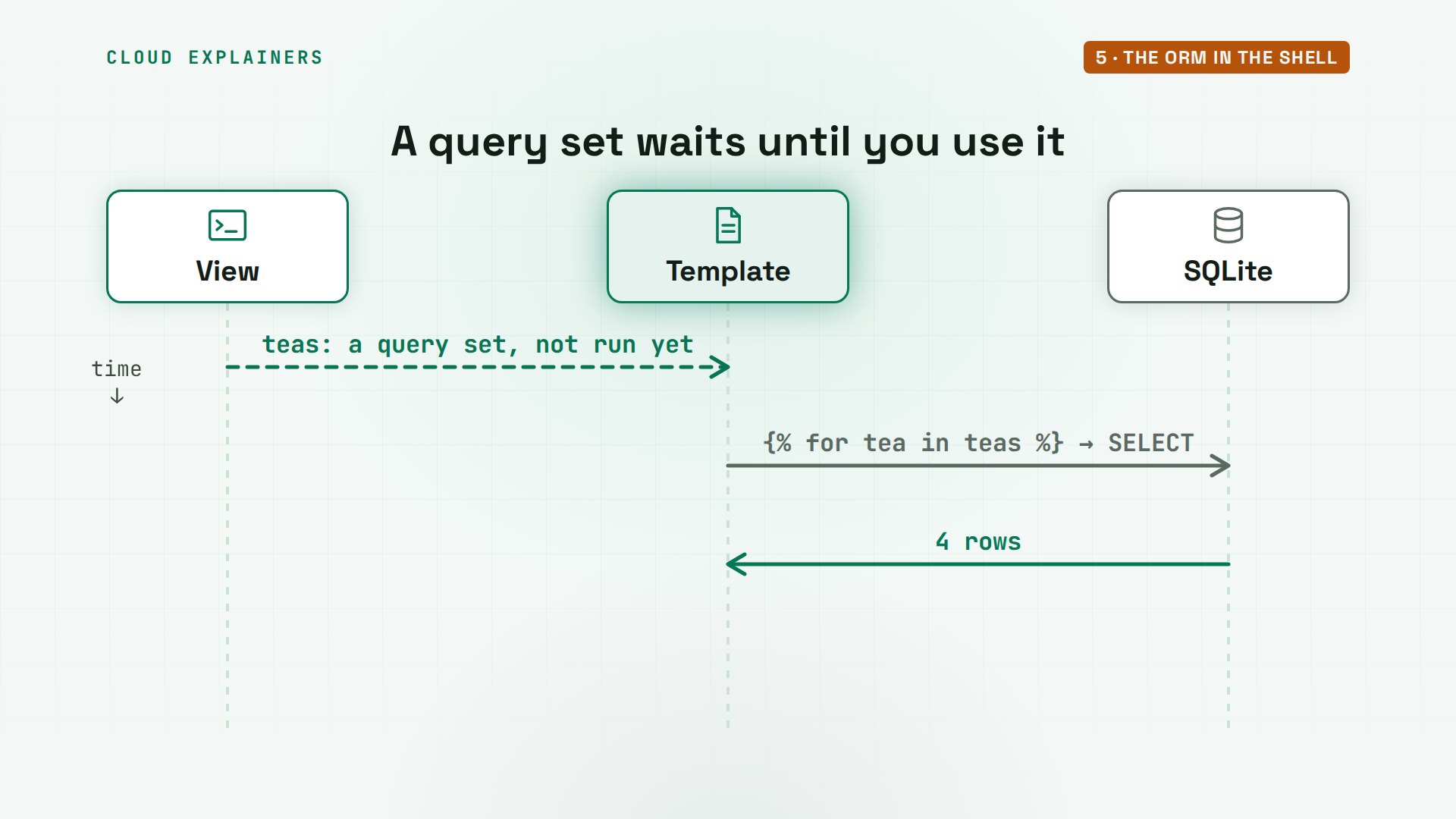
One thing that surprises beginners: filter doesn't touch the database. It builds a query set, a question not yet asked. The SQL runs only when you use the answer: print it, loop over it, or count it. That's why Ana's view can build the list early, and the template's loop is what actually reads the table.
Exit the shell and open the shop. The same view and template, no code changed, and now four teas, in order by name, with their prices.
>>> exit()
w3m -dump http://localhost:8000Ana's Tea Shop

  • Earl Grey: $9.00
  • Jasmine Pearls: $18.00
  • Rooibos: $7.50
  • Sencha: $12.50
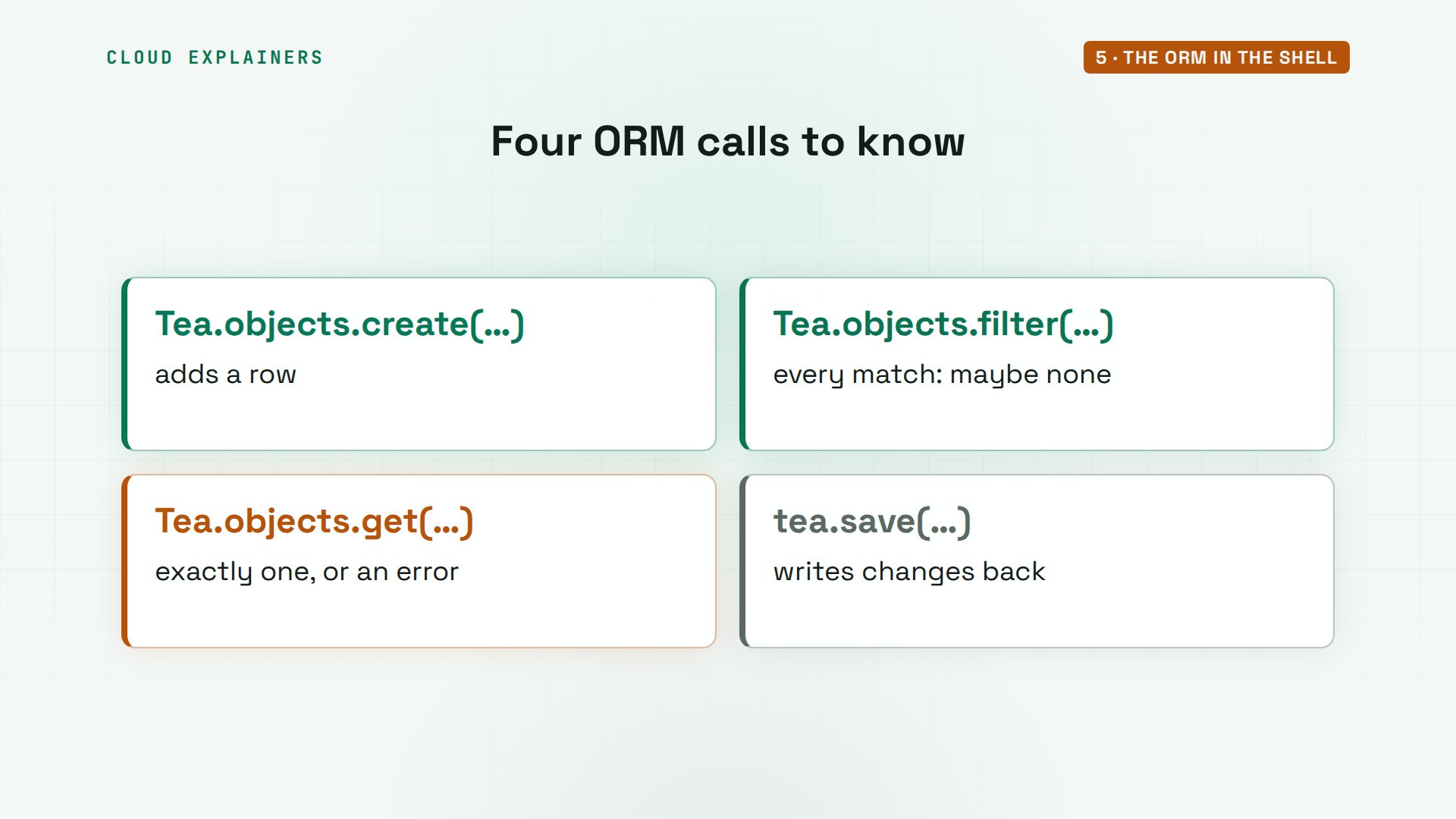
Four ORM calls cover most of what a beginner's site needs. create adds a row. filter returns every match, maybe none. get returns exactly one, or raises an error. And save writes your changes back.
The admin site
Typing Python to add a tea is fine for Ana, but her helper Ben needs a screen with forms. Django has one built in: the admin site. How much code does it take to manage teas there? One line, plus two imports. Register the Tea model, and the admin builds the list and every form from the model's fields.
cat shop/admin.pyfrom django.contrib import admin

from .models import Tea

admin.site.register(Tea)
The admin needs someone to log in. createsuperuser makes an account with every permission. Ana leaves the username blank, so it's ana, gives an email, and types a password twice. The terminal shows nothing while she types it. Then slash admin: a 302, a redirect, to the login page, because nobody is logged in yet.
uv run manage.py createsuperuserUsername (leave blank to use 'ana'):
Email address: ana@example.com
Password:

Password (again):

Superuser created successfully.
curl -sI localhost:8000/admin/ | grep -E "HTTP|Location"HTTP/1.1 302 Found
Location: /admin/login/?next=/admin/
Here's that login page: Django administration, a username, a password, and log in. Behind it, Django already stores users, hashed passwords, sessions, and who may change what. That's what those first migrations were for: the tables behind every login.
w3m -dump http://localhost:8000/admin/Skip to main content
Django administration
Toggle theme (current theme: auto) Toggle theme (current theme: light) Toggle
theme (current theme: dark)
Username: [                    ]
Password: [                    ]
[Log in]
Once Ana logs in, the admin lists her teas, with a form to add one, edit one, or delete one, and it checks every field the way the model says: a unique slug, a price with two decimals, stock never below zero. It's for the shop's staff, like Ben, not for customers.
A page for every tea
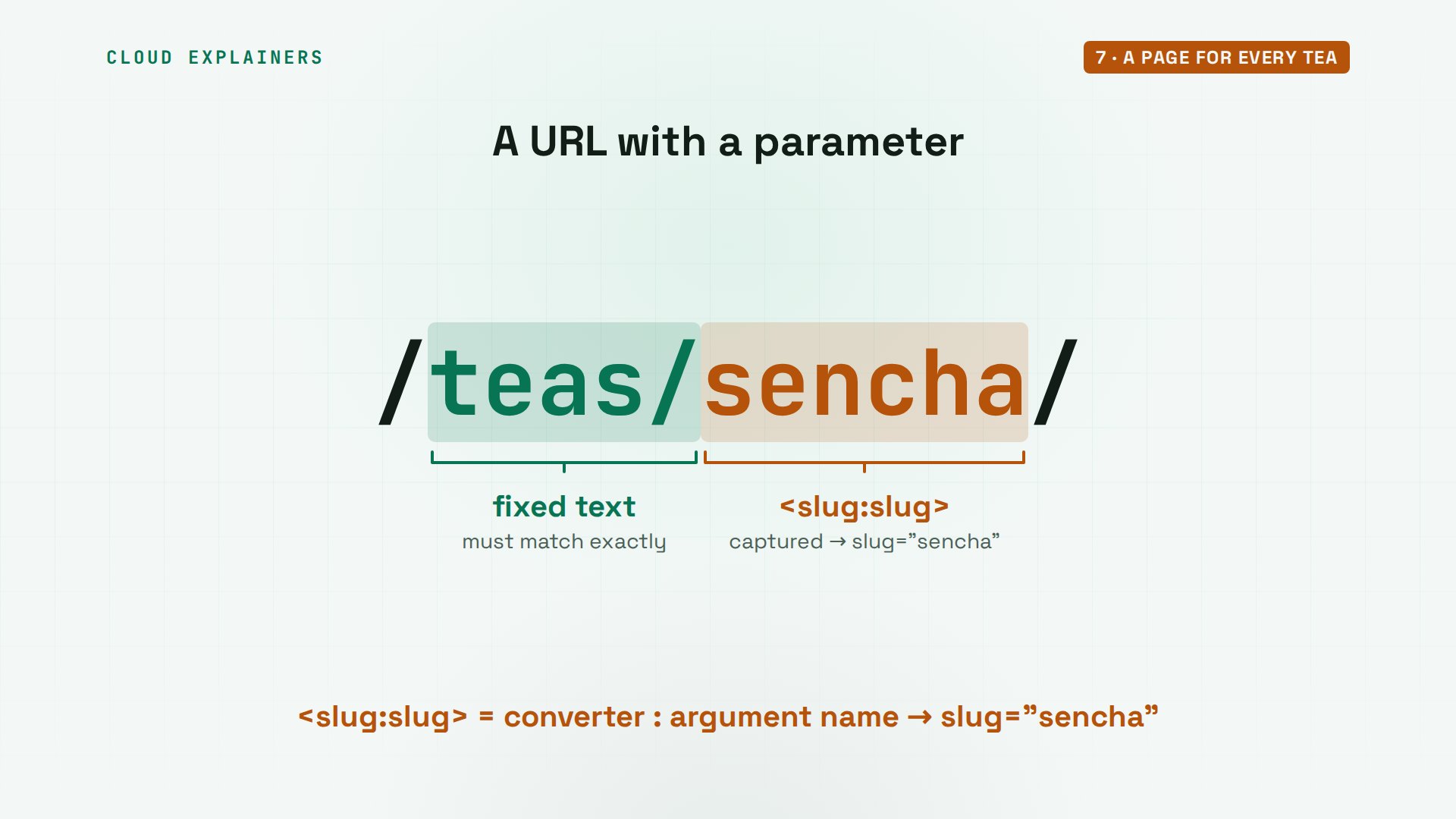
Each tea should have its own page, at slash teas, slash its slug. A URL pattern can capture part of the address. Angle brackets, slug, colon, slug: match a slug here, and pass it to the view as an argument called slug. The view gets the tea with that slug, or, if there's none, answers 404 instead of crashing.
cat shop/urls.pyfrom django.urls import path

from . import views

urlpatterns = [
    path("", views.tea_list, name="tea_list"),
    path("teas/<slug:slug>/", views.tea_detail, name="tea_detail"),
]
tail -n 3 shop/views.pydef tea_detail(request, slug):
    tea = get_object_or_404(Tea, slug=slug)
    return render(request, "shop/tea_detail.html", {"tea": tea})
Take slash teas slash sencha. Teas is fixed text. Sencha is captured, checked that it looks like a slug, and handed to the view. The pattern's name, tea detail, lets templates build these links without typing the address.
The list now links to each tea, built with that url tag. And the Sencha page: 12.50 dollars a bag, 38 in stock, the number Ana saved in the shell. A tea that doesn't exist, matcha? 404, as planned.
cat shop/templates/shop/tea_detail.html{% extends "shop/base.html" %}

{% block title %}{{ tea.name }}{% endblock %}

{% block content %}
<h2>{{ tea.name }}</h2>
<p>${{ tea.price }} per bag, {{ tea.stock }} in stock.</p>
<p><a href="{% url 'tea_list' %}">All teas</a></p>
{% endblock %}
curl -s -o /dev/null -w "%{http_code}\n" localhost:8000/teas/matcha/404
On the map, nothing new, and that's the point: a second page is one more URL pattern, one more view, and one more template, on the same path as the first.
Forms and CSRF
Now customers can order. An order is new data, so it's a new model: which tea, how many, at least one, an email, and when it was made. Foreign key links each order to one tea. A model changed, so: the two commands. Migration 2 adds the order table.
tail -n 5 shop/models.pyclass Order(models.Model):
    tea = models.ForeignKey(Tea, on_delete=models.PROTECT)
    quantity = models.PositiveIntegerField(validators=[MinValueValidator(1)])
    email = models.EmailField()
    created = models.DateTimeField(auto_now_add=True)
uv run manage.py makemigrationsMigrations for 'shop':
  shop/migrations/0002_order.py
    + Create model Order
uv run manage.py migrateOperations to perform:
  Apply all migrations: admin, auth, contenttypes, sessions, shop
Running migrations:
  Applying shop.0002_order... OK
A form takes what a person typed and checks it. A model form builds itself from a model: here, only quantity and email, because the tea comes from the address. The view makes the form from the posted data, or empty on a first visit. If it's valid, it fills in the tea, saves the order, and redirects to a thank-you page. If not, the page comes back with the errors.
cat shop/forms.pyfrom django import forms

from .models import Order


class OrderForm(forms.ModelForm):
    class Meta:
        model = Order
        fields = ["quantity", "email"]
tail -n 15 shop/views.pydef order(request, slug):
    tea = get_object_or_404(Tea, slug=slug)
    form = OrderForm(request.POST or None)
    if form.is_valid():
        new_order = form.save(commit=False)
        new_order.tea = tea
        new_order.save()
        return redirect("thanks")
    return render(request, "shop/order.html", {"tea": tea, "form": form})


def thanks(request):
    return HttpResponse("Thank you! Your order is in.")
The template prints the form with one tag, as paragraphs. And one more tag, csrf token. The page shows Sencha's order form: quantity, email, place order. But the raw HTML holds something you can't see: a hidden field, with a long random value.
cat shop/templates/shop/order.html{% extends "shop/base.html" %}

{% block content %}
<h2>Order {{ tea.name }}</h2>
<form method="post">
  {% csrf_token %}
  {{ form.as_p }}
  <button type="submit">Place order</button>
</form>
{% endblock %}
w3m -dump http://localhost:8000/teas/sencha/order/Ana's Tea Shop

Order Sencha

Quantity: [                    ]

Email: [                    ]

Place order
curl -s localhost:8000/teas/sencha/order/ | grep csrf<input type="hidden" name="csrfmiddlewaretoken" value="9Puej9JfeeMaUk5zu9pydVwyUPvVFEsUE45bjpimK1JZHW9lsBjcNBWK8OZrtmSp">
Now a script posts an order straight to that address, the way another website could make your browser do, without ever loading the form. Guess first: what happens? 403, forbidden. The server window says why: CSRF cookie not set. That's the line from the start: the CSRF middleware, already in the settings Django wrote.
D="quantity=2&email=sam@example.com"
curl -s -o /dev/null -w "%{http_code}\n" -d "$D" localhost:8000/teas/sencha/order/403
[08/Nov/2026 02:13:32] "GET /teas/sencha/order/ HTTP/1.0" 200 642
[08/Nov/2026 02:13:32] "GET /teas/sencha/order/ HTTP/1.1" 200 642
Forbidden (CSRF cookie not set.): /teas/sencha/order/
[08/Nov/2026 02:13:32] "POST /teas/sencha/order/ HTTP/1.1" 403 2908
CSRF means cross-site request forgery. A page on another site makes your browser post to Ana's shop, with your login cookie attached. The defence: Ana's own page hands the browser a secret token, in a cookie and in the form. A real post sends it back. The other site can't read it, so its post is refused.
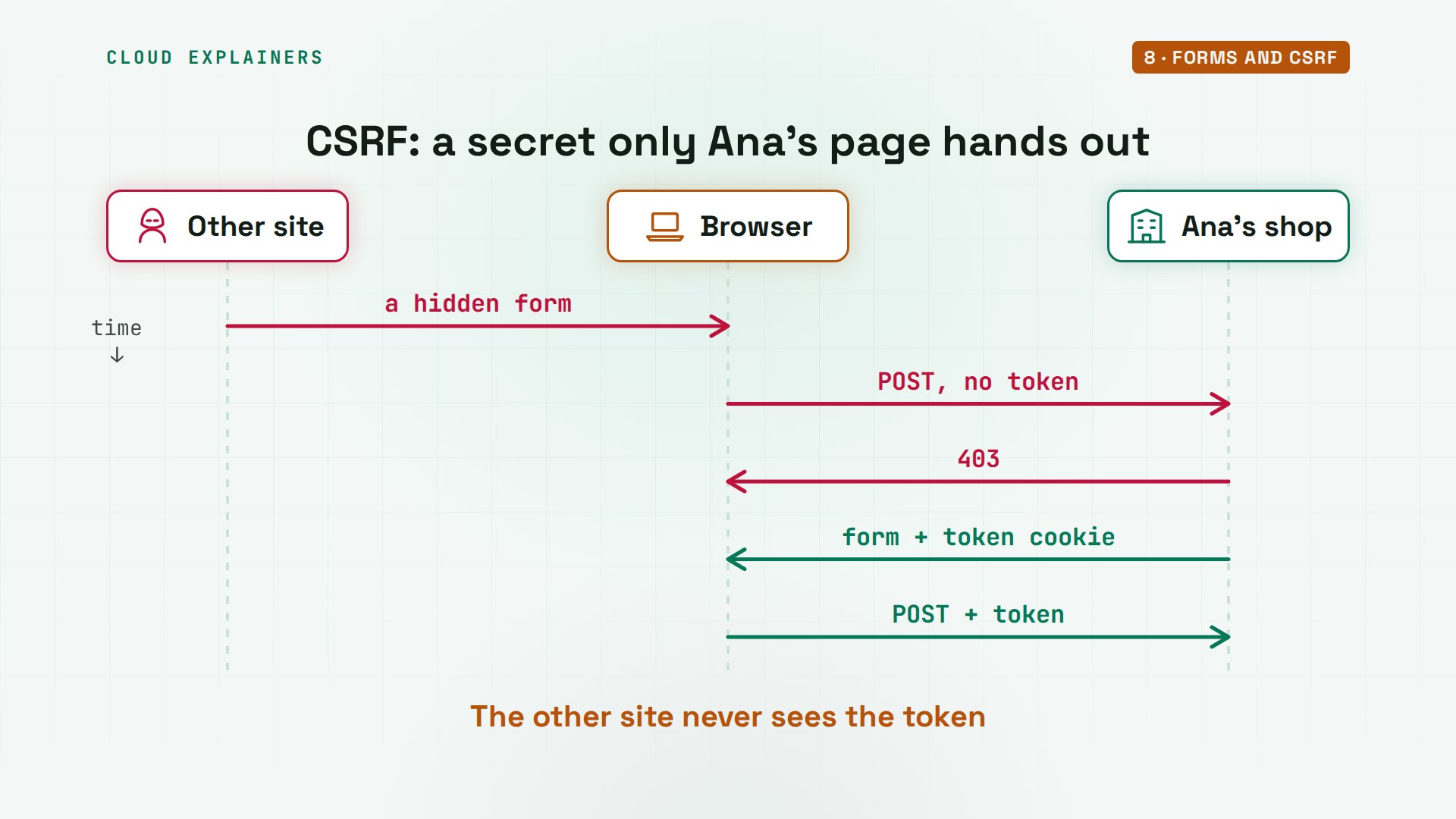
So the script does what a browser does. First it loads the form and keeps the cookie in a jar file. It reads the token from the jar, then posts with both. 302, a redirect to the thank-you page: the order is saved. And nonsense, quantity 0 and no proper email? The page comes back with both errors, written by Django from the model's rules.
curl -s -c jar.txt -o /dev/null localhost:8000/teas/sencha/order/
T=$(awk '/csrftoken/ {print $7}' jar.txt)
curl -si -b jar.txt -d "$D&csrfmiddlewaretoken=$T" localhost:8000/teas/sencha/order/ | grep -E "HTTP|Loc"HTTP/1.1 302 Found
Location: /thanks/
curl -s -b jar.txt -d "quantity=0&email=sam&csrfmiddlewaretoken=$T" localhost:8000/teas/sencha/order/ | w3m -dump -T text/htmlAna's Tea Shop

Order Sencha

  • Ensure this value is greater than or equal to 1.

Quantity: [0                   ]

  • Enter a valid email address.

Email: [sam                 ]

Place order
Why redirect after saving, instead of showing thank you straight away? Because a browser repeats the last request when you press reload. After a redirect, the last request is a harmless GET for the thank-you page, so a reload can't place the order twice. And the shell confirms: one order in the table, the good one.
uv run manage.py shell -c "print(Order.objects.count())"14 objects imported automatically (use -v 2 for details).

1
On the map, the form sits next to the view. It checks the input before the view saves anything, and the CSRF check runs before the view even starts.
Tests catch a bug
How does Ana know all this keeps working when she changes something next month? Tests. Django's test runner makes a fresh, empty test database, runs every test against it, and throws it away, so tests never touch her real teas. Each test uses a test client, a pretend browser that sends requests without a server.
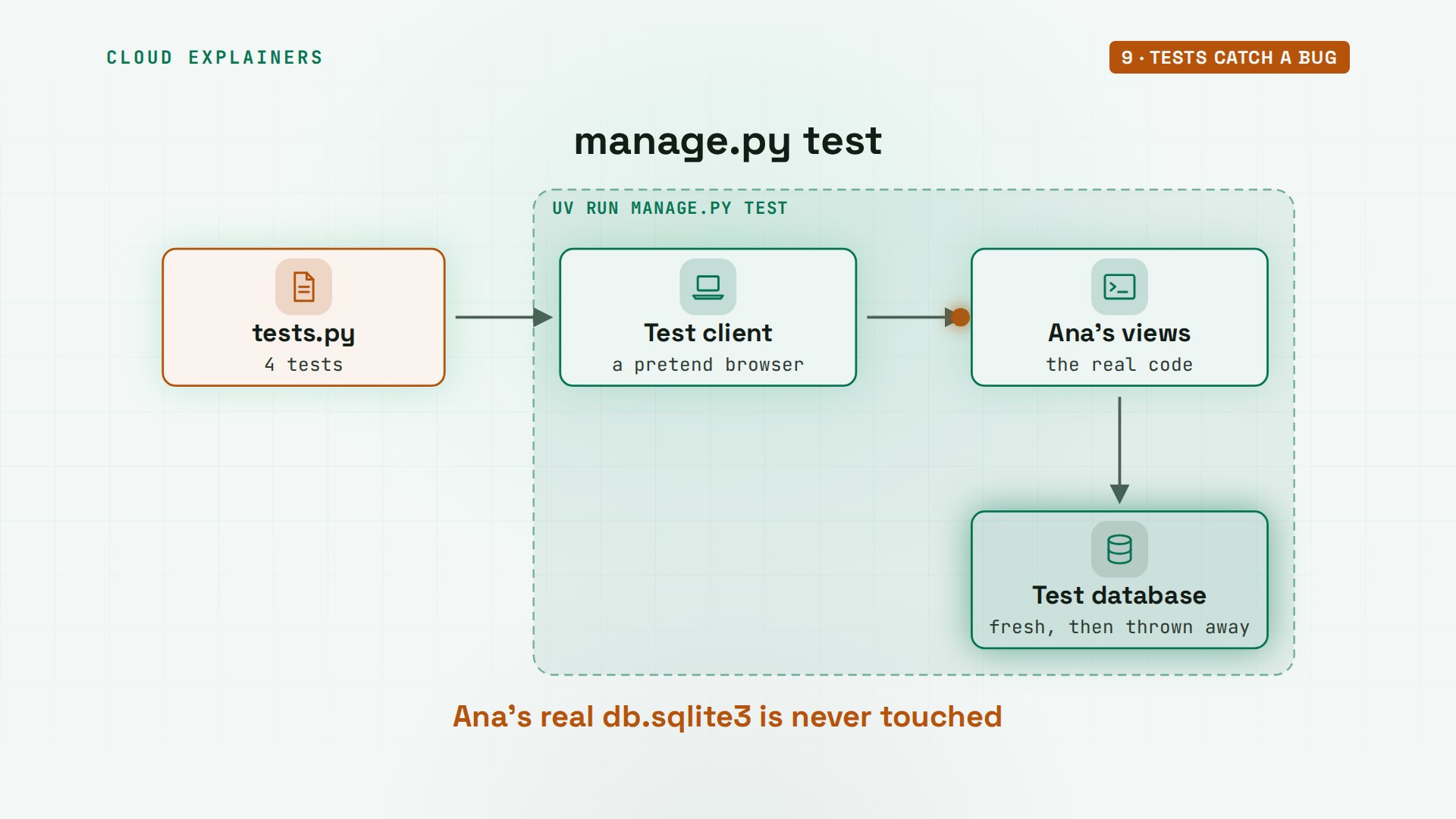
Ana writes 4. Before each one, setUp makes one tea, Sencha, with 3 in stock. The list shows Sencha. A missing tea is a 404. Posting an order saves one. And the last: ordering 5 when only 3 are left should save nothing.
head -n 17 shop/tests.pyfrom django.test import TestCase

from .models import Order, Tea


class ShopTests(TestCase):
    def setUp(self):
        Tea.objects.create(name="Sencha", slug="sencha", price="12.50", stock=3)

    def test_list_shows_teas(self):
        response = self.client.get("/")
        self.assertContains(response, "Sencha")

    def test_missing_tea_is_404(self):
        response = self.client.get("/teas/nope/")
        self.assertEqual(response.status_code, 404)
tail -n +18 shop/tests.pydef test_order_is_saved(self): data = {"quantity": 2, "email": "sam@example.com"} self.client.post("/teas/sencha/order/", data) self.assertEqual(Order.objects.count(), 1) def test_cannot_order_more_than_stock(self): data = {"quantity": 5, "email": "sam@example.com"} self.client.post("/teas/sencha/order/", data) self.assertEqual(Order.objects.count(), 0)
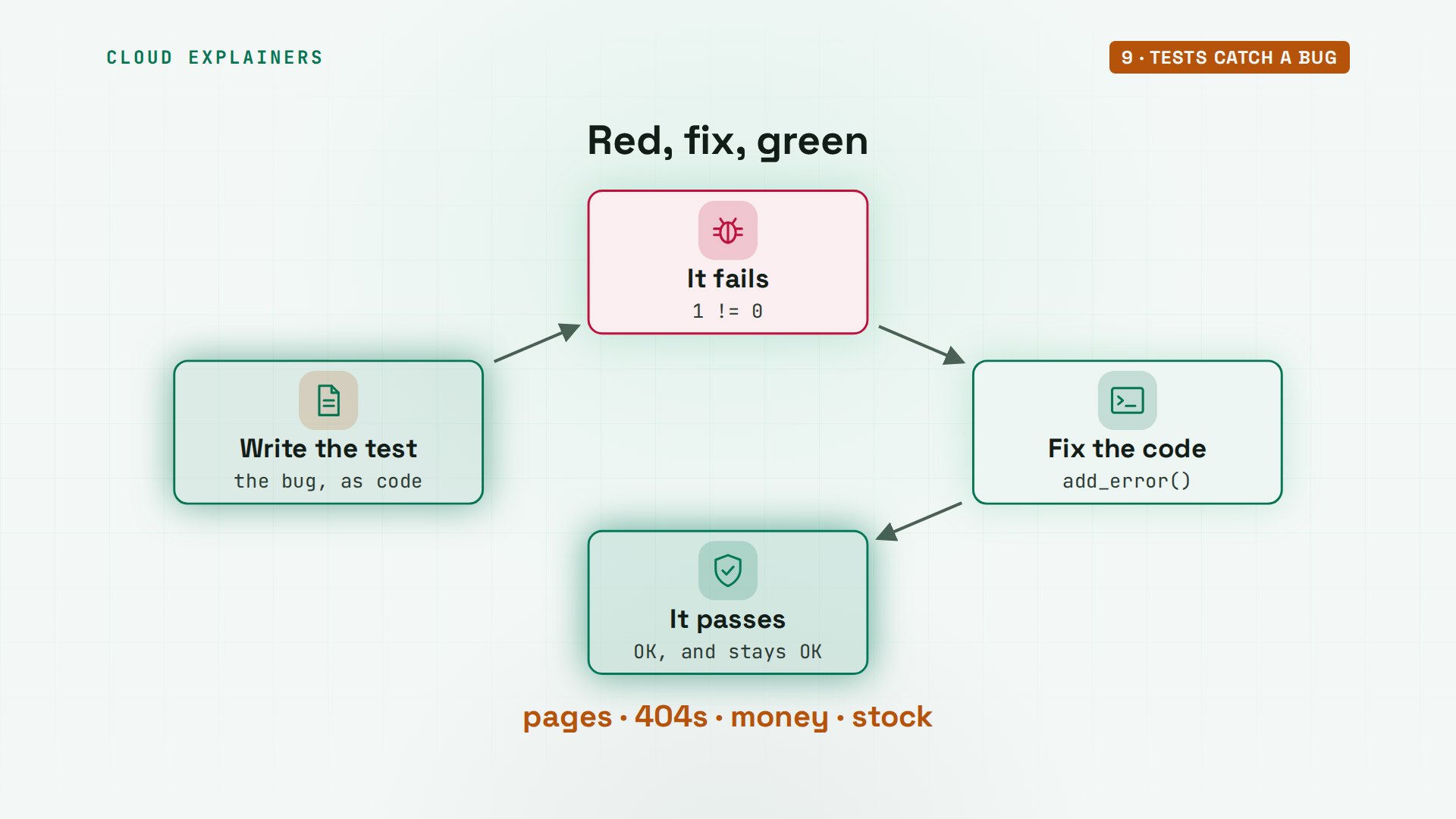
uv run manage.py test. 4 tests ran, three passed, and one failed: the stock test. It expected no orders, and found one. A real bug: the shop happily sells tea it doesn't have. The form only checks that quantity is at least one.
uv run manage.py testFound 4 test(s).
Creating test database for alias 'default'...
System check identified no issues (0 silenced).
F...
======================================================================
FAIL: test_cannot_order_more_than_stock (shop.tests.ShopTests.test_cannot_order_more_than_stock)
----------------------------------------------------------------------
Traceback (most recent call last):
  File "/home/ana/teashop/shop/tests.py", line 26, in test_cannot_order_more_than_stock
    self.assertEqual(Order.objects.count(), 0)
AssertionError: 1 != 0

----------------------------------------------------------------------
Ran 4 tests in 0.041s

FAILED (failures=1)
Destroying test database for alias 'default'...
The fix goes in the view. After the form's own checks pass, compare the quantity with the tea's stock. Too many? Add an error to the quantity field, and the page comes back, like any other form error. Run the tests again: four dots, OK. And on the real site, five Jasmine Pearls: only 3 left in stock.
grep -A 10 "def order" shop/views.pydef order(request, slug):
    tea = get_object_or_404(Tea, slug=slug)
    form = OrderForm(request.POST or None)
    if form.is_valid():
        if form.cleaned_data["quantity"] > tea.stock:
            form.add_error("quantity", f"Only {tea.stock} left in stock.")
        else:
            new_order = form.save(commit=False)
            new_order.tea = tea
            new_order.save()
            return redirect("thanks")
curl -s -b jar.txt -d "quantity=5&email=sam@example.com&csrfmiddlewaretoken=$T" localhost:8000/teas/jasmine-pearls/order/ | w3m -dump -T text/htmlAna's Tea Shop

Order Jasmine Pearls

  • Only 3 left in stock.

Quantity: [5                   ]

Email: [sam@example.com     ]

Place order
What's worth a test? Anything a customer would notice: a page that must show, an address that must be a 404, and every rule about money or stock. Write the test when you find the bug, watch it fail, fix the code, and watch it pass. Then that bug can't come back without a red line.
Before you go live
Is this ready for the internet? Django can tell you: manage.py check, dash dash deploy. 8 issues. Debug must be off. The list of allowed host names is empty. The secret key is the insecure one startproject made. And cookies should only travel over HTTPS.
uv run manage.py check --deploySystemCheckError: System check identified some issues:

ERRORS:
?: (mail.E001) Your MAILERS setting uses a development-only email backend in the 'default' entry (django.core.mail.backends.console.EmailBackend).
	HINT: Use a production-ready email backend, such as the SMTP backend, otherwise email will not be sent.

WARNINGS:
?: (security.W004) You have not set a value for the SECURE_HSTS_SECONDS setting. If your entire site is served only over SSL, you may want to consider setting a value and enabling HTTP Strict Transport Security. Be sure to read the documentation first; enabling HSTS carelessly can cause serious, irreversible problems.
?: (security.W008) Your SECURE_SSL_REDIRECT setting is not set to True. Unless your site should be available over both SSL and non-SSL connections, you may want to either set this setting True or configure a load balancer or reverse-proxy server to redirect all connections to HTTPS.
?: (security.W009) Your SECRET_KEY has less than 50 characters, less than 5 unique characters, or it's prefixed with 'django-insecure-' indicating that it was generated automatically by Django. Please generate a long and random value, otherwise many of Django's security-critical features will be vulnerable to attack.
?: (security.W012) SESSION_COOKIE_SECURE is not set to True. Using a secure-only session cookie makes it more difficult for network traffic sniffers to hijack user sessions.
?: (security.W016) You have 'django.middleware.csrf.CsrfViewMiddleware' in your MIDDLEWARE, but you have not set CSRF_COOKIE_SECURE to True. Using a secure-only CSRF cookie makes it more difficult for network traffic sniffers to steal the CSRF token.
?: (security.W018) You should not have DEBUG set to True in deployment.
?: (security.W020) ALLOWED_HOSTS must not be empty in deployment.

System check identified 8 issues (0 silenced).
Ana turns debug off in settings.py. The server reloads, and refuses to start: you must set allowed hosts if debug is false. Allowed hosts is the list of names this site answers to. She adds localhost, and starts the server again.
/home/ana/teashop/config/settings.py changed, reloading.
CommandError: You must set settings.ALLOWED_HOSTS if DEBUG is False.
uv run manage.py runserveruv run manage.py runserver
Performing system checks...

System check identified no issues (0 silenced).
November 08, 2026 - 02:14:01
Django version 6.1.3, using settings 'config.settings'
Starting WSGI development server at http://127.0.0.1:8000/
Quit the server with CONTROL-C.

WARNING: This is a development server. Do not use it in a production setting. Use a production WSGI or ASGI server instead.
For more information on production servers see: https://docs.djangoproject.com/en/6.1/howto/deployment/
Here are the two lines now: debug false, and allowed hosts, localhost. On a real server you'd put your domain name there. And the missing tea now gets a plain not found page, instead of a list of every URL pattern for any stranger to read.
grep -n -E "^(DEBUG|ALLOWED_HOSTS)" config/settings.py26:DEBUG = False
28:ALLOWED_HOSTS = ['localhost', '127.0.0.1']
w3m -dump http://localhost:8000/teas/matcha/Not Found

The requested resource was not found on this server.
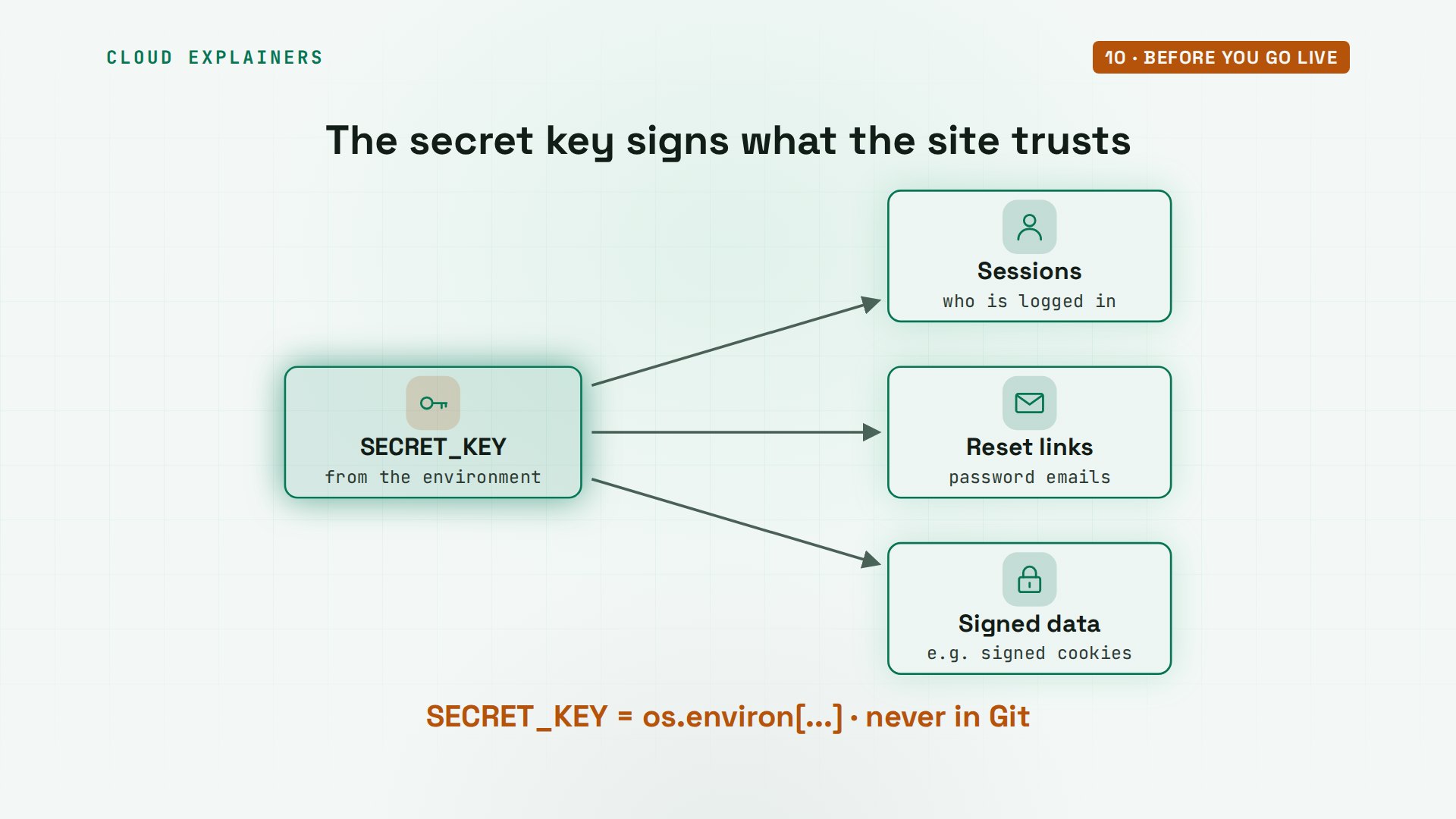
Why keep the secret key out of the code? Django signs sessions, password reset links and other signed data with it. Anyone who reads it can make ones your site trusts. So the code reads it from the server's environment, and the real value never goes into Git.
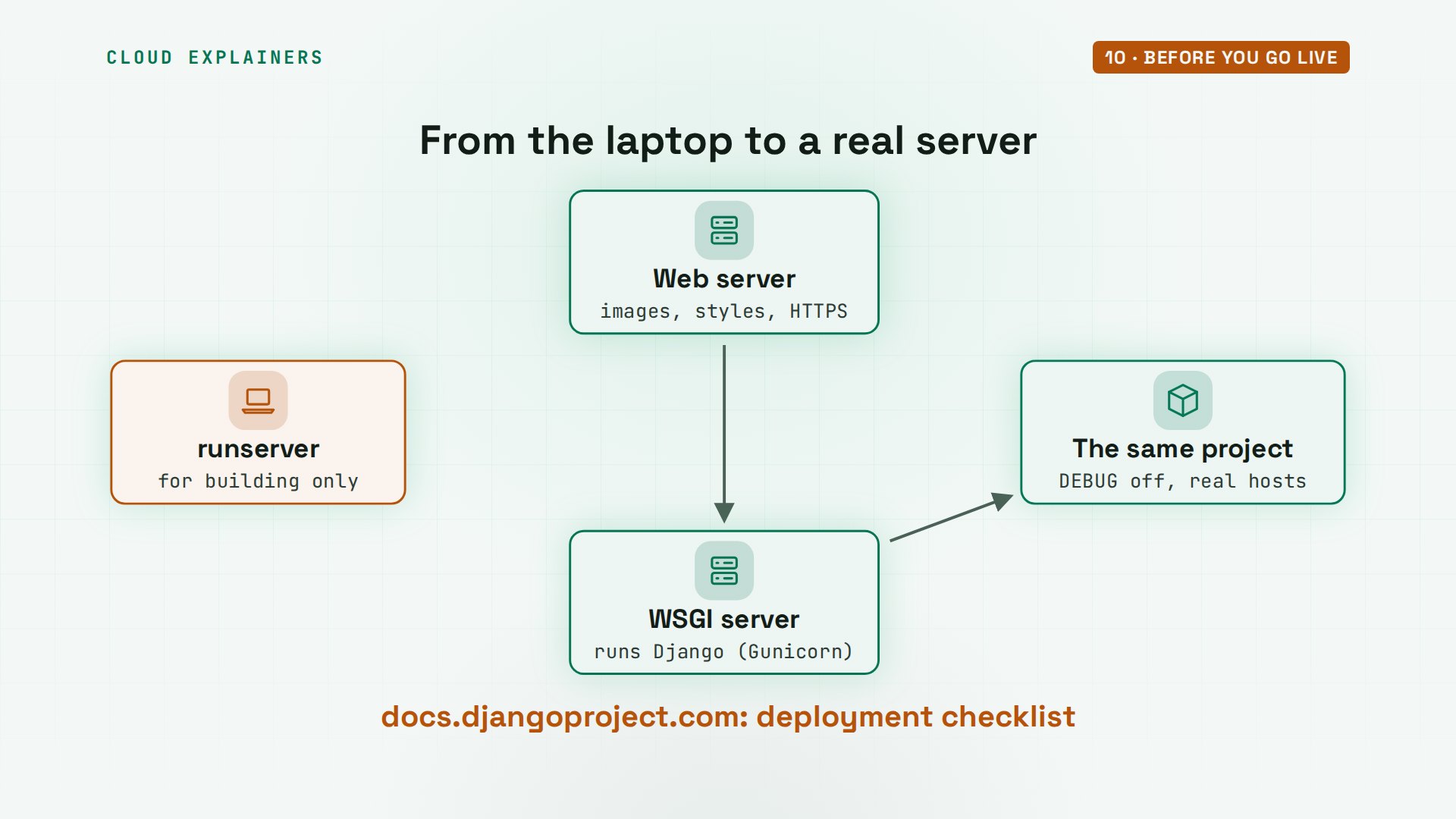
What's left for a real launch? runserver is for building only: it said so in every start-up message. In production, a WSGI server like Gunicorn runs the same project, a web server in front of it serves images and styles, and Django's deployment checklist walks you through the rest.
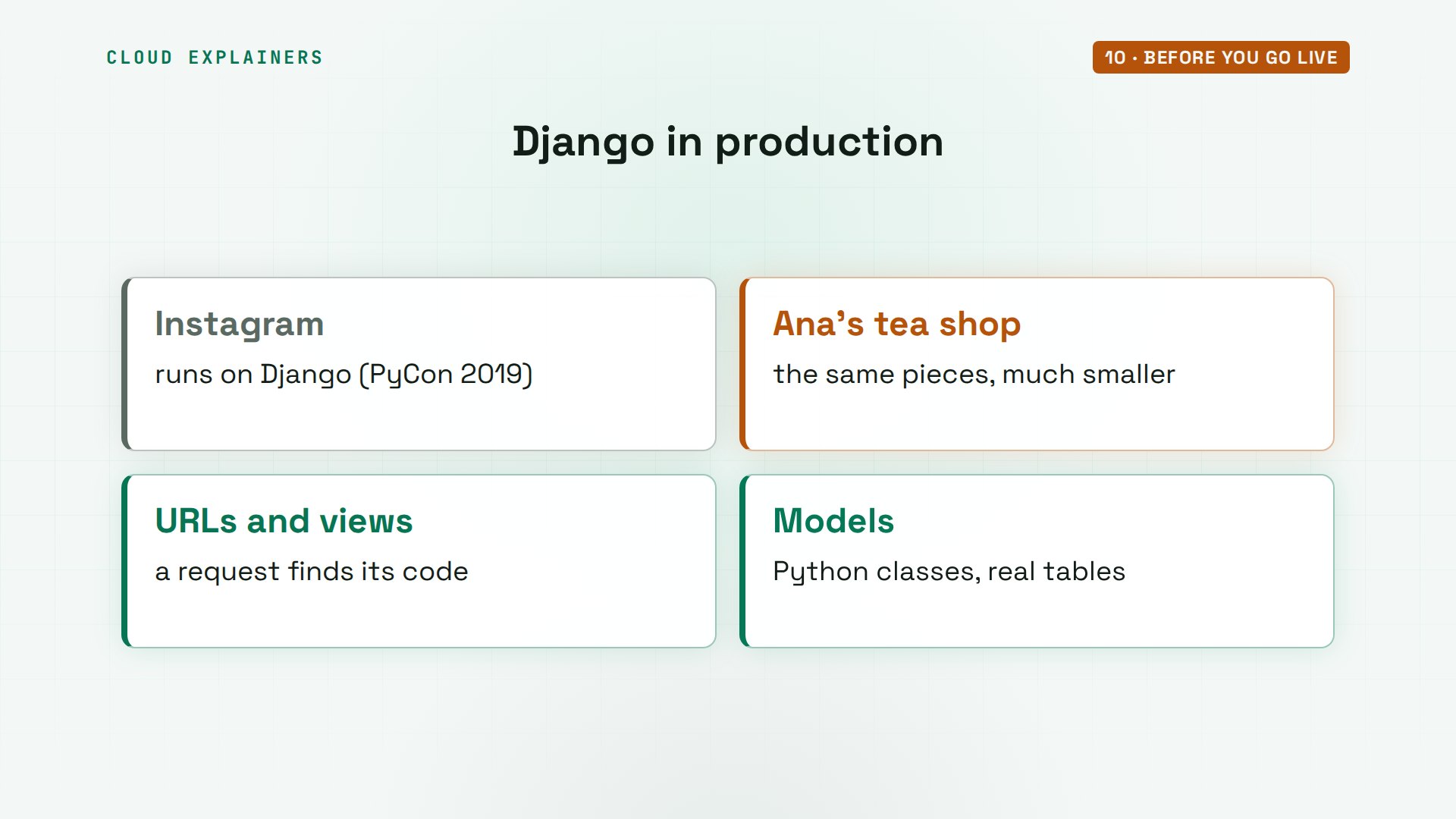
And it isn't only for small shops. Instagram runs Django on its servers, at a size most sites never reach, and its engineers have talked about it in public, like at PyCon 2019. The same pieces you just used: URLs, views, models.
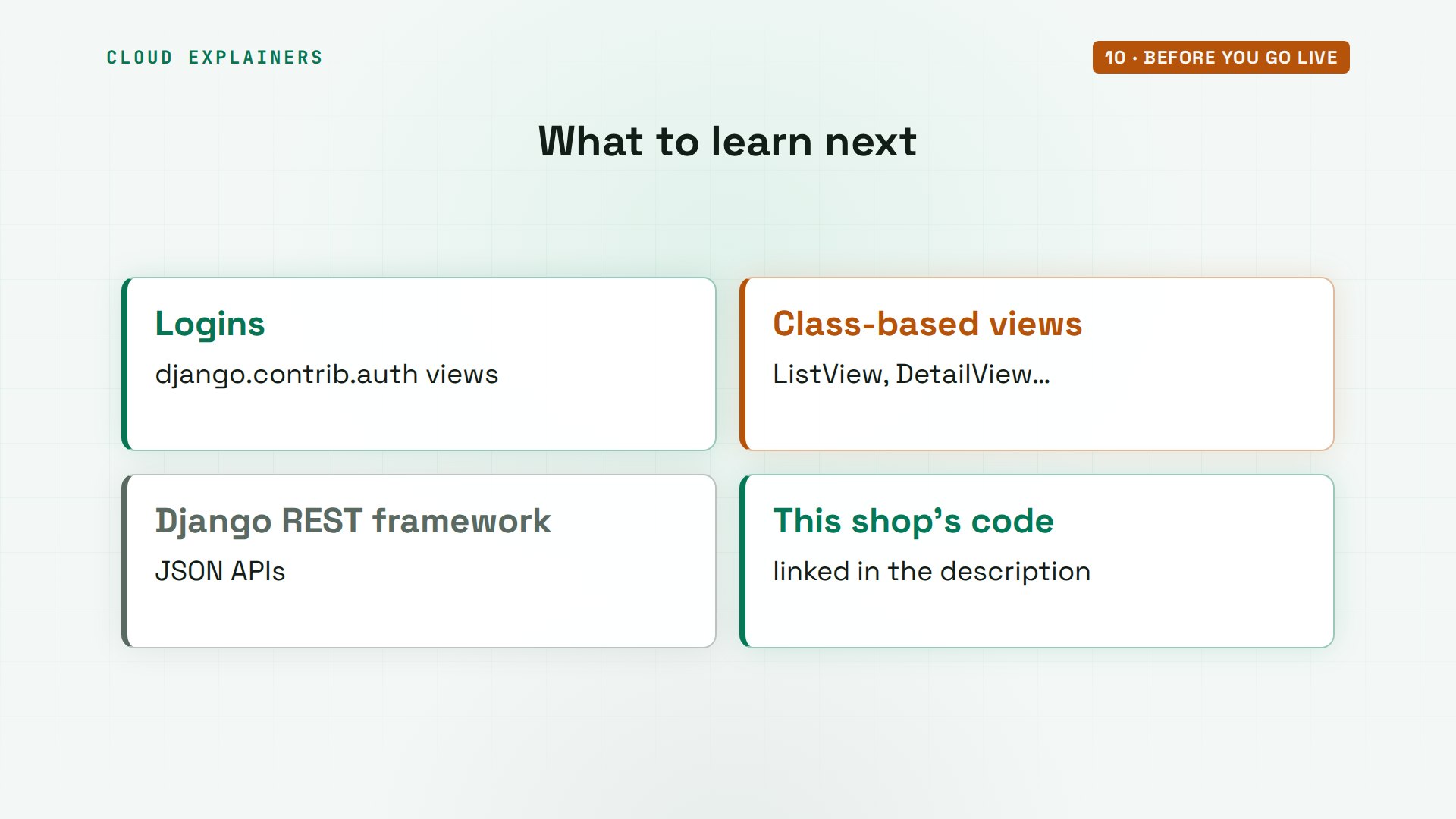
Where next? Django's own login views, so customers can see their orders. Class-based views, which shrink pages like these to a few lines. And Django REST framework, when an app needs JSON instead of pages.
Recap
So: a URL picks a view, the view asks a model, a template draws the page. Forms check input, the admin comes free, and tests catch bugs.
If this tutorial helped, a like helps YouTube show it to more beginners, and subscribing brings you the next one.
Every command and output in this tutorial came from a real run, on Ubuntu 24.04.5 LTS, with Django 6.1.3. Thanks for watching Cloud Explainers.
Sources
- Django 6.1 docs, tutorial and topics (startproject, startapp, views, URL dispatcher, models, migrations, templates, the admin, forms, testing)
- Django docs, Cross Site Request Forgery protection
- Django docs, deployment checklist (check --deploy)
- uv docs, installation and projects (uv init, uv add, uv run)
- The question, Django Forum, "No such table error"
- Instagram at PyCon 2019
Demos: a stock Ubuntu 24.04 container on our own lab machine, standing in for a laptop; the tea shop, its teas, orders, account and email addresses are made up and run inside the lab. Watch the full video on YouTube.
More videos

Linux Makefiles Will Finally Make Sense After This

SAML vs OAuth vs OpenID Connect: What's the Difference?

How to Fix Python cron Jobs That Never Run

Linux Bash Scripting: Full Tutorial for Beginners

How PXE Network Boot Works

How Active Directory Works

How to Fix a Linux systemd Service That Won't Start

Linux Logs: syslog vs journald

JWT vs Session Cookies: Which One Should You Use?

Docker vs Docker Compose: Which One Should You Use?

How to Fix Docker Compose Containers That Can't Talk to Each Other

How Linux systemd Works

How to Fix 'Windows Cannot Access' Network Share Errors (SMB)

REST vs gRPC: Which One Should You Use?

How to Fix SSL Certificate Chain Errors (Missing Intermediate)

Every Python Concept for Beginners in 10 Minutes

Every SQL Join Type in 10 Minutes

Why OpenRouter Free Models Hit Their Limit So Fast

Why Your Gemini API Free Tier Runs Out So Fast

OpenRouter Will Finally Make Sense After This

How Redis Caching Works

Gemini API vs Vertex AI: Which One Should You Use?

How to Fix a Leaked Gemini API Key

Why Golang Uses Goroutines Instead of Threads

How to Fix Gemini API Error 429: Resource Exhausted

Claude Token Pricing Will Finally Make Sense After This

Why Python Web Scraping Returns Nothing (and the Fix)

Python uv vs pip: Which One Should You Use?

Python Automation: Full Tutorial for Beginners

How OAuth Login Works

Google AI Studio Will Finally Make Sense After This

What Happens When You Run a Docker Container

How to Fix Claude Code Billing Your API Key Instead of Your Plan

Why Passkeys Can't Be Phished Like Passwords

PowerShell vs Bash: Which One Should You Learn?

The Linux Roadmap for Beginners

Django vs FastAPI: Which One Should You Use?

Why SQLite Is the Most Used Database in the World

How a NoSQL Database Like MongoDB Works

How to Fix Python pip error: externally-managed-environment

How to Fix MySQL Too Many Connections Database Errors

Golang Concurrency Will Finally Make Sense After This

How Amazon S3 Works

How Kubernetes Works

How Git Works

How to Fix Docker Port Already Allocated Errors

How PostgreSQL Works

How to Fix Git Merge Conflicts

How to Fix No Space Left on Device in Linux

How the Internet Works

SQL vs NoSQL: When Each One Wins

How to Fix JWT Token Expired Errors (401 Unauthorized)

Claude API vs Claude Pro: Why Your Subscription Doesn't Include It

Why AI Agent Skills Beat Giant Prompts

Linux Cron Jobs Will Finally Make Sense After This

Security Logs Will Finally Make Sense After This

How to Fix a Security Leak: An API Key Pushed to GitHub

DNS Will Finally Make Sense After This

Never Ignore a Security Update

Two-Factor Authentication Will Finally Make Sense

Never Expose a Database to the Internet

SSH Keys vs Passwords: Which Is Safer for Security?

The 5 Levels of Linux Boot: From Power On to Login

The 5 Levels of Network Firewalls

Password Security: Why Hackers Crack Weak Passwords

Why Your Linux Server Runs Out of Memory

HTTP vs HTTPS: What Actually Changes on Your Network

Every Linux File Permission You Need to Know

Linux Processes vs Threads: When Each One Wins

The OSI Model Will Finally Make Sense After This

The 7 Levels of Git

Every Network Troubleshooting Command You Need

Hashing vs Encryption in Cybersecurity: When Each One Wins

Why the Internet Ran Out of IP Addresses

Linux Package Managers: apt vs Snap vs Flatpak

Why Python Is Slow (and When It Doesn't Matter)

TCP vs UDP: When Each One Wins

Stop Running Linux as Root (Do This Instead)

Linux Users and Groups Will Finally Make Sense

Why Phishing Beats Good Security (and How to Spot It)

The 7 Levels of Docker

AI Agents Will Finally Make Sense After This

Stop Using git push --force (Use This Instead)

Agent Skills vs MCP: When Each One Wins

Networking Will Finally Make Sense After This

Every Linux Command You Actually Need

The 7 Levels of Cybersecurity

Every System Design Concept You Need, in One Diagram
