How TCP Sockets Work
How TCP sockets work, on real machines: a pizza kitchen's order screen and its tablets, written in plain Python. We follow one socket from socket(), bind(), listen() and accept() to close(): a connection that succeeds before accept() is called, the three-way handshake and a refusal in tcpdump, one port serving four connections, two orders glued into one ticket because TCP carries bytes, not messages, and 'Address already in use' from TIME-WAIT.
Two orders, one ticket
You send two messages over a TCP socket, and you expect two to arrive. At a pizza kitchen, Ana's tablet sends two orders to the kitchen screen: 2 margherita, then 1 pepperoni. The screen prints one ticket, the two orders glued together. Nothing was lost and nothing crashed. So where did the line between the orders go? The answer is in how a socket really works.
python3 kitchen.pykitchen screen: listening on port 9000
python3 tablet.py "2 margherita" "1 pepperoni"connected: 10.48.0.21:55930 -> 10.48.0.10:9000
sent: 2 margherita
sent: 1 pepperoni
python3 kitchen.pykitchen screen: listening on port 9000
tablet connected from ('10.48.0.21', 55930)
TICKET: 2 margherita1 pepperoni
One number, many lines
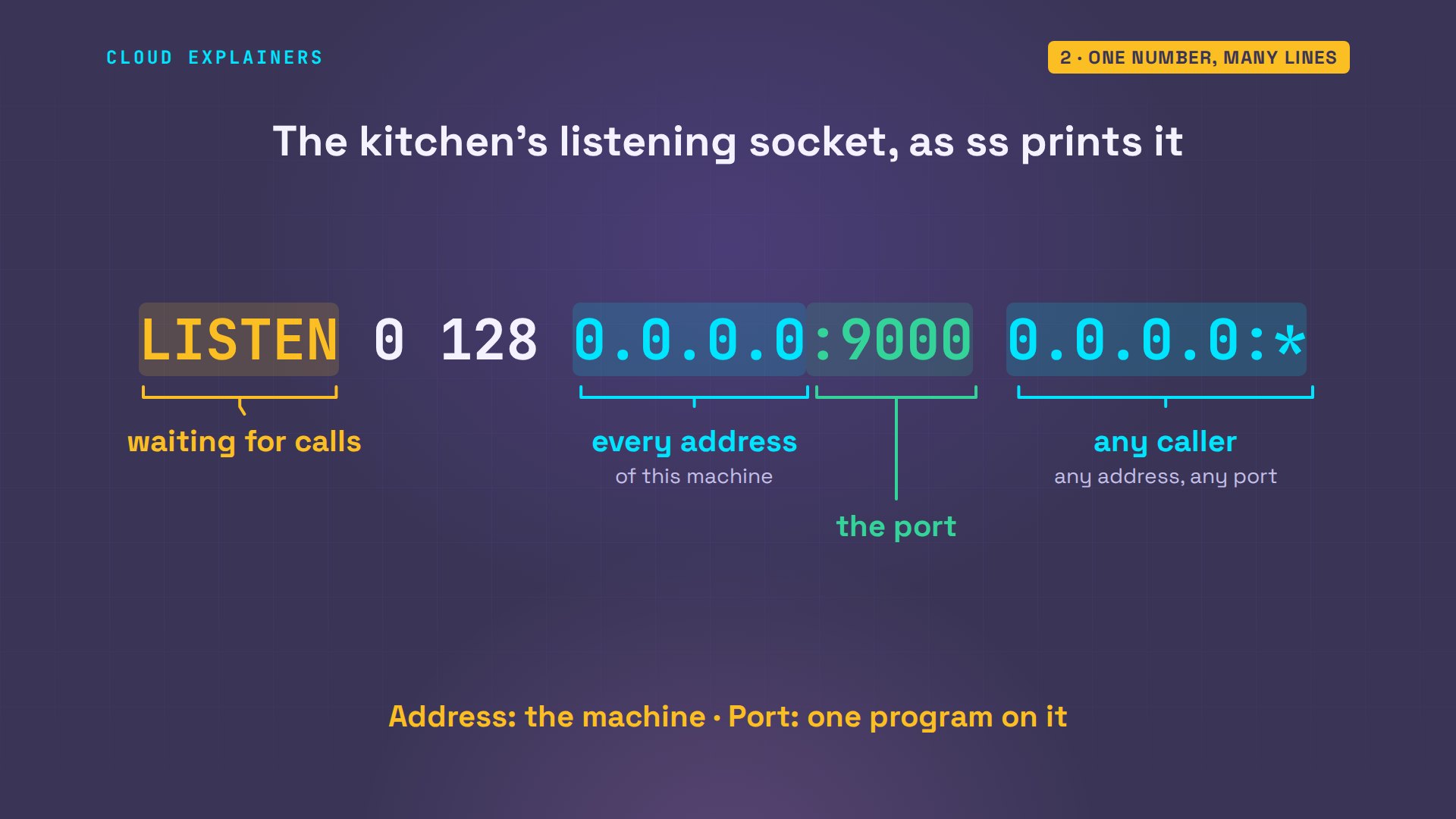
Every TCP connection runs between two addresses and two ports. The address finds the machine. The port finds one program on it: a number from 1 to 65535. Here is the kitchen's listening socket, as ss, a tool that lists a machine's sockets, prints it. LISTEN: waiting for calls. 0.0.0.0: every address this machine has. 9000: the port Ana chose. And the star: calls from any address and port.
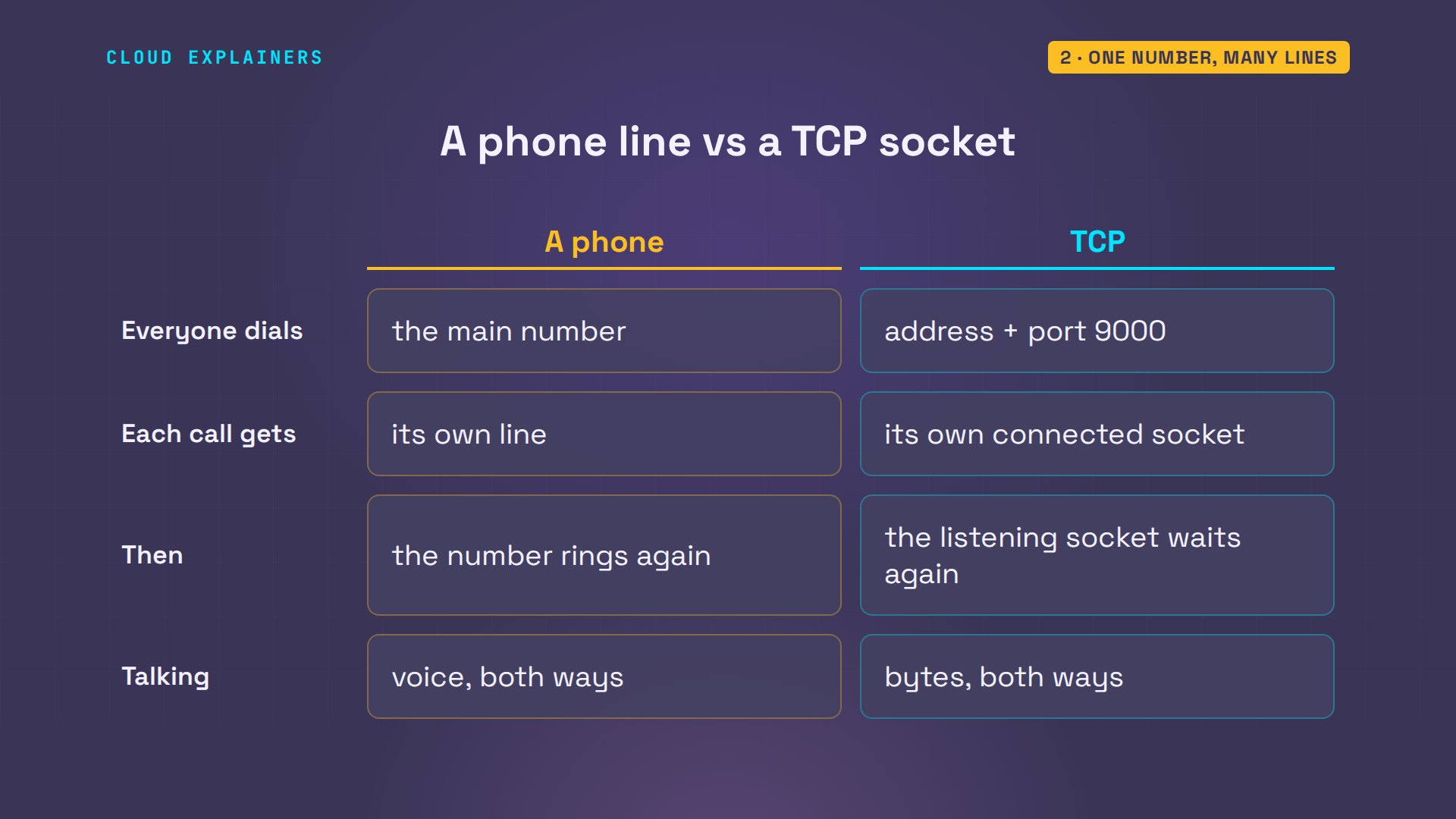
A socket is one end of a conversation between two programs. Think of a phone line. The kitchen has one number everyone dials: in TCP, an address and a port, here port 9000. When a call comes in, the caller gets a line of their own, and the main number is free to ring again. TCP works the same way: one listening socket, the number, and one connected socket for every caller.
Four calls to open the kitchen
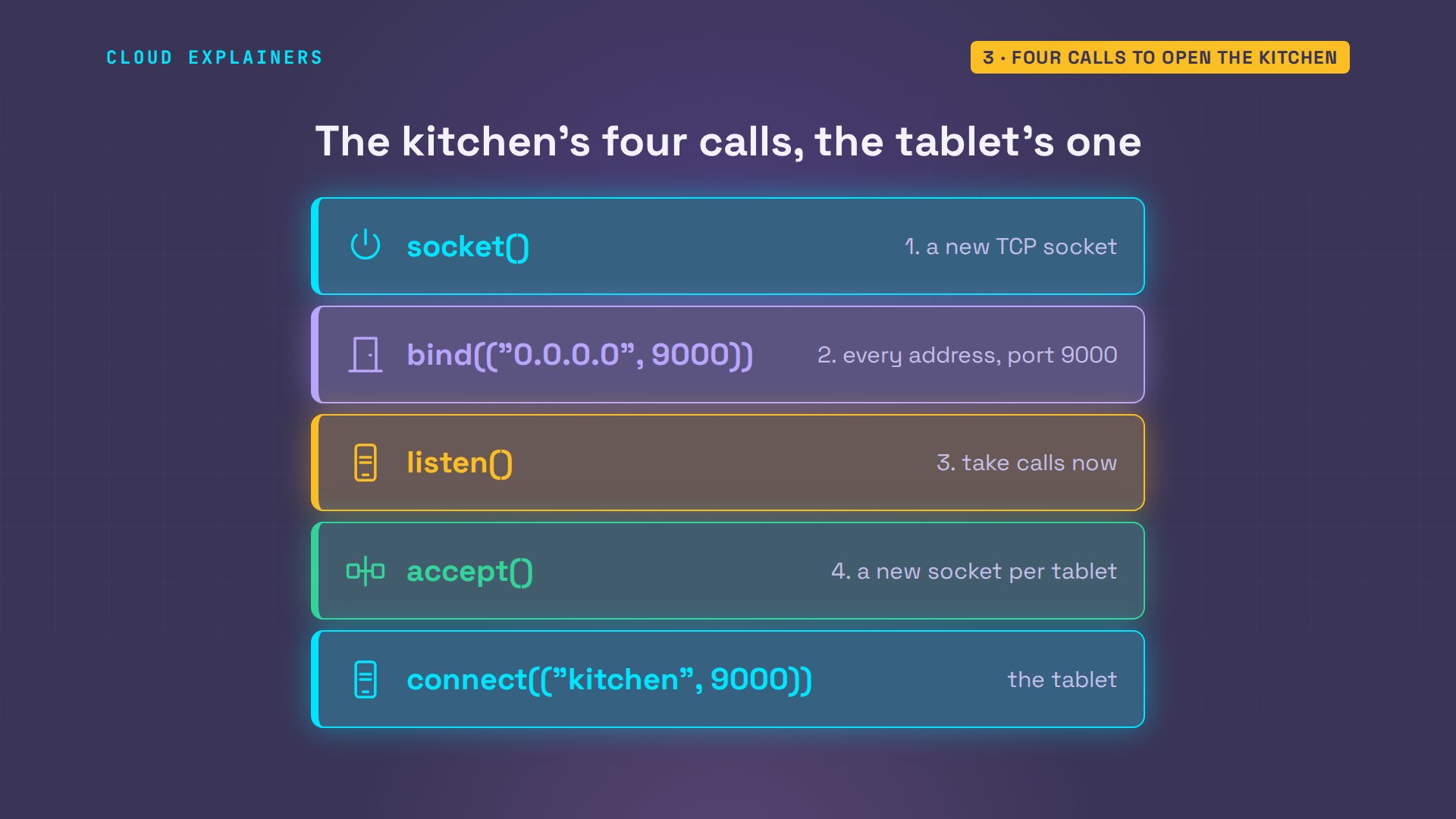
Ana's kitchen program opens with four calls. socket makes a new socket: a phone with no number yet. bind gives it an address and a port: every address on this machine, port 9000. listen says: take calls now. And accept waits for a caller, then returns a brand new socket for that one tablet. The tablet makes a socket too, then needs one more call: connect, to the kitchen's address and port.
So here's a test. This version of the screen calls listen, then waits for Enter before it calls accept. ss lists the sockets on port 9000: one, listening. Now the tablet connects and sends 4 garlic knots. Guess first: does connect work before accept? Yes. Connected, and sent.
python3 not_yet.pylistening on port 9000, not accepting yet (Enter accepts one tablet)
ss -tan 'sport = :9000'State Recv-Q Send-Q Local Address:Port Peer Address:Port Process
LISTEN 0 128 0.0.0.0:9000 0.0.0.0:*
python3 tablet.py "4 garlic knots"connected: 10.48.0.21:55942 -> 10.48.0.10:9000
sent: 4 garlic knots
So who answered? The kernel did, the core of the operating system. ss shows the listening socket with one call waiting in its queue, and a connected socket already holding fourteen bytes: the order. When Ana presses Enter, accept just hands over a call that was answered seconds ago, order and all. Your program never does the handshake. The kernel does.
ss -tan 'sport = :9000'State Recv-Q Send-Q Local Address:Port Peer Address:Port Process
LISTEN 1 128 0.0.0.0:9000 0.0.0.0:*
ESTAB 14 0 10.48.0.10:9000 10.48.0.21:55942
python3 not_yet.pylistening on port 9000, not accepting yet (Enter accepts one tablet)
accepted ('10.48.0.21', 55942) - it had already sent: 4 garlic knots
The handshake on the wire
What does that handshake look like? First, with nothing listening: the screen is closed, and the tablet connects anyway. Connection refused. tcpdump on the kitchen prints every packet, each small chunk of data, crossing its network card. It shows two: an S, a SYN, which asks: can we talk? And straight back an R, a reset: nobody is listening on port 9000.
python3 tablet.py "1 hawaiian"Traceback (most recent call last):
  File "/home/ana/tablet.py", line 6, in <module>
    tab.connect(("kitchen", 9000))
ConnectionRefusedError: [Errno 111] Connection refused
sudo timeout 6 tcpdump -n -t -l -i eth0 tcp port 9000 2>/dev/null | cut -d, -f1IP 10.48.0.21.45192 > 10.48.0.10.9000: Flags [S]
IP 10.48.0.10.9000 > 10.48.0.21.45192: Flags [R.]
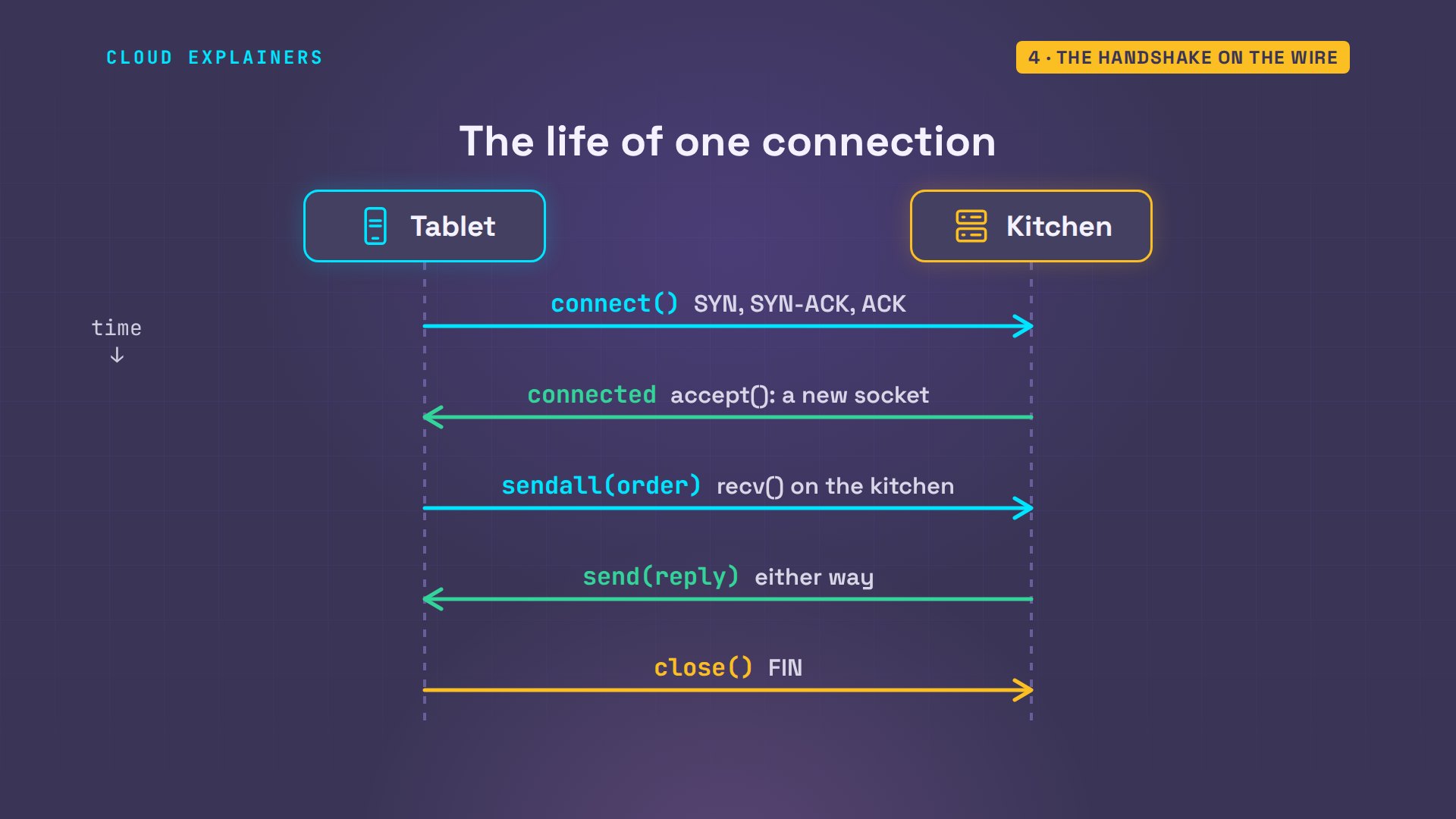
With the screen running, the same connect takes three packets. SYN from the tablet. SYN-ACK from the kitchen: yes, and can you hear me? ACK: yes, which tcpdump draws as a dot. That's the three-way handshake, and only then does connect return. The order goes in one packet marked P, for push, and the kitchen acknowledges it. When the tablet hangs up, each side sends an F, for finish, and the last ACK closes it.
sudo timeout 12 tcpdump -n -t -l -i eth0 tcp port 9000 2>/dev/null | cut -d, -f1IP 10.48.0.21.41176 > 10.48.0.10.9000: Flags [S]
IP 10.48.0.10.9000 > 10.48.0.21.41176: Flags [S.]
IP 10.48.0.21.41176 > 10.48.0.10.9000: Flags [.]
IP 10.48.0.21.41176 > 10.48.0.10.9000: Flags [P.]
IP 10.48.0.10.9000 > 10.48.0.21.41176: Flags [.]
IP 10.48.0.21.41176 > 10.48.0.10.9000: Flags [F.]
IP 10.48.0.10.9000 > 10.48.0.21.41176: Flags [F.]
IP 10.48.0.21.41176 > 10.48.0.10.9000: Flags [.]
Put together, that's the life of one connection. The kitchen listens. The tablet's connect sets off the handshake, and accept hands the kitchen its new socket. Then send on one side and recv on the other, as often as they like, in both directions. And close ends it. Your browser does exactly this for every website it opens, on port 443.
One port, many tablets
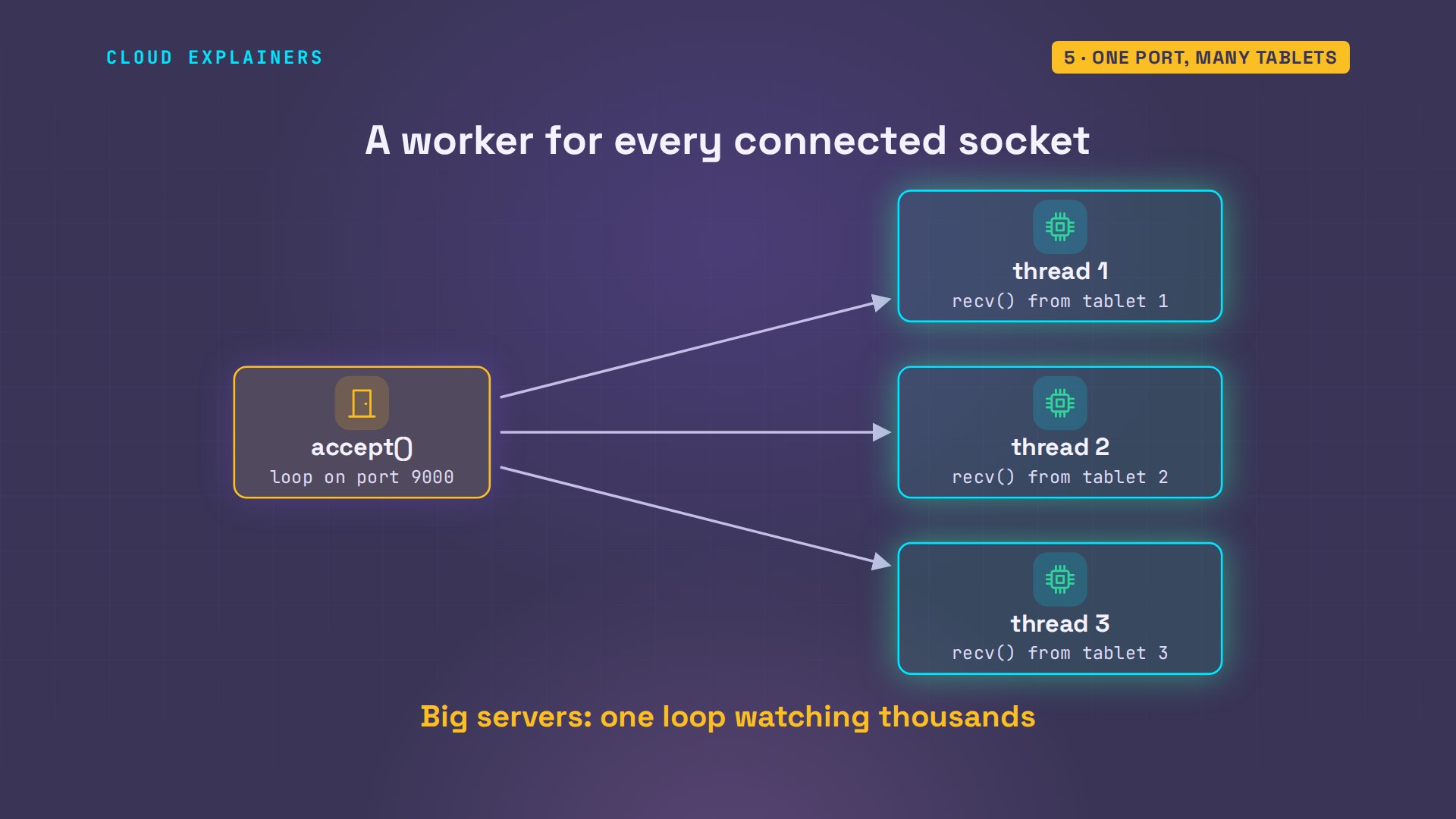
A busy evening: three tablets, and one of them connected twice. The screen prints each connection and every order. On the kitchen, ss shows one listening socket, and four connected ones, all on port 9000.
python3 kitchen.pytablet connected from ('10.48.0.21', 41186)
TICKET: 1 lasagna
tablet connected from ('10.48.0.22', 51898)
tablet connected from ('10.48.0.22', 51906)
tablet connected from ('10.48.0.23', 53294)
TICKET: 2 tiramisu
TICKET: 1 cola
TICKET: 3 garlic bread
ss -tan 'sport = :9000'State Recv-Q Send-Q Local Address:Port Peer Address:Port Process
LISTEN 0 128 0.0.0.0:9000 0.0.0.0:*
ESTAB 0 0 10.48.0.10:9000 10.48.0.23:53294
ESTAB 0 0 10.48.0.10:9000 10.48.0.21:41186
ESTAB 0 0 10.48.0.10:9000 10.48.0.22:51906
ESTAB 0 0 10.48.0.10:9000 10.48.0.22:51898
That needs one more piece in the program. recv waits until something arrives, so a program stuck reading tablet one can't hear tablet two. So for every socket accept returns, Ana's screen starts a thread: one worker per line. Big servers do the same job with tools that watch thousands of sockets at once.
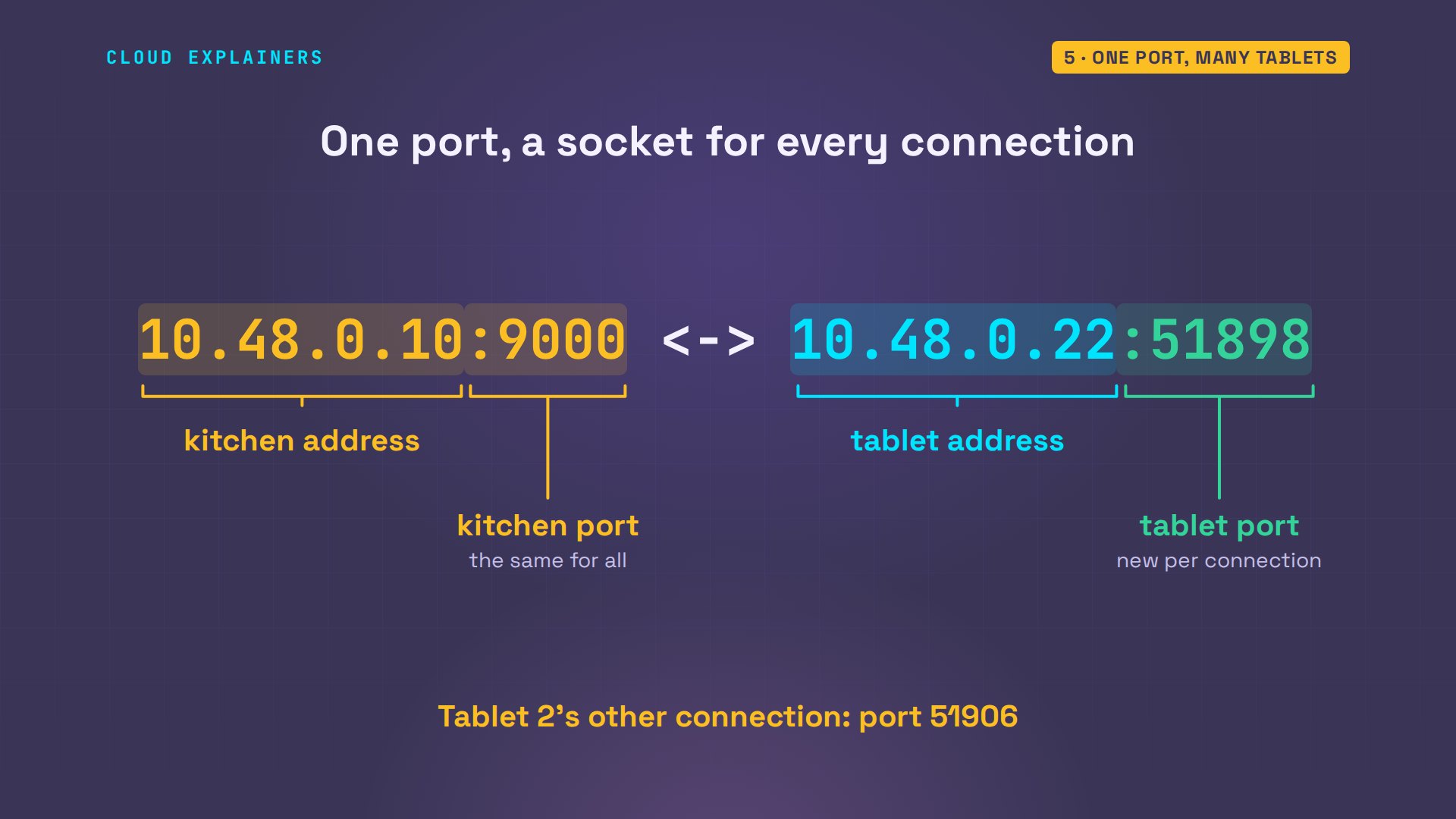
And each tablet's socket knows both ends of its line. Tablet one prints them as it connects. Its own address and port, 41186, a port its system picked. And the kitchen's, 10.48.0.10, port 9000.
python3 tablet.py "1 lasagna"connected: 10.48.0.21:41186 -> 10.48.0.10:9000
sent: 1 lasagna
So how does the kitchen tell them apart, if they all use port 9000? By four numbers together: the kitchen's address and port, and the tablet's address and port. The tablet's port is picked by the tablet's system, new for each connection, so tablet two's two connections differ only there: 51898 and 51906. Each set of four is one connected socket, one line. The listening socket only answers the number.
Where the line between orders went
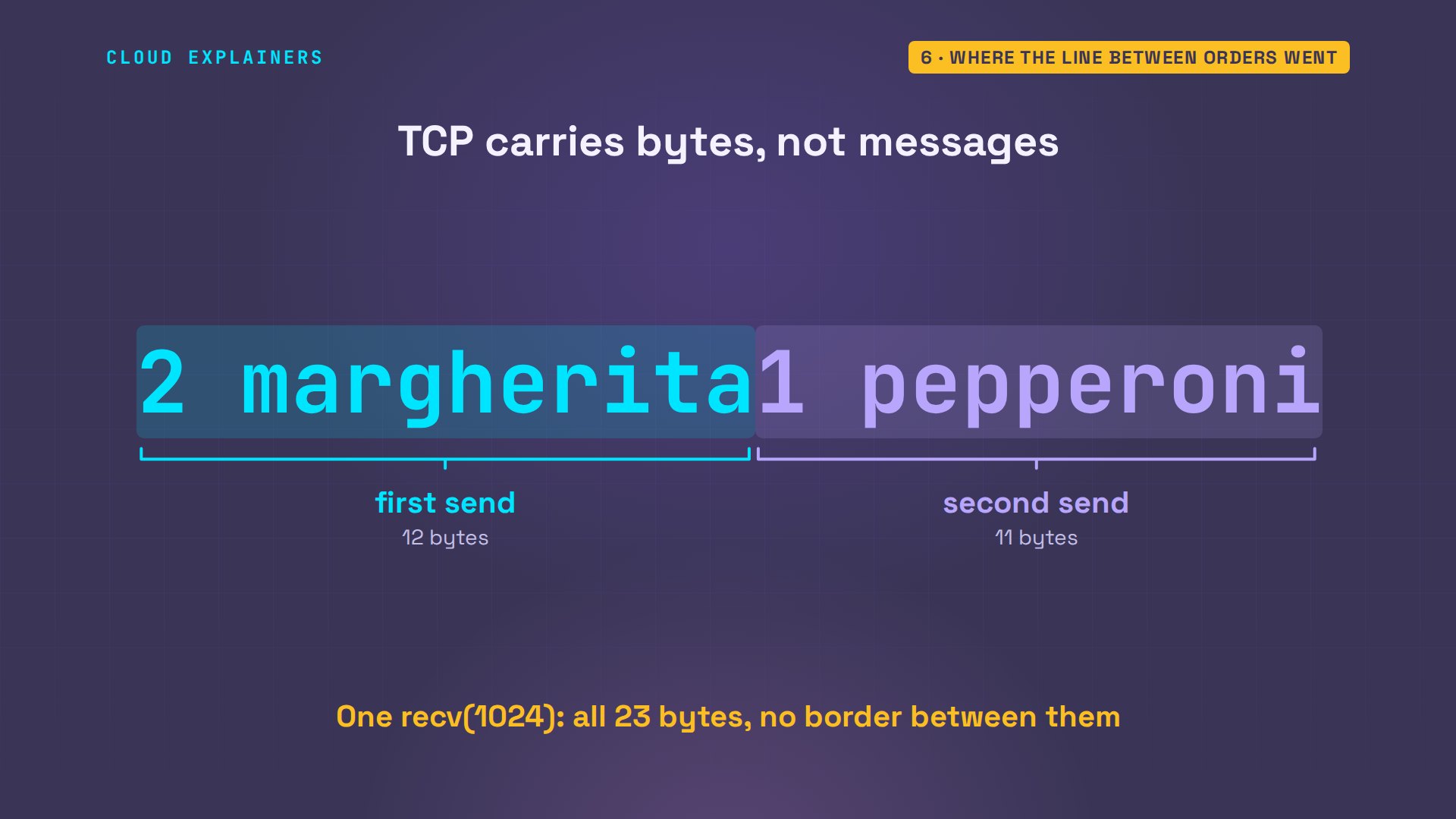
Now, the glued ticket. TCP doesn't carry messages. It carries a stream of bytes, like water through a pipe. The tablet's two sends poured 23 bytes in, one after the other. recv takes whatever has arrived, up to 1024 bytes, and this screen reads once a second, so both orders were waiting: one read, one ticket. Nothing in the stream says where one order ends.
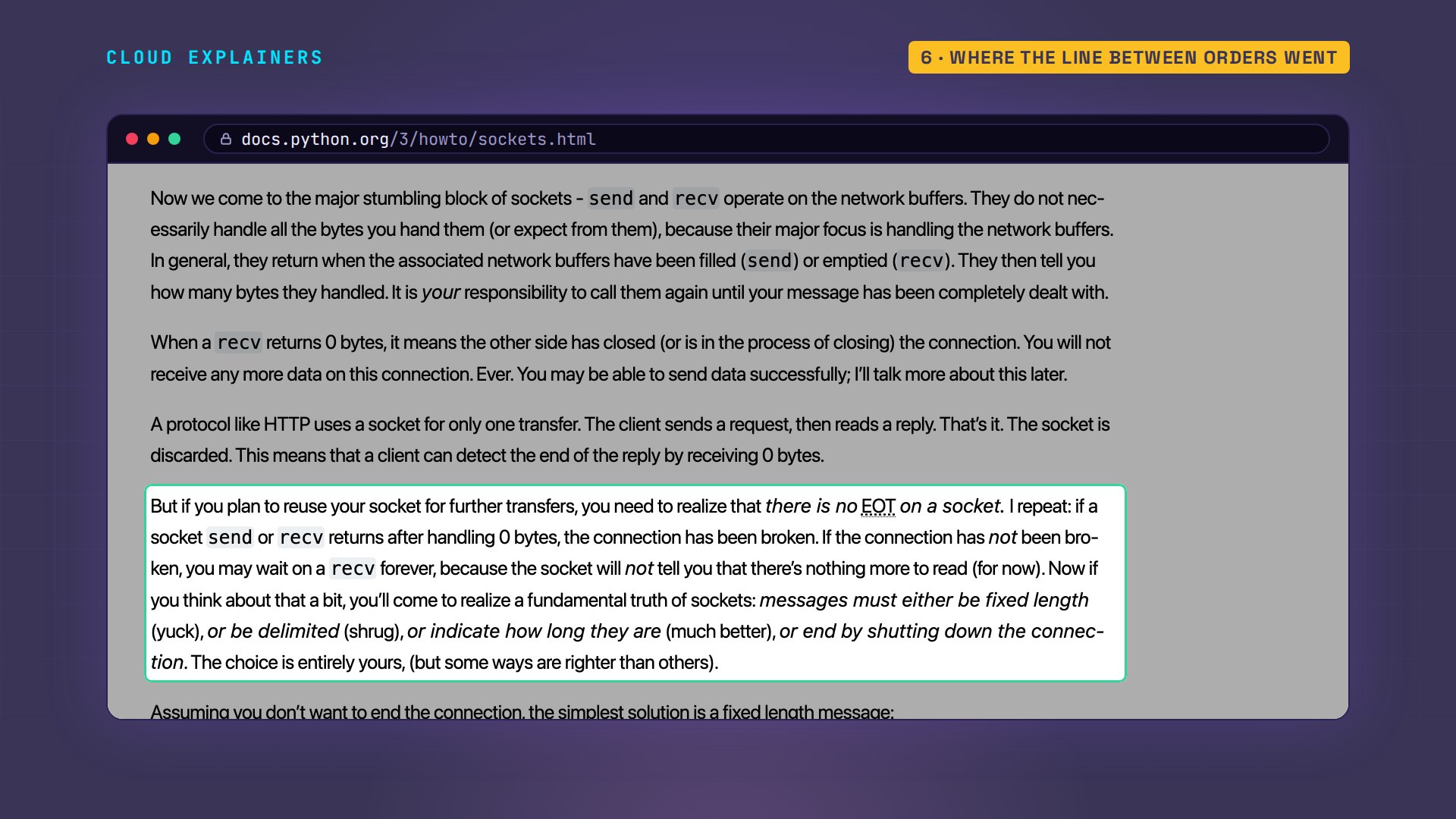
Python's own socket guide says it plainly. send and recv work on the network's buffers, the memory where bytes wait. They may not even hand over all the bytes at once, so a message must have a fixed length, be delimited, say how long it is, or end by closing the connection. Ana picks the simplest: a delimiter, the end of a line.
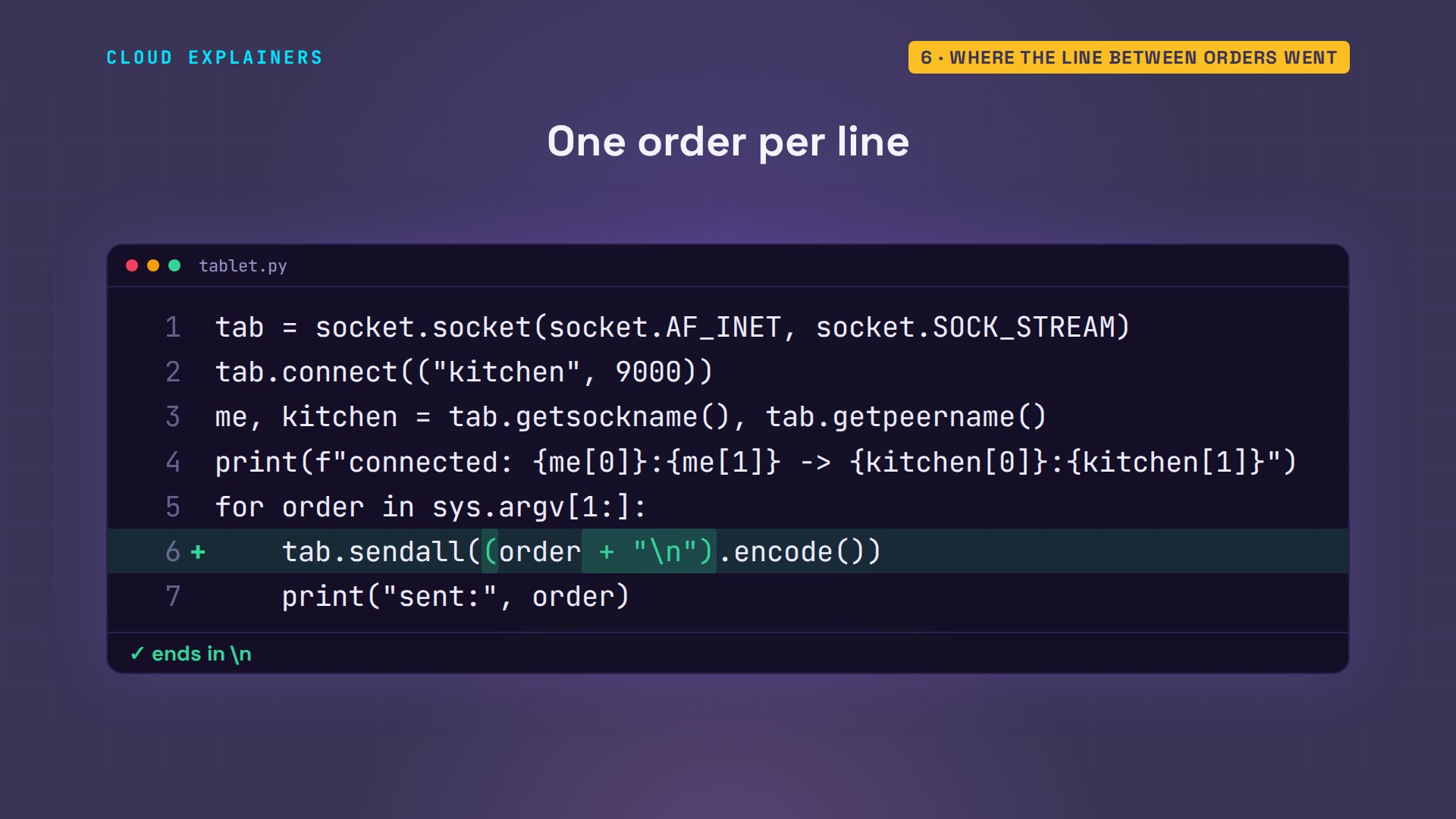
On the tablet, one line changes: each order now ends with a newline character, backslash n, before encode turns the text into bytes.
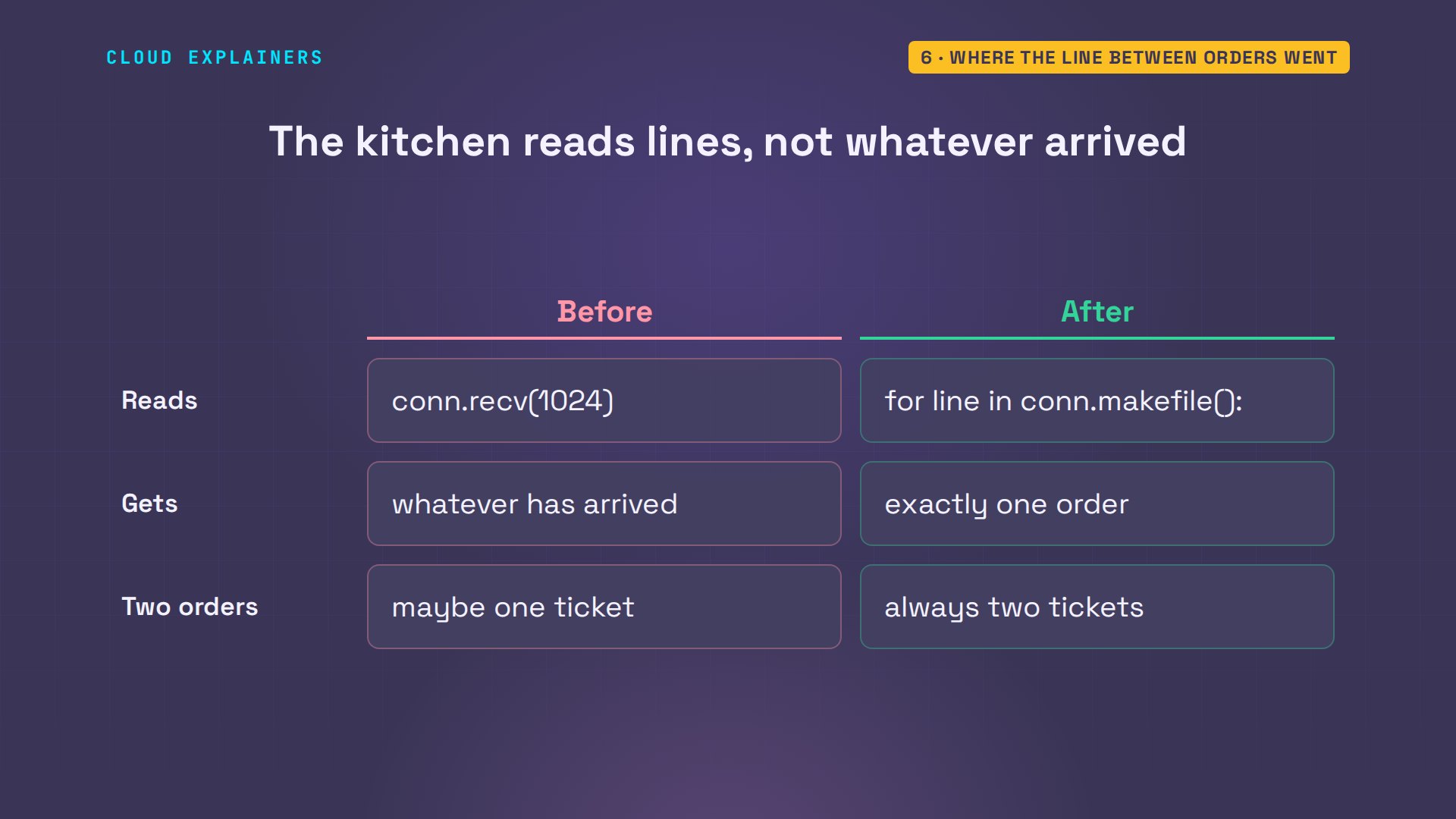
On the kitchen, the screen stops taking whatever has arrived, and reads one line at a time instead, however the bytes came in. The tablet marks where an order ends, and the kitchen reads up to that mark.
Same two orders. 2 margherita, 1 pepperoni. Two tickets. The line between them was never in the stream, so the programs have to put it there.
python3 tablet.py "2 margherita" "1 pepperoni"connected: 10.48.0.21:37822 -> 10.48.0.10:9000
sent: 2 margherita
sent: 1 pepperoni
python3 kitchen.pykitchen screen: listening on port 9000
tablet connected from ('10.48.0.21', 37822)
TICKET: 2 margherita
TICKET: 1 pepperoni
Hanging up, and the minute after
Hanging up travels through the same stream. When a tablet closes its socket, the kitchen's recv returns zero bytes, an empty read, which is how the screen knew to print: tablet hung up. Then it's closing time: Ana stops the screen while three tablets are still connected, and the tablet hears the same thing from the other side: the kitchen closed the connection.
python3 kitchen.pykitchen screen: listening on port 9000
tablet connected from ('10.48.0.21', 55930)
TICKET: 2 margherita1 pepperoni
tablet hung up: ('10.48.0.21', 55930)
python3 tablet.py "2 margherita" "1 pepperoni"connected: 10.48.0.21:37822 -> 10.48.0.10:9000
sent: 2 margherita
sent: 1 pepperoni
the kitchen closed the connection
She changes her mind and starts the screen again, right away. Guess first: what happens? Address already in use. Nothing else is running. ss shows why: the three old connections are in TIME-WAIT, on a 60-second timer, and while they wait, the kernel won't let a new socket bind to port 9000. The side that hangs up first keeps its end for that minute, so a late packet from the old call can't land in a new one. Here, they were gone 61 seconds after the stop.
python3 kitchen.pyTraceback (most recent call last):
  File "/home/ana/kitchen.py", line 15, in <module>
    srv.bind(("0.0.0.0", 9000))                               # 2. an address and a port
    ^^^^^^^^^^^^^^^^^^^^^^^^^^^
OSError: [Errno 98] Address already in use
ss -tano 'sport = :9000'State Recv-Q Send-Q Local Address:Port Peer Address:Port Process
TIME-WAIT 0 0 10.48.0.10:9000 10.48.0.23:53296 timer:(timewait,59sec,0)
TIME-WAIT 0 0 10.48.0.10:9000 10.48.0.22:51920 timer:(timewait,59sec,0)
TIME-WAIT 0 0 10.48.0.10:9000 10.48.0.21:37822 timer:(timewait,59sec,0)
The usual fix is one line before bind, which grep finds here: the SO_REUSEADDR option, reuse the address. It tells the kernel to let the new listening socket share the port with old connections in TIME-WAIT. One catch: it helps from the next restart, because the waiting sockets keep the options of the program that made them. So this time, with the fixed screen running, Ana stops it with two tablets connected, and starts it straight away: listening, right next to the two in TIME-WAIT.
grep -n SO_REUSEADDR kitchen.py15:srv.setsockopt(socket.SOL_SOCKET, socket.SO_REUSEADDR, 1) # reuse the port right after a restart
python3 kitchen.pykitchen screen: listening on port 9000
tablet connected from ('10.48.0.21', 41396)
TICKET: 1 tiramisu
tablet connected from ('10.48.0.22', 38692)
TICKET: 2 lemonade
kitchen screen closing
ss -tan 'sport = :9000'State Recv-Q Send-Q Local Address:Port Peer Address:Port Process
LISTEN 0 128 0.0.0.0:9000 0.0.0.0:*
TIME-WAIT 0 0 10.48.0.10:9000 10.48.0.22:38692
TIME-WAIT 0 0 10.48.0.10:9000 10.48.0.21:41396
Recap
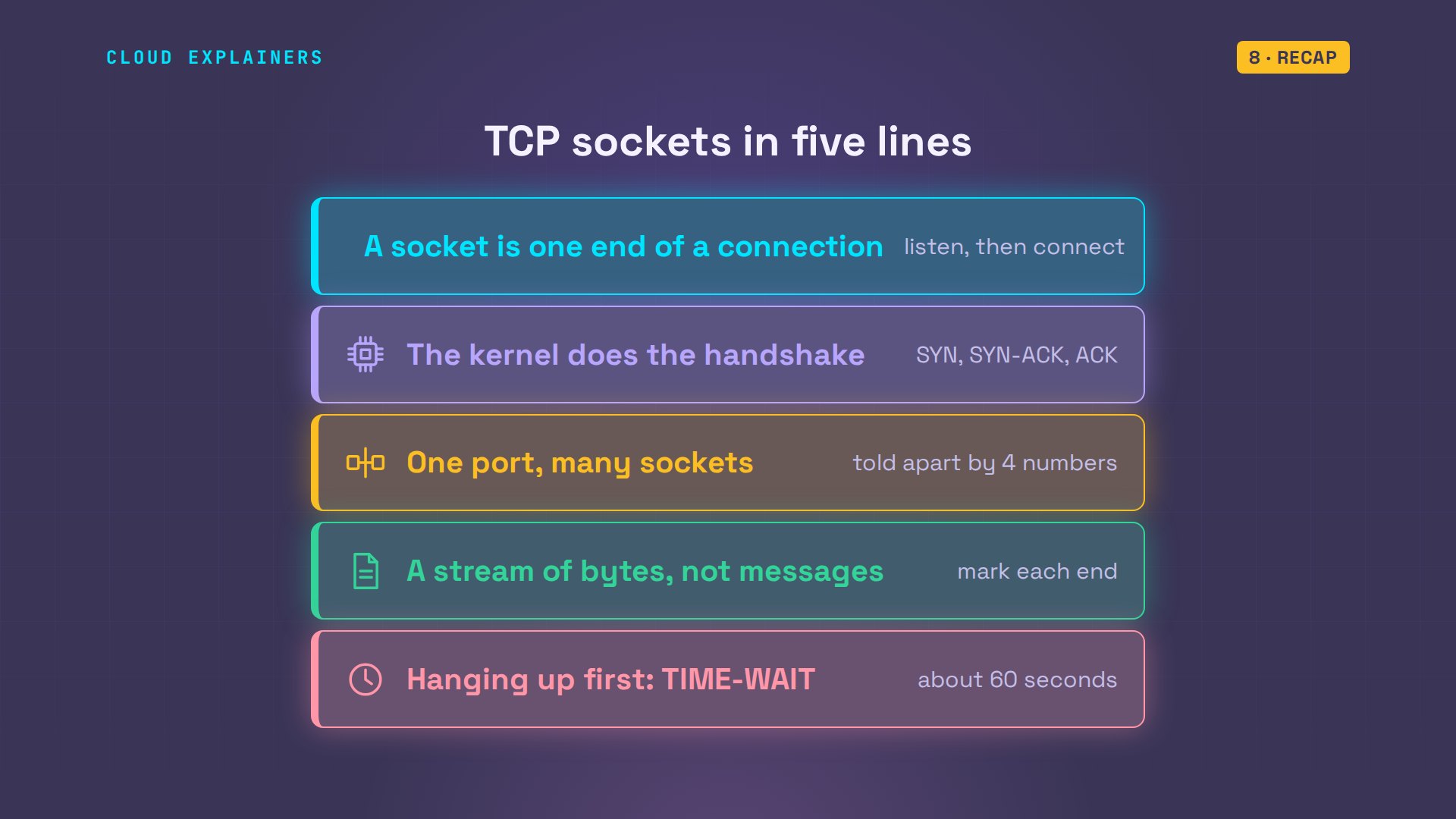
So: a socket is one end of a connection. The kernel does the handshake. One port serves every tablet, told apart by four numbers. TCP is a stream, so mark where messages end. And hanging up first leaves a minute of TIME-WAIT.
If the glued ticket makes sense now, a like helps YouTube show this to more beginners, and subscribing brings more networking, shown on real machines.
Every connection, ticket and packet in this video came from real machines, and every command and the lab files are linked in the description. Thanks for watching Cloud Explainers.
Sources
- RFC 9293, Transmission Control Protocol (connections named by both ends' addresses and ports, the three-way handshake, FIN, reset, TIME-WAIT)
- Python Socket Programming HOWTO (send and recv on network buffers; delimited messages)
- Python socket module (socket, bind, listen, accept, connect, recv, makefile, setsockopt)
- Linux man page socket(7) (SO_REUSEADDR)
- Linux man page listen(2) (connections wait in a queue until accept)
- Linux man page recv(2) (returns 0 when the peer has shut down)
Demos: four containers on our own Mac standing in for a pizza kitchen's order screen and tablets; the kitchen and its orders are made up. Every connection, ticket and packet was real. Watch the full video on YouTube.
More videos

How to Fix Python ModuleNotFoundError: No Module Named
Golang Pointers in 5 Minutes
How to Fix a Kubernetes Pod Stuck in CrashLoopBackOff
How to Fix a Homelab ESXi Host Not Responding
PostgreSQL: Full Tutorial for Beginners
How a Load Balancer Works with HAProxy

How Python Virtual Environments Work
How to Fix Cloudflare Tunnel Errors in a Homelab
How to Fix API CORS Errors: No 'Access-Control-Allow-Origin'
How Authenticator App Login Codes Work (TOTP)
Git and GitHub: Full Tutorial for Beginners
How a Homelab Hypervisor Works (VMware ESXi)
How to Fix Kubernetes ImagePullBackOff Errors

How to Fix DNS 'Temporary Failure in Name Resolution' on Linux
How to Fix AWS CLI 'Unable to Locate Credentials'
Proxmox vs ESXi for Your Homelab: When Each One Wins
PostgreSQL UUID vs Auto Increment: Which Primary Key Should You Use?
Kubernetes: Full Tutorial for Beginners
How to Fix PostgreSQL 'Could Not Connect to Server'
Claude Code Hooks Will Finally Make Sense After This
DevOps with Ansible Will Finally Make Sense After This
How SNMP Network Monitoring Works
How to Fix GitHub 'Permission Denied (publickey)' Errors
Docker: Full Tutorial for Beginners
How to Fix PostgreSQL 'Password Authentication Failed'
Why One Linux Server Handles More Users Than You Think
How to Fix Network 'Connection Refused' Errors
DevOps Pipelines: Jenkins vs GitHub Actions
Linux Nginx Reverse Proxy: Full Tutorial for Beginners
Every Networking Term a Beginner Needs in 12 Minutes
How to Fix Docker 'Permission Denied' on docker.sock
How to Fix Git 'Updates Were Rejected' When You Push
How to Fix nginx 502 Bad Gateway Errors on Linux
How to Fix Linux apt 'Could Not Get Lock' Errors (Ubuntu)

How Email Works on the Internet (SMTP) in 10 Minutes
The Python Roadmap for Beginners

Golang REST API with Gin: Full Tutorial for Beginners
How a WireGuard VPN Network Works

Linux Makefiles Will Finally Make Sense After This

SAML vs OAuth vs OpenID Connect: What's the Difference?
How to Fix Python cron Jobs That Never Run
Linux Bash Scripting: Full Tutorial for Beginners
How PXE Network Boot Works
How Active Directory Works

How to Fix a Linux systemd Service That Won't Start
Linux Logs: syslog vs journald
JWT vs Session Cookies: Which One Should You Use?
Docker vs Docker Compose: Which One Should You Use?
How to Fix Docker Compose Containers That Can't Talk to Each Other

Django Full Tutorial for Beginners
How Linux systemd Works

How to Fix 'Windows Cannot Access' Network Share Errors (SMB)
REST vs gRPC: Which One Should You Use?
How to Fix SSL Certificate Chain Errors (Missing Intermediate)
Every Python Concept for Beginners in 10 Minutes
Every SQL Join Type in 10 Minutes
Why OpenRouter Free Models Hit Their Limit So Fast
Why Your Gemini API Free Tier Runs Out So Fast

OpenRouter Will Finally Make Sense After This
How Redis Caching Works
Gemini API vs Vertex AI: Which One Should You Use?
How to Fix a Leaked Gemini API Key
Why Golang Uses Goroutines Instead of Threads
How to Fix Gemini API Error 429: Resource Exhausted
Claude Token Pricing Will Finally Make Sense After This
Why Python Web Scraping Returns Nothing (and the Fix)
Python uv vs pip: Which One Should You Use?

Python Automation: Full Tutorial for Beginners
How OAuth Login Works

Google AI Studio Will Finally Make Sense After This
What Happens When You Run a Docker Container
How to Fix Claude Code Billing Your API Key Instead of Your Plan
Why Passkeys Can't Be Phished Like Passwords
PowerShell vs Bash: Which One Should You Learn?
The Linux Roadmap for Beginners
Django vs FastAPI: Which One Should You Use?

Why SQLite Is the Most Used Database in the World
How a NoSQL Database Like MongoDB Works
How to Fix Python pip error: externally-managed-environment
How to Fix MySQL Too Many Connections Database Errors
Golang Concurrency Will Finally Make Sense After This
How Amazon S3 Works
How Kubernetes Works
How Git Works
How to Fix Docker Port Already Allocated Errors
How PostgreSQL Works
How to Fix Git Merge Conflicts

How to Fix No Space Left on Device in Linux
How the Internet Works
SQL vs NoSQL: When Each One Wins
How to Fix JWT Token Expired Errors (401 Unauthorized)
Claude API vs Claude Pro: Why Your Subscription Doesn't Include It
Why AI Agent Skills Beat Giant Prompts

Linux Cron Jobs Will Finally Make Sense After This

Security Logs Will Finally Make Sense After This
How to Fix a Security Leak: An API Key Pushed to GitHub
DNS Will Finally Make Sense After This
Never Ignore a Security Update
Two-Factor Authentication Will Finally Make Sense
Never Expose a Database to the Internet
SSH Keys vs Passwords: Which Is Safer for Security?
The 5 Levels of Linux Boot: From Power On to Login
The 5 Levels of Network Firewalls
Password Security: Why Hackers Crack Weak Passwords
Why Your Linux Server Runs Out of Memory
HTTP vs HTTPS: What Actually Changes on Your Network

Every Linux File Permission You Need to Know
Linux Processes vs Threads: When Each One Wins
The OSI Model Will Finally Make Sense After This

The 7 Levels of Git
Every Network Troubleshooting Command You Need
Hashing vs Encryption in Cybersecurity: When Each One Wins
Why the Internet Ran Out of IP Addresses
Linux Package Managers: apt vs Snap vs Flatpak
Why Python Is Slow (and When It Doesn't Matter)
TCP vs UDP: When Each One Wins
Stop Running Linux as Root (Do This Instead)
Linux Users and Groups Will Finally Make Sense

Why Phishing Beats Good Security (and How to Spot It)

The 7 Levels of Docker

AI Agents Will Finally Make Sense After This

Stop Using git push --force (Use This Instead)
Agent Skills vs MCP: When Each One Wins
Networking Will Finally Make Sense After This

Every Linux Command You Actually Need
The 7 Levels of Cybersecurity
Every System Design Concept You Need, in One Diagram