
Linux Logs: syslog vs journald
Ubuntu keeps every log line twice: once in the systemd journal and once in plain text files like /var/log/syslog. We followed one failed order from a small tea-shop app through both: how journald hands lines to rsyslog, what each copy can and can't tell you, why a fake line looks real in the text file but not in the journal, and the one job the text side still does, sending logs to another machine.
One error, two logs
You log in to a Linux server because your app failed, and every guide sends you somewhere different: grep the syslog file, or run journalctl. Here's Ana's tea shop. An order just failed. The syslog file has the error, and so does journalctl: the same line, in a slightly different format.
curl -s "localhost:8080/order?tea=darjeeling"order 42: sorry, darjeeling is out of stock
grep teashop /var/log/syslog | tail -n 22026-11-09T15:30:22.428298+00:00 shop teashop[169]: order 41 paid: assam
2026-11-09T15:30:24.940345+00:00 shop teashop[169]: order 42 failed: darjeeling is out of stock
journalctl -u teashop -n 2 --no-pagerNov 09 15:30:22 shop teashop[169]: order 41 paid: assam
Nov 09 15:30:24 shop teashop[169]: order 42 failed: darjeeling is out of stock
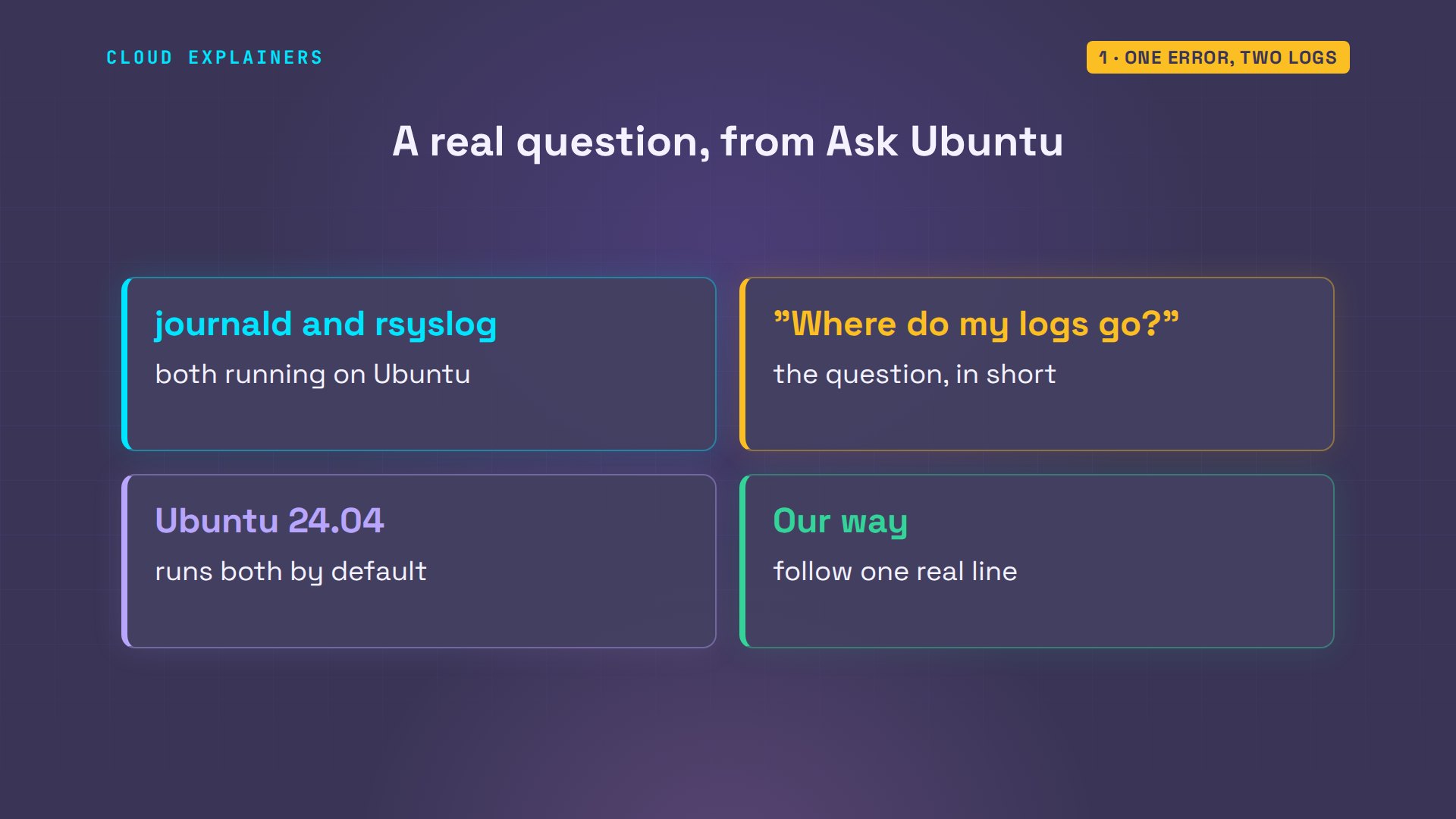
That's because Ubuntu runs two logging systems at once: journald, which keeps a binary journal, and rsyslog, which writes plain text files. By the end you'll know which one to read, and how to tell a real log line from a fake one. And if the journal already has every line, why does Ubuntu still write a text file at all?
Someone asked exactly this on Ask Ubuntu: with journald and rsyslog both running, where do my log messages actually go? Let's follow one line from Ana's shop and find out.
Where a log line goes
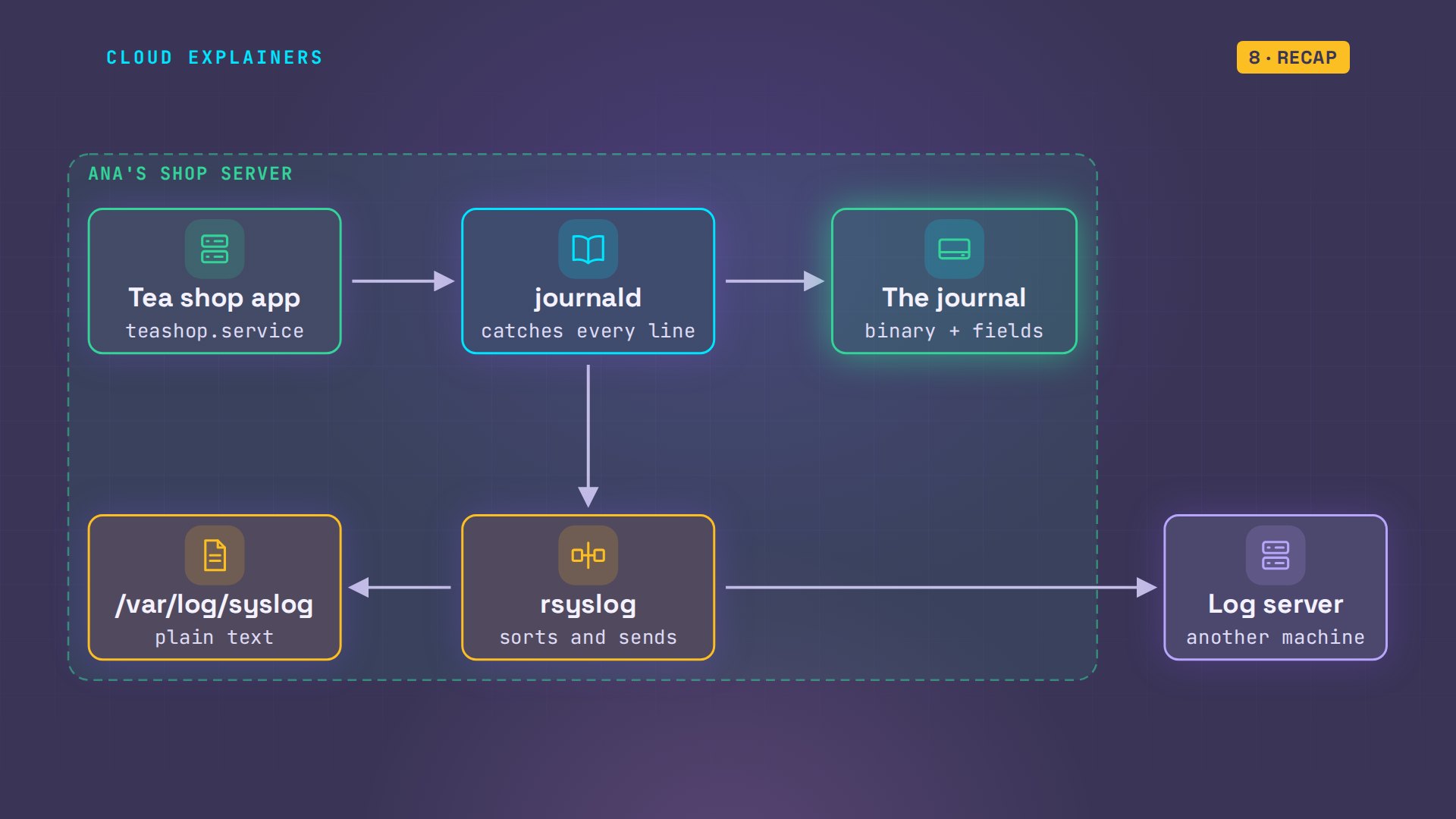
So where does one line go? The shop runs as a systemd service, so everything it prints goes to journald, the journal daemon. journald stores it in the journal, and passes a copy to rsyslog. rsyslog sorts it with its own rules, and adds it to the end of a text file.
Both steps are in Ubuntu's own config files. A small journald setting turns the copy on: forward to syslog, yes. And rsyslog's rules send login and security messages to auth.log, and everything else to the syslog file. That's how the failed order got there.
cat /usr/lib/systemd/journald.conf.d/syslog.conf# Undo upstream commit 46b131574fdd7d77 for now. For details see
#  http://lists.freedesktop.org/archives/systemd-devel/2014-November/025550.html

[Journal]
ForwardToSyslog=yes
grep -v '^#' /etc/rsyslog.d/50-default.conf | grep .auth,authpriv.*			/var/log/auth.log
*.*;auth,authpriv.none		-/var/log/syslog
kern.*				-/var/log/kern.log
mail.*				-/var/log/mail.log
mail.err			/var/log/mail.err
*.emerg				:omusrmsg:*
So Ana's server keeps two copies. In var log: the syslog file, and a folder called journal. The file command says syslog is plain text. The journal is something else: a journal file, compressed, that you read with journalctl. On this small server it takes 16 megabytes.
ls /var/logREADME		  apt	    bootstrap.log  dmesg     faillog  lastlog  syslog
alternatives.log  auth.log  btmp	   dpkg.log  journal  private  wtmp
file -b /var/log/syslogASCII text
file -b /var/log/journal/*/system.journalJournal file, Mon Nov 9 15:30:18 2026, online, keyed hash siphash24, compressed zstd, compact, header size 0x110, entries 0xed1
journalctl --disk-usageArchived and active journals take up 16.0M in the file system.
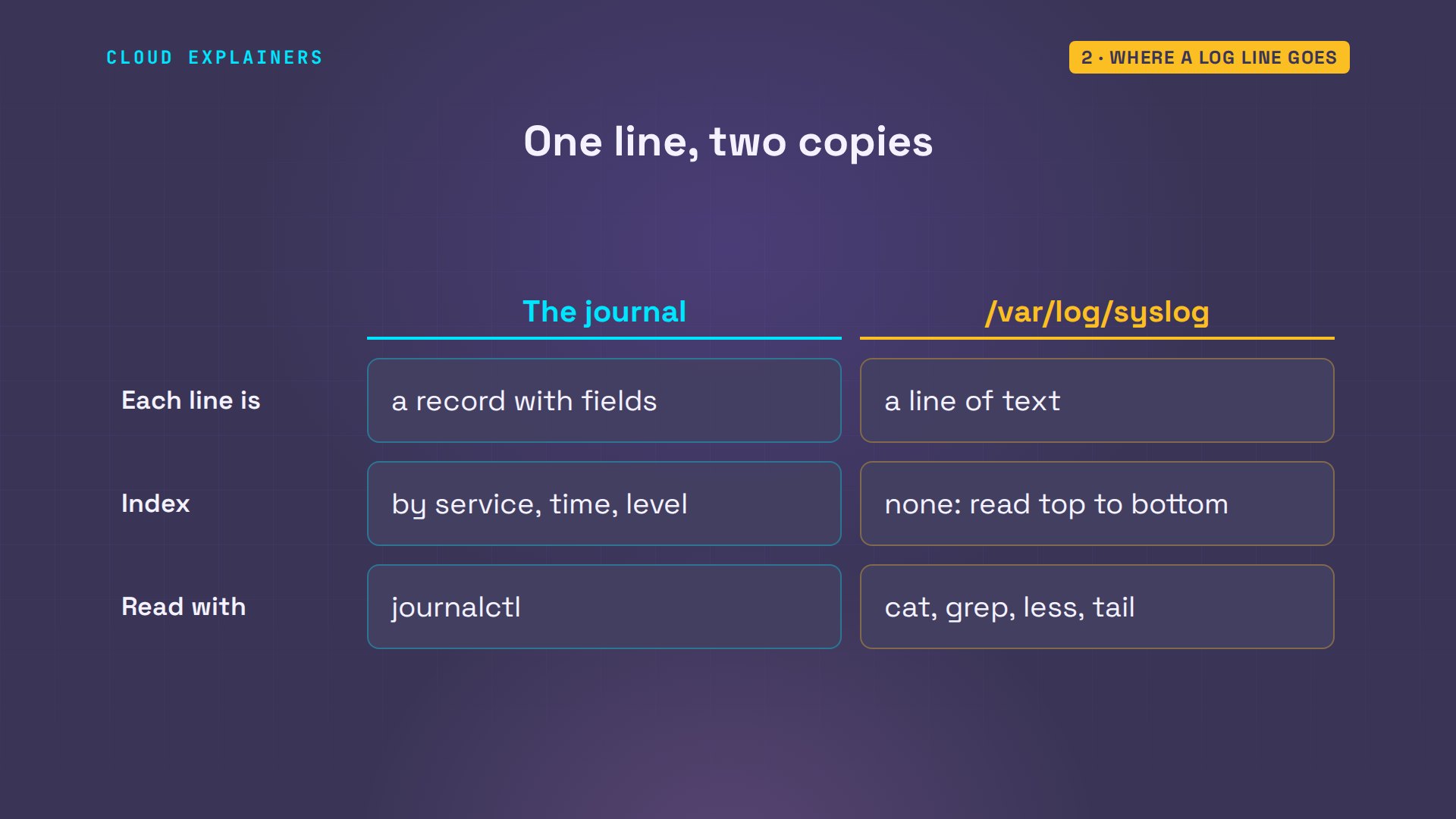
Same line, two very different files. The syslog file is lines of text, one after another. The journal keeps each line as a record with fields, plus an index, so journalctl can jump straight to one service or one time without reading everything. That's also why cat and less can't make sense of it.
Plain text: any tool reads it
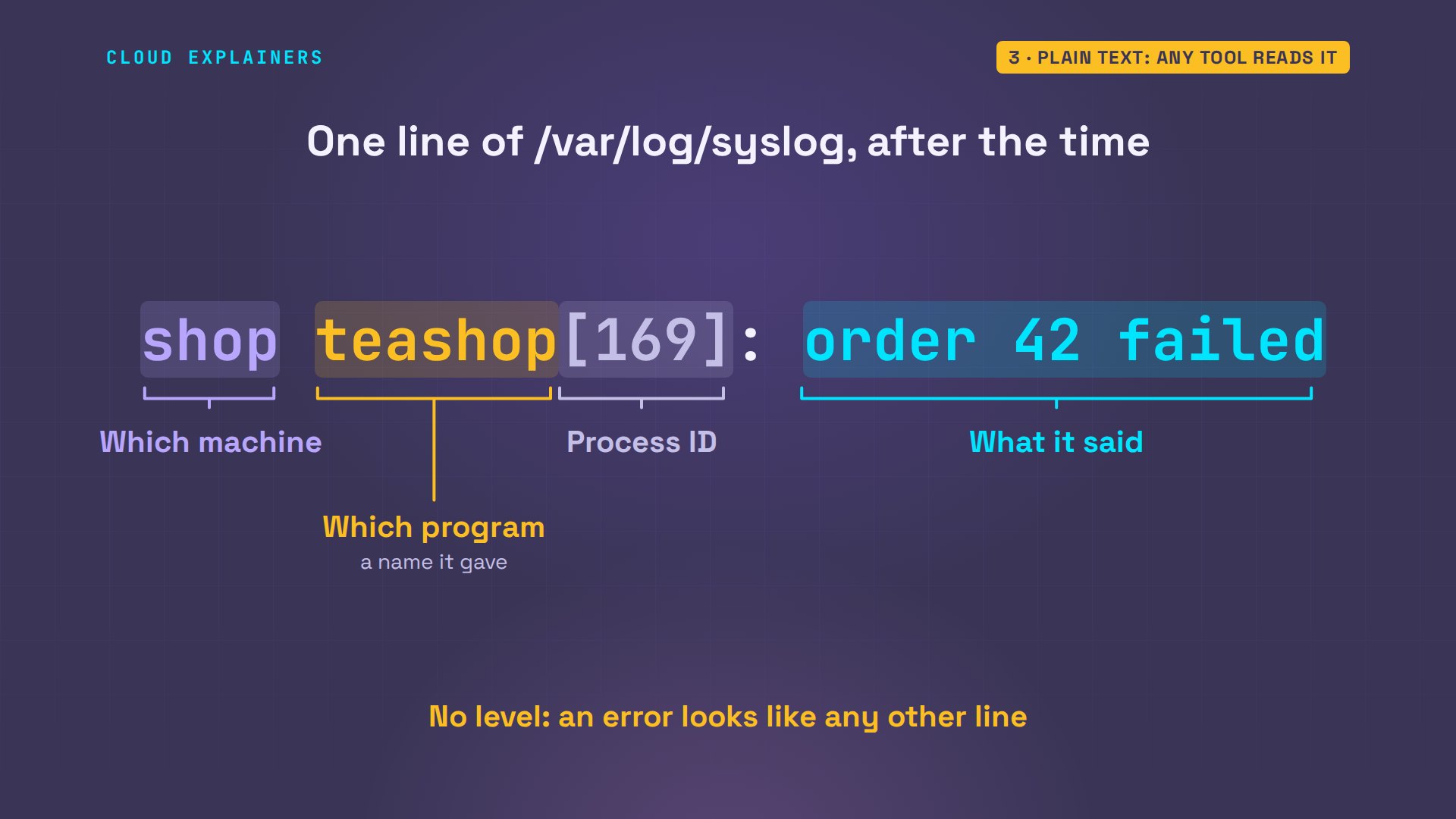
Start with the text file. After the time, each line says which machine, which program, its process ID, and what it said. Now notice what's missing. Nothing on the line says this was an error.
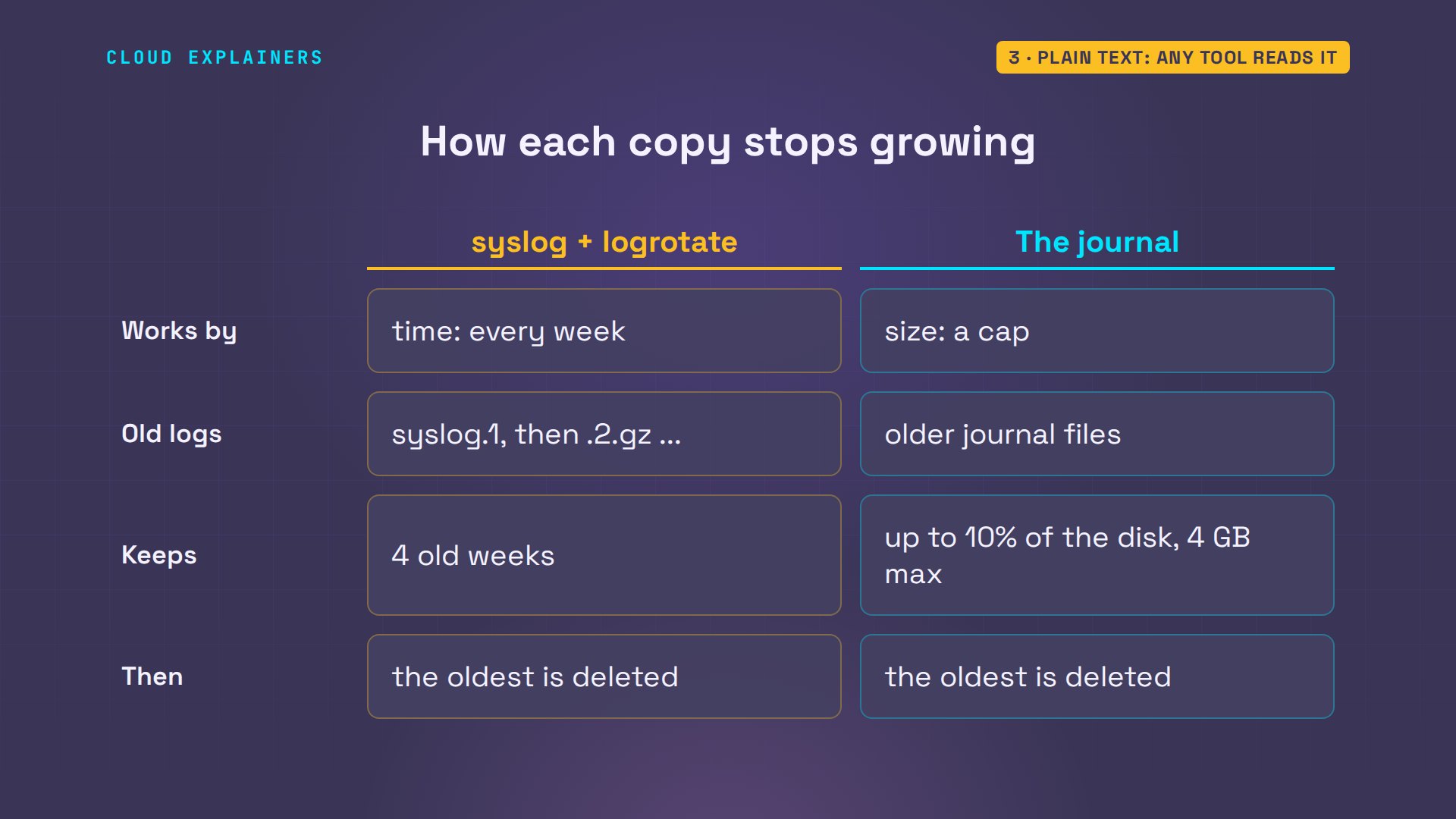
But it's text, so every tool you already know works on it. grep finds the failed order by its words. tail, less, and copying it to another machine all just work. And logrotate stops it growing forever: a new file every week, four old ones kept, compressed.
grep "out of stock" /var/log/syslog2026-11-09T15:30:24.940345+00:00 shop teashop[169]: order 42 failed: darjeeling is out of stock
grep -E '^\s+(rotate [0-9]|weekly|compress)$' /etc/logrotate.d/rsyslogrotate 4 weekly compress
Both copies clean up after themselves, in different ways. logrotate works by time: each week the syslog file becomes syslog dot one, older weeks are compressed, and anything past four weeks is deleted. The journal works by size: by default it stops at ten percent of the disk, four gigabytes at most, and drops its oldest files first.
The journal: lines with fields
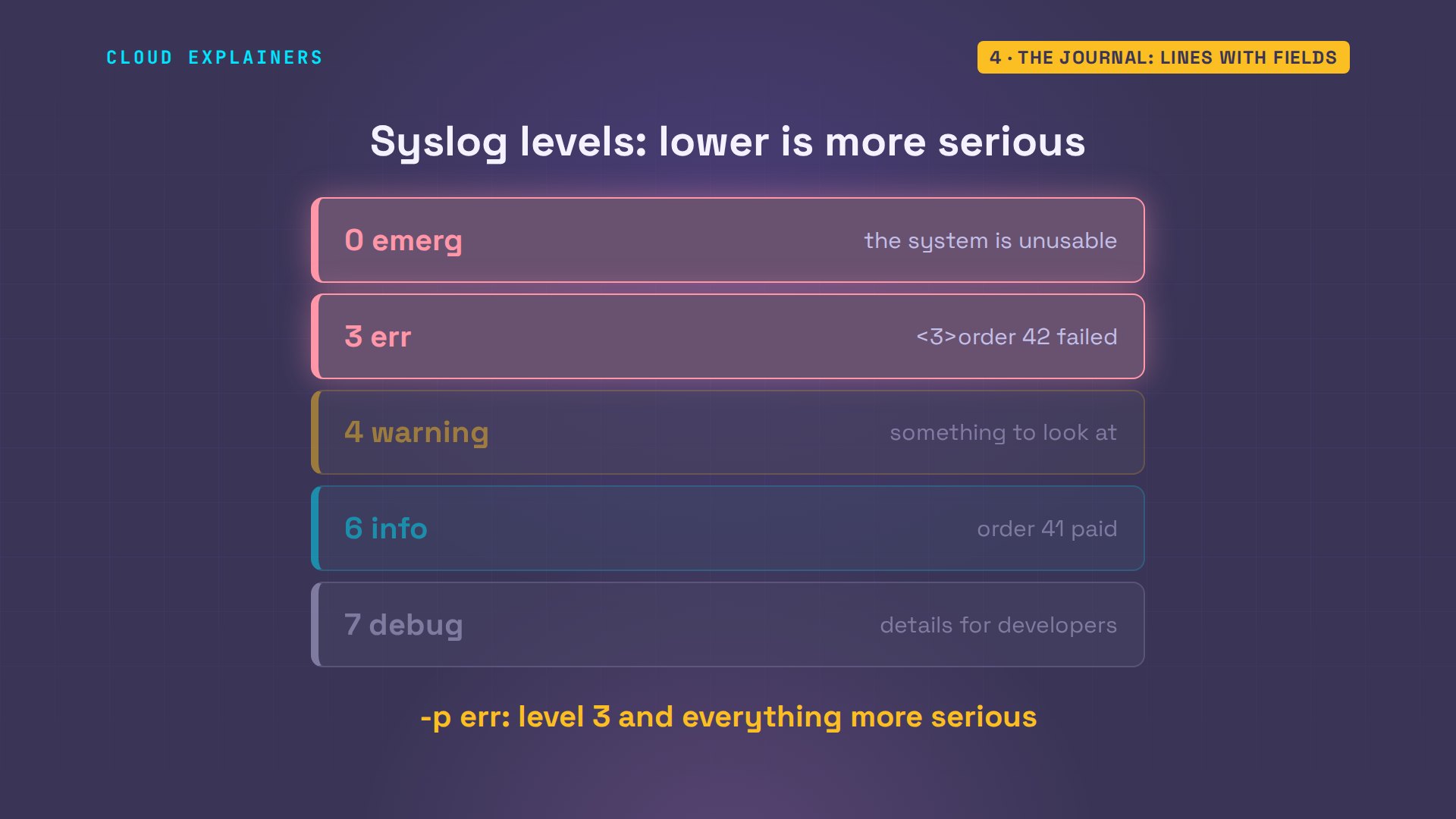
The journal keeps more than the text. Dash u picks one service. Add -p err, and only errors come back: the failed order, because the app marked that line as an error when it printed it. Dash dash since takes a time, like ten minutes ago: the shop's whole story since it started.
journalctl -u teashop -p err --no-pagerNov 09 15:30:24 shop teashop[169]: order 42 failed: darjeeling is out of stock
journalctl -u teashop --since "10 min ago" -o short-iso --no-pager2026-11-09T15:30:20+00:00 shop systemd[1]: Started teashop.service - Ana's tea shop.
2026-11-09T15:30:20+00:00 shop teashop[169]: tea shop open on port 8080
2026-11-09T15:30:22+00:00 shop teashop[169]: order 40 paid: sencha
2026-11-09T15:30:22+00:00 shop teashop[169]: order 41 paid: assam
2026-11-09T15:30:24+00:00 shop teashop[169]: order 42 failed: darjeeling is out of stock
How did the app flag it as an error? It printed that line with a three in angle brackets in front. systemd reads that as a syslog level, and keeps the rest as the message. Zero is an emergency, three is an error, four a warning, six is plain information, seven is debug. With -p, you ask for a level, and you get that level and everything more serious.
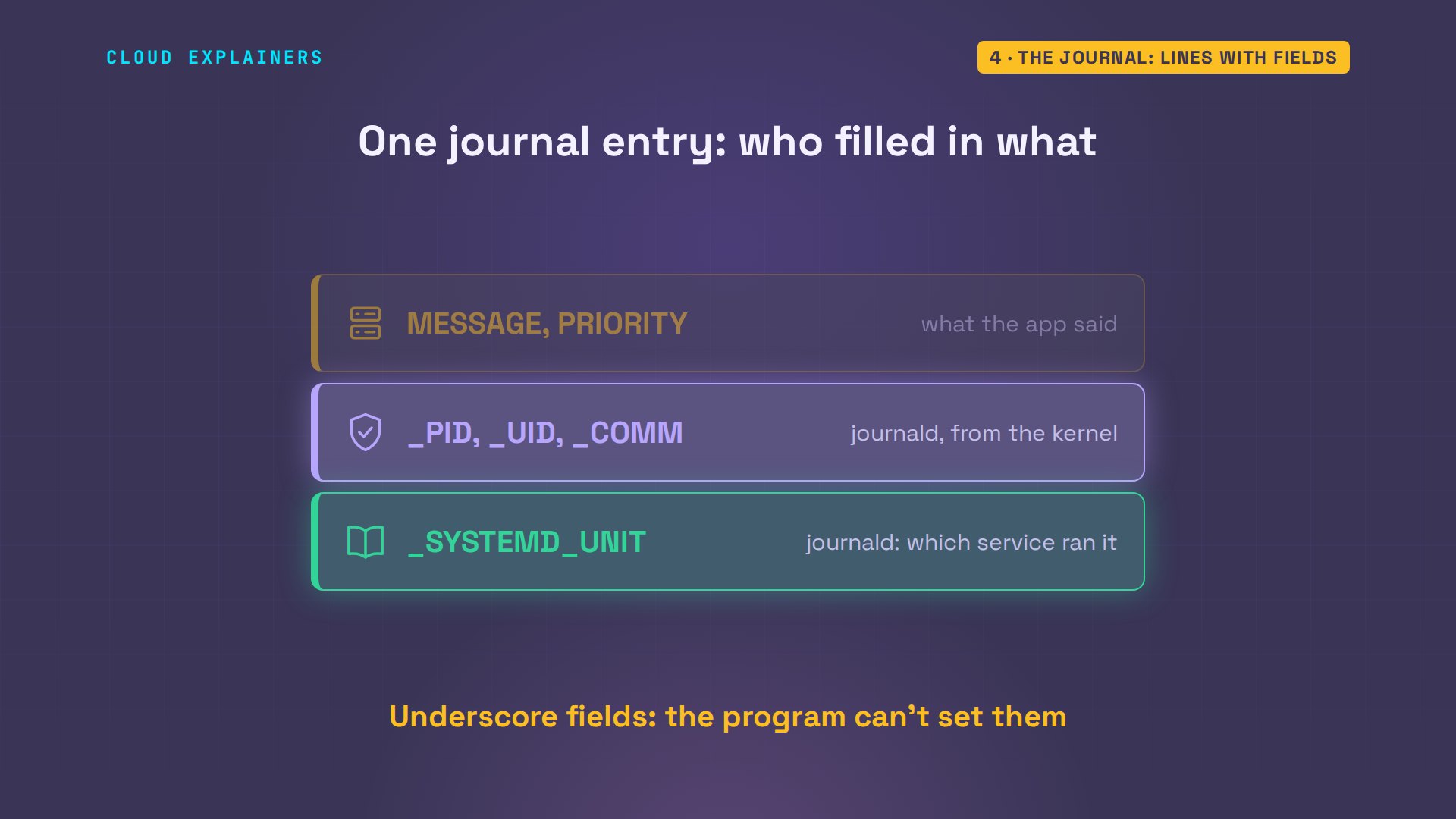
Dash o verbose shows one entry in full, and it isn't a line, it's a record. The message, its priority, three, which means error, and fields journald filled in itself: the process ID, the user ID, the command, and the systemd unit it came from.
journalctl -u teashop -n 1 -o verbose --no-pagerMon 2026-11-09 15:30:24.940090 UTC [s=6d69cd9936964ad2bb4a92cb2d9f8edf;i=1d68;b=3076ef08ab704a418ad3eb606bc38a74;m=6158c76810;t=65fd9a40a3c3a;x=4f2e8662b328f66e]
    _TRANSPORT=stdout
    _STREAM_ID=2c96756e0ed846dea686263b98a71c72
    SYSLOG_FACILITY=3
    SYSLOG_IDENTIFIER=teashop
    _PID=169
    _UID=1000
    _GID=1000
    _COMM=python3
    _EXE=/usr/bin/python3.12
    _CMDLINE=/usr/bin/python3 app.py
    _CAP_EFFECTIVE=0
    _SELINUX_CONTEXT=unconfined
    _SYSTEMD_CGROUP=/system.slice/teashop.service
    _SYSTEMD_UNIT=teashop.service
    _SYSTEMD_SLICE=system.slice
    _SYSTEMD_INVOCATION_ID=197105e1a00742f0b8a02a61ebcbde23
    _BOOT_ID=3076ef08ab704a418ad3eb606bc38a74
    _MACHINE_ID=cf648020263d4cef8e9cd5731b441558
    _HOSTNAME=shop
    _RUNTIME_SCOPE=system
    PRIORITY=3
    MESSAGE=order 42 failed: darjeeling is out of stock
Look at the names. Fields that start with an underscore are trusted: journald fills them in from what the kernel tells it, not from what the program says. The app chose its message and its priority. It didn't choose its process ID, or its unit.
Who wrote this line?
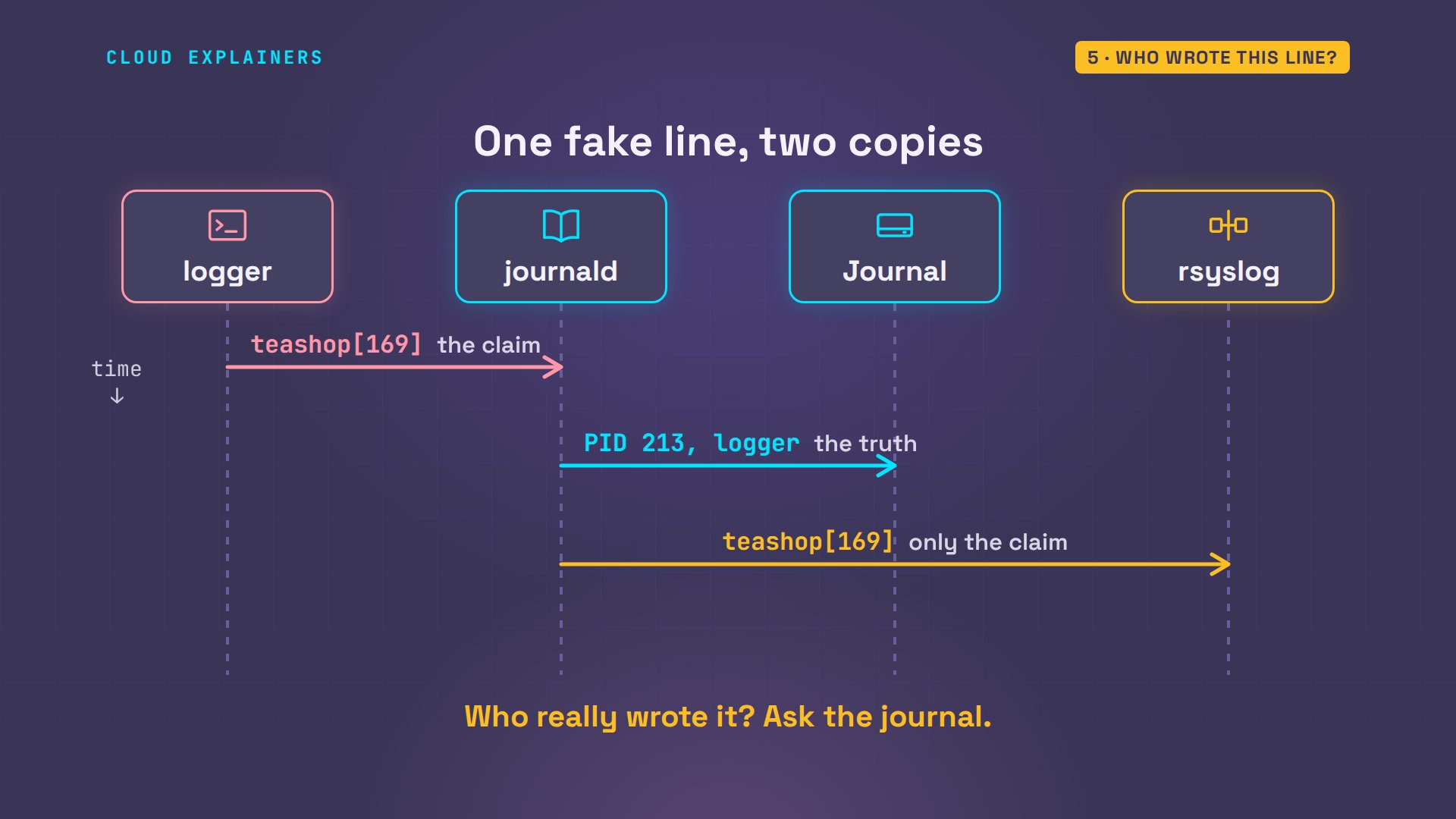
Why does that matter? Any user on the machine can write to the log with the logger command, under any name. Ana looks up the shop's process ID, then writes a made-up failed order, named teashop, with that same ID. Now the text file. Guess first: can you tell which line is fake? No. Order 99 looks exactly like the real one.
systemctl show teashop -p MainPIDMainPID=169
logger -t teashop --id=169 "order 99 failed: sencha is out of stock"
grep teashop /var/log/syslog | tail -n 22026-11-09T15:30:24.940345+00:00 shop teashop[169]: order 42 failed: darjeeling is out of stock
2026-11-09T15:30:25.993697+00:00 shop teashop[169]: order 99 failed: sencha is out of stock
Now ask the journal. By name, with dash t, it shows both, but the fake one says process 213, not 169. By service, with dash u, the fake isn't there at all. And in full, the trusted fields give it away: the real sender was logger, and the process ID Ana typed sits in a field of its own.
journalctl -t teashop -n 2 --no-pagerNov 09 15:30:24 shop teashop[169]: order 42 failed: darjeeling is out of stock
Nov 09 15:30:25 shop teashop[213]: order 99 failed: sencha is out of stock
journalctl -u teashop -n 1 --no-pagerNov 09 15:30:24 shop teashop[169]: order 42 failed: darjeeling is out of stock
journalctl -t teashop -n 1 -o verbose --no-pagerMon 2026-11-09 15:30:25.993539 UTC [s=6d69cd9936964ad2bb4a92cb2d9f8edf;i=1d69;b=3076ef08ab704a418ad3eb606bc38a74;m=6158d77b29;t=65fd9a41a4f53;x=7cea1631ec915feb]
    SYSLOG_IDENTIFIER=teashop
    _UID=1000
    _GID=1000
    _CAP_EFFECTIVE=0
    _SELINUX_CONTEXT=unconfined
    _BOOT_ID=3076ef08ab704a418ad3eb606bc38a74
    _MACHINE_ID=cf648020263d4cef8e9cd5731b441558
    _HOSTNAME=shop
    _RUNTIME_SCOPE=system
    _TRANSPORT=syslog
    PRIORITY=5
    SYSLOG_FACILITY=1
    SYSLOG_PID=169
    SYSLOG_TIMESTAMP=Nov  9 15:30:25
    MESSAGE=order 99 failed: sencha is out of stock
    _PID=213
    _COMM=logger
    _SYSTEMD_CGROUP=/init.scope
    _SYSTEMD_UNIT=init.scope
    _SYSTEMD_SLICE=-.slice
    _SOURCE_REALTIME_TIMESTAMP=1794238225993539
Here's why. Both copies start in journald, and it records who really sent each line. But the copy it hands to rsyslog is the old text format: a name, a process ID and a message, whatever the sender claimed. So when you need to know who really wrote a line, ask the journal.
Logs that leave the machine
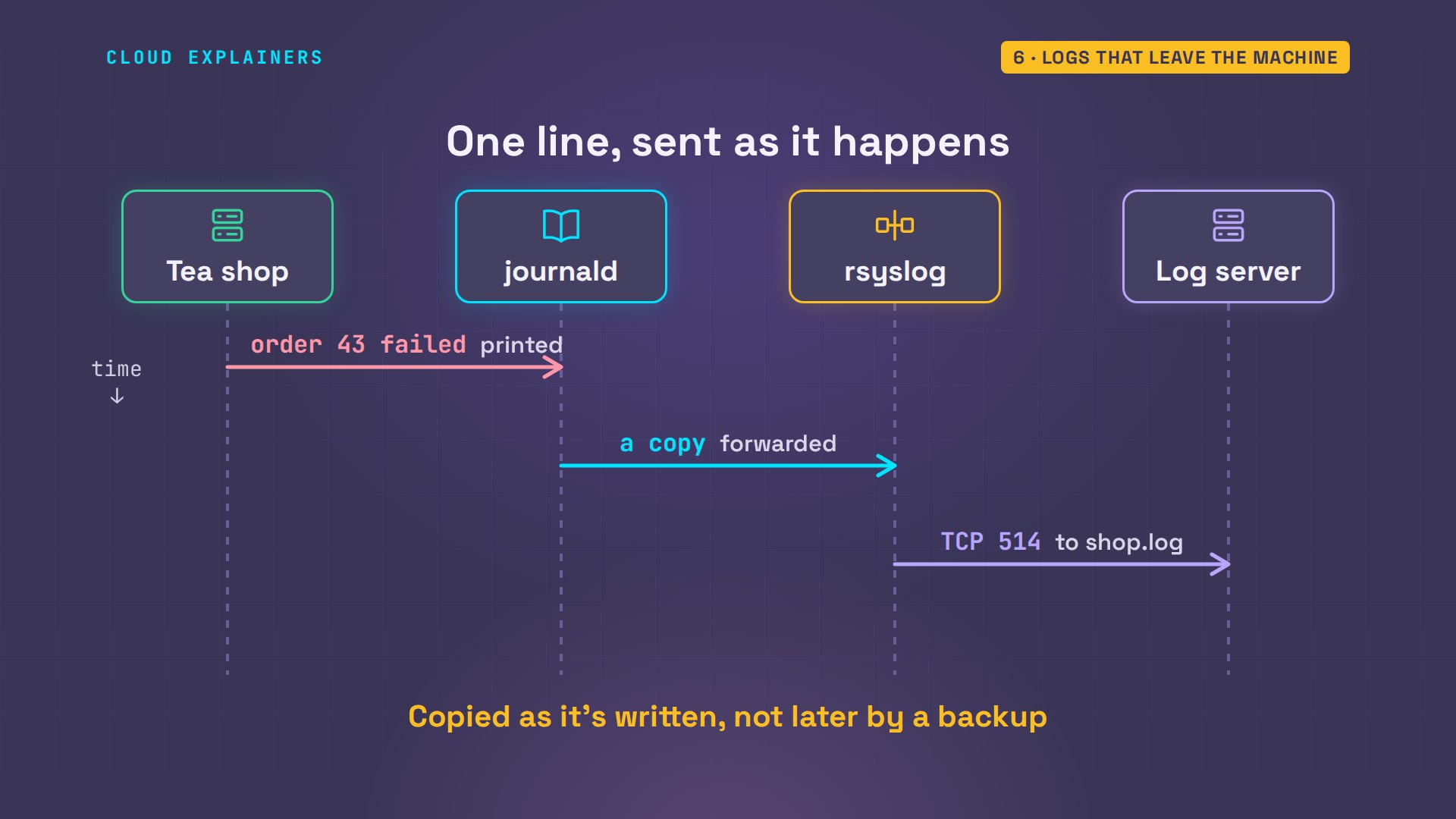
So why does Ubuntu still keep rsyslog? Because logs that stay on a server go down with it: a dead disk, someone who deletes them, a machine that's gone. rsyslog's other job is sending every line to another machine, as it happens, with one line of config.
Ana's second machine, logs, runs rsyslog listening for other servers. On the shop she adds one rule: star dot star, every line, to logs, port 514, over TCP. She restarts rsyslog, and another customer orders the Darjeeling.
cat /etc/rsyslog.d/90-central.conf# Send a copy of every log line to the central log server, over TCP (@@; a single @ means UDP).
*.* @@logs:514
sudo systemctl restart rsyslog[sudo] password for ana:
curl -s "localhost:8080/order?tea=darjeeling"order 43: sorry, darjeeling is out of stock
On the log server, a file for the shop has appeared, and its last line is that failed order: order 43, written there as it happened.
ls /var/log/remoteshop.log
tail -n 1 /var/log/remote/shop.log2026-11-09T15:30:30+00:00 shop teashop[169]: order 43 failed: darjeeling is out of stock
Here's what happened. The shop's rsyslog keeps a TCP connection open to the log server, and sends each line the moment journald hands it over. The log server's rsyslog writes it to a file named after the sender: shop dot log. So the copy isn't made later, by a backup. It leaves the shop as each line is written.
Now the worst case. On the shop, Ana types sudo poweroff. Its journal and its syslog file go dark with it.
sudo poweroff
Back on the log server, the shop is gone. Guess first: did anything arrive as the shop went down? Yes. The shop's last words: systemd stopping its timers on the way down, sent while it shut down. And the failed order is still there, safe on another machine, ready to grep.
tail -n 3 /var/log/remote/shop.log2026-11-09T15:30:33+00:00 shop systemd[1]: Stopped motd-news.timer - Message of the Day.
2026-11-09T15:30:33+00:00 shop systemd[1]: systemd-tmpfiles-clean.timer: Deactivated successfully.
2026-11-09T15:30:33+00:00 shop systemd[1]: Stopped systemd-tmpfiles-clean.timer - Daily Cleanup of Temporary Directories.
grep "out of stock" /var/log/remote/shop.log2026-11-09T15:30:30+00:00 shop teashop[169]: order 43 failed: darjeeling is out of stock
Which one should you read?
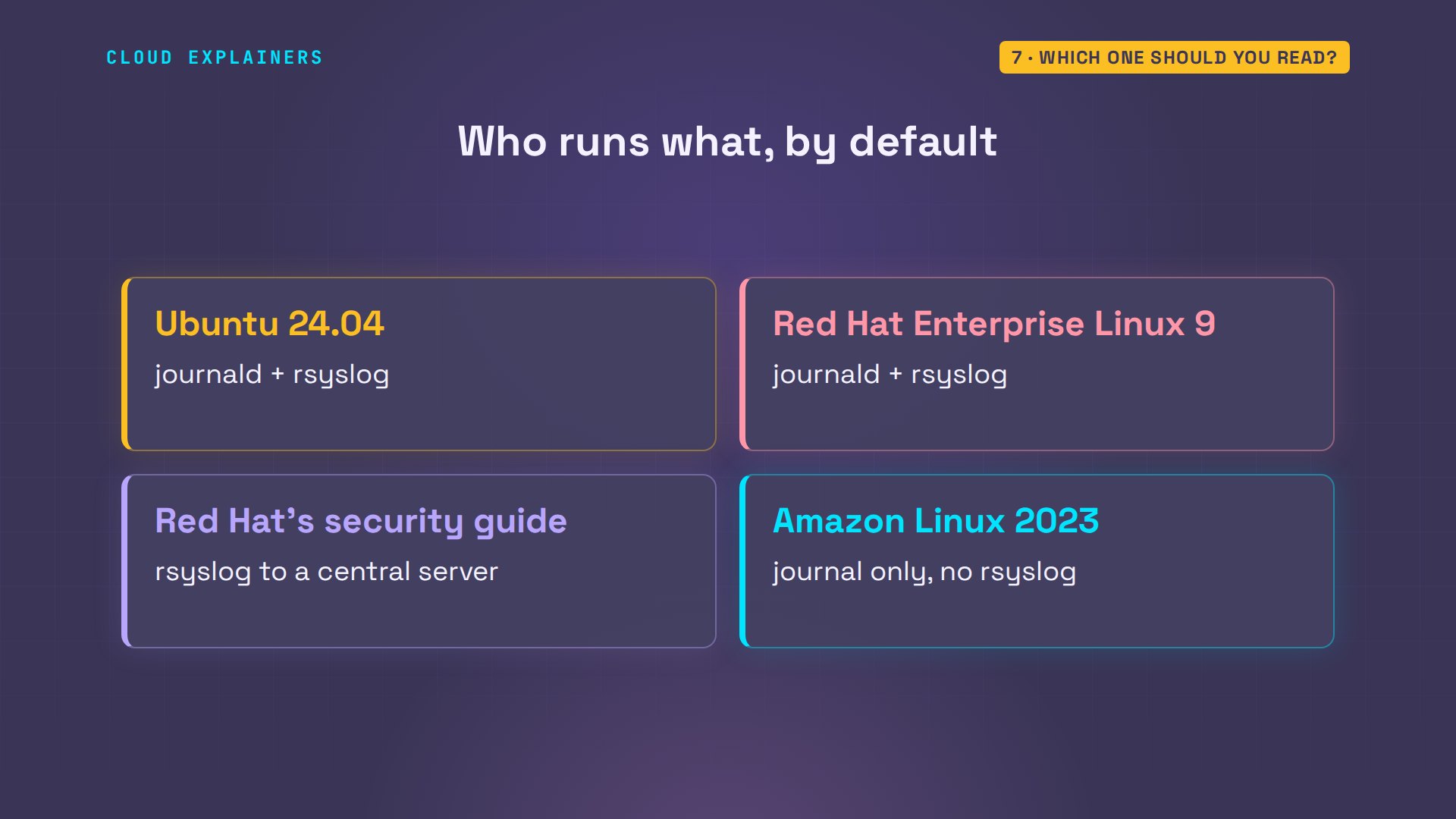
Real systems split this in different ways. Ubuntu runs both, as we saw. Red Hat Enterprise Linux 9 also runs journald and rsyslog side by side by default, and Red Hat's security guide uses rsyslog to send logs to a central server. Amazon Linux 2023 went the other way: no rsyslog by default, only the journal.
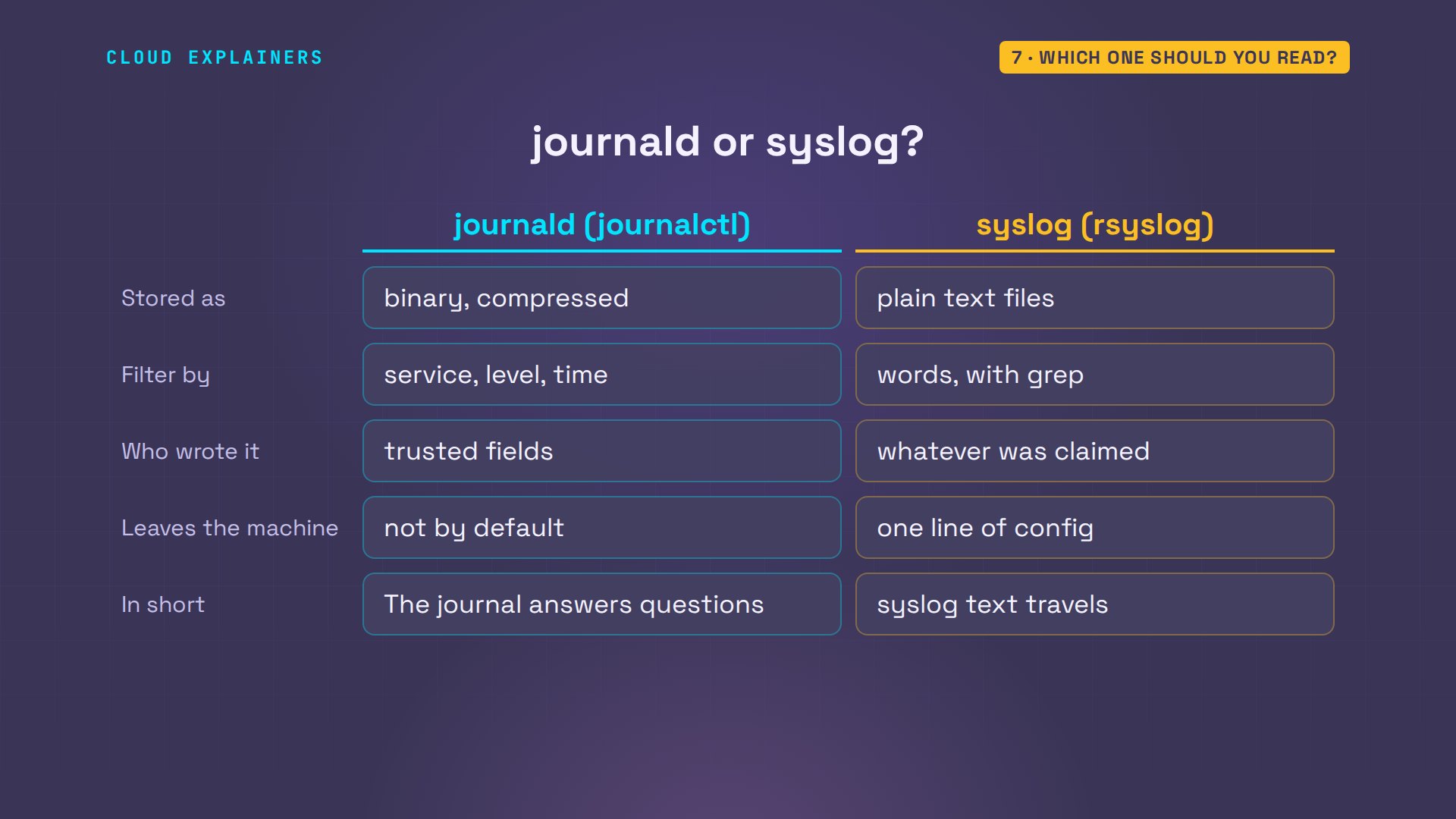
So which one should you read? On one machine, use journalctl: filter by service, level and time, and trust its fields. Use the text files for grep and the tools you already know, and rsyslog to get logs off the machine. The journal answers questions; syslog text travels.
Recap
Every command and the lab files are linked in the description, so you can follow Ana's log line yourself.
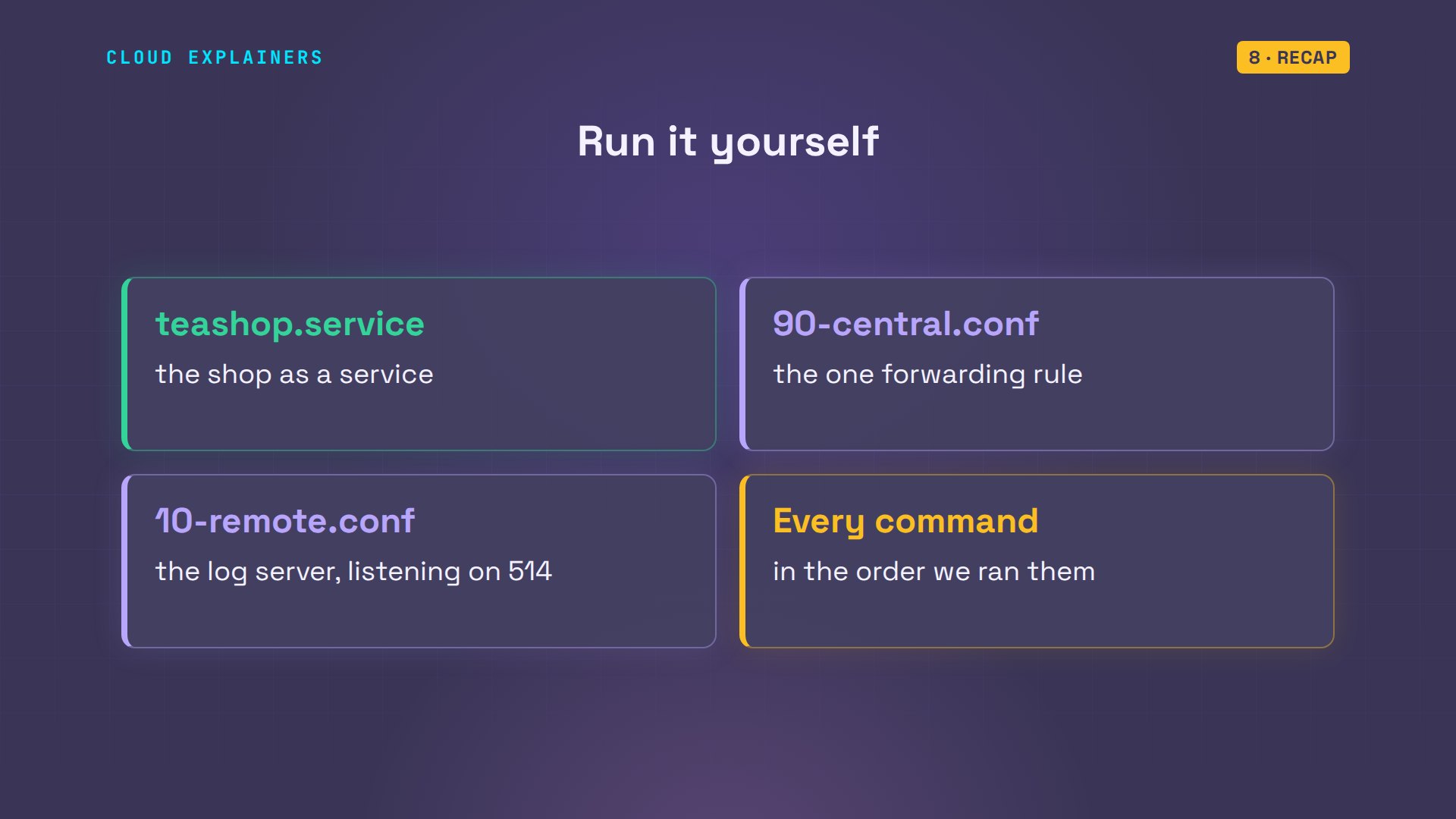
So: journald catches every line first. journalctl filters it, and its fields say who really wrote it. rsyslog writes plain text, and can send it to another machine.
If following one log line made this click, a like helps YouTube show it to more beginners, and subscribing brings the next Linux demo to you.
Every command here ran for real, on two small Ubuntu servers in our lab. Thanks for watching Cloud Explainers.
Sources
- journald.conf (ForwardToSyslog=, Storage=, SystemMaxUse=)
- systemd.journal-fields (trusted fields start with an underscore and are added by the journal, not the client; PRIORITY, SYSLOG_IDENTIFIER, SYSLOG_PID)
- journalctl (-u, -t, -p, --since, -o verbose, --disk-usage)
- rsyslog forwarding actions (@@host:port sends over TCP, @ over UDP)
- Red Hat Enterprise Linux 9, Configuring a remote logging solution (rsyslog to a central server)
- Red Hat, journald and rsyslog both run by default on RHEL 9 and 10
- Amazon Linux 2023 user guide, the systemd journal replaces rsyslog
- Ask Ubuntu, where do log messages go with journald and rsyslog? (question 1190144)
Demos: two containers on our own lab server standing in for Ana's machines; the tea shop is made up. Watch the full video on YouTube.
More videos

Linux Makefiles Will Finally Make Sense After This

SAML vs OAuth vs OpenID Connect: What's the Difference?

How to Fix Python cron Jobs That Never Run

Linux Bash Scripting: Full Tutorial for Beginners

How PXE Network Boot Works

How Active Directory Works

How to Fix a Linux systemd Service That Won't Start

JWT vs Session Cookies: Which One Should You Use?

Docker vs Docker Compose: Which One Should You Use?

How to Fix Docker Compose Containers That Can't Talk to Each Other

Django Full Tutorial for Beginners

How Linux systemd Works

How to Fix 'Windows Cannot Access' Network Share Errors (SMB)

REST vs gRPC: Which One Should You Use?

How to Fix SSL Certificate Chain Errors (Missing Intermediate)

Every Python Concept for Beginners in 10 Minutes

Every SQL Join Type in 10 Minutes

Why OpenRouter Free Models Hit Their Limit So Fast

Why Your Gemini API Free Tier Runs Out So Fast

OpenRouter Will Finally Make Sense After This

How Redis Caching Works

Gemini API vs Vertex AI: Which One Should You Use?

How to Fix a Leaked Gemini API Key

Why Golang Uses Goroutines Instead of Threads

How to Fix Gemini API Error 429: Resource Exhausted

Claude Token Pricing Will Finally Make Sense After This

Why Python Web Scraping Returns Nothing (and the Fix)

Python uv vs pip: Which One Should You Use?

Python Automation: Full Tutorial for Beginners

How OAuth Login Works

Google AI Studio Will Finally Make Sense After This

What Happens When You Run a Docker Container

How to Fix Claude Code Billing Your API Key Instead of Your Plan

Why Passkeys Can't Be Phished Like Passwords

PowerShell vs Bash: Which One Should You Learn?

The Linux Roadmap for Beginners

Django vs FastAPI: Which One Should You Use?

Why SQLite Is the Most Used Database in the World

How a NoSQL Database Like MongoDB Works

How to Fix Python pip error: externally-managed-environment

How to Fix MySQL Too Many Connections Database Errors

Golang Concurrency Will Finally Make Sense After This

How Amazon S3 Works

How Kubernetes Works

How Git Works

How to Fix Docker Port Already Allocated Errors

How PostgreSQL Works

How to Fix Git Merge Conflicts

How to Fix No Space Left on Device in Linux

How the Internet Works

SQL vs NoSQL: When Each One Wins

How to Fix JWT Token Expired Errors (401 Unauthorized)

Claude API vs Claude Pro: Why Your Subscription Doesn't Include It

Why AI Agent Skills Beat Giant Prompts

Linux Cron Jobs Will Finally Make Sense After This

Security Logs Will Finally Make Sense After This

How to Fix a Security Leak: An API Key Pushed to GitHub

DNS Will Finally Make Sense After This

Never Ignore a Security Update

Two-Factor Authentication Will Finally Make Sense

Never Expose a Database to the Internet

SSH Keys vs Passwords: Which Is Safer for Security?

The 5 Levels of Linux Boot: From Power On to Login

The 5 Levels of Network Firewalls

Password Security: Why Hackers Crack Weak Passwords

Why Your Linux Server Runs Out of Memory

HTTP vs HTTPS: What Actually Changes on Your Network

Every Linux File Permission You Need to Know

Linux Processes vs Threads: When Each One Wins

The OSI Model Will Finally Make Sense After This

The 7 Levels of Git

Every Network Troubleshooting Command You Need

Hashing vs Encryption in Cybersecurity: When Each One Wins

Why the Internet Ran Out of IP Addresses

Linux Package Managers: apt vs Snap vs Flatpak

Why Python Is Slow (and When It Doesn't Matter)

TCP vs UDP: When Each One Wins

Stop Running Linux as Root (Do This Instead)

Linux Users and Groups Will Finally Make Sense

Why Phishing Beats Good Security (and How to Spot It)

The 7 Levels of Docker

AI Agents Will Finally Make Sense After This

Stop Using git push --force (Use This Instead)

Agent Skills vs MCP: When Each One Wins

Networking Will Finally Make Sense After This

Every Linux Command You Actually Need

The 7 Levels of Cybersecurity

Every System Design Concept You Need, in One Diagram
