
How to Fix MySQL Too Many Connections Database Errors
MySQL error 1040, Too many connections, for beginners, proven in a real lab: Ana's ticket shop opens a sale and 300 buyers press Buy at once; 151 orders go through and 149 fail. We log in as root through the spare admin slot, find who holds the connections, see why raising max_connections only moves the wall, then fix it with a connection pool, pools sized to fit, and a per-account cap.
Too many connections
Your app fails with MySQL error 1040: Too many connections. Ana's ticket shop opens a concert sale, and 300 people press Buy at the same moment. 151 orders go through. The other 149 fail, every one with the same error. By the end, you'll know who holds those connections, and how to fix it so the next sale doesn't fail.
python3 rush.py 300300 orders at once ...
placed: 151
failed: 149  (1040, 'Too many connections')
took 3.3 s
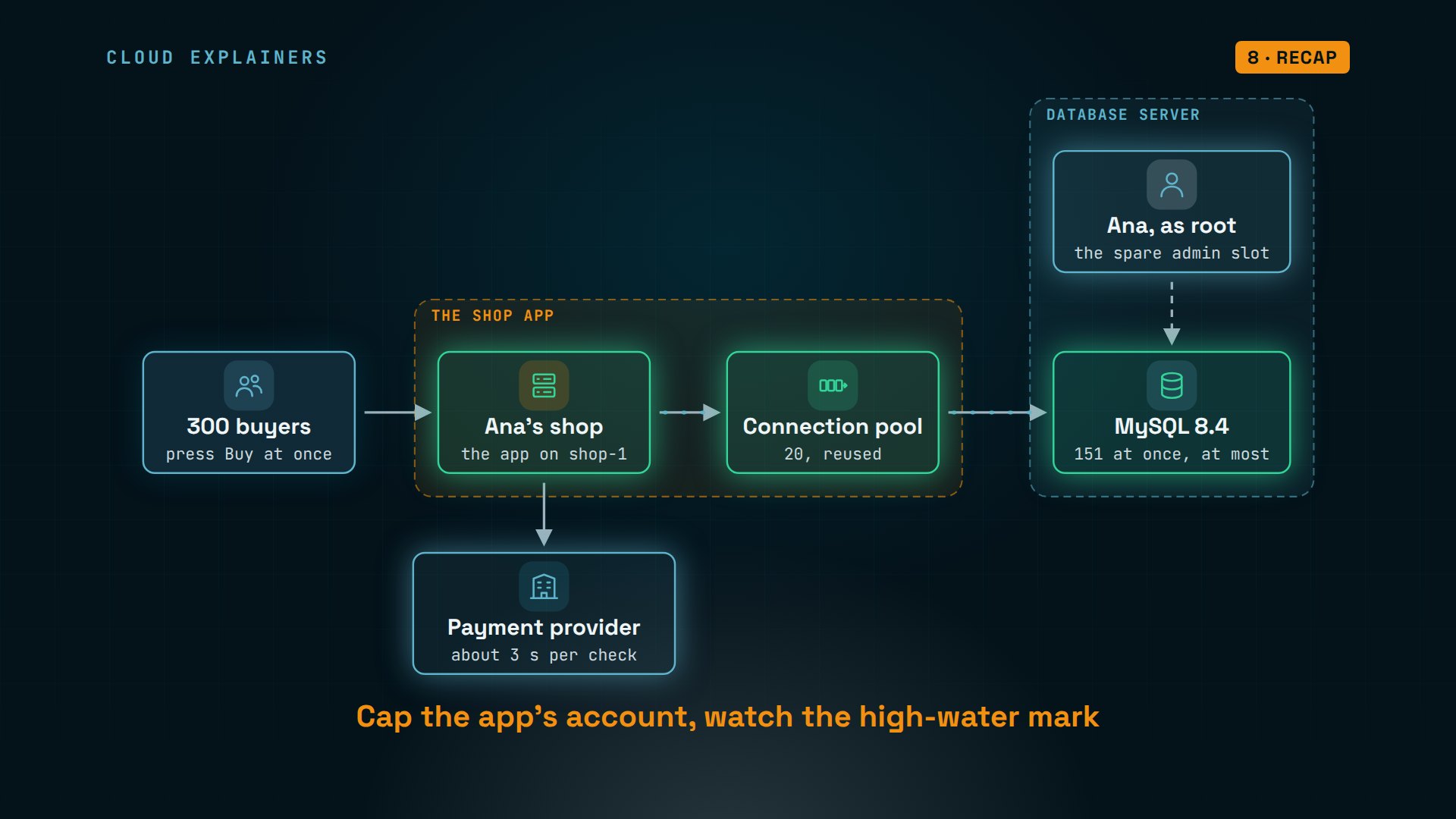
Here's the setup. Every Buy press runs Ana's order code on her shop server. That code talks to the payment provider, and saves the order in MySQL, the database. MySQL lets in 151 connections at a time. Number 152 is turned away.
What a connection is
So what is a connection? Before an app can run a single query, it connects: it opens a network link to MySQL and logs in with a user name and password. MySQL answers by starting a thread for it, a worker that serves only that connection. Queries go back and forth over the link, and it stays open until the app closes it.
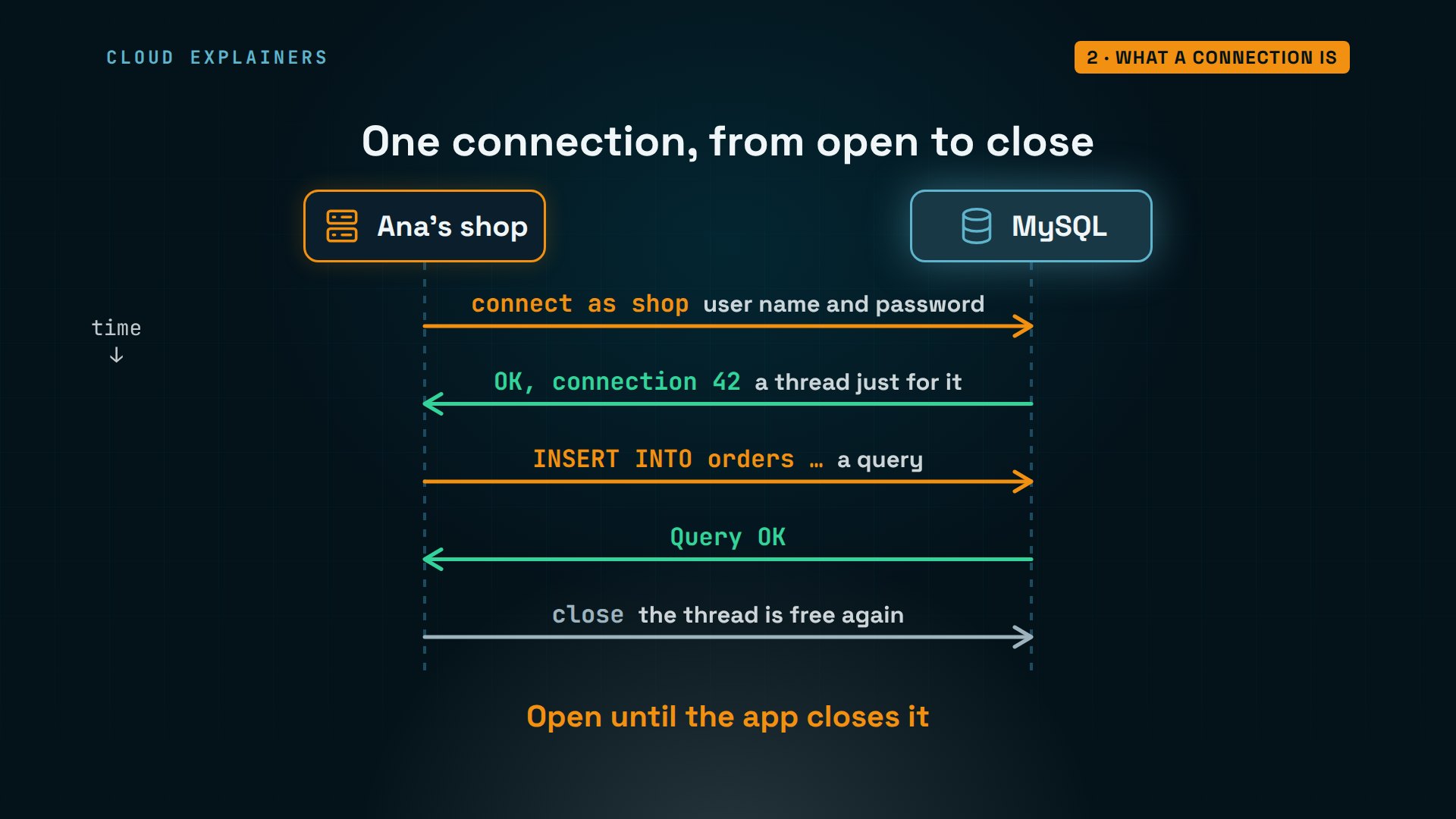
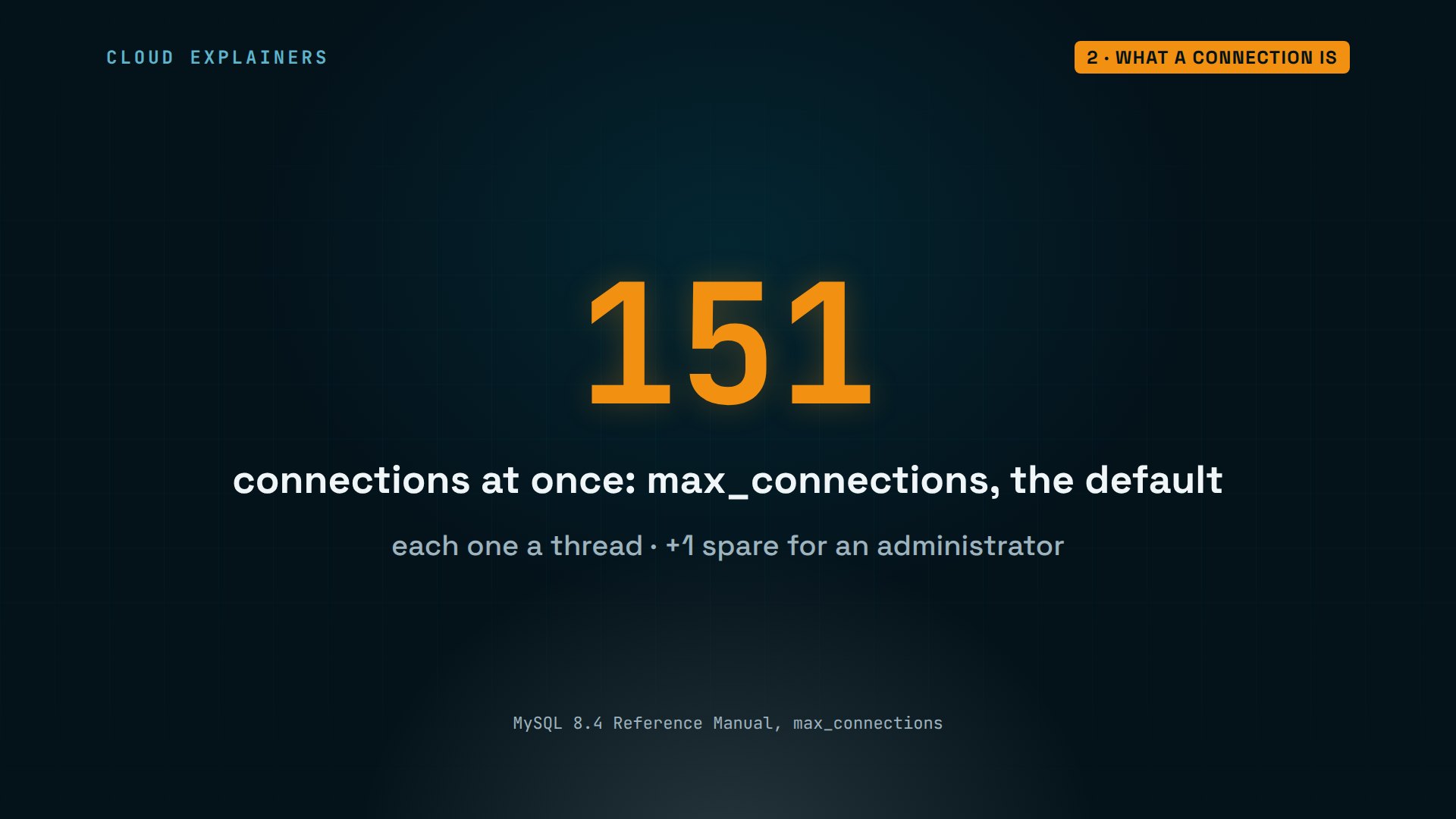
MySQL caps how many connections can be open at once. The setting is max_connections, and its default is 151. Each connection is a thread with its own memory, and one more is kept spare, but only for an administrator.
Who holds the connections
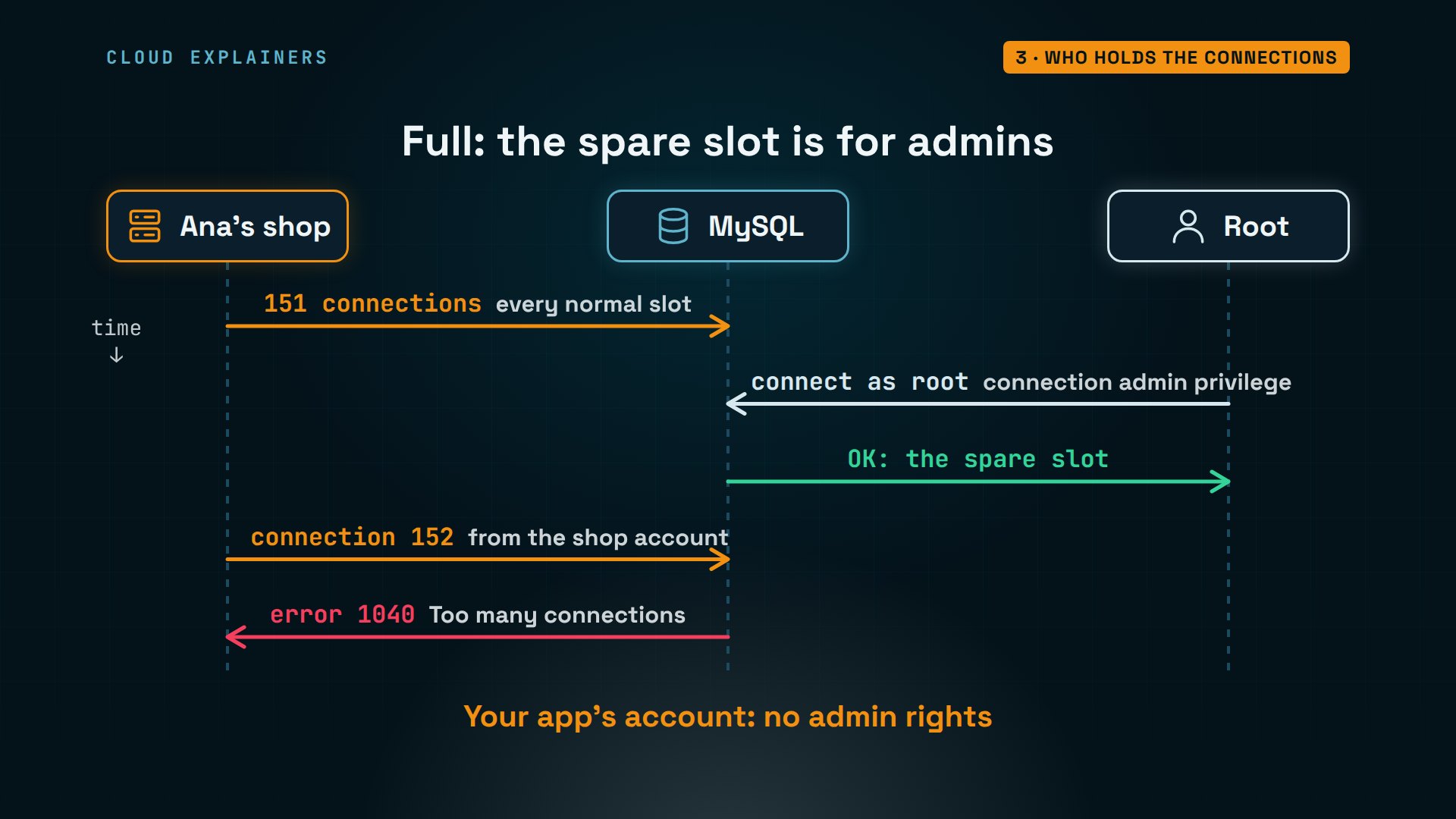
To find the cause, look while it happens. Ana starts the same sale again, and in a second window on the database server, she opens the MySQL client as root. It gets in: that's the spare slot. The limit really is 151. And this query counts the connections by user and by what they're doing: the shop account holds all 151, and every one of them says Sleep.
python3 rush.py 300300 orders at once ...
mysqlWelcome to the MySQL monitor.  Commands end with ; or \g.
Your MySQL connection id is 384
Server version: 8.4.13 MySQL Community Server - GPL

Copyright (c) 2000, 2026, Oracle and/or its affiliates.

Oracle is a registered trademark of Oracle Corporation and/or its
affiliates. Other names may be trademarks of their respective
owners.

Type 'help;' or '\h' for help. Type '\c' to clear the current input statement.
mysql> SHOW VARIABLES LIKE 'max_connections';+-----------------+-------+
| Variable_name   | Value |
+-----------------+-------+
| max_connections | 151   |
+-----------------+-------+
1 row in set (0.01 sec)
mysql> SELECT user, command, COUNT(*) AS connections FROM performance_schema.processlist WHERE command <> 'Daemon' GROUP BY user, command;+------+---------+-------------+
| user | command | connections |
+------+---------+-------------+
| shop | Sleep   |         151 |
| root | Query   |           1 |
+------+---------+-------------+
2 rows in set (0.00 sec)
Here's what just happened. The shop's 151 connections filled every normal slot. Root has the connection admin privilege, so MySQL let it take the one spare. Order number 152, from the shop account, got error 1040. Keep your app on its own account, without admin rights, so that spare is still there when you need it.
Now, Sleep. It means a connection is open, but idle: MySQL is waiting for the app's next query. So the database wasn't busy at all. Each order had opened its connection, then gone off to the payment provider for about three seconds, holding the connection the whole time.
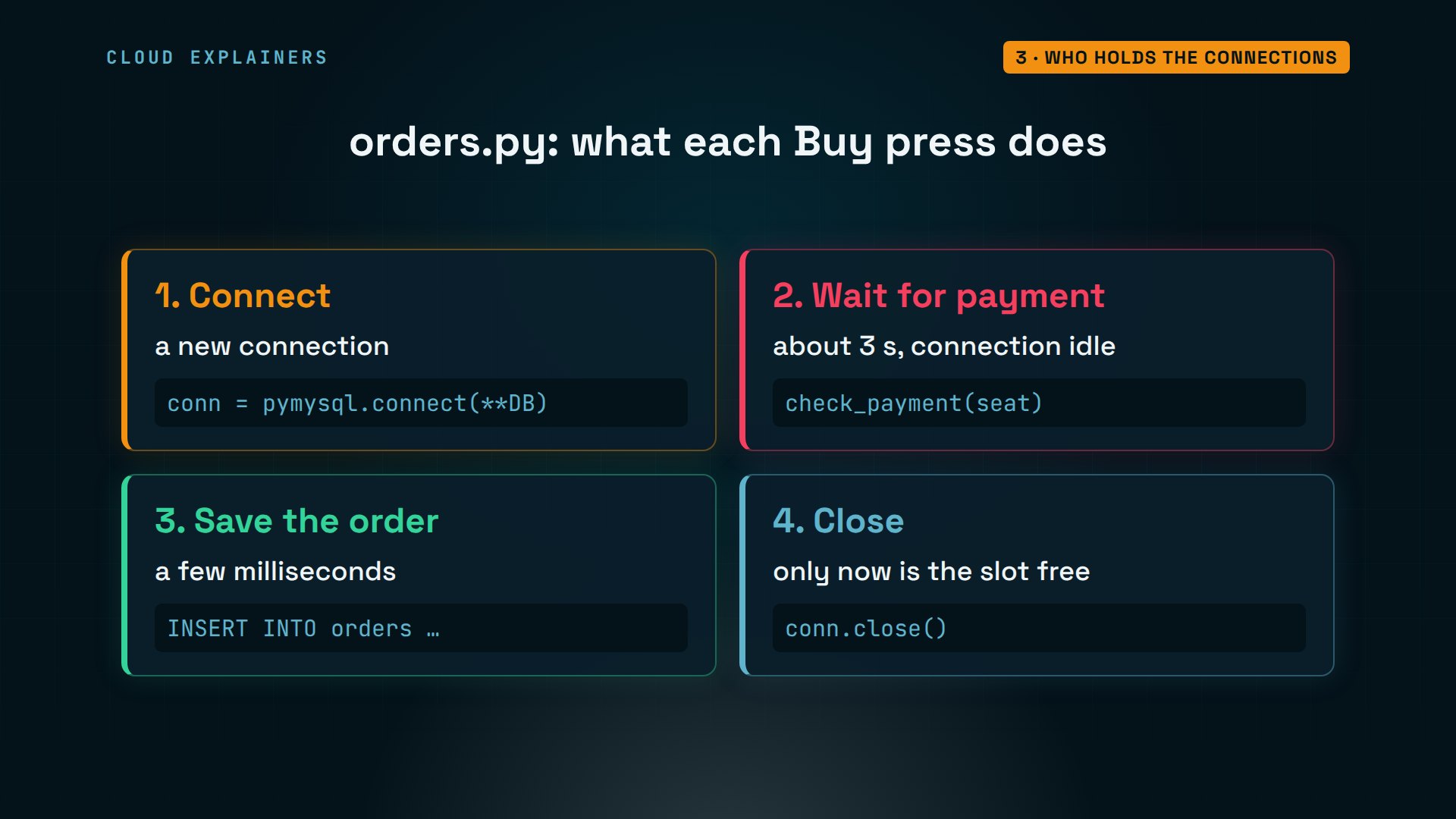
The order code shows it. Step one opens a new connection. Step two waits for the payment. Only step three uses the database, for a few milliseconds, and step four closes it. So 300 buyers at once want 300 connections at once, for three seconds each.
Back in the shop's window, the sale ended the same way: 151 placed, 149 failed. MySQL keeps score, too. The most connections ever open at once: 152, the full 151 plus root. And 298 connections refused for being over the limit, both sales together. A moment later, only root is still connected, which is why you look while it's happening.
python3 rush.py 300300 orders at once ...
placed: 151
failed: 149  (1040, 'Too many connections')
took 3.3 s
mysql> SHOW GLOBAL STATUS LIKE 'Max_used_connections';+----------------------+-------+
| Variable_name        | Value |
+----------------------+-------+
| Max_used_connections | 152   |
+----------------------+-------+
1 row in set (0.00 sec)
mysql> SHOW GLOBAL STATUS LIKE 'Connection_errors_max_connections';+-----------------------------------+-------+
| Variable_name                     | Value |
+-----------------------------------+-------+
| Connection_errors_max_connections | 298   |
+-----------------------------------+-------+
1 row in set (0.00 sec)
mysql> SHOW GLOBAL STATUS LIKE 'Threads_connected';+-------------------+-------+
| Variable_name     | Value |
+-------------------+-------+
| Threads_connected | 1     |
+-------------------+-------+
1 row in set (0.00 sec)
Why not just raise the limit
The quick fix you'll find everywhere is to raise the limit. Ana sets max_connections to 1,000, runs the same sale of 300, and every order goes through, in 3.6 seconds. Problem solved? Not quite.
mysql> SET GLOBAL max_connections = 1000;Query OK, 0 rows affected (0.00 sec)
python3 rush.py 300300 orders at once ...
placed: 300
took 3.6 s
Each connection costs memory, even while it sleeps. We measured the database server: 588 mebibytes with no connections, 594 with 150, 910 with 990 idle ones. That's about a third of a megabyte each. Busy connections take more, for sorting and joining.
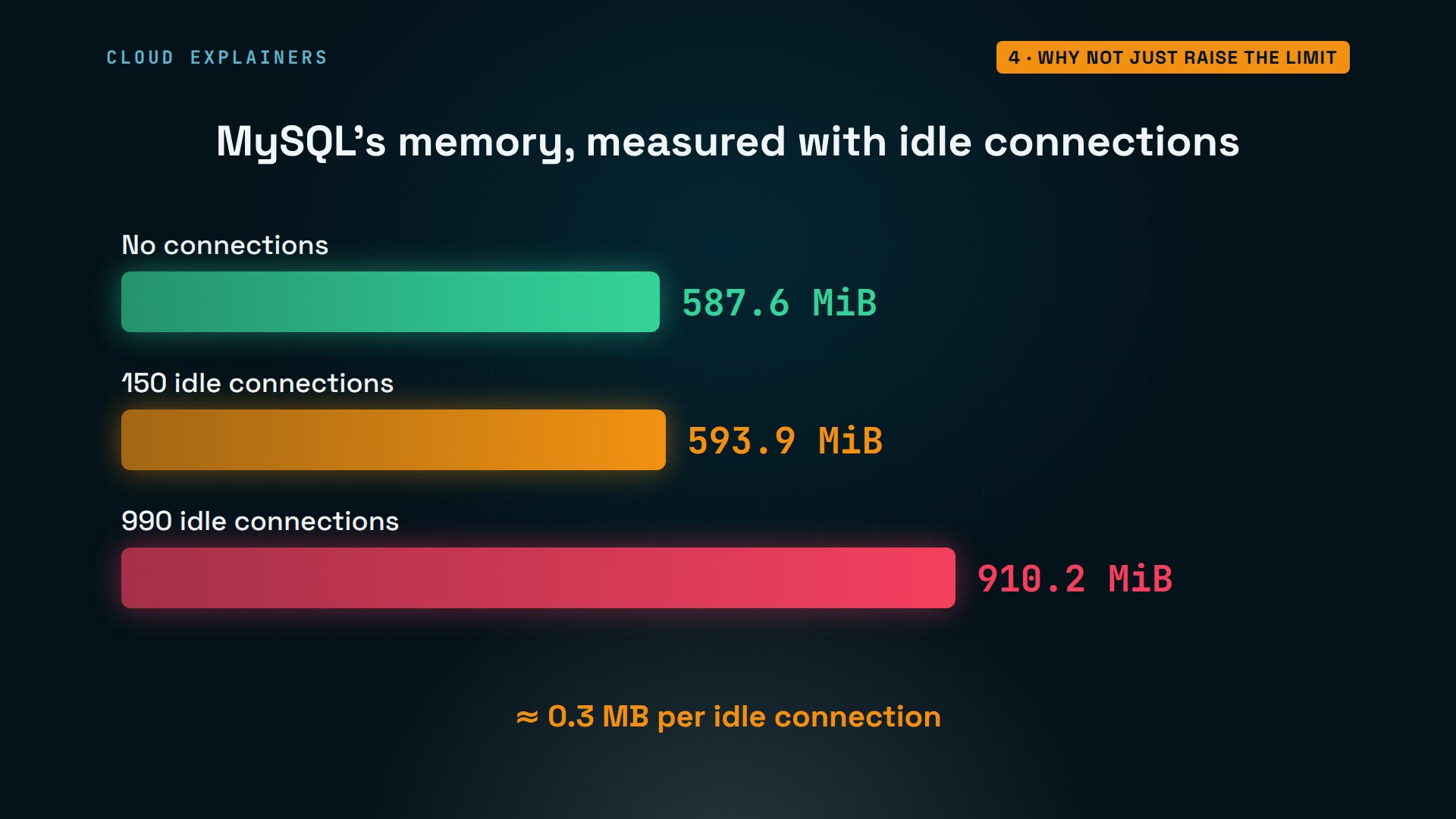
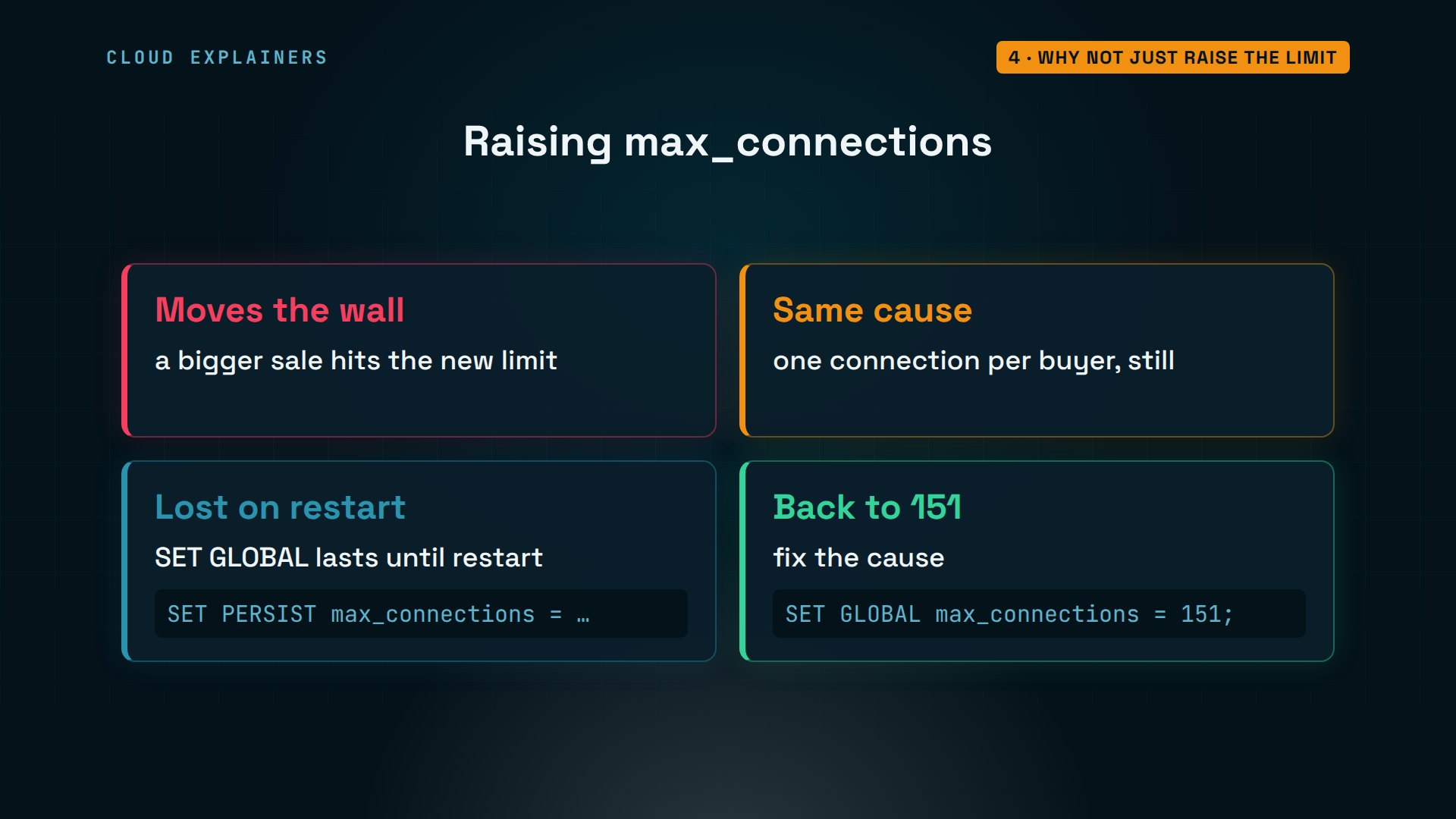
And a bigger limit only moves the wall. The code still wants one connection per buyer, so a sale twice as big fails again. A value set with SET GLOBAL is also lost when MySQL restarts; SET PERSIST would keep it. Ana puts the limit back to 151 and fixes the cause instead.
Fix 1: a connection pool
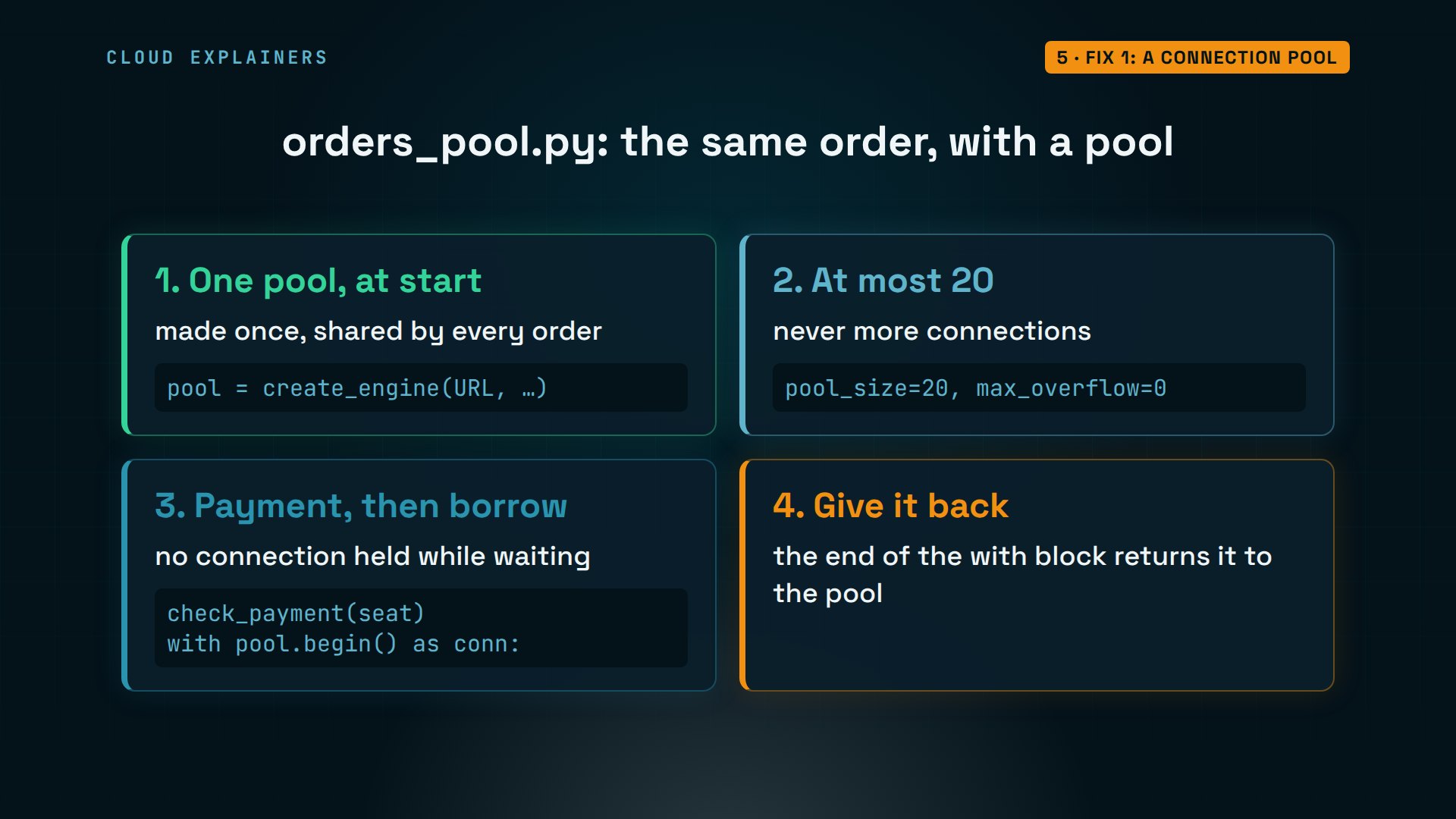
Two changes fix the cause. First, don't hold a connection while you wait for something else: check the payment, then connect. Second, borrow connections from a pool. A pool keeps a few connections open and lends them out. When all are busy, the next order waits a moment in the app, instead of getting an error from MySQL.
Ana's code gets its connection pool from SQLAlchemy, a popular Python database library. She creates it once, with pool_size 20 and max_overflow 0: never more than 20 connections. Each order checks the payment first, then borrows a connection just long enough to save, and gives it back.
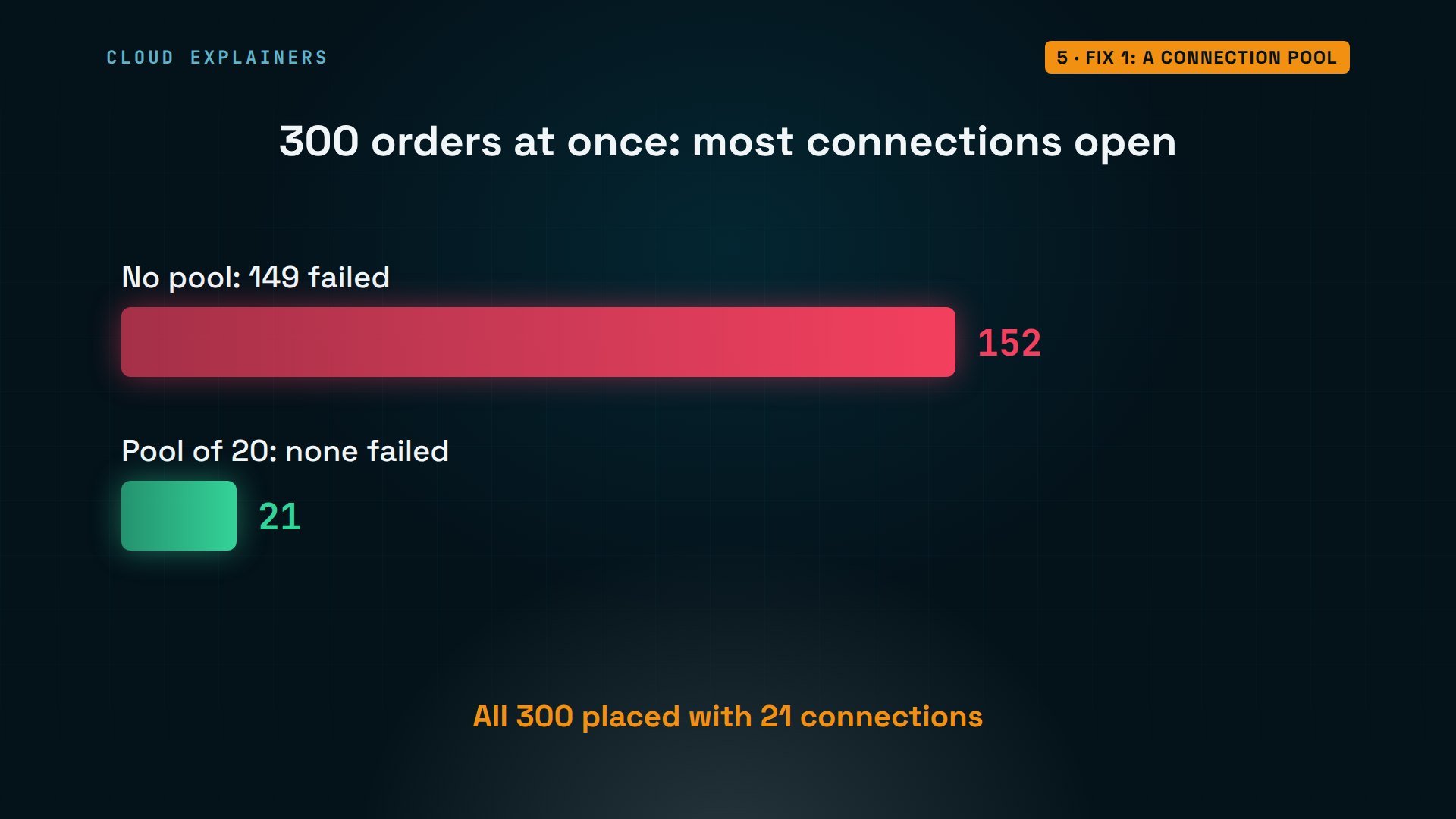
Ana clears MySQL's counters and runs the sale with the pool. All 300 orders go through, in 3.5 seconds. And the most connections open at once: 21, the pool's 20 plus root.
mysql> FLUSH STATUS;Query OK, 0 rows affected (0.01 sec)
python3 rush.py 300 --pool300 orders at once ...
placed: 300
took 3.5 s
mysql> SHOW GLOBAL STATUS LIKE 'Max_used_connections';+----------------------+-------+
| Variable_name        | Value |
+----------------------+-------+
| Max_used_connections | 21    |
+----------------------+-------+
1 row in set (0.00 sec)
Same 300 buyers, measured two ways. Without a pool, the shop filled all 151 slots, and 149 orders failed. With the pool, it never had more than 21 open, the pool's 20 and one for root, and none of the 300 failed.
Fix 2: pools that fit
But pools bring the second cause. Busy shops run several copies of the app, and many pools open all their connections at start, then keep them, ready. Say Ana runs three copies, each with a pool of 60. That's 180 connections, for a server that allows 151.
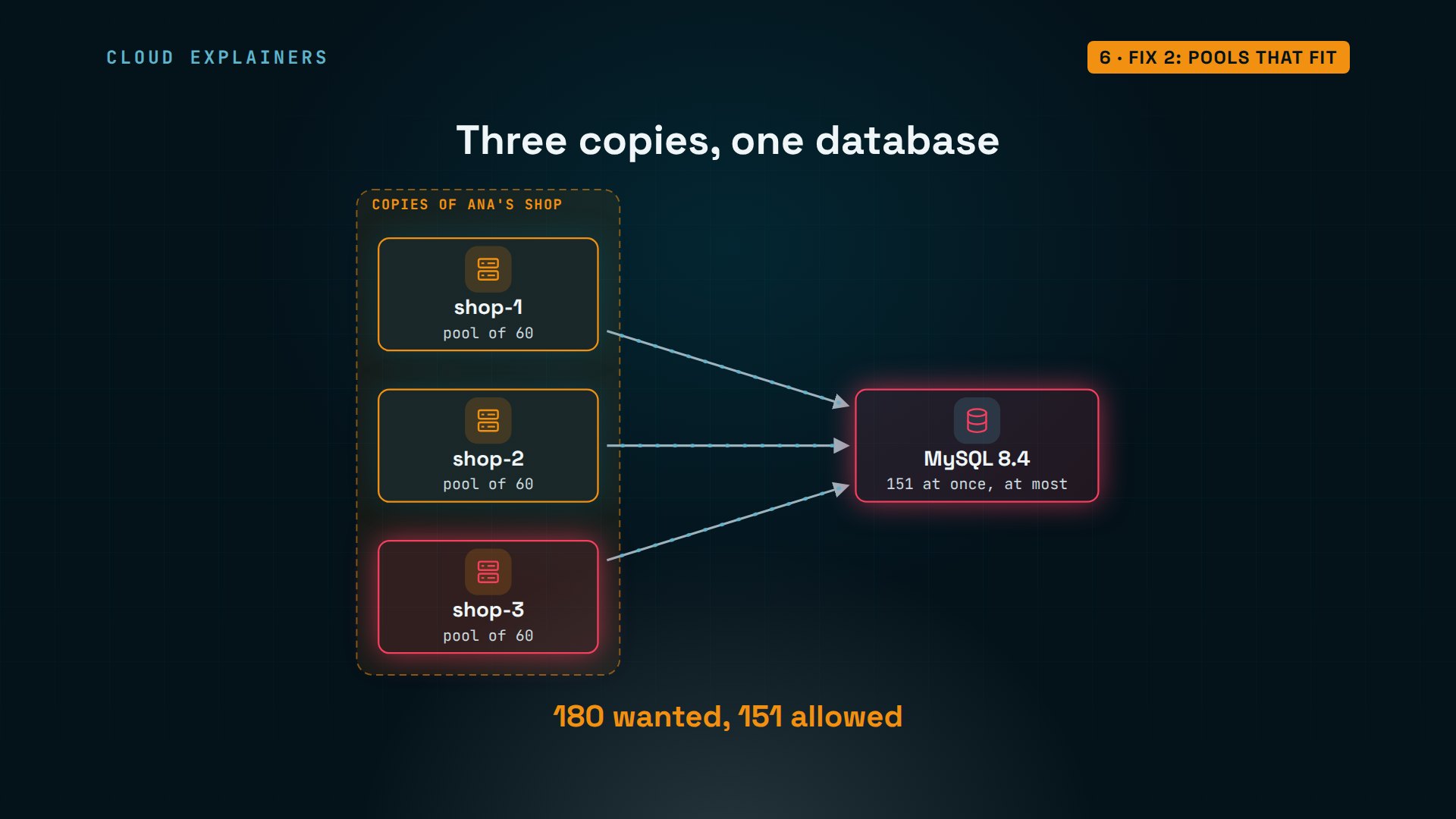
Here they start, one copy per machine. shop-1 opens all 60, so does shop-2. shop-3 gets 30, then error 1040. Nobody is buying anything yet. The connections are simply held, ready.
python3 warm_pool.py 60pool ready: 60 connections
python3 warm_pool.py 60pool ready: 60 connections
python3 warm_pool.py 60opened 30 of 60, then: (1040, 'Too many connections')
As root, group the connections by the machine they come from. 60, 60, and 30, all asleep. MySQL does close idle connections by itself, but only after wait_timeout: 28,800 seconds, eight hours. These pools aren't leaking. They're simply too big for this server.
mysql> SELECT SUBSTRING_INDEX(host, ':', 1) AS app, command, COUNT(*) AS connections FROM performance_schema.processlist WHERE user = 'shop' GROUP BY app, command;+--------------+---------+-------------+
| app          | command | connections |
+--------------+---------+-------------+
| 172.30.71.12 | Sleep   |          60 |
| 172.30.71.13 | Sleep   |          30 |
| 172.30.71.11 | Sleep   |          60 |
+--------------+---------+-------------+
3 rows in set (0.00 sec)
mysql> SHOW VARIABLES LIKE 'wait_timeout';+---------------+-------+
| Variable_name | Value |
+---------------+-------+
| wait_timeout  | 28800 |
+---------------+-------+
1 row in set (0.00 sec)
So do the math before you deploy: copies times pool size must fit under max_connections, with room to spare. Three pools of 60 is 180: too many. Three pools of 40 is 120, which leaves 31 for admins, backups and other jobs. And when you add a fourth copy, do the math again.
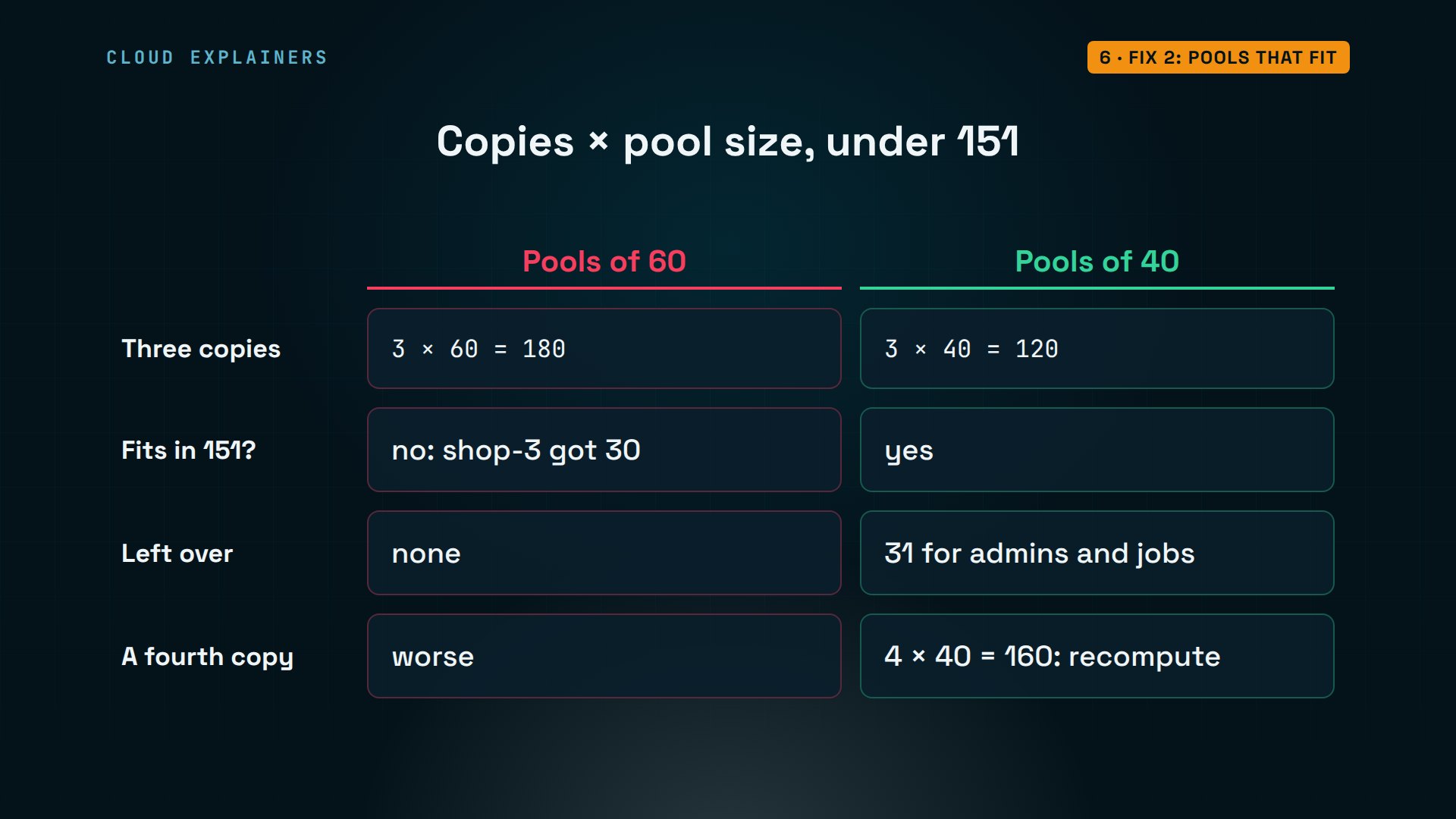
With pools of 40, all three copies start cleanly. Root's query shows 40, 40 and 40, and 121 connections in all, counting root, with room to spare.
mysql> SELECT SUBSTRING_INDEX(host, ':', 1) AS app, command, COUNT(*) AS connections FROM performance_schema.processlist WHERE user = 'shop' GROUP BY app, command;+--------------+---------+-------------+
| app          | command | connections |
+--------------+---------+-------------+
| 172.30.71.11 | Sleep   |          40 |
| 172.30.71.12 | Sleep   |          40 |
| 172.30.71.13 | Sleep   |          40 |
+--------------+---------+-------------+
3 rows in set (0.00 sec)
mysql> SHOW GLOBAL STATUS LIKE 'Threads_connected';+-------------------+-------+
| Variable_name     | Value |
+-------------------+-------+
| Threads_connected | 121   |
+-------------------+-------+
1 row in set (0.00 sec)
Keep it from coming back
One more guard keeps a single app from taking the whole server. Give the app's account its own cap. This statement changes the shop account, from any host, and sets max_user_connections to 120. Whatever the shop does, the other 31 slots stay open for root, backups and other apps.
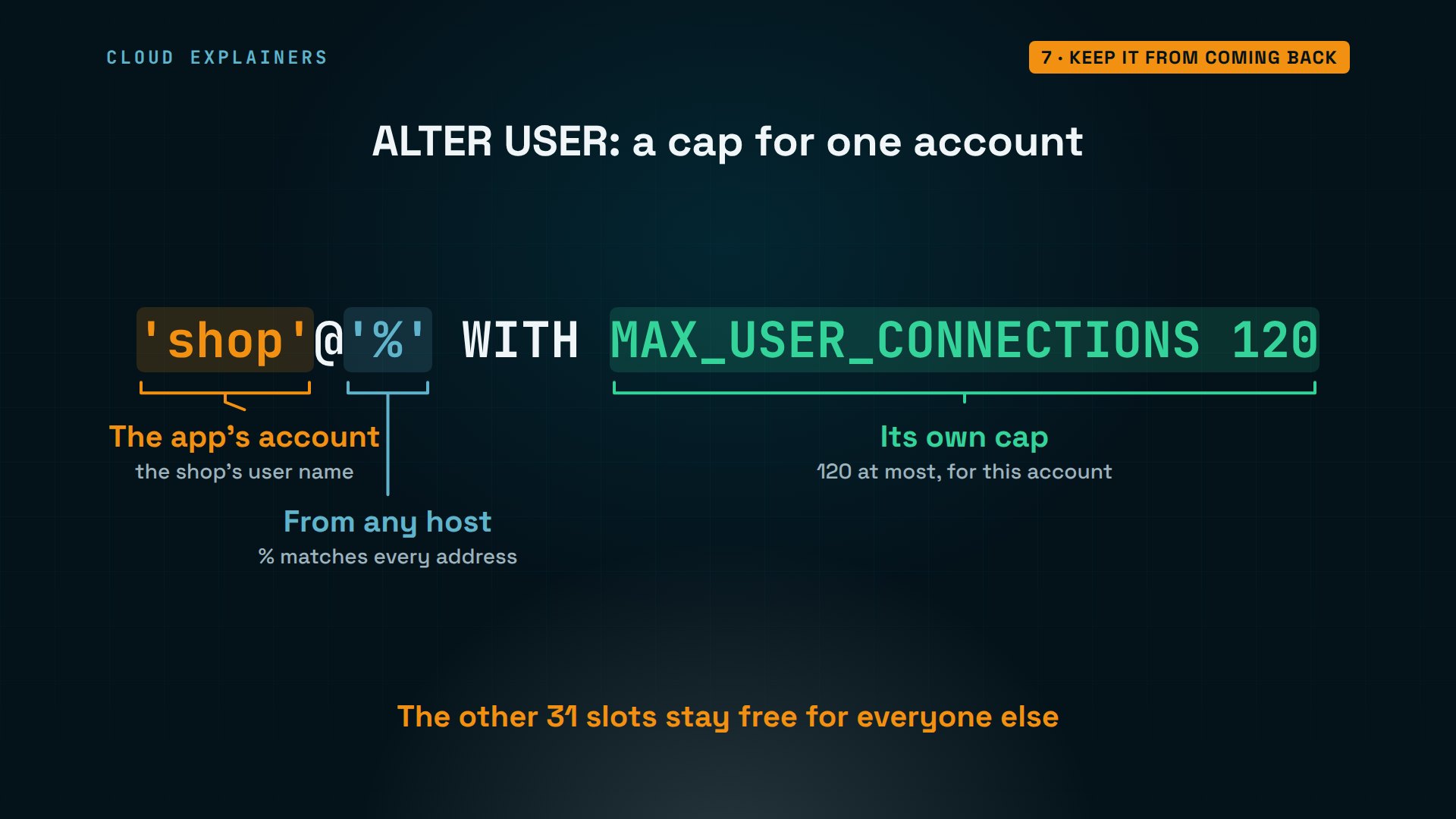
Ana runs it, then tests with the old code once more, with no pool. 120 orders go through. The rest fail with a clearer error, 1226: the shop account has hit its own limit. The server itself never filled up, so everyone else could still get in.
mysql> ALTER USER 'shop'@'%' WITH MAX_USER_CONNECTIONS 120;Query OK, 0 rows affected (0.01 sec)
python3 rush.py 300300 orders at once ...
placed: 120
failed: 180  (1226, "User 'shop' has exceeded the 'max_user_connections' resource (current value: 120)")
took 3.3 s
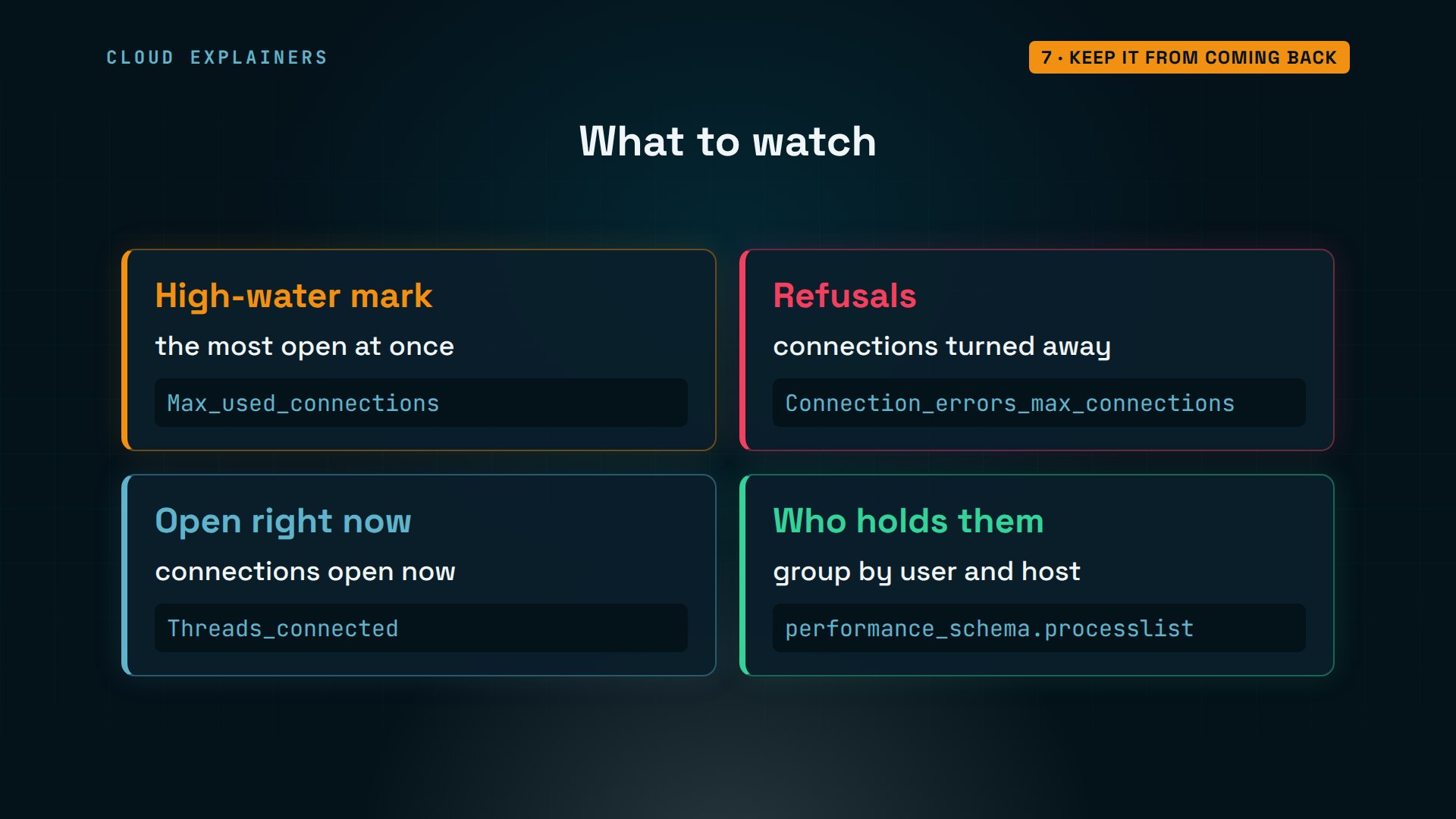
And watch the numbers before a big sale. Max_used_connections is the high-water mark, the most ever open at once. Connection_errors_max_connections counts refusals. If the high-water mark creeps toward the limit, find out who holds the connections before your buyers do.
Recap
So, error 1040 means every one of MySQL's 151 slots is taken. Log in as root, and see who holds them and what they're doing. Raising the limit only moves the wall. Don't hold connections while you wait, borrow them from a pool, and size the pools so every copy fits. Then cap the app's account, and watch the high-water mark.
If this kept your next sale online, subscribing helps a small channel make more real database demos.
Every command and number in this video came from a real run, on MySQL 8.4.13, in our own lab. Thanks for watching Cloud Explainers.
Sources
- MySQL 8.4 Reference Manual, Too many connections
- MySQL 8.4, Server System Variables (max_connections, wait_timeout, max_user_connections)
- MySQL 8.4, Server Status Variables (Max_used_connections, Connection_errors_max_connections, Threads_connected)
- MySQL 8.4, How MySQL Handles Client Connections
- MySQL 8.4, How MySQL Uses Memory
- MySQL 8.4, Setting Account Resource Limits
- SQLAlchemy, Connection Pooling
Demos: MySQL and a made-up ticket shop in containers on our own lab machine, on a private network with no way out. MySQL is a registered trademark of Oracle and/or its affiliates. Watch the full video on YouTube.
More videos
How a NoSQL Database Like MongoDB Works

How to Fix Python pip error: externally-managed-environment
Golang Concurrency Will Finally Make Sense After This
How Amazon S3 Works
How Kubernetes Works
How to Fix Docker Port Already Allocated Errors
How PostgreSQL Works
How to Fix Git Merge Conflicts

How to Fix No Space Left on Device in Linux
How the Internet Works
SQL vs NoSQL: When Each One Wins
How to Fix JWT Token Expired Errors (401 Unauthorized)

Claude API vs Claude Pro: Why Your Subscription Doesn't Include It

Why AI Agent Skills Beat Giant Prompts

Linux Cron Jobs Will Finally Make Sense After This

Security Logs Will Finally Make Sense After This

How to Fix a Security Leak: An API Key Pushed to GitHub

DNS Will Finally Make Sense After This

Never Ignore a Security Update

Two-Factor Authentication Will Finally Make Sense

Never Expose a Database to the Internet

SSH Keys vs Passwords: Which Is Safer for Security?

The 5 Levels of Linux Boot: From Power On to Login

The 5 Levels of Network Firewalls

Password Security: Why Hackers Crack Weak Passwords

Why Your Linux Server Runs Out of Memory

HTTP vs HTTPS: What Actually Changes on Your Network

Every Linux File Permission You Need to Know

Linux Processes vs Threads: When Each One Wins

The OSI Model Will Finally Make Sense After This

The 7 Levels of Git

Every Network Troubleshooting Command You Need

Hashing vs Encryption in Cybersecurity: When Each One Wins

Why the Internet Ran Out of IP Addresses

Linux Package Managers: apt vs Snap vs Flatpak

Why Python Is Slow (and When It Doesn't Matter)

TCP vs UDP: When Each One Wins

Stop Running Linux as Root (Do This Instead)

Linux Users and Groups Will Finally Make Sense

Why Phishing Beats Good Security (and How to Spot It)

The 7 Levels of Docker

AI Agents Will Finally Make Sense After This

Stop Using git push --force (Use This Instead)

Agent Skills vs MCP: When Each One Wins

Networking Will Finally Make Sense After This

Every Linux Command You Actually Need

The 7 Levels of Cybersecurity

Every System Design Concept You Need, in One Diagram
