
How to Fix nginx 502 Bad Gateway Errors on Linux
Your site shows 502 Bad Gateway and nginx says it's running. That's because a 502 is nginx telling you the app behind it gave no usable answer. In a real lab we broke a Python app behind nginx four ways and read nginx's error log each time: the words in that one line name the cause, and each has a fix you can check with nginx -t and curl.
nginx is running. The page says 502
Your website shows 502 Bad Gateway, and nginx says it's running. This is Ana's climbing gym booking page. An hour ago it listed the week's sessions. Now it says this, signed by nginx.
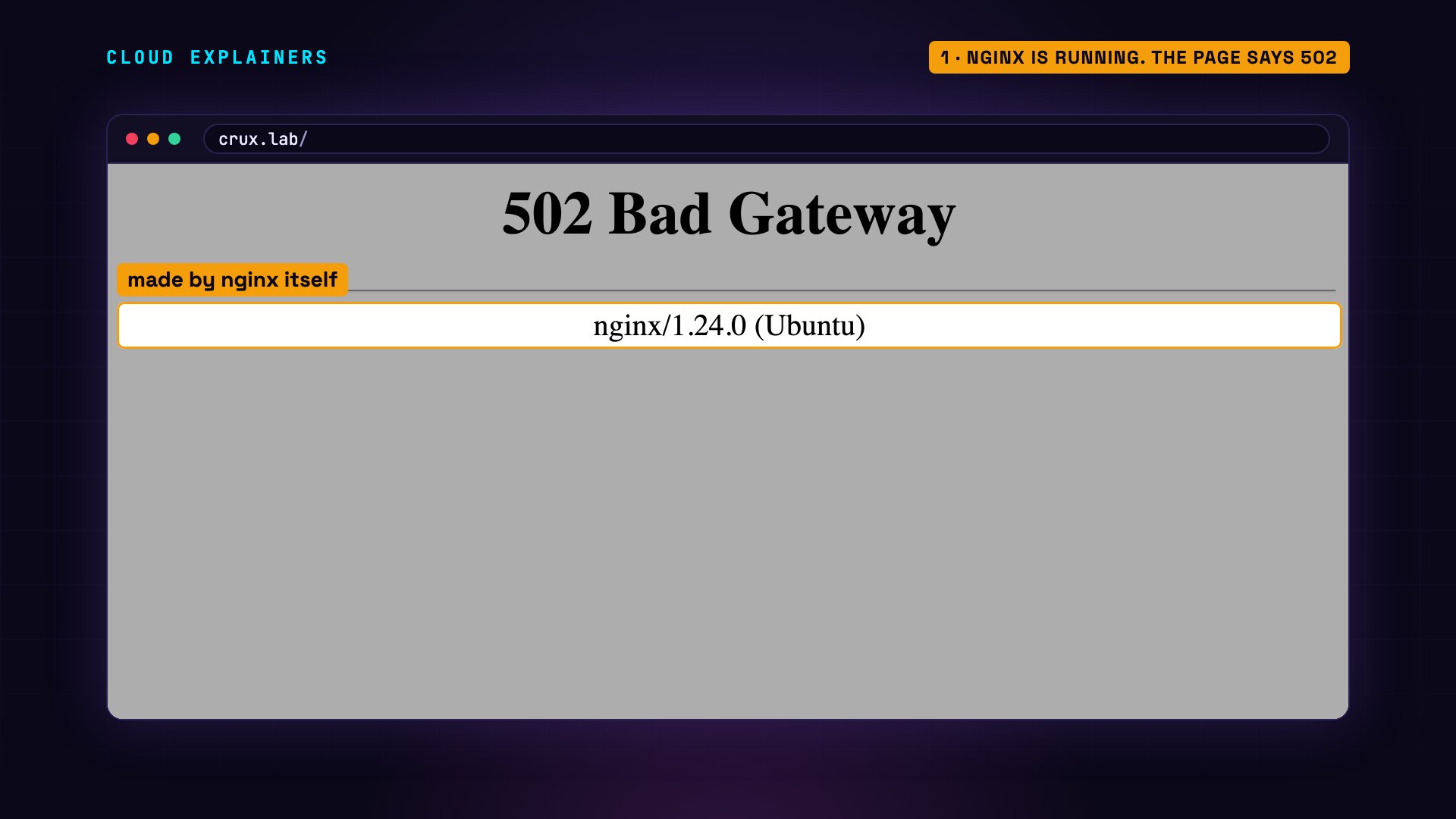
curl, which fetches a page from the command line, asks for just its status: 502. systemctl, the tool that manages services, says nginx is active and running. Most people restart it anyway. Guess first: does that help? No. Still 502.
curl -sI localhost | head -n 1HTTP/1.1 502 Bad Gateway
systemctl status nginx --no-pager● nginx.service - A high performance web server and a reverse proxy server
     Loaded: loaded (/usr/lib/systemd/system/nginx.service; enabled; preset: enabled)
     Active: active (running) since Fri 2026-11-13 17:43:16 UTC; 36s ago
       Docs: man:nginx(8)
    Process: 179 ExecReload=/usr/sbin/nginx -g daemon on; master_process on; -s reload (code=exited, status=0/SUCCESS)
   Main PID: 95 (nginx)
      Tasks: 11 (limit: 9563)
     Memory: 7.8M (peak: 15.2M)
        CPU: 31ms
     CGroup: /system.slice/nginx.service
             ├─ 95 "nginx: master process /usr/sbin/nginx -g daemon on; master_process on;"
             ├─181 "nginx: worker process"
             ├─182 "nginx: worker process"
             ├─183 "nginx: worker process"
             ├─184 "nginx: worker process"
             ├─185 "nginx: worker process"
             ├─186 "nginx: worker process"
             ├─187 "nginx: worker process"
             ├─188 "nginx: worker process"
             ├─189 "nginx: worker process"
             └─190 "nginx: worker process"

Nov 13 17:43:16 gym systemd[1]: Starting nginx.service - A high performance web server an…ver...
Nov 13 17:43:16 gym systemd[1]: Started nginx.service - A high performance web server and…erver.
Nov 13 17:43:17 gym systemd[1]: Reloading nginx.service - A high performance web server a…ver...
Nov 13 17:43:17 gym nginx[179]: 2026/11/13 17:43:17 [notice] 179#179: signal process started
Nov 13 17:43:17 gym systemd[1]: Reloaded nginx.service - A high performance web server an…erver.
Hint: Some lines were ellipsized, use -l to show in full.
sudo systemctl restart nginx
curl -sI localhost | head -n 1HTTP/1.1 502 Bad Gateway
What a bad gateway is
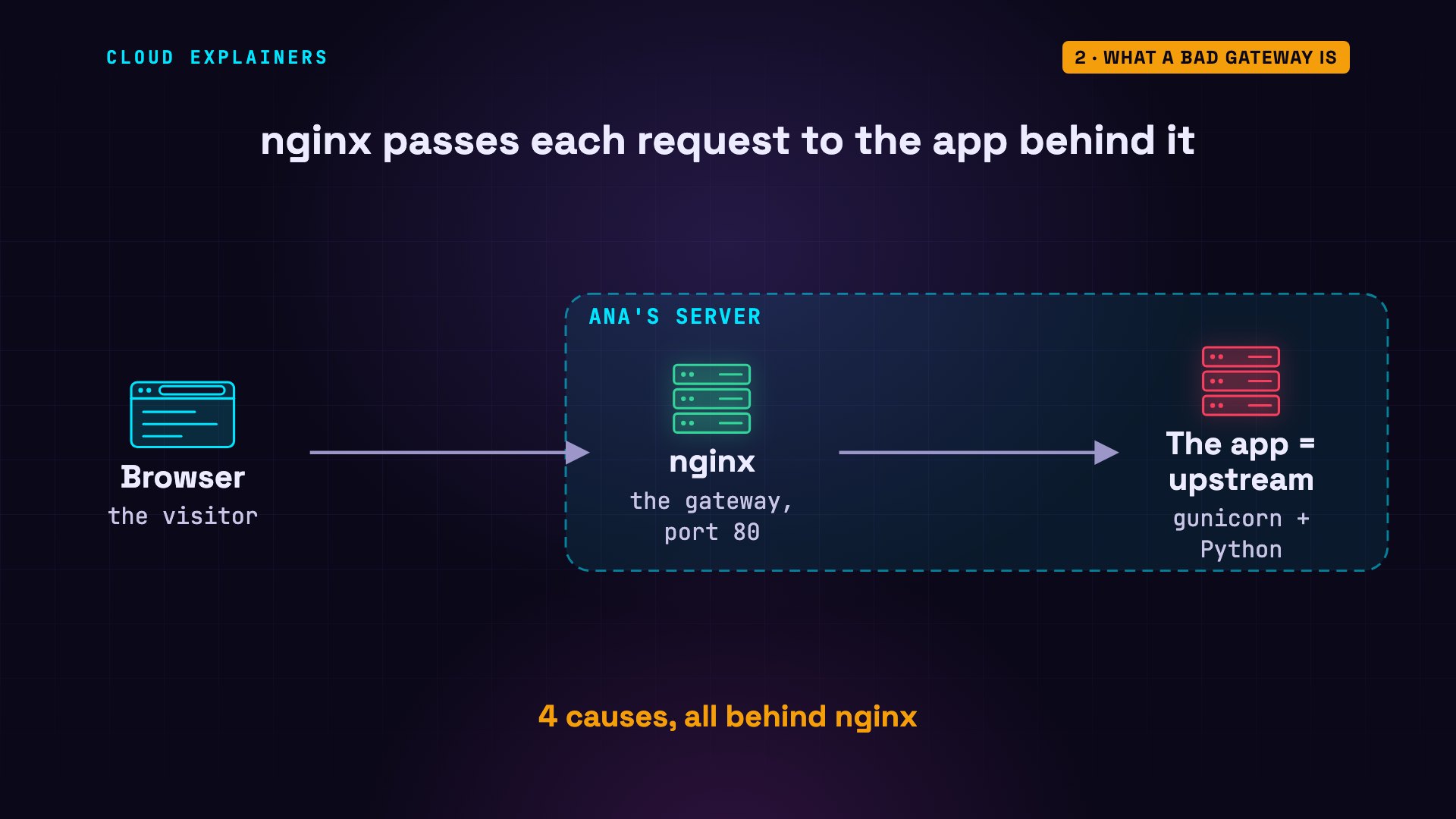
Here's why. nginx isn't the website. It passes each request to the app behind it, here a small Python app run by gunicorn, which nginx calls the upstream. nginx is the waiter, the app is the kitchen. A 502 is the waiter coming back with: the kitchen gave me nothing I can serve. Restarting the waiter changes nothing. We'll find four causes in the kitchen, including one where everything is running and nginx still isn't let in.
The quick fix: nginx's error log
So the quick fix is to stop guessing and ask nginx what the kitchen said. nginx writes it in its error log. This command prints the last line. Connect failed: Connection refused. Refused means nothing is listening at that address. And the address is at the end: the upstream, 127.0.0.1, port 8000.
sudo tail -n 1 /var/log/nginx/error.log2026/11/13 17:43:53 [error] 287#287: *1 connect() failed (111: Connection refused) while connecting to upstream, client: 127.0.0.1, server: _, request: "HEAD / HTTP/1.1", upstream: "http://127.0.0.1:8000/", host: "localhost"
Now skip the waiter and knock on the kitchen yourself: curl straight to that address. Failed to connect. So the app is the problem, not nginx. Its service says failed. And its own log, read with journalctl, says why: a key error. Ana's new version needs a setting called BOOKING_DB, and the service file doesn't give it one. So the app crashed at start, and systemd gave up after a few tries.
curl -I 127.0.0.1:8000curl: (7) Failed to connect to 127.0.0.1 port 8000 after 0 ms: Couldn't connect to server
systemctl status booking --no-pager× booking.service - Crux Climbing booking app (gunicorn)
     Loaded: loaded (/etc/systemd/system/booking.service; enabled; preset: enabled)
     Active: failed (Result: exit-code) since Fri 2026-11-13 17:43:50 UTC; 2s ago
   Duration: 80ms
    Process: 243 ExecStart=/usr/bin/gunicorn --workers 2 --bind 127.0.0.1:8000 booking:app (code=exited, status=3)
   Main PID: 243 (code=exited, status=3)
        CPU: 79ms

Nov 13 17:43:50 gym systemd[1]: booking.service: Scheduled restart job, restart counter is at 5.
Nov 13 17:43:50 gym systemd[1]: booking.service: Start request repeated too quickly.
Nov 13 17:43:50 gym systemd[1]: booking.service: Failed with result 'exit-code'.
Nov 13 17:43:50 gym systemd[1]: Failed to start booking.service - Crux Climbing booking a…corn).
Hint: Some lines were ellipsized, use -l to show in full.
journalctl -u booking -n 40 --no-pagerNov 13 17:43:50 gym gunicorn[244]:   File "/usr/lib/python3/dist-packages/gunicorn/workers/base.py", line 134, in init_process
Nov 13 17:43:50 gym gunicorn[244]:     self.load_wsgi()
Nov 13 17:43:50 gym gunicorn[244]:   File "/usr/lib/python3/dist-packages/gunicorn/workers/base.py", line 146, in load_wsgi
Nov 13 17:43:50 gym gunicorn[244]:     self.wsgi = self.app.wsgi()
Nov 13 17:43:50 gym gunicorn[244]:                 ^^^^^^^^^^^^^^^
Nov 13 17:43:50 gym gunicorn[244]:   File "/usr/lib/python3/dist-packages/gunicorn/app/base.py", line 67, in wsgi
Nov 13 17:43:50 gym gunicorn[244]:     self.callable = self.load()
Nov 13 17:43:50 gym gunicorn[244]:                     ^^^^^^^^^^^
Nov 13 17:43:50 gym gunicorn[244]:   File "/usr/lib/python3/dist-packages/gunicorn/app/wsgiapp.py", line 58, in load
Nov 13 17:43:50 gym gunicorn[244]:     return self.load_wsgiapp()
Nov 13 17:43:50 gym gunicorn[244]:            ^^^^^^^^^^^^^^^^^^^
Nov 13 17:43:50 gym gunicorn[244]:   File "/usr/lib/python3/dist-packages/gunicorn/app/wsgiapp.py", line 48, in load_wsgiapp
Nov 13 17:43:50 gym gunicorn[244]:     return util.import_app(self.app_uri)
Nov 13 17:43:50 gym gunicorn[244]:            ^^^^^^^^^^^^^^^^^^^^^^^^^^^^^
Nov 13 17:43:50 gym gunicorn[244]:   File "/usr/lib/python3/dist-packages/gunicorn/util.py", line 384, in import_app
Nov 13 17:43:50 gym gunicorn[244]:     mod = importlib.import_module(module)
Nov 13 17:43:50 gym gunicorn[244]:           ^^^^^^^^^^^^^^^^^^^^^^^^^^^^^^^
Nov 13 17:43:50 gym gunicorn[244]:   File "/usr/lib/python3.12/importlib/__init__.py", line 90, in import_module
Nov 13 17:43:50 gym gunicorn[244]:     return _bootstrap._gcd_import(name[level:], package, level)
Nov 13 17:43:50 gym gunicorn[244]:            ^^^^^^^^^^^^^^^^^^^^^^^^^^^^^^^^^^^^^^^^^^^^^^^^^^^^
Nov 13 17:43:50 gym gunicorn[244]:   File "<frozen importlib._bootstrap>", line 1387, in _gcd_import
Nov 13 17:43:50 gym gunicorn[244]:   File "<frozen importlib._bootstrap>", line 1360, in _find_and_load
Nov 13 17:43:50 gym gunicorn[244]:   File "<frozen importlib._bootstrap>", line 1331, in _find_and_load_unlocked
Nov 13 17:43:50 gym gunicorn[244]:   File "<frozen importlib._bootstrap>", line 935, in _load_unlocked
Nov 13 17:43:50 gym gunicorn[244]:   File "<frozen importlib._bootstrap_external>", line 995, in exec_module
Nov 13 17:43:50 gym gunicorn[244]:   File "<frozen importlib._bootstrap>", line 488, in _call_with_frames_removed
Nov 13 17:43:50 gym gunicorn[244]:   File "/home/ana/booking/booking.py", line 13, in <module>
Nov 13 17:43:50 gym gunicorn[244]:     DB = Path(os.environ["BOOKING_DB"])          # new in this version: where the sessions file lives
Nov 13 17:43:50 gym gunicorn[244]:               ~~~~~~~~~~^^^^^^^^^^^^^^
Nov 13 17:43:50 gym gunicorn[244]:   File "<frozen os>", line 685, in __getitem__
Nov 13 17:43:50 gym gunicorn[244]: KeyError: 'BOOKING_DB'
Nov 13 17:43:50 gym gunicorn[244]: [2026-11-13 17:43:50 +0000] [244] [INFO] Worker exiting (pid: 244)
Nov 13 17:43:50 gym gunicorn[243]: [2026-11-13 17:43:50 +0000] [243] [INFO] Shutting down: Master
Nov 13 17:43:50 gym gunicorn[243]: [2026-11-13 17:43:50 +0000] [243] [INFO] Reason: Worker failed to boot.
Nov 13 17:43:50 gym systemd[1]: booking.service: Main process exited, code=exited, status=3/NOTIMPLEMENTED
Nov 13 17:43:50 gym systemd[1]: booking.service: Failed with result 'exit-code'.
Nov 13 17:43:50 gym systemd[1]: booking.service: Scheduled restart job, restart counter is at 5.
Nov 13 17:43:50 gym systemd[1]: booking.service: Start request repeated too quickly.
Nov 13 17:43:50 gym systemd[1]: booking.service: Failed with result 'exit-code'.
Nov 13 17:43:50 gym systemd[1]: Failed to start booking.service - Crux Climbing booking app (gunicorn).
In her editor, Ana adds the setting to the service file, and grep shows the line. daemon-reload makes systemd read the changed file, then she restarts the app, not nginx. And the page answers 200 OK.
grep -n BOOKING_DB /etc/systemd/system/booking.service9:Environment=BOOKING_DB=/home/ana/booking/sessions.csv
sudo systemctl daemon-reload
sudo systemctl restart booking
curl -sI localhost | head -n 1HTTP/1.1 200 OK
Refused, but the app is running
Same error, different day. 502, and the log says Connection refused again, at port 8000. But this time the app is active. So where is it? The ss command lists the ports programs are listening on, and grep keeps gunicorn's line. gunicorn is on port 8080. Ana's teammate moved the app, and nobody told nginx. The waiter is knocking on the old kitchen door.
curl -sI localhost | head -n 1HTTP/1.1 502 Bad Gateway
sudo tail -n 1 /var/log/nginx/error.log2026/11/13 17:44:09 [error] 288#288: *5 connect() failed (111: Connection refused) while connecting to upstream, client: 127.0.0.1, server: _, request: "HEAD / HTTP/1.1", upstream: "http://127.0.0.1:8000/", host: "localhost"
systemctl is-active bookingactive
sudo ss -ltnp | grep gunicornLISTEN 0 2048 127.0.0.1:8080 0.0.0.0:* users:(("gunicorn",pid=381,fd=5),("gunicorn",pid=380,fd=5),("gunicorn",pid=372,fd=5))
The address lives on nginx's proxy pass line. Ana changes 8000 to 8080, and before anything else, nginx -t tests the whole configuration. Test is successful. Then a reload, which keeps nginx up while it reads the change. 200 OK.
grep -n proxy_pass /etc/nginx/sites-available/booking6: proxy_pass http://127.0.0.1:8000;
grep -n proxy_pass /etc/nginx/sites-available/booking6: proxy_pass http://127.0.0.1:8080;
sudo nginx -tnginx: the configuration file /etc/nginx/nginx.conf syntax is ok
nginx: configuration file /etc/nginx/nginx.conf test is successful
sudo systemctl reload nginx
curl -sI localhost | head -n 1HTTP/1.1 200 OK
A slow page: 502 or 504?
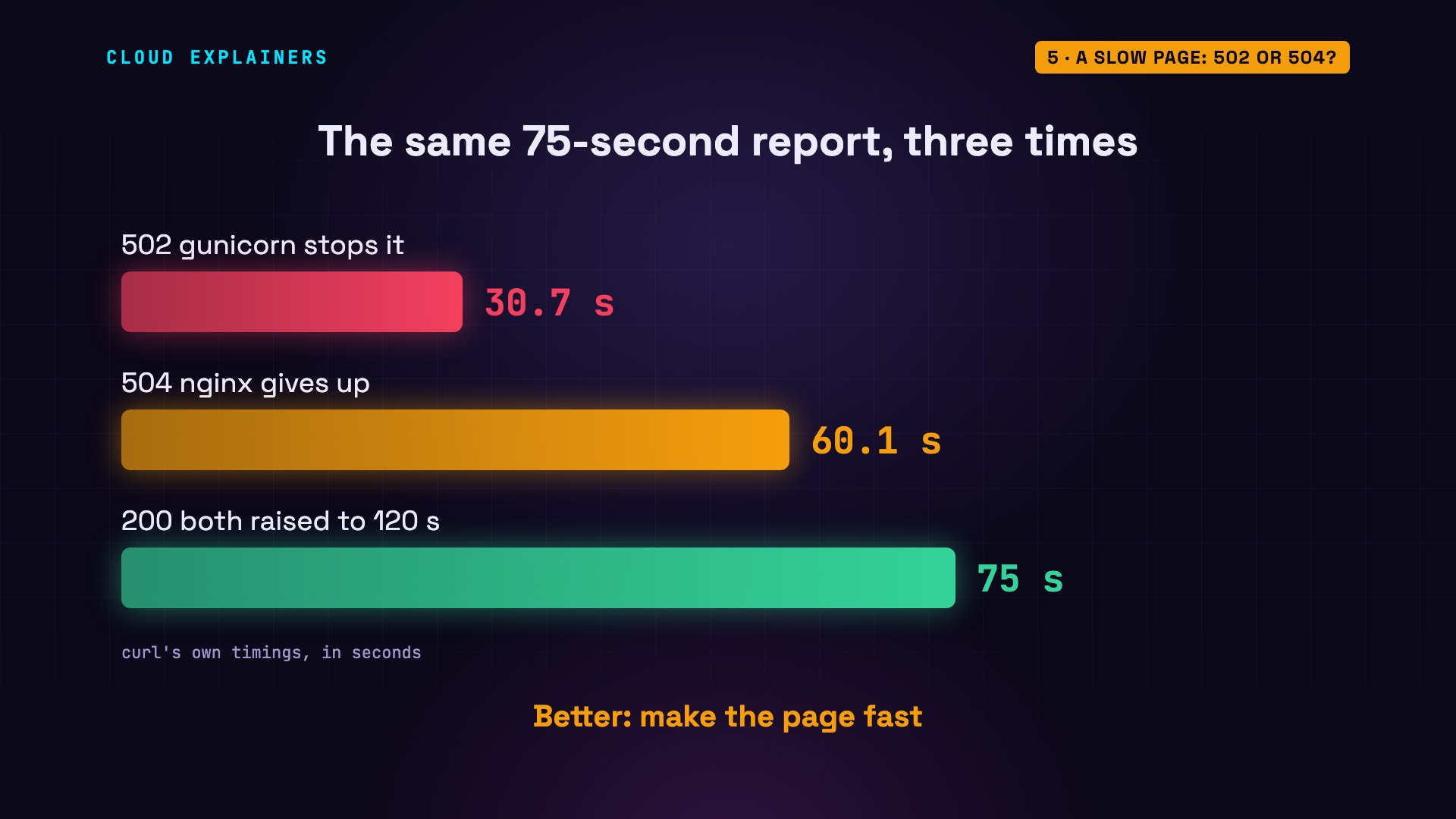
Now a page that's slow, not broken. The monthly report takes seventy-five seconds to build. curl times the request. A gateway timeout is error 504. So guess first: what does the visitor get? A 502, after thirty seconds. The log says the upstream closed the connection early, and the app's log says why: worker timeout.
curl -s -o /dev/null -w '%{http_code} after %{time_total}s\n' localhost/report502 after 30.666800s
sudo tail -n 1 /var/log/nginx/error.log2026/11/13 17:44:42 [error] 411#411: *9 upstream prematurely closed connection while reading response header from upstream, client: 127.0.0.1, server: _, request: "GET /report HTTP/1.1", upstream: "http://127.0.0.1:8080/report", host: "localhost"
journalctl -u booking -n 3 --no-pagerNov 13 17:44:08 gym gunicorn[381]: [2026-11-13 17:44:08 +0000] [381] [INFO] Booting worker with pid: 381
Nov 13 17:44:42 gym gunicorn[372]: [2026-11-13 17:44:42 +0000] [372] [CRITICAL] WORKER TIMEOUT (pid:380)
Nov 13 17:44:42 gym gunicorn[380]: [2026-11-13 17:44:42 +0000] [380] [INFO] Worker exiting (pid: 380)
That's gunicorn's own timer: it stops any worker that's silent for thirty seconds. So Ana raises it to a hundred and twenty, in the service file, and restarts the app. Now nginx's own default limit runs out first: sixty seconds, and the real 504. A different log line too: upstream timed out. Closed early means 502. Timed out means 504.
grep -n timeout /etc/systemd/system/booking.service10:ExecStart=/usr/bin/gunicorn --workers 2 --timeout 120 --bind 127.0.0.1:8080 booking:app
sudo systemctl daemon-reload
sudo systemctl restart booking
curl -s -o /dev/null -w '%{http_code} after %{time_total}s\n' localhost/report504 after 60.066385s
sudo tail -n 1 /var/log/nginx/error.log2026/11/13 17:45:44 [error] 412#412: *11 upstream timed out (110: Connection timed out) while reading response header from upstream, client: 127.0.0.1, server: _, request: "GET /report HTTP/1.1", upstream: "http://127.0.0.1:8080/report", host: "localhost"
nginx's limit is the proxy read timeout. Ana sets it to a hundred and twenty seconds, tests, and reloads. 200, after seventy-five.
grep -n proxy_read_timeout /etc/nginx/sites-available/booking9: proxy_read_timeout 120s;
sudo nginx -tnginx: the configuration file /etc/nginx/nginx.conf syntax is ok
nginx: configuration file /etc/nginx/nginx.conf test is successful
sudo systemctl reload nginx
curl -s -o /dev/null -w '%{http_code} after %{time_total}s\n' localhost/report200 after 75.005155s
Three runs of the same report: whichever timer runs out first decides the error. It works now, but every visitor still waits seventy-five seconds. The lasting fix is a faster page, or building the report in the background.
An answer too big for nginx
This one only hits the sign-in page. 502, every time, with the app running fine. The log: upstream sent too big header. The header is the part of the app's answer before the page itself, and nginx reads it into one small buffer: one memory page, here four thousand ninety-six bytes. Ana's sign-in cookie made the header five thousand sixty-three bytes. The kitchen sent a plate too big for the waiter's tray.
curl -s -o /dev/null -w '%{http_code}\n' localhost/login502
sudo tail -n 1 /var/log/nginx/error.log2026/11/13 17:48:01 [error] 484#484: *17 upstream sent too big header while reading response header from upstream, client: 127.0.0.1, server: _, request: "GET /login HTTP/1.1", upstream: "http://127.0.0.1:8080/login", host: "localhost"
curl -s -D - -o /dev/null 127.0.0.1:8080/login | wc -c5063
getconf PAGESIZE4096
The setting is proxy buffer size. Ana sets sixteen kilobytes, and tests first. Refused. nginx's other buffers are still four kilobytes each, too small to go with it. Notice the site is still up: a failed test changes nothing live. She raises the other buffers, eight of them, to sixteen kilobytes each, tests, reloads, and sign-in returns 200. Smaller cookies are the lasting fix.
grep -n proxy_buffer /etc/nginx/sites-available/booking10: proxy_buffer_size 16k;
sudo nginx -t2026/11/13 17:48:01 [emerg] 512#512: "proxy_busy_buffers_size" must be less than the size of all "proxy_buffers" minus one buffer in /etc/nginx/nginx.conf:61
nginx: configuration file /etc/nginx/nginx.conf test failed
grep -n proxy_buffer /etc/nginx/sites-available/booking10:        proxy_buffer_size 16k;
11:        proxy_buffers 8 16k;
sudo nginx -tnginx: the configuration file /etc/nginx/nginx.conf syntax is ok
nginx: configuration file /etc/nginx/nginx.conf test is successful
sudo systemctl reload nginx
curl -s -o /dev/null -w '%{http_code}\n' localhost/login200
The socket in a home folder
The last one is the case where everything runs and nginx still isn't let in. Ana followed a guide that connects nginx and gunicorn through a socket: a special file the two programs talk through, here in her home folder. 502, and the log says: Permission denied. The socket itself is open to everyone. But nginx's workers run as a user called www-data, and to reach the socket they must pass through Ana's home folder. In its permissions, the last three characters are for everyone else, and dashes mean: keep out. Ubuntu makes new home folders that way.
curl -sI localhost | head -n 1HTTP/1.1 502 Bad Gateway
sudo tail -n 1 /var/log/nginx/error.log2026/11/13 17:48:05 [crit] 585#585: *23 connect() to unix:/home/ana/booking/booking.sock failed (13: Permission denied) while connecting to upstream, client: 127.0.0.1, server: _, request: "HEAD / HTTP/1.1", upstream: "http://unix:/home/ana/booking/booking.sock:/", host: "localhost"
ls -l /home/ana/booking/booking.socksrwxrwxrwx 1 ana ana 0 Nov 13 17:48 /home/ana/booking/booking.sock
ps -o user= -C nginx | sort | uniq -c1 root 10 www-data
ls -ld /home/anadrwxr-x--- 1 ana ana 4096 Nov 13 17:43 /home/ana
Don't open up your home folder. Move the socket. One line in the service file, runtime directory, makes systemd create a folder for it under /run, readable by nginx, and nginx points at the new path. Restart the app, reload nginx, and the page is back. Every command and the lab files are linked in the description.
grep -n -e Runtime -e bind /etc/systemd/system/booking.service10:RuntimeDirectory=booking
11:ExecStart=/usr/bin/gunicorn --workers 2 --timeout 120 --bind unix:/run/booking/booking.sock booking:app
grep -n proxy_pass /etc/nginx/sites-available/booking6: proxy_pass http://unix:/run/booking/booking.sock;
sudo systemctl daemon-reload
sudo systemctl restart booking
sudo systemctl reload nginx
ls -ld /run/bookingdrwxr-xr-x 2 ana ana 60 Nov 13 17:48 /run/booking
curl -sI localhost | head -n 1HTTP/1.1 200 OK
Recap
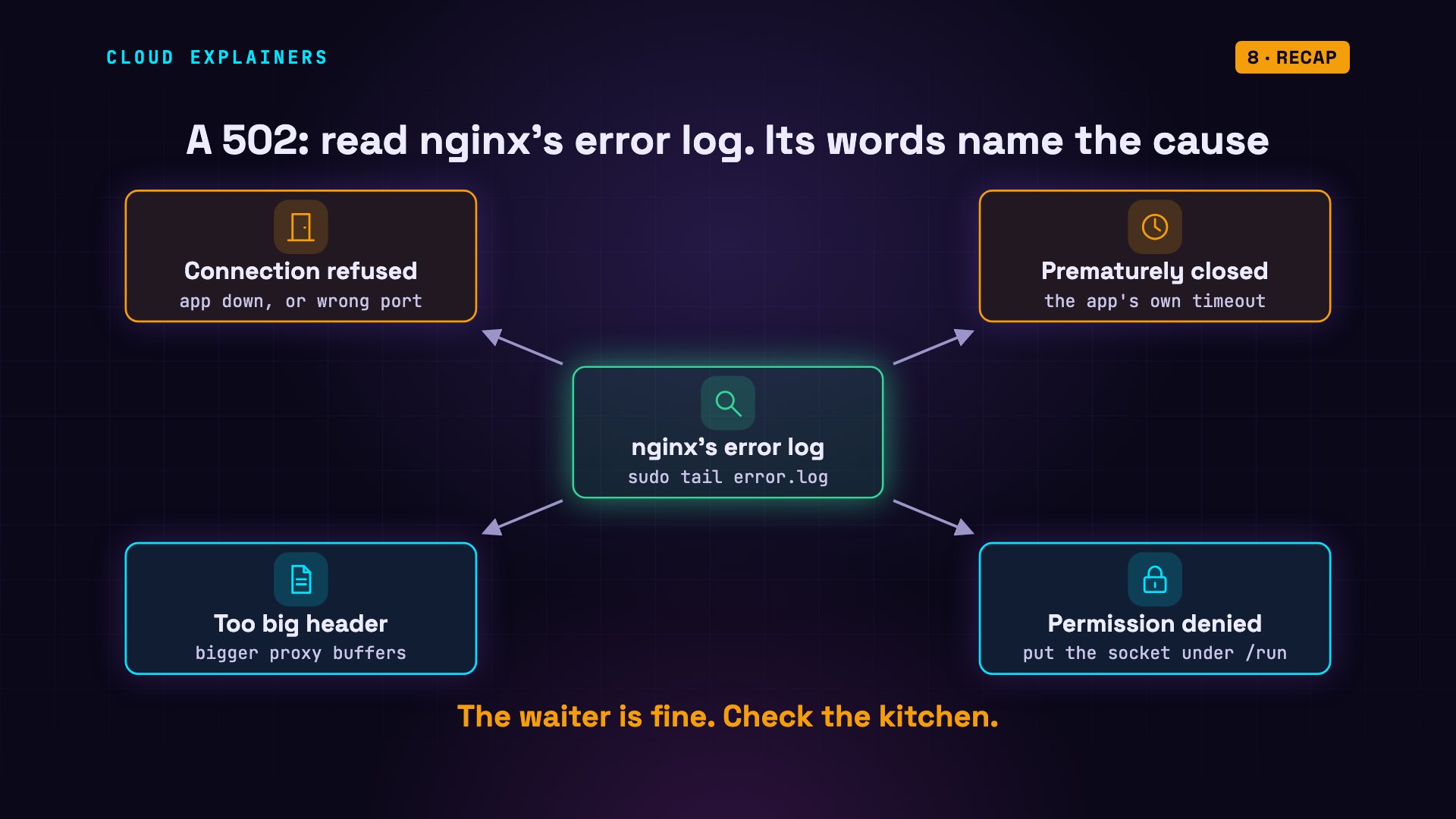
So, a 502: read nginx's error log first. Refused: the app is down, or at another address. Closed early: the app's own timeout. Too big: the first buffer. Denied: the socket's folder. The waiter is fine. Check the kitchen.
If your site is back to 200, a like helps YouTube show this to the next person staring at a 502, and subscribing brings more real fixes like these.
Every error here came from a real nginx and a real app, in our lab. Thanks for watching Cloud Explainers.
Sources
- nginx docs, proxy module (proxy_pass, proxy_read_timeout default 60s, proxy_buffer_size one memory page, proxy_buffers, proxy_busy_buffers_size)
- nginx docs, upstream module (the upstream an nginx proxy passes requests to)
- NGINX docs, reverse proxy guide
- Gunicorn docs, settings: timeout (default 30 seconds; silent workers are killed and restarted)
- Gunicorn docs, deploying behind nginx with a Unix socket
- systemd.exec, RuntimeDirectory= (a folder under /run made for the service)
- Ubuntu 24.04 login.defs (HOME_MODE 0750 for new home folders)
Demos: a container on our own Mac standing in for a small web server; the climbing gym, its page and its app are made up. The restaurant is an analogy. Watch the full video on YouTube.
More videos

Every Networking Term a Beginner Needs in 12 Minutes
How to Fix Docker 'Permission Denied' on docker.sock

How to Fix Git 'Updates Were Rejected' When You Push

How to Fix Linux apt 'Could Not Get Lock' Errors (Ubuntu)

How Email Works on the Internet (SMTP) in 10 Minutes

The Python Roadmap for Beginners

Golang REST API with Gin: Full Tutorial for Beginners

How a WireGuard VPN Network Works

Linux Makefiles Will Finally Make Sense After This

SAML vs OAuth vs OpenID Connect: What's the Difference?

How to Fix Python cron Jobs That Never Run

Linux Bash Scripting: Full Tutorial for Beginners

How PXE Network Boot Works

How Active Directory Works

How to Fix a Linux systemd Service That Won't Start

Linux Logs: syslog vs journald

JWT vs Session Cookies: Which One Should You Use?

Docker vs Docker Compose: Which One Should You Use?

How to Fix Docker Compose Containers That Can't Talk to Each Other

Django Full Tutorial for Beginners

How Linux systemd Works

How to Fix 'Windows Cannot Access' Network Share Errors (SMB)

REST vs gRPC: Which One Should You Use?

How to Fix SSL Certificate Chain Errors (Missing Intermediate)

Every Python Concept for Beginners in 10 Minutes

Every SQL Join Type in 10 Minutes

Why OpenRouter Free Models Hit Their Limit So Fast

Why Your Gemini API Free Tier Runs Out So Fast

OpenRouter Will Finally Make Sense After This

How Redis Caching Works

Gemini API vs Vertex AI: Which One Should You Use?

How to Fix a Leaked Gemini API Key

Why Golang Uses Goroutines Instead of Threads

How to Fix Gemini API Error 429: Resource Exhausted

Claude Token Pricing Will Finally Make Sense After This

Why Python Web Scraping Returns Nothing (and the Fix)

Python uv vs pip: Which One Should You Use?

Python Automation: Full Tutorial for Beginners

How OAuth Login Works

Google AI Studio Will Finally Make Sense After This

What Happens When You Run a Docker Container

How to Fix Claude Code Billing Your API Key Instead of Your Plan

Why Passkeys Can't Be Phished Like Passwords

PowerShell vs Bash: Which One Should You Learn?

The Linux Roadmap for Beginners

Django vs FastAPI: Which One Should You Use?

Why SQLite Is the Most Used Database in the World

How a NoSQL Database Like MongoDB Works

How to Fix Python pip error: externally-managed-environment

How to Fix MySQL Too Many Connections Database Errors

Golang Concurrency Will Finally Make Sense After This

How Amazon S3 Works

How Kubernetes Works

How Git Works

How to Fix Docker Port Already Allocated Errors

How PostgreSQL Works

How to Fix Git Merge Conflicts

How to Fix No Space Left on Device in Linux

How the Internet Works

SQL vs NoSQL: When Each One Wins

How to Fix JWT Token Expired Errors (401 Unauthorized)

Claude API vs Claude Pro: Why Your Subscription Doesn't Include It

Why AI Agent Skills Beat Giant Prompts

Linux Cron Jobs Will Finally Make Sense After This

Security Logs Will Finally Make Sense After This

How to Fix a Security Leak: An API Key Pushed to GitHub

DNS Will Finally Make Sense After This

Never Ignore a Security Update

Two-Factor Authentication Will Finally Make Sense

Never Expose a Database to the Internet

SSH Keys vs Passwords: Which Is Safer for Security?

The 5 Levels of Linux Boot: From Power On to Login

The 5 Levels of Network Firewalls

Password Security: Why Hackers Crack Weak Passwords

Why Your Linux Server Runs Out of Memory

HTTP vs HTTPS: What Actually Changes on Your Network

Every Linux File Permission You Need to Know

Linux Processes vs Threads: When Each One Wins

The OSI Model Will Finally Make Sense After This

The 7 Levels of Git

Every Network Troubleshooting Command You Need

Hashing vs Encryption in Cybersecurity: When Each One Wins

Why the Internet Ran Out of IP Addresses

Linux Package Managers: apt vs Snap vs Flatpak

Why Python Is Slow (and When It Doesn't Matter)

TCP vs UDP: When Each One Wins

Stop Running Linux as Root (Do This Instead)

Linux Users and Groups Will Finally Make Sense

Why Phishing Beats Good Security (and How to Spot It)

The 7 Levels of Docker

AI Agents Will Finally Make Sense After This

Stop Using git push --force (Use This Instead)

Agent Skills vs MCP: When Each One Wins

Networking Will Finally Make Sense After This

Every Linux Command You Actually Need

The 7 Levels of Cybersecurity

Every System Design Concept You Need, in One Diagram
