
Every System Design Concept You Need, in One Diagram
The 12 building blocks behind almost every big app, explained for beginners on one diagram that grows as the app does: DNS, load balancers, stateless servers, databases and indexes, caches, replication and failover, sharding, message queues, object storage, CDNs and monitoring. Every one is run on a real machine and measured, not just drawn.
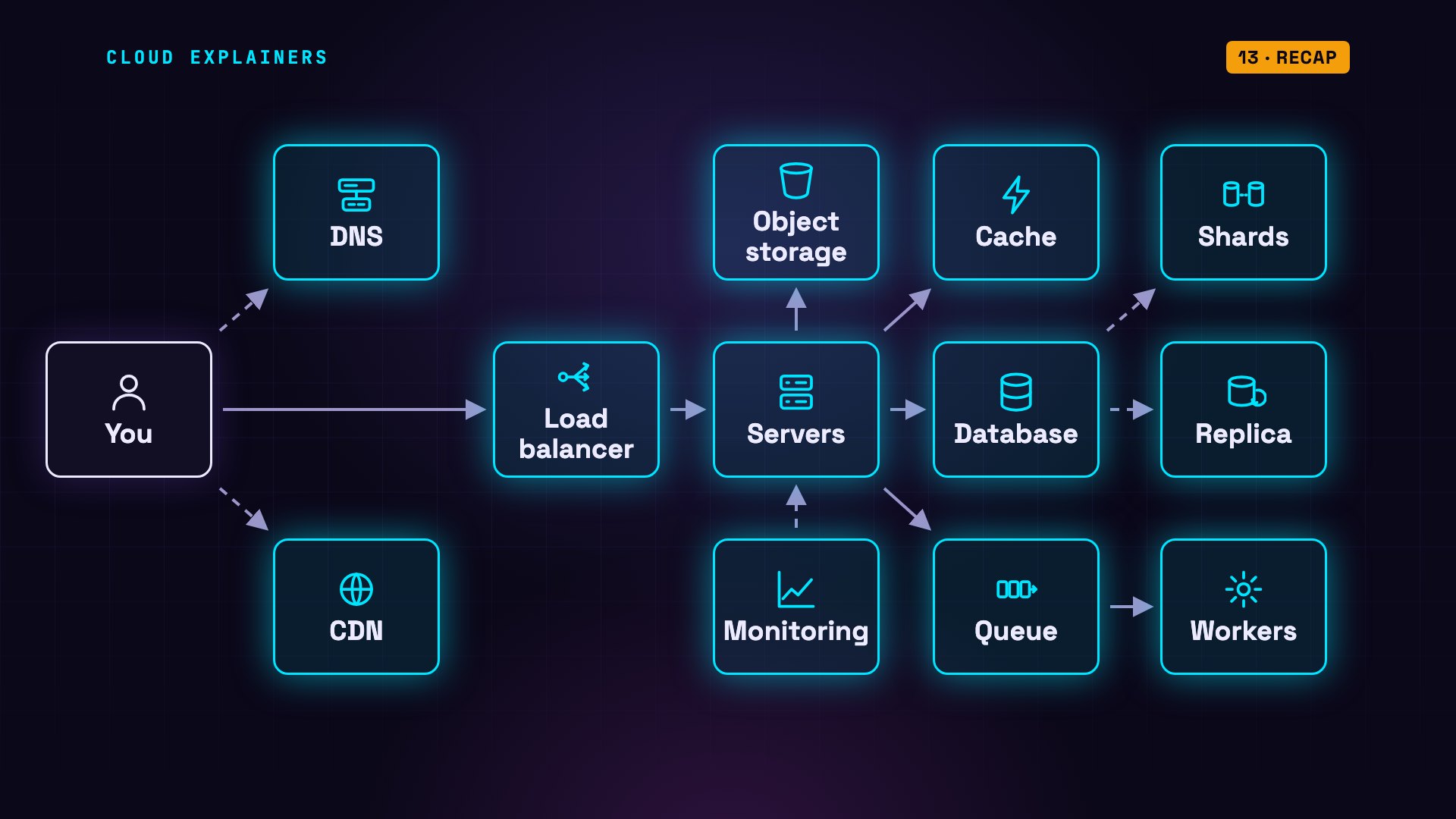
The whole map
This is the system behind almost every big app you use. Twelve building blocks, plus you. This page explains what every box does and why it's there. And we don't just draw them: we ran each one on a real machine, and measured it.
Here's how. We'll start with the simplest app possible: one computer. Then we'll let it grow. Every time something breaks, we add one box to fix it, and we prove the fix with a real run.
One server
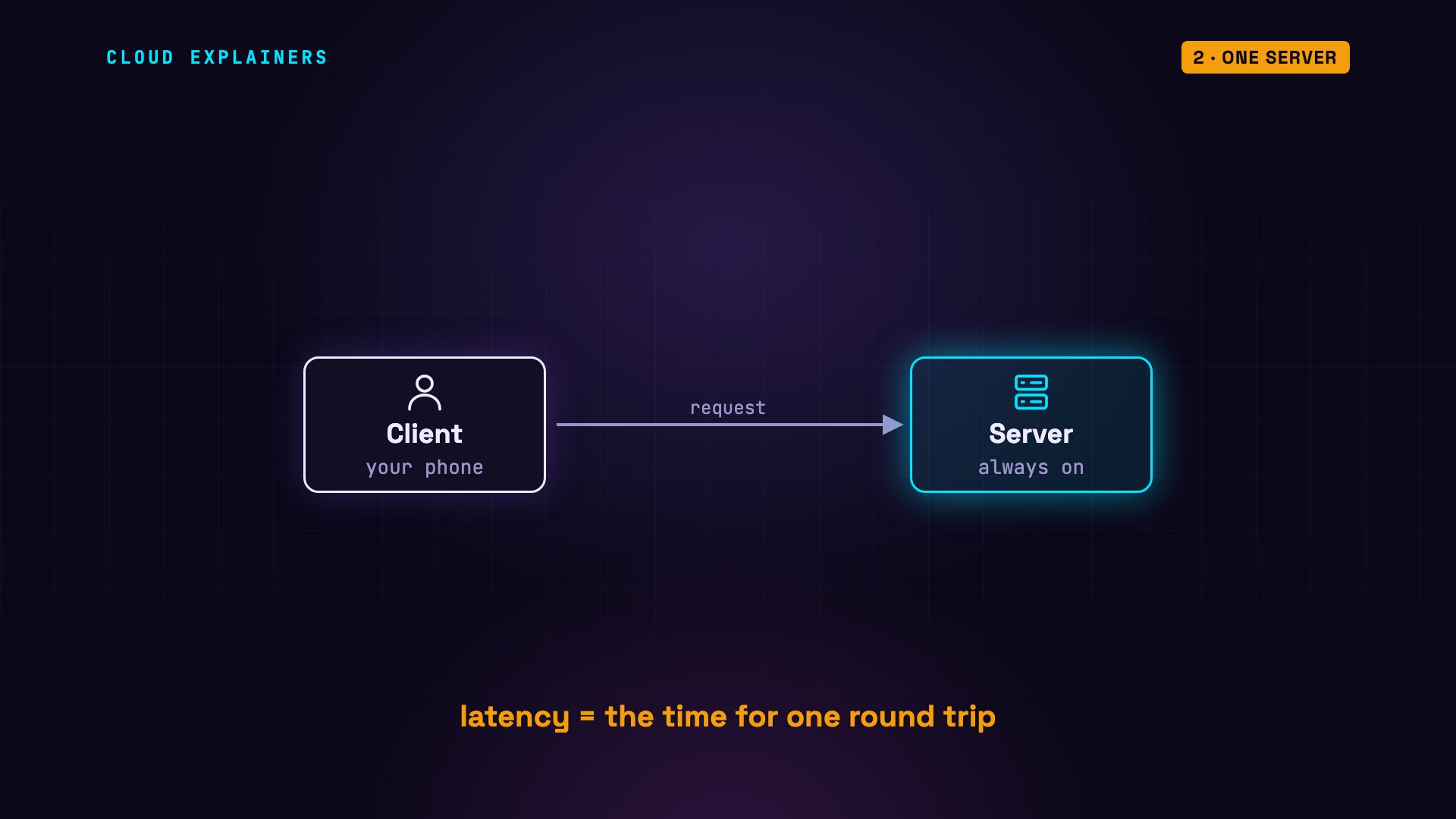
You open an app. Your phone, called the client, sends a request across the internet to a server: a computer that's always on, waiting for requests. The server does the work and sends back a response. The time that round trip takes is called latency. Almost everything that follows is about keeping it small, even when millions of people show up.
DNS
But first, your phone has to find that server. You type a name, like wikipedia dot org, but the internet delivers by number, called an IP address. DNS, the domain name system, is the internet's phone book: it turns the name into the address.
Here's a real lookup. We ask a public DNS server for wikipedia dot org. The address comes back in 11 milliseconds. And this number, 129, is the time to live. It's how many more seconds this answer may be reused, before anyone has to ask again. So repeat visits usually skip the lookup entirely.
dig @1.1.1.1 wikipedia.orgwikipedia.org.		129	IN	A	208.80.154.224
;; Query time: 11 msec
Load balancer
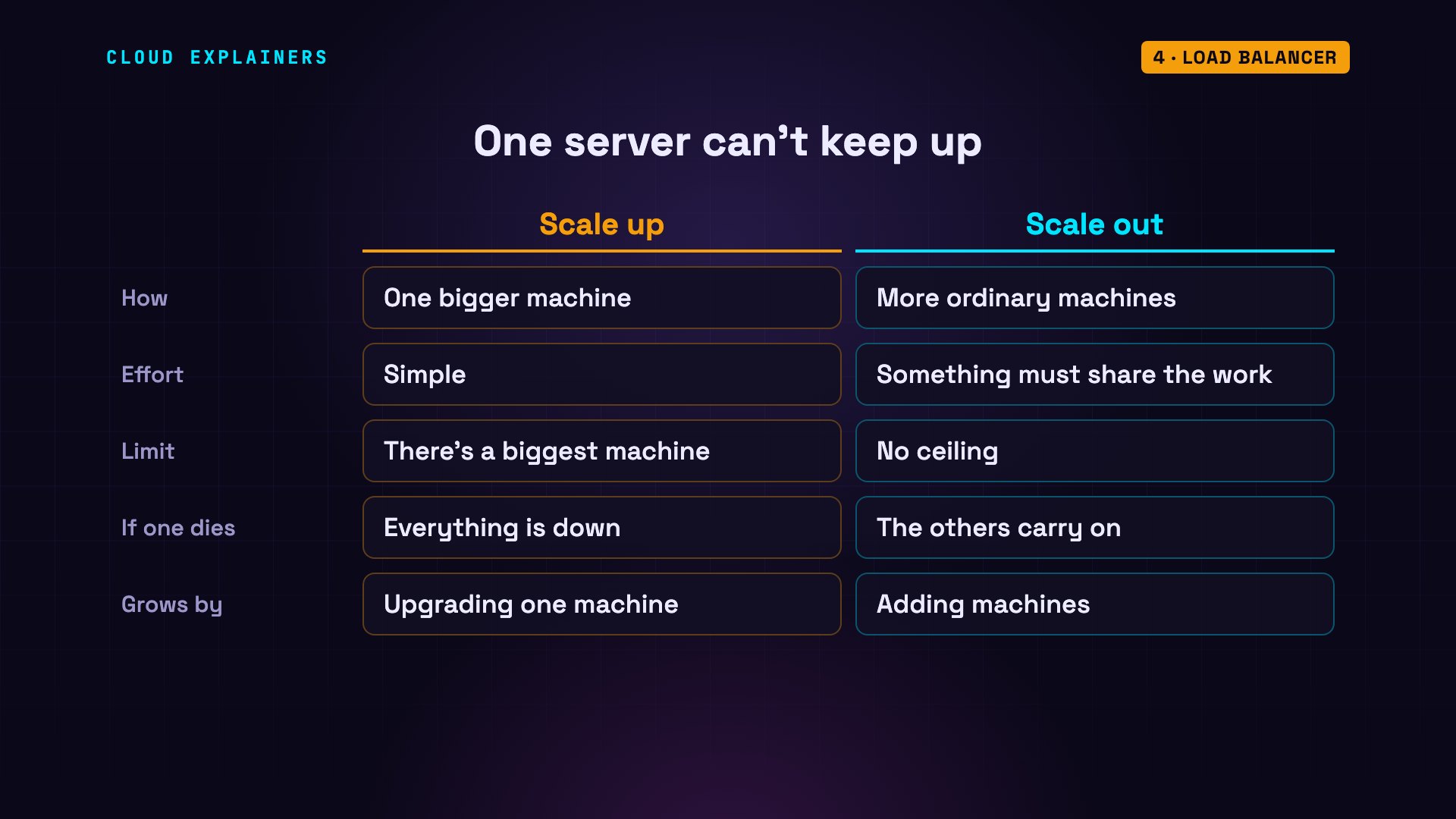
Now the app gets popular, and one server can't keep up. You have two choices. Scale up: buy a bigger machine. Simple, but there's always a biggest machine, and if it dies, everything dies. Or scale out: add more ordinary machines. No ceiling, but now something has to share the work.
That something is a load balancer. Every request goes to it first, and it hands each one to a server, usually in turn: one, two, three, then one again. It also notices when a server stops answering, and skips it.
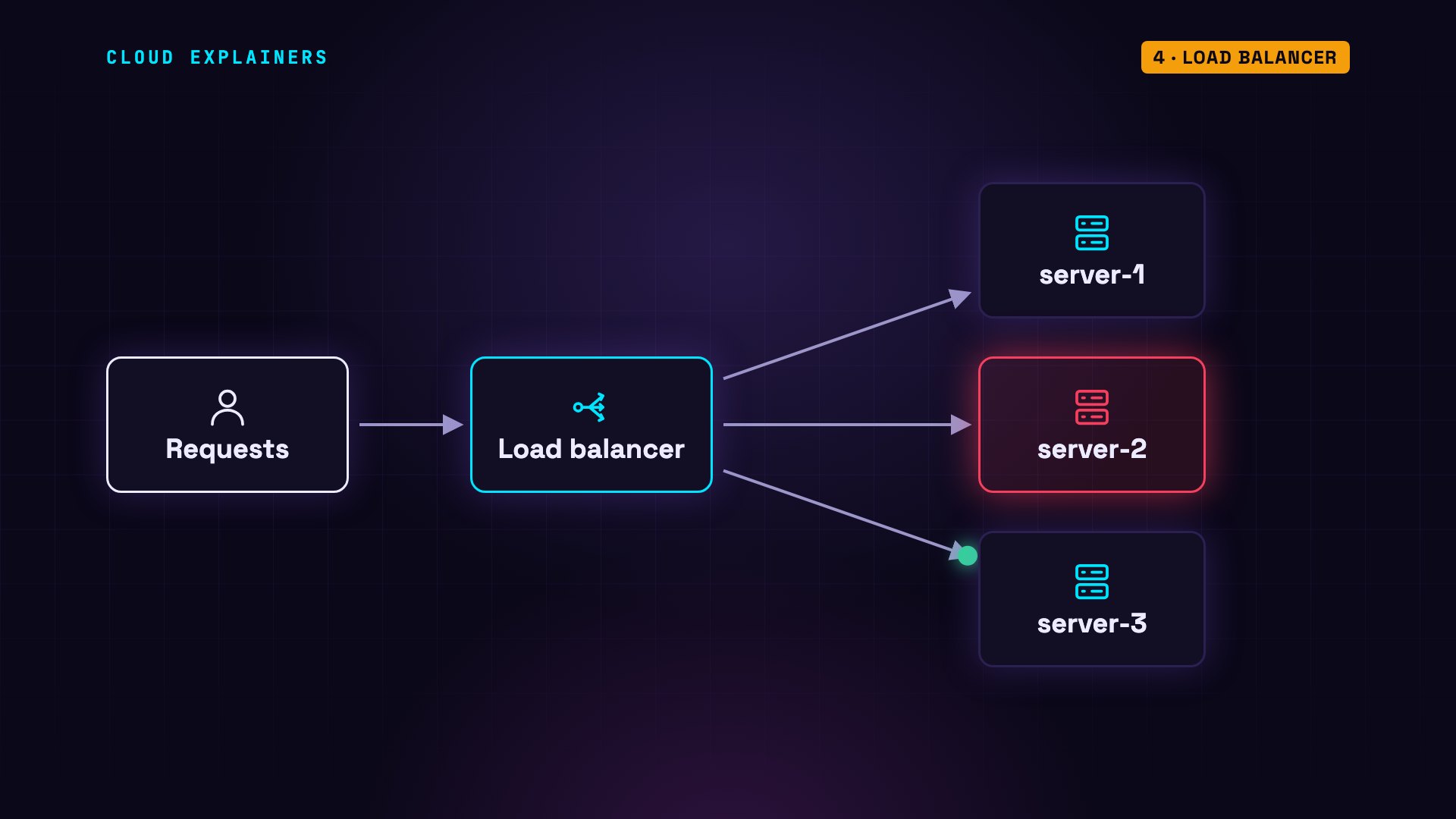
Here are three real servers behind nginx, a popular load balancer. We send six requests, and print which server answered each one. Server two, three, one, two, three, one. Perfect turns: each server gets exactly a third of the traffic.
for i in 1 2 3 4 5 6; do curl -s localhost:8088 | grep Hostname; doneHostname: server-2
Hostname: server-3
Hostname: server-1
Hostname: server-2
Hostname: server-3
Hostname: server-1
Now let's break one. We stop server two. The same six requests now land only on server one and server three. Not in perfect turns: a request that reached the stopped server was quietly retried on the next one. And out of a hundred requests, all one hundred came back with status 200. That's the code for OK. Nobody using the app would have noticed.
docker stop server-2server-2
for i in 1 2 3 4 5 6; do curl -s localhost:8088 | grep Hostname; doneHostname: server-3
Hostname: server-3
Hostname: server-1
Hostname: server-3
Hostname: server-1
Hostname: server-3
for i in $(seq 1 100); do curl -s -o /dev/null -w '%{http_code}\n' localhost:8088; done | sort | uniq -c100 200
One rule comes with this. Since any server might get your next request, a server shouldn't keep your data in its own memory. If server one kept your shopping cart, server two would never have heard of it on your next click. So servers stay stateless, and anything that must last goes into the shared boxes we'll add next.
Database & index
Those servers need somewhere to keep data that lasts, like your account and your orders. That's the database. It's usually the slowest box, because it does the most careful work: finding, sorting and safely storing your data.
Here's a real table with two million orders, in Postgres, a popular free database. Ask for one customer's orders, and Postgres reads the whole table: 32 milliseconds. Now we add an index: a sorted list of customers that points to their rows, like the index at the back of a book. Same question: 0.17 milliseconds. About 190 times faster.
EXPLAIN ANALYZE SELECT * FROM orders WHERE customer_id = 4242;-> Parallel Seq Scan on orders (cost=0.00..25122.67 rows=9 width=30) (actual time=5.606..27.653 rows=6.00 loops=3) Execution Time: 32.298 ms
CREATE INDEX orders_customer_idx ON orders (customer_id);CREATE INDEX
EXPLAIN ANALYZE SELECT * FROM orders WHERE customer_id = 4242;Bitmap Heap Scan on orders (cost=4.59..86.47 rows=21 width=30) (actual time=0.022..0.127 rows=18.00 loops=1) -> Bitmap Index Scan on orders_customer_idx (cost=0.00..4.58 rows=21 width=0) (actual time=0.010..0.010 rows=18.00 loops=1) Execution Time: 0.170 ms
Cache
Even with indexes, some questions are expensive, like: what are our ten best-selling products? And thousands of users ask that same question. A cache is a small, very fast store that remembers recent answers. The most popular one is Redis, which keeps everything in memory.
The usual pattern is called cache-aside. The server checks the cache first. If the answer is there, that's a hit: done. If not, that's a miss: ask the database, then save the answer in the cache for next time.
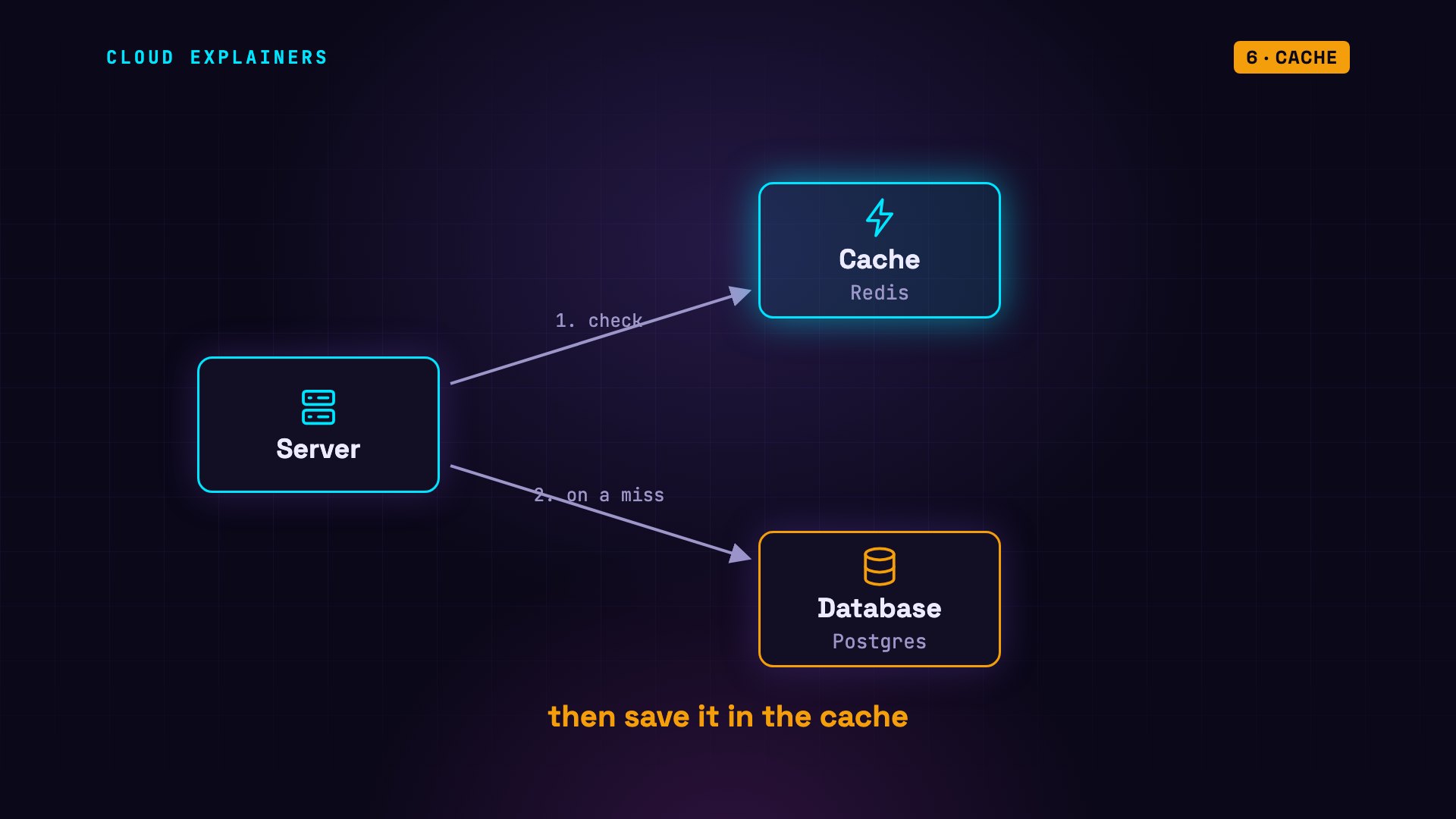
Here's that pattern, running on our two million orders. The first call misses, and the database takes 176 milliseconds. The next call hits: 0.11 milliseconds. More than a thousand times faster. That's the whole idea of a cache: the expensive work happens once, and everyone after that gets the stored answer.
python3 cache.pytop_products() from database    175.92 ms
top_products() from cache         0.11 ms
top_products() from cache         0.10 ms
The catch is stale data. If prices change, the cache still holds the old answer. So each entry gets a time to live, the same idea as in DNS. Here it's 60 seconds, after which the copy is thrown away and fetched fresh.
redis-cli TTL top_products60
Replication
Now look at the database again. It's one machine. If it dies, the whole app is down: a single point of failure. The fix is replication. Keep a live copy, called a replica, on another machine. Every change to the main database, called the primary, is streamed to the replica.
Here's a real primary, and its replica. The primary confirms it's streaming. We add a row for Cleo on the primary, then read the table from the replica. Cleo is already there.
primary=# SELECT application_name, state, sync_state FROM pg_stat_replication;application_name | state | sync_state ------------------+-----------+------------ walreceiver | streaming | async (1 row)
primary=# INSERT INTO accounts VALUES (3, 'cleo', 75);INSERT 0 1
replica=# SELECT * FROM accounts;id | owner | balance ----+-------+--------- 1 | ana | 100 2 | ben | 250 3 | cleo | 75 (3 rows)
But try to write to the replica, and it refuses: read-only. Only the primary takes writes. That's still very useful: replicas can answer reads, and many apps read far more than they write.
replica=# INSERT INTO accounts VALUES (4, 'dev', 10);ERROR: cannot execute INSERT in a read-only transaction
Now the real test. We stop the primary. We promote the replica, which means we tell it to take over, and it becomes the new primary. It accepts the row it refused before, and every earlier row is still there. That's called failover. In production, failover software usually spots the dead primary and does this promotion automatically.
docker stop primaryprimary
replica=# SELECT pg_promote();pg_promote ------------ t (1 row)
new primary=# INSERT INTO accounts VALUES (4, 'dev', 10);INSERT 0 1
 id | owner | balance
----+-------+---------
  1 | ana   |     100
  2 | ben   |     250
  3 | cleo  |      75
  4 | dev   |      10
(4 rows)
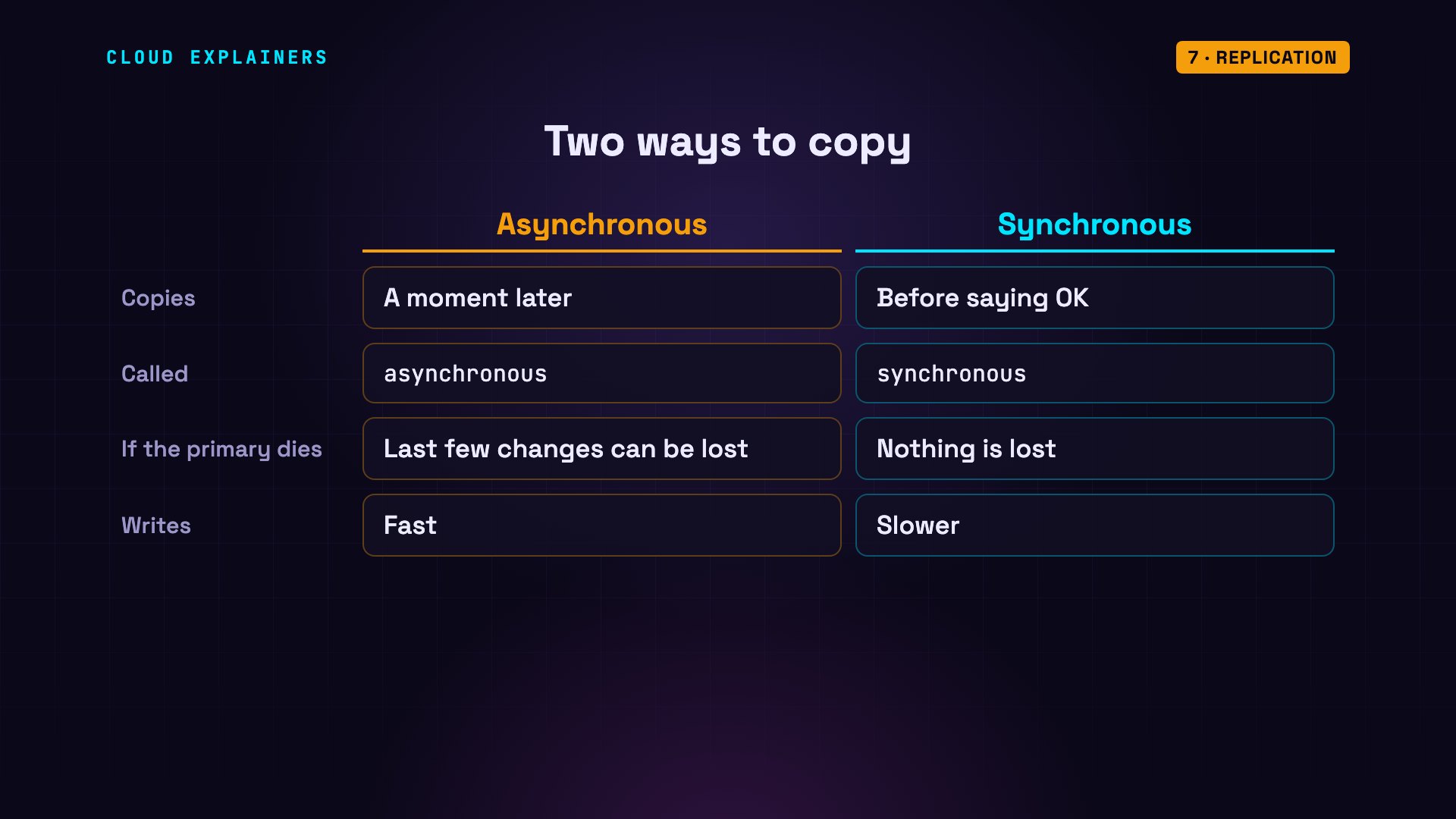
One catch. Our replica copied each change a moment after it happened. That's called asynchronous replication, and if the primary dies in that moment, the last few changes can be lost. Synchronous replication waits for the replica on every write. Nothing is lost, but every write gets slower.
Sharding
Replicas help with reads. But when there are too many writes, or simply too much data for one machine, you split the data itself. That's sharding. Each shard holds part of the data, on its own machine.
How do you decide which shard a user goes to? A common way is hashing: turn the user's ID into a big number, and take the remainder after dividing by the number of shards. User 42 hashes to about 841 million. Divide that by three, and the remainder is two: shard two. User 4242 lands on shard one. Across a million users, each shard gets almost exactly a third.
python3 shard.pyuser    17 -> hash 1,060,745,282 -> % 3 = shard 2
user    42 -> hash   841,265,288 -> % 3 = shard 2
user  4242 -> hash   169,812,835 -> % 3 = shard 1
user 90210 -> hash 1,565,774,763 -> % 3 = shard 0
1,000,000 users: shard 0: 332,986, shard 1: 332,872, shard 2: 334,142
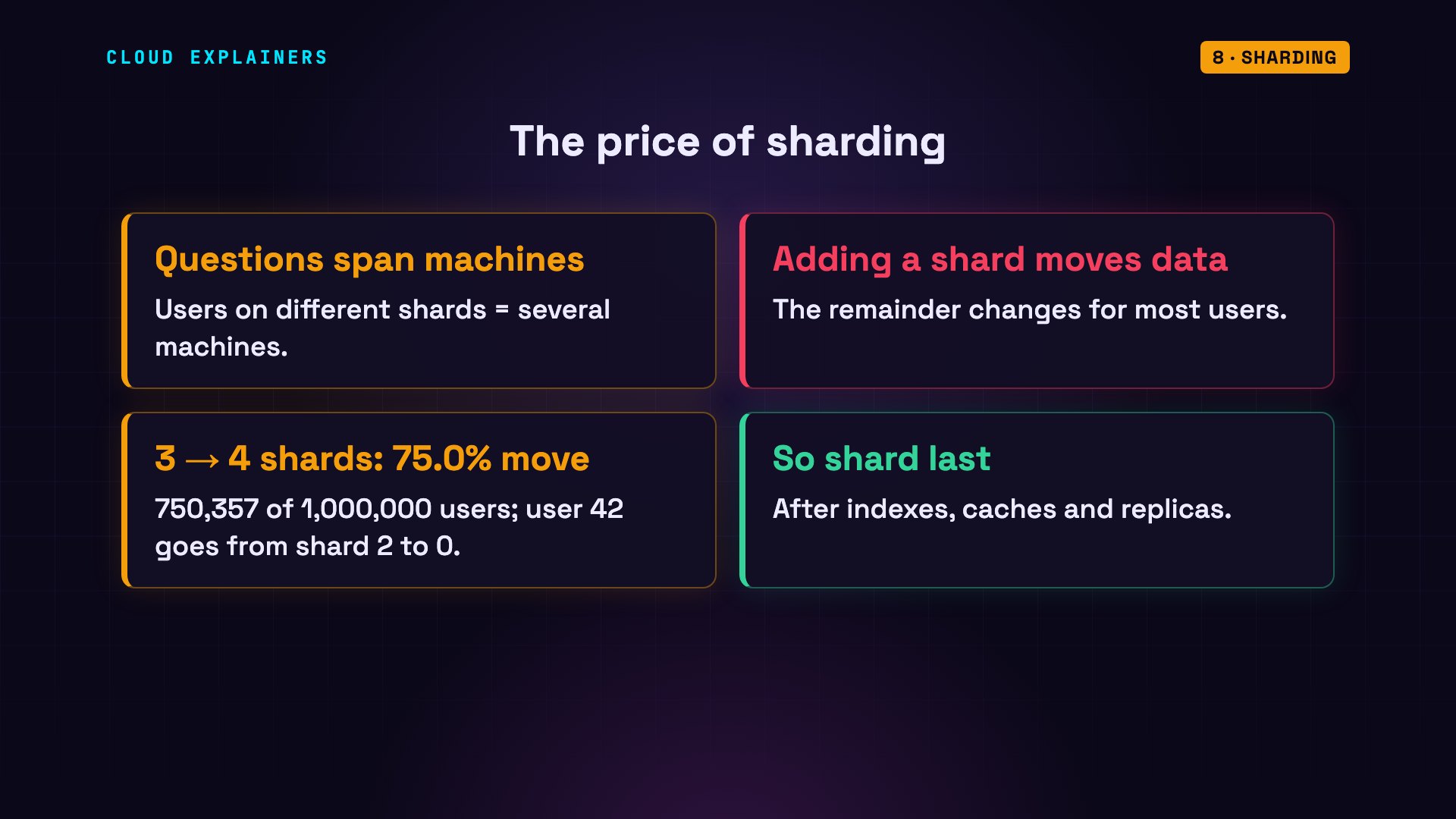
The price: a question about users on different shards now needs several machines. And adding a shard later moves data. With four shards instead of three, the remainder changes: user 42 moves from shard two to shard zero. Across our million users, three out of four would move. That's why teams usually shard last, after indexes, caches and replicas.
Message queue
Some work doesn't need to happen while the user waits: sending a welcome email, or resizing a photo. A message queue holds these jobs in a line, and separate machines, called workers, take them one by one and do them in the background.
Here's a sign-up where sending the email takes two seconds. We simulated that delay with a timer. Done directly, the user waits 2,000 milliseconds. With a queue, the sign-up answers in under 3 milliseconds, and a worker sends the email in the background.
python3 signup.pysignup (direct) answered in  2000.25 ms
signup (queued) answered in     2.71 ms
python3 worker.pyworker: sent welcome email to ana@example.com (2.0 s, in the background)
Object storage
Photos and videos are a bad fit for the database. They're huge, and the database is our most precious machine. They go to object storage, like Amazon S3: a nearly bottomless store for files. The database keeps only a link to each file.
CDN
Those files still have to travel to users all over the world, and distance adds latency. A CDN, a content delivery network, keeps copies of popular files on servers in many cities, so each user is served from somewhere close by.
Here's a real file from a public CDN. Every web response carries headers: short labels about what came back. This one says HIT: a CDN server already had a copy, so the original server was never asked. And this header says the copy is over 900,000 seconds old: about ten days. And the first byte arrived in 42 milliseconds.
curl -s -D - -o /dev/null https://cdn.jsdelivr.net/npm/react@18.3.1/umd/react.production.min.jsHTTP/2 200
age: 901964
x-served-by: cache-fra-eddf8230020-FRA, cache-bos-kbos510027-BOS
x-cache: HIT, HIT
curl -s -o /dev/null -w 'first byte: %{time_starttransfer}s' https://cdn.jsdelivr.net/npm/react@18.3.1/umd/react.production.min.jsfirst byte: 0.042465s
Monitoring
Last box. With this many machines, something is always slow or broken somewhere. Monitoring collects numbers from every part, like response times and error rates, and raises an alert when they go wrong, ideally before your users notice.
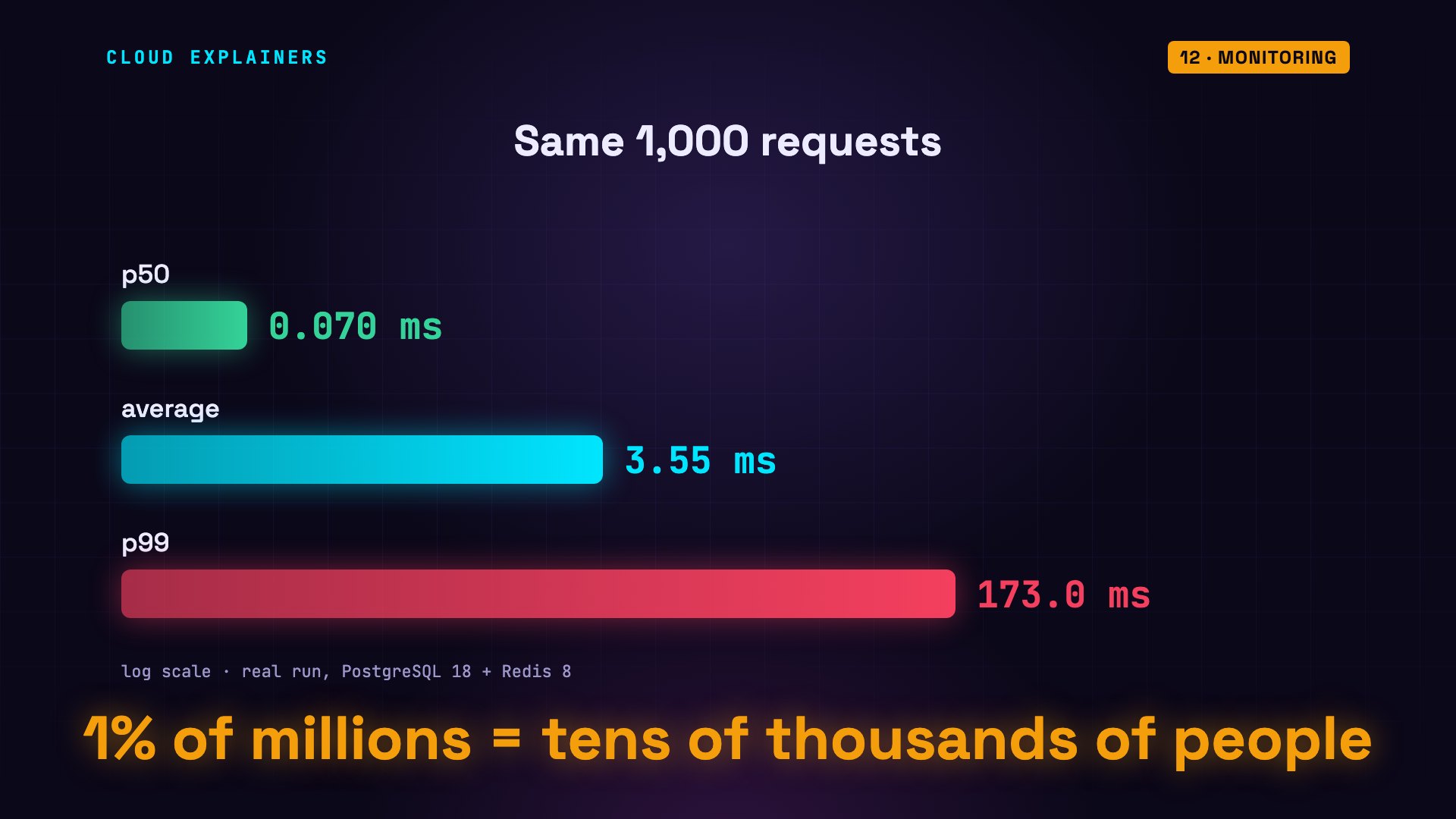
And it matters which number you watch. Here are a thousand real requests for our best sellers, where every fiftieth request misses the cache. The average looks fine: 3.6 milliseconds. The median, called p50, is even better. But look at p99: one request in every hundred waited at least 173 milliseconds.
python3 latency_report.pyrequests: 1000
average:     3.55 ms
p50:         0.07 ms
p99:       172.96 ms
slowest:   182.98 ms
That's why teams watch p99, and set their alerts on it. One user in a hundred sounds small. But on a busy app with millions of users, that's tens of thousands of people, waiting.
Recap
So here's the whole diagram again, and now you can read it. DNS turns names into addresses. The CDN serves files from nearby. The load balancer spreads requests across stateless servers. The cache answers repeat questions. The database stores what lasts, with indexes to find it fast, replicas to survive a failure, and shards when one machine isn't enough. A queue and workers handle slow jobs in the background. Object storage holds the files. And monitoring watches all of it.
Every number here came from a real run on a real machine, not a slide. If you want to go deeper on indexes, we have a whole video on why Postgres ignores yours.
Sources
Narration: AI voice (Google Cloud Text-to-Speech). Demos: real output, nothing staged; the 2-second email task is simulated with a timer, as said in the video. Watch the full video on YouTube.


