
Linux Makefiles Will Finally Make Sense After This
A Makefile looks cryptic until you see the one idea it repeats: a rule with a target, the files it's made from, and the command that makes it. We start from the classic first error, missing separator, then build a small C program with the real make and watch it rebuild only what is out of date. Along the way: why make clean can answer 'clean is up to date', the header change make can't see, and how to read the dollar-sign symbols.
Missing separator
You write your first Makefile, type make, and get this: missing separator. Stop. The message points at line two. You read it, twice, and it looks fine. It isn't. That line starts with four spaces, and make accepts only one thing there: a tab.
cat Makefileferry: main.o times.o fares.o
    cc -o ferry main.o times.o fares.o

main.o: main.c
    cc -c main.c

times.o: times.c
    cc -c times.c

fares.o: fares.c
    cc -c fares.c
makeMakefile:2: *** missing separator. Stop.
One idea: the rule
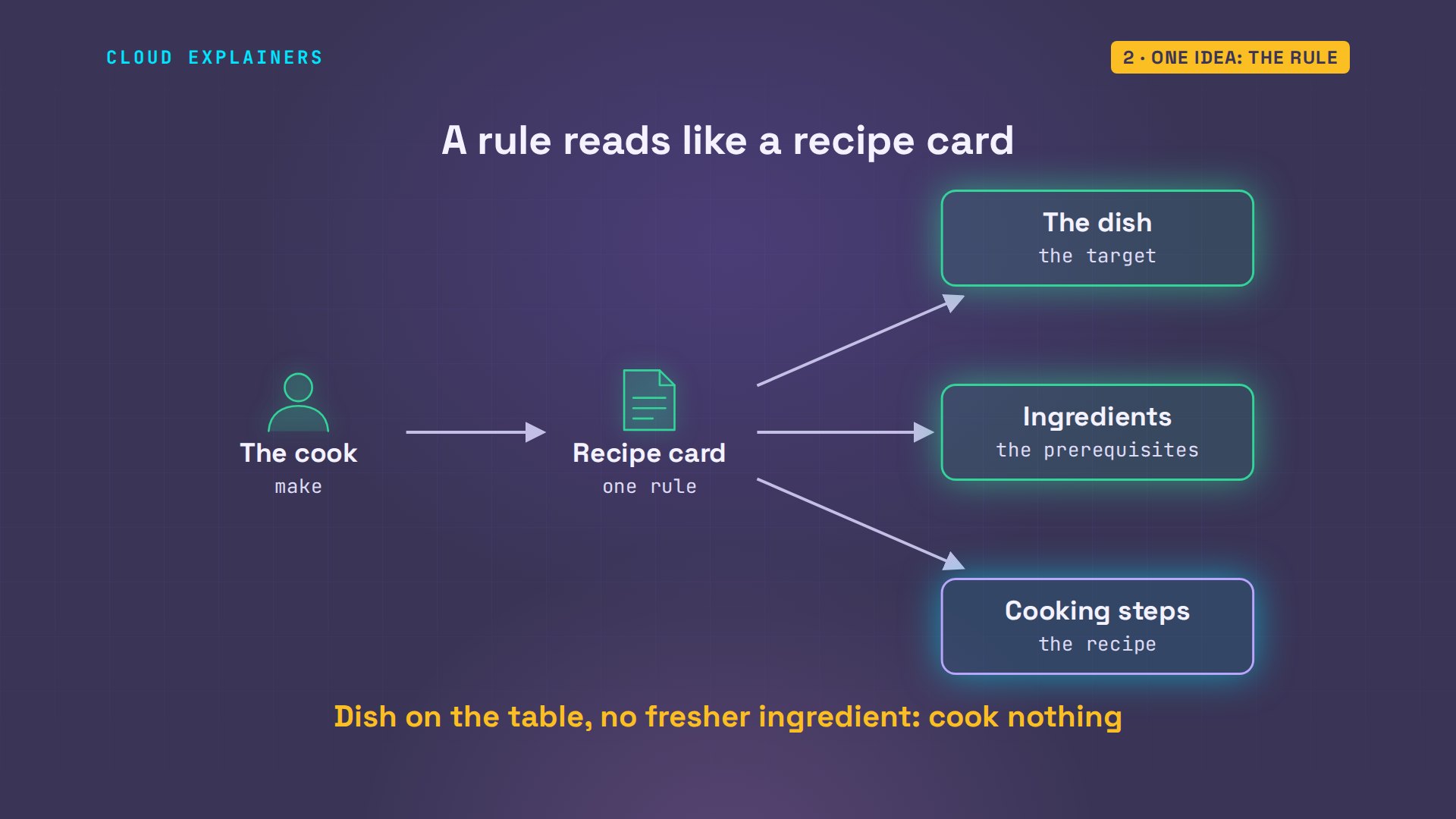
Ana, who wrote that file, swaps the spaces for tabs. cat -T shows each tab as a caret and a capital I. That tab is the one odd part. Everything else in a Makefile is a single idea, repeated: a rule. First, the target: the file you want. Here, a program called ferry. After the colon, its prerequisites: the files it's made from. And on the next line, behind the tab, the recipe: the command that makes it. Those three also explain a strange day that's coming: you ask make to clean up, it answers that clean is up to date, and it deletes nothing.
cat -T Makefileferry: main.o times.o fares.o
^Icc -o ferry main.o times.o fares.o

main.o: main.c
^Icc -c main.c

times.o: times.c
^Icc -c times.c

fares.o: fares.c
^Icc -c fares.c
Think of a recipe card: the dish, its ingredients, the cooking steps. And picture a cook who never wastes effort. If the dish is already on the table, and no ingredient is fresher than the dish, she cooks nothing. That cook is make.
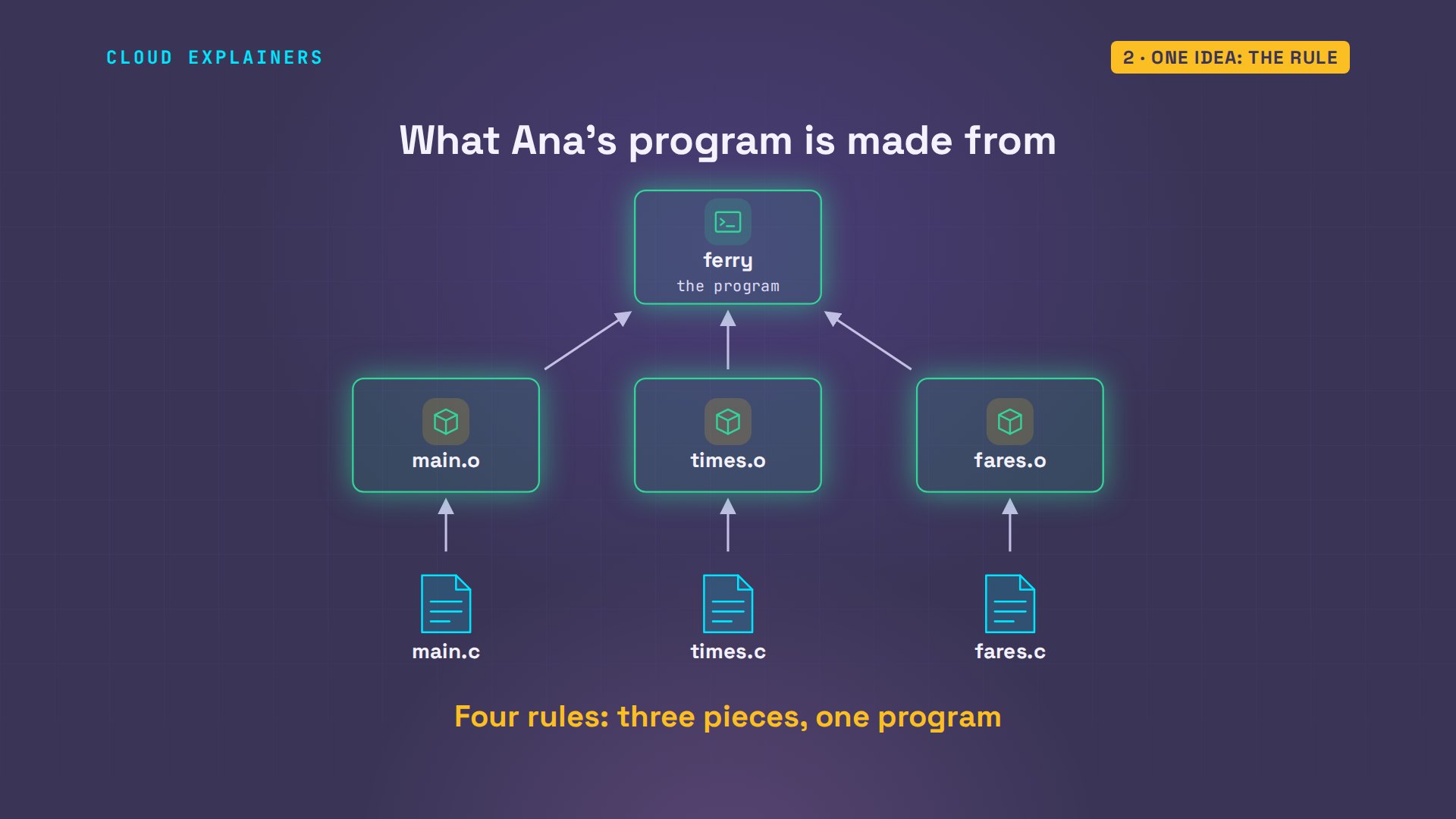
Ana's program prints the day's times and fares for a ferry ticket office. It's written in the C language, in three source files and two small header files they share, and C has to be compiled before it can run. Each source file is compiled into an object file, ending in.o: one finished piece. Then the pieces are joined into a single program, called ferry. So her Makefile holds four rules: one for each piece, and one for the program.
The first build
What happens when she types make? Four commands run, each starting with cc, the C compiler. With -c it compiles one piece; the last line joins the pieces, and -o names the finished program. Make chose that order by itself, because the program's rule asks for the pieces. The program works. Now she types make a second time. Ferry is up to date. It ran nothing at all.
makecc -c main.c
cc -c times.c
cc -c fares.c
cc -o ferry main.o times.o fares.o
./ferryNext ferry: 14:20
Last ferry: 21:30
Adult fare: 4.50
makemake: 'ferry' is up to date.
How does make know?
How did it know? Not by reading her code. Every file on Linux carries the time it was last changed. For each rule, make asks one question: is the target missing, or older than any of its prerequisites? If yes, run the recipe. If no, skip it. Here, the piece was built two seconds after its source file was saved. It's the newer of the two, so: skip.
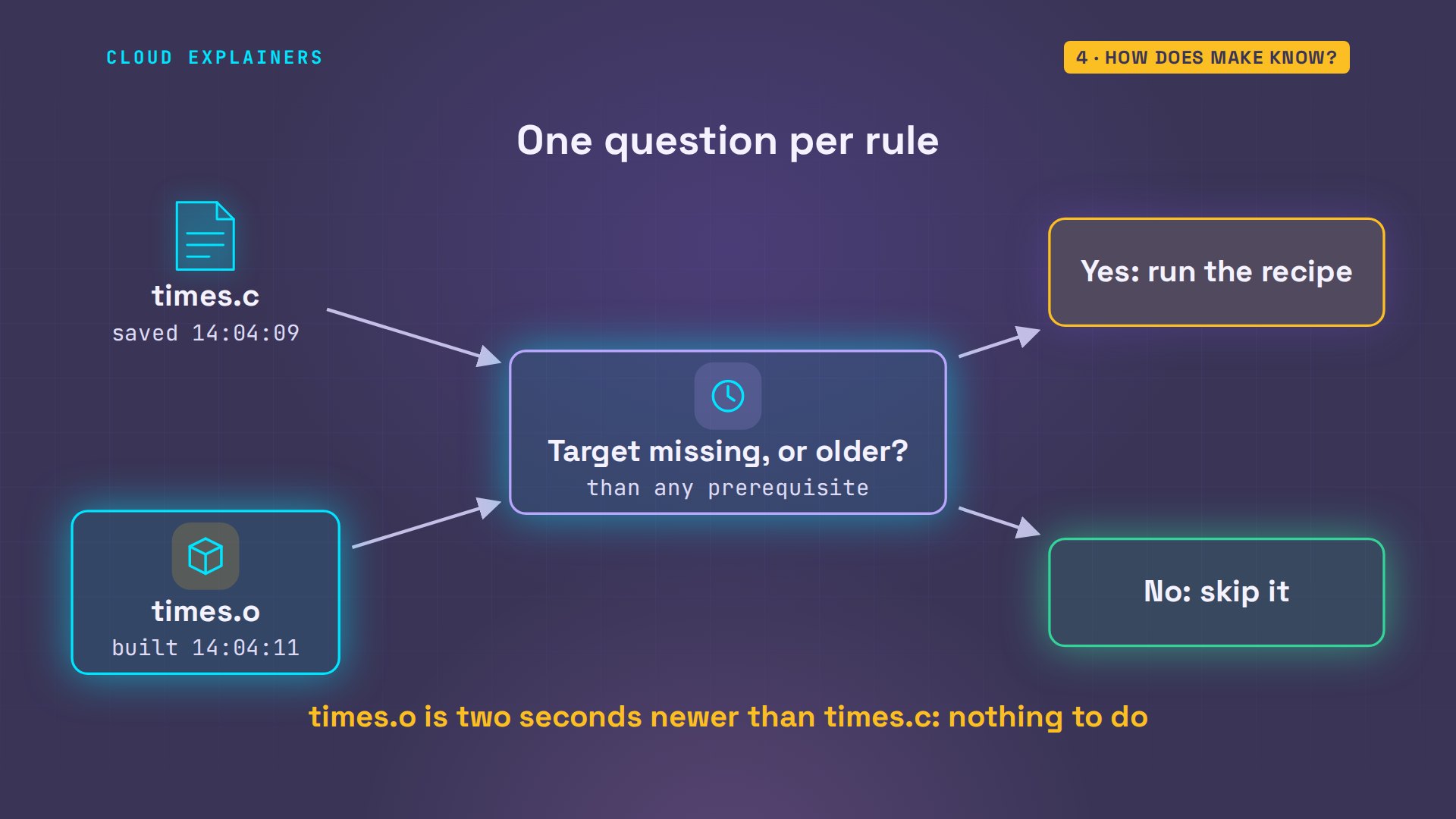
Ana changes the next ferry's time in times.c, and saves. A long listing, with times to the second, shows it: the source file is now newer than its piece. She is about to type make. Guess first: of those four commands, how many will run? Two. The changed file is compiled again. That makes its piece newer than the program, so the program is joined again. The other two pieces are left alone.
ls -l --time-style=+%T times.c times.o-rw-r--r-- 1 ana ana  130 14:04:13 times.c
-rw-r--r-- 1 ana ana 1672 14:04:11 times.o
makecc -c times.c
cc -o ferry main.o times.o fares.o
Notice what make did not do: it never looked inside the file. The touch command gives a file a new time, and changes nothing in it. Make rebuilds anyway. Times are all it compares.
touch fares.c
makecc -c fares.c
cc -o ferry main.o times.o fares.o
The change make can't see
Which change can make not see? This one costs people hours. The last ferry's time is kept in times.h, a header: a small file that two of her source files pull in. Ana moves the last ferry to 22:15, and saves. She types make. Guess again: what happens? Nothing. Ferry is up to date. And the program still says 21:30.
cat times.h#define LAST_FERRY "21:30"

const char *next_ferry(void);
const char *last_ferry(void);
grep LAST times.h#define LAST_FERRY "22:15"
makemake: 'ferry' is up to date.
./ferryNext ferry: 14:50
Last ferry: 21:30
Adult fare: 4.50
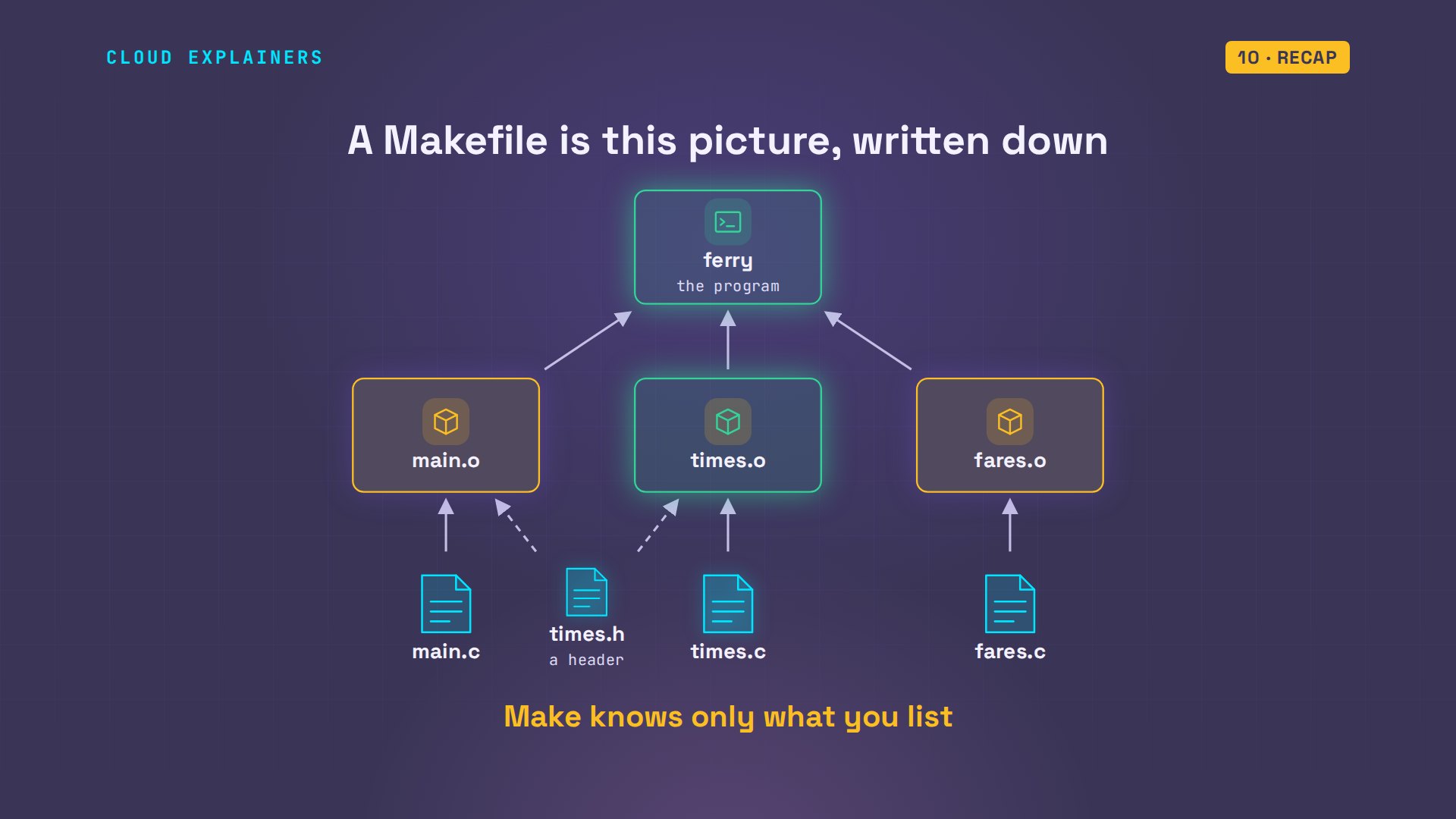
Why? Look at the picture make was given. Source files, pieces, the program. The header sits in the folder, but no arrow touches it, because no rule lists it. Make knows only what the Makefile tells it. So Ana lists the header as a prerequisite of the two pieces that pull it in.
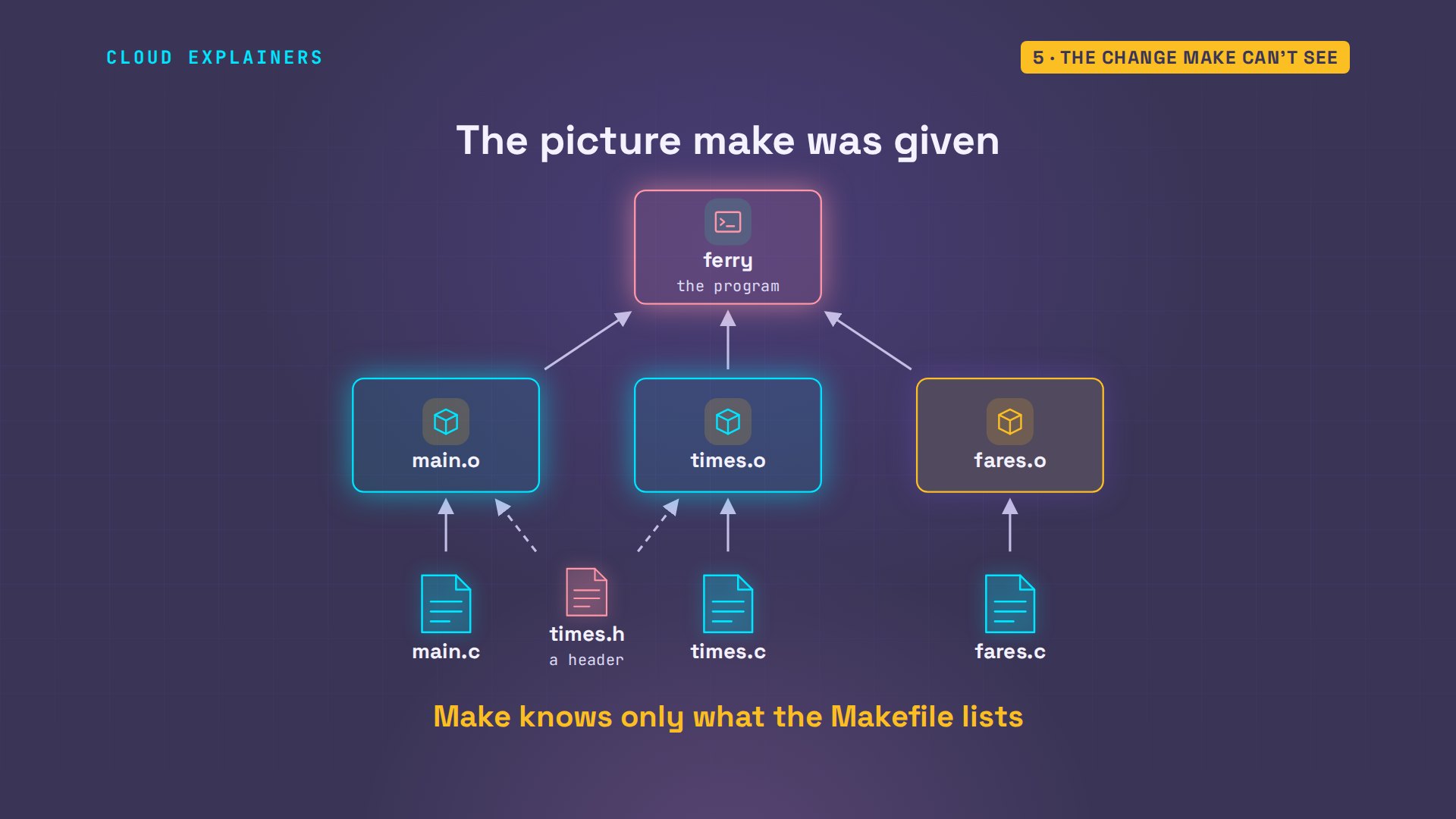
Here are the new rules, each header beside the piece that uses it. make -n is a dry run: it prints what make would do, and runs none of it. Three commands: two pieces, then the program. Now for real. And the program is right: 22:15. You don't have to keep these lists by hand: the compiler can write them for you. The option to search for is -MMD.
grep '\.h' Makefilemain.o: main.c times.h fares.h
times.o: times.c times.h
fares.o: fares.c fares.h
make -ncc -c main.c
cc -c times.c
cc -o ferry main.o times.o fares.o
makecc -c main.c
cc -c times.c
cc -o ferry main.o times.o fares.o
./ferryNext ferry: 14:50
Last ferry: 22:15
Adult fare: 4.50
Targets that aren't files
Does a target have to be a file? No. Ana adds a rule named clean. It has no prerequisites, and its recipe deletes everything make has built. Plain make always builds the first rule in the file. make clean asks for this one by name. No file called clean is ever created, so its recipe runs every time.
tail -n 2 Makefileclean:
	rm -f ferry *.o
make cleanrm -f ferry *.o
lsMakefile fares.c fares.h main.c times.c times.h
And now that strange message. One day, a file named clean ends up in the folder. Ana types make clean, and make answers: clean is up to date. Nothing is deleted. Make did what it always does. The target exists, and nothing is newer than it, so: skip. The fix is one line..PHONY tells make that clean is not a file, so always run it. And it cleans again.
touch clean
make cleanmake: 'clean' is up to date.
tail -n 3 Makefile.PHONY: clean
clean:
	rm -f ferry *.o
make cleanrm -f ferry *.o
A target like that can have prerequisites too. Ana adds one named run. It needs the program, and its recipe starts the program. So make run first brings everything up to date, and then runs it. She touches a source file and tries it: compile, join, run, from one short command. This is how most people use make day to day, and why projects with nothing to compile still keep a Makefile: make test, make deploy: short names for long commands.
tail -n 2 Makefilerun: ferry
	./ferry
make run./ferry
Next ferry: 14:50
Last ferry: 22:15
Adult fare: 4.50
touch times.c
make runcc -c times.c
cc -o ferry main.o times.o fares.o
./ferry
Next ferry: 14:50
Last ferry: 22:15
Adult fare: 4.50
Three messages you'll meet
Which errors will you meet in other people's projects? Mostly these three. No targets specified and no makefile found: make looked in this folder and found no file named Makefile. You're in the wrong folder. No rule to make target: nothing in the Makefile has that name. Here, it's a typing mistake. And the long one: no rule to make target, needed by another. A file that a rule needs is gone, and no rule says how to make it. The words after needed by tell you which rule to open.
makemake: *** No targets specified and no makefile found. Stop.
make claenmake: *** No rule to make target 'claen'. Stop.
mv fares.c fares.c.bak
makemake: *** No rule to make target 'fares.c', needed by 'fares.o'. Stop.
Reading the dollar signs
What about the Makefiles full of dollar signs? They look scarier, because nobody enjoys typing the same thing three times. Here is Ana's, rewritten the way you'll meet them in real projects. The top lines are variables: a name, an equals sign, a value. So CC is the compiler, CFLAGS holds its options, here: show every warning, and optimise, and OBJS is the list of pieces. A dollar sign and brackets read one back.
head -n 9 MakefileCC = cc
CFLAGS = -Wall -O2
OBJS = main.o times.o fares.o

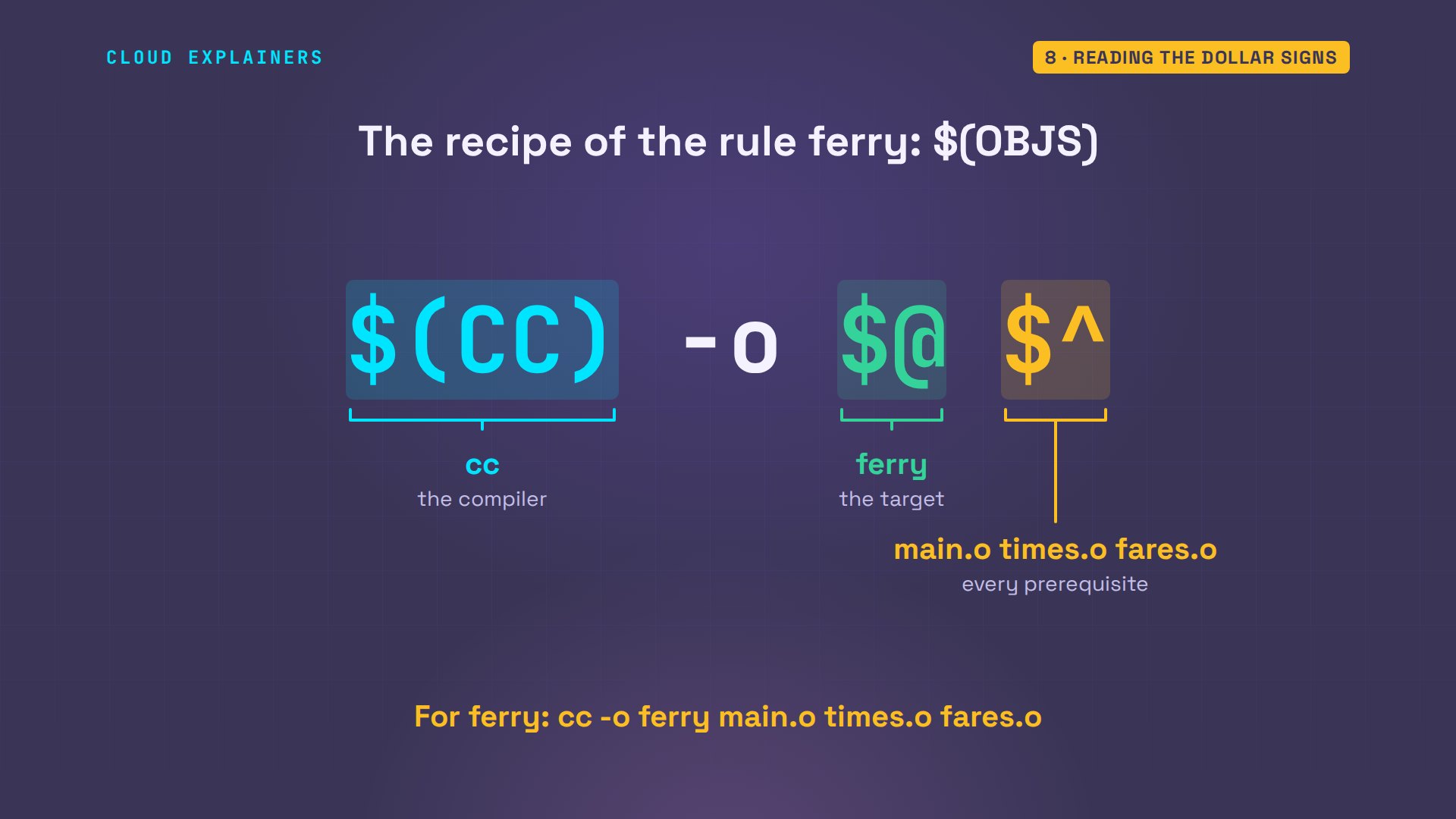
ferry: $(OBJS)
	$(CC) -o $@ $^

%.o: %.c
	$(CC) $(CFLAGS) -c $< -o $@
This one rule replaces three. The percent sign stands for any name: any piece is made from the source file with the same name. In its recipe, the variables are filled in first. Dollar less-than is the first prerequisite: for the times piece, that's its source file. And dollar at is the target itself.
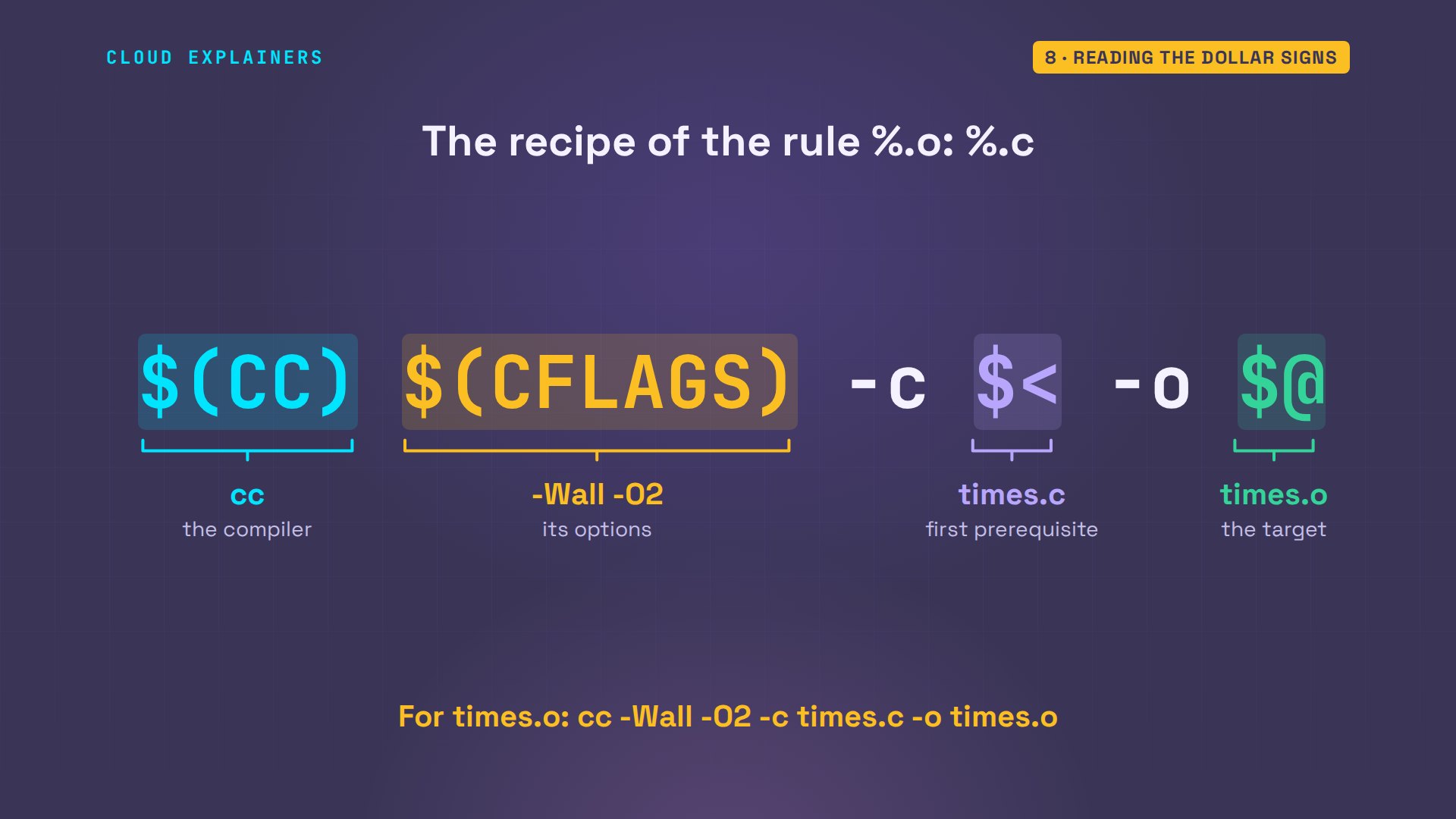
The program's own recipe uses one more. Dollar caret means every prerequisite: here, all three pieces. Ana runs the rewritten file, and gets the same commands as before. With those three symbols, you can read most Makefiles you will ever open.
Does it matter on a real project?
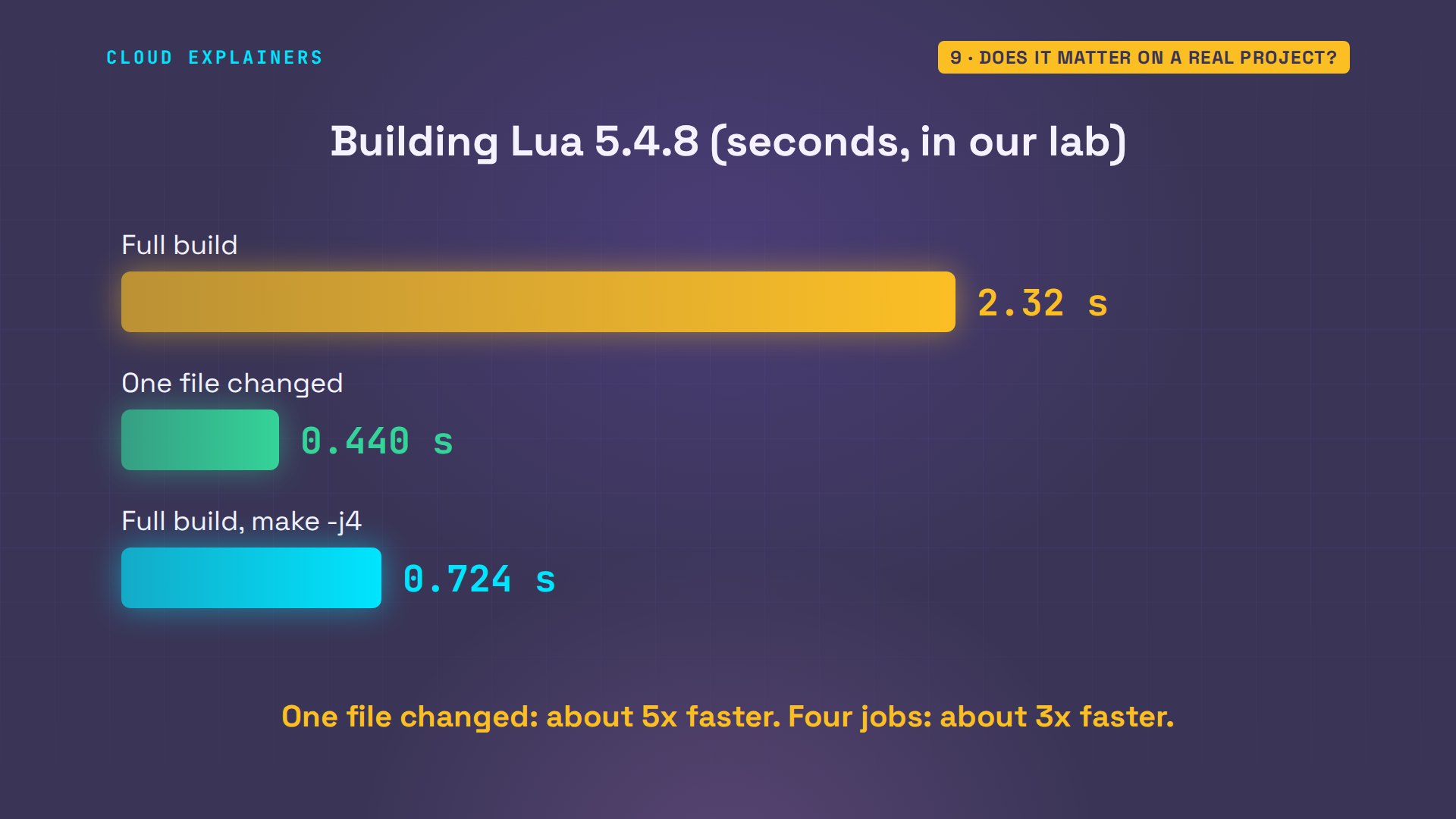
Does any of this matter on a real project? This is the source code of Lua, a real programming language, with the Makefile its authors wrote. Thirty-four C files. A full build, timed, with its output saved to a file so we can count it: two point three seconds, and thirty-six compiler commands. Now touch one file, and build again. Zero point four seconds. Just three commands: one file compiled, and two programs joined again.
ls src/*.c | wc -l34
time make > build.logar: `u' modifier ignored since `D' is the default (see `U')

real	0m2.324s
user	0m2.206s
sys	0m0.119s
grep -c gcc build.log36
touch src/lvm.c
time make > build.logar: `u' modifier ignored since `D' is the default (see `U')

real	0m0.440s
user	0m0.416s
sys	0m0.025s
grep -c gcc build.log3
And that picture of what depends on what gives one more gift. Pieces that don't depend on each other can be built at the same time. The J stands for jobs: make -j4 runs up to four recipes at once. zero point seven seconds for the full build. Every command and the lab files are linked in the description.
Recap
So, a Makefile is a list of rules: a target, what it's made from, and a recipe. Make rebuilds a target only when it's missing, or older than something it's made from. And it knows only what you list.
If Makefiles finally read like plain rules to you, a like helps YouTube show this to more beginners, and subscribing brings the next Linux demo your way.
Every command here was typed into a real terminal, with the real make. Thanks for watching Cloud Explainers.
Sources
- GNU make manual, Rule Syntax (target, prerequisites, a recipe line starts with a tab)
- GNU make manual, How make Processes a Makefile (the first target is the default; a target is remade when it does not exist or is older than a prerequisite)
- GNU make manual, Phony Targets (.PHONY, and a file named clean)
- GNU make manual, Automatic Variables (the target, the first prerequisite, all prerequisites)
- GNU make manual, Pattern Rules (%.o: %.c)
- GNU make manual, Parallel Execution (-j) and Instead of Executing Recipes (-n)
- GNU make manual, Errors Generated by Make (missing separator)
- Lua, about the language and its source
Demos: a container on our own Mac standing in for a ferry office's Linux box; the ferry office is made up. Lua is the real source from lua.org. Timings are from our lab and will differ on your machine. Watch the full video on YouTube.
More videos

SAML vs OAuth vs OpenID Connect: What's the Difference?

How to Fix Python cron Jobs That Never Run

Linux Bash Scripting: Full Tutorial for Beginners

How PXE Network Boot Works

How Active Directory Works

How to Fix a Linux systemd Service That Won't Start

Linux Logs: syslog vs journald

JWT vs Session Cookies: Which One Should You Use?

Docker vs Docker Compose: Which One Should You Use?

How to Fix Docker Compose Containers That Can't Talk to Each Other

Django Full Tutorial for Beginners

How Linux systemd Works

How to Fix 'Windows Cannot Access' Network Share Errors (SMB)

REST vs gRPC: Which One Should You Use?

How to Fix SSL Certificate Chain Errors (Missing Intermediate)

Every Python Concept for Beginners in 10 Minutes

Every SQL Join Type in 10 Minutes

Why OpenRouter Free Models Hit Their Limit So Fast

Why Your Gemini API Free Tier Runs Out So Fast

OpenRouter Will Finally Make Sense After This

How Redis Caching Works

Gemini API vs Vertex AI: Which One Should You Use?

How to Fix a Leaked Gemini API Key

Why Golang Uses Goroutines Instead of Threads

How to Fix Gemini API Error 429: Resource Exhausted

Claude Token Pricing Will Finally Make Sense After This

Why Python Web Scraping Returns Nothing (and the Fix)

Python uv vs pip: Which One Should You Use?

Python Automation: Full Tutorial for Beginners

How OAuth Login Works

Google AI Studio Will Finally Make Sense After This

What Happens When You Run a Docker Container

How to Fix Claude Code Billing Your API Key Instead of Your Plan

Why Passkeys Can't Be Phished Like Passwords

PowerShell vs Bash: Which One Should You Learn?

The Linux Roadmap for Beginners

Django vs FastAPI: Which One Should You Use?

Why SQLite Is the Most Used Database in the World

How a NoSQL Database Like MongoDB Works

How to Fix Python pip error: externally-managed-environment

How to Fix MySQL Too Many Connections Database Errors

Golang Concurrency Will Finally Make Sense After This

How Amazon S3 Works

How Kubernetes Works

How Git Works

How to Fix Docker Port Already Allocated Errors

How PostgreSQL Works

How to Fix Git Merge Conflicts

How to Fix No Space Left on Device in Linux

How the Internet Works

SQL vs NoSQL: When Each One Wins

How to Fix JWT Token Expired Errors (401 Unauthorized)

Claude API vs Claude Pro: Why Your Subscription Doesn't Include It

Why AI Agent Skills Beat Giant Prompts

Linux Cron Jobs Will Finally Make Sense After This

Security Logs Will Finally Make Sense After This

How to Fix a Security Leak: An API Key Pushed to GitHub

DNS Will Finally Make Sense After This

Never Ignore a Security Update

Two-Factor Authentication Will Finally Make Sense

Never Expose a Database to the Internet

SSH Keys vs Passwords: Which Is Safer for Security?

The 5 Levels of Linux Boot: From Power On to Login

The 5 Levels of Network Firewalls

Password Security: Why Hackers Crack Weak Passwords

Why Your Linux Server Runs Out of Memory

HTTP vs HTTPS: What Actually Changes on Your Network

Every Linux File Permission You Need to Know

Linux Processes vs Threads: When Each One Wins

The OSI Model Will Finally Make Sense After This

The 7 Levels of Git

Every Network Troubleshooting Command You Need

Hashing vs Encryption in Cybersecurity: When Each One Wins

Why the Internet Ran Out of IP Addresses

Linux Package Managers: apt vs Snap vs Flatpak

Why Python Is Slow (and When It Doesn't Matter)

TCP vs UDP: When Each One Wins

Stop Running Linux as Root (Do This Instead)

Linux Users and Groups Will Finally Make Sense

Why Phishing Beats Good Security (and How to Spot It)

The 7 Levels of Docker

AI Agents Will Finally Make Sense After This

Stop Using git push --force (Use This Instead)

Agent Skills vs MCP: When Each One Wins

Networking Will Finally Make Sense After This

Every Linux Command You Actually Need

The 7 Levels of Cybersecurity

Every System Design Concept You Need, in One Diagram
