
How to Fix Git Merge Conflicts
How to fix Git merge conflicts, for beginners, on a real two-person project: Ana and Ben both changed the same line of their tea shop's menu page, and Ana's git pull stopped with CONFLICT. We read git status and the conflict markers (which side is HEAD, which is theirs), find every marker with git diff --check, back out safely with git merge --abort, turn on zdiff3 to see the original line and rerere to remember fixes, fix the file, then git add and git commit. Then the same in a rebase, where ours and theirs swap places, finished with git rebase --continue, and how to get fewer conflicts.
A pull that stopped
Your git pull stopped with a merge conflict, and your file is suddenly full of arrows. Ana just pulled her teammate Ben's work into their tea shop's website. Git merged one of his changes by itself, then stopped at the menu page, and wrote both versions into the file.
git pullremote: Enumerating objects: 5, done.
remote: Counting objects: 100% (5/5), done.
remote: Compressing objects: 100% (2/2), done.
remote: Total 3 (delta 1), reused 0 (delta 0), pack-reused 0
Unpacking objects: 100% (3/3), 277 bytes | 277.00 KiB/s, done.
From git-server:shop
   b204aca..2fef57d  main       -> origin/main
Auto-merging menu.html
CONFLICT (content): Merge conflict in menu.html
Automatic merge failed; fix conflicts and then commit the result.
cat menu.html<h1>Tea menu</h1>
<<<<<<< HEAD
<p>Sencha (organic): $4</p>
=======
<p>Sencha: $4.50</p>
>>>>>>> 2fef57d5e82eb32b3c727bef520fe9c5c9fa7f52
<p>Matcha: $5</p>
<p>Earl Grey: $3</p>
<p>Chai: $4</p>
<footer>Open 9 to 6</footer>
By the end, you'll be able to read those arrows and fix the file, back out safely when you're not ready, handle the same thing in a rebase, and get far fewer conflicts.
Why Git stops
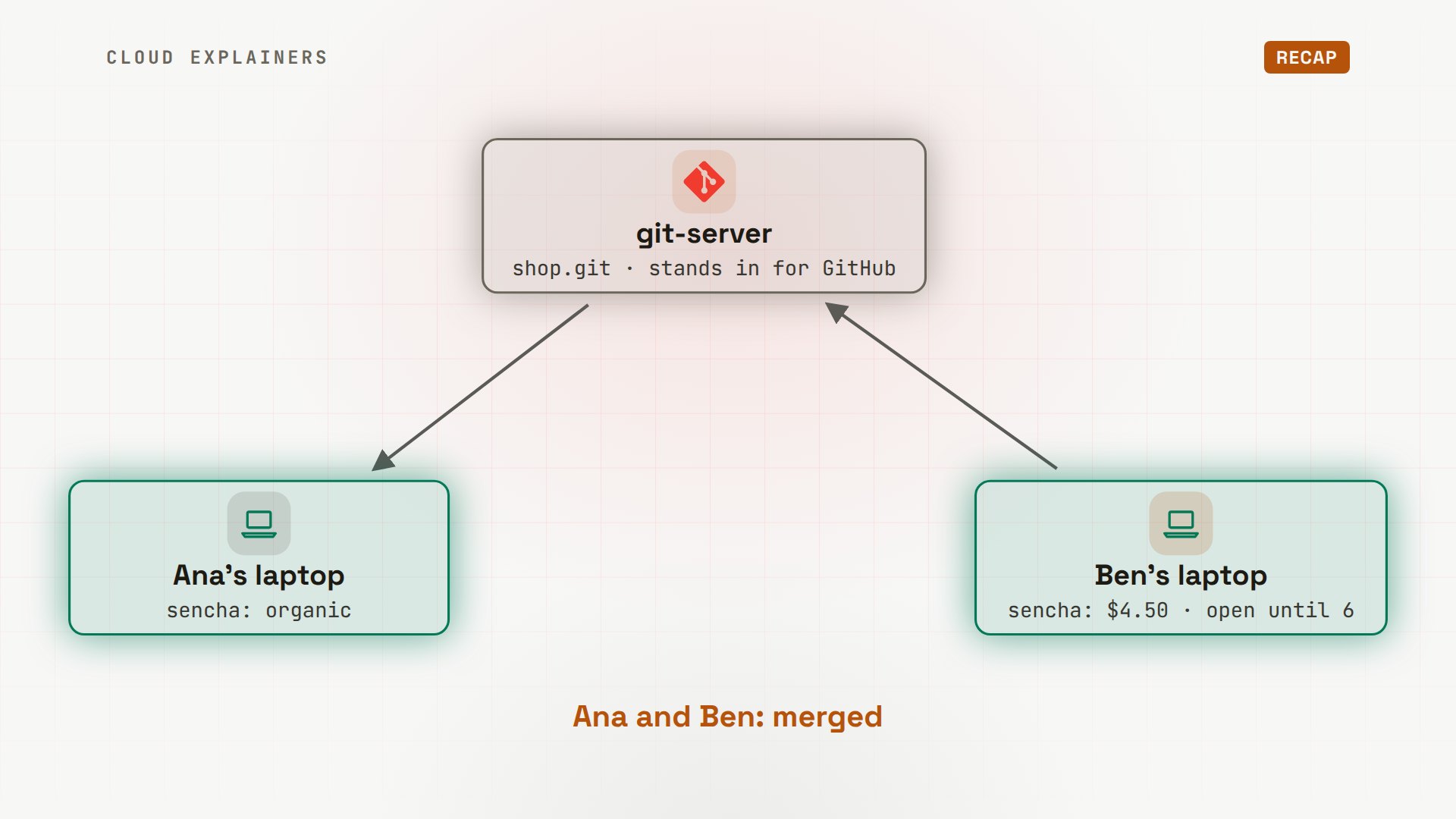
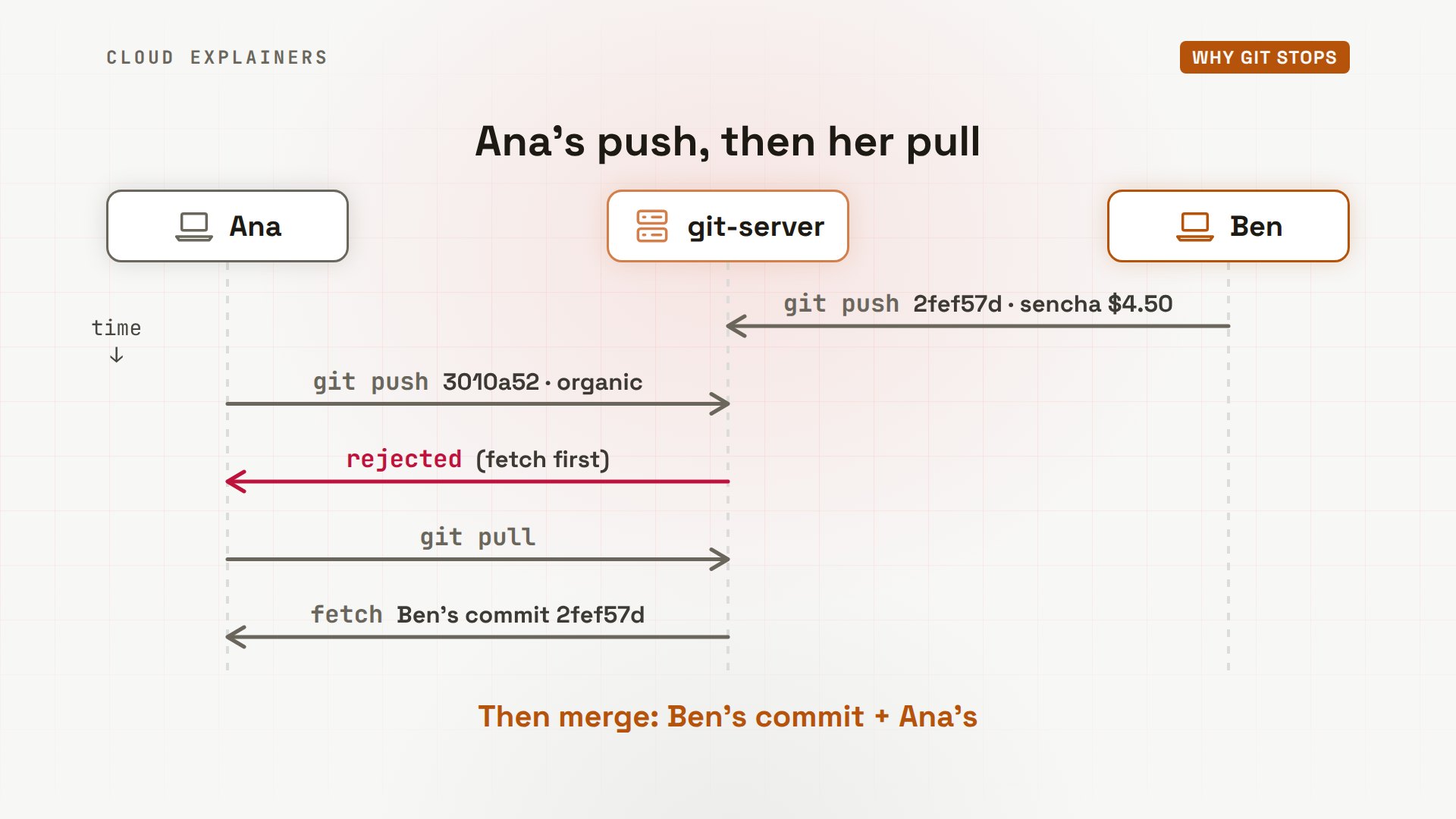
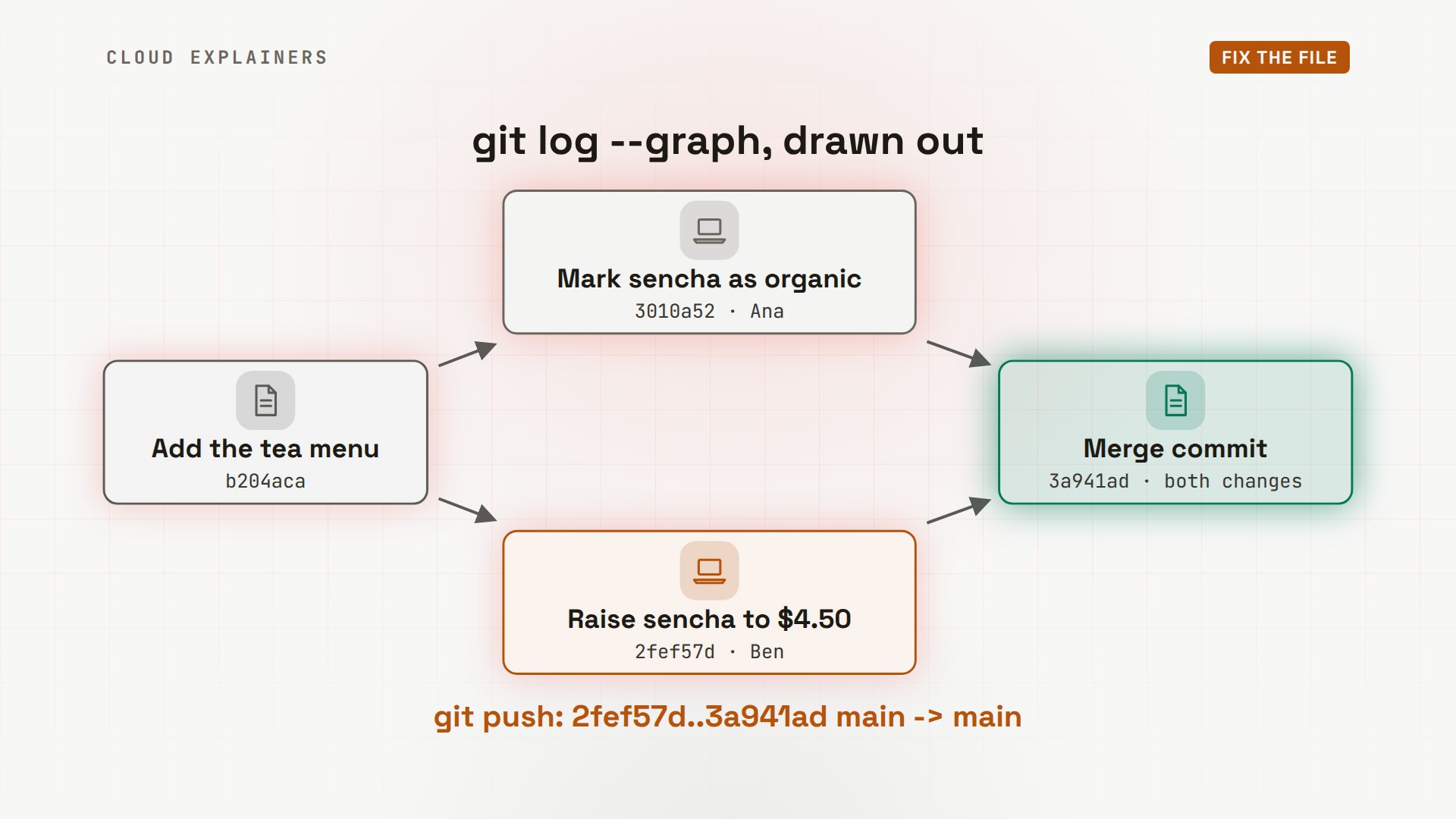
Here's what happened. Ana and Ben share the shop's code through a Git server, which stands in for GitHub. Ben changed two lines of the menu page: a new price for sencha tea, and longer opening hours. He committed, and pushed. Meanwhile, Ana marked the same sencha line as organic, and committed that.
Then Ana tried to push, and the server refused: it has a commit she doesn't have yet, and taking her push would drop Ben's commit. So she pulled. A pull is two steps: fetch downloads Ben's commit, and merge combines it with hers.
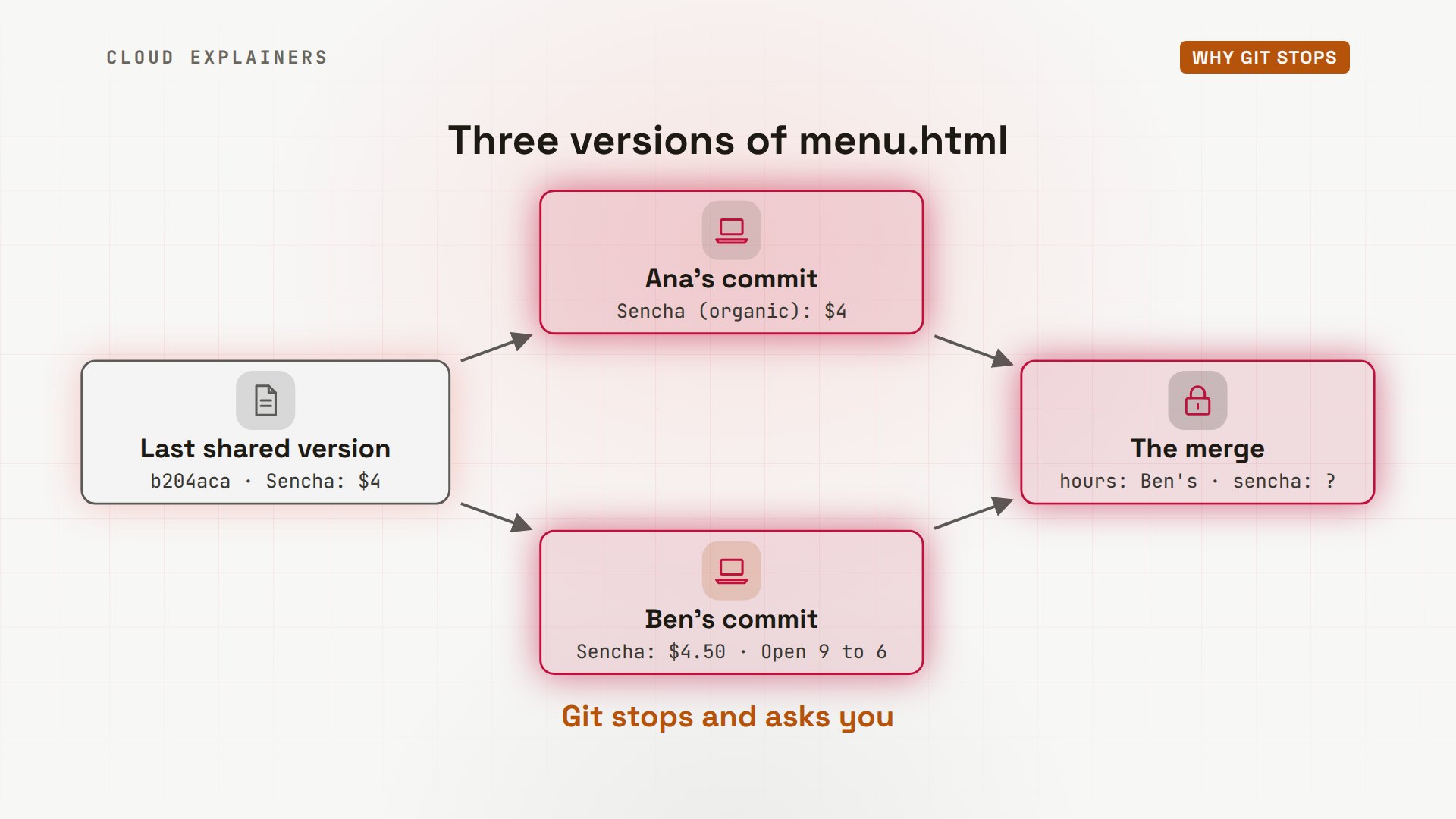
To merge, Git compares three versions of the file: the last version they both had, Ana's, and Ben's. Wherever only one side changed a line, Git takes that change: Ben's new hours came in by themselves. But the sencha line changed on both sides, in different ways. Git won't guess which is right, so it stops and asks you.
Read the conflict
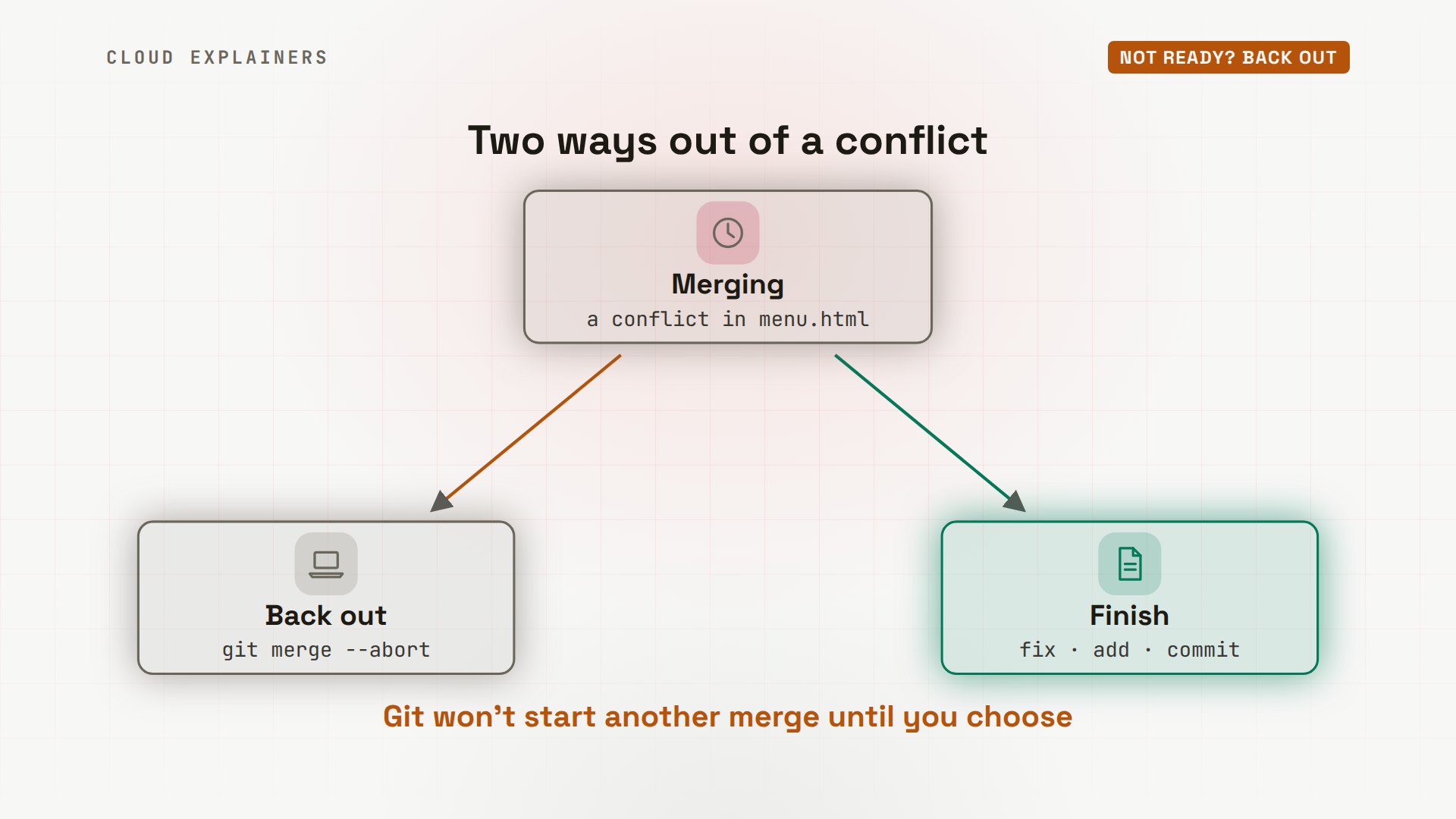
First, run git status. It says you have unmerged paths: menu.html is both modified, changed on both sides. And it already shows the way out, if you need one: git merge --abort.
git statusOn branch main
Your branch and 'origin/main' have diverged,
and have 1 and 1 different commits each, respectively.
  (use "git pull" if you want to integrate the remote branch with yours)

You have unmerged paths.
  (fix conflicts and run "git commit")
  (use "git merge --abort" to abort the merge)

Unmerged paths:
  (use "git add <file>..." to mark resolution)
	both modified:   menu.html

no changes added to commit (use "git add" and/or "git commit -a")
Now open the file. Git wrote both versions of the sencha line into it, between three marker lines. Seven less-than signs start the conflict. Seven equals signs divide it. Seven greater-than signs end it.
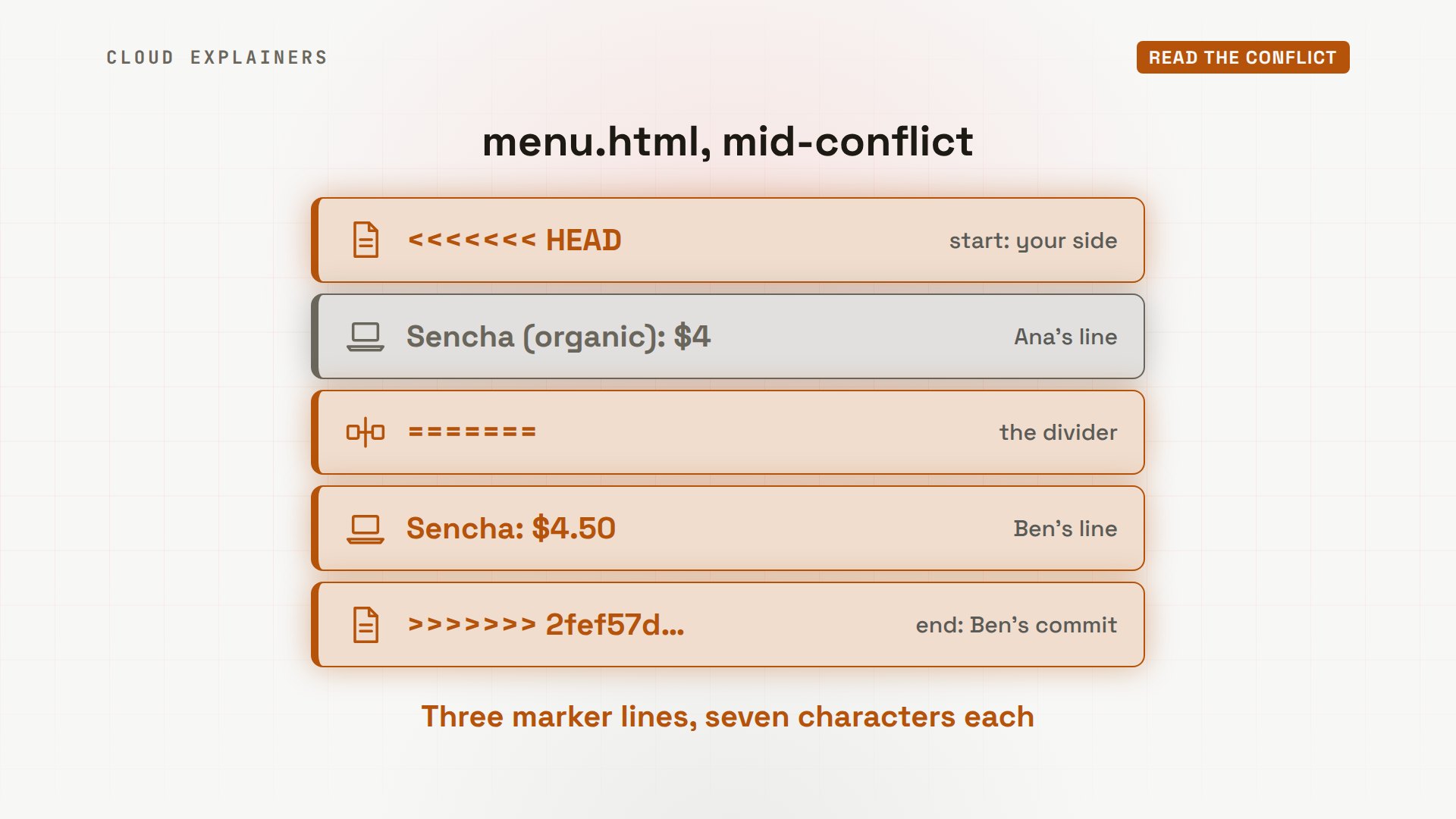
Above the equals signs is your side, called HEAD: the branch you're on, Ana's main. Below is their side: the commit she pulled, named by its ID. That's Ben's. And Ana wants both: organic, and the new price.
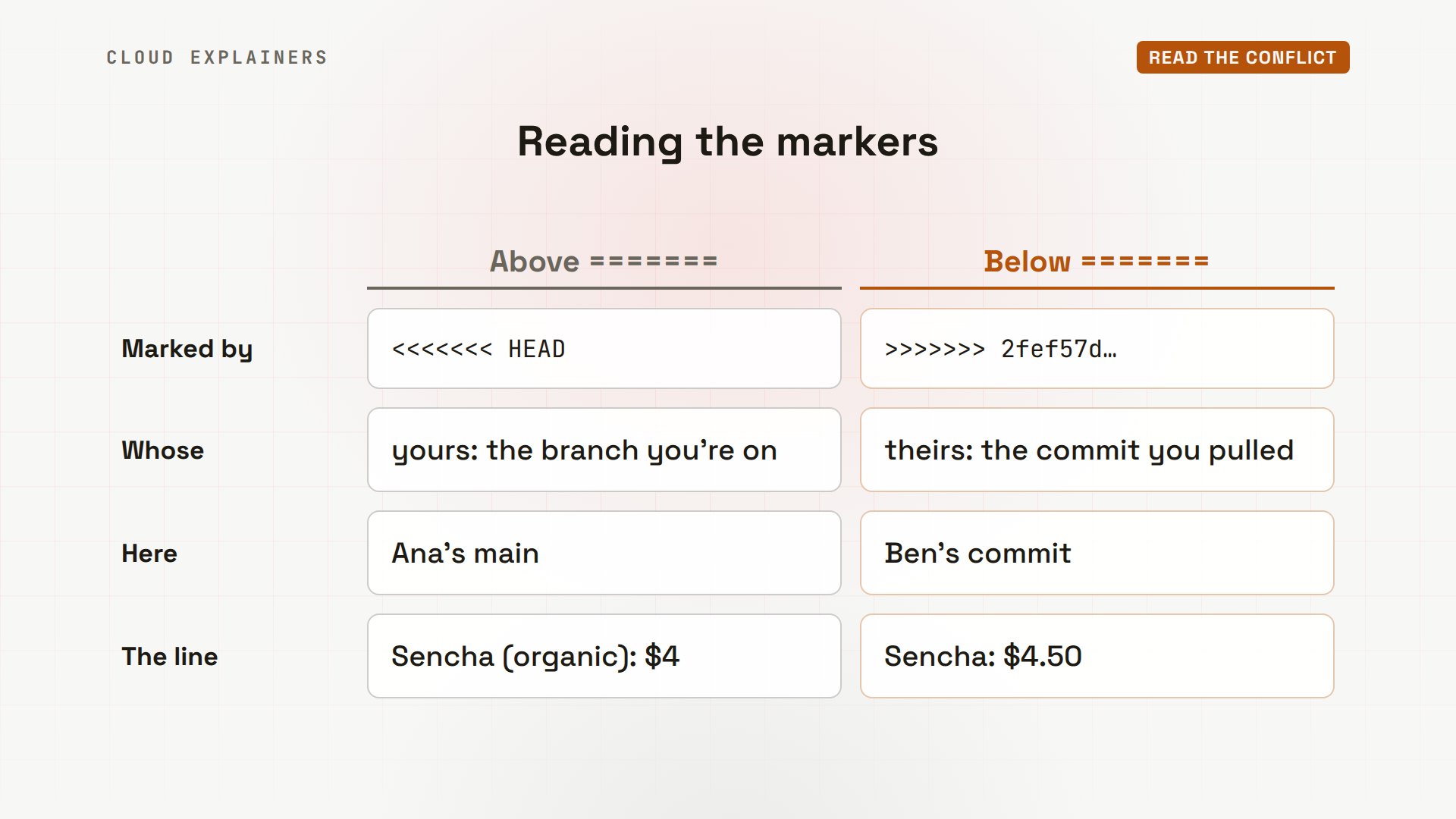
In a bigger project, git diff --check finds every marker that's left. Here: lines 2, 4 and 6 of the menu page.
git diff --checkmenu.html:2: leftover conflict marker
menu.html:4: leftover conflict marker
menu.html:6: leftover conflict marker
Not ready? Back out
If you're not ready to decide, you can back out. You don't have to: Ana does it here to show how. git merge --abort puts everything back the way it was before the merge. Status is clean, and the menu has just her own change again. Nothing is lost: Ben's commit is still waiting in origin/main, her laptop's copy of the server's main branch.
git merge --abort
git statusOn branch main
Your branch and 'origin/main' have diverged,
and have 1 and 1 different commits each, respectively.
  (use "git pull" if you want to integrate the remote branch with yours)

nothing to commit, working tree clean
cat menu.html<h1>Tea menu</h1>
<p>Sencha (organic): $4</p>
<p>Matcha: $5</p>
<p>Earl Grey: $3</p>
<p>Chai: $4</p>
<footer>Open 9 to 5</footer>
Think of a conflict as a waiting room. From there, abort goes back to where you were, and fixing the file, then git add and git commit, goes forward to a finished merge. Until you choose, Git won't start another merge.
Fix the file
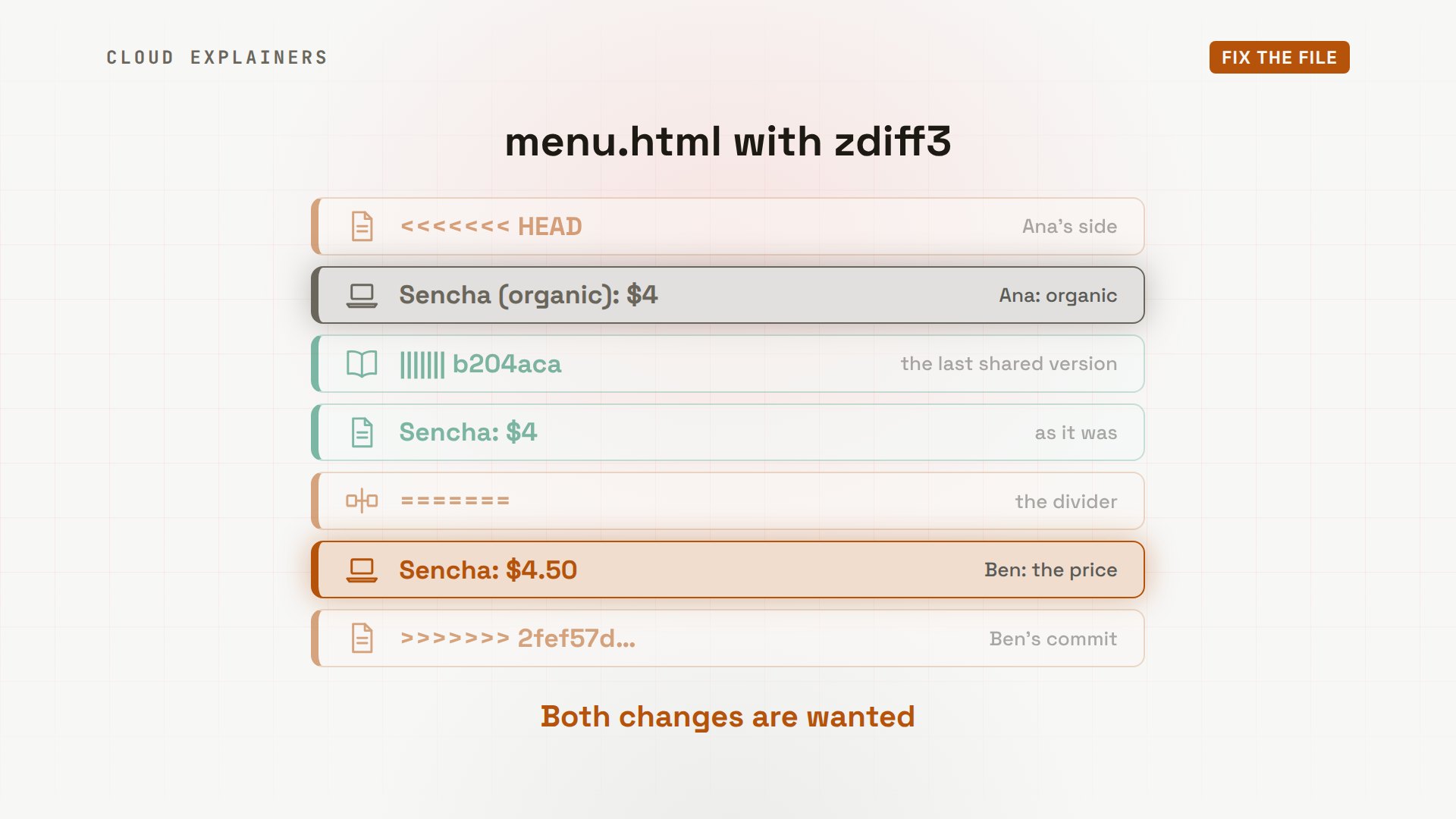
Then, before her next pull, Ana turns on two settings. Neither is required, but both help. conflictStyle zdiff3 also shows the original line, and rerere, short for reuse recorded resolution, makes Git remember how she fixes a conflict. Then the same pull, the same conflict, and one new line: Git recorded the conflict.
git config --global merge.conflictStyle zdiff3
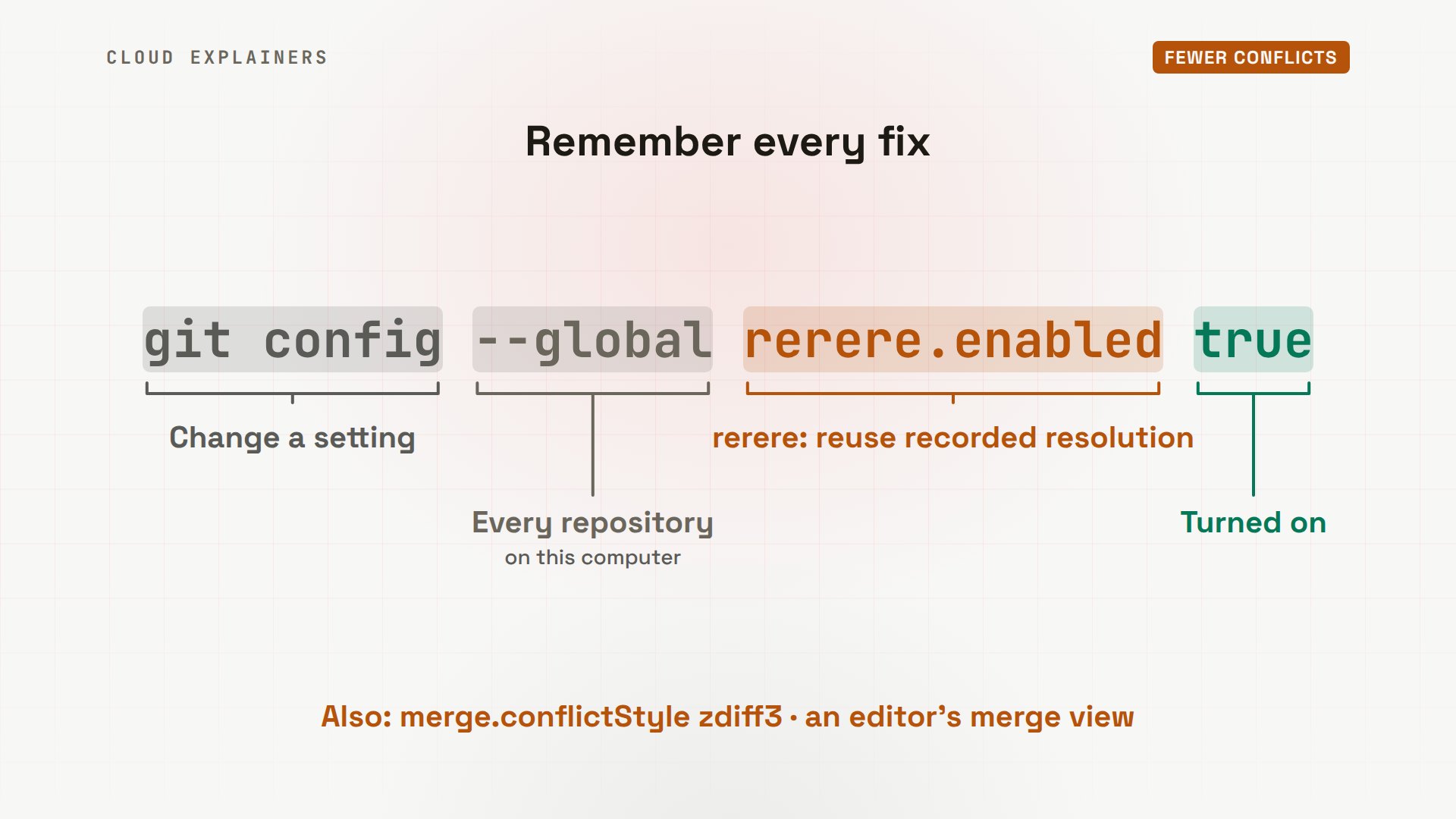
git config --global rerere.enabled true
git pullAuto-merging menu.html
CONFLICT (content): Merge conflict in menu.html
Recorded preimage for 'menu.html'
Automatic merge failed; fix conflicts and then commit the result.
The file now has a third part, after the vertical bars: the line as it was in the last shared version, sencha at $4. So it's clear who did what: Ana added organic, and Ben changed the price. Both changes are wanted.
The fix is up to you. Often you keep one side. Here, Ana keeps both, in one line: organic, at $4.50. Then she deletes every marker line. Whatever is in the file is what gets committed.
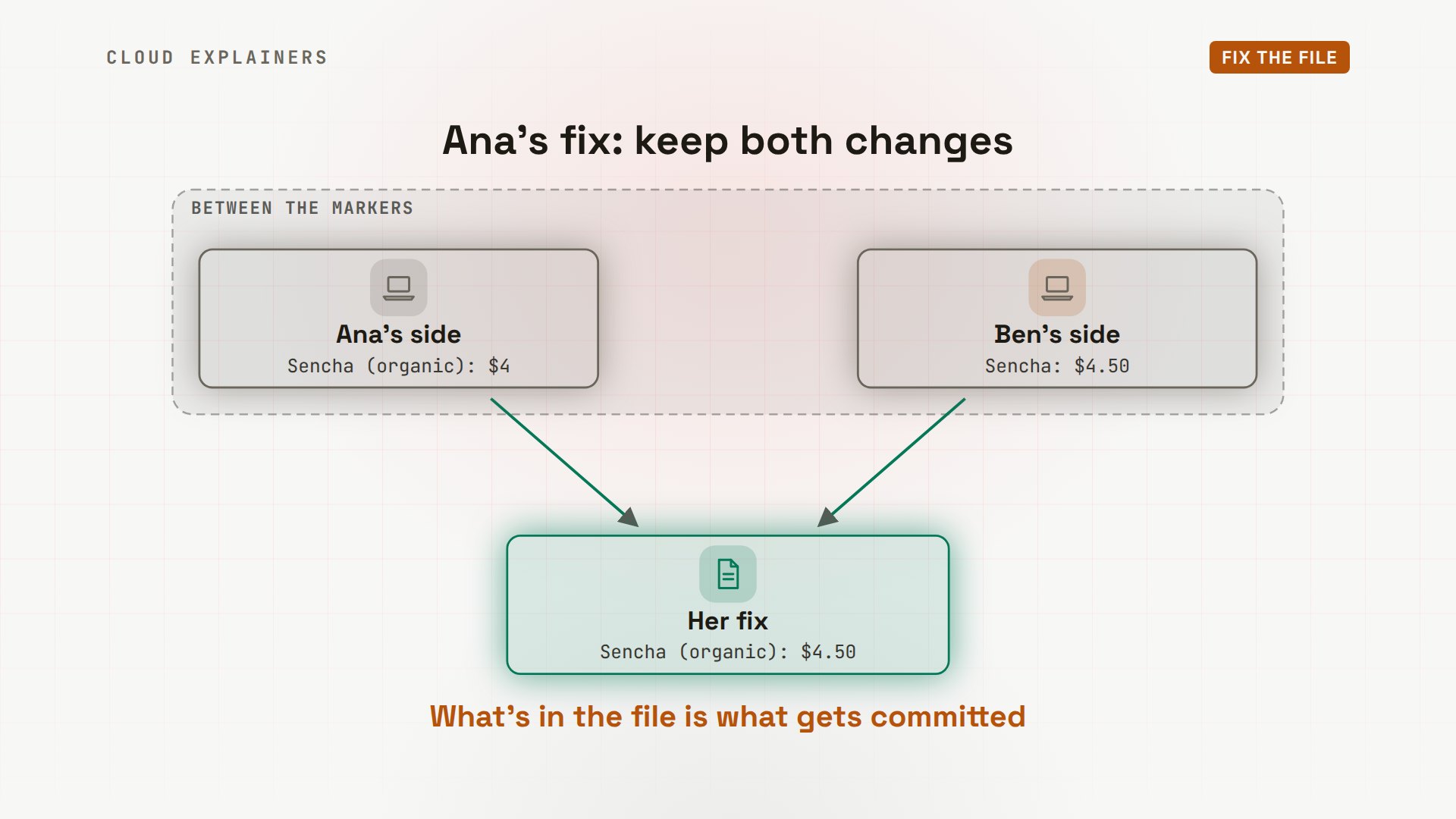
In her editor, Ana makes that change, then checks: git diff --check prints nothing, so no markers are left. That check matters, because git add and git commit don't look for markers. git add marks the file as fixed. git status agrees: all conflicts fixed, but you are still merging. git commit finishes the merge. --no-edit keeps the message Git wrote, so no editor opens. And Git recorded her fix, for next time.
git diff --check
git add menu.html
git statusOn branch main
Your branch and 'origin/main' have diverged,
and have 1 and 1 different commits each, respectively.
  (use "git pull" if you want to integrate the remote branch with yours)

All conflicts fixed but you are still merging.
  (use "git commit" to conclude merge)

Changes to be committed:
	modified:   menu.html
git commit --no-editRecorded resolution for 'menu.html'.
[main 3a941ad] Merge branch 'main' of git-server:shop
Here's the history now. Two lines of work start from the same commit, and the merge commit joins them, with both changes in it. This time, her push goes through, and Ben's next pull brings the merge commit to his laptop.
Conflicts in a rebase
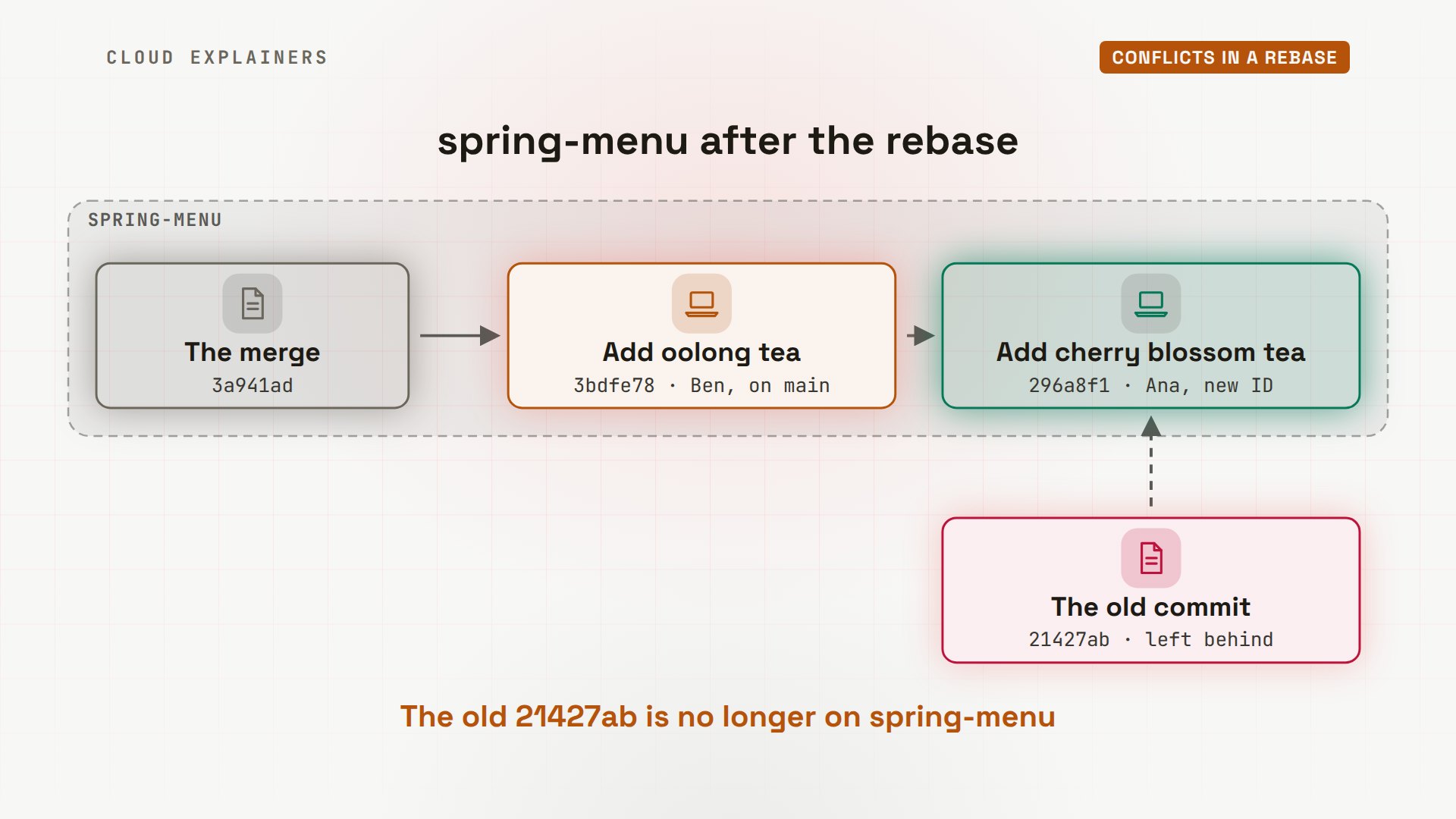
A rebase can stop the same way. Instead of joining two lines of work, it replays your commits on top of the newest main, one at a time. Ana starts a branch, spring-menu, and adds cherry blossom tea below chai. Meanwhile, Ben adds oolong tea to main, in the same spot.
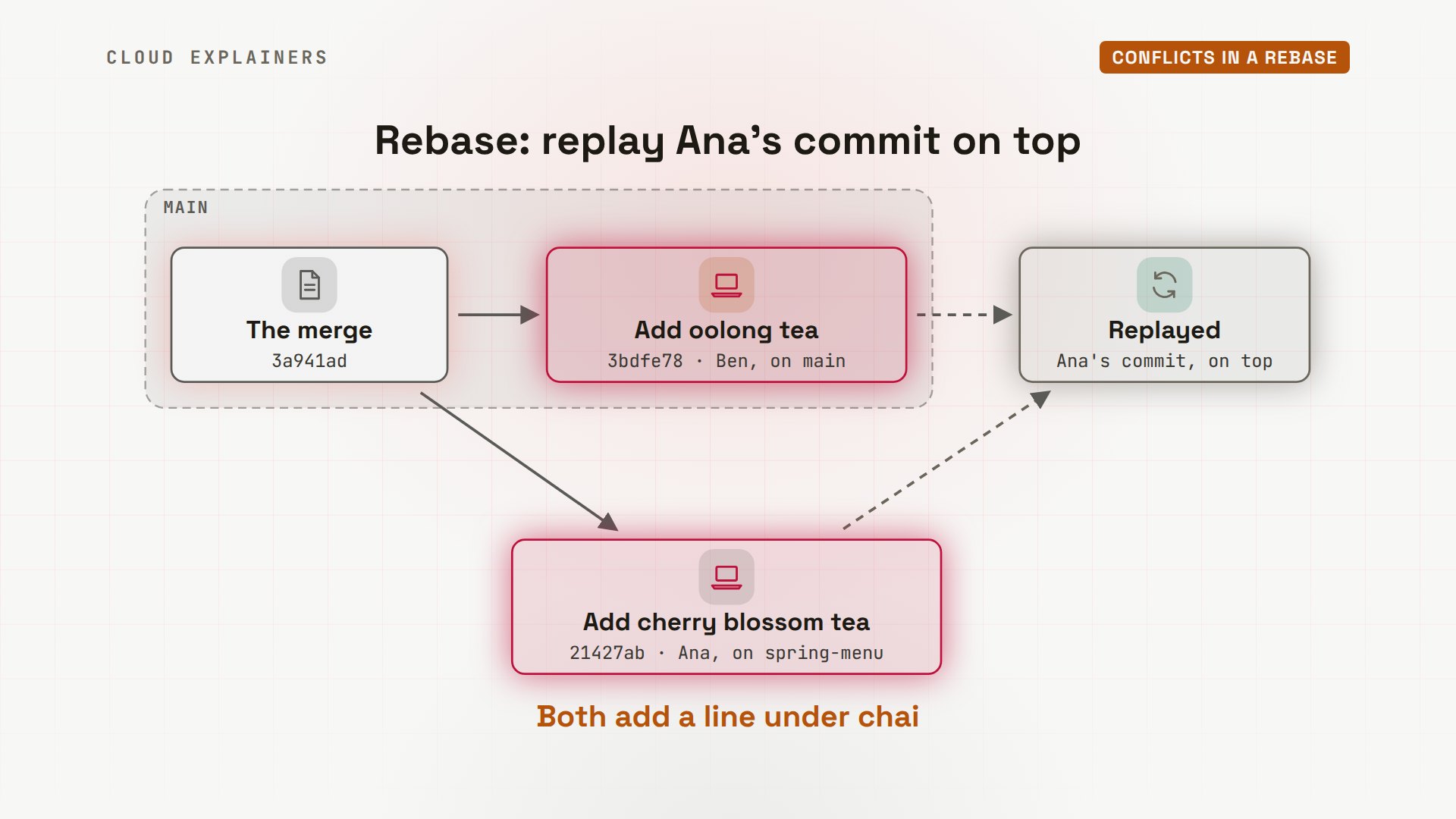
Ana fetches Ben's commit and runs git rebase origin/main. It stops: could not apply, add cherry blossom tea. The hints list three ways on: continue after fixing, skip this commit, or abort to go back.
git fetchremote: Enumerating objects: 5, done.
remote: Counting objects: 100% (5/5), done.
remote: Compressing objects: 100% (2/2), done.
remote: Total 3 (delta 1), reused 0 (delta 0), pack-reused 0
Unpacking objects: 100% (3/3), 258 bytes | 258.00 KiB/s, done.
From git-server:shop
   3a941ad..3bdfe78  main       -> origin/main
git rebase origin/mainAuto-merging menu.html
CONFLICT (content): Merge conflict in menu.html
error: could not apply 21427ab... Add cherry blossom tea
hint: Resolve all conflicts manually, mark them as resolved with
hint: "git add/rm <conflicted_files>", then run "git rebase --continue".
hint: You can instead skip this commit: run "git rebase --skip".
hint: To abort and get back to the state before "git rebase", run "git rebase --abort".
Recorded preimage for 'menu.html'
Could not apply 21427ab... Add cherry blossom tea
Now look at the labels. In a rebase, HEAD is the new main, with Ben's oolong, and the bottom part is Ana's own commit, the one being replayed. The middle part, after the bars, is empty: before her commit, there was no line there at all. And notice: HEAD is not Ana's side here. It's the opposite of a merge.
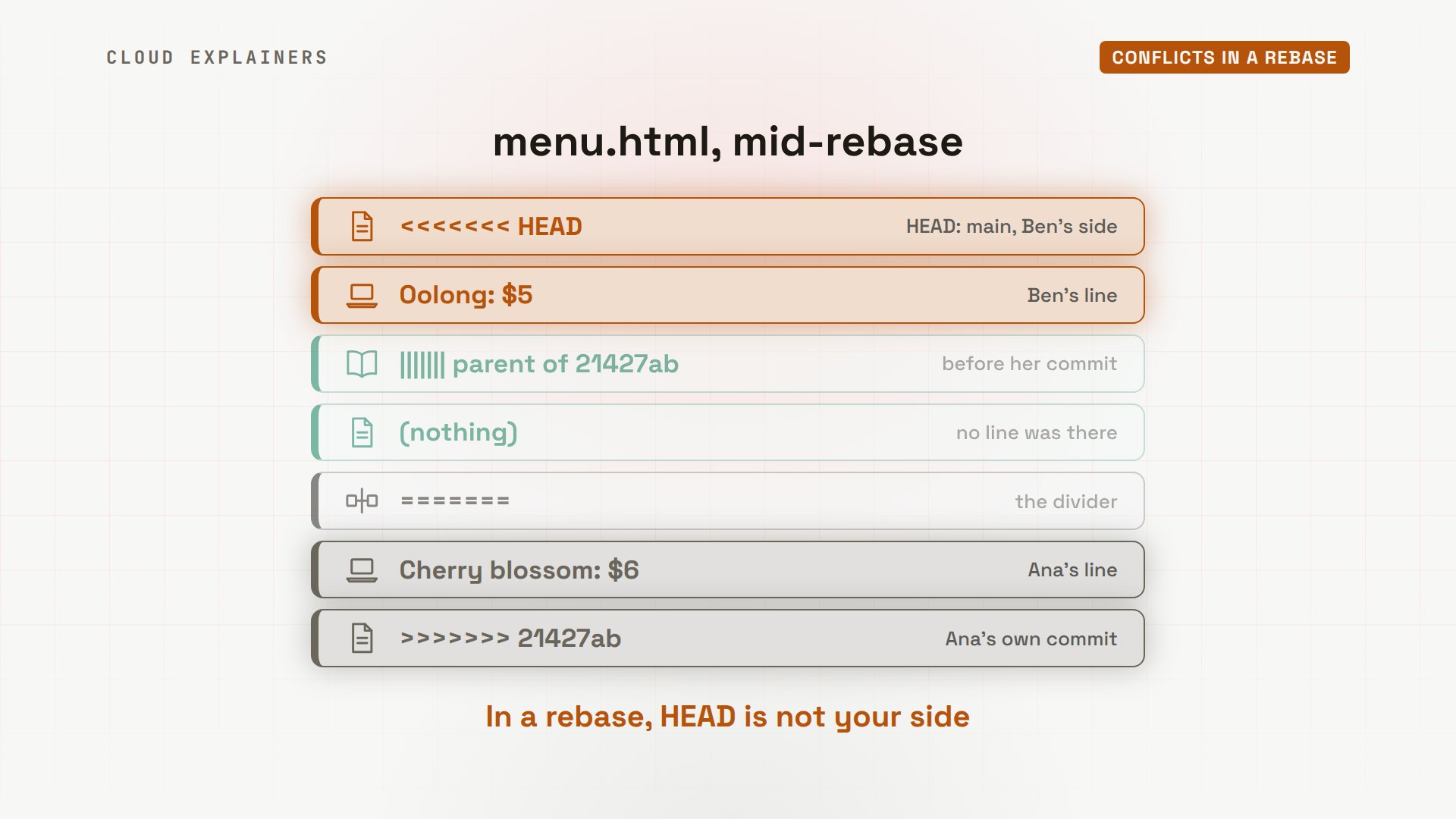
So in a rebase, ours and theirs swap places, because a rebase starts from main, and then replays your commits onto it. HEAD, or ours, is the branch you're rebasing onto. Theirs is your own work. You finish with git rebase --continue, not commit, and back out with git rebase --abort.
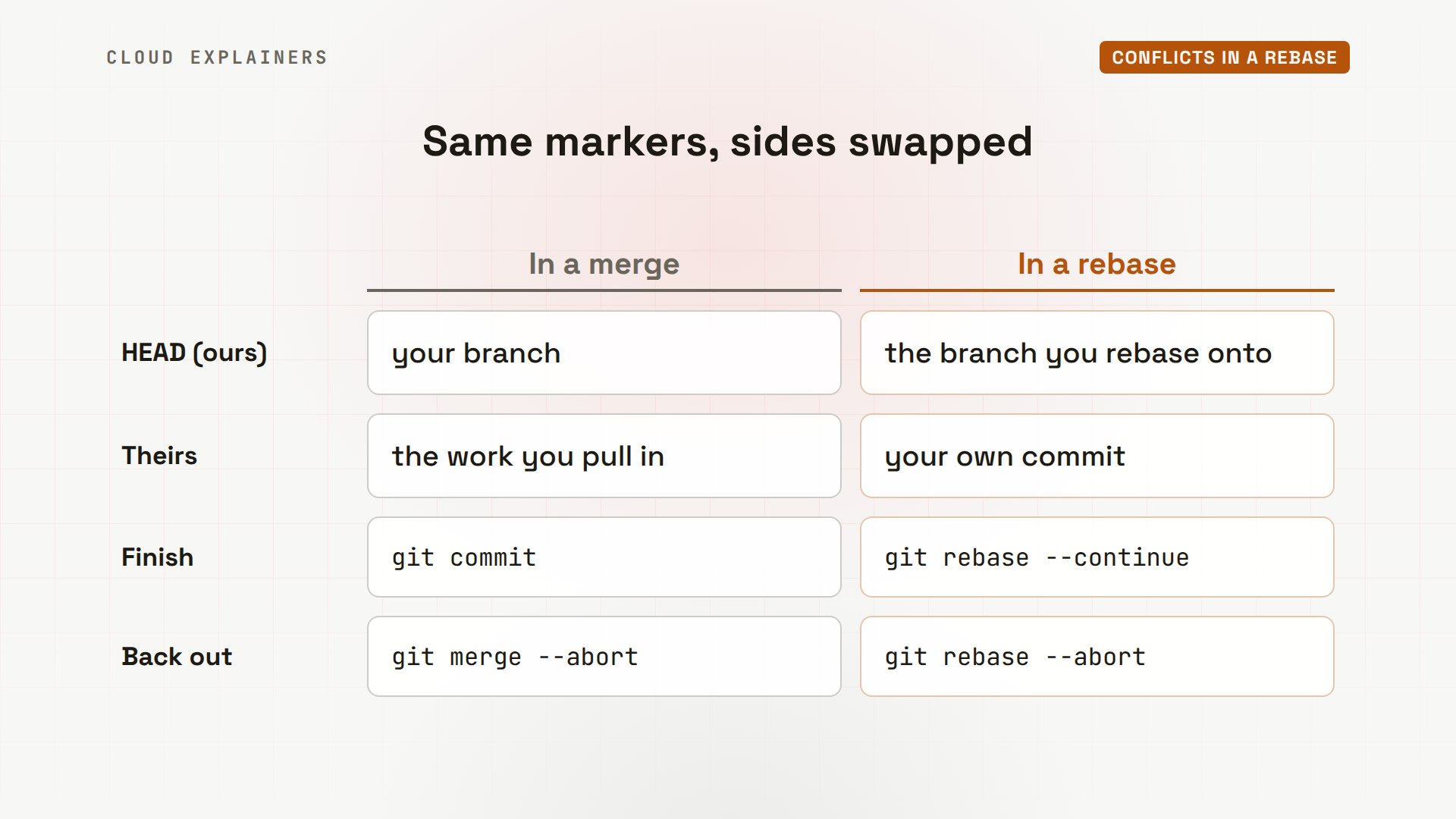
In her editor, Ana deletes the marker lines and keeps both teas, oolong first. She adds the file, and runs git rebase --continue. Git records this fix too, and the rebase finishes, with no merge commit this time: Git rewrote her commit on top of main instead.
cat menu.html<h1>Tea menu</h1>
<p>Sencha (organic): $4.50</p>
<p>Matcha: $5</p>
<p>Earl Grey: $3</p>
<p>Chai: $4</p>
<p>Oolong: $5</p>
<p>Cherry blossom: $6</p>
<footer>Open 9 to 6</footer>
git add menu.html
git rebase --continueRecorded resolution for 'menu.html'.
[detached HEAD 296a8f1] Add cherry blossom tea
 1 file changed, 1 insertion(+)
Successfully rebased and updated refs/heads/spring-menu.
Here's her branch now: one straight line. Ben's oolong commit is on main, and Ana's cherry blossom commit sits on top of it, with a new ID, because a rebase makes new commits. The old one is no longer part of her branch.
Fewer conflicts
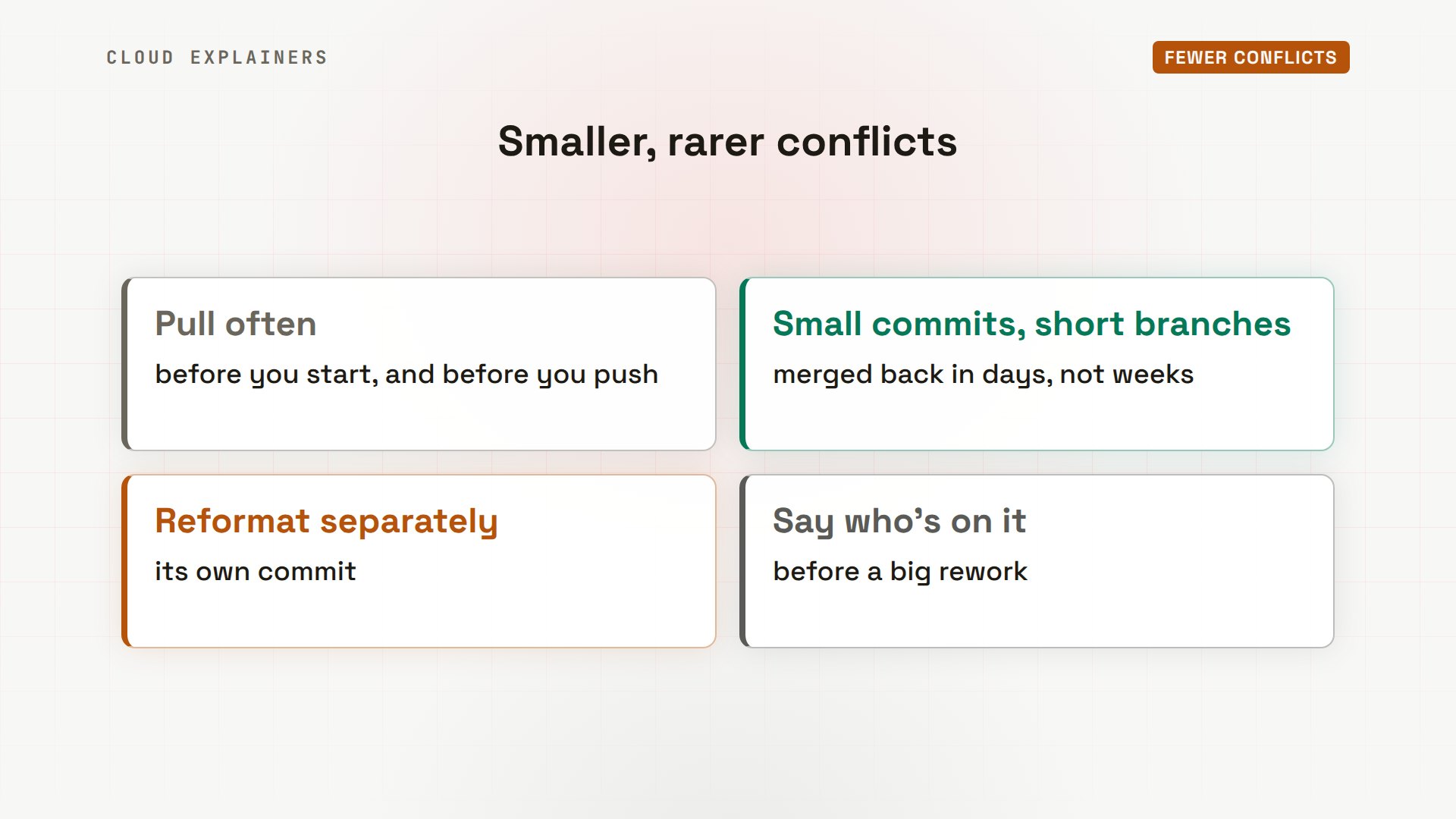
You can't avoid every conflict, but you can keep them small and rare. Pull often, as Ana and Ben do now, so you merge a few changes at a time, not weeks of them. Keep commits small, and merge branches back in days. Reformat a file in its own commit, not with a real change. And before a big rework of a file, tell the team.
And let Git help. This one setting turns rerere on. --global applies it to every repository on your computer. From then on, Git saves each conflict and your fix, and reuses the fix when the same conflict comes back, say, when you rebase a branch again. Pair it with zdiff3, and an editor's merge view, like VS Code's, which puts both sides next to each other.
Recap
Let's recap. A conflict means both sides changed the same lines, and Git wants you to choose. git status shows which files. Between the markers, HEAD is your side in a merge, but main in a rebase. Fix the file, check it with git diff --check, then add and commit, or continue the rebase. Not ready? Abort. And pull often, to keep conflicts small.
If this helped you finish a stuck merge, subscribing helps this small channel keep making real demos for beginners.
Every command and output in this video came from a real run in our lab. Thanks for watching Cloud Explainers.
Sources
Demos: real output from a small Git lab on our own machine: a Git server standing in for GitHub and two laptops, in Docker containers. File edits were made in an editor off-screen; every Git command is shown as typed. Watch the full video on YouTube.
More videos
How to Fix No Space Left on Device in Linux
How the Internet Works
SQL vs NoSQL: When Each One Wins
How to Fix JWT Token Expired Errors (401 Unauthorized)

Claude API vs Claude Pro: Why Your Subscription Doesn't Include It

Why AI Agent Skills Beat Giant Prompts

Linux Cron Jobs Will Finally Make Sense After This

Security Logs Will Finally Make Sense After This

How to Fix a Security Leak: An API Key Pushed to GitHub

DNS Will Finally Make Sense After This

Never Ignore a Security Update

Two-Factor Authentication Will Finally Make Sense

Never Expose a Database to the Internet

SSH Keys vs Passwords: Which Is Safer for Security?

The 5 Levels of Linux Boot: From Power On to Login

The 5 Levels of Network Firewalls

Password Security: Why Hackers Crack Weak Passwords

Why Your Linux Server Runs Out of Memory

HTTP vs HTTPS: What Actually Changes on Your Network

Every Linux File Permission You Need to Know

Linux Processes vs Threads: When Each One Wins

The OSI Model Will Finally Make Sense After This

The 7 Levels of Git

Every Network Troubleshooting Command You Need

Hashing vs Encryption in Cybersecurity: When Each One Wins

Why the Internet Ran Out of IP Addresses

Linux Package Managers: apt vs Snap vs Flatpak

Why Python Is Slow (and When It Doesn't Matter)

TCP vs UDP: When Each One Wins

Stop Running Linux as Root (Do This Instead)

Linux Users and Groups Will Finally Make Sense

Why Phishing Beats Good Security (and How to Spot It)

The 7 Levels of Docker

AI Agents Will Finally Make Sense After This

Stop Using git push --force (Use This Instead)

Agent Skills vs MCP: When Each One Wins

Networking Will Finally Make Sense After This

Every Linux Command You Actually Need

The 7 Levels of Cybersecurity

Every System Design Concept You Need, in One Diagram
