
Networking Will Finally Make Sense After This
Networking for complete beginners: follow one web request from a laptop to a server and back, and learn the seven ideas every network runs on: IP addresses, the local network (MAC and ARP), routers, DNS, NAT (private and public addresses), ports, and packets with TCP and UDP. Every step is proven on a real lab network.
One request
You type an address, press Enter, and a page appears. In that moment, your request crossed several machines you'll never see, and came back. Every network works this way: your home Wi-Fi, an office, a data center, the cloud. Seven ideas explain all of it.
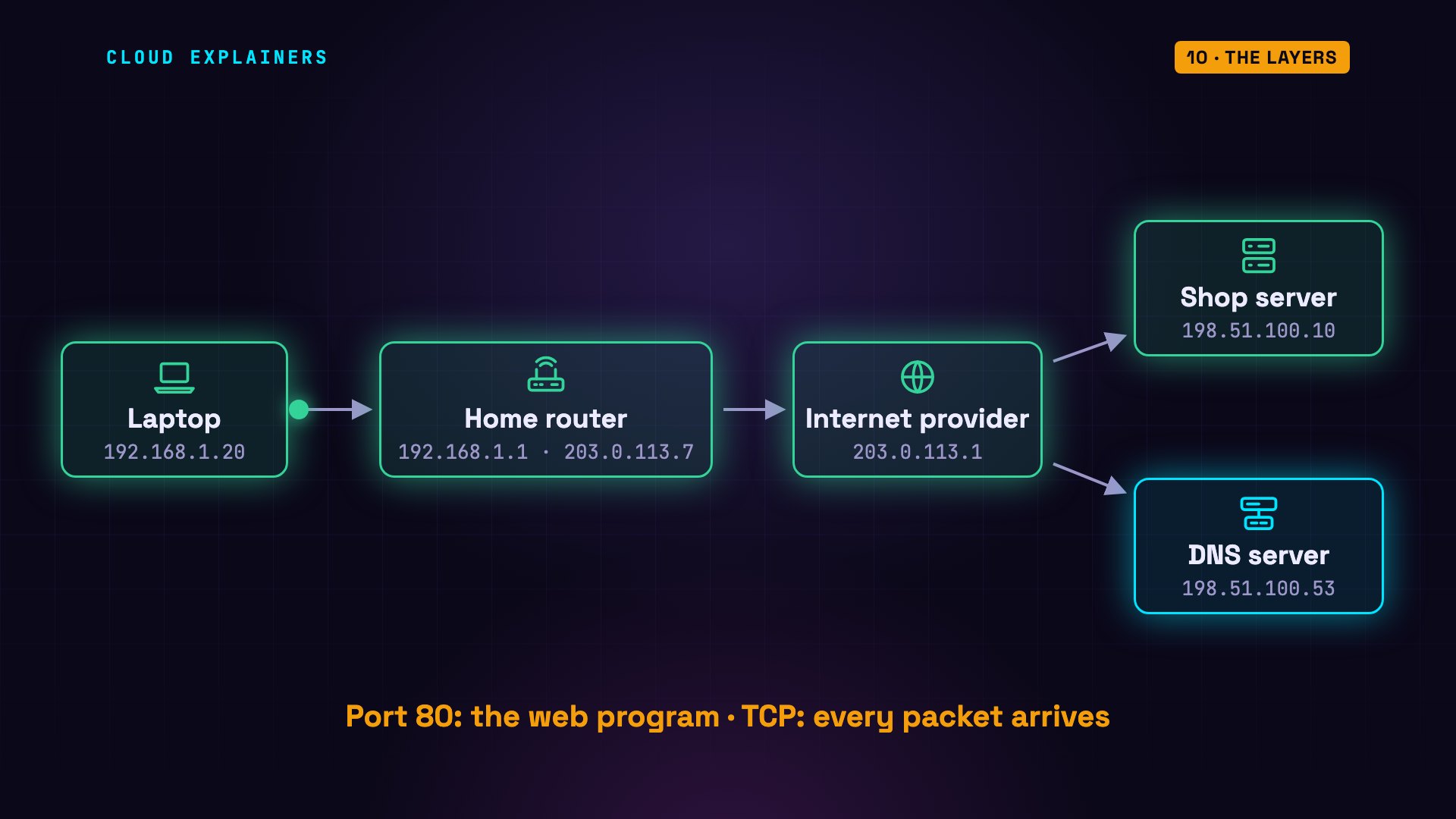
To see those ideas for real, we built this small network inside one computer, with Docker: each box is a separate little computer. A laptop, a home router, an internet provider's router, and a web shop. Here's the laptop asking the shop for its page, and the page coming back. Now let's follow that request, one idea at a time.
IP addresses
Idea one: addresses. Data travels in small pieces called packets. Every device on a network gets a number called an IP address, like a street address. And every packet carries two of them: where it's from, and where it's going.
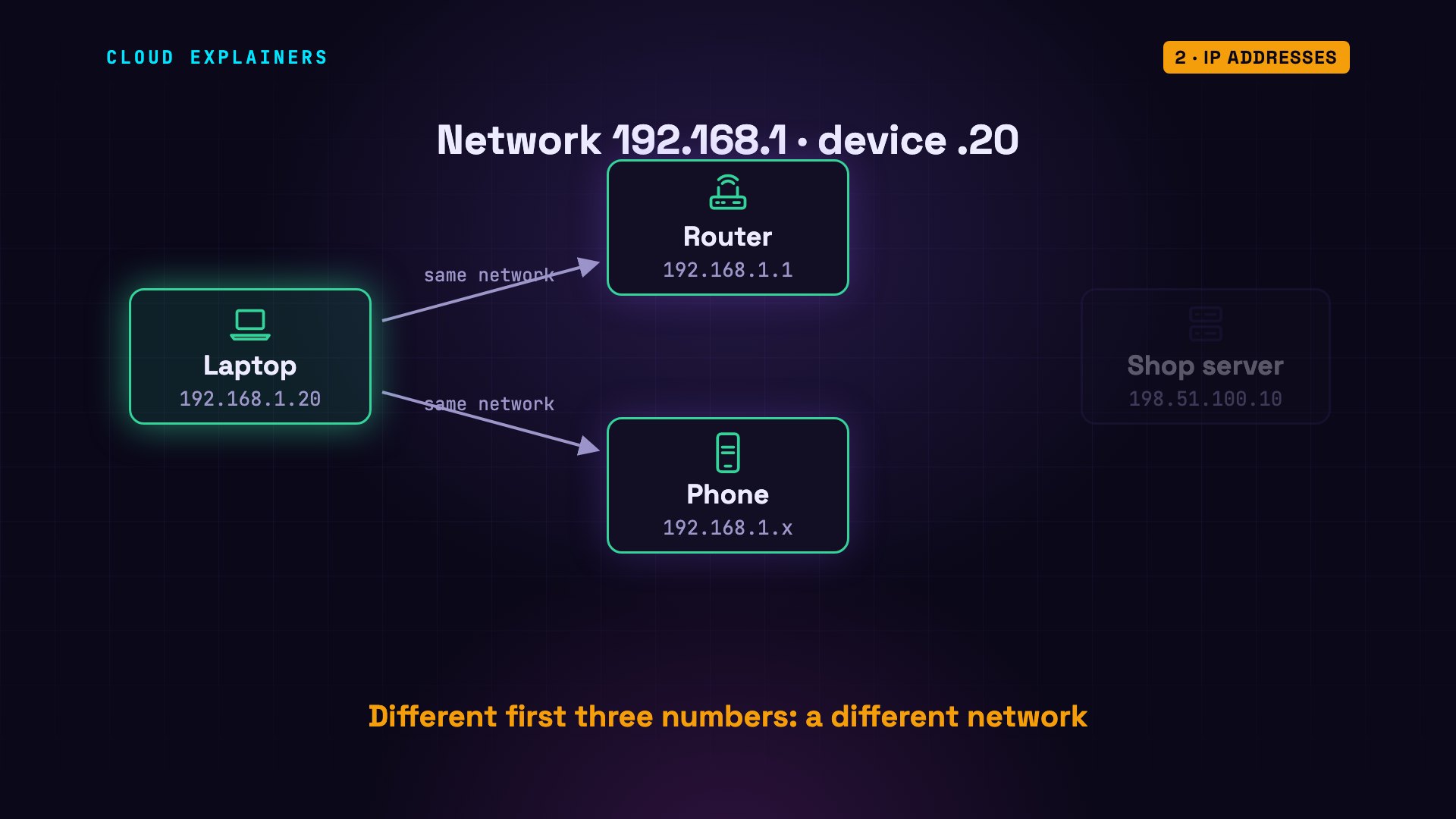
Here's our laptop's address. lo is loopback: the laptop talking to itself. eth0 is its network card, with the address 192.168.1.20. The slash 24 matters. Each of the four numbers is 8 bits, so 24 bits means the first three numbers. They name the network, and the last number names the device.
ip -4 -brief addresslo               UNKNOWN        127.0.0.1/8
eth0@if155       UP             192.168.1.20/24
So every device whose address starts with 192.168.1 is on the same local network as the laptop, like houses on the same street: the router, or a phone at home. The shop, at 198.51.100.10, is on a different street entirely.
The local network: MAC and ARP
Idea two: the local network, through Wi-Fi or a cable. Here's a surprise: on the local network, devices don't deliver to IP addresses. Every network card has a fixed hardware address, called a MAC address, and that's what the local network delivers to.
Here's the laptop's MAC address: six pairs of characters, after link ether. So to hand a packet to the router, the laptop needs the router's MAC address. Its list of known neighbours is empty. So it asks.
ip link show eth011: eth0@if155: <BROADCAST,MULTICAST,UP,LOWER_UP> mtu 1500 qdisc noqueue state UP mode DEFAULT group default
    link/ether 06:d1:de:cb:a8:90 brd ff:ff:ff:ff:ff:ff link-netnsid 0
ip neighbour
We ping the router (a tiny are-you-there message) and capture on the router with tcpdump, a tool that prints every packet it sees. First, the laptop calls out to every device on the network: who has 192.168.1.1? Tell 192.168.1.20. The router replies with its MAC address. This is ARP, the address resolution protocol.
ping -c 3 192.168.1.1PING 192.168.1.1 (192.168.1.1) 56(84) bytes of data.
64 bytes from 192.168.1.1: icmp_seq=1 ttl=64 time=0.137 ms
64 bytes from 192.168.1.1: icmp_seq=2 ttl=64 time=0.060 ms
64 bytes from 192.168.1.1: icmp_seq=3 ttl=64 time=0.165 ms

--- 192.168.1.1 ping statistics ---
3 packets transmitted, 3 received, 0% packet loss, time 2070ms
rtt min/avg/max/mdev = 0.060/0.120/0.165/0.044 ms
tcpdump -n -i lan -c 2 arptcpdump: verbose output suppressed, use -v[v]... for full protocol decode
listening on lan, link-type EN10MB (Ethernet), snapshot length 262144 bytes
12:33:38.689024 ARP, Request who-has 192.168.1.1 tell 192.168.1.20, length 28
12:33:38.689037 ARP, Reply 192.168.1.1 is-at d2:81:7b:5a:83:75, length 28
2 packets captured
2 packets received by filter
0 packets dropped by kernel
Now the laptop remembers it, and it won't ask again for a while. That's the local network: IP addresses say who, MAC addresses do the delivering.
ip neighbour192.168.1.1 dev eth0 lladdr d2:81:7b:5a:83:75 REACHABLE
Routers
Idea three: routers. The shop's address doesn't start with 192.168.1. It's on another network. So the laptop doesn't even try to reach it. It hands the packet to its router, called the default gateway, and each router passes it one step closer. Each step is called a hop.
This is the laptop's routing table: its whole map of the world, in two lines. Line one: by default, everything goes via 192.168.1.1: the router. Line two is the exception: 192.168.1.0/24 means the whole 192.168.1 network. Those addresses are on the laptop's own network, so they're delivered directly.
ip routedefault via 192.168.1.1 dev eth0
192.168.1.0/24 dev eth0 proto kernel scope link src 192.168.1.20
traceroute lists every router on the way. Hop one: our home router. Hop two: the internet provider. Hop three: the shop's server. On the real internet, the list is longer, often ten hops or more, across several companies' networks. The idea is the same.
traceroute -n 198.51.100.10traceroute to 198.51.100.10 (198.51.100.10), 30 hops max, 60 byte packets
 1  192.168.1.1  0.088 ms  0.027 ms  0.015 ms
 2  203.0.113.1  0.134 ms  0.027 ms  0.022 ms
 3  198.51.100.10  0.106 ms  0.040 ms  0.030 ms
DNS
Idea four: names. We typed shop.example, not a number. So before anything else, the laptop asks a DNS server, the internet's phone book, to turn the name into an address.
dig, a DNS lookup tool, asks that question by hand. The answer: 198.51.100.10. On the router, the whole exchange took exactly two packets: one question, one answer. No hello first, no setup. Remember that. We'll see why in a minute.
dig +short shop.example198.51.100.10
tcpdump -n -i lan -c 2 udp port 53tcpdump: verbose output suppressed, use -v[v]... for full protocol decode
listening on lan, link-type EN10MB (Ethernet), snapshot length 262144 bytes
12:33:42.287705 IP 192.168.1.20.36674 > 198.51.100.53.53: 27132+ [1au] A? shop.example. (53)
12:33:42.287906 IP 198.51.100.53.53 > 192.168.1.20.36674: 27132* 1/0/1 A 198.51.100.10 (57)
2 packets captured
2 packets received by filter
0 packets dropped by kernel
NAT: private and public addresses
Idea five confuses almost everyone: private and public addresses. Addresses that start with 192.168, or 10, are private. Millions of homes use the same ones, so the internet can't deliver to them. Your router has one public address, here 203.0.113.7, and it puts that address on every packet going out. This is NAT: network address translation.
Here's the proof. We capture on both sides of the router at once: lan is its home side, wan its internet side. The first packet of a request arrives on the home side, from 192.168.1.20. The same packet leaves on the internet side, from 203.0.113.7. Same destination, new from-address. The number after each address is a port. We'll get to those in a minute.
tcpdump -n -i any -c 2 'tcp[tcpflags] == tcp-syn'tcpdump: data link type LINUX_SLL2
tcpdump: verbose output suppressed, use -v[v]... for full protocol decode
listening on any, link-type LINUX_SLL2 (Linux cooked v2), snapshot length 262144 bytes
12:33:43.914355 lan   In  IP 192.168.1.20.54888 > 198.51.100.10.80: Flags [S], seq 4010232543, win 64240, options [mss 1460,sackOK,TS val 3090164946 ecr 0,nop,wscale 10], length 0
12:33:43.914363 wan   Out IP 203.0.113.7.54888 > 198.51.100.10.80: Flags [S], seq 4010232543, win 64240, options [mss 1460,sackOK,TS val 3090164946 ecr 0,nop,wscale 10], length 0
2 packets captured
2 packets received by filter
0 packets dropped by kernel
And the shop's server never sees the laptop's address. Its log shows only the router's. Could it reply to the laptop directly? No: the provider's router only knows its own two networks. There's no route to any home's 192.168. So replies go back to the router, which keeps a table of which device asked, and passes each reply in.
tail -n 2 /var/log/web.log203.0.113.7 - - [24/Oct/2026 12:33:37] "GET / HTTP/1.1" 200 -
203.0.113.7 - - [24/Oct/2026 12:33:43] "GET / HTTP/1.1" 200 -
ip route198.51.100.0/24 dev eth1 proto kernel scope link src 198.51.100.1
203.0.113.0/24 dev eth0 proto kernel scope link src 203.0.113.1
Ports
Idea six: ports. One server runs many programs: a website, remote login, maybe a database. The IP address gets a packet to the right machine. A port, a number from 1 to 65,535, gets it to the right program on that machine.
On the server, ss lists the programs waiting for connections. Port 80: the web server. Port 22: SSH, for remote login. 80 is the standard port for web pages, and 443 is the standard for encrypted ones: HTTPS.
ss -tlnpState     Recv-Q    Send-Q       Local Address:Port        Peer Address:Port    Process
LISTEN    0         4096            127.0.0.11:38959            0.0.0.0:*
LISTEN    0         128                0.0.0.0:22               0.0.0.0:*        users:(("sshd",pid=24,fd=3))
LISTEN    0         5                  0.0.0.0:80               0.0.0.0:*        users:(("python3",pid=31,fd=3))
Now from the laptop. Port 80 answers with the web page. Port 22, tested with nc, a tool that just opens a connection, answers with an SSH greeting: a different program, at the same address. And on port 8080 nothing is listening, so the server refuses the connection.
curl -s shop.example:80<h1>Welcome to the shop</h1>
nc -w 2 shop.example 22 < /dev/nullSSH-2.0-OpenSSH_9.6p1 Ubuntu-3ubuntu13.20
curl shop.example:8080curl: (7) Failed to connect to shop.example port 8080 after 0 ms: Couldn't connect to server
Packets and TCP
Idea seven: how the data itself travels. Anything big is cut into packets, because a packet has a size limit. On most networks it's 1,500 bytes, a limit called the MTU. Here it is on the laptop's network card.
So the laptop downloads a 2-megabyte photo. It took 23 milliseconds. On the router, we counted the packets coming from the server: 1,438. Each one carries a number saying where its piece belongs, so the laptop can put the photo back together.
time curl -s -o photo.jpg shop.example/photo.jpgreal	0m0.023s
user	0m0.005s
sys	0m0.014s
tcpdump -n -i lan -U -q 'tcp port 80 and src host 198.51.100.10' -w /tmp/photo.pcaptcpdump: listening on lan, link-type EN10MB (Ethernet), snapshot length 262144 bytes
1438 packets captured
1438 packets received by filter
0 packets dropped by kernel
ls -l photo.jpg-rw-r--r-- 1 ana ana 2000000 Oct 24 12:33 photo.jpg
That numbering is the job of TCP, the transmission control protocol. Before any data moves, TCP opens a connection with a three-way handshake. SYN: can we talk? SYN-ACK: yes, can you hear me? ACK: yes. After that, the receiver acknowledges the data it gets, so the sender knows what arrived.
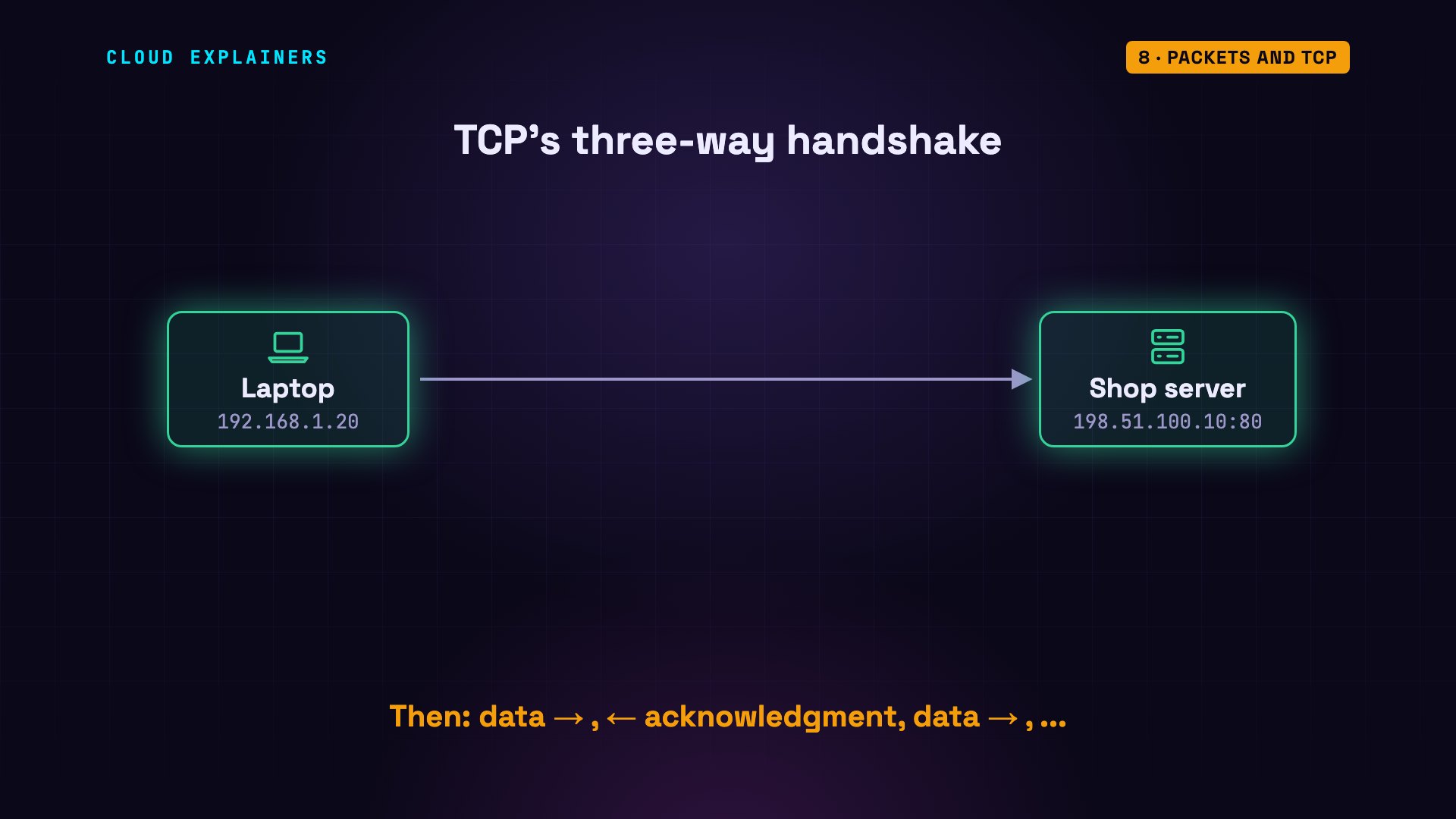
Here's that handshake, captured on the router. Flags S is the SYN. S dot is the SYN-ACK. And a single dot is the ACK. Three packets, before a single byte of the web page.
tcpdump -n -i lan -c 3 'tcp port 80'tcpdump: verbose output suppressed, use -v[v]... for full protocol decode
listening on lan, link-type EN10MB (Ethernet), snapshot length 262144 bytes
12:33:47.652586 IP 192.168.1.20.51232 > 198.51.100.10.80: Flags [S], seq 1278099477, win 64240, options [mss 1460,sackOK,TS val 25538318 ecr 0,nop,wscale 10], length 0
12:33:47.652653 IP 198.51.100.10.80 > 192.168.1.20.51232: Flags [S.], seq 1872415272, ack 1278099478, win 65160, options [mss 1460,sackOK,TS val 226110076 ecr 25538318,nop,wscale 10], length 0
12:33:47.652670 IP 192.168.1.20.51232 > 198.51.100.10.80: Flags [.], ack 1, win 63, options [nop,nop,TS val 25538318 ecr 226110076], length 0
3 packets captured
13 packets received by filter
0 packets dropped by kernel
Lost packets: TCP vs UDP
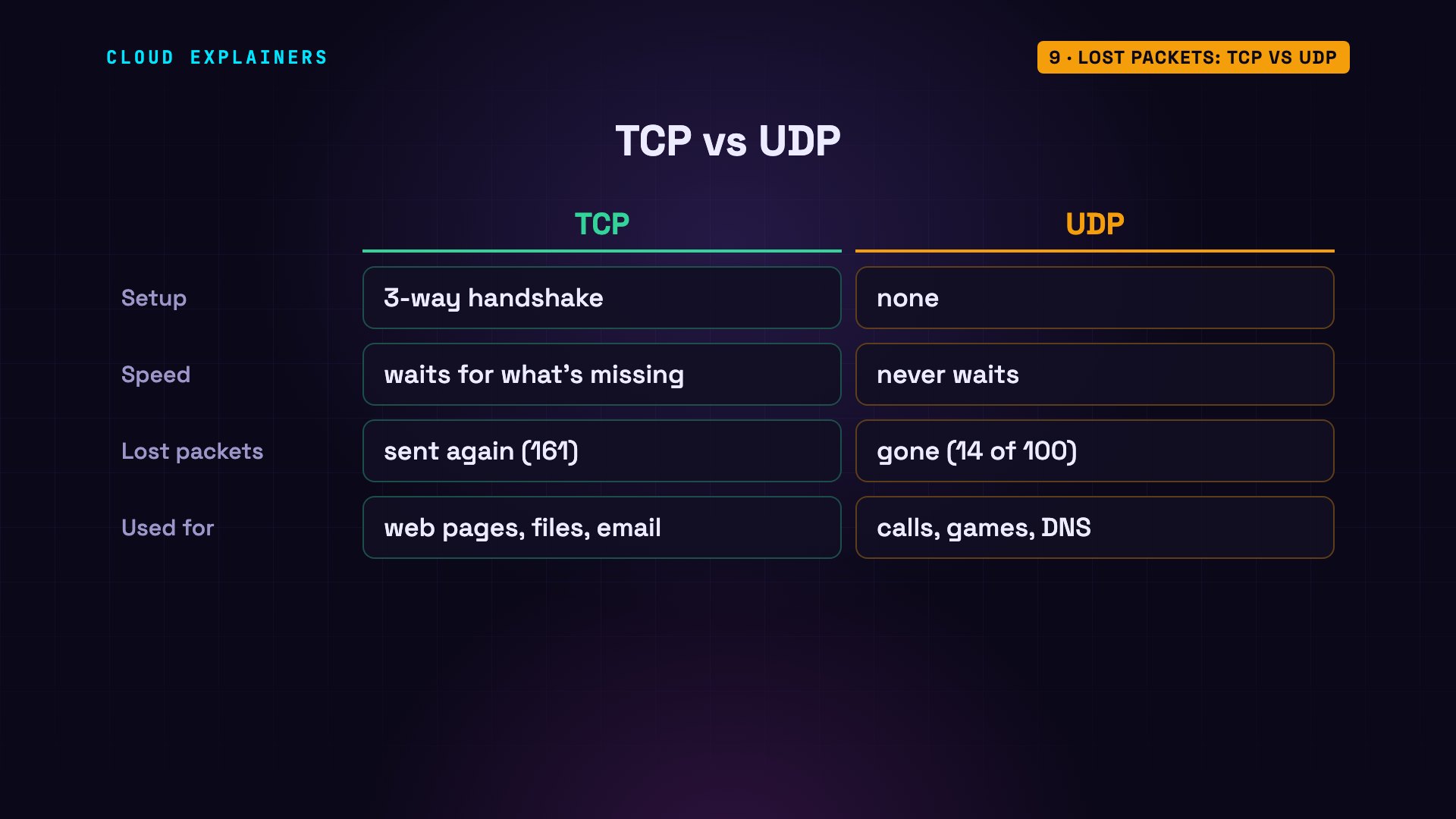
Why bother with all that? Let's break the network on purpose. These two commands use tc, Linux's traffic control tool, to make the router throw away one packet in ten, in both directions. That's a terrible network, much worse than normal Wi-Fi.
tc qdisc add dev lan root netem loss 10%
tc qdisc add dev wan root netem loss 10%
The same download now takes 4.5 seconds, instead of 23 milliseconds. The server keeps a counter of packets it had to send again: 39 before this download, 200 after. So 161 times, a packet was sent again. Each time an acknowledgment didn't come back, TCP sent the packet again.
time curl -s -o photo.jpg shop.example/photo.jpgreal	0m4.505s
user	0m0.007s
sys	0m0.028s
nstat -az TcpRetransSegs#kernel
TcpRetransSegs                  39                 0.0
nstat -az TcpRetransSegs#kernel
TcpRetransSegs                  200                0.0
And the photo? A checksum is a fingerprint of a file's exact bytes. On the laptop and on the server, the fingerprints are identical. Slower, but every byte arrived. That's TCP's promise.
sha256sum photo.jpgdb06fe0f20f235572156f8f512eece86d63c048dc8919d6d6836573d34683902 photo.jpg
sha256sum /srv/shop/photo.jpgdb06fe0f20f235572156f8f512eece86d63c048dc8919d6d6836573d34683902 /srv/shop/photo.jpg
UDP, the user datagram protocol, makes no promise. No handshake, no acknowledgments, and nothing is sent twice. The laptop sends 100 numbered messages over UDP, across the same bad network. On the server, a small program writes each message it receives as one line of a file. Counting the lines: the server got 86. The other 14 are simply gone, and nobody noticed.
for i in $(seq 1 100); do echo "message $i" > /dev/udp/198.51.100.10/9000; done
wc -l received.txt86 received.txt
So why use UDP at all? It's simple and fast. On a video call, a late packet is useless: better to skip it than to wait. And a DNS question fits in one packet: if it's lost, just ask again. So web pages, files and email use TCP. Calls, games and DNS usually use UDP.
The layers
Engineers group these ideas into layers, each one relying on the layer below. Link: MAC addresses and ARP, delivering on one local network. Internet: IP addresses, routers and NAT, across networks. Transport: ports, TCP and UDP, to the right program. And at the top, application: the languages programs speak, like HTTP for web pages, and DNS for names.
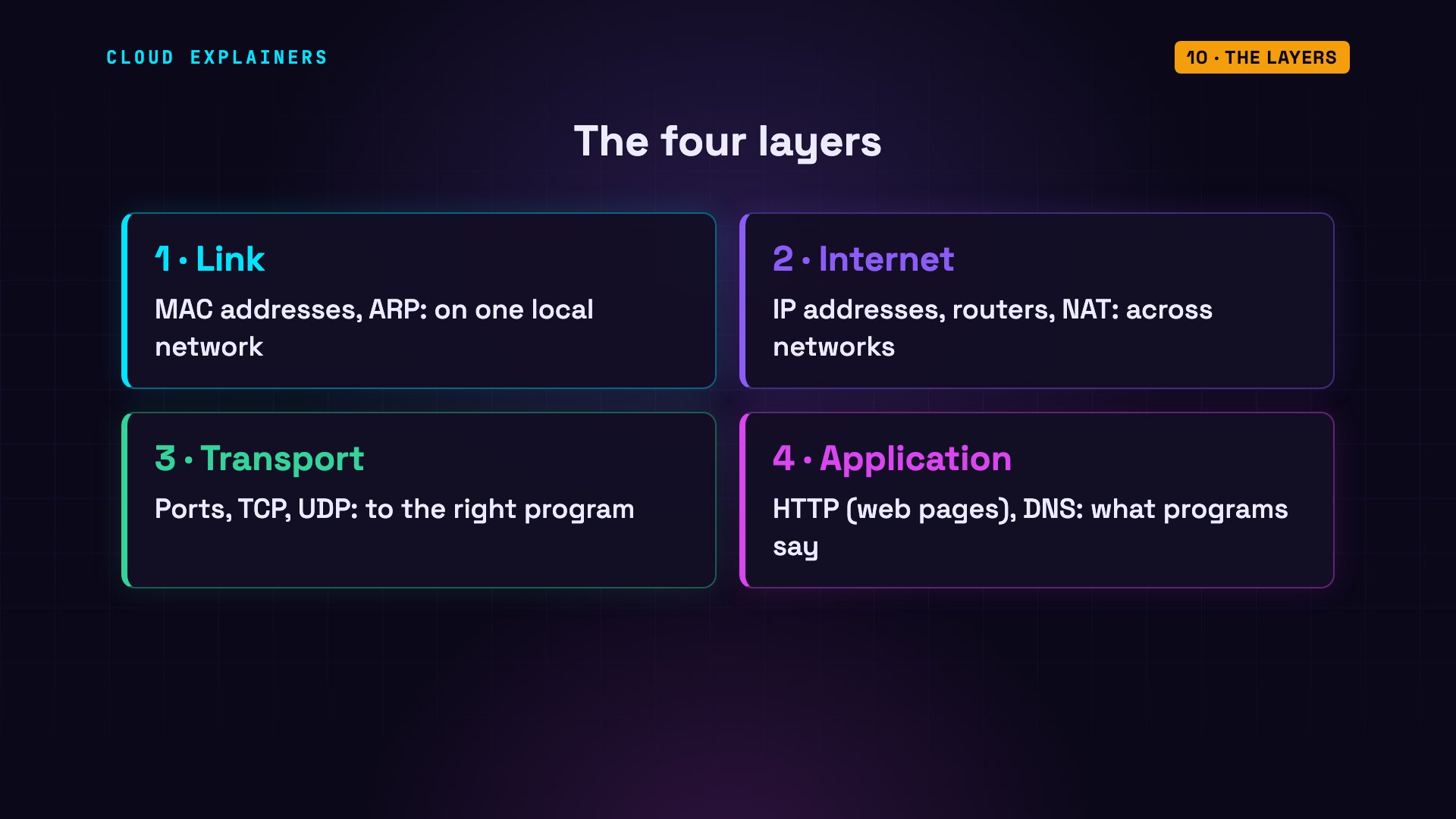
So, one last time. You type shop.example. DNS turns it into 198.51.100.10. That's not on your network, so the packet goes to your router, found with ARP. The router swaps in its public address, and routers pass it hop by hop to the server. Port 80 picks the web program, and TCP makes sure every packet arrives. The page comes back the same way.
Every command and number on this page came from a real run of this small lab network. This is episode one of Networking for Beginners.
Sources
- RFC 791, Internet Protocol
- RFC 826, Address Resolution Protocol (ARP)
- RFC 1918, Address Allocation for Private Internets
- RFC 3022, Traditional NAT
- RFC 9293, Transmission Control Protocol (TCP)
- RFC 768, User Datagram Protocol (UDP)
- RFC 1122, Requirements for Internet Hosts (the four layers)
- RFC 894, IP over Ethernet (1500-byte MTU)
- RFC 6335, port number ranges
- RFC 5737, IPv4 addresses reserved for documentation
- tcpdump manual
- iproute2 (ip, ss, tc netem)
Demos: real output from a small lab network built with Docker containers on one machine: a private home range (192.168.1.x) and addresses reserved for documentation (203.0.113.x and 198.51.100.x) as the internet. The lab has no route to the real internet; packet loss was added on purpose with tc netem. Watch the full video on YouTube.



