
Security Logs Will Finally Make Sense After This
Security logs for complete beginners, read on a real break-in in our lab: a password-guessing bot probes Ana's shop server for forgotten files, guesses SSH passwords, gets in through a forgotten test account, and tries to read the password file with sudo. We take one log line apart (when, which machine, which program, what happened, which account, from where), count the failures with grep, find the one line that matters (Accepted), see what the logs can't show, read the web server's access log, then lock the account and let fail2ban turn the same log events into a ban.
A break-in, in the logs
Security logs look like a wall of noise, so when someone breaks in, the proof can sit there unread. On Ana's shop server, a bot guessed a password, logged in, and tried to take over. The server wrote down every step. By the end of this video, you'll read those lines like a timeline, and know which few really matter.
Everything here ran for real, on three small Linux machines in our lab: the shop's server, Ana's laptop, and a computer running a password-guessing bot, like the ones that knock on servers all over the internet. They share a private lab network, so nobody real is attacked.
Here's what the bot did. First it asks the shop's web server for files people forget to hide, like a settings file or a backup. Then it tries common usernames and passwords over SSH, the way you log in to a server remotely. Wrong, and wrong again, until try 23: test, with the password test one two three. It's in.
./bot shopprobing http://shop/ for forgotten files
  200 /
  404 /.env
  404 /wp-login.php
  404 /.git/config
  404 /phpmyadmin/
  404 /backup.zip
guessing SSH passwords on shop
  try 1: root / 123456   wrong
  try 2: root / password   wrong
  try 3: admin / admin   wrong
  try 4: admin / 123456   wrong
  try 5: root / root   wrong
  try 6: ubuntu / ubuntu   wrong
  try 7: user / user   wrong
  try 8: root / 12345678   wrong
  try 9: admin / password   wrong
  try 10: test / test   wrong
  try 11: oracle / oracle   wrong
  try 12: pi / raspberry   wrong
  try 13: root / qwerty   wrong
  try 14: postgres / postgres   wrong
  try 15: guest / guest   wrong
  try 16: ubuntu / 123456   wrong
  try 17: admin / admin123   wrong
  try 18: root / toor   wrong
  try 19: ftpuser / ftpuser   wrong
  try 20: test / 123456   wrong
  try 21: deploy / deploy   wrong
  try 22: git / git   wrong
  try 23: test / test123   IN
    shop
    uid=1002(test) gid=1002(test) groups=1002(test)
    test is not in the sudoers file.
  saved test / test123
done: 23 tries
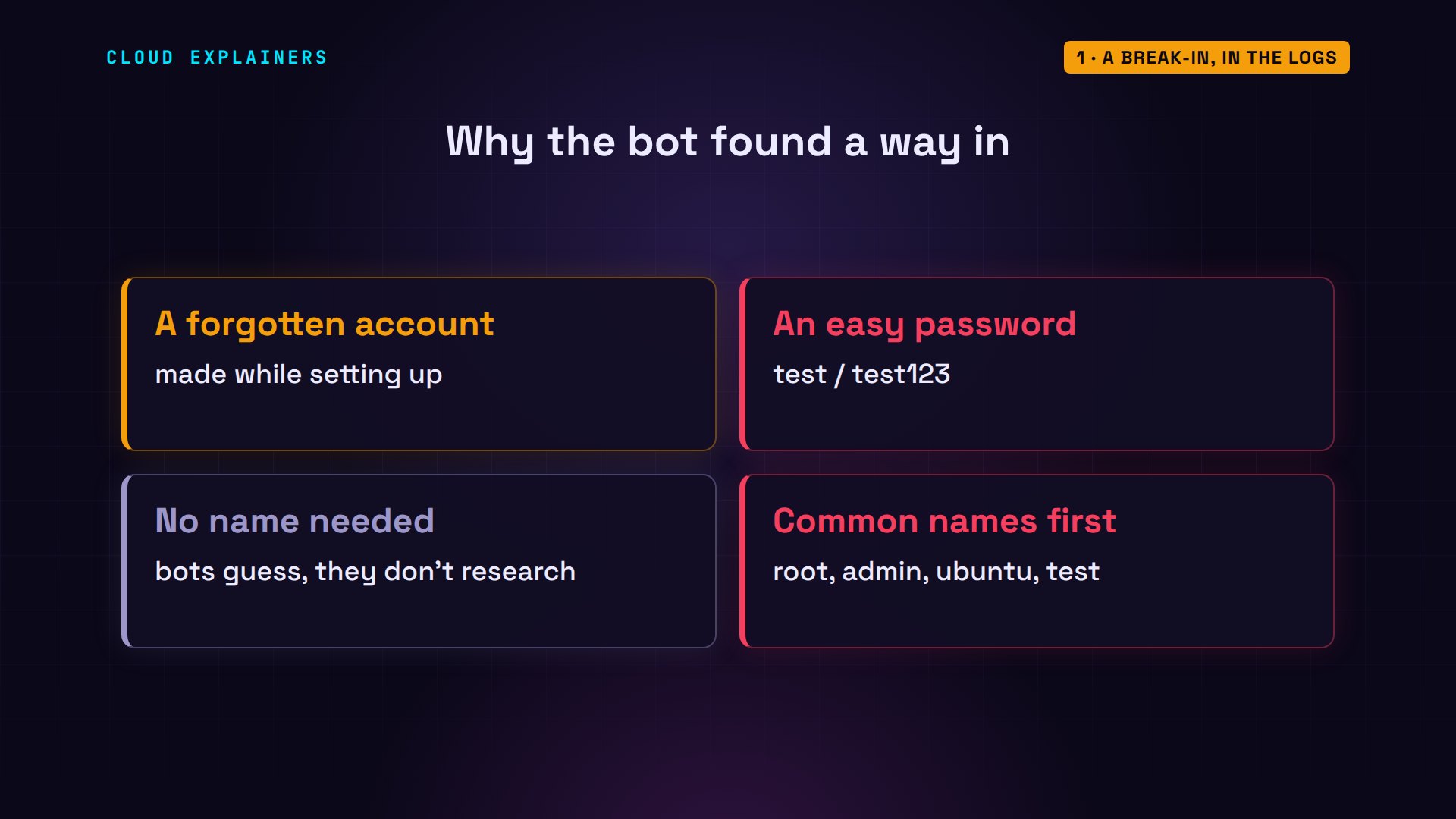
Where did a test account come from? When Ana set up the server, she made one to try things out, gave it an easy password, and forgot about it. Bots don't need to know your name. They try the account names that exist on lots of servers: root, admin, ubuntu, and test.
Now look at it from Ana's side. She opens her server's security log and asks for its last eight lines. Dates, names, numbers, and broken bits of sentences. Even her own command just now got written down. It looks like noise, but every line follows the same pattern, and once you see it, you can read them all.
sudo tail -n 8 /var/log/auth.log[sudo] password for ana:
2026-10-31T23:16:35.011856+00:00 shop sudo:     test : user NOT in sudoers ; TTY=pts/2 ; PWD=/home/test ; USER=root ; COMMAND=/usr/bin/cat /etc/shadow
2026-10-31T23:16:35.012585+00:00 shop sshd[987]: Received disconnect from 10.38.0.66 port 41424:11: disconnected by user
2026-10-31T23:16:35.012627+00:00 shop sshd[987]: Disconnected from user test 10.38.0.66 port 41424
2026-10-31T23:16:35.012971+00:00 shop sshd[940]: pam_unix(sshd:session): session closed for user test
2026-10-31T23:16:35.015266+00:00 shop systemd-logind[302]: Session 13653 logged out. Waiting for processes to exit.
2026-10-31T23:16:35.015751+00:00 shop systemd-logind[302]: Removed session 13653.
2026-10-31T23:16:40.451160+00:00 shop sudo:      ana : TTY=pts/1 ; PWD=/home/ana ; USER=root ; COMMAND=/usr/bin/tail -n 8 /var/log/auth.log
2026-10-31T23:16:40.451604+00:00 shop sudo: pam_unix(sudo:session): session opened for user root(uid=0) by (uid=1001)
Reading one line
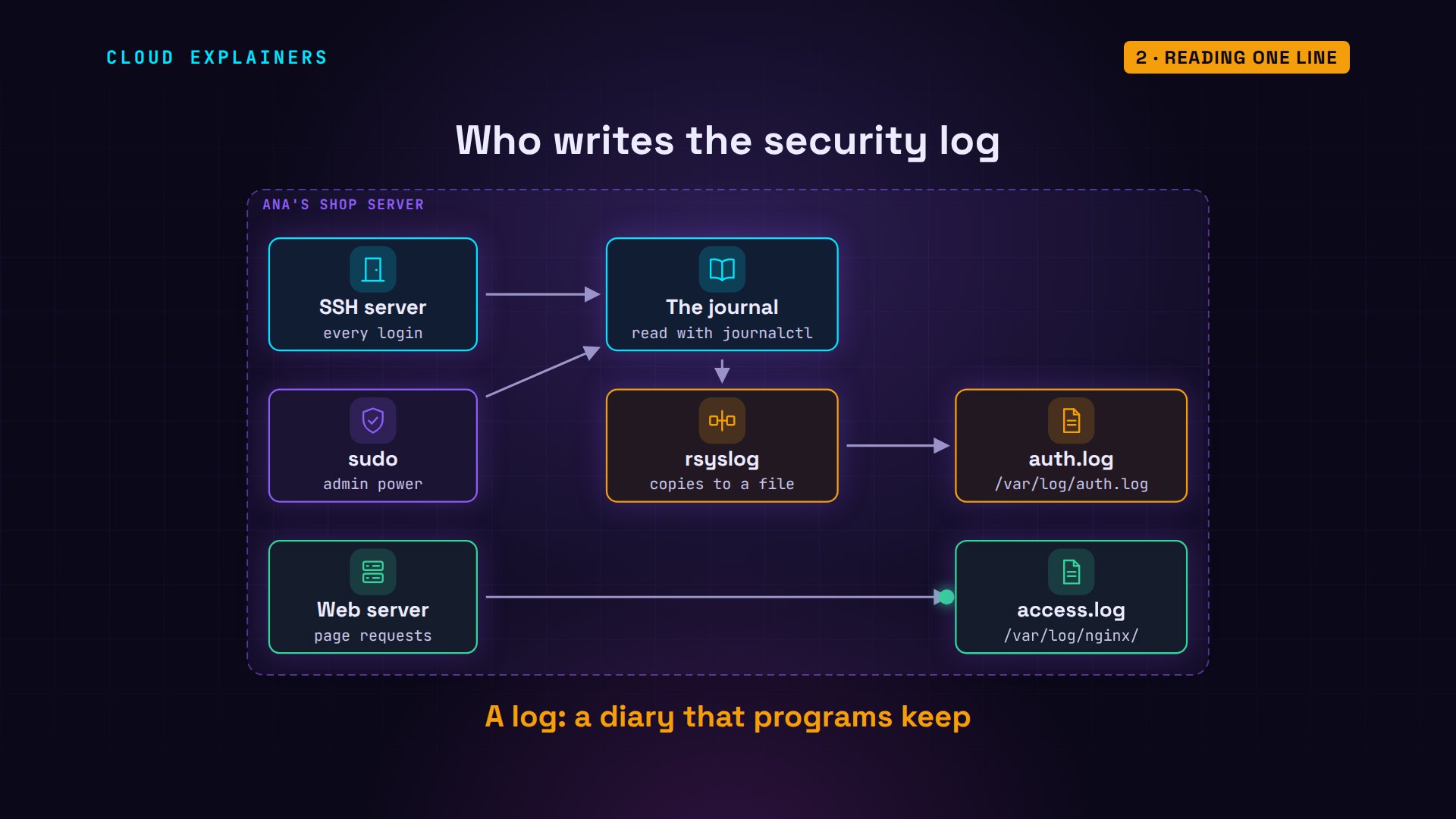
A log is a diary that programs keep. SSH reports every login, good or bad. sudo, the command for admin power, reports everyone who asks for it. Their reports go to the system journal, which journalctl reads. On Ubuntu, a program called rsyslog also copies them into one plain file, auth.log, in the folder /var/log. The web server keeps a file of its own.
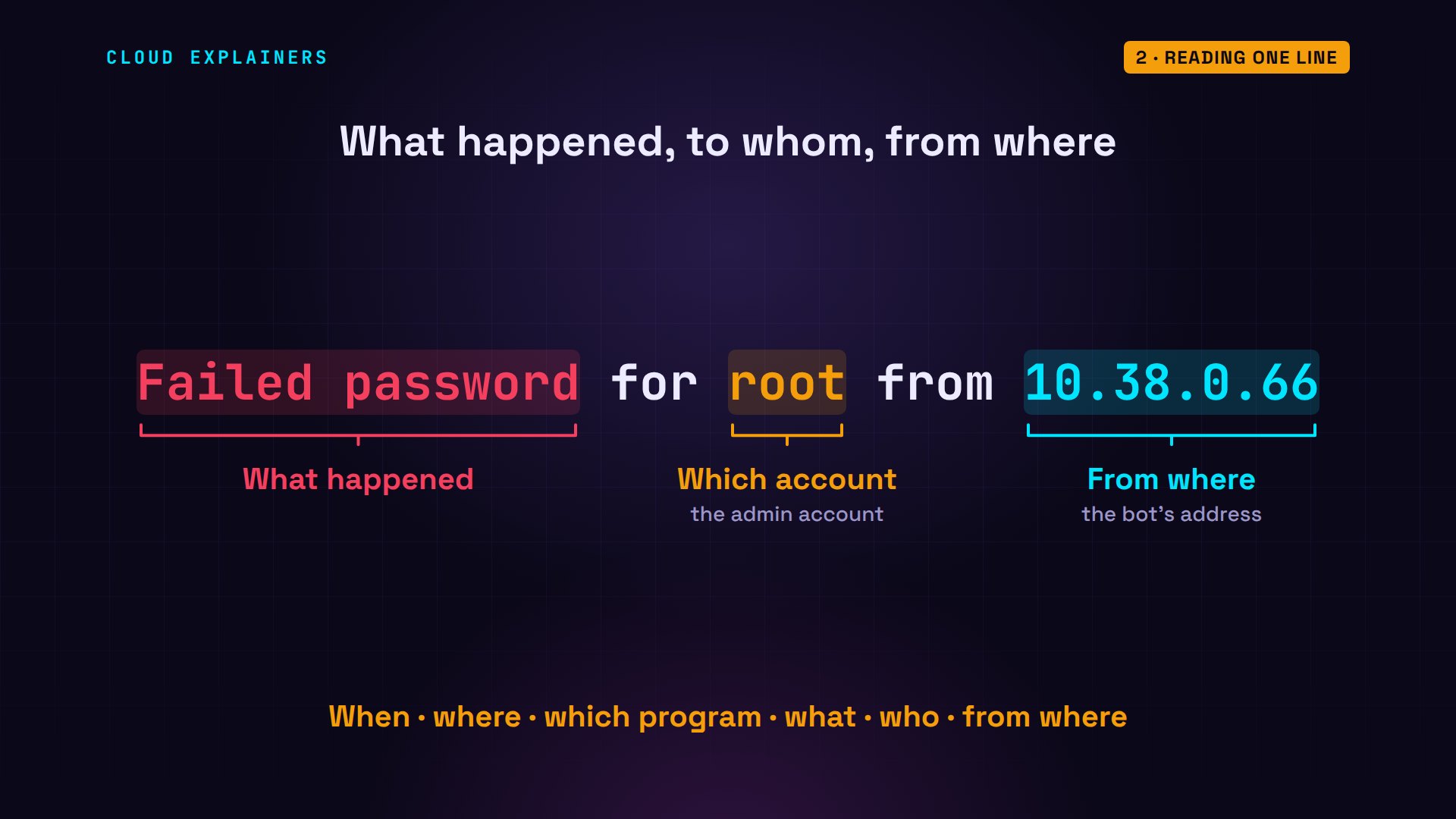
Take one line from the log. After the date, it starts with when: the time, down to millionths of a second. Plus zero zero colon zero zero says the clock is UTC, the world's reference time. Then which machine wrote it: shop. Then which program: sshd, the SSH server, with its process number in square brackets.
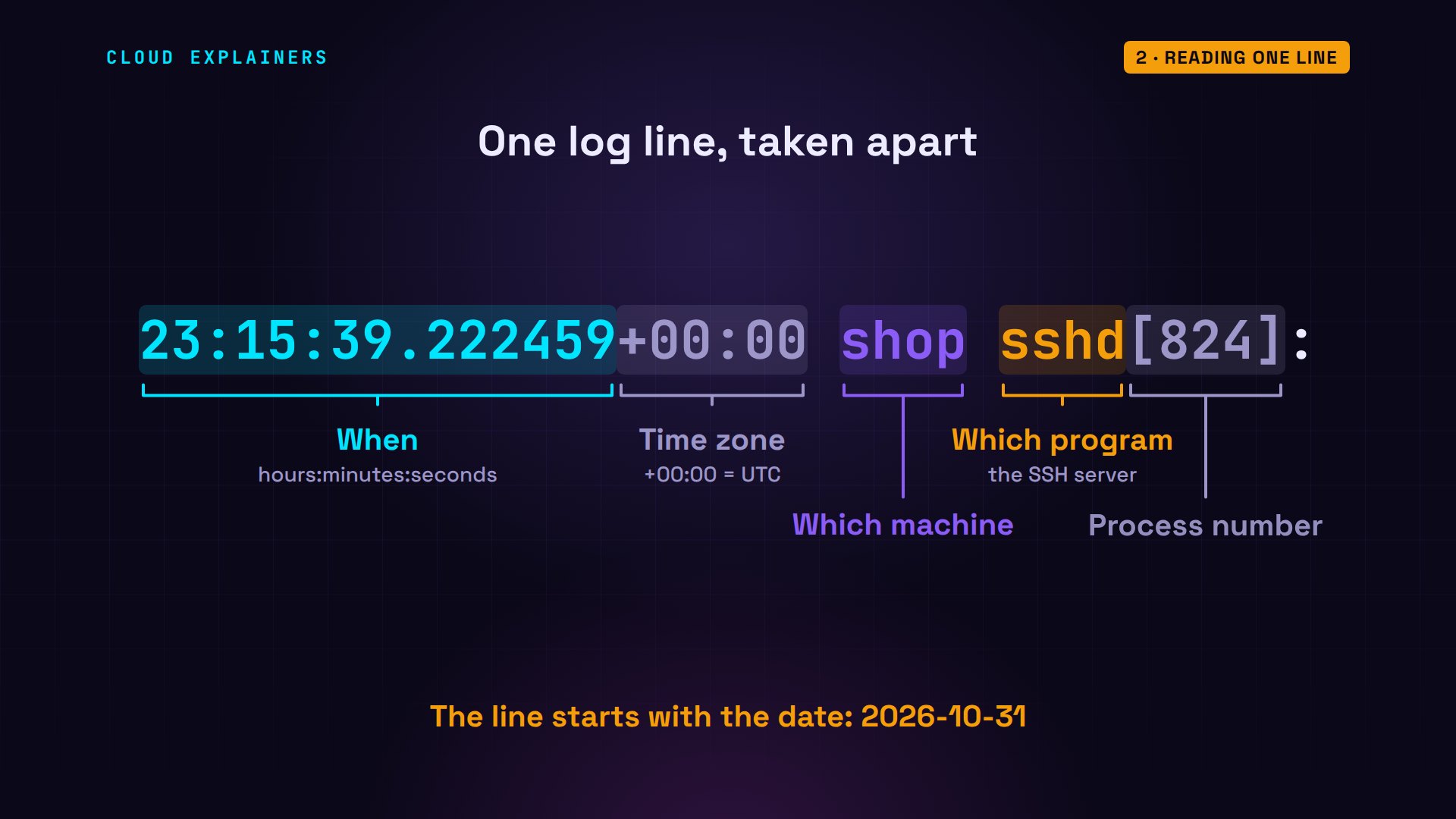
Then the message: what happened. A failed password. For which account: root, the all-powerful admin account. And from where: the network address of the machine that tried. When, where, which program, what, who, and from where. Nearly every security log line answers those same questions.
Reading the attack
Now Ana can ask the log questions. grep prints the lines that contain some text, and with dash c it just counts them: 22 failed passwords. Next, she keeps only the addresses, and counts each one. Every single failure came from the same machine.
grep -c "Failed password" /var/log/auth.log22
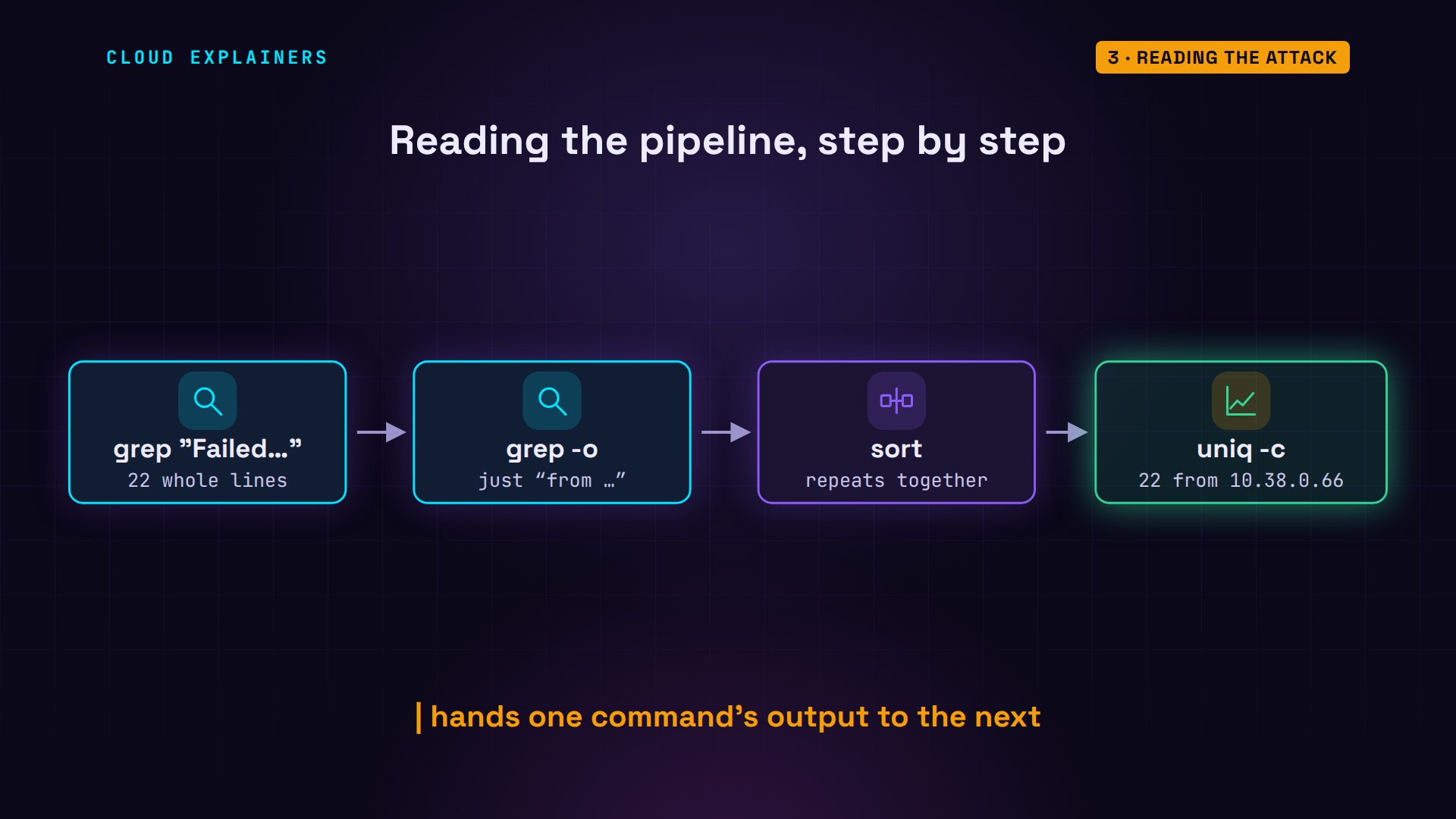
grep "Failed password" /var/log/auth.log | grep -o "from [0-9.]*" | sort | uniq -c22 from 10.38.0.66
That second command is a pipeline: each upright bar hands one command's output to the next. grep keeps the 22 failed lines. grep with dash o keeps only the part that says from, and the address. sort puts identical lines next to each other, and uniq with dash c counts each group.
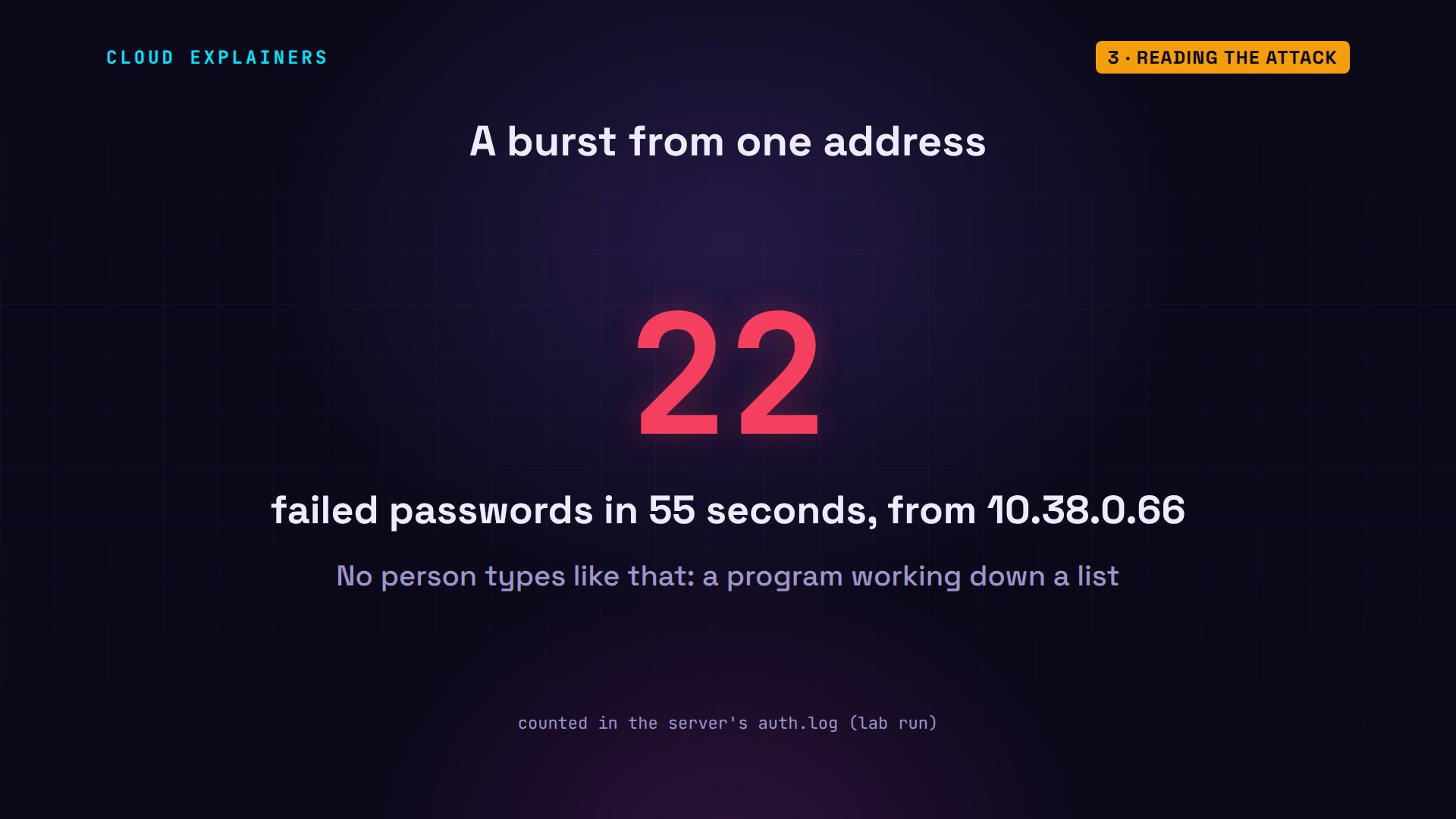
22 wrong passwords in about 55 seconds, all from one address. No person types like that. It's a program working down a list, and servers on the internet see bursts like this every day.
Which accounts did it try? Root most of all, then admin. Invalid user means the account doesn't exist on this server, so those guesses could never work. The lines without it are real accounts here: root, on every Linux machine, ubuntu, on many cloud servers, and Ana's forgotten test. Those are the ones to worry about.
grep "Failed password" /var/log/auth.log | grep -oE "for (invalid user )?[a-z]+" | sort | uniq -c | sort -rn6 for root 4 for invalid user admin 2 for ubuntu 2 for test 1 for invalid user user 1 for invalid user postgres 1 for invalid user pi 1 for invalid user oracle 1 for invalid user guest 1 for invalid user git 1 for invalid user ftpuser 1 for invalid user deploy
The line that matters
Failures are noise you can expect. The word that matters is Accepted: a login that worked. Ana, from her laptop's address. Then, about 77 seconds later, test, from the bot's address. Twice: first to check the password, then to look around. journalctl reads the same events from the system journal, on any modern Linux.
grep Accepted /var/log/auth.log2026-10-31T23:15:16.876793+00:00 shop sshd[726]: Accepted password for ana from 10.38.0.25 port 40824 ssh2
2026-10-31T23:16:34.318271+00:00 shop sshd[868]: Accepted password for test from 10.38.0.66 port 41414 ssh2
2026-10-31T23:16:34.878099+00:00 shop sshd[940]: Accepted password for test from 10.38.0.66 port 41424 ssh2
journalctl -u ssh -g Accepted --no-pagerOct 31 23:15:16 shop sshd[726]: Accepted password for ana from 10.38.0.25 port 40824 ssh2
Oct 31 23:16:34 shop sshd[868]: Accepted password for test from 10.38.0.66 port 41414 ssh2
Oct 31 23:16:34 shop sshd[940]: Accepted password for test from 10.38.0.66 port 41424 ssh2
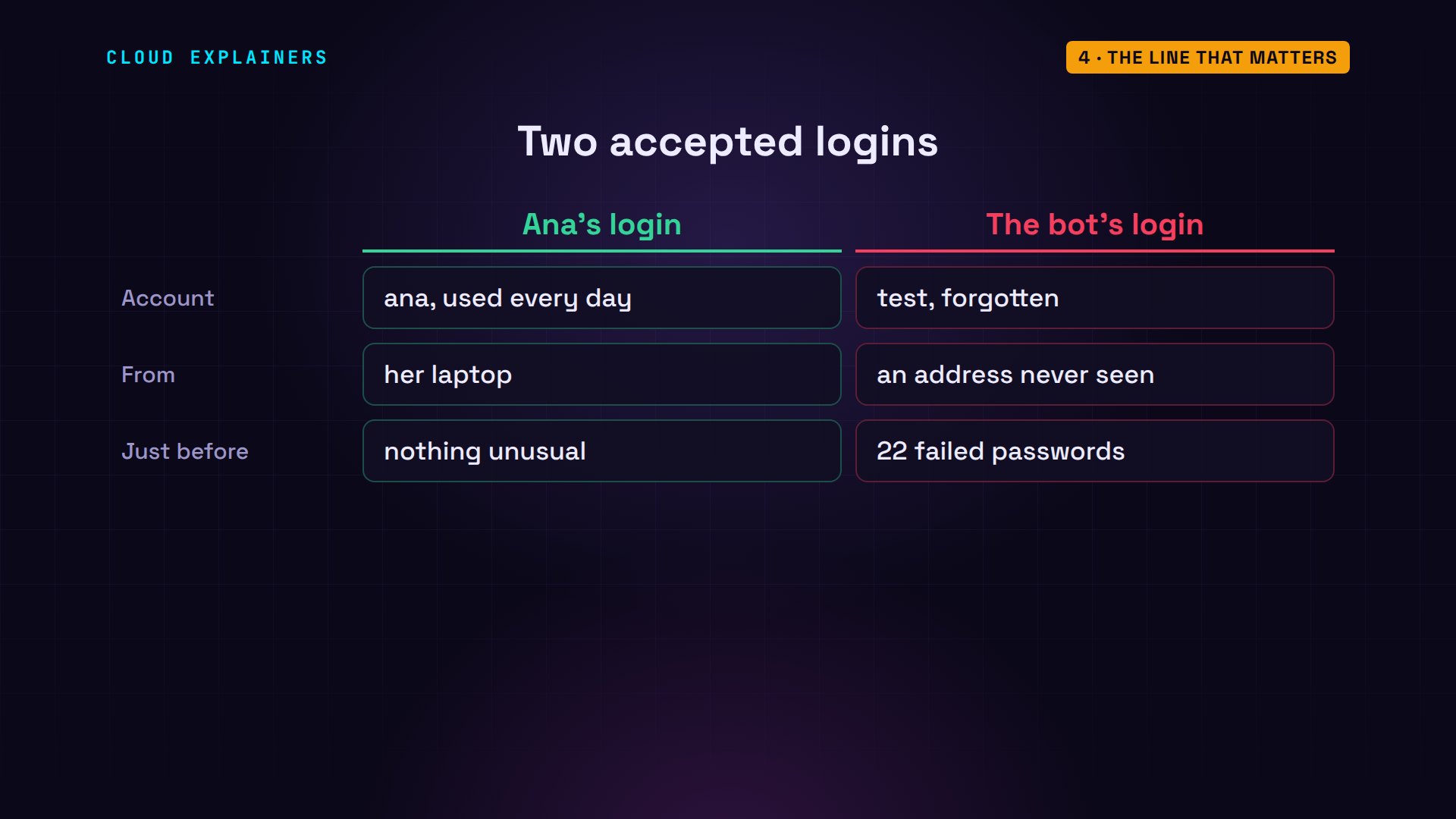
Put the two logins side by side. Ana uses her own account, every day, from her laptop. The other login used an account nobody uses, from an address she has never seen, right after a burst of failures. That pattern is the alarm.
What did it do once inside? last lists logins: test, from the bot's address, for under a minute. And sudo wrote this line: test is NOT in sudoers, the list of who may use admin power, and it tried to read /etc/shadow, the file of password hashes. Refused, and logged.
last -i testtest     pts/2        10.38.0.66       Sat Oct 31 23:16 - 23:16  (00:00)

wtmp begins Sat Oct 31 23:16:34 2026
grep "NOT in sudoers" /var/log/auth.log2026-10-31T23:16:35.011856+00:00 shop sudo: test : user NOT in sudoers ; TTY=pts/2 ; PWD=/home/test ; USER=root ; COMMAND=/usr/bin/cat /etc/shadow
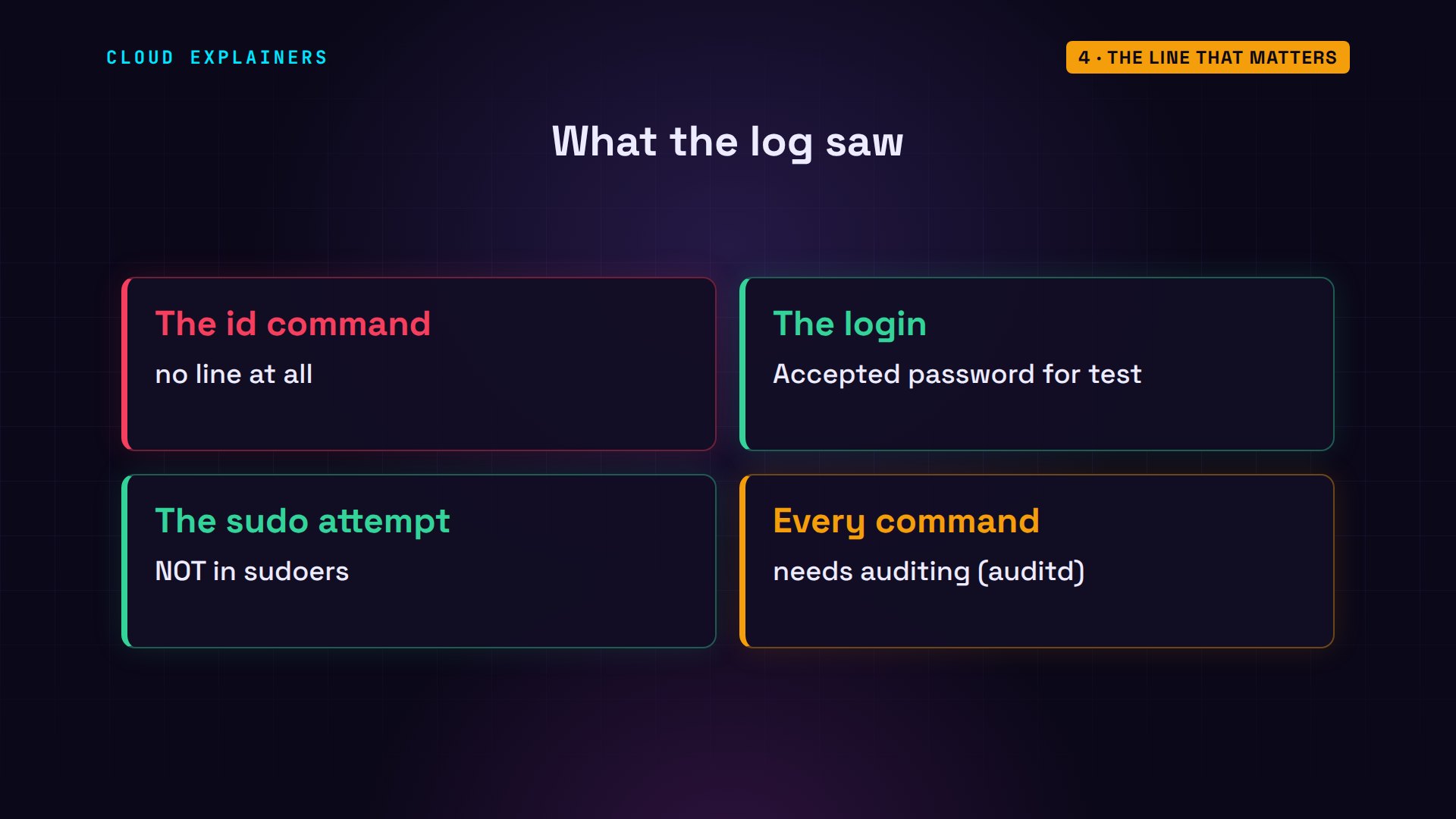
Notice what's missing. The bot also ran id, to see which account it had, and that left no line at all. Logs only hold what programs choose to report: logins, admin requests, errors. To record every command, you'd turn on auditing, with a tool like auditd.
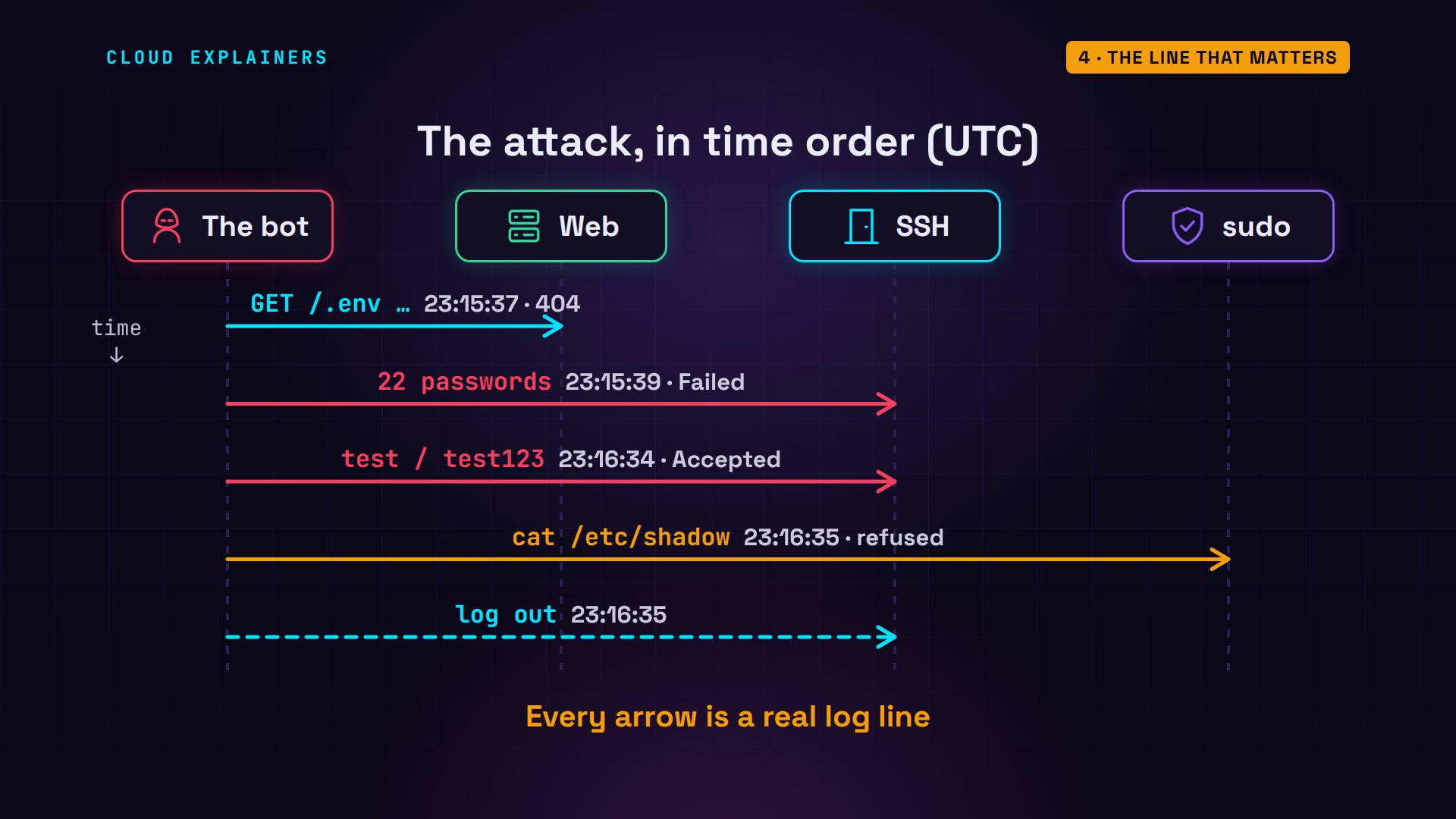
Put the lines in time order, and the attack reads like a story. The bot scans the web server. Then 22 wrong passwords. Then test gets in. It asks for admin power and is refused. It logs out, all in about 58 seconds.
The web server's log
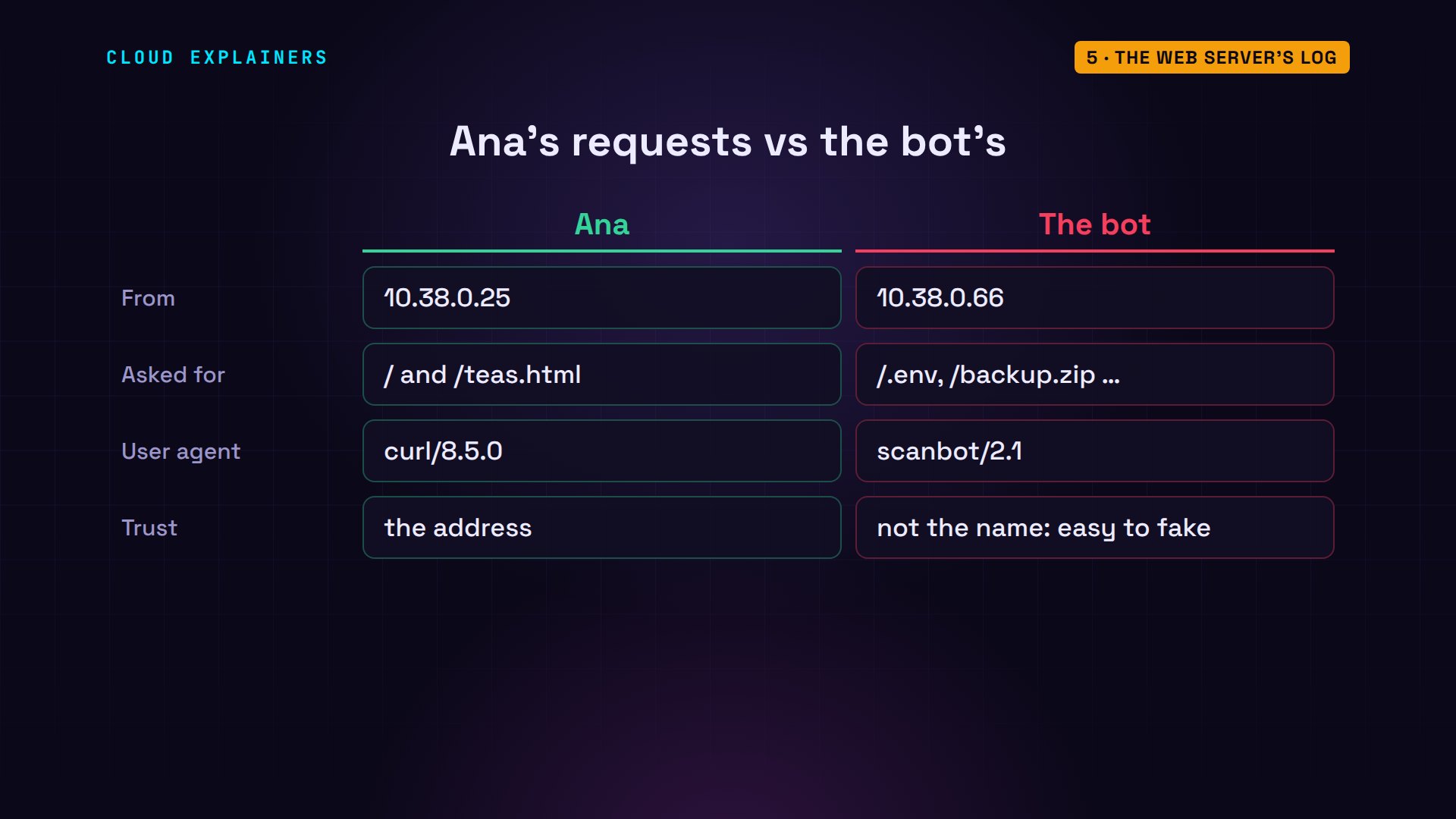
The web server, nginx, keeps its own log: one line per request. Ana's two visits, then the bot asking for a settings file, a WordPress login page, a Git folder, a database tool, and a backup. Ana's shop has none of them.
tail -n 8 /var/log/nginx/access.log10.38.0.25 - - [31/Oct/2026:23:15:16 +0000] "GET / HTTP/1.1" 200 68 "-" "curl/8.5.0"
10.38.0.25 - - [31/Oct/2026:23:15:16 +0000] "GET /teas.html HTTP/1.1" 200 68 "-" "curl/8.5.0"
10.38.0.66 - - [31/Oct/2026:23:15:37 +0000] "GET / HTTP/1.1" 200 68 "-" "Mozilla/5.0 (compatible; scanbot/2.1)"
10.38.0.66 - - [31/Oct/2026:23:15:37 +0000] "GET /.env HTTP/1.1" 404 162 "-" "Mozilla/5.0 (compatible; scanbot/2.1)"
10.38.0.66 - - [31/Oct/2026:23:15:37 +0000] "GET /wp-login.php HTTP/1.1" 404 162 "-" "Mozilla/5.0 (compatible; scanbot/2.1)"
10.38.0.66 - - [31/Oct/2026:23:15:37 +0000] "GET /.git/config HTTP/1.1" 404 162 "-" "Mozilla/5.0 (compatible; scanbot/2.1)"
10.38.0.66 - - [31/Oct/2026:23:15:37 +0000] "GET /phpmyadmin/ HTTP/1.1" 404 162 "-" "Mozilla/5.0 (compatible; scanbot/2.1)"
10.38.0.66 - - [31/Oct/2026:23:15:37 +0000] "GET /backup.zip HTTP/1.1" 404 162 "-" "Mozilla/5.0 (compatible; scanbot/2.1)"
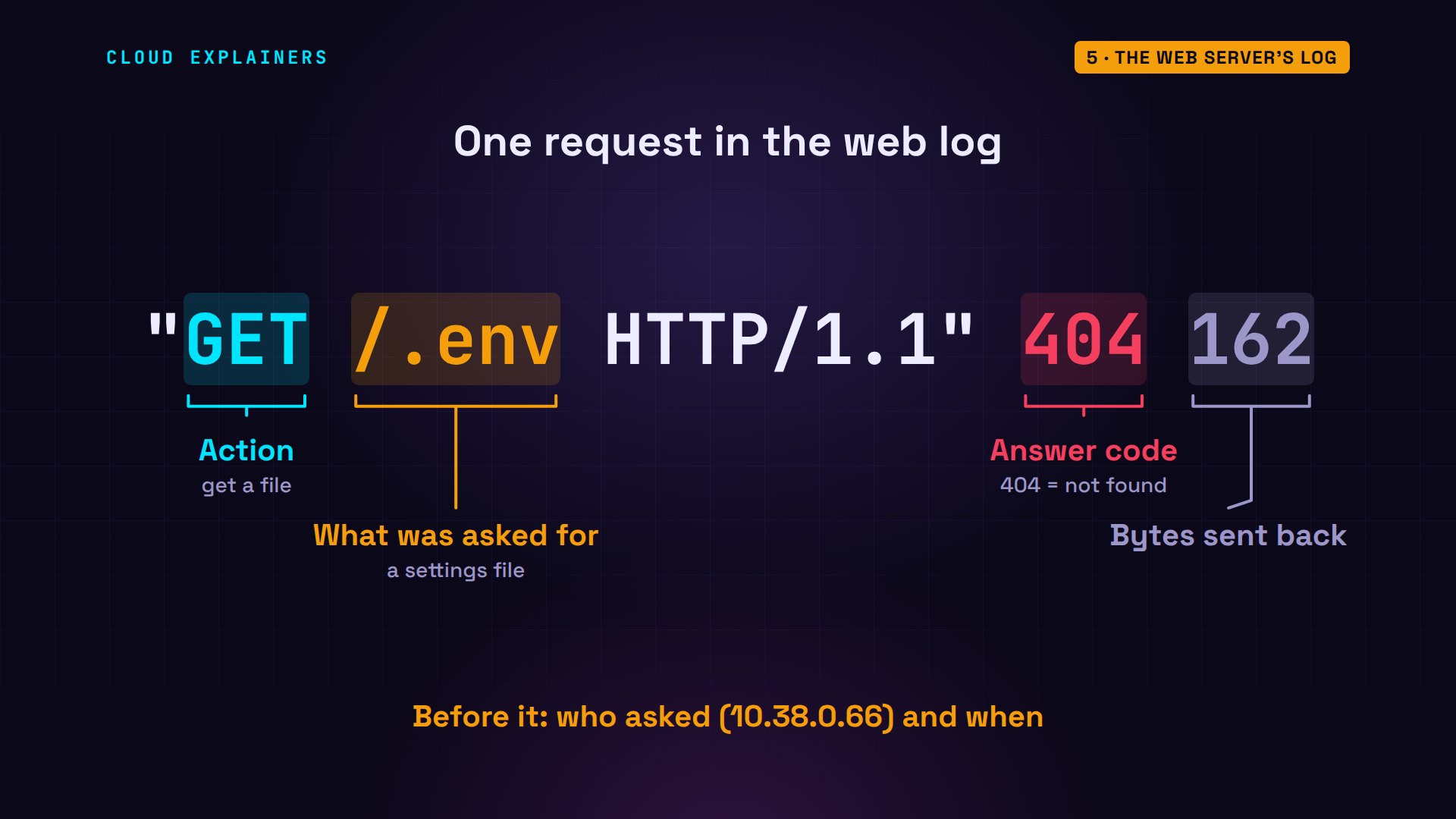
Each request line says what was asked: get the file slash dot env. Then the answer code. Two hundred means here you go. Four oh four means not found. Then how many bytes came back. Before it, as always: the address, and the time.
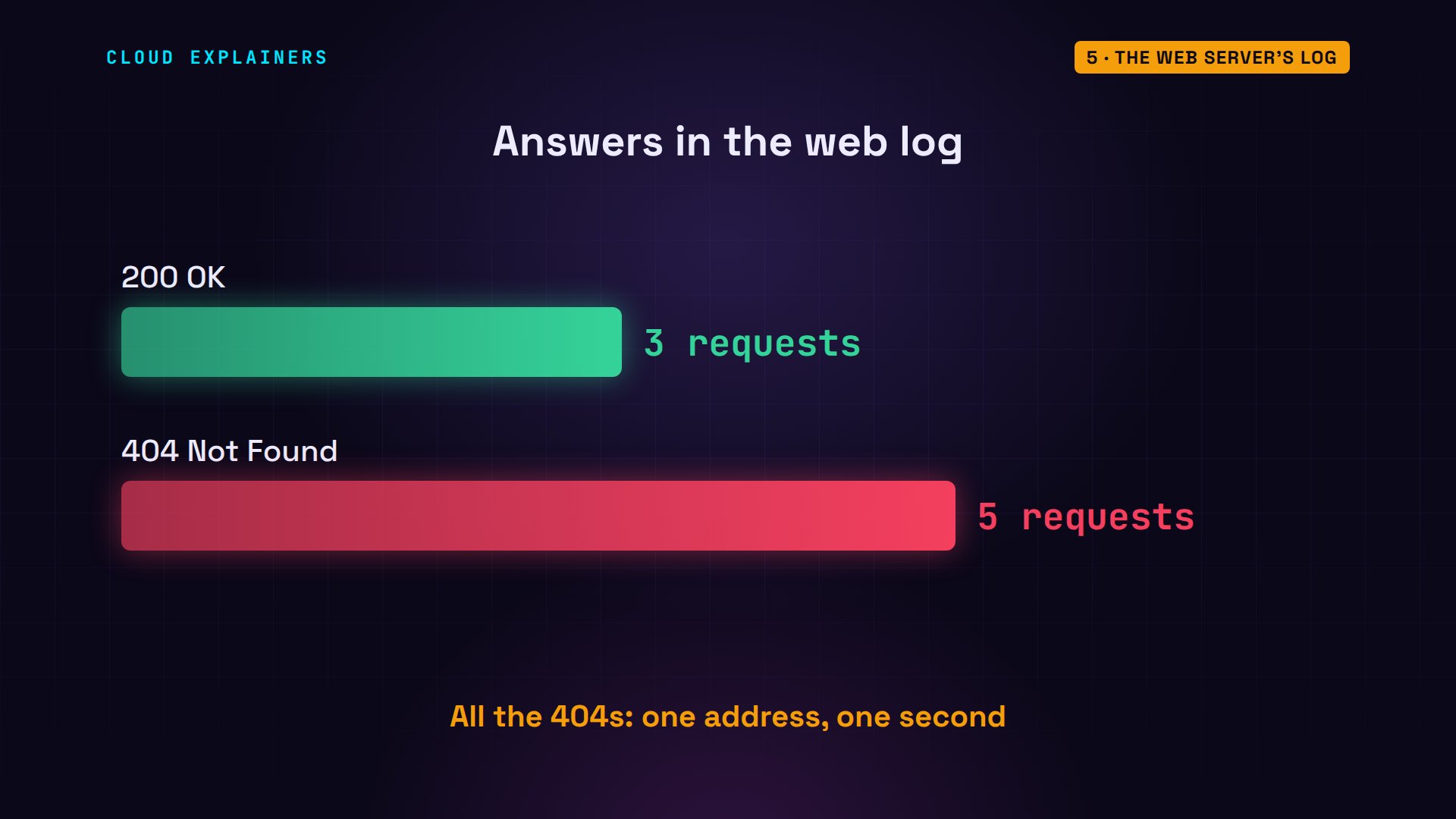
Count the answer codes, and the pattern jumps out: 3 normal pages, and 5 not-founds, every one from the bot, within one second. A burst of requests for files that were never there is a scanner. It's harmless, as long as those files really don't exist.
The last part of each line names the program that asked, called the user agent: curl, a download tool, for Ana's visits, and scanbot for the bot. A bot can write anything there, so trust the address and the pattern more than the name.
Acting on the logs
Now it's time for Ana to act. First, the account the bot used: usermod locks it. She locks it rather than deleting it, so its files stay as evidence. passwd -S confirms it: L, for locked. The expiry date, long in the past, also blocks other ways in, like SSH keys.
sudo usermod --lock --expiredate 1 test
sudo passwd -S testtest L 2026-10-31 0 99999 7 -1
Second, stop the guessing itself. fail2ban is a free tool that watches the same login events. When one address fails 5 times within 10 minutes, it adds a firewall rule that blocks that address for 10 minutes. Ubuntu's version turns this on for SSH by default, once it's running.
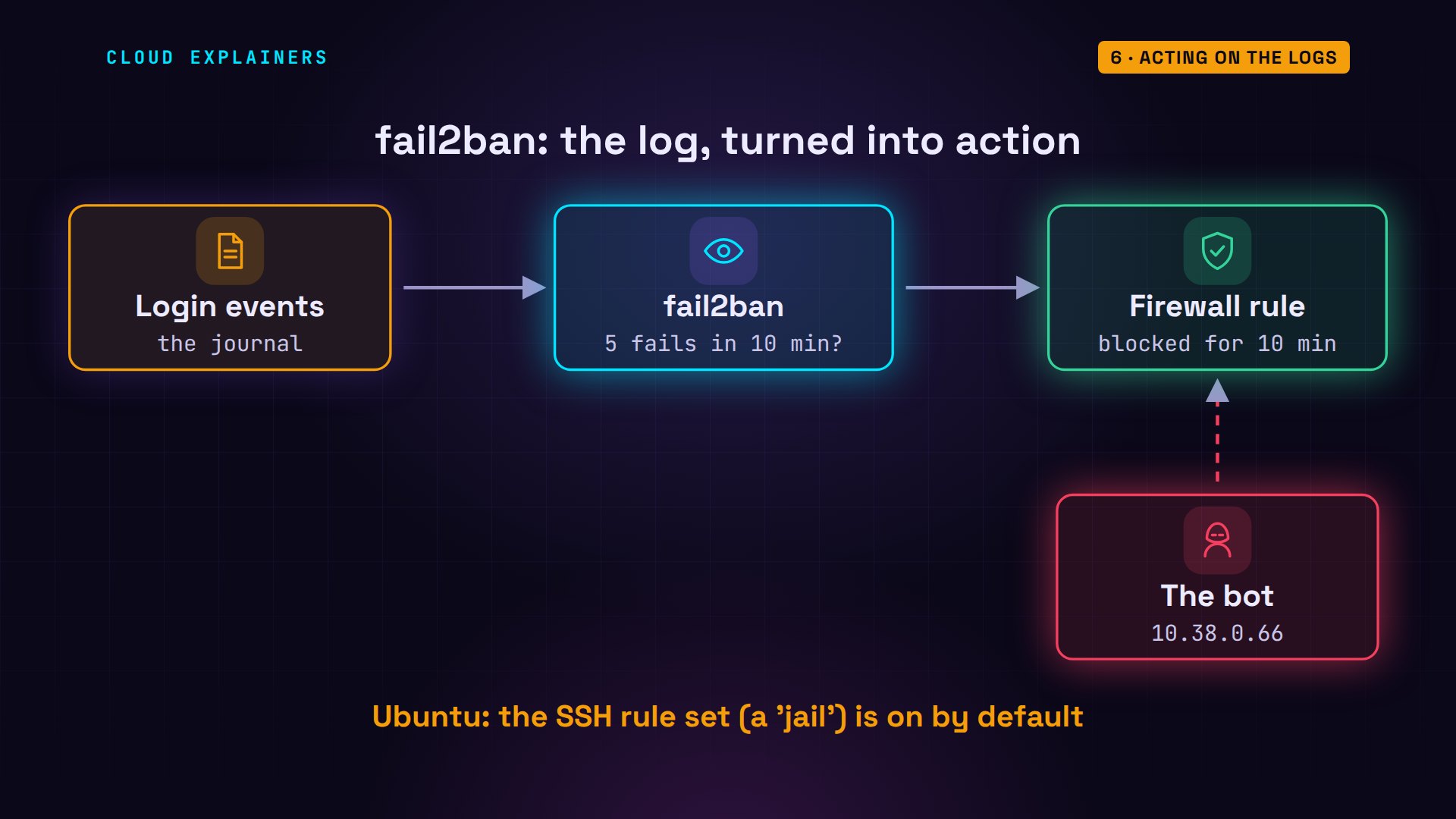
Ana starts it. It reads the recent events straight away, finds the bot's failures from the last few minutes, and bans its address at once.
sudo systemctl enable --now fail2banSynchronizing state of fail2ban.service with SysV service script with /usr/lib/systemd/systemd-sysv-install.
Executing: /usr/lib/systemd/systemd-sysv-install enable fail2ban
Created symlink /etc/systemd/system/multi-user.target.wants/fail2ban.service → /usr/lib/systemd/system/fail2ban.service.
sudo fail2ban-client status sshdStatus for the jail: sshd
|- Filter
|  |- Currently failed:	1
|  |- Total failed:	34
|  `- Journal matches:	_SYSTEMD_UNIT=sshd.service + _COMM=sshd
`- Actions
   |- Currently banned:	1
   |- Total banned:	1
   `- Banned IP list:	10.38.0.66
And the bot? It runs its list again. The web server still answers, but SSH now refuses every connection, before any password is checked. After three refusals in a row, the bot gives up and moves on.
./bot shopprobing http://shop/ for forgotten files
  200 /
  404 /.env
  404 /wp-login.php
  404 /.git/config
  404 /phpmyadmin/
  404 /backup.zip
guessing SSH passwords on shop
  try 1: root / 123456   refused
  try 2: root / password   refused
  try 3: admin / admin   refused
  refused 3 times in a row: blocked, moving on
done: 3 tries
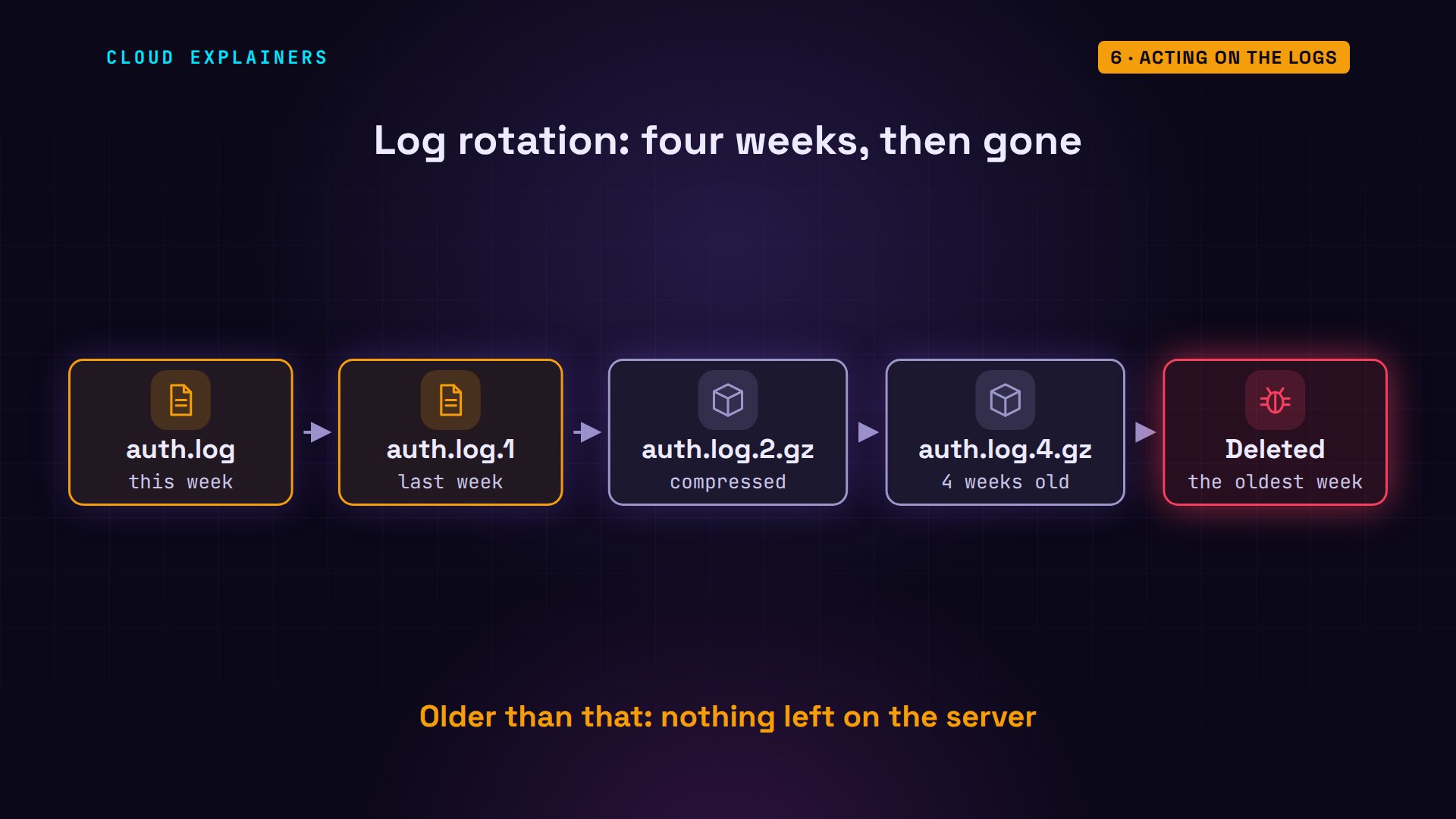
Logs don't grow forever, either. Every week, Ubuntu renames auth.log to auth.log.1 and starts a fresh one, compresses the older weeks, keeps four of them, and deletes the oldest. So a break-in from two months ago has no lines left on the server at all.
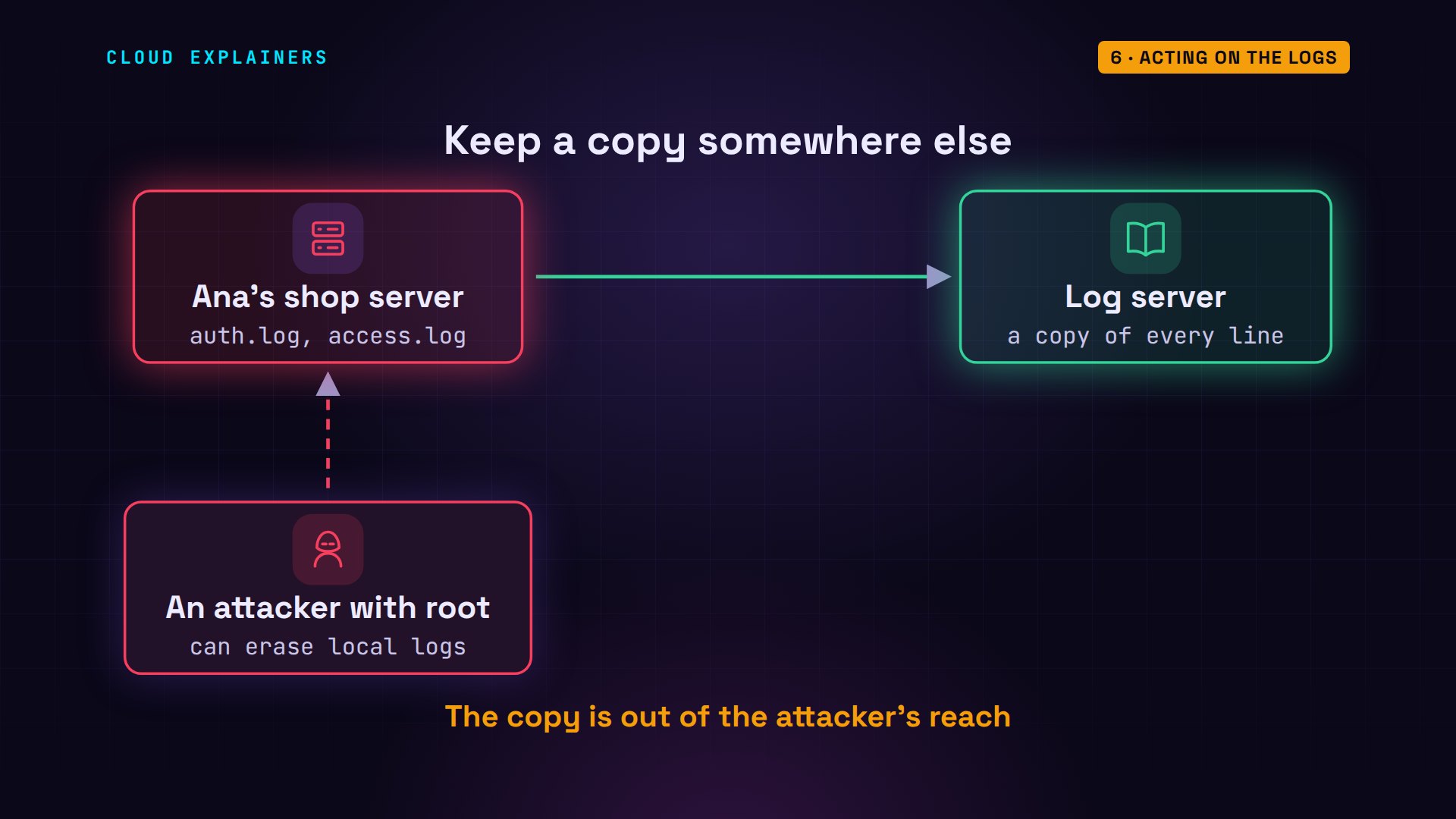
And an attacker who does become root can edit these files and erase their tracks. So bigger setups send a copy of every line to a separate log server the moment it's written, where the attacker can't reach it.
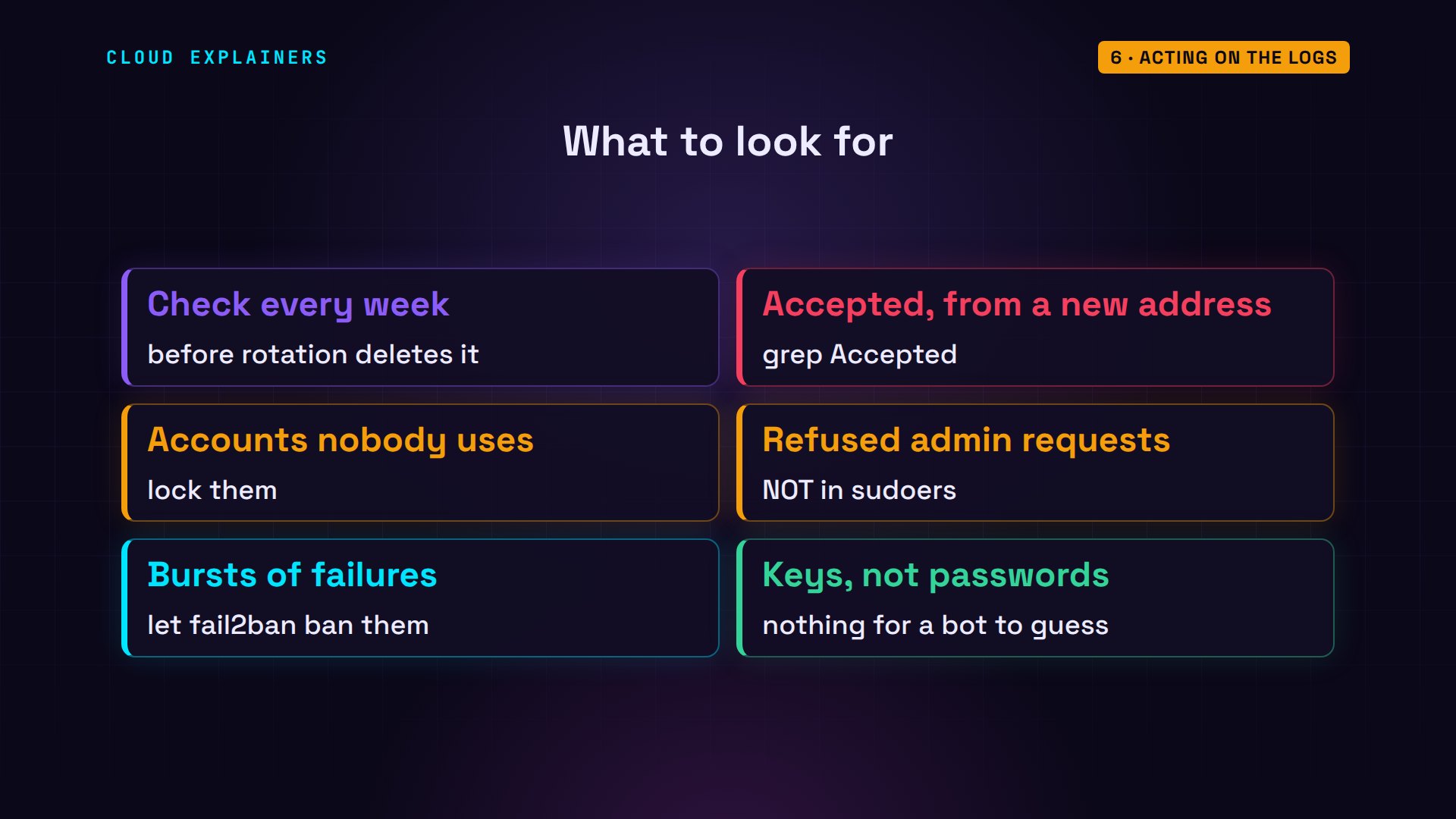
So what should you look for? Accepted logins from addresses you don't know. Accounts nobody should be using. Refused requests for admin power. And bursts of failures, which fail2ban can handle for you. Better still, use SSH keys instead of passwords: no list can guess one.
Recap
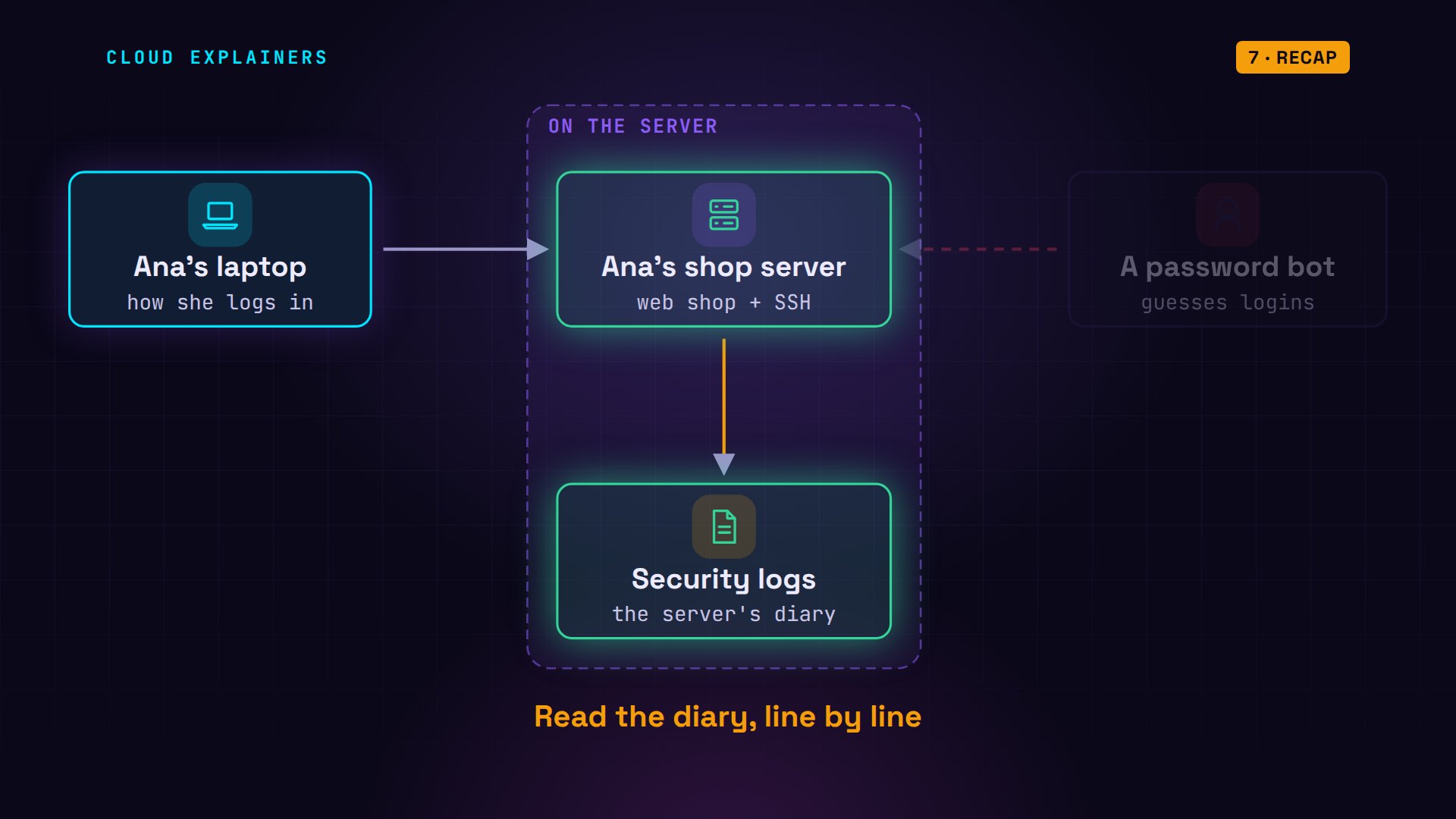
Let's recap. A log is the diary your server keeps, and every line says when, which machine, which program, what happened, and from where. The failures were background noise. The accepted login was the break-in, and sudo's refusal showed what the bot wanted. Then fail2ban turned those same lines into a ban.
If reading a real break-in line by line made logs click for you, subscribing helps other beginners find videos like this one.
Every command and log line in this video came from a real run in our lab. Thanks for watching Cloud Explainers.
Sources
Demos: real output from three Ubuntu containers on a private network on our own machine. The bot and its password list ran only against our own lab server; the passwords shown are throwaway lab values. Watch the full video on YouTube.
More videos
How to Fix a Security Leak: An API Key Pushed to GitHub
DNS Will Finally Make Sense After This
Never Ignore a Security Update
Two-Factor Authentication Will Finally Make Sense
Never Expose a Database to the Internet
SSH Keys vs Passwords: Which Is Safer for Security?

The 5 Levels of Linux Boot: From Power On to Login
The 5 Levels of Network Firewalls
Password Security: Why Hackers Crack Weak Passwords

Why Your Linux Server Runs Out of Memory
HTTP vs HTTPS: What Actually Changes on Your Network

Every Linux File Permission You Need to Know
Linux Processes vs Threads: When Each One Wins

The OSI Model Will Finally Make Sense After This

The 7 Levels of Git
Every Network Troubleshooting Command You Need
Hashing vs Encryption in Cybersecurity: When Each One Wins

Why the Internet Ran Out of IP Addresses

Linux Package Managers: apt vs Snap vs Flatpak

Why Python Is Slow (and When It Doesn't Matter)

TCP vs UDP: When Each One Wins
Stop Running Linux as Root (Do This Instead)

Linux Users and Groups Will Finally Make Sense

Why Phishing Beats Good Security (and How to Spot It)

The 7 Levels of Docker

AI Agents Will Finally Make Sense After This

Stop Using git push --force (Use This Instead)
Agent Skills vs MCP: When Each One Wins

Networking Will Finally Make Sense After This

Every Linux Command You Actually Need

The 7 Levels of Cybersecurity

Every System Design Concept You Need, in One Diagram
