Stop Using git push --force (Use This Instead)
Why git push --force can silently delete a teammate's commit, and what to use instead: git push --force-with-lease --force-if-includes. For beginners, with real runs on a Git server and two laptops: the lost commit, how to get it back, the lease, the background-fetch trap, a default alias, and protecting main.
A lost commit
Ben pushed a commit to the branch he shares with Ana. Seconds later, Ana ran git push --force. Now look at the server's copy of the branch. Ben's commit, Add forgot-password link, is gone. No error. No warning.
git pushEnumerating objects: 5, done.
Counting objects: 100% (5/5), done.
Delta compression using up to 10 threads
Compressing objects: 100% (3/3), done.
Writing objects: 100% (3/3), 367 bytes | 367.00 KiB/s, done.
Total 3 (delta 0), reused 0 (delta 0), pack-reused 0
To git-server:shop.git
   ed9b266..000de8c  login-page -> login-page
git push --forceEnumerating objects: 4, done.
Counting objects: 100% (4/4), done.
Delta compression using up to 10 threads
Compressing objects: 100% (3/3), done.
Writing objects: 100% (3/3), 363 bytes | 363.00 KiB/s, done.
Total 3 (delta 0), reused 0 (delta 0), pack-reused 0
To git-server:shop.git
 + 000de8c...358cacb login-page -> login-page (forced update)
git log --oneline origin/login-page358cacb (origin/login-page) Add login form
3a66055 (origin/main, origin/HEAD) Add shopping cart
401b161 (main) Create the shop homepage
In this video you'll see exactly why that happens, how Ben gets his work back, and the push command that would have refused to do it.
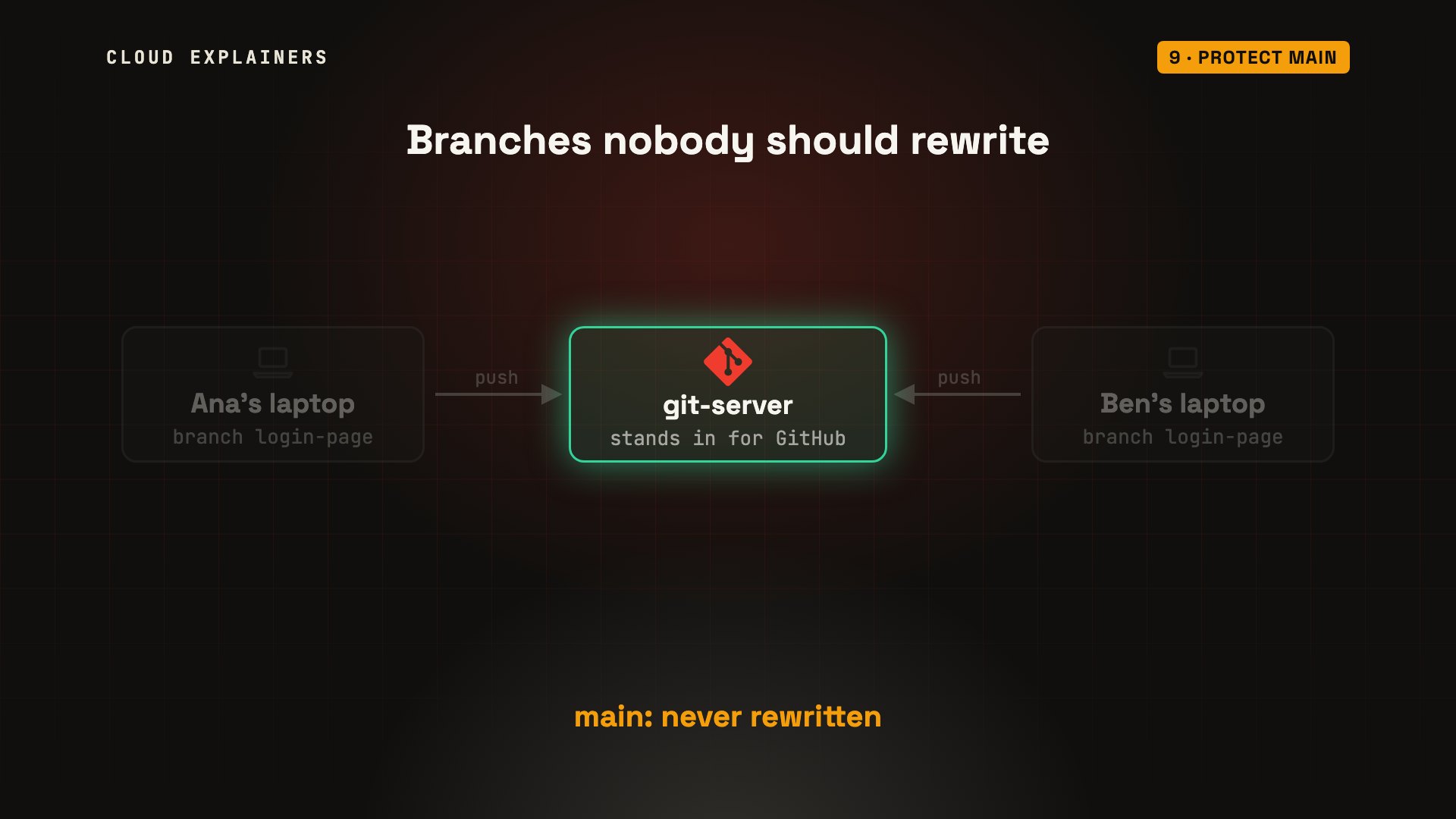
Everything here is a real run. Our lab has a Git server standing in for GitHub, and two laptops, Ana's and Ben's, all in Docker on one computer. Ana and Ben both work on one branch, called login-page.
Why Git refuses
First, two words. A commit is a saved snapshot of the project, with an ID. Each commit points back to the one before it. A branch is just a name that points at one commit: the newest.
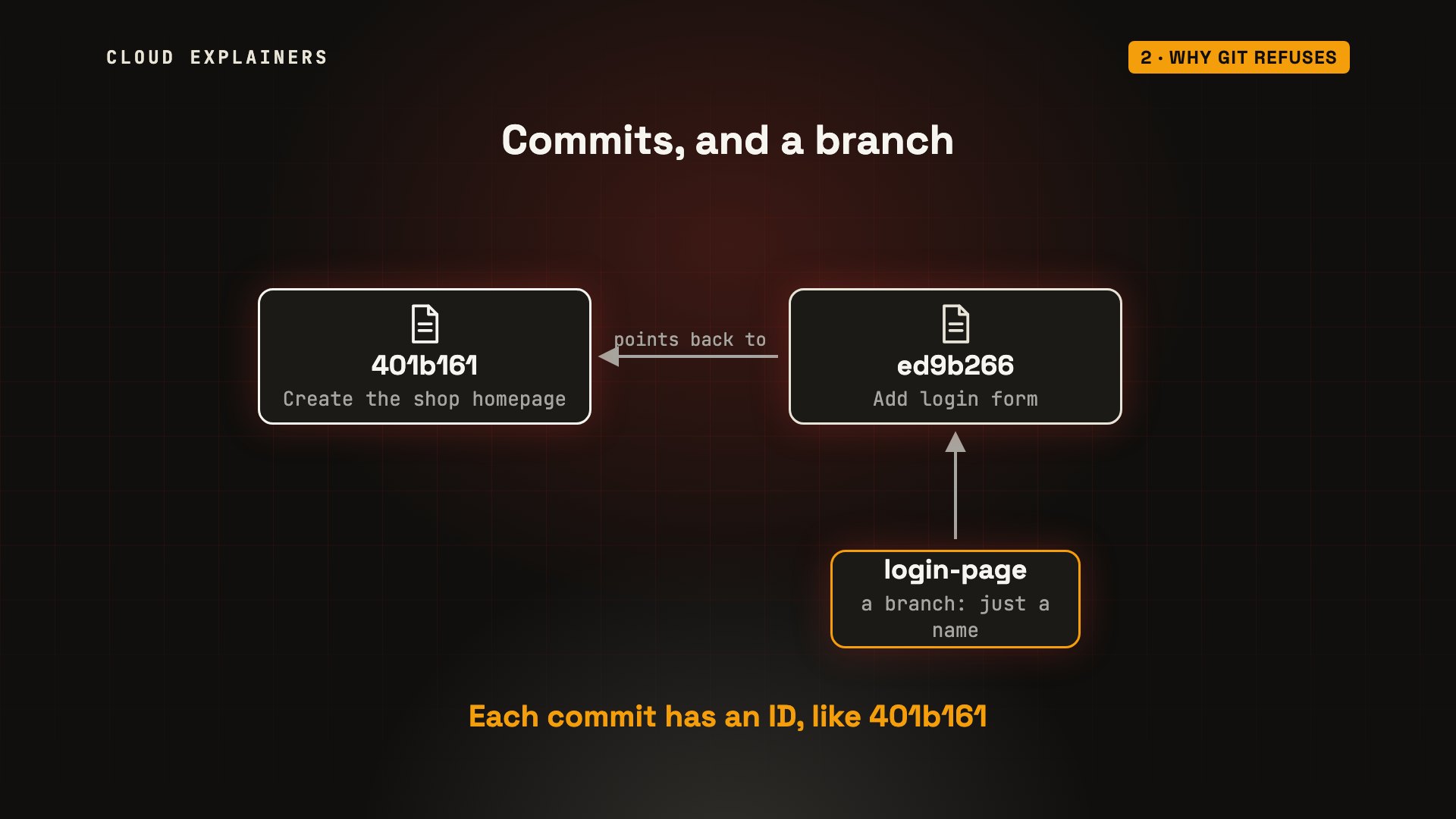
Here's Ana's history, newest at the top. The names in brackets are branches, and HEAD marks the one she's on. origin/login-page is Ana's note of where the server's branch was, the last time she checked. Keep that one in mind.
git log --onelineed9b266 (HEAD -> login-page, origin/login-page) Add login form
401b161 (origin/main, origin/HEAD, main) Create the shop homepage
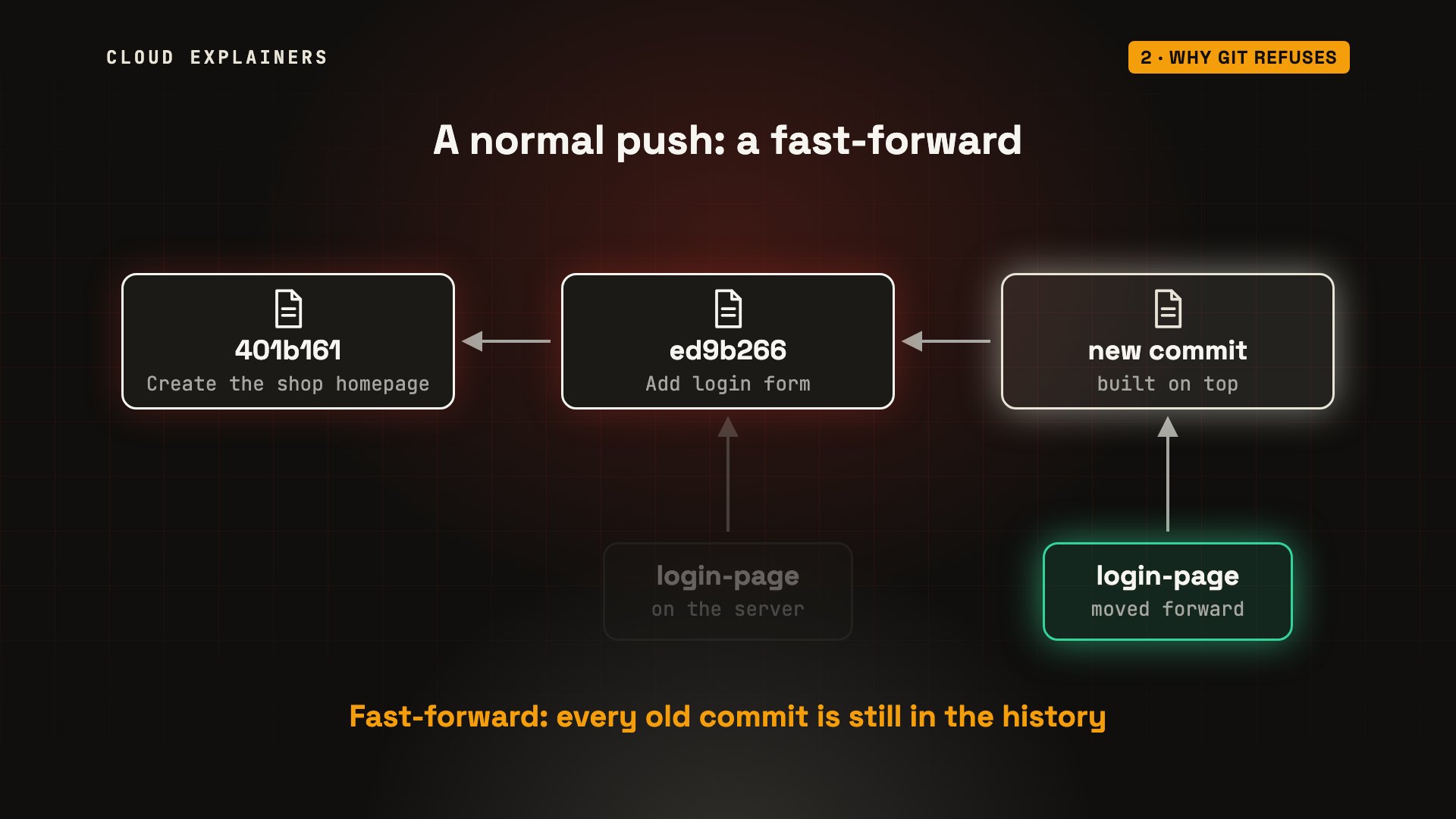
When you push, you ask the server to move its branch to your newest commit. Normally, it only agrees if your commit is built on top of the one it has. That's a fast-forward: the name just moves forward, and nothing is lost.
Meanwhile, Chloe, a third teammate, added a shopping cart to main. Ana fetches: that downloads new commits, without changing her work. Then she rebases: she replays her commit on top of the newest main, so her branch includes the team's latest work. Look at her commit's ID. It changed. Rebasing makes new commits.
git fetchremote: Enumerating objects: 4, done.
remote: Counting objects: 100% (4/4), done.
remote: Compressing objects: 100% (2/2), done.
remote: Total 3 (delta 0), reused 0 (delta 0), pack-reused 0
Unpacking objects: 100% (3/3), 279 bytes | 279.00 KiB/s, done.
From git-server:shop
   401b161..3a66055  main       -> origin/main
git rebase origin/mainSuccessfully rebased and updated refs/heads/login-page.
git log --oneline358cacb (HEAD -> login-page) Add login form
3a66055 (origin/main, origin/HEAD) Add shopping cart
401b161 (main) Create the shop homepage
So now the server's branch ends at her old commit, and her new one isn't built on top of it. Moving the name would throw the old commit away. So Git refuses.
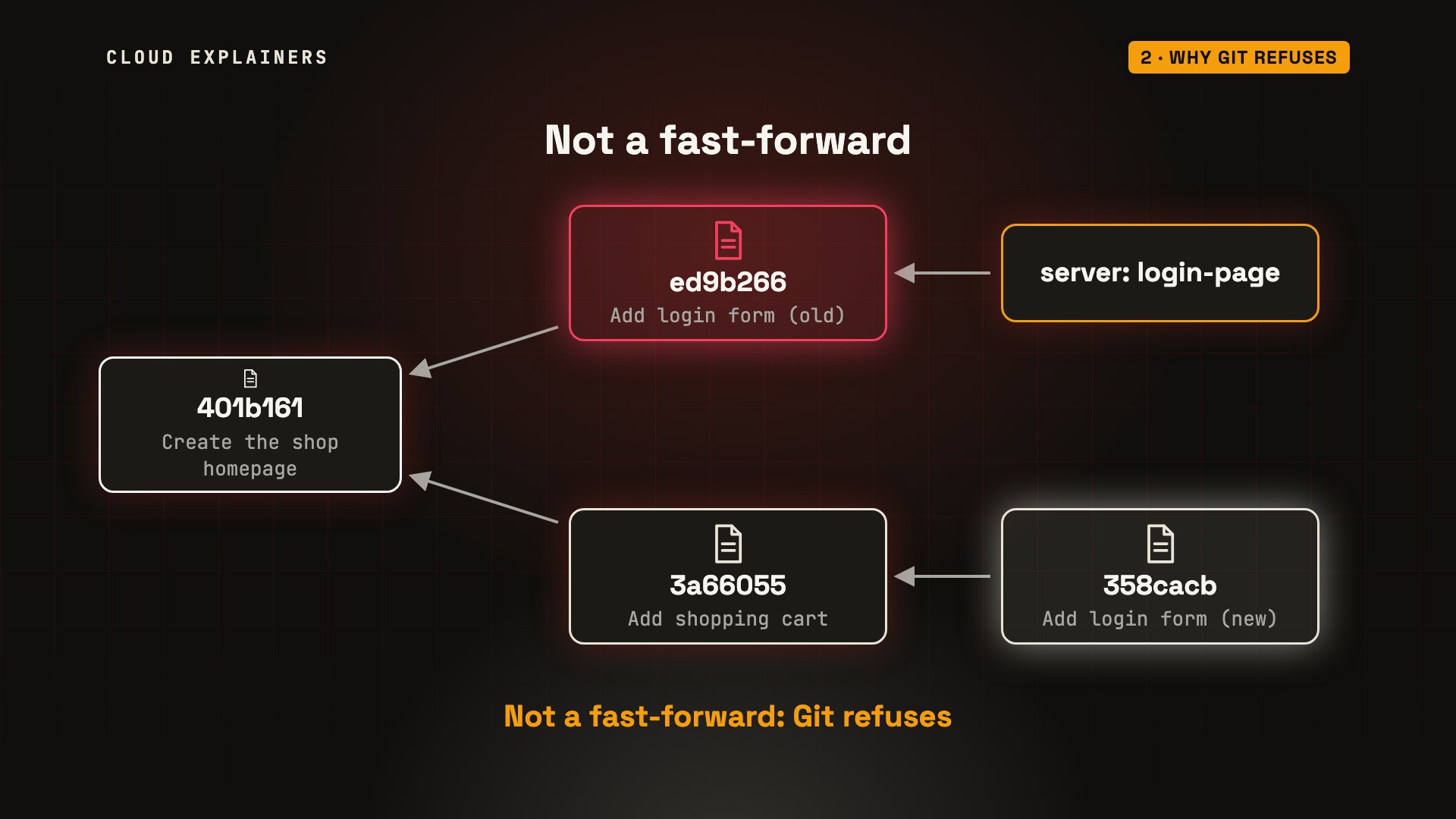
Ana pushes, and Git says rejected, non-fast-forward. You'll see this whenever you rebase a branch you've already pushed. And it's the moment people reach for --force: it tells the server to move the name anyway.
git pushTo git-server:shop.git
 ! [rejected]        login-page -> login-page (non-fast-forward)
error: failed to push some refs to 'git-server:shop.git'
hint: Updates were rejected because the tip of your current branch is behind
hint: its remote counterpart. If you want to integrate the remote changes,
hint: use 'git pull' before pushing again.
hint: See the 'Note about fast-forwards' in 'git push --help' for details.
What --force does
But Ana last checked the server before her rebase. While she was reading that error, Ben committed a forgot-password link, and pushed it to the same branch.
On the server, the branch moved forward, from Ana's old commit to Ben's. A normal fast-forward.
git commit -am "Add forgot-password link"[login-page 000de8c] Add forgot-password link
 1 file changed, 1 insertion(+)
Then Ana forces her push. The plus sign, and forced update, mean the server's branch was moved from Ben's commit to Ana's.
The forced push didn't merge anything. It replaced the server's branch with Ana's. Ben's commit was built on her old one, so now no branch on the server points to it.
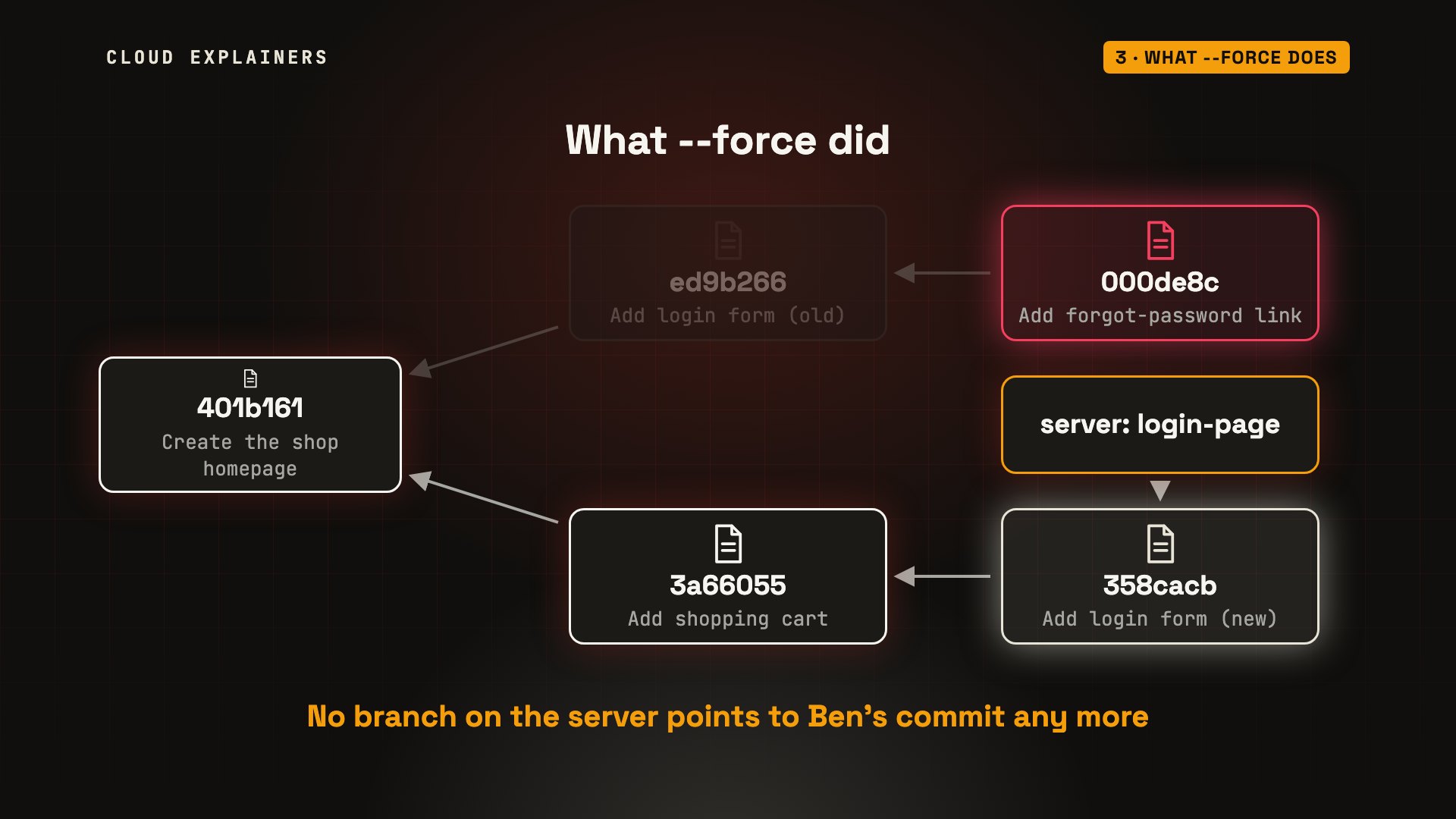
When Ben fetches, he sees forced update too. The server's branch no longer has his commit, and Git says his branch and the server's have diverged: each has commits the other doesn't.
git fetchremote: Enumerating objects: 7, done.
remote: Counting objects: 100% (7/7), done.
remote: Compressing objects: 100% (5/5), done.
remote: Total 6 (delta 1), reused 0 (delta 0), pack-reused 0
Unpacking objects: 100% (6/6), 546 bytes | 546.00 KiB/s, done.
From git-server:shop
 + 000de8c...358cacb login-page -> origin/login-page  (forced update)
   401b161..3a66055  main       -> origin/main
git statusOn branch login-page
Your branch and 'origin/login-page' have diverged,
and have 2 and 2 different commits each, respectively.
  (use "git pull" if you want to integrate the remote branch with yours)

nothing to commit, working tree clean
Getting it back
The good news: Ben's commit still exists on his laptop. He rebases his branch onto the server's new one. The warning is expected: Git skips the login commit, because the server already has that change, and replays only his.
git rebase origin/login-pagewarning: skipped previously applied commit ed9b266
hint: use --reapply-cherry-picks to include skipped commits
hint: Disable this message with "git config advice.skippedCherryPicks false"
Successfully rebased and updated refs/heads/login-page.
Now his commit is on top of the server's branch, so a normal push works: a fast-forward, no force needed. That only worked because Ben still had his copy. If nobody does, getting it back is much harder.
git pushEnumerating objects: 5, done.
Counting objects: 100% (5/5), done.
Delta compression using up to 10 threads
Compressing objects: 100% (3/3), done.
Writing objects: 100% (3/3), 346 bytes | 346.00 KiB/s, done.
Total 3 (delta 1), reused 0 (delta 0), pack-reused 0
To git-server:shop.git
   358cacb..224d62a  login-page -> login-page
git log --oneline224d62a (HEAD -> login-page, origin/login-page) Add forgot-password link
358cacb Add login form
3a66055 (origin/main, origin/HEAD) Add shopping cart
401b161 (main) Create the shop homepage
--force-with-lease
So how do you rewrite a shared branch safely? With --force-with-lease. Remember Ana's note, origin/login-page? It says where the server's branch was, the last time she checked. A lease means: replace the branch, but only if it's still where I last saw it. If anyone pushed since, refuse.
Let's replay the same situation. Chloe adds a search box to main. Ana fetches, and rebases again.
git fetchremote: Enumerating objects: 4, done.
remote: Counting objects: 100% (4/4), done.
remote: Compressing objects: 100% (2/2), done.
remote: Total 3 (delta 0), reused 0 (delta 0), pack-reused 0
Unpacking objects: 100% (3/3), 304 bytes | 304.00 KiB/s, done.
From git-server:shop
   3a66055..274f8e4  main       -> origin/main
git rebase origin/mainSuccessfully rebased and updated refs/heads/login-page.
And before Ana pushes, Ben pushes another commit: an error message for a wrong password.
git commit -am "Show an error for a wrong password"[login-page be49ad8] Show an error for a wrong password
 1 file changed, 1 insertion(+)
git pushEnumerating objects: 5, done.
Counting objects: 100% (5/5), done.
Delta compression using up to 10 threads
Compressing objects: 100% (3/3), done.
Writing objects: 100% (3/3), 338 bytes | 338.00 KiB/s, done.
Total 3 (delta 2), reused 0 (delta 0), pack-reused 0
To git-server:shop.git
   224d62a..be49ad8  login-page -> login-page
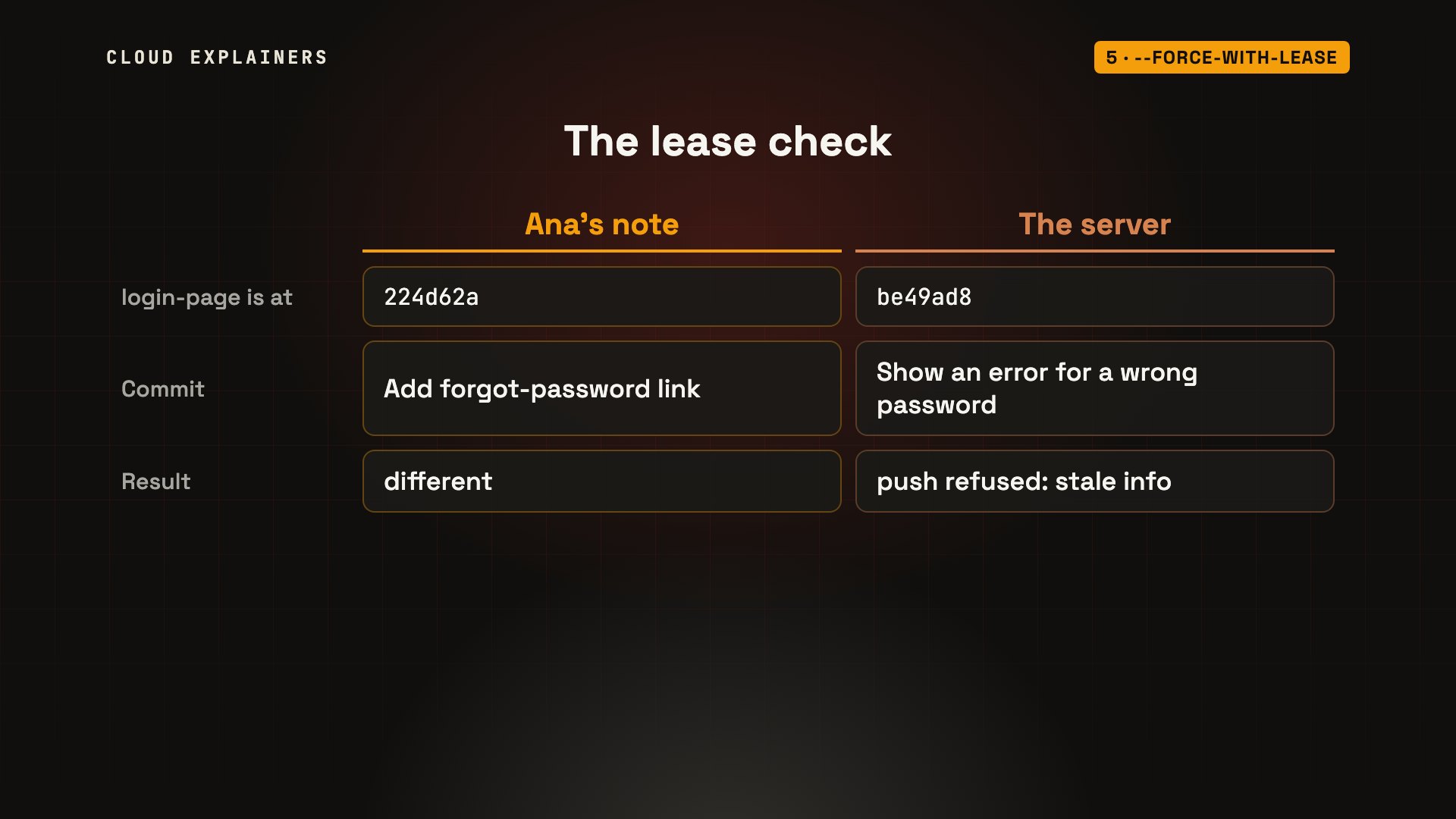
This time, Ana uses force with lease, and Git refuses: stale info. This command just prints her note: the branch is at Ben's first commit. The server has moved on, to his new one. Ben's work is safe.
git push --force-with-leaseTo git-server:shop.git
 ! [rejected]        login-page -> login-page (stale info)
error: failed to push some refs to 'git-server:shop.git'
git rev-parse --short origin/login-page224d62a
The lease compares two things: where Ana last saw the branch, and where the server's branch really is. Different, so nothing is overwritten.
The background fetch
But the lease has a weak spot. It trusts Ana's note, and the note updates every time she fetches. Some editors and tools fetch automatically, in the background. Here's that fetch, run by hand: the note now points at Ben's new commit, though Ana has never looked at it.
git fetchremote: Enumerating objects: 5, done.
remote: Counting objects: 100% (5/5), done.
remote: Compressing objects: 100% (3/3), done.
remote: Total 3 (delta 2), reused 0 (delta 0), pack-reused 0
Unpacking objects: 100% (3/3), 318 bytes | 318.00 KiB/s, done.
From git-server:shop
   224d62a..be49ad8  login-page -> origin/login-page
Now the note matches the server, so the lease is satisfied. --dry-run shows what a push would do, without doing it: a forced update, from Ben's new commit. His work would be lost again.
git push --force-with-lease --dry-runTo git-server:shop.git
 + be49ad8...e89fb9b login-page -> login-page (forced update)
--force-if-includes
That's what --force-if-includes fixes. It checks one more thing: has the commit in Ana's note ever been part of her branch? Fetching only downloads it. It doesn't put it in her branch.
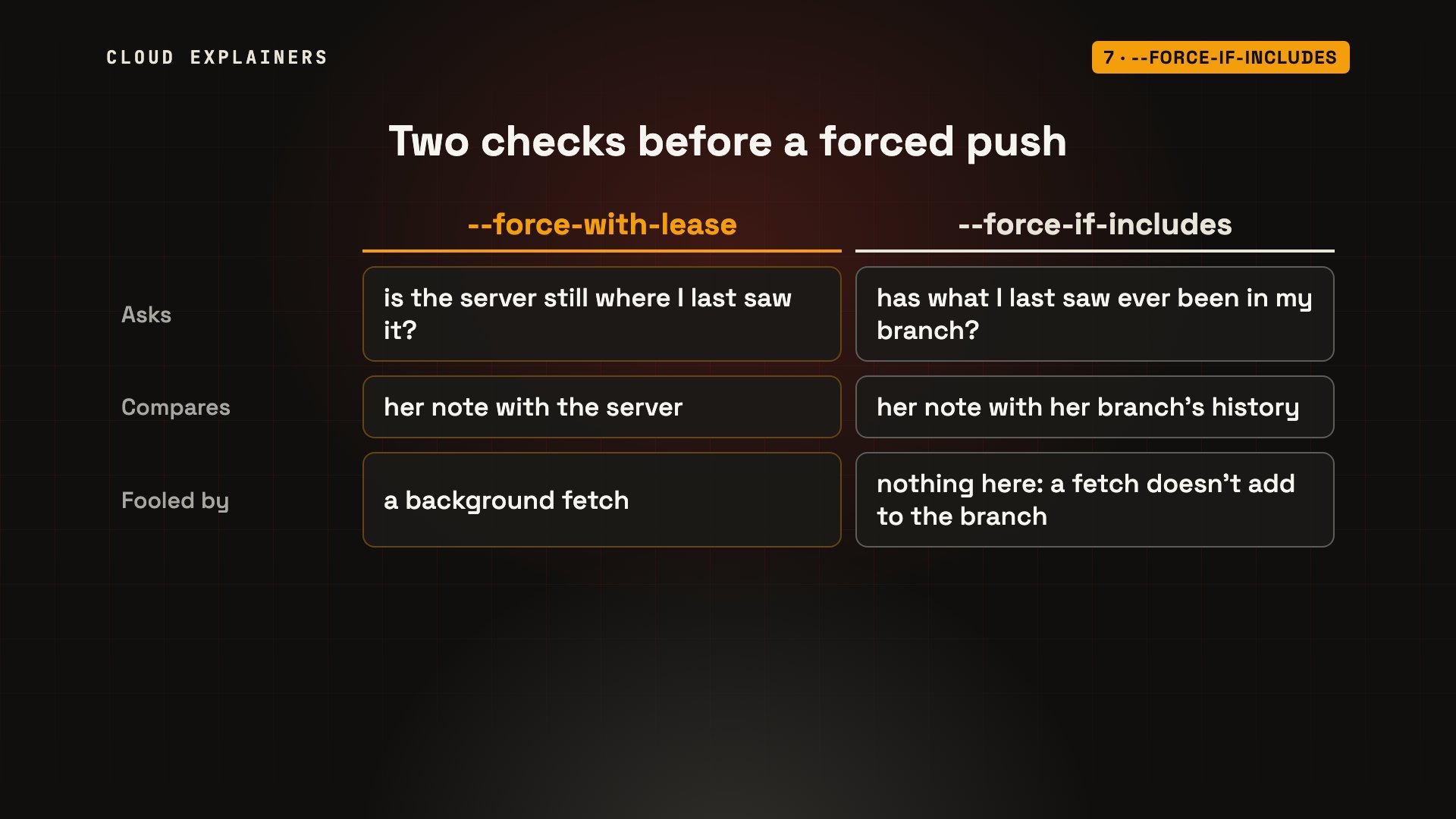
Ana pushes with both, and Git refuses: remote ref updated since checkout. The remote ref is the server's branch. In other words, the server has work you haven't brought into your branch yet.
git push --force-with-lease --force-if-includesTo git-server:shop.git
 ! [rejected]        login-page -> login-page (remote ref updated since checkout)
error: failed to push some refs to 'git-server:shop.git'
hint: Updates were rejected because the tip of the remote-tracking branch has
hint: been updated since the last checkout. If you want to integrate the
hint: remote changes, use 'git pull' before pushing again.
hint: See the 'Note about fast-forwards' in 'git push --help' for details.
So Ana does it properly. git pull --rebase brings Ben's commits into her branch. Then she redoes her rebase on top of main, so her commits come after the search box again. Now her history has everything: her login form, and both of Ben's commits, on top of the search box.
git pull --rebasewarning: skipped previously applied commit 7a58454
warning: skipped previously applied commit e89fb9b
hint: use --reapply-cherry-picks to include skipped commits
hint: Disable this message with "git config advice.skippedCherryPicks false"
Successfully rebased and updated refs/heads/login-page.
git rebase origin/mainwarning: skipped previously applied commit b852b6d
hint: use --reapply-cherry-picks to include skipped commits
hint: Disable this message with "git config advice.skippedCherryPicks false"
Successfully rebased and updated refs/heads/login-page.
git log --oneline2283f14 (HEAD -> login-page) Show an error for a wrong password
a2eaaaf Add forgot-password link
4fbf1a5 Add login form
274f8e4 (origin/main, origin/HEAD) Add search box
3a66055 Add shopping cart
401b161 (main) Create the shop homepage
Now the same push, with both checks, goes through. And when Ben pulls, his history matches hers: every commit kept.
git push --force-with-lease --force-if-includesEnumerating objects: 10, done.
Counting objects: 100% (10/10), done.
Delta compression using up to 10 threads
Compressing objects: 100% (9/9), done.
Writing objects: 100% (9/9), 921 bytes | 921.00 KiB/s, done.
Total 9 (delta 4), reused 0 (delta 0), pack-reused 0
To git-server:shop.git
 + be49ad8...2283f14 login-page -> login-page (forced update)
git log --oneline2283f14 (HEAD -> login-page, origin/login-page) Show an error for a wrong password
a2eaaaf Add forgot-password link
4fbf1a5 Add login form
274f8e4 (origin/main, origin/HEAD) Add search box
3a66055 Add shopping cart
401b161 (main) Create the shop homepage
Make it the default
Typing both every time is a lot, so make it your default. An alias: git pushf, short for push with a lease. And one setting, push.useForceIfIncludes, adds the second check to every lease.
git config --global alias.pushf "push --force-with-lease"
git config --global push.useForceIfIncludes true
git config --global --list | grep -i -e pushf -e useforcealias.pushf=push --force-with-lease
push.useforceifincludes=true
Same trap again: Ben pushes, Ana's tools fetch in the background, and Ana pushes a new commit with pushf. Refused, because Ben's latest commit isn't in her branch.
git fetchremote: Enumerating objects: 4, done.
remote: Counting objects: 100% (4/4), done.
remote: Compressing objects: 100% (2/2), done.
remote: Total 3 (delta 1), reused 0 (delta 0), pack-reused 0
Unpacking objects: 100% (3/3), 256 bytes | 256.00 KiB/s, done.
From git-server:shop
   2283f14..acb1ac6  login-page -> origin/login-page
git pushfTo git-server:shop.git
 ! [rejected]        login-page -> login-page (remote ref updated since checkout)
error: failed to push some refs to 'git-server:shop.git'
hint: Updates were rejected because the tip of the remote-tracking branch has
hint: been updated since the last checkout. If you want to integrate the
hint: remote changes, use 'git pull' before pushing again.
hint: See the 'Note about fast-forwards' in 'git push --help' for details.
Protect main
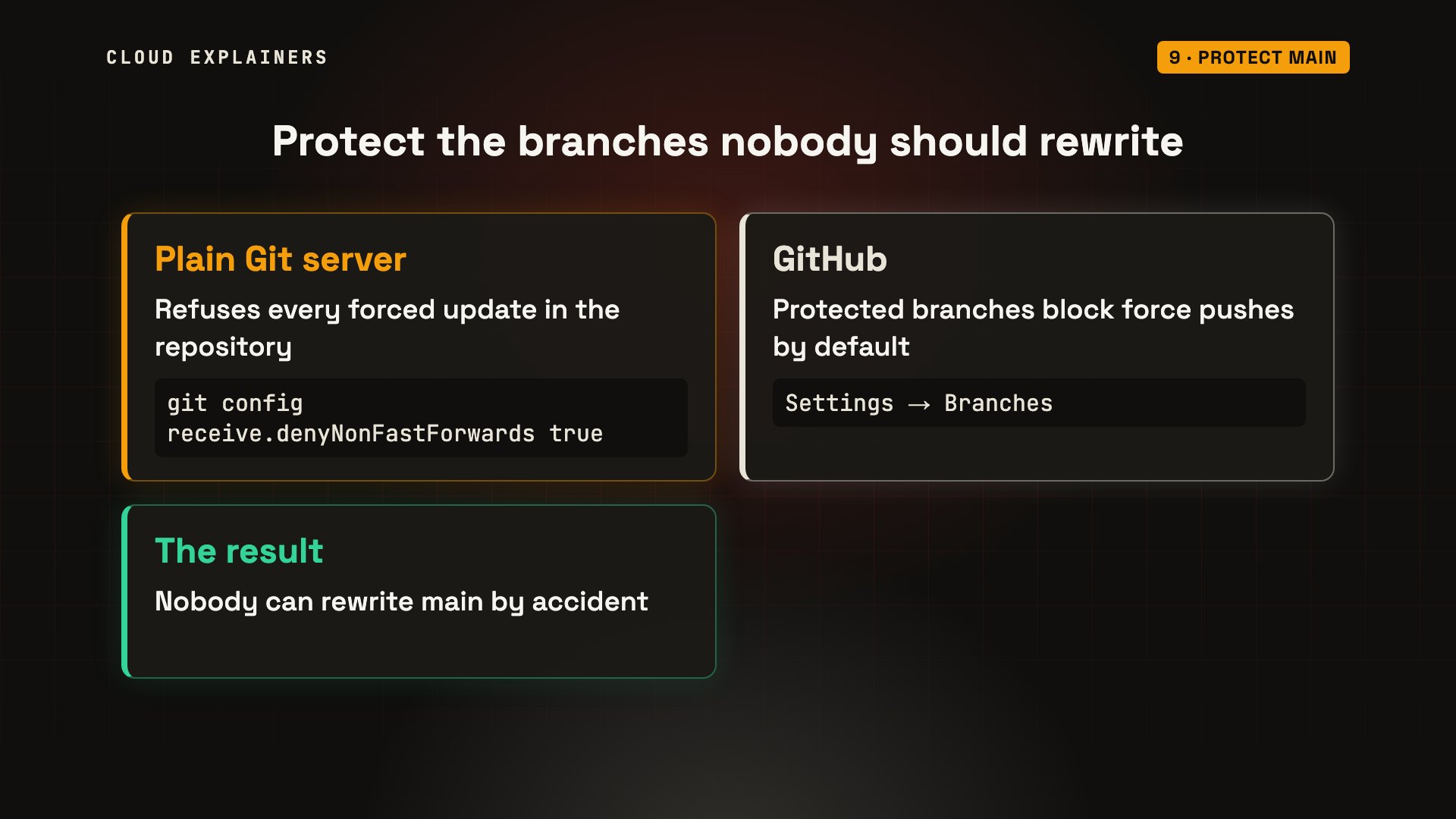
Some branches should never be rewritten at all, like main. So tell the server to refuse.
On a plain Git server, one setting, for the whole repository, refuses every push that isn't a fast-forward. Now even --force fails: remote rejected.
git config receive.denyNonFastForwards true
git push --forceEnumerating objects: 4, done.
Counting objects: 100% (4/4), done.
Delta compression using up to 10 threads
Compressing objects: 100% (2/2), done.
Writing objects: 100% (3/3), 334 bytes | 334.00 KiB/s, done.
Total 3 (delta 0), reused 0 (delta 0), pack-reused 0
remote: error: denying non-fast-forward refs/heads/main (you should pull first)
To git-server:shop.git
 ! [remote rejected] main -> main (non-fast-forward)
error: failed to push some refs to 'git-server:shop.git'
On GitHub, you protect the branch instead, and protected branches block force pushes by default. Protect main, and nobody can rewrite it by accident.
Recap
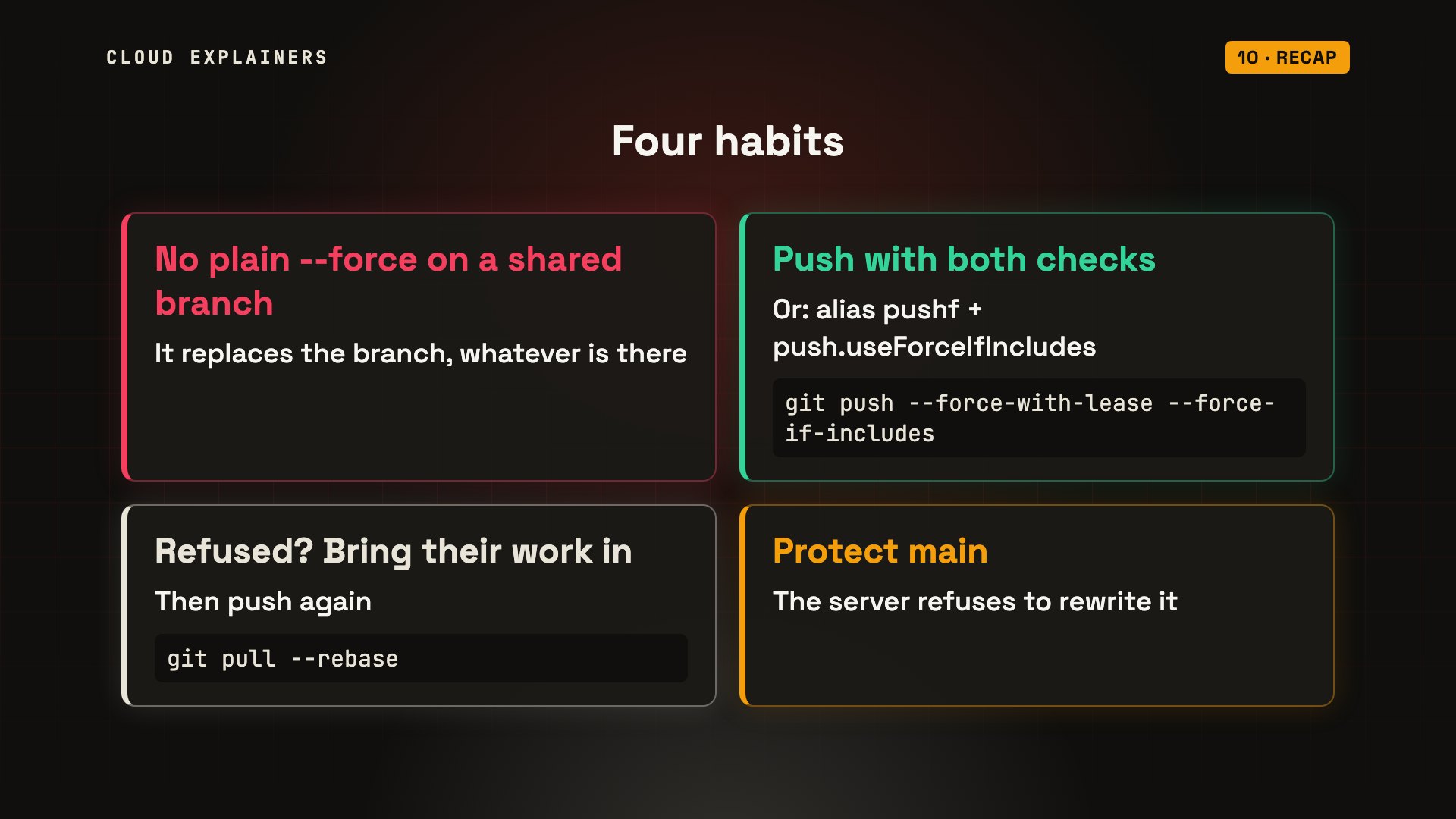
So, four habits. One: don't use plain --force on a branch anyone else uses. Two: use --force-with-lease with --force-if-includes, or the alias and setting. Three: when it refuses, pull with rebase, then push again. Four: protect main on the server.
Every command and every result in this video came from a real run, and the description lists exactly what we ran. Thanks for watching.
Sources
Demos: real runs of Git in Docker on one machine (a Git server and two laptops). Ana, Ben, Chloe and their shop are invented. Watch the full video on YouTube.