
How to Fix Docker 'Permission Denied' on docker.sock
docker ps says 'permission denied while trying to connect to the docker API at unix:///var/run/docker.sock' (older Docker: 'the Docker daemon socket'). On a real Ubuntu 24.04 PC with Docker we show why: the socket only lets in root and the docker group. We add the user with usermod -aG, see why it still fails until you log in again, tell 'permission denied' from 'is the docker daemon running?', and show what usermod -G without -a and chmod 666 really do.
Permission denied on docker.sock
You typed docker ps, and got: permission denied, while trying to connect to the docker API. Put sudo in front, which runs it as the administrator, root, and the same command lists the running containers: here, a music school's booking page. So Docker is fine. You just aren't allowed to talk to it. One popular fix lets every account on the PC talk to it, until the next reboot. We'll see which.
docker ps --format '{{.Names}} {{.Image}} {{.Status}}'permission denied while trying to connect to the docker API at unix:///var/run/docker.sock
sudo docker ps --format '{{.Names}}  {{.Image}}  {{.Status}}'[sudo] password for ben:
bookings  nginx:alpine  Up 2 seconds
What docker.sock is
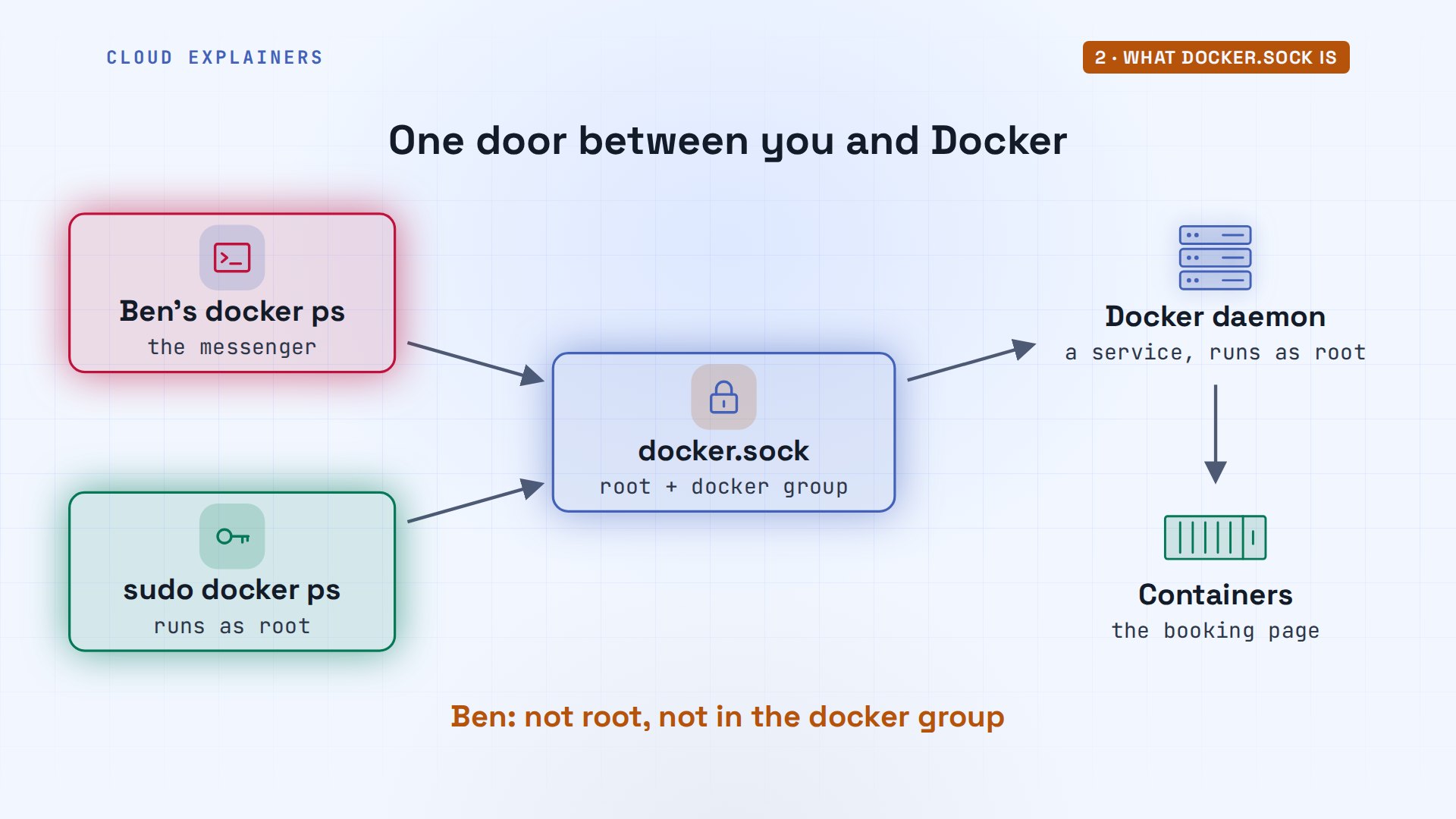
So who decides? The docker command is only a messenger. The work is done by the Docker daemon, a background service that runs as root. The two talk through one special file, docker dot sock. Think of that file as a staff-only door, with a keycard list: root, and the docker group. sudo runs the command as root, so it walks in. Ben, new in the school's office, is not on the list.
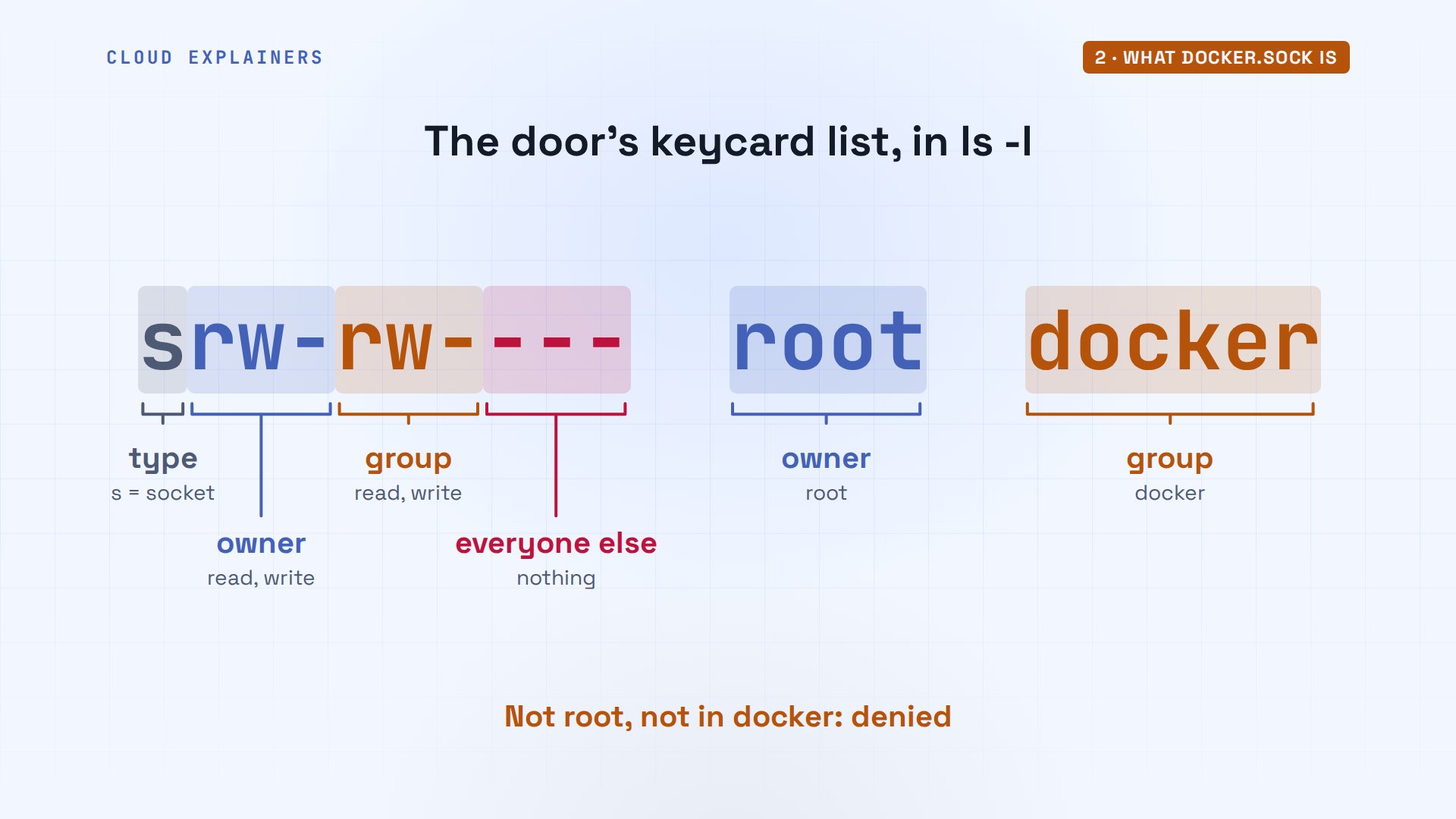
The list is printed on the file itself. ls dash l on slash var slash run slash docker dot sock shows it in ten characters. The s means socket. Then read and write for the owner, read and write for the group, and nothing for everyone else. The owner is root, the group is docker.
The fix: the docker group
So the usual fix: put Ben on the list. First, id, which shows who you are, lists Ben's groups: ben and sudo. No docker. So Ben runs user mod with dash a capital G, docker, ben: capital G names a group, and dash a means add it to the ones he has. It prints nothing, which means it worked. Guess first: does his docker ps work now? No. The same error, word for word.
iduid=1001(ben) gid=1001(ben) groups=1001(ben),27(sudo)
sudo usermod -aG docker ben
docker ps --format '{{.Names}} {{.Image}} {{.Status}}'permission denied while trying to connect to the docker API at unix:///var/run/docker.sock
Why it still fails: log in again
Why? Ask id about Ben by name, and docker is there. getent, which reads the group list, says so too: ana, ben. But plain id, about this terminal, still says no. Linux gives a program its groups when it starts, and Ben's shell started before the change. Back at the staff door: the list was updated, but Ben's keycard was printed when he logged in this morning.
id benuid=1001(ben) gid=1001(ben) groups=1001(ben),27(sudo),102(docker)
getent group dockerdocker:x:102:ana,ben
iduid=1001(ben) gid=1001(ben) groups=1001(ben),27(sudo)
So get a new keycard. new group docker starts a shell with the group, and docker ps works in it, but only in that one shell. The real fix is to log out and back in. Now plain id lists docker, and docker ps works without sudo.
newgrp docker
docker ps --format '{{.Names}} {{.Image}} {{.Status}}'bookings nginx:alpine Up 1 second
exitexit
iduid=1001(ben) gid=1001(ben) groups=1001(ben),27(sudo),102(docker)
docker ps --format '{{.Names}} {{.Image}} {{.Status}}'bookings nginx:alpine Up 3 seconds
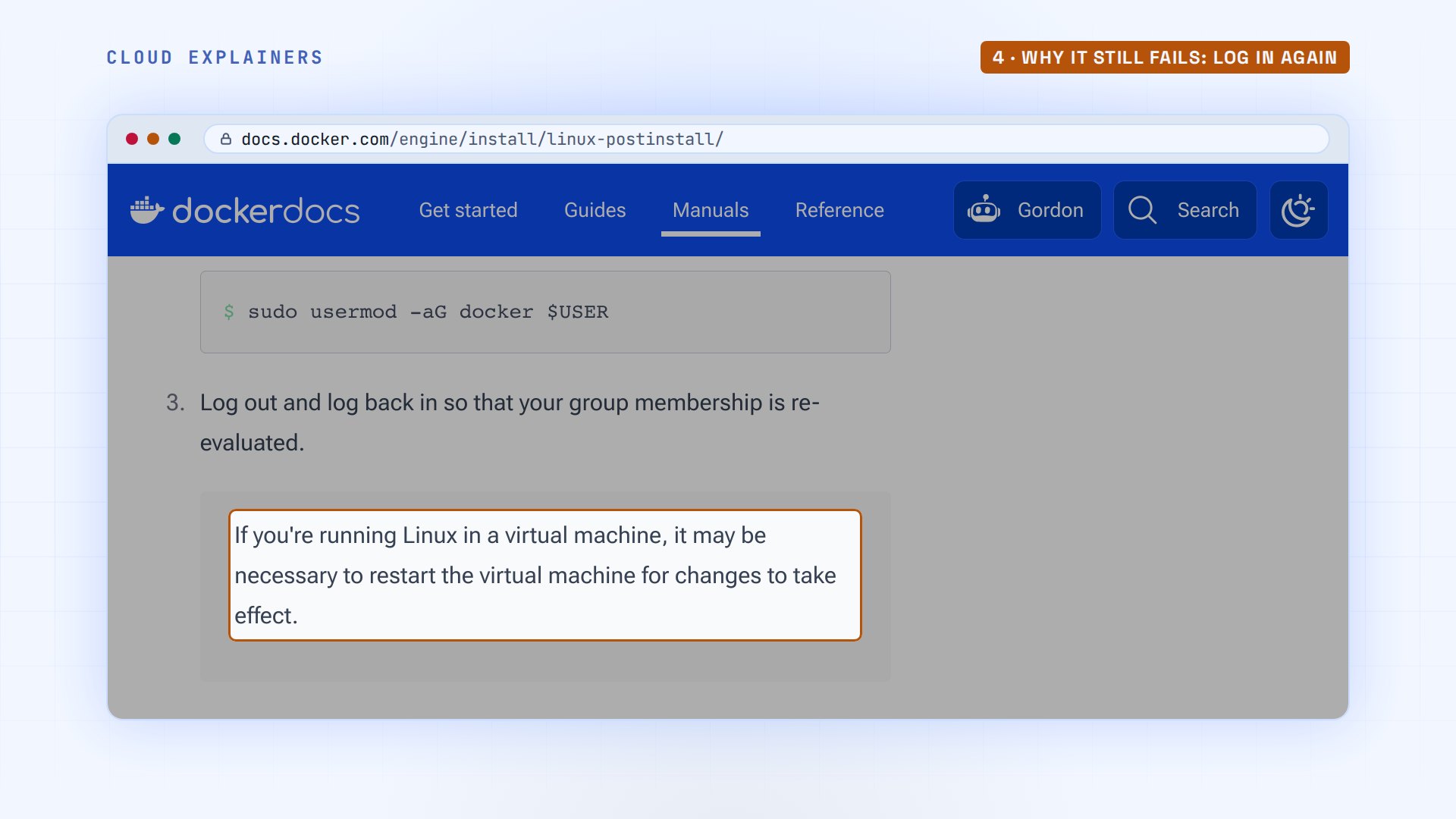
Docker's own setup page agrees, and adds one detail: on a virtual machine, you may need to restart it before the group takes effect.
Denied, or not running?
Read the error before you fix it, though. Earlier that day, Ana stopped Docker for an update, with systemctl, the tool that controls background services. Guess first: what does Ben's plain docker ps say then? Still permission denied. Linux checks the socket file's permissions before anything reaches Docker, so Ben never finds out nobody is home. Only with sudo does the real problem show: cannot connect. Is the docker daemon running?
sudo systemctl stop docker docker.socket[sudo] password for ana:
docker ps --format '{{.Names}} {{.Image}} {{.Status}}'permission denied while trying to connect to the docker API at unix:///var/run/docker.sock
sudo docker ps --format '{{.Names}} {{.Image}} {{.Status}}'Cannot connect to the Docker daemon at unix:///var/run/docker.sock. Is the docker daemon running?
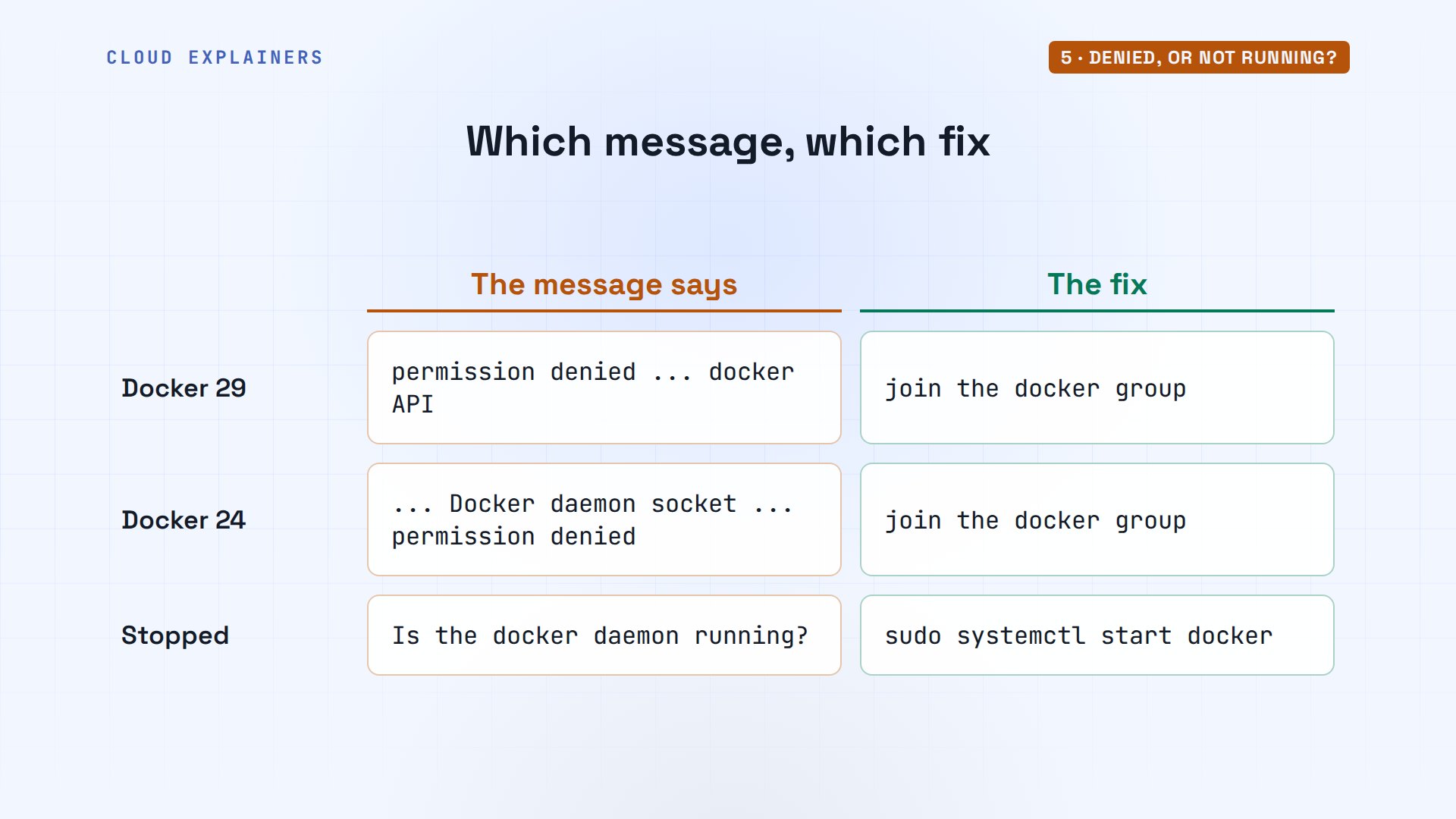
So match the message to the fix. Permission denied: the group. Older Docker versions, like 24, word it as the Docker daemon socket, with connect, permission denied at the end. Same cause. Is the docker daemon running: start it, with systemctl start docker.
Two fixes that backfire
Now the two fixes that backfire. The first is a missing letter. Ana adds a new helper, Eli, who is an admin: his groups include sudo. She types user mod dash capital G docker, but forgets the dash a. Without it, the list is replaced, not added to. Eli is in docker, and no longer an admin. Adding sudo back with dash a repairs it.
id eliuid=1003(eli) gid=1003(eli) groups=1003(eli),27(sudo)
sudo usermod -G docker eli
id eliuid=1003(eli) gid=1003(eli) groups=1003(eli),102(docker)
sudo usermod -aG sudo eli
id eliuid=1003(eli) gid=1003(eli) groups=1003(eli),27(sudo),102(docker)
The second is the popular one. C H mod changes a file's permissions, and six six six means read and write for owner, group, and everyone else. She runs it on the socket, and the last group of letters now says read and write for all. The staff door is propped open.
sudo chmod 666 /var/run/docker.sock
ls -l /var/run/docker.socksrw-rw-rw- 1 root docker 0 Nov 14 14:52 /var/run/docker.sock
Cara has a part-time account: no sudo, not in the docker group. Denied before. After the C H mod, she sees the booking page's container, while sudo still refuses her. Docker is open to every account on the PC.
docker ps --format '{{.Names}} {{.Image}} {{.Status}}'permission denied while trying to connect to the docker API at unix:///var/run/docker.sock
docker ps --format '{{.Names}} {{.Image}} {{.Status}}'bookings nginx:alpine Up 4 seconds
sudo ls /root[sudo] password for cara:
cara is not in the sudoers file.
And it doesn't even last. Ana reboots the PC. The socket is back to read and write for root and the group only, and Cara is denied again. systemd, the service manager that starts everything at boot, makes the socket fresh at every start, and its settings say: mode zero six six zero, group docker. So C H mod six six six is a hole that closes at the next reboot, and someone types it again.
sudo reboot
ls -l /var/run/docker.socksrw-rw---- 1 root docker 0 Nov 14 14:52 /var/run/docker.sock
systemctl cat docker.socket# /usr/lib/systemd/system/docker.socket
[Unit]
Description=Docker Socket for the API

[Socket]
ListenStream=/run/docker.sock
SocketMode=0660
SocketUser=root
SocketGroup=docker

[Install]
WantedBy=sockets.target
Who should be in the group
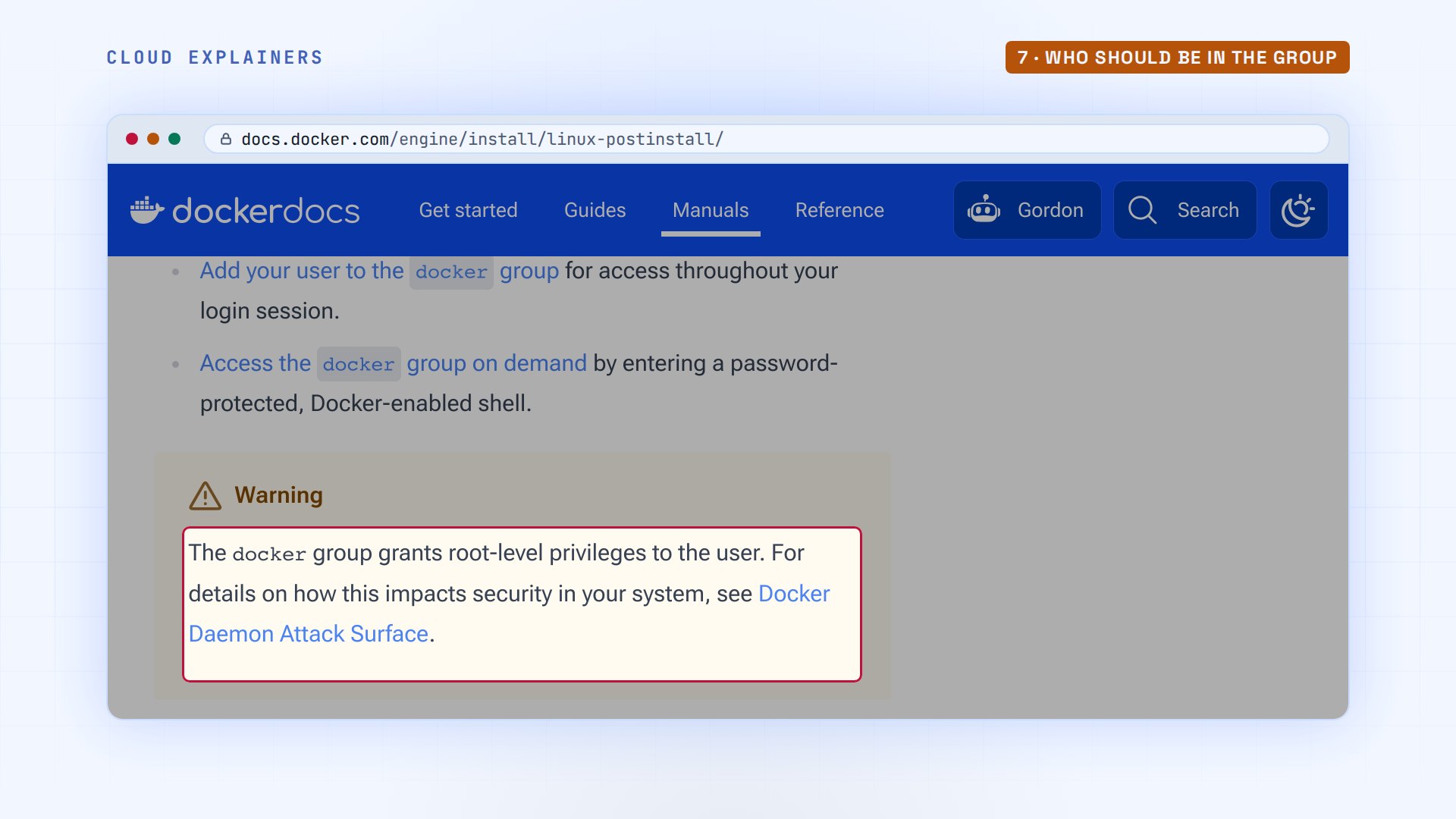
So who belongs in the docker group? Docker's own page warns: the docker group grants root-level privileges. The daemon runs as root, and it starts whatever a group member asks for, with full control of the PC. So treat the docker group like sudo: add only people you'd trust as an admin.
Recap
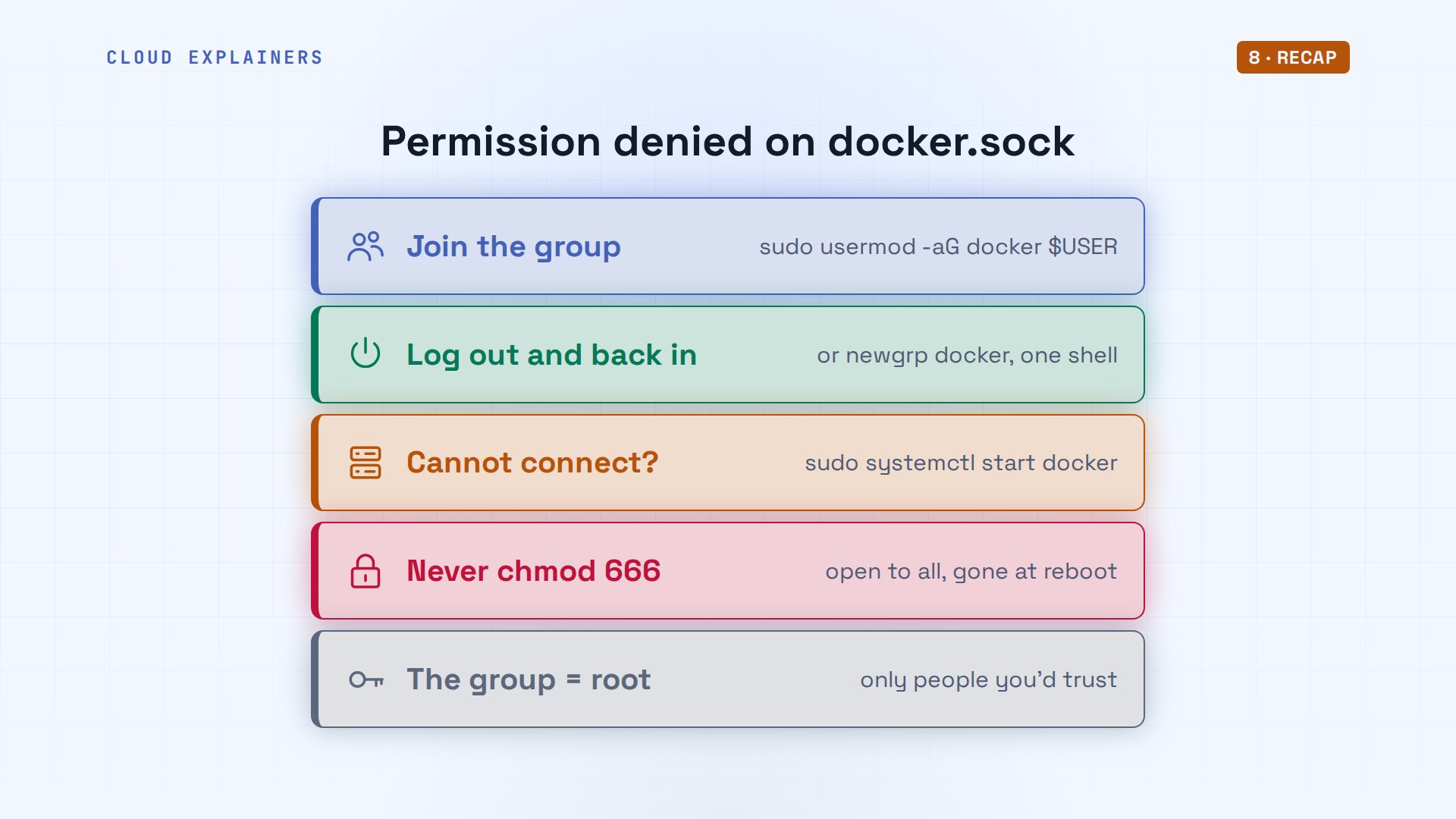
So, permission denied on docker dot sock: join the group with user mod dash a G, then log out and back in. Cannot connect means Docker isn't running. Never C H mod six six six, which opens it to everyone, and add only people you'd trust with root.
If Docker answers you now without sudo, a like helps the next stuck beginner find this, and subscribing brings more fixes run on real machines.
Every error in this video came from a real Ubuntu PC with Docker, and every command and the lab files are linked in the description. Thanks for watching Cloud Explainers.
Sources
- Docker docs, Linux post-installation steps (the docker group, log out and back in, newgrp, the root-level privileges warning)
- Docker docs, Docker daemon attack surface
- Docker docs, rootless mode
- usermod(8): -G sets the list of groups; -a appends instead
- newgrp(1)
- credentials(7): a process's supplementary groups are set when it starts
Demos: a container on our own Mac standing in for a music school's office PC; the school and its staff are made up. Every error and the reboot were real. Watch the full video on YouTube.
More videos
Every Networking Term a Beginner Needs in 12 Minutes
How to Fix Git 'Updates Were Rejected' When You Push
How to Fix nginx 502 Bad Gateway Errors on Linux

How to Fix Linux apt 'Could Not Get Lock' Errors (Ubuntu)

How Email Works on the Internet (SMTP) in 10 Minutes

The Python Roadmap for Beginners

Golang REST API with Gin: Full Tutorial for Beginners
How a WireGuard VPN Network Works

Linux Makefiles Will Finally Make Sense After This

SAML vs OAuth vs OpenID Connect: What's the Difference?

How to Fix Python cron Jobs That Never Run

Linux Bash Scripting: Full Tutorial for Beginners

How PXE Network Boot Works

How Active Directory Works

How to Fix a Linux systemd Service That Won't Start

Linux Logs: syslog vs journald

JWT vs Session Cookies: Which One Should You Use?

Docker vs Docker Compose: Which One Should You Use?

How to Fix Docker Compose Containers That Can't Talk to Each Other

Django Full Tutorial for Beginners

How Linux systemd Works

How to Fix 'Windows Cannot Access' Network Share Errors (SMB)

REST vs gRPC: Which One Should You Use?

How to Fix SSL Certificate Chain Errors (Missing Intermediate)

Every Python Concept for Beginners in 10 Minutes

Every SQL Join Type in 10 Minutes

Why OpenRouter Free Models Hit Their Limit So Fast

Why Your Gemini API Free Tier Runs Out So Fast

OpenRouter Will Finally Make Sense After This

How Redis Caching Works

Gemini API vs Vertex AI: Which One Should You Use?

How to Fix a Leaked Gemini API Key

Why Golang Uses Goroutines Instead of Threads

How to Fix Gemini API Error 429: Resource Exhausted

Claude Token Pricing Will Finally Make Sense After This

Why Python Web Scraping Returns Nothing (and the Fix)

Python uv vs pip: Which One Should You Use?

Python Automation: Full Tutorial for Beginners

How OAuth Login Works

Google AI Studio Will Finally Make Sense After This

What Happens When You Run a Docker Container

How to Fix Claude Code Billing Your API Key Instead of Your Plan

Why Passkeys Can't Be Phished Like Passwords

PowerShell vs Bash: Which One Should You Learn?

The Linux Roadmap for Beginners

Django vs FastAPI: Which One Should You Use?

Why SQLite Is the Most Used Database in the World

How a NoSQL Database Like MongoDB Works

How to Fix Python pip error: externally-managed-environment

How to Fix MySQL Too Many Connections Database Errors

Golang Concurrency Will Finally Make Sense After This

How Amazon S3 Works

How Kubernetes Works

How Git Works

How to Fix Docker Port Already Allocated Errors

How PostgreSQL Works

How to Fix Git Merge Conflicts

How to Fix No Space Left on Device in Linux

How the Internet Works

SQL vs NoSQL: When Each One Wins

How to Fix JWT Token Expired Errors (401 Unauthorized)

Claude API vs Claude Pro: Why Your Subscription Doesn't Include It

Why AI Agent Skills Beat Giant Prompts

Linux Cron Jobs Will Finally Make Sense After This

Security Logs Will Finally Make Sense After This

How to Fix a Security Leak: An API Key Pushed to GitHub

DNS Will Finally Make Sense After This

Never Ignore a Security Update

Two-Factor Authentication Will Finally Make Sense

Never Expose a Database to the Internet

SSH Keys vs Passwords: Which Is Safer for Security?

The 5 Levels of Linux Boot: From Power On to Login

The 5 Levels of Network Firewalls

Password Security: Why Hackers Crack Weak Passwords

Why Your Linux Server Runs Out of Memory

HTTP vs HTTPS: What Actually Changes on Your Network

Every Linux File Permission You Need to Know

Linux Processes vs Threads: When Each One Wins

The OSI Model Will Finally Make Sense After This

The 7 Levels of Git

Every Network Troubleshooting Command You Need

Hashing vs Encryption in Cybersecurity: When Each One Wins

Why the Internet Ran Out of IP Addresses

Linux Package Managers: apt vs Snap vs Flatpak

Why Python Is Slow (and When It Doesn't Matter)

TCP vs UDP: When Each One Wins

Stop Running Linux as Root (Do This Instead)

Linux Users and Groups Will Finally Make Sense

Why Phishing Beats Good Security (and How to Spot It)

The 7 Levels of Docker

AI Agents Will Finally Make Sense After This

Stop Using git push --force (Use This Instead)

Agent Skills vs MCP: When Each One Wins

Networking Will Finally Make Sense After This

Every Linux Command You Actually Need

The 7 Levels of Cybersecurity

Every System Design Concept You Need, in One Diagram
