
How Email Works on the Internet (SMTP) in 10 Minutes
You press send and a second later the email is in an inbox at another company. This video follows one email through a real lab of mail servers: the login on port 587, the MX lookup in DNS, the SMTP conversation between two servers (typed by hand), the envelope and the letter (and how Bcc works), what happens when the other server is switched off, reading it with IMAP, and how SPF checks who really sent it.
Press send
You press send, and a second later the email is in an inbox at another company. Where did it go in that second? Here Ana, at a flower stall called Bloom, emails Ben at the cafe down the road, with swaks, a terminal tool that sends mail like an app. Her server answers: queued.
swaks --to ben@harbor.test --h-Subject 'Flowers for Saturday' --body '12 sunflowers, at the cafe by 8 am. Ana'Password: === Trying mail.bloom.test:587...
=== Connected to mail.bloom.test.
<-  220 mail.bloom.test ESMTP Postfix (Ubuntu)
 -> EHLO ana-laptop
<-  250-mail.bloom.test
<-  250-PIPELINING
<-  250-SIZE 10240000
<-  250-VRFY
<-  250-ETRN
<-  250-STARTTLS
<-  250-ENHANCEDSTATUSCODES
<-  250-8BITMIME
<-  250-DSN
<-  250-SMTPUTF8
<-  250 CHUNKING
 -> STARTTLS
<-  220 2.0.0 Ready to start TLS
=== TLS started with cipher TLSv1.3:TLS_AES_256_GCM_SHA384:256
=== TLS client certificate not requested and not sent
=== TLS no client certificate set
=== TLS peer[0]   subject=[/CN=mail.bloom.test]
===               commonName=[mail.bloom.test], subjectAltName=[DNS:mail.bloom.test] notAfter=[2026-12-13T14:38:51Z]
=== TLS peer certificate passed CA verification, passed host verification (using host mail.bloom.test to verify)
 ~> EHLO ana-laptop
<~  250-mail.bloom.test
<~  250-PIPELINING
<~  250-SIZE 10240000
<~  250-VRFY
<~  250-ETRN
<~  250-AUTH PLAIN LOGIN
<~  250-ENHANCEDSTATUSCODES
<~  250-8BITMIME
<~  250-DSN
<~  250-SMTPUTF8
<~  250 CHUNKING
 ~> AUTH LOGIN
<~  334 VXNlcm5hbWU6
 ~> YW5hQGJsb29tLnRlc3Q=
<~  334 UGFzc3dvcmQ6
 ~> UFJPVklERURfQlVUX1JFTU9WRUQ=
<~  235 2.7.0 Authentication successful
 ~> MAIL FROM:<ana@bloom.test>
<~  250 2.1.0 Ok
 ~> RCPT TO:<ben@harbor.test>
<~  250 2.1.5 Ok
 ~> DATA
<~  354 End data with <CR><LF>.<CR><LF>
 ~> Date: Fri, 13 Nov 2026 14:39:10 +0000
 ~> To: ben@harbor.test
 ~> From: ana@bloom.test
 ~> Subject: Flowers for Saturday
 ~> Message-Id: <20261113143910.000037@ana-laptop>
 ~> X-Mailer: swaks v20240103.0 jetmore.org/john/code/swaks/
 ~>
 ~> 12 sunflowers, at the cafe by 8 am. Ana
 ~>
 ~>
 ~> .
<~  250 2.0.0 Ok: queued as C6E7CE4779
 ~> QUIT
<~  221 2.0.0 Bye
=== Connection closed with remote host.
Ben fetches it with curl, and his copy holds the answer: two lines starting with Received, each a stamp from a server on the way. Keep one question in mind: what happens when the other server is switched off?
curl -sn --ssl-reqd 'imap://mx.harbor.test/INBOX;MAILINDEX=1'Return-Path: <ana@bloom.test>
X-Original-To: ben@harbor.test
Delivered-To: ben@harbor.test
Received-SPF: Pass (mailfrom) identity=mailfrom; client-ip=203.0.113.25; helo=mail.bloom.test; envelope-from=ana@bloom.test; receiver=harbor.test
Received: from mail.bloom.test (mail.bloom.test [203.0.113.25])
	(using TLSv1.3 with cipher TLS_AES_256_GCM_SHA384 (256/256 bits)
	 key-exchange X25519 server-signature RSA-PSS (2048 bits) server-digest SHA256)
	(No client certificate requested)
	by mx.harbor.test (Postfix) with ESMTPS id D187FE4782
	for <ben@harbor.test>; Fri, 13 Nov 2026 14:39:10 +0000 (UTC)
Received: from ana-laptop (ana-laptop.bloom.test [203.0.113.101])
	(using TLSv1.3 with cipher TLS_AES_256_GCM_SHA384 (256/256 bits)
	 key-exchange X25519 server-signature RSA-PSS (2048 bits) server-digest SHA256)
	(No client certificate requested)
	by mail.bloom.test (Postfix) with ESMTPSA id C6E7CE4779
	for <ben@harbor.test>; Fri, 13 Nov 2026 14:39:10 +0000 (UTC)
Date: Fri, 13 Nov 2026 14:39:10 +0000
To: ben@harbor.test
From: ana@bloom.test
Subject: Flowers for Saturday
Message-Id: <20261113143910.000037@ana-laptop>
X-Mailer: swaks v20240103.0 jetmore.org/john/code/swaks/

12 sunflowers, at the cafe by 8 am. Ana
Four stops
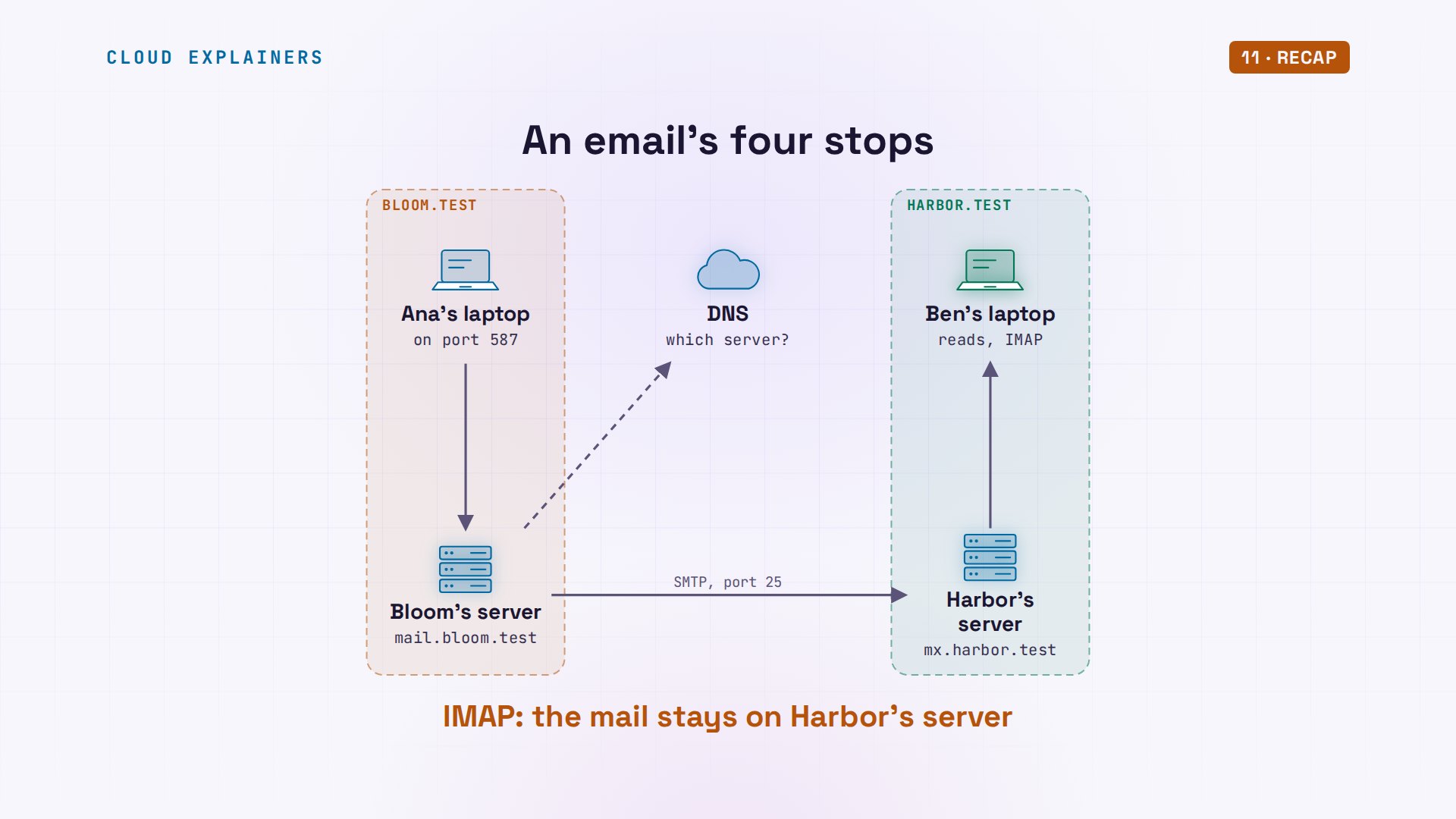
Here's the whole trip, read from those stamps. Ana's laptop doesn't deliver anything itself. It hands the email to Bloom's own mail server, after a login. That server asks DNS, the internet's address book, which server takes mail for Ben's company. It hands the email over, and Harbor's server keeps it in Ben's mailbox, until Ben's laptop collects it.
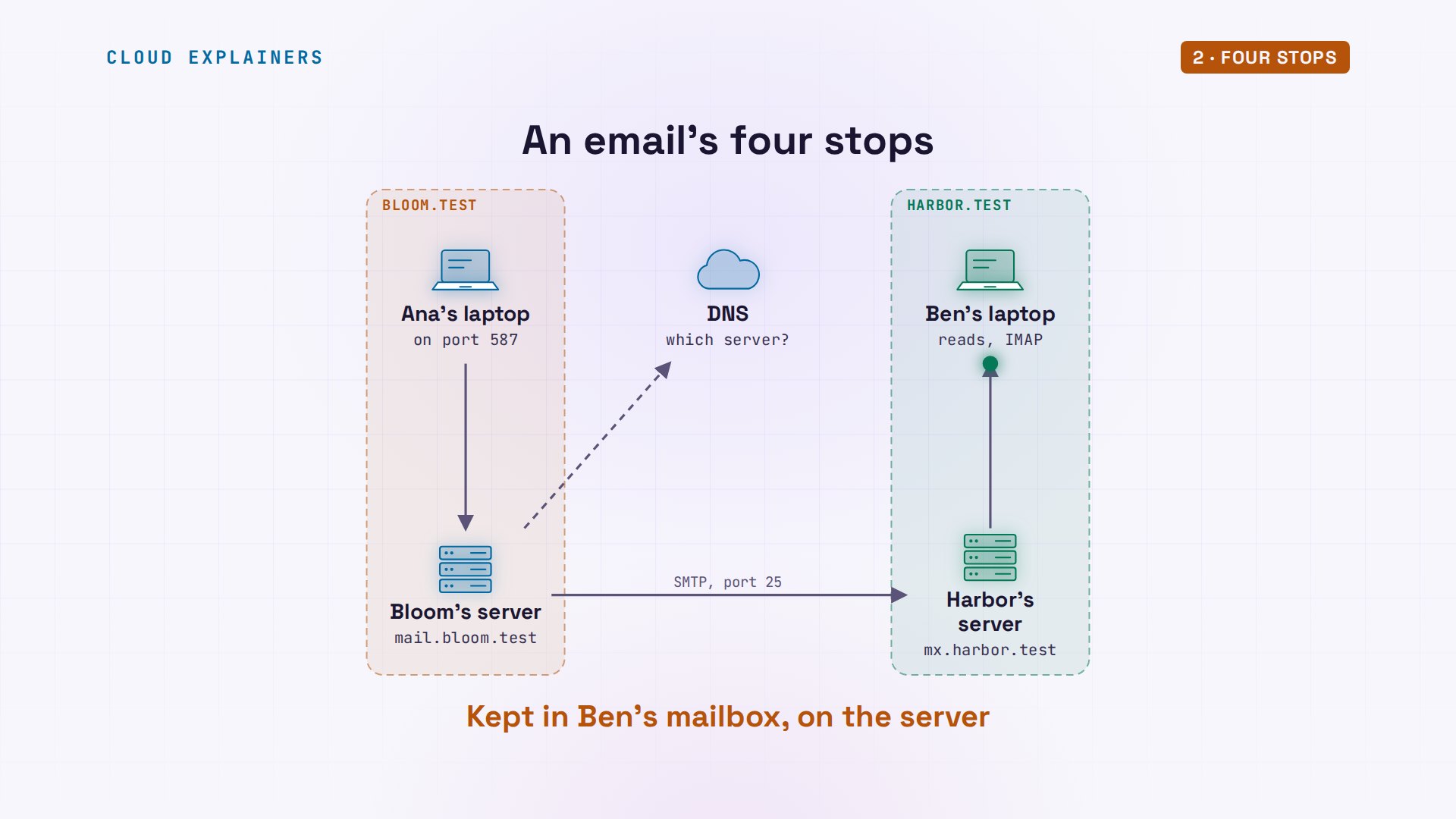
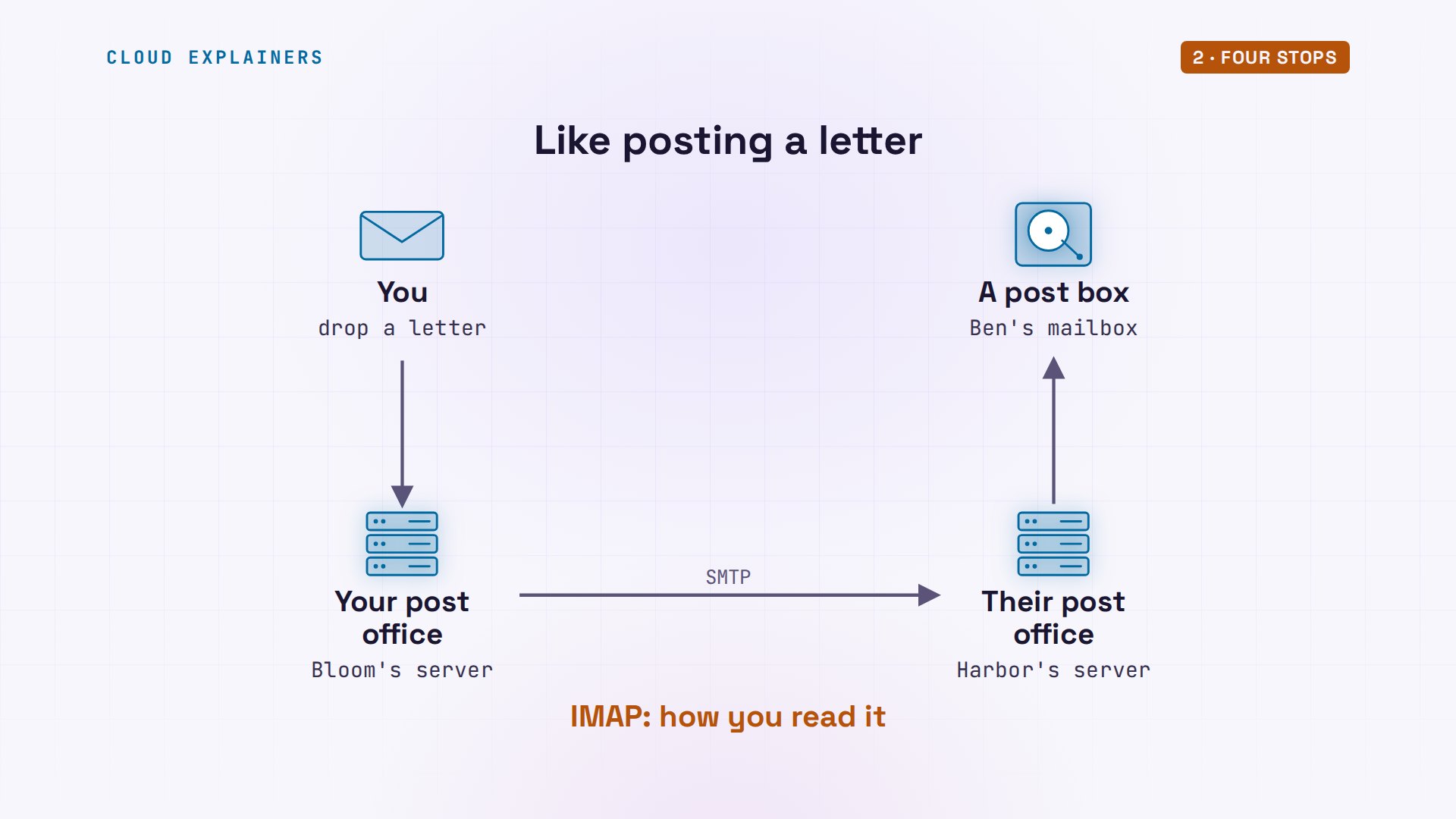
If that sounds like the post, it is. You drop a letter at your local post office. It looks up the town, and passes the letter to the office there, which keeps it in a post box until you collect it. The language the two servers speak on the way is SMTP, the simple mail transfer protocol. Reading is a different language, IMAP.
Why Ana logs in
First stop: why does Ana log in at all? Watch what happens without a login. She connects to her own server with telnet, a tool that just sends what you type, on port 25, the door mail servers use with each other. She asks it to relay, to pass a letter on, to Ben. Refused: relay access denied.
telnet mail.bloom.test 25Trying 203.0.113.25...
Connected to mail.bloom.test.
Escape character is '^]'.
220 mail.bloom.test ESMTP Postfix (Ubuntu)
EHLO ana-laptop
250-mail.bloom.test
250-PIPELINING
250-SIZE 10240000
250-VRFY
250-ETRN
250-STARTTLS
250-ENHANCEDSTATUSCODES
250-8BITMIME
250-DSN
250-SMTPUTF8
250 CHUNKING
MAIL FROM:<ana@bloom.test>
250 2.1.0 Ok
RCPT TO:<ben@harbor.test>
554 5.7.1 <ben@harbor.test>: Relay access denied
QUIT
221 2.0.0 Bye
Connection closed by foreign host.
Good. A server that relays for strangers is an open relay, and spammers find those within hours. So Ana's real email went to port 587, the submission port. Her server switched to an encrypted channel, start TLS, checked her password, and only then took the email.
Who takes mail for harbor.test?
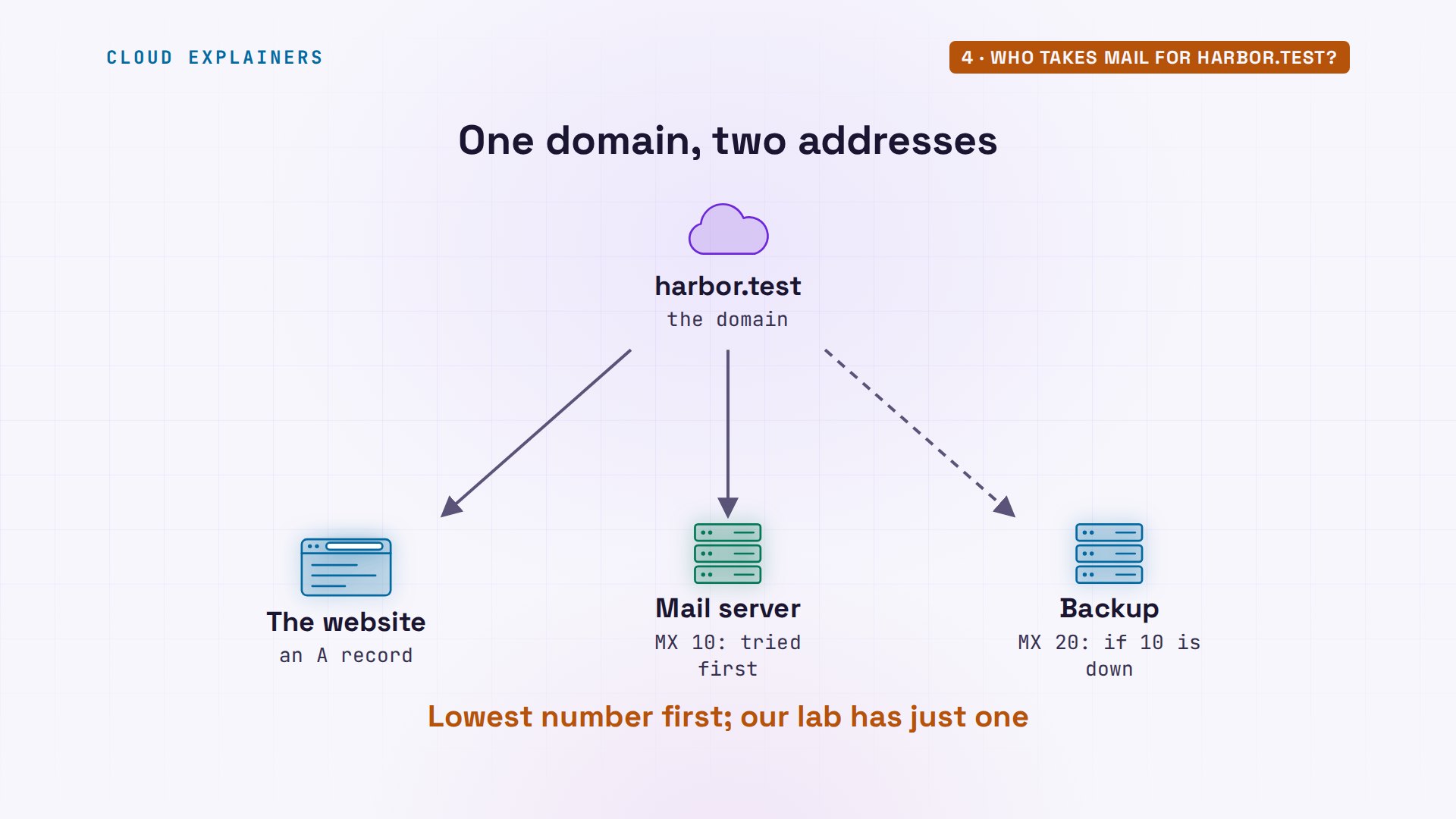
Second stop: Bloom's server has an email for harbor.test. Where does it go? It asks DNS, here with a lookup tool called dig, for the domain's MX record, short for mail exchanger. The answer: mx.harbor.test, with a priority of ten, for when a company lists more than one. One more lookup turns that name into an address, the number computers connect to.
dig +short MX harbor.test10 mx.harbor.test.
dig +short mx.harbor.test203.0.113.30
Bloom's mail log, searched with grep, shows the handover in one line: to Ben, relayed to mx.harbor.test on port 25, status sent. And the receipt from Harbor's server: queued, with its own number for the email. That's the same number on Ben's first stamp.
grep 'to=<ben@harbor.test>' /var/log/mail.logNov 13 14:39:10 mail postfix/smtp[209]: C6E7CE4779: to=<ben@harbor.test>, relay=mx.harbor.test[203.0.113.30]:25, delay=0.05, delays=0/0.01/0.01/0.02, dsn=2.0.0, status=sent (250 2.0.0 Ok: queued as D187FE4782)
Why a separate record for mail? Because a company's website and its mail often live on different machines, even at different companies. Point the MX record at a mail provider, and the mail goes there, while the website stays where it is. And the priority number lets a company list a backup server: the lowest number is tried first.
The conversation
What do two servers actually say? A short conversation, in plain text. The receiving server says it's ready; the sender says hello. Then: who it's from, who it's for, and data, the email itself, ending with a line holding one full stop. Every answer starts with a number: two means OK, three means go on, five means no.
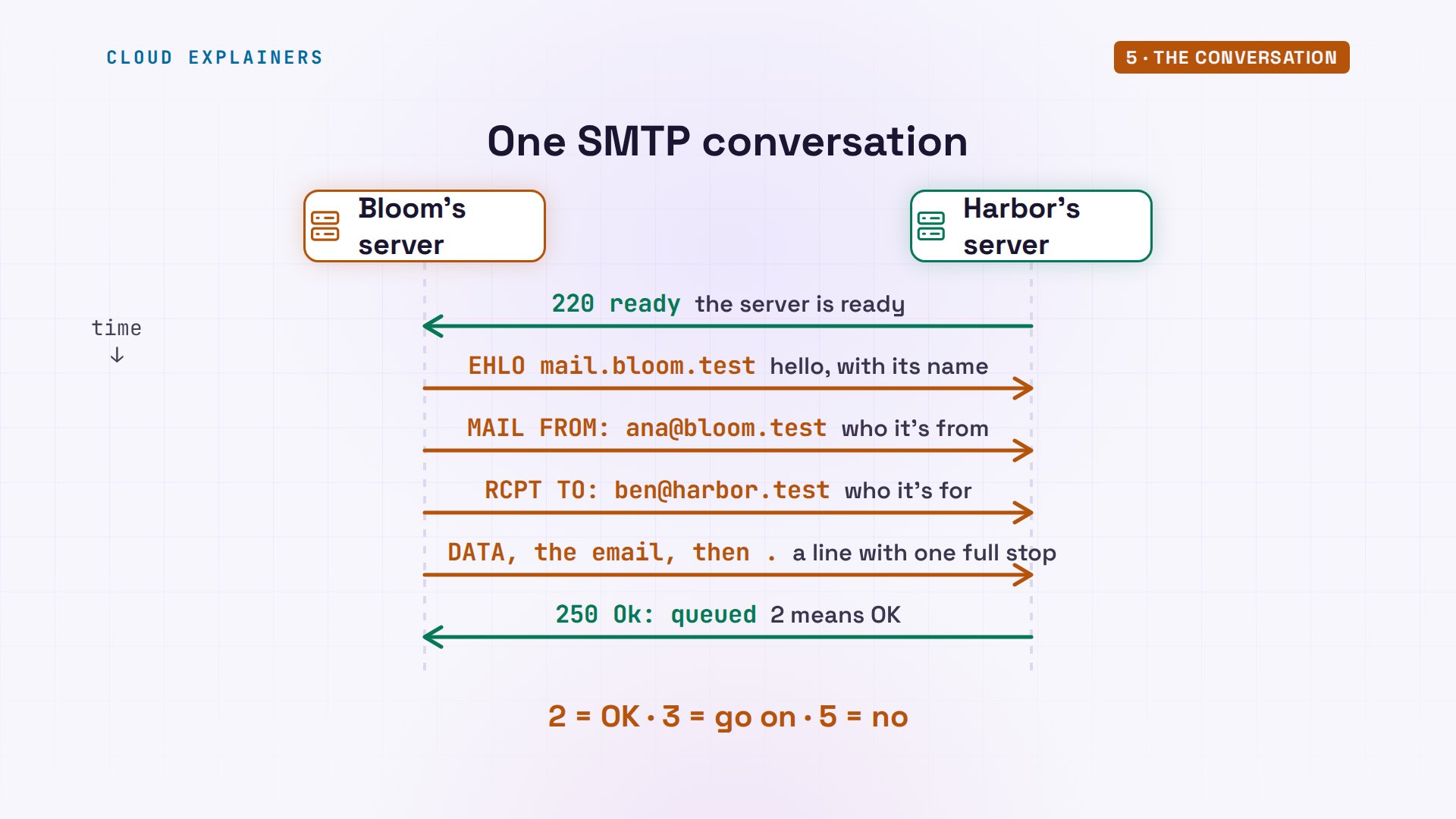
Ana can type it by hand. On Bloom's server, telnet to Harbor's, port 25. Hello: E H L O, short for extended hello. Harbor answers two fifty, OK, and lists what it supports, including start TLS. Mail from Ana: OK. Then she mistypes Ben's name, B N E. Guess first: what will Harbor's server do? Harbor's server refuses it right away, with a five: user unknown.
telnet mx.harbor.test 25Trying 203.0.113.30...
Connected to mx.harbor.test.
Escape character is '^]'.
220 mx.harbor.test ESMTP Postfix (Ubuntu)
EHLO mail.bloom.test
250-mx.harbor.test
250-PIPELINING
250-SIZE 10240000
250-VRFY
250-ETRN
250-STARTTLS
250-ENHANCEDSTATUSCODES
250-8BITMIME
250-DSN
250-SMTPUTF8
250 CHUNKING
MAIL FROM:<ana@bloom.test>
250 2.1.0 Ok
RCPT TO:<bne@harbor.test>
550 5.1.1 <bne@harbor.test>: Recipient address rejected: User unknown in local recipient table
RCPT TO:<ben@harbor.test>
250 2.1.5 Ok
DATA
354 End data with <CR><LF>.<CR><LF>
From: Ana <ana@bloom.test>
To: Ben <ben@harbor.test>
Subject: Typed by hand

This email was typed one line at a time.
.
250 2.0.0 Ok: queued as 662E0E4791
QUIT
221 2.0.0 Bye
Connection closed by foreign host.
550 5.1.1 <bne@harbor.test>: Recipient address rejected: User unknown in local recipient table
Bounces exist too, but here Harbor refused the name before any email was sent. The right name: OK. Data: three, go on. Ana types the email, the From, To and Subject lines, a blank line, the text, and a full stop on its own. Two five oh: queued. Quit, and bye.
Reading the stamps
Now Ben's two stamps make sense. Read them from the bottom up: each server adds its stamp on top. The bottom one: from Ana's laptop, by Bloom's server, with ESMTPSA. The S means encrypted, the A means she logged in. The top one: from Bloom's server, by Harbor's, encrypted, no login, port 25. And the id on it is the number Harbor's server gave in Bloom's log.
Envelope and letter
Look closely: Ana said who the email was for twice. Once in RCPT TO, and once in the To line. That's the post again. RCPT TO and MAIL FROM are the envelope: the servers read only that. From, To and Subject are the letter inside, written for people. Usually they match. They don't have to.
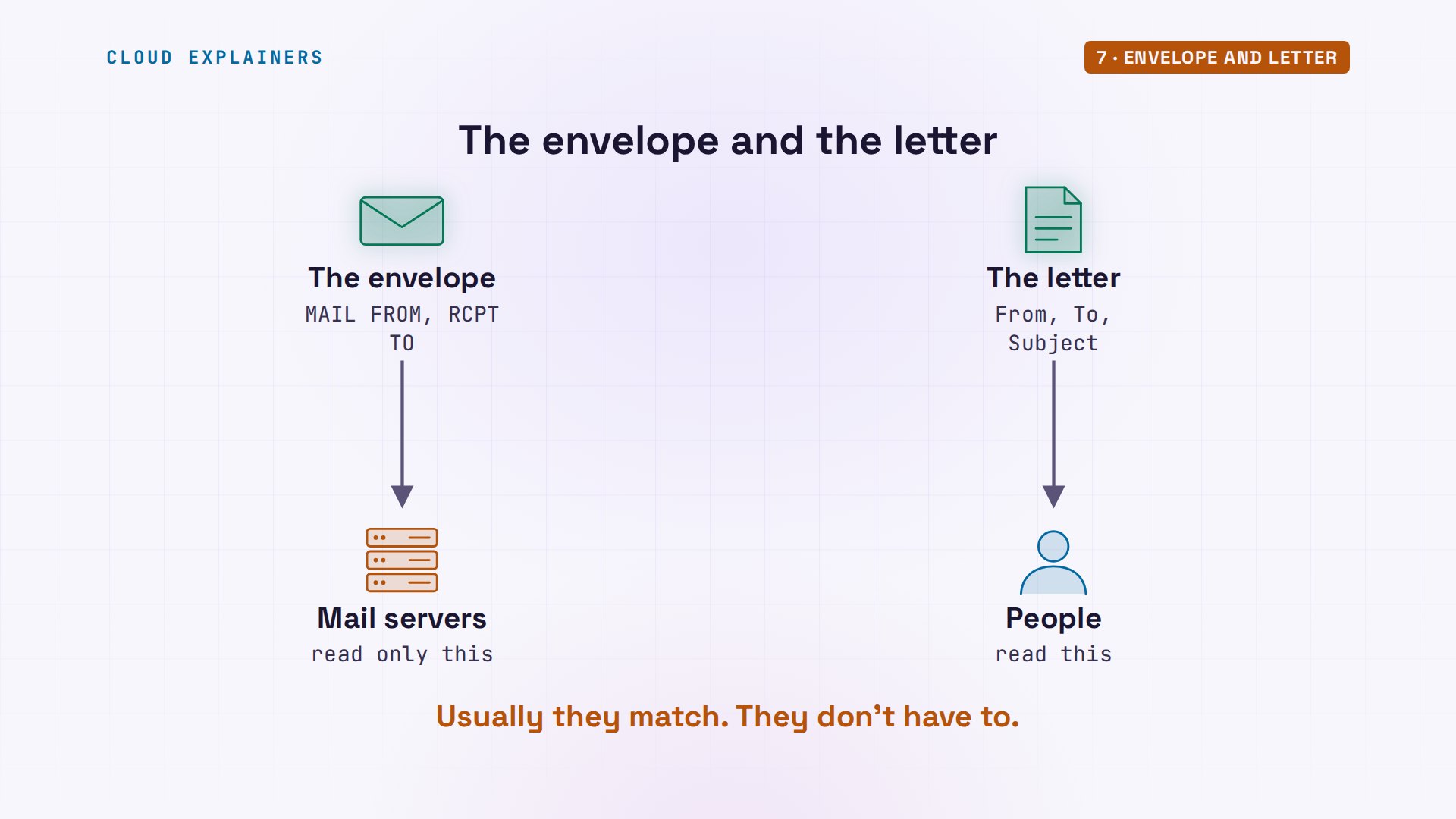
That's how Bcc works. Ana sends an invoice to Ben, with a blind copy to Cara, his manager. One swaks option puts both names on the envelope, another writes only Ben on the To line. So does Ben's copy show Cara's name anywhere? No.
swaks --to ben@harbor.test,cara@harbor.test --h-To ben@harbor.test --h-Subject 'March invoice' --body 'Invoice attached. Ana'Password: === Trying mail.bloom.test:587...
=== Connected to mail.bloom.test.
<-  220 mail.bloom.test ESMTP Postfix (Ubuntu)
 -> EHLO ana-laptop
<-  250-mail.bloom.test
<-  250-PIPELINING
<-  250-SIZE 10240000
<-  250-VRFY
<-  250-ETRN
<-  250-STARTTLS
<-  250-ENHANCEDSTATUSCODES
<-  250-8BITMIME
<-  250-DSN
<-  250-SMTPUTF8
<-  250 CHUNKING
 -> STARTTLS
<-  220 2.0.0 Ready to start TLS
=== TLS started with cipher TLSv1.3:TLS_AES_256_GCM_SHA384:256
=== TLS client certificate not requested and not sent
=== TLS no client certificate set
=== TLS peer[0]   subject=[/CN=mail.bloom.test]
===               commonName=[mail.bloom.test], subjectAltName=[DNS:mail.bloom.test] notAfter=[2026-12-13T14:38:51Z]
=== TLS peer certificate passed CA verification, passed host verification (using host mail.bloom.test to verify)
 ~> EHLO ana-laptop
<~  250-mail.bloom.test
<~  250-PIPELINING
<~  250-SIZE 10240000
<~  250-VRFY
<~  250-ETRN
<~  250-AUTH PLAIN LOGIN
<~  250-ENHANCEDSTATUSCODES
<~  250-8BITMIME
<~  250-DSN
<~  250-SMTPUTF8
<~  250 CHUNKING
 ~> AUTH LOGIN
<~  334 VXNlcm5hbWU6
 ~> YW5hQGJsb29tLnRlc3Q=
<~  334 UGFzc3dvcmQ6
 ~> UFJPVklERURfQlVUX1JFTU9WRUQ=
<~  235 2.7.0 Authentication successful
 ~> MAIL FROM:<ana@bloom.test>
<~  250 2.1.0 Ok
 ~> RCPT TO:<ben@harbor.test>
<~  250 2.1.5 Ok
 ~> RCPT TO:<cara@harbor.test>
<~  250 2.1.5 Ok
 ~> DATA
<~  354 End data with <CR><LF>.<CR><LF>
 ~> Date: Fri, 13 Nov 2026 14:39:25 +0000
 ~> To: ben@harbor.test
 ~> From: ana@bloom.test
 ~> Subject: March invoice
 ~> Message-Id: <20261113143925.000038@ana-laptop>
 ~> X-Mailer: swaks v20240103.0 jetmore.org/john/code/swaks/
 ~>
 ~> Invoice attached. Ana
 ~>
 ~>
 ~> .
<~  250 2.0.0 Ok: queued as 4EC66E4791
 ~> QUIT
<~  221 2.0.0 Bye
=== Connection closed with remote host.
Here's the proof, on Harbor's server. Its log has one line per name on the envelope, Ben, and Cara, each delivered to maildir, a folder for each mailbox. Ben's copy names only Ben. Cara's copy says To: Ben as well. The only record of her was the envelope, and nobody sees the envelope.
grep -E 'to=<(ben|cara)@harbor.test>' /var/log/mail.log | tail -2 | cut -d' ' -f6-5B511E4793: to=<ben@harbor.test>, relay=local, delay=0.01, delays=0/0/0/0, dsn=2.0.0, status=sent (delivered to maildir)
5B511E4793: to=<cara@harbor.test>, relay=local, delay=0.01, delays=0/0/0/0, dsn=2.0.0, status=sent (delivered to maildir)
When the other server is off
Now the question from the start. Ben switches Harbor's mail server off, and Ana sends a change of plan. Her own server still says queued, but it can't reach Harbor. So what happens to the email? It waits, and tries again.
swaks --to ben@harbor.test --h-Subject 'Change of plan' --body 'Make it 20 sunflowers. Ana'Password: === Trying mail.bloom.test:587...
=== Connected to mail.bloom.test.
<-  220 mail.bloom.test ESMTP Postfix (Ubuntu)
 -> EHLO ana-laptop
<-  250-mail.bloom.test
<-  250-PIPELINING
<-  250-SIZE 10240000
<-  250-VRFY
<-  250-ETRN
<-  250-STARTTLS
<-  250-ENHANCEDSTATUSCODES
<-  250-8BITMIME
<-  250-DSN
<-  250-SMTPUTF8
<-  250 CHUNKING
 -> STARTTLS
<-  220 2.0.0 Ready to start TLS
=== TLS started with cipher TLSv1.3:TLS_AES_256_GCM_SHA384:256
=== TLS client certificate not requested and not sent
=== TLS no client certificate set
=== TLS peer[0]   subject=[/CN=mail.bloom.test]
===               commonName=[mail.bloom.test], subjectAltName=[DNS:mail.bloom.test] notAfter=[2026-12-13T14:38:51Z]
=== TLS peer certificate passed CA verification, passed host verification (using host mail.bloom.test to verify)
 ~> EHLO ana-laptop
<~  250-mail.bloom.test
<~  250-PIPELINING
<~  250-SIZE 10240000
<~  250-VRFY
<~  250-ETRN
<~  250-AUTH PLAIN LOGIN
<~  250-ENHANCEDSTATUSCODES
<~  250-8BITMIME
<~  250-DSN
<~  250-SMTPUTF8
<~  250 CHUNKING
 ~> AUTH LOGIN
<~  334 VXNlcm5hbWU6
 ~> YW5hQGJsb29tLnRlc3Q=
<~  334 UGFzc3dvcmQ6
 ~> UFJPVklERURfQlVUX1JFTU9WRUQ=
<~  235 2.7.0 Authentication successful
 ~> MAIL FROM:<ana@bloom.test>
<~  250 2.1.0 Ok
 ~> RCPT TO:<ben@harbor.test>
<~  250 2.1.5 Ok
 ~> DATA
<~  354 End data with <CR><LF>.<CR><LF>
 ~> Date: Fri, 13 Nov 2026 14:39:36 +0000
 ~> To: ben@harbor.test
 ~> From: ana@bloom.test
 ~> Subject: Change of plan
 ~> Message-Id: <20261113143936.000040@ana-laptop>
 ~> X-Mailer: swaks v20240103.0 jetmore.org/john/code/swaks/
 ~>
 ~> Make it 20 sunflowers. Ana
 ~>
 ~>
 ~> .
<~  250 2.0.0 Ok: queued as 896B5E47A0
 ~> QUIT
<~  221 2.0.0 Bye
=== Connection closed with remote host.
Bloom's queue shows it, with the reason: connection refused. SMTP was built for a network where servers come and go, so a sender keeps the email and retries for days. Here, a setting in Postfix, the mail server program, says up to five days. Only then does Ana get a bounce: an email back, saying hers couldn't be delivered.
mailq-Queue ID-  --Size-- ----Arrival Time---- -Sender/Recipient-------
896B5E47A0      620 Fri Nov 13 14:39:36  ana@bloom.test
              (connect to mx.harbor.test[203.0.113.30]:25: Connection refused)
                                         ben@harbor.test

-- 0 Kbytes in 1 Request.
postconf maximal_queue_lifetimemaximal_queue_lifetime = 5d
Ben switches his server back on. Bloom's server would try again within minutes; Ana, who looks after Bloom's server, tells it to flush the queue: try everything now. The queue is empty, and Ben's mailbox holds four emails, the change of plan included. Nothing was lost.
sudo postqueue -f
mailqMail queue is empty
Reading it: IMAP
Ben reads with IMAP, the other language. With curl standing in for his mail app, his laptop logs in to Harbor's server and asks for the list: four messages. SMTP only ever pushes mail towards its destination. IMAP lets Ben look at it where it lives, on Harbor's server, so his phone and his laptop see the same inbox.
curl -sn --ssl-reqd imap://mx.harbor.test/INBOX -X 'SEARCH ALL'* SEARCH 1 2 3 4
curl -sn --ssl-reqd 'imap://mx.harbor.test/INBOX;MAILINDEX=4' | grep -E '^(Subject|Date):'Date: Fri, 13 Nov 2026 14:39:36 +0000
Subject: Change of plan
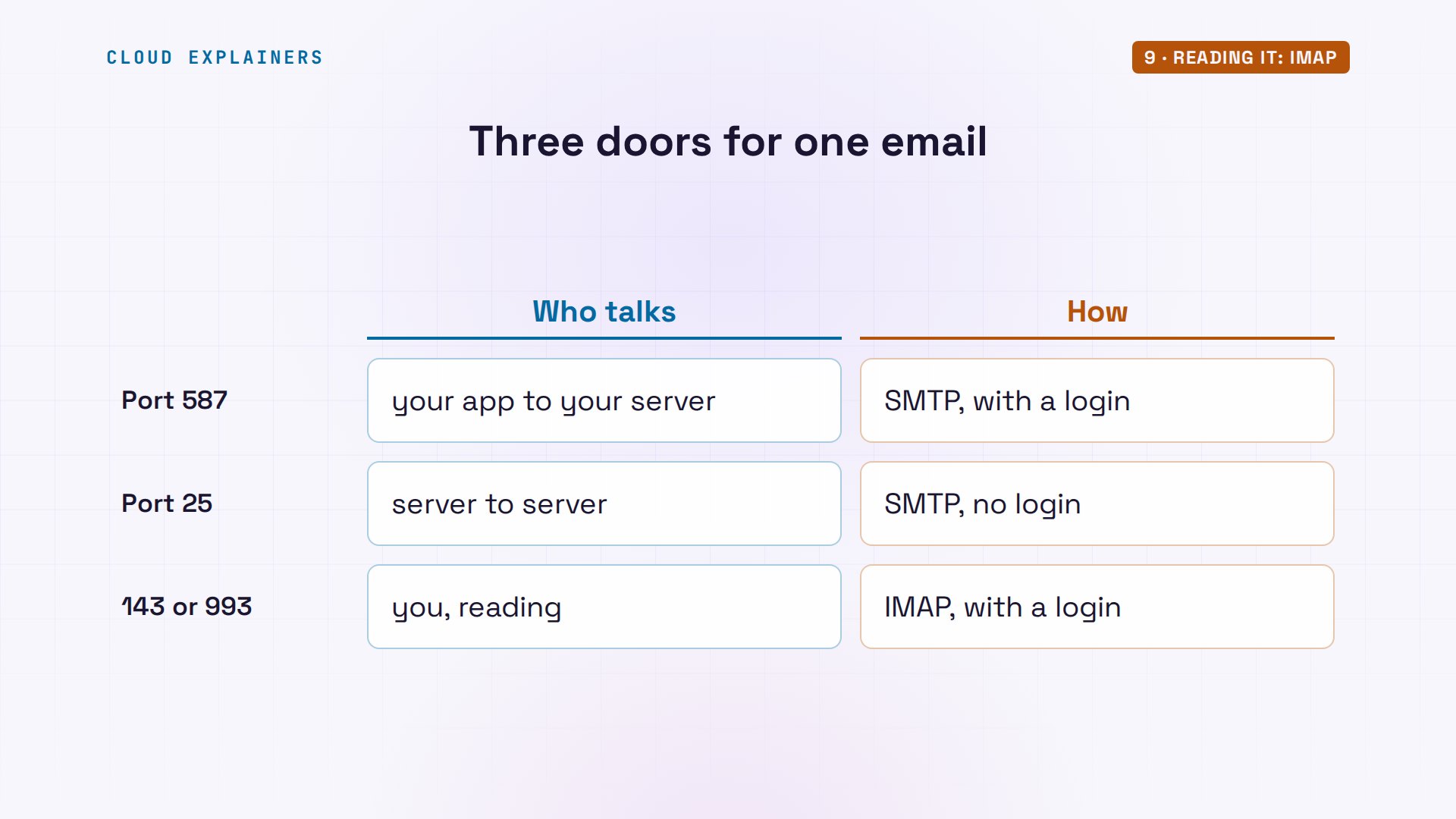
So one email used three doors. A port is a numbered door on a machine, one for each service. Five eight seven, from your app to your own server, with a login. Twenty-five, from server to server. And for reading, IMAP: one four three, or nine nine three when the whole connection is encrypted from the start.
Is it really from Bloom?
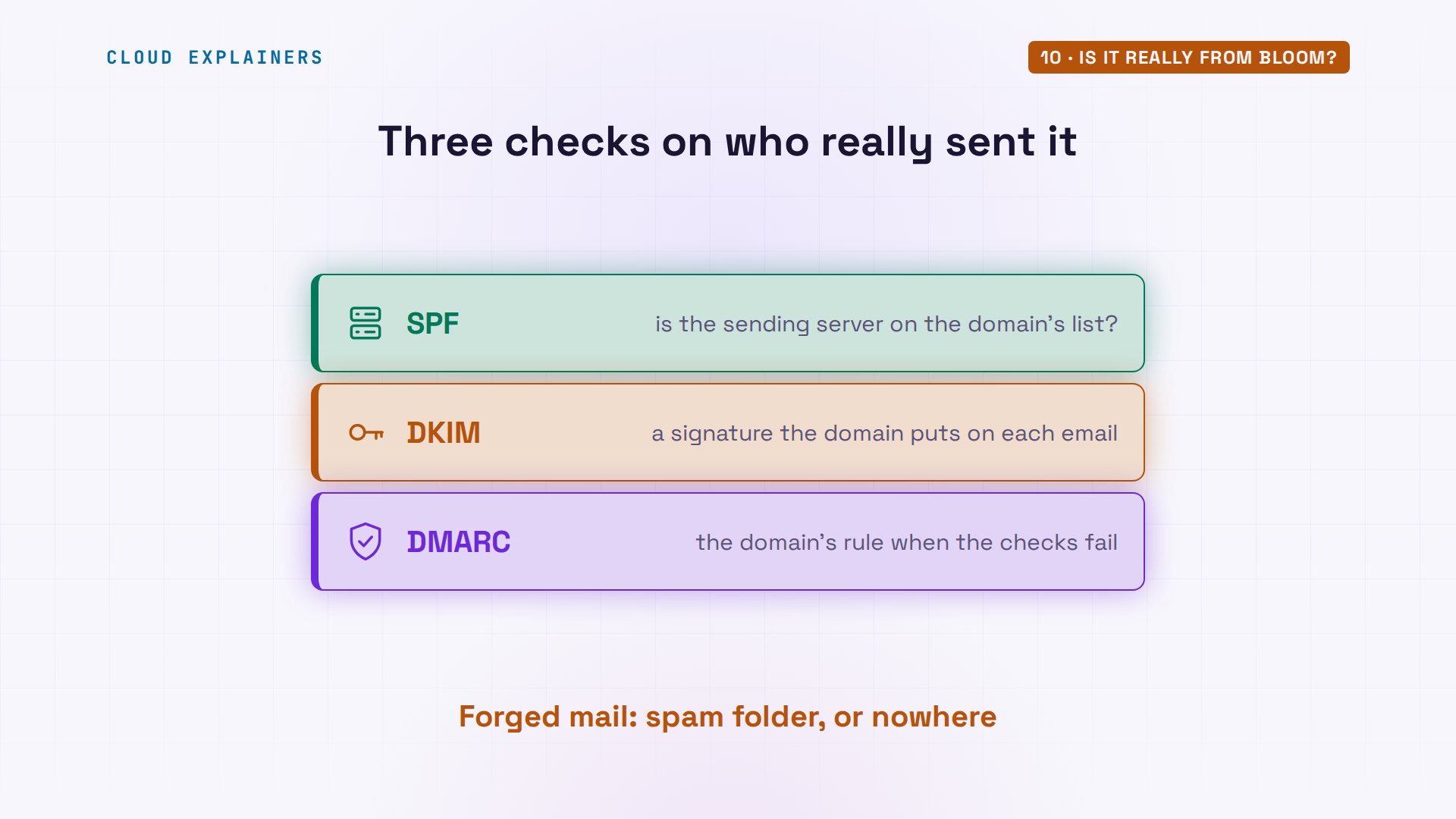
One worry. Ana typed MAIL FROM by hand, so anyone could type her address. How does Harbor's server know the email really came from Bloom? Bloom publishes a list in DNS, an SPF record: mail from bloom.test only comes from the server at this one IP address. Harbor checked the sending server against it, and stamped the result on Ben's copy: pass.
dig +short TXT bloom.test"v=spf1 ip4:203.0.113.25 -all"
curl -sn --ssl-reqd 'imap://mx.harbor.test/INBOX;MAILINDEX=1' | grep -A1 '^Received-SPF'Received-SPF: Pass (mailfrom) identity=mailfrom; client-ip=203.0.113.25; helo=mail.bloom.test; envelope-from=ana@bloom.test; receiver=harbor.test
Received: from mail.bloom.test (mail.bloom.test [203.0.113.25])
A server that isn't on the list gets a fail instead. Big providers add two more checks: DKIM, a signature on the email, and DMARC, the domain's rule for what to do when the checks fail. Together, they're why most forged mail lands in spam, or nowhere.
Recap
So: your app logs in to your own server on port 587. That server asks DNS for the MX record, and hands the envelope and the letter to the other server on port 25. If it's down, the email waits, and retries. And the reader collects it with IMAP.
If you can read those two stamps now, a like helps YouTube show this to more beginners, and subscribing brings you the next one, where we take apart another thing you use every day.
Every server you saw was real, in a small lab of five containers. Every command and the lab files are linked in the description. Thanks for watching Cloud Explainers.
Sources
- RFC 5321, SMTP (commands, reply codes, MX lookup, the envelope, retrying)
- RFC 5322, the format of a message (From, To, Subject, Received)
- RFC 6409, message submission on port 587 with a login
- RFC 9051, IMAP
- RFC 7208, SPF
- Postfix: maximal_queue_lifetime (how long mail waits in the queue)
- Postfix: mailq
- RFC 2606 (.test names are reserved for examples)
Demos: containers on our own Mac standing in for a flower stall's and a cafe's mail servers; both businesses are made up, .test names and 203.0.113.x addresses are reserved for examples, and the passwords were made for this lab. Watch the full video on YouTube.
More videos
Every Networking Term a Beginner Needs in 12 Minutes
How to Fix Docker 'Permission Denied' on docker.sock
How to Fix Git 'Updates Were Rejected' When You Push
How to Fix nginx 502 Bad Gateway Errors on Linux
How to Fix Linux apt 'Could Not Get Lock' Errors (Ubuntu)

The Python Roadmap for Beginners

Golang REST API with Gin: Full Tutorial for Beginners
How a WireGuard VPN Network Works

Linux Makefiles Will Finally Make Sense After This

SAML vs OAuth vs OpenID Connect: What's the Difference?

How to Fix Python cron Jobs That Never Run

Linux Bash Scripting: Full Tutorial for Beginners

How PXE Network Boot Works

How Active Directory Works

How to Fix a Linux systemd Service That Won't Start

Linux Logs: syslog vs journald

JWT vs Session Cookies: Which One Should You Use?

Docker vs Docker Compose: Which One Should You Use?

How to Fix Docker Compose Containers That Can't Talk to Each Other

Django Full Tutorial for Beginners

How Linux systemd Works

How to Fix 'Windows Cannot Access' Network Share Errors (SMB)

REST vs gRPC: Which One Should You Use?

How to Fix SSL Certificate Chain Errors (Missing Intermediate)

Every Python Concept for Beginners in 10 Minutes

Every SQL Join Type in 10 Minutes

Why OpenRouter Free Models Hit Their Limit So Fast

Why Your Gemini API Free Tier Runs Out So Fast

OpenRouter Will Finally Make Sense After This

How Redis Caching Works

Gemini API vs Vertex AI: Which One Should You Use?

How to Fix a Leaked Gemini API Key

Why Golang Uses Goroutines Instead of Threads

How to Fix Gemini API Error 429: Resource Exhausted

Claude Token Pricing Will Finally Make Sense After This

Why Python Web Scraping Returns Nothing (and the Fix)

Python uv vs pip: Which One Should You Use?

Python Automation: Full Tutorial for Beginners

How OAuth Login Works

Google AI Studio Will Finally Make Sense After This

What Happens When You Run a Docker Container

How to Fix Claude Code Billing Your API Key Instead of Your Plan

Why Passkeys Can't Be Phished Like Passwords

PowerShell vs Bash: Which One Should You Learn?

The Linux Roadmap for Beginners

Django vs FastAPI: Which One Should You Use?

Why SQLite Is the Most Used Database in the World

How a NoSQL Database Like MongoDB Works

How to Fix Python pip error: externally-managed-environment

How to Fix MySQL Too Many Connections Database Errors

Golang Concurrency Will Finally Make Sense After This

How Amazon S3 Works

How Kubernetes Works

How Git Works

How to Fix Docker Port Already Allocated Errors

How PostgreSQL Works

How to Fix Git Merge Conflicts

How to Fix No Space Left on Device in Linux

How the Internet Works

SQL vs NoSQL: When Each One Wins

How to Fix JWT Token Expired Errors (401 Unauthorized)

Claude API vs Claude Pro: Why Your Subscription Doesn't Include It

Why AI Agent Skills Beat Giant Prompts

Linux Cron Jobs Will Finally Make Sense After This

Security Logs Will Finally Make Sense After This

How to Fix a Security Leak: An API Key Pushed to GitHub

DNS Will Finally Make Sense After This

Never Ignore a Security Update

Two-Factor Authentication Will Finally Make Sense

Never Expose a Database to the Internet

SSH Keys vs Passwords: Which Is Safer for Security?

The 5 Levels of Linux Boot: From Power On to Login

The 5 Levels of Network Firewalls

Password Security: Why Hackers Crack Weak Passwords

Why Your Linux Server Runs Out of Memory

HTTP vs HTTPS: What Actually Changes on Your Network

Every Linux File Permission You Need to Know

Linux Processes vs Threads: When Each One Wins

The OSI Model Will Finally Make Sense After This

The 7 Levels of Git

Every Network Troubleshooting Command You Need

Hashing vs Encryption in Cybersecurity: When Each One Wins

Why the Internet Ran Out of IP Addresses

Linux Package Managers: apt vs Snap vs Flatpak

Why Python Is Slow (and When It Doesn't Matter)

TCP vs UDP: When Each One Wins

Stop Running Linux as Root (Do This Instead)

Linux Users and Groups Will Finally Make Sense

Why Phishing Beats Good Security (and How to Spot It)

The 7 Levels of Docker

AI Agents Will Finally Make Sense After This

Stop Using git push --force (Use This Instead)

Agent Skills vs MCP: When Each One Wins

Networking Will Finally Make Sense After This

Every Linux Command You Actually Need

The 7 Levels of Cybersecurity

Every System Design Concept You Need, in One Diagram
