
The Python Roadmap for Beginners
Learning Python isn't hard because of the syntax: beginners get stuck on python: command not found, a TypeError about an int and a str, and pip refusing to install anything. This roadmap puts the stages in the order that clears each wall before you hit it: run Python, the basics, errors and files, packages in a virtual environment, one real project, and tests with Git. We follow one small bakery program from the first command to a tested spreadsheet report, all run for real on Ubuntu.
Where beginners get stuck
You've decided to learn Python, and you expect the hard part to be the syntax. It usually isn't. Here are the first three walls, for real. You type python: command not found. Your first program stops with a type error, about an int and a str. And pip refuses to install anything: externally managed environment. None of them is about syntax, and each one belongs to a stage you can learn before you hit it.
pythonCommand 'python' not found, did you mean:
  command 'python3' from deb python3
  command 'python' from deb python-is-python3
python3 totals.pyTraceback (most recent call last):
  File "/home/ana/orders/totals.py", line 17, in <module>
    for item, qty in totals(read_orders("orders.csv")).items():
                     ^^^^^^^^^^^^^^^^^^^^^^^^^^^^^^^^^
  File "/home/ana/orders/totals.py", line 13, in totals
    sold[item] = sold.get(item, 0) + row["qty"]
                 ~~~~~~~~~~~~~~~~~~^~~~~~~~~~~~
TypeError: unsupported operand type(s) for +: 'int' and 'str'
pip install openpyxlerror: externally-managed-environment

× This environment is externally managed
╰─> To install Python packages system-wide, try apt install
    python3-xyz, where xyz is the package you are trying to
    install.

    If you wish to install a non-Debian-packaged Python package,
    create a virtual environment using python3 -m venv path/to/venv.
    Then use path/to/venv/bin/python and path/to/venv/bin/pip. Make
    sure you have python3-full installed.

    If you wish to install a non-Debian packaged Python application,
    it may be easiest to use pipx install xyz, which will manage a
    virtual environment for you. Make sure you have pipx installed.

    See /usr/share/doc/python3.12/README.venv for more information.

note: If you believe this is a mistake, please contact your Python installation or OS distribution provider. You can override this, at the risk of breaking your Python installation or OS, by passing --break-system-packages.
hint: See PEP 668 for the detailed specification.
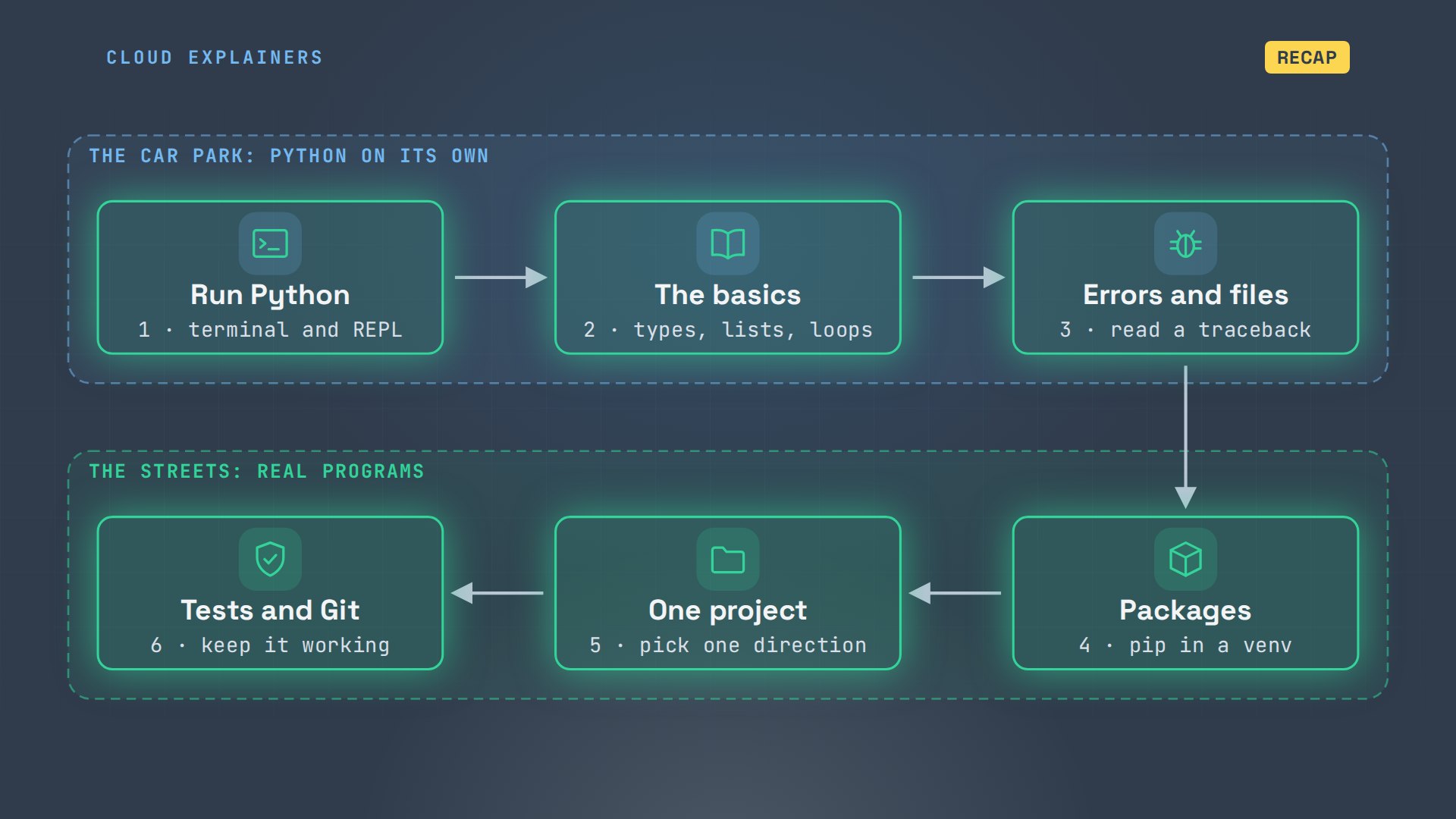
Here's an order that works, in six stages. Like learning to drive: an empty car park first, Python on its own, then the streets: other people's code, a real project, and keeping it working. We'll follow one program, at a neighbourhood bakery. One number in it will be wrong, and its spreadsheet won't show it.
Stage 1: run Python
Stage one sounds too simple to need a stage. On Ubuntu, a popular Linux, the command is python3; on Windows it's py. Plain python gets you this, and the helper even suggests the fix. Python 3.12, already installed. With nothing after it, python3 opens the REPL: three arrows, waiting for one line, and answering at once. It's where you try things out.
python3 --versionPython 3.12.3
python3Python 3.12.3 (main, Aug 31 2026, 10:18:26) [GCC 13.3.0] on linux
Type "help", "copyright", "credits" or "license" for more information.
>>> 2 + 35
>>> print("Good morning")Good morning
A script is the same lines, saved from any text editor in a file ending in.py; cat prints a file to the screen. You run it with python3 and the file's name. That's the whole of stage one: the REPL to try a line, a file to keep it.
cat hello.pyprint("Good morning from the bakery")
python3 hello.pyGood morning from the bakery
Stage 2: the basics
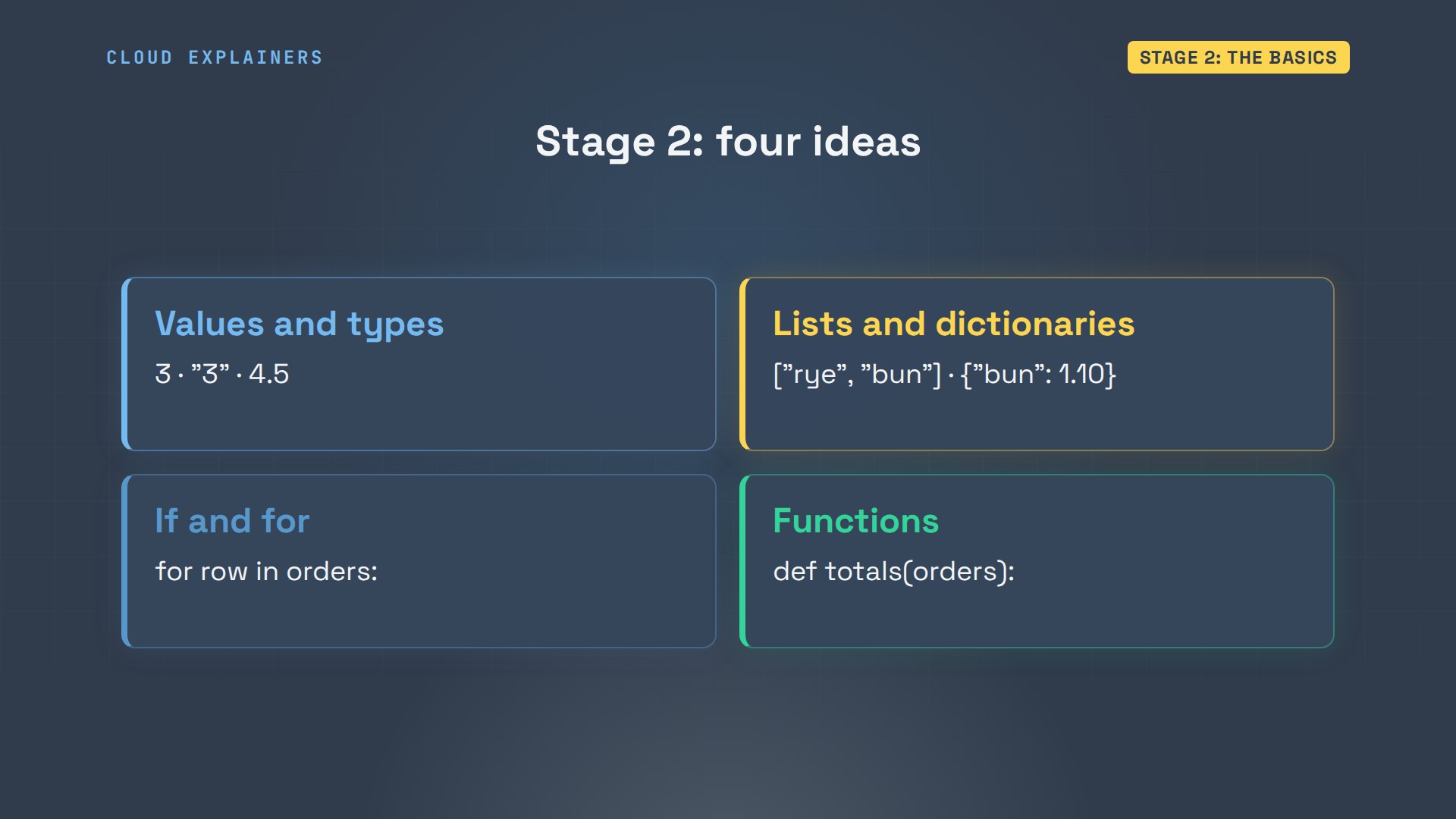
Stage two is four ideas: values and their types, lists and dictionaries, if and for, and functions. Here's the one that trips people first.
Every value has a type. A number read from a file arrives as text, a string. Here, the quantity is the string three. Guess first: what does times two give? Thirty-three. Times two repeats the text. int turns it into a whole number, and now it's six.
python3Python 3.12.3 (main, Aug 31 2026, 10:18:26) [GCC 13.3.0] on linux
Type "help", "copyright", "credits" or "license" for more information.
>>> qty = "3"
>>> type(qty)<class 'str'>
>>> qty * 2'33'
>>> int(qty) * 26
Two more you'll use every day. A list keeps things in order, and len counts them. A dictionary looks a value up by its name: the croissant's price.
>>> items = ["rye loaf", "croissant", "sourdough"]
>>> len(items)3
>>> prices = {"rye loaf": 4.50, "croissant": 2.20}
>>> prices["croissant"]2.2
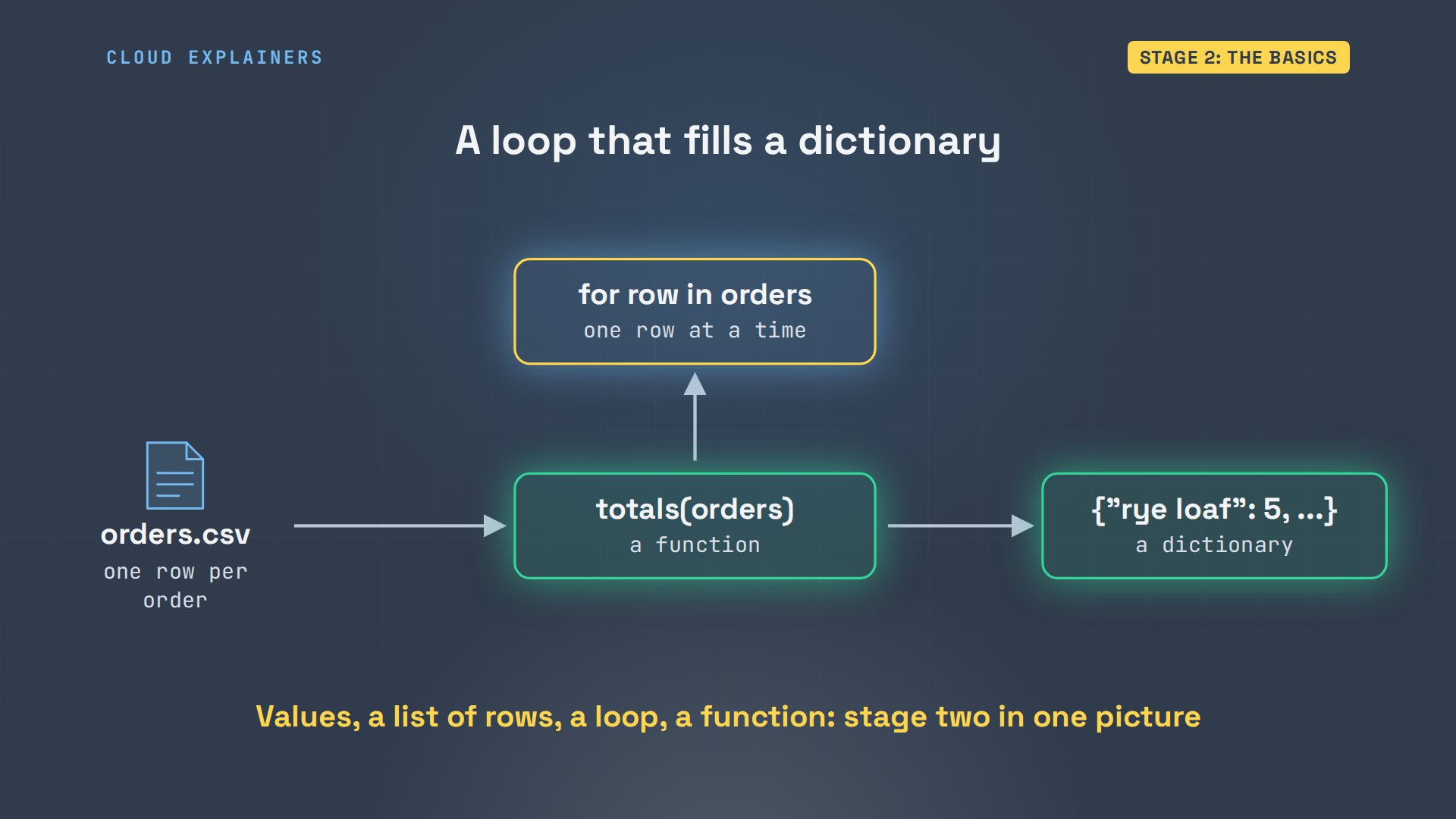
Loops and functions put them together. A function takes the orders, and a loop goes through them one row at a time, adding each row's quantity to its item in a dictionary. At the end, it hands the dictionary back: each item and how many sold.
Stage 3: errors and files
Why give errors a stage of their own? Because you'll read more of them than anything else. Ana's first real program reads the bakery's orders from a CSV file, plain text with commas between columns, and adds up how many of each item sold. She runs it, and gets this: a traceback.
cat orders.csvitem,qty,price
rye loaf,3,4.50
croissant,12,2.20
sourdough,4,5.80
rye loaf,2,4.50
croissant,6,2.20
cinnamon bun,3,1.10
cat totals.pyimport csv


def read_orders(path):
    with open(path) as f:
        return list(csv.DictReader(f))


def totals(orders):
    sold = {}
    for row in orders:
        item = row["item"]
        sold[item] = sold.get(item, 0) + row["qty"]
    return sold


for item, qty in totals(read_orders("orders.csv")).items():
    print(f"{item}: {qty}")
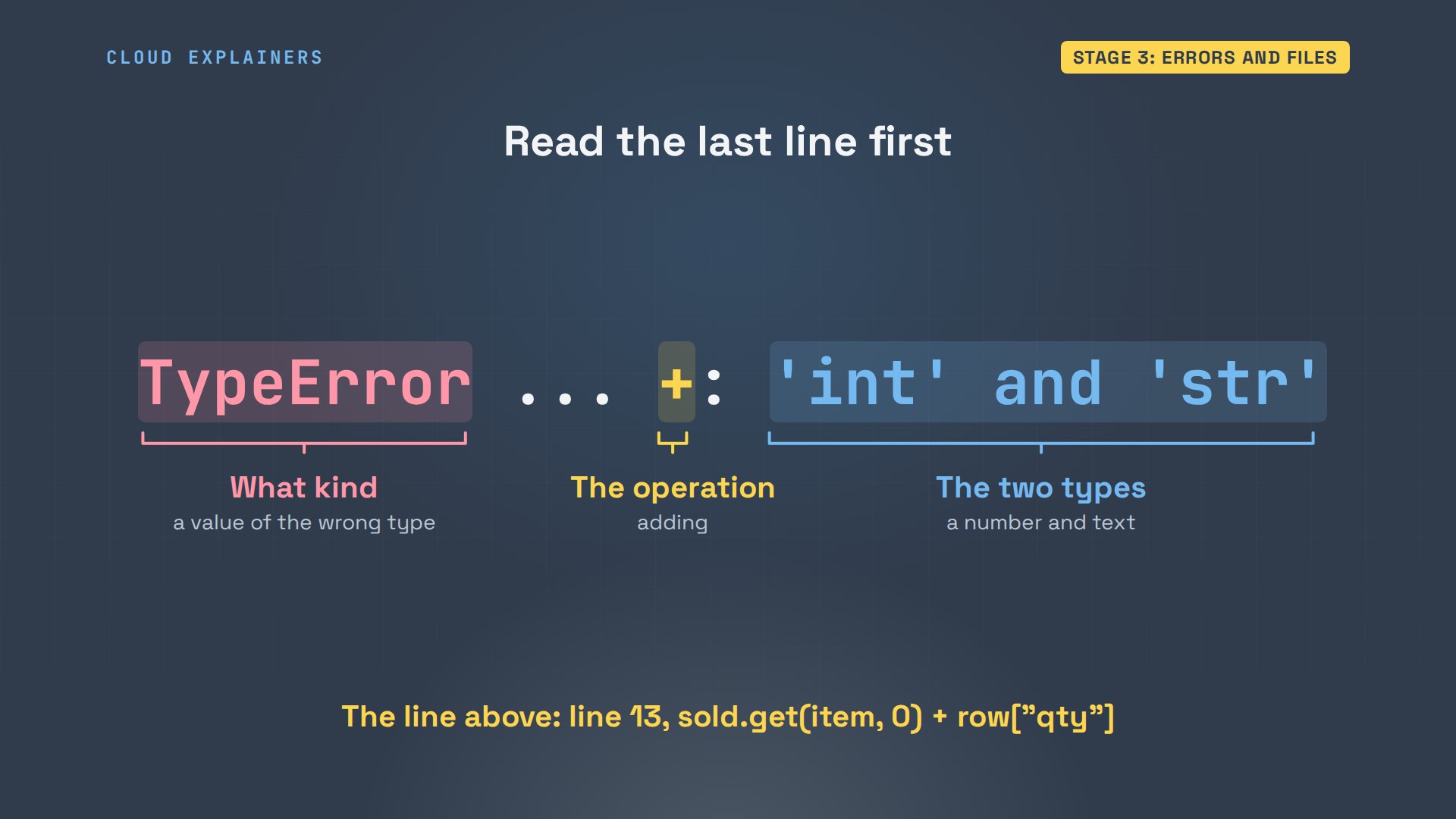
Read a traceback from the bottom. The last line says what went wrong: a type error. Plus, between an int and a str. The line above says where: line 13, adding the quantity. It's the same string as in stage two: the file gave her text.
She wraps the quantity in int; grep, which prints the lines that contain a word, shows the change. And the totals come out: five rye loaves, eighteen croissants. The other error you'll meet in this stage: a file that isn't where Python looks. We moved the CSV away and ran it again. Same traceback, read the same way: the last line names the missing file.
grep qty totals.pysold[item] = sold.get(item, 0) + int(row["qty"]) for item, qty in totals(read_orders("orders.csv")).items(): print(f"{item}: {qty}")
python3 totals.pyrye loaf: 5
croissant: 18
sourdough: 4
cinnamon bun: 3
python3 totals.pyTraceback (most recent call last):
  File "/home/ana/orders/totals.py", line 17, in <module>
    for item, qty in totals(read_orders("orders.csv")).items():
                            ^^^^^^^^^^^^^^^^^^^^^^^^^
  File "/home/ana/orders/totals.py", line 5, in read_orders
    with open(path) as f:
         ^^^^^^^^^^
FileNotFoundError: [Errno 2] No such file or directory: 'orders.csv'
Stage 4: packages
Now the streets, where other people's code comes in. The owner wants a spreadsheet, and Python can't write Excel files on its own. A package called openpyxl can: someone else's code, that you install. head shows the top of her new version, and import loads that package's tools into her program. Python can't find it yet. And pip, the installer, refuses: externally managed environment.
head -n 3 totals.pyimport csv

from openpyxl import Workbook
python3 totals.pyTraceback (most recent call last):
  File "/home/ana/orders/totals.py", line 3, in <module>
    from openpyxl import Workbook
ModuleNotFoundError: No module named 'openpyxl'
Why? Ubuntu runs parts of itself on that Python, so it's protected. The answer is a virtual environment: a folder with the project's own Python and its own packages. Each project gets one, and nothing it installs can reach the system's.
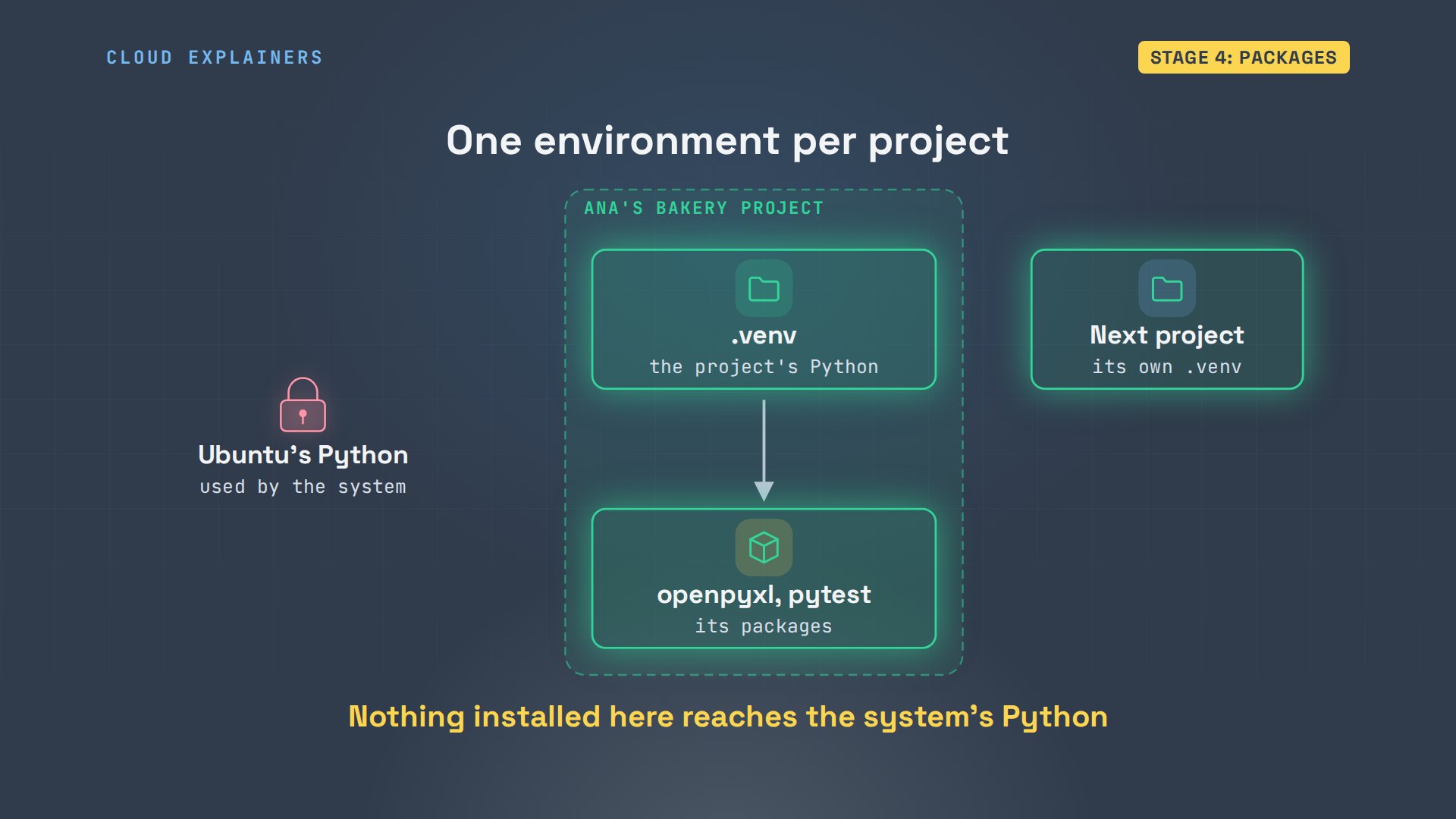
python3 -m venv makes one, in a folder called.venv. source activates it, which switches this terminal over to it. Now python means the one inside that folder: which shows its path. pip installs openpyxl there, and the program saves the spreadsheet.
python3 -m venv .venv
source .venv/bin/activate
(.venv) ana@bakery:~/orders$ which python/home/ana/orders/.venv/bin/python
(.venv) ana@bakery:~/orders$ pip install openpyxlCollecting openpyxl
  Downloading openpyxl-3.1.5-py2.py3-none-any.whl.metadata (2.5 kB)
Collecting et-xmlfile (from openpyxl)
  Downloading et_xmlfile-2.0.0-py3-none-any.whl.metadata (2.7 kB)
Downloading openpyxl-3.1.5-py2.py3-none-any.whl (250 kB)
Downloading et_xmlfile-2.0.0-py3-none-any.whl (18 kB)
Installing collected packages: et-xmlfile, openpyxl
Successfully installed et-xmlfile-2.0.0 openpyxl-3.1.5
(.venv) ana@bakery:~/orders$ python3 totals.pySaved report.xlsx: 4 items
One more habit for this stage. pip freeze writes down every package in the environment, with its exact version, into a file called requirements.txt. Openpyxl, and the package it needed. On a new laptop, pip install -r requirements.txt reads that list and builds the same environment again.
(.venv) ana@bakery:~/orders$ pip freeze > requirements.txt
(.venv) ana@bakery:~/orders$ cat requirements.txtet_xmlfile==2.0.0
openpyxl==3.1.5
Stage 5: one project
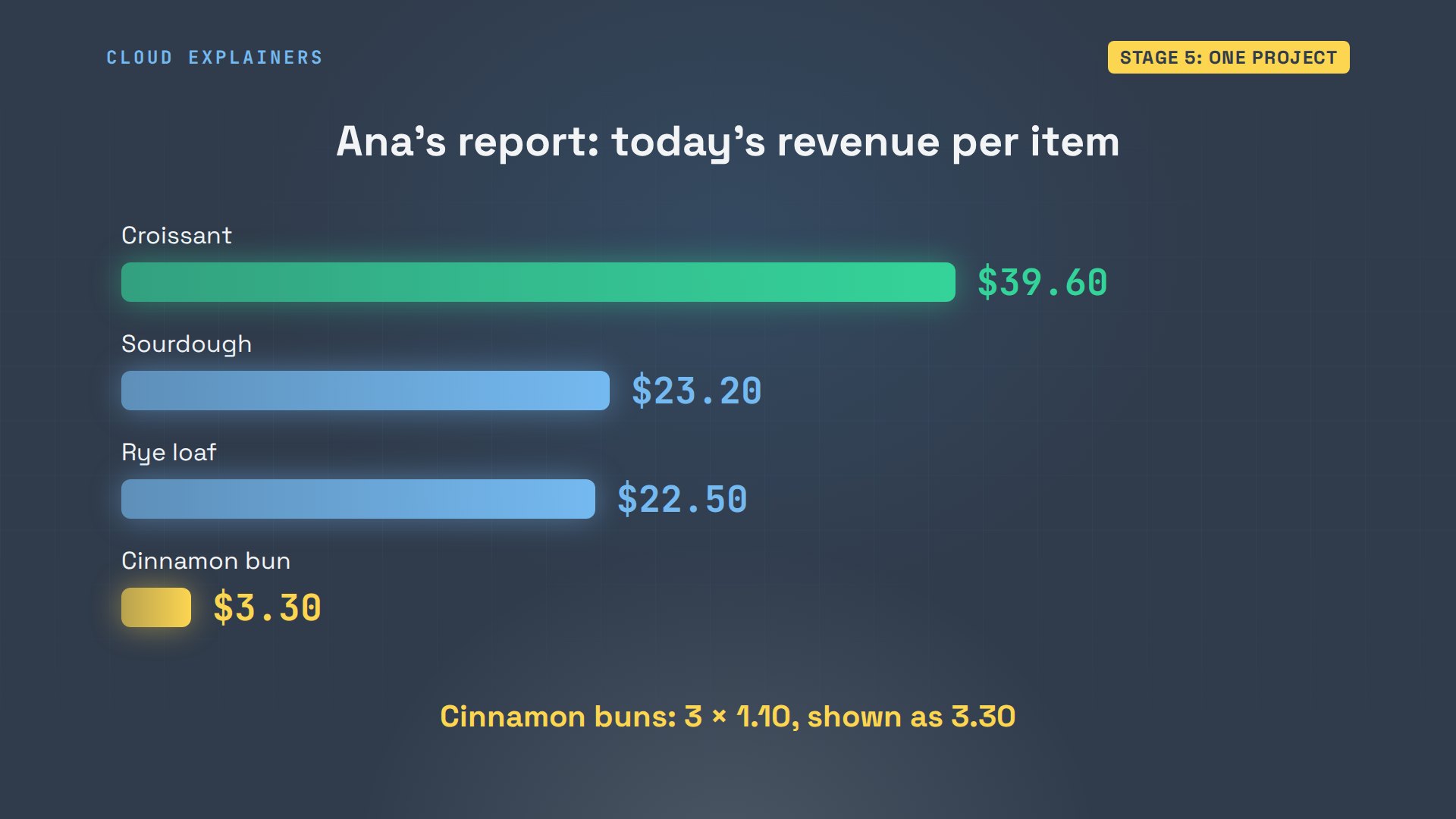
Where do you go from here? Pick one direction, not all of them. Automation: scripts that do boring work, like Ana's report. The web: sites and APIs, ways for programs to talk, built with Django or FastAPI, two Python packages for the web. Data: pages and files, cleaned up into tables. Each has a full episode on this channel. The best first project is one you'd actually use.
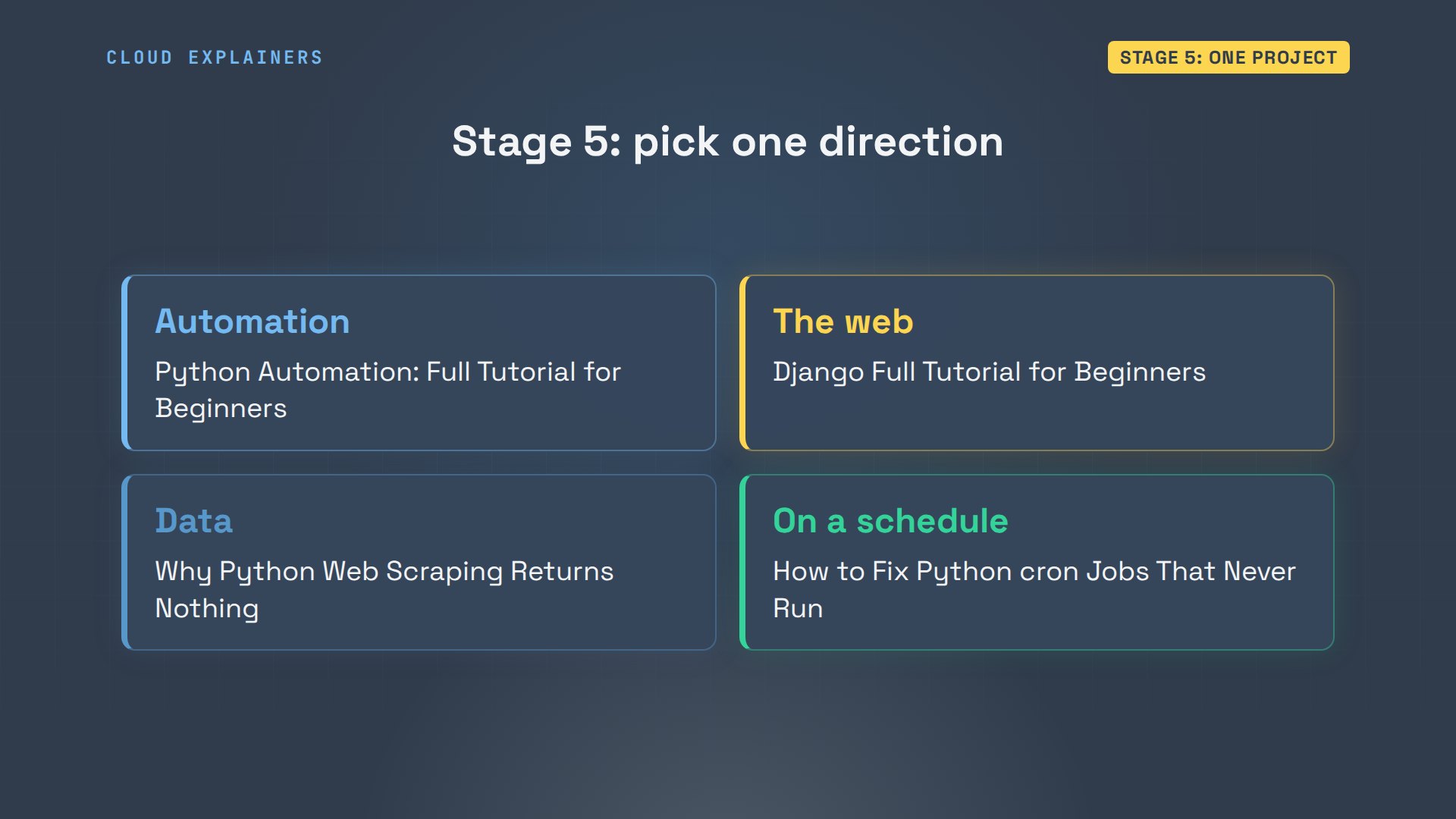
What a project really teaches you is to read documentation. Ana didn't memorise openpyxl. Its own tutorial starts with the same import line she used, and the next example gives her the sheet to write into. Copy one small example, run it, then change it: that's how every package gets learned.
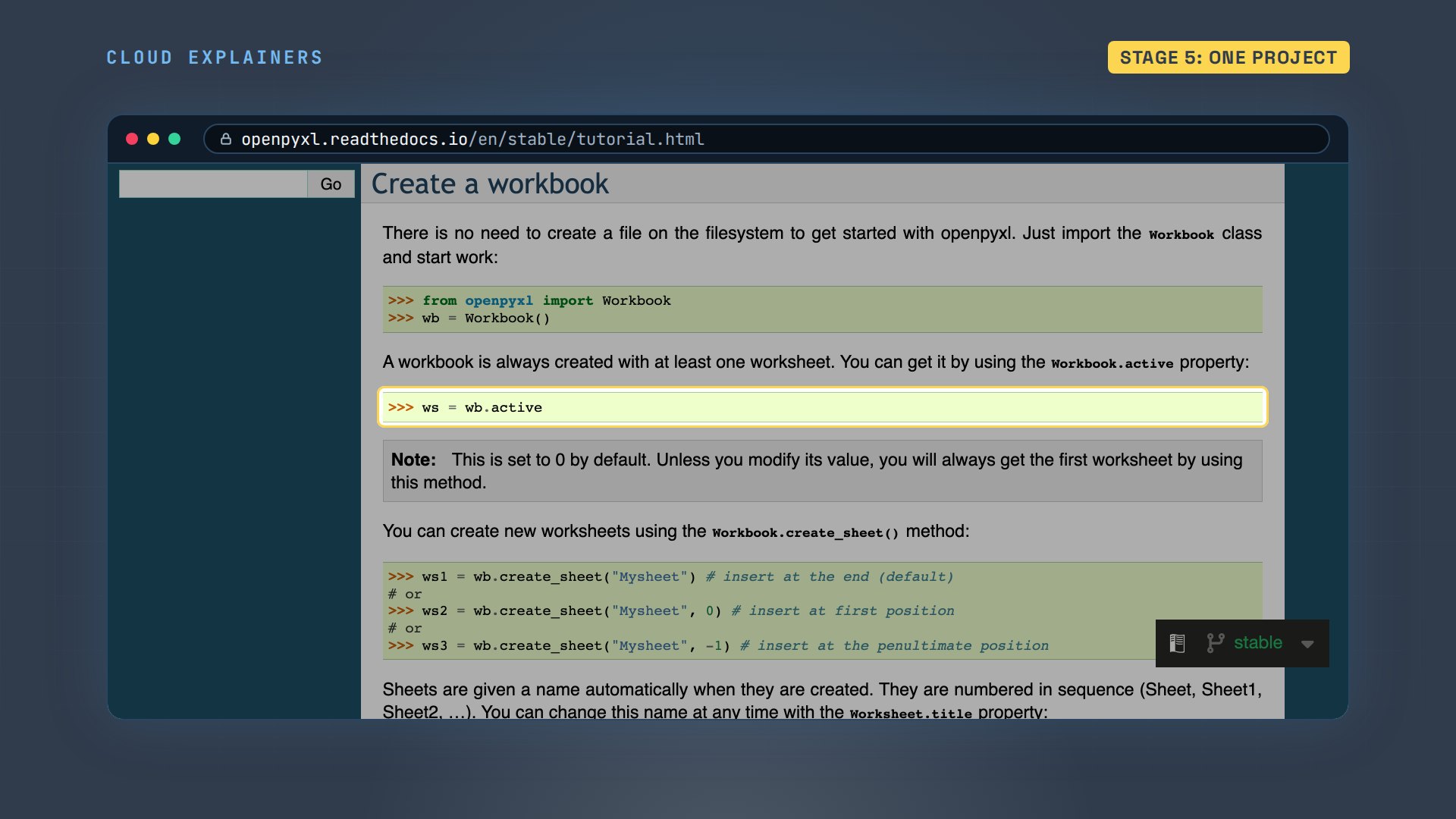
Ana's direction is automation. Here's what lands in the owner's spreadsheet: today's revenue per item. Croissants lead. And the cinnamon buns: three of them, at one ten each, shown as three thirty. Remember that number.
Stage 6: tests and Git
How do you know a program is still right next week? You write tests: small checks that run your code and compare the answer. Ana's says three cinnamon buns at one ten make three thirty. She installs pytest, which runs every test in files whose names start with test. Guess first: does it pass? It fails. Her program says three point three, and then fourteen more digits.
(.venv) ana@bakery:~/orders$ cat test_totals.pyfrom totals import revenue, totals

ORDERS = [{"item": "cinnamon bun", "qty": "3", "price": "1.10"}]


def test_totals():
    assert totals(ORDERS) == {"cinnamon bun": 3}


def test_revenue():
    assert revenue(ORDERS) == {"cinnamon bun": 3.30}
(.venv) ana@bakery:~/orders$ pip install pytestCollecting pytest
  Downloading pytest-9.2.0-py3-none-any.whl.metadata (7.9 kB)
Collecting iniconfig>=2 (from pytest)
  Downloading iniconfig-2.3.1-py3-none-any.whl.metadata (2.8 kB)
Collecting packaging>=24 (from pytest)
  Downloading packaging-26.3-py3-none-any.whl.metadata (3.5 kB)
Collecting pluggy<2,>=1.6 (from pytest)
  Downloading pluggy-1.7.0-py3-none-any.whl.metadata (5.0 kB)
Collecting pygments>=2.15 (from pytest)
  Downloading pygments-2.21.0-py3-none-any.whl.metadata (2.5 kB)
Downloading pytest-9.2.0-py3-none-any.whl (411 kB)
Downloading iniconfig-2.3.1-py3-none-any.whl (7.6 kB)
Downloading packaging-26.3-py3-none-any.whl (129 kB)
Downloading pluggy-1.7.0-py3-none-any.whl (27 kB)
Downloading pygments-2.21.0-py3-none-any.whl (1.3 MB)
Installing collected packages: pygments, pluggy, packaging, iniconfig, pytest
Successfully installed iniconfig-2.3.1 packaging-26.3 pluggy-1.7.0 pygments-2.21.0 pytest-9.2.0
(.venv) ana@bakery:~/orders$ pytest -q.F                                                               [100%]
=============================== FAILURES ===============================
_____________________________ test_revenue _____________________________

    def test_revenue():
>       assert revenue(ORDERS) == {"cinnamon bun": 3.30}
E       AssertionError: assert {'cinnamon bu...0000000000003} == {'cinnamon bun': 3.3}
E
E         Differing items:
E         {'cinnamon bun': 3.3000000000000003} != {'cinnamon bun': 3.3}
E         Use -v to get more diff

test_totals.py:11: AssertionError
======================= short test summary info ========================
FAILED test_totals.py::test_revenue - AssertionError: assert {'cinnam...
1 failed, 1 passed in 0.03s
This is the number we promised. Computers store most decimals in binary, slightly off, so three times one ten isn't exactly three thirty. The spreadsheet showed three point three, so nobody saw it. The test did. Ana adds round, to two places, to her code, as grep shows, and both tests pass.
(.venv) ana@bakery:~/orders$ python3Python 3.12.3 (main, Aug 31 2026, 10:18:26) [GCC 13.3.0] on linux
Type "help", "copyright", "credits" or "license" for more information.
>>> 3 * 1.103.3000000000000003
>>> round(3 * 1.10, 2)3.3
(.venv) ana@bakery:~/orders$ grep round totals.pymoney[item] = round(money[item], 2)
(.venv) ana@bakery:~/orders$ pytest -q..                                                               [100%]
2 passed in 0.02s
The last habit is Git, a tool that tracks every version of a project. First, a file called gitignore tells it to leave the.venv folder out: it can be rebuilt any time. git init starts tracking, add with a dot picks every file, and each commit saves a snapshot, so she can always go back. Every command, and the lab files, are linked in the description.
(.venv) ana@bakery:~/orders$ echo .venv > .gitignore
(.venv) ana@bakery:~/orders$ git init -q
(.venv) ana@bakery:~/orders$ git add .
(.venv) ana@bakery:~/orders$ git commit -q -m "Order report with tests"
(.venv) ana@bakery:~/orders$ git log --onelinea45eef4 (HEAD -> main) Order report with tests
Can you change the order?
Can you change the order? A little. Git can start on your first day, and tests can come with your first project. But don't skip stage three: almost every question a beginner searches for is a traceback that hasn't been read from the bottom yet.
Recap
Six stages, each clearing a wall before you reach it.
If this gave your Python learning an order, subscribing brings each stage's next episode your way.
Every command here was typed into a real terminal, with Ubuntu's own Python. Thanks for watching Cloud Explainers.
Sources
- Python tutorial, Using the Python Interpreter (the interactive prompt, running a script)
- Python tutorial, Errors and Exceptions (reading a traceback, TypeError, FileNotFoundError)
- Python tutorial, Floating-Point Arithmetic: Issues and Limitations
- Python docs, venv (virtual environments)
- PEP 668, marking Python base environments as externally managed
- pytest, Get Started
- openpyxl documentation
- Ubuntu package python-is-python3
Demos: a container on our own Mac standing in for a laptop at a bakery; the bakery is made up. openpyxl and pytest were downloaded from PyPI during the run. Watch the full video on YouTube.
More videos
Every Networking Term a Beginner Needs in 12 Minutes
How to Fix Docker 'Permission Denied' on docker.sock
How to Fix Git 'Updates Were Rejected' When You Push
How to Fix nginx 502 Bad Gateway Errors on Linux
How to Fix Linux apt 'Could Not Get Lock' Errors (Ubuntu)

How Email Works on the Internet (SMTP) in 10 Minutes

Golang REST API with Gin: Full Tutorial for Beginners
How a WireGuard VPN Network Works

Linux Makefiles Will Finally Make Sense After This

SAML vs OAuth vs OpenID Connect: What's the Difference?

How to Fix Python cron Jobs That Never Run

Linux Bash Scripting: Full Tutorial for Beginners

How PXE Network Boot Works

How Active Directory Works

How to Fix a Linux systemd Service That Won't Start

Linux Logs: syslog vs journald

JWT vs Session Cookies: Which One Should You Use?

Docker vs Docker Compose: Which One Should You Use?

How to Fix Docker Compose Containers That Can't Talk to Each Other

Django Full Tutorial for Beginners

How Linux systemd Works

How to Fix 'Windows Cannot Access' Network Share Errors (SMB)

REST vs gRPC: Which One Should You Use?

How to Fix SSL Certificate Chain Errors (Missing Intermediate)

Every Python Concept for Beginners in 10 Minutes

Every SQL Join Type in 10 Minutes

Why OpenRouter Free Models Hit Their Limit So Fast

Why Your Gemini API Free Tier Runs Out So Fast

OpenRouter Will Finally Make Sense After This

How Redis Caching Works

Gemini API vs Vertex AI: Which One Should You Use?

How to Fix a Leaked Gemini API Key

Why Golang Uses Goroutines Instead of Threads

How to Fix Gemini API Error 429: Resource Exhausted

Claude Token Pricing Will Finally Make Sense After This

Why Python Web Scraping Returns Nothing (and the Fix)

Python uv vs pip: Which One Should You Use?

Python Automation: Full Tutorial for Beginners

How OAuth Login Works

Google AI Studio Will Finally Make Sense After This

What Happens When You Run a Docker Container

How to Fix Claude Code Billing Your API Key Instead of Your Plan

Why Passkeys Can't Be Phished Like Passwords

PowerShell vs Bash: Which One Should You Learn?

The Linux Roadmap for Beginners

Django vs FastAPI: Which One Should You Use?

Why SQLite Is the Most Used Database in the World

How a NoSQL Database Like MongoDB Works

How to Fix Python pip error: externally-managed-environment

How to Fix MySQL Too Many Connections Database Errors

Golang Concurrency Will Finally Make Sense After This

How Amazon S3 Works

How Kubernetes Works

How Git Works

How to Fix Docker Port Already Allocated Errors

How PostgreSQL Works

How to Fix Git Merge Conflicts

How to Fix No Space Left on Device in Linux

How the Internet Works

SQL vs NoSQL: When Each One Wins

How to Fix JWT Token Expired Errors (401 Unauthorized)

Claude API vs Claude Pro: Why Your Subscription Doesn't Include It

Why AI Agent Skills Beat Giant Prompts

Linux Cron Jobs Will Finally Make Sense After This

Security Logs Will Finally Make Sense After This

How to Fix a Security Leak: An API Key Pushed to GitHub

DNS Will Finally Make Sense After This

Never Ignore a Security Update

Two-Factor Authentication Will Finally Make Sense

Never Expose a Database to the Internet

SSH Keys vs Passwords: Which Is Safer for Security?

The 5 Levels of Linux Boot: From Power On to Login

The 5 Levels of Network Firewalls

Password Security: Why Hackers Crack Weak Passwords

Why Your Linux Server Runs Out of Memory

HTTP vs HTTPS: What Actually Changes on Your Network

Every Linux File Permission You Need to Know

Linux Processes vs Threads: When Each One Wins

The OSI Model Will Finally Make Sense After This

The 7 Levels of Git

Every Network Troubleshooting Command You Need

Hashing vs Encryption in Cybersecurity: When Each One Wins

Why the Internet Ran Out of IP Addresses

Linux Package Managers: apt vs Snap vs Flatpak

Why Python Is Slow (and When It Doesn't Matter)

TCP vs UDP: When Each One Wins

Stop Running Linux as Root (Do This Instead)

Linux Users and Groups Will Finally Make Sense

Why Phishing Beats Good Security (and How to Spot It)

The 7 Levels of Docker

AI Agents Will Finally Make Sense After This

Stop Using git push --force (Use This Instead)

Agent Skills vs MCP: When Each One Wins

Networking Will Finally Make Sense After This

Every Linux Command You Actually Need

The 7 Levels of Cybersecurity

Every System Design Concept You Need, in One Diagram
