
Golang Concurrency Will Finally Make Sense After This
Go concurrency for beginners, proven with real programs: Ana's tea shop program checks three teas with a supplier one after another and takes three seconds, then adding the word go makes it print nothing. We follow why, and build it up: goroutines and the Go scheduler, the difference between concurrency and parallelism, WaitGroups, channels, a real race condition caught by the race detector and fixed with a mutex, a deadlock, and select with a timeout.
Three seconds, then nothing
You add the word go to make your Go program faster, and it prints nothing at all. Here's Ana's tea shop program. It asks a supplier's stock service about three teas, one after another. Each answer takes a second, so three seconds in all. She adds go in front of one line, and the program finishes in zero seconds, with no answers. By the end, you'll know why, and how to get all three answers in one second.
go run ./sequentialgreen in stock: 12
black in stock: 30
oolong in stock: 7
all done in 3.002s
diff sequential/main.go gokeyword/main.go20c20
< 		check(tea)
---
> 		go check(tea)
go run ./gokeywordall done in 0s
Go is famous for doing many things at once. Its tool for that is the goroutine, and the word go starts one. But goroutines come with rules: how to wait for them, how to get their results back, and how to share data without losing any. Let's build Ana's program up, one piece at a time.
What a goroutine is
A goroutine is a function that runs on its own, alongside the rest of your program. Every Go program starts with one: main. Writing go before a function call starts another, and main moves straight on to the next line, without waiting. So Ana's loop starts three goroutines, one for each tea, and all three wait for the supplier at the same time.
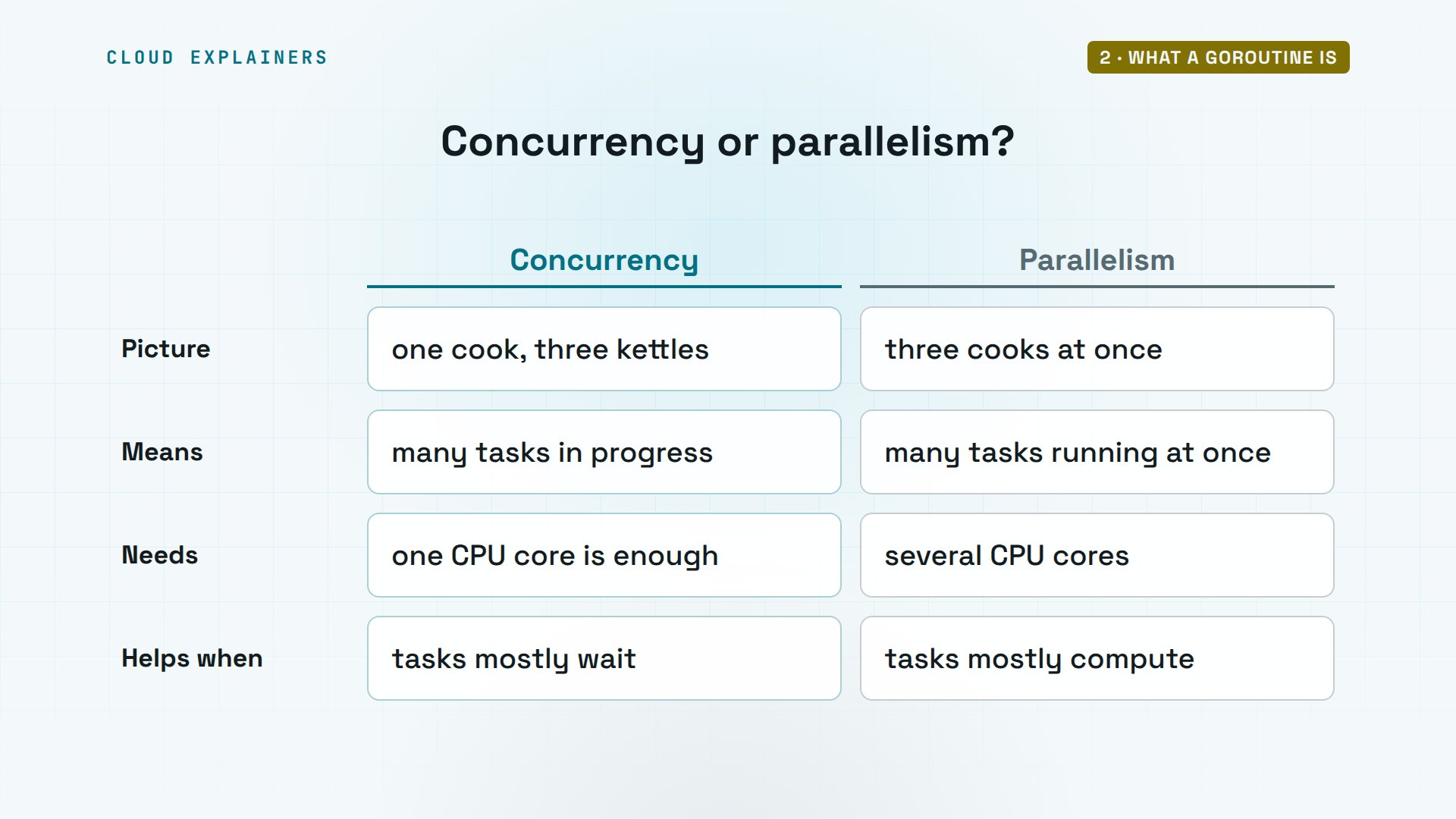
That's concurrency: dealing with several things at once. Think of Ana's kitchen. One cook with three kettles doesn't watch each one boil in turn. She puts all three on, and pours whichever is ready first. Three cooks, each working at the same instant, is parallelism, and that needs several CPU cores. Ana's goroutines spend their time waiting for the supplier, so concurrency is what saves her the two seconds.
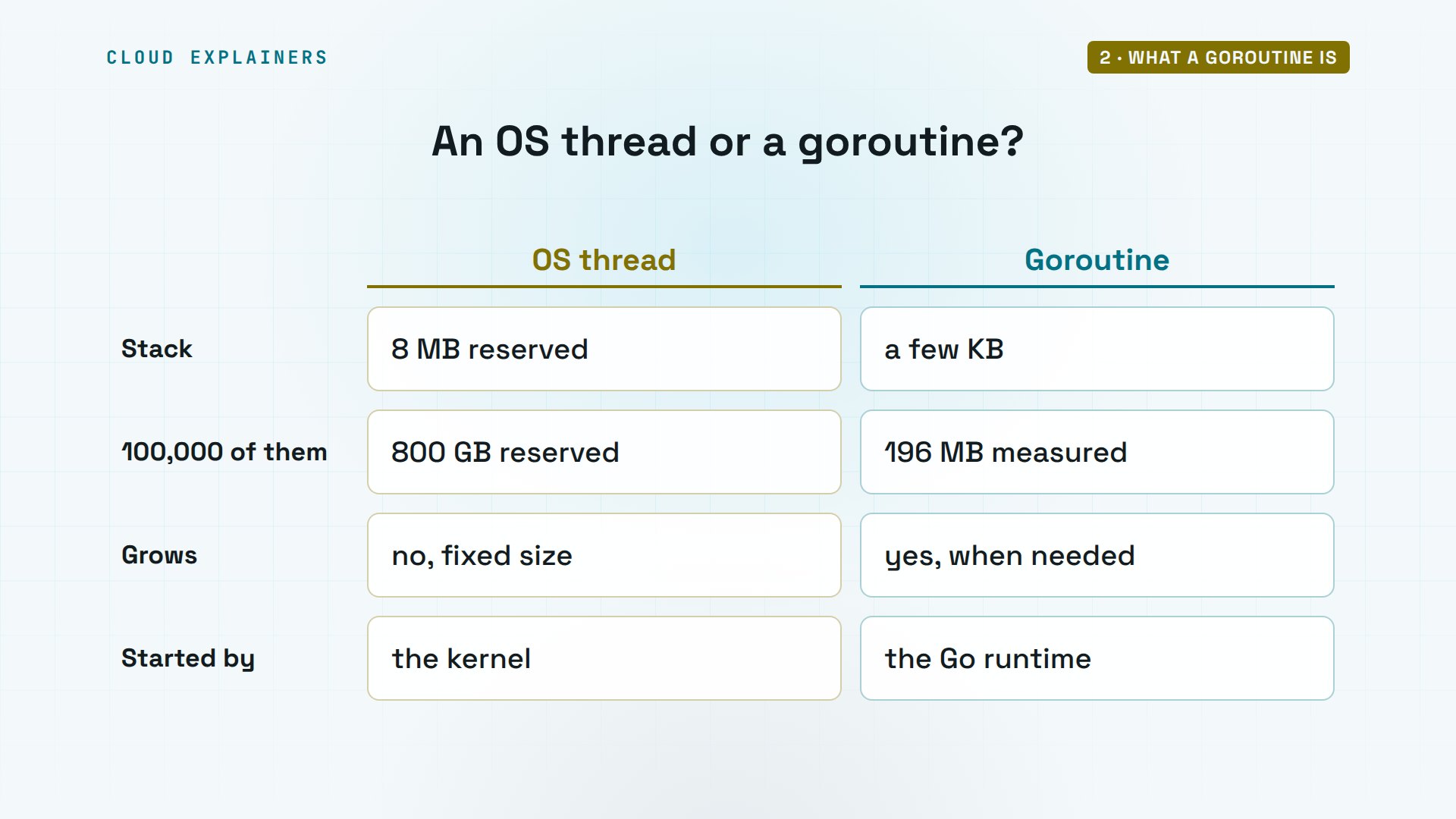
So how many goroutines can one program start? This one starts a hundred thousand, each waiting three seconds. It counts 100,001 goroutines, the hundred thousand plus main, running on just 12 operating system threads, on a machine with 10 CPU cores. Their stacks, the memory each one keeps for its work, add up to 196 megabytes: about 2 kilobytes each.
go run ./manygoroutines running: 100001
OS threads:         12
CPU cores:          10
stack memory:       196 MB
Compare that with operating system threads, the kind the kernel runs for every program. On this machine, each new thread reserves 8,192 kilobytes, 8 megabytes, for its stack. A hundred thousand threads would reserve 800 gigabytes. A goroutine starts with a few kilobytes and grows only if it needs to, and Go starts and switches goroutines itself, without asking the kernel.
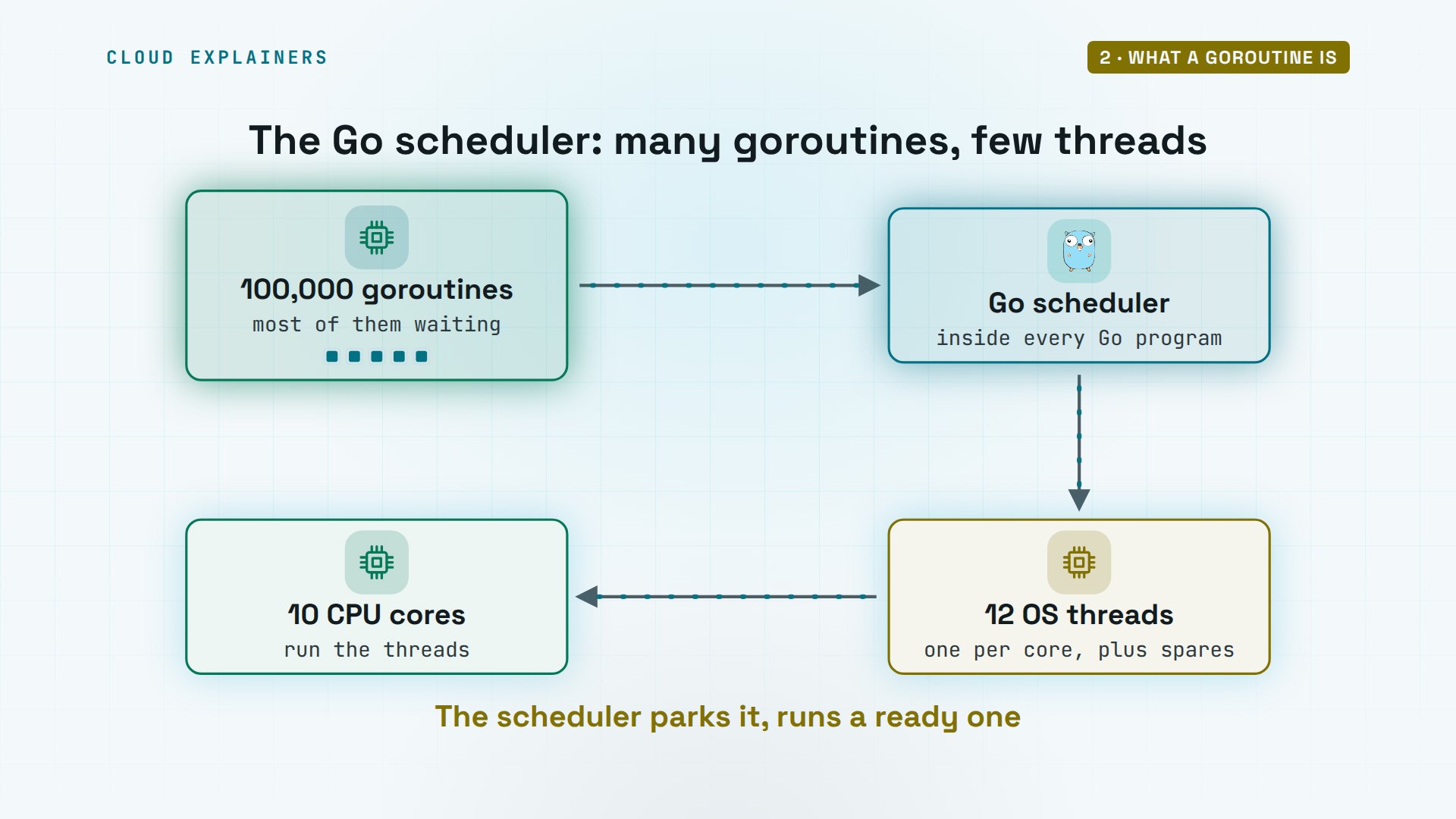
So how do a hundred thousand goroutines fit on 12 threads? Every Go program carries the Go runtime, and the runtime has a scheduler. It runs goroutines on about one thread per CPU core, plus a few spare. When a goroutine has to wait, for the network, a timer, or another goroutine, the scheduler parks it and puts a ready one on that thread. That's why a waiting goroutine costs almost nothing.
Waiting for goroutines
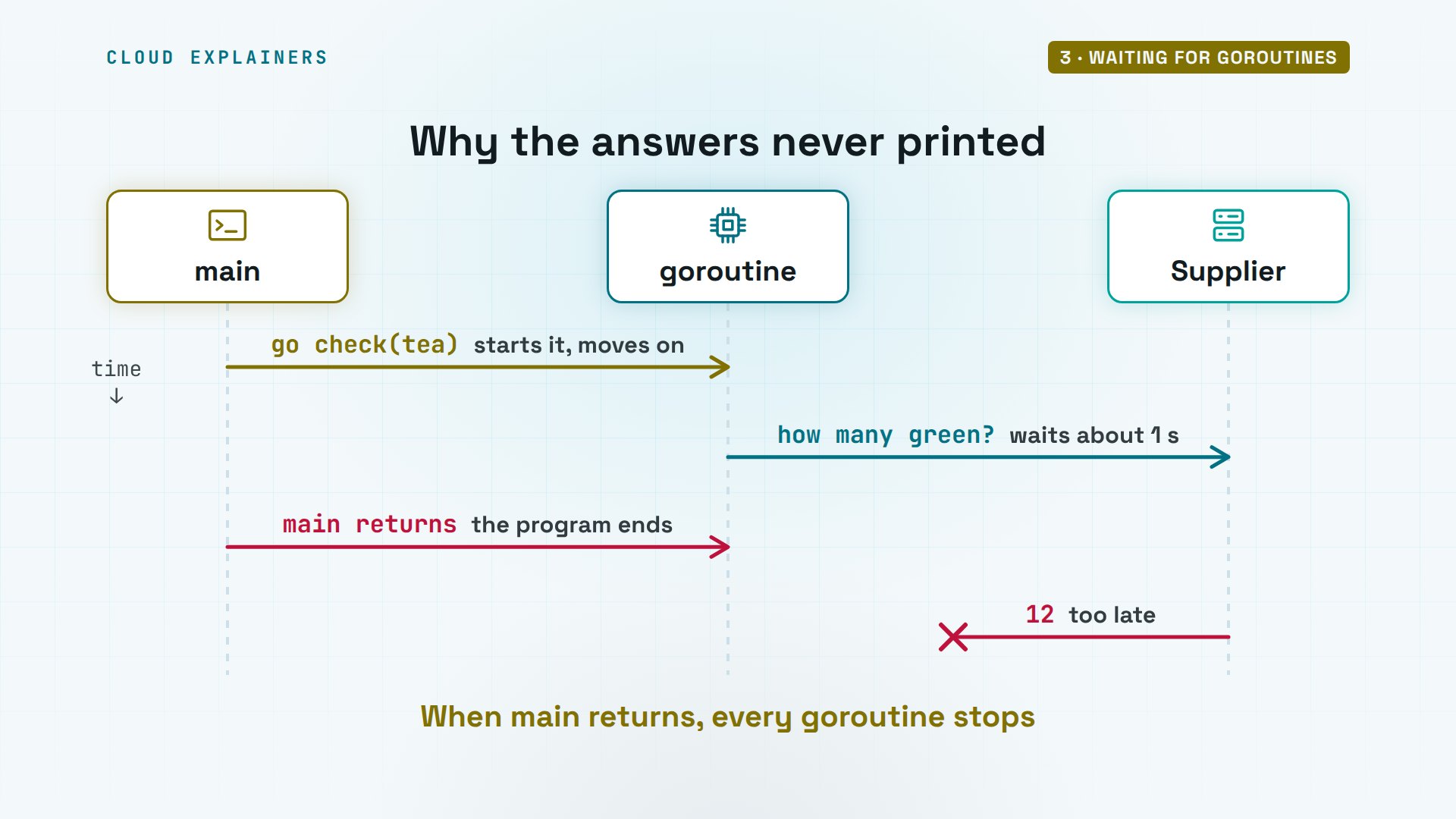
So why did Ana's program print nothing? main started the three goroutines and went straight on, printed all done, and returned. When main returns, the whole program ends, and every goroutine still running is stopped, here while it was still waiting for the supplier's answer. Nothing waited for them.
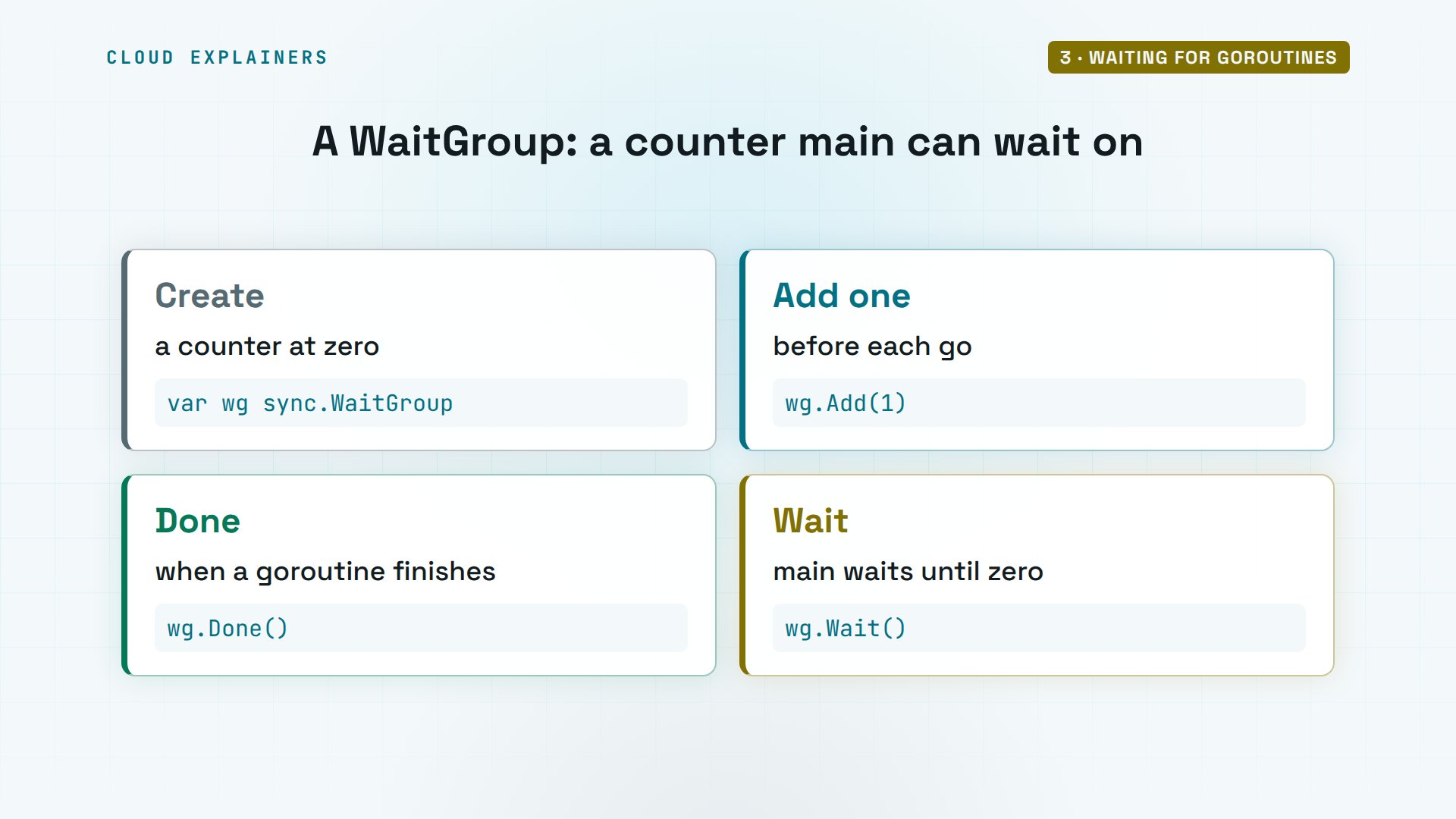
Go's tool for waiting is a WaitGroup, from the sync package. It's a counter. Add one before starting each goroutine. Each goroutine calls Done as it finishes, which takes one off. And Wait holds main until the counter is back to zero.
With the WaitGroup, all three answers arrive in 1.001 seconds, instead of three. Run it again, and the order changes: oolong came first the first time, black the second. Goroutines finish in whatever order their work allows, so never count on the order.
go run ./waitgroupoolong in stock: 7
green in stock: 12
black in stock: 30
all done in 1.001s
go run ./waitgroupblack in stock: 30
oolong in stock: 7
green in stock: 12
all done in 1.001s
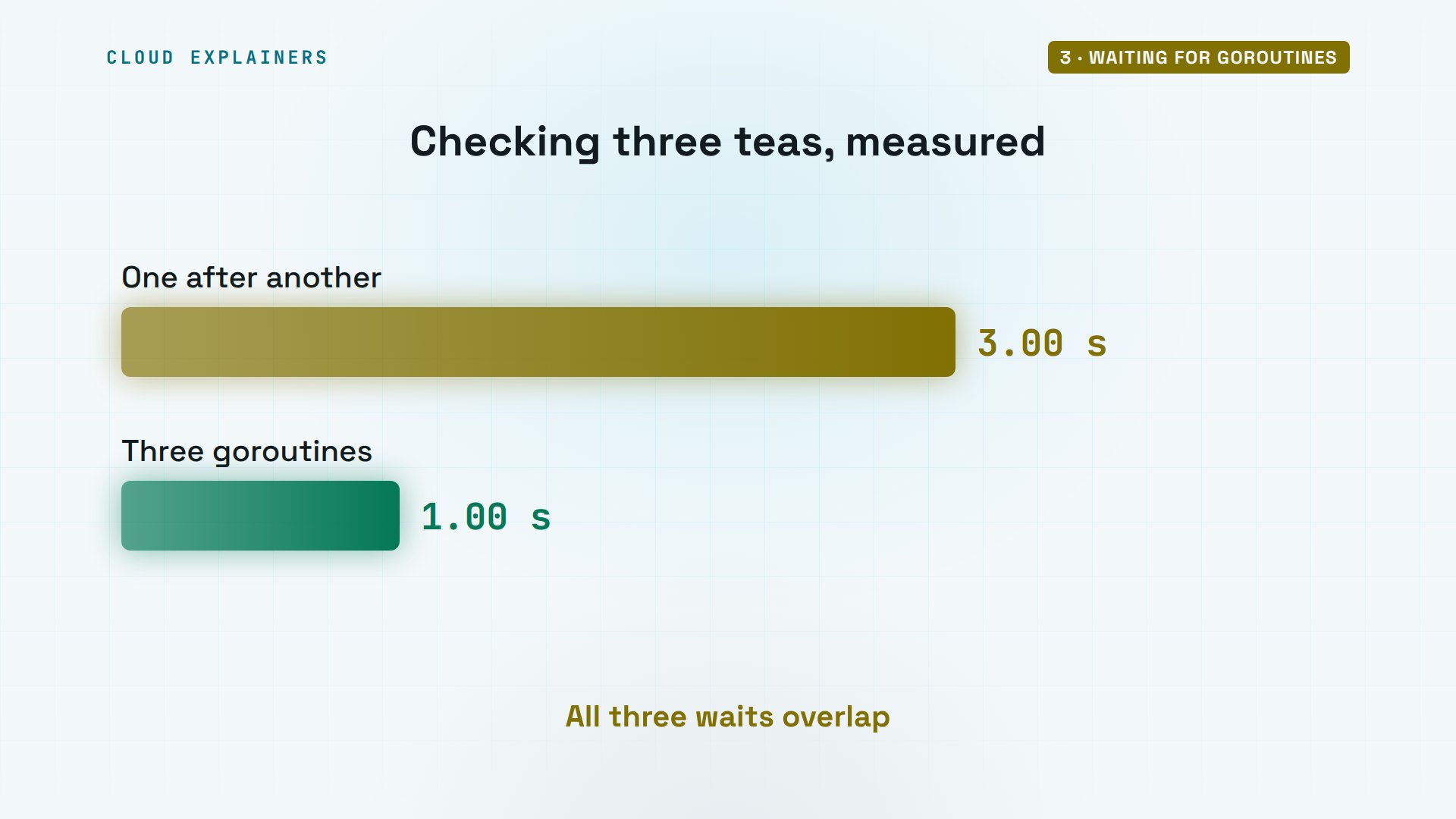
Here's the gain. One after another, the three checks took 3.002 seconds. As goroutines, 1.001 seconds: about as long as the slowest single answer, because all three waited at the same time.
Channels
Printing is fine, but Ana wants a number back: the total stock. Goroutines hand values to each other through channels. A channel is a pipe with a type, and this one carries whole numbers. Each goroutine sends its count into it, and main receives three counts and adds them up. On a plain channel, a send waits until someone receives, so the two sides meet in step.
In code, make creates the channel. An arrow pointing into the channel's name sends a value. An arrow pointing out of it receives one, and waits until a value is there.
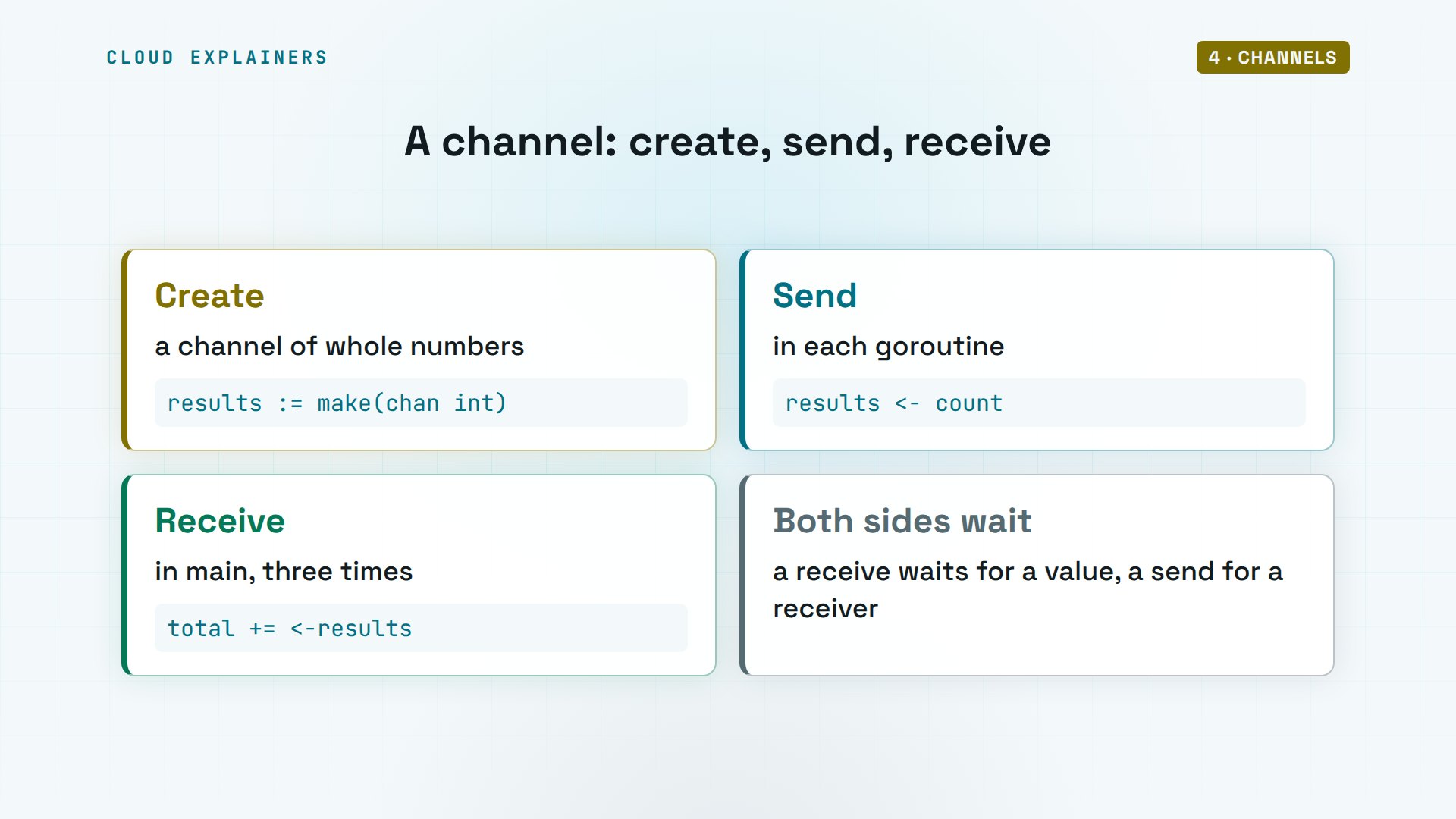
Three goroutines, one channel: the total is 49, 12 green plus 30 black plus 7 oolong, in 1.001 seconds. No WaitGroup this time: main waits by receiving exactly three values.
go run ./channelstotal in stock: 49
all done in 1.001s
Race conditions
Now a trap. Ana's shop counts orders, and a thousand goroutines each add a thousand orders to one shared counter. That should be a million. It says 287,573. Again: 285,311. Again: 331,453. Wrong, and different every time.
go run ./raceorders counted: 287573 of 1000000
go run ./raceorders counted: 285311 of 1000000
go run ./raceorders counted: 331453 of 1000000
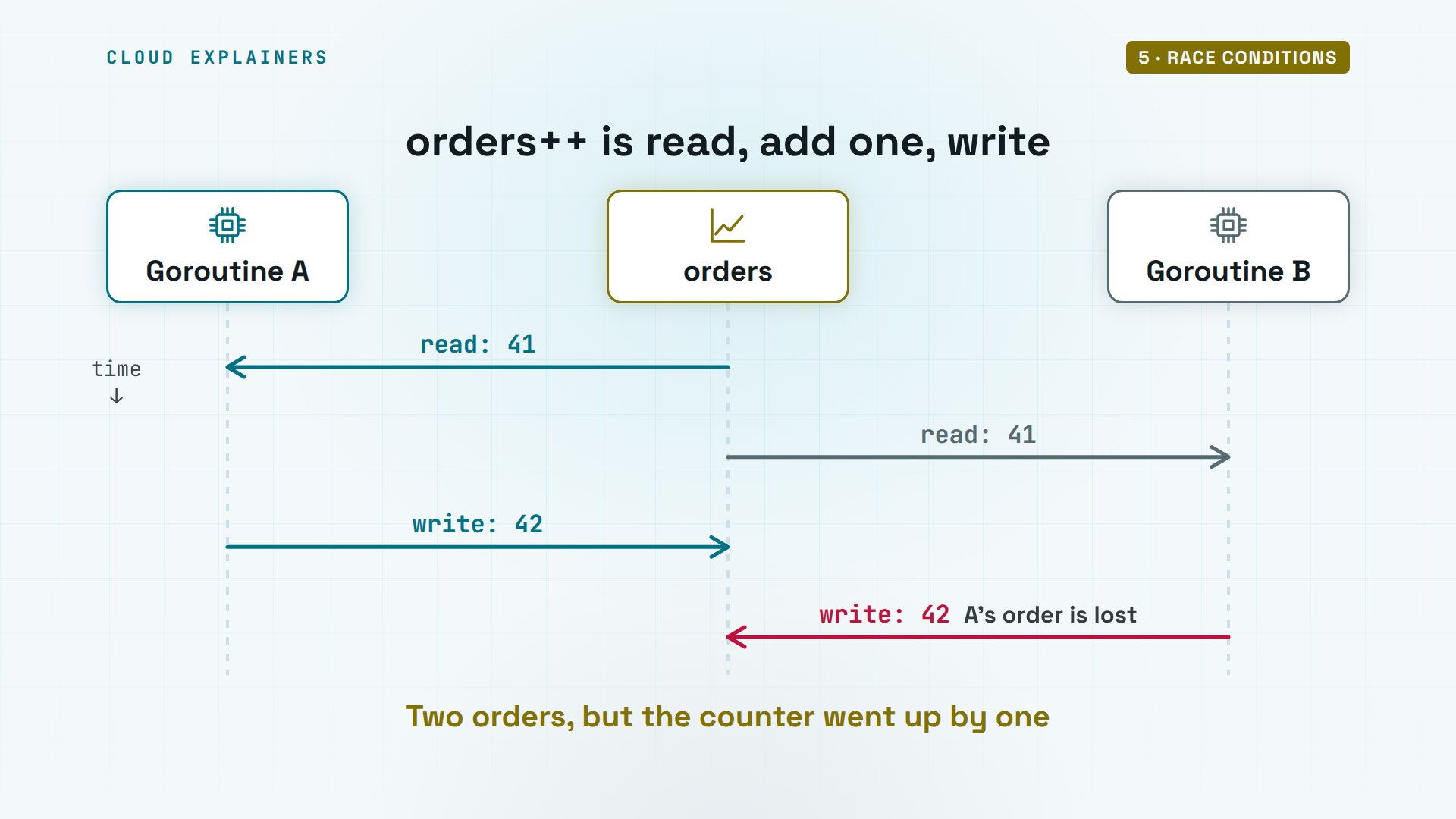
Here's why. orders++ looks like one step, but it's three: read the number, add one, write it back. Goroutine A reads 41. Before it writes, goroutine B reads 41 too. A writes 42, then B writes 42. Two orders, but the counter went up by one. That's a race condition: the result depends on who gets there first.
Go can catch this. Run the program with -race, Go's race detector, and it prints a data race warning: a read and a write of the same memory by two goroutines, pointing at line 16, where orders++ is. It found 2, and the program exits with an error.
go run -race ./race==================
WARNING: DATA RACE
Read at 0x00c0000180e8 by goroutine 10:
  main.main.func1()
      /home/ana/shop/race/main.go:16 +0x99

Previous write at 0x00c0000180e8 by goroutine 9:
  main.main.func1()
      /home/ana/shop/race/main.go:16 +0xab

Goroutine 10 (running) created at:
  main.main()
      /home/ana/shop/race/main.go:13 +0x84

Goroutine 9 (running) created at:
  main.main()
      /home/ana/shop/race/main.go:13 +0x84
==================
==================
WARNING: DATA RACE
Write at 0x00c0000180e8 by goroutine 11:
  main.main.func1()
      /home/ana/shop/race/main.go:16 +0xab

Previous write at 0x00c0000180e8 by goroutine 8:
  main.main.func1()
      /home/ana/shop/race/main.go:16 +0xab

Goroutine 11 (running) created at:
  main.main()
      /home/ana/shop/race/main.go:13 +0x84

Goroutine 8 (running) created at:
  main.main()
      /home/ana/shop/race/main.go:13 +0x84
==================
orders counted: 395932 of 1000000
Found 2 data race(s)
exit status 66
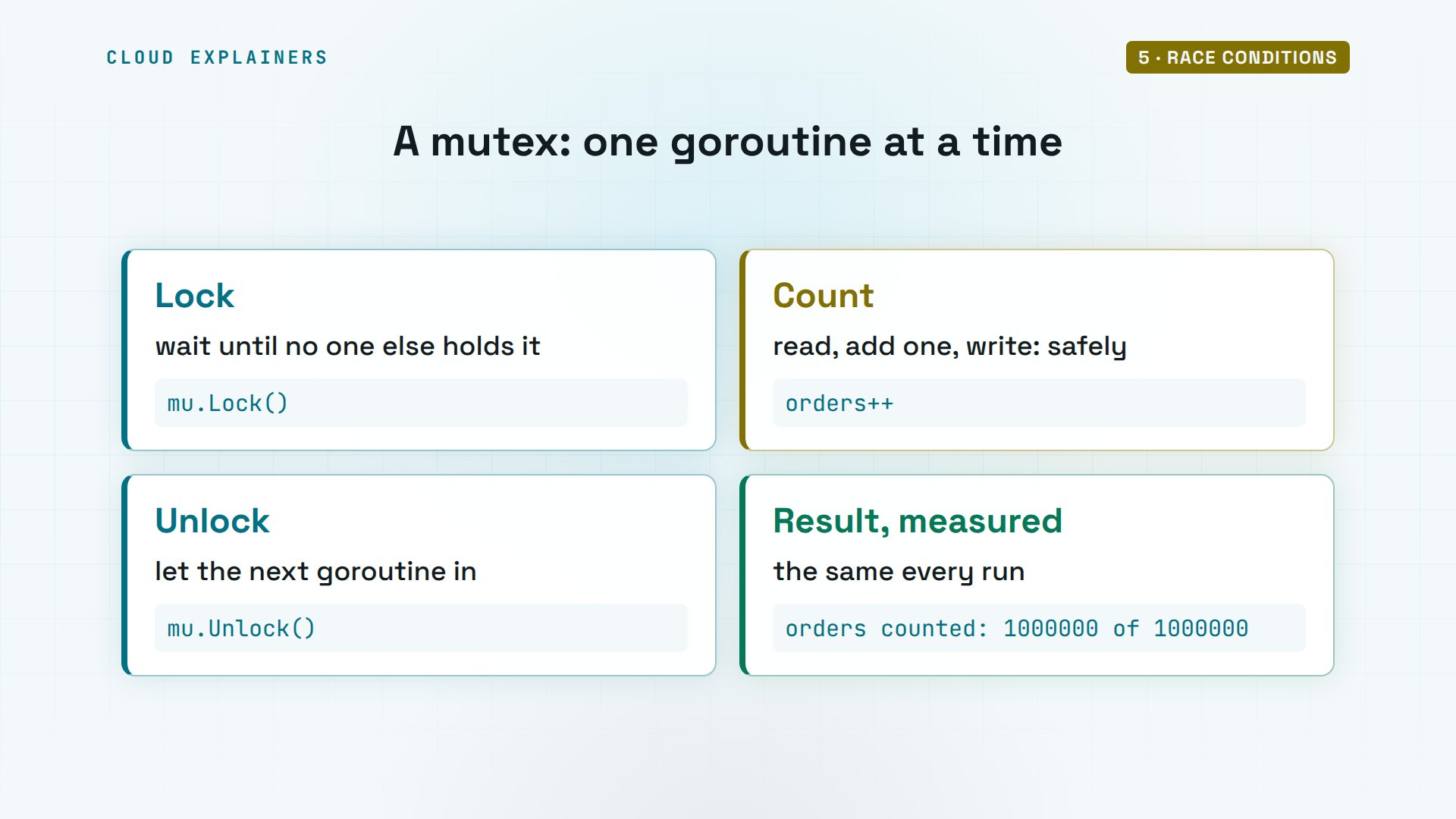
One fix is a mutex, short for mutual exclusion. Lock it before touching the counter, unlock it after, and only one goroutine at a time can be in between. Now the count is exactly 1,000,000, every run.
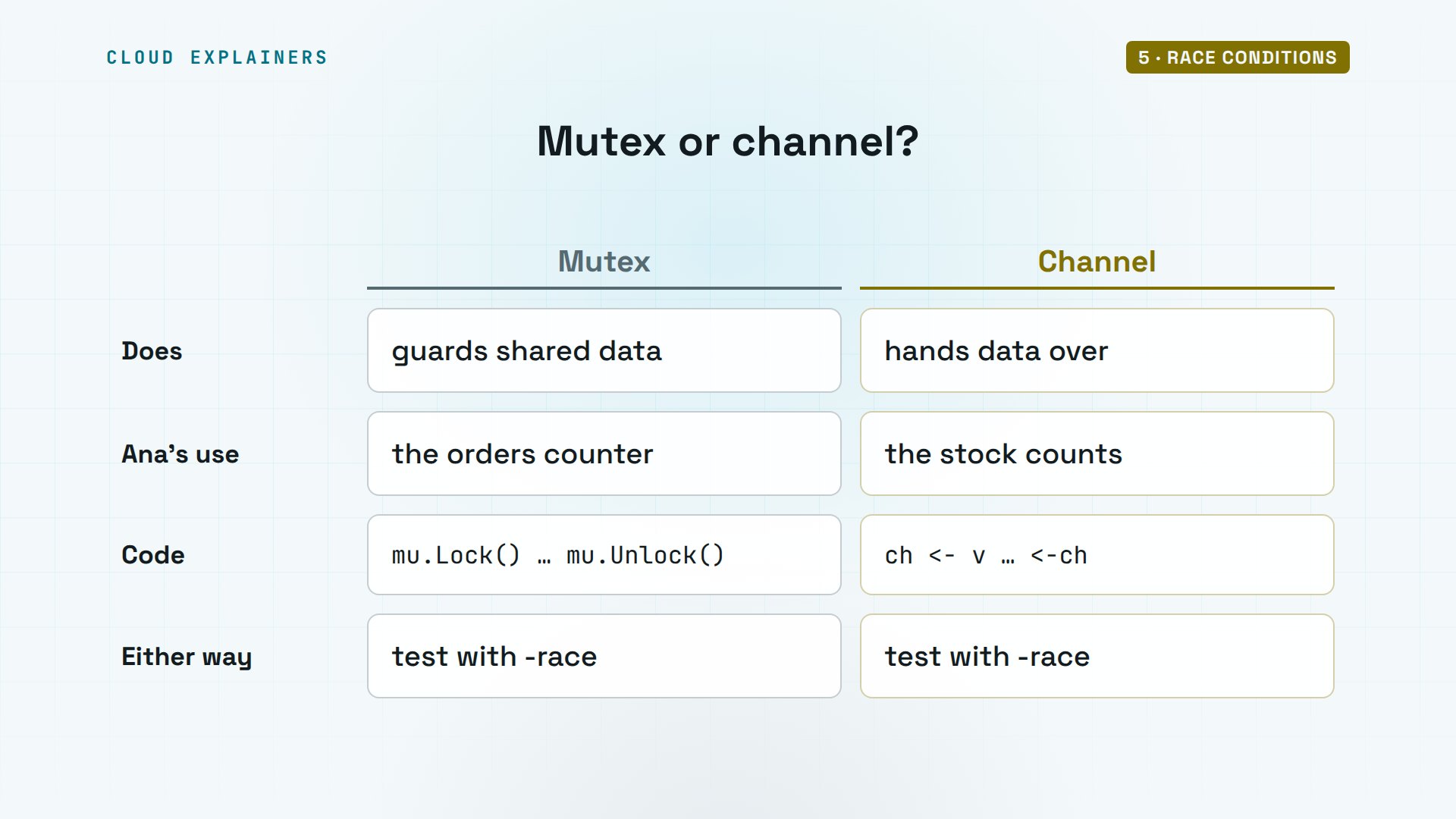
Go's own advice is: don't communicate by sharing memory; share memory by communicating. A mutex guards data that goroutines share, like Ana's counter. A channel hands data from one goroutine to another, like the stock counts. Both are correct Go. Pick the one that makes the program easier to follow, and test with -race.
When goroutines get stuck
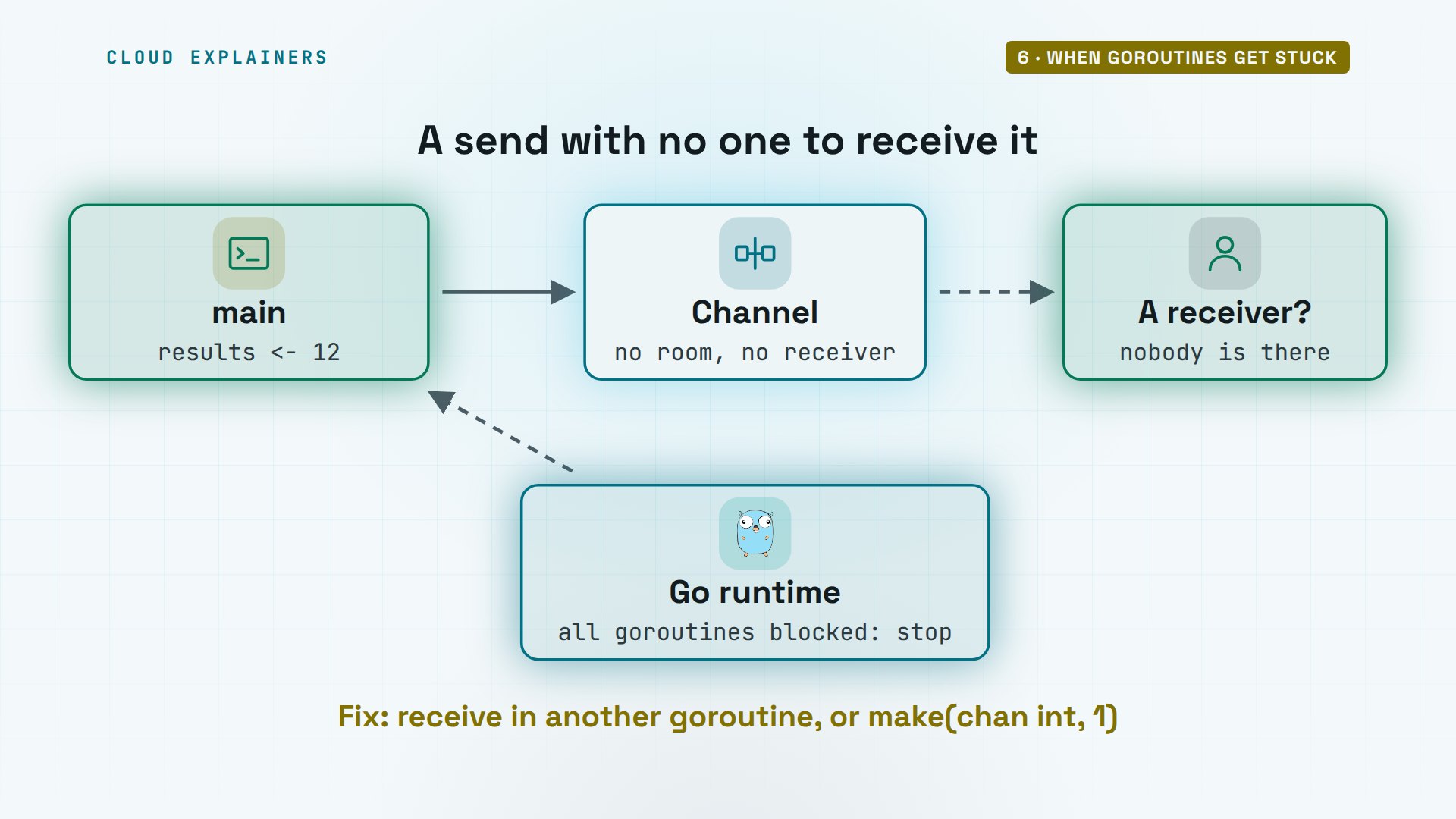
Channels have a trap of their own. This program sends 12 into a channel, then receives it on the next line. It never gets there. Go stops it: fatal error, all goroutines are asleep, deadlock.
cat deadlock/main.gopackage main

import "fmt"

func main() {
	results := make(chan int)
	results <- 12
	fmt.Println(<-results)
}
go run ./deadlockfatal error: all goroutines are asleep - deadlock!

goroutine 1 [chan send]:
main.main()
	/home/ana/shop/deadlock/main.go:7 +0x36
exit status 2
Sending on a plain channel waits until another goroutine receives. main is the only goroutine, so it waits for itself, forever. The runtime sees that every goroutine is blocked, and stops the program instead of letting it hang. In a big program with other goroutines still running, it can't tell, and the blocked goroutine just waits. The fix: receive in another goroutine, or give the channel room for a value.
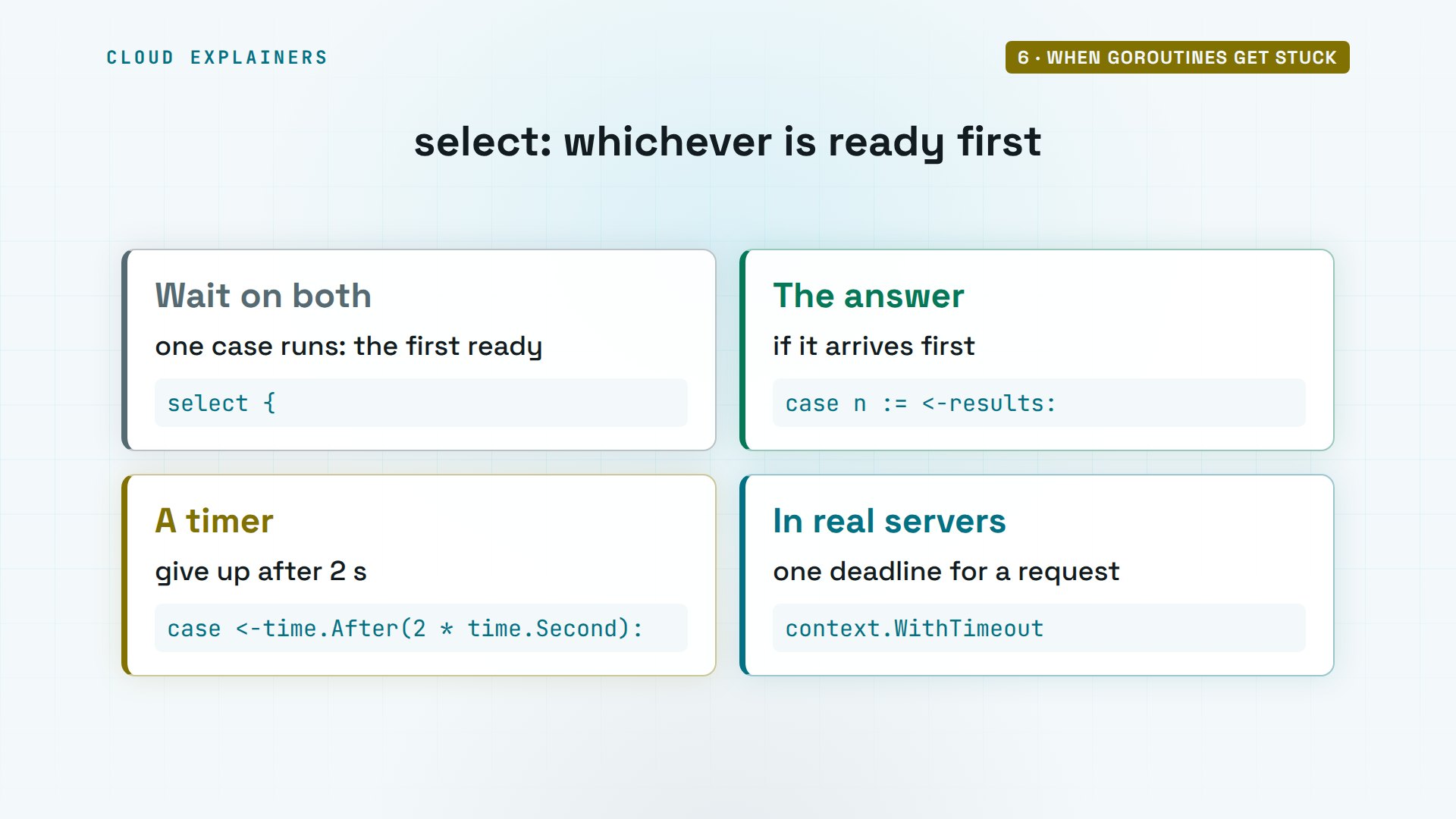
A supplier that never answers is the same kind of problem. Here, oolong's answer takes five seconds. Ana's program uses select, which waits on several channels at once and takes whichever is ready first: the answer, or a two-second timer. The timer wins: no answer, gave up, after 2.001 seconds.
go run ./timeoutoolong: no answer, gave up
all done in 2.001s
Here's the select. One case receives the answer, if it comes first. The other receives from a timer channel that fires after two seconds. Real servers often use the context package for the same job: a deadline that every goroutine working on a request can see.
Recap
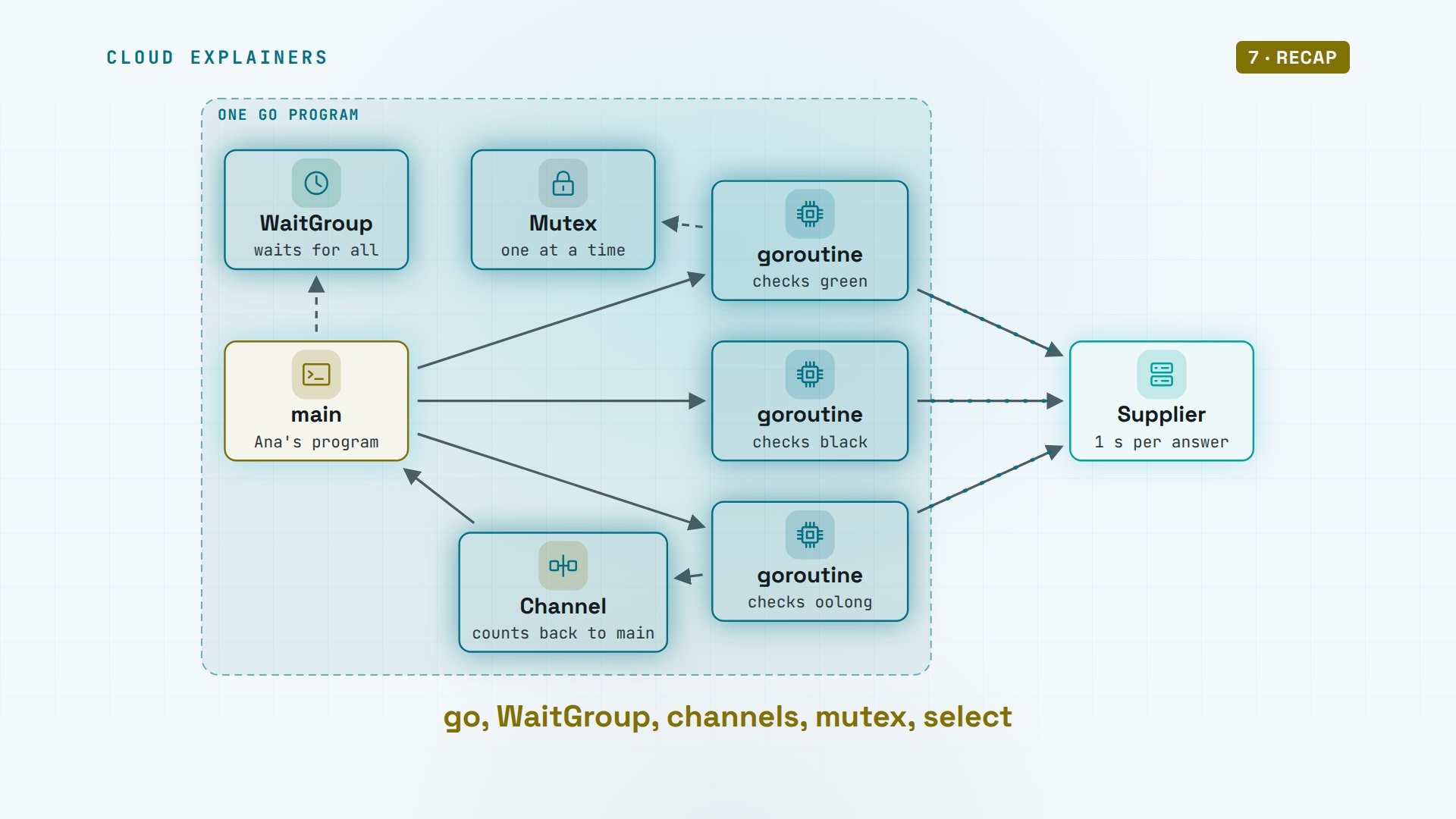
So here's Go concurrency. The word go starts a goroutine, a function that runs on its own, and the scheduler runs thousands of them on a few threads. main doesn't wait, so use a WaitGroup, or a channel. Channels hand values between goroutines, a mutex guards data they share, and -race finds the mistakes. And select with a timer means nothing waits forever.
If goroutines finally make sense now, a subscribe is the easiest way to catch the next demo like this one.
Every program in this video ran for real, with Go 1.27.3, on a lab machine of our own. Thanks for watching Cloud Explainers.
Sources
Demos: real Go programs in a lab container on our own machine, with a made-up shop and a local stock service standing in for a supplier. Watch the full video on YouTube.
More videos
How a NoSQL Database Like MongoDB Works
How to Fix Python pip error: externally-managed-environment
How to Fix MySQL Too Many Connections Database Errors
How Amazon S3 Works
How Kubernetes Works
How to Fix Docker Port Already Allocated Errors
How PostgreSQL Works
How to Fix Git Merge Conflicts
How to Fix No Space Left on Device in Linux
How the Internet Works
SQL vs NoSQL: When Each One Wins
How to Fix JWT Token Expired Errors (401 Unauthorized)

Claude API vs Claude Pro: Why Your Subscription Doesn't Include It

Why AI Agent Skills Beat Giant Prompts

Linux Cron Jobs Will Finally Make Sense After This

Security Logs Will Finally Make Sense After This

How to Fix a Security Leak: An API Key Pushed to GitHub

DNS Will Finally Make Sense After This

Never Ignore a Security Update

Two-Factor Authentication Will Finally Make Sense

Never Expose a Database to the Internet

SSH Keys vs Passwords: Which Is Safer for Security?

The 5 Levels of Linux Boot: From Power On to Login

The 5 Levels of Network Firewalls

Password Security: Why Hackers Crack Weak Passwords

Why Your Linux Server Runs Out of Memory

HTTP vs HTTPS: What Actually Changes on Your Network

Every Linux File Permission You Need to Know

Linux Processes vs Threads: When Each One Wins

The OSI Model Will Finally Make Sense After This

The 7 Levels of Git

Every Network Troubleshooting Command You Need

Hashing vs Encryption in Cybersecurity: When Each One Wins

Why the Internet Ran Out of IP Addresses

Linux Package Managers: apt vs Snap vs Flatpak

Why Python Is Slow (and When It Doesn't Matter)

TCP vs UDP: When Each One Wins

Stop Running Linux as Root (Do This Instead)

Linux Users and Groups Will Finally Make Sense

Why Phishing Beats Good Security (and How to Spot It)

The 7 Levels of Docker

AI Agents Will Finally Make Sense After This

Stop Using git push --force (Use This Instead)

Agent Skills vs MCP: When Each One Wins

Networking Will Finally Make Sense After This

Every Linux Command You Actually Need

The 7 Levels of Cybersecurity

Every System Design Concept You Need, in One Diagram
