
How to Fix Linux apt 'Could Not Get Lock' Errors (Ubuntu)
sudo apt install says 'Could not get lock /var/lib/dpkg/lock-frontend'. On a real Ubuntu 24.04 server we made every common cause happen for real: Ubuntu's automatic security updates holding the lock, and a second admin's apt left at its yes/no question. We read who holds it, wait the right way, and show what the two forum shortcuts really do: deleting the lock file, and killing the process (dpkg was interrupted).
Could not get lock
You typed sudo apt install, and Ubuntu said: could not get lock. On this library's catalog server, the same install ran twice, moments apart. apt-get gave up at once. Plain apt waited fifteen seconds, then installed it. Same holder both times.
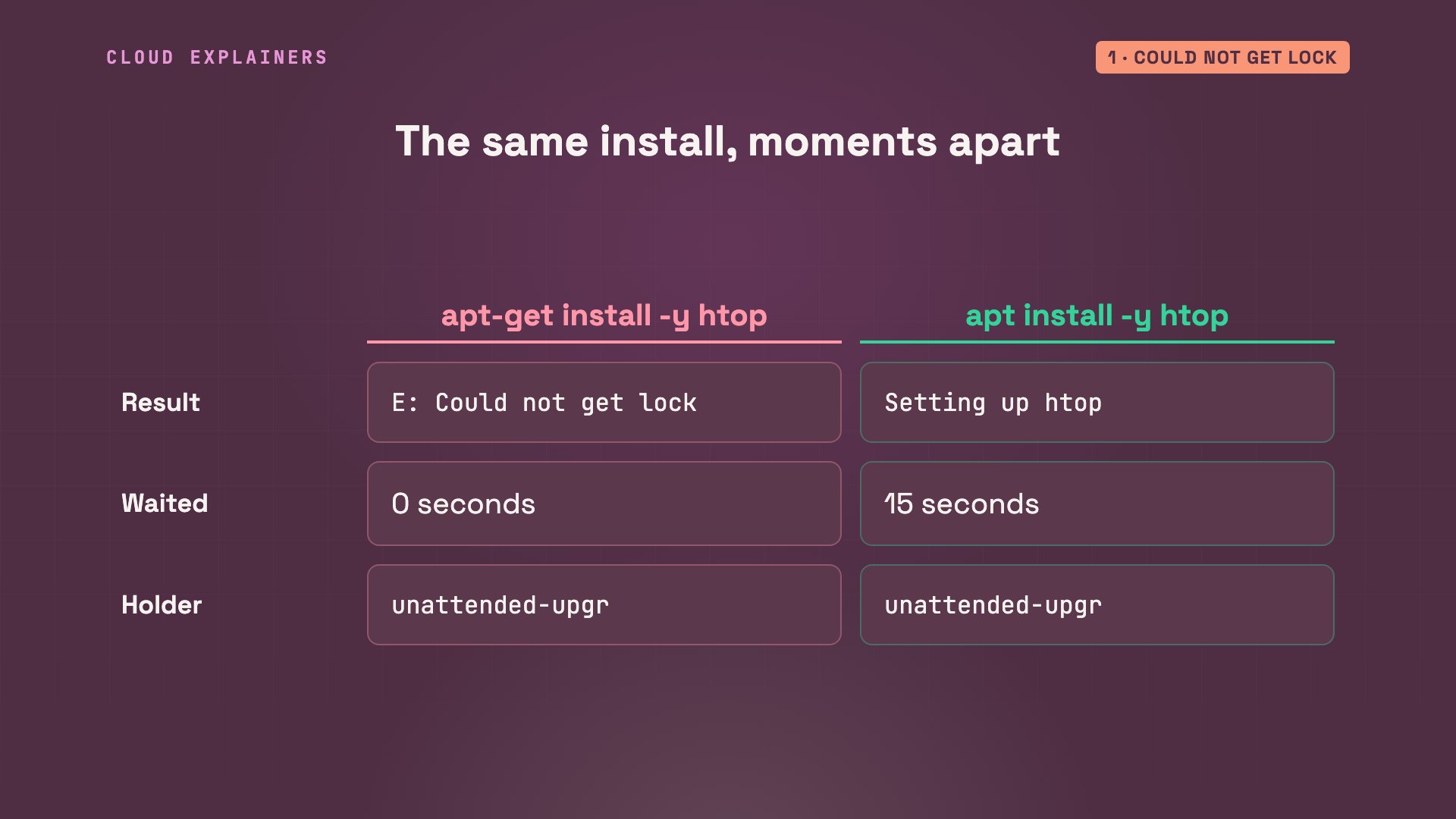
Ana's error names the lock, the process holding it, and a warning: removing the lock file is not a solution. Most forum answers say: delete it. Do that while apt is writing, and you can break the package database. We'll see how.
sudo apt-get install -y htopE: Could not get lock /var/lib/dpkg/lock-frontend. It is held by process 471 (unattended-upgr)
N: Be aware that removing the lock file is not a solution and may break your system.
E: Unable to acquire the dpkg frontend lock (/var/lib/dpkg/lock-frontend), is another process using it?
What the lock is
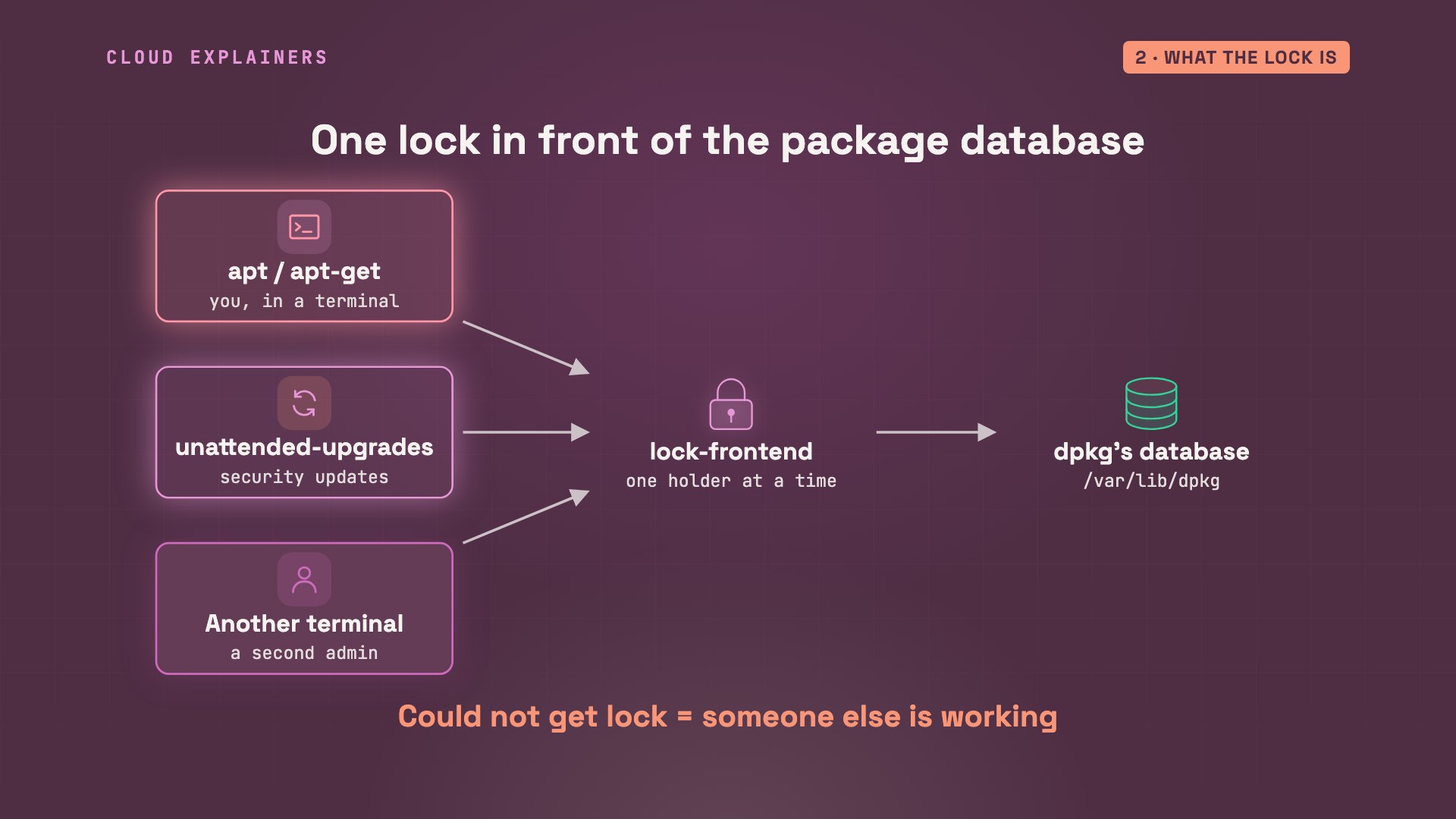
So what is the lock? apt is Ubuntu's installer, and underneath it, dpkg does the actual work. dpkg keeps a list of every installed package and its files: its database. Anything that installs or updates software must change it: apt, apt-get, the automatic security updates, or a second admin. Two writers at once would scramble it, so each must first take one lock. Whoever is first gets it. Everyone else gets: could not get lock.
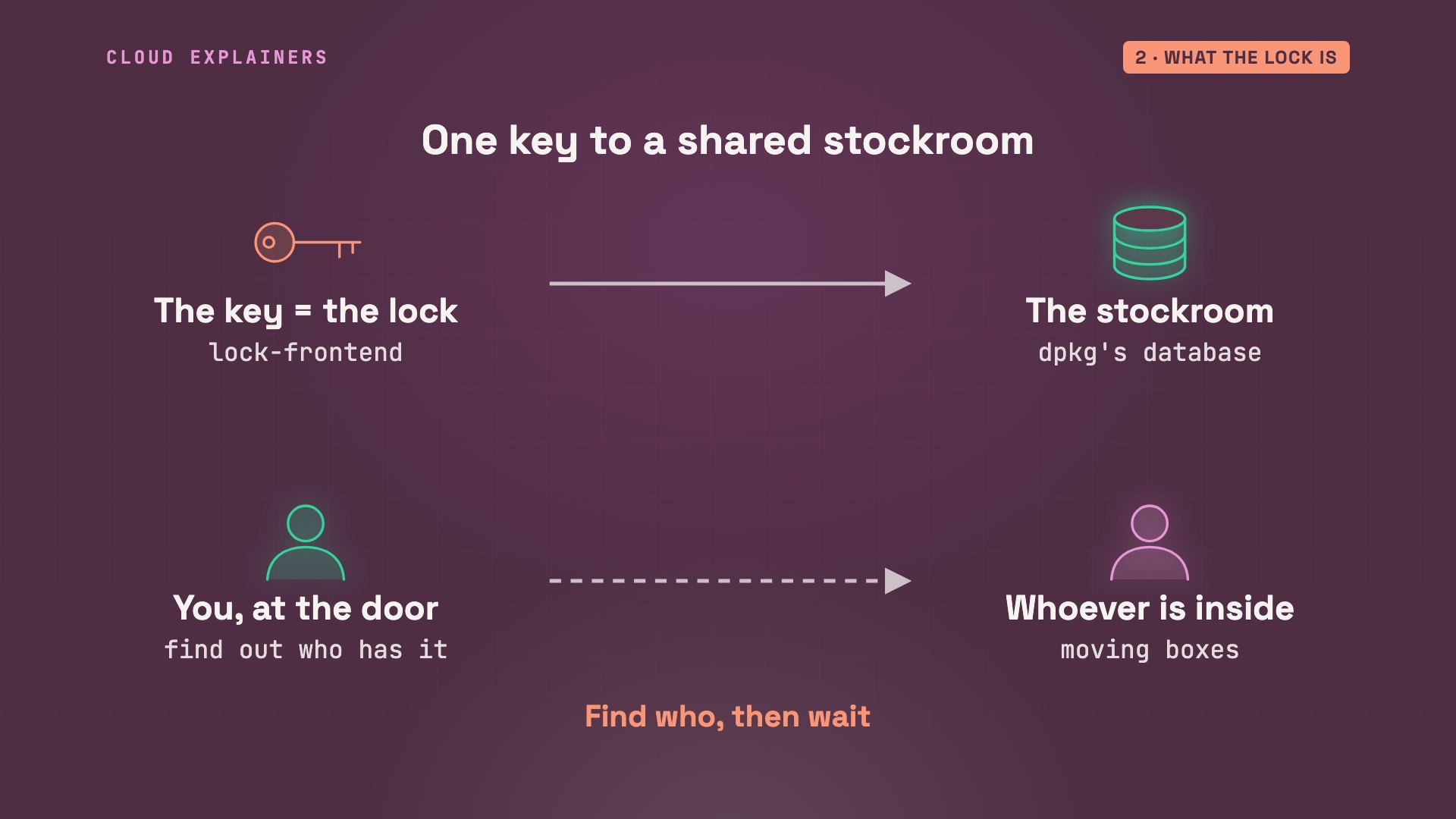
Think of the one key to a shared stockroom. Whoever holds the key is inside, moving boxes. You don't break the door. You find out who has the key, and you wait for them to come out. The rest of this video is that, on a real server.
The quick fix: read it, then wait
The quick fix starts with reading the error. Every running program has a number, its process ID, and the error gives it: four hundred seventy-one, unattended upgrade. The ps command lists running programs, and shows what that one is: Ubuntu's automatic security updates. And systemctl, the tool for background services, says their daily job is still activating: at work right now. apt-get gave up. Guess first: what does plain apt do in the same spot? It waits. Waiting for cache lock, fifteen seconds, and then it installs.
ps -o pid,etime,cmd -p 471PID ELAPSED CMD 471 00:00 /usr/bin/python3 /usr/bin/unattended-upgrade
systemctl is-active apt-daily-upgrade.serviceactivating
sudo apt install -y htopWaiting for cache lock: Could not get lock /var/lib/dpkg/lock-frontend. It is held by process 471 (unattended-upgr)... 15s
Reading package lists... Done
Building dependency tree... Done
Reading state information... Done
The following additional packages will be installed:
  libnl-3-200 libnl-genl-3-200
Suggested packages:
  lm-sensors strace
The following NEW packages will be installed:
  htop libnl-3-200 libnl-genl-3-200
0 upgraded, 3 newly installed, 0 to remove and 22 not upgraded.
Need to get 240 kB of archives.
After this operation, 791 kB of additional disk space will be used.
Get:1 http://ports.ubuntu.com/ubuntu-ports noble-updates/main arm64 libnl-3-200 arm64 3.7.0-0.3build1.1 [57.5 kB]
Get:2 http://ports.ubuntu.com/ubuntu-ports noble-updates/main arm64 libnl-genl-3-200 arm64 3.7.0-0.3build1.1 [12.2 kB]
Get:3 http://ports.ubuntu.com/ubuntu-ports noble/main arm64 htop arm64 3.3.0-4build1 [171 kB]
Fetched 240 kB in 1s (300 kB/s)
debconf: delaying package configuration, since apt-utils is not installed

Selecting previously unselected package libnl-3-200:arm64.
(Reading database ... 7951 files and directories currently installed.)
Preparing to unpack .../libnl-3-200_3.7.0-0.3build1.1_arm64.deb ...
Unpacking libnl-3-200:arm64 (3.7.0-0.3build1.1) ...
Selecting previously unselected package libnl-genl-3-200:arm64.
Preparing to unpack .../libnl-genl-3-200_3.7.0-0.3build1.1_arm64.deb ...
Unpacking libnl-genl-3-200:arm64 (3.7.0-0.3build1.1) ...
Selecting previously unselected package htop.
Preparing to unpack .../htop_3.3.0-4build1_arm64.deb ...
Unpacking htop (3.3.0-4build1) ...
Setting up libnl-3-200:arm64 (3.7.0-0.3build1.1) ...
Setting up libnl-genl-3-200:arm64 (3.7.0-0.3build1.1) ...
Setting up htop (3.3.0-4build1) ...
Processing triggers for libc-bin (2.39-0ubuntu8.12) ...
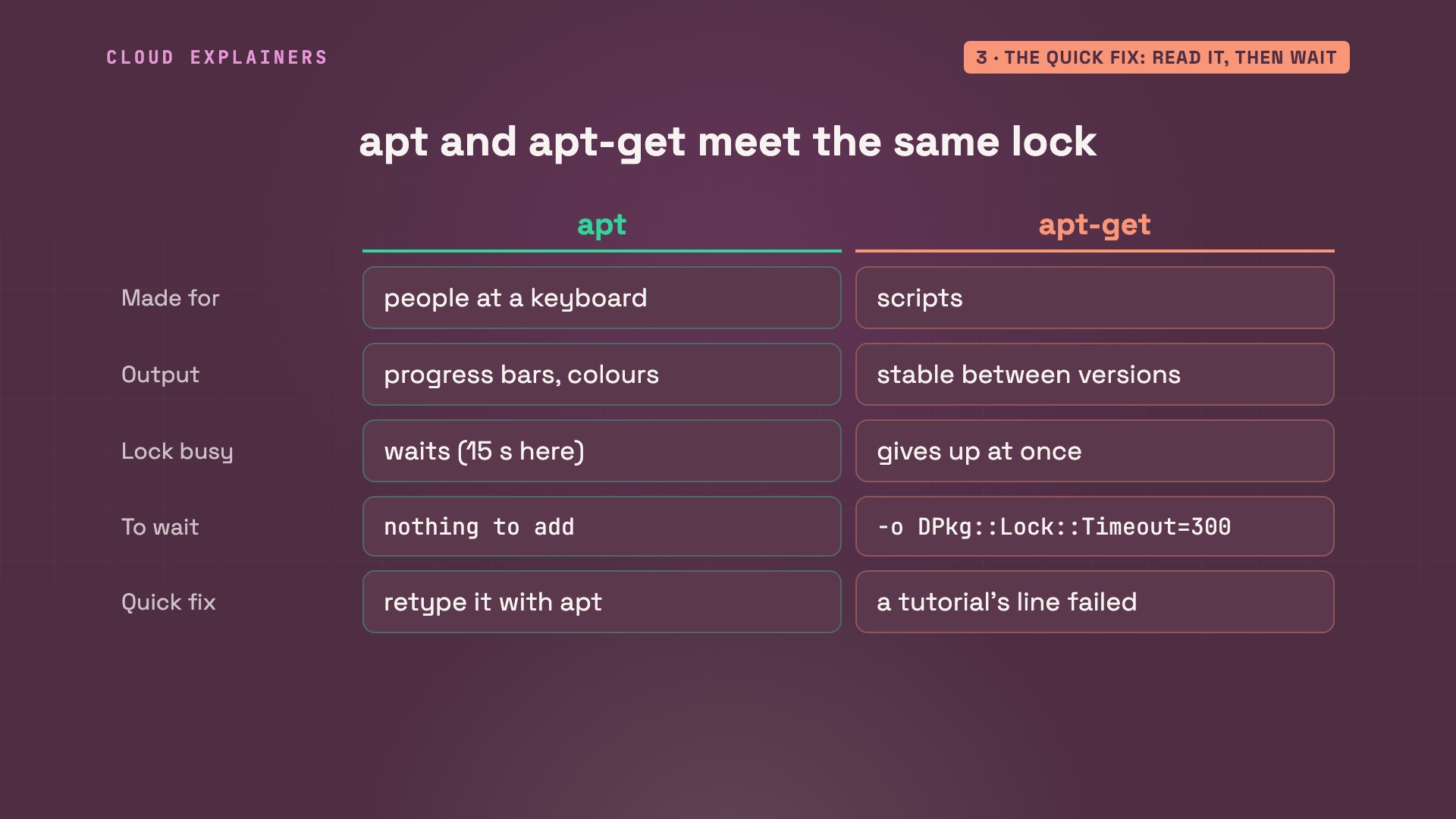
Why do the two behave differently? apt is made for people at a keyboard. apt-get, the older one, is made for scripts, so its output never changes between versions. And when the lock is busy, apt waits, while apt-get gives up at once, unless you tell it to wait. So if a tutorial's apt-get line failed on Ana's server, typing it again with plain apt is a fine quick fix.
Who holds it on a fresh server
Why was it busy on a server nobody had touched? Ubuntu's own documentation says it. Security updates are installed automatically, by a package that is there by default. And if the server was off at the scheduled time, the job may run right after it starts, and other installs have to wait.
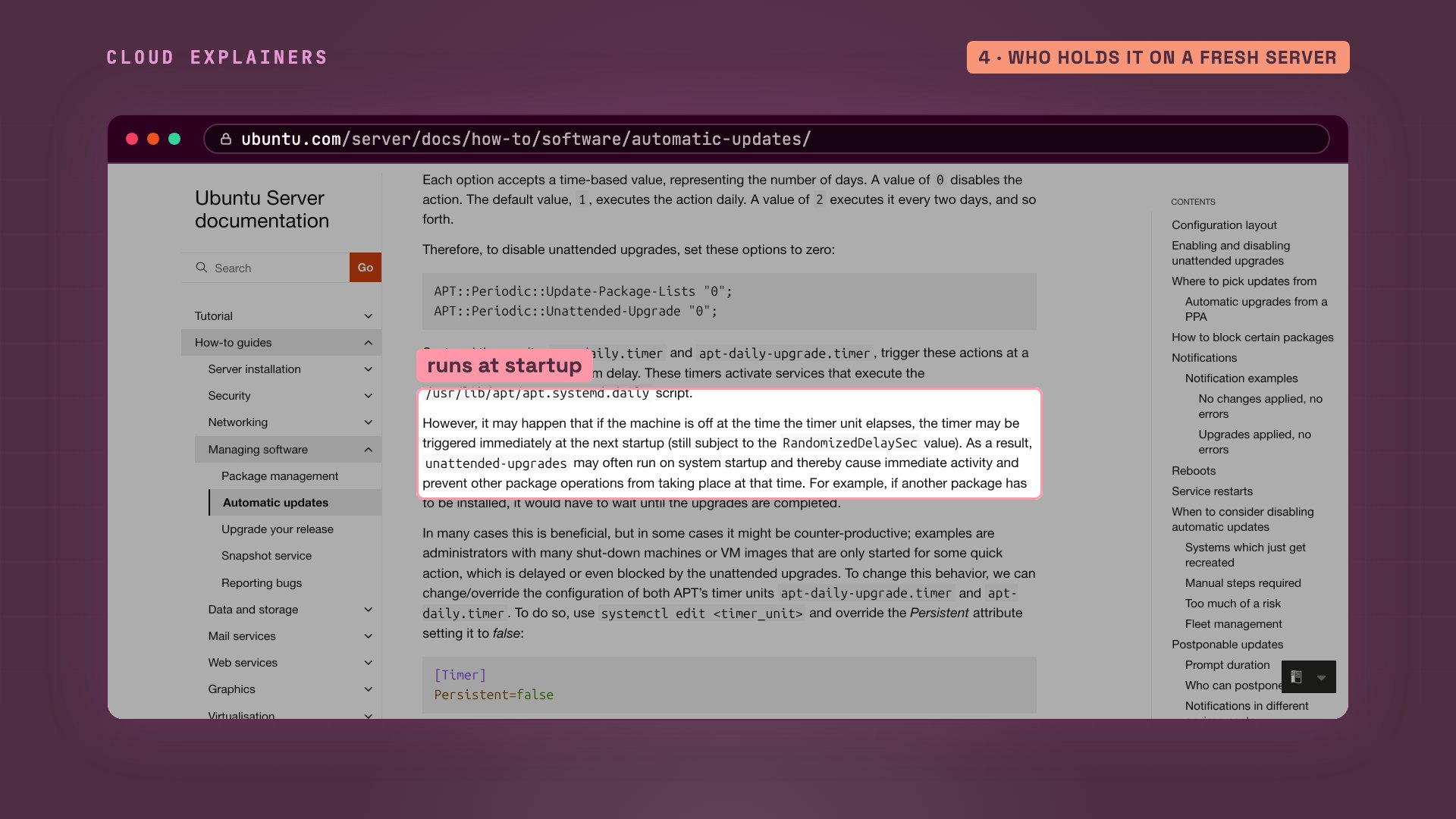
On the catalog server, it's a timer: six in the morning, plus up to an hour of random delay, and persistent, meaning a missed run happens as soon as the server is back. We started the same job by hand for this demo. The last lines of its log show why it held the lock: thirty packages to upgrade, then all upgrades installed, and the job is now inactive. Here it took seconds. On a server that has been off for months, it can take several minutes. Let it finish.
systemctl cat apt-daily-upgrade.timer# /usr/lib/systemd/system/apt-daily-upgrade.timer
[Unit]
Description=Daily apt upgrade and clean activities
After=apt-daily.timer

[Timer]
OnCalendar=*-*-* 6:00
RandomizedDelaySec=60m
Persistent=true

[Install]
WantedBy=timers.target
sudo tail -n 3 /var/log/unattended-upgrades/unattended-upgrades.log | cut -c 12-9517:49:35,979 INFO Packages that will be upgraded: apt coreutils diffutils dpkg gcc-1
17:49:35,979 INFO Writing dpkg log to /var/log/unattended-upgrades/unattended-upgrad
17:49:47,515 INFO All upgrades installed
systemctl is-active apt-daily-upgrade.serviceinactive
Who holds it: another terminal
Who else can hold the lock? On another day, Ana's error names plain apt. ps shows its command line and how long it has run: an install of build tools, started one minute ago. And who typed it? The sudo processes say: Ben. One more check: L S of lists who has a file open. In its F D column, the file handle, the W means apt holds the write lock.
sudo apt-get install -y treeE: Could not get lock /var/lib/dpkg/lock-frontend. It is held by process 1454 (apt)
N: Be aware that removing the lock file is not a solution and may break your system.
E: Unable to acquire the dpkg frontend lock (/var/lib/dpkg/lock-frontend), is another process using it?
ps -o pid,tty,etime,cmd -p 1454PID TT ELAPSED CMD 1454 pts/2 01:15 apt install build-essential
ps -o ruser,etime,cmd -C sudoRUSER        ELAPSED CMD
ben            01:15 sudo apt install build-essential
ben            01:15 sudo apt install build-essential
sudo lsof /var/lib/dpkg/lock-frontendCOMMAND  PID USER   FD   TYPE DEVICE SIZE/OFF   NODE NAME
apt     1454 root    4uW  REG   0,63        0 959045 /var/lib/dpkg/lock-frontend
Ben's terminal explains it. apt asked: do you want to continue? And Ben walked away. A question waiting for an answer still holds the lock. Ben answers no, and Ana's install goes straight through.
sudo apt install build-essentialReading package lists... Done
Building dependency tree... Done
Reading state information... Done
The following additional packages will be installed:
  binutils binutils-aarch64-linux-gnu binutils-common bzip2 cpp cpp-13
  cpp-13-aarch64-linux-gnu cpp-aarch64-linux-gnu dirmngr dpkg-dev fakeroot fontconfig-config
  fonts-dejavu-core fonts-dejavu-mono g++ g++-13 g++-13-aarch64-linux-gnu
  g++-aarch64-linux-gnu gcc gcc-13 gcc-13-aarch64-linux-gnu gcc-13-base gcc-aarch64-linux-gnu
  gnupg gnupg-l10n gnupg-utils gpg gpg-agent gpg-wks-client gpgconf gpgsm keyboxd
  libalgorithm-diff-perl libalgorithm-diff-xs-perl libalgorithm-merge-perl libaom3 libasan8
  libatomic1 libbinutils libbrotli1 libbsd0 libc-dev-bin libc-devtools libc6-dev libcc1-0
  libcrypt-dev libctf-nobfd0 libctf0 libdeflate0 libdpkg-perl libfakeroot
  libfile-fcntllock-perl libfontconfig1 libfreetype6 libgcc-13-dev libgd3 libgdbm-compat4t64
  libgdbm6t64 libgomp1 libgprofng0 libheif-plugin-aomdec libheif-plugin-aomenc libheif1
  libhwasan0 libisl23 libitm1 libjansson4 libjbig0 libjpeg-turbo8 libjpeg8 libksba8
  libldap-common libldap2 liblerc4 liblocale-gettext-perl liblsan0 libmpc3 libmpfr6
  libperl5.38t64 libpng16-16t64 libsasl2-2 libsasl2-modules libsasl2-modules-db libsframe1
  libsharpyuv0 libstdc++-13-dev libtiff6 libtsan2 libubsan1 libwebp7 libx11-6 libx11-data
  libxau6 libxcb1 libxdmcp6 libxpm4 linux-libc-dev lto-disabled-list make manpages
  manpages-dev patch perl perl-modules-5.38 pinentry-curses rpcsvc-proto
Suggested packages:
  binutils-doc gprofng-gui bzip2-doc cpp-doc gcc-13-locales cpp-13-doc dbus-user-session
  libpam-systemd pinentry-gnome3 tor debian-keyring gcc-13-doc gcc-multilib autoconf automake
  libtool flex bison gdb gcc-doc gdb-aarch64-linux-gnu parcimonie xloadimage gpg-wks-server
  scdaemon glibc-doc git bzr libgd-tools gdbm-l10n libheif-plugin-libde265 libheif-plugin-x265
  libheif-plugin-ffmpegdec libheif-plugin-jpegdec libheif-plugin-jpegenc libheif-plugin-j2kdec
  libheif-plugin-j2kenc libheif-plugin-rav1e libheif-plugin-svtenc libsasl2-modules-gssapi-mit
  | libsasl2-modules-gssapi-heimdal libsasl2-modules-ldap libsasl2-modules-otp
  libsasl2-modules-sql libstdc++-13-doc make-doc man-browser ed diffutils-doc perl-doc
  libterm-readline-gnu-perl | libterm-readline-perl-perl libtap-harness-archive-perl
  pinentry-doc
The following NEW packages will be installed:
  binutils binutils-aarch64-linux-gnu binutils-common build-essential bzip2 cpp cpp-13
  cpp-13-aarch64-linux-gnu cpp-aarch64-linux-gnu dirmngr dpkg-dev fakeroot fontconfig-config
  fonts-dejavu-core fonts-dejavu-mono g++ g++-13 g++-13-aarch64-linux-gnu
  g++-aarch64-linux-gnu gcc gcc-13 gcc-13-aarch64-linux-gnu gcc-13-base gcc-aarch64-linux-gnu
  gnupg gnupg-l10n gnupg-utils gpg gpg-agent gpg-wks-client gpgconf gpgsm keyboxd
  libalgorithm-diff-perl libalgorithm-diff-xs-perl libalgorithm-merge-perl libaom3 libasan8
  libatomic1 libbinutils libbrotli1 libbsd0 libc-dev-bin libc-devtools libc6-dev libcc1-0
  libcrypt-dev libctf-nobfd0 libctf0 libdeflate0 libdpkg-perl libfakeroot
  libfile-fcntllock-perl libfontconfig1 libfreetype6 libgcc-13-dev libgd3 libgdbm-compat4t64
  libgdbm6t64 libgomp1 libgprofng0 libheif-plugin-aomdec libheif-plugin-aomenc libheif1
  libhwasan0 libisl23 libitm1 libjansson4 libjbig0 libjpeg-turbo8 libjpeg8 libksba8
  libldap-common libldap2 liblerc4 liblocale-gettext-perl liblsan0 libmpc3 libmpfr6
  libperl5.38t64 libpng16-16t64 libsasl2-2 libsasl2-modules libsasl2-modules-db libsframe1
  libsharpyuv0 libstdc++-13-dev libtiff6 libtsan2 libubsan1 libwebp7 libx11-6 libx11-data
  libxau6 libxcb1 libxdmcp6 libxpm4 linux-libc-dev lto-disabled-list make manpages
  manpages-dev patch perl perl-modules-5.38 pinentry-curses rpcsvc-proto
0 upgraded, 107 newly installed, 0 to remove and 22 not upgraded.
Need to get 86.7 MB of archives.
After this operation, 321 MB of additional disk space will be used.
Do you want to continue? [Y/n] n
Abort.
Why deleting the lock file is wrong
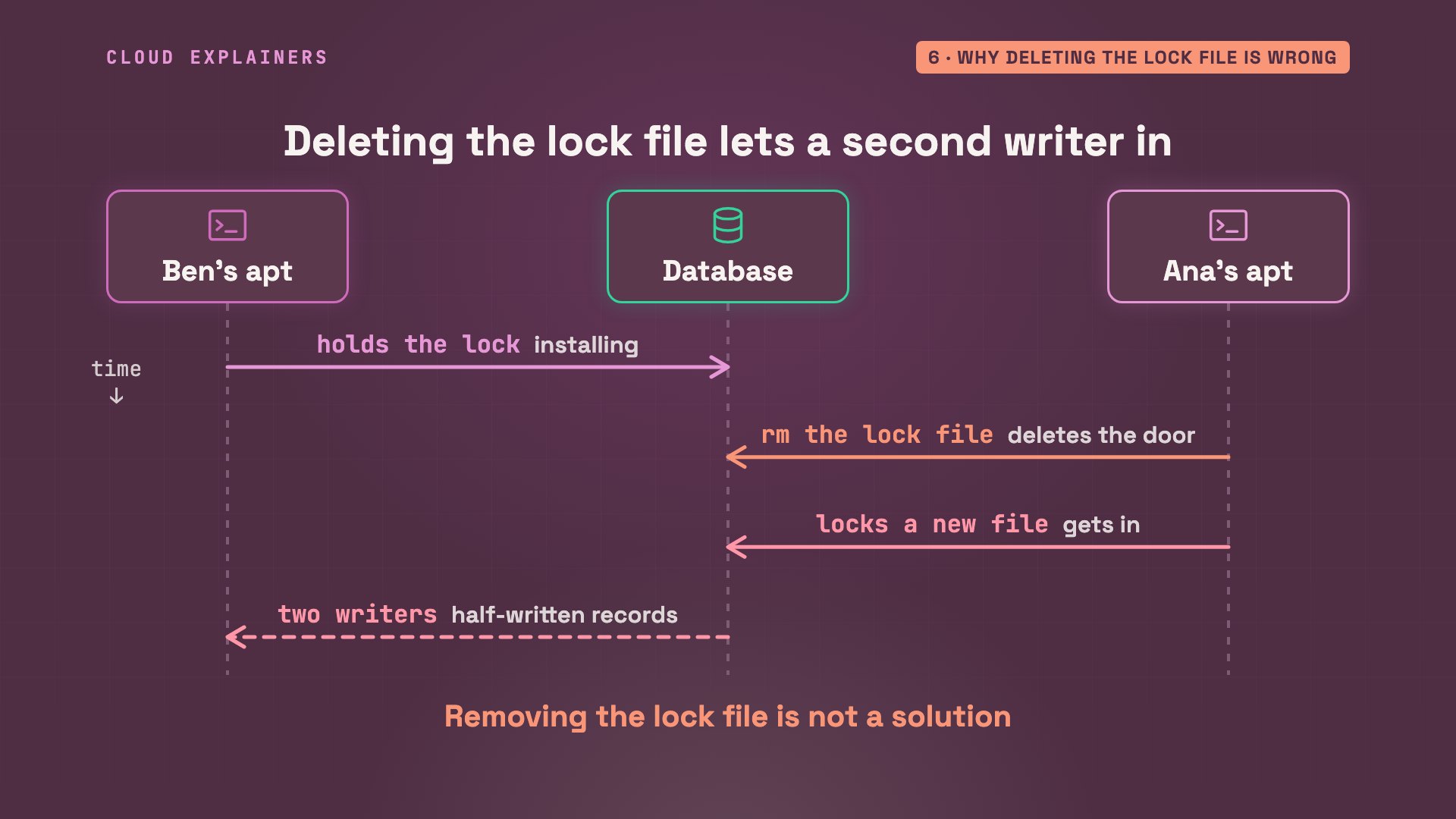
Now the forum shortcut. There are two lock files: lock front end for apt, and lock for dpkg, the engine underneath. With nothing running, they're still there, empty, and L S of finds nobody holding them. The file is just the hook the key hangs on. The lock is a running process holding it, and Linux drops it the moment that process ends.
ls -l /var/lib/dpkg/lock*-rw-r----- 1 root root 0 Nov 13 17:51 /var/lib/dpkg/lock
-rw-r----- 1 root root 0 Apr 23  2024 /var/lib/dpkg/lock-frontend
sudo lsof /var/lib/dpkg/lock-frontend
So deleting the file while apt runs doesn't stop anything. The next apt makes a fresh file, locks that one, and walks in while the first is still changing the database. Two writers, one database: exactly what the lock was there to prevent. That's why apt's own warning says it may break your system.
What killing the holder costs
The other shortcut is to kill the process that holds the lock. Ben runs his install again, this time for real. Ana, blocked, takes the process ID from her error and kills it with kill dash nine, which stops a process with no chance to clean up: someone dragged out of the stockroom mid-box. Ben's terminal says: killed. Guess first: what does Ana's next install say? dpkg was interrupted.
sudo apt-get install -y jqE: Could not get lock /var/lib/dpkg/lock-frontend. It is held by process 1505 (apt)
N: Be aware that removing the lock file is not a solution and may break your system.
E: Unable to acquire the dpkg frontend lock (/var/lib/dpkg/lock-frontend), is another process using it?
sudo kill -9 1505
sudo apt-get install -y jqE: dpkg was interrupted, you must manually run 'sudo dpkg --configure -a' to correct the problem.
The lock is free, but Ben's install stopped halfway, and apt refuses to touch the database until that's repaired. dpkg dash dash configure dash a finishes what was left. dpkg dash dash audit checks for broken packages, and still lists one in a mess, half unpacked when the kill came. Running Ben's install once more puts it back, and the audit comes up empty. Recoverable here, but a kill during a big upgrade can leave far more to repair.
sudo dpkg --configure -a
sudo dpkg --auditThe following packages are in a mess due to serious problems during
installation.  They must be reinstalled for them (and any packages
that depend on them) to function properly:
 liblocale-gettext-perl (no description available)
sudo dpkg --audit
In scripts: wait for the lock
One place where waiting doesn't happen by itself: scripts. Ana's setup script for the library's server uses apt-get, as scripts should, for its stable output, and Ben has an upgrade question open again. The script fails on its first line and stops, and whatever came after never runs.
cat setup.sh#!/bin/bash
set -e
sudo apt-get install -y curl
echo "setup done"
bash setup.shE: Could not get lock /var/lib/dpkg/lock-frontend. It is held by process 2970 (apt)
N: Be aware that removing the lock file is not a solution and may break your system.
E: Unable to acquire the dpkg frontend lock (/var/lib/dpkg/lock-frontend), is another process using it?
The fix is one option, passed with a lowercase dash O: dpkg lock timeout, in seconds. Now apt-get waits, as plain apt does, but only that long. Ben answers his question, the lock comes free after about thirteen seconds, and the script finishes: setup done.
cat setup.sh#!/bin/bash
set -e
sudo apt-get -o DPkg::Lock::Timeout=300 install -y curl
echo "setup done"
bash setup.shWaiting for cache lock: Could not get lock /var/lib/dpkg/lock-frontend. It is held by process 2970 (apt)
Reading package lists... Done
Building dependency tree... Done
Reading state information... Done
The following additional packages will be installed:
  libcurl4t64 libnghttp2-14 libpsl5t64 librtmp1 libssh-4 publicsuffix
The following NEW packages will be installed:
  curl libcurl4t64 libnghttp2-14 libpsl5t64 librtmp1 libssh-4 publicsuffix
0 upgraded, 7 newly installed, 0 to remove and 22 not upgraded.
Need to get 1070 kB of archives.
After this operation, 2979 kB of additional disk space will be used.
Get:1 http://ports.ubuntu.com/ubuntu-ports noble-updates/main arm64 libnghttp2-14 arm64 1.59.0-1ubuntu0.4 [74.8 kB]
Get:2 http://ports.ubuntu.com/ubuntu-ports noble/main arm64 libpsl5t64 arm64 0.21.2-1.1build1 [57.4 kB]
Get:3 http://ports.ubuntu.com/ubuntu-ports noble/main arm64 publicsuffix all 20231001.0357-0.1 [129 kB]
Get:4 http://ports.ubuntu.com/ubuntu-ports noble/main arm64 librtmp1 arm64 2.4+20151223.gitfa8646d.1-2build7 [57.8 kB]
Get:5 http://ports.ubuntu.com/ubuntu-ports noble-updates/main arm64 libssh-4 arm64 0.10.6-2ubuntu0.5 [192 kB]
Get:6 http://ports.ubuntu.com/ubuntu-ports noble-updates/main arm64 libcurl4t64 arm64 8.5.0-2ubuntu10.16 [337 kB]
Get:7 http://ports.ubuntu.com/ubuntu-ports noble-updates/main arm64 curl arm64 8.5.0-2ubuntu10.16 [222 kB]
Fetched 1070 kB in 1s (940 kB/s)
debconf: delaying package configuration, since apt-utils is not installed
Selecting previously unselected package libnghttp2-14:arm64.
(Reading database ... 17353 files and directories currently installed.)
Preparing to unpack .../0-libnghttp2-14_1.59.0-1ubuntu0.4_arm64.deb ...
Unpacking libnghttp2-14:arm64 (1.59.0-1ubuntu0.4) ...
Selecting previously unselected package libpsl5t64:arm64.
Preparing to unpack .../1-libpsl5t64_0.21.2-1.1build1_arm64.deb ...
Unpacking libpsl5t64:arm64 (0.21.2-1.1build1) ...
Selecting previously unselected package publicsuffix.
Preparing to unpack .../2-publicsuffix_20231001.0357-0.1_all.deb ...
Unpacking publicsuffix (20231001.0357-0.1) ...
Selecting previously unselected package librtmp1:arm64.
Preparing to unpack .../3-librtmp1_2.4+20151223.gitfa8646d.1-2build7_arm64.deb ...
Unpacking librtmp1:arm64 (2.4+20151223.gitfa8646d.1-2build7) ...
Selecting previously unselected package libssh-4:arm64.
Preparing to unpack .../4-libssh-4_0.10.6-2ubuntu0.5_arm64.deb ...
Unpacking libssh-4:arm64 (0.10.6-2ubuntu0.5) ...
Selecting previously unselected package libcurl4t64:arm64.
Preparing to unpack .../5-libcurl4t64_8.5.0-2ubuntu10.16_arm64.deb ...
Unpacking libcurl4t64:arm64 (8.5.0-2ubuntu10.16) ...
Selecting previously unselected package curl.
Preparing to unpack .../6-curl_8.5.0-2ubuntu10.16_arm64.deb ...
Unpacking curl (8.5.0-2ubuntu10.16) ...
Setting up libpsl5t64:arm64 (0.21.2-1.1build1) ...
Setting up libnghttp2-14:arm64 (1.59.0-1ubuntu0.4) ...
Setting up librtmp1:arm64 (2.4+20151223.gitfa8646d.1-2build7) ...
Setting up libssh-4:arm64 (0.10.6-2ubuntu0.5) ...
Setting up publicsuffix (20231001.0357-0.1) ...
Setting up libcurl4t64:arm64 (8.5.0-2ubuntu10.16) ...
Setting up curl (8.5.0-2ubuntu10.16) ...
Processing triggers for libc-bin (2.39-0ubuntu8.12) ...
setup done
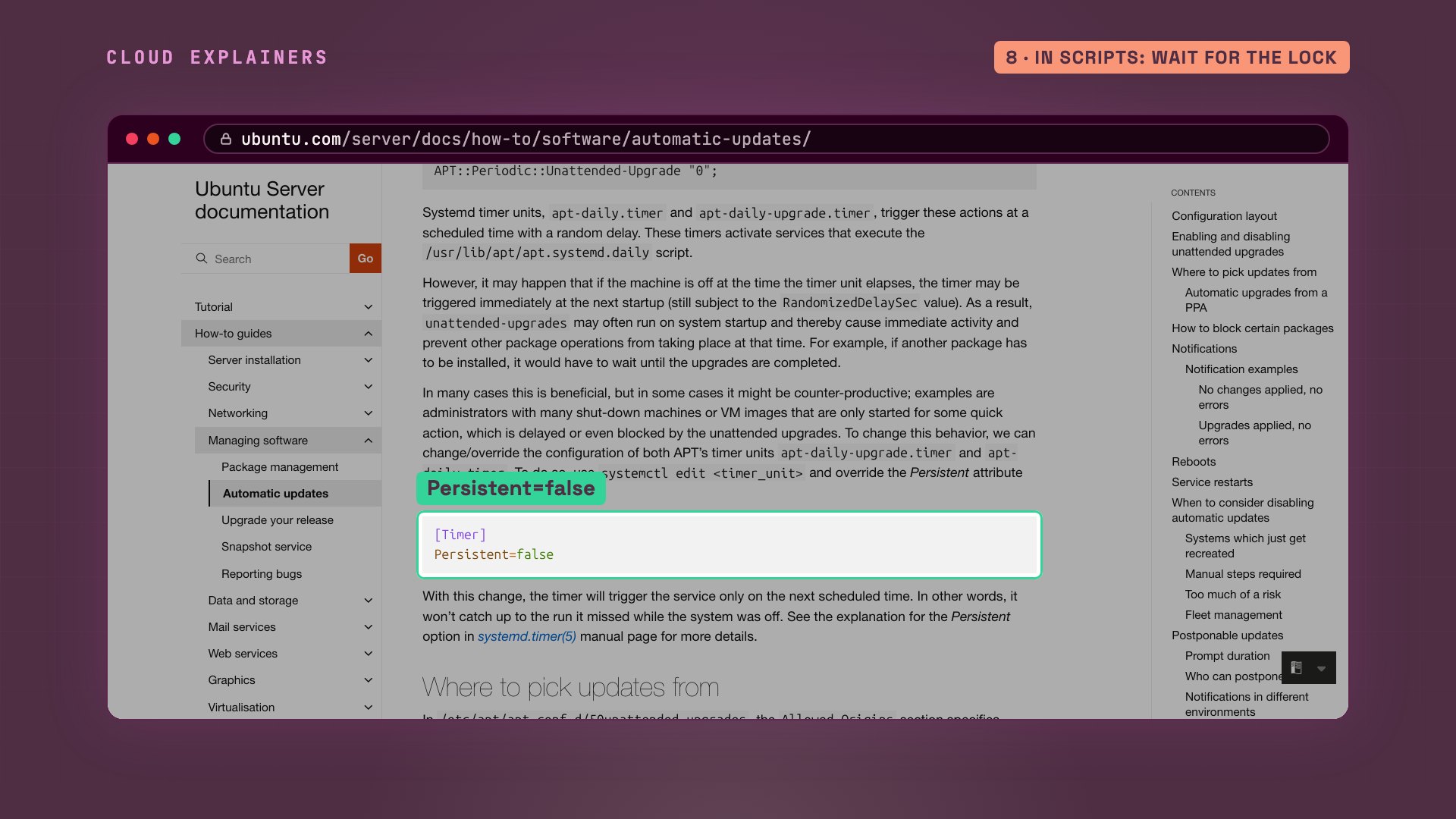
And for servers you start only now and then, the same Ubuntu page shows a second choice. Open the apt daily upgrade timer we saw earlier with systemctl edit, and set persistent to false, and a missed run waits for its next scheduled time instead of starting the moment the server boots. The updates still come, just not in your way.
Recap
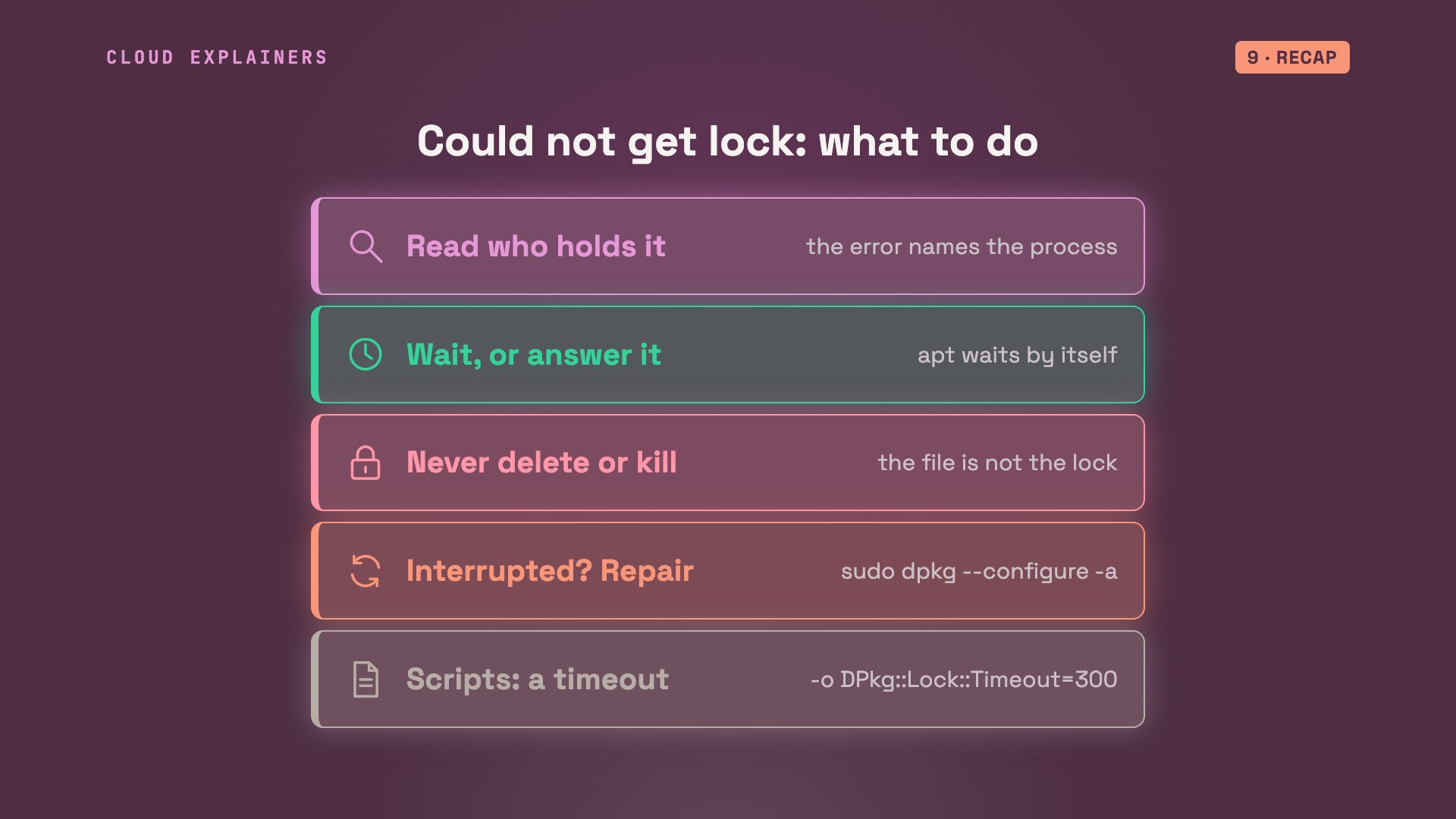
So, could not get lock: read who holds it, and wait, or answer the question left open. Never delete the lock file, and don't kill the holder. If something was killed anyway, dpkg configure dash a. And in scripts, give apt-get a lock timeout.
If your install finally went through, subscribing brings more real fixes from real servers like this one.
Every lock in this video was held by a real process on a real Ubuntu server, and every command and the lab files are linked in the description. Thanks for watching Cloud Explainers.
Sources
- apt(8) on Ubuntu 24.04
- apt.conf(5), DPkg::Lock::Timeout (seconds to wait for the dpkg lock)
- dpkg(1), --configure -a and --audit
- Ubuntu Server documentation, Automatic updates (installed by default; may run at startup and make other installs wait)
- fcntl(2): a record lock is released when the process that holds it ends
Demos: a container on our own Mac standing in for a library's server; the library and its admins are made up. The security updates and every lock were real. Watch the full video on YouTube.
More videos
Every Networking Term a Beginner Needs in 12 Minutes
How to Fix Docker 'Permission Denied' on docker.sock
How to Fix Git 'Updates Were Rejected' When You Push
How to Fix nginx 502 Bad Gateway Errors on Linux

How Email Works on the Internet (SMTP) in 10 Minutes

The Python Roadmap for Beginners

Golang REST API with Gin: Full Tutorial for Beginners
How a WireGuard VPN Network Works

Linux Makefiles Will Finally Make Sense After This

SAML vs OAuth vs OpenID Connect: What's the Difference?

How to Fix Python cron Jobs That Never Run

Linux Bash Scripting: Full Tutorial for Beginners

How PXE Network Boot Works

How Active Directory Works

How to Fix a Linux systemd Service That Won't Start

Linux Logs: syslog vs journald

JWT vs Session Cookies: Which One Should You Use?

Docker vs Docker Compose: Which One Should You Use?

How to Fix Docker Compose Containers That Can't Talk to Each Other

Django Full Tutorial for Beginners

How Linux systemd Works

How to Fix 'Windows Cannot Access' Network Share Errors (SMB)

REST vs gRPC: Which One Should You Use?

How to Fix SSL Certificate Chain Errors (Missing Intermediate)

Every Python Concept for Beginners in 10 Minutes

Every SQL Join Type in 10 Minutes

Why OpenRouter Free Models Hit Their Limit So Fast

Why Your Gemini API Free Tier Runs Out So Fast

OpenRouter Will Finally Make Sense After This

How Redis Caching Works

Gemini API vs Vertex AI: Which One Should You Use?

How to Fix a Leaked Gemini API Key

Why Golang Uses Goroutines Instead of Threads

How to Fix Gemini API Error 429: Resource Exhausted

Claude Token Pricing Will Finally Make Sense After This

Why Python Web Scraping Returns Nothing (and the Fix)

Python uv vs pip: Which One Should You Use?

Python Automation: Full Tutorial for Beginners

How OAuth Login Works

Google AI Studio Will Finally Make Sense After This

What Happens When You Run a Docker Container

How to Fix Claude Code Billing Your API Key Instead of Your Plan

Why Passkeys Can't Be Phished Like Passwords

PowerShell vs Bash: Which One Should You Learn?

The Linux Roadmap for Beginners

Django vs FastAPI: Which One Should You Use?

Why SQLite Is the Most Used Database in the World

How a NoSQL Database Like MongoDB Works

How to Fix Python pip error: externally-managed-environment

How to Fix MySQL Too Many Connections Database Errors

Golang Concurrency Will Finally Make Sense After This

How Amazon S3 Works

How Kubernetes Works

How Git Works

How to Fix Docker Port Already Allocated Errors

How PostgreSQL Works

How to Fix Git Merge Conflicts

How to Fix No Space Left on Device in Linux

How the Internet Works

SQL vs NoSQL: When Each One Wins

How to Fix JWT Token Expired Errors (401 Unauthorized)

Claude API vs Claude Pro: Why Your Subscription Doesn't Include It

Why AI Agent Skills Beat Giant Prompts

Linux Cron Jobs Will Finally Make Sense After This

Security Logs Will Finally Make Sense After This

How to Fix a Security Leak: An API Key Pushed to GitHub

DNS Will Finally Make Sense After This

Never Ignore a Security Update

Two-Factor Authentication Will Finally Make Sense

Never Expose a Database to the Internet

SSH Keys vs Passwords: Which Is Safer for Security?

The 5 Levels of Linux Boot: From Power On to Login

The 5 Levels of Network Firewalls

Password Security: Why Hackers Crack Weak Passwords

Why Your Linux Server Runs Out of Memory

HTTP vs HTTPS: What Actually Changes on Your Network

Every Linux File Permission You Need to Know

Linux Processes vs Threads: When Each One Wins

The OSI Model Will Finally Make Sense After This

The 7 Levels of Git

Every Network Troubleshooting Command You Need

Hashing vs Encryption in Cybersecurity: When Each One Wins

Why the Internet Ran Out of IP Addresses

Linux Package Managers: apt vs Snap vs Flatpak

Why Python Is Slow (and When It Doesn't Matter)

TCP vs UDP: When Each One Wins

Stop Running Linux as Root (Do This Instead)

Linux Users and Groups Will Finally Make Sense

Why Phishing Beats Good Security (and How to Spot It)

The 7 Levels of Docker

AI Agents Will Finally Make Sense After This

Stop Using git push --force (Use This Instead)

Agent Skills vs MCP: When Each One Wins

Networking Will Finally Make Sense After This

Every Linux Command You Actually Need

The 7 Levels of Cybersecurity

Every System Design Concept You Need, in One Diagram
