
How PXE Network Boot Works
A PC with no disk at all can be running Linux seconds after you press the power button, because everything arrives over the network cable. We booted two diskless PCs from a small server and followed the whole conversation: the network card's shout for help, the DHCP answer with an address and a file name, the boot loader fetched by TFTP, its search for instructions, and the kernel loading into memory. Then we broke it twice, and measured why big files moved to HTTP.
A PC with no disk
You press the power button on a PC with no hard drive, no USB stick, nothing to boot from, and thirteen seconds later it's running Linux. Nothing was installed. Every byte came down the network cable, from a server this PC had never heard of.
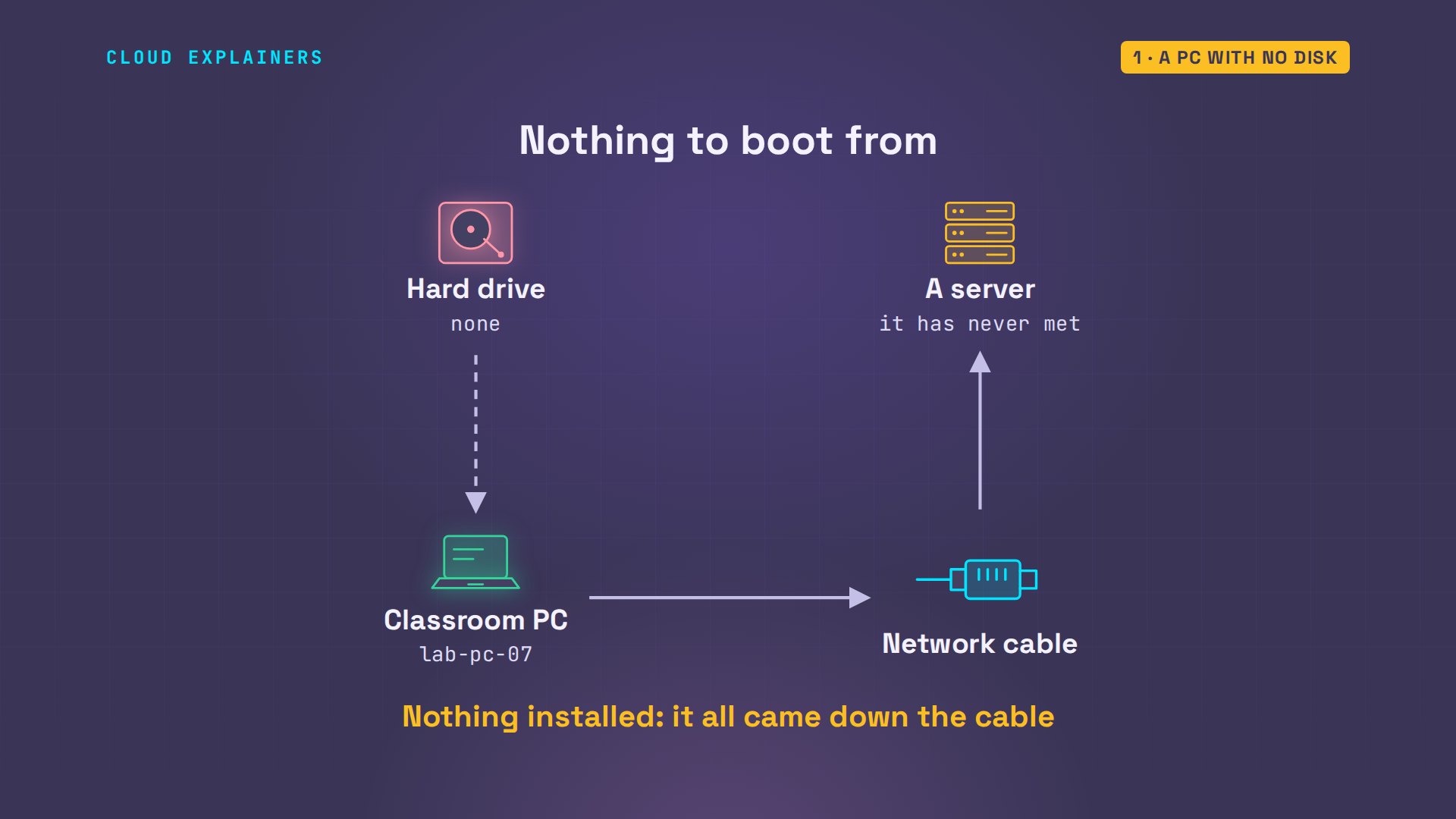
This is that PC's real screen. Ask Linux for its list of disks, and the list is empty. It's called PXE network boot: four short steps. And one of them is why this same server leaves the brand-new PC beside it stuck.
lab-pc-07: Linux is running. No disk was read.
Set up as: student
cat /proc/partitionsmajor minor #blocks name
Who speaks first?
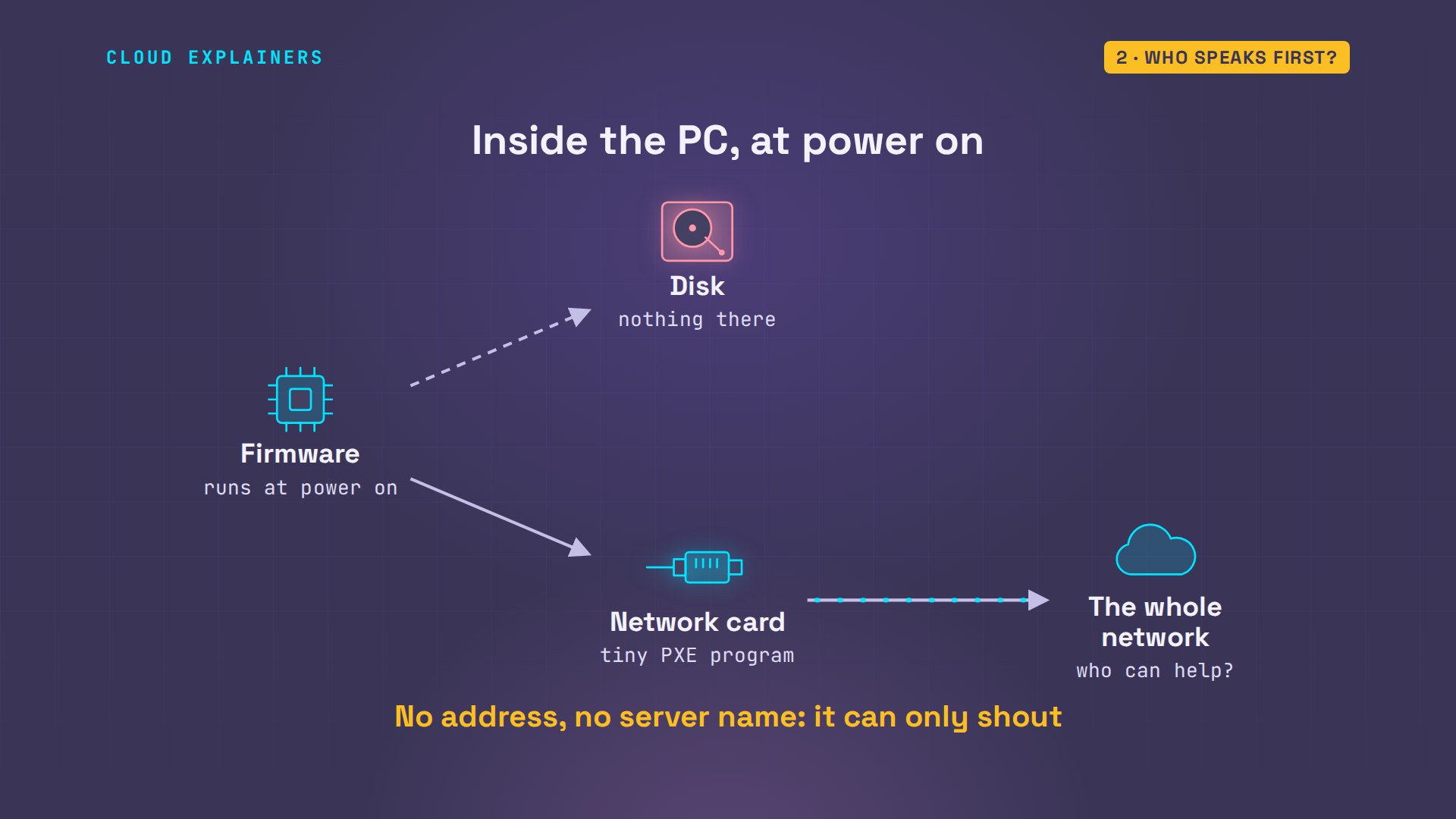
With no disk, the PC's firmware, the built-in program that runs at power on, tries its next option: the network card. If you've ever seen a PC stuck on the words Start PXE, this is that moment. Almost every wired network card carries a tiny program for exactly this. It's called PXE, the preboot execution environment. It starts with nothing: no address, no server name. So it shouts to the whole network: I'm new, I can boot from the network, who can help?
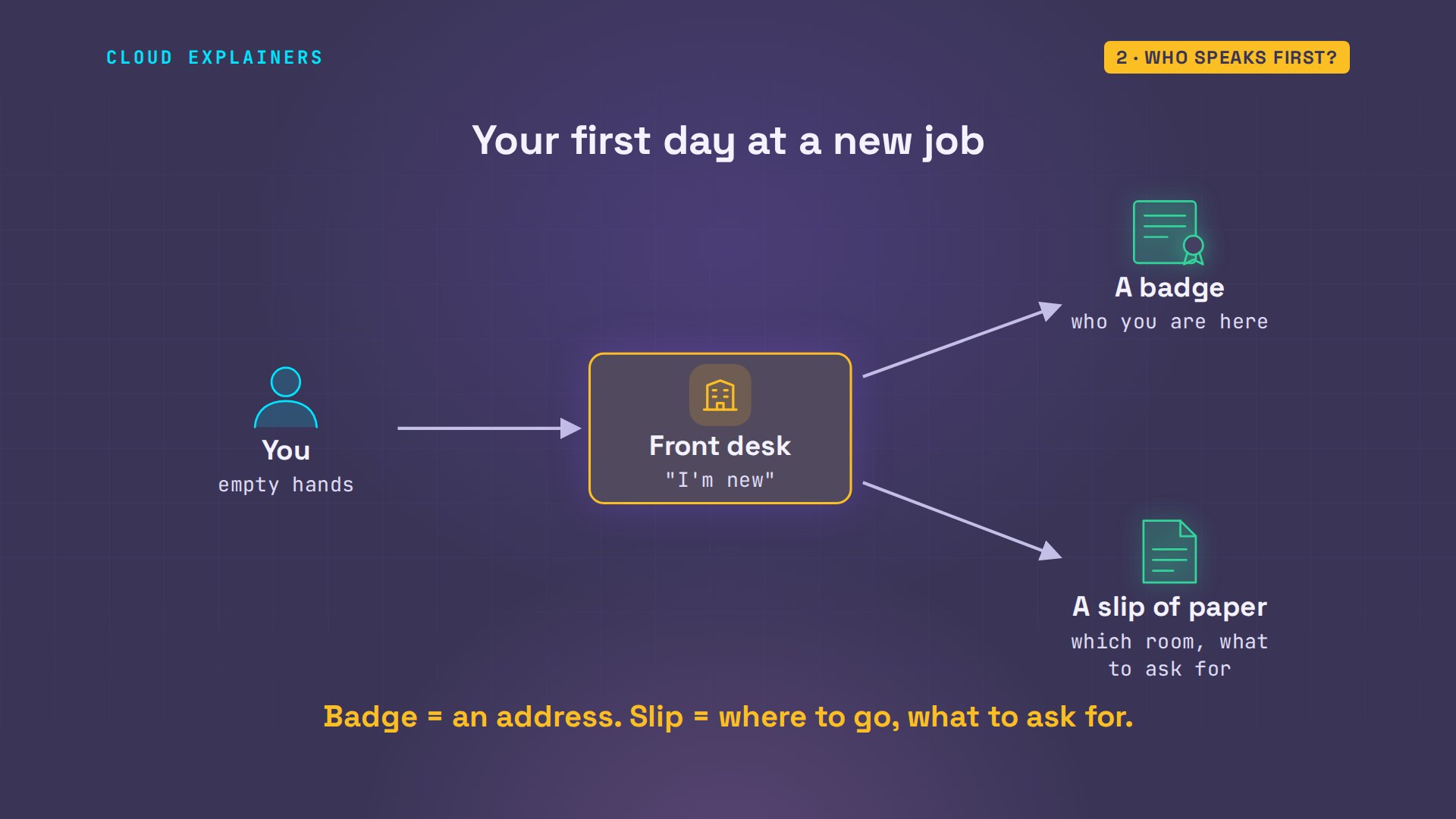
It's like your first day at a new job. You walk in with empty hands and tell the front desk: I'm new. The desk hands you a badge, so you're someone in this building, and a slip of paper: which room has your equipment, and what to ask for. Keep those two: a badge, and a slip.
And if nobody is at the desk? Ana looks after a school's computer room, and her boot server is switched off. The PC's card shouts, waits, shouts again, and after fifteen seconds it gives up: no configuration methods succeeded. That message means one thing: nobody answered.
net0: 52:54:00:00:00:07 using 82540em on 0000:00:02.0 (Ethernet) [open]
  [Link:up, TX:0 TXE:0 RX:0 RXE:0]
Step 1: an address and a slip
So, step one: someone has to be at the desk. That's a DHCP server, the service that hands out addresses on a network. Ana's is a small program called dnsmasq, with a range of addresses to hand out. For network boot it needs three more lines. dhcp-boot names the file a new PC should ask for. enable-tftp switches on a tiny file server, and tftp-root is the folder it serves. Then she starts the service.
cat /etc/dnsmasq.d/pxe.conf# PXE boot for the classroom network
port=0
interface=classroom
bind-interfaces
dhcp-range=10.20.0.100,10.20.0.150,12h
dhcp-boot=pxelinux.0
enable-tftp
tftp-root=/srv/tftp
log-dhcp
sudo systemctl start dnsmasq
systemctl is-active dnsmasqactive
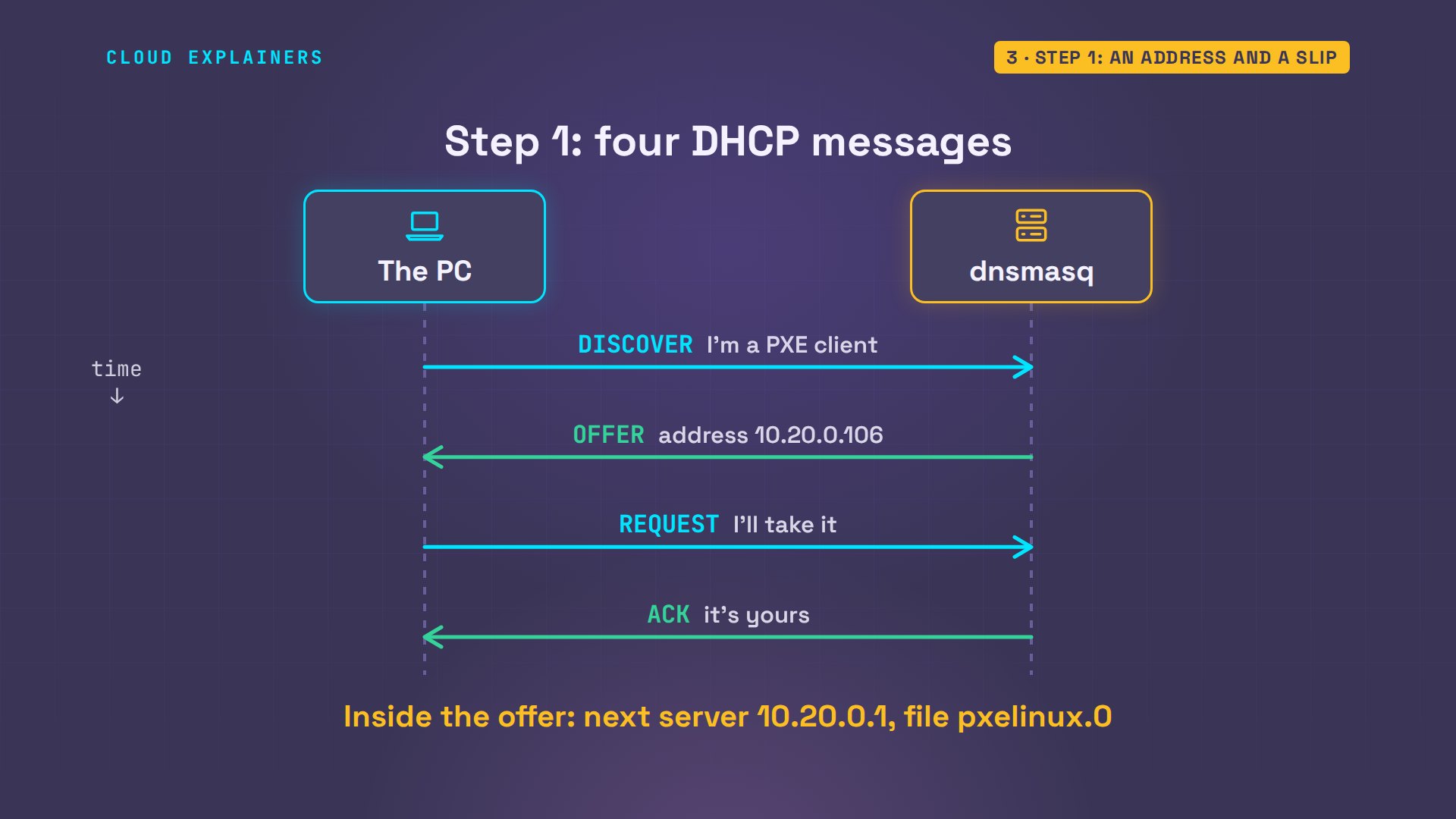
Power on again. The card shouts its discover message, and says what it is: a PXE client. The server offers an address: that's the badge. And inside the same offer is the slip: the next server to talk to, and the file to ask for, pxelinux.0. The PC requests that address, the server acknowledges, and step one is done.
Step 2: fetch a tiny program
Step two: fetch that file. The PC uses TFTP, the trivial file transfer protocol. Trivial is the point: no login, no browsing, just: send me this file. On the PC's screen you can read the slip: next server, file name. And the file arrives: about forty-two thousand bytes. It's a boot loader: a small program whose only job is to load a bigger one.
Configuring (net0 52:54:00:00:00:07)...... ok
net0: 10.20.0.106/255.255.255.0 gw 10.20.0.1
net0: fe80::5054:ff:fe00:7/64
Next server: 10.20.0.1
Filename: pxelinux.0
Step 3: find the instructions
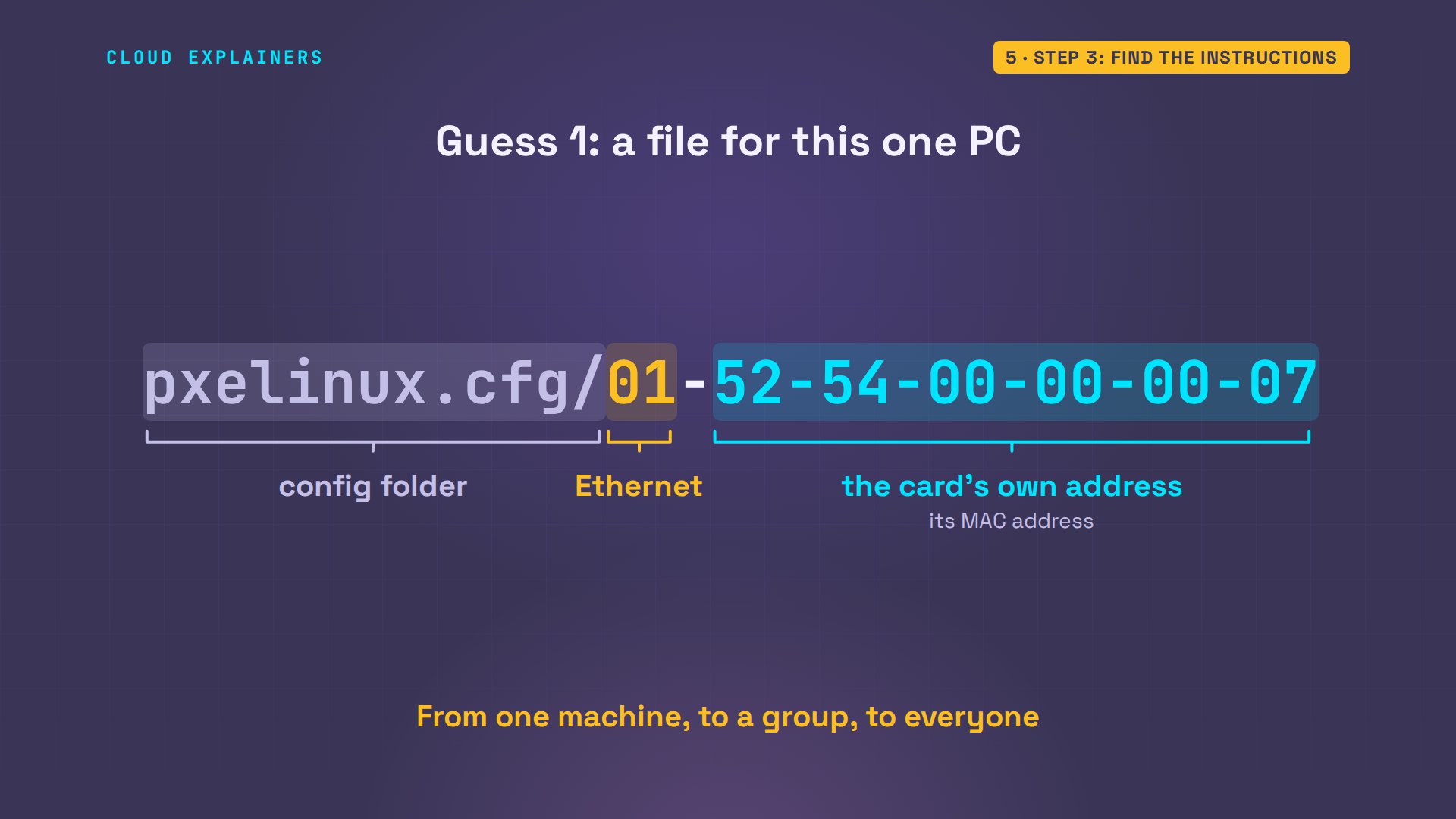
Step three. The boot loader is running, but it has no instructions: which system should it load? So it asks the server for a config file, in a folder called pxelinux.cfg. The catch: it doesn't know the file's name, so it guesses. Guess with it: how many names does it try before it finds one? Ten. Nine misses, and then a file called default.
ls -l /srv/tftptotal 21164
-rw-r--r-- 1 root root   966664 Apr  4  2024 bootx64.efi
drwxr-xr-x 2 root root     4096 Nov  9 23:30 grub
-rw-r--r-- 1 root root  2344840 Mar 28  2025 grubx64.efi
-rw-r--r-- 1 root root  1107439 Nov  9 23:30 initrd.img
-rw-r--r-- 1 root root   118676 Nov  9 23:30 ldlinux.c32
-rw-r--r-- 1 root root 16992648 Sep  9 06:47 linux
-rw-r--r-- 1 root root    74904 Nov  9 23:30 lpxelinux.0
-rw-r--r-- 1 root root    42392 Nov  9 23:30 pxelinux.0
drwxr-xr-x 2 root root     4096 Nov  9 23:30 pxelinux.cfg
sudo journalctl -u dnsmasq -o cat --since 23:30:55 | grep -E 'sent /|not found'sent /srv/tftp/pxelinux.0 to 10.20.0.106
sent /srv/tftp/ldlinux.c32 to 10.20.0.106
file /srv/tftp/pxelinux.cfg/01-52-54-00-00-00-07 not found for 10.20.0.106
file /srv/tftp/pxelinux.cfg/0A14006A not found for 10.20.0.106
file /srv/tftp/pxelinux.cfg/0A14006 not found for 10.20.0.106
file /srv/tftp/pxelinux.cfg/0A1400 not found for 10.20.0.106
file /srv/tftp/pxelinux.cfg/0A140 not found for 10.20.0.106
file /srv/tftp/pxelinux.cfg/0A14 not found for 10.20.0.106
file /srv/tftp/pxelinux.cfg/0A1 not found for 10.20.0.106
file /srv/tftp/pxelinux.cfg/0A not found for 10.20.0.106
file /srv/tftp/pxelinux.cfg/0 not found for 10.20.0.106
sent /srv/tftp/pxelinux.cfg/default to 10.20.0.106
sent /srv/tftp/linux to 10.20.0.106
sent /srv/tftp/initrd.img to 10.20.0.106
Why those names? The guesses run from one machine, to a group, to everyone. The first is this single PC: zero one means Ethernet, and the rest is the network card's own hardware address, its MAC address.
The next is its IP address, written in hexadecimal, the base-sixteen numbers computers like, two characters for each part: ten, twenty, zero, one hundred and six.
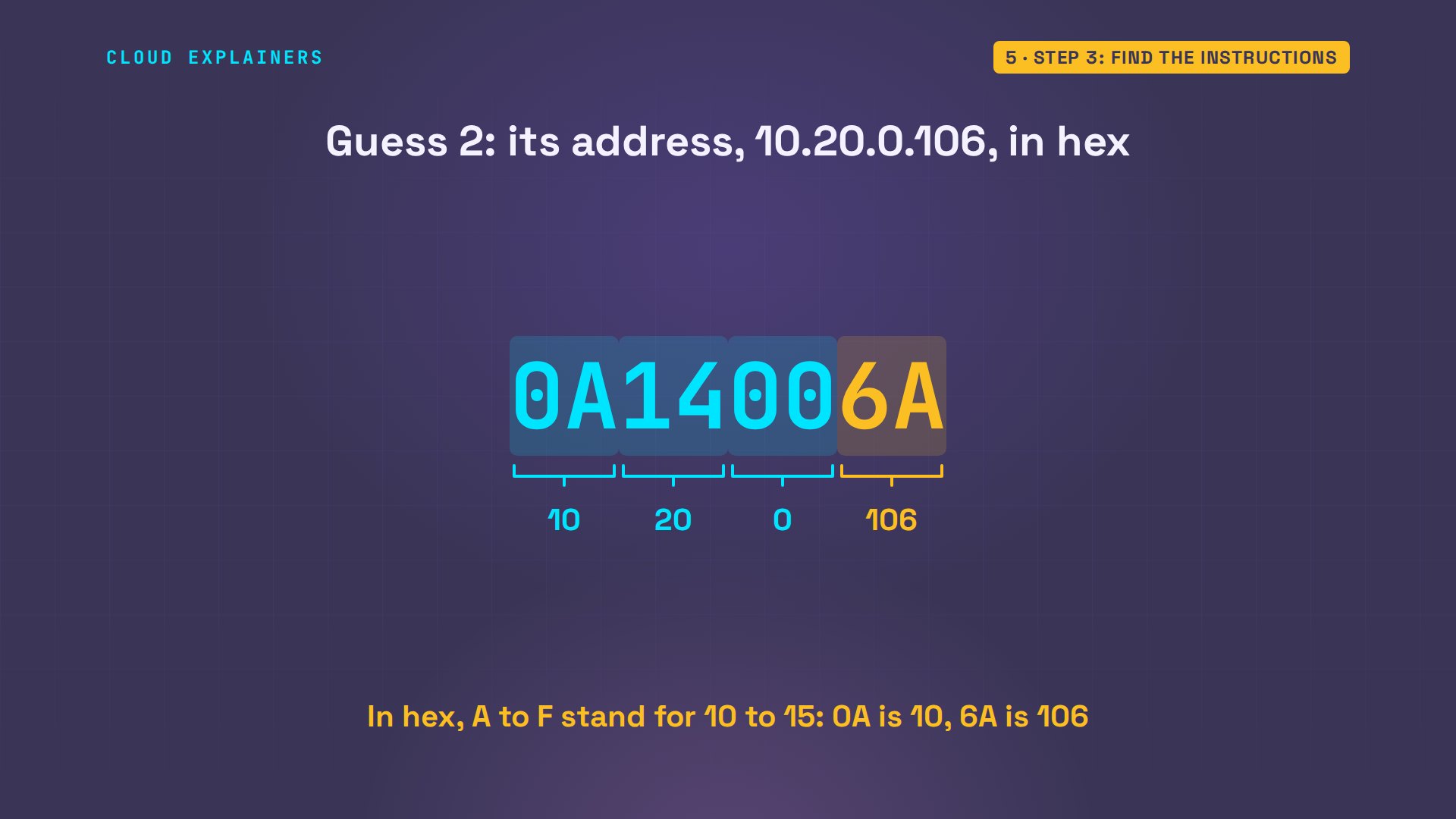
Then the boot loader chops one character off the end and tries again, and again. Like a phone number with the last digits left off, each shorter name covers a bigger block of addresses. Last comes default: everybody else.
That order is useful. Ana saves a config file under the teacher PC's own name, with one word changed: role, teacher. Power on, and in the server's log the very first guess hits. That PC alone comes up as the teacher's, chosen by nothing but its card's address.
cat /srv/tftp/pxelinux.cfg/01-52-54-00-00-00-07SERIAL 0 115200
DEFAULT teacher
LABEL teacher
  KERNEL linux
  INITRD initrd.img
  APPEND console=ttyS0 quiet lab.role=teacher
  IPAPPEND 2
sudo journalctl -u dnsmasq -o cat --since 23:31:11 | grep -E 'sent /|not found'sent /srv/tftp/pxelinux.0 to 10.20.0.106
sent /srv/tftp/ldlinux.c32 to 10.20.0.106
sent /srv/tftp/pxelinux.cfg/01-52-54-00-00-00-07 to 10.20.0.106
sent /srv/tftp/linux to 10.20.0.106
sent /srv/tftp/initrd.img to 10.20.0.106
Step 4: Linux, into memory
Step four. The instructions themselves are short. Kernel: a file called linux, the core of the operating system. Initrd: a packed set of starter files and tools, which the kernel unpacks first. Append passes settings along, like where to print messages. The boot loader fetches both files, by TFTP again, seventeen megabytes and one megabyte, and hands over control.
cat /srv/tftp/pxelinux.cfg/defaultSERIAL 0 115200
DEFAULT classroom
LABEL classroom
  KERNEL linux
  INITRD initrd.img
  APPEND console=ttyS0 quiet lab.role=student
  IPAPPEND 2
Here's the part people don't expect: nothing was written anywhere. Linux unpacked into the PC's memory, and runs from there. Ask the kernel how it was started, and it remembers: boot image, linux. List its files: they live in memory too. Switch this PC off and it's all gone. Tomorrow it boots fresh again.
lab-pc-07: Linux is running. No disk was read.
Set up as: student
cat /proc/cmdlineBOOT_IMAGE=linux console=ttyS0 quiet lab.role=student initrd=initrd.img BOOTIF=01-52-54-00-00-00-07
ls /bin dev init proc root sys
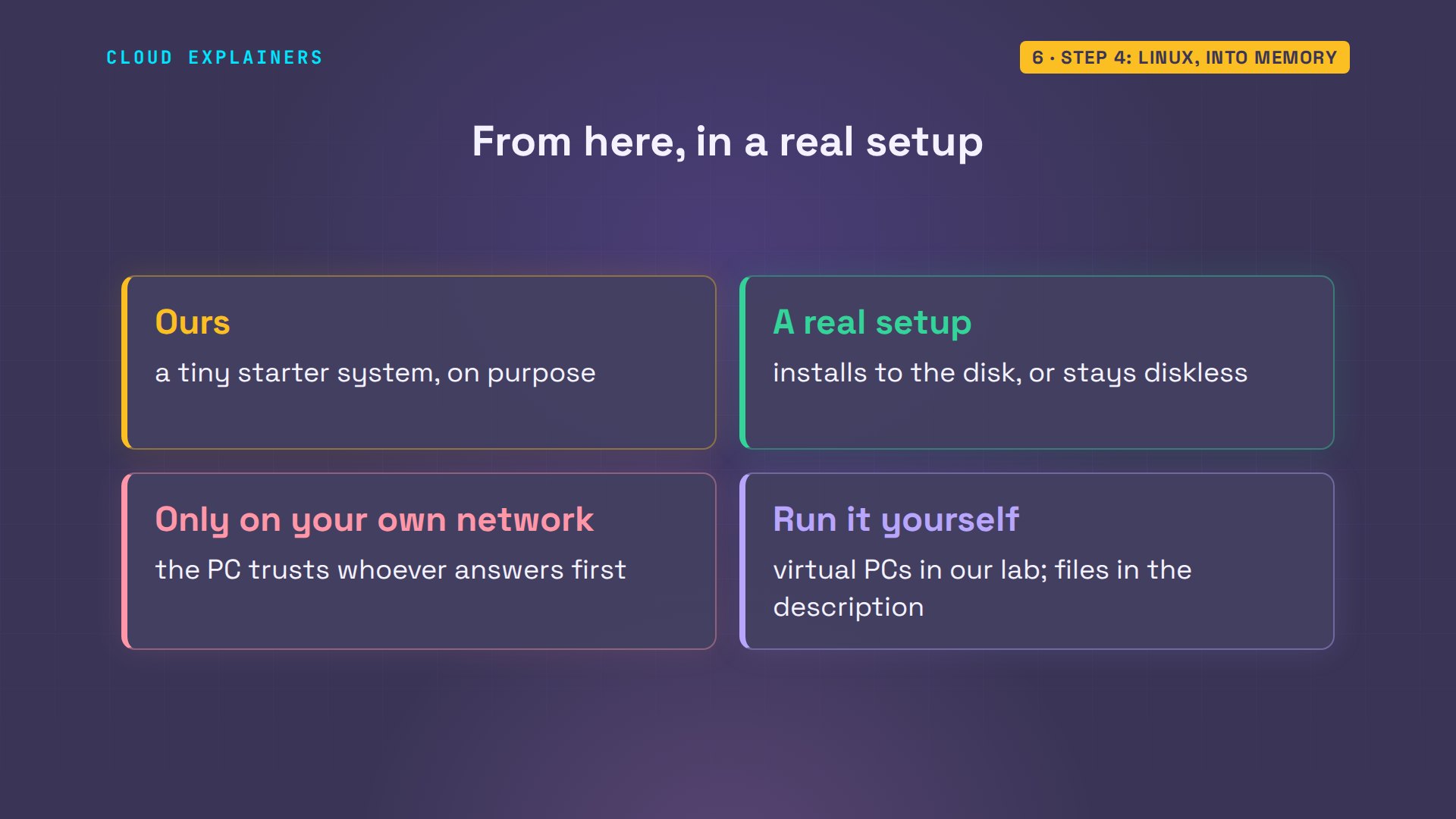
Ours is a tiny starter system, on purpose. A real setup continues from here: an installer that writes a full system to the disk, or a PC that stays diskless and uses files on the server. One caution: the PC trusts whoever answers its shout, so network boot belongs on a network you control. Every command and the lab files are linked in the description.
When the file never arrives
Now, when it breaks. On purpose, Ana has her server's firewall drop UDP port sixty-nine, the port TFTP listens on.
sudo iptables -A INPUT -i classroom -p udp --dport 69 -j DROP
Power on. The PC gets its address. It gets its slip: next server, file name. Then dots, and: connection timed out. Read it by the steps. Step one worked, so the server is alive and DHCP is fine. It died at step two: the file transfer. So check TFTP: is it running, and is its port open?
Configuring (net0 52:54:00:00:00:07)...... ok
net0: 10.20.0.106/255.255.255.0 gw 10.20.0.1
net0: fe80::5054:ff:fe00:7/64
Next server: 10.20.0.1
Filename: pxelinux.0
The new PC that won't boot
And now the brand-new PC from the beginning. Same cable, same server. It gets an address. It downloads pxelinux.0, which this firmware calls the NBP, the network boot program: downloaded successfully. And then: failed to load. Not found. The file arrived, and the PC still can't use it.
>>Start PXE over IPv4.
  Station IP address is 10.20.0.107
  Server IP address is 10.20.0.1
  NBP filename is pxelinux.0
  NBP filesize is 42392 Bytes
 Downloading NBP file...
  NBP file downloaded successfully.
Here's why. PCs come with one of two kinds of firmware. Older ones have BIOS; newer ones have UEFI. They can't run each other's programs. pxelinux.0 is a BIOS program, and this PC needs a UEFI one. The server handed the right file to the wrong kind of machine. But it could have known: every client says which kind it is, in its very first shout.
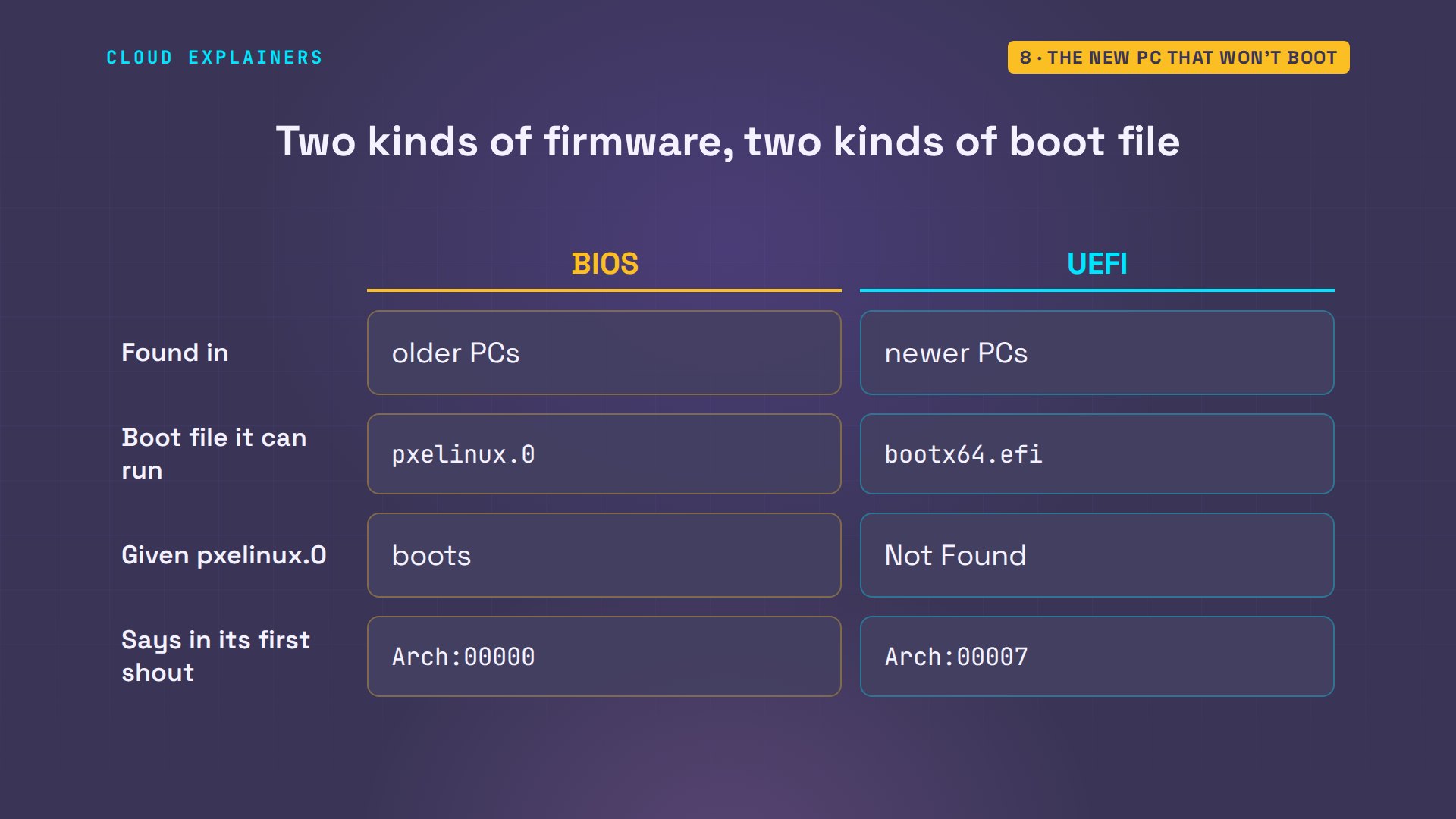
It's in the server's log. The old PC announced arch zero: BIOS. The new one, arch seven: sixty-four-bit UEFI. So Ana adds a rule to her config. If a client says seven, tag it UEFI, and send that tag a different file. Everyone else, that's the exclamation mark, still gets the old one.
sudo journalctl -u dnsmasq -o cat | grep -m1 'Arch:00000'3580167284 vendor class: PXEClient:Arch:00000:UNDI:002001
sudo journalctl -u dnsmasq -o cat --since 23:31:50 | grep -E 'vendor class|DHCPACK'2186476049 vendor class: PXEClient:Arch:00007:UNDI:003001
2186476049 vendor class: PXEClient:Arch:00007:UNDI:003001
2186476049 DHCPACK(classroom) 10.20.0.107 52:54:00:00:00:08
cat /etc/dnsmasq.d/pxe.conf# PXE boot for the classroom network
port=0
interface=classroom
bind-interfaces
dhcp-range=10.20.0.100,10.20.0.150,12h
dhcp-match=set:uefi,option:client-arch,7
dhcp-boot=tag:uefi,bootx64.efi
dhcp-boot=tag:!uefi,pxelinux.0
enable-tftp
tftp-root=/srv/tftp
log-dhcp
She restarts the service, and powers the new PC on. This time the file is bootx64.efi, a UEFI program, and Linux is running. A different first file, and the same four steps. The old PC still boots too.
>>Start PXE over IPv4.
  Station IP address is 10.20.0.107
  Server IP address is 10.20.0.1
  NBP filename is bootx64.efi
  NBP filesize is 966664 Bytes
 Downloading NBP file...
  NBP file downloaded successfully.
Why big files moved to HTTP
One more thing, because it's where network boot is heading. TFTP sends a file in small blocks, and after every block it waits for a thank-you before sending the next. Block, thanks. Block, thanks. On a fast local network you never notice.
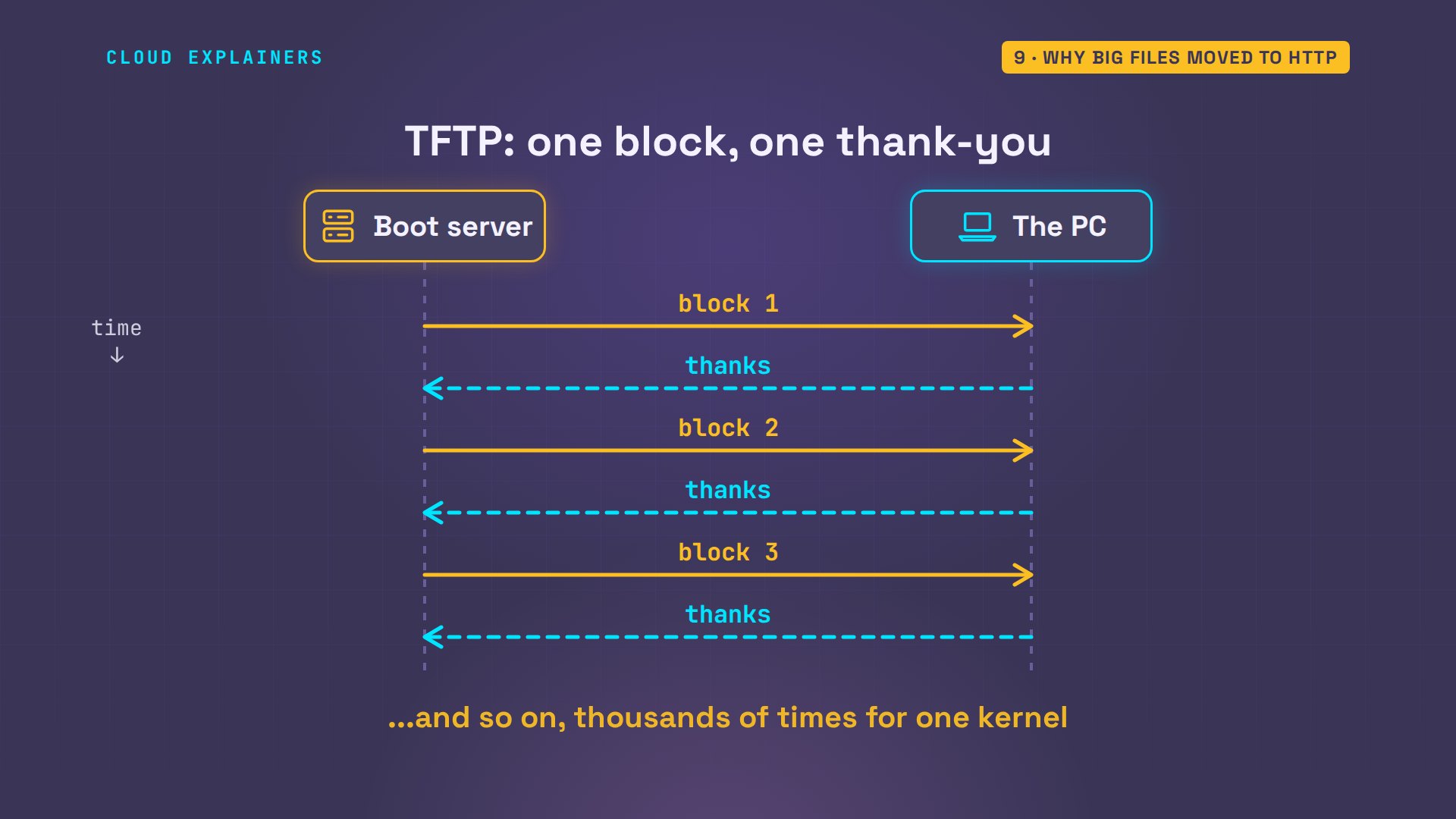
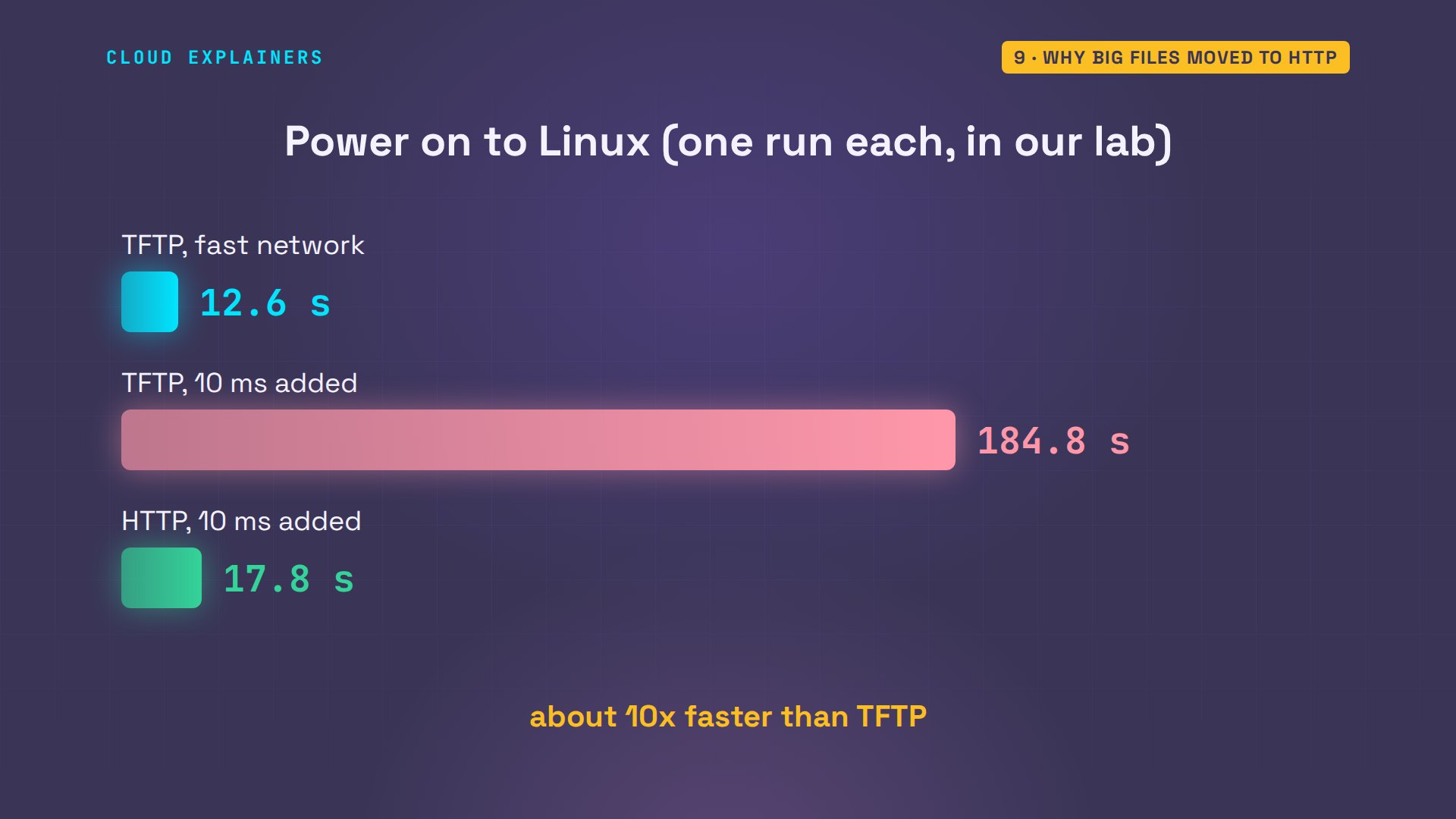
So Ana uses Linux's traffic control tool to delay every packet her server sends by ten milliseconds, The boot took thirteen seconds. What does it take now? About three minutes: one hundred and eighty-five seconds. Nearly all of it is the kernel: thousands of small blocks, each one waiting on a round trip.
sudo tc qdisc add dev classroom root netem delay 10ms
The fix is to move the big files to HTTP, the protocol of the web, which keeps sending without stopping after every block. In the config, the kernel and the starter system become web addresses. The boot loader itself still arrives by TFTP, but Ana switches to the version of it that also speaks HTTP, lpxelinux.0.
cat /srv/tftp/pxelinux.cfg/defaultSERIAL 0 115200
DEFAULT classroom
LABEL classroom
  KERNEL http://10.20.0.1/linux
  INITRD http://10.20.0.1/initrd.img
  APPEND console=ttyS0 quiet lab.role=student
  IPAPPEND 2
grep dhcp-boot /etc/dnsmasq.d/pxe.confdhcp-boot=tag:uefi,bootx64.efi
dhcp-boot=tag:!uefi,lpxelinux.0
Power on again, and the web server's own log shows the PC asking: two plain web requests, the kernel, and the starter system.
sudo tail -n 2 /var/log/nginx/access.log10.20.0.106 - - [09/Nov/2026:23:35:47 +0000] "GET /linux HTTP/1.0" 200 16992648 "-" "Syslinux/6.04"
10.20.0.106 - - [09/Nov/2026:23:35:47 +0000] "GET /initrd.img HTTP/1.0" 200 1107439 "-" "Syslinux/6.04"
Same PC, same delay: eighteen seconds. Ours still used TFTP for the small boot loader; newer UEFI firmware can skip TFTP completely, and boot straight over HTTP.
Recap
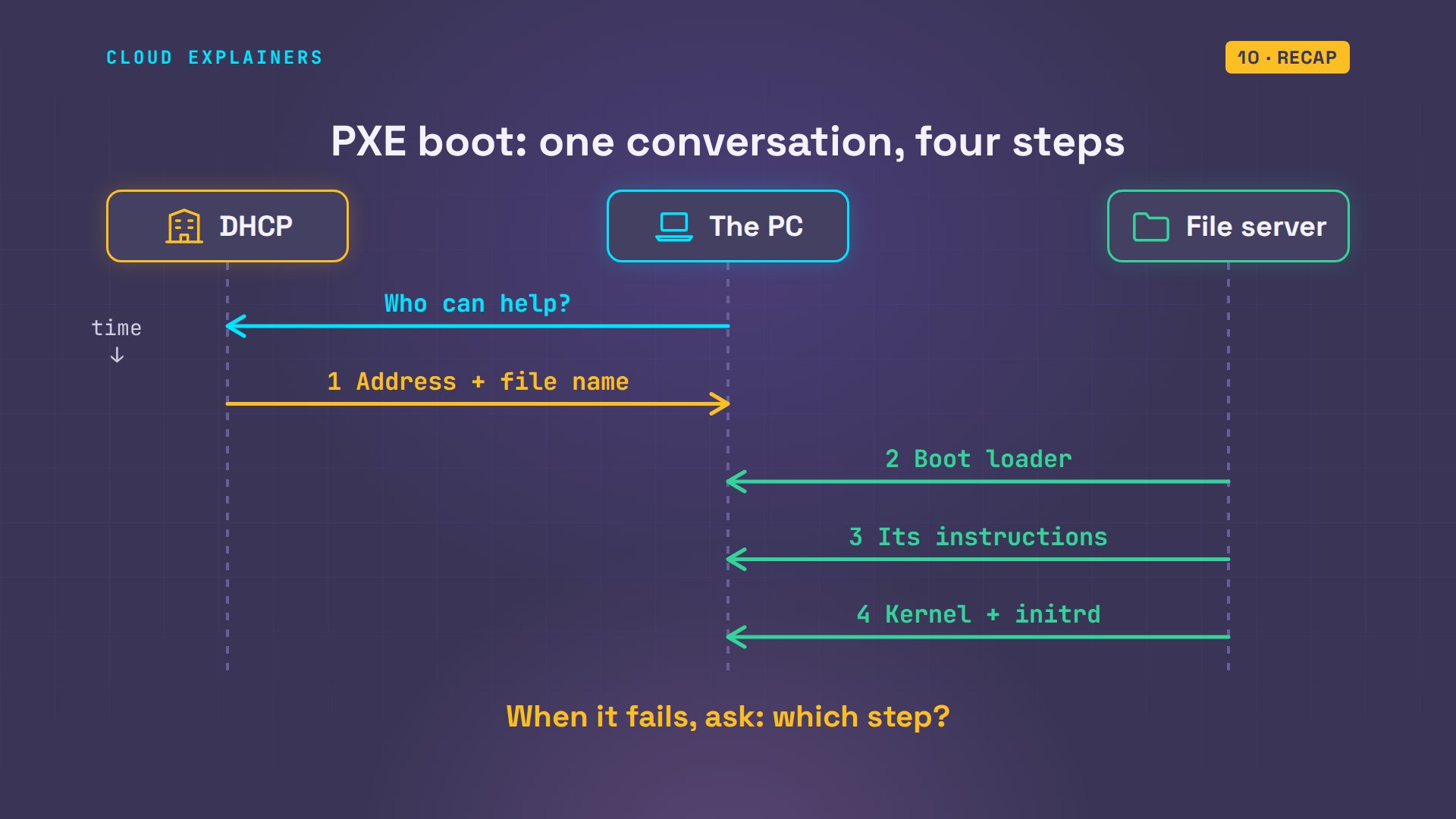
So, four steps. One: DHCP hands the PC an address and a file name. Two: it fetches a boot loader. Three: the loader finds its instructions. Four: kernel and starter system load into memory. When it fails, ask which step.
If this made network boot click for you, a like helps YouTube show it to more beginners, and subscribing brings the next networking demo straight to you.
Every screen here came from a real boot, in a small lab of virtual PCs. Thanks for watching Cloud Explainers.
Sources
- RFC 4578, DHCP options for PXE (option 93, the client system architecture; PXEClient vendor class)
- IANA, processor architecture types (0x00 x86 BIOS, 0x07 x64 UEFI, 0x10 x64 UEFI boot from HTTP)
- RFC 1350, the TFTP protocol (port 69; each data packet is acknowledged before the next is sent)
- Syslinux wiki, PXELINUX (the config file search order; lpxelinux.0 supports HTTP)
- dnsmasq man page (dhcp-boot, dhcp-match with client-arch, enable-tftp, tftp-root, log-dhcp)
- iPXE error 040ee1, No configuration methods succeeded
Demos: a container and virtual PCs on our own Mac standing in for a school's boot server and classroom PCs; the school is made up. Timings are from single runs on emulated hardware. Watch the full video on YouTube.
More videos

Linux Makefiles Will Finally Make Sense After This

SAML vs OAuth vs OpenID Connect: What's the Difference?

How to Fix Python cron Jobs That Never Run

Linux Bash Scripting: Full Tutorial for Beginners

How Active Directory Works

How to Fix a Linux systemd Service That Won't Start

Linux Logs: syslog vs journald

JWT vs Session Cookies: Which One Should You Use?

Docker vs Docker Compose: Which One Should You Use?

How to Fix Docker Compose Containers That Can't Talk to Each Other

Django Full Tutorial for Beginners

How Linux systemd Works

How to Fix 'Windows Cannot Access' Network Share Errors (SMB)

REST vs gRPC: Which One Should You Use?

How to Fix SSL Certificate Chain Errors (Missing Intermediate)

Every Python Concept for Beginners in 10 Minutes

Every SQL Join Type in 10 Minutes

Why OpenRouter Free Models Hit Their Limit So Fast

Why Your Gemini API Free Tier Runs Out So Fast

OpenRouter Will Finally Make Sense After This

How Redis Caching Works

Gemini API vs Vertex AI: Which One Should You Use?

How to Fix a Leaked Gemini API Key

Why Golang Uses Goroutines Instead of Threads

How to Fix Gemini API Error 429: Resource Exhausted

Claude Token Pricing Will Finally Make Sense After This

Why Python Web Scraping Returns Nothing (and the Fix)

Python uv vs pip: Which One Should You Use?

Python Automation: Full Tutorial for Beginners

How OAuth Login Works

Google AI Studio Will Finally Make Sense After This

What Happens When You Run a Docker Container

How to Fix Claude Code Billing Your API Key Instead of Your Plan

Why Passkeys Can't Be Phished Like Passwords

PowerShell vs Bash: Which One Should You Learn?

The Linux Roadmap for Beginners

Django vs FastAPI: Which One Should You Use?

Why SQLite Is the Most Used Database in the World

How a NoSQL Database Like MongoDB Works

How to Fix Python pip error: externally-managed-environment

How to Fix MySQL Too Many Connections Database Errors

Golang Concurrency Will Finally Make Sense After This

How Amazon S3 Works

How Kubernetes Works

How Git Works

How to Fix Docker Port Already Allocated Errors

How PostgreSQL Works

How to Fix Git Merge Conflicts

How to Fix No Space Left on Device in Linux

How the Internet Works

SQL vs NoSQL: When Each One Wins

How to Fix JWT Token Expired Errors (401 Unauthorized)

Claude API vs Claude Pro: Why Your Subscription Doesn't Include It

Why AI Agent Skills Beat Giant Prompts

Linux Cron Jobs Will Finally Make Sense After This

Security Logs Will Finally Make Sense After This

How to Fix a Security Leak: An API Key Pushed to GitHub

DNS Will Finally Make Sense After This

Never Ignore a Security Update

Two-Factor Authentication Will Finally Make Sense

Never Expose a Database to the Internet

SSH Keys vs Passwords: Which Is Safer for Security?

The 5 Levels of Linux Boot: From Power On to Login

The 5 Levels of Network Firewalls

Password Security: Why Hackers Crack Weak Passwords

Why Your Linux Server Runs Out of Memory

HTTP vs HTTPS: What Actually Changes on Your Network

Every Linux File Permission You Need to Know

Linux Processes vs Threads: When Each One Wins

The OSI Model Will Finally Make Sense After This

The 7 Levels of Git

Every Network Troubleshooting Command You Need

Hashing vs Encryption in Cybersecurity: When Each One Wins

Why the Internet Ran Out of IP Addresses

Linux Package Managers: apt vs Snap vs Flatpak

Why Python Is Slow (and When It Doesn't Matter)

TCP vs UDP: When Each One Wins

Stop Running Linux as Root (Do This Instead)

Linux Users and Groups Will Finally Make Sense

Why Phishing Beats Good Security (and How to Spot It)

The 7 Levels of Docker

AI Agents Will Finally Make Sense After This

Stop Using git push --force (Use This Instead)

Agent Skills vs MCP: When Each One Wins

Networking Will Finally Make Sense After This

Every Linux Command You Actually Need

The 7 Levels of Cybersecurity

Every System Design Concept You Need, in One Diagram
