
How Amazon S3 Works
How Amazon S3 works, for beginners, proven on real S3: Ana uploads her tea shop's menu, opens its web address and gets Access Denied, and we follow why through every part of S3: buckets and objects found by keys (no real folders), signed requests checked against IAM and bucket policies, Block Public Access, presigned links that expire, versioning and delete markers, copies across three Availability Zones, and storage classes from Standard to Glacier.
Uploaded, yet Access Denied
You upload a file to Amazon S3, open its web address, and get Access Denied. Here's Ana, who runs a small tea shop. She makes a bucket, uploads her menu, and opens its address with curl, a tool that fetches web addresses. Access Denied. The file is there. By the end, you'll know why, how to share it safely, and what S3 does with every file you give it.
aws s3 mb s3://ana-tea-shopmake_bucket: ana-tea-shop
aws s3 cp menu.txt s3://ana-tea-shop/ --no-progressupload: ./menu.txt to s3://ana-tea-shop/menu.txt
curl -s https://ana-tea-shop.s3.us-east-1.amazonaws.com/menu.txt | xmllint --format -<?xml version="1.0" encoding="UTF-8"?>
<Error>
  <Code>AccessDenied</Code>
  <Message>Access Denied</Message>
  <RequestId>F3JKVMT0403T8SAA</RequestId>
  <HostId>fS5ucDbPMV50939udvwhKyc+QrIn2cimi08ZSYXAPO5Us0dhF0SMGaSPKTBmeefj62U0PkPtixgg/FZwIiwIofcEkdGFm4J/</HostId>
</Error>
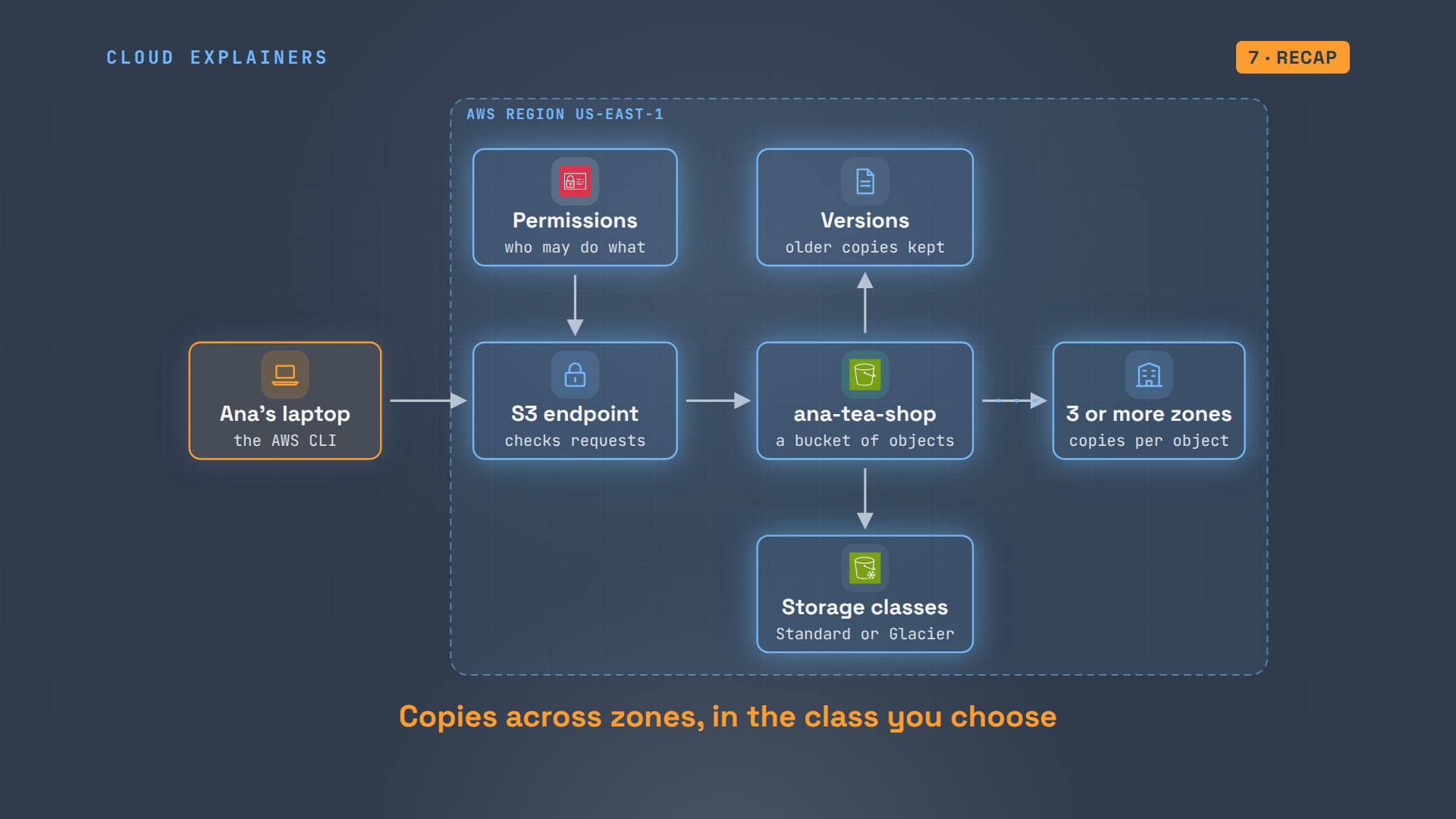
Amazon S3 isn't a hard drive in the cloud. It's a web service. Every upload and every download is a request over the internet, and S3 checks each one before it does anything. Let's follow Ana's menu through it: the bucket, the check on every request, the permissions, the versions, and the disks underneath.
Buckets and objects
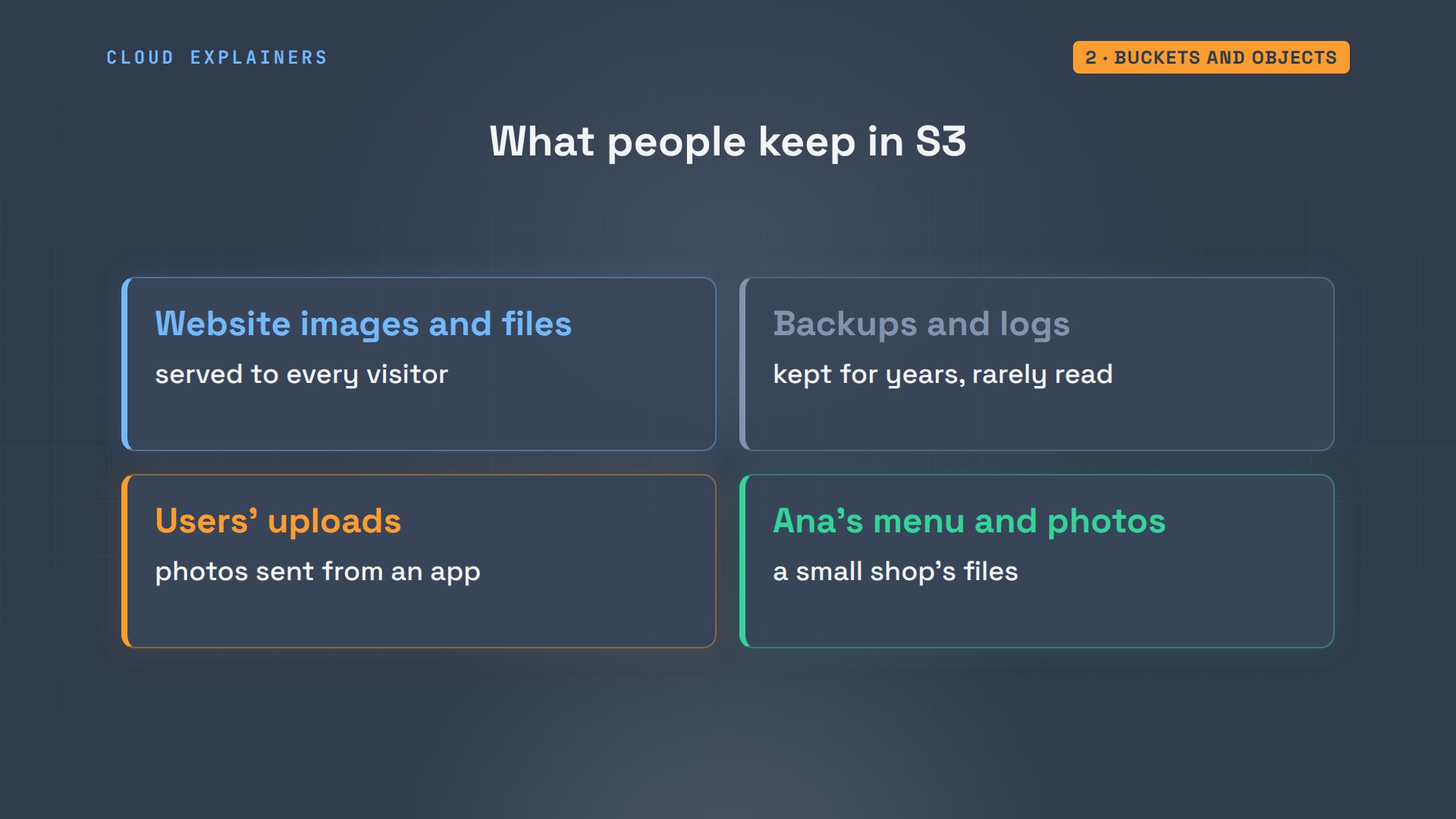
First, what is S3 for? Websites keep their images in it, companies keep backups and logs in it, and apps keep the photos their users upload. It holds files of any kind, from a few bytes to terabytes. Ana keeps her menu and product photos there.
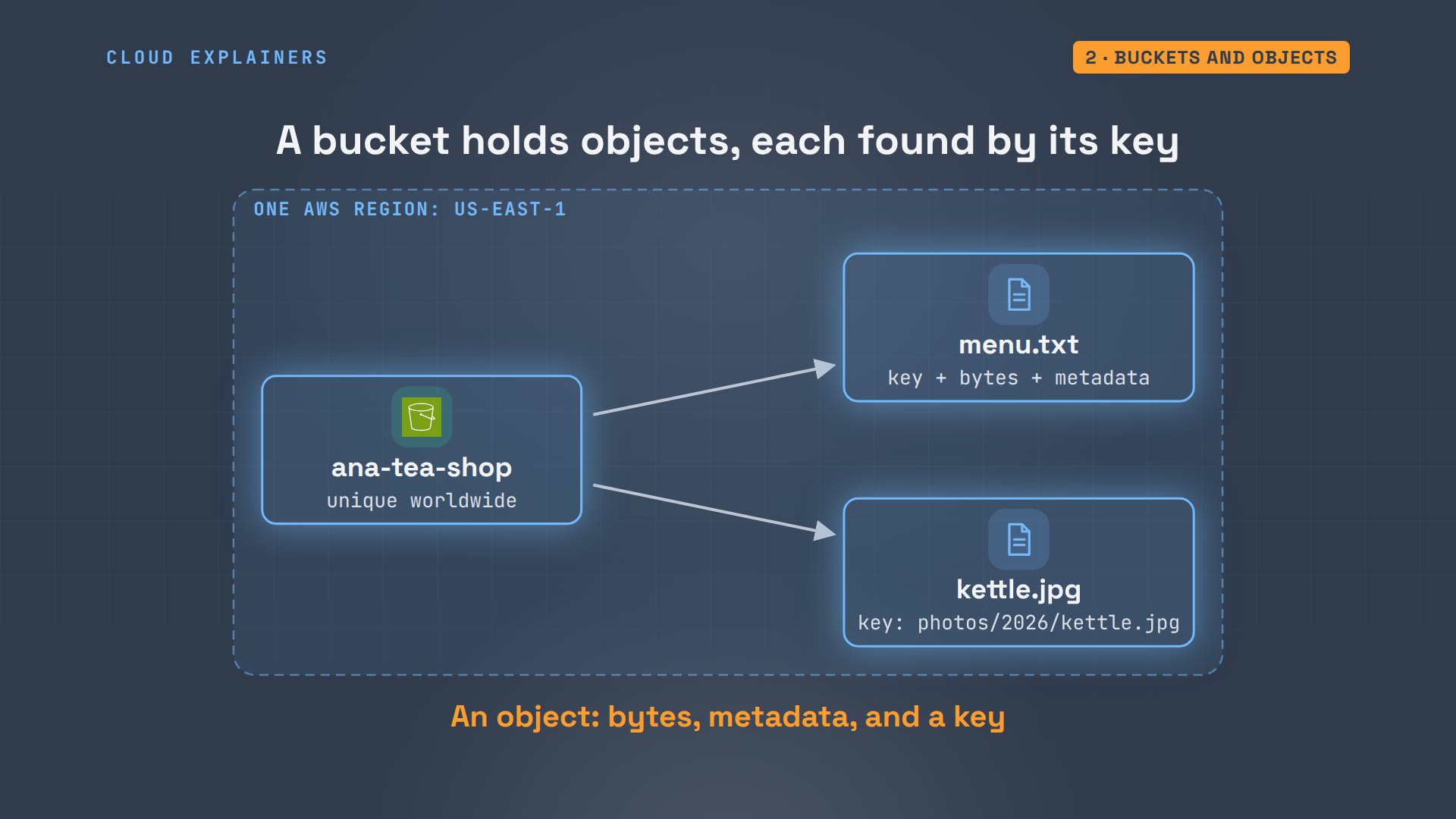
S3 keeps files in buckets. A bucket is a container you create in one AWS region, a group of data centers like northern Virginia, and its name must be unique across every AWS account in the world, so no one else can have a bucket called ana-tea-shop. Inside, each file is an object: the file's bytes, some facts about them called metadata, and a name, called its key.
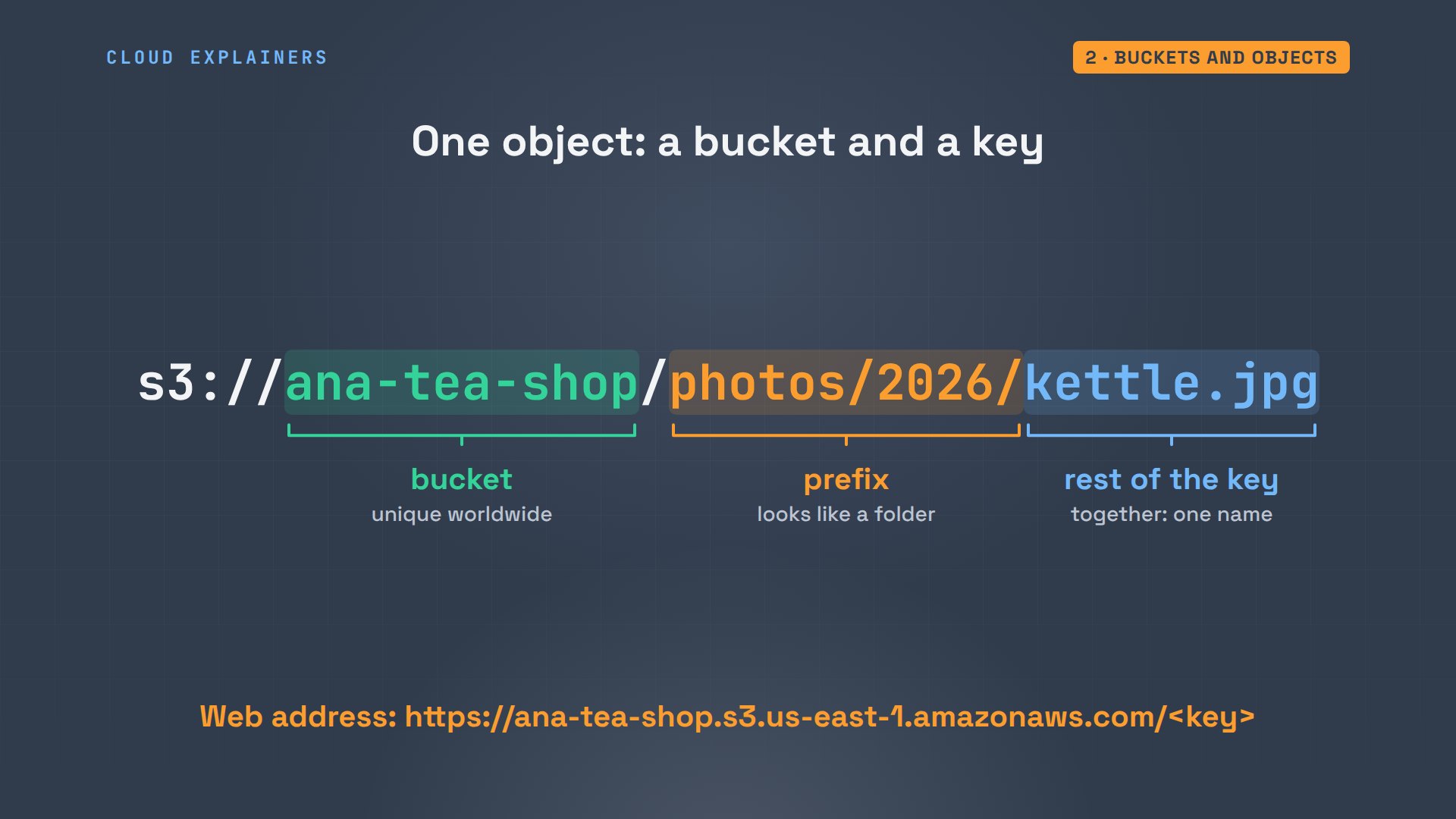
Here it is for real. S3 says Ana's bucket is in us-east-1, in northern Virginia. She uploads a photo of her copper kettle, under the key photos, slash, 2026, slash, kettle.jpg.
aws s3api head-bucket --bucket ana-tea-shop{
    "BucketArn": "arn:aws:s3:::ana-tea-shop",
    "BucketRegion": "us-east-1",
    "AccessPointAlias": false
}
aws s3 cp kettle.jpg s3://ana-tea-shop/photos/2026/kettle.jpg --no-progressupload: ./kettle.jpg to s3://ana-tea-shop/photos/2026/kettle.jpg
Listing the bucket shows something that looks like a folder: photos, marked PRE, short for prefix. But S3 has no folders. Ask for the raw list of keys, and there are just two objects: menu.txt, and one object whose name is the whole path, slashes included. The listing groups names at each slash, so they look like folders.
aws s3 ls s3://ana-tea-shop/PRE photos/ 2026-11-04 05:39:06 24 menu.txt
aws s3api list-objects-v2 --bucket ana-tea-shop --query 'Contents[].[Key,Size]' --output textmenu.txt	24
photos/2026/kettle.jpg	853
So an object's full name is just two things: the bucket's name, and the key. The part of the key before the last slash is called a prefix. It only looks like a folder. Its web address adds the region, like the one curl asked for.
The metadata tells S3 how to serve the object: its size, 853 bytes, its type, a JPEG image, and that it's encrypted on disk with AES256. S3 encrypts every new object by default. The ETag is a fingerprint of the bytes. Here, it's the file's MD5 checksum, so Ana can check her photo arrived unchanged.
aws s3api head-object --bucket ana-tea-shop --key photos/2026/kettle.jpg{
    "AcceptRanges": "bytes",
    "LastModified": "Wed, 04 Nov 2026 10:39:07 GMT",
    "ContentLength": 853,
    "ETag": "\"6d5387741d2bd3a5a6c685eac9a0d62a\"",
    "ContentType": "image/jpeg",
    "ServerSideEncryption": "AES256",
    "Metadata": {}
}
md5 -q kettle.jpg6d5387741d2bd3a5a6c685eac9a0d62a
Every request is checked
So why did curl get Access Denied? Every request to S3 names an action, like get this object. The AWS CLI, Amazon's command-line tool, signs each request with Ana's credentials, and S3 checks the signature and her permissions before it sends a single byte. curl sent no signature. To S3, that's an anonymous request: anyone on the internet. And by default, anyone may do nothing.
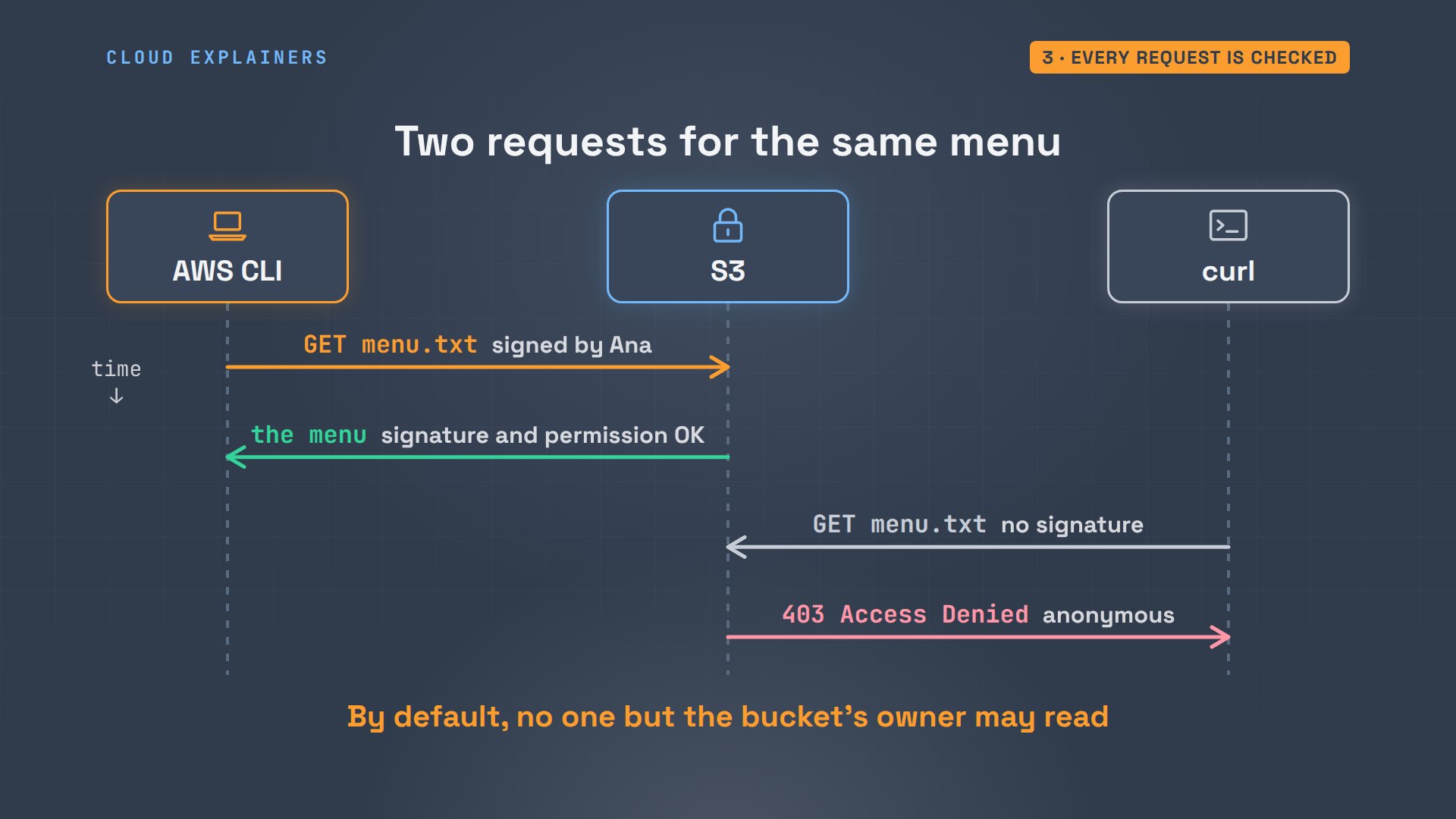
The same menu, asked for by the signed CLI, comes straight back, the dash at the end means print it here: copper kettle tea, $4.00. Nothing about the file changed. Only who was asking: a request signed by Ana, instead of an anonymous one.
aws s3 cp s3://ana-tea-shop/menu.txt -Copper kettle tea 4.00
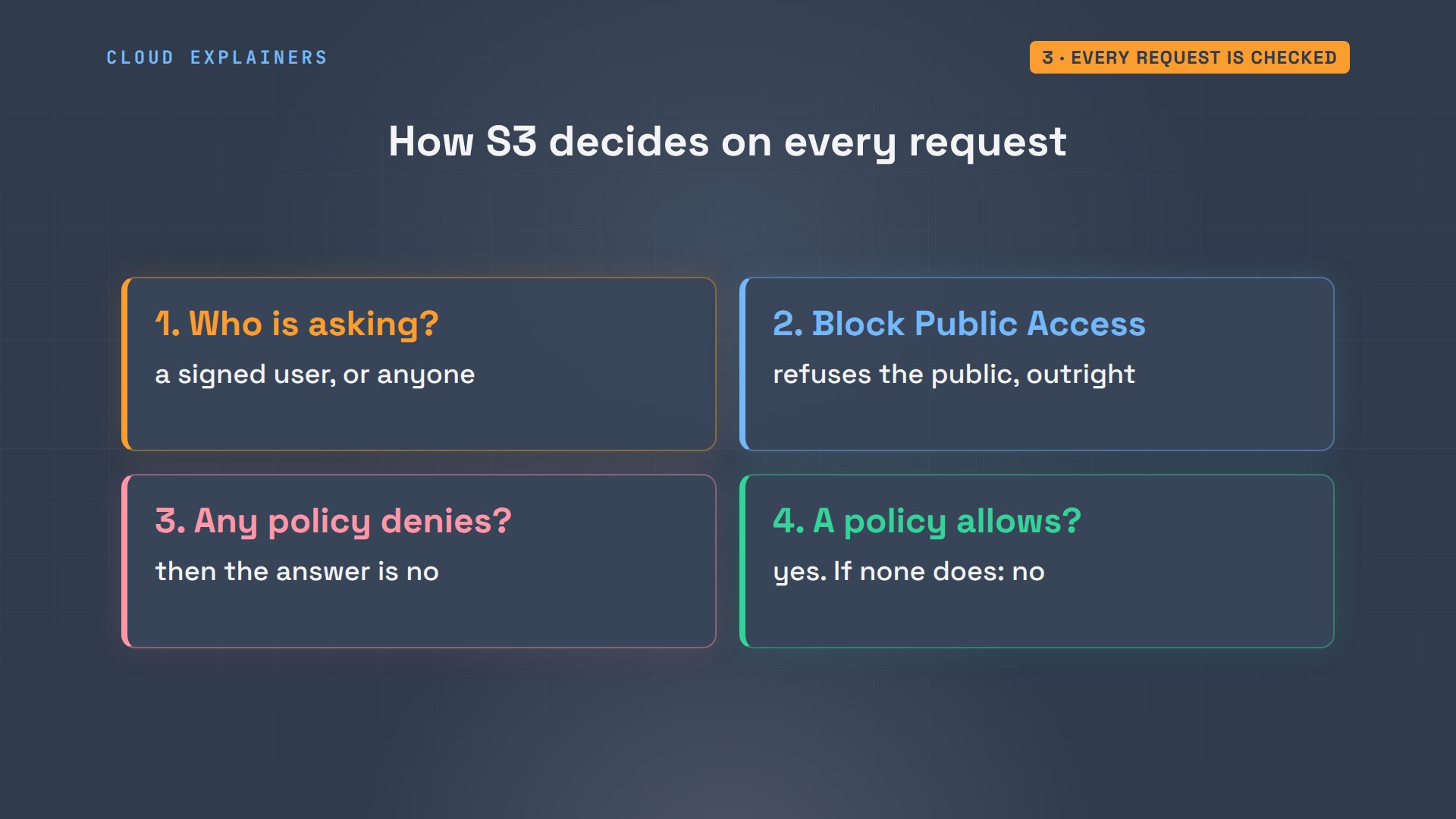
Here's how S3 decides, every time. First: who is asking? A signature names the user, no signature means anyone. Block Public Access can refuse requests from the public outright. Then the policies: IAM, AWS's system for users and permissions, has policies that say what each user in Ana's account may do, and a bucket policy says who else may use the bucket. If any rule denies, it's no. If one allows, it's yes. Otherwise, no.
Sharing one file safely
Could Ana just make the bucket public? New buckets come with Block Public Access turned on: four switches, all true. They refuse any policy or setting that would open the bucket to everyone, because public buckets are one of the most common ways data leaks.
aws s3api get-public-access-block --bucket ana-tea-shop{
    "PublicAccessBlockConfiguration": {
        "BlockPublicAcls": true,
        "IgnorePublicAcls": true,
        "BlockPublicPolicy": true,
        "RestrictPublicBuckets": true
    }
}
To share one file, Ana makes a presigned link instead: the object's address plus her signature, valid for 30 seconds. curl with that link gets the menu. 36 seconds later, the same link: Request has expired.
URL=$(aws s3 presign s3://ana-tea-shop/menu.txt --expires-in 30)
curl -s "$URL"Copper kettle tea 4.00
curl -s "$URL" | xmllint --format -<?xml version="1.0" encoding="UTF-8"?>
<Error>
  <Code>AccessDenied</Code>
  <Message>Request has expired</Message>
  <Expires>2026-11-04T10:39:38Z</Expires>
  <ServerTime>2026-11-04T10:39:45Z</ServerTime>
  <RequestId>4A0A58ASMJY3287K</RequestId>
  <HostId>mocHr1ZXwi2v48JP3lYJ1p6Y+zLImn2n7p9bu92Q28b9QFufp6LCGQ9kIn9PXFGUXIzMoeS5X0kRVnjJ2siW/2dl66eAiszL</HostId>
</Error>
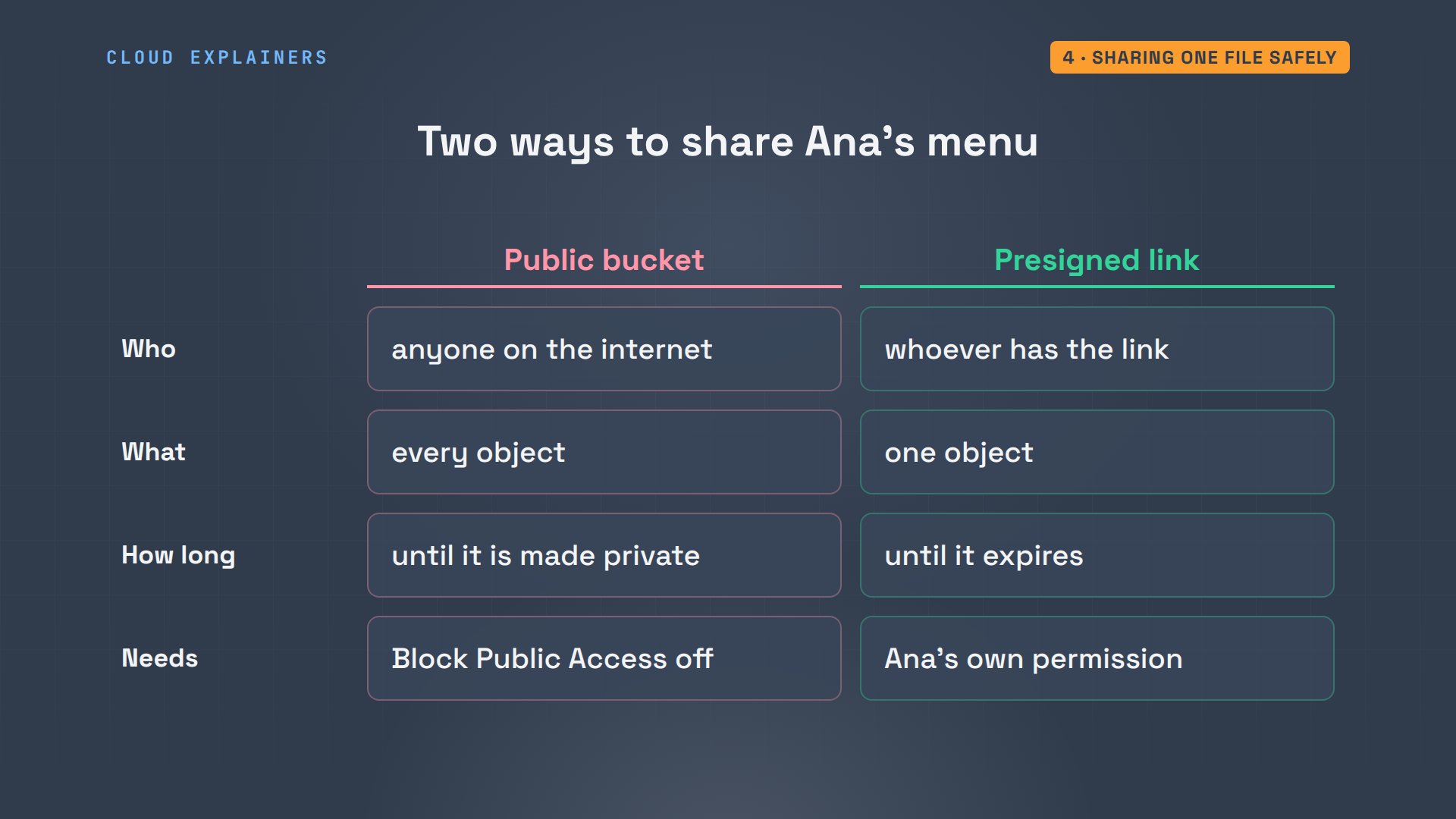
So there are two ways to share. A public bucket lets anyone read every object, for as long as it stays public. A presigned link lets whoever has the link read one object, and only until it expires. The link works because Ana's own permission signed it: if she couldn't read the file, neither could the link.
Versions
Next: what happens when Ana changes her menu? Normally, uploading to the same key replaces the object. With versioning turned on, S3 keeps every version under that key, each with its own version ID. A normal read gets the newest one, and the older ones stay, so a mistake can be undone.
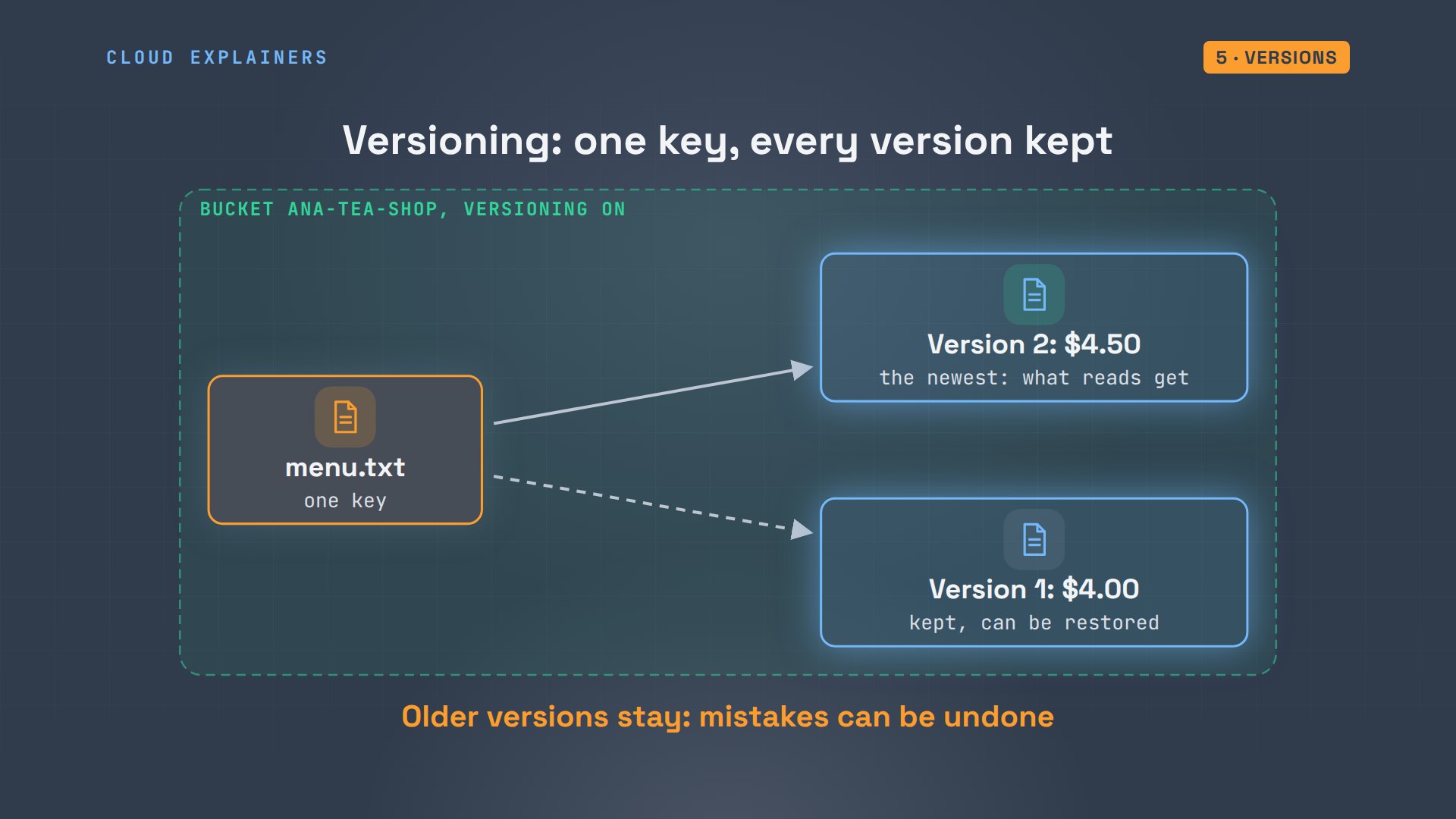
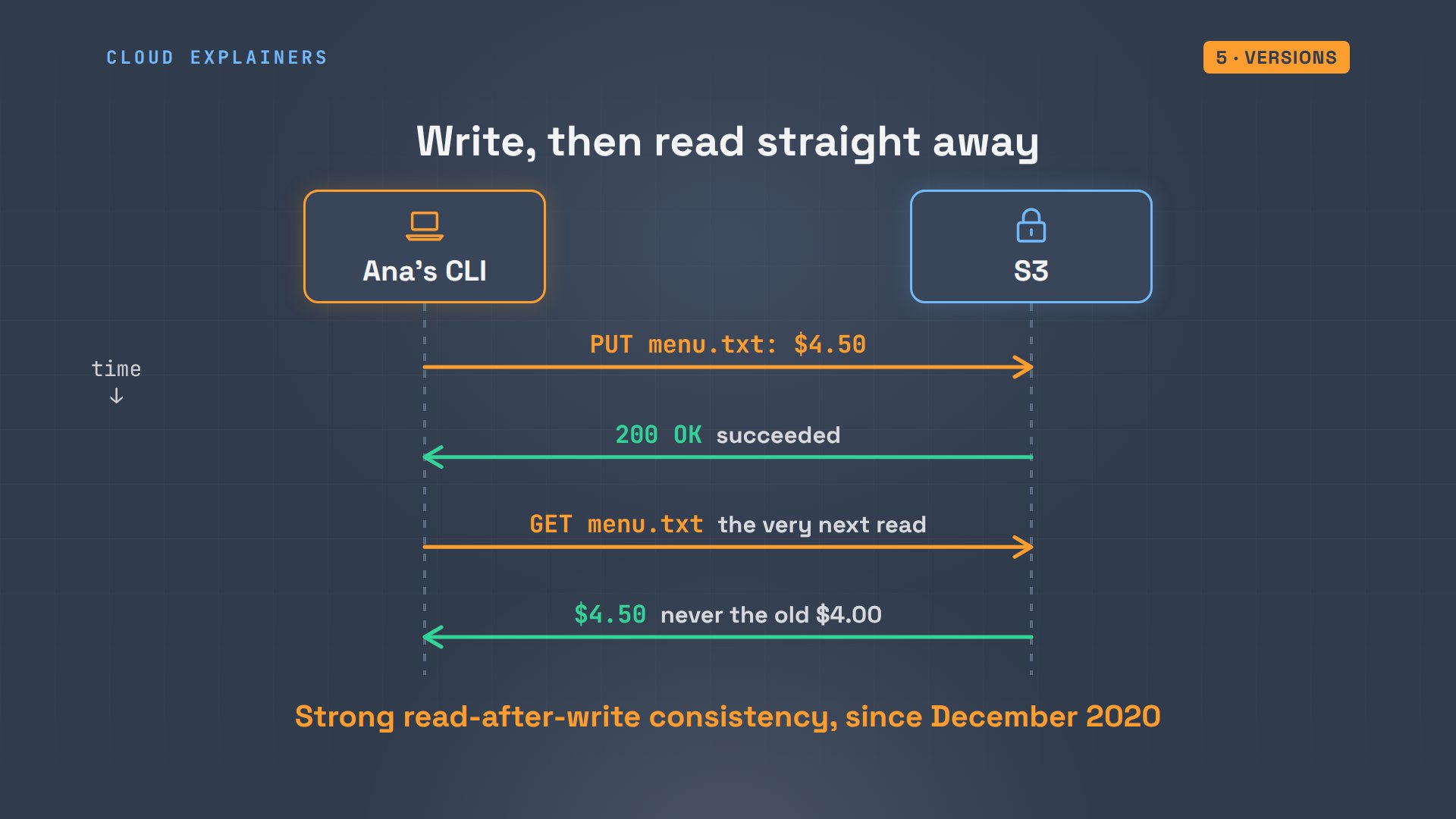
Ana turns versioning on, raises the kettle tea to $4.50, and uploads the menu again. Reading it straight back gives the new price at once: once an upload succeeds, every read sees it. The bucket now holds two versions. The first upload, from before versioning, has the version ID null.
aws s3api put-bucket-versioning --bucket ana-tea-shop --versioning-configuration Status=Enabled
echo 'Copper kettle tea 4.50' > menu.txt
aws s3 cp menu.txt s3://ana-tea-shop/ --no-progressupload: ./menu.txt to s3://ana-tea-shop/menu.txt
aws s3 cp s3://ana-tea-shop/menu.txt -Copper kettle tea 4.50
aws s3api list-object-versions --bucket ana-tea-shop --prefix menu.txt --query 'Versions[].[VersionId,IsLatest]' --output textK3RiMnkG_eMEoLiLIg8Xc8IVRqBu7LtJ	True
null	False
That instant read matters. S3 is spread over many machines, yet since December 2020 it promises read-after-write consistency: once an upload succeeds, the very next read, from anywhere, gets the new version. Before that, a read straight after an overwrite could still return the old file for a moment.
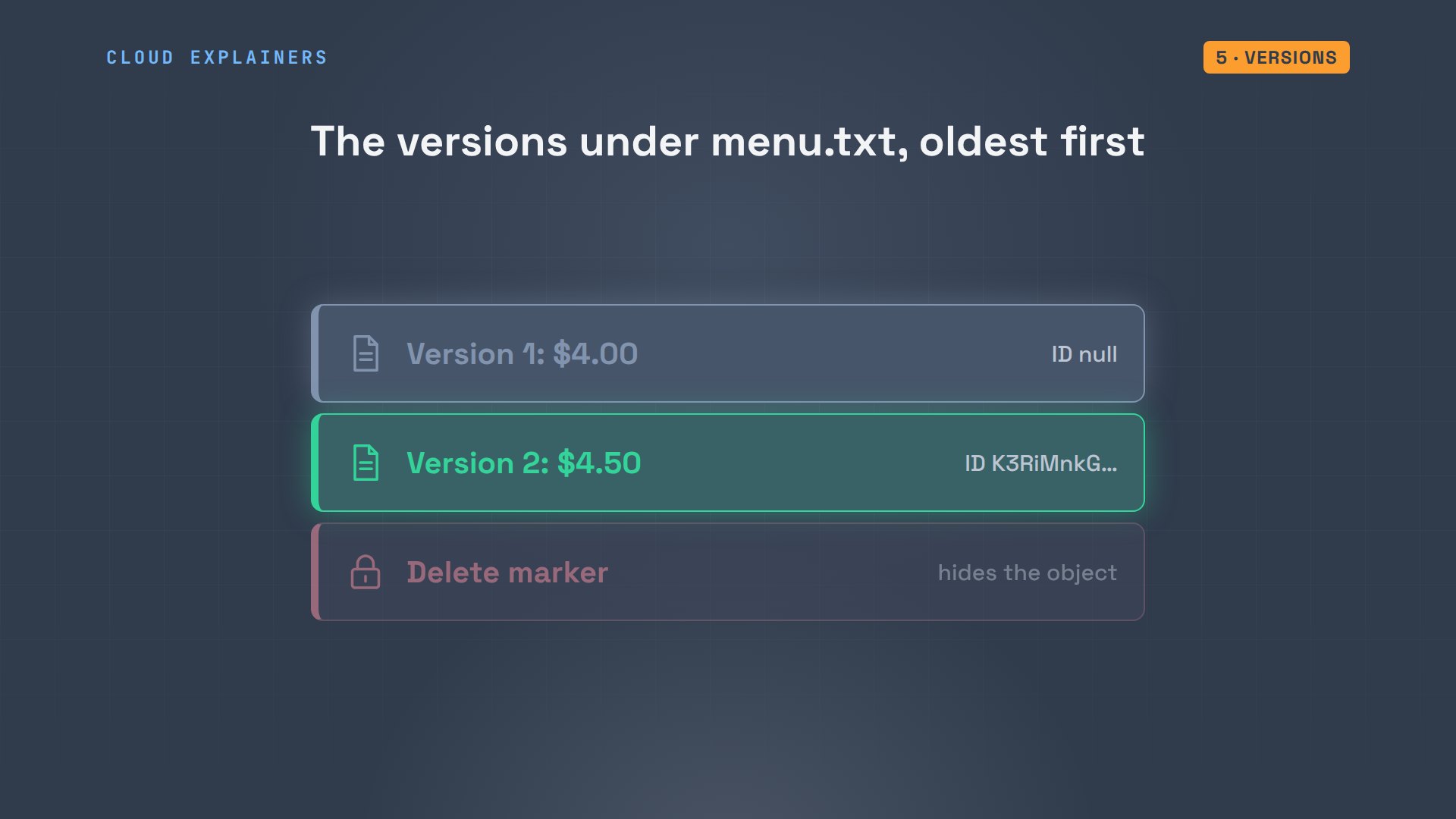
Now she deletes the menu. The listing shows only the photos. But nothing was erased. S3 added a delete marker, a placeholder that hides the object. Ana deletes that marker, by its ID, which lifts the placeholder off, and the menu is back, at $4.50.
aws s3 rm s3://ana-tea-shop/menu.txtdelete: s3://ana-tea-shop/menu.txt
aws s3 ls s3://ana-tea-shop/PRE photos/
aws s3api list-object-versions --bucket ana-tea-shop --prefix menu.txt --query 'DeleteMarkers[].[VersionId,IsLatest]' --output textffQ27kz3B8QhZD06lBfmJJBILsQWaO_b True
aws s3api delete-object --bucket ana-tea-shop --key menu.txt --version-id ffQ27kz3B8QhZD06lBfmJJBILsQWaO_b{
    "DeleteMarker": true,
    "VersionId": "ffQ27kz3B8QhZD06lBfmJJBILsQWaO_b"
}
aws s3 cp s3://ana-tea-shop/menu.txt -Copper kettle tea 4.50
Here's the whole story of one key. Version one, then version two. A delete only stacks a marker on top, so reads find nothing. Remove the marker, and the newest real version shows again. Every version is stored, and billed, until you delete it by ID.
Where the bytes live
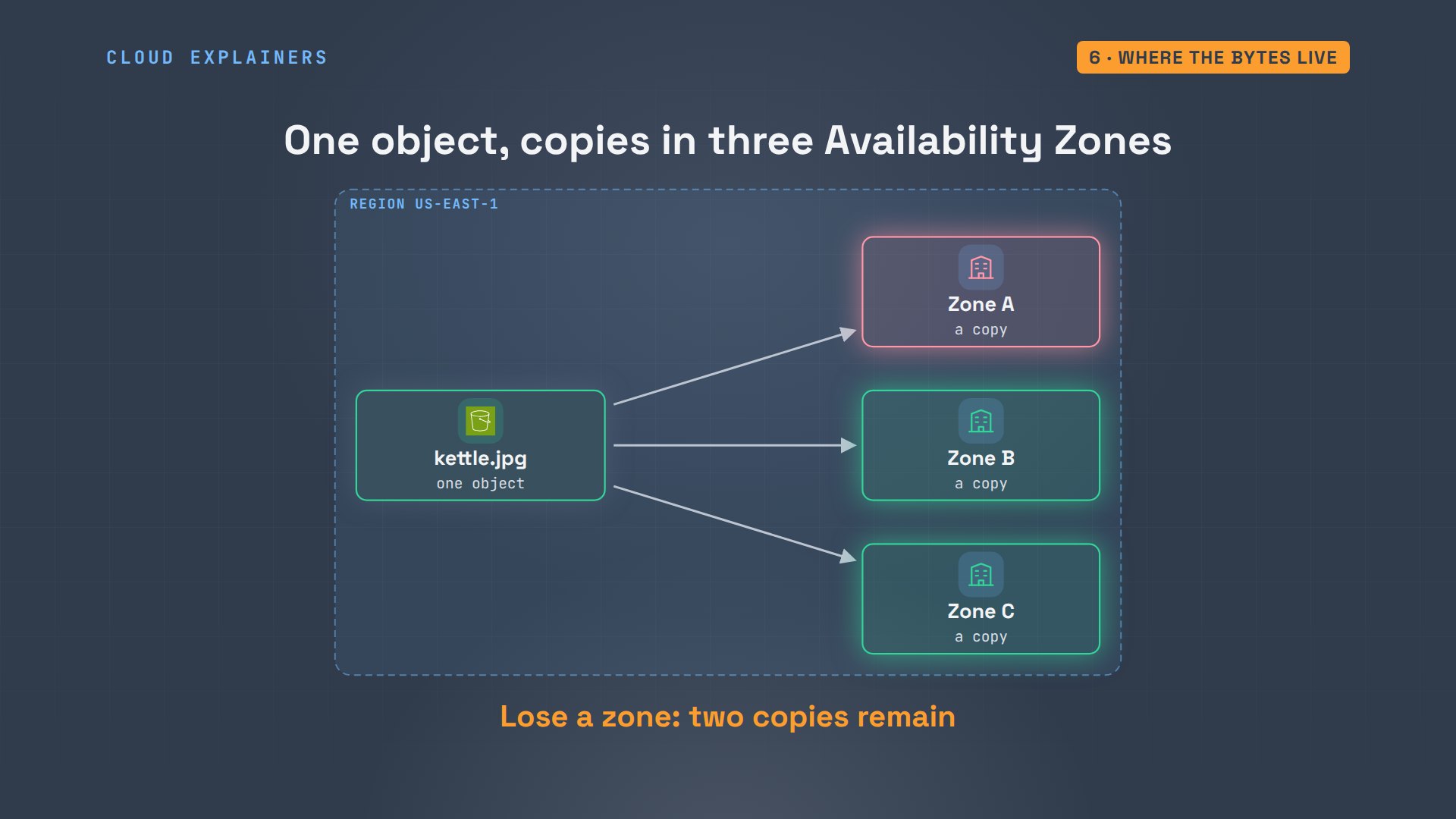
So where do the bytes actually go? An AWS region is made of separate data centers, grouped into Availability Zones, miles apart. S3's standard storage class keeps copies of every object in at least three of them, so a fire or a power cut in one zone doesn't lose Ana's photo.
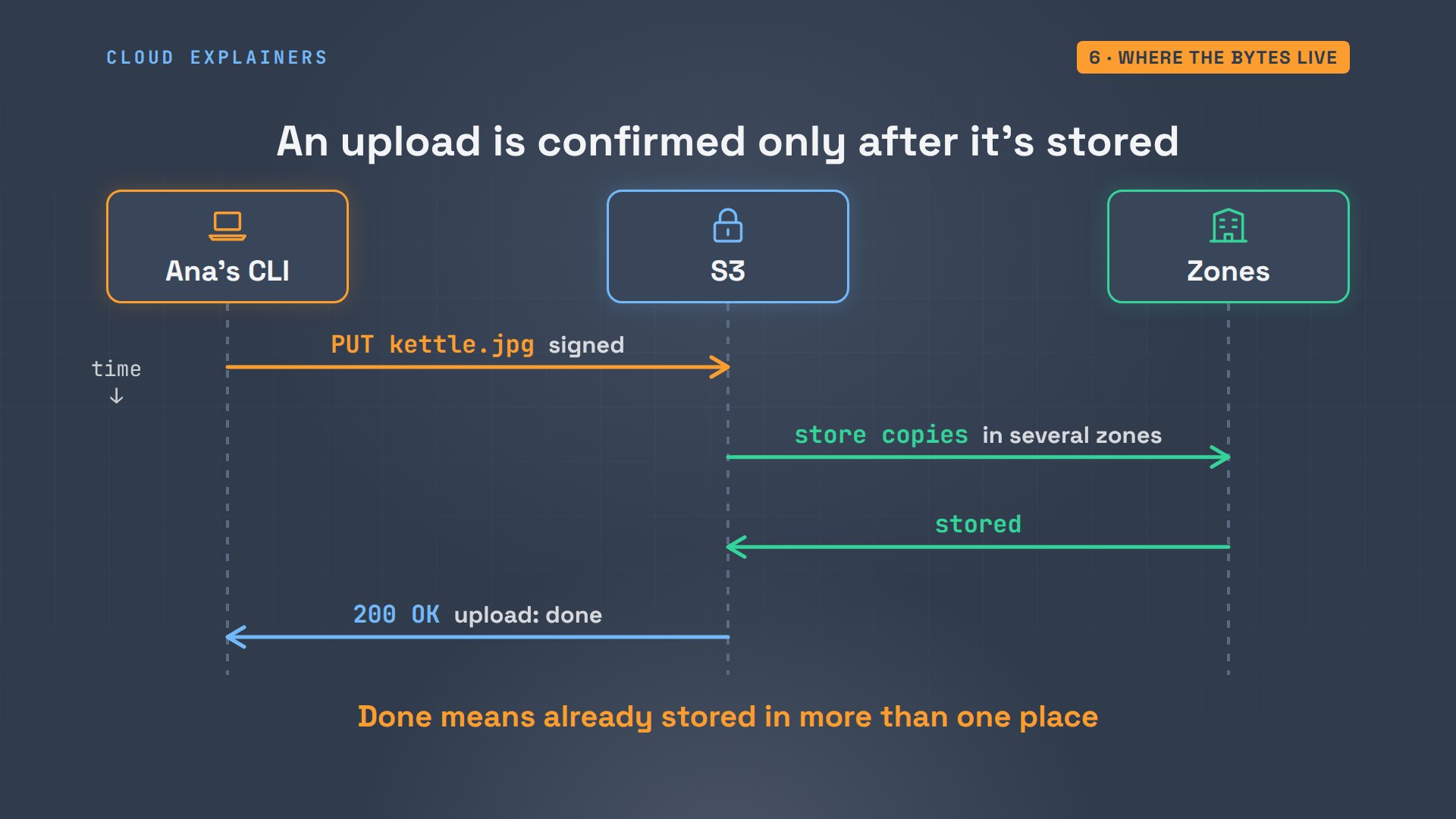
And it does this before it answers. When Ana uploads, S3 stores the copies across zones first, and only then replies with success. So the moment her upload command says done, the photo is already safe in more than one place.
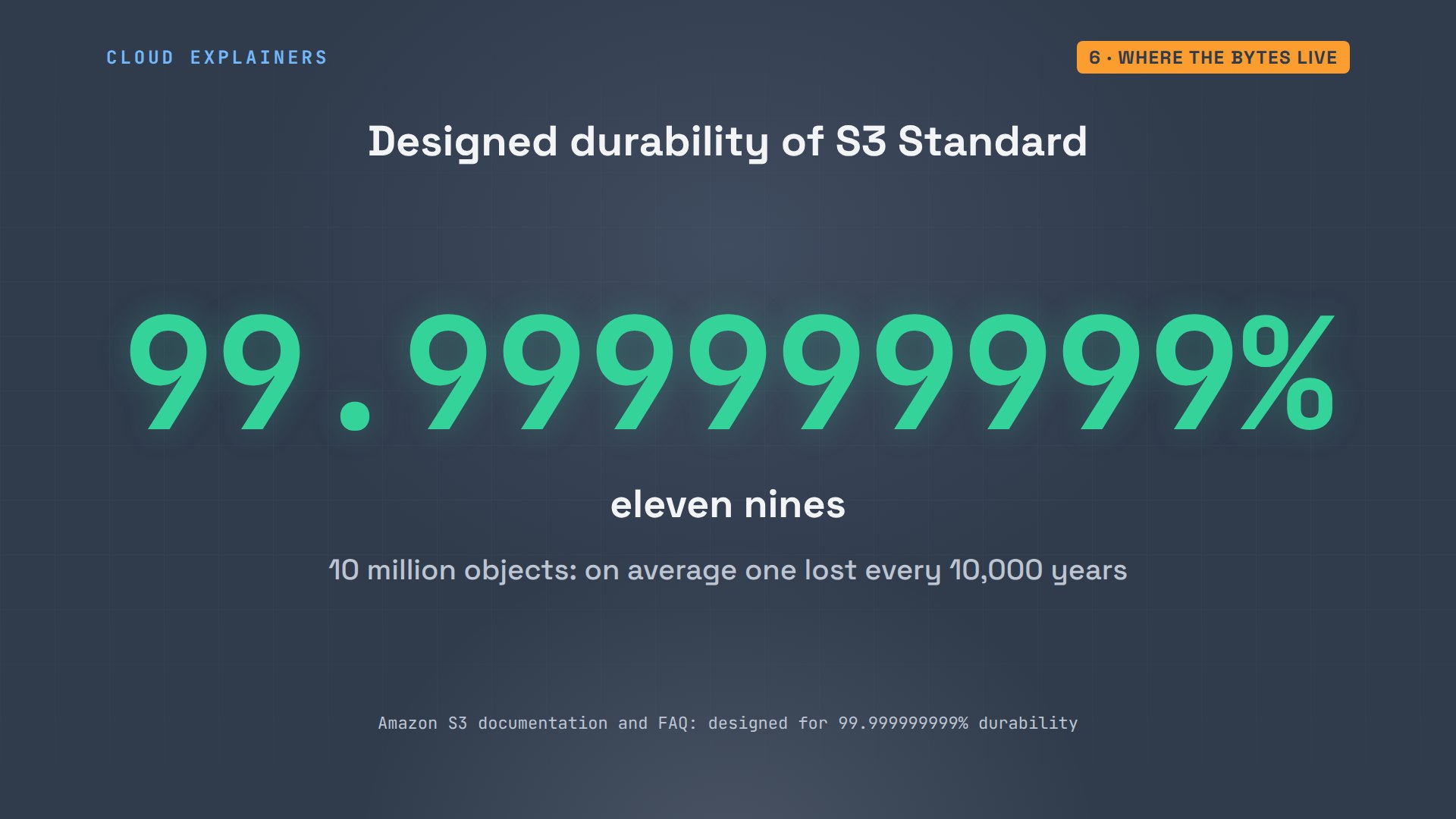
That's why AWS designs S3 for eleven nines of durability. In its own example: store ten million objects, and on average you'd expect to lose a single one about once every ten thousand years.
Not every file needs to be ready in milliseconds. Ana uploads an old teapot photo with the storage class Glacier, made for archives. The listing shows each object's class. But asking for the teapot fails: invalid object state. An object in Glacier must be restored first: a restore request makes a temporary readable copy, which takes minutes to hours.
aws s3 cp teapot.jpg s3://ana-tea-shop/photos/2026/teapot.jpg --storage-class GLACIER --no-progressupload: ./teapot.jpg to s3://ana-tea-shop/photos/2026/teapot.jpg
aws s3api list-objects-v2 --bucket ana-tea-shop --prefix photos/ --query 'Contents[].[Key,StorageClass]' --output textphotos/2026/kettle.jpg	STANDARD
photos/2026/teapot.jpg	GLACIER
aws s3api get-object --bucket ana-tea-shop --key photos/2026/teapot.jpg teapot-copy.jpgAn error occurred (InvalidObjectState) when calling the GetObject operation: The operation is not valid for the object's storage class
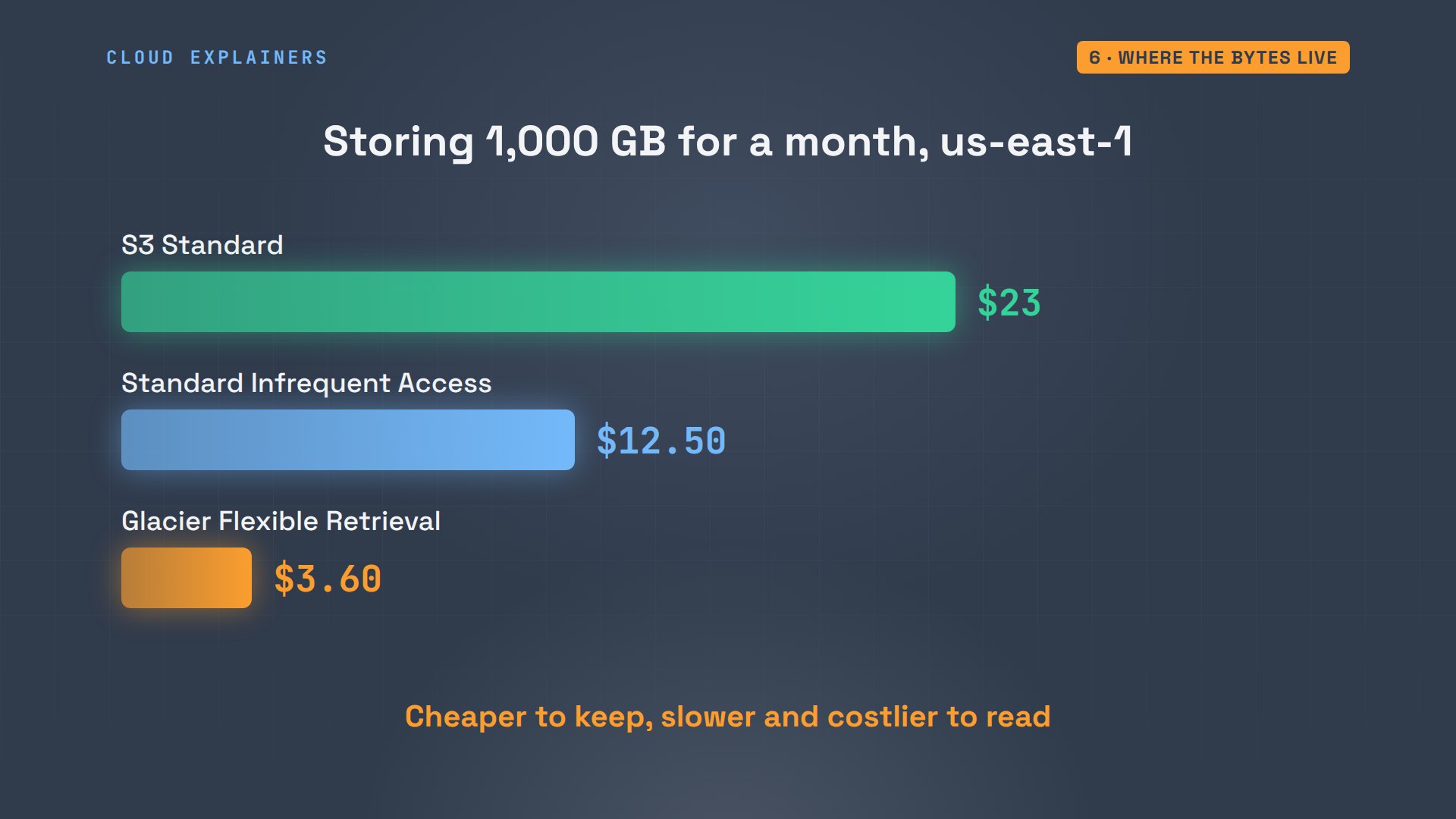
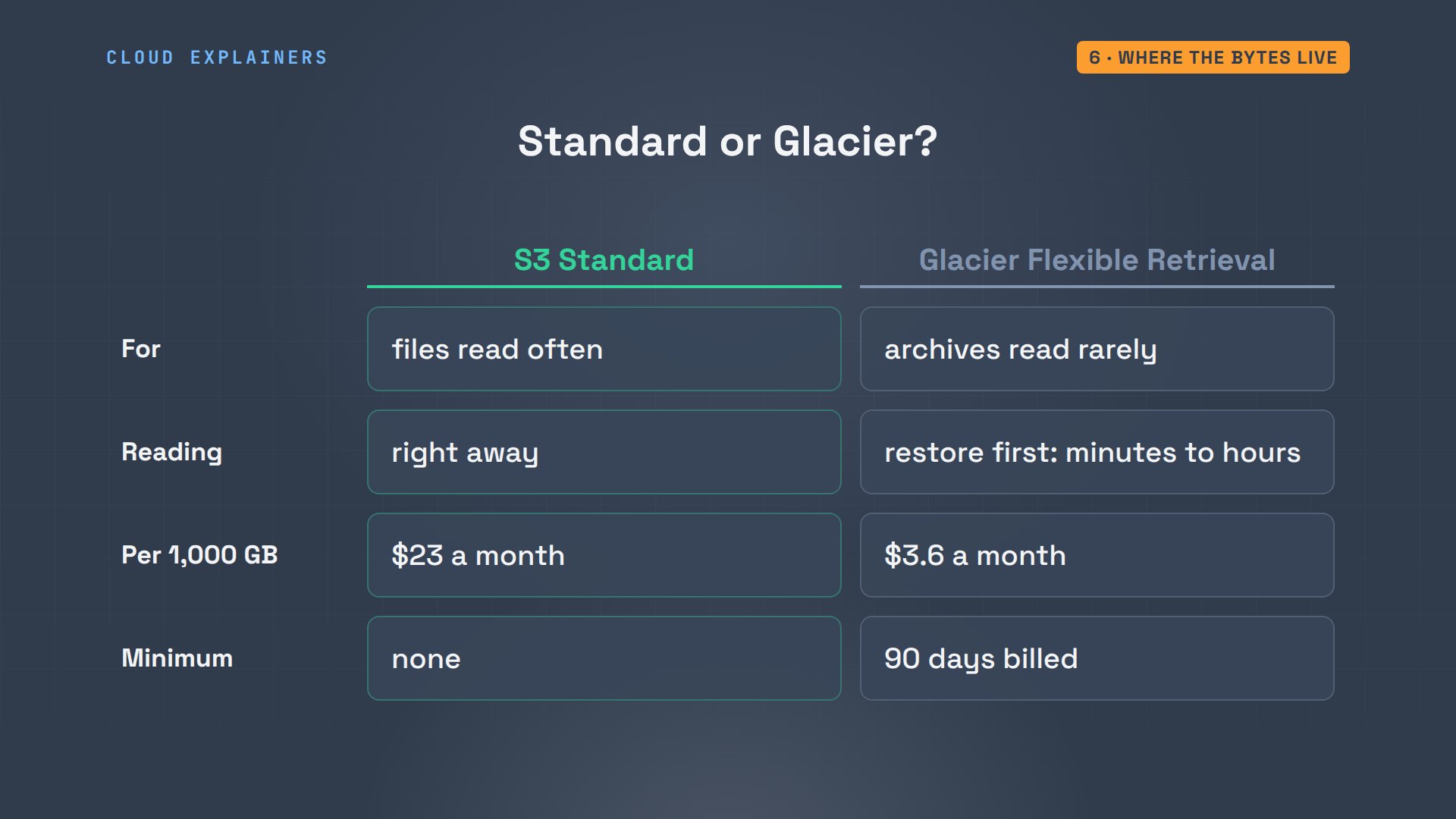
Why would anyone wait hours? Price. In standard storage, keeping a thousand gigabytes here for a month costs about 23 dollars, 12.5 in Standard Infrequent Access, and 3.6 in Glacier. Requests and downloads cost extra, and the cheaper classes charge more to read.
So the class is a choice about each object. Standard is for files you read often, like Ana's menu. Glacier is for files you must keep but rarely open, like old photos or last year's receipts. Glacier also bills at least 90 days for each object, even if you delete it sooner.
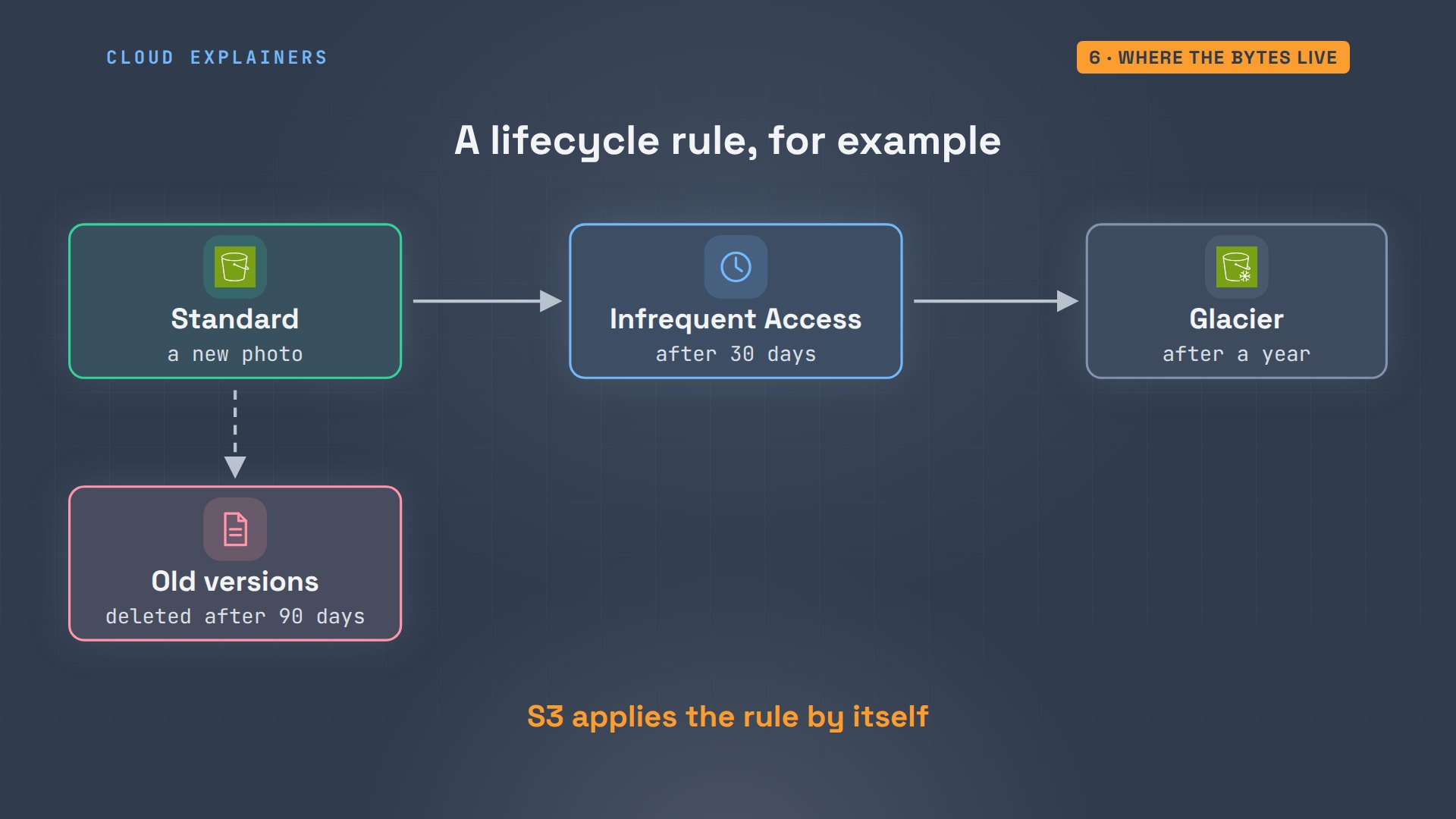
Moving files by hand isn't needed. A lifecycle rule on Ana's bucket can do it: for example, move photos to Infrequent Access after 30 days, to Glacier after a year, and delete old versions after 90 days. S3 runs the rule by itself, every day.
Recap
So here's how Amazon S3 works. Files are objects in a bucket, found by their keys. Every request is signed and checked against permissions, which is why Ana's unsigned link was denied, and a presigned link shares one file for a short time. Versions keep every change. And copies across zones keep the bytes safe, in the storage class you choose.
If following one menu through S3 made the cloud feel less mysterious, subscribing helps this small channel reach more beginners.
Every command in this video ran against real Amazon S3, in our own AWS account, and Ana's bucket was deleted afterwards. Thanks for watching Cloud Explainers.
Sources
- Amazon S3 User Guide, What is Amazon S3?
- Amazon S3 User Guide, Bucket naming rules
- Amazon S3 User Guide, Organizing objects using prefixes
- Amazon S3 User Guide, Blocking public access
- Amazon S3 User Guide, Sharing objects with presigned URLs
- Amazon S3 User Guide, Retaining multiple versions of objects
- Amazon S3 User Guide, Data consistency model
- Amazon S3 User Guide, Understanding storage classes
- Amazon S3 FAQs (durability)
- Amazon S3 pricing
Demos: real Amazon S3 in our own AWS account, with a made-up shop's files; the bucket and every version were deleted after recording. Watch the full video on YouTube.
More videos
How Kubernetes Works
How to Fix Docker Port Already Allocated Errors
How PostgreSQL Works
How to Fix Git Merge Conflicts
How to Fix No Space Left on Device in Linux
How the Internet Works
SQL vs NoSQL: When Each One Wins
How to Fix JWT Token Expired Errors (401 Unauthorized)

Claude API vs Claude Pro: Why Your Subscription Doesn't Include It

Why AI Agent Skills Beat Giant Prompts

Linux Cron Jobs Will Finally Make Sense After This

Security Logs Will Finally Make Sense After This

How to Fix a Security Leak: An API Key Pushed to GitHub

DNS Will Finally Make Sense After This

Never Ignore a Security Update

Two-Factor Authentication Will Finally Make Sense

Never Expose a Database to the Internet

SSH Keys vs Passwords: Which Is Safer for Security?

The 5 Levels of Linux Boot: From Power On to Login

The 5 Levels of Network Firewalls

Password Security: Why Hackers Crack Weak Passwords

Why Your Linux Server Runs Out of Memory

HTTP vs HTTPS: What Actually Changes on Your Network

Every Linux File Permission You Need to Know

Linux Processes vs Threads: When Each One Wins

The OSI Model Will Finally Make Sense After This

The 7 Levels of Git

Every Network Troubleshooting Command You Need

Hashing vs Encryption in Cybersecurity: When Each One Wins

Why the Internet Ran Out of IP Addresses

Linux Package Managers: apt vs Snap vs Flatpak

Why Python Is Slow (and When It Doesn't Matter)

TCP vs UDP: When Each One Wins

Stop Running Linux as Root (Do This Instead)

Linux Users and Groups Will Finally Make Sense

Why Phishing Beats Good Security (and How to Spot It)

The 7 Levels of Docker

AI Agents Will Finally Make Sense After This

Stop Using git push --force (Use This Instead)

Agent Skills vs MCP: When Each One Wins

Networking Will Finally Make Sense After This

Every Linux Command You Actually Need

The 7 Levels of Cybersecurity

Every System Design Concept You Need, in One Diagram
