How to Fix Cloudflare Tunnel Errors in a Homelab
Cloudflare Tunnel errors on a home server, fixed on real tunnels: a 502 Bad Gateway because cloudflared in Docker points at localhost, a 502 when the app is stopped (no such host), error 1033 when no cloudflared is connected (an old quick-tunnel address, no restart policy), a tunnel that runs but gives 1033 for almost two minutes because UDP 7844 is blocked, an x509 error from a NAS's self-signed certificate, and a named tunnel's missing catch-all rule.
Fine at home, 502 outside
Your site works on your own server, but through Cloudflare Tunnel it's a five oh two, Bad Gateway. Ana runs her board game club's site from a mini PC at home. On the server, curl gets the page: two hundred, fine. Ben, a club member, opens the tunnel's address from his laptop: five oh two. So the site is up, the tunnel is up, and nobody outside can see the site. Next: why, and the one-word fix. Then error ten thirty-three, and a tunnel that runs but still fails.
curl -s -o /dev/null -w '%{http_code}\n' localhost:8080200
curl -sI https://moments-yourself-led-relevance.trycloudflare.com | head -1HTTP/2 502
How a tunnel reaches your server
How does a tunnel reach a server at home at all? Ana's home router has no open ports. Instead, cloudflared, a small program on her server, calls out to Cloudflare and keeps that connection open: that's the tunnel. Ana runs both with Docker Compose, each in its own container. When Ben opens the address, Cloudflare sends his request down the tunnel, and cloudflared passes it to the site, at the address Ana typed into its settings: localhost, port eighty-eighty. Keep that in mind. The answer goes back the same way.
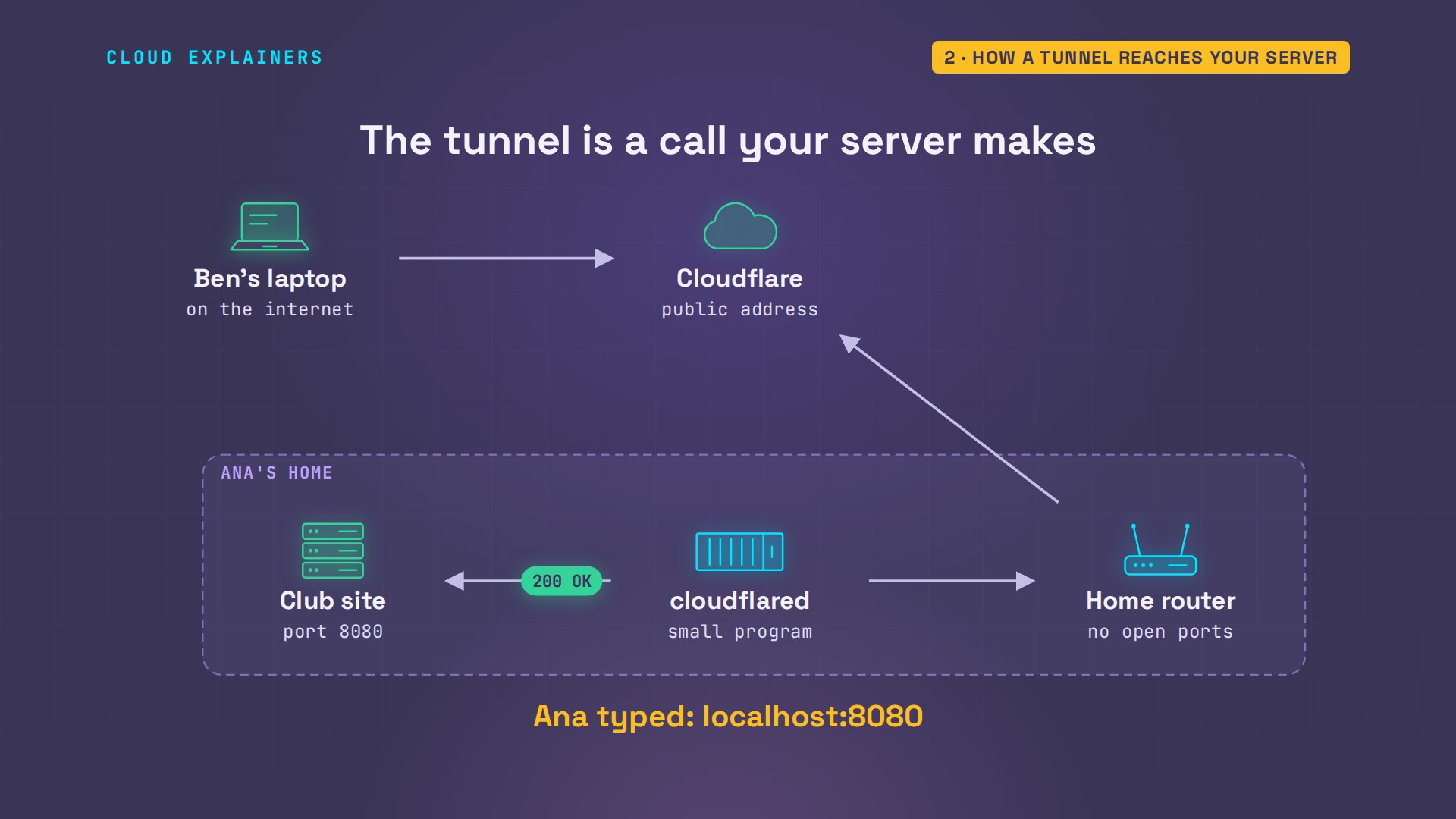
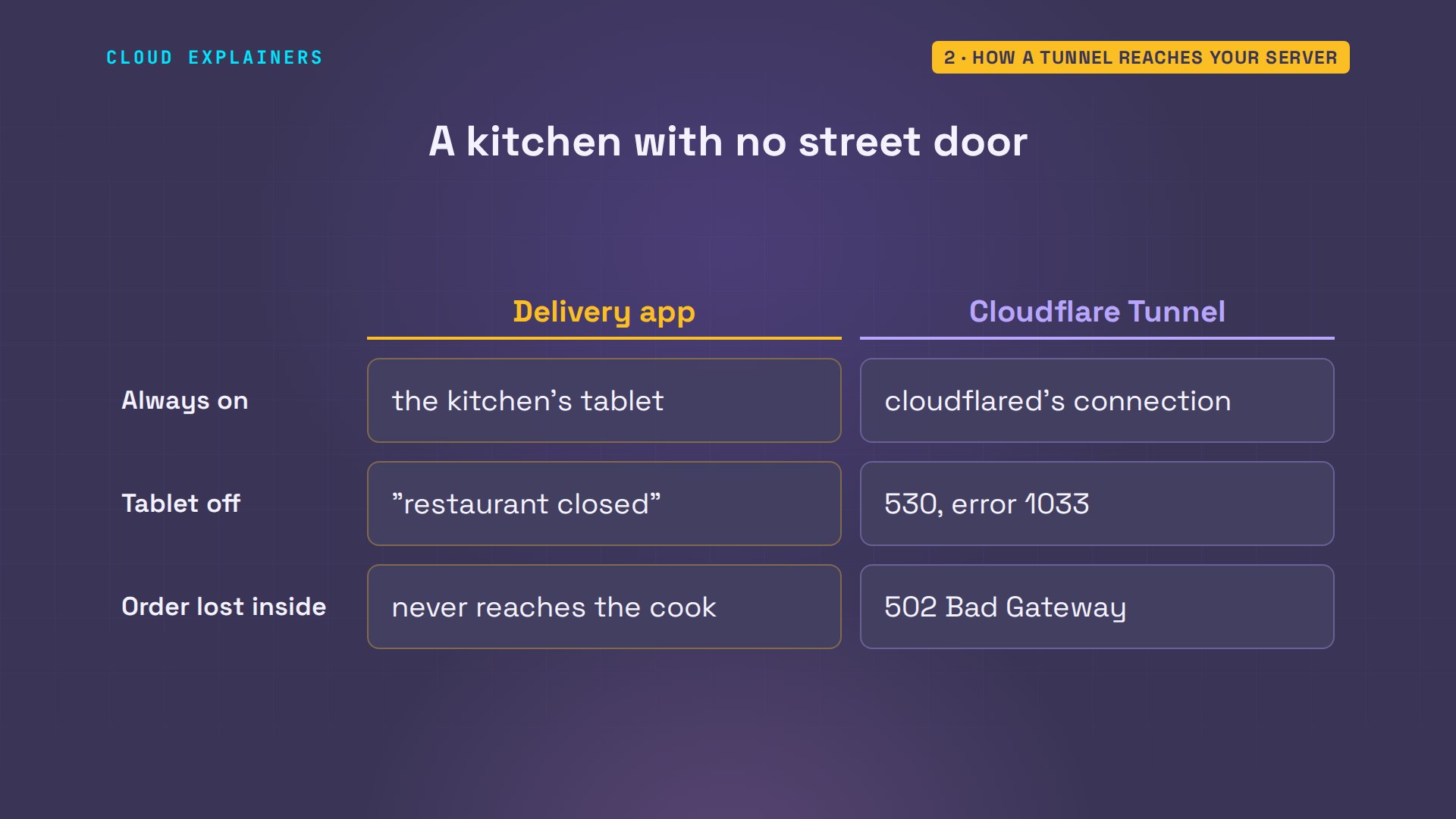
Think of a restaurant with no street door that takes orders through a delivery app. The kitchen keeps the app's tablet on, and every order arrives through it. Tablet off: the app says the restaurant is closed. Tablet on, but the order never reaches the cook: it fails.
Read the tunnel's log
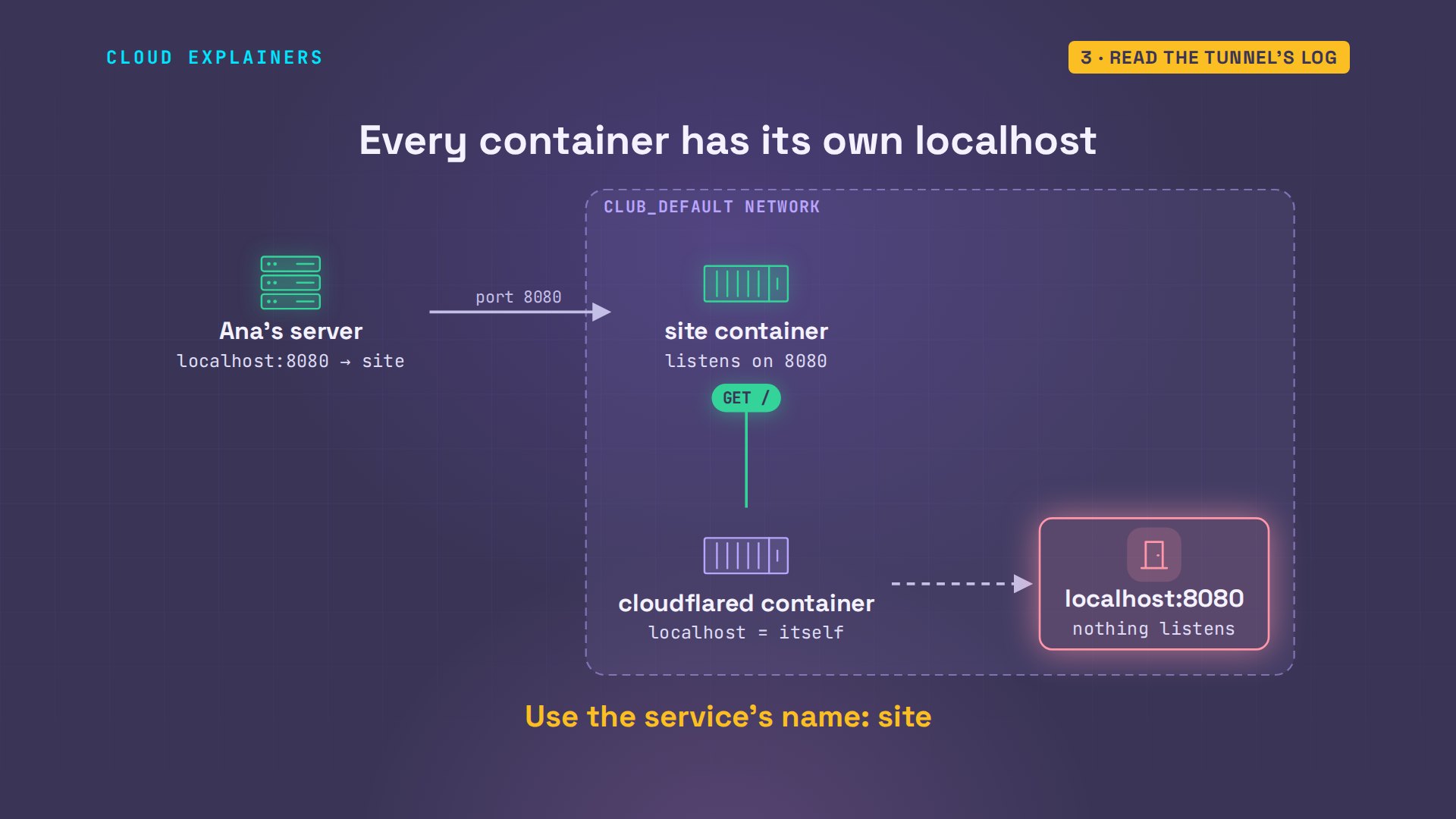
So, start with cloudflared's own log. Filtered down to its errors, it says: unable to reach the origin service. Origin is Cloudflare's word for your app. The last words say why: it tried localhost, port eighty-eighty, and the connection was refused. In the log, localhost is written colon colon one. Guess first: inside the tunnel's container, what is localhost? The tunnel container itself.
docker compose logs tunnel | grep -o 'error="[^"]*"' | tail -1error="Unable to reach the origin service. The service may be down or it may not be responding to traffic from cloudflared: dial tcp [::1]:8080: connect: connection refused"
Every container has its own localhost. The site's container listens on port eighty-eighty, and Compose also opens port eighty-eighty on the server itself and forwards it in, which is why curl on the server worked. But cloudflared runs in a container of its own: its localhost is itself, and nothing in there listens. On the network Compose makes, each service is reachable by its name. The site's name is site.
The fix: the service's name
So the fix is one word in compose dot yaml. The tunnel's URL, localhost, becomes site. The same goes for any app in Compose: point the tunnel at the service's name and the port inside its container.
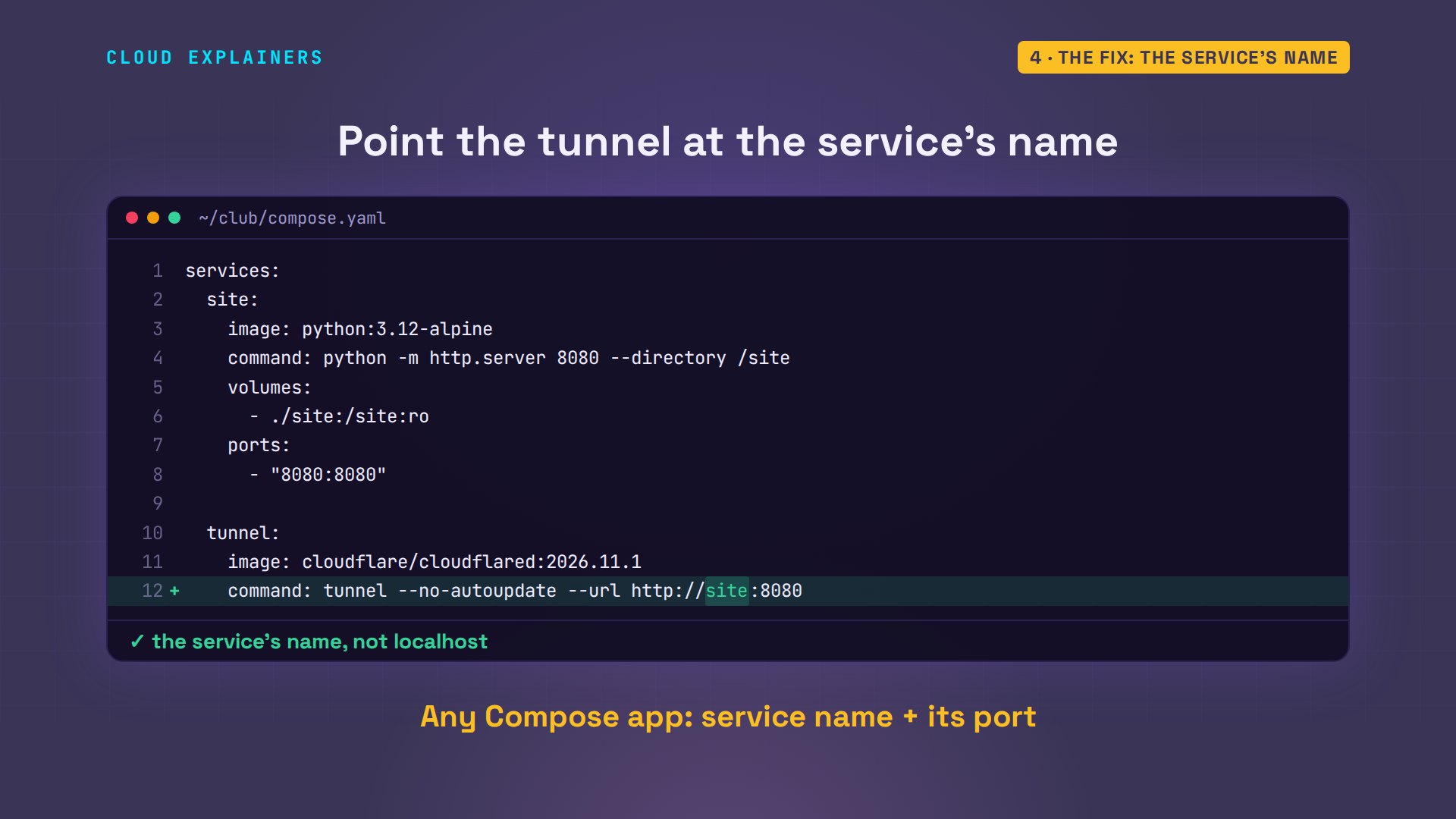
docker compose up dash d recreates the tunnel. A quick tunnel prints its public address in its log: here it is, but look: a different one. A quick tunnel gets a new address every time it starts; that matters in a minute. Ben opens the new address: two hundred.
docker compose up -dContainer club-tunnel-1 Recreate Container club-site-1 Running Container club-tunnel-1 Recreated Container club-tunnel-1 Starting Container club-tunnel-1 Started
docker compose logs tunnel | grep -o 'https://[a-z-]*.trycloudflare.com' | tail -1https://grab-election-representatives-participation.trycloudflare.com
curl -sI https://grab-election-representatives-participation.trycloudflare.com | head -1HTTP/2 200
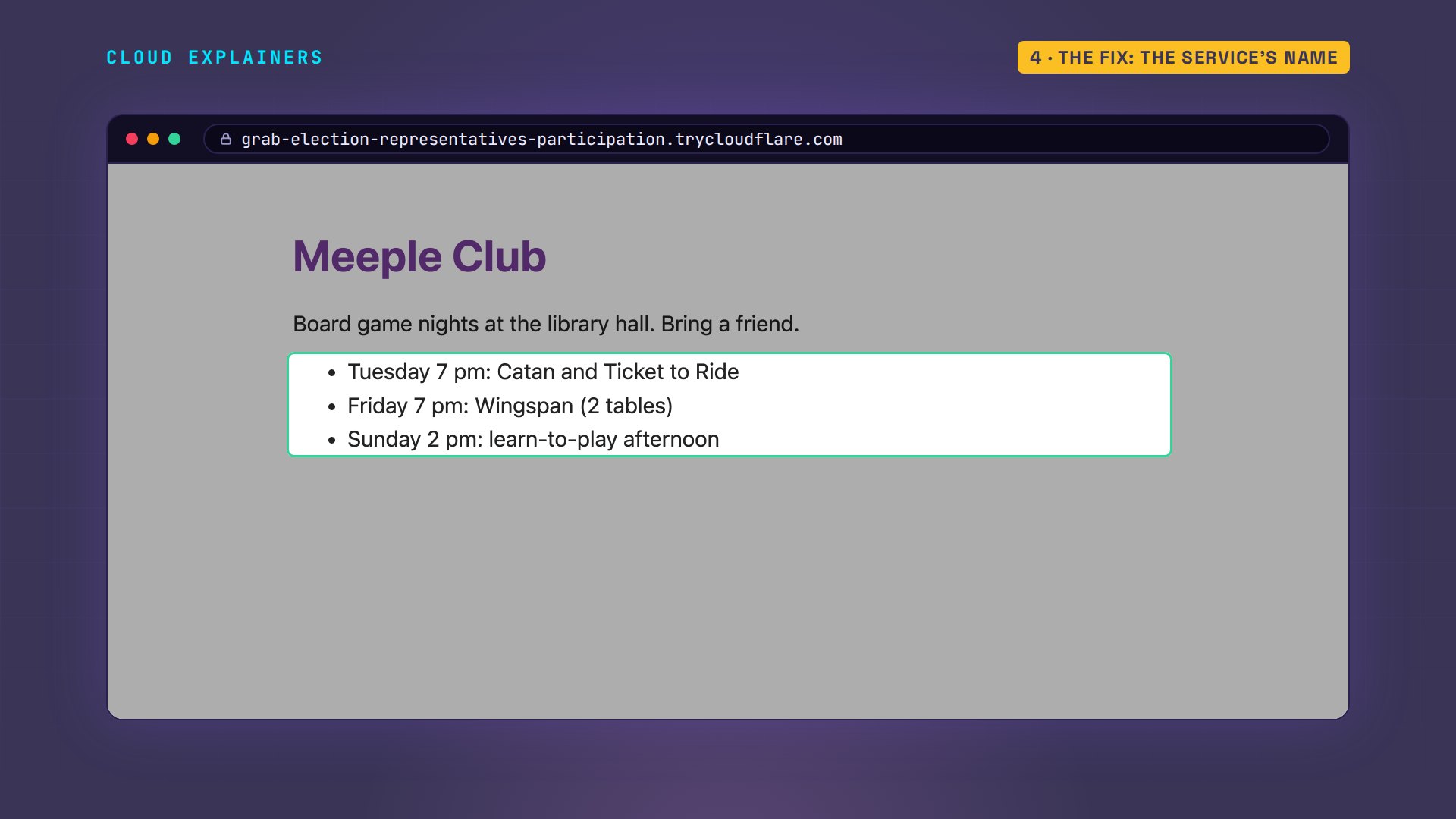
And in his browser, the club's game nights, served from a mini PC in Ana's home, with no port open on her router.
Two codes, two halves
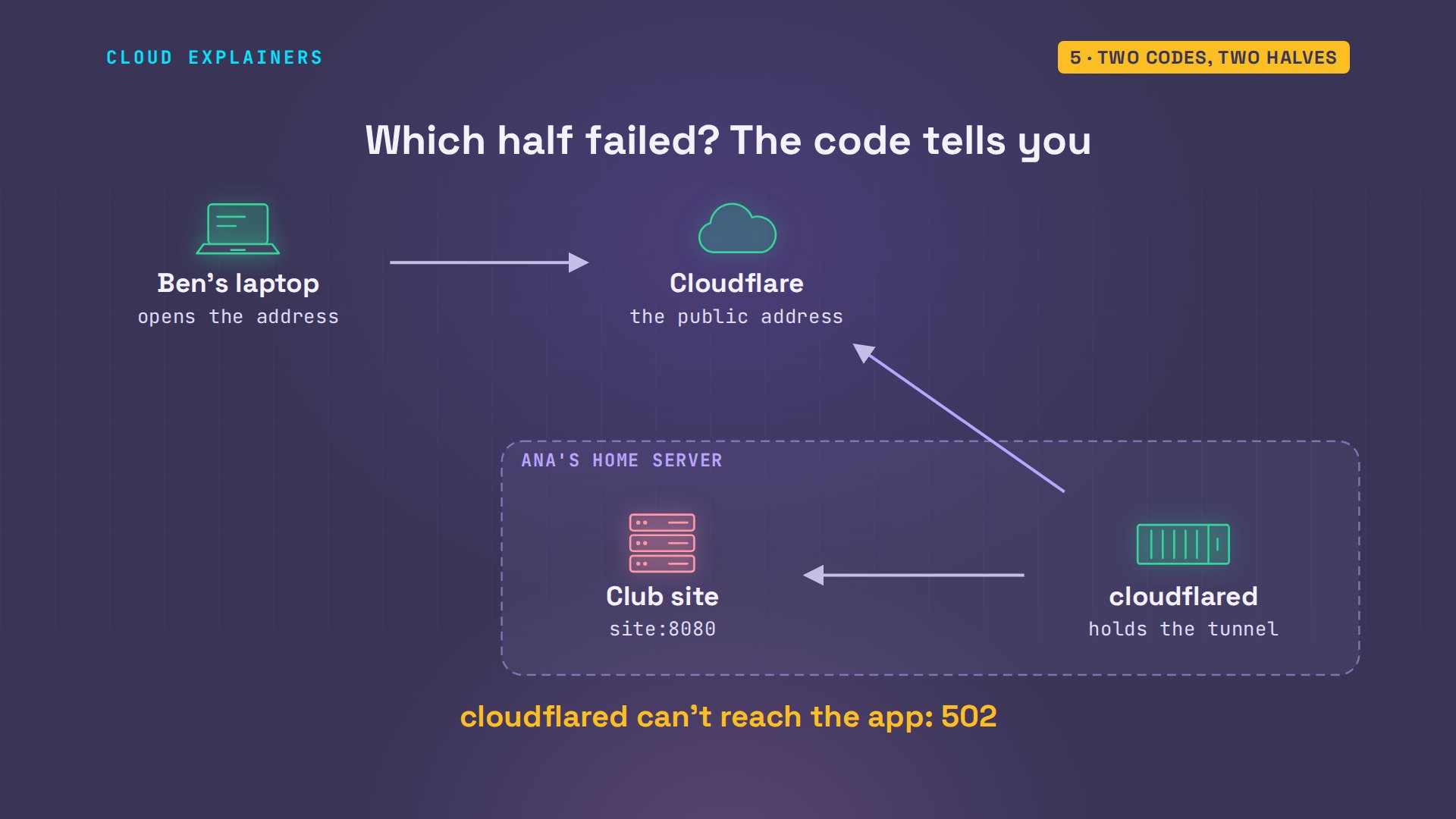
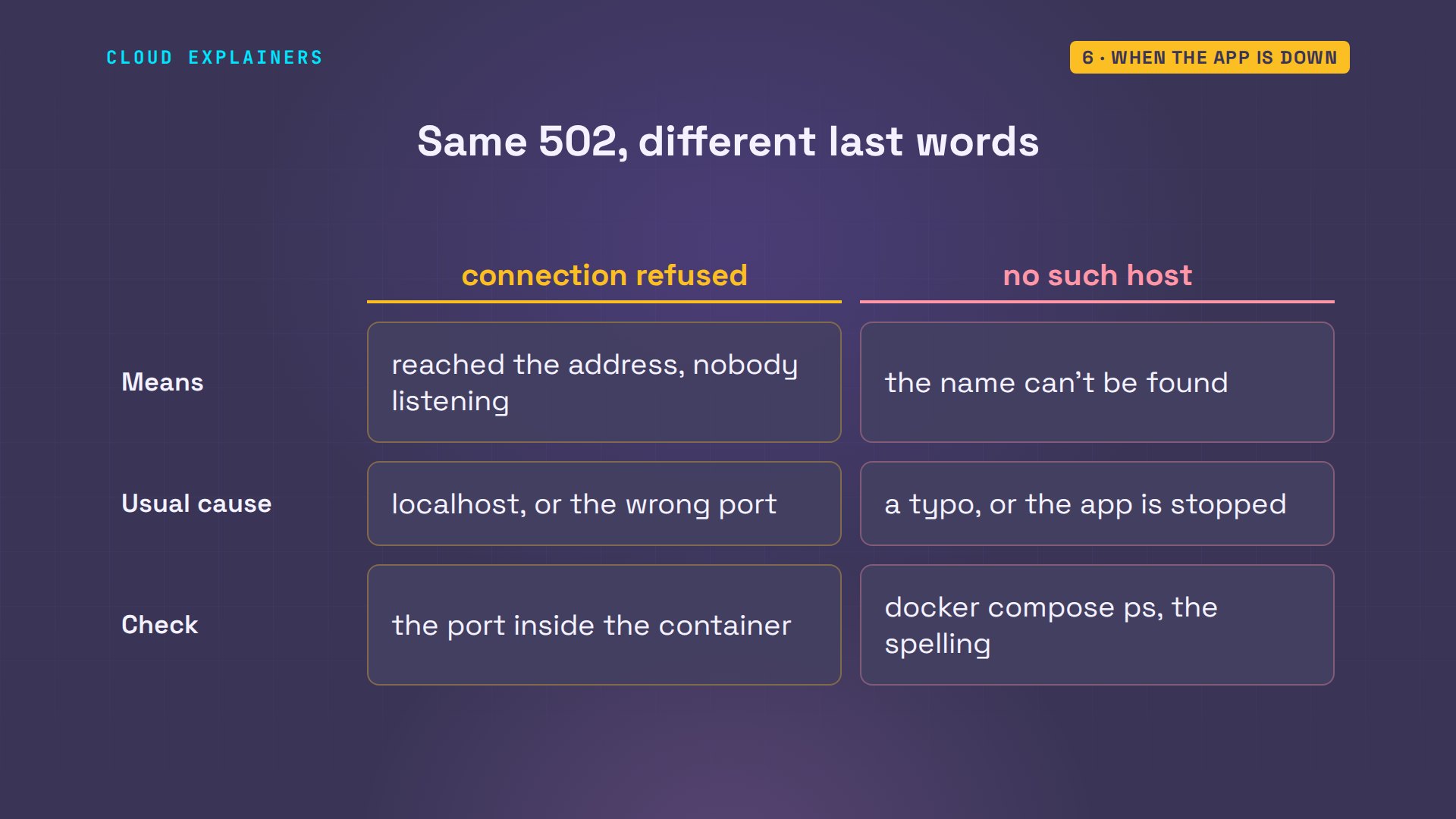
So which part broke? The error code tells you. There are two halves to check. First, Cloudflare to cloudflared, the tunnel: if no cloudflared is connected, Cloudflare answers status five thirty, and its page says error ten thirty-three. Second, cloudflared to your app. If the tunnel is fine but that last step fails: five oh two. So always ask which half failed first.
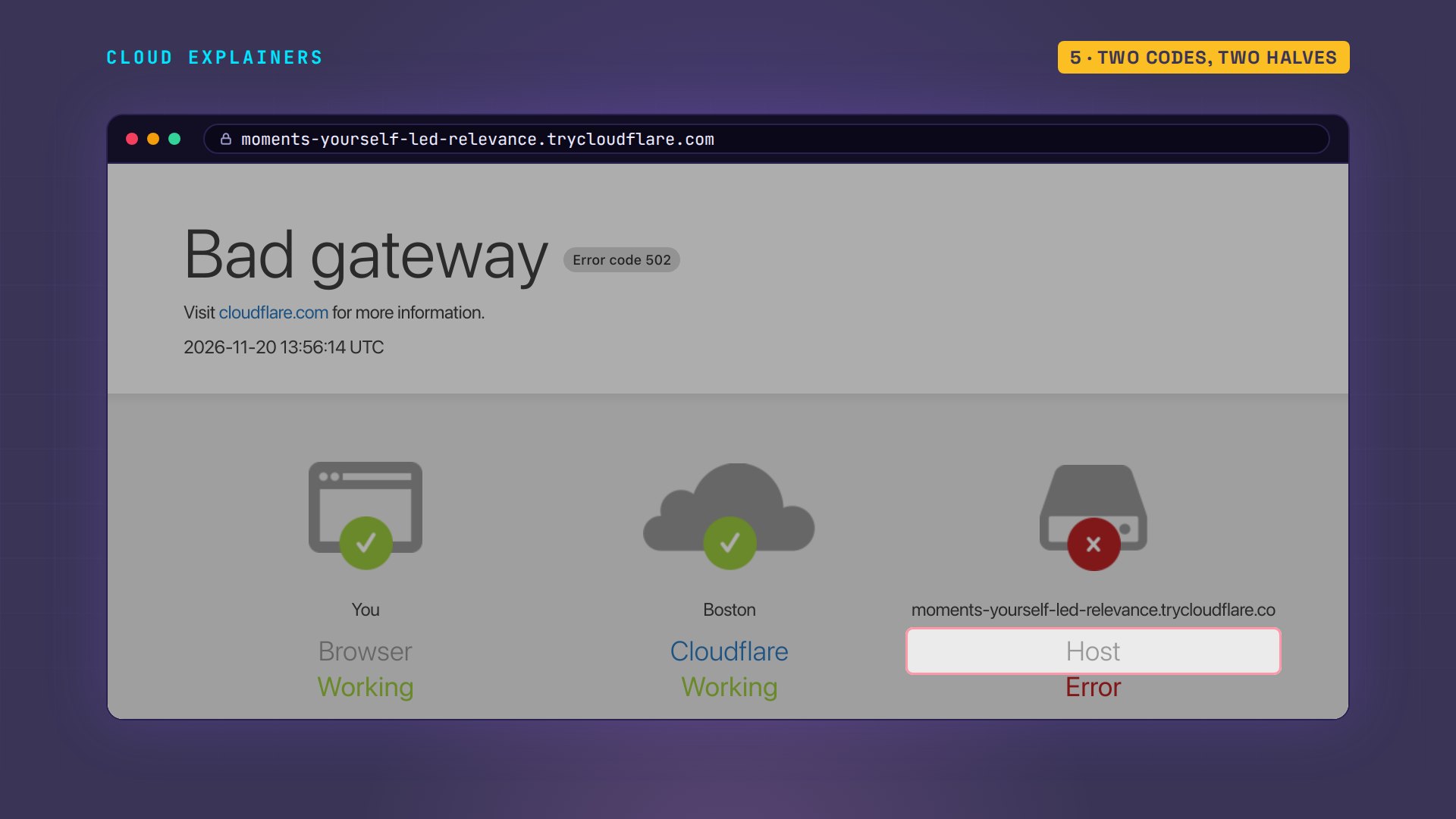
Cloudflare's own page says the same. On Ben's first visit, the Bad gateway page showed his browser working, Cloudflare working, and the error at the host: Ana's end.
When the app is down
A different five oh two. Ana stops the site, the way an update or a crash would. Ben gets five oh two again, but the log's last words changed: lookup site: no such host. A stopped container has no name on the network, so cloudflared can't even find it.
docker compose stop siteContainer club-site-1 Stopping Container club-site-1 Stopped
curl -sI https://grab-election-representatives-participation.trycloudflare.com | head -1HTTP/2 502
docker compose logs tunnel | grep -o 'error="[^"]*"' | tail -1error="Unable to reach the origin service. The service may be down or it may not be responding to traffic from cloudflared: dial tcp: lookup site on 127.0.0.11:53: no such host"
So read the last words of the error. Connection refused: cloudflared found the place, and nothing listens there, like our localhost mistake. No such host: the name is wrong, misspelled, or the service isn't running. Ana starts the site again.
Error 1033: no tunnel connected
Now the other code. Ben still has the first address from this morning. He opens it: five thirty. In his browser: error ten thirty-three, Cloudflare Tunnel error. A quick tunnel gets a new random address every time cloudflared starts, so nothing is connected behind the old one any more. The tablet that took those orders is gone.
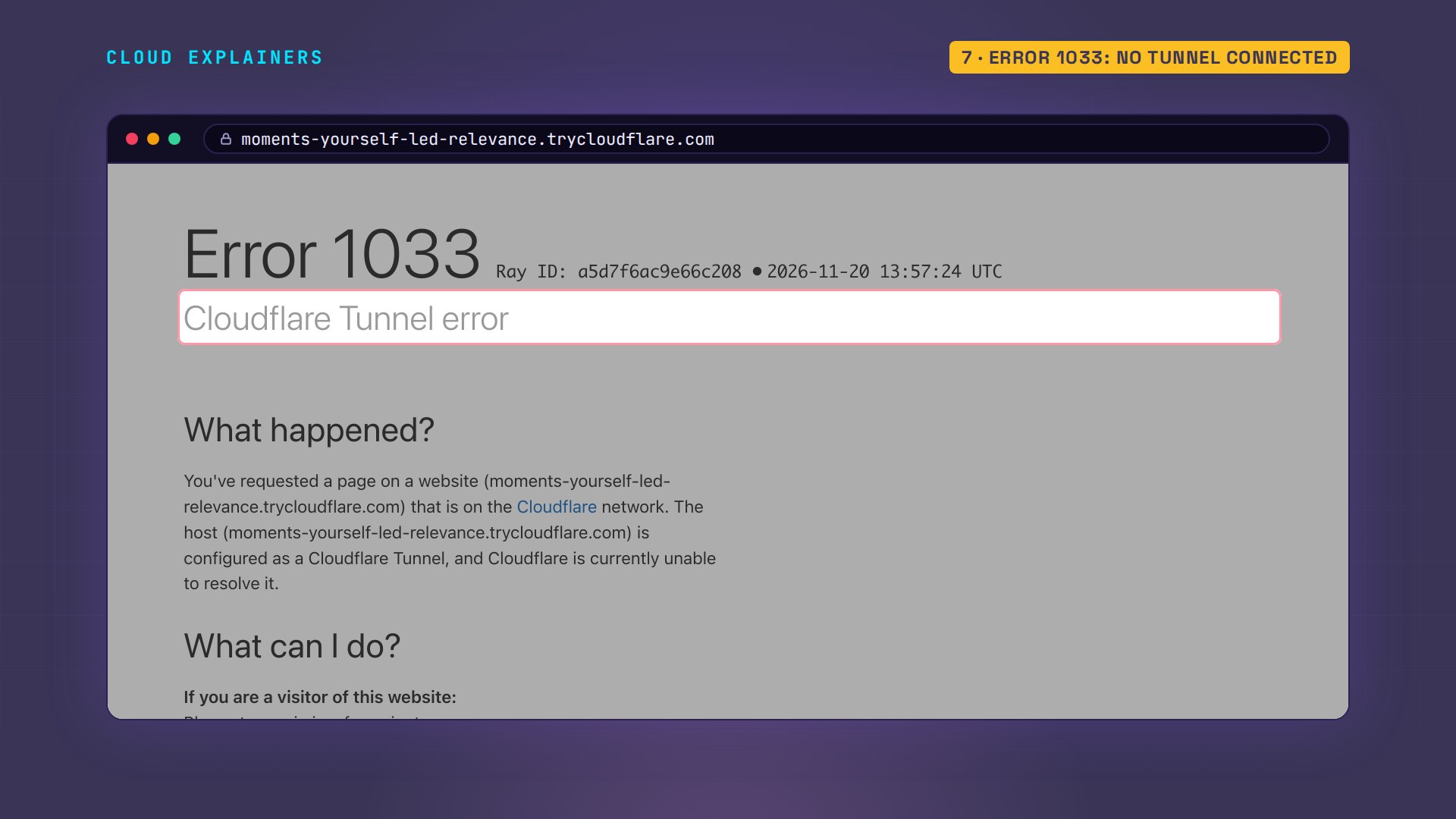
The same code comes after a reboot. Ana restarts Docker, which does to containers what a reboot does. Both containers have stopped, and nothing starts them again, so today's address gives Ben five thirty too.
sudo systemctl restart docker[sudo] password for ana:
docker compose ps -a --format 'table {{.Service}}\t{{.Status}}'SERVICE   STATUS
site      Exited (137) 3 seconds ago
tunnel    Exited (0) 13 seconds ago
curl -sI https://grab-election-representatives-participation.trycloudflare.com | head -1HTTP/2 530
The fix is one line per service: restart, unless stopped: start it whenever Docker starts, unless you stopped it yourself. Docker restarts again, and this time both come back up by themselves. A quick tunnel still comes back with a new address, though. For an address that stays, use a named tunnel: one you create once in a free Cloudflare account, on your own domain. It shows these same errors.
grep -n restart compose.yaml9:    restart: unless-stopped
14:    restart: unless-stopped
docker compose up -dContainer club-site-1 Recreate Container club-tunnel-1 Recreate Container club-tunnel-1 Recreated Container club-site-1 Recreated Container club-tunnel-1 Starting Container club-site-1 Starting Container club-tunnel-1 Started Container club-site-1 Started
sudo systemctl restart docker
docker compose ps -a --format 'table {{.Service}}\t{{.Status}}'SERVICE   STATUS
site      Up 4 seconds
tunnel    Up 4 seconds
docker compose logs tunnel | grep -o 'https://[a-z-]*.trycloudflare.com' | tail -1https://parking-husband-positions-paso.trycloudflare.com
Running, and still 1033
Now the tunnel that runs and still fails. Data crosses the internet in two main ways, TCP and UDP, and some strict routers block UDP. cloudflared prefers a protocol called QUIC, which travels over UDP to port seventy-eight forty-four. Ana copies such a router with one firewall rule that drops it. She recreates the tunnel. It's up. Ben gets five thirty, the status behind error ten thirty-three.
sudo iptables -I DOCKER-USER -p udp --dport 7844 -j DROP
docker compose up -d --force-recreate tunnelContainer club-tunnel-1 Recreate Container club-tunnel-1 Recreated Container club-tunnel-1 Starting Container club-tunnel-1 Started
docker compose ps --format 'table {{.Service}}\t{{.Status}}'SERVICE   STATUS
site      Up About a minute
tunnel    Up 15 seconds
curl -sI https://intranet-hope-bias-recognised.trycloudflare.com | head -1HTTP/2 530
The log explains. At start, cloudflared's own check says: UDP failed, and it will use HTTP/2, which runs over TCP instead. Then it tries QUIC anyway, again and again: failed to dial to edge with quic; the edge is Cloudflare's servers. Guess first: how long until Ben's page loads? 138 seconds, when it finally switches to HTTP/2.
docker compose logs --no-log-prefix tunnel | grep -E '[|]  (UDP|SUMMARY)' | cut -c 26-|  UDP Connectivity  region1.v2.argotunnel.com  FAIL    QUIC connection failed                  |
|  UDP Connectivity  region2.v2.argotunnel.com  FAIL    QUIC connection failed                  |
|  SUMMARY: Environment ready with degraded transport. cloudflared will proceed using 'http2'.  |
docker compose logs tunnel | grep -o 'error="[^"]*"' | tail -1error="failed to dial to edge with quic: timeout: no recent network activity"
docker compose logs --no-log-prefix tunnel | grep -E 'Switching|Registered' | sed -E 's/^.{11}//; s/ (connIndex|connection|event|ip|location)=[^ ]+//g'14:01:41Z INF Switching to fallback protocol http2
14:01:41Z INF Registered tunnel connection protocol=http2
So don't wait for it to give up. The flag protocol, set to HTTP/2, tells cloudflared to use TCP from the start, and it connects in 6 seconds. If your router allows it, opening outgoing UDP to port seventy-eight forty-four works too.
grep -n protocol compose.yaml13: command: tunnel --no-autoupdate --protocol http2 --url http://site:8080
docker compose up -dContainer club-site-1 Running Container club-tunnel-1 Recreate Container club-tunnel-1 Recreated Container club-tunnel-1 Starting Container club-tunnel-1 Started
docker compose logs --no-log-prefix tunnel | grep -E 'Initial protocol|Registered' | sed -E 's/^.{11}//; s/ (connIndex|connection|event|ip|location)=[^ ]+//g'14:01:47Z INF Initial protocol http2
14:01:47Z INF Registered tunnel connection protocol=http2
A NAS on HTTPS
If you put a NAS behind a tunnel, you'll probably hit this next five oh two. The club has a photo NAS. Like most NAS boxes, it serves its page over HTTPS, with a certificate it made for itself. Ana points a second tunnel at that HTTPS address. Five oh two again, and the last words: X five oh nine, certificate signed by unknown authority.
docker compose up -dContainer club-nas-tunnel-1 Creating Container club-tunnel-1 Running Container club-nas-1 Creating Container club-site-1 Running Container club-nas-tunnel-1 Created Container club-nas-1 Created Container club-nas-1 Starting Container club-nas-tunnel-1 Starting Container club-nas-tunnel-1 Started Container club-nas-1 Started
curl -sI https://mlb-site-peers-predict.trycloudflare.com | head -1HTTP/2 502
docker compose logs nas-tunnel | grep -o 'error="[^"]*"' | tail -1error="failed to proxy HTTP: Unable to reach the origin service. The service may be down or it may not be responding to traffic from cloudflared: tls: failed to verify certificate: x509: certificate signed by unknown authority"
cloudflared checks the NAS's certificate the way a browser would, and nobody it trusts signed it. Dash dash no TLS verify tells it to accept the certificate: two hundred. The only hop left unchecked is the one inside Ana's server; Ben's connection to Cloudflare is checked as always. With a named tunnel, you can instead tell it which certificate to trust.
grep -n tls compose.yaml25: command: tunnel --no-autoupdate --protocol http2 --no-tls-verify --url https://nas:443
docker compose up -dContainer club-tunnel-1 Running Container club-nas-1 Running Container club-nas-tunnel-1 Recreate Container club-site-1 Running Container club-nas-tunnel-1 Recreated Container club-nas-tunnel-1 Starting Container club-nas-tunnel-1 Started
curl -sI https://aus-release-set-sizes.trycloudflare.com | head -1HTTP/2 200
A named tunnel's rules
With a named tunnel, one typo in a hostname sends your visitors a four oh four. Here's how to catch it first. A named tunnel often reads a config file: rules that say which hostname goes to which service. Here cloudflared runs on the server itself, installed as a package, so localhost is right this time. cloudflared tunnel ingress validate checks the file without connecting. On Ana's file it fails: the last rule must match all URLs.
cat .cloudflared/config.ymltunnel: 6ff42ae2-765d-4adf-8112-31c55c1551ef
credentials-file: /home/ana/.cloudflared/6ff42ae2-765d-4adf-8112-31c55c1551ef.json

ingress:
  - hostname: games.example.com
    service: http://localhost:8080
  - hostname: photos.example.com
    service: https://localhost:8443
    originRequest:
      noTLSVerify: true
cloudflared tunnel ingress validateValidating rules from  /home/ana/.cloudflared/config.yml
Validation failed: The last ingress rule must match all URLs (i.e. it should not have a hostname or path filter)
So every file ends with a catch-all rule, for any address no other rule names. Add one that answers four oh four, and the file is OK. Then ingress rule tests an address. Game dot example dot com, one letter short, falls through to the catch-all, rule number two, so a visitor gets a four oh four. The right name, games dot example dot com, matches rule zero, the first rule: the site.
tail -1 .cloudflared/config.yml- service: http_status:404
cloudflared tunnel ingress validateValidating rules from  /home/ana/.cloudflared/config.yml
OK
cloudflared tunnel ingress rule https://game.example.comUsing rules from /home/ana/.cloudflared/config.yml
Matched rule #2
	service: http_status:404
cloudflared tunnel ingress rule https://games.example.comUsing rules from /home/ana/.cloudflared/config.yml
Matched rule #0
	hostname: games.example.com
	service: http://localhost:8080
Recap
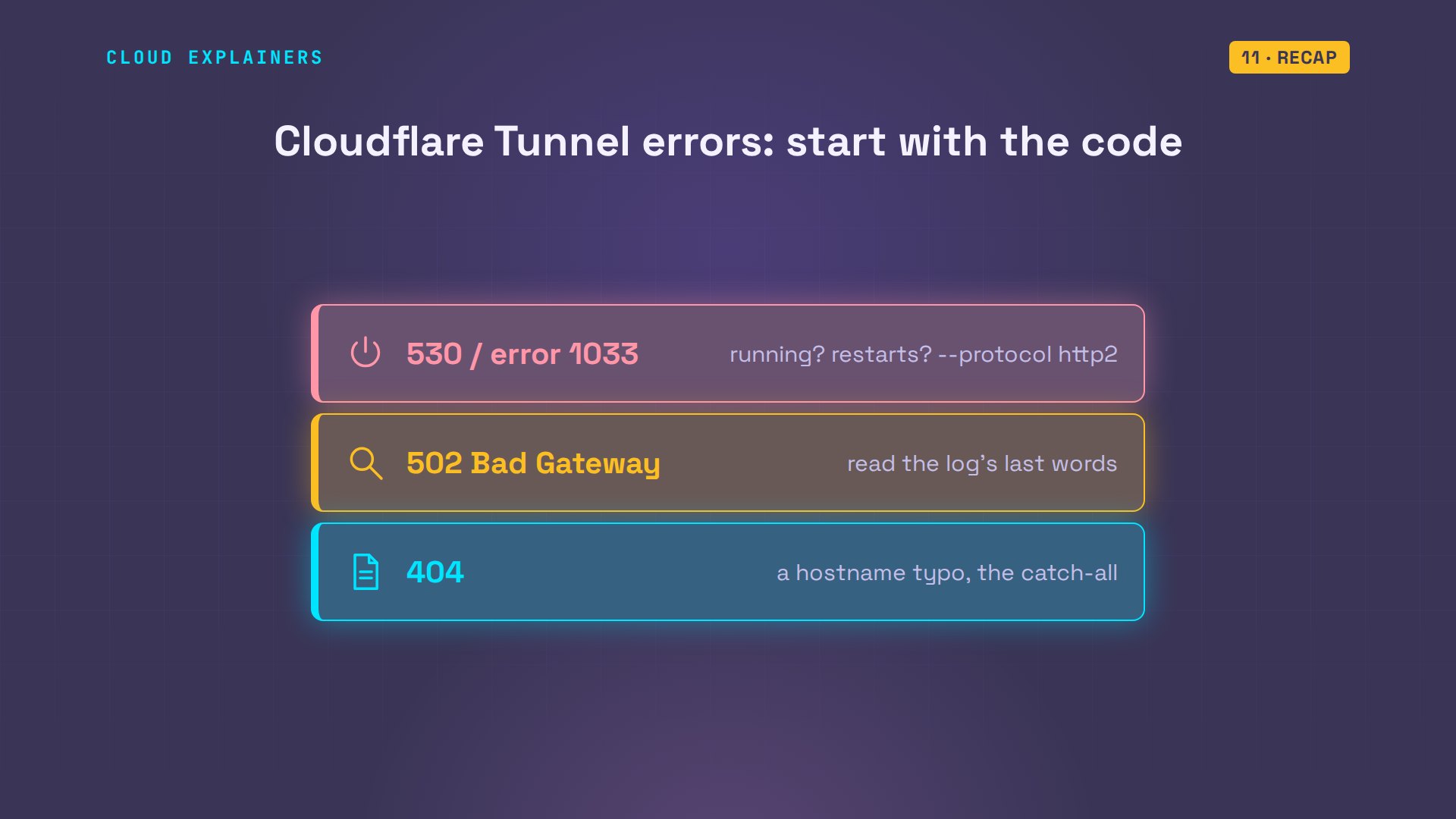
So, start with the code. Error ten thirty-three: no tunnel connected; is cloudflared running and reaching Cloudflare? Five oh two: read the log's last words. Four oh four: check the rules.
If Ben can see the game nights now, a like helps another homelabber find this, and subscribing brings more fixes, tested on real machines.
Every error in this video came from real Cloudflare tunnels to a real Ubuntu server, and every command and the lab files are linked in the description. Thanks for watching Cloud Explainers.
Sources
- Cloudflare Tunnel (cloudflared makes outbound-only connections to Cloudflare)
- Quick Tunnels (TryCloudflare: a random trycloudflare.com address, for testing)
- Common tunnel errors (1033: no cloudflared connected for the hostname; 502: origin unreachable)
- Tunnel with firewall (port 7844, QUIC over UDP or HTTP/2 over TCP)
- cloudflared run parameters (--protocol)
- Origin parameters (noTLSVerify, caPool, originServerName)
- Configuration file and ingress rules (the last rule must be a catch-all; ingress validate, ingress rule)
- Docker Compose networking (services reach each other by service name)
- Compose restart policy (unless-stopped)
Demos: two containers on our own Mac standing in for a home server and a club member's laptop, with real Cloudflare quick tunnels (no account); the club and its members are made up. Every error page, status code and log line was real. Watch the full video on YouTube.
More videos

How to Fix Python ModuleNotFoundError: No Module Named
Golang Pointers in 5 Minutes
How to Fix a Kubernetes Pod Stuck in CrashLoopBackOff
How to Fix a Homelab ESXi Host Not Responding
PostgreSQL: Full Tutorial for Beginners
How a Load Balancer Works with HAProxy

How Python Virtual Environments Work
How to Fix API CORS Errors: No 'Access-Control-Allow-Origin'
How Authenticator App Login Codes Work (TOTP)

Git and GitHub: Full Tutorial for Beginners
How a Homelab Hypervisor Works (VMware ESXi)
How to Fix Kubernetes ImagePullBackOff Errors

How to Fix DNS 'Temporary Failure in Name Resolution' on Linux
How to Fix AWS CLI 'Unable to Locate Credentials'
Proxmox vs ESXi for Your Homelab: When Each One Wins
PostgreSQL UUID vs Auto Increment: Which Primary Key Should You Use?
Kubernetes: Full Tutorial for Beginners

How TCP Sockets Work

How to Fix PostgreSQL 'Could Not Connect to Server'
Claude Code Hooks Will Finally Make Sense After This
DevOps with Ansible Will Finally Make Sense After This
How SNMP Network Monitoring Works
How to Fix GitHub 'Permission Denied (publickey)' Errors
Docker: Full Tutorial for Beginners
How to Fix PostgreSQL 'Password Authentication Failed'
Why One Linux Server Handles More Users Than You Think
How to Fix Network 'Connection Refused' Errors
DevOps Pipelines: Jenkins vs GitHub Actions
Linux Nginx Reverse Proxy: Full Tutorial for Beginners
Every Networking Term a Beginner Needs in 12 Minutes
How to Fix Docker 'Permission Denied' on docker.sock
How to Fix Git 'Updates Were Rejected' When You Push
How to Fix nginx 502 Bad Gateway Errors on Linux

How to Fix Linux apt 'Could Not Get Lock' Errors (Ubuntu)

How Email Works on the Internet (SMTP) in 10 Minutes

The Python Roadmap for Beginners

Golang REST API with Gin: Full Tutorial for Beginners
How a WireGuard VPN Network Works

Linux Makefiles Will Finally Make Sense After This

SAML vs OAuth vs OpenID Connect: What's the Difference?
How to Fix Python cron Jobs That Never Run
Linux Bash Scripting: Full Tutorial for Beginners
How PXE Network Boot Works
How Active Directory Works

How to Fix a Linux systemd Service That Won't Start
Linux Logs: syslog vs journald
JWT vs Session Cookies: Which One Should You Use?
Docker vs Docker Compose: Which One Should You Use?
How to Fix Docker Compose Containers That Can't Talk to Each Other

Django Full Tutorial for Beginners

How Linux systemd Works

How to Fix 'Windows Cannot Access' Network Share Errors (SMB)
REST vs gRPC: Which One Should You Use?

How to Fix SSL Certificate Chain Errors (Missing Intermediate)
Every Python Concept for Beginners in 10 Minutes

Every SQL Join Type in 10 Minutes
Why OpenRouter Free Models Hit Their Limit So Fast
Why Your Gemini API Free Tier Runs Out So Fast

OpenRouter Will Finally Make Sense After This
How Redis Caching Works
Gemini API vs Vertex AI: Which One Should You Use?
How to Fix a Leaked Gemini API Key
Why Golang Uses Goroutines Instead of Threads
How to Fix Gemini API Error 429: Resource Exhausted

Claude Token Pricing Will Finally Make Sense After This
Why Python Web Scraping Returns Nothing (and the Fix)

Python uv vs pip: Which One Should You Use?

Python Automation: Full Tutorial for Beginners
How OAuth Login Works

Google AI Studio Will Finally Make Sense After This
What Happens When You Run a Docker Container
How to Fix Claude Code Billing Your API Key Instead of Your Plan
Why Passkeys Can't Be Phished Like Passwords
PowerShell vs Bash: Which One Should You Learn?
The Linux Roadmap for Beginners
Django vs FastAPI: Which One Should You Use?

Why SQLite Is the Most Used Database in the World
How a NoSQL Database Like MongoDB Works
How to Fix Python pip error: externally-managed-environment
How to Fix MySQL Too Many Connections Database Errors
Golang Concurrency Will Finally Make Sense After This
How Amazon S3 Works
How Kubernetes Works

How Git Works
How to Fix Docker Port Already Allocated Errors
How PostgreSQL Works
How to Fix Git Merge Conflicts

How to Fix No Space Left on Device in Linux
How the Internet Works
SQL vs NoSQL: When Each One Wins
How to Fix JWT Token Expired Errors (401 Unauthorized)
Claude API vs Claude Pro: Why Your Subscription Doesn't Include It
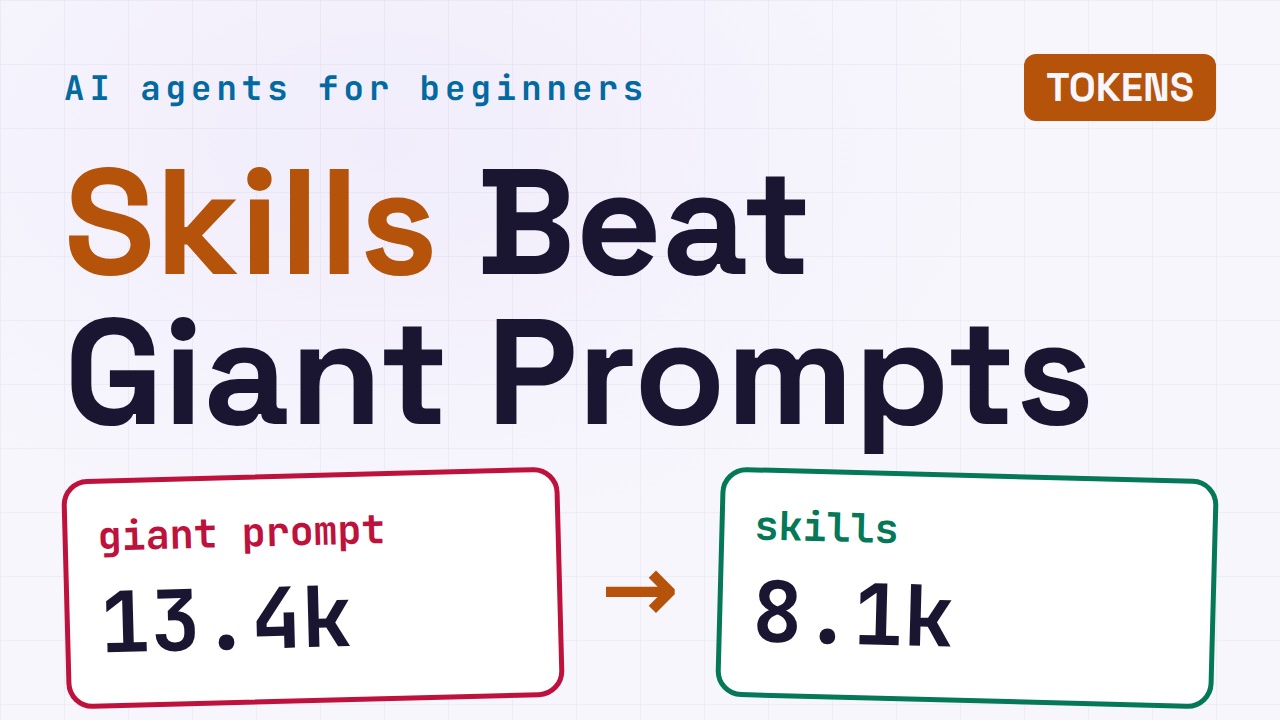
Why AI Agent Skills Beat Giant Prompts

Linux Cron Jobs Will Finally Make Sense After This

Security Logs Will Finally Make Sense After This
How to Fix a Security Leak: An API Key Pushed to GitHub
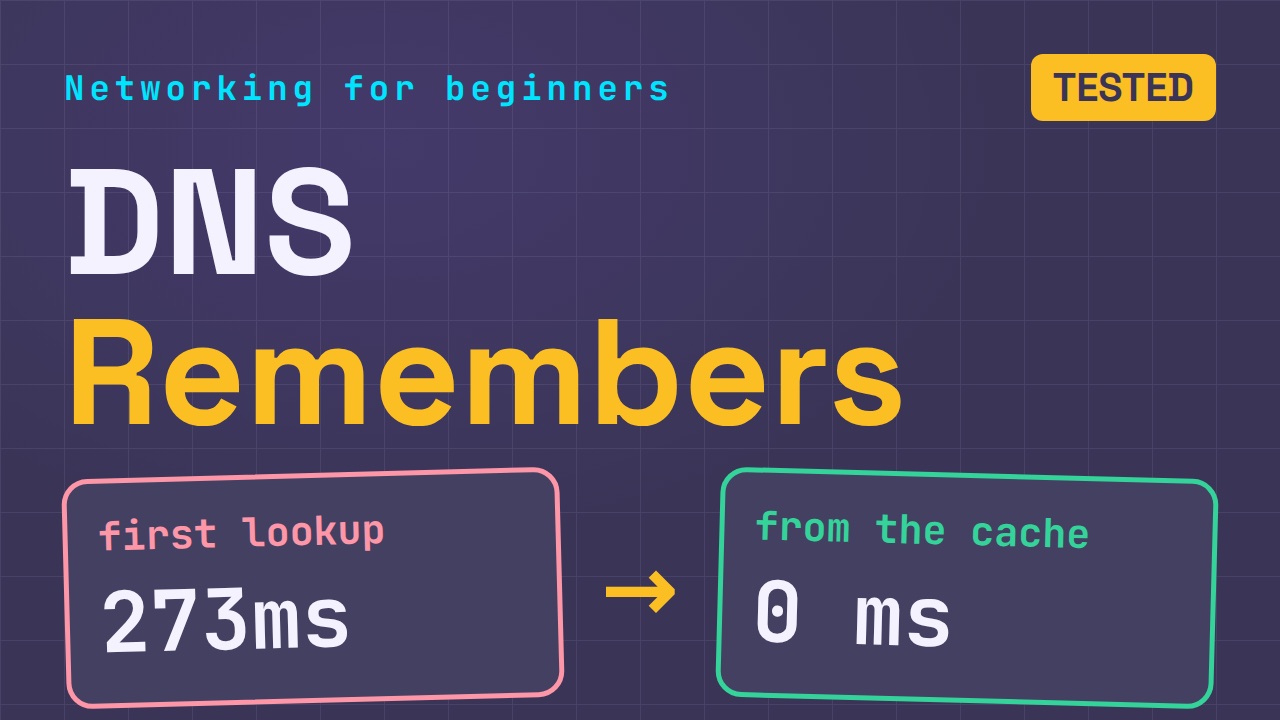
DNS Will Finally Make Sense After This
Never Ignore a Security Update
Two-Factor Authentication Will Finally Make Sense
Never Expose a Database to the Internet
SSH Keys vs Passwords: Which Is Safer for Security?
The 5 Levels of Linux Boot: From Power On to Login
The 5 Levels of Network Firewalls
Password Security: Why Hackers Crack Weak Passwords
Why Your Linux Server Runs Out of Memory
HTTP vs HTTPS: What Actually Changes on Your Network

Every Linux File Permission You Need to Know
Linux Processes vs Threads: When Each One Wins
The OSI Model Will Finally Make Sense After This
The 7 Levels of Git
Every Network Troubleshooting Command You Need
Hashing vs Encryption in Cybersecurity: When Each One Wins
Why the Internet Ran Out of IP Addresses
Linux Package Managers: apt vs Snap vs Flatpak

Why Python Is Slow (and When It Doesn't Matter)
TCP vs UDP: When Each One Wins
Stop Running Linux as Root (Do This Instead)
Linux Users and Groups Will Finally Make Sense

Why Phishing Beats Good Security (and How to Spot It)

The 7 Levels of Docker

AI Agents Will Finally Make Sense After This

Stop Using git push --force (Use This Instead)
Agent Skills vs MCP: When Each One Wins
Networking Will Finally Make Sense After This

Every Linux Command You Actually Need
The 7 Levels of Cybersecurity
Every System Design Concept You Need, in One Diagram