
How to Fix Django Static Files Not Loading in Production
How to fix Django static files (CSS, JavaScript, images) that load on your laptop but not in production, on a real Ubuntu server with nginx and gunicorn: why DEBUG = True isn't the fix, STATIC_ROOT and the ImproperlyConfigured error, collectstatic, an nginx location for /static/, 403 Forbidden from a home folder nginx can't read, a 404 from an alias without its trailing slash, running collectstatic on every deploy, and WhiteNoise when there's no nginx.
Styled on the laptop, bare on the server
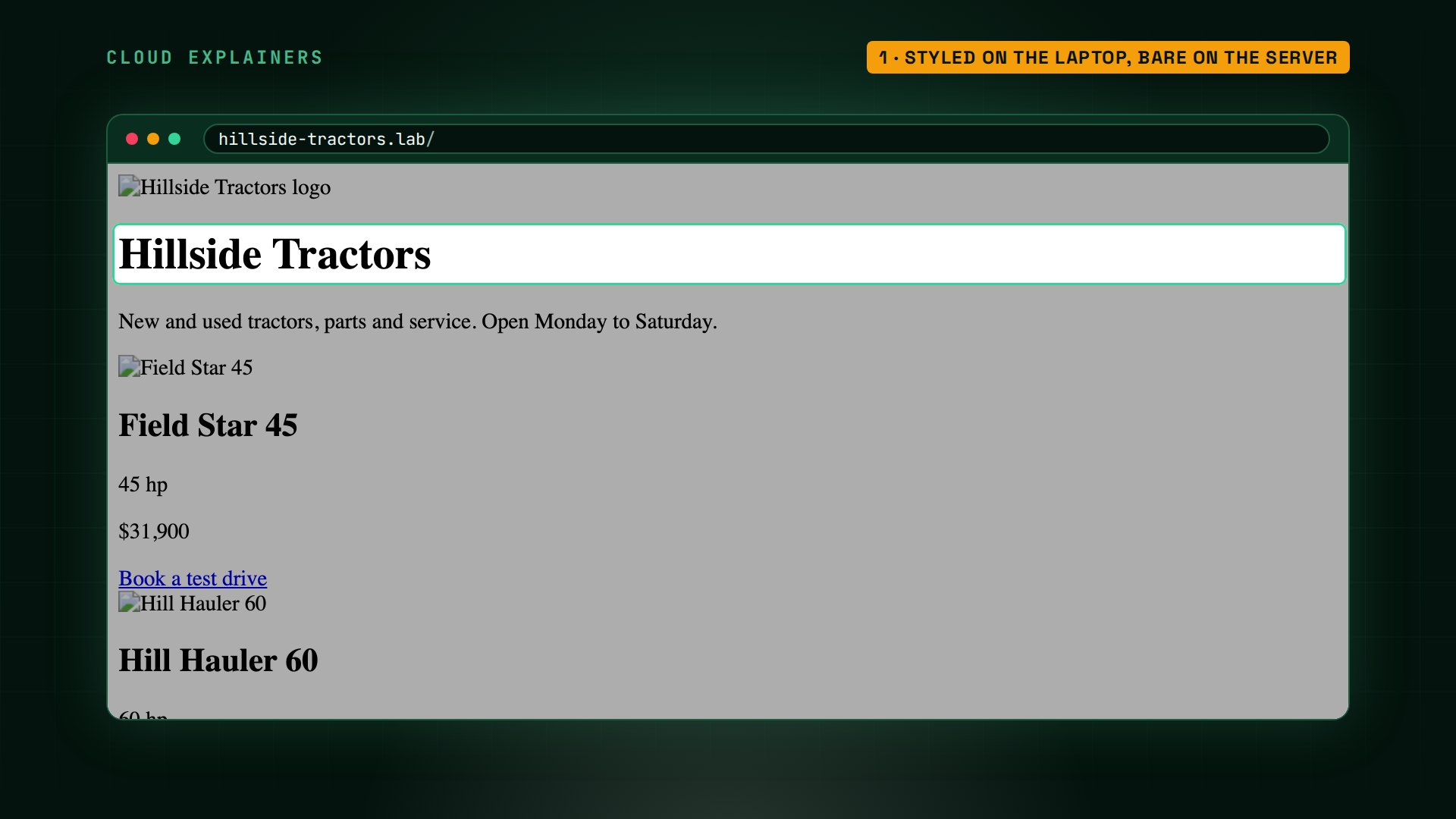
Your Django site looks right on your laptop, but on the server it loads with no styles and broken images. Ana runs the website for Hillside Tractors, her family's tractor dealership. On her laptop, the page looks like this. On the server, the same code looks like this: the words are there, but the stylesheet and every tractor photo are missing. Django sent the page. So who was supposed to send the files? By the end, your styles will load too, and you'll know the three parts that make it work.
The usual fix: three parts
Let's ask the server ourselves with curl, a tool that fetches a web address in the terminal, just like a browser does. The page itself is HTML from Django, and it names its other files, all under /static/. The browser asks for each one separately. The stylesheet answers 404: not found. On a server, Django doesn't send those files at all. Something else has to.
(.venv) ana@dealership:~/tractors$ curl -s localhost | grep -n static6:  <link rel="stylesheet" href="/static/css/site.css">
9:  <header id="top"><img id="logo" src="/static/img/logo.svg" alt="Hillside Tractors logo"><h1 id="title">Hillside Tractors</h1>
13:    <article class="card" id="card1"><img src="/static/img/field-star.svg" alt="Field Star 45">
16:    <article class="card" id="card2"><img src="/static/img/hill-hauler.svg" alt="Hill Hauler 60">
19:    <article class="card" id="card3"><img src="/static/img/orchard-mini.svg" alt="Orchard Mini 25">
(.venv) ana@dealership:~/tractors$ curl -sI localhost/static/css/site.css | head -n 1HTTP/1.1 404 Not Found
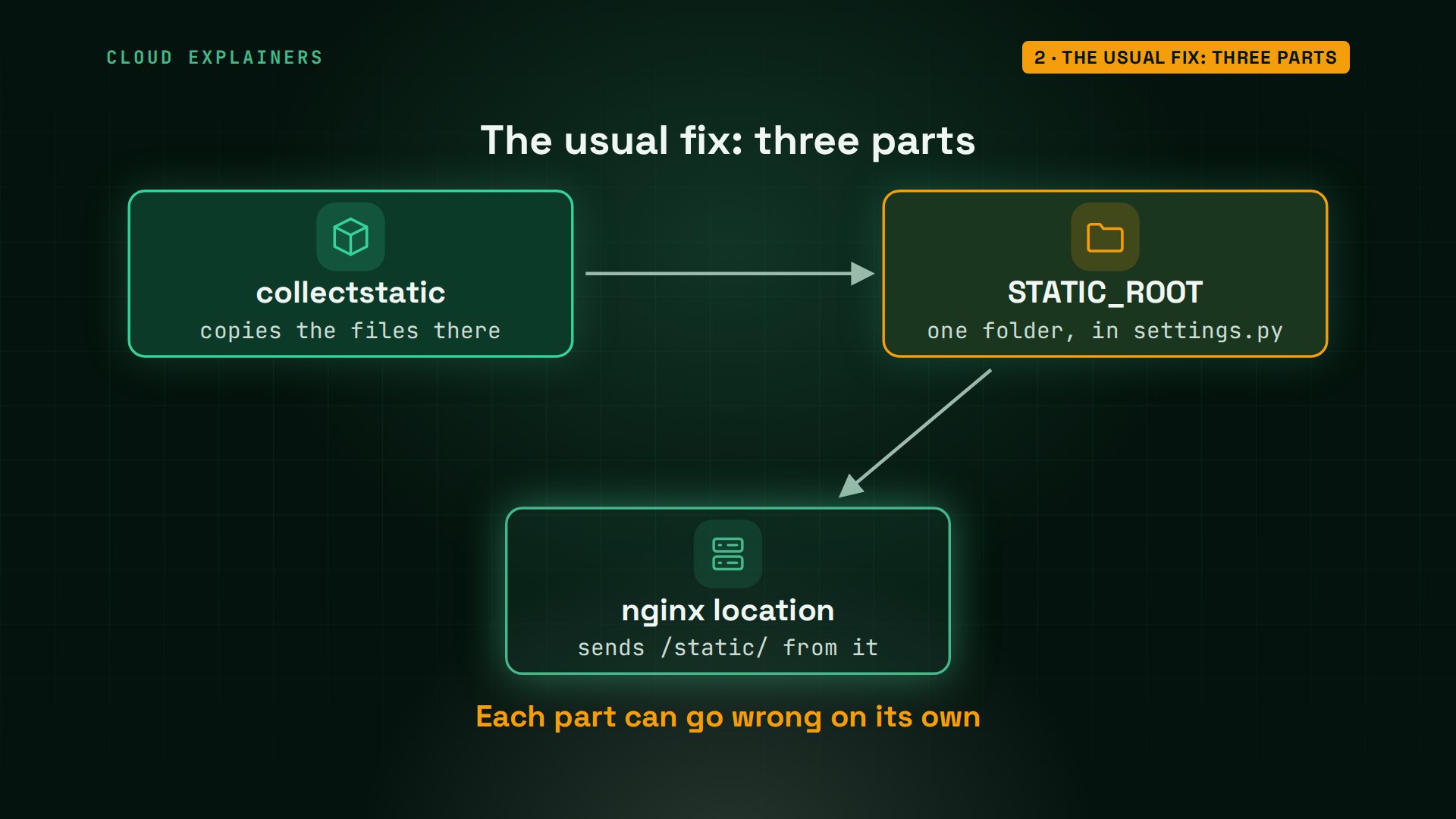
The usual fix has three parts. You tell Django one folder to gather the files in: that's STATIC_ROOT, in settings.py. You run a command, collectstatic, that copies them there. And you tell nginx, the web server in front, to send anything under /static/ straight from that folder, using a rule nginx calls a location. Each part can go wrong on its own, and Ana's server hits every one.
Turning DEBUG on isn't the fix
Most people try one thing first: turning DEBUG back on. DEBUG is a switch in settings.py that puts Django in developer mode. On the laptop it's True, and here it's False. Ben, who helps with the site, sets it back to True and restarts the app. Do the styles come back? No. Still 404.
(.venv) ana@dealership:~/tractors$ grep -n DEBUG tractors/settings.py6:DEBUG = False
(.venv) ana@dealership:~/tractors$ grep -n DEBUG tractors/settings.py6:DEBUG = True
(.venv) ana@dealership:~/tractors$ sudo systemctl restart tractors
(.venv) ana@dealership:~/tractors$ curl -sI localhost/static/css/site.css | head -n 1HTTP/1.1 404 Not Found
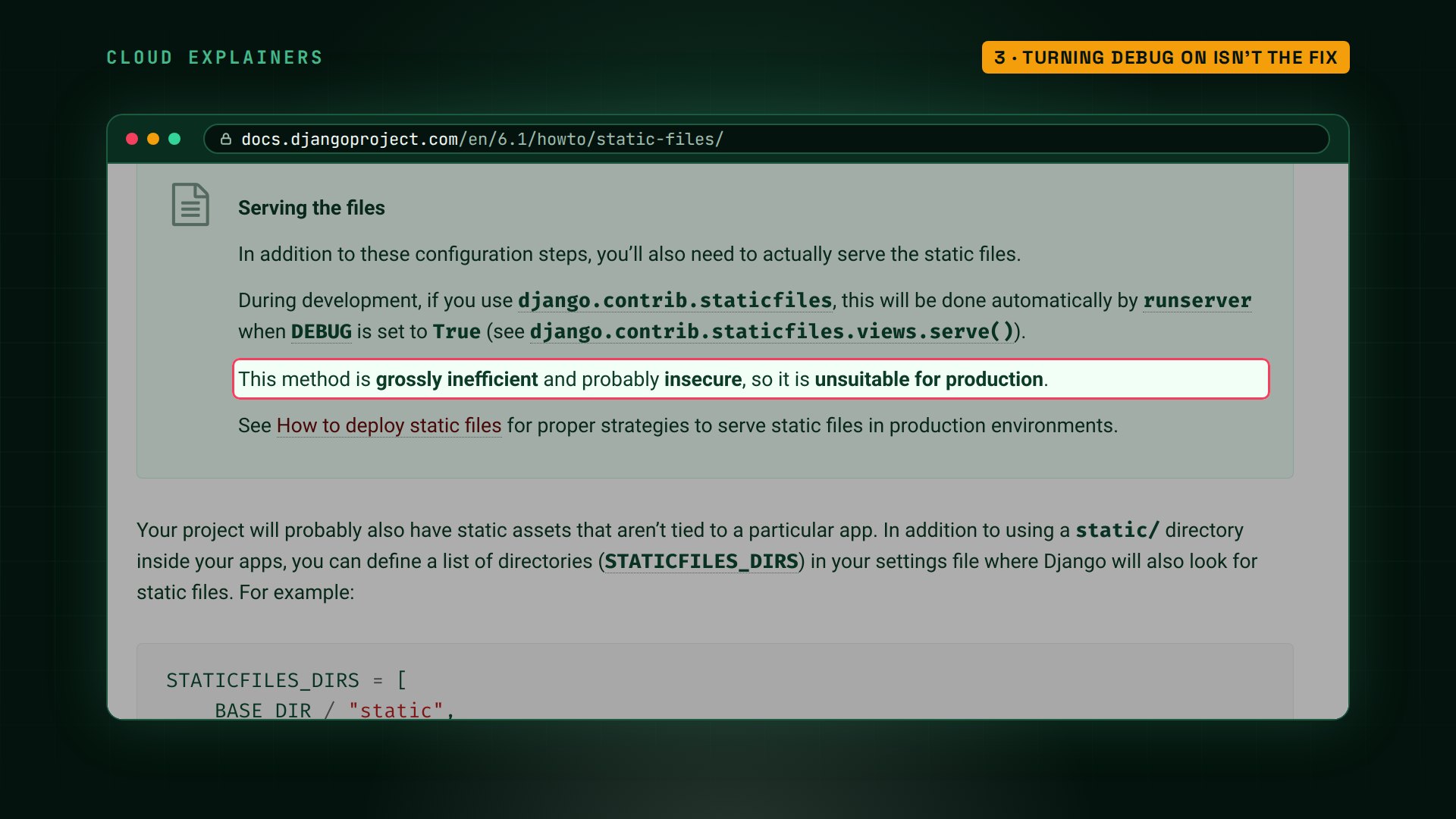
Django's documentation says why. runserver, the small test server you start on your laptop, sends static files for you, but only when DEBUG is True. The docs call that grossly inefficient and probably insecure: not for production. On the server, Django doesn't run under runserver. It runs under gunicorn, a program built to run Python web apps in production. And gunicorn never sends static files, DEBUG or not. DEBUG on would also show strangers your settings on every error page, so Ben turns it off again.
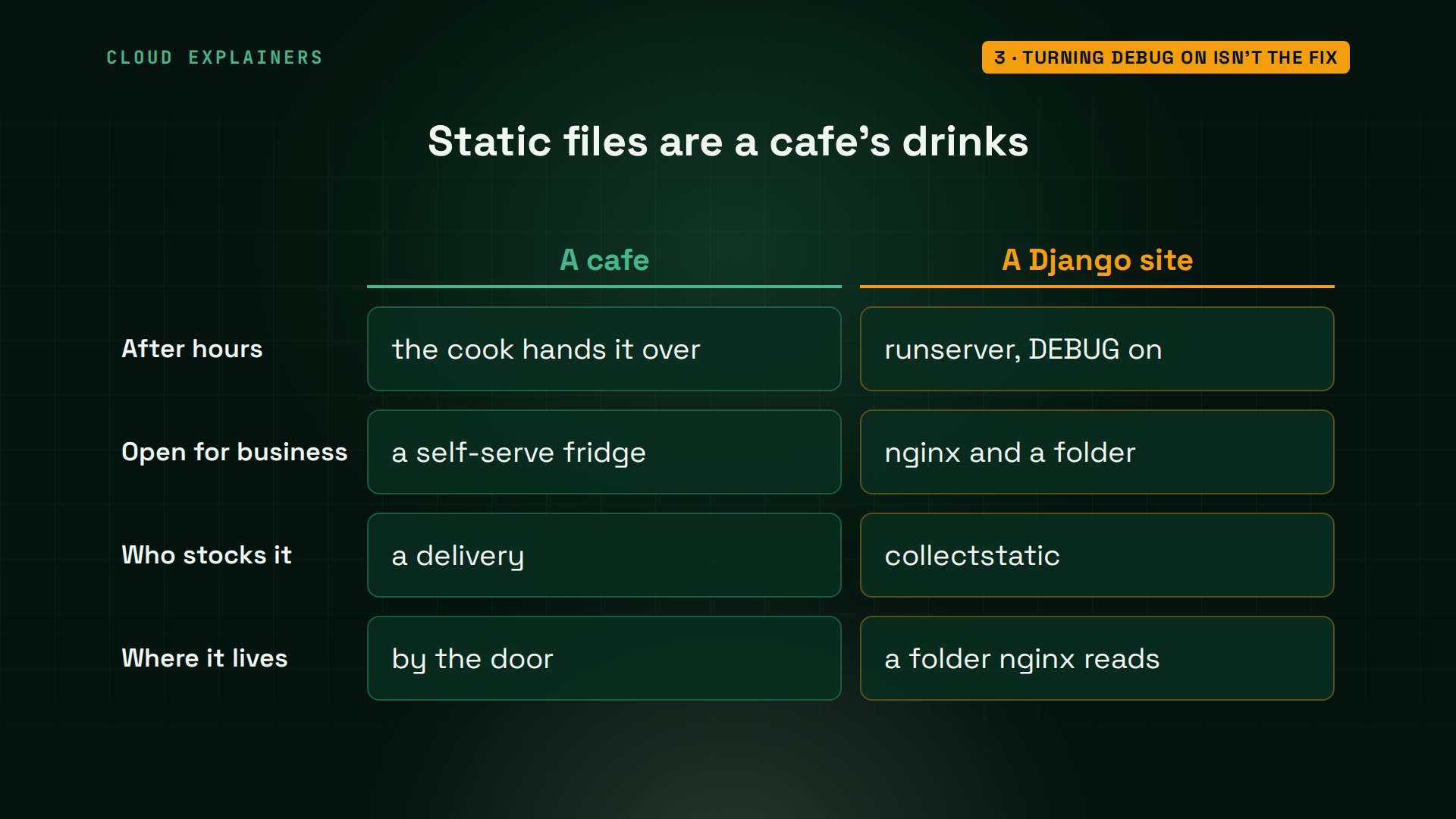
Think of a cafe. After hours, the cook hands a friend a drink himself. That's runserver. Once the cafe opens, drinks come from a self-serve fridge by the door, and someone has to stock it. In production, the fridge is a folder nginx sends from, and collectstatic stocks it.
No STATIC_ROOT: collectstatic refuses
Step one: collect the files into one place. Ana runs collectstatic, a command that comes with Django's manage.py. It warns that it may overwrite files, and asks if she's sure. She types yes. Then it stops with a long error message, a traceback. The last line is the one that matters: STATIC_ROOT isn't set, so Django has no folder to copy into. She adds the line most tutorials give to settings.py: STATIC_ROOT is a folder called staticfiles, inside the project.
(.venv) ana@dealership:~/tractors$ python manage.py collectstaticYou have requested to collect static files at the destination
location as specified in your settings.

This will overwrite existing files!
Are you sure you want to do this?

Type 'yes' to continue, or 'no' to cancel: Traceback (most recent call last):
  File "/home/ana/tractors/manage.py", line 8, in <module>
    execute_from_command_line(sys.argv)
  File "/home/ana/tractors/.venv/lib/python3.12/site-packages/django/core/management/__init__.py", line 443, in execute_from_command_line
    utility.execute()
  File "/home/ana/tractors/.venv/lib/python3.12/site-packages/django/core/management/__init__.py", line 437, in execute
    self.fetch_command(subcommand).run_from_argv(self.argv)
  File "/home/ana/tractors/.venv/lib/python3.12/site-packages/django/core/management/base.py", line 422, in run_from_argv
    self.execute(*args, **cmd_options)
  File "/home/ana/tractors/.venv/lib/python3.12/site-packages/django/core/management/base.py", line 466, in execute
    output = self.handle(*args, **options)
             ^^^^^^^^^^^^^^^^^^^^^^^^^^^^^
  File "/home/ana/tractors/.venv/lib/python3.12/site-packages/django/contrib/staticfiles/management/commands/collectstatic.py", line 218, in handle
    collected = self.collect()
                ^^^^^^^^^^^^^^
  File "/home/ana/tractors/.venv/lib/python3.12/site-packages/django/contrib/staticfiles/management/commands/collectstatic.py", line 137, in collect
    handler(path, prefixed_path, storage)
  File "/home/ana/tractors/.venv/lib/python3.12/site-packages/django/contrib/staticfiles/management/commands/collectstatic.py", line 392, in copy_file
    if not self.delete_file(path, prefixed_path, source_storage):
           ^^^^^^^^^^^^^^^^^^^^^^^^^^^^^^^^^^^^^^^^^^^^^^^^^^^^^
  File "/home/ana/tractors/.venv/lib/python3.12/site-packages/django/contrib/staticfiles/management/commands/collectstatic.py", line 302, in delete_file
    if self.storage.exists(prefixed_path):
       ^^^^^^^^^^^^^^^^^^^^^^^^^^^^^^^^^^
  File "/home/ana/tractors/.venv/lib/python3.12/site-packages/django/core/files/storage/filesystem.py", line 182, in exists
    return os.path.lexists(self.path(name))
                           ^^^^^^^^^^^^^^^
  File "/home/ana/tractors/.venv/lib/python3.12/site-packages/django/contrib/staticfiles/storage.py", line 57, in path
    raise ImproperlyConfigured(
django.core.exceptions.ImproperlyConfigured: You're using the staticfiles app without having set the STATIC_ROOT setting to a filesystem path.
(.venv) ana@dealership:~/tractors$ grep -n STATIC tractors/settings.py42:STATIC_URL = "static/"
43:STATIC_ROOT = BASE_DIR / "staticfiles"
44:STATICFILES_DIRS = [BASE_DIR / "static"]
Her site has 5 files of its own: one stylesheet and four pictures. Guess first: how many files does collectstatic copy? 135. It gathers every app's files, and Django's own admin pages bring the rest. The new folder holds admin, css and img.
(.venv) ana@dealership:~/tractors$ python manage.py collectstatic --noinput135 static files copied to '/home/ana/tractors/staticfiles'.
(.venv) ana@dealership:~/tractors$ ls staticfilesadmin css img
nginx sends /static/ to Django
The files are collected, and the stylesheet still says 404. nginx's site file has just one rule, called a location. It's for addresses starting with a slash, and every address starts with one, so this rule catches them all. So nginx passes /static/ to gunicorn too, and Django won't send it. Ana adds a second location, just for /static/, with alias, meaning send files from this folder. nginx's test command checks the file, and a reload puts it to work.
(.venv) ana@dealership:~/tractors$ curl -sI localhost/static/css/site.css | head -n 1HTTP/1.1 404 Not Found
(.venv) ana@dealership:~/tractors$ grep -n location /etc/nginx/sites-available/tractors5: location / {
(.venv) ana@dealership:~/tractors$ grep -n -A 2 'location /static/' /etc/nginx/sites-available/tractors5:    location /static/ {
6-        alias /home/ana/tractors/staticfiles/;
7-    }
(.venv) ana@dealership:~/tractors$ sudo nginx -tnginx: the configuration file /etc/nginx/nginx.conf syntax is ok
nginx: configuration file /etc/nginx/nginx.conf test is successful
(.venv) ana@dealership:~/tractors$ sudo systemctl reload nginx
nginx has the new rule now. Guess first: what does the stylesheet answer now? 403, forbidden. When nginx refuses, its error log says why. Error 13: permission denied. ps lists who nginx's workers run as: a user called www-data. The listing for Ana's home folder ends in three dashes. Those are the permissions for everyone else, and a dash means no. So www-data can't go in. The files are fine. nginx just can't get into the folder above them.
(.venv) ana@dealership:~/tractors$ curl -sI localhost/static/css/site.css | head -n 1HTTP/1.1 403 Forbidden
(.venv) ana@dealership:~/tractors$ sudo tail -n 1 /var/log/nginx/error.log2026/11/23 03:37:46 [error] 423#423: *22 open() "/home/ana/tractors/staticfiles/css/site.css" failed (13: Permission denied), client: 127.0.0.1, server: _, request: "HEAD /static/css/site.css HTTP/1.1", host: "localhost"
(.venv) ana@dealership:~/tractors$ ps -o user= -C nginx | sort | uniq -c1 root 10 www-data
(.venv) ana@dealership:~/tractors$ ls -ld /home/anadrwxr-x--- 1 ana ana 4096 Nov 23 03:37 /home/ana
Permission denied: nginx can't read a home folder
The fix is a folder the web server can read. Folders under /var/www let every user look inside, www-data too. Ana makes /var/www/tractors and makes herself its owner, so collectstatic can write there. She points STATIC_ROOT at a static folder inside it, and runs collectstatic again. Ben updates the alias in nginx to match, tests, reloads, and the stylesheet answers 404 again.
(.venv) ana@dealership:~/tractors$ sudo mkdir -p /var/www/tractors && sudo chown ana:ana /var/www/tractors
(.venv) ana@dealership:~/tractors$ grep -n STATIC_ROOT tractors/settings.py43:STATIC_ROOT = "/var/www/tractors/static"
(.venv) ana@dealership:~/tractors$ python manage.py collectstatic --noinput135 static files copied to '/var/www/tractors/static'.
(.venv) ana@dealership:~/tractors$ grep -n alias /etc/nginx/sites-available/tractors6: alias /var/www/tractors/static;
(.venv) ana@dealership:~/tractors$ sudo nginx -tnginx: the configuration file /etc/nginx/nginx.conf syntax is ok
nginx: configuration file /etc/nginx/nginx.conf test is successful
(.venv) ana@dealership:~/tractors$ sudo systemctl reload nginx
(.venv) ana@dealership:~/tractors$ curl -sI localhost/static/css/site.css | head -n 1HTTP/1.1 404 Not Found
An alias without its last slash
This time the log points at the problem. Read the path nginx tried: static, then css, glued together with no slash between them. nginx takes the address /static/css/site.css, cuts off /static/ with its slash, and puts the alias folder in its place. The alias Ben typed had no slash at the end, so static and css got stuck together.
(.venv) ana@dealership:~/tractors$ sudo tail -n 1 /var/log/nginx/error.log2026/11/23 03:37:48 [error] 488#488: *23 open() "/var/www/tractors/staticcss/site.css" failed (2: No such file or directory), client: 127.0.0.1, server: _, request: "HEAD /static/css/site.css HTTP/1.1", host: "localhost"
The fix is one character: a slash at the end of the alias. Now the part nginx cuts off and the folder it puts in both end in a slash.
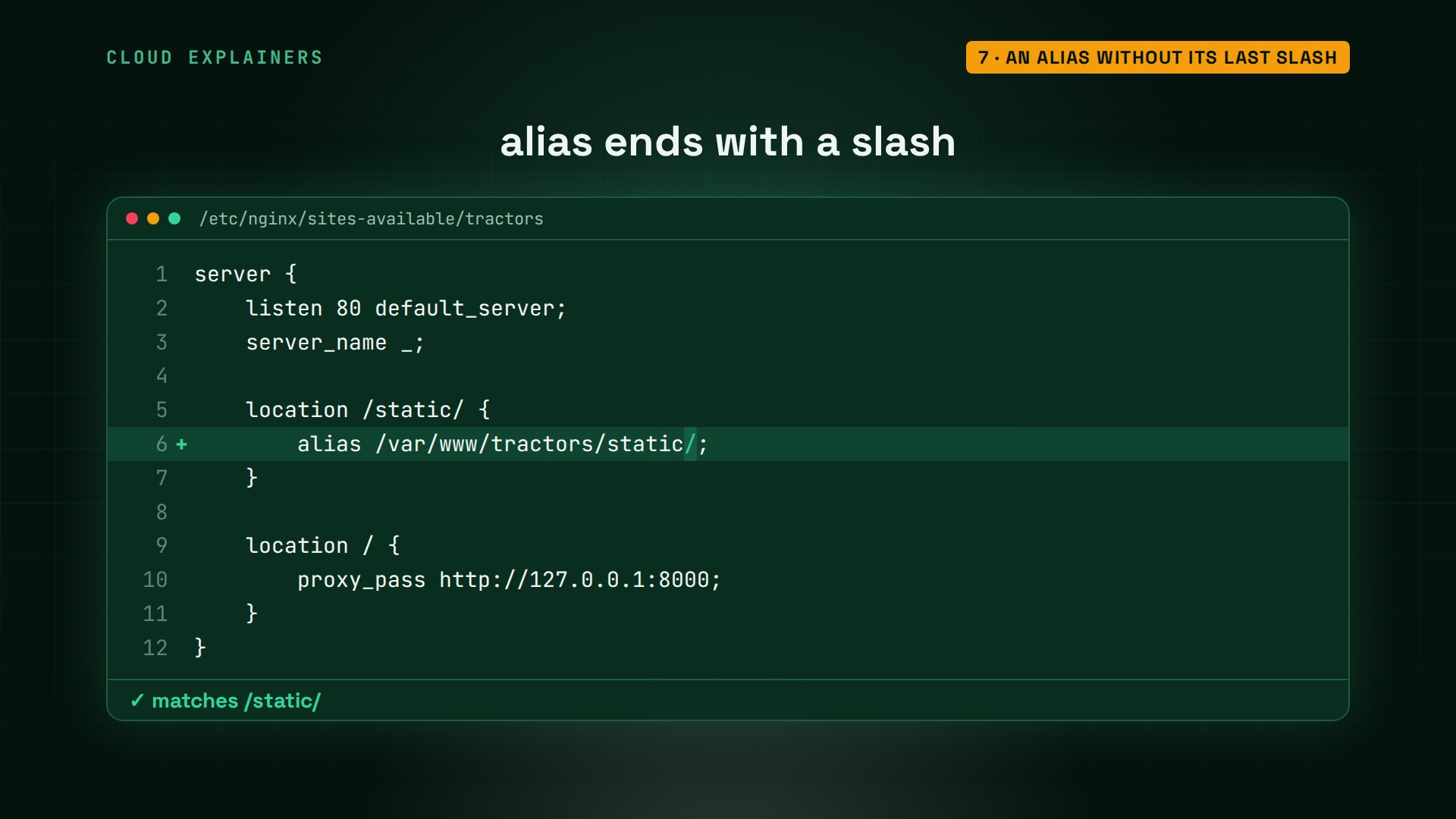
Test, reload, and the stylesheet answers 200 OK.
(.venv) ana@dealership:~/tractors$ grep -n alias /etc/nginx/sites-available/tractors6: alias /var/www/tractors/static/;
(.venv) ana@dealership:~/tractors$ sudo nginx -tnginx: the configuration file /etc/nginx/nginx.conf syntax is ok
nginx: configuration file /etc/nginx/nginx.conf test is successful
(.venv) ana@dealership:~/tractors$ sudo systemctl reload nginx
(.venv) ana@dealership:~/tractors$ curl -sI localhost/static/css/site.css | head -n 1HTTP/1.1 200 OK
Same server, same DEBUG off, styles and photos back.

Who sends what in production
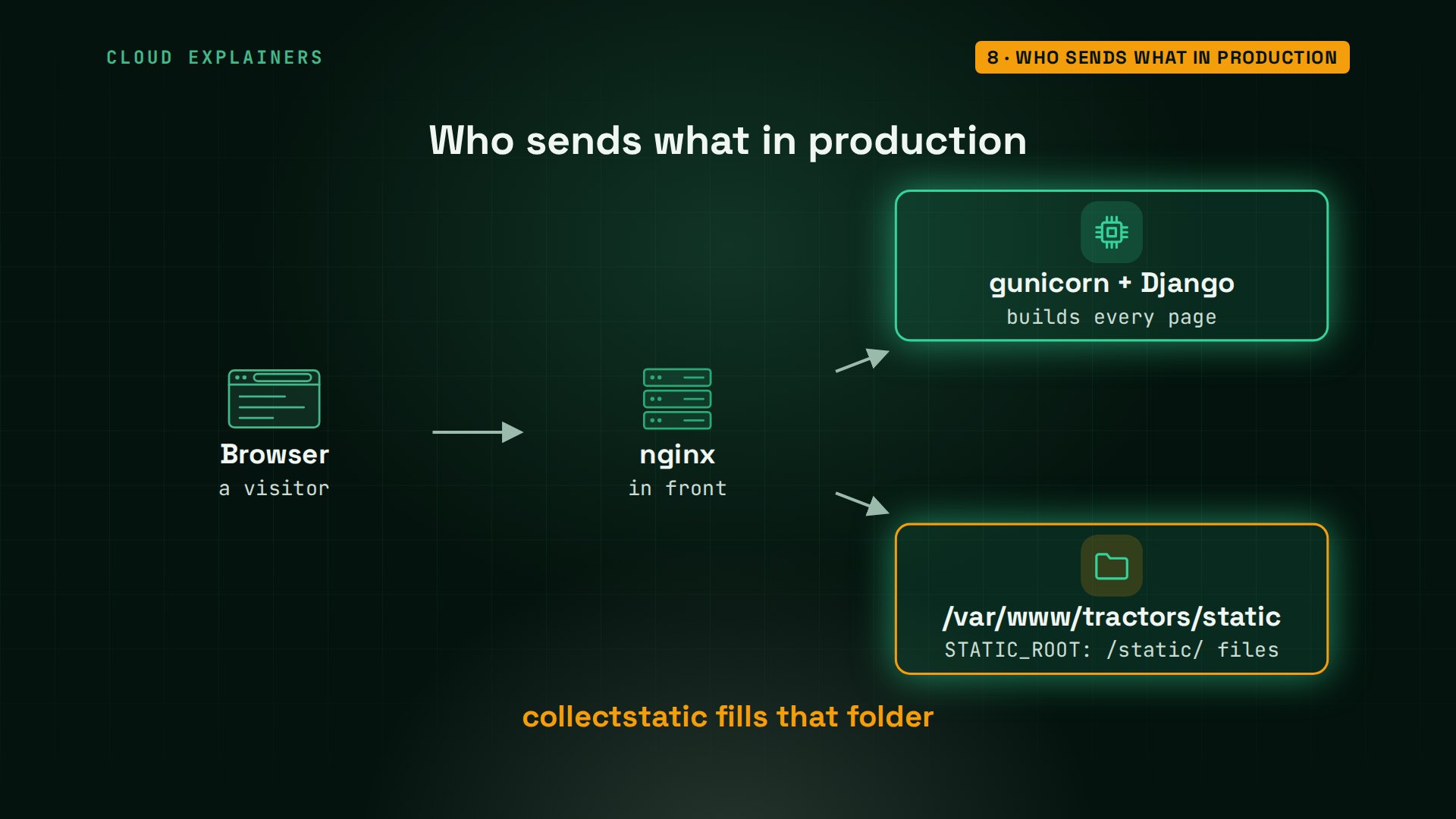
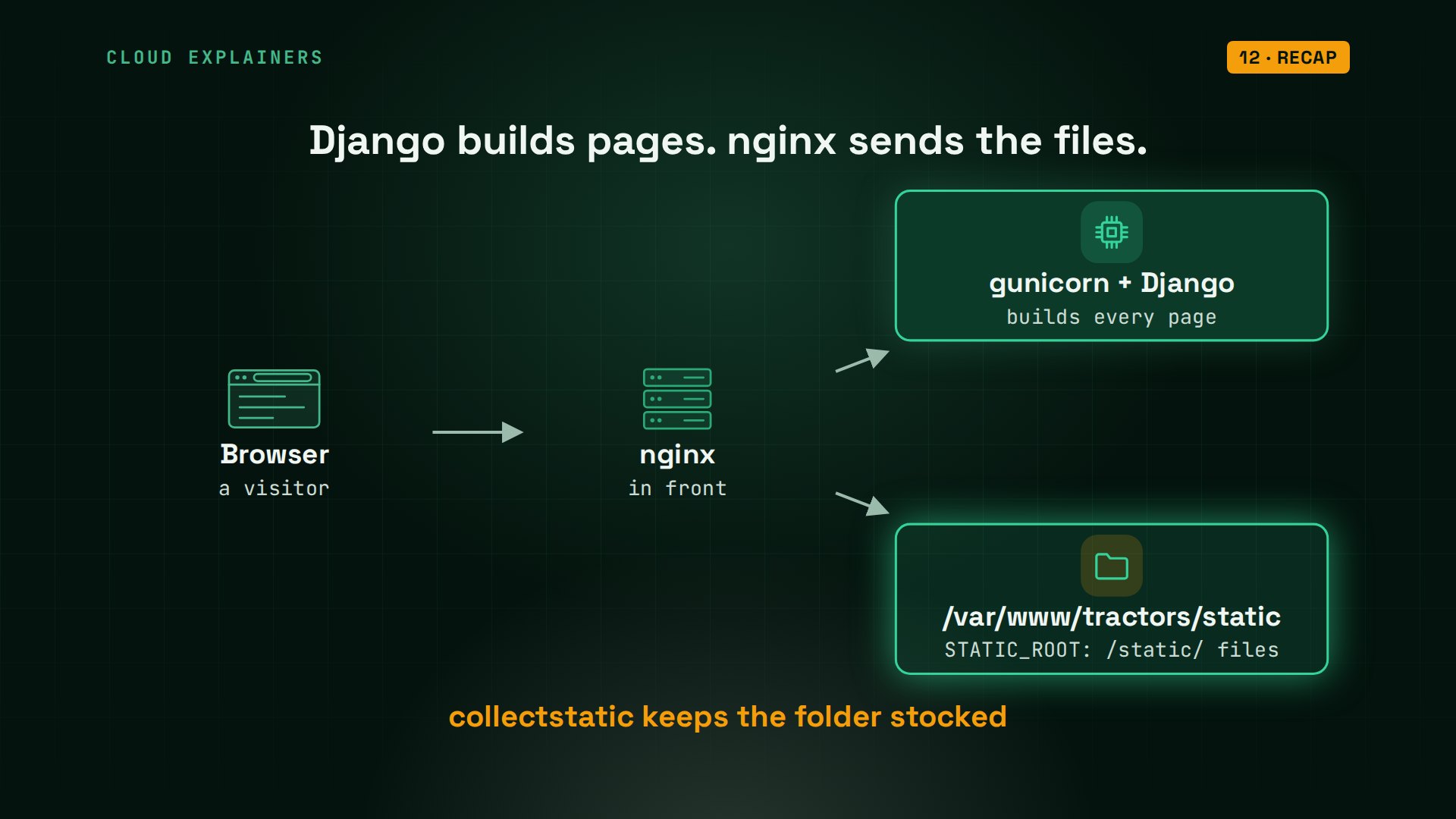
Here's the whole design that now works. A visitor's browser asks for the page, nginx passes that to gunicorn, which runs Django, and Django builds the page. Then the browser asks for the stylesheet, and nginx sends it straight from a folder, without asking Django. And collectstatic is what fills that folder.
A new photo: collect on every deploy
A week later, Ben adds a new tractor, the Compact 30, with its photo, and restarts the app. The card shows up. The photo doesn't.

The new photo is in the project, but not yet in the folder nginx reads. Ana runs collectstatic with the no-input flag, which skips the yes question so a deploy script can run it. It copies one new file, leaves the rest alone, and the photo answers 200. So collectstatic is part of every deploy: stocking the fridge, every time.
(.venv) ana@dealership:~/tractors$ curl -sI localhost/static/img/compact-30.svg | head -n 1HTTP/1.1 404 Not Found
(.venv) ana@dealership:~/tractors$ python manage.py collectstatic --noinput1 static file copied to '/var/www/tractors/static', 135 unmodified.
(.venv) ana@dealership:~/tractors$ curl -sI localhost/static/img/compact-30.svg | head -n 1HTTP/1.1 200 OK
No nginx? WhiteNoise
What if there's no nginx, say on a hosting service that runs only your app? gunicorn listens on its own port, 8000, so asking there skips nginx: 404. WhiteNoise is a small package Ana installed with pip. It lets your app send its own static files, and do it quickly. settings.py has a list called MIDDLEWARE: the steps every request passes through. Ana adds one line to it, right after Django's security line, which is already there. She restarts, and gunicorn answers 200. It still reads STATIC_ROOT, so collectstatic stays.
(.venv) ana@dealership:~/tractors$ curl -sI localhost:8000/static/css/site.css | head -n 1HTTP/1.1 404 Not Found
(.venv) ana@dealership:~/tractors$ grep -n -i whitenoise tractors/settings.py21: "whitenoise.middleware.WhiteNoiseMiddleware",
(.venv) ana@dealership:~/tractors$ sudo systemctl restart tractors
(.venv) ana@dealership:~/tractors$ curl -sI localhost:8000/static/css/site.css | head -n 1HTTP/1.1 200 OK
Four checks
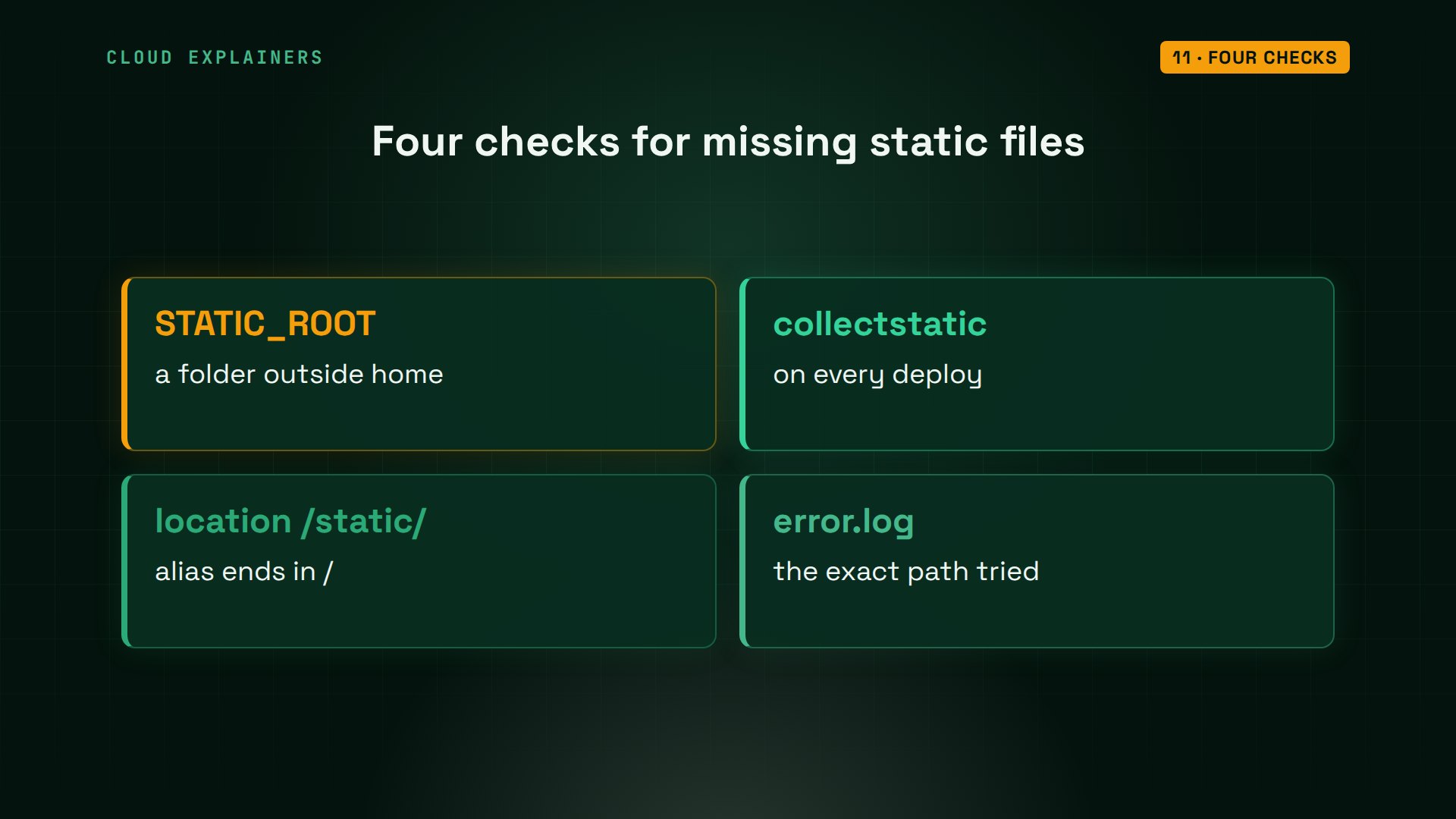
Four checks, in order. First, leave DEBUG off and set STATIC_ROOT to a folder outside your home folder. Second, run collectstatic on every deploy. Third, give nginx a location for /static/ whose alias ends in a slash. Fourth, when a file still fails, read nginx's error.log: it names the exact path it tried.
Recap
So: Django builds the pages, nginx sends the files, and collectstatic keeps nginx's folder stocked.
If your styles are back, subscribing brings more fixes, each one run on a real server.
Every command here ran for real, and the lab files are linked in the description. Thanks for watching Cloud Explainers.
Sources
Demos: one container on our own Mac standing in for a web server; the dealership is made up. Every command, error and status code was real. Watch the full video on YouTube.
More videos

Every PostgreSQL Setting to Change After You Install It

What Happens When You Install Docker on Ubuntu

How to Fix Python 'Address Already in Use' Errors
Golang Interfaces and Mocks in 5 Minutes

How to Fix Git 'Detached HEAD' State

Linux Firewall with ufw: Full Tutorial for Beginners
Golang defer Statements in 5 Minutes

How to Fix OAuth 'invalid_grant' Errors

The SQL Roadmap for Beginners

Golang make() for Slices and Maps in 5 Minutes

How to Fix Network 'No Route to Host' Errors on Linux

How to Fix Linux 'Too Many Open Files' Errors

Every Django Concept a Beginner Needs to Know

SSH on Linux: Full Tutorial for Beginners

Golang for range Loops in 5 Minutes

SQL Databases: SQLite vs PostgreSQL

The Django Roadmap for Beginners

Golang Structs in 5 Minutes

Redis: Full Tutorial for Beginners

Golang context.Context in 5 Minutes
How to Fix MySQL Database Error 1045: Access Denied for User

Golang Method Receivers in 5 Minutes
How to Fix Python SSL: CERTIFICATE_VERIFY_FAILED Errors

OpenRouter vs Direct API Keys: Which One Should You Use?
Golang if err != nil Checks in 5 Minutes

How to Fix Golang 'go.mod File Not Found' Errors

MCP Servers: Full Tutorial for Beginners

Golang Error Return Values in 5 Minutes

How to Fix Python ModuleNotFoundError: No Module Named
Golang Pointers in 5 Minutes

How to Fix a Kubernetes Pod Stuck in CrashLoopBackOff

How to Fix a Homelab ESXi Host Not Responding

PostgreSQL: Full Tutorial for Beginners
How a Load Balancer Works with HAProxy

How Python Virtual Environments Work
How to Fix Cloudflare Tunnel Errors in a Homelab
How to Fix API CORS Errors: No 'Access-Control-Allow-Origin'

How Authenticator App Login Codes Work (TOTP)

Git and GitHub: Full Tutorial for Beginners

How a Homelab Hypervisor Works (VMware ESXi)

How to Fix Kubernetes ImagePullBackOff Errors

How to Fix DNS 'Temporary Failure in Name Resolution' on Linux

How to Fix AWS CLI 'Unable to Locate Credentials'

Proxmox vs ESXi for Your Homelab: When Each One Wins
PostgreSQL UUID vs Auto Increment: Which Primary Key Should You Use?
Kubernetes: Full Tutorial for Beginners

How TCP Sockets Work

How to Fix PostgreSQL 'Could Not Connect to Server'
Claude Code Hooks Will Finally Make Sense After This

DevOps with Ansible Will Finally Make Sense After This

How SNMP Network Monitoring Works
How to Fix GitHub 'Permission Denied (publickey)' Errors

Docker: Full Tutorial for Beginners
How to Fix PostgreSQL 'Password Authentication Failed'

Why One Linux Server Handles More Users Than You Think

How to Fix Network 'Connection Refused' Errors

DevOps Pipelines: Jenkins vs GitHub Actions

Linux Nginx Reverse Proxy: Full Tutorial for Beginners

Every Networking Term a Beginner Needs in 12 Minutes
How to Fix Docker 'Permission Denied' on docker.sock

How to Fix Git 'Updates Were Rejected' When You Push

How to Fix nginx 502 Bad Gateway Errors on Linux

How to Fix Linux apt 'Could Not Get Lock' Errors (Ubuntu)

How Email Works on the Internet (SMTP) in 10 Minutes

The Python Roadmap for Beginners

Golang REST API with Gin: Full Tutorial for Beginners

How a WireGuard VPN Network Works

Linux Makefiles Will Finally Make Sense After This

SAML vs OAuth vs OpenID Connect: What's the Difference?

How to Fix Python cron Jobs That Never Run

Linux Bash Scripting: Full Tutorial for Beginners

How PXE Network Boot Works

How Active Directory Works

How to Fix a Linux systemd Service That Won't Start

Linux Logs: syslog vs journald
JWT vs Session Cookies: Which One Should You Use?

Docker vs Docker Compose: Which One Should You Use?

How to Fix Docker Compose Containers That Can't Talk to Each Other

Django Full Tutorial for Beginners

How Linux systemd Works

How to Fix 'Windows Cannot Access' Network Share Errors (SMB)
REST vs gRPC: Which One Should You Use?

How to Fix SSL Certificate Chain Errors (Missing Intermediate)

Every Python Concept for Beginners in 10 Minutes

Every SQL Join Type in 10 Minutes

Why OpenRouter Free Models Hit Their Limit So Fast

Why Your Gemini API Free Tier Runs Out So Fast

OpenRouter Will Finally Make Sense After This
How Redis Caching Works
Gemini API vs Vertex AI: Which One Should You Use?
How to Fix a Leaked Gemini API Key
Why Golang Uses Goroutines Instead of Threads
How to Fix Gemini API Error 429: Resource Exhausted

Claude Token Pricing Will Finally Make Sense After This
Why Python Web Scraping Returns Nothing (and the Fix)

Python uv vs pip: Which One Should You Use?

Python Automation: Full Tutorial for Beginners

How OAuth Login Works

Google AI Studio Will Finally Make Sense After This
What Happens When You Run a Docker Container

How to Fix Claude Code Billing Your API Key Instead of Your Plan
Why Passkeys Can't Be Phished Like Passwords
PowerShell vs Bash: Which One Should You Learn?

The Linux Roadmap for Beginners
Django vs FastAPI: Which One Should You Use?

Why SQLite Is the Most Used Database in the World

How a NoSQL Database Like MongoDB Works

How to Fix Python pip error: externally-managed-environment
How to Fix MySQL Too Many Connections Database Errors
Golang Concurrency Will Finally Make Sense After This
How Amazon S3 Works
How Kubernetes Works

How Git Works
How to Fix Docker Port Already Allocated Errors
How PostgreSQL Works

How to Fix Git Merge Conflicts

How to Fix No Space Left on Device in Linux
How the Internet Works
SQL vs NoSQL: When Each One Wins

How to Fix JWT Token Expired Errors (401 Unauthorized)

Claude API vs Claude Pro: Why Your Subscription Doesn't Include It

Why AI Agent Skills Beat Giant Prompts

Linux Cron Jobs Will Finally Make Sense After This

Security Logs Will Finally Make Sense After This

How to Fix a Security Leak: An API Key Pushed to GitHub

DNS Will Finally Make Sense After This
Never Ignore a Security Update

Two-Factor Authentication Will Finally Make Sense

Never Expose a Database to the Internet

SSH Keys vs Passwords: Which Is Safer for Security?

The 5 Levels of Linux Boot: From Power On to Login

The 5 Levels of Network Firewalls

Password Security: Why Hackers Crack Weak Passwords

Why Your Linux Server Runs Out of Memory

HTTP vs HTTPS: What Actually Changes on Your Network

Every Linux File Permission You Need to Know
Linux Processes vs Threads: When Each One Wins

The OSI Model Will Finally Make Sense After This

The 7 Levels of Git

Every Network Troubleshooting Command You Need

Hashing vs Encryption in Cybersecurity: When Each One Wins

Why the Internet Ran Out of IP Addresses

Linux Package Managers: apt vs Snap vs Flatpak

Why Python Is Slow (and When It Doesn't Matter)

TCP vs UDP: When Each One Wins

Stop Running Linux as Root (Do This Instead)

Linux Users and Groups Will Finally Make Sense

Why Phishing Beats Good Security (and How to Spot It)

The 7 Levels of Docker

AI Agents Will Finally Make Sense After This

Stop Using git push --force (Use This Instead)

Agent Skills vs MCP: When Each One Wins

Networking Will Finally Make Sense After This

Every Linux Command You Actually Need

The 7 Levels of Cybersecurity

Every System Design Concept You Need, in One Diagram