
Every Networking Term a Beginner Needs in 12 Minutes
IP address, subnet mask, MAC, ARP, router, gateway, DHCP, DNS, TCP, UDP, port, firewall, NAT, latency, hop: every networking term a beginner needs, each shown doing its job. A PC at a small vet clinic opens one web page while a capture counts 17 packets, and we follow them through a real lab network: where the PC's address comes from, how it finds the router, how a name becomes a number, the TCP handshake, what refused and timed out really mean, and why the website never sees the PC's own address.
One page, seventeen packets
You hear networking words every day, and they blur together. Ana, at the front desk of a small vet clinic, opens the clinic's booking page, while a capture tool lists every packet her PC sends or receives.
curl http://maplevets.test<h1>Maple Vets</h1>
<p>Book an appointment: open 8 am to 6 pm.</p>
sudo tcpdump -n -t -i eth0tcpdump: verbose output suppressed, use -v[v]... for full protocol decode
listening on eth0, link-type EN10MB (Ethernet), snapshot length 262144 bytes
ARP, Request who-has 192.168.1.1 tell 192.168.1.87, length 28
ARP, Request who-has 192.168.1.1 tell 192.168.1.87, length 28
ARP, Reply 192.168.1.1 is-at 26:a9:5c:29:ce:c2, length 28
IP 192.168.1.87.55521 > 192.168.1.1.53: 16947+ A? maplevets.test. (32)
IP 192.168.1.87.55521 > 192.168.1.1.53: 38700+ AAAA? maplevets.test. (32)
IP 192.168.1.1.53 > 192.168.1.87.55521: 16947* 1/0/0 A 198.51.100.80 (48)
IP 192.168.1.1.53 > 192.168.1.87.55521: 38700 0/0/0 (32)
IP 192.168.1.87.51480 > 198.51.100.80.80: Flags [S], seq 1420982412, win 64240, options [mss 1460,sackOK,TS val 3345178197 ecr 0,nop,wscale 10], length 0
IP 198.51.100.80.80 > 192.168.1.87.51480: Flags [S.], seq 1638025224, ack 1420982413, win 65160, options [mss 1460,sackOK,TS val 1400859882 ecr 3345178197,nop,wscale 10], length 0
IP 192.168.1.87.51480 > 198.51.100.80.80: Flags [.], ack 1, win 63, options [nop,nop,TS val 3345178244 ecr 1400859882], length 0
IP 192.168.1.87.51480 > 198.51.100.80.80: Flags [P.], seq 1:78, ack 1, win 63, options [nop,nop,TS val 3345178244 ecr 1400859882], length 77: HTTP: GET / HTTP/1.1
IP 198.51.100.80.80 > 192.168.1.87.51480: Flags [.], ack 78, win 64, options [nop,nop,TS val 1400859914 ecr 3345178244], length 0
IP 198.51.100.80.80 > 192.168.1.87.51480: Flags [P.], seq 1:186, ack 78, win 64, options [nop,nop,TS val 1400859918 ecr 3345178244], length 185: HTTP: HTTP/1.0 200 OK
IP 192.168.1.87.51480 > 198.51.100.80.80: Flags [.], ack 186, win 63, options [nop,nop,TS val 3345178280 ecr 1400859918], length 0
IP 198.51.100.80.80 > 192.168.1.87.51480: Flags [FP.], seq 186:253, ack 78, win 64, options [nop,nop,TS val 1400859918 ecr 3345178244], length 67: HTTP
IP 192.168.1.87.51480 > 198.51.100.80.80: Flags [F.], seq 78, ack 254, win 63, options [nop,nop,TS val 3345178280 ecr 1400859918], length 0
IP 198.51.100.80.80 > 192.168.1.87.51480: Flags [.], ack 79, win 64, options [nop,nop,TS val 1400859950 ecr 3345178280], length 0

17 packets captured
17 packets received by filter
0 packets dropped by kernel
17 packets, to find out the clinic opens at eight. Each line of that capture is a networking term at work.
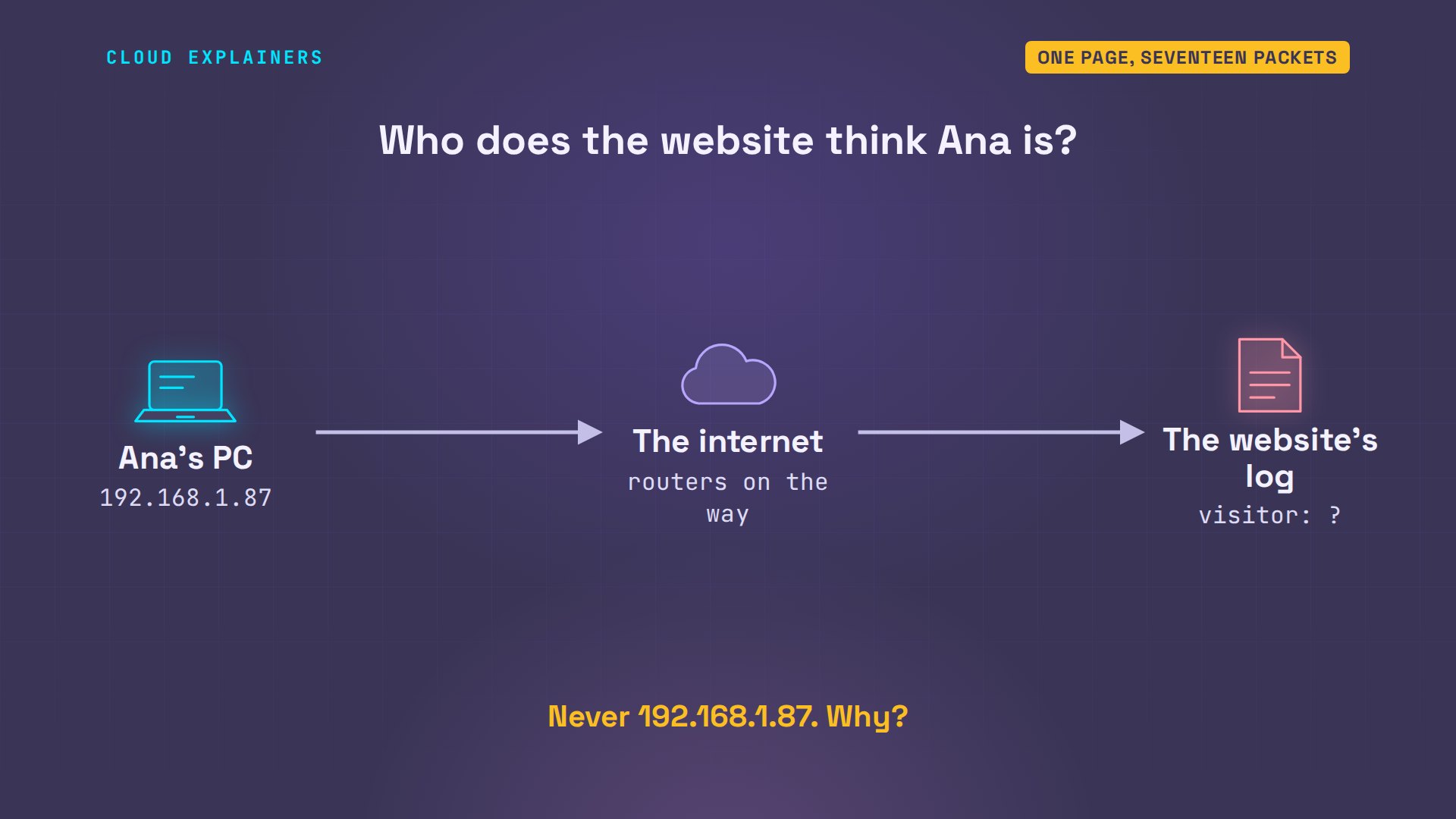
And one thing is odd. The website keeps a log of every visitor, and Ana's PC's own address will never appear in it. Why not? Keep that question.
IP address
What is Ana's PC called, on the network? A number: its IP address, 192.168.1.87. Like a street address, it tells the network where to deliver. Every packet in the capture carries two of them, the sender's and the receiver's, each with one more number after it, a port, which comes later. Four numbers from 0 to 255 is IPv4, the kind most networks still use.
ip -4 addr show eth011: eth0@if37: <BROADCAST,MULTICAST,UP,LOWER_UP> mtu 1500 qdisc noqueue state UP group default  link-netnsid 0
    inet 192.168.1.87/24 brd 192.168.1.255 scope global dynamic eth0
       valid_lft 43188sec preferred_lft 43188sec
Subnet and mask
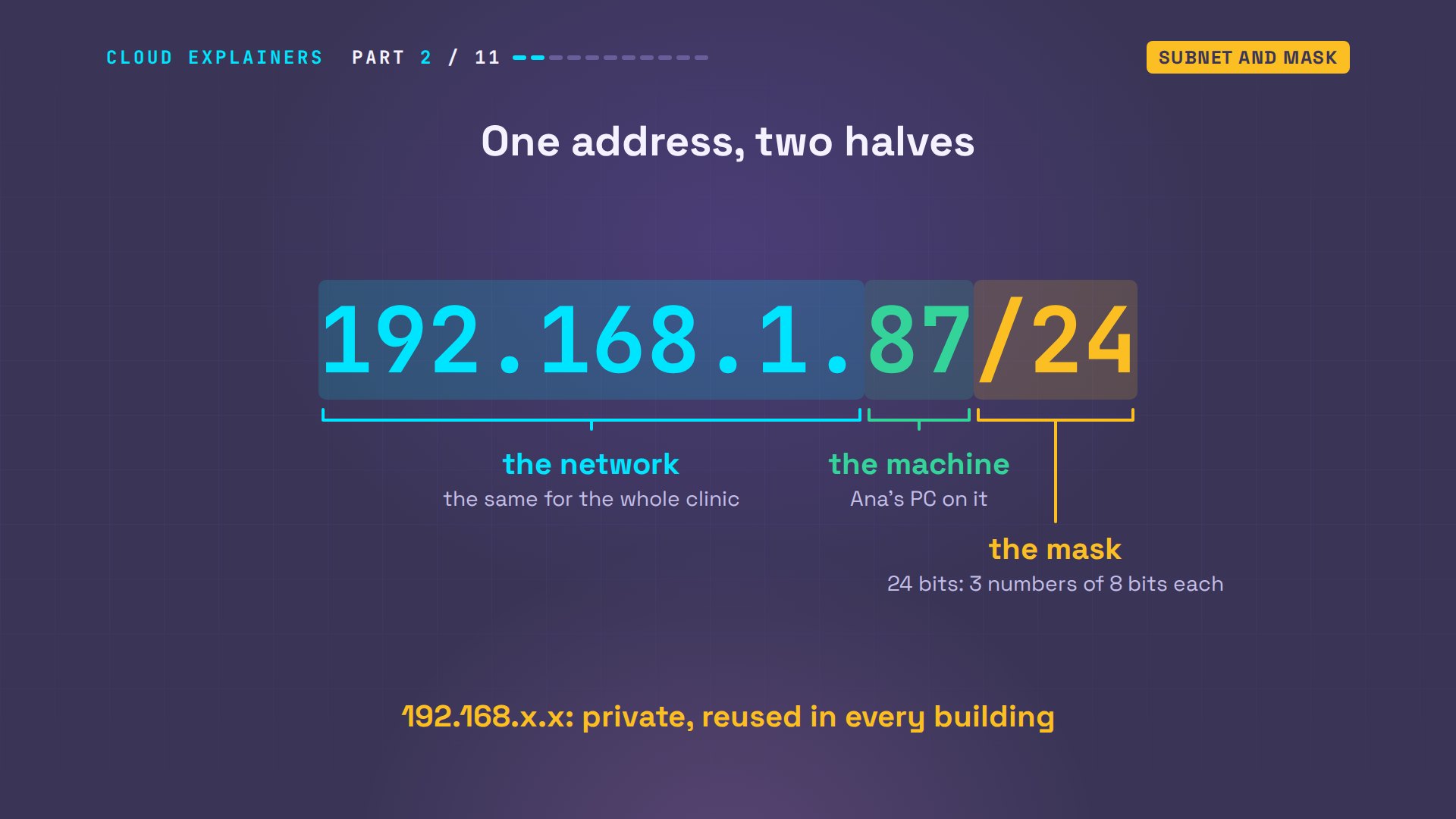
What's the slash twenty-four next to the address? That's the subnet mask, written short. It splits the address in two: the first three numbers name the network, and the last one names the machine on it. Everything starting 192.168.1 is on the same local network, one subnet. And 192.168 is a private range: it works only inside a building, so millions of offices reuse it.
Same subnet means talking directly. ping sends a tiny are-you-there packet, called an echo request, and times the answer. The printer, at 192.168.1.40, answers in about 0.131 milliseconds: nothing in between, just the cable.
ping -c 3 printerPING printer.lan (192.168.1.40) 56(84) bytes of data.
64 bytes from printer.lan (192.168.1.40): icmp_seq=1 ttl=64 time=0.123 ms
64 bytes from printer.lan (192.168.1.40): icmp_seq=2 ttl=64 time=0.133 ms
64 bytes from printer.lan (192.168.1.40): icmp_seq=3 ttl=64 time=0.138 ms

--- printer.lan ping statistics ---
3 packets transmitted, 3 received, 0% packet loss, time 2051ms
rtt min/avg/max/mdev = 0.123/0.131/0.138/0.006 ms
MAC address and ARP
But on the cable itself, IP addresses aren't what delivers a packet. Every network card has a second address, set when it's made: the MAC address, six pairs of letters and digits. A switch, the box the office cables plug into, sends each packet to the right socket by that address. Wi-Fi works the same way, with the access point in the switch's place.
ip link show eth011: eth0@if37: <BROADCAST,MULTICAST,UP,LOWER_UP> mtu 1500 qdisc noqueue state UP mode DEFAULT group default
    link/ether ca:13:bb:6f:0b:c1 brd ff:ff:ff:ff:ff:ff link-netnsid 0
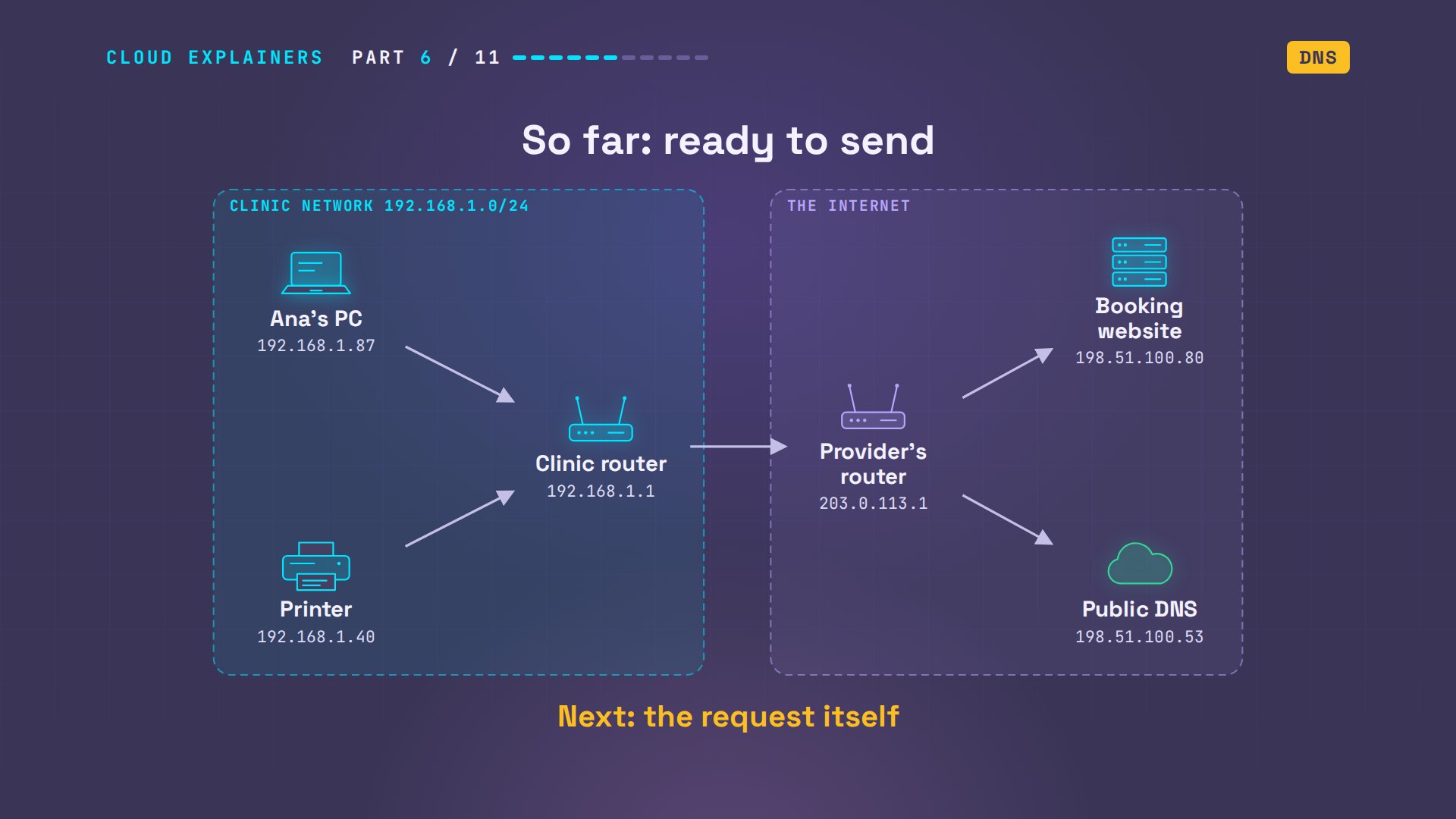
To reach anything outside the clinic, the PC sends through the router, at 192.168.1.1. So how does it learn the router's MAC address? It asks everyone. ARP, the address resolution protocol, shouts: who has 192.168.1.1? The router answers with its MAC. Those were the first packets in the capture. The PC keeps the answers in a table, its neighbours.
ip neigh192.168.1.40 dev eth0 lladdr d2:29:51:33:f7:04 REACHABLE
192.168.1.1 dev eth0 lladdr 26:a9:5c:29:ce:c2 REACHABLE
Router and gateway
The website isn't on 192.168.1, so who gets those packets? A router: a machine that joins two networks and passes packets between them. The PC's route table says so in two lines. 192.168.1: right here, on the cable. Everything else: the default route, via 192.168.1.1. That address is the default gateway, the door out of the building.
ip routedefault via 192.168.1.1 dev eth0
192.168.1.0/24 dev eth0 proto kernel scope link src 192.168.1.87
DHCP
Nobody typed any of these numbers into Ana's PC. So where did they come from? Release the address, and the PC has none at all.
sudo dhclient -v -r eth0Killed old client process
Internet Systems Consortium DHCP Client 4.4.3-P1
Copyright 2004-2022 Internet Systems Consortium.
All rights reserved.
For info, please visit https://www.isc.org/software/dhcp/

Listening on LPF/eth0/ca:13:bb:6f:0b:c1
Sending on   LPF/eth0/ca:13:bb:6f:0b:c1
Sending on   Socket/fallback
xid: warning: no netdev with useable HWADDR found for seed's uniqueness enforcement
xid: rand init seed (0xc2385a3f) built using gethostid
DHCPRELEASE of 192.168.1.87 on eth0 to 192.168.1.1 port 67 (xid=0x710c7a25)
ip -4 addr show eth0
Ask again, and four messages go by. That's DHCP, the dynamic host configuration protocol. Discover: a shout to the broadcast address, heard by every machine here: is there a DHCP server? Offer, from the router: 192.168.1.87. Request: yes please. Acknowledge: it's yours for twelve hours, with the gateway and a DNS server, the name lookup that comes next. That loan is the lease. Well before it runs out, the PC asks to renew it.
sudo dhclient -v eth0Internet Systems Consortium DHCP Client 4.4.3-P1
Copyright 2004-2022 Internet Systems Consortium.
All rights reserved.
For info, please visit https://www.isc.org/software/dhcp/

Listening on LPF/eth0/ca:13:bb:6f:0b:c1
Sending on   LPF/eth0/ca:13:bb:6f:0b:c1
Sending on   Socket/fallback
xid: warning: no netdev with useable HWADDR found for seed's uniqueness enforcement
xid: rand init seed (0xc2385a3f) built using gethostid
DHCPDISCOVER on eth0 to 255.255.255.255 port 67 interval 3 (xid=0x257a0c71)
DHCPOFFER of 192.168.1.87 from 192.168.1.1
DHCPREQUEST for 192.168.1.87 on eth0 to 255.255.255.255 port 67 (xid=0x710c7a25)
DHCPACK of 192.168.1.87 from 192.168.1.1 (xid=0x257a0c71)
hostname: you must be root to change the host name
bound to 192.168.1.87 -- renewal in 21301 seconds.
DNS
Ana typed a name, maplevets.test, but packets need a number. DNS, the domain name system, is the internet's phone book. Her PC asks the DNS server DHCP gave it, the router, which asks a public DNS server on her behalf. The answer: 198.51.100.80. And the line below says how the question went: UDP, a quick way to send with no connection set up first.
dig maplevets.test; <<>> DiG 9.18.39-0ubuntu0.24.04.9-Ubuntu <<>> maplevets.test
;; global options: +cmd
;; Got answer:
;; ->>HEADER<<- opcode: QUERY, status: NOERROR, id: 15995
;; flags: qr aa rd ra; QUERY: 1, ANSWER: 1, AUTHORITY: 0, ADDITIONAL: 1

;; OPT PSEUDOSECTION:
; EDNS: version: 0, flags:; udp: 1232
;; QUESTION SECTION:
;maplevets.test.			IN	A

;; ANSWER SECTION:
maplevets.test.		300	IN	A	198.51.100.80

;; Query time: 30 msec
;; SERVER: 192.168.1.1#53(192.168.1.1) (UDP)
;; WHEN: Sat Nov 14 17:54:07 UTC 2026
;; MSG SIZE  rcvd: 59
In the capture, that's four packets: two questions, two answers. One question asks for the usual address. The other asks for an IPv6 address, the newer, longer kind. The clinic's site has none, so that answer comes back empty, and the PC uses the first.
That lookup took 30 milliseconds. Ask again, and it takes zero. The router kept the answer in its cache, its short-term memory, for as long as the public server allowed: the TTL, time to live, here 300 seconds. After that, it asks again, in case the address has changed.
dig maplevets.test; <<>> DiG 9.18.39-0ubuntu0.24.04.9-Ubuntu <<>> maplevets.test
;; global options: +cmd
;; Got answer:
;; ->>HEADER<<- opcode: QUERY, status: NOERROR, id: 53989
;; flags: qr rd ra; QUERY: 1, ANSWER: 1, AUTHORITY: 0, ADDITIONAL: 1

;; OPT PSEUDOSECTION:
; EDNS: version: 0, flags:; udp: 1232
;; QUESTION SECTION:
;maplevets.test.			IN	A

;; ANSWER SECTION:
maplevets.test.		300	IN	A	198.51.100.80

;; Query time: 0 msec
;; SERVER: 192.168.1.1#53(192.168.1.1) (UDP)
;; WHEN: Sat Nov 14 17:54:07 UTC 2026
;; MSG SIZE  rcvd: 59
Halfway. Ana's PC has an address, a mask and a gateway from DHCP, the router's MAC address from ARP, and the website's number from DNS. Now it can finally send the page request.
Packets, TCP and UDP
Why UDP for the question, and something else for the page? UDP sends one packet and hopes. No setup: fine for a short question you can ask again. The page uses TCP, which starts with a handshake. SYN: can we talk? SYN-ACK: yes. ACK: starting. After that, every piece is acknowledged, and anything lost is sent again. At the end, each side says FIN: finished.
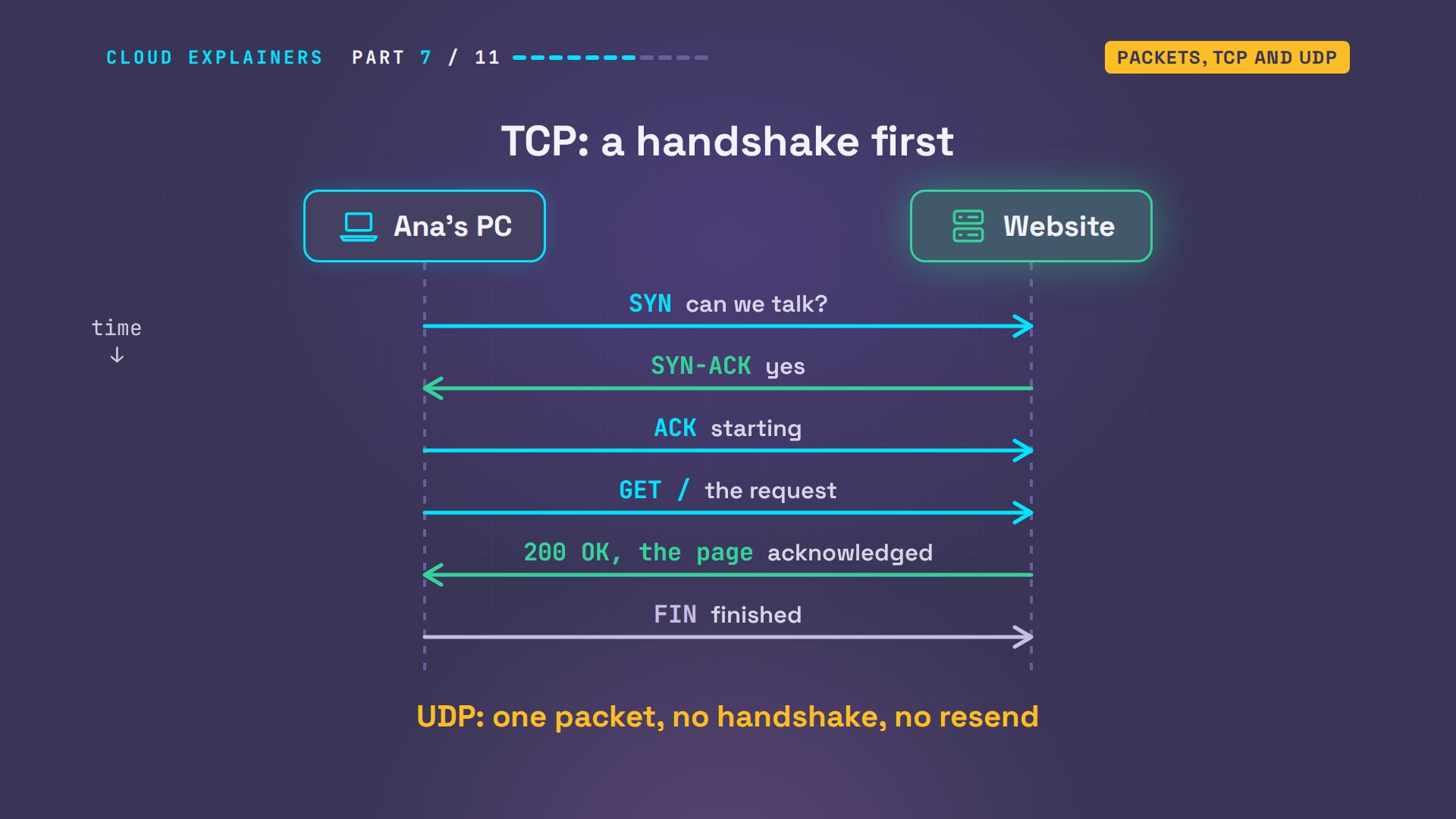
Here they are in the capture. S is SYN, S dot is SYN-ACK, a dot alone is ACK. Then the request, GET, and the page: 200 OK. So a packet is just a small chunk of data with the addresses written on the front. On this network, at most 1500 bytes each.
Ports
One server runs many programs. So which one gets the packet? Each packet also names a port, a number for one program on the machine. ss lists the ports the website's server is listening on: 80, the web page, and 8080, an admin page.
ss -tlnState      Recv-Q     Send-Q         Local Address:Port           Peer Address:Port     Process
LISTEN     0          5                    0.0.0.0:80                  0.0.0.0:*
LISTEN     0          4096              127.0.0.11:37205               0.0.0.0:*
LISTEN     0          5                    0.0.0.0:8080                0.0.0.0:*
Think of a block of flats. The IP address gets a letter to the building. The port number gets it to the right flat. Web pages live at 80, or 443 when encrypted, and office printers take print jobs at 9100.
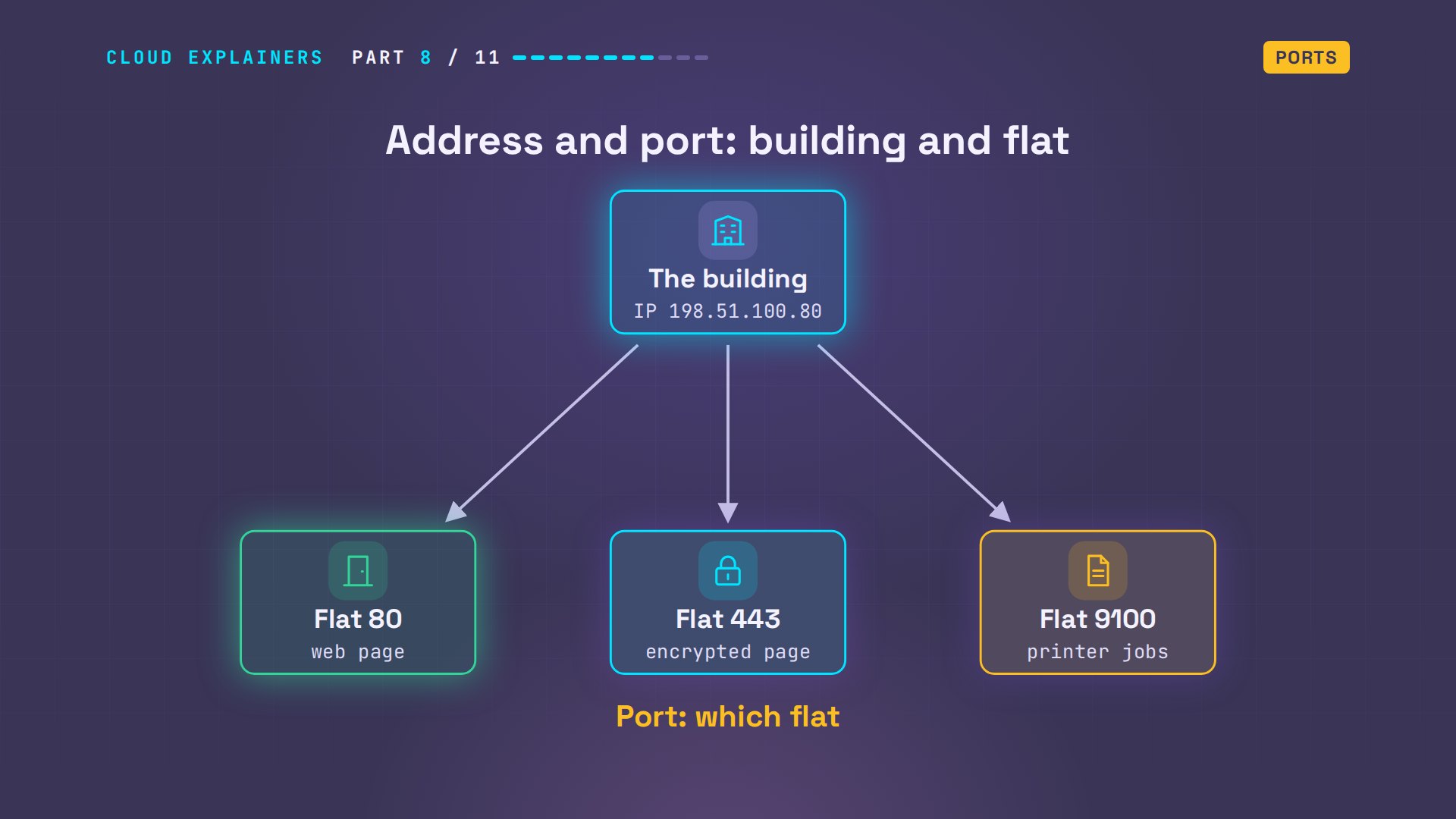
nc, short for netcat, knocks on one port and reports what happened. Knock on a flat where nobody lives, port 81, and the server says so at once: connection refused. Knock on the printer's port 9100, and it answers: succeeded.
nc -zv maplevets.test 81nc: connect to maplevets.test (198.51.100.80) port 81 (tcp) failed: Connection refused
nc -zv printer 9100Connection to printer (192.168.1.40) 9100 port [tcp/*] succeeded!
Ports work both ways. Look at the first packet again. It goes to port 80 on the website, from port 51480 on Ana's PC: a number her PC picked for this one conversation, so the reply comes back to the right program. A browser with ten tabs open uses ten of them.
Firewall
Now port 8080. The admin page is running, but the hosting company's firewall blocks it from outside. A firewall is a set of rules that lets packets in, or throws them away. So guess first: what does Ana get? Ten seconds of nothing. Then curl gives up: timed out.
curl -m 10 http://maplevets.test:8080curl: (28) Connection timed out after 10007 milliseconds
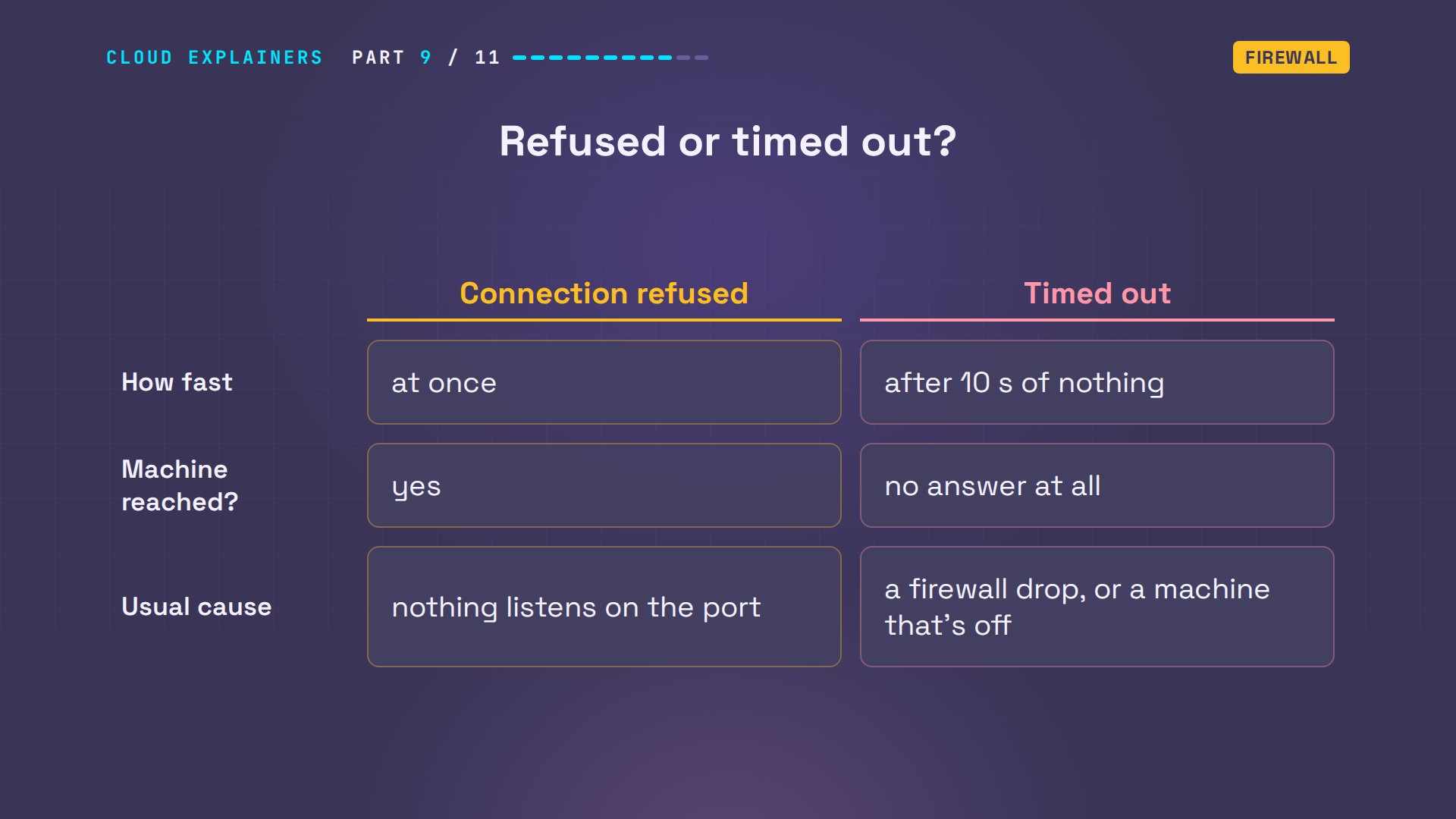
The rule on the server says drop: throw the packet away and say nothing. So a rule of thumb. Refused means you reached the machine, and nothing listens on that port. A time-out means no answer at all: often a firewall, or a machine that's switched off.
nft, Linux's firewall tool, lists that rule on the website's server: TCP, destination port 8080, drop.
sudo nft list table inet filtertable inet filter {
	chain input {
		type filter hook input priority filter; policy accept;
		tcp dport 8080 drop
	}
}
NAT and public addresses
Now the question from the start. The website writes down every visitor's address. Is it 192.168.1.87, Ana's PC? Guess first. No. The log says 203.0.113.7, an address Ana's PC has never had.
tail -n 1 /var/log/web.log203.0.113.7 - - [14/Nov/2026 17:54:01] "GET / HTTP/1.1" 200 -
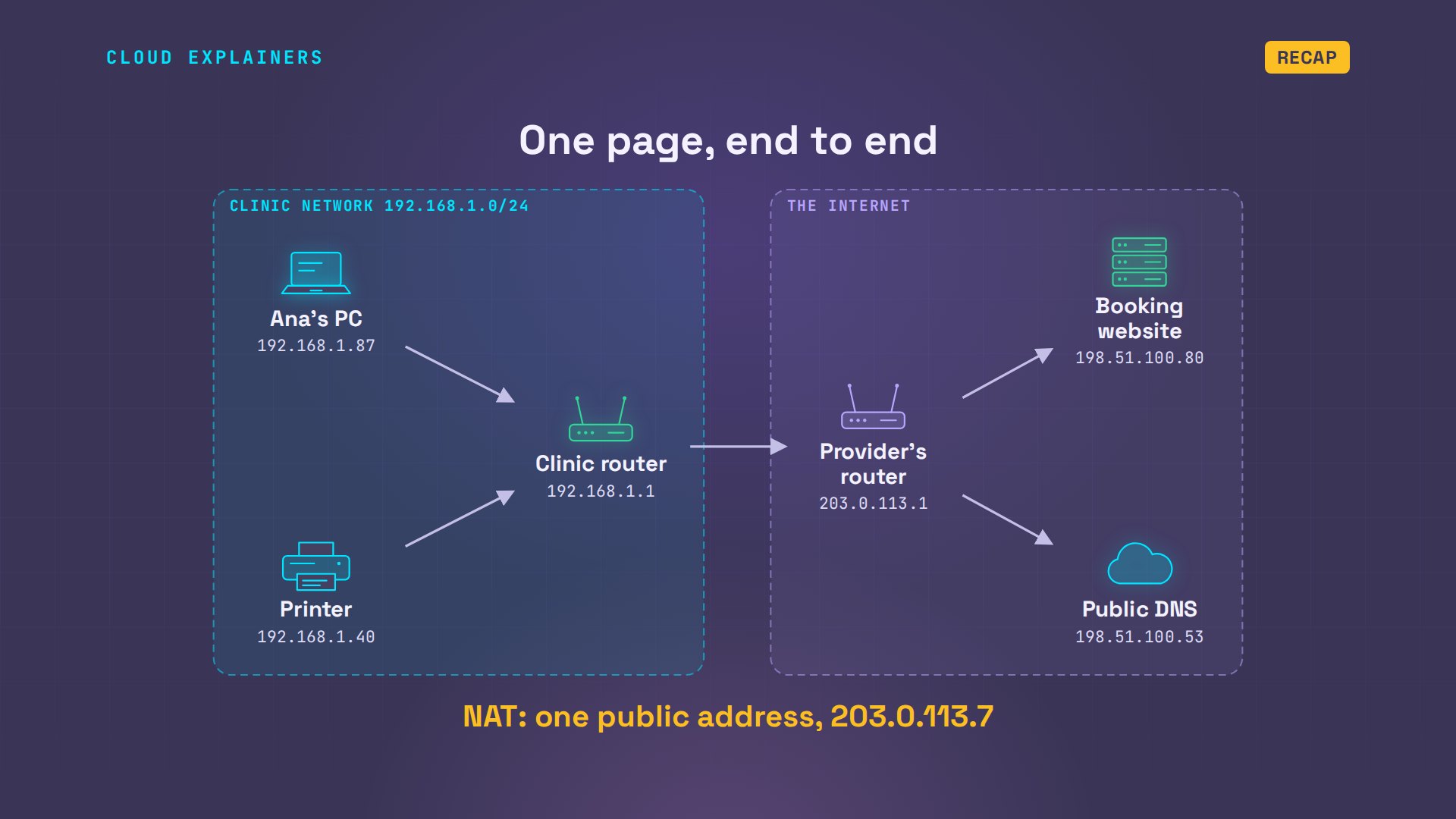
It's the router's. Private addresses like 192.168 are reused in millions of buildings, so the internet can't tell them apart. So the router rewrites every packet going out with its own public address, remembers who asked, and hands each reply back to the right PC. That's NAT, network address translation: one public address for the whole clinic. Your home router does the same, which is one reason IPv4's four billion addresses haven't run out.
ip -4 -br addrlo               UNKNOWN        127.0.0.1/8
lan@if39         UP             192.168.1.1/24
wan@if40         UP             203.0.113.7/24
sudo iptables -t nat -L POSTROUTING -n -vChain POSTROUTING (policy ACCEPT 0 packets, 0 bytes)
 pkts bytes target     prot opt in     out     source               destination
    0     0 DOCKER_POSTROUTING  0    --  *      *       0.0.0.0/0            127.0.0.11
   10   683 MASQUERADE  0    --  *      wan     0.0.0.0/0            0.0.0.0/0
Latency, hops and bandwidth
Last: distance. The printer answered a ping in 0.1 milliseconds. The website takes about 33. That wait is latency, the time for a round trip. In this lab, we added 15 milliseconds each way, to stand in for distance.
ping -c 3 maplevets.testPING maplevets.test (198.51.100.80) 56(84) bytes of data.
64 bytes from maplevets.test (198.51.100.80): icmp_seq=1 ttl=62 time=31.6 ms
64 bytes from maplevets.test (198.51.100.80): icmp_seq=2 ttl=62 time=33.4 ms
64 bytes from maplevets.test (198.51.100.80): icmp_seq=3 ttl=62 time=33.1 ms

--- maplevets.test ping statistics ---
3 packets transmitted, 3 received, 0% packet loss, time 2006ms
rtt min/avg/max/mdev = 31.595/32.678/33.388/0.778 ms
Where does the time go? tracepath lists every router on the way, and each one is a hop. The clinic's router, under a millisecond. The internet provider's router, about 15. Then the website: three hops away.
tracepath -n maplevets.test1?: [LOCALHOST] pmtu 1500 1: 192.168.1.1 0.084ms 1: 192.168.1.1 0.017ms 2: 203.0.113.1 19.184ms 3: 198.51.100.80 37.027ms reached Resume: pmtu 1500 hops 3 back 3
Latency is how long the road is. Bandwidth is how wide it is: how much data fits through each second. Ana downloads five megabytes of X-rays from the clinic's site. 2.2 seconds. A byte is 8 bits, so that's 40 megabits: about 18 megabits a second, just under the 20 we set for this lab's internet line. A wider line makes big files faster, but it doesn't shorten the road: each round trip still takes the same time.
curl -s -o x-rays.zip -w '%{size_download} bytes in %{time_total} s\n' http://maplevets.test/x-rays.zip5000000 bytes in 2.248442 s
Recap
So: DHCP gave Ana's PC its address, mask and gateway. ARP found the router. DNS turned the name into a number, over UDP. TCP shook hands with port 80, and NAT carried it all out under one public address.
If that capture reads like a story now, subscribe for the next one, where we open up another piece of the network.
Every machine you saw was real: six containers in a small lab. The commands and the lab files are linked in the description. Thanks for watching Cloud Explainers.
Sources
- RFC 791, Internet Protocol (IPv4 addresses)
- RFC 1918, private address ranges (192.168.0.0/16 and others)
- RFC 4632, the /24 prefix notation
- RFC 826, ARP
- RFC 2131, DHCP (discover, offer, request, acknowledge)
- RFC 1034, DNS concepts
- RFC 9293, TCP (the three-way handshake, acknowledgements, retransmission)
- RFC 768, UDP
- RFC 3022, NAT
- IANA service name and port number registry (80, 443, 9100)
- RFC 5737 (203.0.113.0/24 and 198.51.100.0/24 are reserved for examples)
Demos: containers on our own Mac standing in for a vet clinic's office network and a slice of the internet; the clinic and its website are made up, and every address and name is reserved for examples (192.168.x.x, 203.0.113.x, 198.51.100.x, .test). The 15 ms delay was added on purpose to stand in for distance. Watch the full video on YouTube.
More videos
How to Fix Docker 'Permission Denied' on docker.sock
How to Fix Git 'Updates Were Rejected' When You Push
How to Fix nginx 502 Bad Gateway Errors on Linux
How to Fix Linux apt 'Could Not Get Lock' Errors (Ubuntu)
How Email Works on the Internet (SMTP) in 10 Minutes

The Python Roadmap for Beginners

Golang REST API with Gin: Full Tutorial for Beginners
How a WireGuard VPN Network Works

Linux Makefiles Will Finally Make Sense After This

SAML vs OAuth vs OpenID Connect: What's the Difference?

How to Fix Python cron Jobs That Never Run

Linux Bash Scripting: Full Tutorial for Beginners

How PXE Network Boot Works

How Active Directory Works

How to Fix a Linux systemd Service That Won't Start

Linux Logs: syslog vs journald

JWT vs Session Cookies: Which One Should You Use?

Docker vs Docker Compose: Which One Should You Use?

How to Fix Docker Compose Containers That Can't Talk to Each Other

Django Full Tutorial for Beginners

How Linux systemd Works

How to Fix 'Windows Cannot Access' Network Share Errors (SMB)

REST vs gRPC: Which One Should You Use?

How to Fix SSL Certificate Chain Errors (Missing Intermediate)

Every Python Concept for Beginners in 10 Minutes

Every SQL Join Type in 10 Minutes

Why OpenRouter Free Models Hit Their Limit So Fast

Why Your Gemini API Free Tier Runs Out So Fast

OpenRouter Will Finally Make Sense After This

How Redis Caching Works

Gemini API vs Vertex AI: Which One Should You Use?

How to Fix a Leaked Gemini API Key

Why Golang Uses Goroutines Instead of Threads

How to Fix Gemini API Error 429: Resource Exhausted

Claude Token Pricing Will Finally Make Sense After This

Why Python Web Scraping Returns Nothing (and the Fix)

Python uv vs pip: Which One Should You Use?

Python Automation: Full Tutorial for Beginners

How OAuth Login Works

Google AI Studio Will Finally Make Sense After This

What Happens When You Run a Docker Container

How to Fix Claude Code Billing Your API Key Instead of Your Plan

Why Passkeys Can't Be Phished Like Passwords

PowerShell vs Bash: Which One Should You Learn?

The Linux Roadmap for Beginners

Django vs FastAPI: Which One Should You Use?

Why SQLite Is the Most Used Database in the World

How a NoSQL Database Like MongoDB Works

How to Fix Python pip error: externally-managed-environment

How to Fix MySQL Too Many Connections Database Errors

Golang Concurrency Will Finally Make Sense After This

How Amazon S3 Works

How Kubernetes Works

How Git Works

How to Fix Docker Port Already Allocated Errors

How PostgreSQL Works

How to Fix Git Merge Conflicts

How to Fix No Space Left on Device in Linux

How the Internet Works

SQL vs NoSQL: When Each One Wins

How to Fix JWT Token Expired Errors (401 Unauthorized)

Claude API vs Claude Pro: Why Your Subscription Doesn't Include It

Why AI Agent Skills Beat Giant Prompts

Linux Cron Jobs Will Finally Make Sense After This

Security Logs Will Finally Make Sense After This

How to Fix a Security Leak: An API Key Pushed to GitHub

DNS Will Finally Make Sense After This

Never Ignore a Security Update

Two-Factor Authentication Will Finally Make Sense

Never Expose a Database to the Internet

SSH Keys vs Passwords: Which Is Safer for Security?

The 5 Levels of Linux Boot: From Power On to Login

The 5 Levels of Network Firewalls

Password Security: Why Hackers Crack Weak Passwords

Why Your Linux Server Runs Out of Memory

HTTP vs HTTPS: What Actually Changes on Your Network

Every Linux File Permission You Need to Know

Linux Processes vs Threads: When Each One Wins

The OSI Model Will Finally Make Sense After This

The 7 Levels of Git

Every Network Troubleshooting Command You Need

Hashing vs Encryption in Cybersecurity: When Each One Wins

Why the Internet Ran Out of IP Addresses

Linux Package Managers: apt vs Snap vs Flatpak

Why Python Is Slow (and When It Doesn't Matter)

TCP vs UDP: When Each One Wins

Stop Running Linux as Root (Do This Instead)

Linux Users and Groups Will Finally Make Sense

Why Phishing Beats Good Security (and How to Spot It)

The 7 Levels of Docker

AI Agents Will Finally Make Sense After This

Stop Using git push --force (Use This Instead)

Agent Skills vs MCP: When Each One Wins

Networking Will Finally Make Sense After This

Every Linux Command You Actually Need

The 7 Levels of Cybersecurity

Every System Design Concept You Need, in One Diagram
