Kubernetes: Full Tutorial for Beginners
A full Kubernetes tutorial for beginners, on a real three-node cluster built with kind on one laptop. We see what Kubernetes is (a helmsman holding a course), make a cluster, run a first pod, deploy our own app with a Deployment, watch deleted pods come back, scale and drain a node, put a Service in front of the pods (and fix a selector typo), update to a new version that fails twice (ImagePullBackOff, then CrashLoopBackOff), move settings to a ConfigMap, and fix a Pending pod.
Delete it, and it comes back
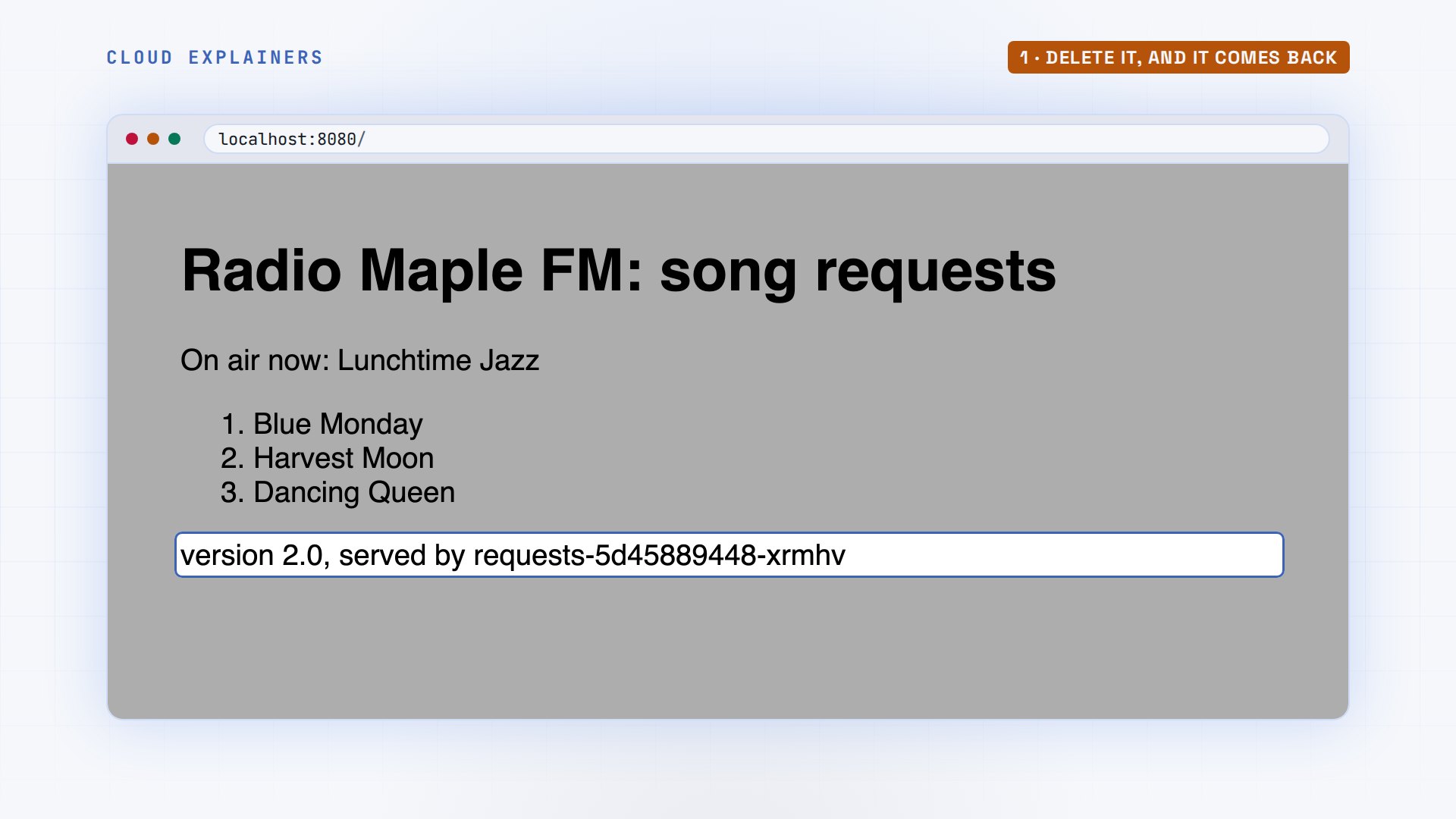
You deleted a pod in Kubernetes, and a new one appeared. Here, Ana lists her app's pods and deletes one of three. A moment later there are three again, one of them 0 seconds old. Why does it come back, and when doesn't it? By the end, you'll know, and you'll have run a real cluster yourself.
kubectl get pods -l app=requestsNAME                        READY   STATUS    RESTARTS   AGE
requests-5d45889448-94rbt   1/1     Running   0          2s
requests-5d45889448-skmc9   1/1     Running   0          1s
requests-5d45889448-xrmhv   1/1     Running   0          2s
kubectl delete pod requests-5d45889448-94rbtpod "requests-5d45889448-94rbt" deleted from default namespace
kubectl get pods -l app=requestsNAME                        READY   STATUS    RESTARTS   AGE
requests-5d45889448-skmc9   1/1     Running   0          2s
requests-5d45889448-xrmhv   1/1     Running   0          3s
requests-5d45889448-z94k9   1/1     Running   0          0s
Those pods serve the song request board of a small radio station, Radio Maple FM. You'll build it from an empty laptop.
What Kubernetes does
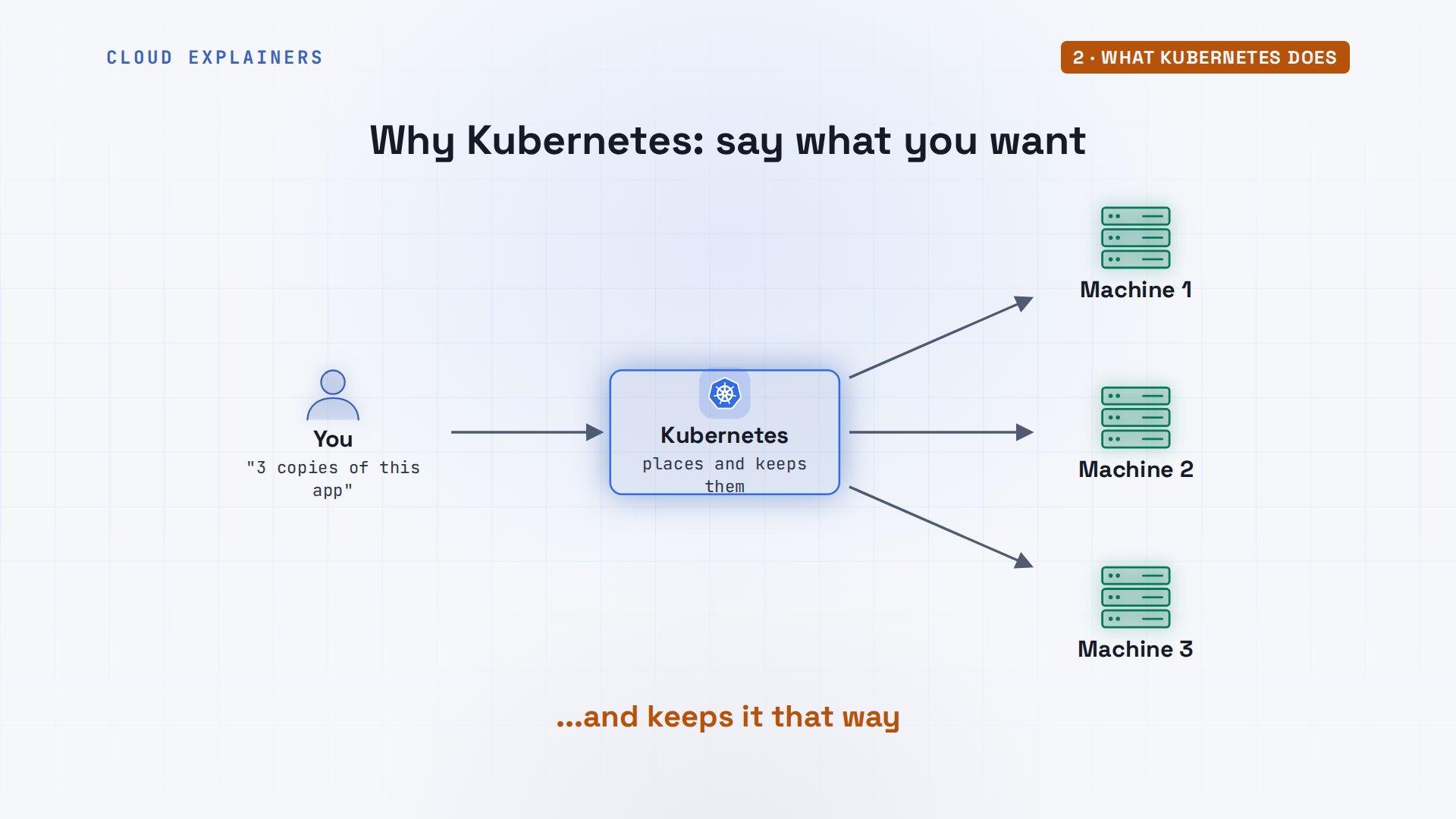
Why does Kubernetes exist? Docker runs containers on one machine, and when one stops, it stays stopped unless you restart it. Kubernetes runs them across many machines, and you don't tell it what to do step by step. You tell it what you want: three copies of this app. It works out where they run, and keeps it that way.
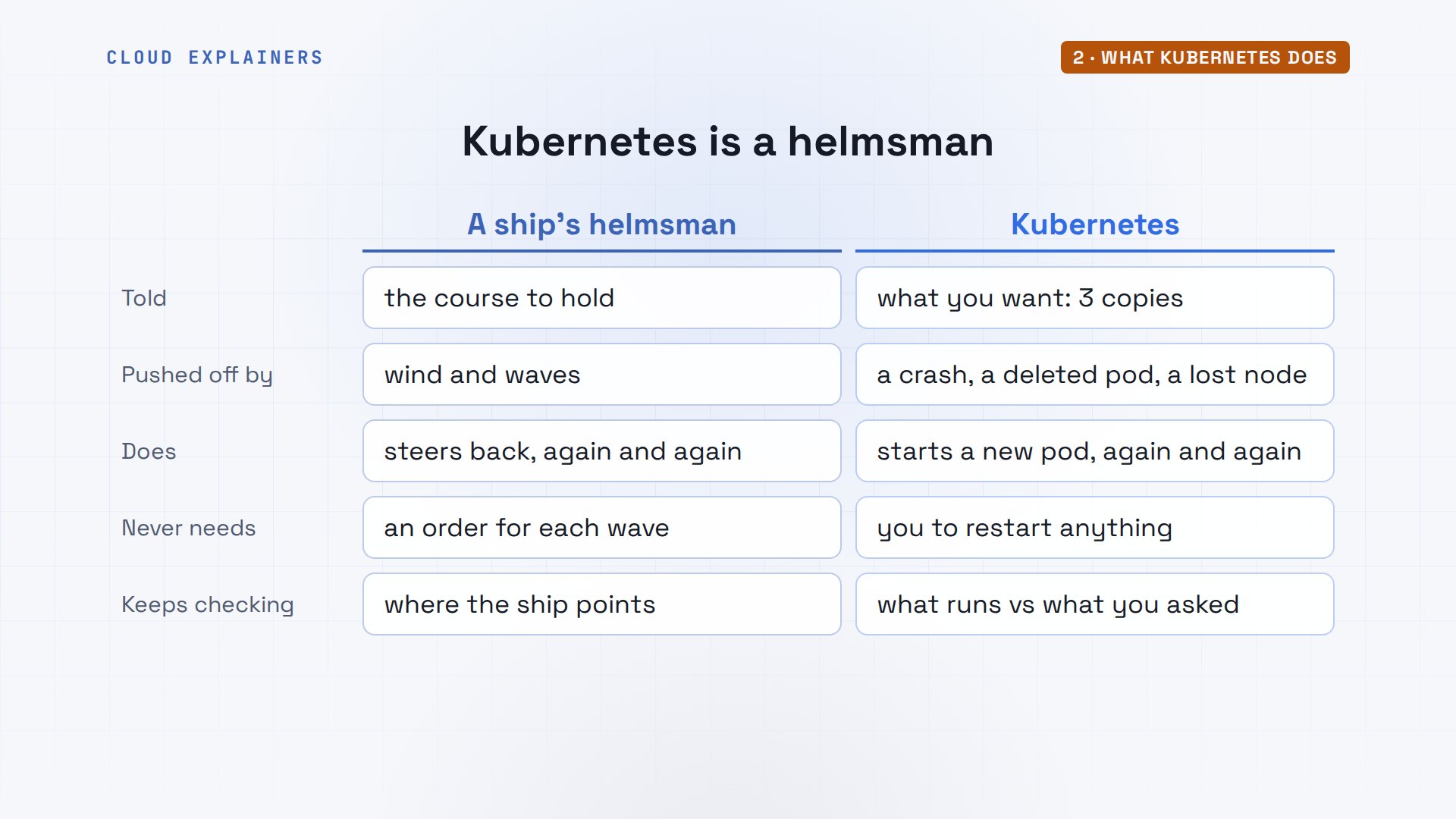
The name is Greek for helmsman, the sailor at a ship's wheel. The captain sets a course. Wind and waves push the ship off it, and the helmsman keeps steering back, without being told each time. Kubernetes does the same with your apps: you set what you want, it keeps checking what is, and fixes any difference. That is the answer to the opening, in one sentence.
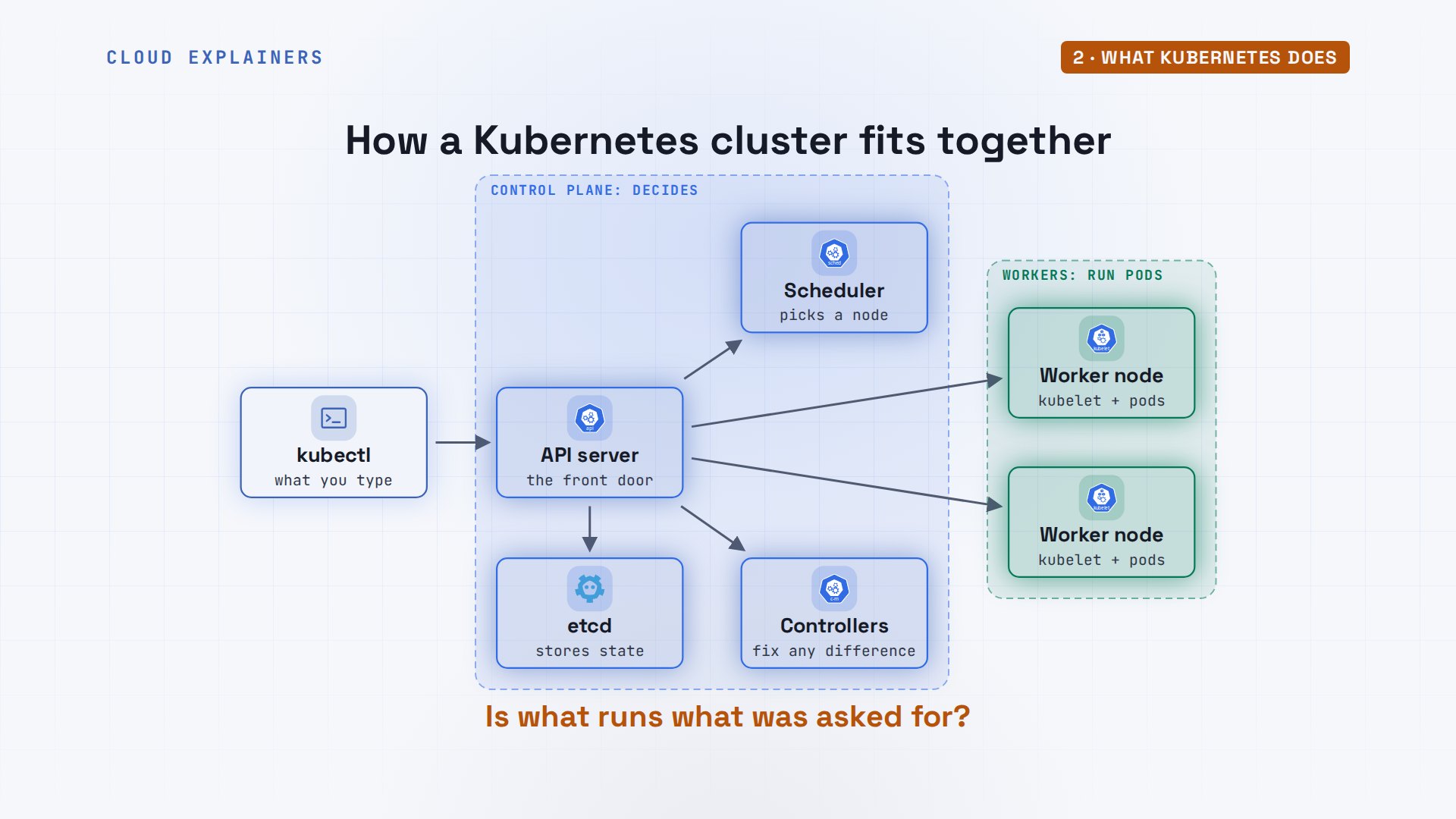
Here are the parts. kubectl, the command you type, talks only to the API server, the cluster's front door. The API server remembers what you asked for in a database called etcd. The scheduler decides which machine each new pod runs on, and the controllers keep comparing what runs with what was asked for. Those four are the control plane. The worker machines, called nodes, each run a kubelet, which starts the pods it is given. We'll see every one of these running in a minute.
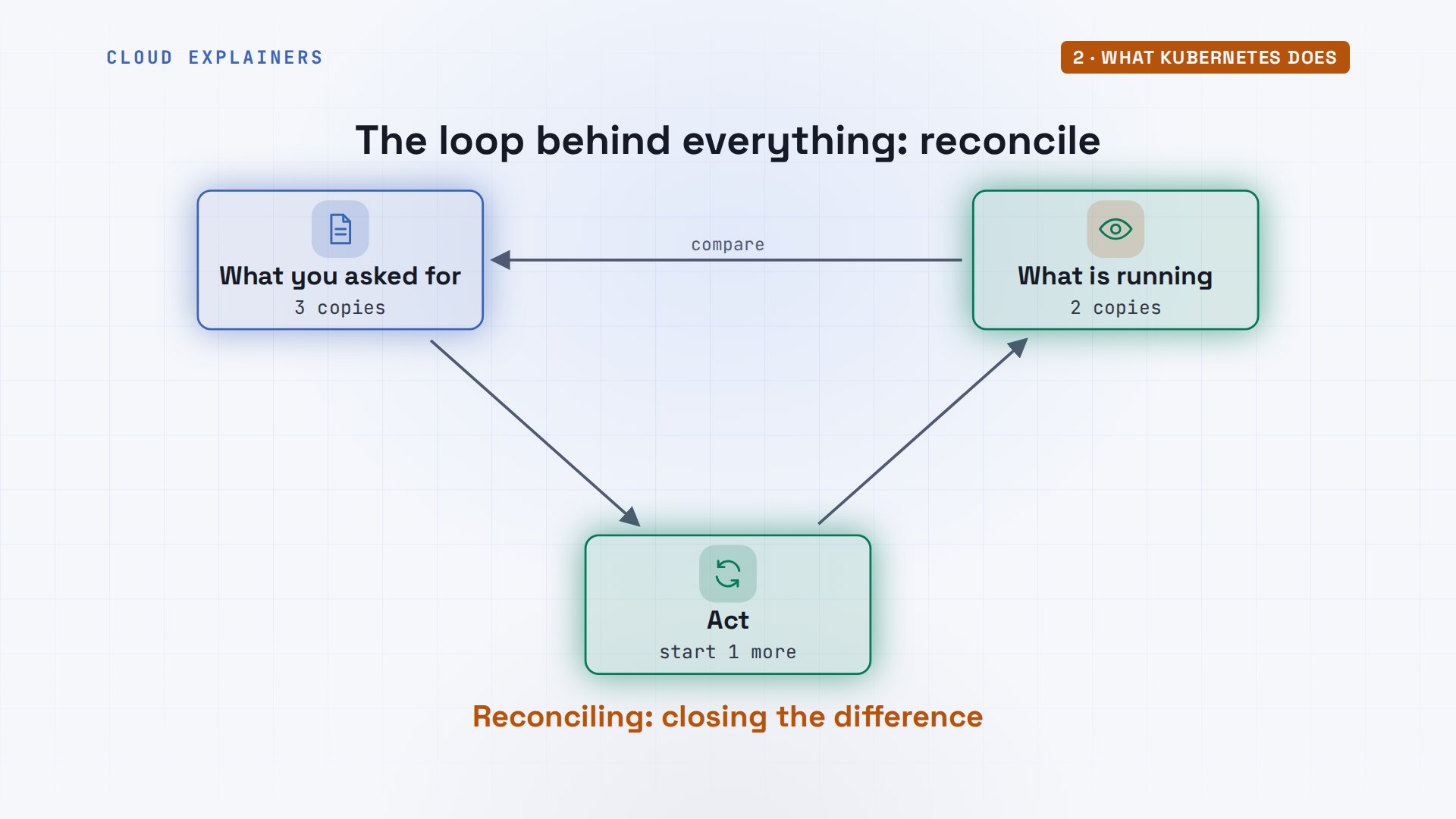
That checking never stops. It's a loop: look at what is running, compare it with what you asked for, and act on any difference, then look again, every few moments, forever. It's called reconciling. A crashed app, a deleted pod, a machine that died: to Kubernetes, each is just a difference to close. Keep this loop in mind; nearly every command in this tutorial changes one side of it.
A real cluster needs several machines, so Ana uses kind: Kubernetes in Docker. Each node is a Docker container on her laptop, running the same Kubernetes you'd get on a cloud. kubectl v1.37.2, kind v0.33.0. Every command and the lab files are linked in the description, and kubectl works the same against a cluster on any cloud.
kubectl version --clientClient Version: v1.37.2
Kustomize Version: v5.8.1
kind versionkind v0.33.0 go1.26.7 linux/arm64
A cluster on your laptop
Her cluster is described in a small file: one control plane node and two workers. Then kind create cluster builds it. It took 26 seconds: start the nodes, start the control plane, install the network plugin, called CNI, join the workers. It also points kubectl at the new cluster.
cat cluster.yamlkind: Cluster
apiVersion: kind.x-k8s.io/v1alpha4
name: radio
nodes:
- role: control-plane
- role: worker
- role: worker
time kind create cluster --config cluster.yamlCreating cluster "radio" ...
 • Ensuring node image (kindest/node:v1.37.0) 🖼️  ...
 ✓ Ensuring node image (kindest/node:v1.37.0) 🖼️
 • Preparing nodes 📦 📦 📦   ...
 ✓ Preparing nodes 📦 📦 📦
 • Writing configuration 📜  ...
 ✓ Writing configuration 📜
 • Starting control-plane 🕹️  ...
 ✓ Starting control-plane 🕹️
 • Installing CNI 🔌  ...
 ✓ Installing CNI 🔌
 • Installing StorageClass 💾  ...
 ✓ Installing StorageClass 💾
 • Joining worker nodes 🚜  ...
 ✓ Joining worker nodes 🚜
Set kubectl context to "kind-radio"
You can now use your cluster with:

kubectl cluster-info --context kind-radio

Not sure what to do next? 😅  Check out https://kind.sigs.k8s.io/docs/user/quick-start/

real	0m25.598s
user	0m0.527s
sys	0m0.568s
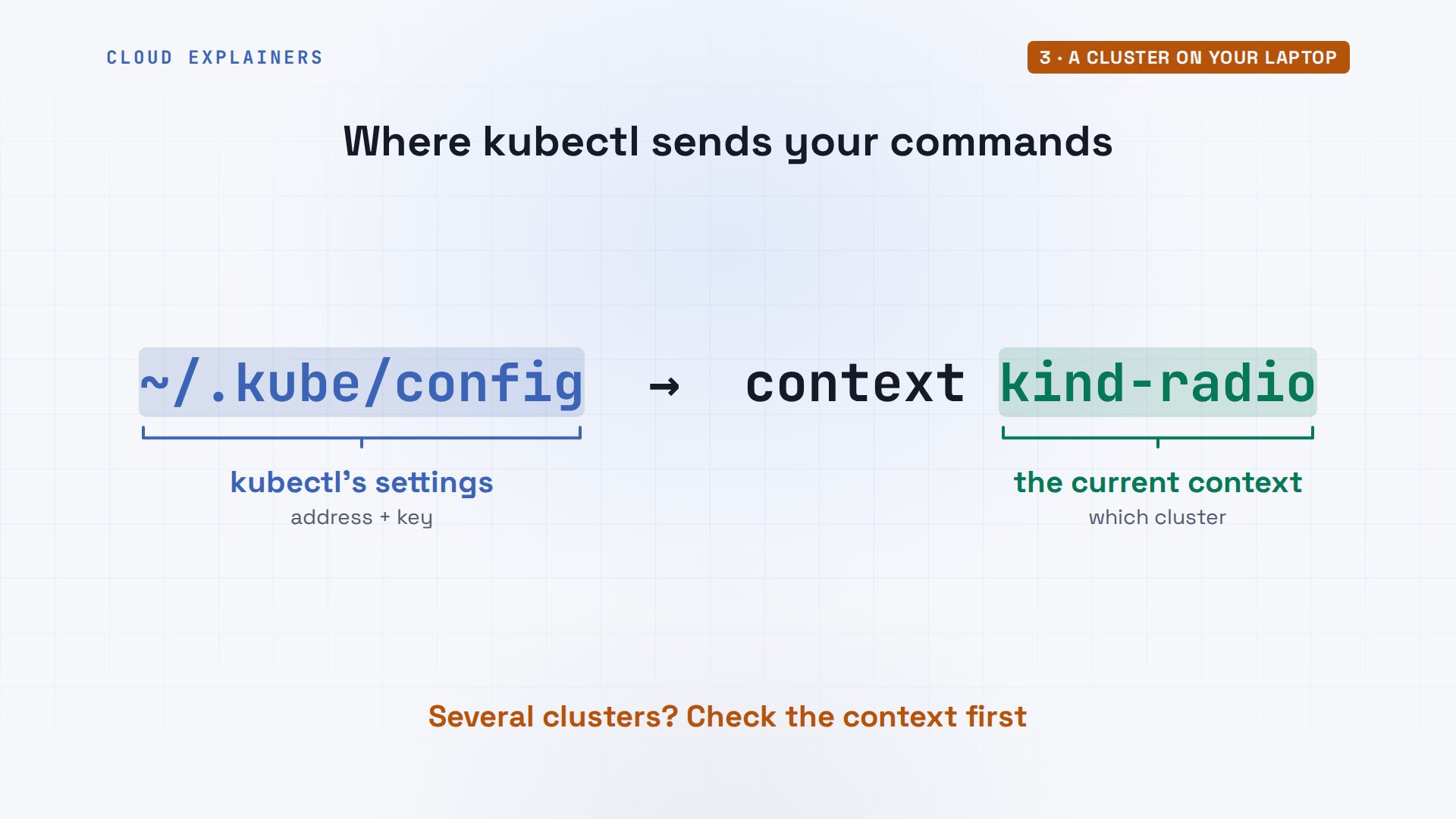
How does kubectl know where the cluster is? kind wrote it into a file, dot kube slash config in Ana's home folder: the API server's address and a key to prove who she is. An entry there is called a context, here kind-radio. With several clusters, the current context decides which one every command goes to, so check it before you delete anything.
kubectl get nodes: three nodes, all Ready, running Kubernetes 1.37.0. And docker ps shows what they really are here: three containers, one per node. On a real cloud cluster, each would be a separate machine, but kubectl couldn't tell the difference.
kubectl get nodesNAME                  STATUS   ROLES           AGE   VERSION
radio-control-plane   Ready    control-plane   27s   v1.37.0
radio-worker          Ready    <none>          13s   v1.37.0
radio-worker2         Ready    <none>          13s   v1.37.0
docker ps --format '{{.Names}}  {{.Image}}'radio-worker  kindest/node:v1.37.0
radio-worker2  kindest/node:v1.37.0
radio-control-plane  kindest/node:v1.37.0
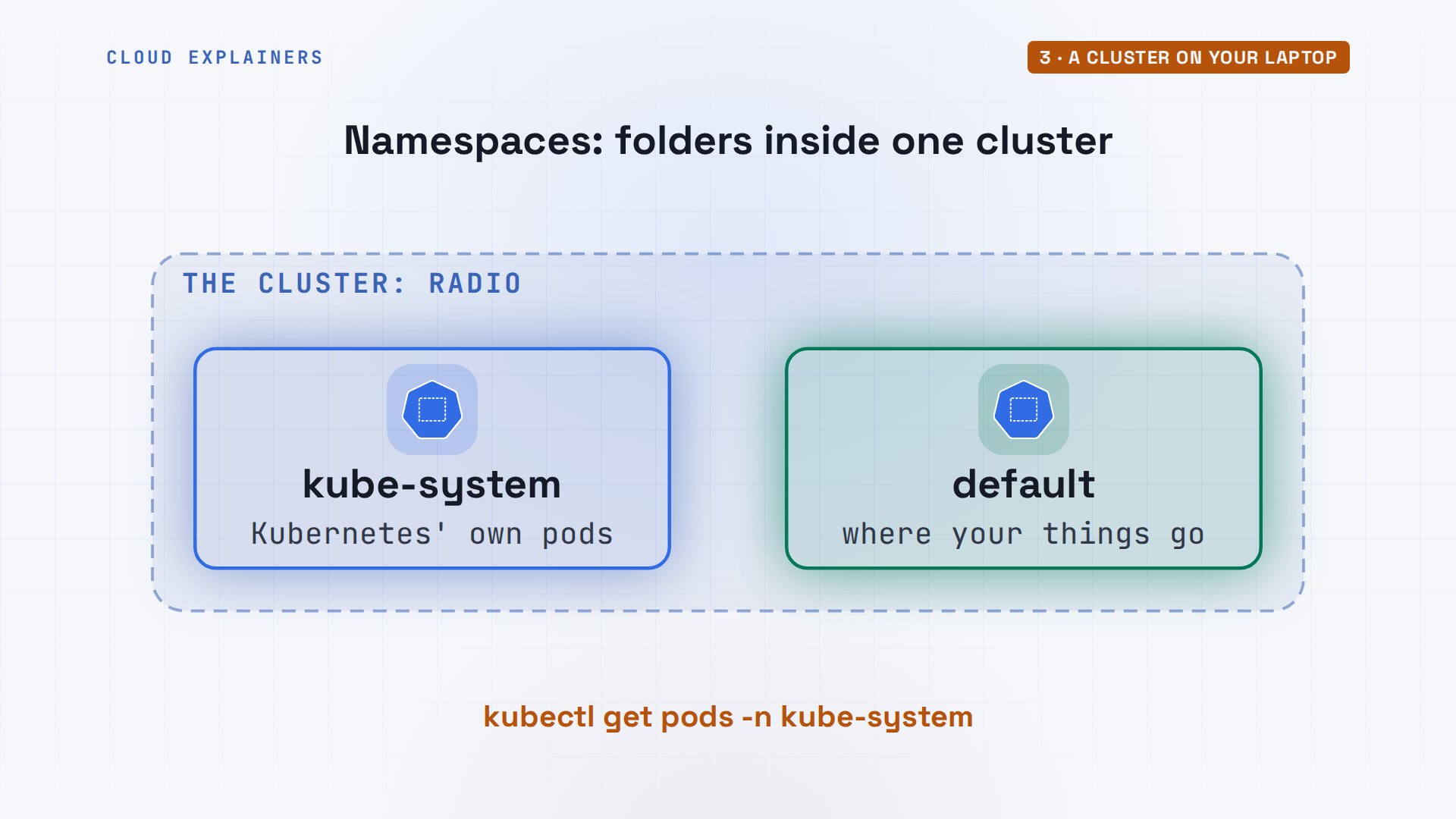
Remember the parts from the map? They run as pods too, in a namespace called kube-system, a separate area for Kubernetes' own things. Here is etcd, the API server, the controllers, and the scheduler, on the control plane. kube-proxy runs on every node and handles traffic, and CoreDNS answers names inside the cluster.
kubectl get pods -n kube-systemNAME                                          READY   STATUS    RESTARTS   AGE
coredns-559f6c778d-fgsc5                      1/1     Running   0          16s
coredns-559f6c778d-m6ppk                      1/1     Running   0          16s
etcd-radio-control-plane                      1/1     Running   0          25s
kindnet-s4bj9                                 1/1     Running   0          13s
kindnet-sz46b                                 1/1     Running   0          16s
kindnet-xlvhd                                 1/1     Running   0          13s
kube-apiserver-radio-control-plane            1/1     Running   0          25s
kube-controller-manager-radio-control-plane   1/1     Running   0          25s
kube-proxy-hhhwb                              1/1     Running   0          13s
kube-proxy-jtwkr                              1/1     Running   0          13s
kube-proxy-njhmn                              1/1     Running   0          16s
kube-scheduler-radio-control-plane            1/1     Running   0          25s
A word you just heard: namespace. A namespace is a folder for things in one cluster. Kubernetes keeps its own parts in kube-system; your things go in default, unless you say otherwise. Teams often get a namespace each, so two apps can use the same names without clashing. kubectl looks in default unless you add dash n and a name, as Ana did.
Your first pod
What does Kubernetes actually run? Not containers on their own: pods. A pod wraps one container, sometimes a few that must stay together, and gives them one IP address. It's the smallest thing Kubernetes schedules.
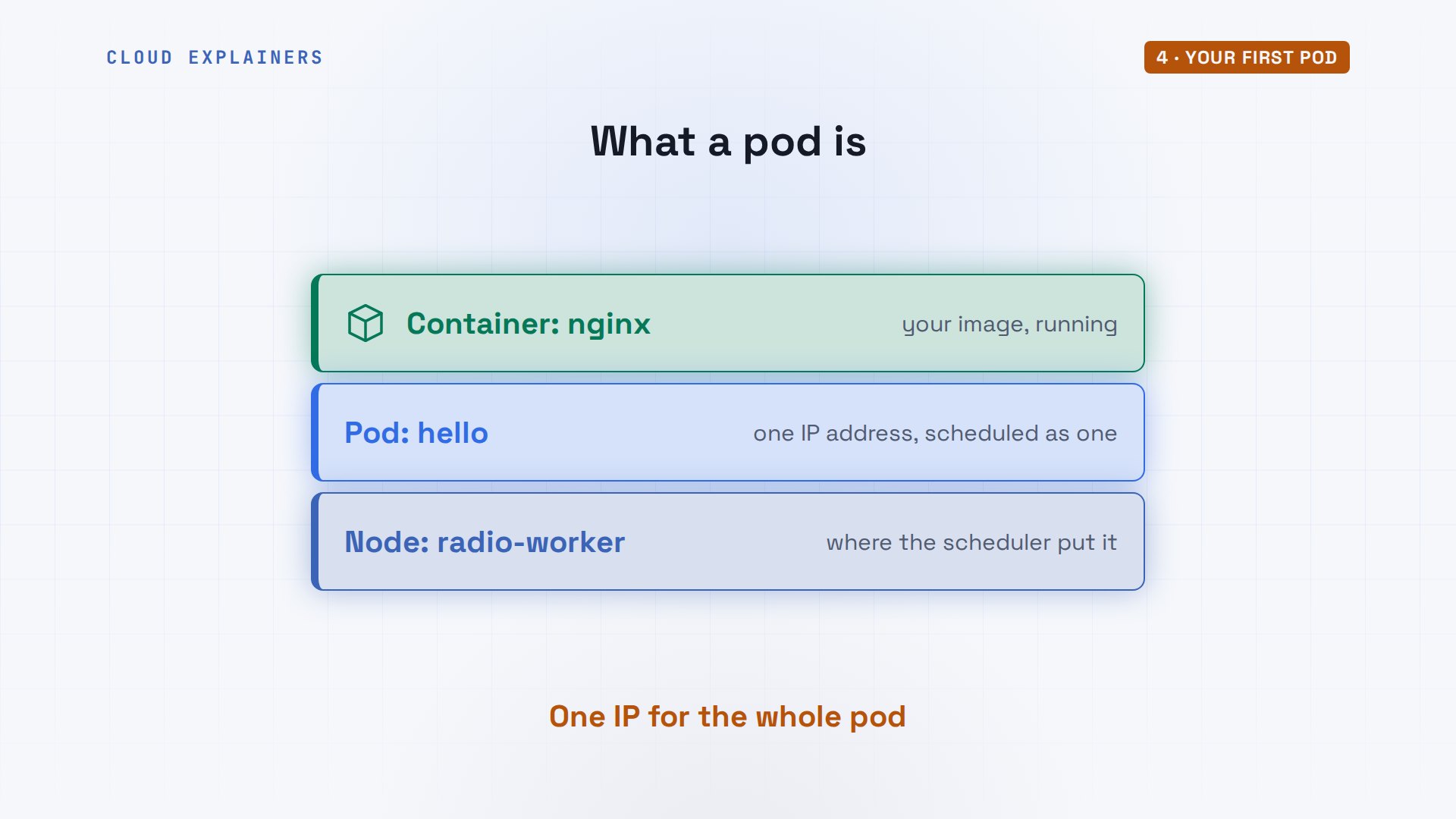
The quickest way to make one: kubectl run, a name, and an image. Right away it's still being created, its image downloading. A few seconds later it's Running, on radio-worker: the scheduler picked that node. The custom columns option just picks which columns to print: the pod, its status, and its node.
kubectl run hello --image=nginx:alpinepod/hello created
kubectl get podsNAME    READY   STATUS              RESTARTS   AGE
hello   0/1     ContainerCreating   0          0s
kubectl get pods -o custom-columns=POD:.metadata.name,STATUS:.status.phase,NODE:.spec.nodeNamePOD     STATUS    NODE
hello   Running   radio-worker
kubectl describe tells its story; tail keeps only its last lines, the events, oldest first. Scheduled, by the scheduler. Then the kubelet on that node pulls the image, creates the container, and starts it. Whenever a pod misbehaves, these events are where you look first.
kubectl describe pod hello | tail -n 6---- ------ ---- ---- ------- Normal Scheduled 3s default-scheduler Successfully assigned default/hello to radio-worker Normal Pulling 3s kubelet spec.containers{hello}: Pulling image "nginx:alpine" Normal Pulled 1s kubelet spec.containers{hello}: Successfully pulled image "nginx:alpine" in 1.664s (1.664s including waiting). Image size: 26292700 bytes. Normal Created 1s kubelet spec.containers{hello}: Container created Normal Started 1s kubelet spec.containers{hello}: Container started
kubectl logs shows what the container printed, here nginx starting up. kubectl exec runs a command inside it: here, nginx prints its version number. Between them, describe, logs and exec answer most questions about what a pod is doing.
kubectl logs hello | tail -n 22026/11/18 18:14:13 [notice] 1#1: start worker process 42
2026/11/18 18:14:13 [notice] 1#1: start worker process 43
kubectl exec hello -- nginx -vnginx version: nginx/1.31.9
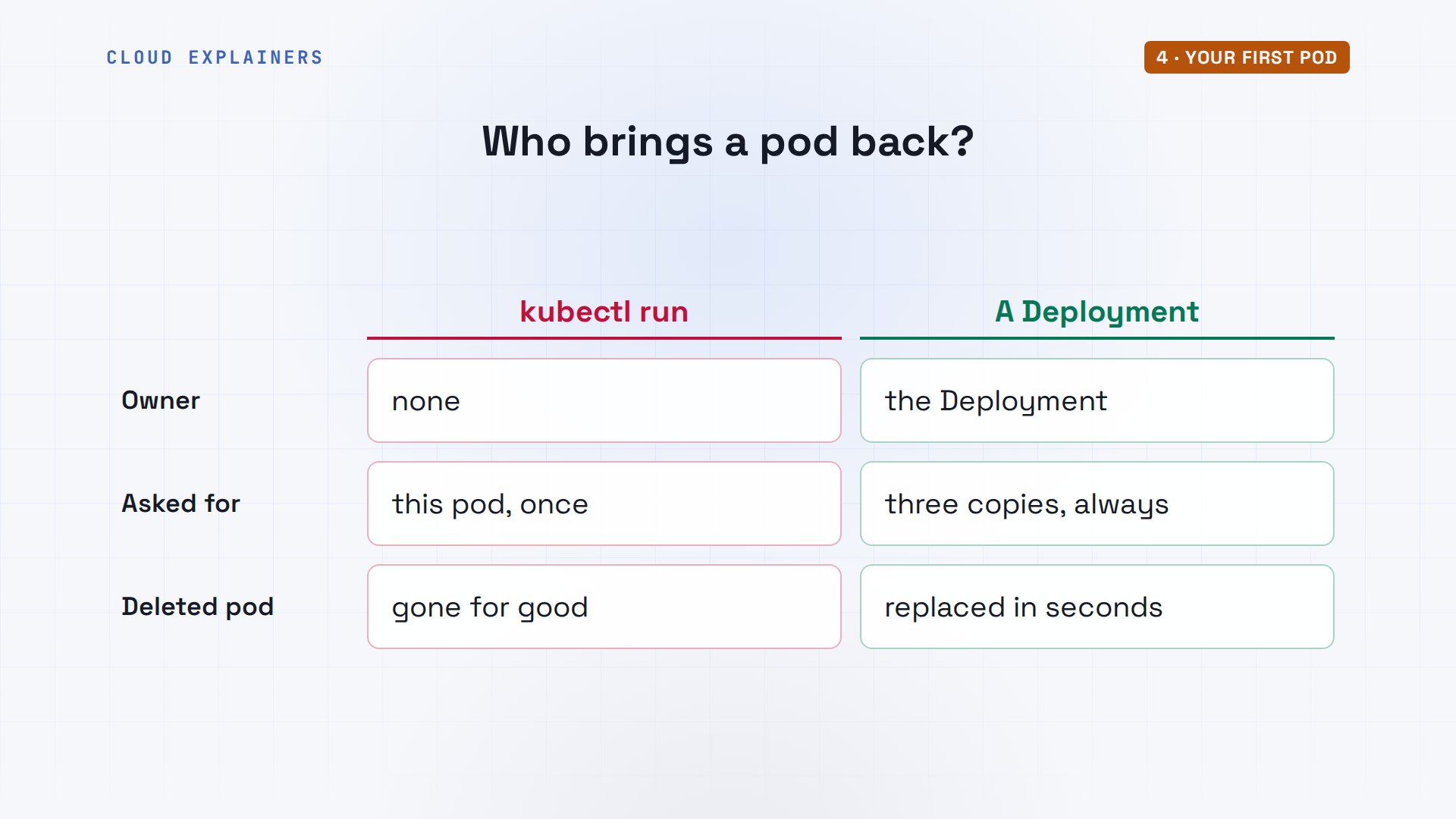
Now Ana deletes it. At the start, a deleted pod came back. Guess first: does this one? No. No resources found: it's gone for good, and nothing will bring it back.
kubectl delete pod hellopod "hello" deleted from default namespace
kubectl get podsNo resources found in default namespace.
Why? Nothing asked for this pod to keep existing. Ana made it once, by hand, so there was no course for the helmsman to steer back to. The pod in the opening had an owner that wants three copies: a Deployment. To get one, Ana first needs her own app as an image.
Your app as an image
Her app is one Python file, app.py, a small web page with the listeners' song requests. Its Dockerfile starts from Python and runs it. She builds it as requests, version 1.0, as in our Docker tutorial. But Kubernetes doesn't run images from her laptop's Docker. Each node needs a copy: on a real cluster you'd push it to a registry; with kind, kind load copies it into every node.
cat app/DockerfileFROM python:3.13-alpine
WORKDIR /app
COPY app.py .
CMD ["python", "app.py"]
docker build -q -t requests:1.0 appsha256:6c06c0b36f6ee2dbb58feeca3eb1a23dfce4a10e592c56f9b6b87fb6e5a50780
kind load docker-image requests:1.0 --name radioImage: "requests:1.0" with ID "sha256:6c06c0b36f6ee2dbb58feeca3eb1a23dfce4a10e592c56f9b6b87fb6e5a50780" not yet present on node "radio-worker", loading...
Image: "requests:1.0" with ID "sha256:6c06c0b36f6ee2dbb58feeca3eb1a23dfce4a10e592c56f9b6b87fb6e5a50780" not yet present on node "radio-worker2", loading...
Image: "requests:1.0" with ID "sha256:6c06c0b36f6ee2dbb58feeca3eb1a23dfce4a10e592c56f9b6b87fb6e5a50780" not yet present on node "radio-control-plane", loading...
A Deployment: copies that come back
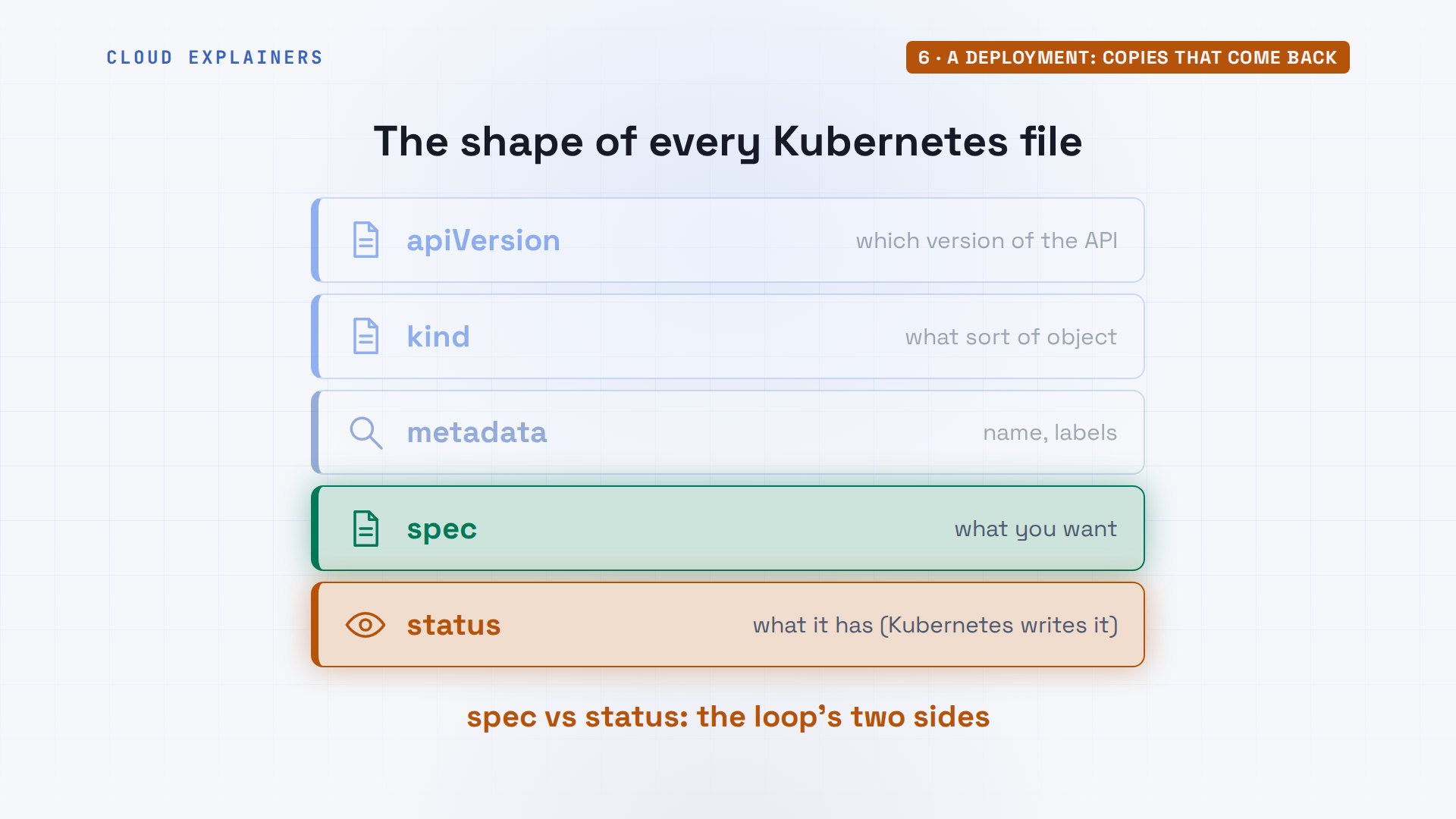
Every Kubernetes file has the same four parts. apiVersion and kind say what sort of object this is. metadata gives it a name and labels. spec is what you want. After you apply it, Kubernetes adds a fifth part, status: what it actually has. The loop from earlier compares the two.
A Deployment is written as a file, in YAML, saved in Ana's radio folder. kind: Deployment, named requests. replicas: three, the course to hold. The template is the pod to make copies of: one container, from her image, listening on port 8080. Each copy gets the label app: requests, and the selector says: the pods with that label are mine.
cat deployment.yamlapiVersion: apps/v1
kind: Deployment
metadata:
  name: requests
spec:
  replicas: 3
  selector:
    matchLabels:
      app: requests
  template:
    metadata:
      labels:
        app: requests
    spec:
      containers:
      - name: board
        image: requests:1.0
        ports:
        - containerPort: 8080
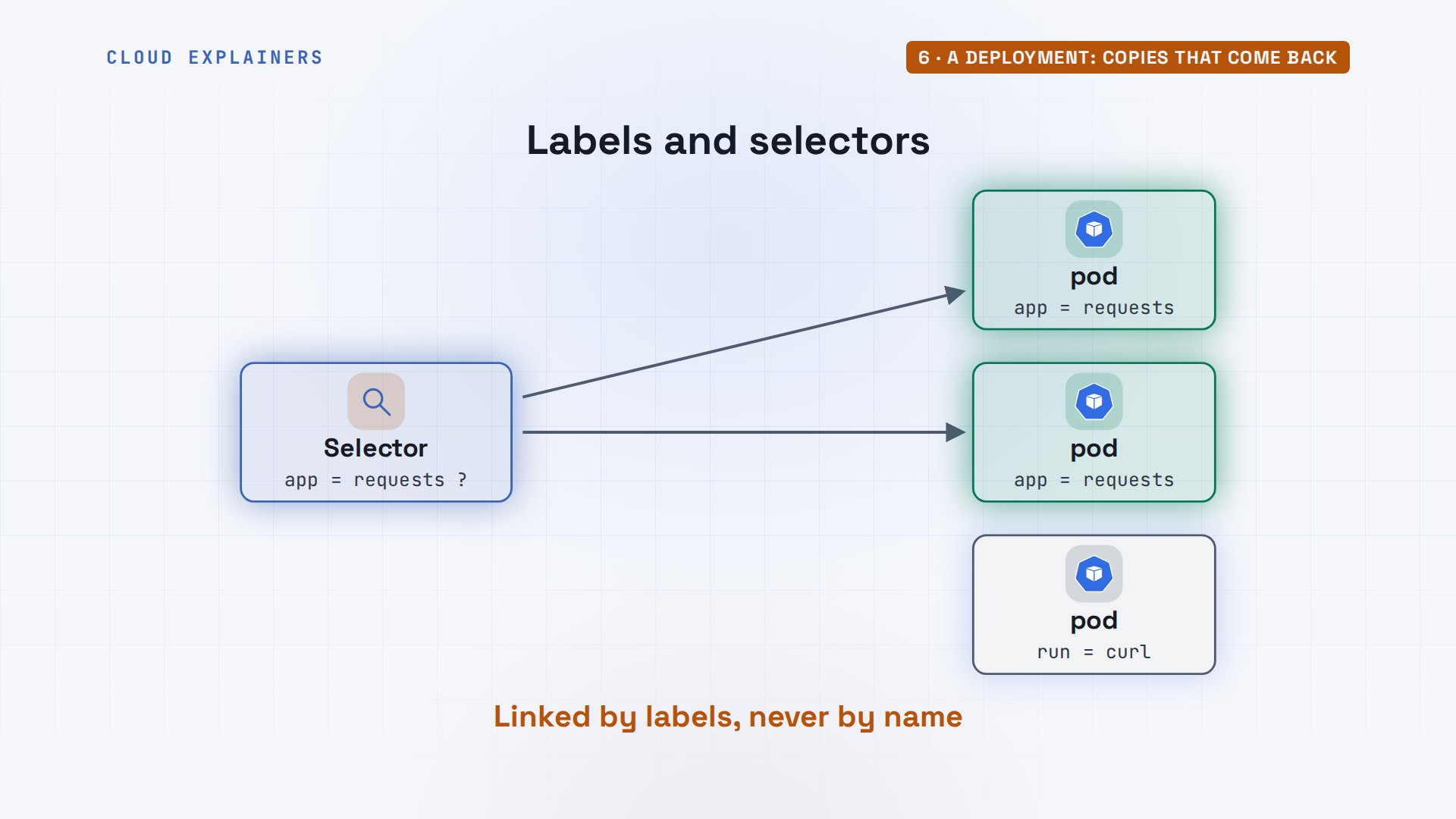
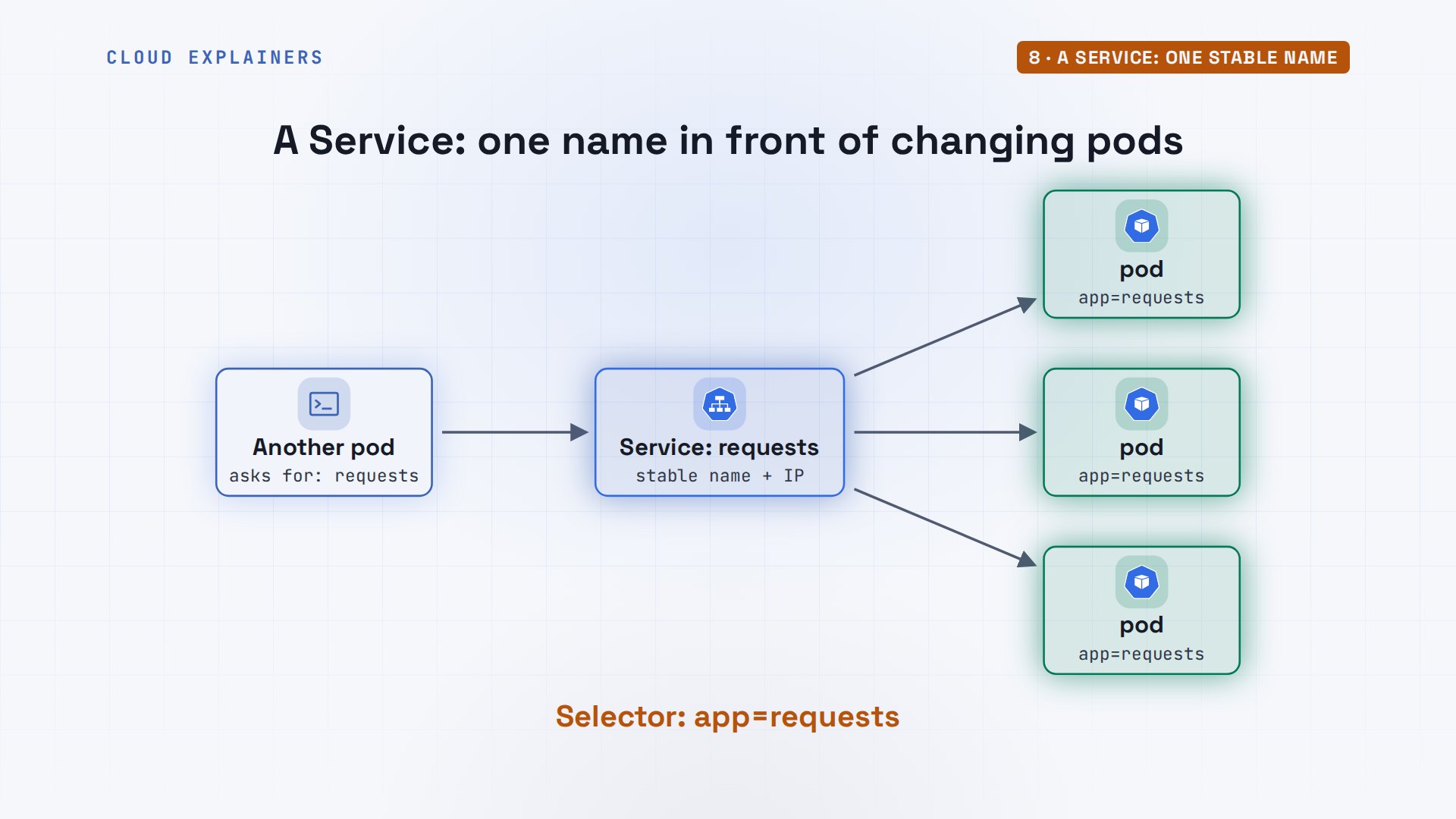
Labels deserve a moment, because Kubernetes runs on them. A label is a sticky note on an object: a key and a value, like app equals requests. A selector is a question: which objects carry this note? The Deployment finds its pods that way, and soon a Service will too. Nothing is linked by name; it's all labels.
One more idea before she applies it. kubectl run was an order: do this now. This file is a description: this is how it should be. Apply the same file twice and nothing changes the second time. Change one line and apply it, and Kubernetes changes only what differs. That's why teams keep these files in Git: the files are the truth.
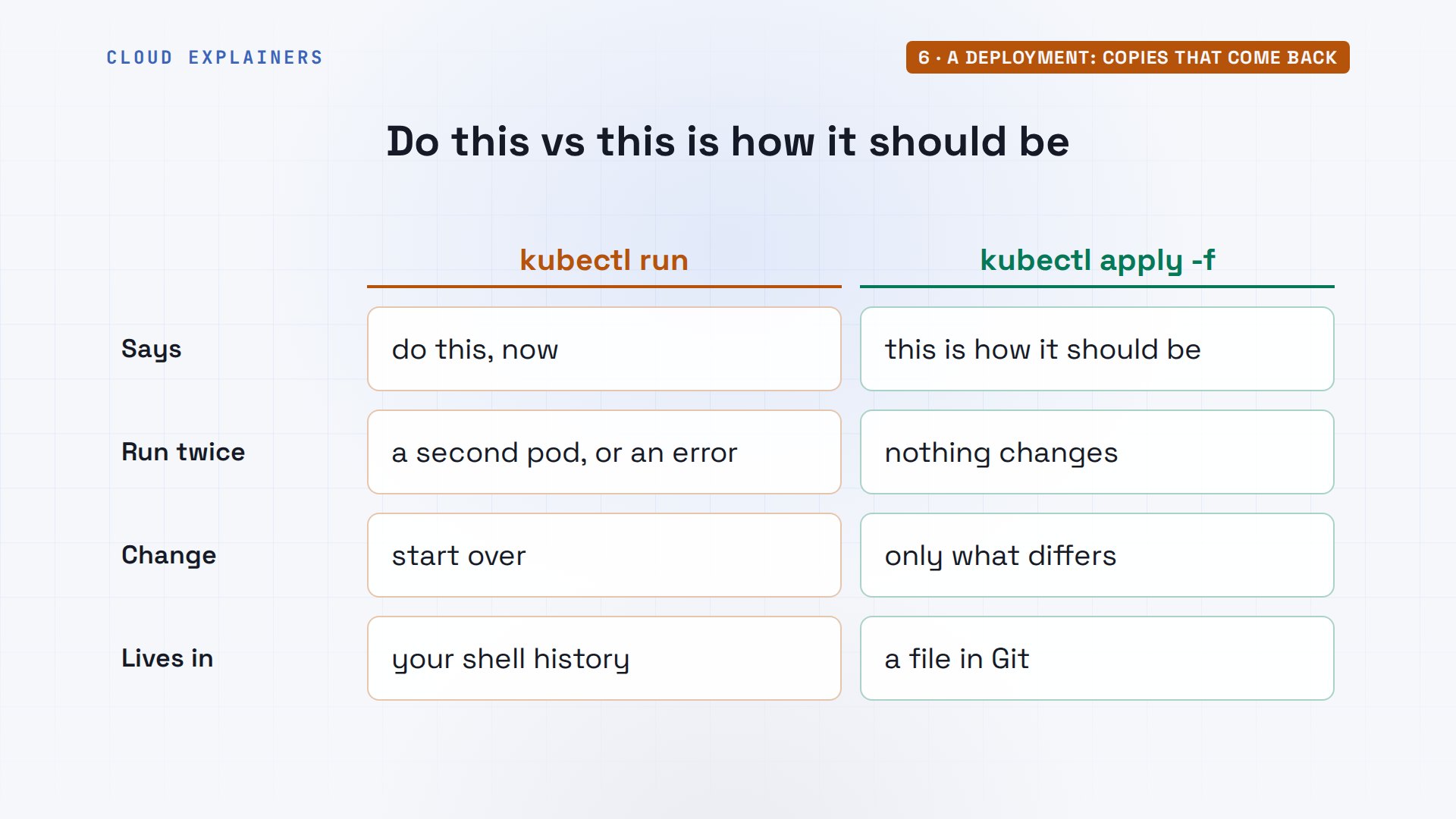
kubectl apply sends the file to the API server. Ana never says start three pods; she says three should exist. The deployment shows 3 of 3 ready. Under it, Kubernetes made a ReplicaSet, because a Deployment doesn't manage pods itself. The ReplicaSet's only job is to keep three pods. And the scheduler spread them over both workers.
kubectl apply -f deployment.yamldeployment.apps/requests created
kubectl get deploymentsNAME       READY   UP-TO-DATE   AVAILABLE   AGE
requests   3/3     3            3           2s
kubectl get replicasetsNAME                  DESIRED   CURRENT   READY   AGE
requests-67d8f9997b   3         3         3       2s
kubectl get pods -o custom-columns=POD:.metadata.name,STATUS:.status.phase,NODE:.spec.nodeNamePOD                         STATUS    NODE
requests-67d8f9997b-88xl9   Running   radio-worker
requests-67d8f9997b-bhz4v   Running   radio-worker2
requests-67d8f9997b-ngwg8   Running   radio-worker
Look at a pod's name. It's built from three parts: the Deployment's name, requests; a hash of the pod template, which names the ReplicaSet; and five random characters for this one pod. Change the template, by a new image for example, and the hash changes: that's how you'll tell old pods from new ones in an update.
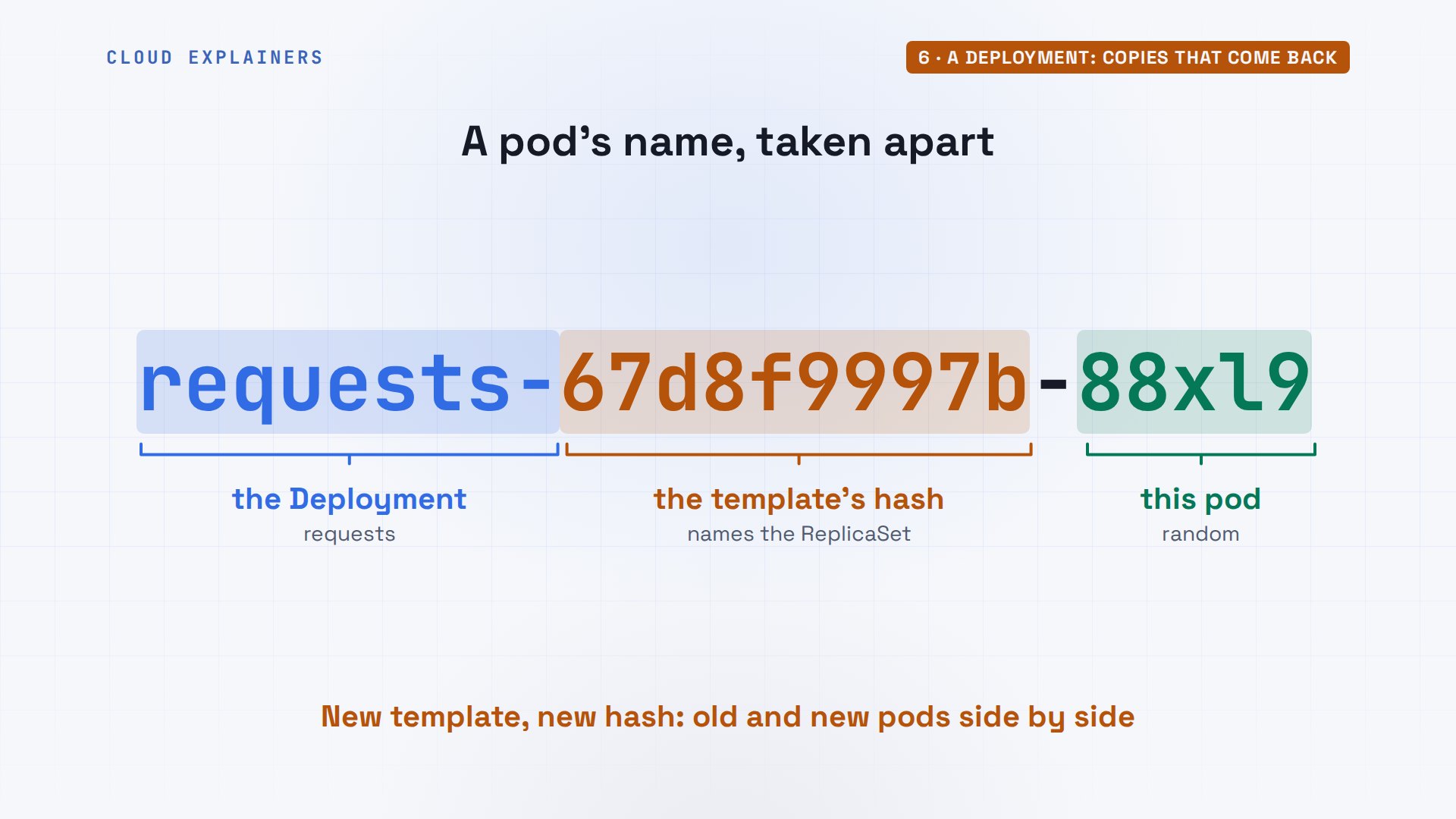
So what happens if Ana deletes every pod at once? All three deleted. The very next command shows three pods, new names, one second old. The ReplicaSet saw zero where it wanted three and made three more. That's the helmsman steering back.
kubectl delete pods --allpod "requests-67d8f9997b-88xl9" deleted from default namespace
pod "requests-67d8f9997b-bhz4v" deleted from default namespace
pod "requests-67d8f9997b-ngwg8" deleted from default namespace
kubectl get podsNAME                        READY   STATUS    RESTARTS   AGE
requests-67d8f9997b-6dmdb   1/1     Running   0          1s
requests-67d8f9997b-j29nx   1/1     Running   0          1s
requests-67d8f9997b-wwxcd   1/1     Running   0          1s
Reading kubectl get pods: READY, one of one, means the pod's one container is ready. STATUS is where it is in its life: Pending, ContainerCreating, Running, or an error. RESTARTS counts how often its container was restarted, and AGE is how long this pod has existed. A low AGE on an app that should be steady means something keeps replacing it.
kubectl get podsNAME                        READY   STATUS    RESTARTS   AGE
requests-67d8f9997b-6dmdb   1/1     Running   0          1s
requests-67d8f9997b-j29nx   1/1     Running   0          1s
requests-67d8f9997b-wwxcd   1/1     Running   0          1s
Scaling, and losing a node
A busy morning show? kubectl scale changes the course to six. Three more pods appear, spread over both workers. Changing replicas in the file and applying it again does the same, and keeps the file true. The scheduler places each new pod on the node with the most room for it.
kubectl scale deployment requests --replicas=6deployment.apps/requests scaled
kubectl get pods -o custom-columns=POD:.metadata.name,STATUS:.status.phase,NODE:.spec.nodeNamePOD                         STATUS    NODE
requests-67d8f9997b-6dmdb   Running   radio-worker2
requests-67d8f9997b-gqzh8   Running   radio-worker
requests-67d8f9997b-j29nx   Running   radio-worker
requests-67d8f9997b-wnb64   Running   radio-worker
requests-67d8f9997b-wwxcd   Running   radio-worker2
requests-67d8f9997b-x8mx5   Running   radio-worker2
What if a node needs to go away, for an upgrade or a repair? kubectl drain marks it unschedulable and evicts its pods: 3 of them. ignore daemonsets leaves alone the system pods that run on every node, like kube-proxy. The ReplicaSet makes replacements, and the scheduler can only put them on radio-worker2. Six pods, one node. get nodes shows the first worker as SchedulingDisabled, until uncordon lets pods back on.
kubectl drain radio-worker --ignore-daemonsetsnode/radio-worker cordoned
Warning: ignoring DaemonSet-managed Pods: kube-system/kindnet-xlvhd, kube-system/kube-proxy-hhhwb
evicting pod default/requests-67d8f9997b-wnb64
evicting pod default/requests-67d8f9997b-gqzh8
evicting pod default/requests-67d8f9997b-j29nx
pod/requests-67d8f9997b-gqzh8 evicted
pod/requests-67d8f9997b-wnb64 evicted
pod/requests-67d8f9997b-j29nx evicted
node/radio-worker drained
kubectl get pods -o custom-columns=POD:.metadata.name,STATUS:.status.phase,NODE:.spec.nodeNamePOD                         STATUS    NODE
requests-67d8f9997b-6dmdb   Running   radio-worker2
requests-67d8f9997b-b6tql   Running   radio-worker2
requests-67d8f9997b-mb4lp   Running   radio-worker2
requests-67d8f9997b-rc29s   Running   radio-worker2
requests-67d8f9997b-wwxcd   Running   radio-worker2
requests-67d8f9997b-x8mx5   Running   radio-worker2
kubectl get nodesNAME                  STATUS                     ROLES           AGE   VERSION
radio-control-plane   Ready                      control-plane   43s   v1.37.0
radio-worker          Ready,SchedulingDisabled   <none>          29s   v1.37.0
radio-worker2         Ready                      <none>          29s   v1.37.0
kubectl uncordon radio-workernode/radio-worker uncordoned
A Service: one stable name
Each pod has its own IP address, and every replacement gets a new one. So how does anything find the app? A Service: one stable name and address in front of the pods. It picks its pods by label, and spreads each request to one of them.
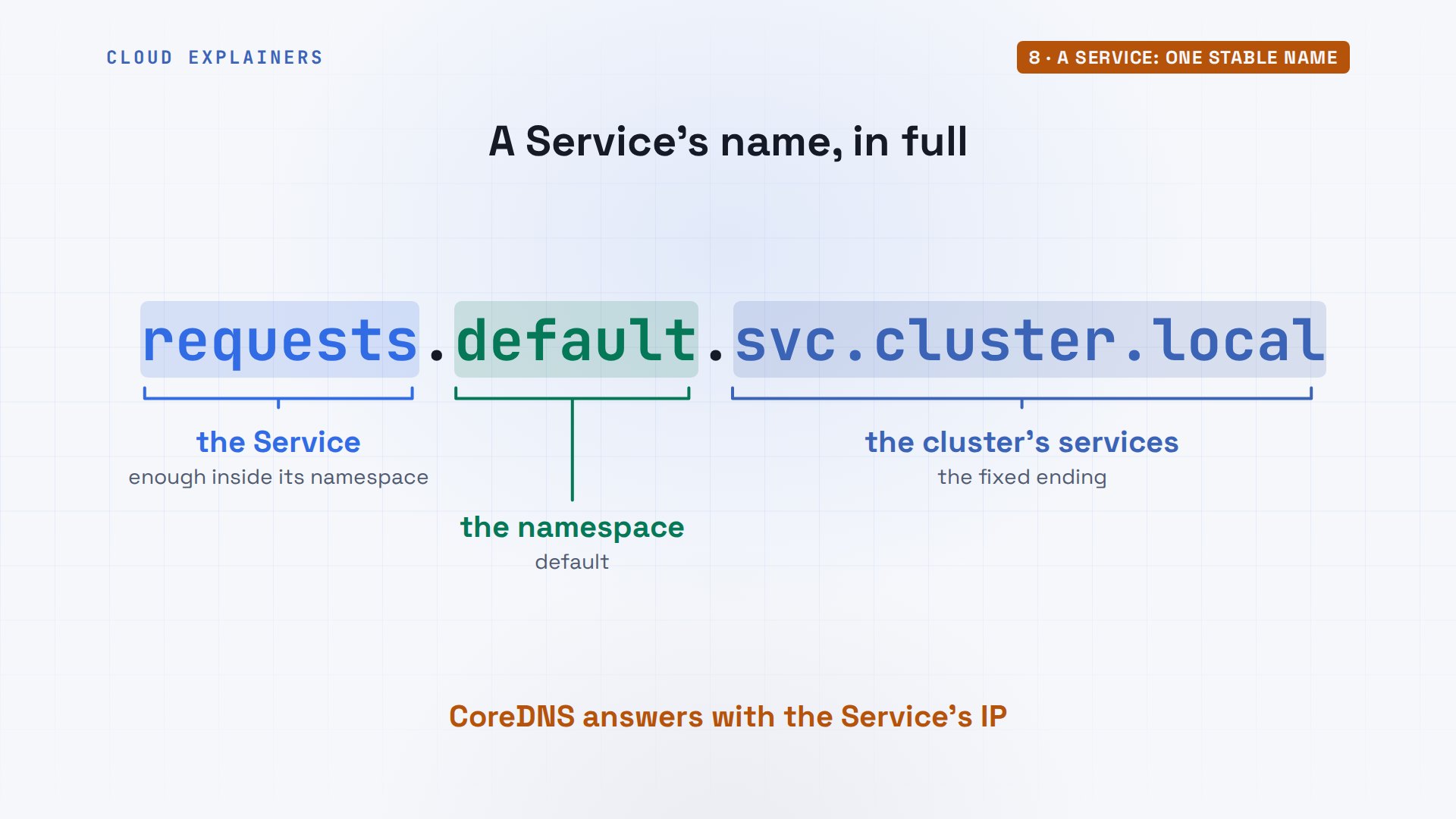
Every Service also gets a name in the cluster's DNS. Inside the same namespace, just requests is enough. The full name adds the namespace, then svc, then cluster.local, which reaches it from any namespace. CoreDNS, one of the system pods, answers those names with the Service's address.
To test from inside the cluster, Ana starts a small pod with curl in it, told to sleep forever so it stays up. Her Service file: name requests, port 80 forwarded to the pods' 8080, and a selector. She applies it, and gets a cluster IP address, a virtual address that stays the same however often the pods behind it change.
kubectl run curl --image=curlimages/curl --command -- sleep infinitypod/curl created
cat service.yamlapiVersion: v1
kind: Service
metadata:
  name: requests
spec:
  selector:
    app: request
  ports:
  - port: 80
    targetPort: 8080
kubectl apply -f service.yamlservice/requests created
kubectl get service requestsNAME       TYPE        CLUSTER-IP      EXTERNAL-IP   PORT(S)   AGE
requests   ClusterIP   10.96.106.204   <none>        80/TCP    0s
With kubectl exec, she runs curl inside that pod and asks for requests, by name. Could not connect to server. The name worked, so the Service exists, but describe shows its Endpoints line empty: no pods behind it. Why? show labels prints each pod's labels: app equals requests. Her selector says request, without the s. It matches nothing.
kubectl exec curl -- curl -sS requests/whoamicurl: (7) Failed to connect to requests:80 after 0 ms: Could not connect to server
command terminated with exit code 7
kubectl describe service requests | grep EndpointsEndpoints:
kubectl get pods --show-labelsNAME                        READY   STATUS    RESTARTS   AGE   LABELS
curl                        1/1     Running   0          5s    run=curl
requests-67d8f9997b-6dmdb   1/1     Running   0          9s    app=requests,pod-template-hash=67d8f9997b
requests-67d8f9997b-wwxcd   1/1     Running   0          9s    app=requests,pod-template-hash=67d8f9997b
requests-67d8f9997b-x8mx5   1/1     Running   0          8s    app=requests,pod-template-hash=67d8f9997b
One letter is the fix.
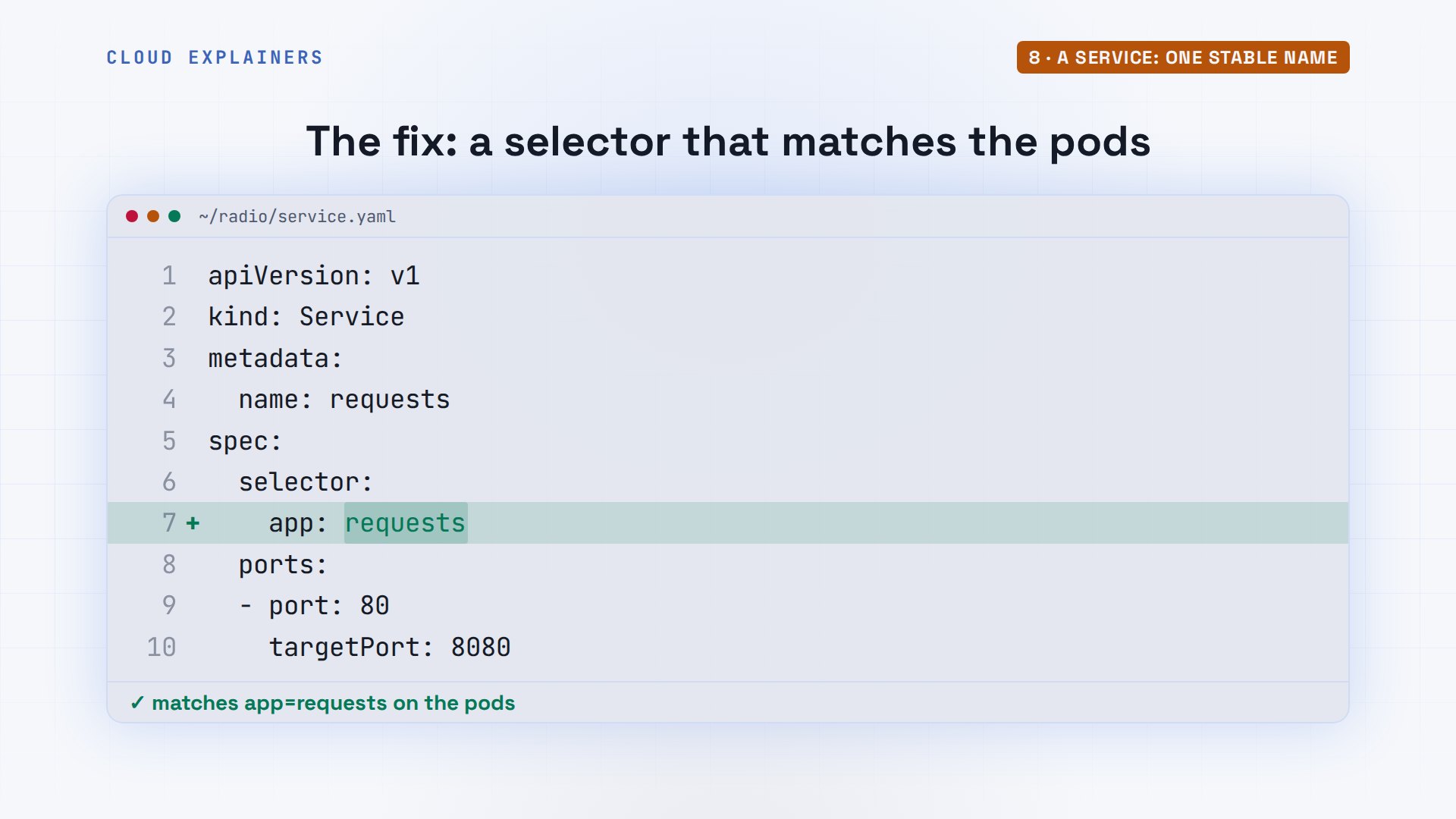
Applied again, the Service has 3 endpoints, one per pod. Ana asks six times: every request answered, by different pods. The Service spreads requests over its endpoints; which pod answers is up to it.
kubectl apply -f service.yamlservice/requests configured
kubectl describe service requests | grep EndpointsEndpoints: 10.244.2.4:8080,10.244.2.5:8080,10.244.2.3:8080
for i in 1 2 3 4 5 6; do kubectl exec curl -- curl -s requests/whoami; donerequests-67d8f9997b-x8mx5 v1.0
requests-67d8f9997b-x8mx5 v1.0
requests-67d8f9997b-6dmdb v1.0
requests-67d8f9997b-6dmdb v1.0
requests-67d8f9997b-wwxcd v1.0
requests-67d8f9997b-6dmdb v1.0
That address only works inside the cluster: it's the default type, ClusterIP. To reach the app from outside, a Service can be a NodePort, a port on every node, or a LoadBalancer, which asks a cloud for a public address. On her laptop, Ana uses the simplest way: kubectl port-forward, a tunnel from a port on her laptop to the Service, for as long as the command runs.
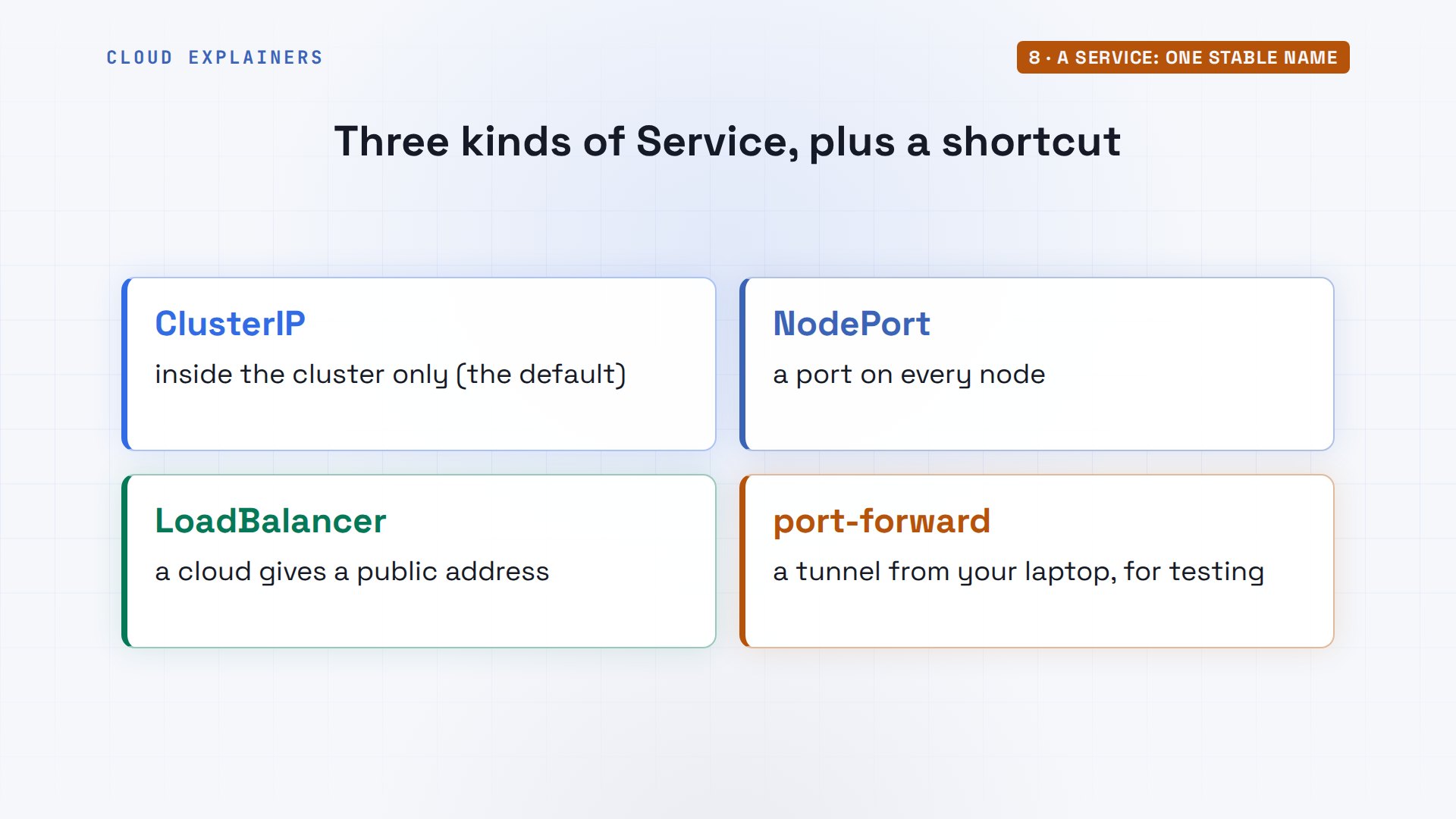
In a second window, kubectl port-forward connects port 8080 on her laptop to the Service, and keeps running while she works. It prints 8080 twice because it goes straight to the port the pods listen on, behind the Service.
kubectl port-forward service/requests 8080:80Forwarding from 127.0.0.1:8080 -> 8080
Forwarding from [::1]:8080 -> 8080
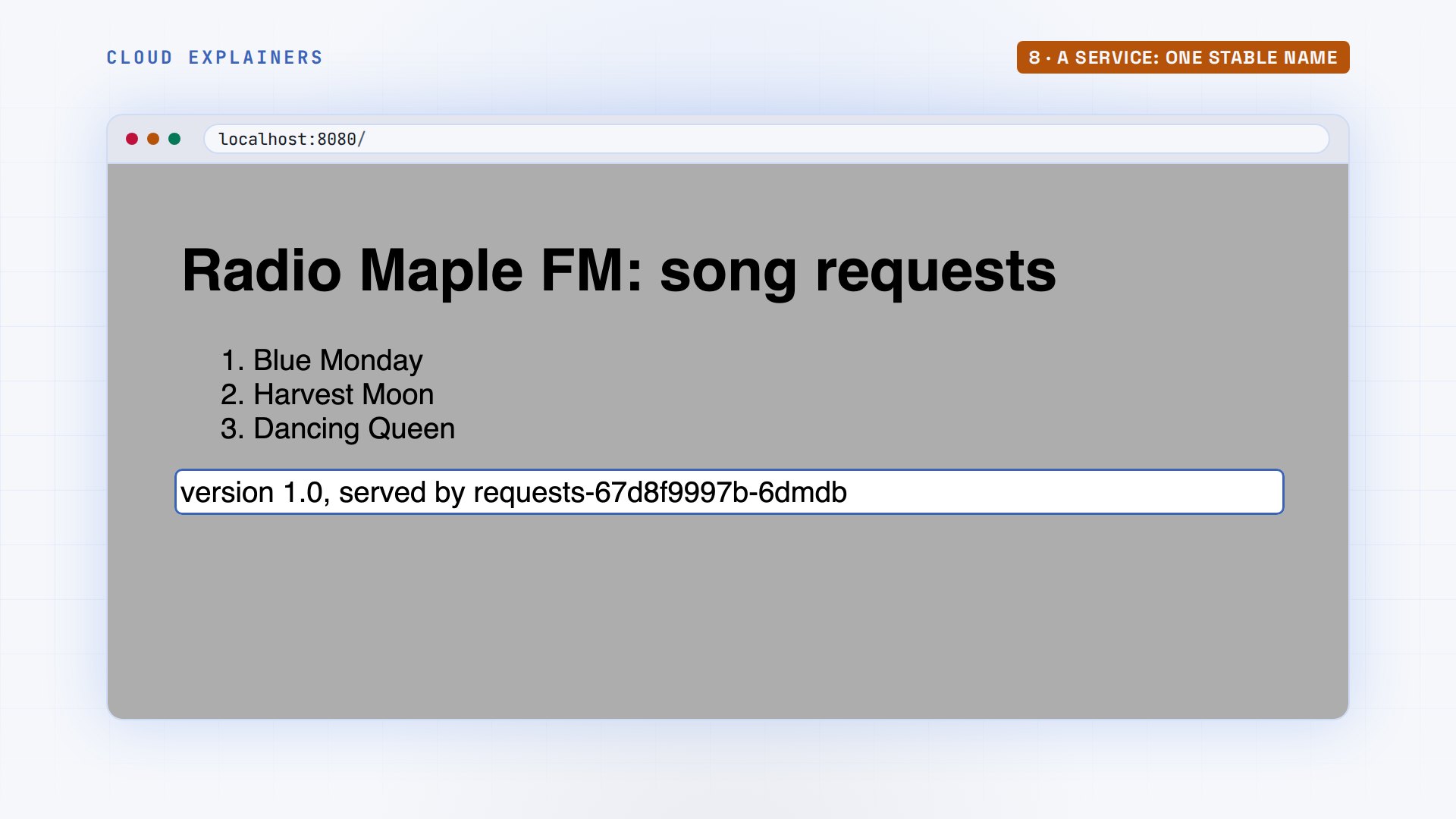
Her browser, at localhost port 8080, shows the request board, version 1.0, served by one of the pods.
An update that fails twice
Version 2 shows the show that's on air now. It reads that from an environment variable, ON_AIR. Ana builds requests:2.0, changes the image line in her Deployment, and applies it.
grep ON_AIR app/app.py# The song request board of a small community radio station, Radio Maple FM. Version 2.0: shows the show on air now, from ON_AIR.
ON_AIR = os.environ["ON_AIR"]   # set by the station's ConfigMap
                    f"<p>On air now: {ON_AIR}</p><ol>{items}</ol><p>version {VERSION}, served by {POD}</p>")
docker build -q -t requests:2.0 appsha256:9751e7bf1d9e7adbb480ac9b4e1c50d0ce64a4521e4794c6ef83a1e90a71590f
grep image: deployment.yamlimage: requests:2.0
kubectl apply -f deployment.yamldeployment.apps/requests configured
A Deployment updates gently, a rolling update. It starts one new pod, and only when that one is up does it remove an old one, then the next. So the station never goes dark, as long as Kubernetes can tell when a new pod is really working. Keep that in mind.
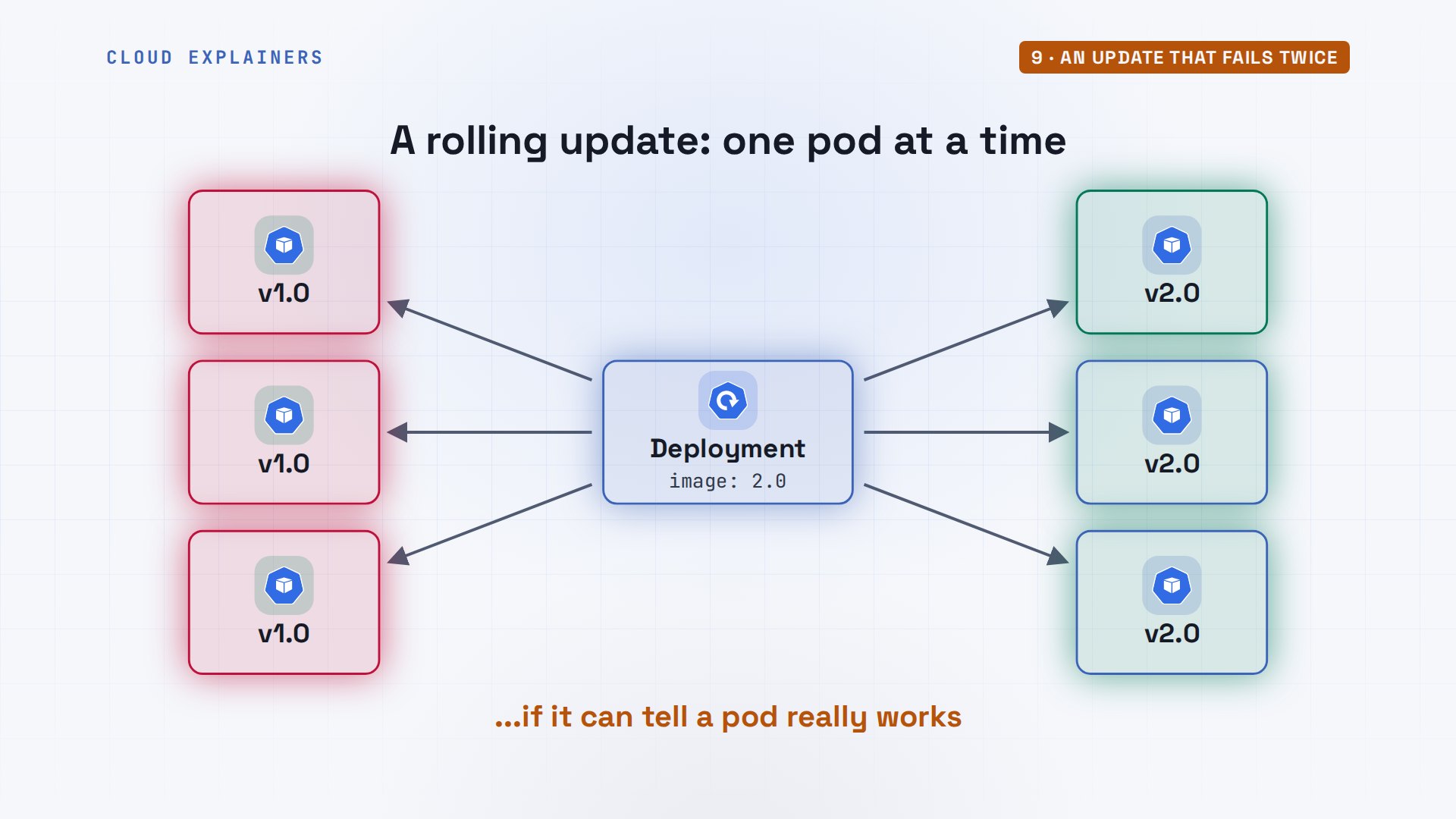
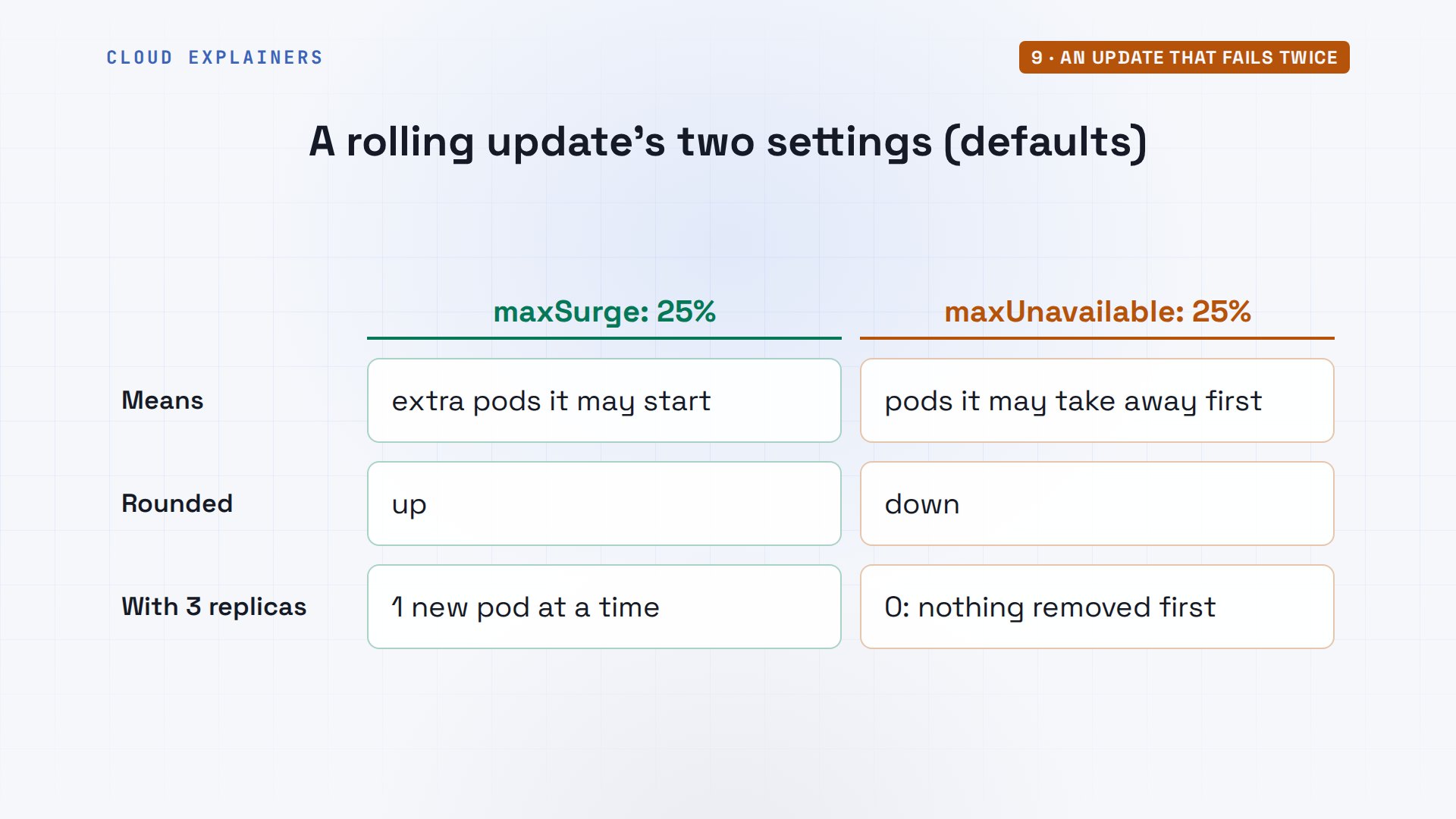
How gently? Two settings decide. max surge: how many extra pods it may start, a quarter of the replicas, rounded up: one, here. max unavailable: how many it may take away first, a quarter rounded down: zero. So with three replicas, Kubernetes starts one new pod and removes nothing until that pod is ready.
Seconds later: one new pod, stuck in ImagePullBackOff, and three old ones still Running. Guess first: what does the radio's page show right now? Version 1.0. The old pods carry on while the new one fails.
kubectl get podsNAME                        READY   STATUS             RESTARTS   AGE
curl                        1/1     Running            0          26s
requests-5c8f69c89-c9hz8    0/1     ImagePullBackOff   0          14s
requests-67d8f9997b-6dmdb   1/1     Running            0          30s
requests-67d8f9997b-wwxcd   1/1     Running            0          30s
requests-67d8f9997b-x8mx5   1/1     Running            0          29s
kubectl exec curl -- curl -s requests/whoamirequests-67d8f9997b-6dmdb v1.0
Why can't it start? describe ends with the reason: pull access denied. The node looked for requests:2.0 on Docker Hub, because Ana built it but never loaded it into the nodes. Back off means Kubernetes keeps retrying, waiting longer each time. And rollout status waits at one of three: the update is stuck, safely.
kubectl describe pod requests-5c8f69c89-c9hz8 | grep Failed | tail -n 2Warning Failed 0s (x2 over 13s) kubelet spec.containers{board}: Failed to pull image "requests:2.0": failed to pull and unpack image "docker.io/library/requests:2.0": failed to resolve reference "docker.io/library/requests:2.0": pull access denied, repository does not exist or may require authorization: server message: insufficient_scope: authorization failed Warning Failed 0s (x2 over 13s) kubelet spec.containers{board}: Error: ErrImagePull
kubectl rollout status deployment requests --timeout=5sWaiting for deployment "requests" rollout to finish: 1 out of 3 new replicas have been updated...
error: timed out waiting for the condition
So she loads the image. The kubelet's next retry finds it, the new pods start, and then this: CrashLoopBackOff, and the old pods are gone. The page doesn't answer at all. The station went dark, which the rolling update was supposed to prevent. Two failures in a row, and the second one was worse.
kind load docker-image requests:2.0 --name radioImage: "requests:2.0" with ID "sha256:9751e7bf1d9e7adbb480ac9b4e1c50d0ce64a4521e4794c6ef83a1e90a71590f" not yet present on node "radio-worker", loading...
Image: "requests:2.0" with ID "sha256:9751e7bf1d9e7adbb480ac9b4e1c50d0ce64a4521e4794c6ef83a1e90a71590f" not yet present on node "radio-worker2", loading...
Image: "requests:2.0" with ID "sha256:9751e7bf1d9e7adbb480ac9b4e1c50d0ce64a4521e4794c6ef83a1e90a71590f" not yet present on node "radio-control-plane", loading...
kubectl get podsNAME                       READY   STATUS             RESTARTS       AGE
curl                       1/1     Running            0              3m23s
requests-5c8f69c89-c9hz8   0/1     Error              4 (2m1s ago)   3m11s
requests-5c8f69c89-n8tvx   0/1     Error              4 (2m ago)     2m43s
requests-5c8f69c89-w6dhc   0/1     CrashLoopBackOff   4 (74s ago)    2m43s
kubectl exec curl -- curl -sS requests/whoamicurl: (7) Failed to connect to requests:80 after 0 ms: Could not connect to server
command terminated with exit code 7
logs with dash dash previous show the run that crashed, and say why: KeyError, ON_AIR. Version 2 needs that variable, and nothing sets it. But why did the old pods go? Each new container ran for a moment before crashing, and with no readiness check, running counts as ready. So the rollout moved on and removed them. A readiness probe, a health check Kubernetes calls, prevents exactly that.
kubectl logs requests-5c8f69c89-w6dhc --previous | tail -n 2File "<frozen os>", line 717, in __getitem__ KeyError: 'ON_AIR'
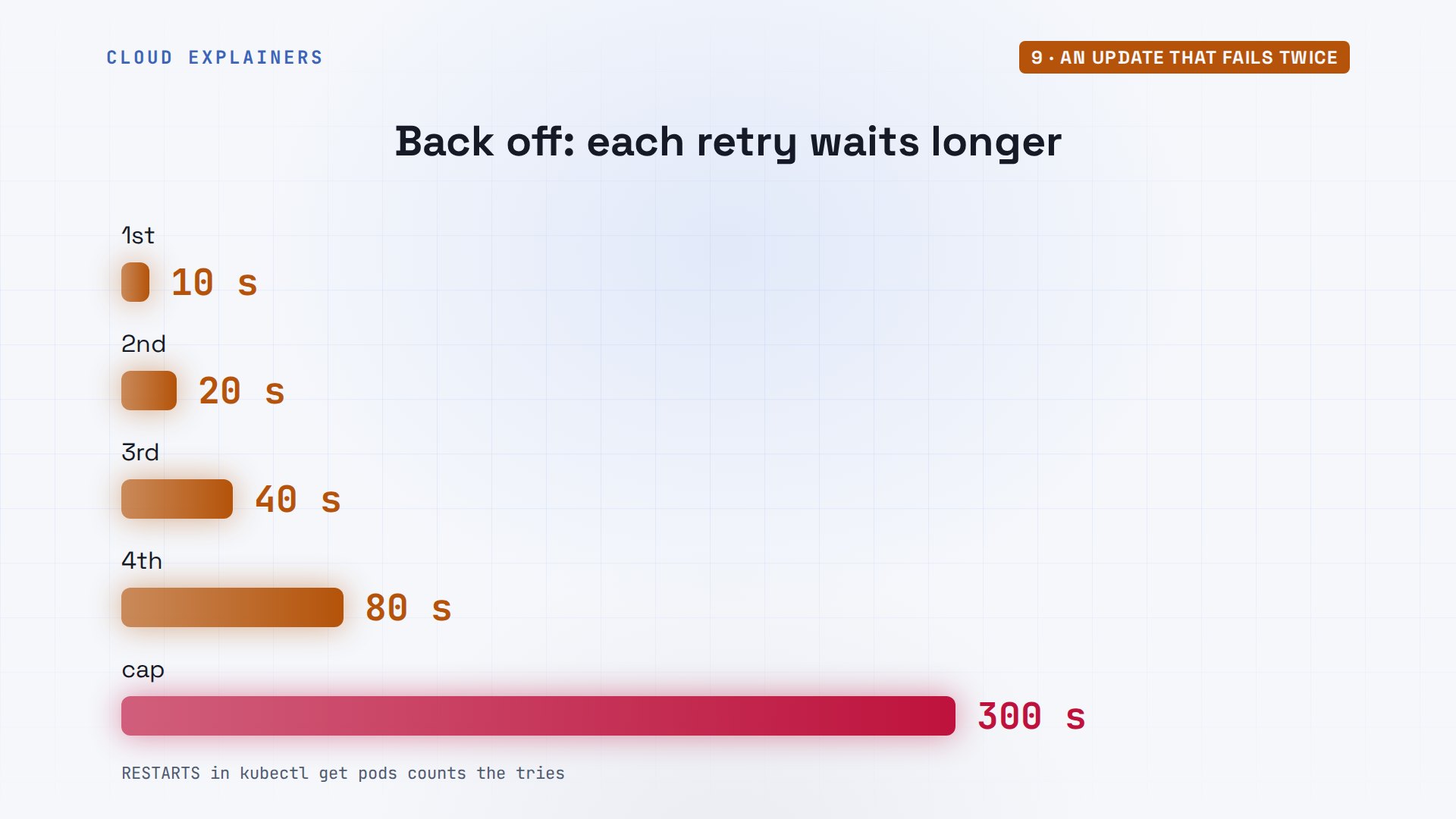
What do the two back offs mean? Both say: this failed, and Kubernetes will try again, later each time. The wait doubles, ten seconds, twenty, forty, up to five minutes. So a fix doesn't always show at once: the pod may be waiting out its back off. The RESTARTS column counts the tries.
First, get the station back on air. kubectl rollout undo returns to the previous version. It warns that her file and the cluster now differ; she'll fix the file next. Three pods Running, and the page answers again: version 1.0.
kubectl rollout undo deployment requestsWarning: resource deployments/requests was previously managed with 'kubectl apply'. Rolling back will not update the kubectl.kubernetes.io/last-applied-configuration annotation, which may cause unexpected behavior on future 'kubectl apply' operations. Consider using 'kubectl apply' with your previous configuration file instead.
deployment.apps/requests rolled back
kubectl get podsNAME                        READY   STATUS    RESTARTS   AGE
curl                        1/1     Running   0          3m26s
requests-67d8f9997b-d7rpv   1/1     Running   0          3s
requests-67d8f9997b-rmj6r   1/1     Running   0          3s
requests-67d8f9997b-zlsrd   1/1     Running   0          2s
kubectl exec curl -- curl -s requests/whoamirequests-67d8f9997b-rmj6r v1.0
Settings: ConfigMaps
Settings like ON_AIR don't belong in the image. They go in a ConfigMap: a named set of keys and values, here ON_AIR, The Breakfast Show. In the Deployment, envFrom turns every key of the station ConfigMap into an environment variable in the container.
cat configmap.yamlapiVersion: v1
kind: ConfigMap
metadata:
  name: station
data:
  ON_AIR: "The Breakfast Show"
kubectl apply -f configmap.yamlconfigmap/station created
tail -n 6 deployment.yamlimage: requests:2.0 ports: - containerPort: 8080 envFrom: - configMapRef: name: station
Apply, and this time the rollout finishes: successfully rolled out. Each new pod got ON_AIR from the ConfigMap, so none of them crashed. And the page now says: on air now, The Breakfast Show.
kubectl apply -f deployment.yamldeployment.apps/requests configured
kubectl rollout status deployment requestsWaiting for deployment "requests" rollout to finish: 1 out of 3 new replicas have been updated...
Waiting for deployment "requests" rollout to finish: 1 out of 3 new replicas have been updated...
Waiting for deployment "requests" rollout to finish: 1 out of 3 new replicas have been updated...
Waiting for deployment "requests" rollout to finish: 2 out of 3 new replicas have been updated...
Waiting for deployment "requests" rollout to finish: 2 out of 3 new replicas have been updated...
Waiting for deployment "requests" rollout to finish: 2 out of 3 new replicas have been updated...
Waiting for deployment "requests" rollout to finish: 2 out of 3 new replicas have been updated...
Waiting for deployment "requests" rollout to finish: 1 old replicas are pending termination...
Waiting for deployment "requests" rollout to finish: 1 old replicas are pending termination...
Waiting for deployment "requests" rollout to finish: 1 old replicas are pending termination...
deployment "requests" successfully rolled out
kubectl exec curl -- curl -s requests | grep -o 'On air now: [^<]*'On air now: The Breakfast Show
At noon the show changes. Ana sets ON_AIR to Lunchtime Jazz and applies the ConfigMap. The pods still say The Breakfast Show. Environment variables are read once, when a container starts. rollout restart replaces the pods, one by one, and the new ones read Lunchtime Jazz.
kubectl apply -f configmap.yamlconfigmap/station configured
kubectl exec deploy/requests -- printenv ON_AIRThe Breakfast Show
kubectl rollout restart deployment requestsdeployment.apps/requests restarted
kubectl exec deploy/requests -- printenv ON_AIRLunchtime Jazz
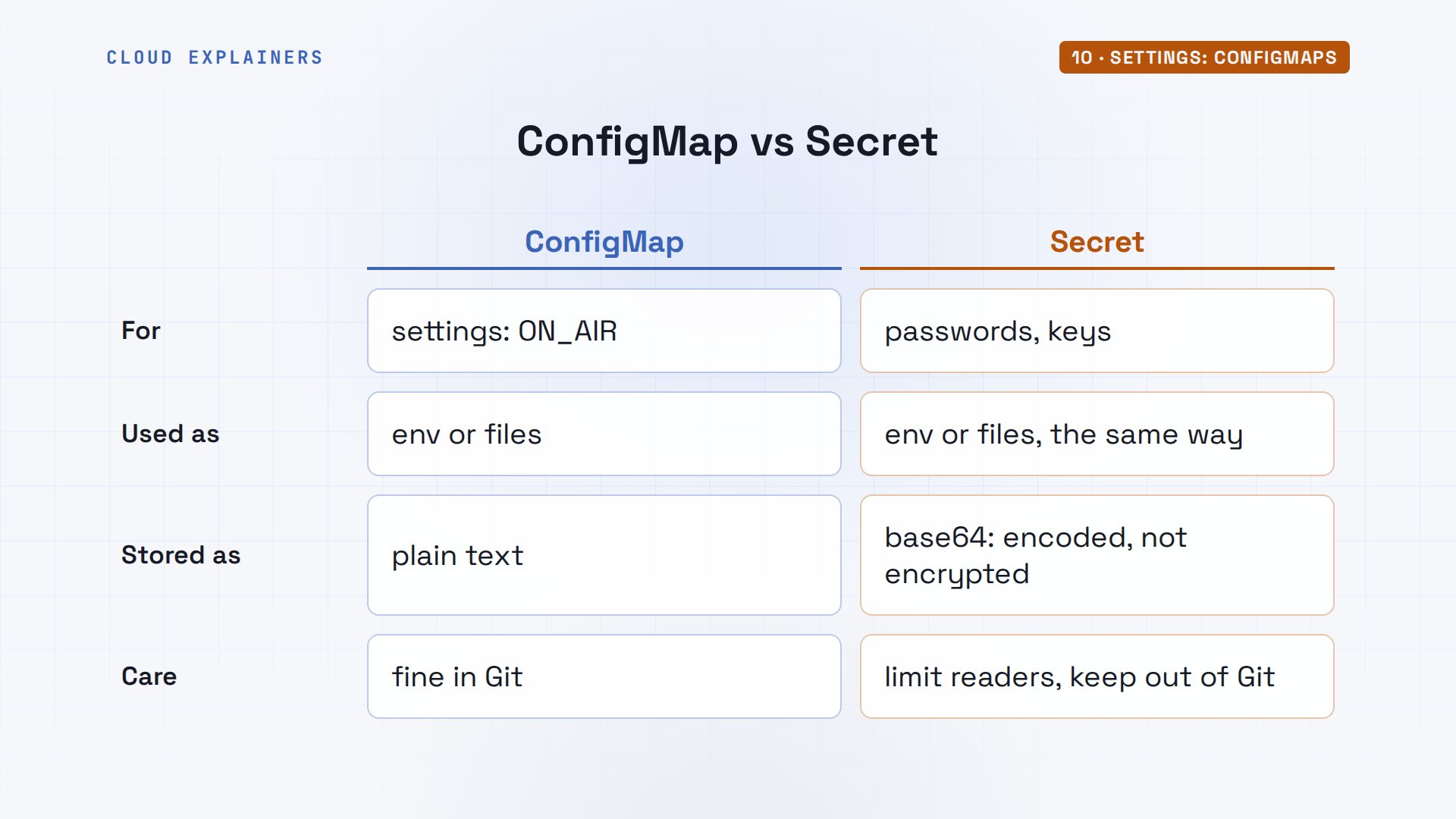
What about a password, like a database login? That goes in a Secret, used the same way. But a Secret is only encoded, in base64, a reversible way to write bytes as letters, not encrypted by default: anyone allowed to read it in the cluster can decode it. So limit who can read Secrets, and never commit them to Git as plain files.
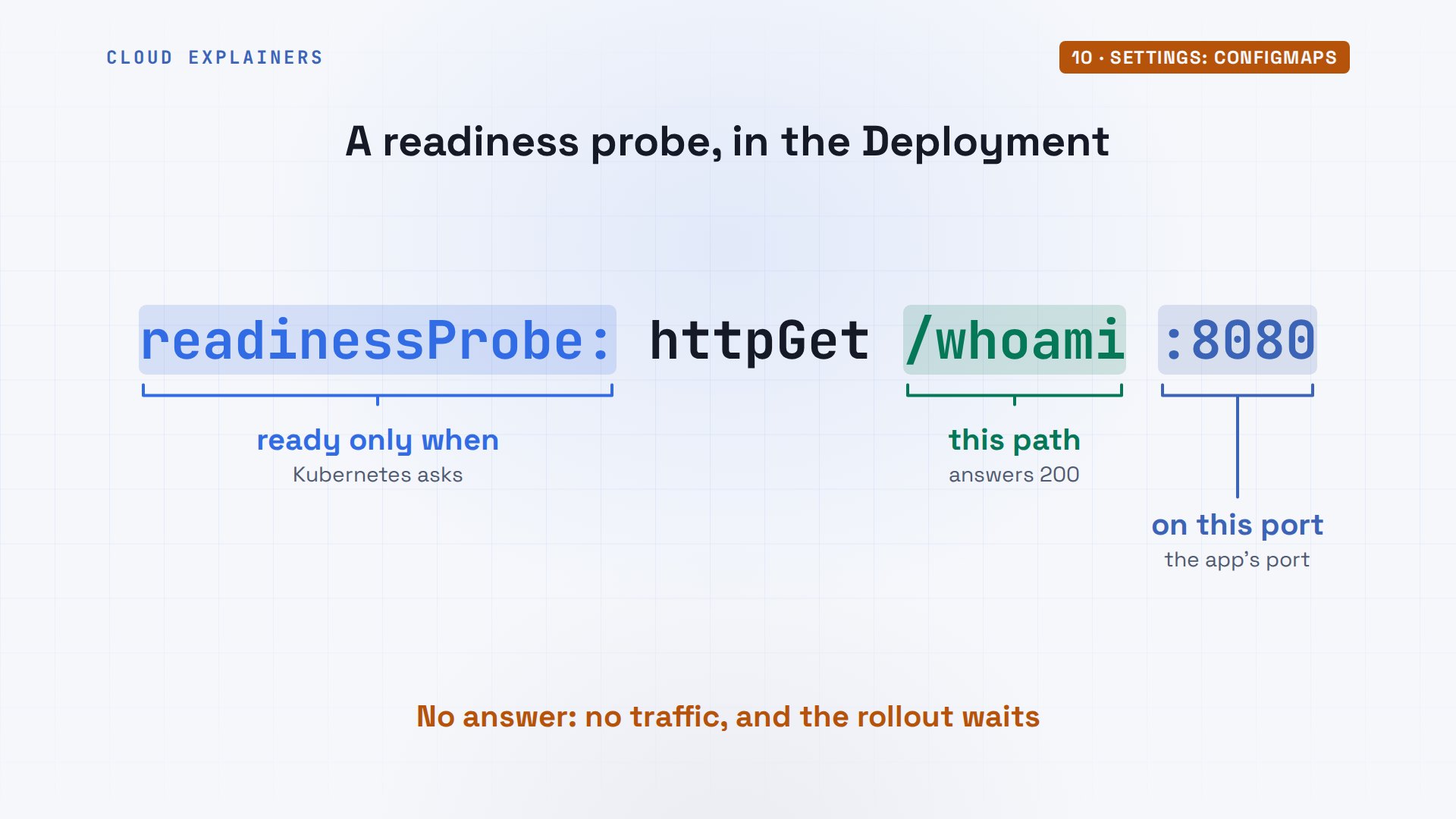
Remember the readiness probe? It's a few lines in the container section: ask this path on this port, and only send traffic once it answers. With it, version 2's crash would have stopped the rollout at one broken pod, the way the missing image did, while the old pods kept the station on air. Add one to every app you deploy.
Resources: the Pending pod
A pod can say how much memory and CPU it needs: requests. The scheduler only places a pod on a node with that much left over. Ana adds requests to her Deployment: a tenth of a CPU, written 100m, a hundred millicores, and memory, sixty-four. But she typed Gi, gibibytes, where she meant Mi, mebibytes: a thousand times more.
tail -n 4 deployment.yamlresources: requests: memory: 64Gi cpu: 100m
Requests have a partner: limits. A request is what the scheduler reserves for the pod. A limit is a ceiling while it runs: go over the memory limit and the container is killed, OOMKilled, go over the CPU limit and it's slowed down. Ana sets requests only, for now.
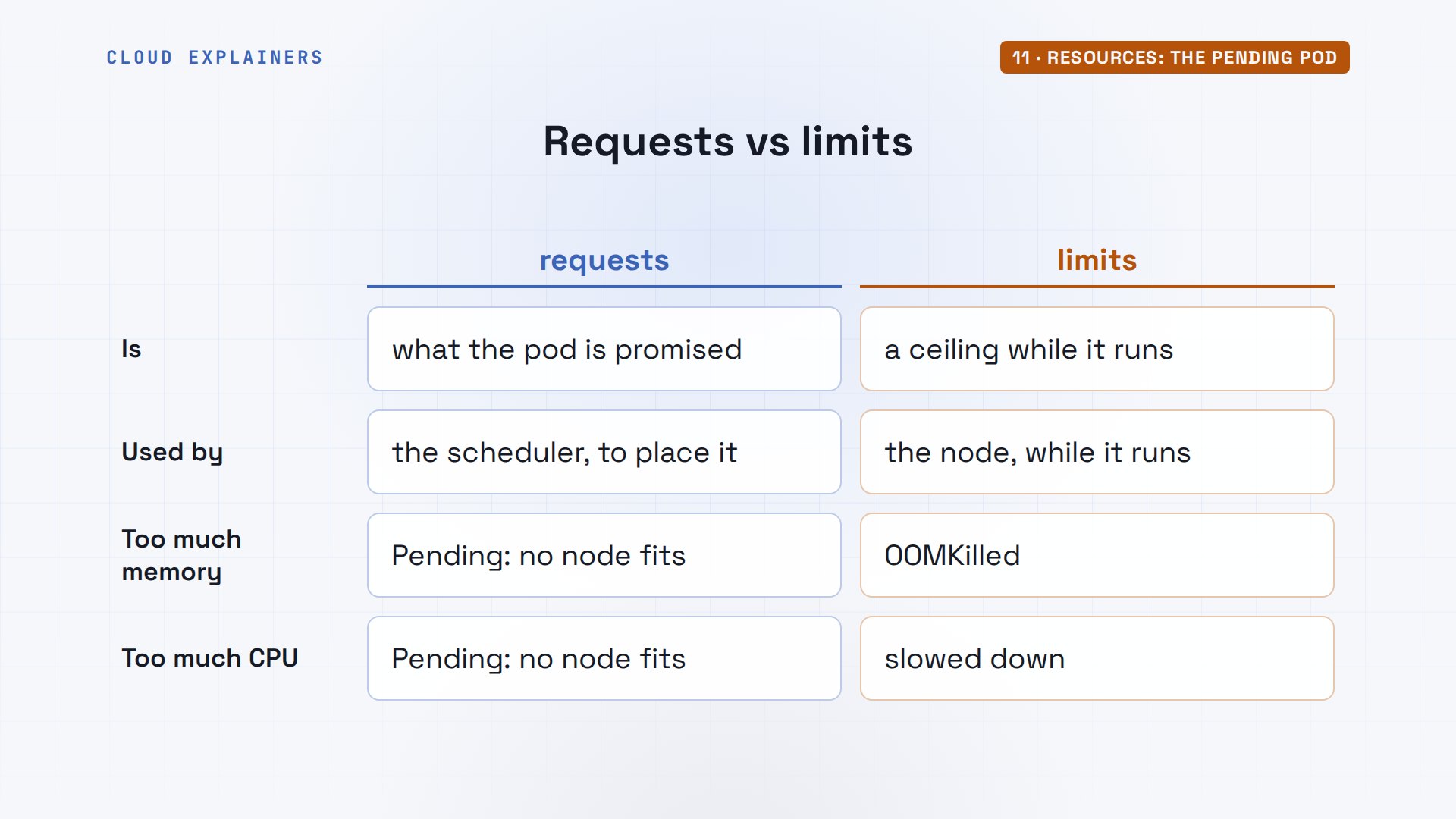
She applies it. The new pod stays Pending: no node will take it. describe says why: zero of three nodes are available, two have insufficient memory, and the control plane has a taint, a mark that keeps ordinary pods off it. Each node here has about 8 gibibytes to give.
kubectl apply -f deployment.yamldeployment.apps/requests configured
kubectl get podsNAME                        READY   STATUS    RESTARTS   AGE
curl                        1/1     Running   0          3m37s
requests-7d8ddd5c7f-7l5wm   1/1     Running   0          4s
requests-7d8ddd5c7f-f6fkg   1/1     Running   0          4s
requests-7d8ddd5c7f-lw4h5   1/1     Running   0          5s
requests-7fbd678dd8-nvqst   0/1     Pending   0          2s
kubectl describe pod requests-7fbd678dd8-nvqst | grep FailedSchedulingWarning FailedScheduling 2s default-scheduler 0/3 nodes are available: 1 node(s) had untolerated taint(s), 2 Insufficient memory. preemption: 0/3 nodes are available: 3 Preemption is not helpful for scheduling.
kubectl get nodes -o custom-columns=NODE:.metadata.name,MEMORY:.status.allocatable.memoryNODE                  MEMORY
radio-control-plane   8124452Ki
radio-worker          8124452Ki
radio-worker2         8124452Ki
She changes Gi to Mi and applies it again. The scheduler finds room on both workers, the rollout completes, and three pods are Running again, each with sixty-four mebibytes reserved.
kubectl apply -f deployment.yamldeployment.apps/requests configured
kubectl rollout status deployment requestsWaiting for deployment "requests" rollout to finish: 1 out of 3 new replicas have been updated...
Waiting for deployment "requests" rollout to finish: 1 out of 3 new replicas have been updated...
Waiting for deployment "requests" rollout to finish: 1 out of 3 new replicas have been updated...
Waiting for deployment "requests" rollout to finish: 2 out of 3 new replicas have been updated...
Waiting for deployment "requests" rollout to finish: 2 out of 3 new replicas have been updated...
Waiting for deployment "requests" rollout to finish: 2 out of 3 new replicas have been updated...
Waiting for deployment "requests" rollout to finish: 2 out of 3 new replicas have been updated...
Waiting for deployment "requests" rollout to finish: 1 old replicas are pending termination...
Waiting for deployment "requests" rollout to finish: 1 old replicas are pending termination...
Waiting for deployment "requests" rollout to finish: 1 old replicas are pending termination...
deployment "requests" successfully rolled out
kubectl get pods -o custom-columns=POD:.metadata.name,STATUS:.status.phase,NODE:.spec.nodeNamePOD                         STATUS    NODE
curl                        Running   radio-worker
requests-5d45889448-94rbt   Running   radio-worker2
requests-5d45889448-skmc9   Running   radio-worker2
requests-5d45889448-xrmhv   Running   radio-worker
Four errors, one checklist
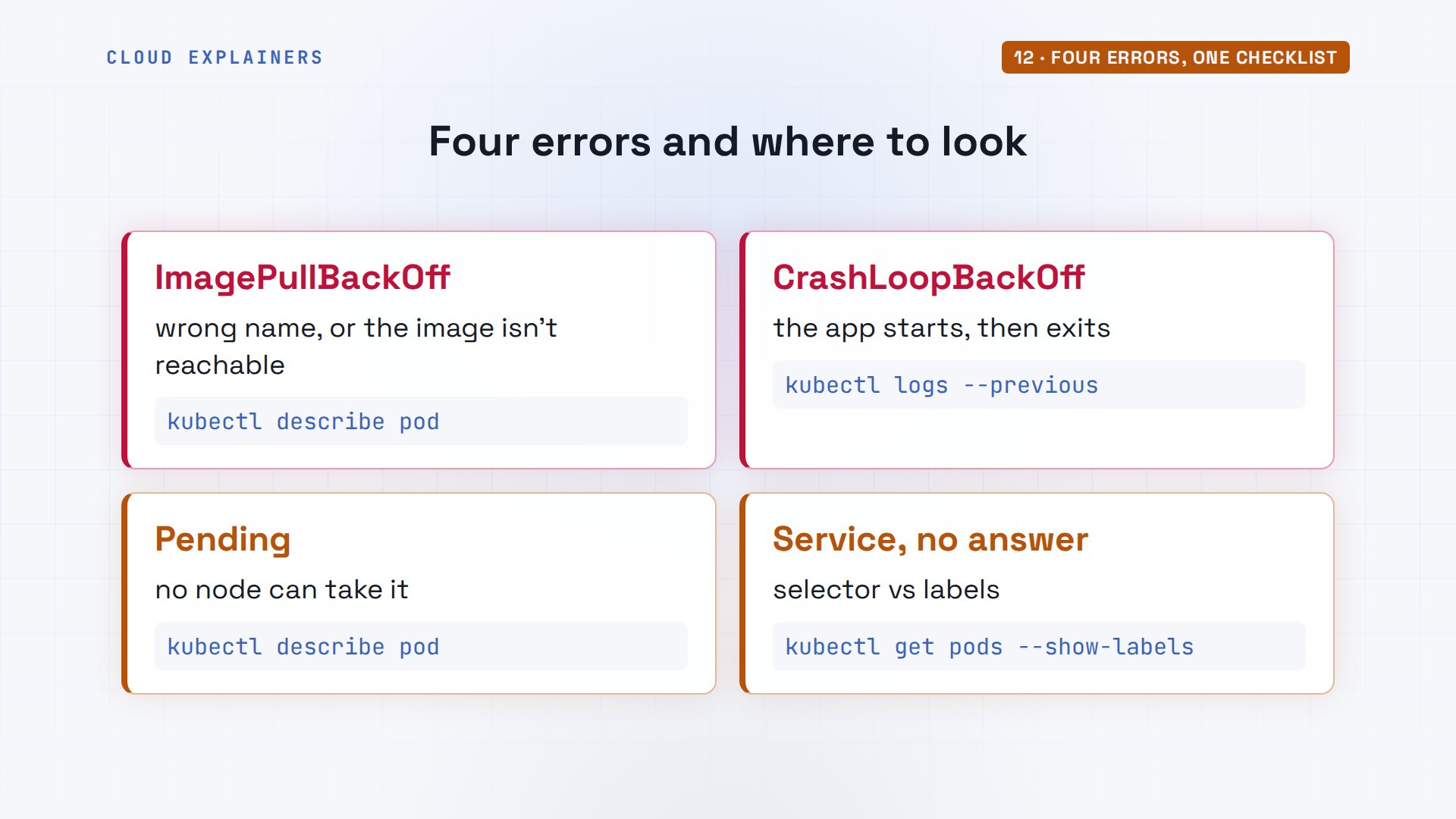
Those are the four problems almost everyone meets first. ImagePullBackOff: check the image name and that the nodes can reach it. CrashLoopBackOff: read logs with dash dash previous. Pending: describe the pod and read its events. And a Service with no answer: compare its selector with the pods' labels. Notice the pattern: in every case, Kubernetes already knew what was wrong, and describe or logs said it in plain words. Look there before you search the web.
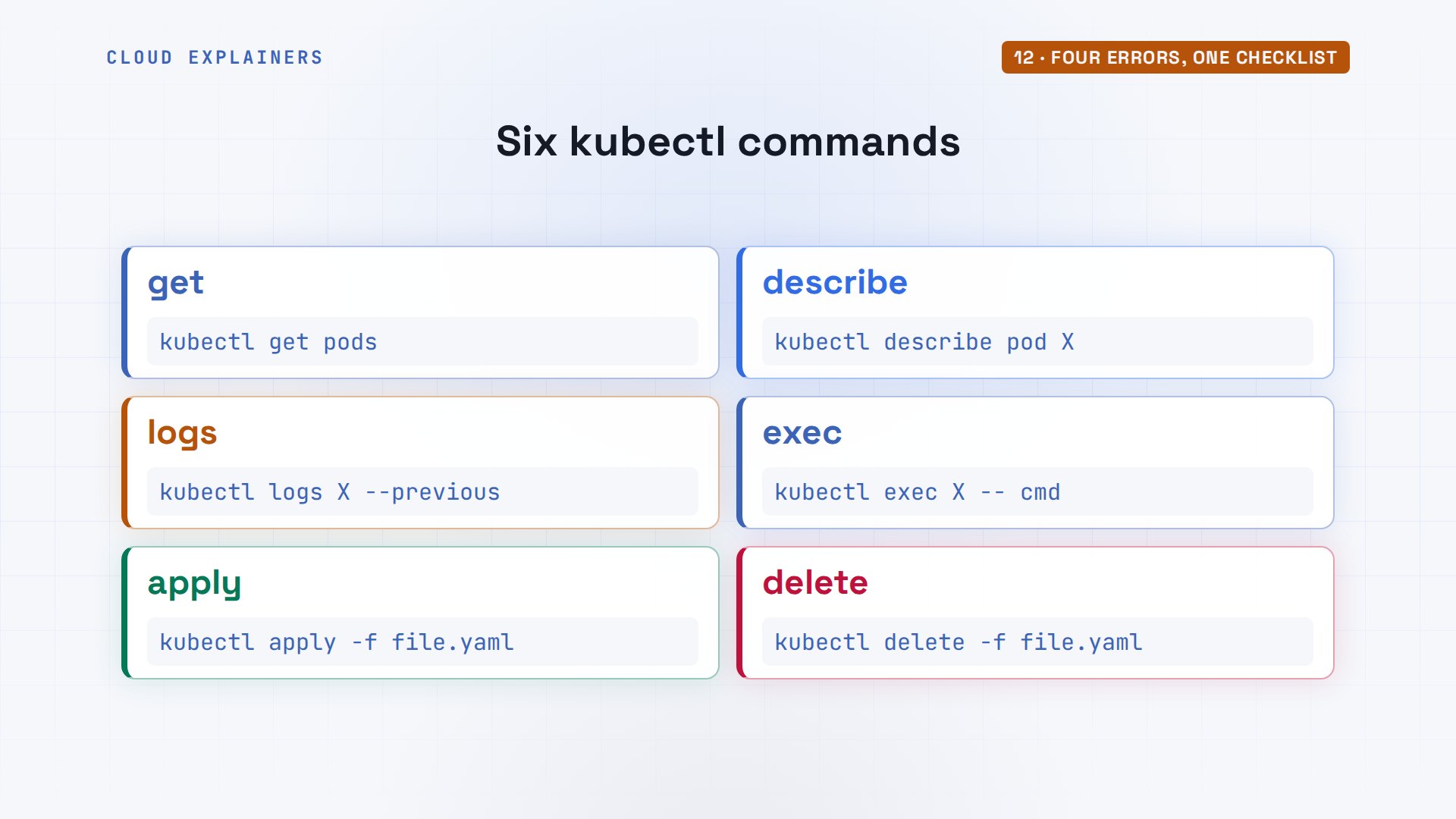
Six kubectl commands did almost all the work today. get, to see what exists. describe, for the story and the events. logs, for what the app printed. exec, to run something inside. apply, to send a file. And delete. Learn those six and you can find your way around any cluster.
Cleaning up
To clean up, kubectl delete with the same files removes everything they made. kind delete cluster removes the cluster itself, and docker ps is empty again.
kubectl delete -f deployment.yaml -f service.yaml -f configmap.yamldeployment.apps "requests" deleted from default namespace
service "requests" deleted from default namespace
configmap "station" deleted from default namespace
kind delete cluster --name radioDeleting cluster "radio" ...
Deleted nodes: ["radio-worker" "radio-worker2" "radio-control-plane"]
docker psCONTAINER ID IMAGE COMMAND CREATED STATUS PORTS NAMES
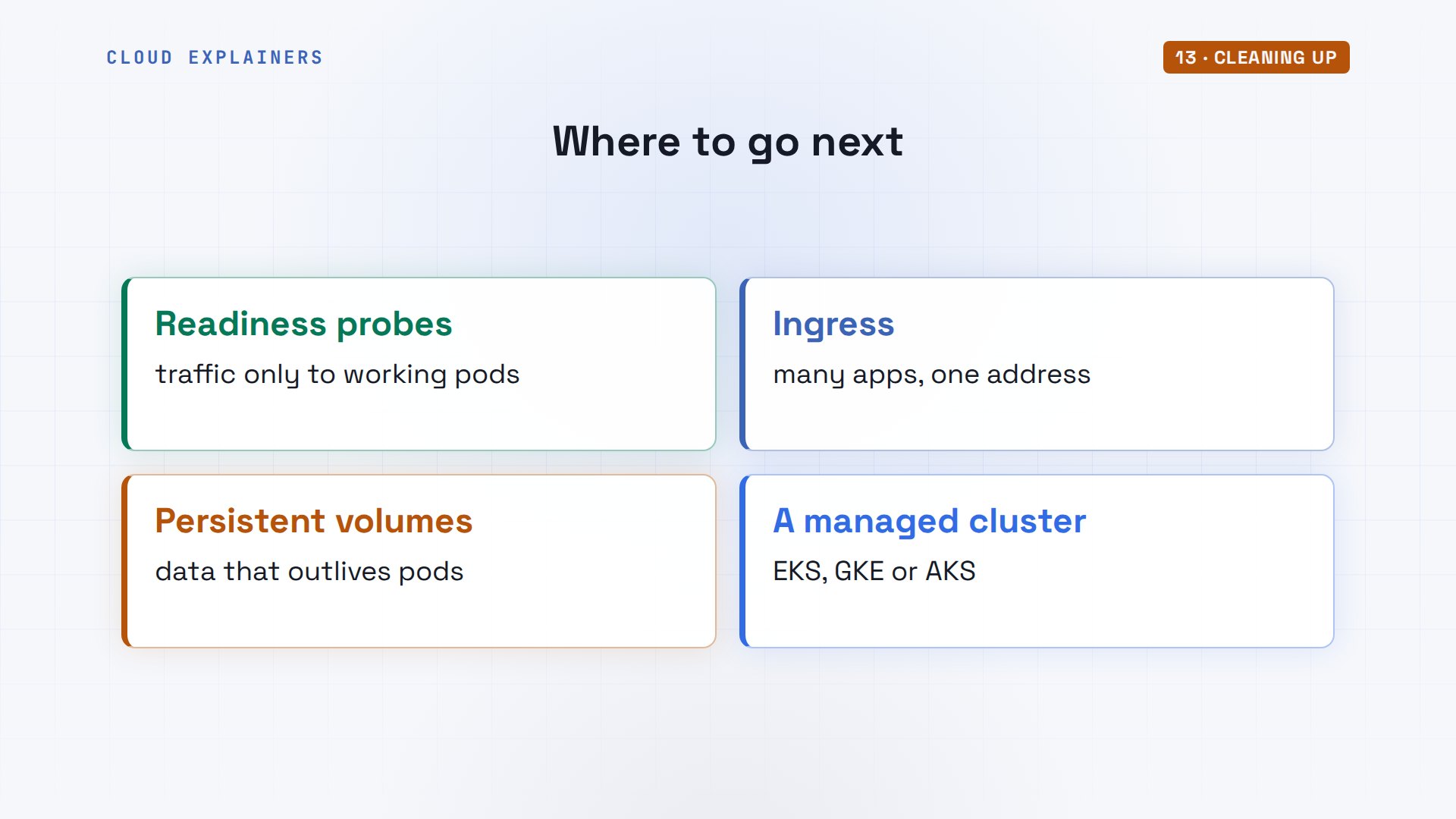
Where next? Readiness probes, for every app. An Ingress, to put several apps behind one web address. Persistent volumes, for databases. And a managed cluster on a cloud, like Amazon's, Google's or Microsoft's, where the same kubectl and the same files work. Everything you learned here carries over unchanged: pods, Deployments, Services, ConfigMaps and the six commands.
Recap
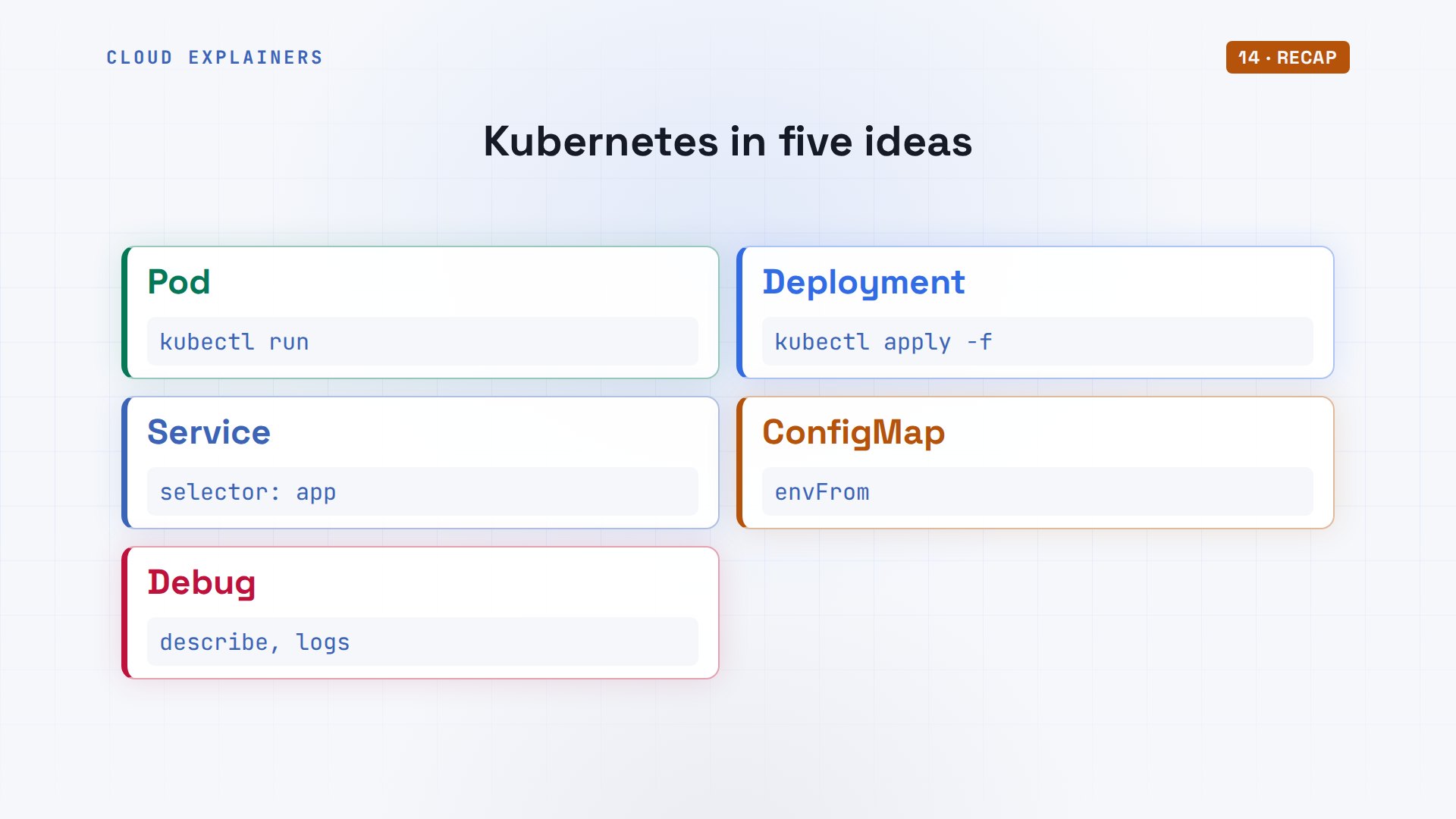
So: a pod runs your container. A Deployment keeps copies running and updates them. A Service gives them one name. A ConfigMap holds settings. And describe and logs tell you what went wrong.
If you can deploy, update and debug an app on Kubernetes now, subscribing brings the next hands-on tutorial, run on real machines.
Every command in this video ran on a real three-node cluster, and every command and the lab files are linked in the description. Thanks for watching Cloud Explainers.
Sources
- Kubernetes docs, Kubernetes Components (control plane and node components)
- Kubernetes docs, Overview (the name: Greek for helmsman or pilot)
- Kubernetes docs, Pods
- Kubernetes docs, Deployments (ReplicaSets, rolling updates, rollout undo)
- Kubernetes docs, Service (selectors, ClusterIP, NodePort, LoadBalancer)
- Kubernetes docs, ConfigMaps (environment variables are not updated in a running container)
- Kubernetes docs, Resource Management for Pods and Containers (requests and scheduling)
- Kubernetes docs, Configure Liveness, Readiness and Startup Probes
- Kubernetes docs, Safely Drain a Node
- kind quick start (create cluster, load docker-image)
Demos: one container on our own Mac standing in for a radio station's laptop, with a real Kubernetes cluster inside it; the station and its shows are made up. Every command and output was real. Watch the full video on YouTube.
More videos
How to Fix Python ModuleNotFoundError: No Module Named
Golang Pointers in 5 Minutes
How to Fix a Kubernetes Pod Stuck in CrashLoopBackOff
How to Fix a Homelab ESXi Host Not Responding
PostgreSQL: Full Tutorial for Beginners
How a Load Balancer Works with HAProxy
How Python Virtual Environments Work
How to Fix Cloudflare Tunnel Errors in a Homelab
How to Fix API CORS Errors: No 'Access-Control-Allow-Origin'
How Authenticator App Login Codes Work (TOTP)
Git and GitHub: Full Tutorial for Beginners
How a Homelab Hypervisor Works (VMware ESXi)
How to Fix Kubernetes ImagePullBackOff Errors
How to Fix DNS 'Temporary Failure in Name Resolution' on Linux
How to Fix AWS CLI 'Unable to Locate Credentials'
Proxmox vs ESXi for Your Homelab: When Each One Wins
PostgreSQL UUID vs Auto Increment: Which Primary Key Should You Use?
How TCP Sockets Work
How to Fix PostgreSQL 'Could Not Connect to Server'
Claude Code Hooks Will Finally Make Sense After This
DevOps with Ansible Will Finally Make Sense After This
How SNMP Network Monitoring Works
How to Fix GitHub 'Permission Denied (publickey)' Errors
Docker: Full Tutorial for Beginners
How to Fix PostgreSQL 'Password Authentication Failed'
Why One Linux Server Handles More Users Than You Think
How to Fix Network 'Connection Refused' Errors
DevOps Pipelines: Jenkins vs GitHub Actions
Linux Nginx Reverse Proxy: Full Tutorial for Beginners
Every Networking Term a Beginner Needs in 12 Minutes
How to Fix Docker 'Permission Denied' on docker.sock
How to Fix Git 'Updates Were Rejected' When You Push
How to Fix nginx 502 Bad Gateway Errors on Linux
How to Fix Linux apt 'Could Not Get Lock' Errors (Ubuntu)
How Email Works on the Internet (SMTP) in 10 Minutes
The Python Roadmap for Beginners
Golang REST API with Gin: Full Tutorial for Beginners
How a WireGuard VPN Network Works
Linux Makefiles Will Finally Make Sense After This
SAML vs OAuth vs OpenID Connect: What's the Difference?
How to Fix Python cron Jobs That Never Run
Linux Bash Scripting: Full Tutorial for Beginners
How PXE Network Boot Works
How Active Directory Works
How to Fix a Linux systemd Service That Won't Start
Linux Logs: syslog vs journald
JWT vs Session Cookies: Which One Should You Use?
Docker vs Docker Compose: Which One Should You Use?
How to Fix Docker Compose Containers That Can't Talk to Each Other
Django Full Tutorial for Beginners
How Linux systemd Works
How to Fix 'Windows Cannot Access' Network Share Errors (SMB)
REST vs gRPC: Which One Should You Use?
How to Fix SSL Certificate Chain Errors (Missing Intermediate)
Every Python Concept for Beginners in 10 Minutes
Every SQL Join Type in 10 Minutes
Why OpenRouter Free Models Hit Their Limit So Fast
Why Your Gemini API Free Tier Runs Out So Fast
OpenRouter Will Finally Make Sense After This
How Redis Caching Works
Gemini API vs Vertex AI: Which One Should You Use?
How to Fix a Leaked Gemini API Key
Why Golang Uses Goroutines Instead of Threads
How to Fix Gemini API Error 429: Resource Exhausted
Claude Token Pricing Will Finally Make Sense After This
Why Python Web Scraping Returns Nothing (and the Fix)
Python uv vs pip: Which One Should You Use?
Python Automation: Full Tutorial for Beginners
How OAuth Login Works
Google AI Studio Will Finally Make Sense After This
What Happens When You Run a Docker Container
How to Fix Claude Code Billing Your API Key Instead of Your Plan
Why Passkeys Can't Be Phished Like Passwords
PowerShell vs Bash: Which One Should You Learn?
The Linux Roadmap for Beginners
Django vs FastAPI: Which One Should You Use?
Why SQLite Is the Most Used Database in the World
How a NoSQL Database Like MongoDB Works
How to Fix Python pip error: externally-managed-environment
How to Fix MySQL Too Many Connections Database Errors
Golang Concurrency Will Finally Make Sense After This
How Amazon S3 Works
How Kubernetes Works
How Git Works
How to Fix Docker Port Already Allocated Errors
How PostgreSQL Works
How to Fix Git Merge Conflicts
How to Fix No Space Left on Device in Linux
How the Internet Works
SQL vs NoSQL: When Each One Wins
How to Fix JWT Token Expired Errors (401 Unauthorized)
Claude API vs Claude Pro: Why Your Subscription Doesn't Include It
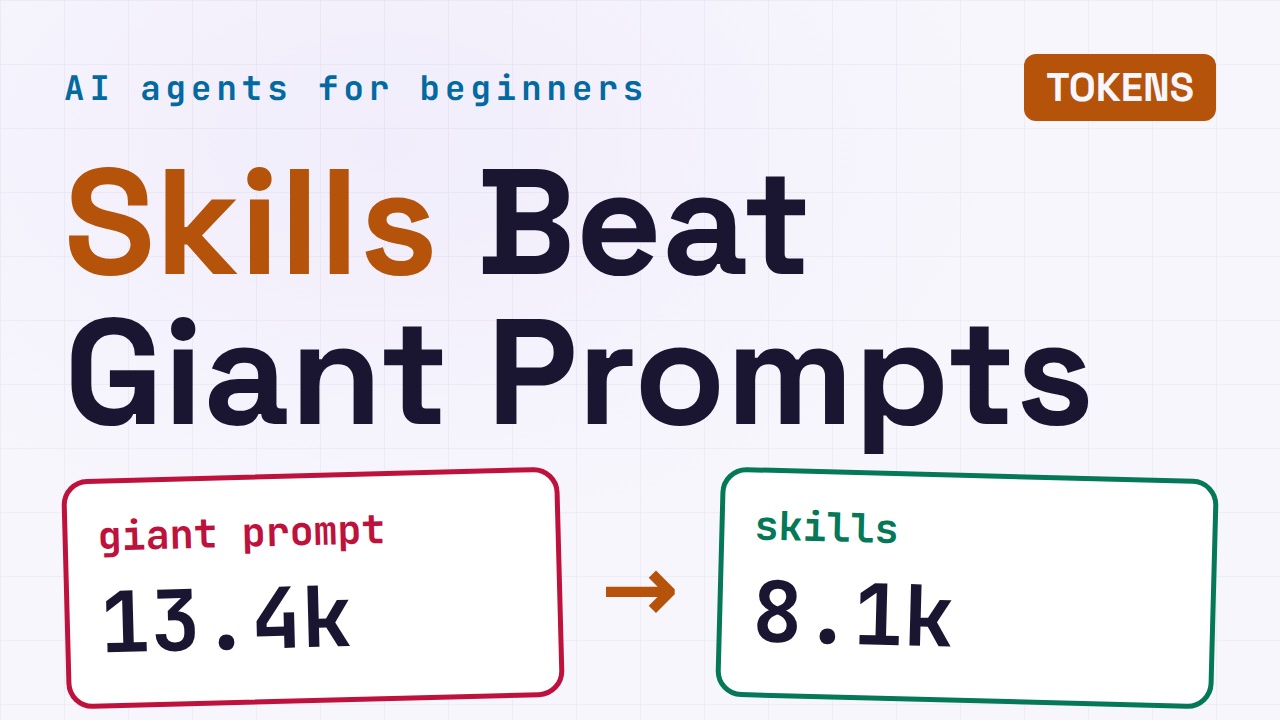
Why AI Agent Skills Beat Giant Prompts
Linux Cron Jobs Will Finally Make Sense After This
Security Logs Will Finally Make Sense After This
How to Fix a Security Leak: An API Key Pushed to GitHub
DNS Will Finally Make Sense After This
Never Ignore a Security Update
Two-Factor Authentication Will Finally Make Sense
Never Expose a Database to the Internet
SSH Keys vs Passwords: Which Is Safer for Security?
The 5 Levels of Linux Boot: From Power On to Login
The 5 Levels of Network Firewalls
Password Security: Why Hackers Crack Weak Passwords
Why Your Linux Server Runs Out of Memory
HTTP vs HTTPS: What Actually Changes on Your Network
Every Linux File Permission You Need to Know
Linux Processes vs Threads: When Each One Wins
The OSI Model Will Finally Make Sense After This
The 7 Levels of Git
Every Network Troubleshooting Command You Need
Hashing vs Encryption in Cybersecurity: When Each One Wins
Why the Internet Ran Out of IP Addresses
Linux Package Managers: apt vs Snap vs Flatpak
Why Python Is Slow (and When It Doesn't Matter)
TCP vs UDP: When Each One Wins
Stop Running Linux as Root (Do This Instead)
Linux Users and Groups Will Finally Make Sense
Why Phishing Beats Good Security (and How to Spot It)
The 7 Levels of Docker
AI Agents Will Finally Make Sense After This
Stop Using git push --force (Use This Instead)
Agent Skills vs MCP: When Each One Wins
Networking Will Finally Make Sense After This
Every Linux Command You Actually Need
The 7 Levels of Cybersecurity
Every System Design Concept You Need, in One Diagram