
DNS Will Finally Make Sense After This
DNS for complete beginners, on a tiny private copy of the internet's DNS in our lab: our own root server, a .test top-level domain server, Ana's DNS server for shop.test, two resolvers and two laptops. Ana moves her shop's website to a new server, but her customer Ben still lands on the old one. We follow a lookup from the resolver to the root, the top-level domain and the authoritative server with dig +trace, take a DNS record apart, see caching make a lookup 273 ms then 0 ms, watch Ben's TTL run out, and redo the move the right way: lower the TTL first, wait, then switch.
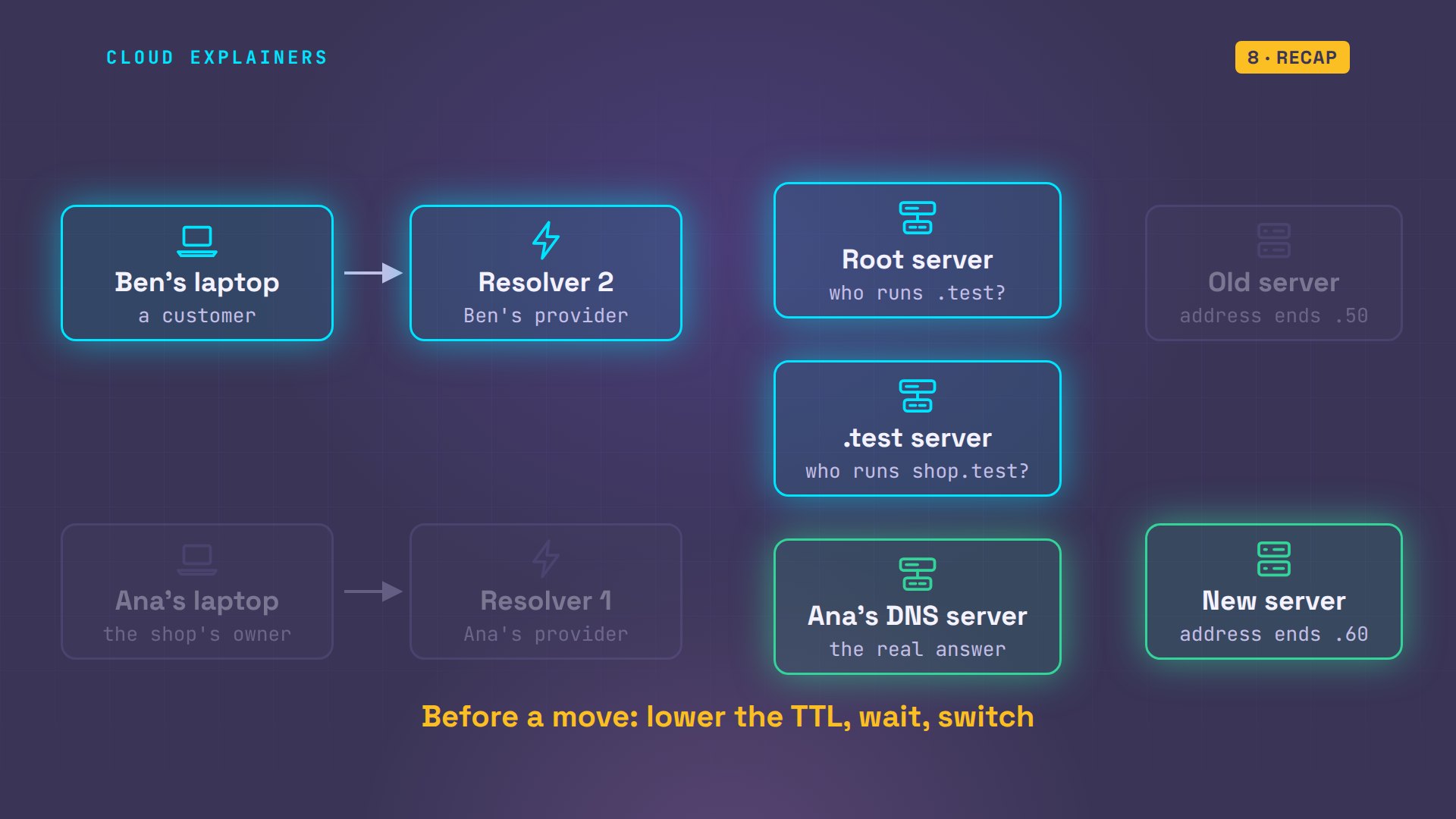
A move that half worked
Ana moved her shop's website to another server, but her customer Ben still lands on the old one. Same name, same minute, two different servers. The culprit is DNS, the system that turns a name into an address. By the end of this video you'll know exactly who kept the old address, why, and how to move a website so nobody gets stuck.
Here it is for real. curl fetches a web page. Ana's laptop asks for shop.test and gets the new server. Ben's laptop asks for the same name at the same moment, and gets the old one.
curl -s shop.testAna's shop, served by the new server
curl -s shop.testAna's shop, served by the old server
Everything here runs on nine small Linux machines in our lab, on a private network: two laptops, two resolvers that look names up for them, three DNS servers, and Ana's old and new web servers. It's a tiny copy of the internet's DNS, with its own root, the top of the system. We slowed each DNS server down a little, to stand in for the distance to real ones.
Names and addresses
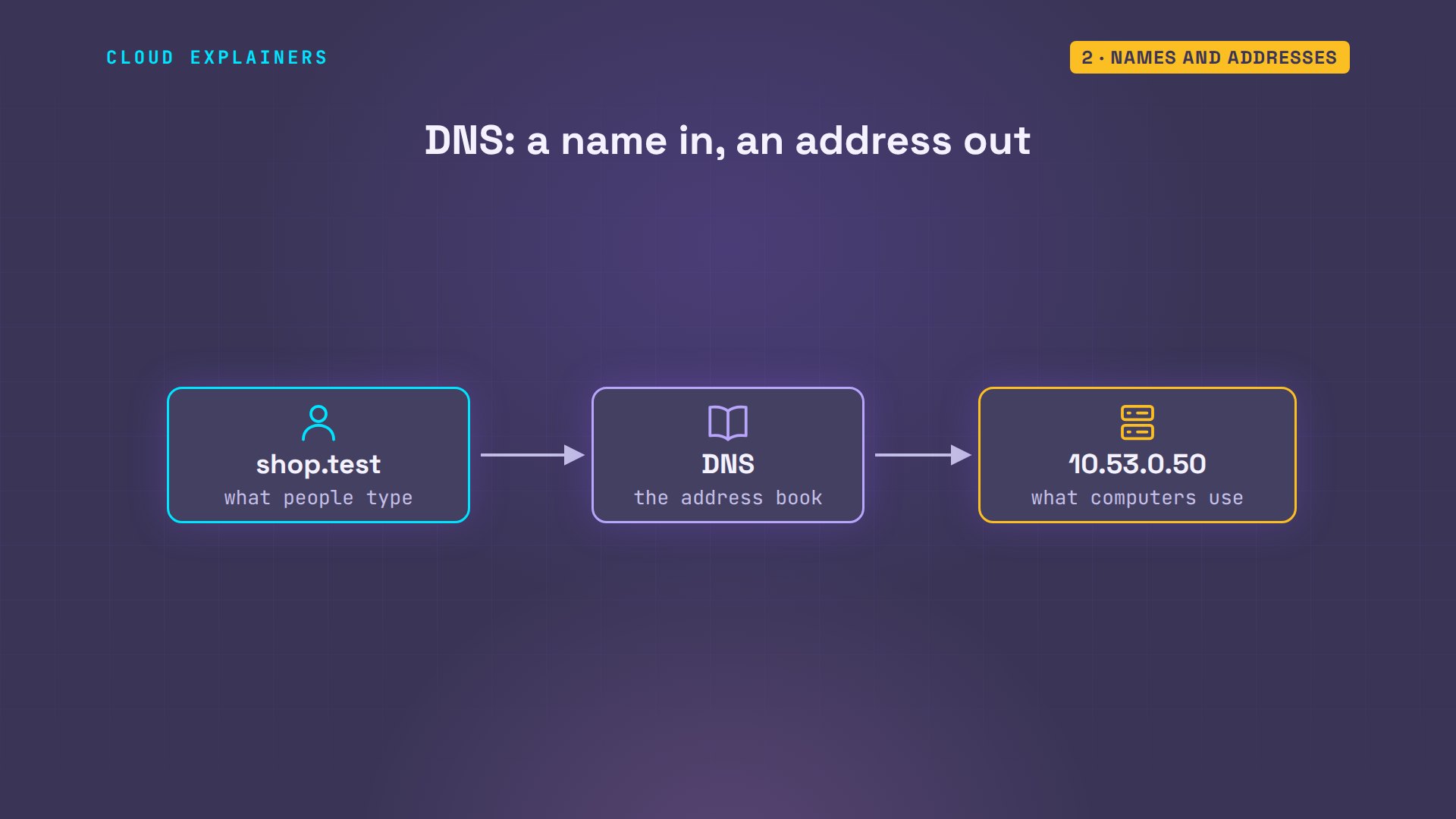
Computers find each other by IP address, a number like this one. People remember names. DNS, the Domain Name System, is the internet's address book: you give it a name, it gives you back the address to connect to.
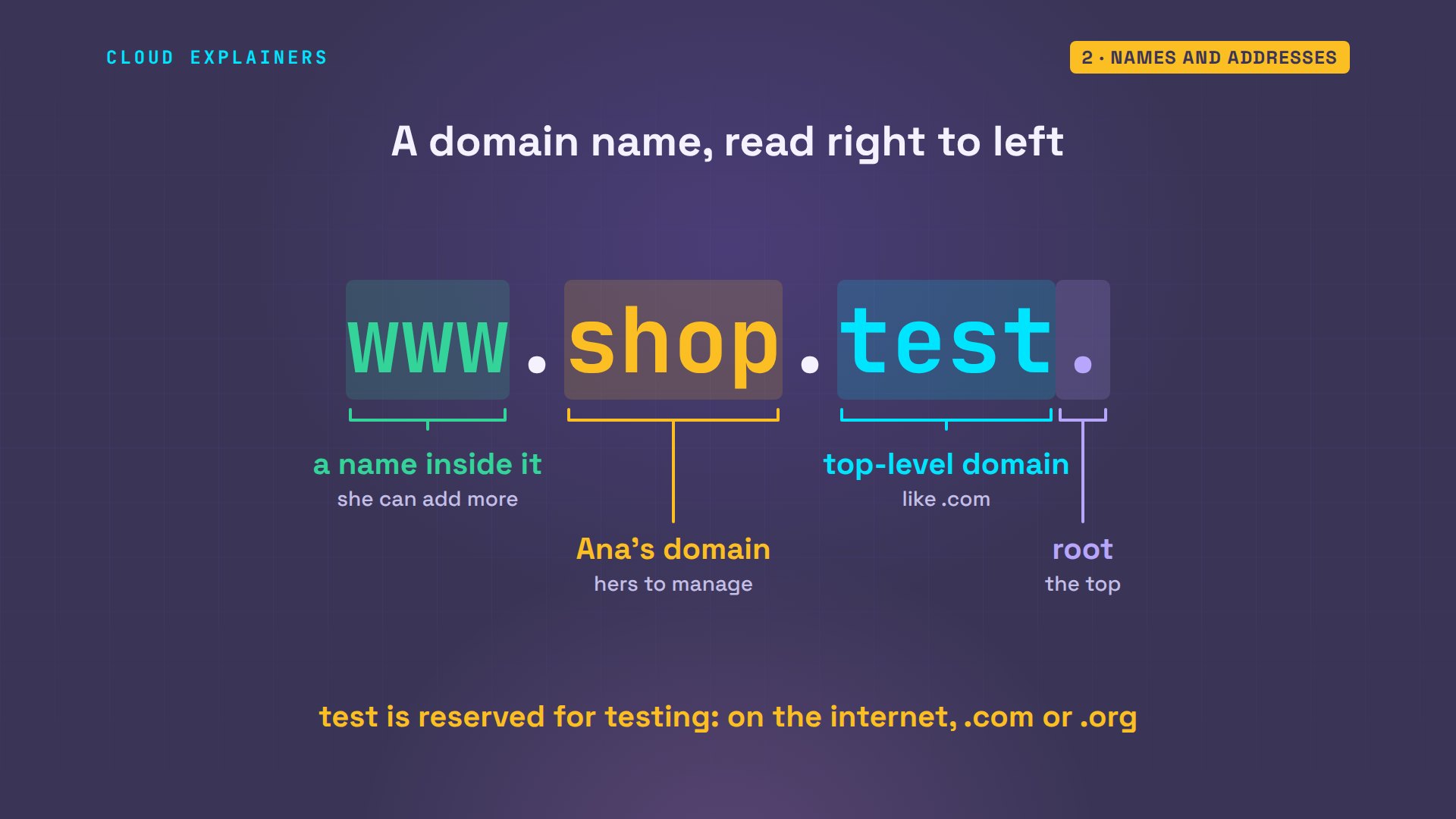
A name is read from right to left. The dot at the very end is the root, the top of the whole system. Then test, the top-level domain: on the internet that's com, org, or uk; ours is test, a name reserved for testing. Then shop: the domain Ana owns. And www, one name inside it.
So how does Ben's laptop look a name up? It knows exactly one DNS server: its resolver, set in resolv.conf. Usually your internet provider runs it, or a public one like Cloudflare's or Google's.
cat /etc/resolv.confnameserver 10.53.0.22
Who has the answer
The resolver does all the work for Ben. It doesn't know shop.test either, at first. But it knows where to start: the root. Three kinds of DNS server each know one piece, from the top down.
The resolver asks the root server: where is shop.test? The root doesn't know, but it knows who runs test, and sends back a referral: ask the test server. The test server refers it again: ask ns.shop.test, Ana's DNS server. Ana's server is authoritative: it holds the real answer, the address ending in fifty.
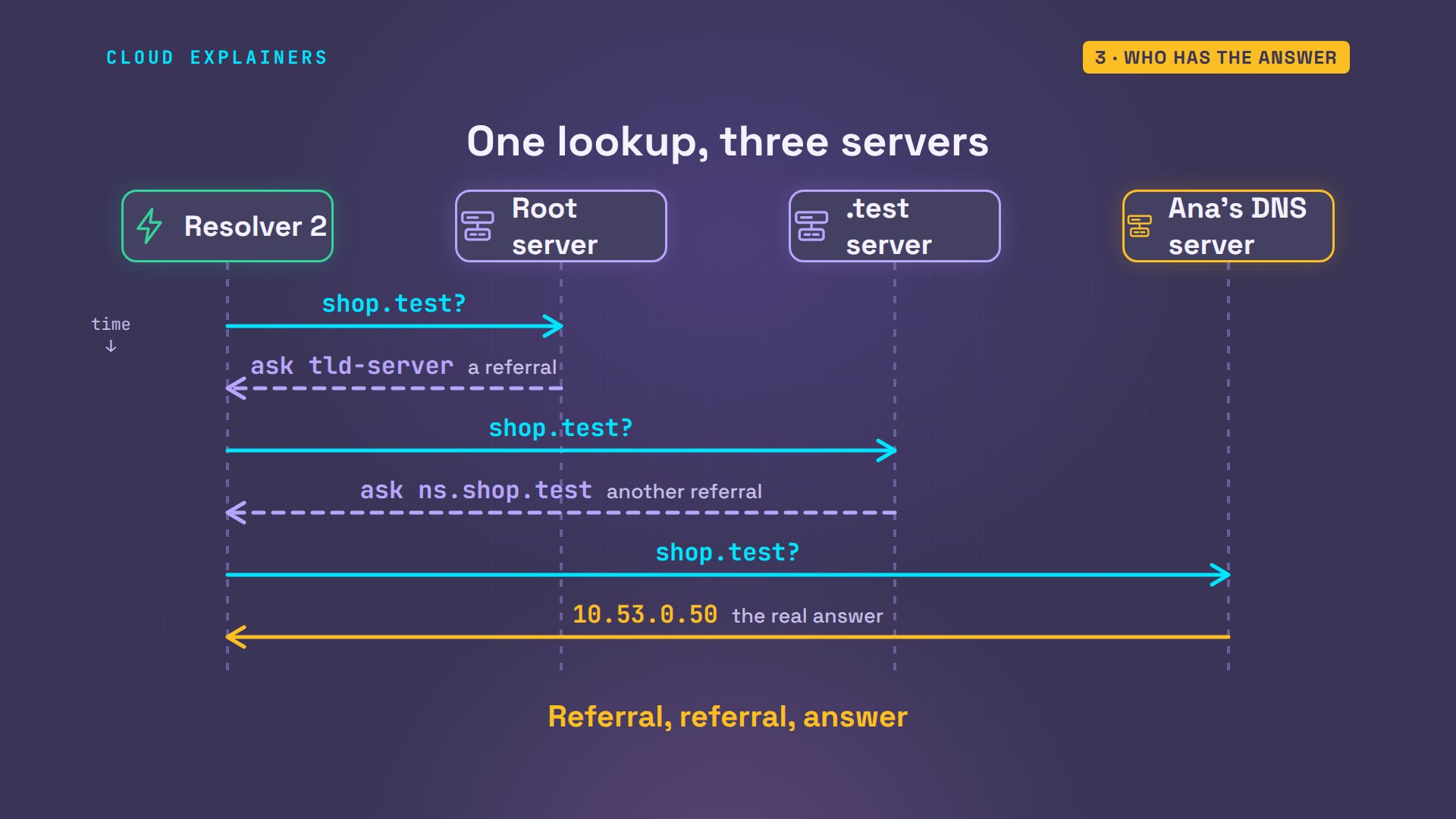
dig is a tool that asks DNS servers questions. dig +trace walks the same path by hand and prints each step. The root server points to the test server, in 60 milliseconds. The test server points to ns.shop.test. Finally, the shop's DNS server answers with the address.
dig +trace shop.test; <<>> DiG 9.18.39-0ubuntu0.24.04.8-Ubuntu <<>> +trace shop.test
;; global options: +cmd
.			86395	IN	NS	root-server.
;; Received 52 bytes from 10.53.0.22#53(10.53.0.22) in 1 ms

test.			172800	IN	NS	tld-server.
;; Received 90 bytes from 10.53.0.11#53(root-server) in 60 ms

shop.test.		172800	IN	NS	ns.shop.test.
;; Received 99 bytes from 10.53.0.12#53(tld-server) in 61 ms

shop.test.		300	IN	A	10.53.0.50
shop.test.		3600	IN	NS	ns.shop.test.
;; Received 115 bytes from 10.53.0.13#53(ns.shop.test) in 60 ms
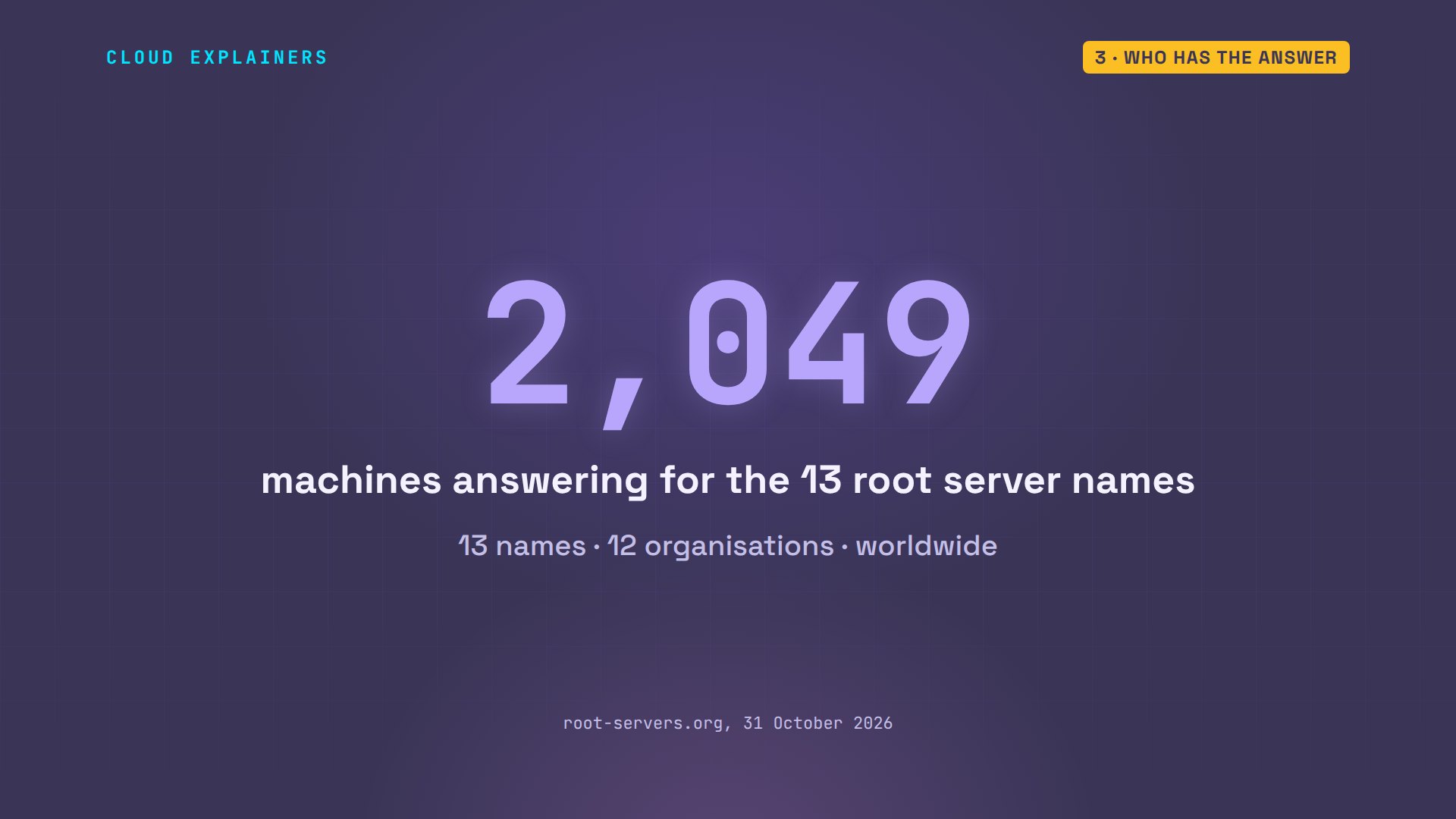
On the real internet the root is thirteen server names, run by twelve organisations. Behind those names stand 2,049 machines around the world, so the top of DNS never rests on one computer.
DNS records
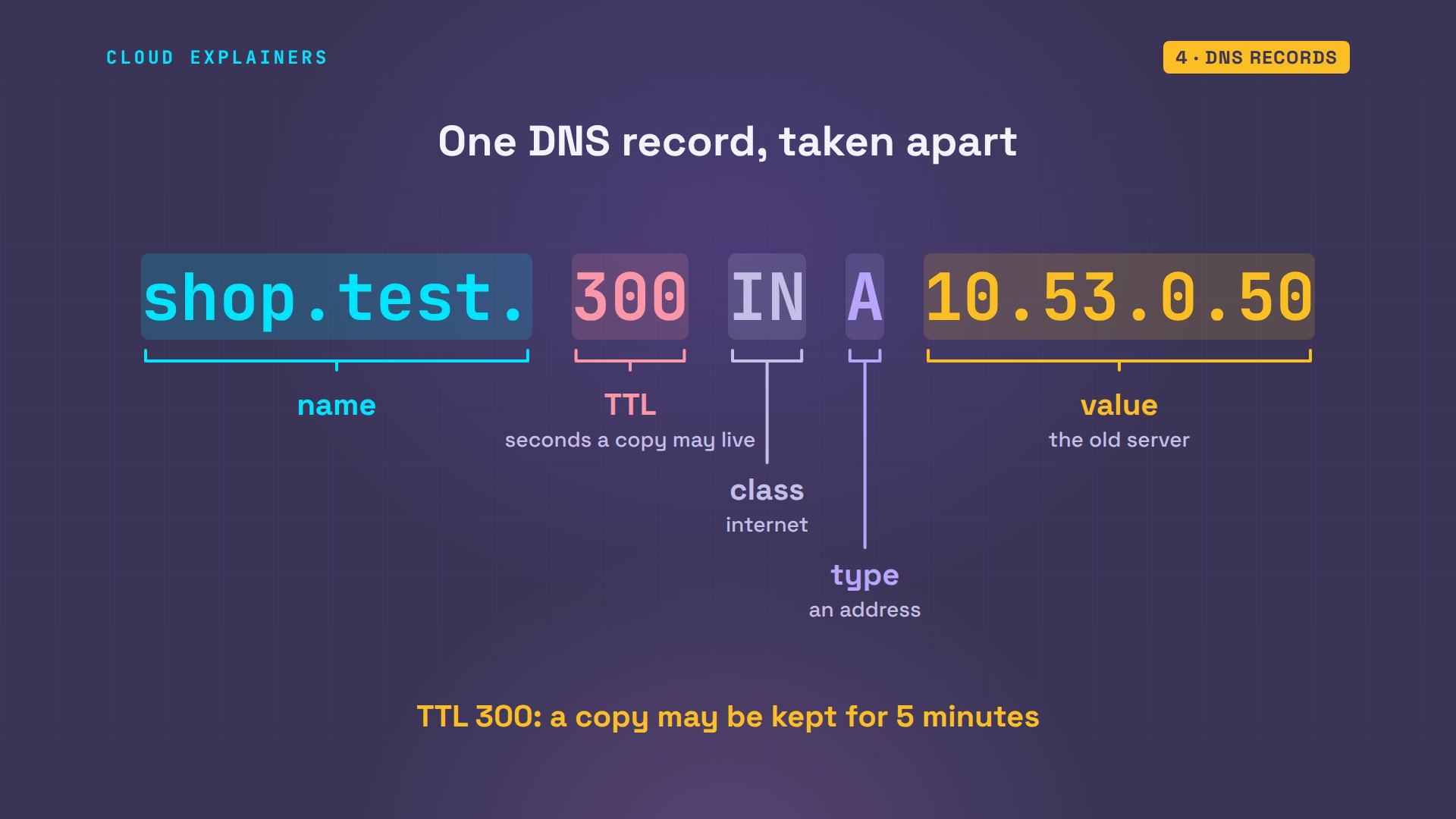
Here's what Ana's DNS server holds: a zone file, the list of her domain's records, one per line. The line that matters today says shop.test, 300, IN, A, and the old server's address.
cat db.shop.test$TTL 3600
shop.test.      IN SOA   ns.shop.test. ana.shop.test. ( 1 3600 600 86400 60 )
shop.test.      IN NS    ns.shop.test.
ns.shop.test.   IN A     10.53.0.13
shop.test. 300 IN A 10.53.0.50
www.shop.test.  IN CNAME shop.test.
shop.test.      IN MX    10 mail.shop.test.
mail.shop.test. IN A     10.53.0.25
Let's take that line apart. The name. The TTL, time to live: how many seconds anyone may keep a copy of this answer. Remember that one. IN means internet. A is the record type: an address. And the value, the address itself.
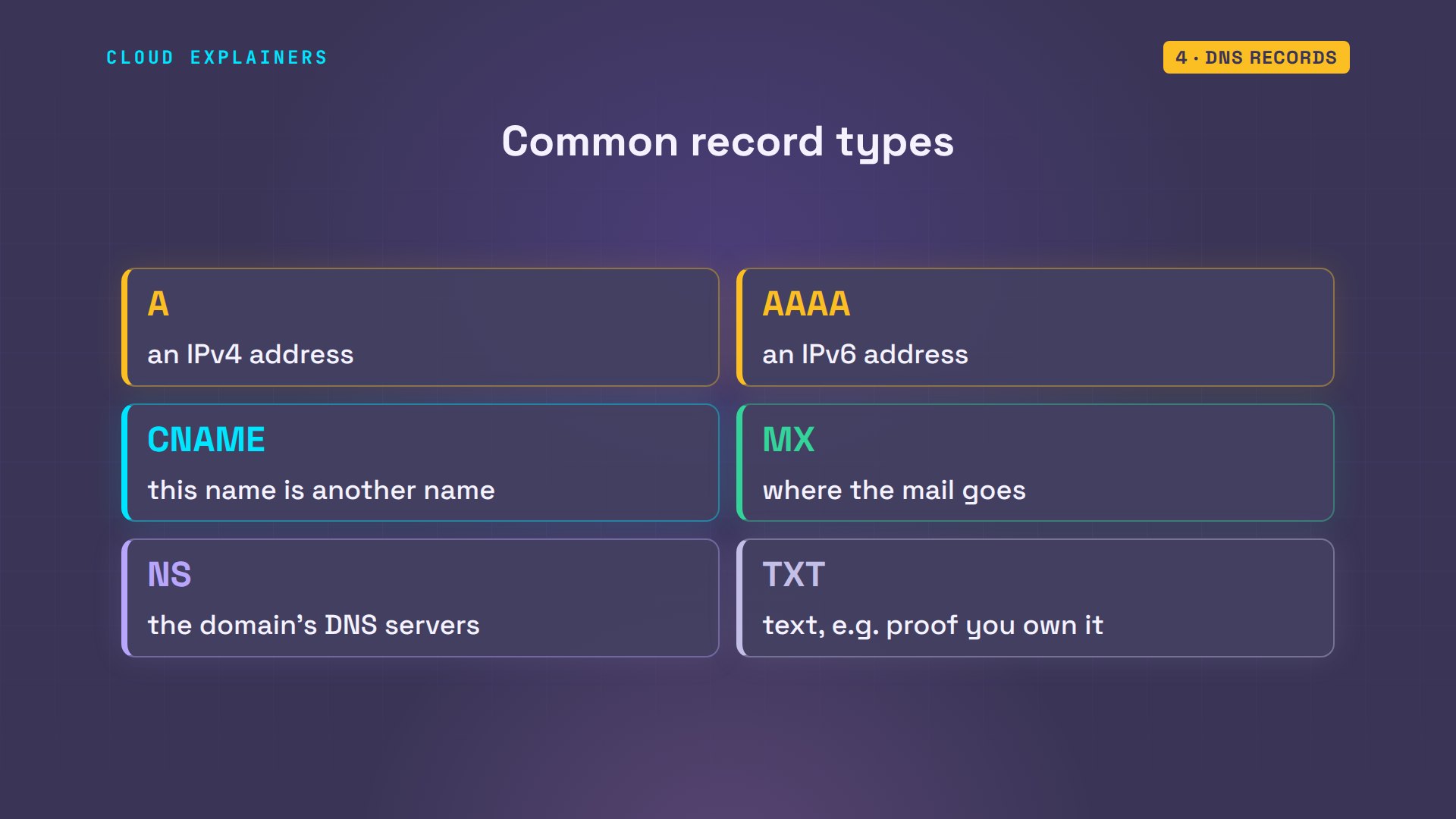
A is one of several record types. AAAA holds a newer, longer IPv6 address. CNAME says this name is another name. MX names the mail server. NS names the domain's own DNS servers. And TXT holds text, often proof that you own a domain.
Ben can ask for any of them. www.shop.test is a CNAME: it just points to shop.test, so the resolver follows it to the A record. And the MX record says mail for the shop goes to mail.shop.test.
dig +noall +answer www.shop.test shop.test MXwww.shop.test.		3600	IN	CNAME	shop.test.
shop.test.		294	IN	A	10.53.0.50
shop.test.		3600	IN	MX	10 mail.shop.test.
Caching and TTL
Now the part that explains Ben's problem. Ben's first lookup took 273 milliseconds: the resolver walked the whole path. He asks again: 0 milliseconds. The resolver didn't ask anyone. It answered from memory. And look at the TTL: 300, then 295. It's counting down.
dig +noall +answer +stats shop.testshop.test.		300	IN	A	10.53.0.50
;; Query time: 273 msec
;; SERVER: 10.53.0.22#53(10.53.0.22) (UDP)
;; WHEN: Sat Oct 31 14:12:13 UTC 2026
;; MSG SIZE  rcvd: 54
Inside Ben's resolver, here's the copy it keeps: the old address, with 295 seconds left. And the root server's log shows it was asked about shop.test only once, for both of Ben's lookups.
unbound-control dump_cache | grep '^shop.test'shop.test. 295 IN A 10.53.0.50
journalctl -u named -o cat | grep 'query: shop.test'client @0x7153900f9078 10.53.0.22#59449 (shop.test): query: shop.test IN A -E(0)DC (10.53.0.11)
That's caching, and it's why DNS is fast. Each answer comes with its TTL, and every resolver that asks may keep a copy until that timer runs out. Until then it answers from the copy and never checks with Ana's server. When the timer hits zero, the copy is thrown away, and the next lookup asks again.
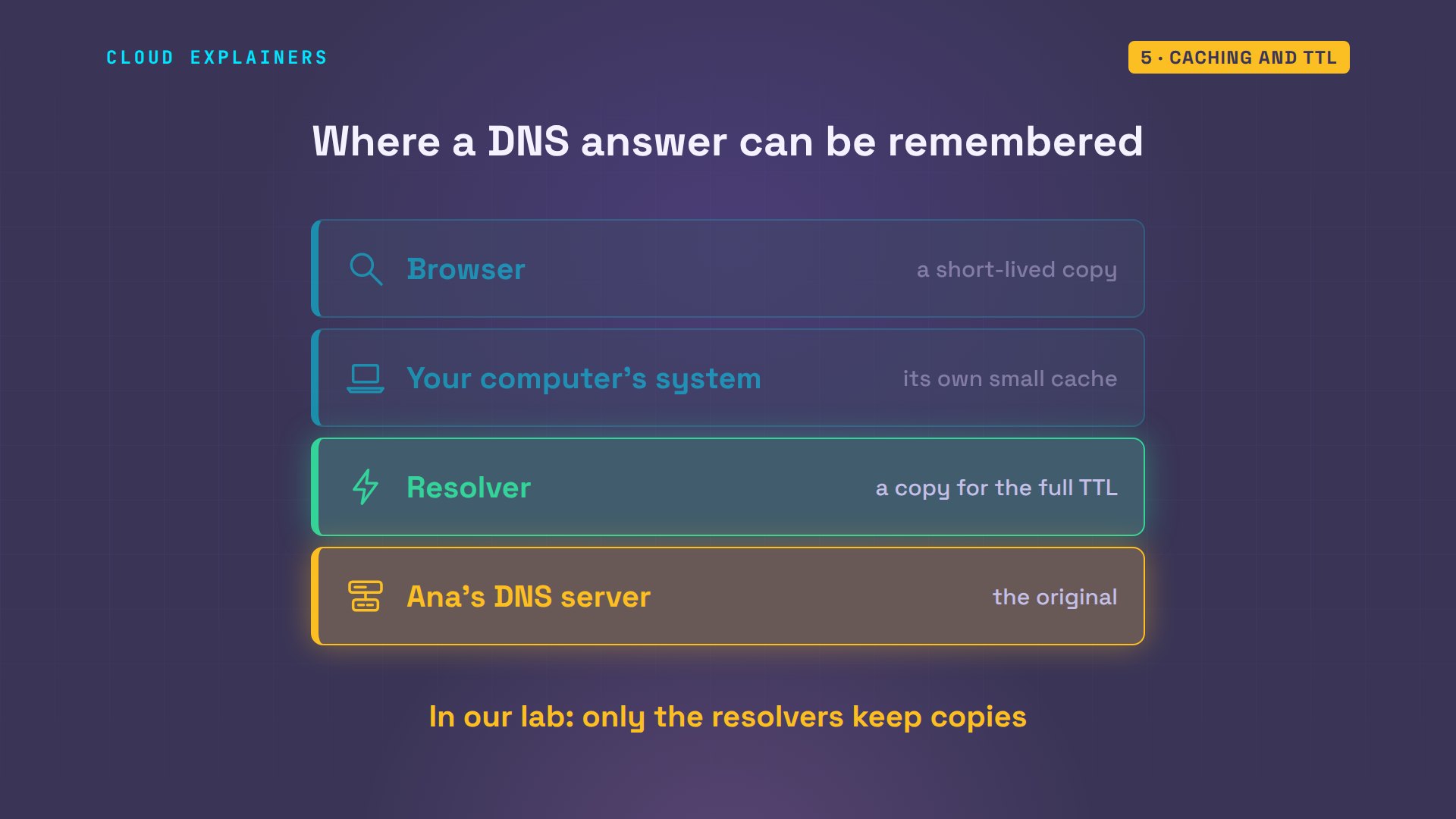
Copies can live in more than one place. Your browser can keep one for a short while, your computer's system can keep one, and the resolver keeps one for the full TTL. Only Ana's server has the original. In our lab, only the resolvers keep copies.
Why Ben saw the old shop
Now Ana moves the shop. grep finds the line with the old address. She swaps it for the new one with sed, a find-and-replace command. rndc reload tells the server to read the file again, and asking her own server directly now gives the new address, ending in sixty.
grep 10.53.0.50 db.shop.testshop.test. 300 IN A 10.53.0.50
sudo sed -i 's/10.53.0.50/10.53.0.60/' db.shop.test[sudo] password for ana:
sudo rndc reload shop.testzone reload queued
dig @10.53.0.13 +short shop.test10.53.0.60
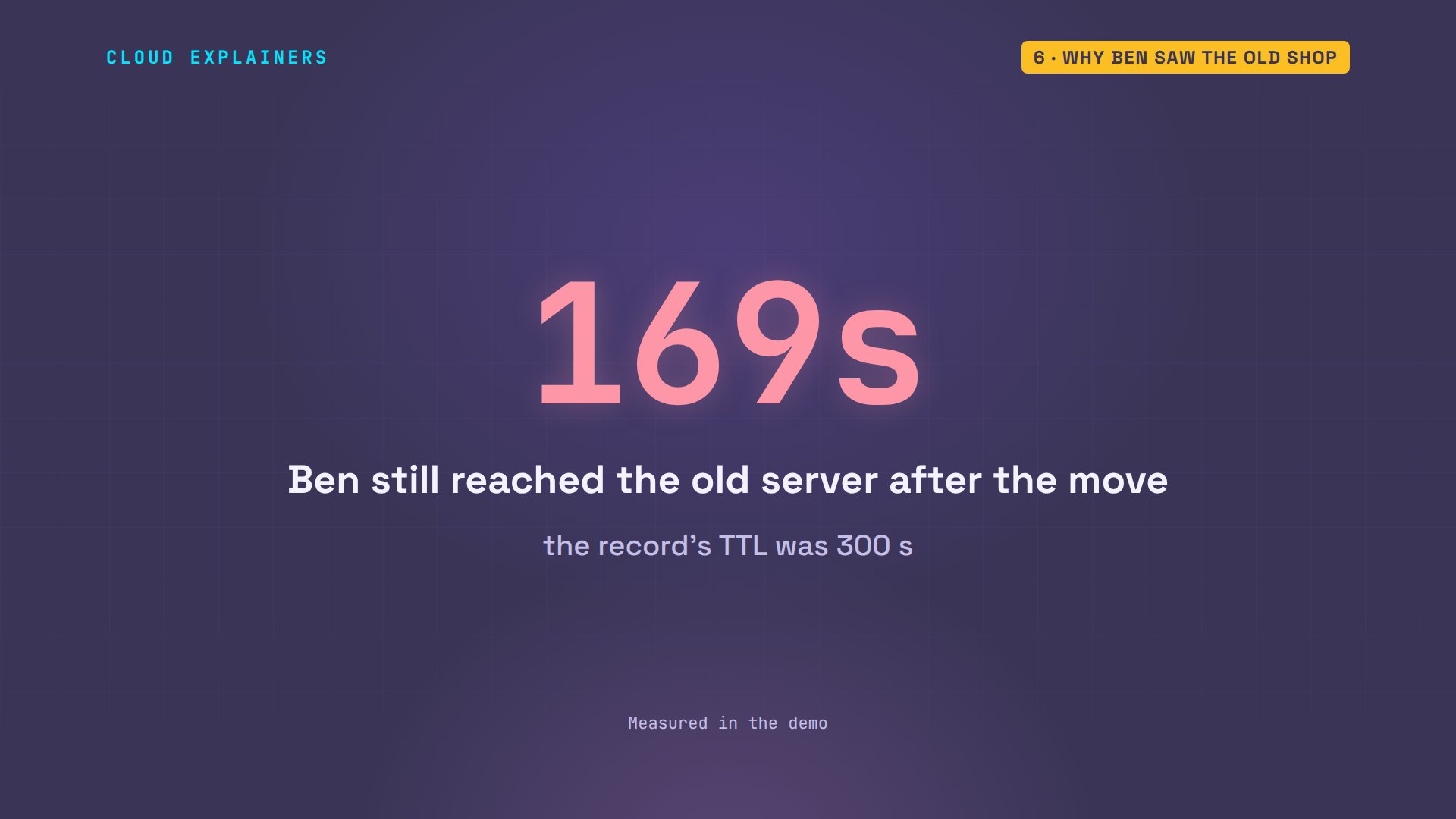
Ana's laptop got the new server, as we saw. Ben's laptop still gets the old one. His lookup shows why: the old address, with 169 seconds of its TTL left. When Ben asks Ana's server directly, it already says sixty.
curl -s shop.testAna's shop, served by the old server
dig +noall +answer shop.testshop.test. 169 IN A 10.53.0.50
dig @ns.shop.test +noall +answer shop.testshop.test. 300 IN A 10.53.0.60
Nothing is broken. Ben's resolver asked before the move and kept the answer for its five-minute TTL, exactly as the record allowed. Ana's resolver had never asked, so it went to her server and got the new address. Which visitors see which server depends on what their resolver remembers.
So a short loop on Ben's laptop runs dig every thirty seconds. The TTL counts down on the old address, and the moment it runs out, the resolver asks Ana's server again: the new address, with a fresh 300 seconds.
for i in $(seq 7); do dig +noall +answer shop.test; sleep 30; doneshop.test.		169	IN	A	10.53.0.50
shop.test.		139	IN	A	10.53.0.50
shop.test.		109	IN	A	10.53.0.50
shop.test.		79	IN	A	10.53.0.50
shop.test.		49	IN	A	10.53.0.50
shop.test.		19	IN	A	10.53.0.50
shop.test.		300	IN	A	10.53.0.60
In all, Ben was sent to the old server for about 169 seconds after the move. With a TTL of an hour, or a whole day, as many records have, that wait could last up to an hour, or a day.
Moving the right way
Let's do the move again, the right way. The trick: shrink the TTL before the move, not during it. Lower it, then wait one old TTL, so the old copies run out. Switch the address, with the old server still running. Then raise the TTL again. First, we put the shop back on the old server and waited until every copy had expired.
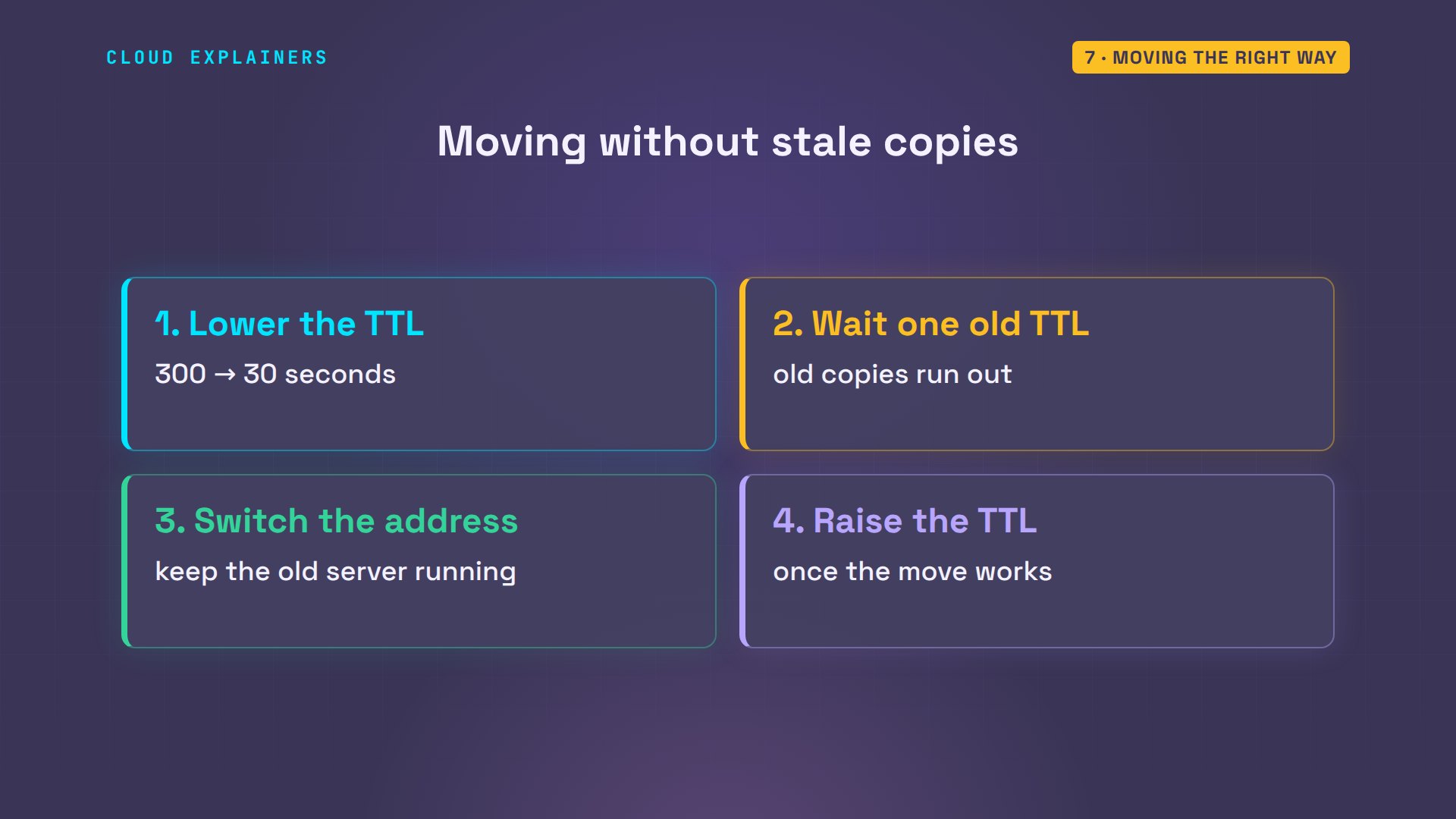
A moment ago Ben visited the shop, so his resolver holds a copy with the full 300. Ana lowers the TTL to 30 and reloads. But Ben's lookup is answered by his resolver, and it still shows the old copy, 300 seconds left: a new TTL only reaches resolvers when their old copy runs out. That's why you wait.
curl -s shop.testAna's shop, served by the old server
sudo sed -i 's/ 300 / 30 /' db.shop.test
sudo rndc reload shop.testzone reload queued
grep 10.53.0.50 db.shop.testshop.test. 30 IN A 10.53.0.50
dig +noall +answer shop.testshop.test. 300 IN A 10.53.0.50
Five minutes later Ben's copy carries the short timer: 30 seconds. Now Ana switches to the new server. Ben asks every ten seconds. The short copy runs out about 30 seconds after the switch, and he's on the new address.
dig +noall +answer shop.testshop.test. 30 IN A 10.53.0.50
sudo sed -i 's/10.53.0.50/10.53.0.60/' db.shop.test && sudo rndc reload shop.testzone reload queued
for i in $(seq 5); do dig +noall +answer shop.test; sleep 10; doneshop.test.		30	IN	A	10.53.0.50
shop.test.		20	IN	A	10.53.0.50
shop.test.		10	IN	A	10.53.0.50
shop.test.		0	IN	A	10.53.0.50
shop.test.		30	IN	A	10.53.0.60
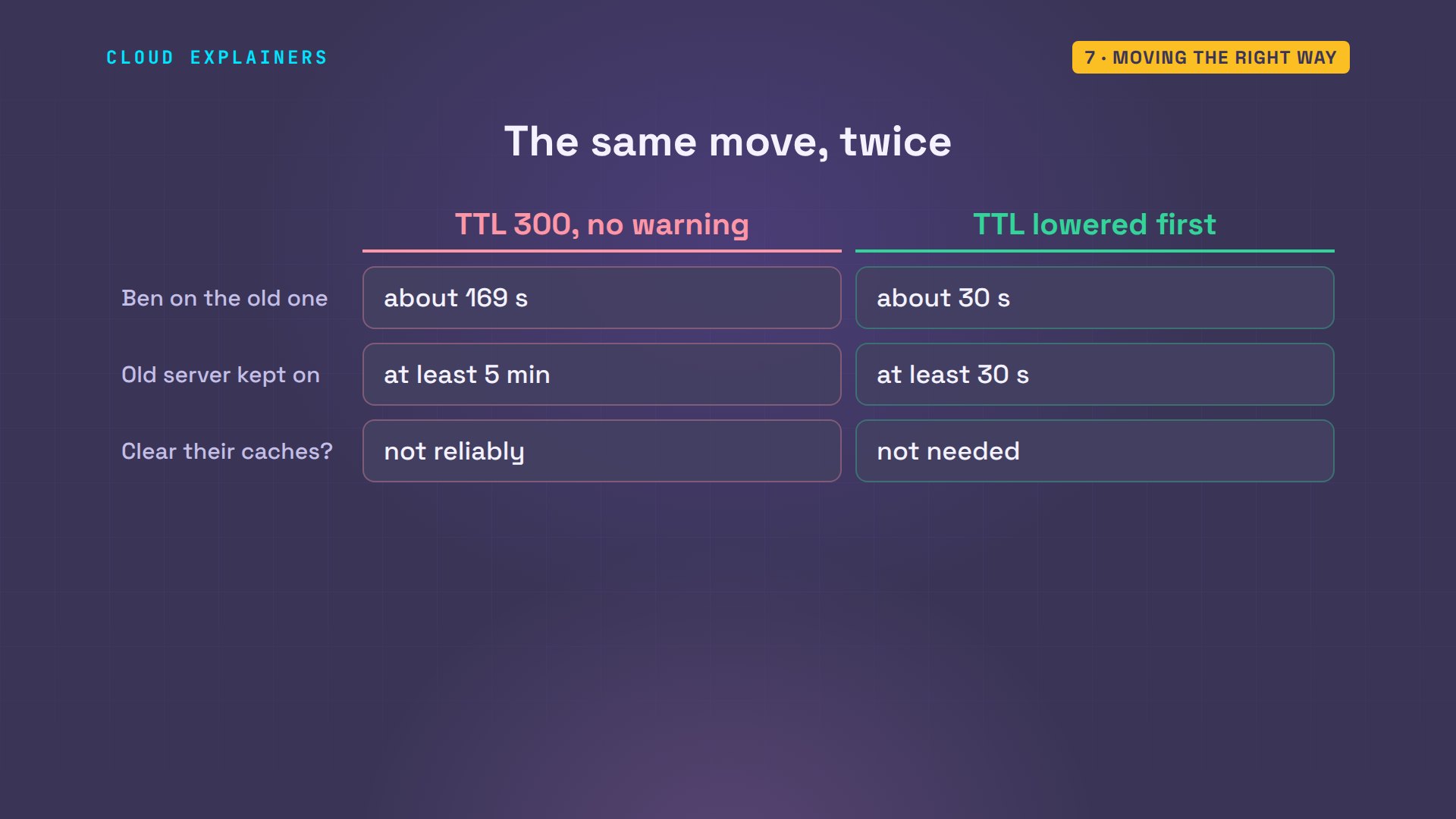
Same move, two results. Unprepared, Ben was stuck on the old server for minutes. Prepared, for seconds. Either way, keep the old server running until the last copies have run out, because you can't count on clearing other people's resolvers. Mostly, only time does that.
Recap
Let's recap. Your laptop asks a resolver. The resolver follows referrals from the root, to the top-level domain, to the domain's own DNS server, which has the real answer. Every answer carries a TTL, and resolvers keep copies until it runs out. So before a move, lower the TTL, wait, then switch.
If watching Ben's TTL run out finally made DNS click, subscribing helps other beginners find it too.
Every command and number in this video came from a real run in our lab. Thanks for watching Cloud Explainers.
Sources
Demos: real output from nine Ubuntu containers on a private network on our own machine, with our own root server; nothing in the lab used the real DNS. Watch the full video on YouTube.
More videos
Never Ignore a Security Update
Two-Factor Authentication Will Finally Make Sense
Never Expose a Database to the Internet
SSH Keys vs Passwords: Which Is Safer for Security?
The 5 Levels of Linux Boot: From Power On to Login
The 5 Levels of Network Firewalls
Password Security: Why Hackers Crack Weak Passwords
Why Your Linux Server Runs Out of Memory
HTTP vs HTTPS: What Actually Changes on Your Network

Every Linux File Permission You Need to Know
Linux Processes vs Threads: When Each One Wins

The OSI Model Will Finally Make Sense After This

The 7 Levels of Git
Every Network Troubleshooting Command You Need
Hashing vs Encryption in Cybersecurity: When Each One Wins
Why the Internet Ran Out of IP Addresses

Linux Package Managers: apt vs Snap vs Flatpak

Why Python Is Slow (and When It Doesn't Matter)
TCP vs UDP: When Each One Wins

Stop Running Linux as Root (Do This Instead)

Linux Users and Groups Will Finally Make Sense

Why Phishing Beats Good Security (and How to Spot It)

The 7 Levels of Docker

AI Agents Will Finally Make Sense After This
Stop Using git push --force (Use This Instead)
Agent Skills vs MCP: When Each One Wins

Networking Will Finally Make Sense After This

Every Linux Command You Actually Need

The 7 Levels of Cybersecurity

Every System Design Concept You Need, in One Diagram
