
How a WireGuard VPN Network Works
A WireGuard VPN is set up with about eight lines of config, and no username, password or connect button. This video shows what those lines do, in a real lab: a laptop on a hotel's Wi-Fi reaches a private file server through a WireGuard tunnel, and we look at what the hotel's router can see, what a stranger gets back from the VPN's port, what AllowedIPs really does, and why the tunnel survives a change of network.
Eight lines
You set up a WireGuard VPN by pasting eight lines into a file, and it just worked. No username. No password. No connect button.
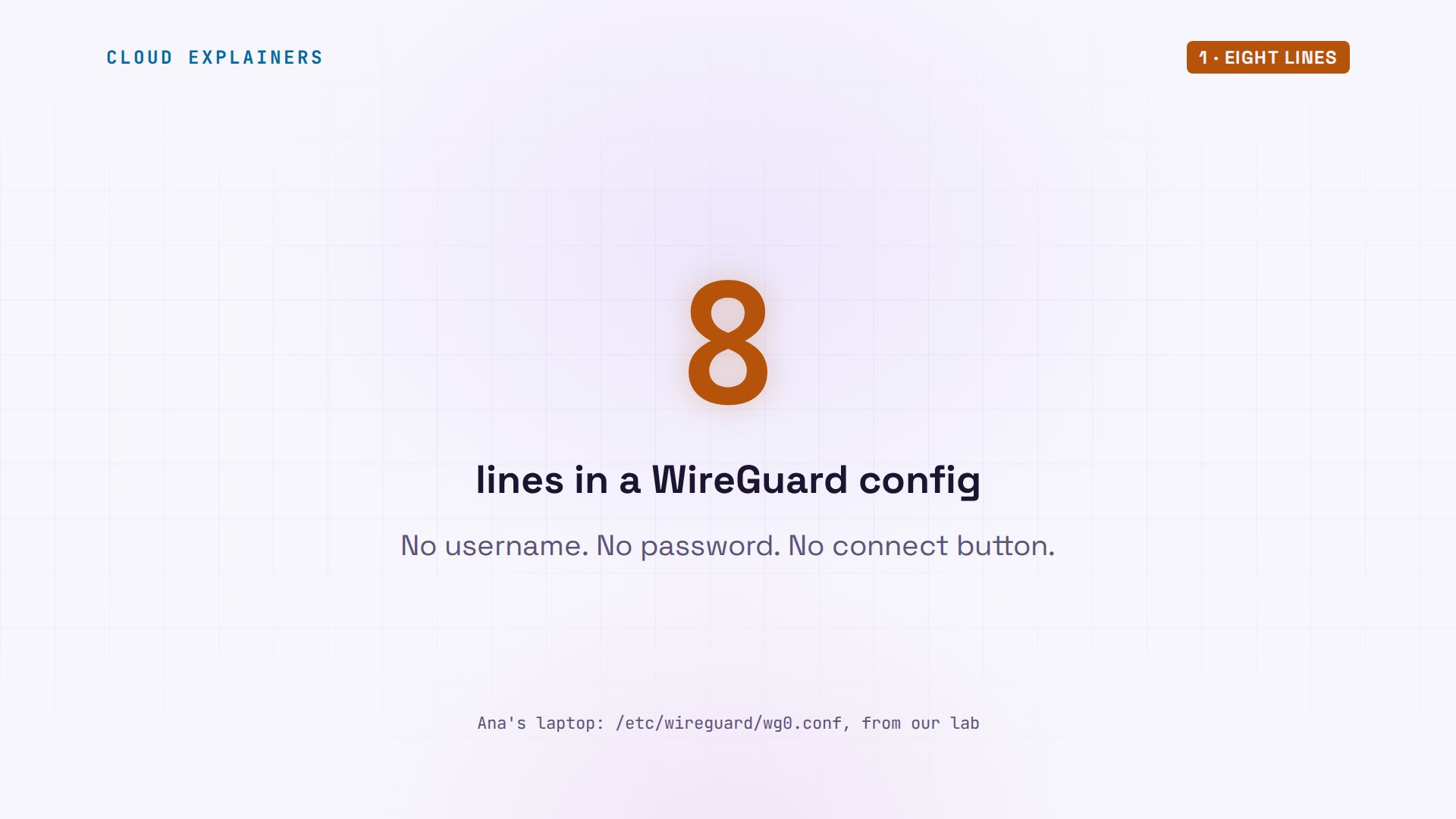
Here they are. Two keys you never chose, an endpoint, and AllowedIPs, the line nearly everyone gets wrong. With them, this laptop reads a file on a server the internet can't reach, and the hotel's Wi-Fi can't read a byte of it. One question to keep in mind: what happens to the tunnel when the laptop walks out of the hotel?
sudo cat /etc/wireguard/wg0.conf[Interface]
PrivateKey = WB8i4Ko1JfJZuwMdYMRYYK7qdNFgNb4WJf2/haJuJVc=
Address = 10.8.0.2/24

[Peer]
PublicKey = KsCji+LATcC7XoxBVg6ucAdNsoa6HnIFwzVyqcfWGwk=
Endpoint = 203.0.113.10:51820
AllowedIPs = 10.8.0.0/24, 10.20.0.0/24
PersistentKeepalive = 25
An address the internet can't reach
Start with the problem those lines solve. Ana runs a small print shop. Its price list sits on a file server in the back office, at 10.20.0.10. That is a private address: it works inside the office, and no router on the internet will carry a packet to it. The shop has one machine with a public address, the gateway. And tonight Ana is far away, on a hotel's Wi-Fi.
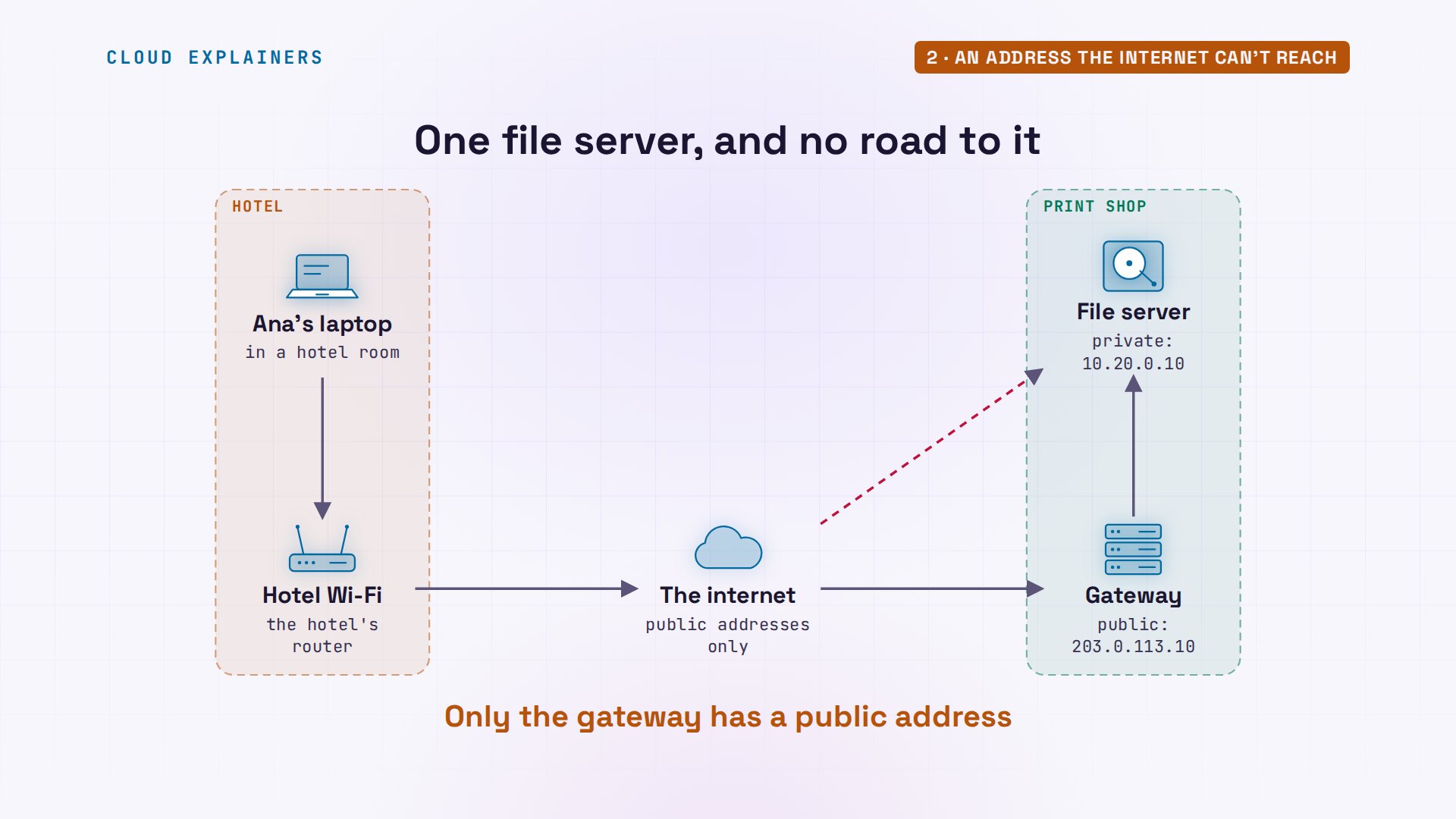
From her room she uses curl, a tool that fetches a web address from the terminal. The shop's public page loads: the gateway serves it. The price list, on the private address: nothing. After five seconds, curl gives up. A VPN has one job: make that second request work, without opening the file server to everyone else.
curl http://203.0.113.10/hours.txtAna's Print Shop
Open Monday to Friday, 9 to 5
curl -m 5 http://10.20.0.10/prices.txtcurl: (28) Connection timed out after 5007 milliseconds
A locked box in a parcel
The trick is an old one. Ana can't post a letter to a back room of the shop: the post office only knows the street address. So she puts the letter in a locked box, and the box in an ordinary parcel for the front door. The post office sees a parcel. At the door, the shop unlocks the box, and carries the letter to the right room.
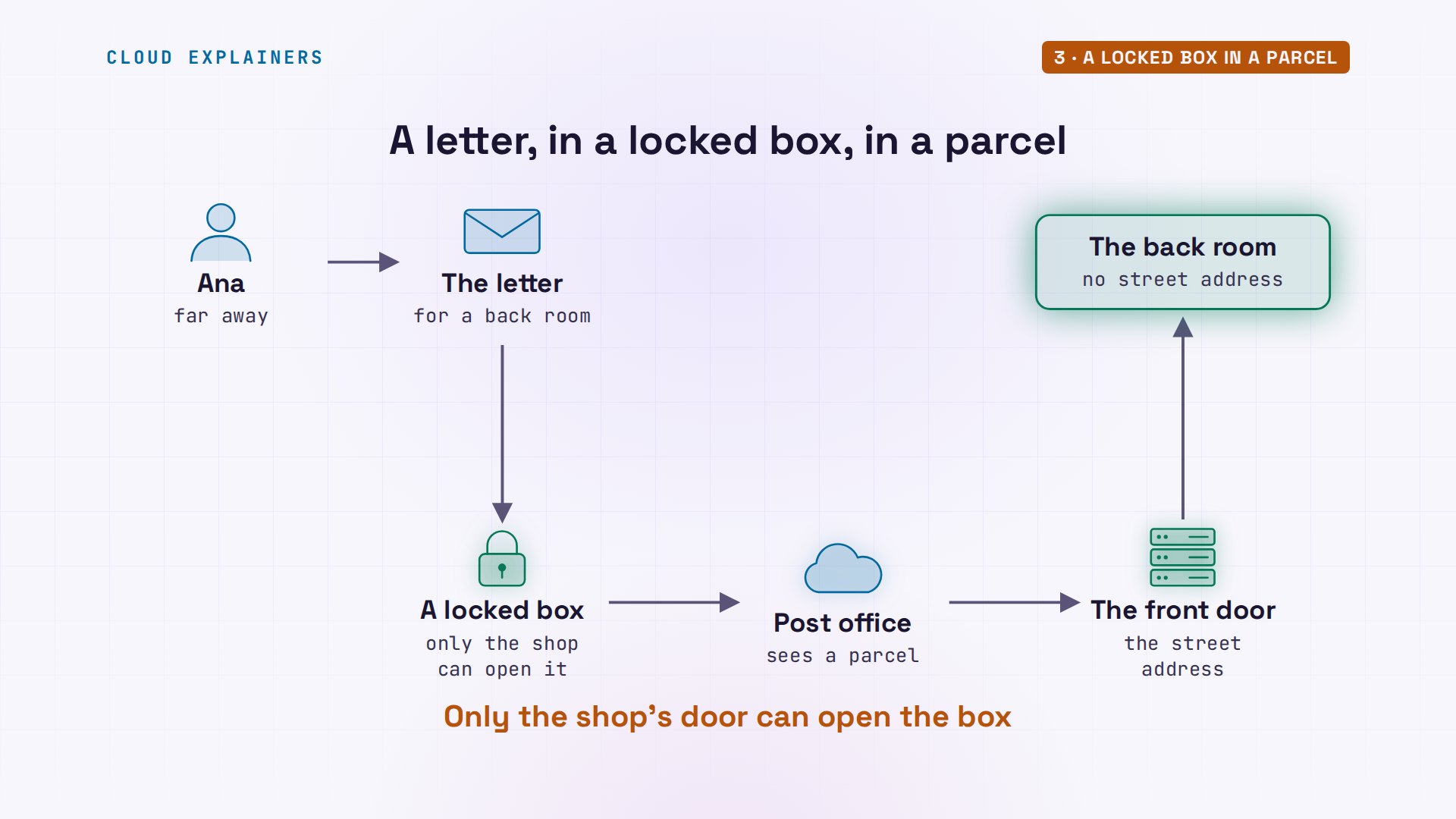
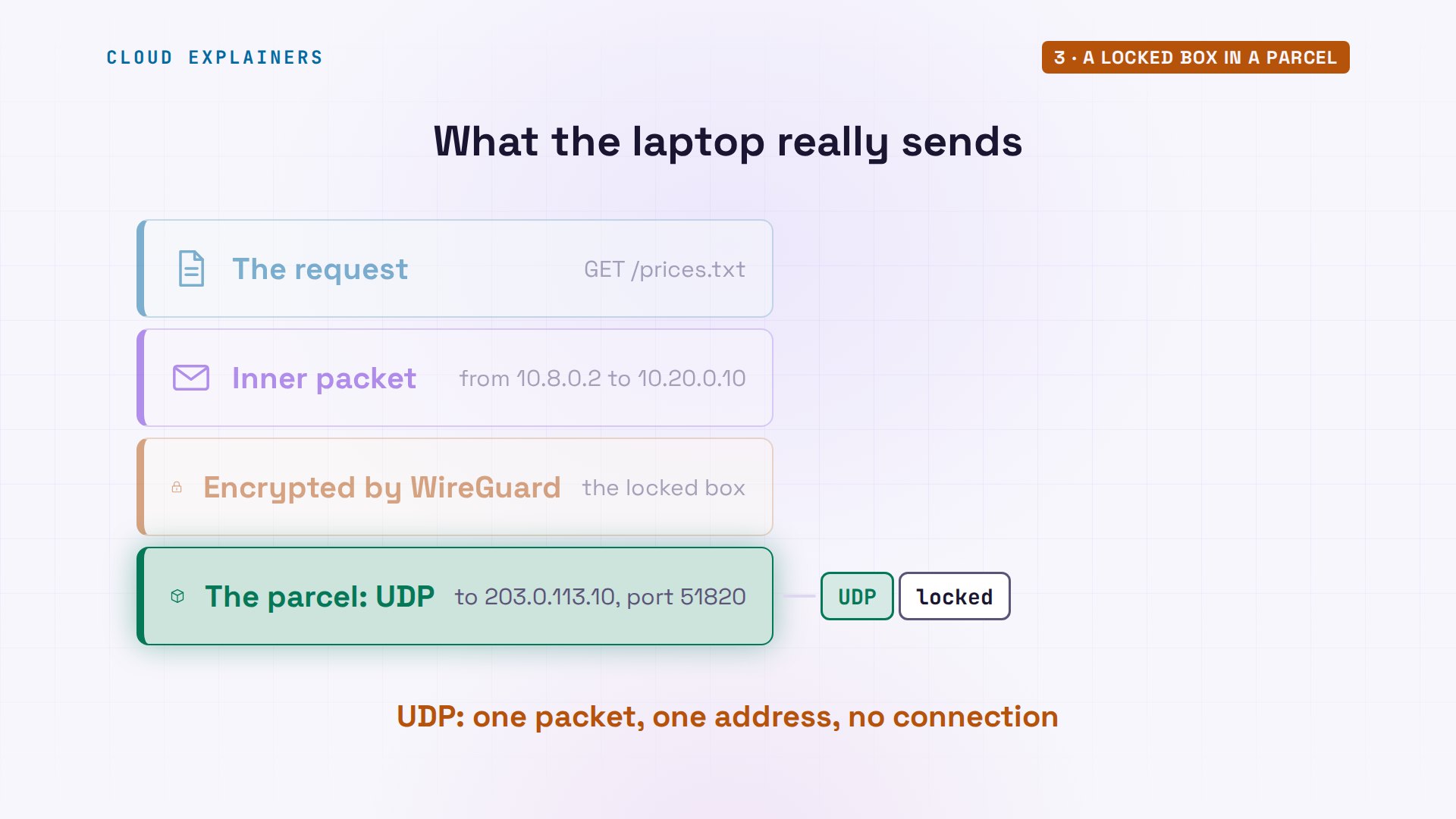
WireGuard does this with packets. The letter is Ana's request for the price list. It travels in an inner packet, from an extra address that the config gives her laptop for use inside the tunnel, to the file server. WireGuard encrypts that whole packet: the locked box. Then it wraps it in a plain UDP packet, the parcel, sent to the gateway's public address. UDP is the internet's simplest delivery: one packet, one address, no connection to set up first.
Keys, not passwords
Who can open the box? WireGuard has no passwords. Every machine makes a pair of keys. On the laptop, wg genkey writes a private key, into a file only Ana can read. It never leaves this machine. wg pubkey computes its partner from it: the public key, an open padlock you hand out. Anyone can snap it shut on a box; only your private key opens it. The laptop and the gateway swap public keys, once, and that swap is the whole sign-up.
umask 077
wg genkey > private.key
wg pubkey < private.key | tee public.keyti1qI6LsmazUZ9M19tgWFoMJH5F307EtS6wdwFPevgg=
ls -ltotal 8
-rw------- 1 ana ana 45 Nov 12 18:59 private.key
-rw------- 1 ana ana 45 Nov 12 18:59 public.key
The config, line by line
Now the eight lines read differently. Interface is this machine: its private key, and its address inside the tunnel. Peer is the other side: the gateway's public key; its endpoint, the public address and UDP port where parcels go; and AllowedIPs: the addresses that live behind that peer. Keepalive we'll come back to. One warning: this private key was made for this video and thrown away. Never show yours.
The gateway's file mirrors it. Its own private key, a port to listen on, and one peer: the laptop's public key, allowed to use exactly one address. And no endpoint. The gateway has no idea where Ana will be tonight. It learns that from the first packet her laptop sends.
sudo cat /etc/wireguard/wg0.conf[Interface]
PrivateKey = iEvBnCOBAjck/WtbTHoU4xXajLjtcUlNWcfLzowl8UM=
Address = 10.8.0.1/24
ListenPort = 51820

[Peer]
PublicKey = ti1qI6LsmazUZ9M19tgWFoMJH5F307EtS6wdwFPevgg=
AllowedIPs = 10.8.0.2/32
Ana brings the tunnel up with wg-quick, which prints everything it does. It adds a network interface called wg0: to Linux, one more network card, this one made of software. It gives it the keys, and the address. And it adds a route, a rule for where packets go, taken from the AllowedIPs line: anything for the office network goes into wg0. That's what a WireGuard tunnel is on your machine: one more network interface, with keys, run by the Linux kernel itself. The same request as before: the price list.
sudo wg-quick up wg0[#] ip link add wg0 type wireguard
[#] wg setconf wg0 /dev/fd/63
[#] ip -4 address add 10.8.0.2/24 dev wg0
[#] ip link set mtu 1420 up dev wg0
[#] ip -4 route add 10.20.0.0/24 dev wg0
curl http://10.20.0.10/prices.txtPrint shop price list (staff only)
Business cards, 250    18.00
Posters A2, each        6.50
Flyers A5, 500         42.00
What the hotel's Wi-Fi sees
So what does the hotel see? Its router can record every packet Ana sends, with a tool called tcpdump. First, the shop's public page, over plain HTTP: the request, the address, and every word of the page, readable.
tcpdump -ni eth0 -t -q -A -c 10 host 192.168.50.20 and not arptcpdump: verbose output suppressed, use -v[v]... for full protocol decode
listening on eth0, link-type EN10MB (Ethernet), snapshot length 262144 bytes
IP 192.168.50.20.49308 > 203.0.113.10.80: tcp 0
E..<..@.@.P...2...q
...P...T...................
...........

IP 203.0.113.10.80 > 192.168.50.20.49308: tcp 0
E..<..@.?.....q
..2..P..M......U...............
...........

IP 192.168.50.20.49308 > 203.0.113.10.80: tcp 0
E..4..@.@.P...2...q
...P...UM......?.......
........
IP 192.168.50.20.49308 > 203.0.113.10.80: tcp 84
E.....@.@.O...2...q
...P...UM......?/B.....
........GET /hours.txt HTTP/1.1
Host: 203.0.113.10
User-Agent: curl/8.5.0
Accept: */*


IP 203.0.113.10.80 > 192.168.50.20.49308: tcp 0
E..4..@.?.....q
..2..P..M..........@.......
........
IP 203.0.113.10.80 > 192.168.50.20.49308: tcp 186
E.....@.?..G..q
..2..P..M..........@/......
........HTTP/1.0 200 OK
Server: SimpleHTTP/0.6 Python/3.12.3
Date: Thu, 12 Nov 2026 18:59:45 GMT
Content-type: text/plain
Content-Length: 47
Last-Modified: Thu, 12 Nov 2026 18:50:00 GMT


IP 192.168.50.20.49308 > 203.0.113.10.80: tcp 0
E..4..@.@.P...2...q
...P....M......?.......
........
IP 203.0.113.10.80 > 192.168.50.20.49308: tcp 47
E..c..@.?.....q
..2..P..M..........@/......
........Ana's Print Shop
Open Monday to Friday, 9 to 5

IP 192.168.50.20.49308 > 203.0.113.10.80: tcp 0
E..4..@.@.P...2...q
...P....M......?.......
........
IP 192.168.50.20.49308 > 203.0.113.10.80: tcp 0
E..4..@.@.P
..2...q
...P....M......?.......
........
10 packets captured
13 packets received by filter
0 packets dropped by kernel
Now the private price list, through the tunnel, with the same recording. Every packet is UDP, to one address and one port. And inside: noise. The hotel learns that Ana talks to the gateway, when, and how much. Not what she asks for, and not that a file server exists.
tcpdump -ni eth0 -t -q -A -c 10 host 192.168.50.20 and not arptcpdump: verbose output suppressed, use -v[v]... for full protocol decode
listening on eth0, link-type EN10MB (Ethernet), snapshot length 262144 bytes
IP 192.168.50.20.59321 > 203.0.113.10.51820: UDP, length 96
E..|....@.....2...q
...l.h/A.....$................9..H|.h.7.......S...T^_\,.	.....a.T..A...u...........i.g..............)D..
IP 203.0.113.10.51820 > 192.168.50.20.59321: UDP, length 96
E..|....?..$..q
..2..l...h/A....oNY..........B..Y:..g..H.'...>j.&.....r1..a.i..B...2...s...o..8.0.5...S....8.~"|f(k:5..4.$U<
IP 192.168.50.20.59321 > 203.0.113.10.51820: UDP, length 96
E..|.	..@.....2...q
...l.h/A.....$............+......J..8).G...Qz...9..SsZ....9...*....Z..vs..*=..I....,...li*.93.\..@..p...
IP 192.168.50.20.59321 > 203.0.113.10.51820: UDP, length 176
E....
..@..O..2...q
...l../......$........... ..g.......c._.".......[....7.....ic.KoE.T....4..N..........{.".#<...
.5....oj..{.....(.......@.X.g.m.P..Ra.6...~`C....k....}.@...SO..bji.....1....F...&..yq..+
IP 203.0.113.10.51820 > 192.168.50.20.59321: UDP, length 96
E..|....?..#..q
..2..l...h/A....oNY.........m.....].%ui....!... ....8....L.....&.G9.K..2..<.>...*g]..^.gh.d..{|0.x..x/.....K
IP 203.0.113.10.51820 > 192.168.50.20.59321: UDP, length 272
E..,....?..r..q
..2..l..../.....oNY..........[.......ZS..%D.b...
....p5W.....a.g.5..c../.t.^.T<..3.........J..C.p0qG.8.-...}Yl.Dz..........S...e...!7|.H/....7.....dY.0.V.X.....d~..2.5.a....WD.S...b.7.m....Z:Cr.T.gd5..x=......s.kk.(...w.......@....".2.K*...m..{.&.)4...$......!.`.
1	D|Z..Q.&^....u\..+
IP 203.0.113.10.51820 > 192.168.50.20.59321: UDP, length 208
E.......?.....q
..2..l..../.....oNY.........#.p....'.......s.W.u9.Ef...u.........'8..k[...^`...........y....y.\.aR!..@..-....R.8.d.LSI(C3.6.C6QT.Q4.&.f.~9..y.%...Y"...L...8.c!(.6.^.P.)uW^...i..:/......~	............]..7D~...[J...I"".e.m
IP 192.168.50.20.59321 > 203.0.113.10.51820: UDP, length 96
E..|....@.....2...q
...l.h/A.....$..	.......v.N.9.............bsv
..{.K.....d]..b...M.#m....8.x....pY..a{...=?.-...h... ..`!
IP 192.168.50.20.59321 > 203.0.113.10.51820: UDP, length 96
E..|....@.....2...q
...l.h/A.....$..
.......N~i...R..........3...E.m.p.{....f....y.'......./....]..........;..E5i....k......
IP 203.0.113.10.51820 > 192.168.50.20.59321: UDP, length 96
E..|....?.. ..q
..2..l...h/A....oNY.	.........k.,d.EG.......&b.q.r...q^..&...........A........A..L...`.\.q..
^d.o.........J.
10 packets captured
10 packets received by filter
0 packets dropped by kernel
How did both ends agree on a key for that noise? With a handshake of two messages. The laptop sends one packet of 148 bytes, made with its own private key and the gateway's public key. The gateway answers with one of 92. From those two, each side works out the same fresh secret, and data flows. The hotel's router recorded both, and learned nothing it could use.
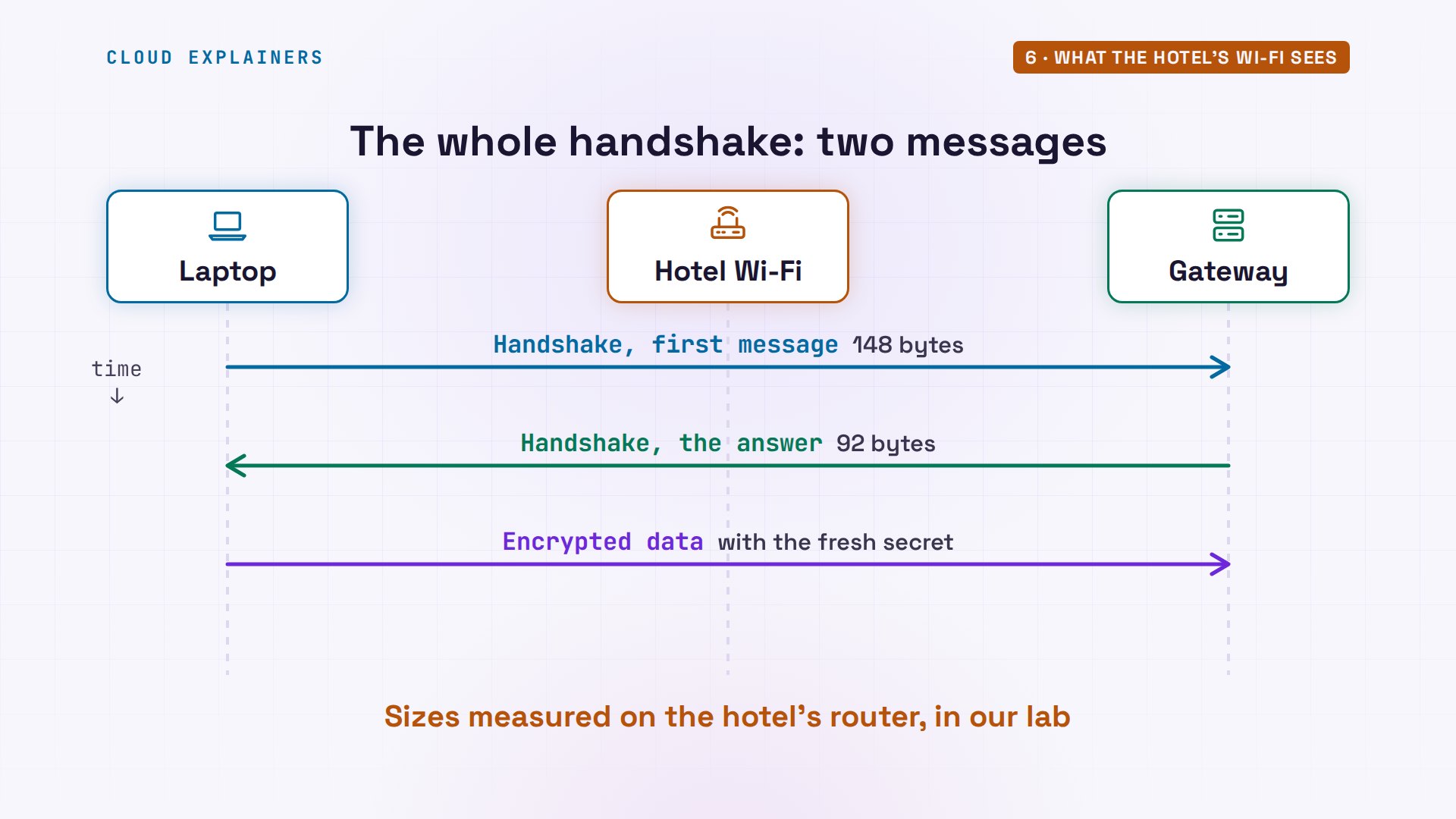
And that secret doesn't last. Ana leaves a ping running, once a second, while the router records only first handshake messages. Two of them, one hundred and twenty-one seconds apart: about every two minutes, the laptop starts a new handshake, and both sides switch to new keys. And the ping? Two hundred and sixty sent, two hundred and sixty answered.
tcpdump -ni eth0 -c 2 'udp[8] = 1'tcpdump: verbose output suppressed, use -v[v]... for full protocol decode
listening on eth0, link-type EN10MB (Ethernet), snapshot length 262144 bytes
19:01:44.991602 IP 192.168.50.20.59321 > 203.0.113.10.51820: UDP, length 148
19:03:45.822031 IP 192.168.50.20.59321 > 203.0.113.10.51820: UDP, length 148
2 packets captured
2 packets received by filter
0 packets dropped by kernel
ping -c 260 -i 1 -q 10.20.0.10PING 10.20.0.10 (10.20.0.10) 56(84) bytes of data.

--- 10.20.0.10 ping statistics ---
260 packets transmitted, 260 received, 0% packet loss, time 265226ms
rtt min/avg/max/mdev = 0.191/0.683/4.064/0.291 ms
A door that doesn't answer
Now, the stranger. Someone on the internet finds the gateway's address, and sends five packets to its WireGuard port. Each one says: knock. Guess first: how many replies come back? None. The gateway's own recording agrees: five packets in, and not one going out.
for i in 1 2 3 4 5; do echo knock | nc -u -w1 203.0.113.10 51820; done
sudo timeout 8 tcpdump -ni eth0 host 203.0.113.66 and not arptcpdump: verbose output suppressed, use -v[v]... for full protocol decode
listening on eth0, link-type EN10MB (Ethernet), snapshot length 262144 bytes
18:59:48.893183 IP 203.0.113.66.45201 > 203.0.113.10.51820: UDP, length 6
18:59:49.901701 IP 203.0.113.66.37297 > 203.0.113.10.51820: UDP, length 6
18:59:50.907305 IP 203.0.113.66.57197 > 203.0.113.10.51820: UDP, length 6
18:59:51.911705 IP 203.0.113.66.49446 > 203.0.113.10.51820: UDP, length 6
18:59:52.916970 IP 203.0.113.66.59647 > 203.0.113.10.51820: UDP, length 6

5 packets captured
5 packets received by filter
0 packets dropped by kernel
WireGuard's rule is simple: a packet that doesn't prove who sent it gets no answer at all. So the stranger tries properly: WireGuard, the right address, even the gateway's real public key, which is no secret. But the stranger's own key is not on the gateway's list. Three pings: all lost. WireGuard's status shows why: zero bytes received. The first handshake message went out three times, about five seconds apart, and the gateway never replied. Without a listed key, there is nothing here to talk to, and nothing to try passwords against.
sudo cat /etc/wireguard/wg0.conf[Interface]
PrivateKey = kGPXI4FTPgTnZ15KKgNa/yDRFhdAiefifu0vjmnQFVE=
Address = 10.8.0.3/24

[Peer]
PublicKey = KsCji+LATcC7XoxBVg6ucAdNsoa6HnIFwzVyqcfWGwk=
Endpoint = 203.0.113.10:51820
AllowedIPs = 10.8.0.0/24, 10.20.0.0/24
ping -c 3 -W 1 10.20.0.10PING 10.20.0.10 (10.20.0.10) 56(84) bytes of data.

--- 10.20.0.10 ping statistics ---
3 packets transmitted, 0 received, 100% packet loss, time 2049ms
sudo wg showinterface: wg0
  public key: +ZsX3EjU7b0SIaEODyBoUHg3FhCH1K5iRU+whA1bmlQ=
  private key: (hidden)
  listening port: 55525

peer: KsCji+LATcC7XoxBVg6ucAdNsoa6HnIFwzVyqcfWGwk=
  endpoint: 203.0.113.10:51820
  allowed ips: 10.8.0.0/24, 10.20.0.0/24
  transfer: 0 B received, 444 B sent
AllowedIPs does two jobs
Back to the line nearly everyone gets wrong. AllowedIPs does two jobs. Job one, when sending: it's a signpost. A packet for the file server goes into wg0, to the peer whose list holds that address. A packet for the shop's public page goes straight out through the hotel: no tunnel. That's a split tunnel: only the office's traffic takes it. Write 0.0.0.0/0 here instead, which means every address, and everything goes through. And a packet pushed into wg0 for an address no peer lists? Required key not available. No peer, no key, nothing sent.
ip route get 10.20.0.1010.20.0.10 dev wg0 src 10.8.0.2 uid 1000
    cache
ip route get 203.0.113.10203.0.113.10 via 192.168.50.2 dev eth0 src 192.168.50.20 uid 1000
    cache
ping -c 1 -I wg0 10.30.0.5PING 10.30.0.5 (10.30.0.5) from 10.8.0.2 wg0: 56(84) bytes of data.
From 10.8.0.2 icmp_seq=1 Destination Host Unreachable
ping: sendmsg: Required key not available

--- 10.30.0.5 ping statistics ---
1 packets transmitted, 0 received, +1 errors, 100% packet loss, time 0ms
Job two, when receiving: it's a guest list. The gateway allows this peer exactly one source address. So Ana gives her laptop a second one, ending in ninety-nine, and pings from it. The packets are encrypted with the right key. They arrive, and they decrypt. And the gateway drops them: wrong address for this key. From the address on the list: answered.
sudo ip address add 10.8.0.99/24 dev wg0
ping -c 2 -W 1 -I 10.8.0.99 10.20.0.10PING 10.20.0.10 (10.20.0.10) from 10.8.0.99 : 56(84) bytes of data.

--- 10.20.0.10 ping statistics ---
2 packets transmitted, 0 received, 100% packet loss, time 1070ms
ping -c 2 10.20.0.10PING 10.20.0.10 (10.20.0.10) 56(84) bytes of data.
64 bytes from 10.20.0.10: icmp_seq=1 ttl=63 time=0.436 ms
64 bytes from 10.20.0.10: icmp_seq=2 ttl=63 time=0.490 ms

--- 10.20.0.10 ping statistics ---
2 packets transmitted, 2 received, 0% packet loss, time 1040ms
rtt min/avg/max/mdev = 0.436/0.463/0.490/0.027 ms
Leaving the hotel
Now, the open question. Ana starts thirty pings to the file server, two a second, and walks out. Her laptop falls off the hotel's Wi-Fi and joins her phone's hotspot: a new network, a new address. Guess first: does she have to restart the VPN? No. After ping eleven, a gap: the seconds with no network at all. Then ping seventeen is answered, and every one after it.
ping -c 30 -i 0.5 10.20.0.10PING 10.20.0.10 (10.20.0.10) 56(84) bytes of data.
64 bytes from 10.20.0.10: icmp_seq=1 ttl=63 time=0.743 ms
64 bytes from 10.20.0.10: icmp_seq=2 ttl=63 time=0.495 ms
64 bytes from 10.20.0.10: icmp_seq=3 ttl=63 time=0.704 ms
64 bytes from 10.20.0.10: icmp_seq=4 ttl=63 time=0.853 ms
64 bytes from 10.20.0.10: icmp_seq=5 ttl=63 time=0.550 ms
64 bytes from 10.20.0.10: icmp_seq=6 ttl=63 time=0.662 ms
64 bytes from 10.20.0.10: icmp_seq=7 ttl=63 time=0.802 ms
64 bytes from 10.20.0.10: icmp_seq=8 ttl=63 time=0.820 ms
64 bytes from 10.20.0.10: icmp_seq=9 ttl=63 time=0.465 ms
64 bytes from 10.20.0.10: icmp_seq=10 ttl=63 time=0.633 ms
64 bytes from 10.20.0.10: icmp_seq=11 ttl=63 time=0.812 ms
64 bytes from 10.20.0.10: icmp_seq=17 ttl=63 time=1.55 ms
64 bytes from 10.20.0.10: icmp_seq=18 ttl=63 time=0.668 ms
64 bytes from 10.20.0.10: icmp_seq=19 ttl=63 time=0.256 ms
64 bytes from 10.20.0.10: icmp_seq=20 ttl=63 time=0.532 ms
64 bytes from 10.20.0.10: icmp_seq=21 ttl=63 time=0.635 ms
64 bytes from 10.20.0.10: icmp_seq=22 ttl=63 time=0.771 ms
64 bytes from 10.20.0.10: icmp_seq=23 ttl=63 time=0.398 ms
64 bytes from 10.20.0.10: icmp_seq=24 ttl=63 time=0.841 ms
64 bytes from 10.20.0.10: icmp_seq=25 ttl=63 time=0.537 ms
64 bytes from 10.20.0.10: icmp_seq=26 ttl=63 time=0.542 ms
64 bytes from 10.20.0.10: icmp_seq=27 ttl=63 time=0.924 ms
64 bytes from 10.20.0.10: icmp_seq=28 ttl=63 time=0.867 ms
64 bytes from 10.20.0.10: icmp_seq=29 ttl=63 time=0.762 ms
64 bytes from 10.20.0.10: icmp_seq=30 ttl=63 time=0.398 ms

--- 10.20.0.10 ping statistics ---
30 packets transmitted, 25 received, 16.6667% packet loss, time 14676ms
rtt min/avg/max/mdev = 0.256/0.688/1.545/0.242 ms
How? There never was a connection: no login, so no session to drop. The gateway shows it. Before, Ana's key was last heard from the hotel's public address. After: from the phone network's. Nobody told it. WireGuard knows a peer by its key, not by its address. Whenever a packet arrives that the key can decrypt, the gateway notes where it came from, and sends its replies there. And the last of the eight lines, the keepalive: every twenty-five seconds the laptop sends one tiny packet, because a router like the hotel's forgets a conversation that goes quiet, and then replies can't get back in.
sudo wg show wg0 endpointsti1qI6LsmazUZ9M19tgWFoMJH5F307EtS6wdwFPevgg= 203.0.113.50:59321
sudo wg show wg0 endpointsti1qI6LsmazUZ9M19tgWFoMJH5F307EtS6wdwFPevgg= 203.0.113.77:59321
Recap
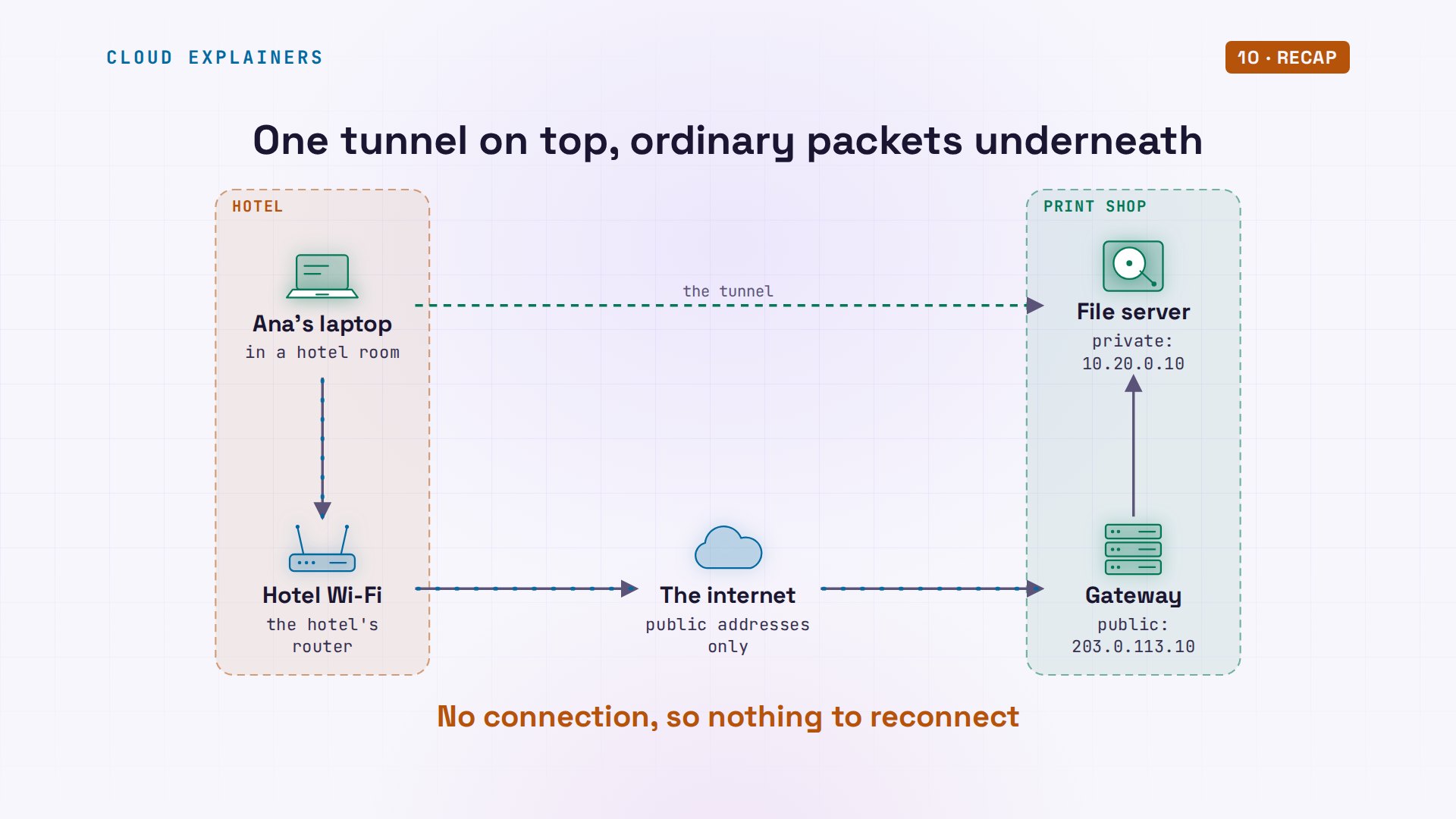
So, a WireGuard VPN is: one more network interface on each machine; a pair of keys each, with the public ones swapped; encrypted packets inside ordinary UDP; and AllowedIPs, a route going out and a guest list coming in. No connection, so nothing to reconnect.
If those eight lines make sense now, subscribing is the easy way to catch the next networking demo.
Every packet you saw was real, in a small lab of six containers. Every command and the lab files are linked in the description. Thanks for watching Cloud Explainers.
Sources
- WireGuard: conceptual overview, cryptokey routing, built-in roaming
- WireGuard protocol (UDP only; no reply to an unauthenticated packet; handshake and timers)
- WireGuard quick start (wg genkey, wg pubkey, wg-quick)
- wg(8) manual page (AllowedIPs, Endpoint, PersistentKeepalive)
- wg-quick(8) manual page
- Linux 5.6 release notes (WireGuard joins the kernel)
- RFC 5737 (203.0.113.0/24 is reserved for documentation)
Demos: containers on our own Mac standing in for a hotel, a print shop and a stranger; all of them are made up, and 203.0.113.x addresses are reserved for examples. The keys shown were made for this video and deleted. WireGuard is a registered trademark of Jason A. Donenfeld; this channel is not affiliated with the project. Watch the full video on YouTube.
More videos
Every Networking Term a Beginner Needs in 12 Minutes
How to Fix Docker 'Permission Denied' on docker.sock
How to Fix Git 'Updates Were Rejected' When You Push
How to Fix nginx 502 Bad Gateway Errors on Linux
How to Fix Linux apt 'Could Not Get Lock' Errors (Ubuntu)

How Email Works on the Internet (SMTP) in 10 Minutes

The Python Roadmap for Beginners

Golang REST API with Gin: Full Tutorial for Beginners

Linux Makefiles Will Finally Make Sense After This

SAML vs OAuth vs OpenID Connect: What's the Difference?

How to Fix Python cron Jobs That Never Run

Linux Bash Scripting: Full Tutorial for Beginners

How PXE Network Boot Works

How Active Directory Works

How to Fix a Linux systemd Service That Won't Start

Linux Logs: syslog vs journald

JWT vs Session Cookies: Which One Should You Use?

Docker vs Docker Compose: Which One Should You Use?

How to Fix Docker Compose Containers That Can't Talk to Each Other

Django Full Tutorial for Beginners

How Linux systemd Works

How to Fix 'Windows Cannot Access' Network Share Errors (SMB)

REST vs gRPC: Which One Should You Use?

How to Fix SSL Certificate Chain Errors (Missing Intermediate)

Every Python Concept for Beginners in 10 Minutes

Every SQL Join Type in 10 Minutes

Why OpenRouter Free Models Hit Their Limit So Fast

Why Your Gemini API Free Tier Runs Out So Fast

OpenRouter Will Finally Make Sense After This

How Redis Caching Works

Gemini API vs Vertex AI: Which One Should You Use?

How to Fix a Leaked Gemini API Key

Why Golang Uses Goroutines Instead of Threads

How to Fix Gemini API Error 429: Resource Exhausted

Claude Token Pricing Will Finally Make Sense After This

Why Python Web Scraping Returns Nothing (and the Fix)

Python uv vs pip: Which One Should You Use?

Python Automation: Full Tutorial for Beginners

How OAuth Login Works

Google AI Studio Will Finally Make Sense After This

What Happens When You Run a Docker Container

How to Fix Claude Code Billing Your API Key Instead of Your Plan

Why Passkeys Can't Be Phished Like Passwords

PowerShell vs Bash: Which One Should You Learn?

The Linux Roadmap for Beginners

Django vs FastAPI: Which One Should You Use?

Why SQLite Is the Most Used Database in the World

How a NoSQL Database Like MongoDB Works

How to Fix Python pip error: externally-managed-environment

How to Fix MySQL Too Many Connections Database Errors

Golang Concurrency Will Finally Make Sense After This

How Amazon S3 Works

How Kubernetes Works

How Git Works

How to Fix Docker Port Already Allocated Errors

How PostgreSQL Works

How to Fix Git Merge Conflicts

How to Fix No Space Left on Device in Linux

How the Internet Works

SQL vs NoSQL: When Each One Wins

How to Fix JWT Token Expired Errors (401 Unauthorized)

Claude API vs Claude Pro: Why Your Subscription Doesn't Include It

Why AI Agent Skills Beat Giant Prompts

Linux Cron Jobs Will Finally Make Sense After This

Security Logs Will Finally Make Sense After This

How to Fix a Security Leak: An API Key Pushed to GitHub

DNS Will Finally Make Sense After This

Never Ignore a Security Update

Two-Factor Authentication Will Finally Make Sense

Never Expose a Database to the Internet

SSH Keys vs Passwords: Which Is Safer for Security?

The 5 Levels of Linux Boot: From Power On to Login

The 5 Levels of Network Firewalls

Password Security: Why Hackers Crack Weak Passwords

Why Your Linux Server Runs Out of Memory

HTTP vs HTTPS: What Actually Changes on Your Network

Every Linux File Permission You Need to Know

Linux Processes vs Threads: When Each One Wins

The OSI Model Will Finally Make Sense After This

The 7 Levels of Git

Every Network Troubleshooting Command You Need

Hashing vs Encryption in Cybersecurity: When Each One Wins

Why the Internet Ran Out of IP Addresses

Linux Package Managers: apt vs Snap vs Flatpak

Why Python Is Slow (and When It Doesn't Matter)

TCP vs UDP: When Each One Wins

Stop Running Linux as Root (Do This Instead)

Linux Users and Groups Will Finally Make Sense

Why Phishing Beats Good Security (and How to Spot It)

The 7 Levels of Docker

AI Agents Will Finally Make Sense After This

Stop Using git push --force (Use This Instead)

Agent Skills vs MCP: When Each One Wins

Networking Will Finally Make Sense After This

Every Linux Command You Actually Need

The 7 Levels of Cybersecurity

Every System Design Concept You Need, in One Diagram
