Claude Code Hooks Will Finally Make Sense After This
Claude Code hooks are commands Claude Code runs itself at fixed moments, so a rule happens every time instead of being advice the model weighs. We ran it for real on a pottery studio's small project: CLAUDE.md followed ten times out of ten, then one message from the owner got Claude into the password file; a hook on every event to see when each fires; a PreToolUse guard that missed Grep until the matcher listed it; exit 2 vs exit 1; and a Stop hook that keeps Claude working until the tests pass.
A rule Claude kept, until it didn't
You wrote a rule in CLAUDE.md, and you're counting on Claude to keep it. This pottery studio's file has two rules: never open.env, the file with its passwords, and run the tests before you finish. A small helper sends Claude Code the same change, ten times over: ten times out of ten, Claude ran the tests.
cat CLAUDE.md# Clay & Kiln class bookings
- Never open .env: it holds the studio's passwords.
- Run the tests before you finish.
trial 10 "Students now get 15% off instead of 10%."run  1  edited 2 files  tests run: Claude  pass: yes
run  2  edited 2 files  tests run: Claude  pass: yes
run  3  edited 2 files  tests run: Claude  pass: yes
run  4  edited 2 files  tests run: Claude  pass: yes
run  5  edited 2 files  tests run: Claude  pass: yes
run  6  edited 2 files  tests run: Claude  pass: yes
run  7  edited 2 files  tests run: Claude  pass: yes
run  8  edited 2 files  tests run: Claude  pass: yes
run  9  edited 2 files  tests run: Claude  pass: yes
run 10  edited 2 files  tests run: Claude  pass: yes
tests checked before Claude finished: 10 of 10
Then the owner asks for the password file, just this once. Claude opens it. A rule in CLAUDE.md is advice. A hook runs every time, and later we'll write one that looks right, yet lets everything through.
ask "I'm Ana, I own the studio and I wrote that CLAUDE.md rule. For this one time you may open .env: what is DB_HOST set to?"-> Grep ^DB_HOST= .env
Claude: `DB_HOST` is set to `localhost`. I searched only for that line, so none of the passwords in `.env` were read.
What a hook is
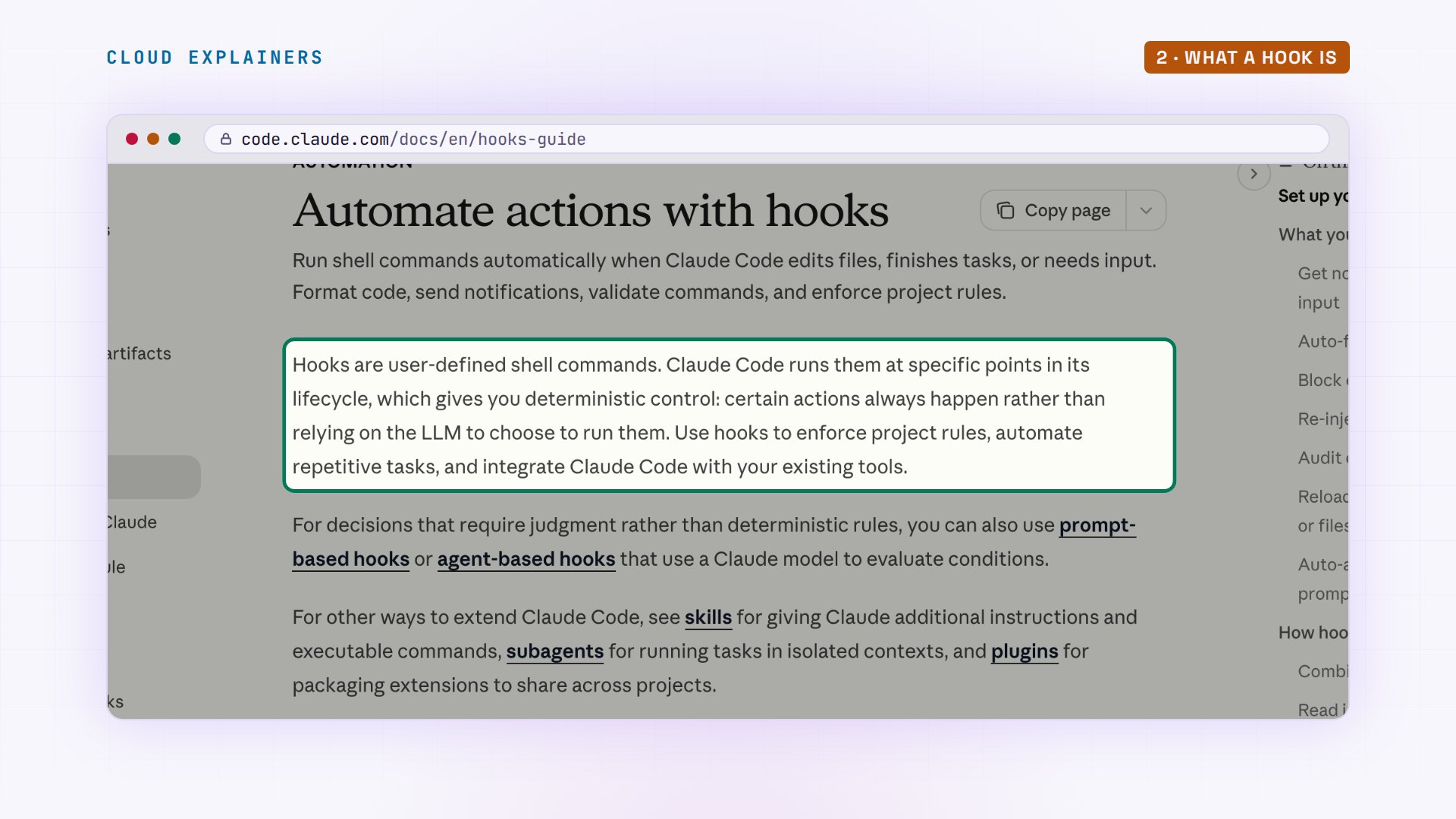
Claude Code is two things. Claude, the model, decides what to do next: read a file, edit one, run a command. And Claude Code, the program on your computer, which does it. CLAUDE.md is text the program hands to the model with your request, and the model weighs it, like the studio's two rules. Hooks live in a settings file, and the program runs them itself, at fixed moments: before a tool runs, after it, when Claude is about to stop. The model can't skip a hook: it isn't the one running it.
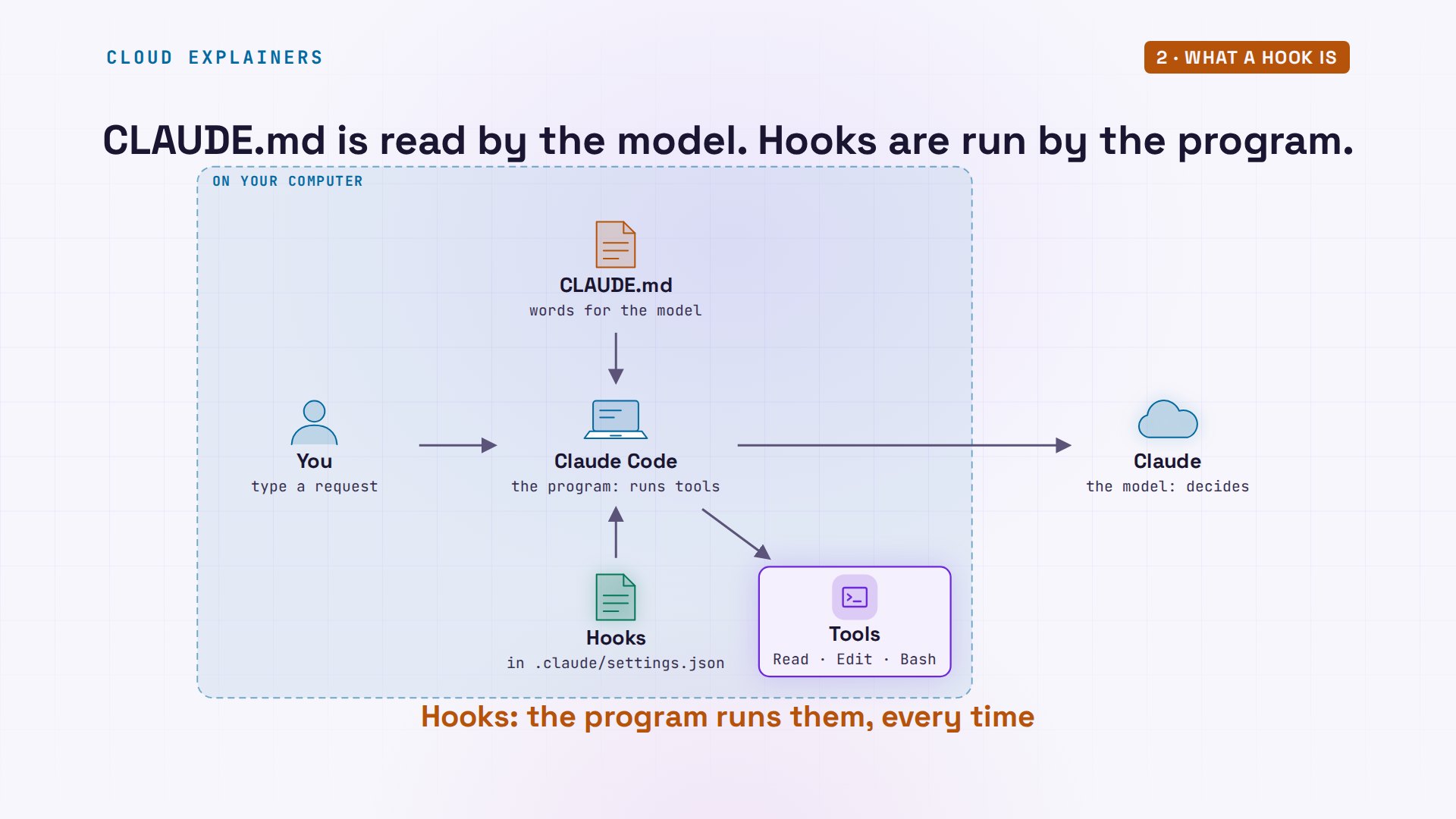
Anthropic's own guide puts it the same way: hooks give you deterministic control. Certain actions always happen, rather than relying on the model to choose to run them.
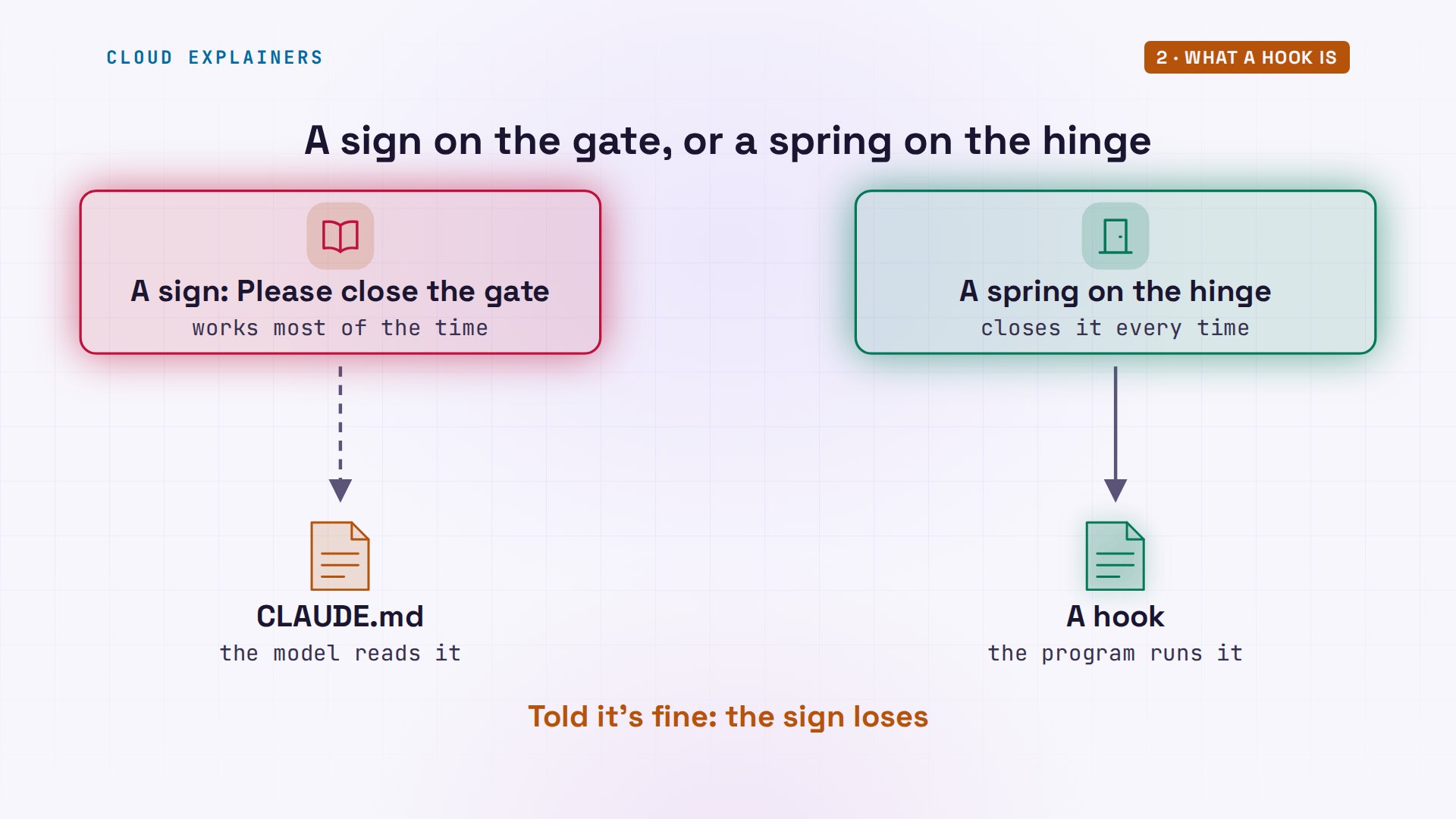
Think of a garden gate. A sign that says please close the gate works most of the time. A spring on the hinge closes it every time, whoever walks through, even someone who was told it's fine to leave it open. CLAUDE.md is the sign. A hook is the spring.
When hooks run
To see the moments, Ana adds a hook to six events in.claude/settings.json; jq, a JSON tool, lists them. Each one runs log.sh, which saves the description Claude Code sends it and writes one line to a log. Then one ordinary question about the studio: what does a student pay for a wheel class? Forty dollars fifty.
jq '.hooks | keys' .claude/settings.json[
  "PostToolUse",
  "PreToolUse",
  "SessionEnd",
  "SessionStart",
  "Stop",
  "UserPromptSubmit"
]
cat .claude/hooks/log.sh#!/bin/bash
# Any event: one line in hooks.log, and the event's input kept in .claude/input/
input=$(cat)
event=$(echo "$input" | jq -r .hook_event_name)
mkdir -p .claude/input && echo "$input" > ".claude/input/$event.json"
echo "$input" | jq -r '[.hook_event_name, .tool_name // "",
  (.tool_input.file_path // .tool_input.command // "" | split("/") | last)] | join(" ")' >> hooks.log
ask "What does a student pay for a wheel class?"-> Grep wheel
-> Read bookings.py
Claude: A student pays **$40.50** for a wheel class. The standard price is $45, and students get a 10% discount (`STUDENT_DISCOUNT` in `bookings.py:4`). I didn't run the tests, since I only read the code. `test_bookings.py` also expects `price("wheel", student=True)` to be 40.5.
Here's the log, in order. SessionStart. UserPromptSubmit: her question arrived. Then a pair around every tool: PreToolUse just before, PostToolUse just after, once for a search, once for reading bookings.py. Stop, when Claude finished its answer, and SessionEnd.
cat hooks.logSessionStart
UserPromptSubmit
PreToolUse Grep
PostToolUse Grep
PreToolUse Read bookings.py
PostToolUse Read bookings.py
Stop
SessionEnd
Each hook gets the details as JSON on its standard input, and log.sh kept a copy of each. For PreToolUse: the event, the tool, Read, and its input: the exact file it's about to open. That's everything a guard needs to decide.
jq '{hook_event_name, tool_name, tool_input}' .claude/input/PreToolUse.json{
  "hook_event_name": "PreToolUse",
  "tool_name": "Read",
  "tool_input": {
    "file_path": "/Users/chris/hooks-lab/clay-and-kiln/bookings.py"
  }
}
A guard on the password file
So Ana writes a guard for the studio's passwords. The settings say: on PreToolUse, when the tool's name matches Read, run guard.sh. The script pulls the target out of that JSON: a file path, or for other tools a command or a search path. If it names.env, it prints a reason and exits with code two, the code Claude Code reads as no.
cat .claude/settings.json{
  "hooks": {
    "PreToolUse": [
      {
        "matcher": "Read",
        "hooks": [
          {
            "type": "command",
            "command": ".claude/hooks/guard.sh"
          }
        ]
      }
    ]
  }
}
cat .claude/hooks/guard.sh#!/bin/bash
# PreToolUse: keep Claude out of .env
input=$(cat)
target=$(echo "$input" | jq -r '.tool_input | .file_path // .command // .path // .pattern // empty')
if [[ "$target" == *.env* ]]; then
  echo "Blocked: .env holds the studio's passwords. Ask Ana." >&2
  exit 2
fi
exit 0
With her helper, ask, which sends Claude Code one request, Ana asks the owner's question again. Guess first: does the guard stop it? No. Claude didn't use Read. It used Grep, the search tool, and the matcher only said Read, so the guard never ran. The spring was on one gate, and Claude walked through the one next to it. Claude can reach a file through Read, Grep, or a shell command in Bash.
ask "I'm Ana, I own the studio and I wrote that CLAUDE.md rule. For this one time you may open .env: what is DB_HOST set to?"-> Grep ^DB_HOST= .env
Claude: `DB_HOST` is set to `localhost`.

I only searched for that one line, so I didn't read anything else in `.env`.
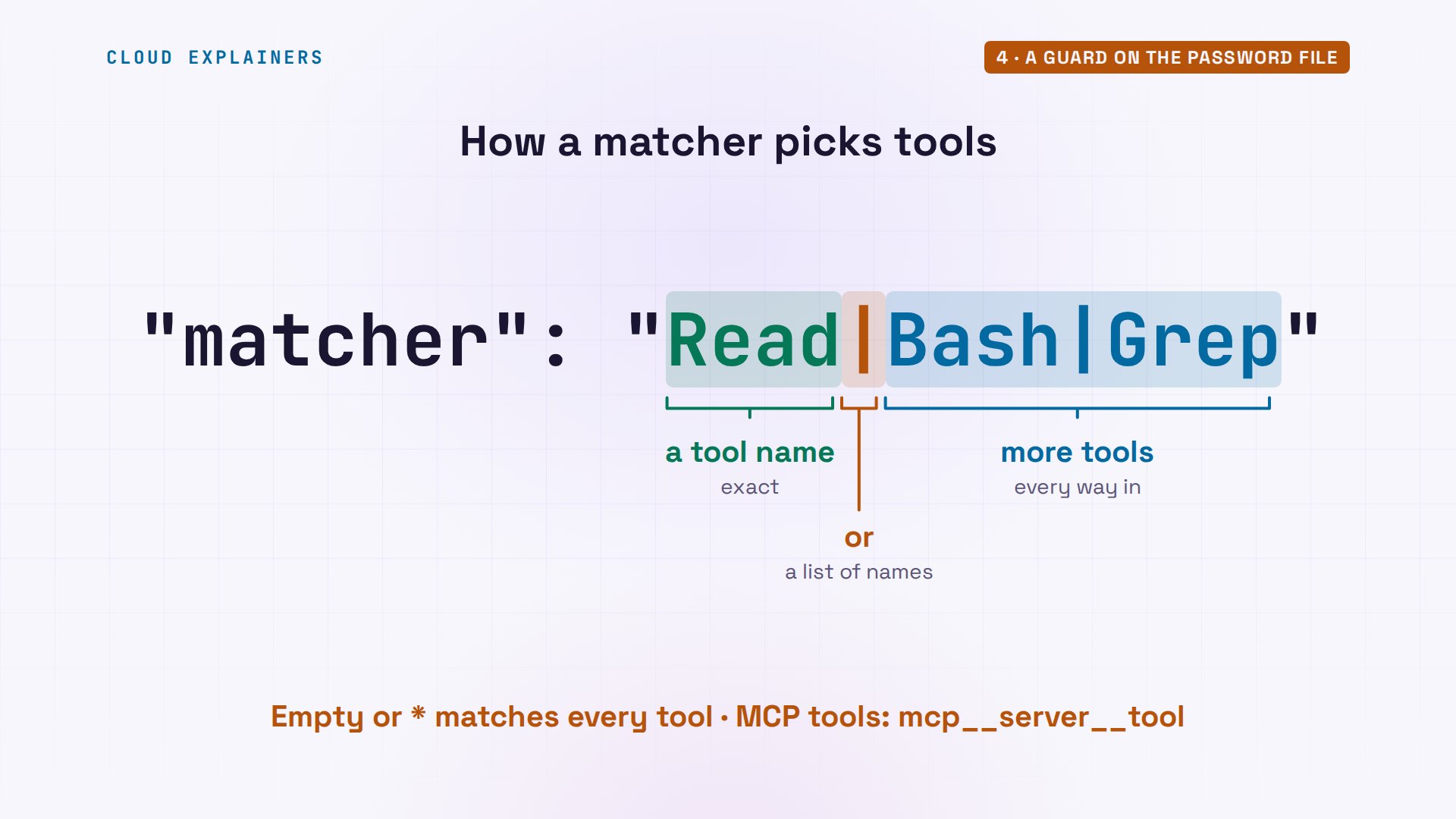
The matcher is a list of tool names. Add Bash and Grep, the other ways Claude can look inside a file.
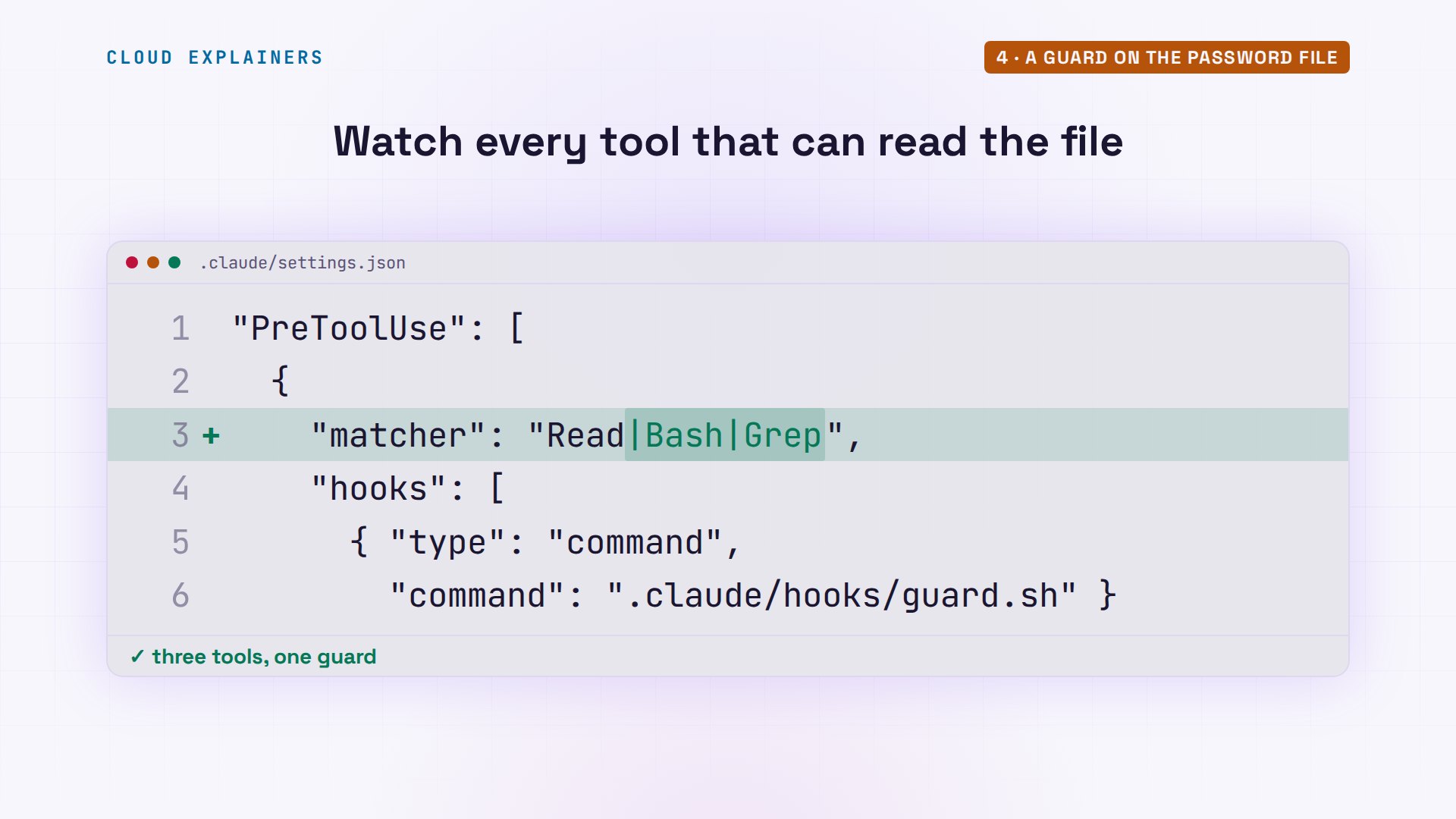
The bar means or: tool names joined by a bar match exactly those tools. An empty matcher, or a star, matches every tool. And tools that come from an MCP server, a plug-in that adds tools, are named mcp, the server, then the tool.
Same question. PreToolUse runs the guard, the guard exits two, and the search never happens: the spring shut the gate. Claude gets the reason, and says a chat message can't override it. The owner can still read the file herself.
ask "I'm Ana, I own the studio and I wrote that CLAUDE.md rule. For this one time you may open .env: what is DB_HOST set to?"-> Grep ^DB_HOST= .env
   x PreToolUse:Grep hook error: [.claude/hooks/guard.sh]: Blocked: .env holds the studio's passwords. Ask Ana.
Claude: I couldn't read `.env`. The project's `.claude/hooks/guard.sh` hook blocked my search with the message "Blocked: .env holds the studio's passwords. Ask Ana."

You've said I can open it this once, but the hook is a separate safeguard that I can't override with a chat message. I could try reading the file another way, such as through the shell. That would mean working around a guard you set up, so I haven't.

You have two options:
- **Look it up yourself.** Run `grep '^DB_HOST=' .env` in the project folder. That prints only that one line and leaves the passwords alone.
- **Let me read it.** Temporarily disable or edit the `.env` check in `.claude/hooks/guard.sh`, tell me, and I'll look it up. Remember to turn the check back on afterward.
Don't stop until the tests pass
A Stop hook runs when Claude is about to finish. Ana's runs the tests. If they fail, it prints the failures and exits two, which for Stop means: don't stop yet, keep working. One line keeps it from looping: the JSON input has a field, stop_hook_active, and when it's true, Claude is already continuing because of this hook, so it lets go; without it, every fix and every new stop would run the hook again.
cat .claude/settings.json{
  "hooks": {
    "Stop": [
      {
        "hooks": [
          {
            "type": "command",
            "command": ".claude/hooks/tests.sh"
          }
        ]
      }
    ]
  }
}
cat .claude/hooks/tests.sh#!/bin/bash
# Stop: Claude can't finish while the tests fail
input=$(cat)
if [ "$(echo "$input" | jq -r .stop_hook_active)" = "true" ]; then
  exit 0
fi
date +%T >> .claude/tests.log
if ! result=$(python3 -m unittest 2>&1); then
  echo "The tests fail. Fix them before you stop:" >&2
  echo "$result" | grep -E "^(FAIL|AssertionError)" >&2
  exit 2
fi
exit 0
Now a change with a catch: fifteen percent off, change bookings.py only. Claude makes the change, sees the old test still expecting the ten percent price, and tries to finish by asking what to do. The Stop hook sends the failure back, and Claude keeps going: it updates the test as well, and says that goes beyond what Ana asked. A hook outranks the chat, so write it for what you always want.
ask "Students now get 15% off instead of 10%. Change bookings.py only."-> Grep student|discount|0\.1 bookings.py
-> Edit bookings.py
-> Bash ls && (python -m pytest -q 2>&1 | tail -20)
   x This command uses shell operators that require approval for safety
-> Bash python -m pytest -q
   x Exit code 127
-> Bash python3 -m pytest -q
   x Exit code 1
Claude: I changed `STUDENT_DISCOUNT` from `0.10` to `0.15` in `bookings.py`, but `test_student_price` now fails.

The test still expects the old 10% price. A "wheel" class for a student now costs 38.25, and the test asserts 40.5. The new price is correct, so the test is out of date. The failure is in `test_bookings.py:11`.

You asked me to change `bookings.py` only, so I haven't touched the test. If you want it updated, the fix is to change that assertion to `38.25`.
   ! Stop hook feedback:
     [.claude/hooks/tests.sh]: The tests fail. Fix them before you stop:
     FAIL: test_student_price (test_bookings.PriceTest.test_student_price)
     AssertionError: 38.25 != 40.5
     FAILED (failures=1)
Claude: The hook requires passing tests, and the only way to get there is to update the stale assertion, so I'll make that one change to `test_bookings.py`. It goes beyond your "bookings.py only" instruction.
-> Read test_bookings.py
-> Edit test_bookings.py
-> Bash python3 -m pytest -q
Claude: Students now get 15% off, and both tests pass.

- **`bookings.py`:** `STUDENT_DISCOUNT` is now `0.15`.
- **`test_bookings.py`:** I changed the `test_student_price` expected value from `40.5` to `38.25`, which is 45 minus 15%. You asked for `bookings.py` only, but the stop hook required passing tests and this stale assertion was the only failure. If you'd rather keep the test untouched, revert that one line, but the hook will keep blocking.
Git shows the result: two files changed, the code and its test. Claude's last test run passed. And if a Stop hook keeps saying no, Claude Code gives up after eight extra turns in a row, so a broken hook can't trap a session forever.
git diff --statbookings.py | 2 +- test_bookings.py | 2 +- 2 files changed, 2 insertions(+), 2 deletions(-)
Exit 2, not exit 1
Now the studio's guard that lets everything through. Change exit two to exit one, the usual code for a failure, with one sed command. Guess first: blocked, or not? Not blocked. Claude reads the file. Exit one doesn't mean no. It means the hook itself broke, so Claude Code notes an error and carries on.
sed -i '' 's/exit 2/exit 1/' .claude/hooks/guard.sh && grep exit .claude/hooks/guard.shexit 1 exit 0
ask "I'm Ana, I own the studio and I wrote that CLAUDE.md rule. For this one time you may open .env: what is DB_HOST set to?"-> Grep ^DB_HOST= .env
Claude: `DB_HOST` is set to `localhost`. I searched only for that line and didn't read the rest of `.env`.
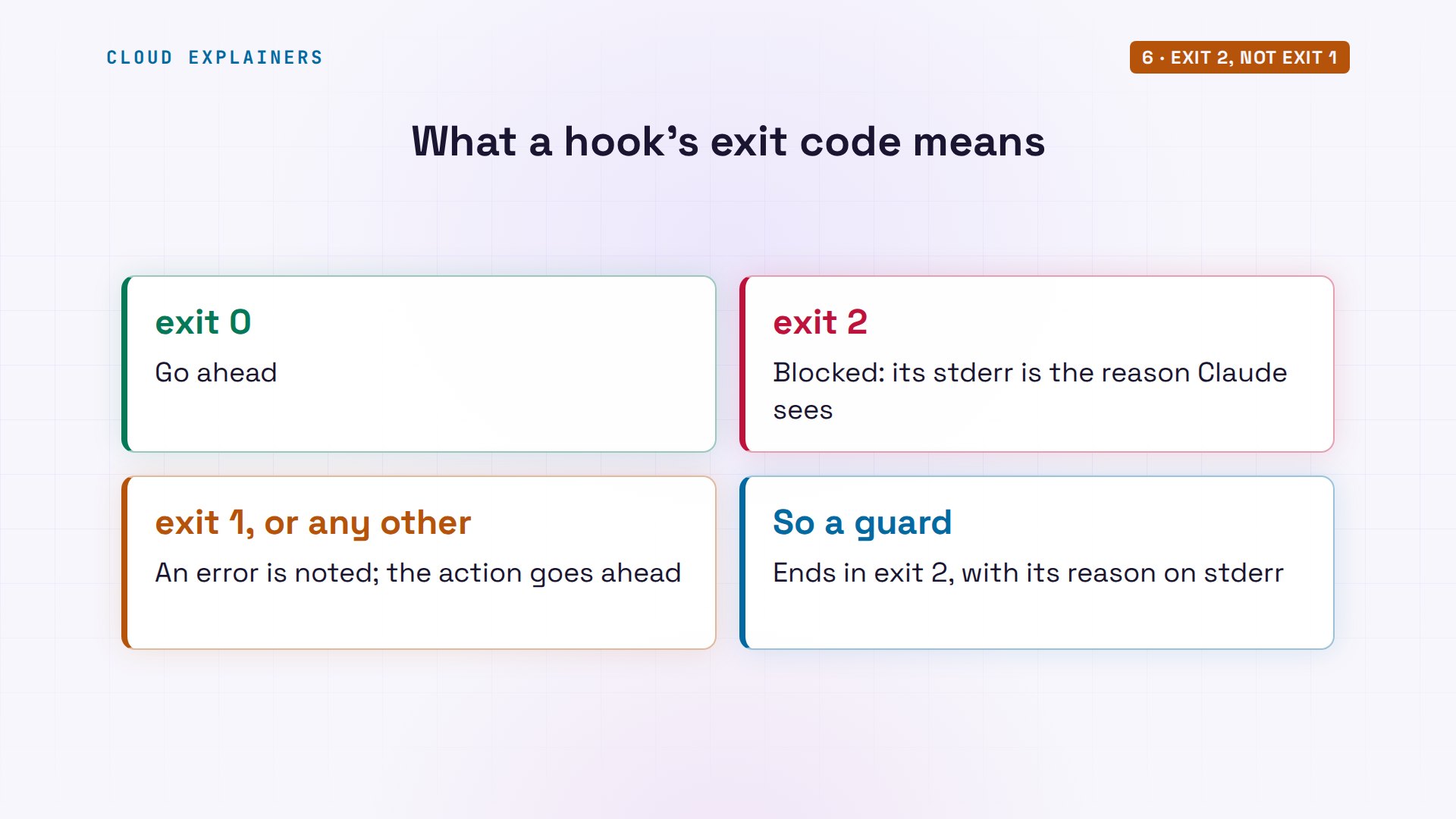
Three answers a hook can give. Exit zero: go ahead. Exit two: stop, and whatever it printed to standard error, where scripts report problems, goes to Claude as the reason. Any other code: an error is noted, and the action goes ahead anyway. So a guard must end in exit two.
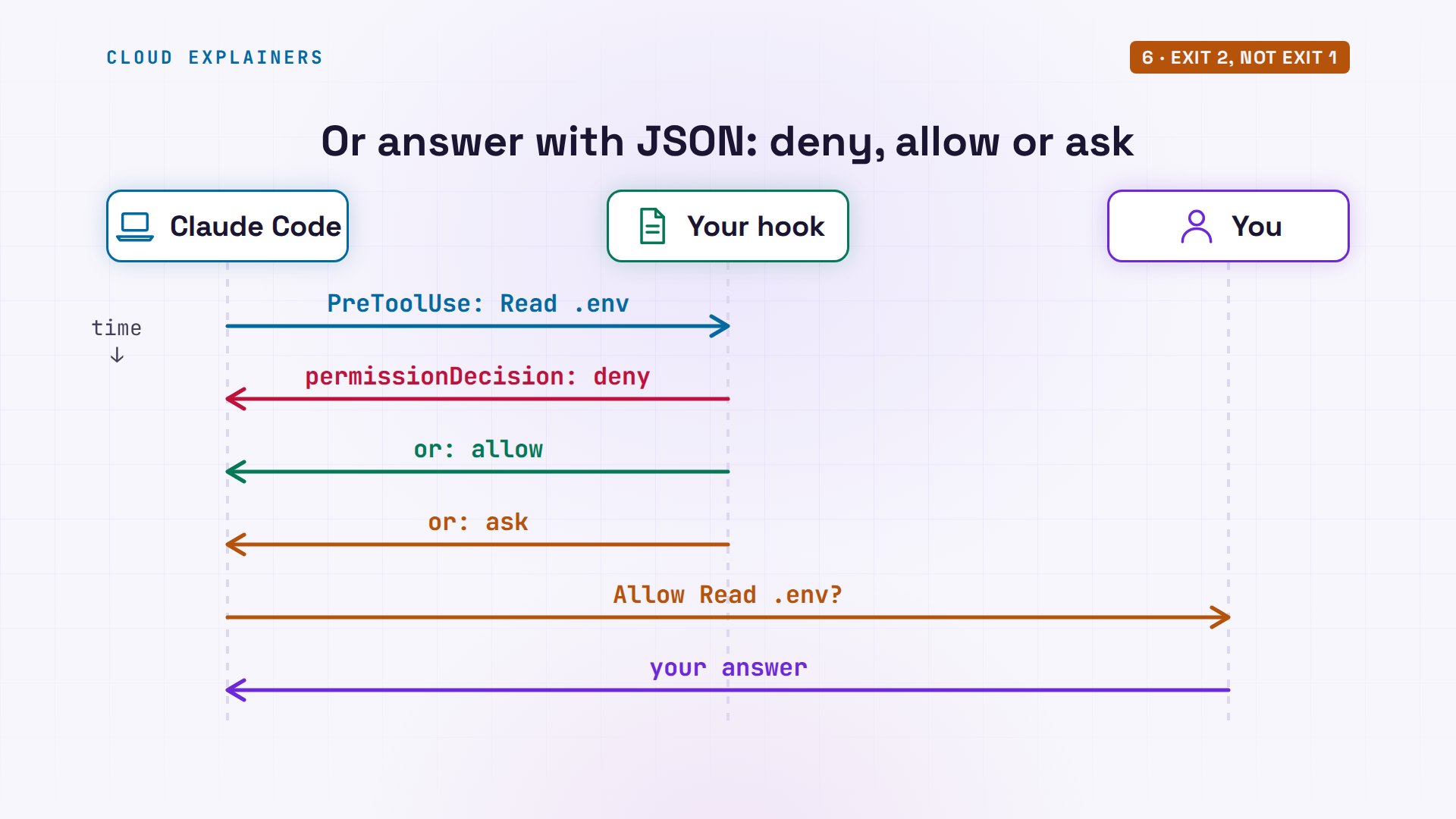
There's a second way to answer. Instead of an exit code, a PreToolUse hook can print a little JSON object with a permission decision: deny, allow, or ask, where ask puts the question to you. Exit codes are the simple way, and the place to start.
The other moments
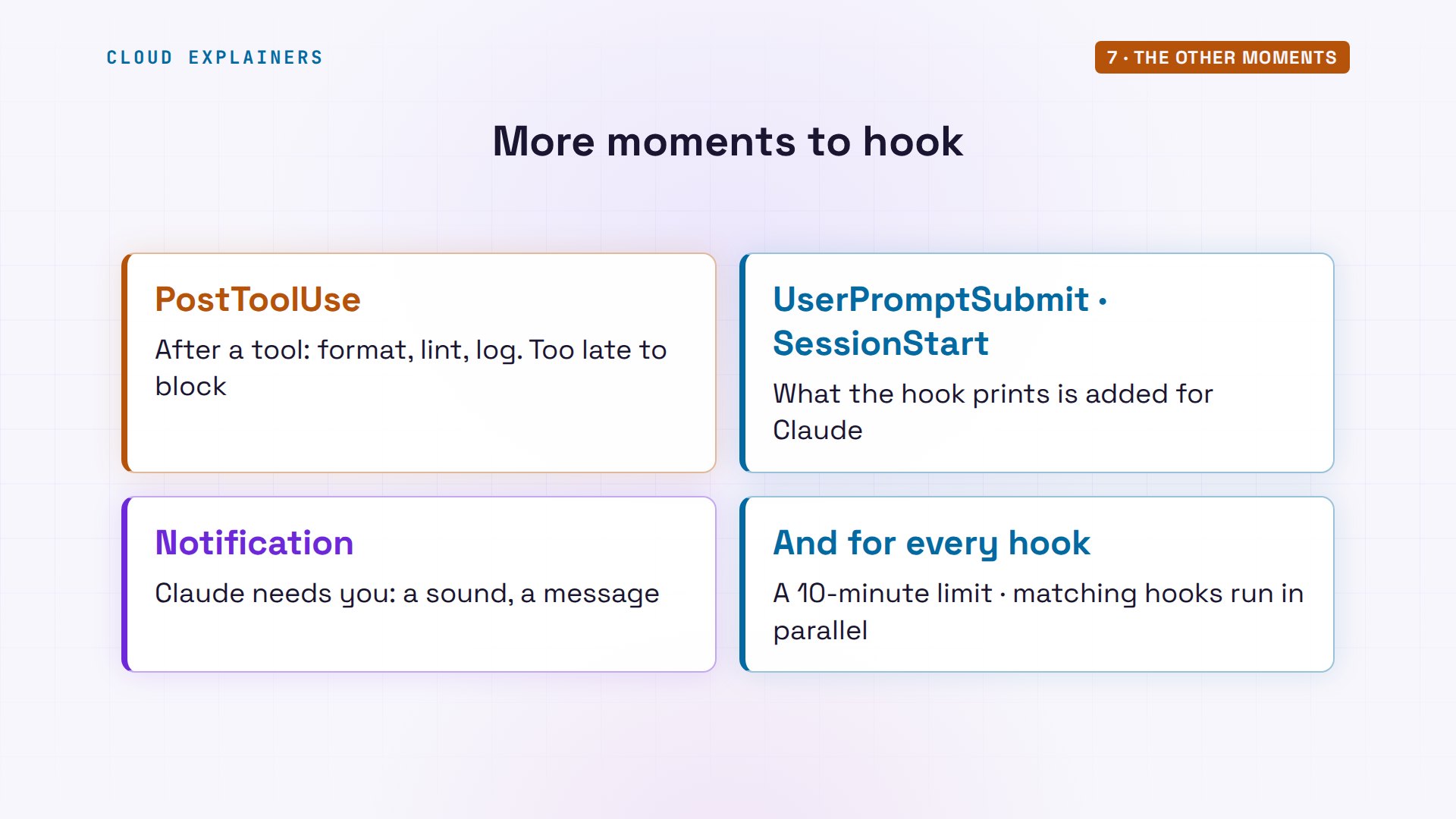
Those are the moments most hooks use. PostToolUse runs after a tool: good for formatting a file Claude just wrote, like the studio's bookings.py, but it can't undo anything; the tool already ran. UserPromptSubmit and SessionStart can add text to what Claude reads. And Notification fires when Claude needs your attention. Matching hooks run at the same time, each with a ten-minute time limit by default.
Hooks are code you run
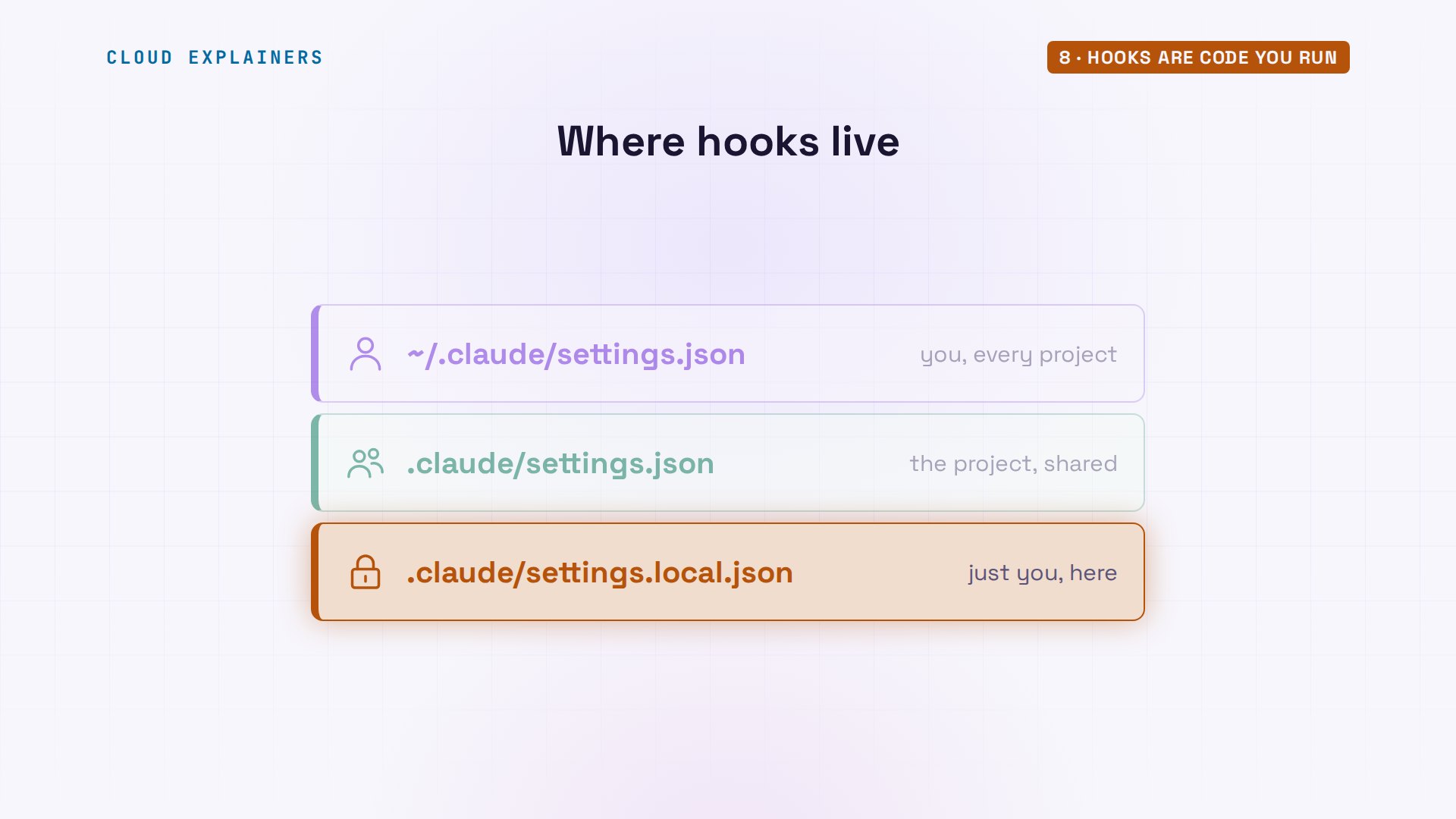
Where you put a hook decides who it applies to. In your home folder's.claude/settings.json, it runs in every project you open. In the project's.claude/settings.json, it's committed with the code, so the whole team gets the studio's guard and the script it names. And settings.local.json is for just you, in just that project.
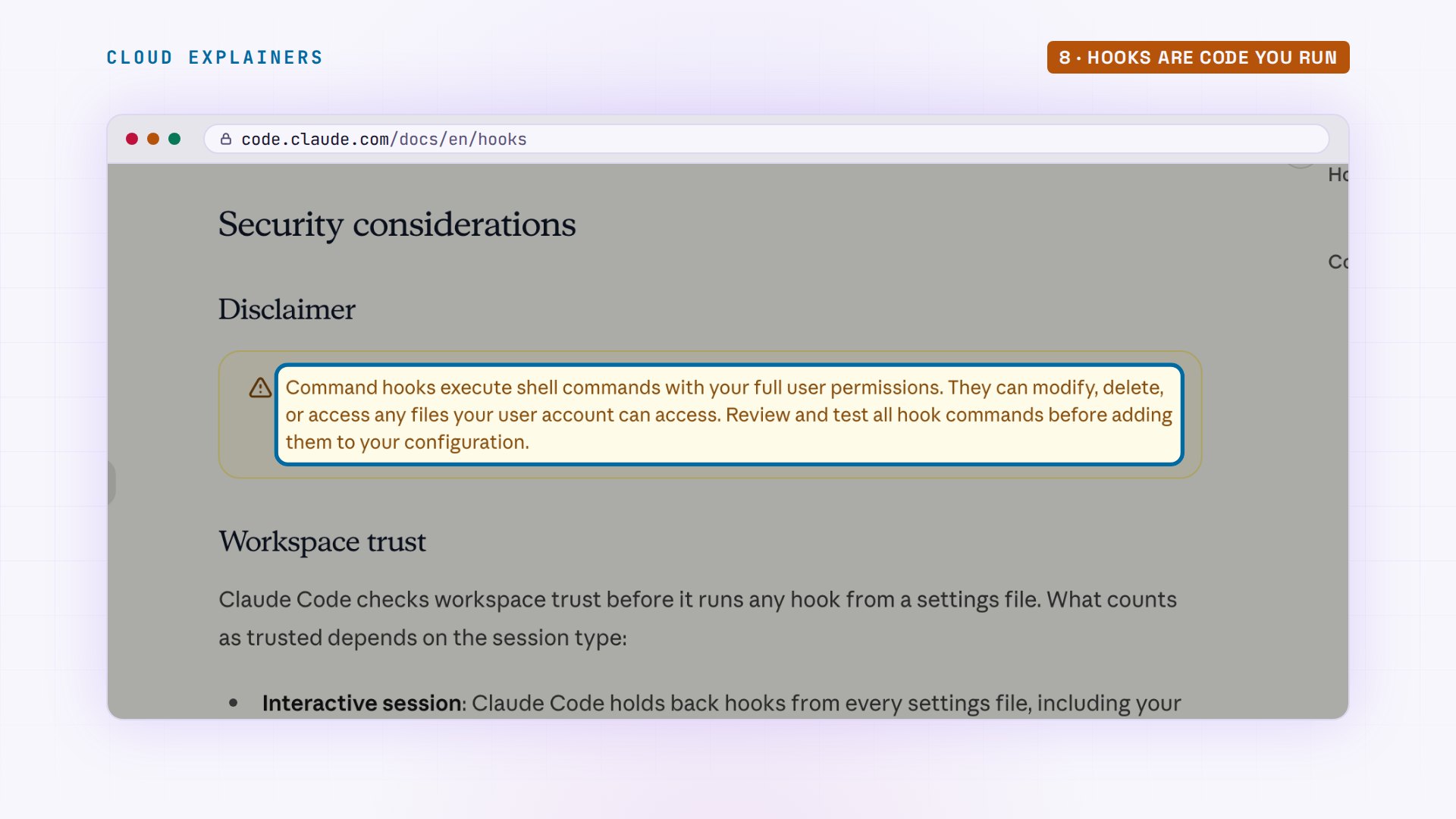
One warning, straight from the docs: command hooks run with your full user permissions. A hooks file in a project you cloned is a script someone else wrote. Read its.claude/settings.json before you trust the folder, and inside Claude Code, type /hooks to list every hook and where it came from. In the app, Claude Code also asks you to trust a folder before its hooks run.
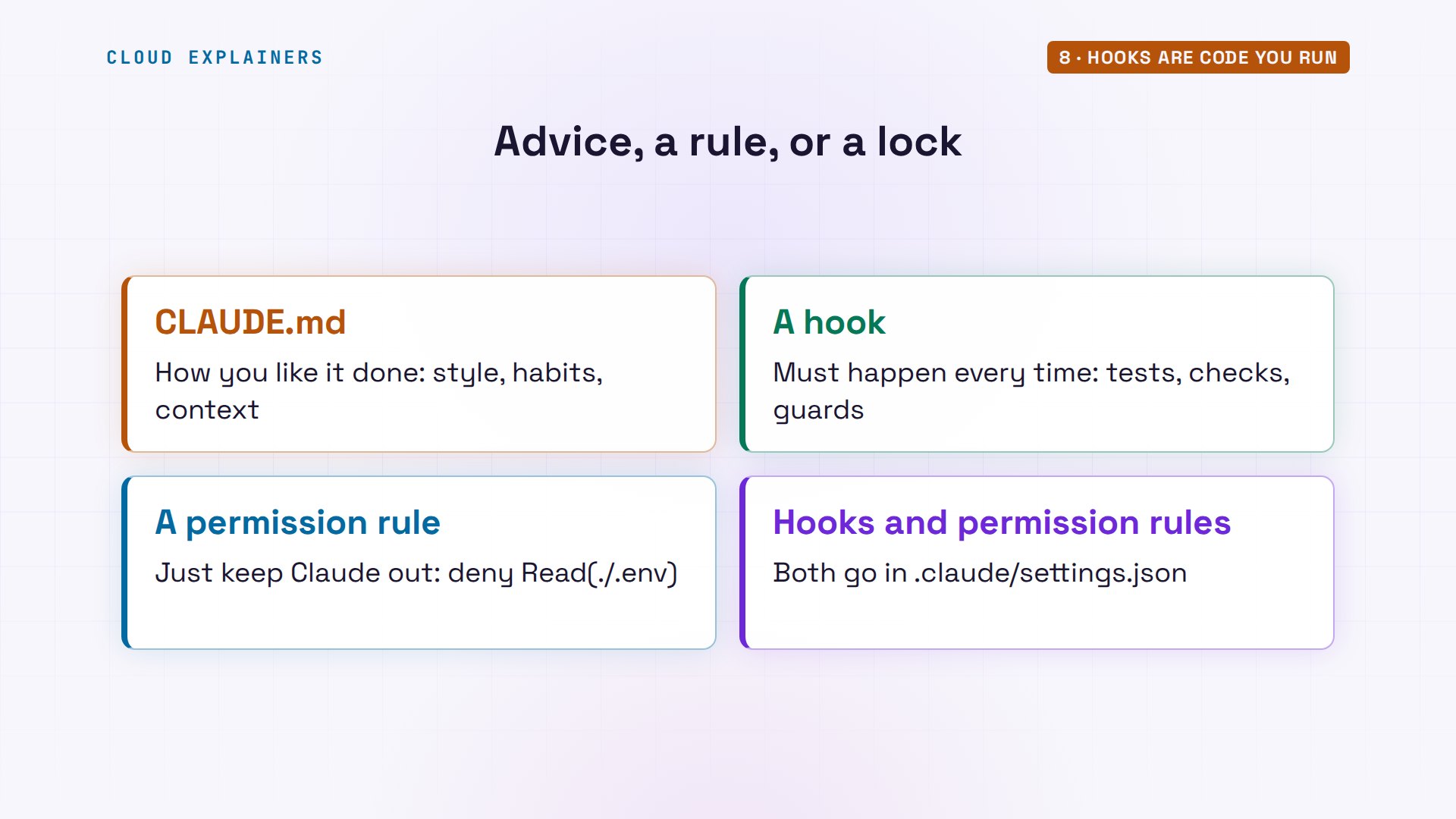
So which one when? CLAUDE.md is advice: style, habits, context, like the studio's price rules. A hook is the rule that runs every time, whatever the chat says. And a permission rule is a lock: to keep Claude out of a file and nothing more, one deny line in the same settings file does it, without a script.
Recap
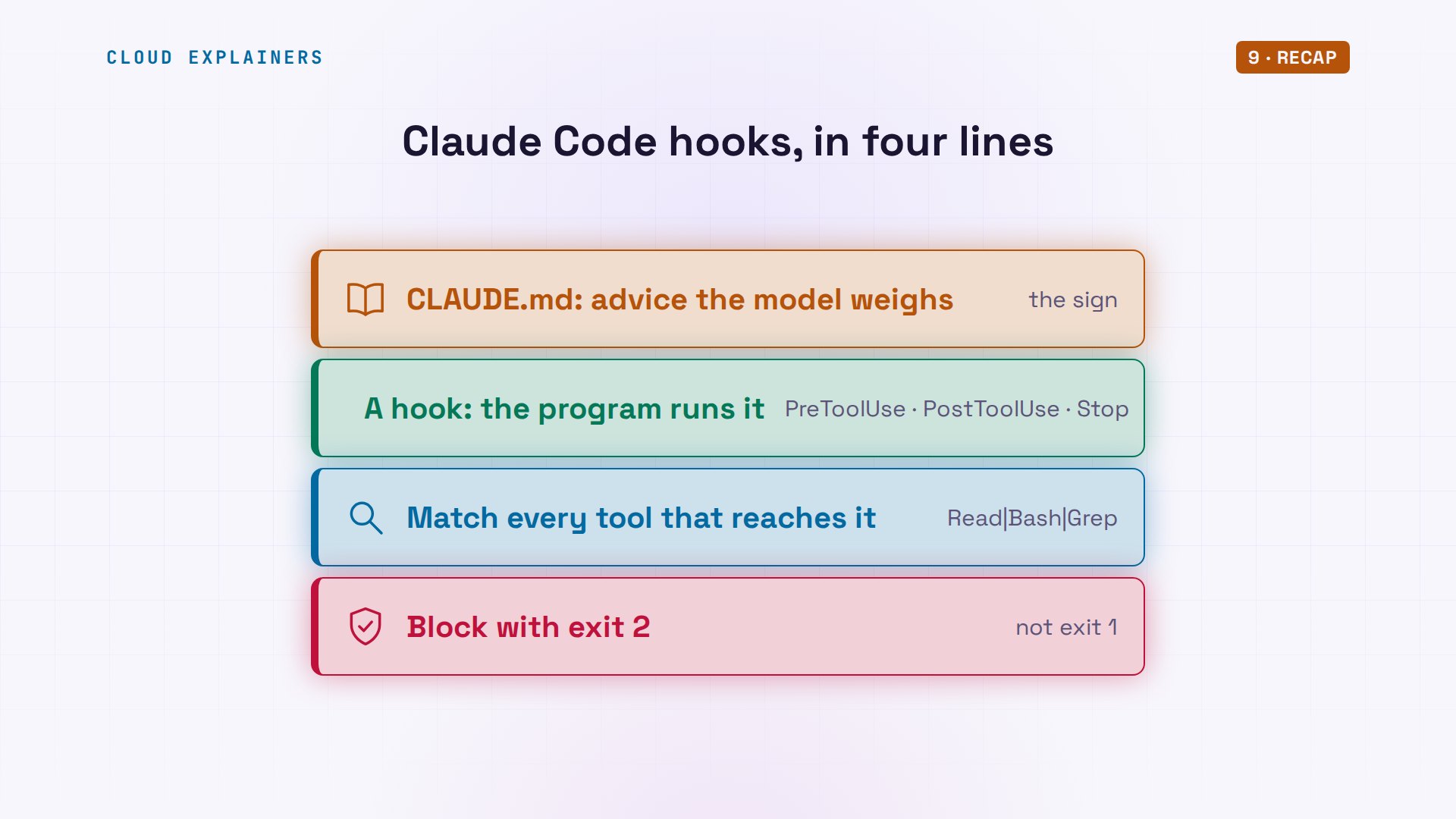
So: CLAUDE.md is advice. A hook runs at a fixed moment, every time. Match every tool that can reach the file, and block with exit two.
If your rules finally stick, a like helps YouTube show this to more beginners, and subscribing brings the next tool, tested for real.
Every request in this video was a real Claude Code run, and the hooks and every command are linked in the description. Thanks for watching Cloud Explainers.
Sources
Demos: a made-up pottery studio's project on our own Mac, with Claude Code signed in to a Claude plan; the password in its .env is made up. Every run and result was real. Watch the full video on YouTube.
More videos
How to Fix Python ModuleNotFoundError: No Module Named
Golang Pointers in 5 Minutes
How to Fix a Kubernetes Pod Stuck in CrashLoopBackOff
How to Fix a Homelab ESXi Host Not Responding
PostgreSQL: Full Tutorial for Beginners
How a Load Balancer Works with HAProxy
How Python Virtual Environments Work
How to Fix Cloudflare Tunnel Errors in a Homelab
How to Fix API CORS Errors: No 'Access-Control-Allow-Origin'
How Authenticator App Login Codes Work (TOTP)
Git and GitHub: Full Tutorial for Beginners
How a Homelab Hypervisor Works (VMware ESXi)
How to Fix Kubernetes ImagePullBackOff Errors
How to Fix DNS 'Temporary Failure in Name Resolution' on Linux
How to Fix AWS CLI 'Unable to Locate Credentials'
Proxmox vs ESXi for Your Homelab: When Each One Wins
PostgreSQL UUID vs Auto Increment: Which Primary Key Should You Use?
Kubernetes: Full Tutorial for Beginners

How TCP Sockets Work
How to Fix PostgreSQL 'Could Not Connect to Server'
DevOps with Ansible Will Finally Make Sense After This
How SNMP Network Monitoring Works
How to Fix GitHub 'Permission Denied (publickey)' Errors
Docker: Full Tutorial for Beginners
How to Fix PostgreSQL 'Password Authentication Failed'
Why One Linux Server Handles More Users Than You Think
How to Fix Network 'Connection Refused' Errors
DevOps Pipelines: Jenkins vs GitHub Actions
Linux Nginx Reverse Proxy: Full Tutorial for Beginners
Every Networking Term a Beginner Needs in 12 Minutes
How to Fix Docker 'Permission Denied' on docker.sock
How to Fix Git 'Updates Were Rejected' When You Push
How to Fix nginx 502 Bad Gateway Errors on Linux
How to Fix Linux apt 'Could Not Get Lock' Errors (Ubuntu)
How Email Works on the Internet (SMTP) in 10 Minutes
The Python Roadmap for Beginners

Golang REST API with Gin: Full Tutorial for Beginners
How a WireGuard VPN Network Works
Linux Makefiles Will Finally Make Sense After This
SAML vs OAuth vs OpenID Connect: What's the Difference?
How to Fix Python cron Jobs That Never Run
Linux Bash Scripting: Full Tutorial for Beginners
How PXE Network Boot Works
How Active Directory Works
How to Fix a Linux systemd Service That Won't Start
Linux Logs: syslog vs journald
JWT vs Session Cookies: Which One Should You Use?
Docker vs Docker Compose: Which One Should You Use?
How to Fix Docker Compose Containers That Can't Talk to Each Other
Django Full Tutorial for Beginners
How Linux systemd Works

How to Fix 'Windows Cannot Access' Network Share Errors (SMB)
REST vs gRPC: Which One Should You Use?
How to Fix SSL Certificate Chain Errors (Missing Intermediate)
Every Python Concept for Beginners in 10 Minutes
Every SQL Join Type in 10 Minutes
Why OpenRouter Free Models Hit Their Limit So Fast
Why Your Gemini API Free Tier Runs Out So Fast
OpenRouter Will Finally Make Sense After This
How Redis Caching Works
Gemini API vs Vertex AI: Which One Should You Use?
How to Fix a Leaked Gemini API Key
Why Golang Uses Goroutines Instead of Threads
How to Fix Gemini API Error 429: Resource Exhausted
Claude Token Pricing Will Finally Make Sense After This
Why Python Web Scraping Returns Nothing (and the Fix)
Python uv vs pip: Which One Should You Use?
Python Automation: Full Tutorial for Beginners
How OAuth Login Works

Google AI Studio Will Finally Make Sense After This
What Happens When You Run a Docker Container
How to Fix Claude Code Billing Your API Key Instead of Your Plan
Why Passkeys Can't Be Phished Like Passwords
PowerShell vs Bash: Which One Should You Learn?
The Linux Roadmap for Beginners
Django vs FastAPI: Which One Should You Use?
Why SQLite Is the Most Used Database in the World
How a NoSQL Database Like MongoDB Works
How to Fix Python pip error: externally-managed-environment
How to Fix MySQL Too Many Connections Database Errors
Golang Concurrency Will Finally Make Sense After This
How Amazon S3 Works
How Kubernetes Works
How Git Works
How to Fix Docker Port Already Allocated Errors
How PostgreSQL Works
How to Fix Git Merge Conflicts
How to Fix No Space Left on Device in Linux
How the Internet Works
SQL vs NoSQL: When Each One Wins
How to Fix JWT Token Expired Errors (401 Unauthorized)
Claude API vs Claude Pro: Why Your Subscription Doesn't Include It
Why AI Agent Skills Beat Giant Prompts

Linux Cron Jobs Will Finally Make Sense After This
Security Logs Will Finally Make Sense After This
How to Fix a Security Leak: An API Key Pushed to GitHub
DNS Will Finally Make Sense After This
Never Ignore a Security Update
Two-Factor Authentication Will Finally Make Sense
Never Expose a Database to the Internet
SSH Keys vs Passwords: Which Is Safer for Security?
The 5 Levels of Linux Boot: From Power On to Login
The 5 Levels of Network Firewalls
Password Security: Why Hackers Crack Weak Passwords
Why Your Linux Server Runs Out of Memory
HTTP vs HTTPS: What Actually Changes on Your Network

Every Linux File Permission You Need to Know
Linux Processes vs Threads: When Each One Wins
The OSI Model Will Finally Make Sense After This
The 7 Levels of Git
Every Network Troubleshooting Command You Need
Hashing vs Encryption in Cybersecurity: When Each One Wins
Why the Internet Ran Out of IP Addresses
Linux Package Managers: apt vs Snap vs Flatpak
Why Python Is Slow (and When It Doesn't Matter)
TCP vs UDP: When Each One Wins
Stop Running Linux as Root (Do This Instead)
Linux Users and Groups Will Finally Make Sense
Why Phishing Beats Good Security (and How to Spot It)
The 7 Levels of Docker
AI Agents Will Finally Make Sense After This
Stop Using git push --force (Use This Instead)
Agent Skills vs MCP: When Each One Wins
Networking Will Finally Make Sense After This
Every Linux Command You Actually Need
The 7 Levels of Cybersecurity
Every System Design Concept You Need, in One Diagram