
How to Fix Python cron Jobs That Never Run
Your Python script works when you run it by hand, and does nothing from cron. In a real lab we put one script on a schedule and followed it: cron's own log shows it did start, its output was thrown away, and three things a terminal quietly provides were missing: the right Python, the right folder and your environment variables. Each failure is a real traceback, and each has a one-line fix.
Works by hand, not from cron
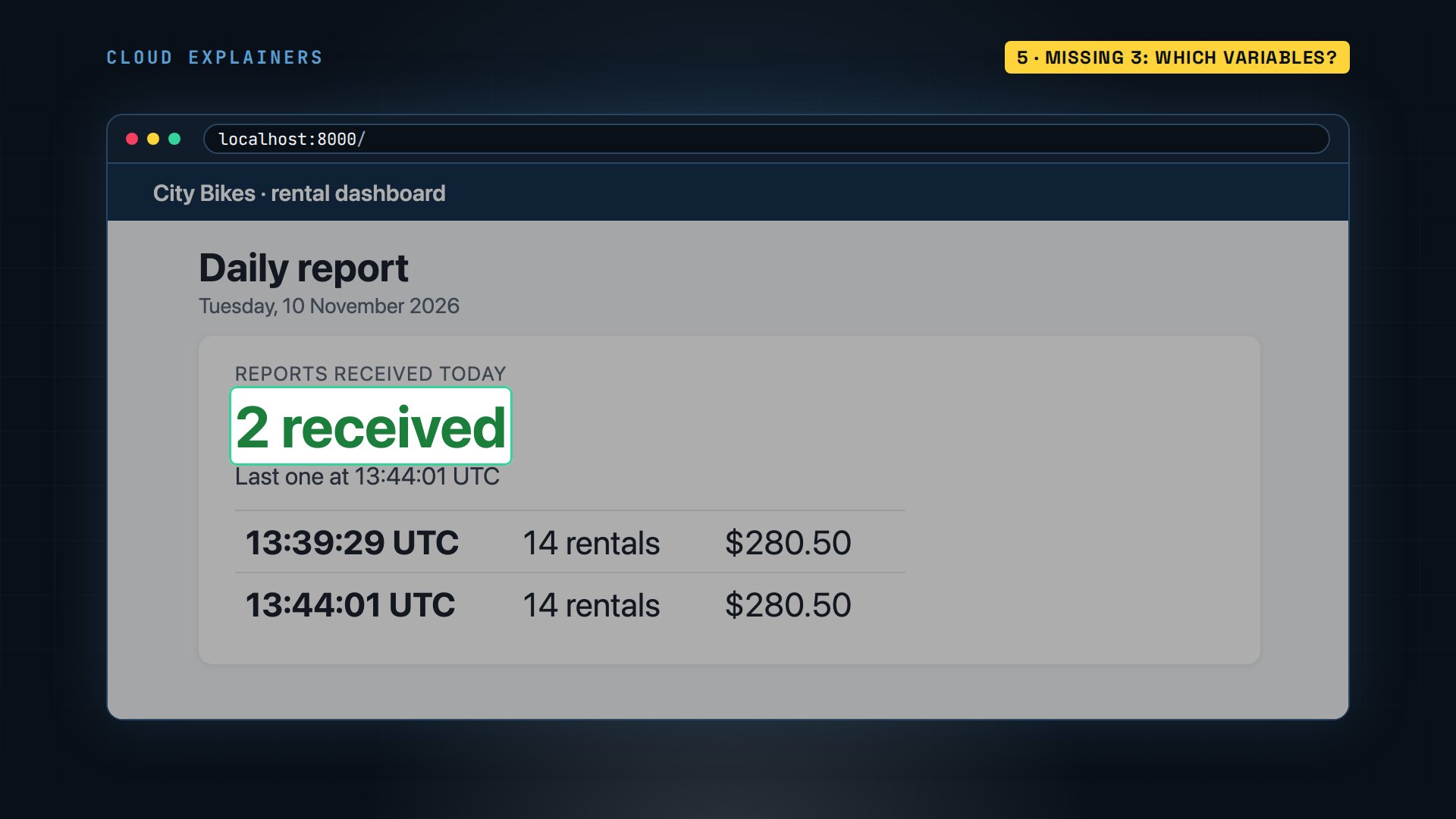
Your Python script works when you run it by hand. Put the same script in cron, and nothing happens. No output, no error, and no idea where to look. This dashboard should list two reports by now. It lists one: the run typed by hand.
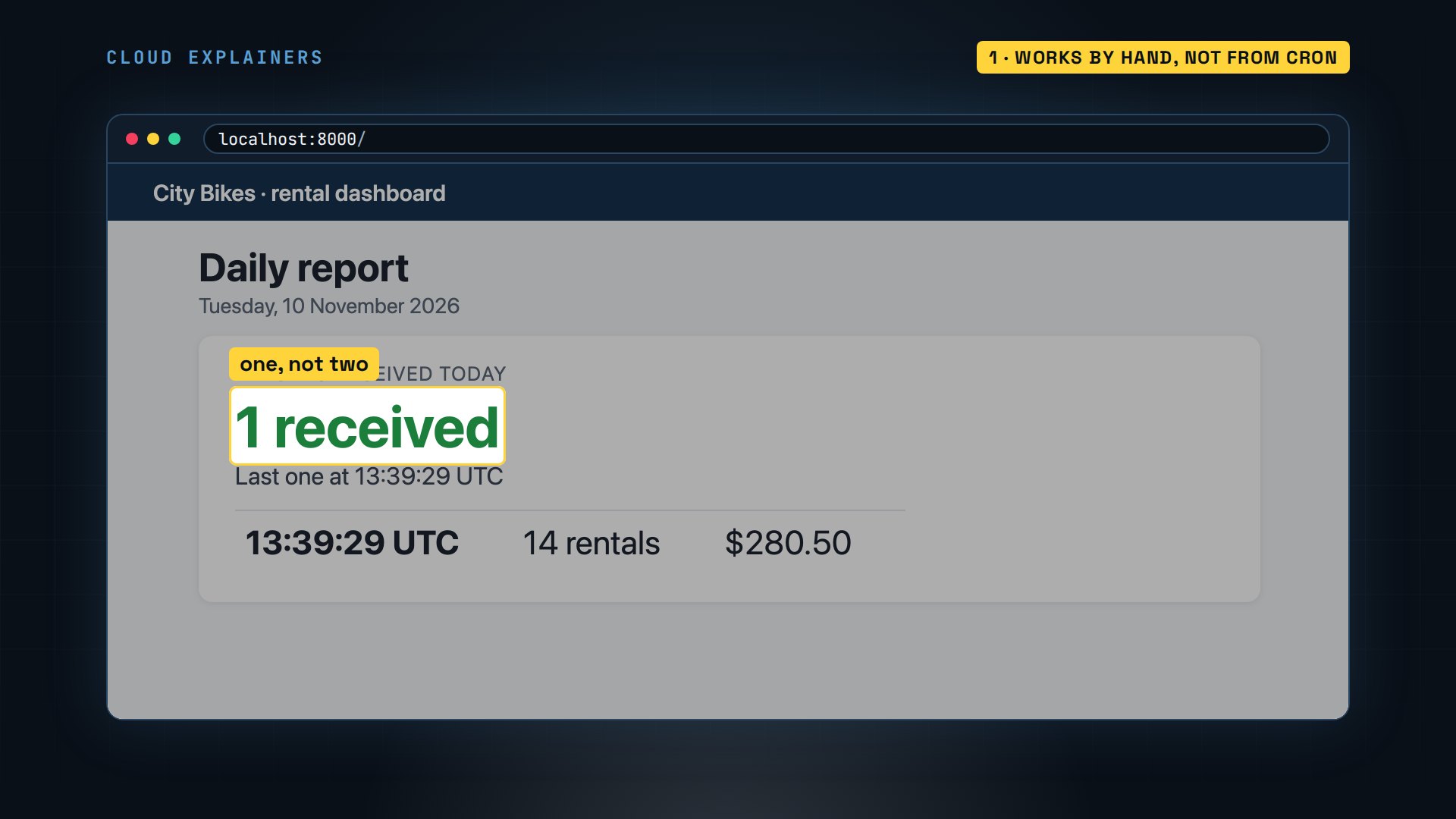
Same script, same machine. Ana rents out bikes, and her cron line should send the day's numbers on its own. Three things your terminal quietly hands a script are missing in cron, and the third still bites when everything looks fixed.
(.venv) ana@bikes:~/bikes$ python report.pyReport sent: 14 rentals, $280.50
(.venv) ana@bikes:~/bikes$ crontab -l40 13 * * * python3 /home/ana/bikes/report.py
Did cron even start it?
First: did cron even start the job? Cron is the Linux service that runs commands on a schedule, and this command prints its log. Guess first: is Ana's job in it? Yes. CMD means cron ran a command: hers, at thirteen forty, right on time. The next line explains the silence. No MTA installed, discarding output. An MTA is a mail program. Cron tried to mail Ana what the job printed, found no mail program, and threw it away.
(.venv) ana@bikes:~/bikes$ journalctl -u cron --since "3 minutes ago" --no-pagerNov 10 13:39:24 bikes systemd[1]: Started cron.service - Regular background program processing daemon.
Nov 10 13:39:24 bikes (cron)[83]: cron.service: Referenced but unset environment variable evaluates to an empty string: EXTRA_OPTS
Nov 10 13:39:24 bikes cron[83]: (CRON) INFO (pidfile fd = 3)
Nov 10 13:39:24 bikes cron[83]: (CRON) INFO (Running @reboot jobs)
Nov 10 13:40:01 bikes CRON[389]: pam_unix(cron:session): session opened for user ana(uid=1000) by ana(uid=0)
Nov 10 13:40:01 bikes CRON[390]: (ana) CMD (python3 /home/ana/bikes/report.py)
Nov 10 13:40:01 bikes CRON[389]: (CRON) info (No MTA installed, discarding output)
Nov 10 13:40:01 bikes CRON[389]: pam_unix(cron:session): session closed for user ana
So the quick fix comes before any guessing: keep the output. Ana keeps her cron lines in a text file, and the crontab command installs it. At the end of the line, two greater-than signs add whatever the job prints to a log file. And 2>&1 sends its error messages to that same file. One minute later, the log holds a real Python error: no module named requests. Requests is the library the script uses to reach the dashboard. And Ana's own run just used it.
(.venv) ana@bikes:~/bikes$ crontab crontab.txt
(.venv) ana@bikes:~/bikes$ crontab -l41 13 * * * python3 /home/ana/bikes/report.py >> /home/ana/bikes/cron.log 2>&1
(.venv) ana@bikes:~/bikes$ cat cron.logTraceback (most recent call last):
  File "/home/ana/bikes/report.py", line 4, in <module>
    import requests
ModuleNotFoundError: No module named 'requests'
Missing 1: which Python?
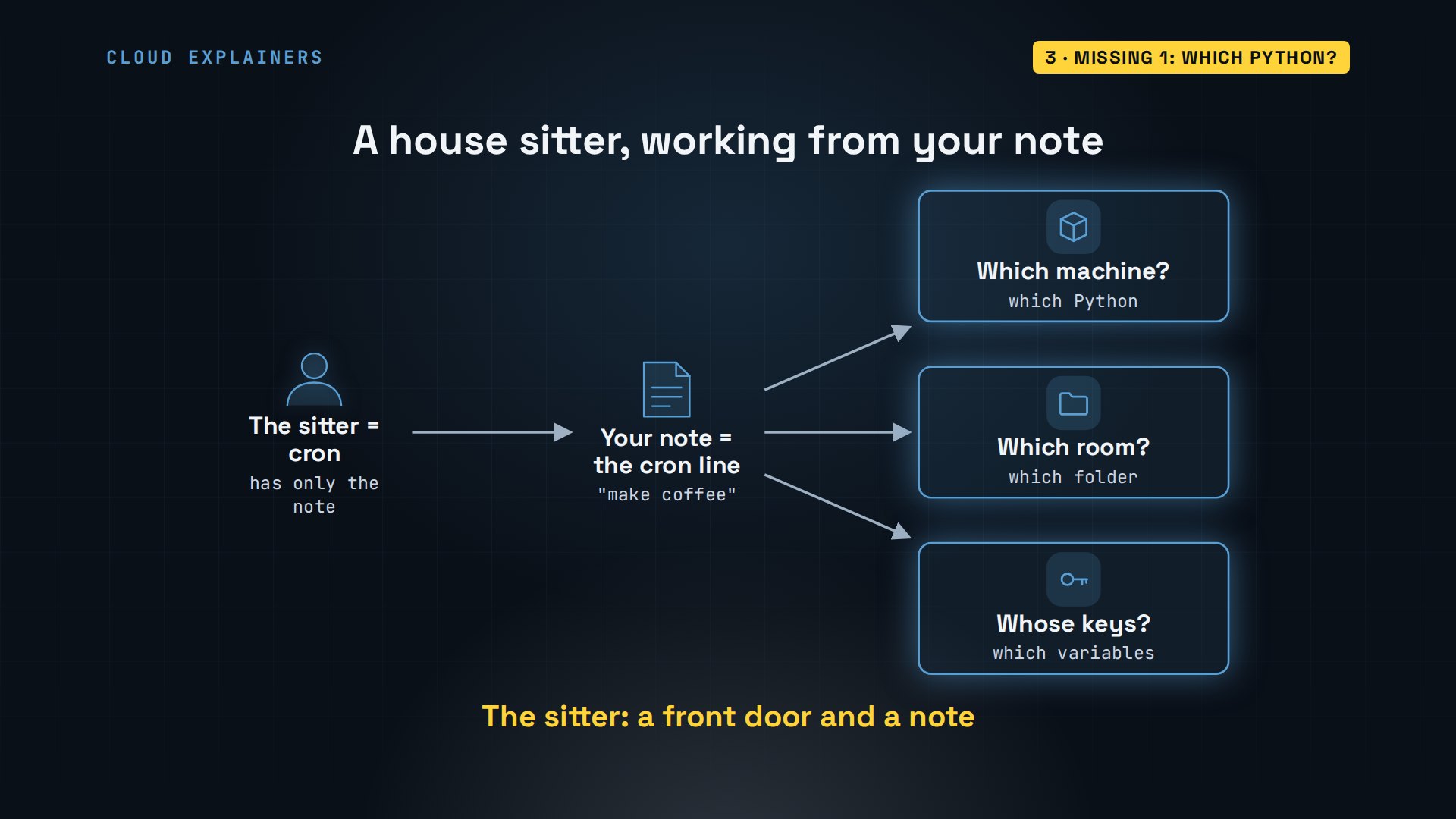
Think of cron as a house sitter working from your note. You make coffee every morning without thinking: your machine, your kitchen, your keys. The sitter starts at the front door with a note that says: make coffee. Which machine? Which room? Whose keys? Cron has the same three gaps.
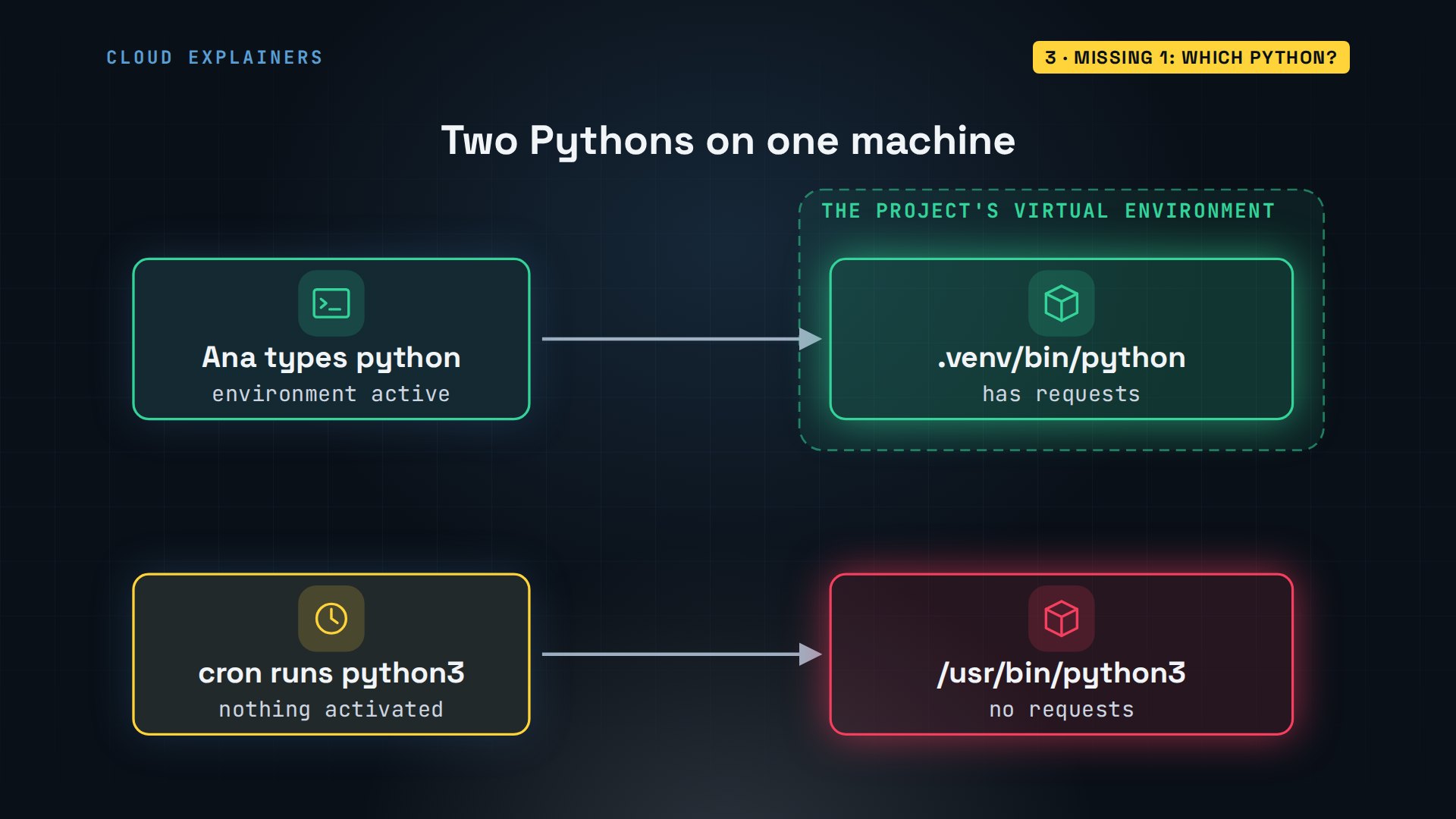
Gap one: which Python? There are two on this machine. Ana's project has a virtual environment: a private folder with its own Python and its own libraries. Requests lives there. When she activates it, the word python means that one. Cron activates nothing. Its python3 is the system's Python, which has never heard of requests.
Check it yourself. The which command shows what a name will run. With the environment active, python is the project's. Deactivate, to leave the environment, and python3 is the system's. Run the script with that one, and Ana gets cron's exact error, by hand. That works for every gap: make your terminal as bare as cron, and the failure shows up in front of you.
(.venv) ana@bikes:~/bikes$ which python/home/ana/bikes/.venv/bin/python
(.venv) ana@bikes:~/bikes$ deactivate
which python3/usr/bin/python3
python3 report.pyTraceback (most recent call last):
  File "/home/ana/bikes/report.py", line 4, in <module>
    import requests
ModuleNotFoundError: No module named 'requests'
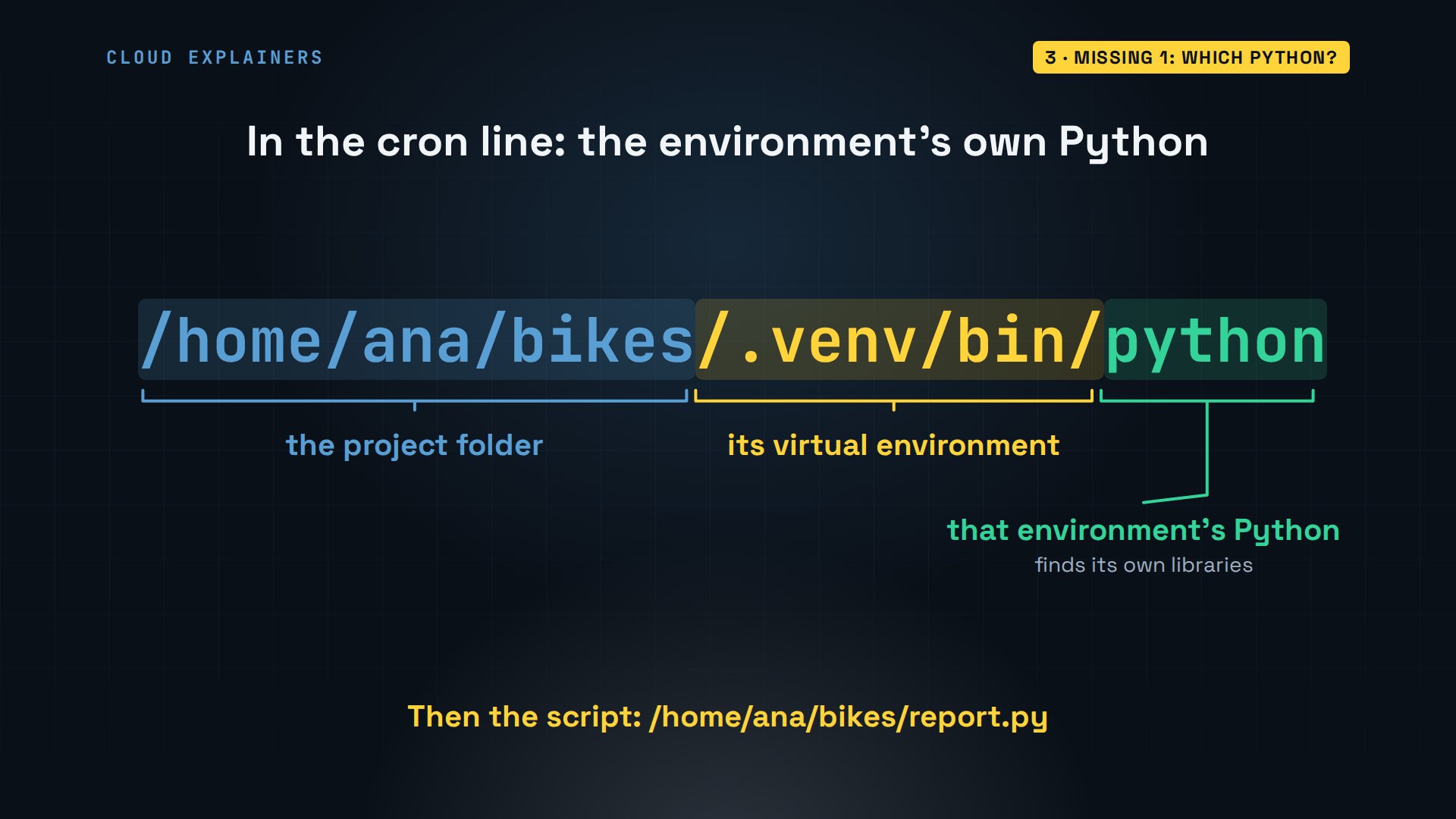
The fix needs no activating. In the cron line, name the environment's own Python by its full path. Started that way, it finds its own libraries. Then the script, by its full path too.
Missing 2: which folder?
No such file: rentals.csv. That's the next run's error, and the file sits right beside the script. But the script asks for it by bare name, and a bare name means: in the folder I was started from. So, gap two. Which folder does cron start a job in? Your home folder. Ana added a second cron line that writes its folder to a file: slash home, slash ana. Not the project.
tail -n 5 cron.logTraceback (most recent call last):
  File "/home/ana/bikes/report.py", line 6, in <module>
    with open("rentals.csv") as f:
         ^^^^^^^^^^^^^^^^^^^
FileNotFoundError: [Errno 2] No such file or directory: 'rentals.csv'
crontab -l42 13 * * * /home/ana/bikes/.venv/bin/python /home/ana/bikes/report.py >> /home/ana/bikes/cron.log 2>&1
42 13 * * * pwd > /home/ana/cron-folder.txt; env > /home/ana/cron-env.txt
cat ~/cron-folder.txt/home/ana
There are two fixes. The quick one: in the cron line, cd into the project first, then run. The lasting one: let the script find its own folder. Python gives every script a special name that holds its own location. Ana builds the file's path from that, and now it opens from anywhere, whoever starts it.
grep -n "HERE" report.py7:HERE = Path(__file__).resolve().parent
9:with open(HERE / "rentals.csv") as f:
Missing 3: which variables?
One more minute, and here is gap three, the one that bites last. Key error. The dashboard wants a secret key, and the script reads it from an environment variable: a named value your shell hands to every program it starts. Ana set hers in.bashrc, a file her shell reads when a terminal opens. Cron opens no terminal, so it never reads that file. Ana's test line also saved what cron gave it: six variables. Her terminal has sixteen.
tail -n 6 cron.logTraceback (most recent call last):
  File "/home/ana/bikes/report.py", line 13, in <module>
    key = os.environ["BIKES_API_KEY"]
          ~~~~~~~~~~^^^^^^^^^^^^^^^^^
  File "<frozen os>", line 685, in __getitem__
KeyError: 'BIKES_API_KEY'
grep BIKES ~/.bashrcexport BIKES_API_KEY=bk_demo_4821
cat ~/cron-env.txtHOME=/home/ana
LOGNAME=ana
PATH=/usr/local/sbin:/usr/local/bin:/usr/sbin:/usr/bin:/sbin:/bin:/usr/games:/usr/local/games:/snap/bin
LANG=C.UTF-8
SHELL=/bin/sh
PWD=/home/ana
So she copies her.bashrc line to the top of her cron file, and crontab refuses all of it. Bad command. Can't install. A crontab isn't a shell script, and export means nothing in it. Notice what that does: the old schedule stays in place. An edit that was never accepted is one real way a job never runs.
cat crontab.txtexport BIKES_API_KEY=bk_demo_4821
43 13 * * * /home/ana/bikes/.venv/bin/python /home/ana/bikes/report.py >> /home/ana/bikes/cron.log 2>&1
crontab crontab.txt"crontab.txt":1: bad command
errors in crontab file, can't install.
crontab -l43 13 * * * /home/ana/bikes/.venv/bin/python /home/ana/bikes/report.py >> /home/ana/bikes/cron.log 2>&1
What a crontab does accept is a plain line at the top: name, equals, value. Every job below it gets that variable. She installs it, waits for the minute, and the last line of the log reads: report sent.
cat crontab.txtBIKES_API_KEY=bk_demo_4821
44 13 * * * /home/ana/bikes/.venv/bin/python /home/ana/bikes/report.py >> /home/ana/bikes/cron.log 2>&1
crontab crontab.txt
tail -n 1 cron.logReport sent: 14 rentals, $280.50
And the dashboard lists a second report: thirteen forty-four, sent with nobody at the keyboard.
When it truly never starts
And when cron's log has no CMD line at all? Then the job truly never started, and there are three usual reasons. The cron service isn't running: systemctl, the tool that manages services, should say active. The line was never installed: crontab -l lists what cron really has. Or the clock: the date command shows the server's time, and on most servers that's UTC, the world's reference time, not your time zone.
systemctl is-active cronactive
dateTue Nov 10 13:44:05 UTC 2026
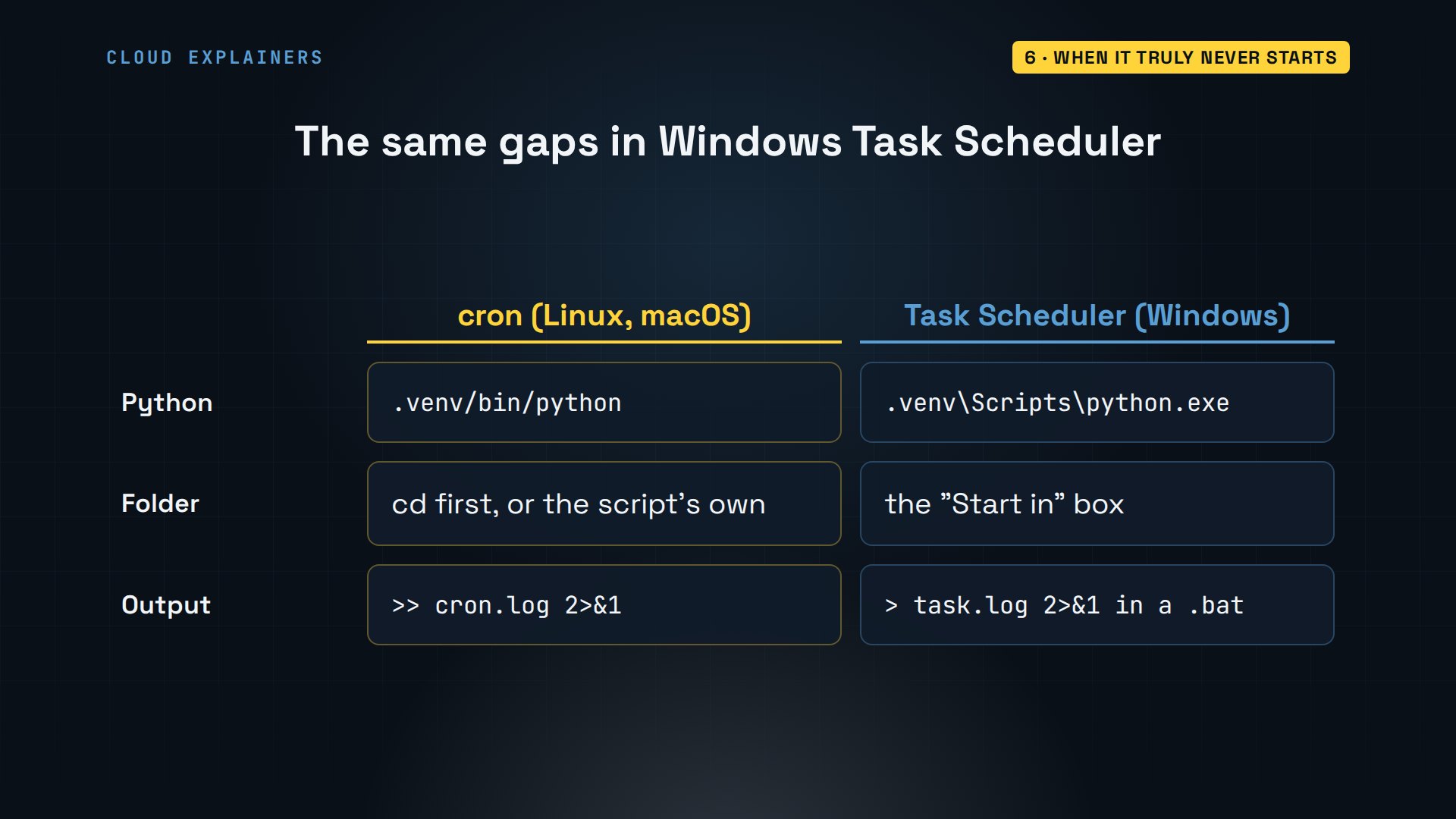
Scheduling Python on Windows instead? Task Scheduler leaves the same gaps. Point the task at the environment's own python.exe. Fill in the Start in box with the project folder. And run it through a small batch file that sends the output to a log. Every command and the lab files are linked in the description.
Recap
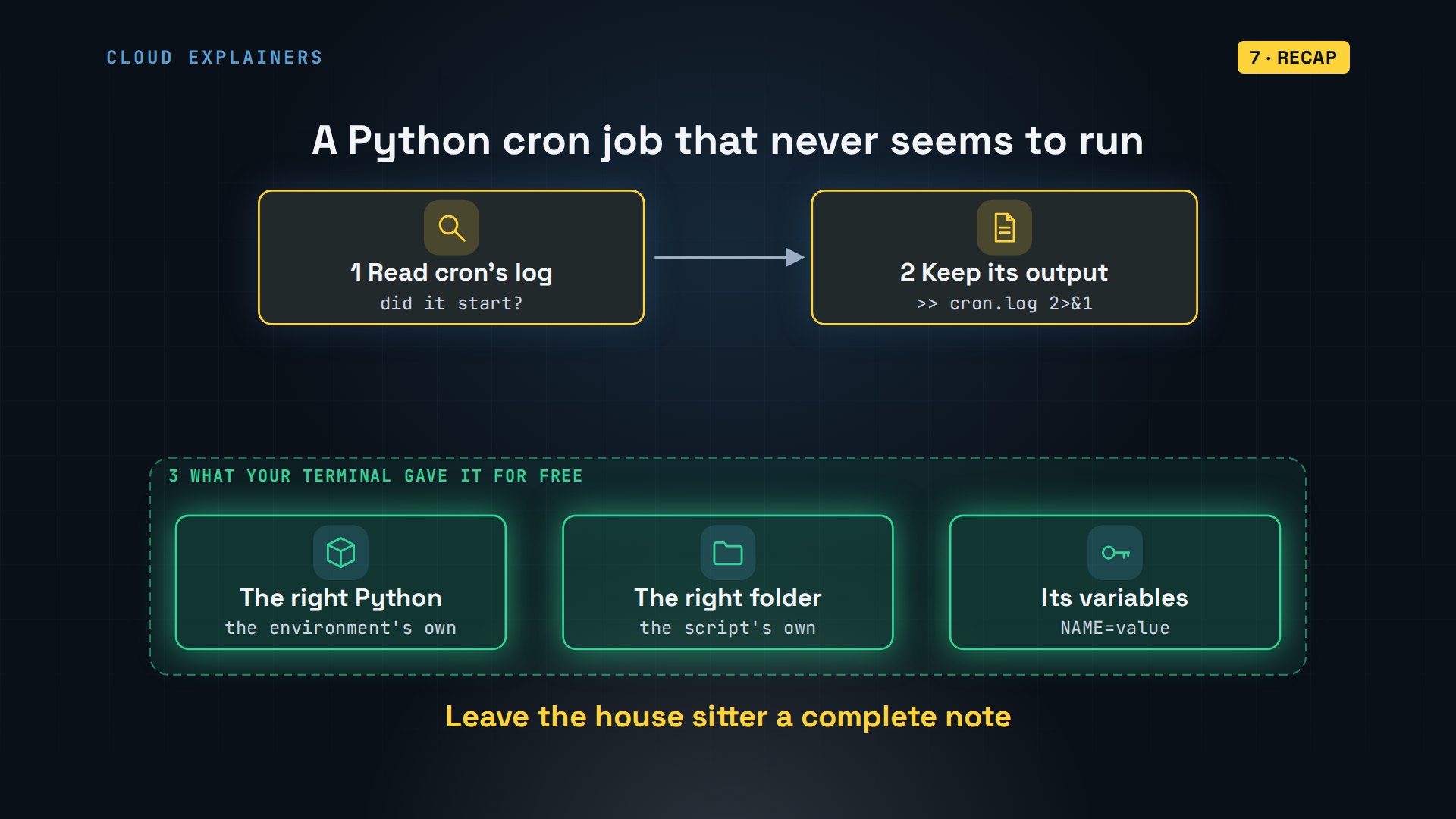
So when a Python cron job never seems to run: read cron's log, then keep the job's output. Then give it what your terminal gave it for free: the right Python, the right folder, and its variables. Leave the house sitter a complete note.
If your cron job finally has something to say for itself, subscribing keeps more small, real fixes of this kind coming.
Every error here came from a real cron job, run at a real minute in our lab. Thanks for watching Cloud Explainers.
Sources
- crontab(5) on Ubuntu 24.04 (name = value lines, SHELL=/bin/sh, HOME and LOGNAME, output mailed to the owner)
- cron(8) on Ubuntu 24.04 (cron checks every minute; output is discarded when no mail program is installed)
- Python docs, venv: an environment's Python can be run by its full path, without activating it
- Python docs, __file__ (the path a module was loaded from)
- Python docs, os.environ
- Microsoft Learn, Task Scheduler's working directory (the "Start in" box)
Demos: a container on our own Mac standing in for a small shop computer; the bike shop, its dashboard and its key are made up. The Windows comparison comes from Microsoft's documentation. Watch the full video on YouTube.
More videos

Linux Makefiles Will Finally Make Sense After This

SAML vs OAuth vs OpenID Connect: What's the Difference?

Linux Bash Scripting: Full Tutorial for Beginners

How PXE Network Boot Works

How Active Directory Works

How to Fix a Linux systemd Service That Won't Start

Linux Logs: syslog vs journald

JWT vs Session Cookies: Which One Should You Use?

Docker vs Docker Compose: Which One Should You Use?

How to Fix Docker Compose Containers That Can't Talk to Each Other

Django Full Tutorial for Beginners

How Linux systemd Works

How to Fix 'Windows Cannot Access' Network Share Errors (SMB)

REST vs gRPC: Which One Should You Use?

How to Fix SSL Certificate Chain Errors (Missing Intermediate)

Every Python Concept for Beginners in 10 Minutes

Every SQL Join Type in 10 Minutes

Why OpenRouter Free Models Hit Their Limit So Fast

Why Your Gemini API Free Tier Runs Out So Fast

OpenRouter Will Finally Make Sense After This

How Redis Caching Works

Gemini API vs Vertex AI: Which One Should You Use?

How to Fix a Leaked Gemini API Key

Why Golang Uses Goroutines Instead of Threads

How to Fix Gemini API Error 429: Resource Exhausted

Claude Token Pricing Will Finally Make Sense After This

Why Python Web Scraping Returns Nothing (and the Fix)

Python uv vs pip: Which One Should You Use?

Python Automation: Full Tutorial for Beginners

How OAuth Login Works

Google AI Studio Will Finally Make Sense After This

What Happens When You Run a Docker Container

How to Fix Claude Code Billing Your API Key Instead of Your Plan

Why Passkeys Can't Be Phished Like Passwords

PowerShell vs Bash: Which One Should You Learn?

The Linux Roadmap for Beginners

Django vs FastAPI: Which One Should You Use?

Why SQLite Is the Most Used Database in the World

How a NoSQL Database Like MongoDB Works

How to Fix Python pip error: externally-managed-environment

How to Fix MySQL Too Many Connections Database Errors

Golang Concurrency Will Finally Make Sense After This

How Amazon S3 Works

How Kubernetes Works

How Git Works

How to Fix Docker Port Already Allocated Errors

How PostgreSQL Works

How to Fix Git Merge Conflicts

How to Fix No Space Left on Device in Linux

How the Internet Works

SQL vs NoSQL: When Each One Wins

How to Fix JWT Token Expired Errors (401 Unauthorized)

Claude API vs Claude Pro: Why Your Subscription Doesn't Include It

Why AI Agent Skills Beat Giant Prompts

Linux Cron Jobs Will Finally Make Sense After This

Security Logs Will Finally Make Sense After This

How to Fix a Security Leak: An API Key Pushed to GitHub

DNS Will Finally Make Sense After This

Never Ignore a Security Update

Two-Factor Authentication Will Finally Make Sense

Never Expose a Database to the Internet

SSH Keys vs Passwords: Which Is Safer for Security?

The 5 Levels of Linux Boot: From Power On to Login

The 5 Levels of Network Firewalls

Password Security: Why Hackers Crack Weak Passwords

Why Your Linux Server Runs Out of Memory

HTTP vs HTTPS: What Actually Changes on Your Network

Every Linux File Permission You Need to Know

Linux Processes vs Threads: When Each One Wins

The OSI Model Will Finally Make Sense After This

The 7 Levels of Git

Every Network Troubleshooting Command You Need

Hashing vs Encryption in Cybersecurity: When Each One Wins

Why the Internet Ran Out of IP Addresses

Linux Package Managers: apt vs Snap vs Flatpak

Why Python Is Slow (and When It Doesn't Matter)

TCP vs UDP: When Each One Wins

Stop Running Linux as Root (Do This Instead)

Linux Users and Groups Will Finally Make Sense

Why Phishing Beats Good Security (and How to Spot It)

The 7 Levels of Docker

AI Agents Will Finally Make Sense After This

Stop Using git push --force (Use This Instead)

Agent Skills vs MCP: When Each One Wins

Networking Will Finally Make Sense After This

Every Linux Command You Actually Need

The 7 Levels of Cybersecurity

Every System Design Concept You Need, in One Diagram
