
JWT vs Session Cookies: Which One Should You Use?
Session cookies or JWTs for your app's login? In our own lab (a small Python shop API on two servers, Redis as the session store, and a real Chromium) we log in both ways and compare what each one stores, what travels with every request, what happens on a second server, and what logging out really does: a logged-out JWT keeps working until it expires, unless you add a denylist, which brings back the lookup a session makes.
Logged out, still logged in
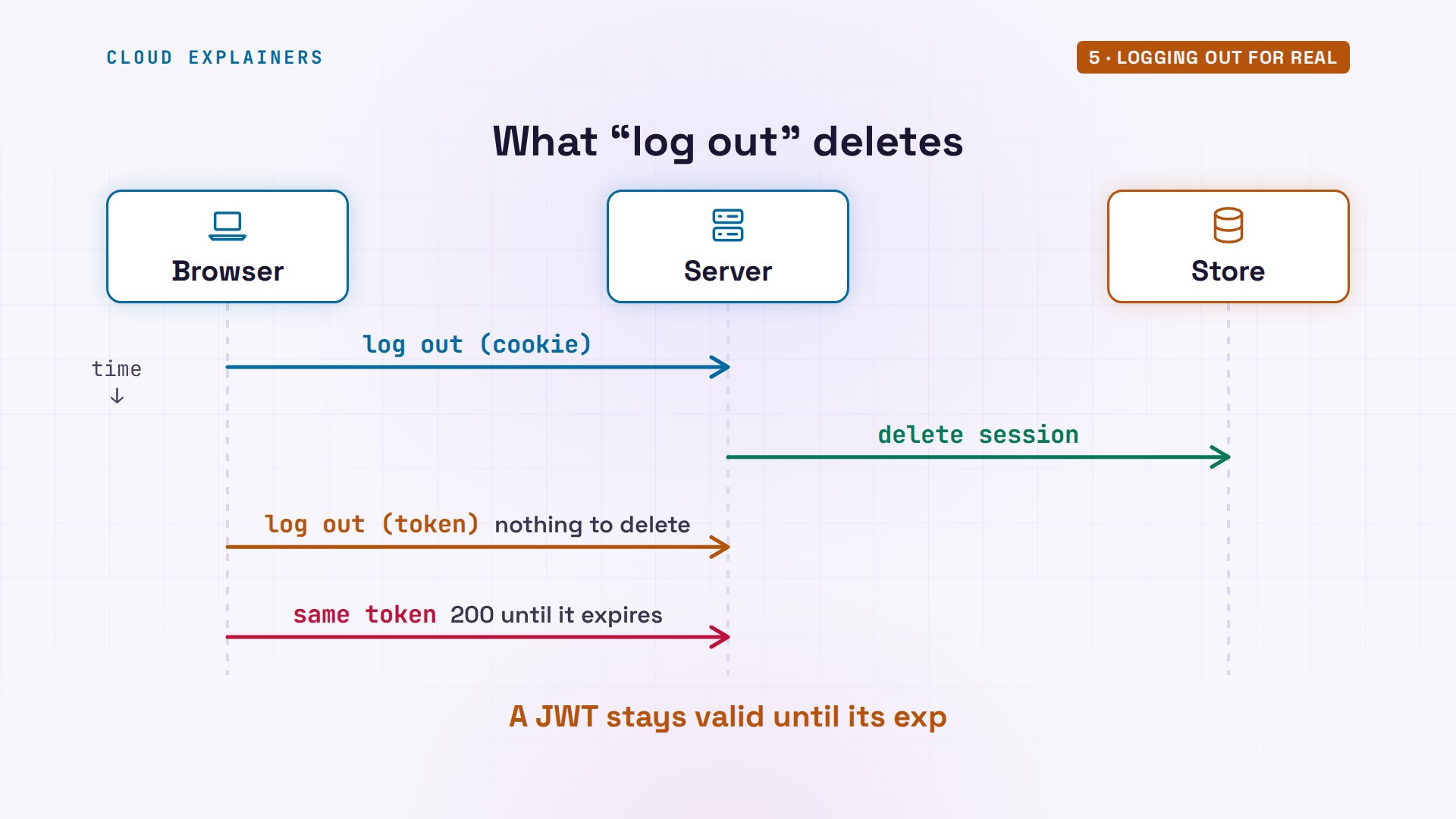
You're adding login to your app, and you have to pick: session cookies, or JWTs. Pick without knowing the difference, and logging out might not log anyone out. Here's Ana's kettle shop. She logs out, and the shop says so. Yet the token she had still gets her orders: 200 OK.
curl -s -X POST api1.kettle.test/token/logout -H "Authorization: Bearer $TOKEN"{"message": "logged out"}
curl -si api1.kettle.test/orders -H "Authorization: Bearer $TOKEN"HTTP/1.1 200 OK
Server: kettle-shop
Date: Mon, 09 Nov 2026 16:03:04 GMT
Content-Type: application/json
Content-Length: 72

{"user": "ana", "orders": 3, "checked": "signature and expiry checked"}
That's not a bug. Session cookies and JWTs both keep you logged in, but they keep the proof in different places. By the end you'll know which one fits your app, and whether a JWT can ever really be taken back, and what that costs.
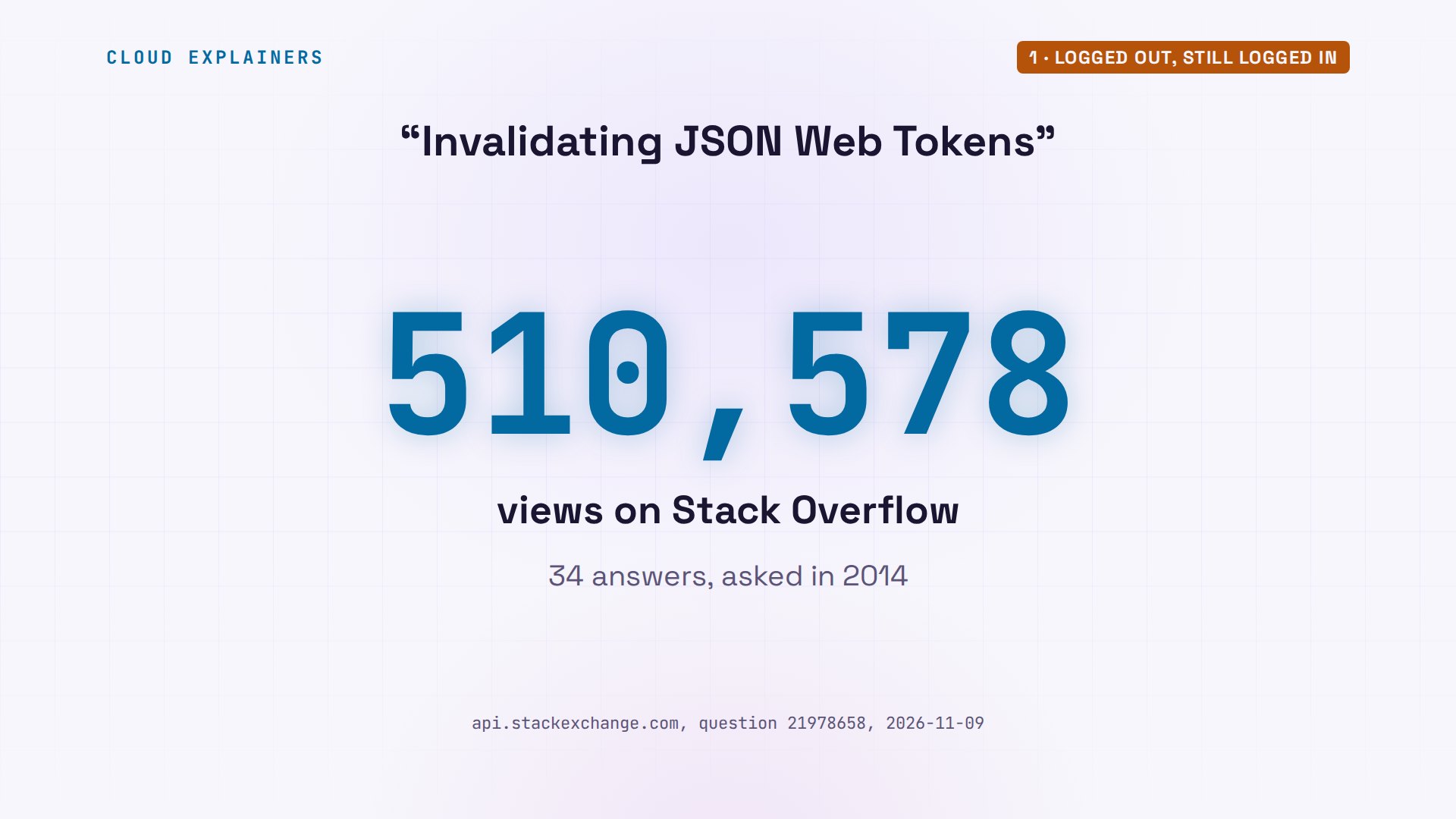
You're far from alone. On Stack Overflow, a question called Invalidating JSON Web Tokens has over five hundred thousand views and 34 answers. Its question, in short: how do you log someone out, if a token can't be taken back?
What a session is
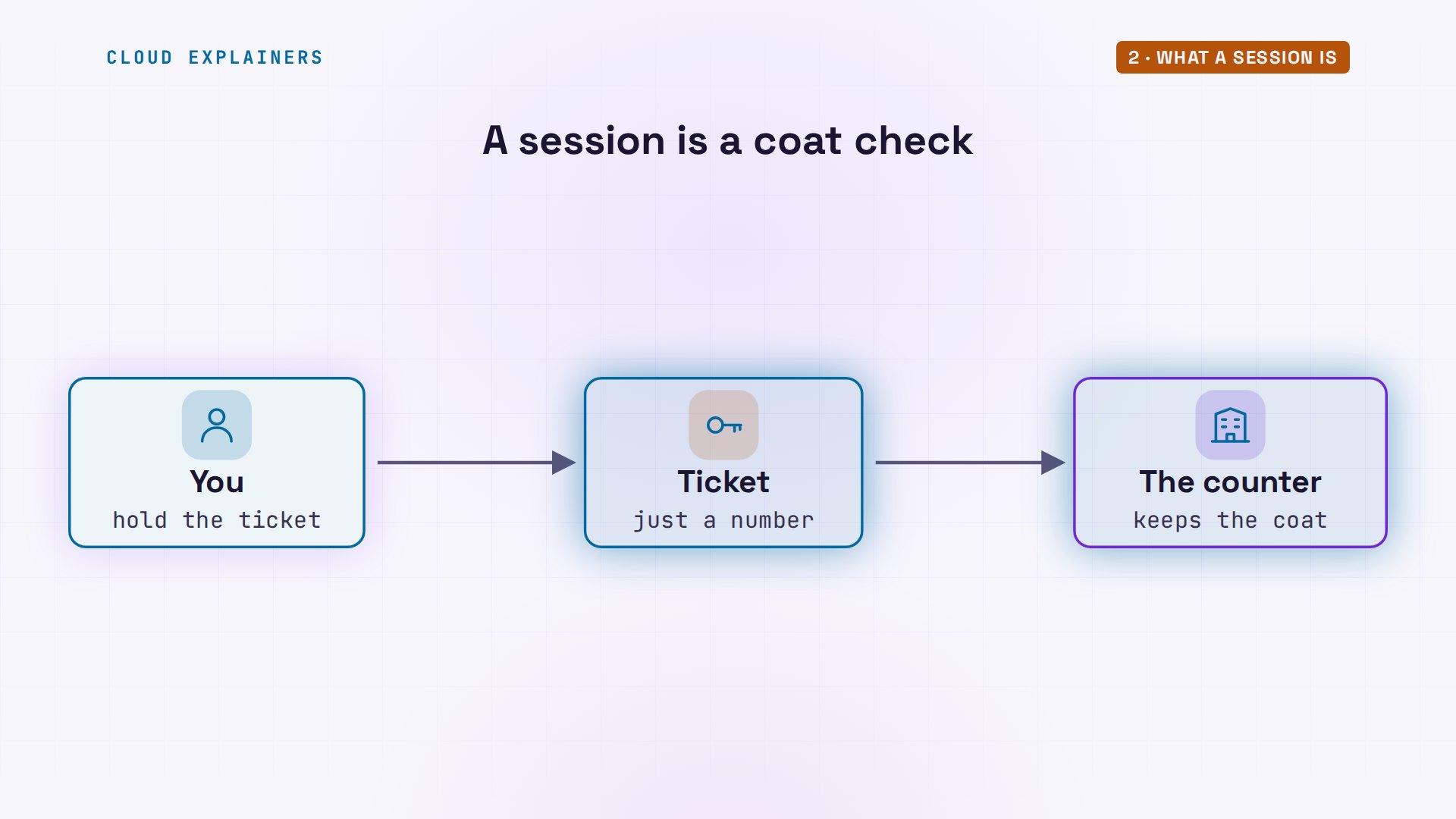
What's actually different? Start with a session. Think of a coat check. You hand over your coat and get a ticket with a number. The ticket proves nothing by itself; the coat stays behind the counter, and the number only means something there.
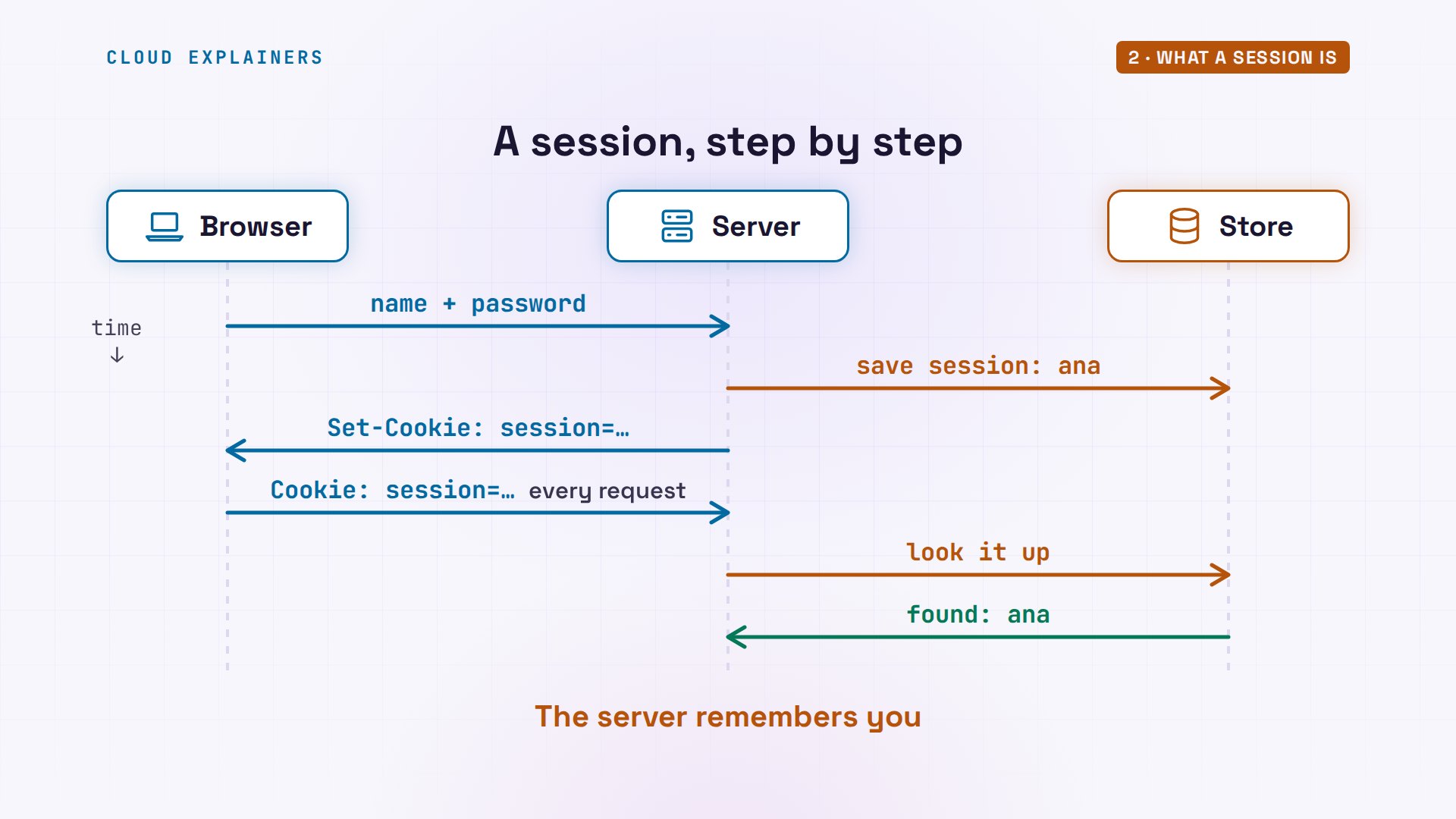
Ana's shop works the same way. She sends her name and password, and curl keeps any cookie in a file, jar.txt, the way a browser would. The answer has one header that matters: Set-Cookie, session, then a random string. That string is the ticket. From then on, curl sends the cookie back, and the shop finds her session.
curl -si -c jar.txt api1.kettle.test/session/login -d user=ana -d password=kettle-2026HTTP/1.1 200 OK
Server: kettle-shop
Date: Mon, 09 Nov 2026 16:03:04 GMT
Set-Cookie: session=OFn3gUkjWNcUaNxoKTIxD-nsj-0ufFu68Ol6YDwhu7k; Domain=kettle.test; Path=/; Max-Age=28800; HttpOnly; SameSite=Lax
Content-Type: application/json
Content-Length: 32

{"message": "logged in as ana"}
curl -si -b jar.txt api1.kettle.test/ordersHTTP/1.1 200 OK
Server: kettle-shop
Date: Mon, 09 Nov 2026 16:03:04 GMT
Content-Type: application/json
Content-Length: 70

{"user": "ana", "orders": 3, "checked": "session found in the store"}
So where is the coat kept? In the session store, Redis, a fast in-memory database. One key: session, with the same random string, holding who she is. It expires in eight hours.
show-store1 key(s) stored
  session:OFn3gUkj…  {"user": "ana", "created": 1794240184} expires in 28800 s
So a session goes like this. At login, the server saves the session and sends back the ticket. On every request after that, the cookie comes along, and the server looks it up in the store. Found, so it's Ana.
What a JWT carries
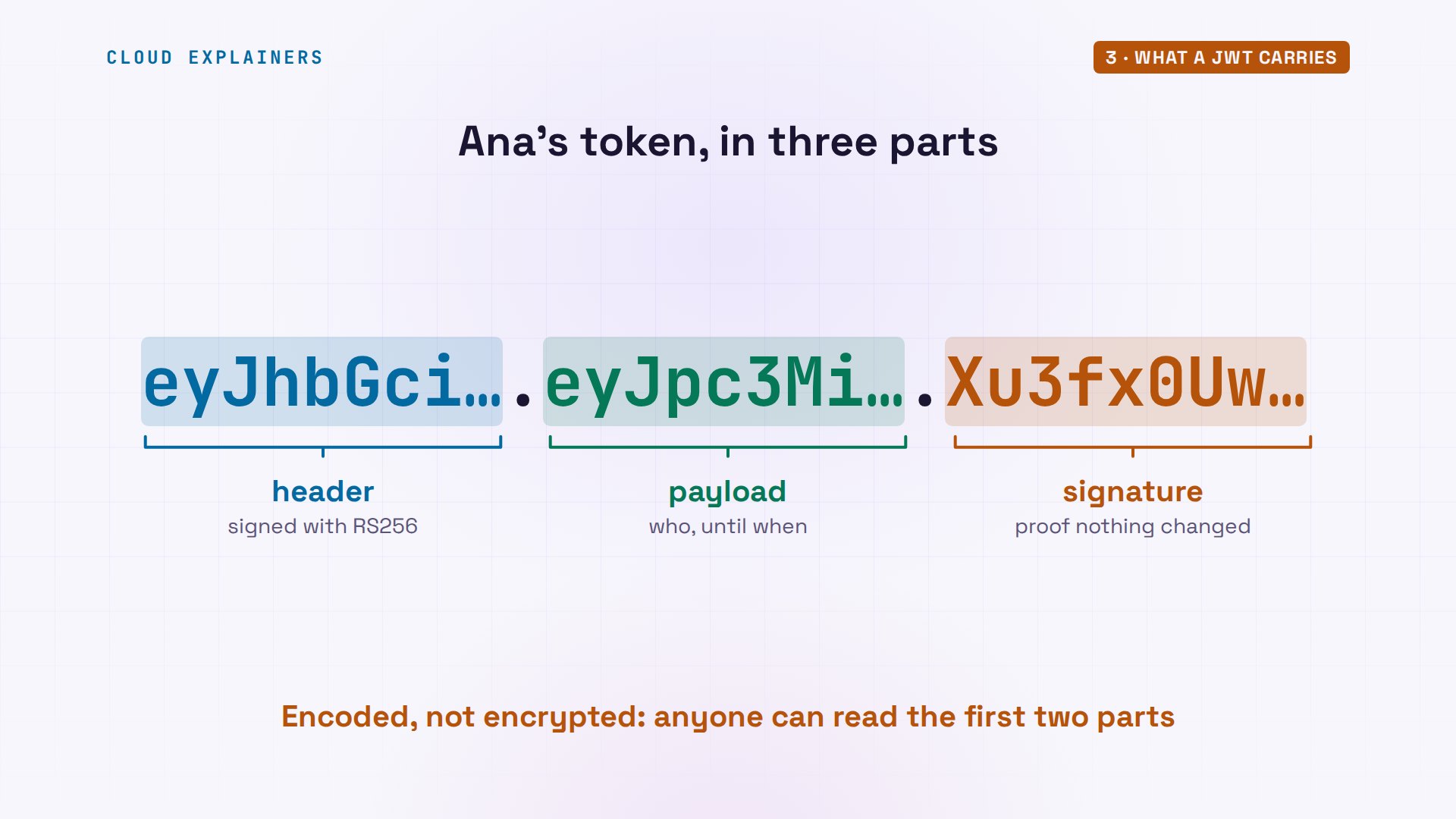
So what does a JWT do instead? The token login answers with no cookie, just a JSON Web Token, which Ana keeps in a variable. Printed, it's one long string. Its middle part decodes to plain text: who issued it, who it's about, when it expires, fifteen minutes on, and a unique id, the jti.
TOKEN=$(curl -s api1.kettle.test/token/login -d user=ana -d password=kettle-2026 | jq -r .access_token)
echo $TOKENeyJhbGciOiJSUzI1NiIsInR5cCI6IkpXVCJ9.eyJpc3MiOiJodHRwczovL2FwaTEua2V0dGxlLnRlc3QiLCJzdWIiOiJhbmEiLCJpYXQiOjE3OTQyNDAxODUsImV4cCI6MTc5NDI0MTA4NSwianRpIjoiODUyYzAwNjYzNjYwNGI0M2E3OTY3M2Q5NTdjYmE5MzcifQ.Xu3fx0Uwl6JMyO-HKtoB-2SpvEIcydHq8BHyoBKFXaiOumeJtZETglmk3eAy-B9_HBMNVv9Op05KeYXHeOPE_F4snoGgDrKvWav1TRPhndh7MkKePZb5_qEldkVqyy9_kl5PoWBzc4pfDTTEcUuxRuTxM0NSQDGicnF367gkhTtyrBtiMQgKXDXEkGCdi7Eg7rMxQqOVNupQqx_9vqWb5ZG3xxXhDchXYSw5Mco9B9VABEacFiCI8ZMLKlvHfHk0Gm1-KkqBnZDrpwcxifvwrp9KLWBdU-8UccMrrqAxn39-7YJmA5npDvJ62nruLXT8_hWWbhUi9BABtwQElt8v0g
echo $TOKEN | cut -d. -f2 | jq -R '@base64d | fromjson'{
  "iss": "https://api1.kettle.test",
  "sub": "ana",
  "iat": 1794240185,
  "exp": 1794241085,
  "jti": "852c006636604b43a79673d957cba937"
}
A JWT has three parts, split by dots. The header says how it was signed: RS256. The payload holds those claims. Both are only encoded, not encrypted, so anyone holding the token can read them. The signature is what makes it trustworthy.
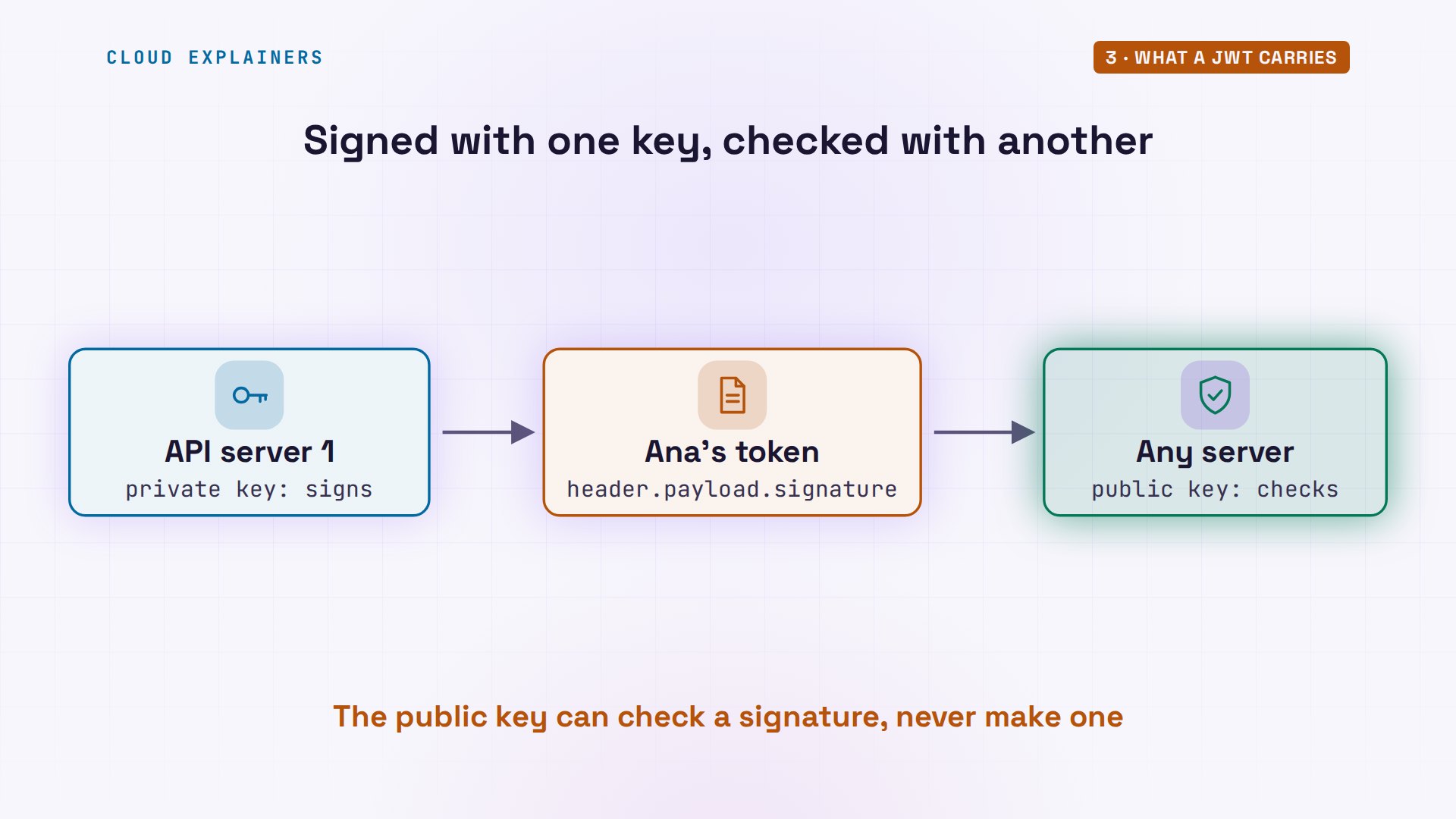
Server one signs the first two parts with a private key that only it holds. Any server with the matching public key can check that signature, and so know that nothing in the token was changed, without asking anyone.
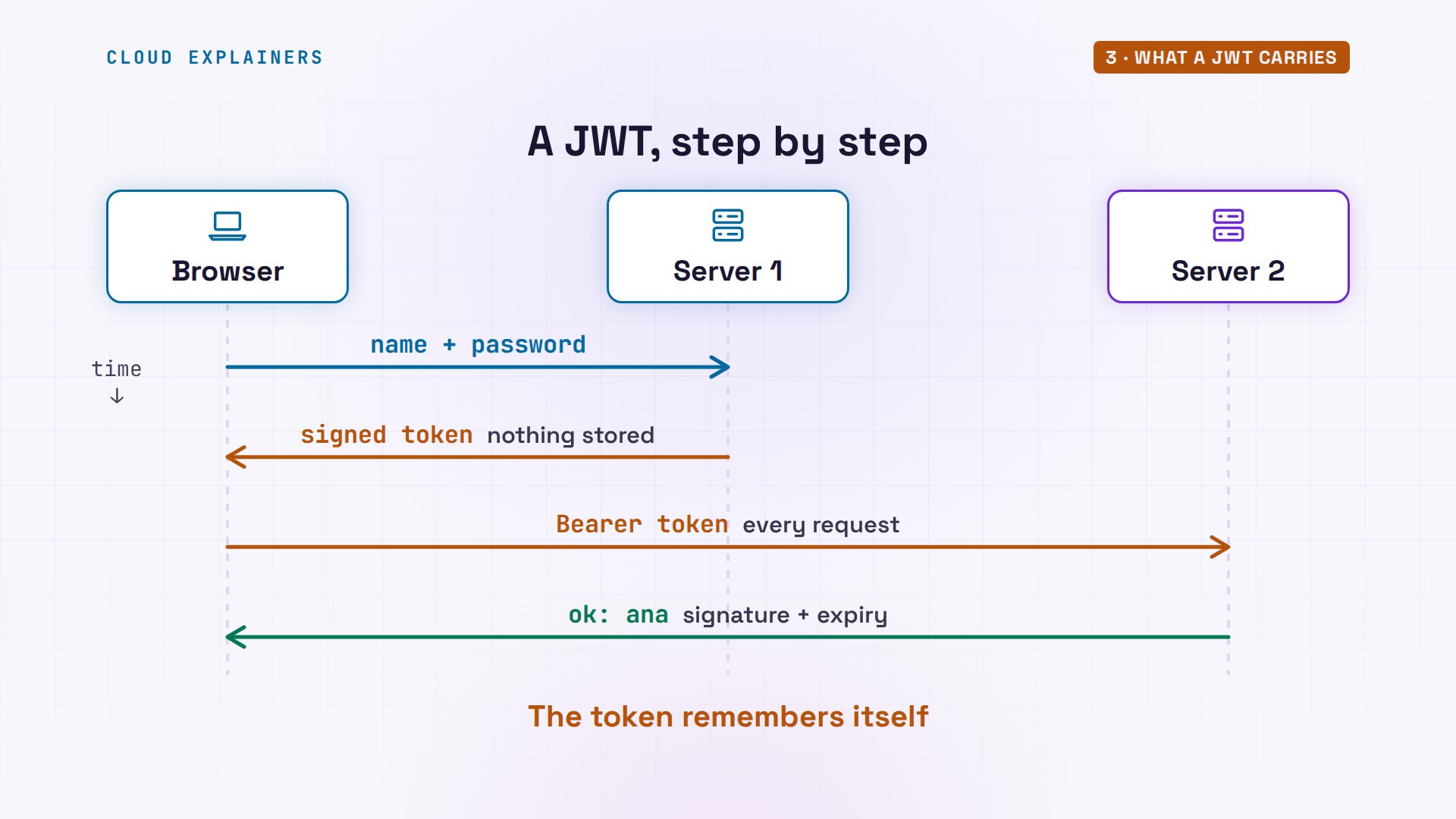
So a JWT goes like this. At login, server one signs a token and hands it over, and stores nothing. On every request, the token comes along in a header, and the server checks its signature and its expiry. That's all. The token remembers who she is.
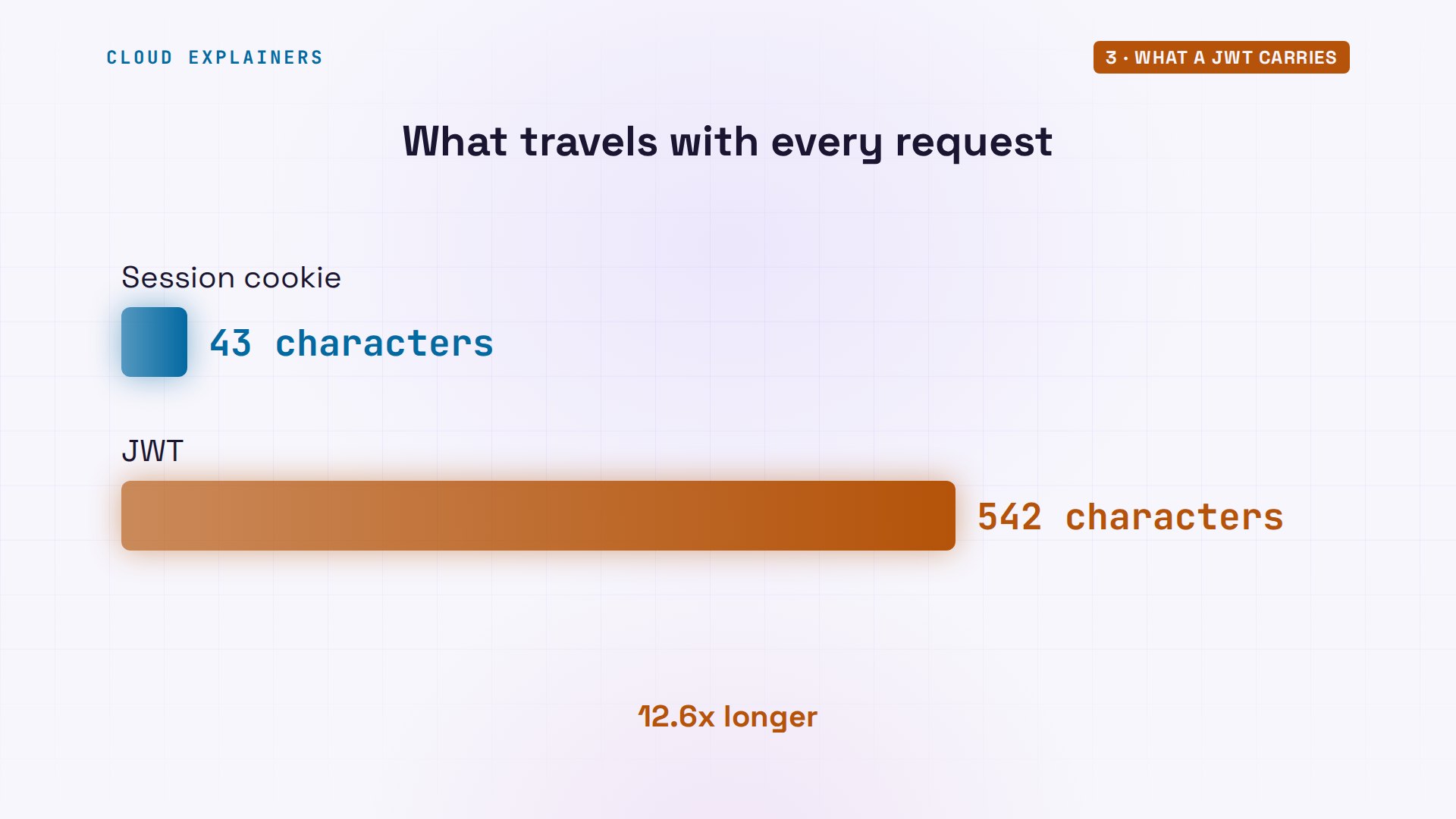
Carrying everything has a price: size. Her session cookie is a short random string. Guess first: how much longer is Ana's token than her session cookie? Over ten times longer: 542 characters against 43, sent with every request.
A second server
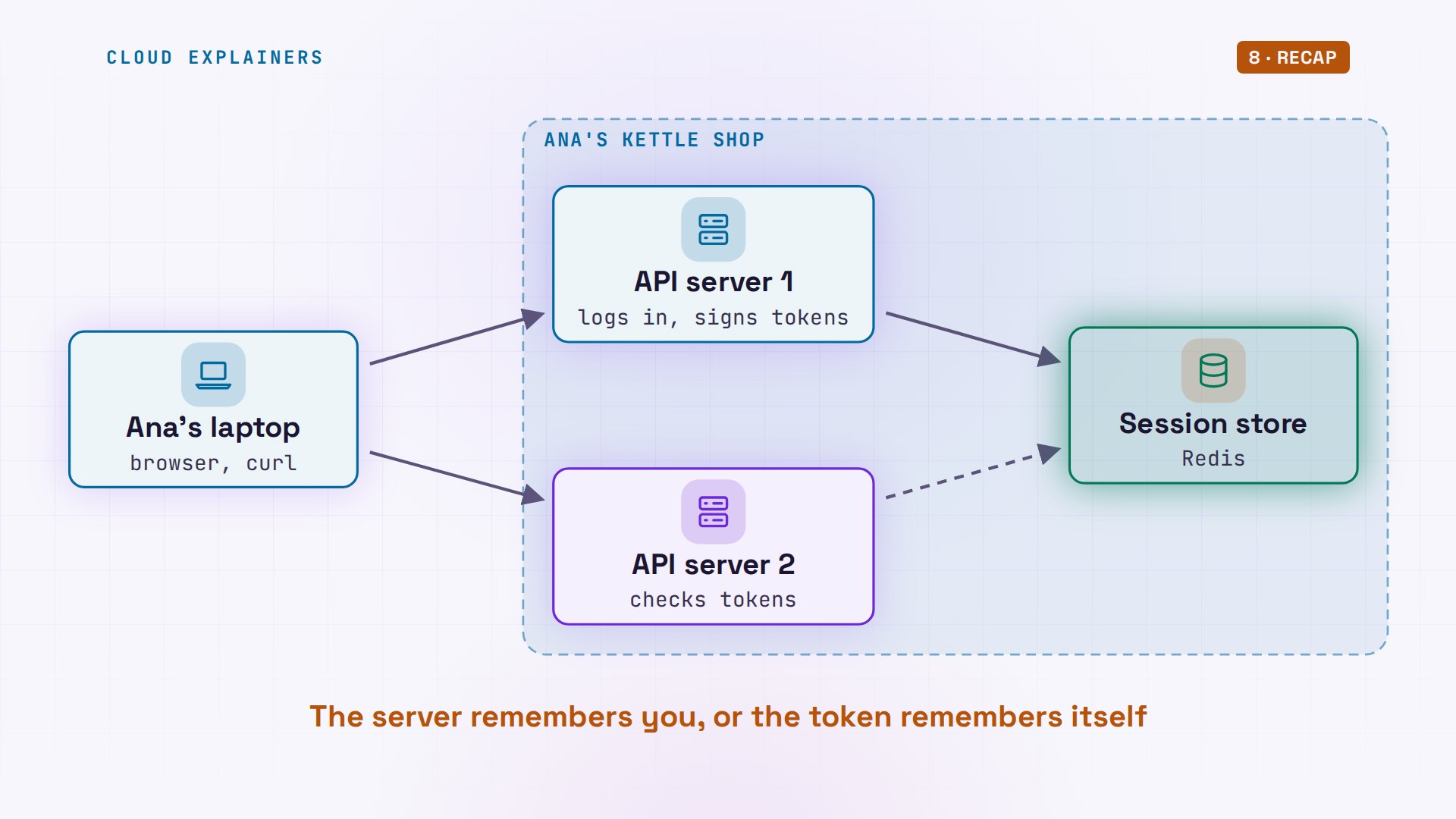
Why would anyone pick the bigger one? Here's the reason. Ana's shop gets a second API server. It has the public key, so it can check tokens, but it has no access to the session store. Before we try it, guess: which login works there? Only the token.
The cookie gets 401, no such session. The token gets 200: a signature needs no lookup. And with no private key, server two refuses to sign.
curl -si -b jar.txt api2.kettle.test/ordersHTTP/1.1 401 Unauthorized
Server: kettle-shop
Date: Mon, 09 Nov 2026 16:03:05 GMT
Content-Type: application/json
Content-Length: 29

{"error": "no such session"}
curl -si api2.kettle.test/orders -H "Authorization: Bearer $TOKEN"HTTP/1.1 200 OK
Server: kettle-shop
Date: Mon, 09 Nov 2026 16:03:05 GMT
Content-Type: application/json
Content-Length: 72

{"user": "ana", "orders": 3, "checked": "signature and expiry checked"}
curl -si api2.kettle.test/token/login -d user=ana -d password=kettle-2026HTTP/1.1 403 Forbidden
Server: kettle-shop
Date: Mon, 09 Nov 2026 16:03:05 GMT
Content-Type: application/json
Content-Length: 45

{"error": "this server can't sign anything"}
Sessions can work on two servers too, if every server can reach the same store. We pointed server two at the store, off camera, and now the same cookie works there.
curl -si -b jar.txt api2.kettle.test/ordersHTTP/1.1 200 OK
Server: kettle-shop
Date: Mon, 09 Nov 2026 16:03:05 GMT
Content-Type: application/json
Content-Length: 70

{"user": "ana", "orders": 3, "checked": "session found in the store"}
That's the real case for JWTs. When many services each need to know who you are, a token they can check with a public key saves every one of them a trip to a shared store. With sessions, that one store is on the path of every request. Every command here is linked in the description, together with the lab files.
Logging out for real
Now the question from the start: can you take a login back? With a session, yes. Ana copies her cookie file first, then logs out. The server deletes the session, and tells the browser to drop the cookie. The old copy now gets 401, no such session.
cp jar.txt old-jar.txt
curl -si -b jar.txt -c jar.txt -X POST api1.kettle.test/session/logoutHTTP/1.1 200 OK
Server: kettle-shop
Date: Mon, 09 Nov 2026 16:03:05 GMT
Set-Cookie: session=; Domain=kettle.test; Path=/; Max-Age=0; HttpOnly; SameSite=Lax
Content-Type: application/json
Content-Length: 26

{"message": "logged out"}
curl -si -b old-jar.txt api1.kettle.test/ordersHTTP/1.1 401 Unauthorized
Server: kettle-shop
Date: Mon, 09 Nov 2026 16:03:05 GMT
Content-Type: application/json
Content-Length: 29

{"error": "no such session"}
The store is empty. Even a stolen copy of that cookie is worthless now. And nothing in it was ever about Ana's token.
show-store0 key(s) stored
So logging out works differently. For a session, the server deletes the session, and every copy of the ticket dies with it. For a token, the server has nothing to delete. That's what the opening showed: the token still works until it expires, up to fifteen minutes after it was issued.
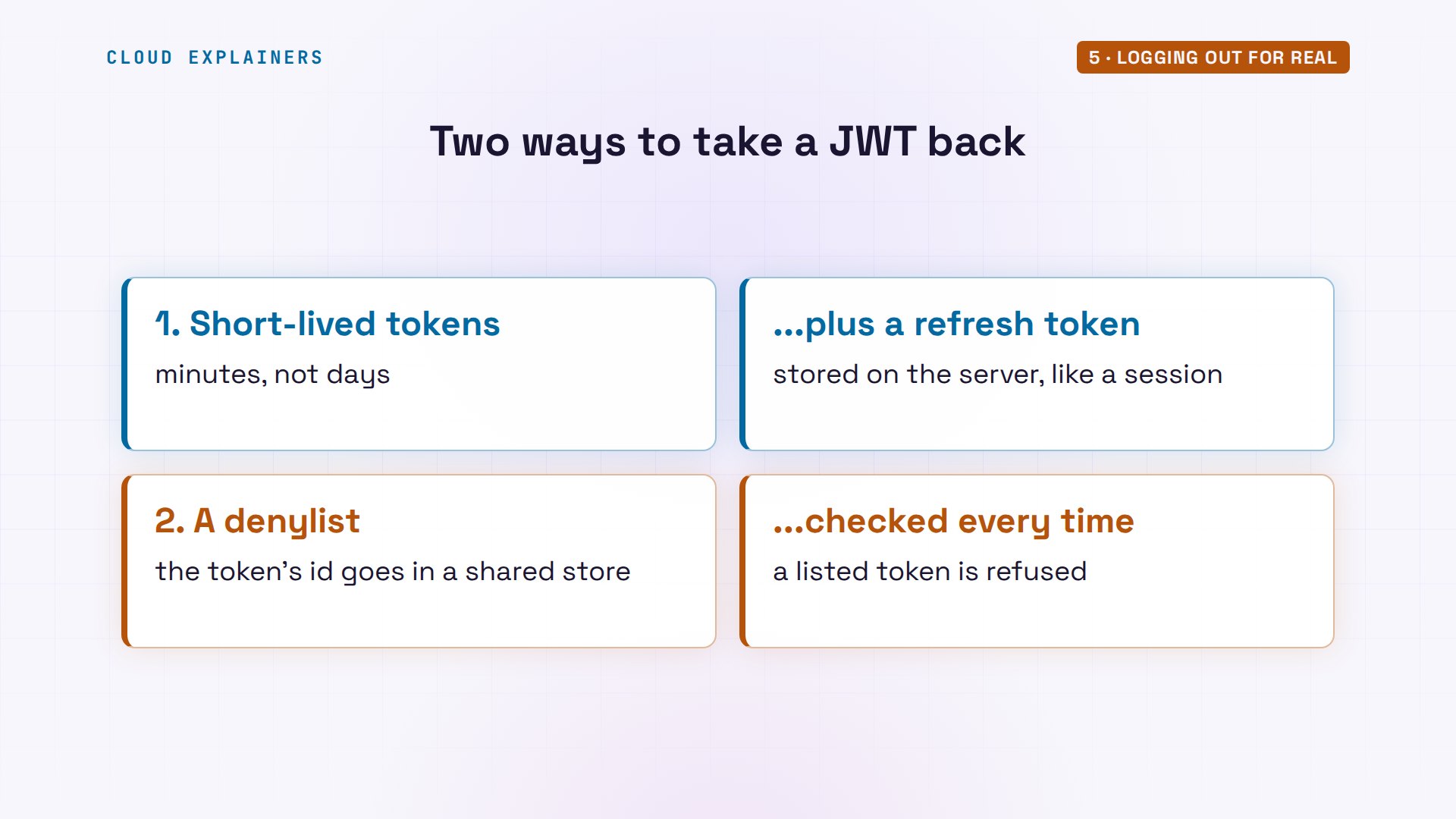
There are two usual answers. First, keep tokens short-lived, minutes rather than days, and hand out a refresh token to get new ones; but that refresh token is stored on the server, like a session. Second, a denylist: on logout, the server writes the token's id into a shared store, and refuses any token on the list.
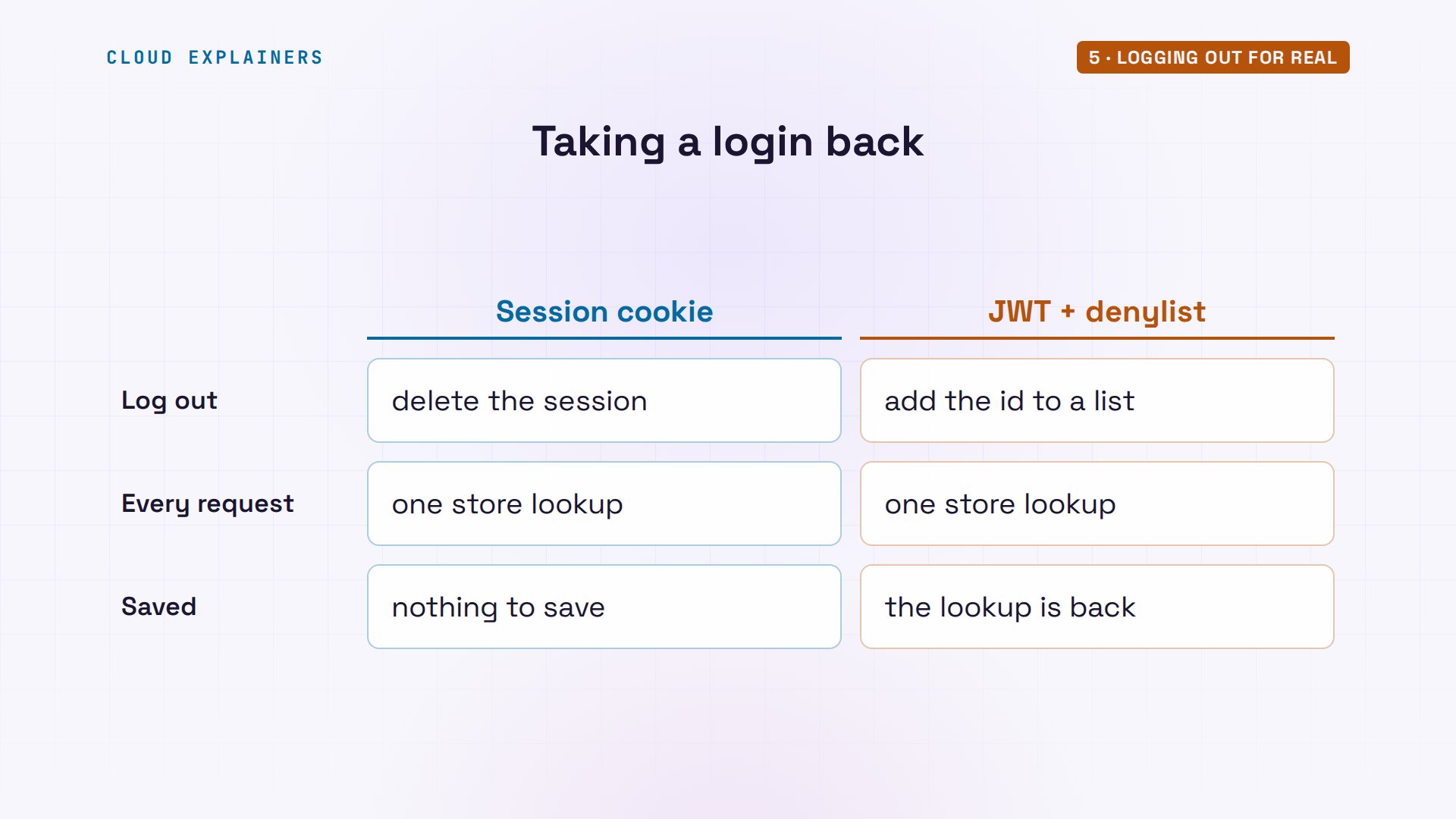
We turned on the denylist, on both servers, off camera. Ana logs out again. Server two now says 401: token revoked. A fresh token still works, but look at what the server checked: the signature, the expiry, and the denylist.
curl -s -X POST api1.kettle.test/token/logout -H "Authorization: Bearer $TOKEN"{"message": "logged out"}
curl -si api2.kettle.test/orders -H "Authorization: Bearer $TOKEN"HTTP/1.1 401 Unauthorized
Server: kettle-shop
Date: Mon, 09 Nov 2026 16:03:06 GMT
Content-Type: application/json
Content-Length: 27

{"error": "token revoked"}
T2=$(curl -s api1.kettle.test/token/login -d user=ana -d password=kettle-2026 | jq -r .access_token)
curl -si api2.kettle.test/orders -H "Authorization: Bearer $T2"HTTP/1.1 200 OK
Server: kettle-shop
Date: Mon, 09 Nov 2026 16:03:06 GMT
Content-Type: application/json
Content-Length: 82

{"user": "ana", "orders": 3, "checked": "signature, expiry and denylist checked"}
In the store, one key: deny, then her token's id, kept only until the token would have expired anyway.
show-store1 key(s) stored
  deny:852c0066…     ana                                expires in 899 s
So here's the cost. Every request now asks the shared store about the token: the same lookup a session makes. A JWT can be taken back, but only by giving up the very thing it saved.
Inside the browser
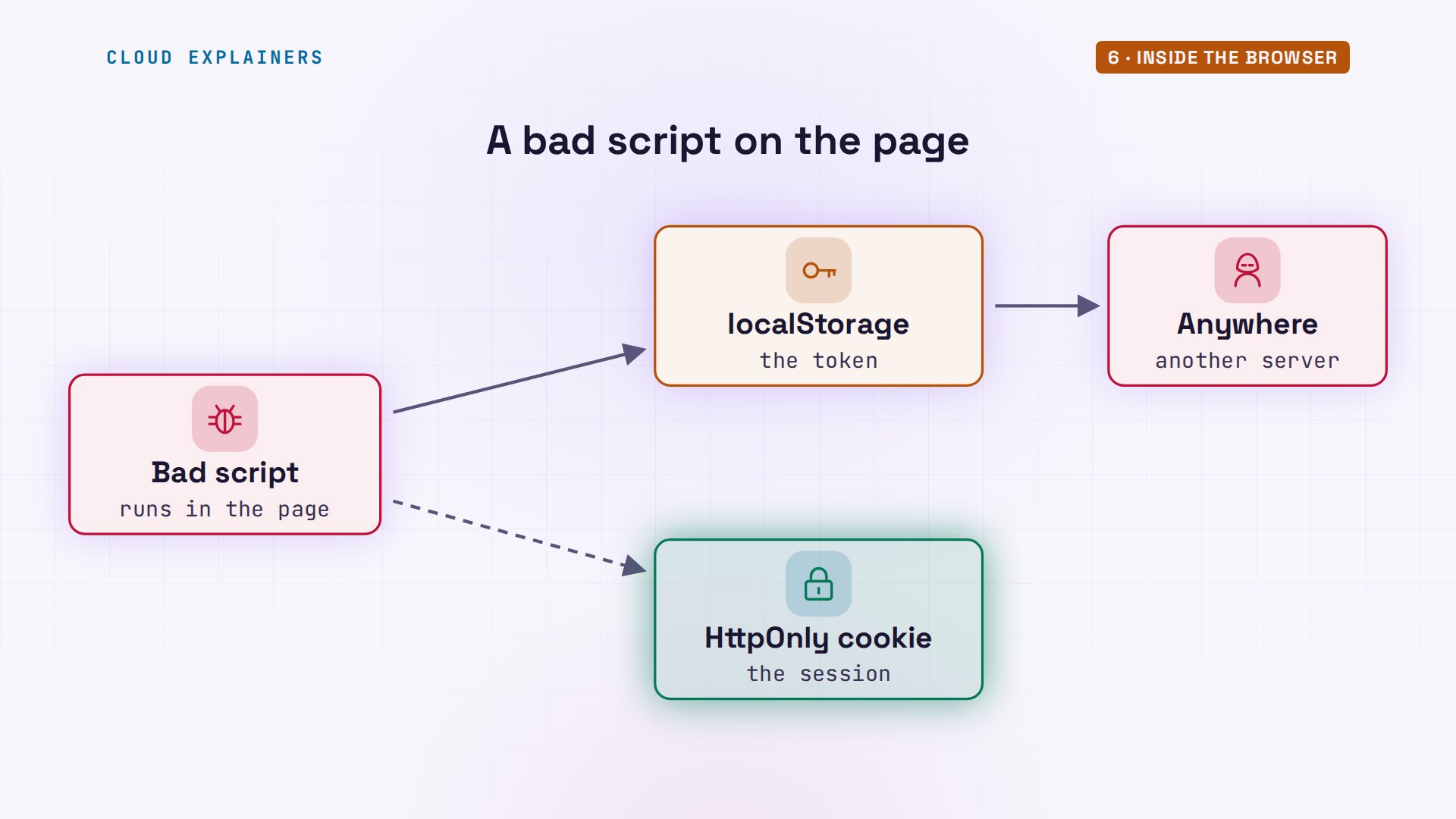
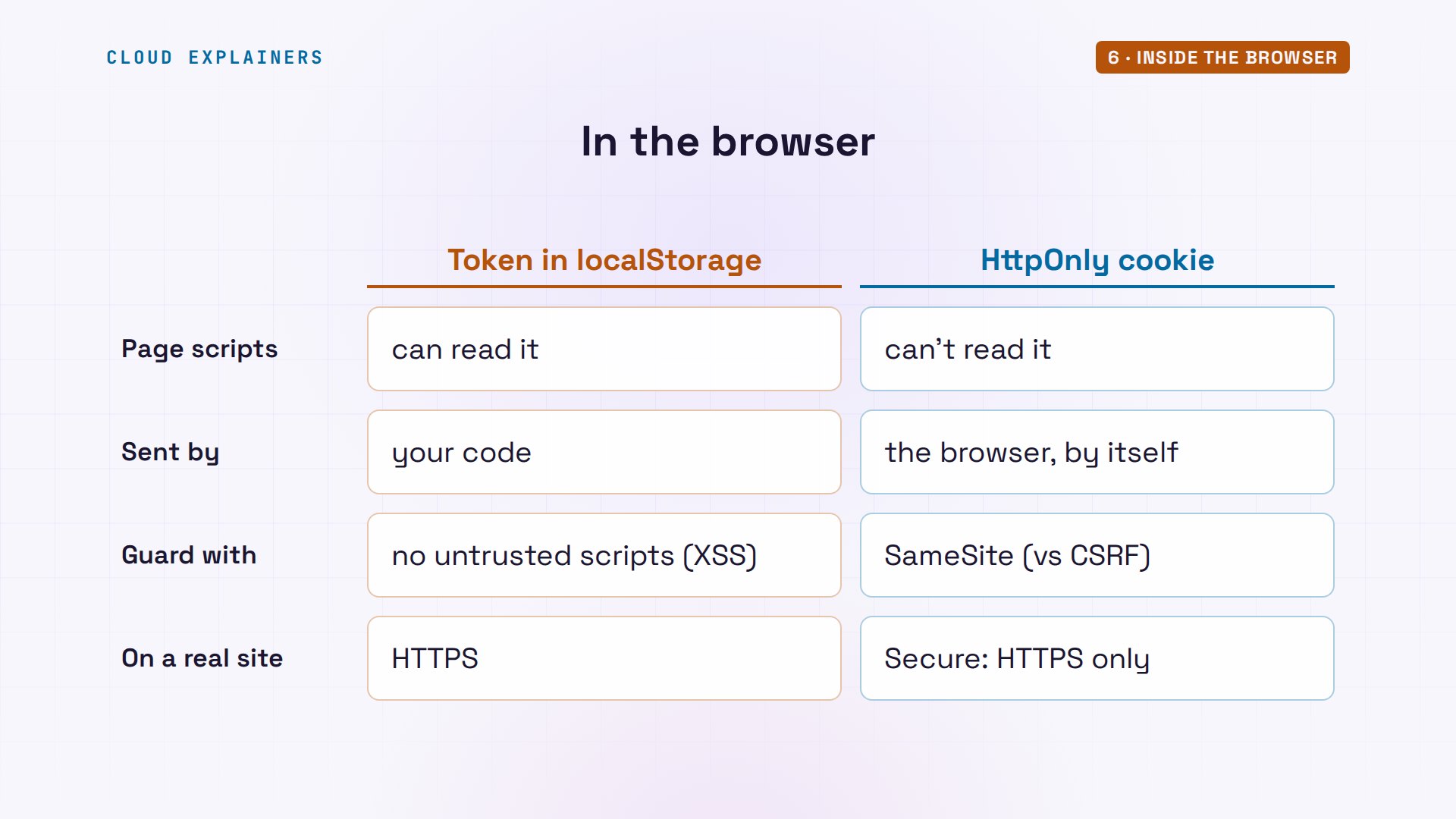
Where the browser keeps each one matters too. This is a real Chromium browser, opening the kettle shop. The page logs in both ways, then runs what any script on that page could run. The session cookie is invisible: document.cookie is empty, because it's HttpOnly. The token in localStorage is right there.
browser http://api1.kettle.test/browser: opened http://api1.kettle.test/
page:    logged in twice: a session cookie, and a token saved in localStorage
a script on the page can read:
  document.cookie                 ""
  localStorage.getItem('token')   "eyJhbGciOiJSUzI1NiIsInR5..." (542 characters)
  fetch('/orders')                200, with no code adding the cookie
the browser's own cookie store:
  session  domain kettle.test  HttpOnly  SameSite=Lax
Why does that matter? Say a bad script gets onto a page, through a buggy add-on. It runs with the page's own rights. It can read a token from localStorage and send it anywhere, but an HttpOnly cookie never reaches it.
Cookies have their own catch: the browser attaches them by itself. That fetch got 200 with no code adding the cookie, so cookies need SameSite, which keeps them off most requests from other sites, and on a real site, Secure, so they only travel over HTTPS.
Which one to use
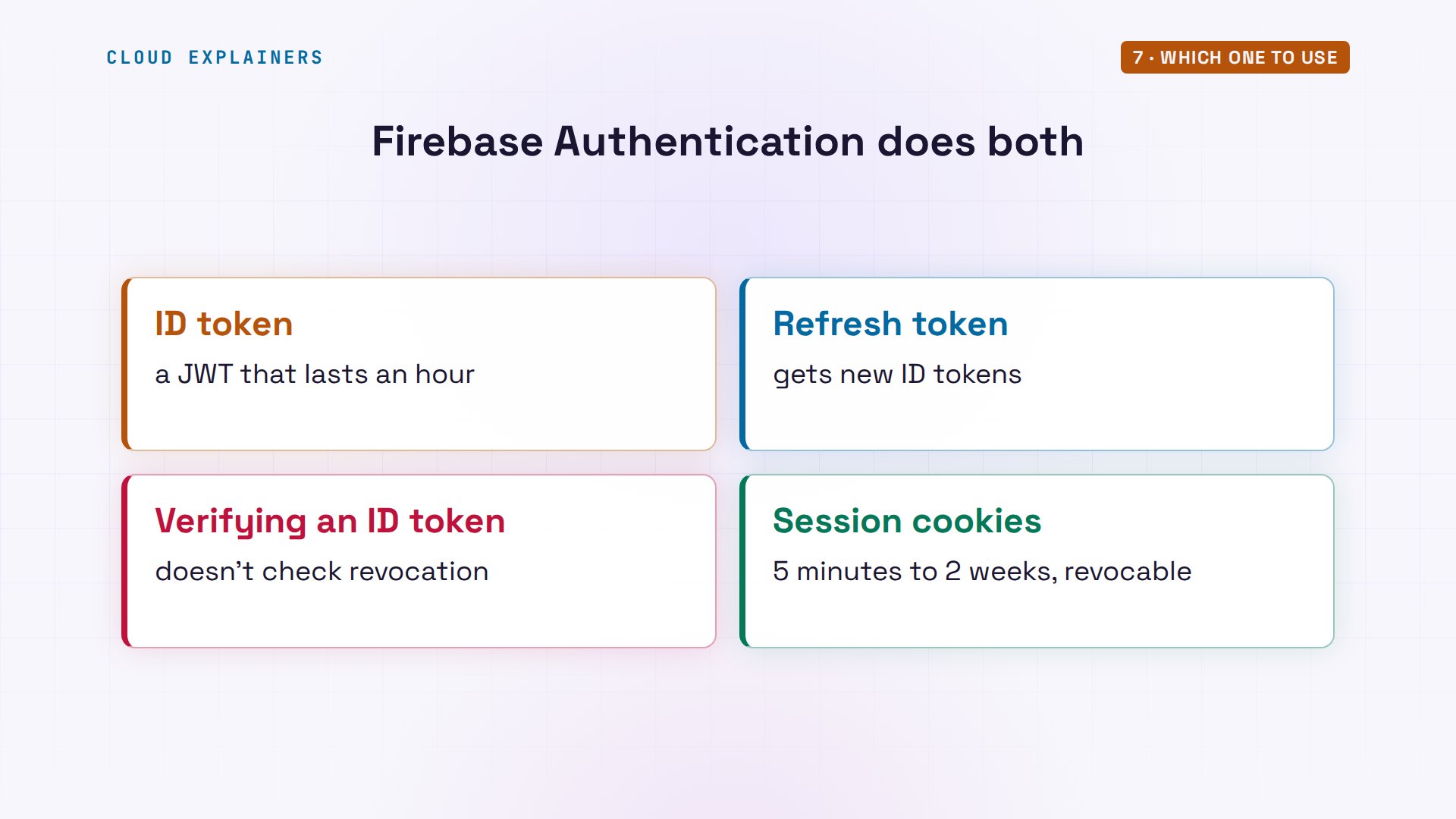
Big platforms often use both. Firebase, Google's app platform, signs users in with an ID token, a JWT that lasts an hour, plus a refresh token. Its docs warn that verifying an ID token doesn't check whether it was revoked. And for websites, it offers session cookies, from five minutes to two weeks, that can be revoked.
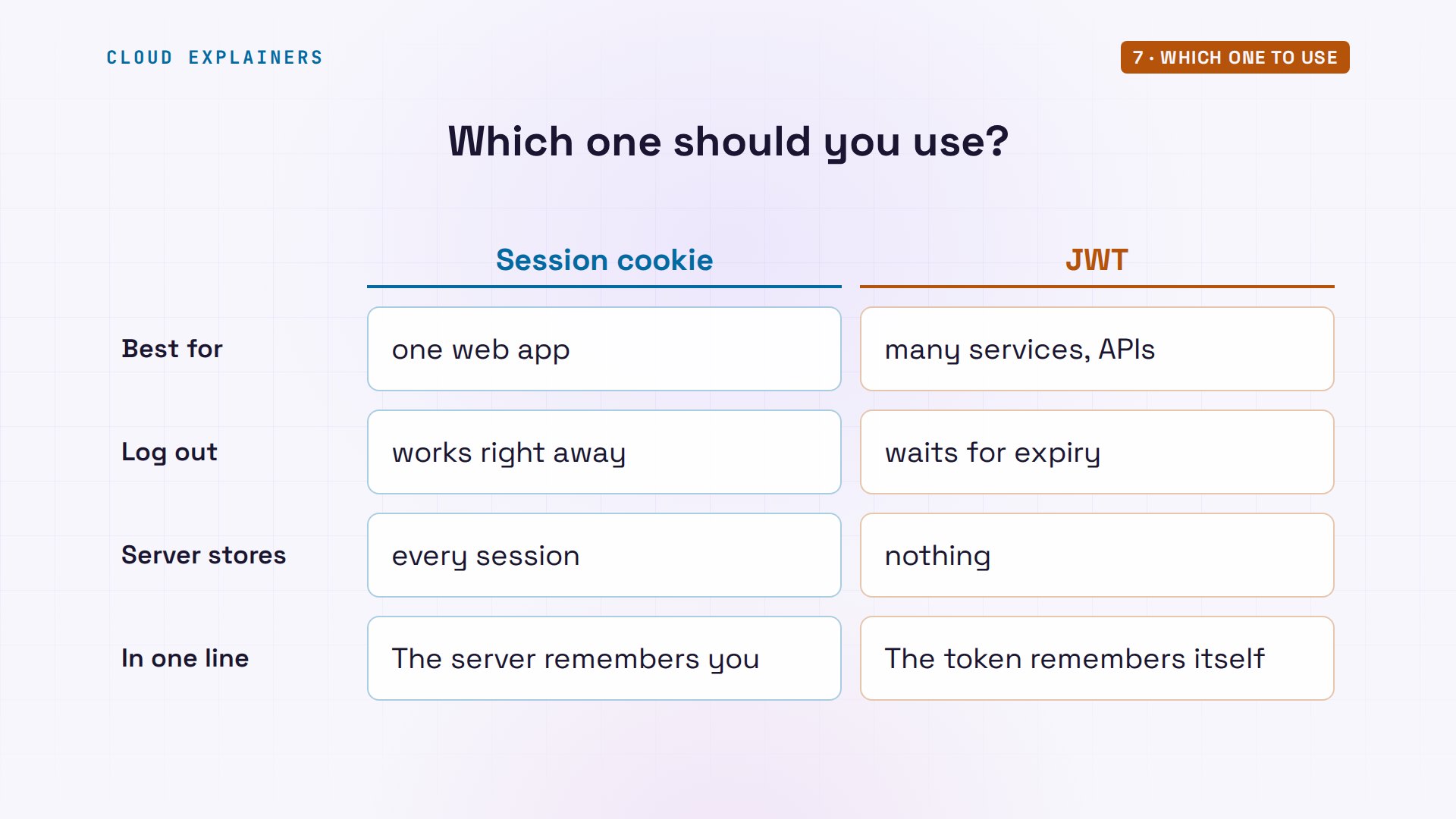
So which one? Use session cookies for a web app with its own server, when logging out has to work right away. Use JWTs when many services must check who you are without a shared store, or for API and mobile clients, and keep them short-lived. In one line: the server remembers you, or the token remembers itself.
Recap
So: a session cookie is a ticket the server looks up, and can cancel at once. A JWT is proof the server checks by signature alone, good until it expires.
If this finally made sessions and tokens click, subscribing helps a small channel make more of these.
Every request here ran for real, in our own lab. Thanks for watching Cloud Explainers.
Sources
- RFC 7519, JSON Web Token (JWT)
- Firebase, Manage user sessions (ID tokens are JWTs that last an hour; refresh tokens)
- Firebase, Verify ID tokens (this does not check whether the token has been revoked)
- Firebase, Manage session cookies (5 minutes to 2 weeks, revocable)
- OWASP Session Management Cheat Sheet (invalidate the session on logout; deleting a cookie alone does not invalidate a stolen copy)
- MDN, Using HTTP cookies (HttpOnly, SameSite)
- Stack Overflow, 'Invalidating JSON Web Tokens' (question 21978658, over 500,000 views on 2026-11-09)
Demos: containers on our own Mac; the kettle shop, its users and its keys are made up. Watch the full video on YouTube.
More videos

Linux Makefiles Will Finally Make Sense After This

SAML vs OAuth vs OpenID Connect: What's the Difference?

How to Fix Python cron Jobs That Never Run

Linux Bash Scripting: Full Tutorial for Beginners

How PXE Network Boot Works

How Active Directory Works

How to Fix a Linux systemd Service That Won't Start

Linux Logs: syslog vs journald

Docker vs Docker Compose: Which One Should You Use?

How to Fix Docker Compose Containers That Can't Talk to Each Other

Django Full Tutorial for Beginners

How Linux systemd Works

How to Fix 'Windows Cannot Access' Network Share Errors (SMB)

REST vs gRPC: Which One Should You Use?

How to Fix SSL Certificate Chain Errors (Missing Intermediate)

Every Python Concept for Beginners in 10 Minutes

Every SQL Join Type in 10 Minutes

Why OpenRouter Free Models Hit Their Limit So Fast

Why Your Gemini API Free Tier Runs Out So Fast

OpenRouter Will Finally Make Sense After This

How Redis Caching Works

Gemini API vs Vertex AI: Which One Should You Use?

How to Fix a Leaked Gemini API Key

Why Golang Uses Goroutines Instead of Threads

How to Fix Gemini API Error 429: Resource Exhausted

Claude Token Pricing Will Finally Make Sense After This

Why Python Web Scraping Returns Nothing (and the Fix)

Python uv vs pip: Which One Should You Use?

Python Automation: Full Tutorial for Beginners

How OAuth Login Works

Google AI Studio Will Finally Make Sense After This

What Happens When You Run a Docker Container

How to Fix Claude Code Billing Your API Key Instead of Your Plan

Why Passkeys Can't Be Phished Like Passwords

PowerShell vs Bash: Which One Should You Learn?

The Linux Roadmap for Beginners

Django vs FastAPI: Which One Should You Use?

Why SQLite Is the Most Used Database in the World

How a NoSQL Database Like MongoDB Works

How to Fix Python pip error: externally-managed-environment

How to Fix MySQL Too Many Connections Database Errors

Golang Concurrency Will Finally Make Sense After This

How Amazon S3 Works

How Kubernetes Works

How Git Works

How to Fix Docker Port Already Allocated Errors

How PostgreSQL Works

How to Fix Git Merge Conflicts

How to Fix No Space Left on Device in Linux

How the Internet Works

SQL vs NoSQL: When Each One Wins

How to Fix JWT Token Expired Errors (401 Unauthorized)

Claude API vs Claude Pro: Why Your Subscription Doesn't Include It

Why AI Agent Skills Beat Giant Prompts

Linux Cron Jobs Will Finally Make Sense After This

Security Logs Will Finally Make Sense After This

How to Fix a Security Leak: An API Key Pushed to GitHub

DNS Will Finally Make Sense After This

Never Ignore a Security Update

Two-Factor Authentication Will Finally Make Sense

Never Expose a Database to the Internet

SSH Keys vs Passwords: Which Is Safer for Security?

The 5 Levels of Linux Boot: From Power On to Login

The 5 Levels of Network Firewalls

Password Security: Why Hackers Crack Weak Passwords

Why Your Linux Server Runs Out of Memory

HTTP vs HTTPS: What Actually Changes on Your Network

Every Linux File Permission You Need to Know

Linux Processes vs Threads: When Each One Wins

The OSI Model Will Finally Make Sense After This

The 7 Levels of Git

Every Network Troubleshooting Command You Need

Hashing vs Encryption in Cybersecurity: When Each One Wins

Why the Internet Ran Out of IP Addresses

Linux Package Managers: apt vs Snap vs Flatpak

Why Python Is Slow (and When It Doesn't Matter)

TCP vs UDP: When Each One Wins

Stop Running Linux as Root (Do This Instead)

Linux Users and Groups Will Finally Make Sense

Why Phishing Beats Good Security (and How to Spot It)

The 7 Levels of Docker

AI Agents Will Finally Make Sense After This

Stop Using git push --force (Use This Instead)

Agent Skills vs MCP: When Each One Wins

Networking Will Finally Make Sense After This

Every Linux Command You Actually Need

The 7 Levels of Cybersecurity

Every System Design Concept You Need, in One Diagram
