
How to Fix SSL Certificate Chain Errors (Missing Intermediate)
curl fails with 'SSL certificate problem: unable to get local issuer certificate' and Python with CERTIFICATE_VERIFY_FAILED, yet the site opens in a browser. The server is sending its certificate without the intermediate. In our own lab (nginx, our own CA) we show what the server sends, why Chromium hides the problem by downloading the missing certificate itself, the one-word fix (fullchain.pem), why adding the certificate to your own laptop or using curl -k isn't a fix, and how to check a chain before your users do.
Works in the browser, not in curl
Your curl command fails with: SSL certificate problem, unable to get local issuer certificate. But the same address opens fine in your browser. Ana's tea shop has exactly that. Curl, on her laptop: error sixty. A real Chromium browser, on the same laptop: status two hundred, the page loads.
curl https://shop.testcurl: (60) SSL certificate problem: unable to get local issuer certificate
More details here: https://curl.se/docs/sslcerts.html

curl failed to verify the legitimacy of the server and therefore could not
establish a secure connection to it. To learn more about this situation and
how to fix it, please visit the web page mentioned above.
browser https://shop.testbrowser: 200 Kettle and Leaf tea shop
Her customer Ben reads the shop's prices with a Python script. Same failure, in Python's words: certificate verify failed.
python3 price_check.pySSLError: [SSL: CERTIFICATE_VERIFY_FAILED] certificate verify failed: unable to get local issuer certificate (_ssl.c:1000)
Here's the odd part: nothing is wrong with the certificate itself. One piece is missing, and some programs quietly fill it in while others don't. By the end you'll know which piece, the fix on the server, and why one popular fix only fixes your own laptop.
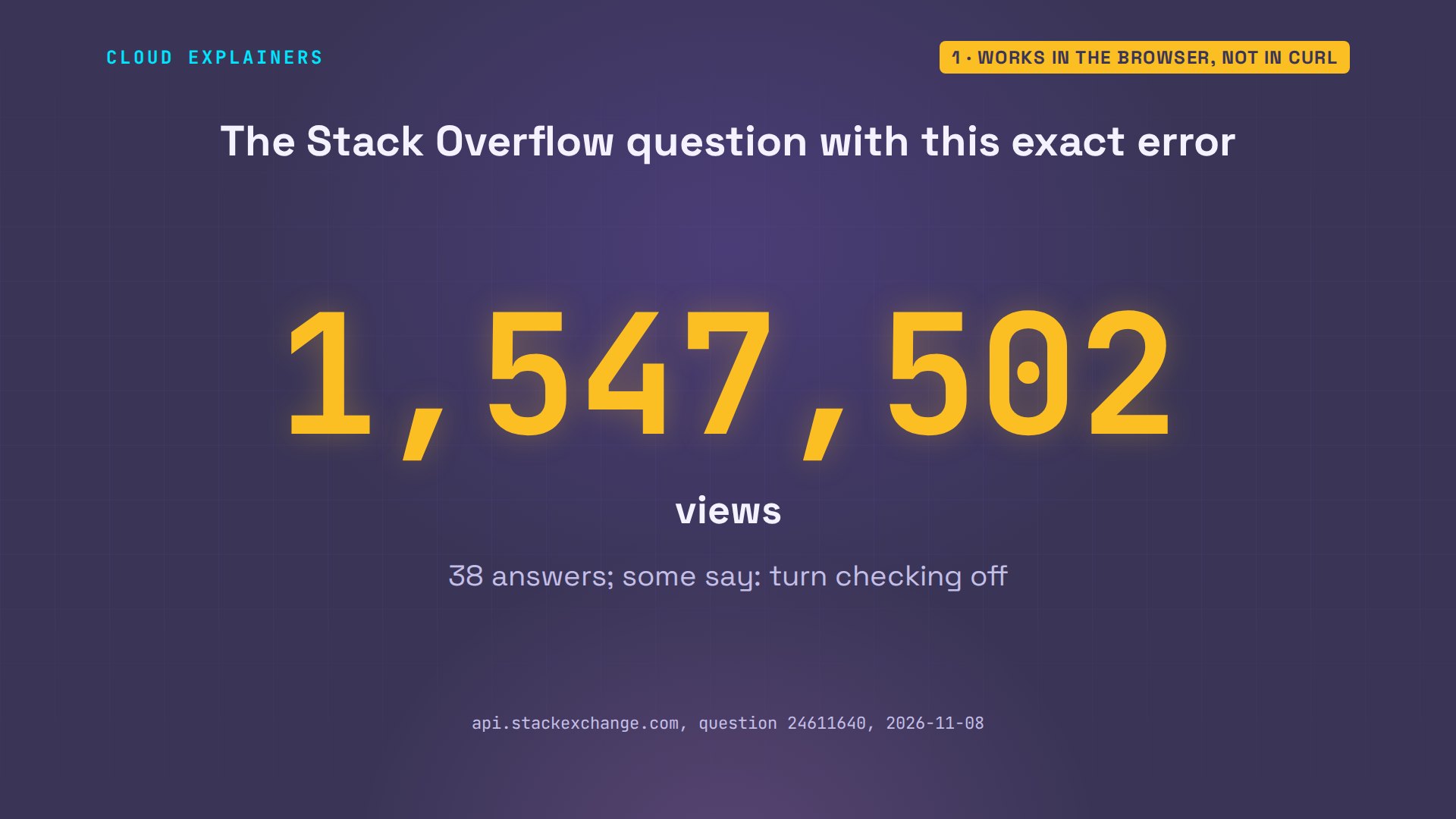
You're far from alone. On Stack Overflow, the question titled with this exact curl error has over one and a half million views and 38 answers. Some of them say: turn the check off. We'll see why that's the one fix to never use.
The usual fix: the full chain
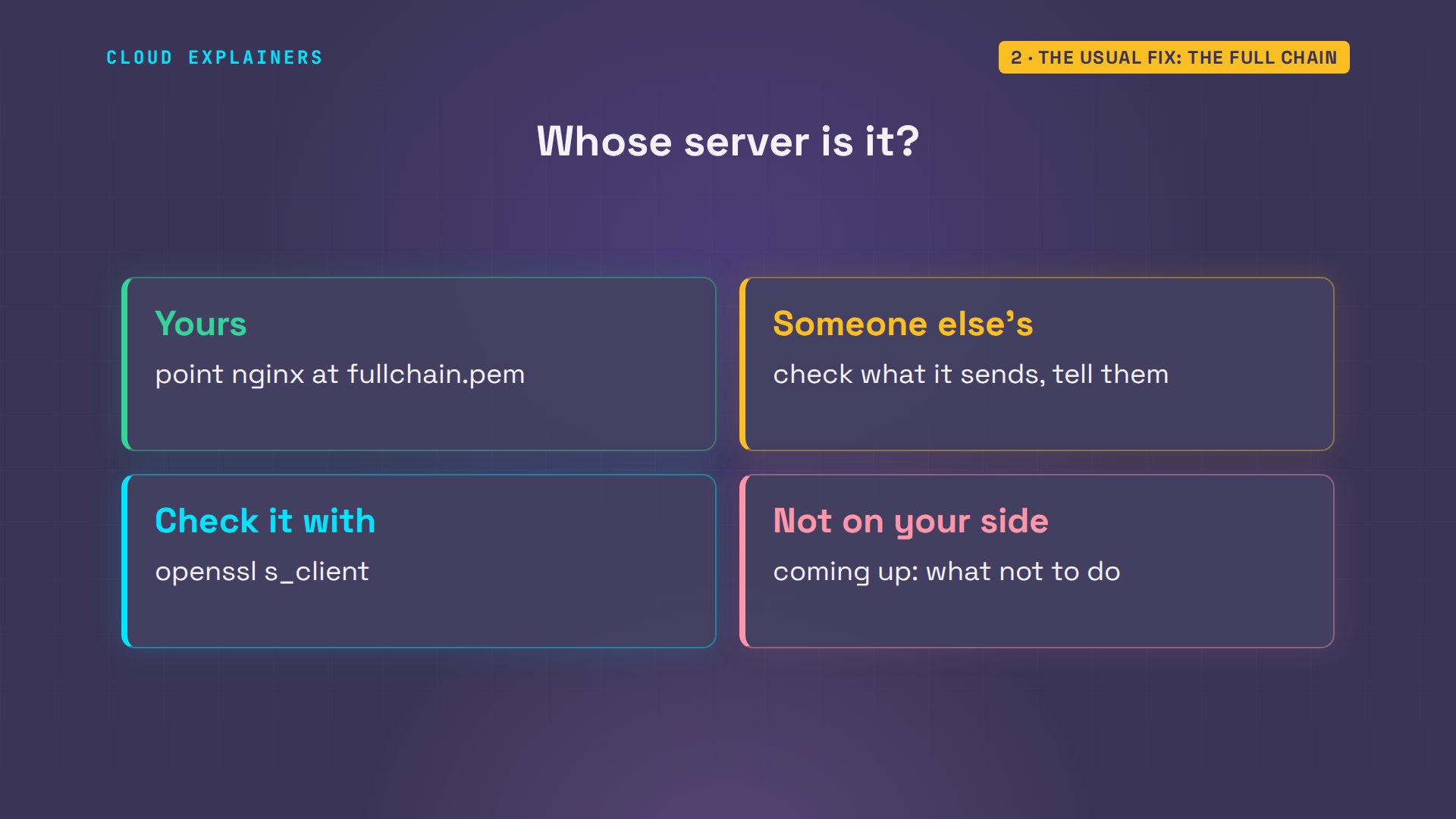
If you run the server, check this first. Ana's nginx config points ssl certificate at cert.pem. Right next to it, the folder has fullchain.pem. Count the certificates in each file: grep dash c counts the lines that say BEGIN. cert.pem holds one. fullchain.pem holds two.
grep ssl_certificate /etc/nginx/sites-enabled/shopssl_certificate /etc/ssl/shop/cert.pem; ssl_certificate_key /etc/ssl/shop/privkey.pem;
ls /etc/ssl/shopcert.pem chain.pem fullchain.pem privkey.pem
grep -c BEGIN /etc/ssl/shop/cert.pem /etc/ssl/shop/fullchain.pem/etc/ssl/shop/cert.pem:1
/etc/ssl/shop/fullchain.pem:2
The fix is one word in the config: point it at fullchain. Then nginx -t tests the config before it goes live: successful. And a reload makes nginx use the new file, without stopping the site.
sudo sed -i 's|/cert.pem|/fullchain.pem|' /etc/nginx/sites-enabled/shop
grep ssl_certificate /etc/nginx/sites-enabled/shopssl_certificate /etc/ssl/shop/fullchain.pem; ssl_certificate_key /etc/ssl/shop/privkey.pem;
sudo nginx -tnginx: the configuration file /etc/nginx/nginx.conf syntax is ok
nginx: configuration file /etc/nginx/nginx.conf test is successful
sudo nginx -s reload2026/11/08 15:25:38 [notice] 941#941: signal process started
Back on Ben's laptop, his script still shows the old error, and Ben has changed nothing. Guess first: does his script work now? It does. Curl gets the page, and his Python script gets status two hundred, with the prices.
curl https://shop.test<!doctype html><title>Kettle and Leaf tea shop</title><p>Kettle and Leaf: 12 teas in stock</p>
python3 price_check.py200 {'green tea': 6.5, 'earl grey': 7.0, 'oolong': 8.25}
And if it isn't your server? Then the fix isn't yours to make either. Check what it sends, with a command we'll see in a minute, and tell whoever runs it. And there's one thing you shouldn't do on your side. That's coming up too.
What the chain is
So why did one more certificate fix it? Ben's laptop doesn't trust shop.test directly. It trusts a short list of root authorities, kept in its trust store. A root doesn't sign websites itself. It signs an intermediate, sometimes called an issuing authority, and the intermediate signs the site. Why the middle step? So the root's own key can stay locked away, while the intermediate does the daily signing.
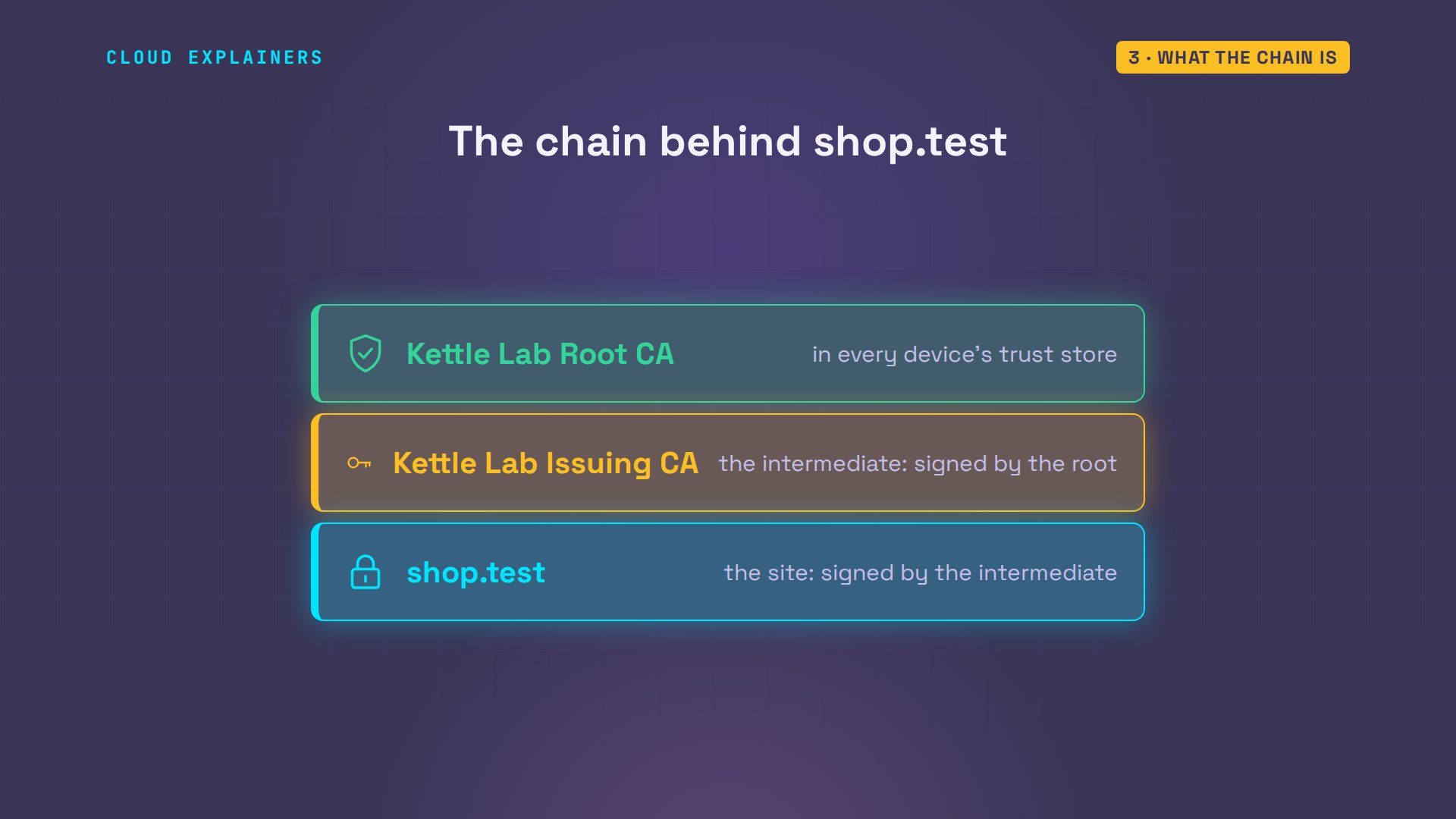
To check a site, the client walks up that chain. The site's certificate says: I was signed by Kettle Lab Issuing CA. The client needs that certificate to check the signature, and to find who signed it in turn: the root it trusts. With only the site's certificate, the walk stops at the first step.
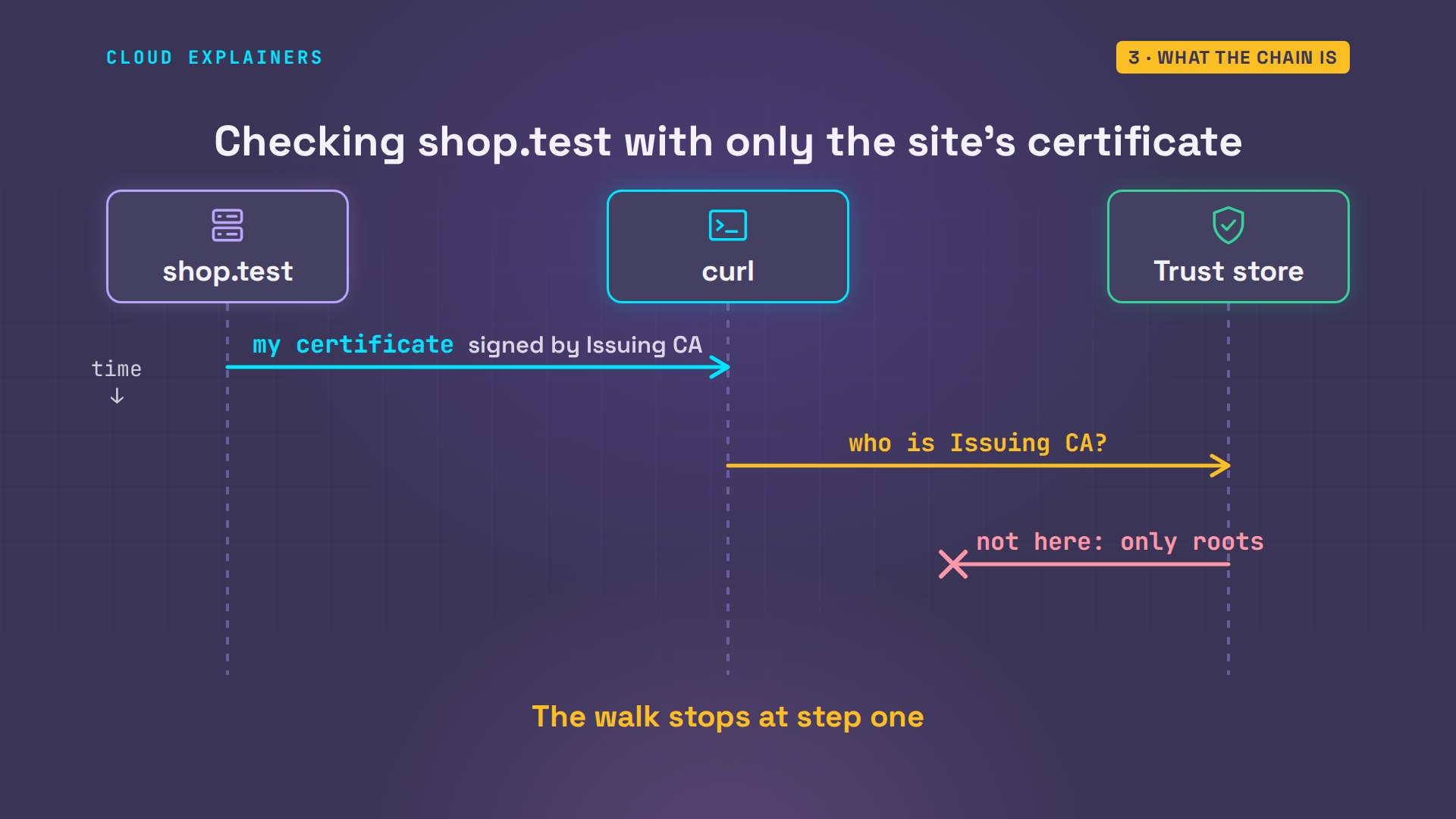
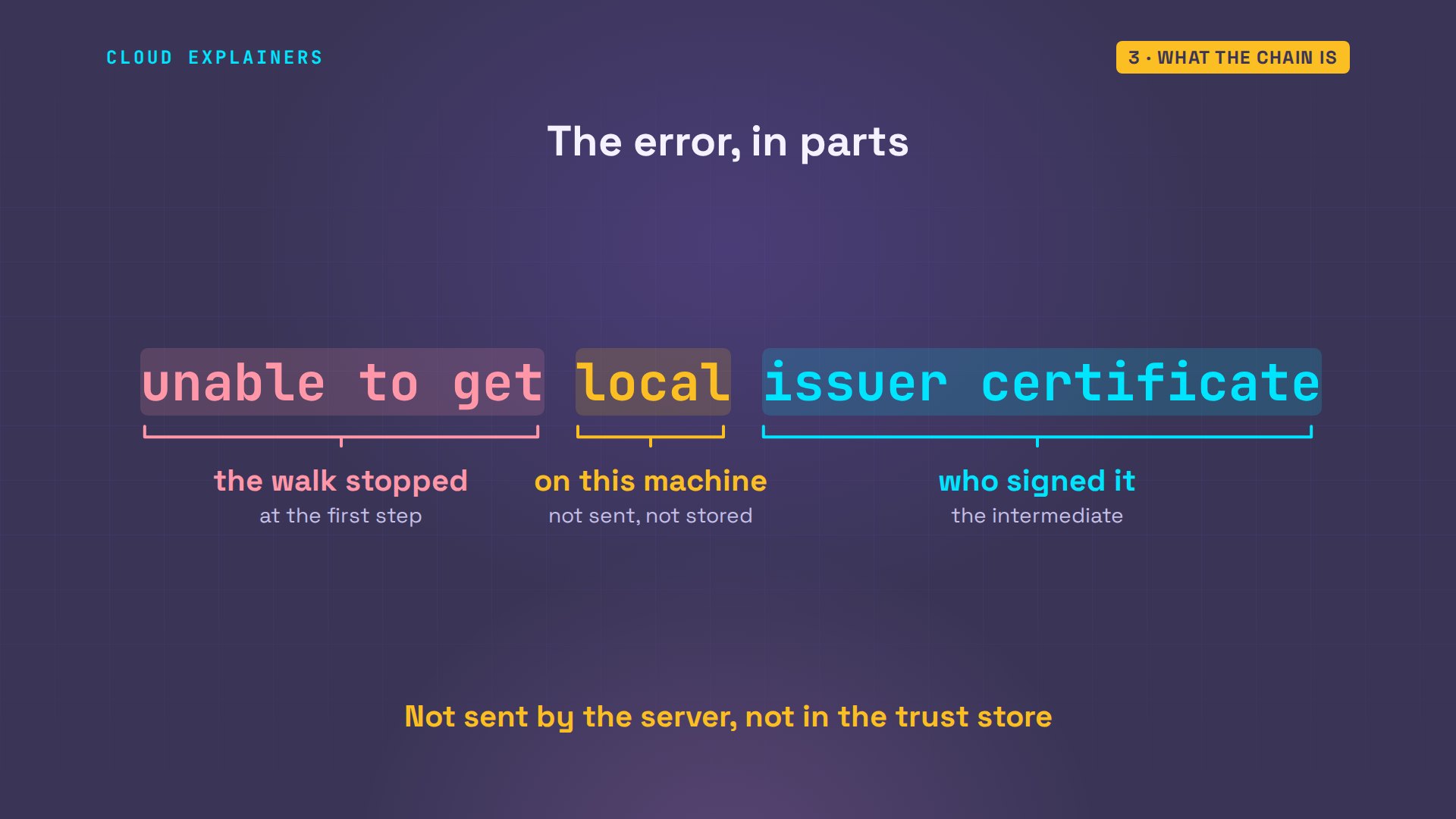
And that's the error, word for word. Unable to get: the walk stopped. Issuer certificate: the one that signed the certificate in hand. Local: it isn't anywhere on this machine. Not sent by the server, and not in the trust store.
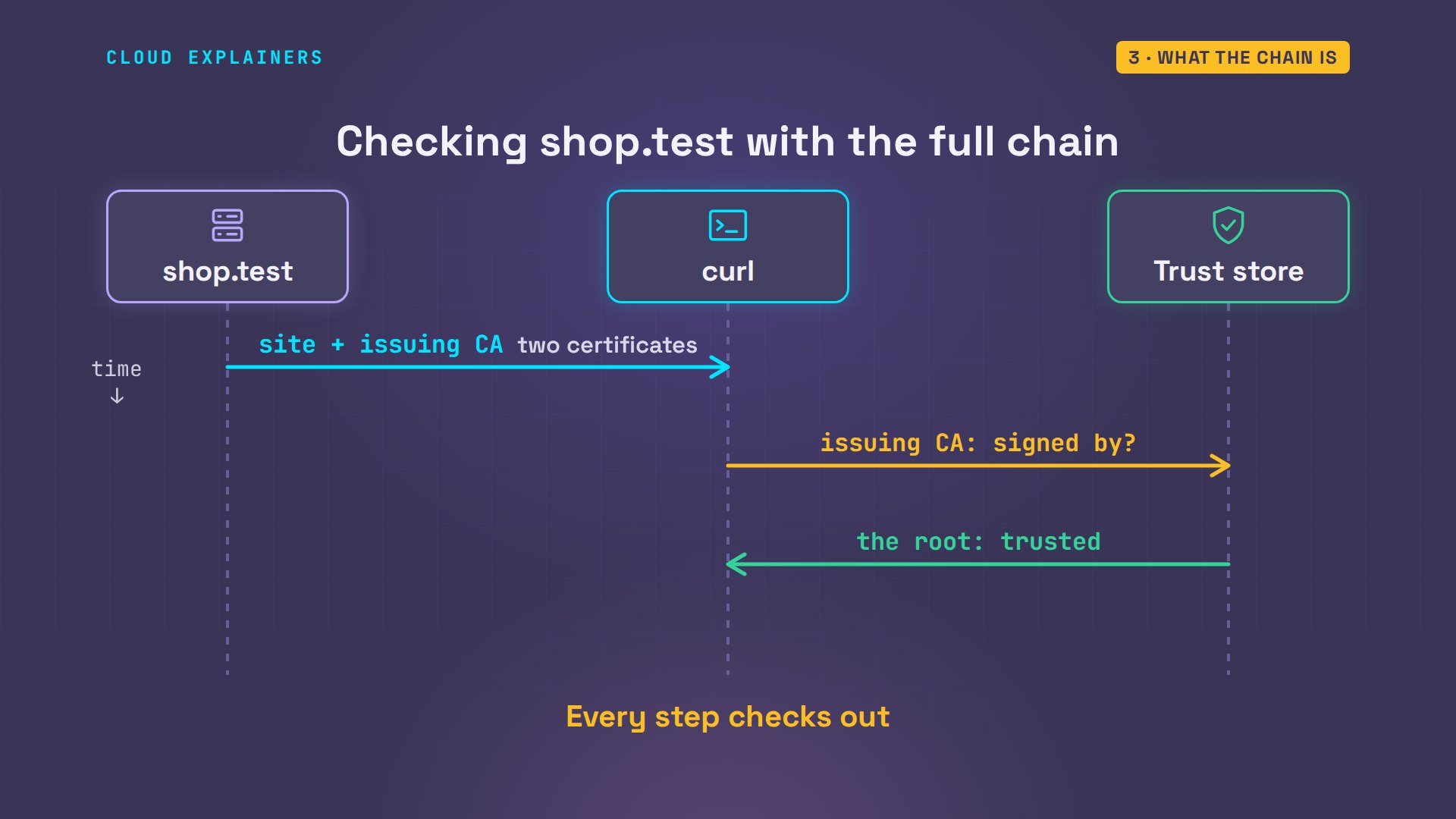
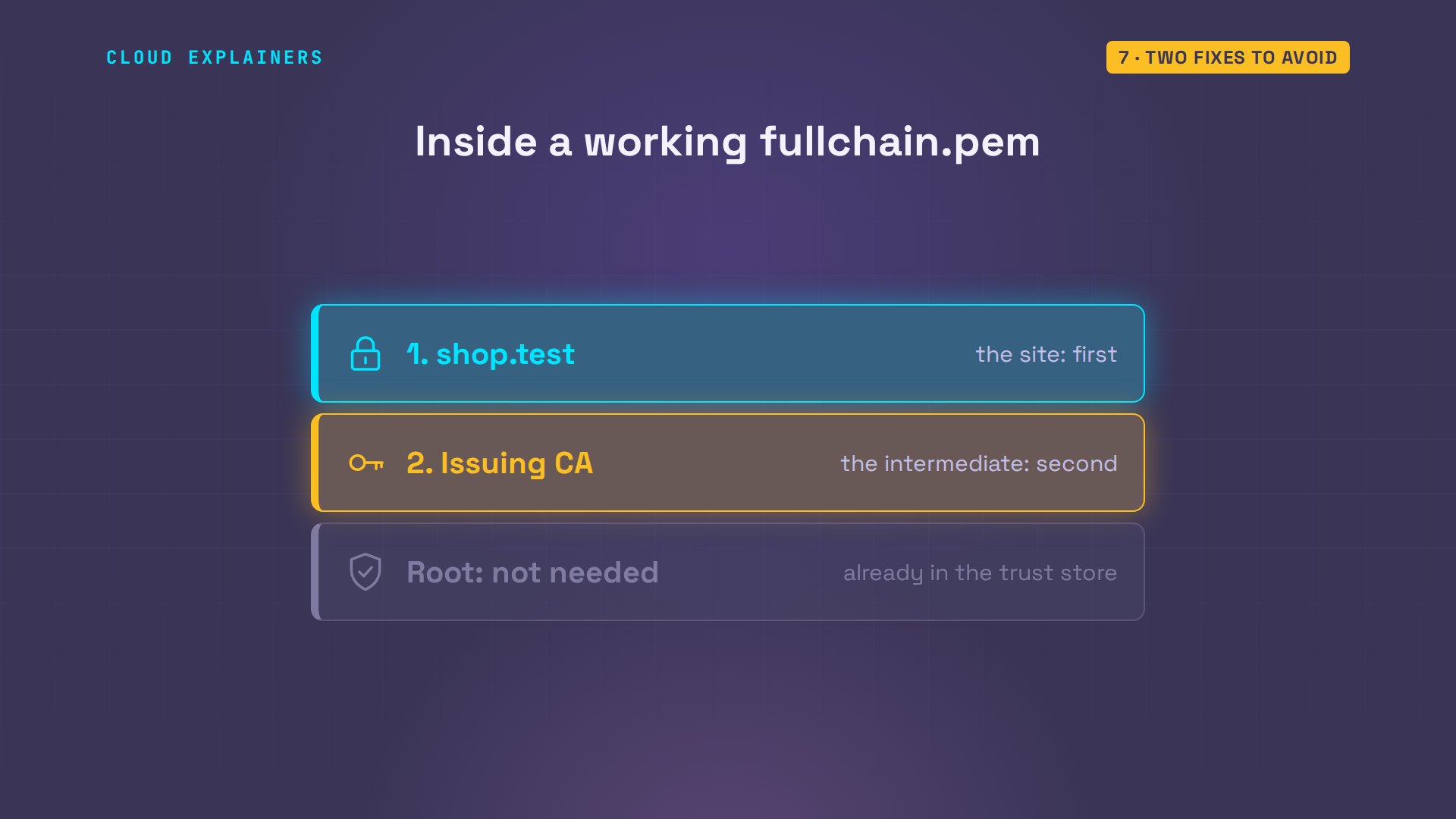
Now with the full chain. The server sends the site's certificate and the issuing certificate together. The client checks the site against the issuing CA, then the issuing CA against the root in its store. Every step checks out.
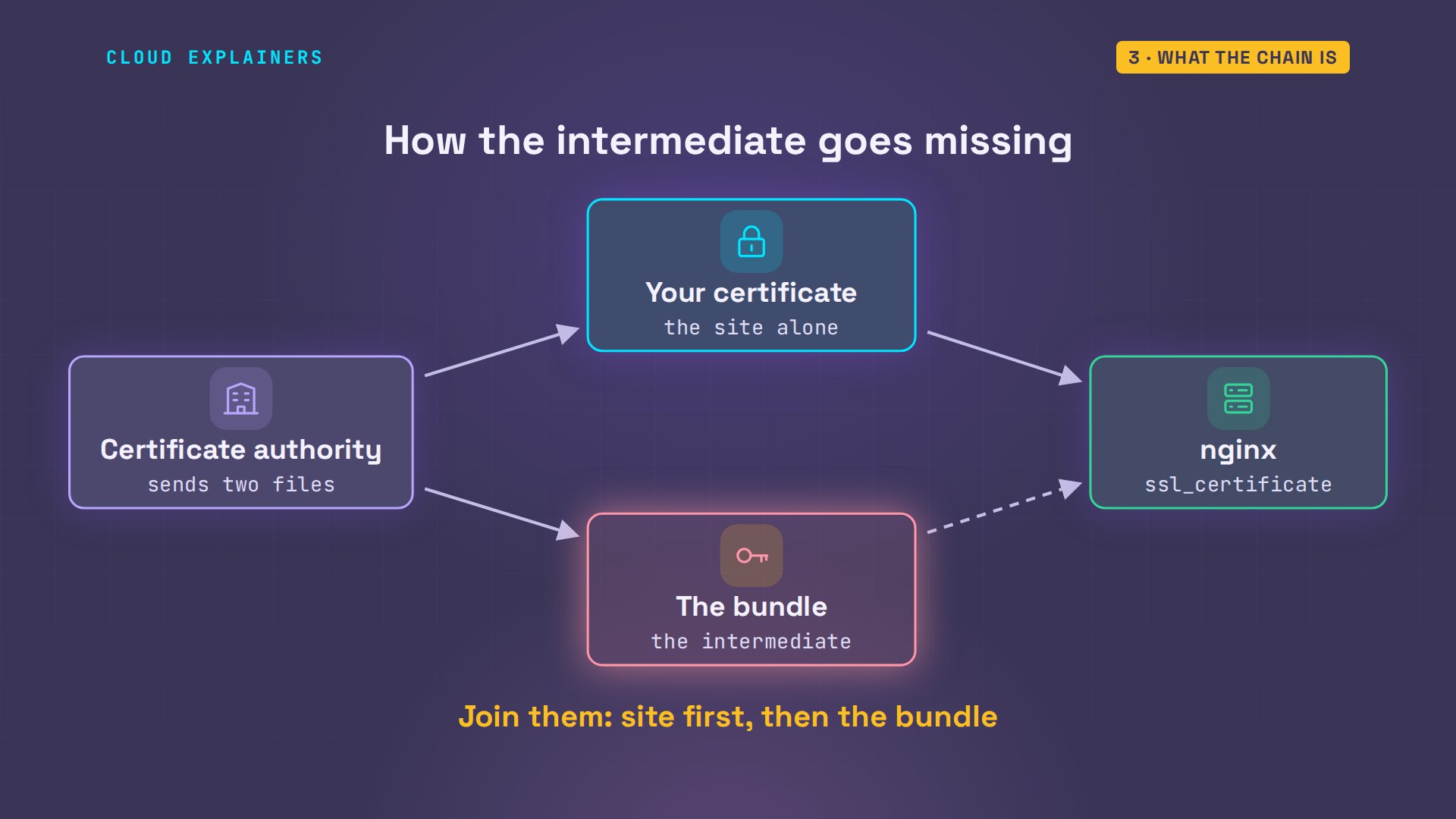
How does a server end up without it? Often a certificate authority hands you two files: your certificate, and a bundle with the intermediate. nginx's docs say to join them into one file. Point nginx at only the first, and everything looks fine in your browser.
What the server sends
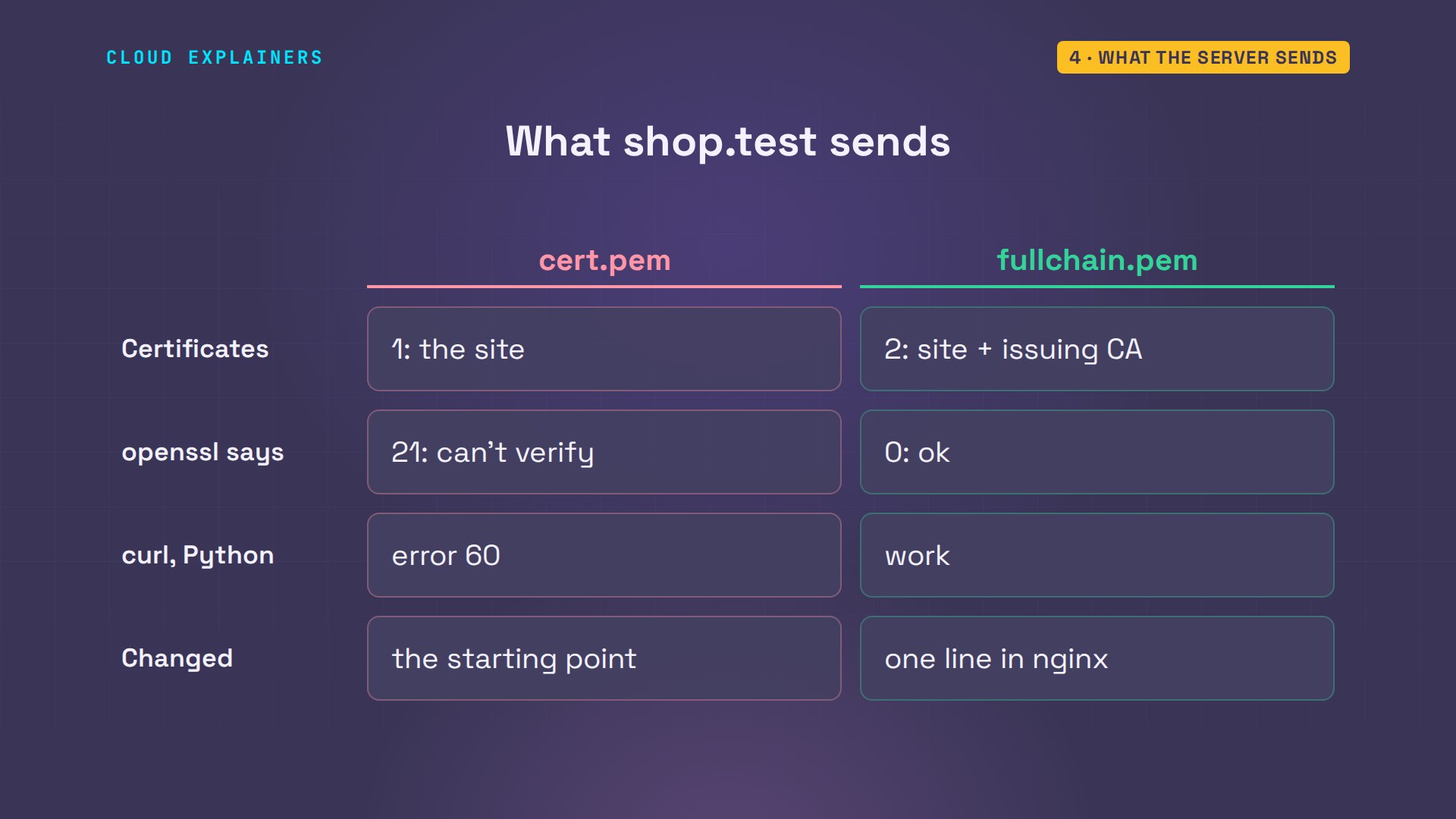
You can see what a server sends with openssl s_client: it connects, and grep keeps just the certificate list. After the fix, from Ben's laptop: two certificates. Number zero is the site, issued by the issuing CA. Number one is the issuing CA itself, issued by the root. Verify return code: zero, ok.
openssl s_client -connect shop.test:443 </dev/null 2>/dev/null | grep -E 's:|i:|Verify'0 s:CN = shop.test i:CN = Kettle Lab Issuing CA 1 s:CN = Kettle Lab Issuing CA i:CN = Kettle Lab Root CA Verify return code: 0 (ok)
Each certificate gets two lines. The number is its place in the chain: zero is the site, one is the next one up. s is the subject, who the certificate is for. And the line under it, starting with i, is the issuer: who signed it.
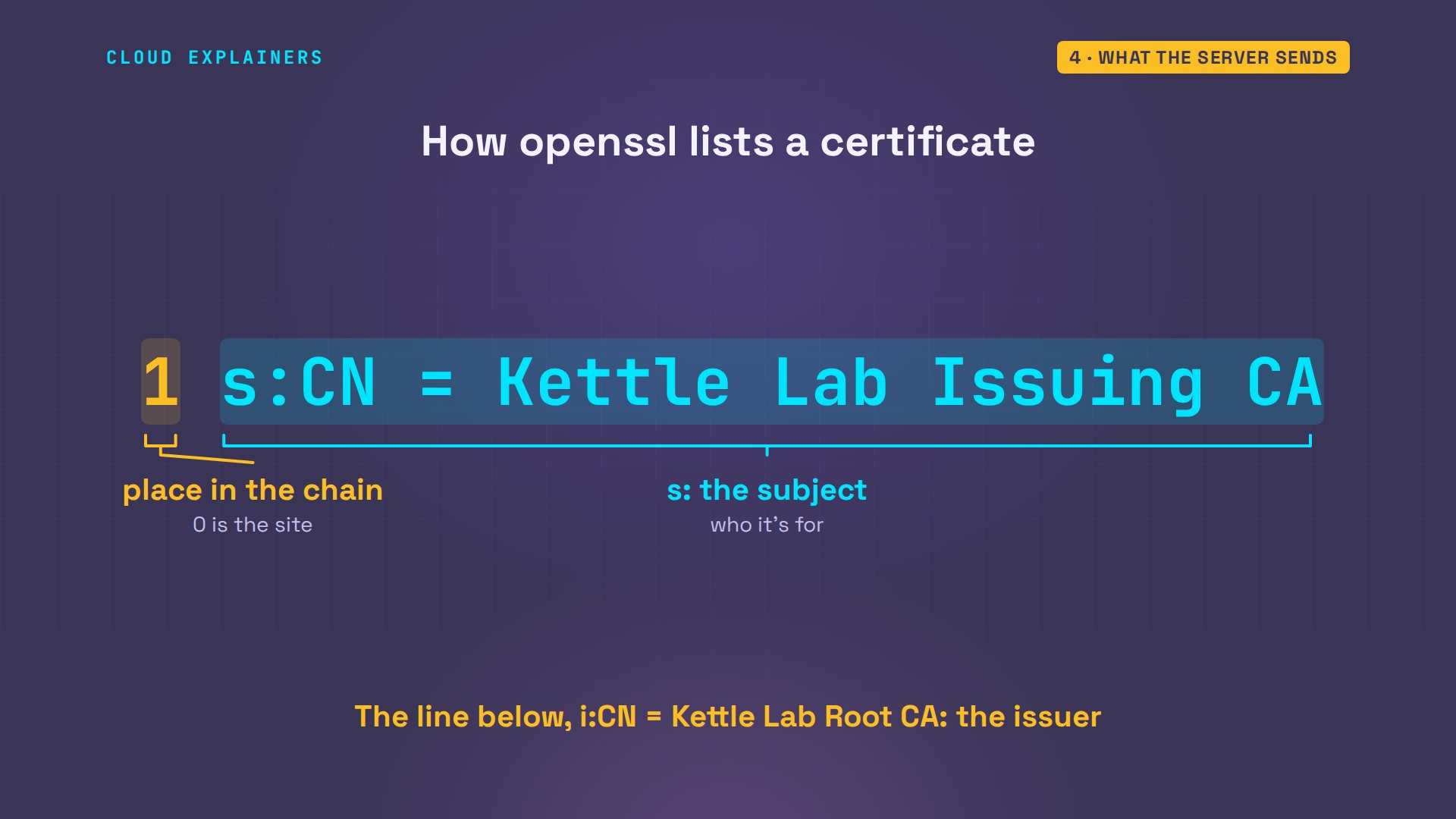
Before the fix, the same check from Ana's laptop listed only number zero, and said: unable to verify the first certificate. So curl and Python failed, and they work with the full chain, with nothing changed on any laptop.
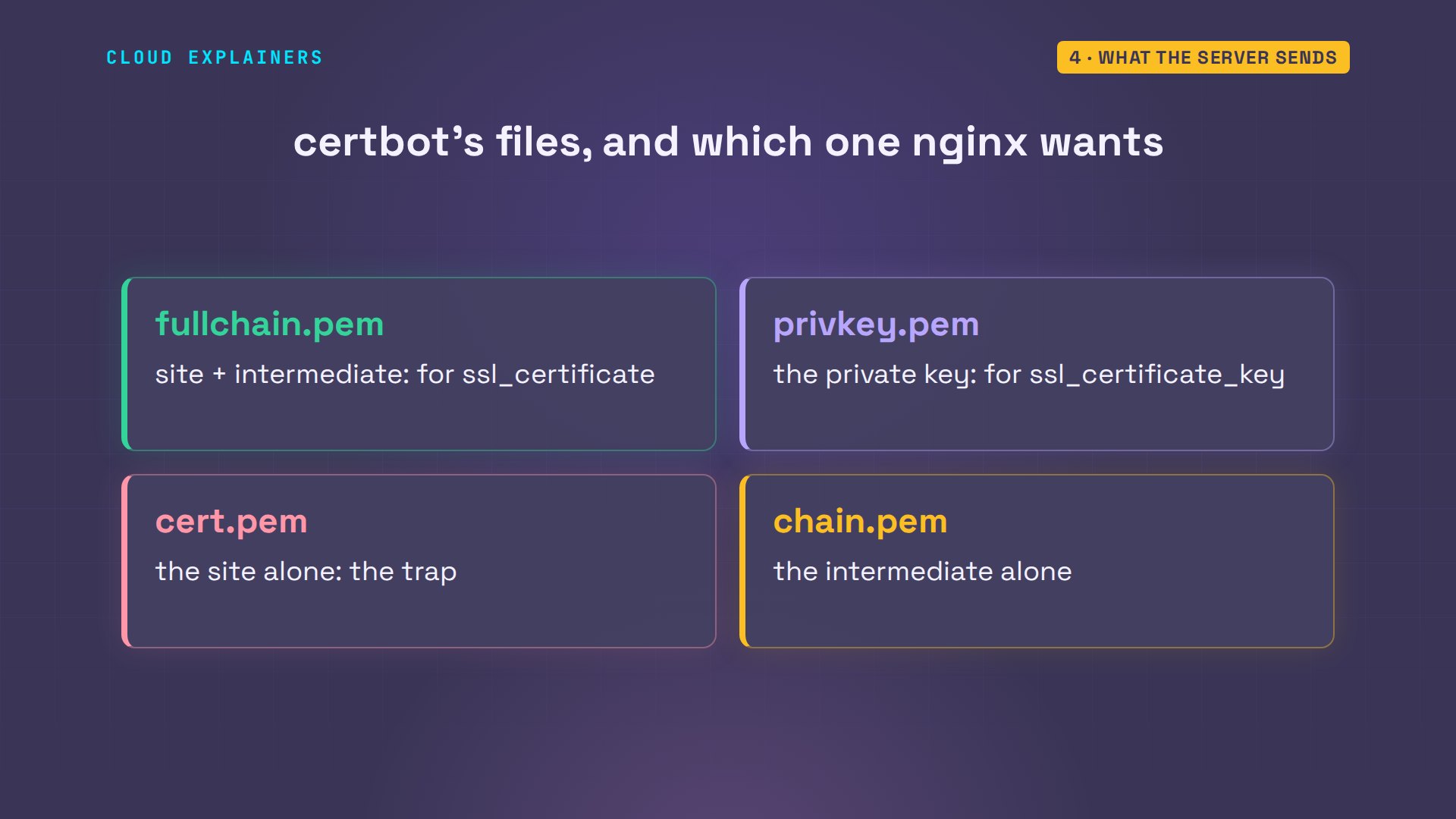
Let's Encrypt, through its certbot tool, writes the same four files Ana has: fullchain, the private key, cert, and chain. Its docs say fullchain.pem is what nginx needs for ssl certificate. cert.pem alone is the site's certificate, with no chain: the trap.
Why the browser worked
So why did Chromium load the page all along? Look inside the site's certificate. It carries an address: CA Issuers, at ca.test, where the issuing certificate can be downloaded. And the shop's own log shows what the browser did: it fetched that file first, then the page.
openssl x509 -in /etc/ssl/shop/cert.pem -noout -ext authorityInfoAccessAuthority Information Access:
    CA Issuers - URI:http://ca.test/issuing-ca.crt
sudo tail -n 2 /var/log/nginx/access.log | cut -d'"' -f2GET /issuing-ca.crt HTTP/1.1
GET / HTTP/1.1
The browser got the same single certificate as curl. But it went and downloaded the missing one from that address, finished the chain, and loaded the page. Curl and Python on Linux don't do that: they check exactly what the server sent.
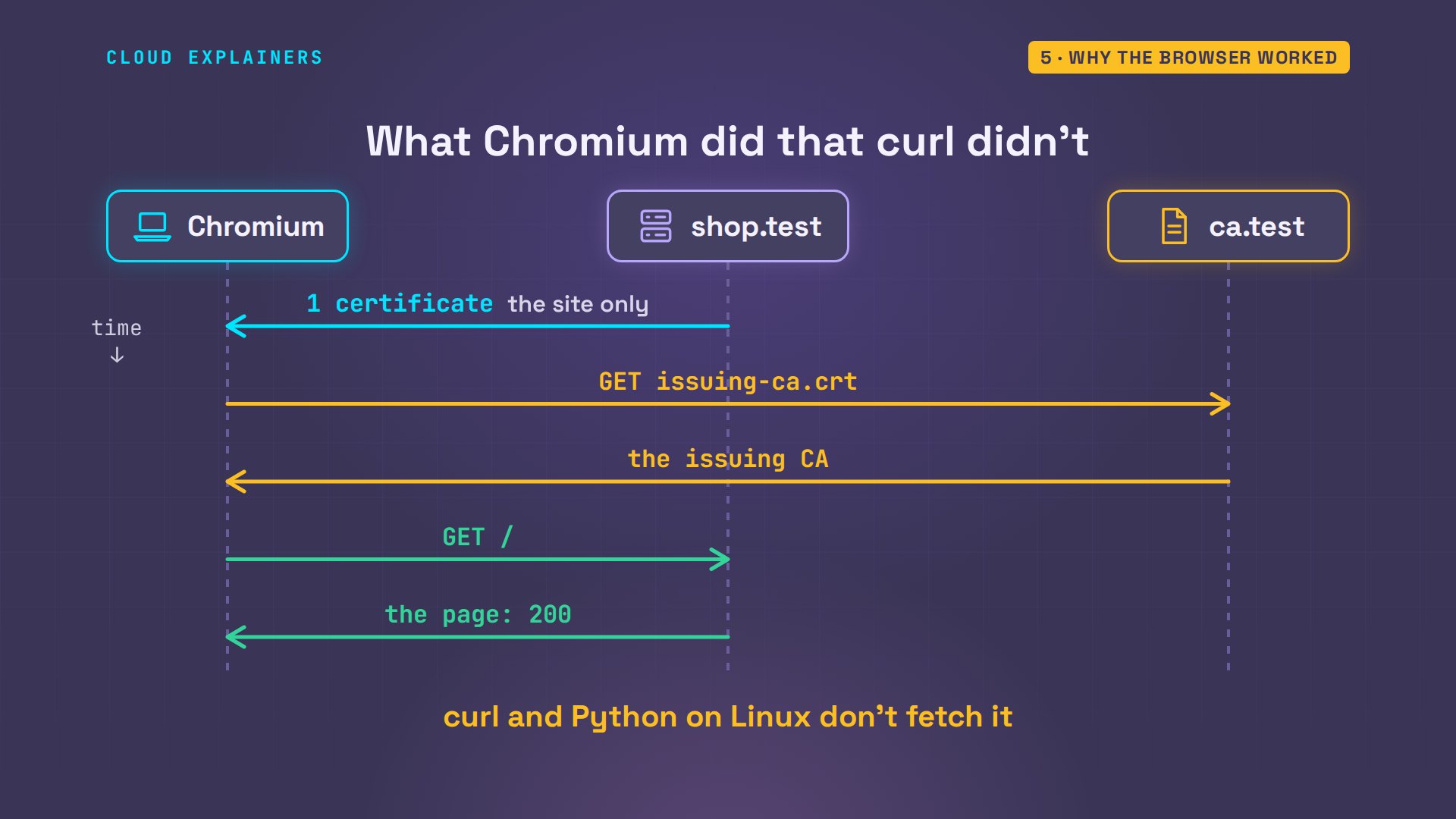
That's why testing in a browser can fool you. nginx's own docs warn about it: some browsers complain about a missing intermediate, while others accept it. The site looks fine to you, while every script and server that calls it fails.
The fix that only fixes you
Now the popular fix that only fixes you. Before Ana fixed the server, she tried what many answers suggest. Download the missing certificate, copy it into her laptop's trust store, and update the store: one added. Her curl works now.
curl -s http://ca.test/issuing-ca.crt | openssl x509 -inform der > issuing.crt
sudo cp issuing.crt /usr/local/share/ca-certificates/
sudo update-ca-certificatesUpdating certificates in /etc/ssl/certs...
rehash: warning: skipping ca-certificates.crt,it does not contain exactly one certificate or CRL
1 added, 0 removed; done.
Running hooks in /etc/ca-certificates/update.d...
done.
curl https://shop.test<!doctype html><title>Kettle and Leaf tea shop</title><p>Kettle and Leaf: 12 teas in stock</p>
Ana's curl works, so the problem looks solved. Guess first: at that same moment, what does Ben's laptop say? The same error. And so would every other customer's. Ana had fixed her own laptop, and nobody else's: the server was still sending one certificate.
curl https://shop.testcurl: (60) SSL certificate problem: unable to get local issuer certificate
More details here: https://curl.se/docs/sslcerts.html

curl failed to verify the legitimacy of the server and therefore could not
establish a secure connection to it. To learn more about this situation and
how to fix it, please visit the web page mentioned above.
A trust store belongs to one machine. Adding a certificate there changes what one laptop trusts. Ben, and every other visitor, would each have to do the same, and most never will. The chain is something the server sends to everyone, so the fix belongs on the server.
Two fixes to avoid
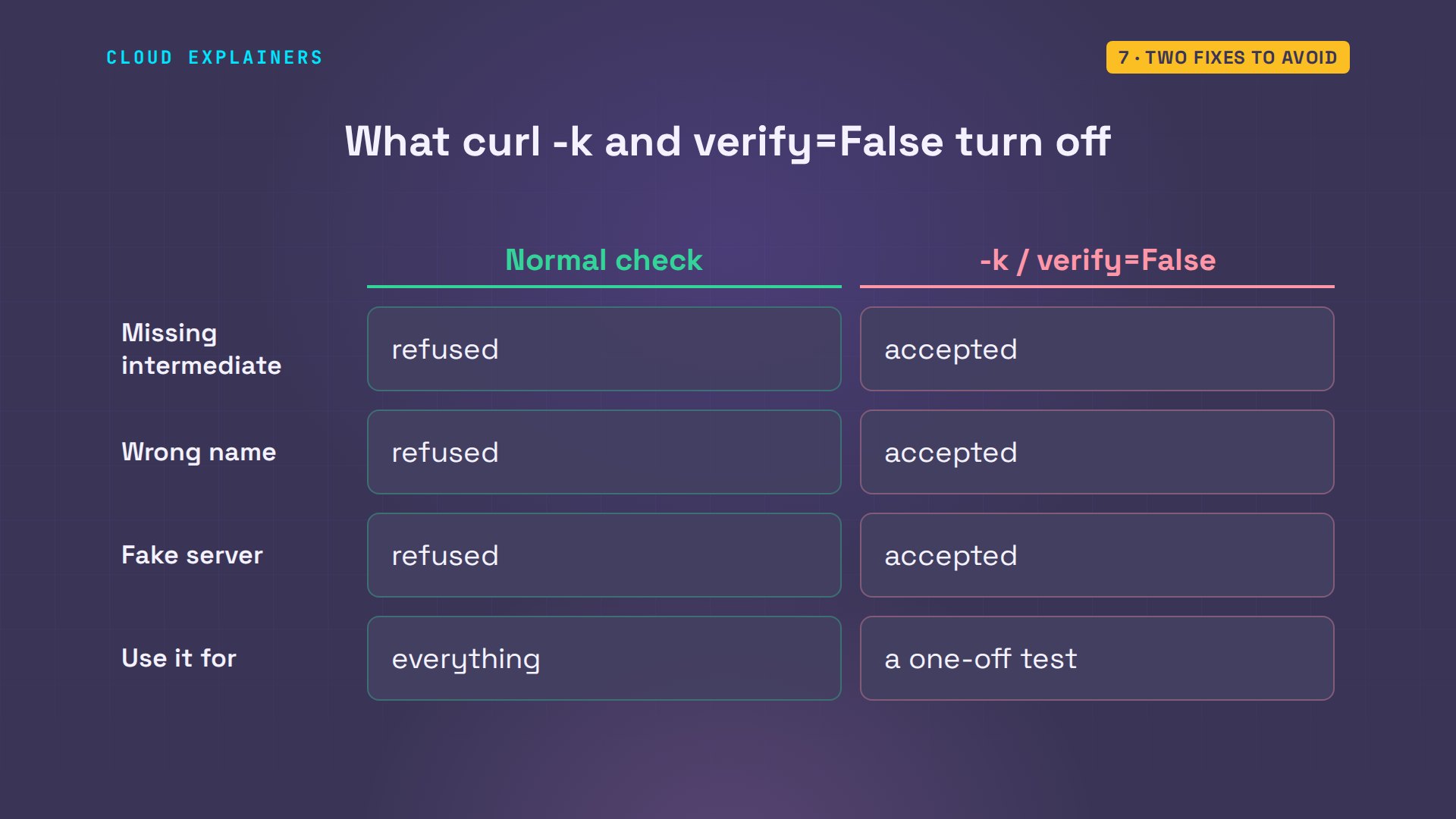
The fix you'll see most often is curl -k, for insecure. Here, Ben asks for ca.test, but the server answers with the certificate for shop.test. Curl refuses: the name doesn't match. With -k, curl takes it anyway.
curl https://ca.testcurl: (60) SSL: no alternative certificate subject name matches target host name 'ca.test'
More details here: https://curl.se/docs/sslcerts.html

curl failed to verify the legitimacy of the server and therefore could not
establish a secure connection to it. To learn more about this situation and
how to fix it, please visit the web page mentioned above.
curl -k https://ca.test<!doctype html><title>Kettle and Leaf tea shop</title><p>Kettle and Leaf: 12 teas in stock</p>
So -k doesn't just skip the missing piece. It skips every check, including who you're talking to. In Python, verify equals false does the same. A fake server on a café's network would pass too. Use it for a one-off test on your own machine, never as the fix.
The other mistake is the right files in the wrong order. Here the issuing certificate goes first and the site's certificate second. nginx -t refuses: key values mismatch.
cd /etc/ssl/shop && cat chain.pem cert.pem | sudo tee backwards.pem >/dev/null
sudo sed -i 's|/fullchain.pem|/backwards.pem|' /etc/nginx/sites-enabled/shop
sudo nginx -t2026/11/08 15:25:40 [emerg] 961#961: SSL_CTX_use_PrivateKey("/etc/ssl/shop/privkey.pem") failed (SSL: error:05800074:x509 certificate routines::key values mismatch)
nginx: configuration file /etc/nginx/nginx.conf test failed
nginx matches the private key against the first certificate in the file, and here that was the issuing CA's. nginx's docs give the rule: the server's own certificate must come before the chain. Site first, then the intermediate. fullchain.pem is already in that order.
Check it before users do
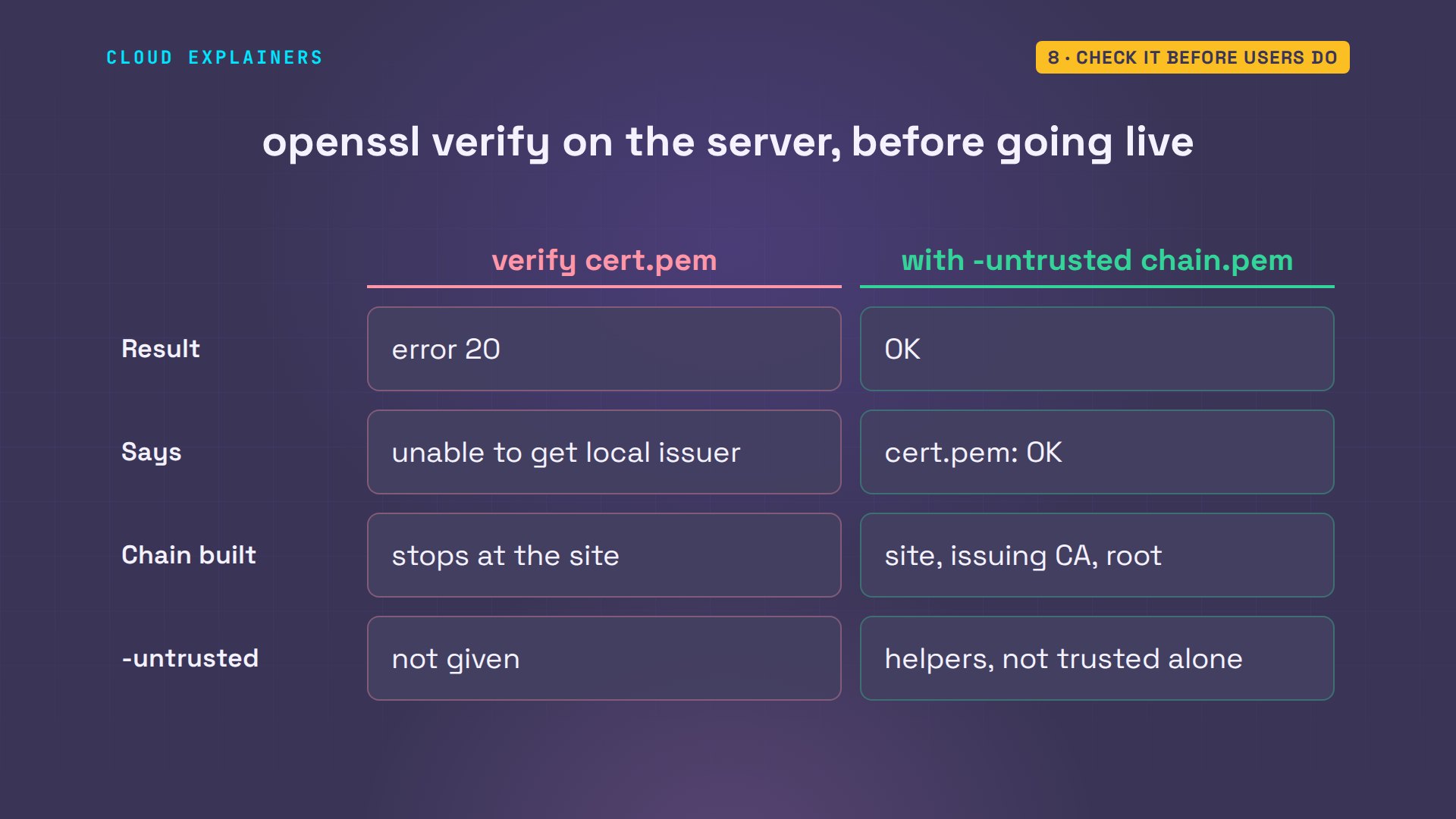
You can catch this before anyone visits. openssl verify checks a certificate file the way a client would. On cert.pem alone, it fails with error twenty: unable to get local issuer certificate. Give it the chain with dash untrusted, and it's OK. Untrusted means: use these to build the chain, but don't trust them on their own.
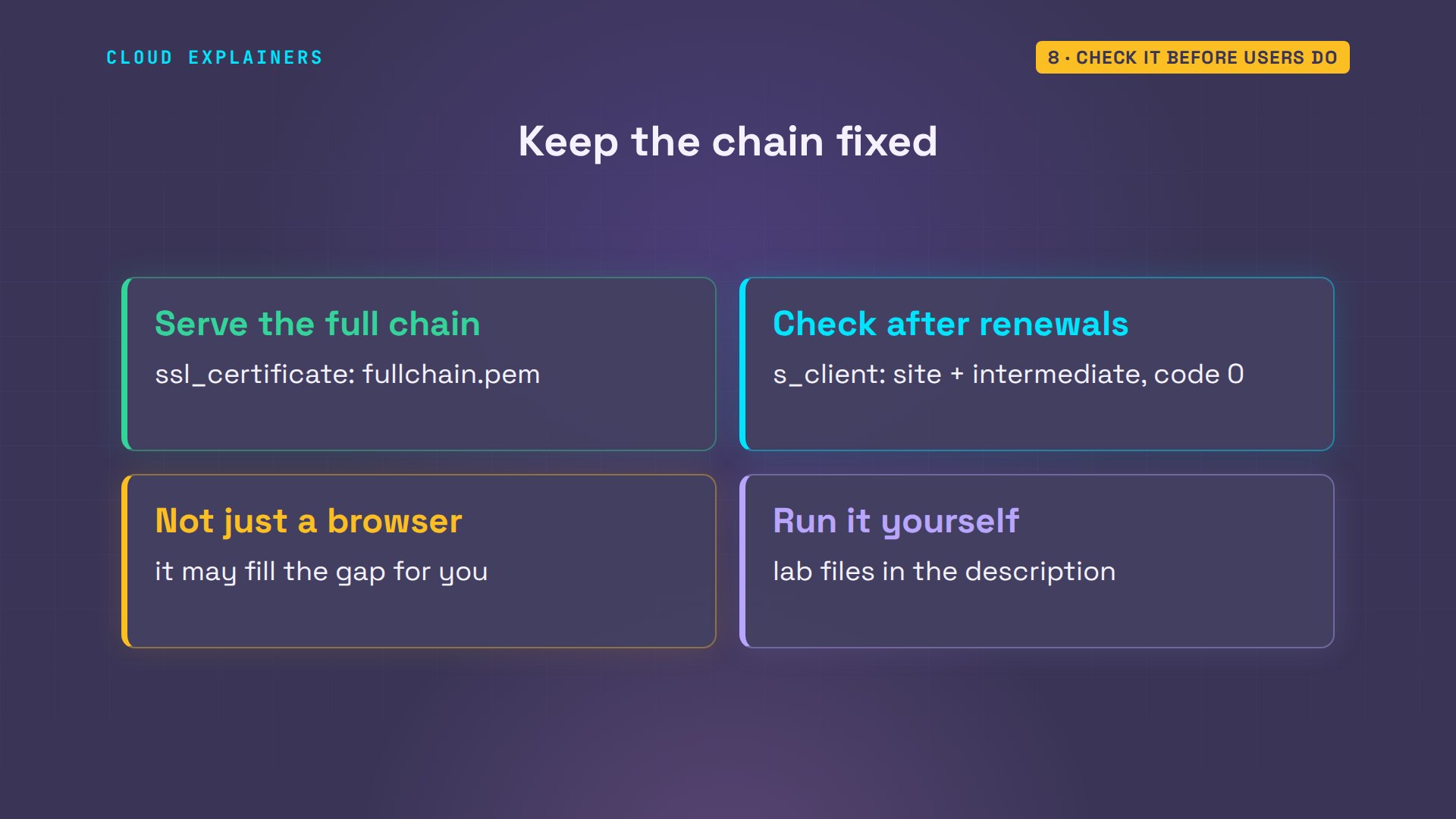
So, to keep it fixed: point ssl certificate at the full chain. After every certificate renewal, run the s_client check from another machine: the site plus the intermediate, and verify code zero. And never test only in a browser. Ana's lab files and every command are linked in the description.
Recap
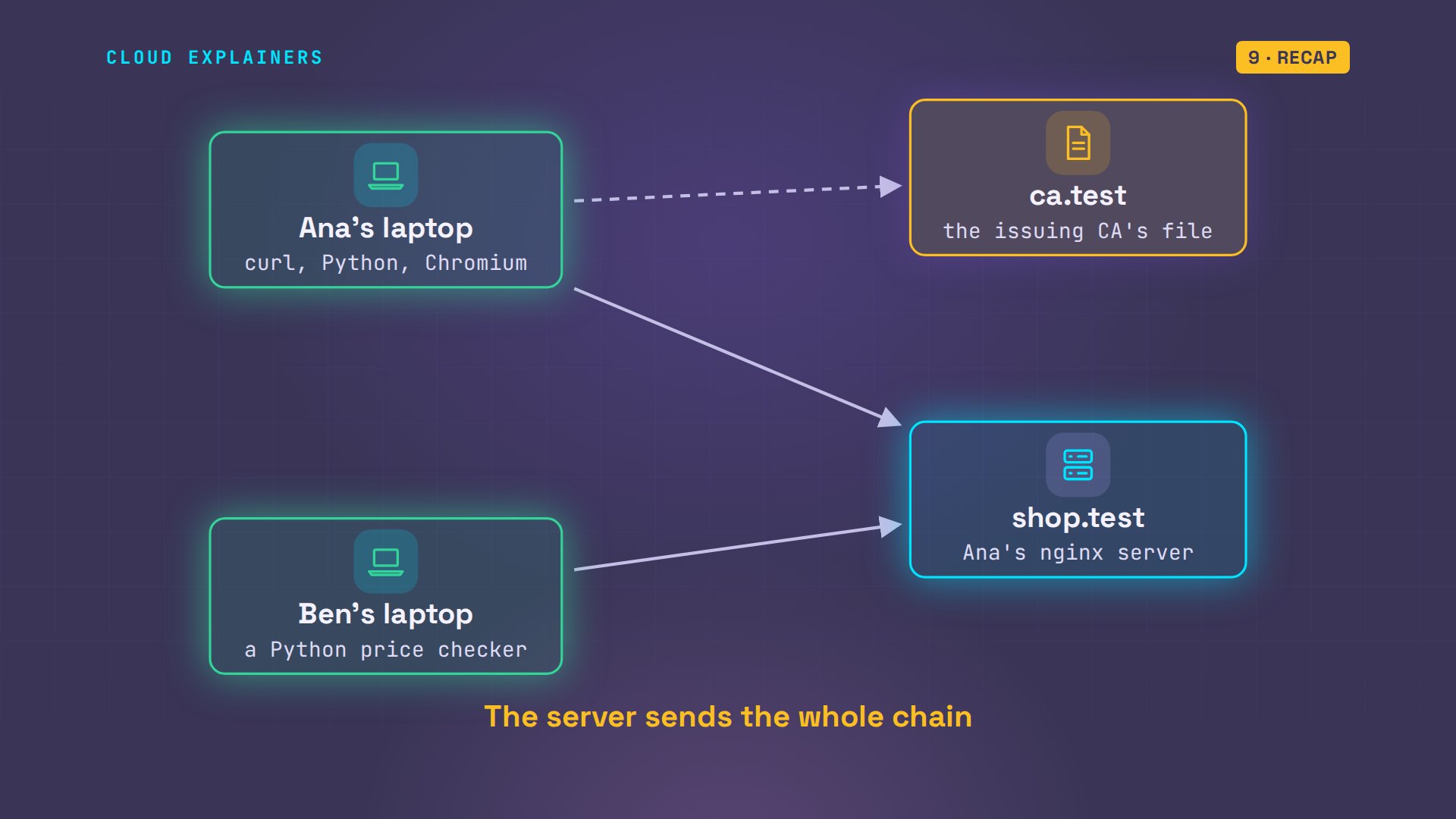
So: clients trust roots, not your site. The server must send its certificate and the intermediate, in that order. Some browsers fill a gap. Scripts usually don't.
If this got your curl working again, subscribing helps the next stuck beginner find it.
Every command here ran for real, in our own lab. Thanks for watching Cloud Explainers.
Sources
- nginx, Configuring HTTPS servers: SSL certificate chains (some browsers complain about a missing intermediate, others accept it; the server certificate must appear before the chained certificates)
- Certbot user guide, where certificates are saved (fullchain.pem is what Nginx needs for ssl_certificate)
- curl, SSL certificate verification
- Stack Overflow, 'curl: (60) SSL certificate problem: unable to get local issuer certificate' (question 24611640, over 1.5 million views on 2026-11-08)
Demos: three containers on our own Mac (a server and two laptops) on a private network, with a certificate authority we made for the lab; the tea shop is made up. Watch the full video on YouTube.
More videos

Linux Makefiles Will Finally Make Sense After This

SAML vs OAuth vs OpenID Connect: What's the Difference?

How to Fix Python cron Jobs That Never Run

Linux Bash Scripting: Full Tutorial for Beginners

How PXE Network Boot Works

How Active Directory Works

How to Fix a Linux systemd Service That Won't Start

Linux Logs: syslog vs journald

JWT vs Session Cookies: Which One Should You Use?

Docker vs Docker Compose: Which One Should You Use?

How to Fix Docker Compose Containers That Can't Talk to Each Other

Django Full Tutorial for Beginners

How Linux systemd Works

How to Fix 'Windows Cannot Access' Network Share Errors (SMB)

REST vs gRPC: Which One Should You Use?

Every Python Concept for Beginners in 10 Minutes

Every SQL Join Type in 10 Minutes

Why OpenRouter Free Models Hit Their Limit So Fast

Why Your Gemini API Free Tier Runs Out So Fast

OpenRouter Will Finally Make Sense After This

How Redis Caching Works

Gemini API vs Vertex AI: Which One Should You Use?

How to Fix a Leaked Gemini API Key

Why Golang Uses Goroutines Instead of Threads

How to Fix Gemini API Error 429: Resource Exhausted

Claude Token Pricing Will Finally Make Sense After This

Why Python Web Scraping Returns Nothing (and the Fix)

Python uv vs pip: Which One Should You Use?

Python Automation: Full Tutorial for Beginners

How OAuth Login Works

Google AI Studio Will Finally Make Sense After This

What Happens When You Run a Docker Container

How to Fix Claude Code Billing Your API Key Instead of Your Plan

Why Passkeys Can't Be Phished Like Passwords

PowerShell vs Bash: Which One Should You Learn?

The Linux Roadmap for Beginners

Django vs FastAPI: Which One Should You Use?

Why SQLite Is the Most Used Database in the World

How a NoSQL Database Like MongoDB Works

How to Fix Python pip error: externally-managed-environment

How to Fix MySQL Too Many Connections Database Errors

Golang Concurrency Will Finally Make Sense After This

How Amazon S3 Works

How Kubernetes Works

How Git Works

How to Fix Docker Port Already Allocated Errors

How PostgreSQL Works

How to Fix Git Merge Conflicts

How to Fix No Space Left on Device in Linux

How the Internet Works

SQL vs NoSQL: When Each One Wins

How to Fix JWT Token Expired Errors (401 Unauthorized)

Claude API vs Claude Pro: Why Your Subscription Doesn't Include It

Why AI Agent Skills Beat Giant Prompts

Linux Cron Jobs Will Finally Make Sense After This

Security Logs Will Finally Make Sense After This

How to Fix a Security Leak: An API Key Pushed to GitHub

DNS Will Finally Make Sense After This

Never Ignore a Security Update

Two-Factor Authentication Will Finally Make Sense

Never Expose a Database to the Internet

SSH Keys vs Passwords: Which Is Safer for Security?

The 5 Levels of Linux Boot: From Power On to Login

The 5 Levels of Network Firewalls

Password Security: Why Hackers Crack Weak Passwords

Why Your Linux Server Runs Out of Memory

HTTP vs HTTPS: What Actually Changes on Your Network

Every Linux File Permission You Need to Know

Linux Processes vs Threads: When Each One Wins

The OSI Model Will Finally Make Sense After This

The 7 Levels of Git

Every Network Troubleshooting Command You Need

Hashing vs Encryption in Cybersecurity: When Each One Wins

Why the Internet Ran Out of IP Addresses

Linux Package Managers: apt vs Snap vs Flatpak

Why Python Is Slow (and When It Doesn't Matter)

TCP vs UDP: When Each One Wins

Stop Running Linux as Root (Do This Instead)

Linux Users and Groups Will Finally Make Sense

Why Phishing Beats Good Security (and How to Spot It)

The 7 Levels of Docker

AI Agents Will Finally Make Sense After This

Stop Using git push --force (Use This Instead)

Agent Skills vs MCP: When Each One Wins

Networking Will Finally Make Sense After This

Every Linux Command You Actually Need

The 7 Levels of Cybersecurity

Every System Design Concept You Need, in One Diagram
