
How Active Directory Works
You sign in once at work and every computer and shared folder knows who you are; when someone leaves, IT switches them off everywhere at once. That's Active Directory. On a real Windows Server domain in our lab we make an account, see how a computer finds the domain controller through DNS, sign in with Kerberos tickets, watch a new group fail to reach a signed-in user until he signs in again, meet the password policy and Group Policy, and disable an account.
One password, every door
You sign in once at work, and every computer and shared folder already knows who you are. When someone leaves, I T switches them off everywhere at once. How? Ben, Ana's new hire at the tea shop, signs in to a shop computer he has never used. One password, and Windows already knows him: lab, backslash, ben, on srv01.
ssh ben@lab.internal@srv01Windows PowerShell
Copyright (C) Microsoft Corporation. All rights reserved.

Install the latest PowerShell for new features and improvements! https://aka.ms/PSWindows
PS C:\Users\ben> whoamilab\ben
PS C:\Users\ben> hostnamesrv01
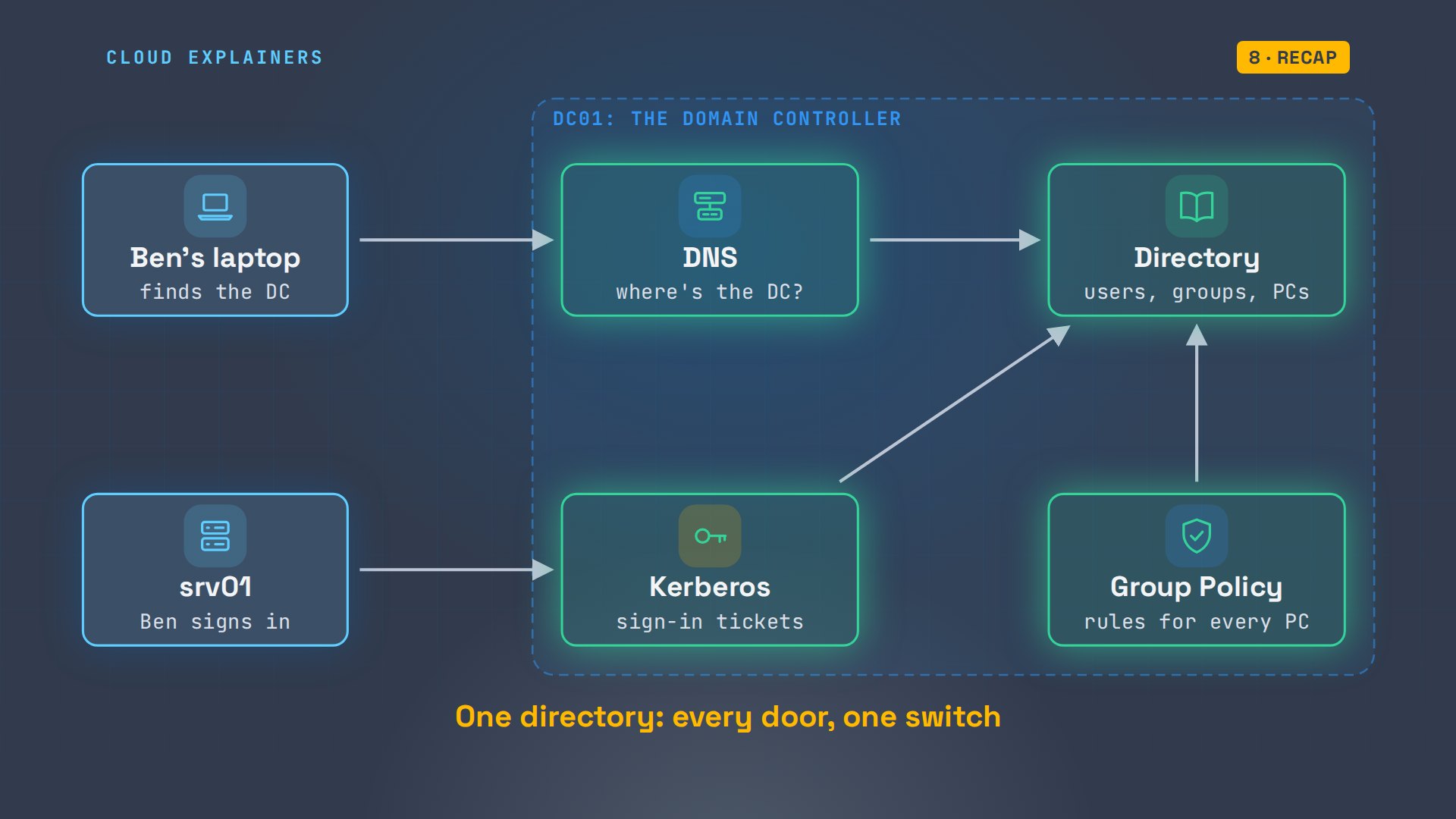
That's Active Directory. It does four jobs: a directory of every account, a way for computers to find it, sign-in tickets, and rules for every PC. And one change Ana makes for Ben doesn't reach him right away. We'll see which.
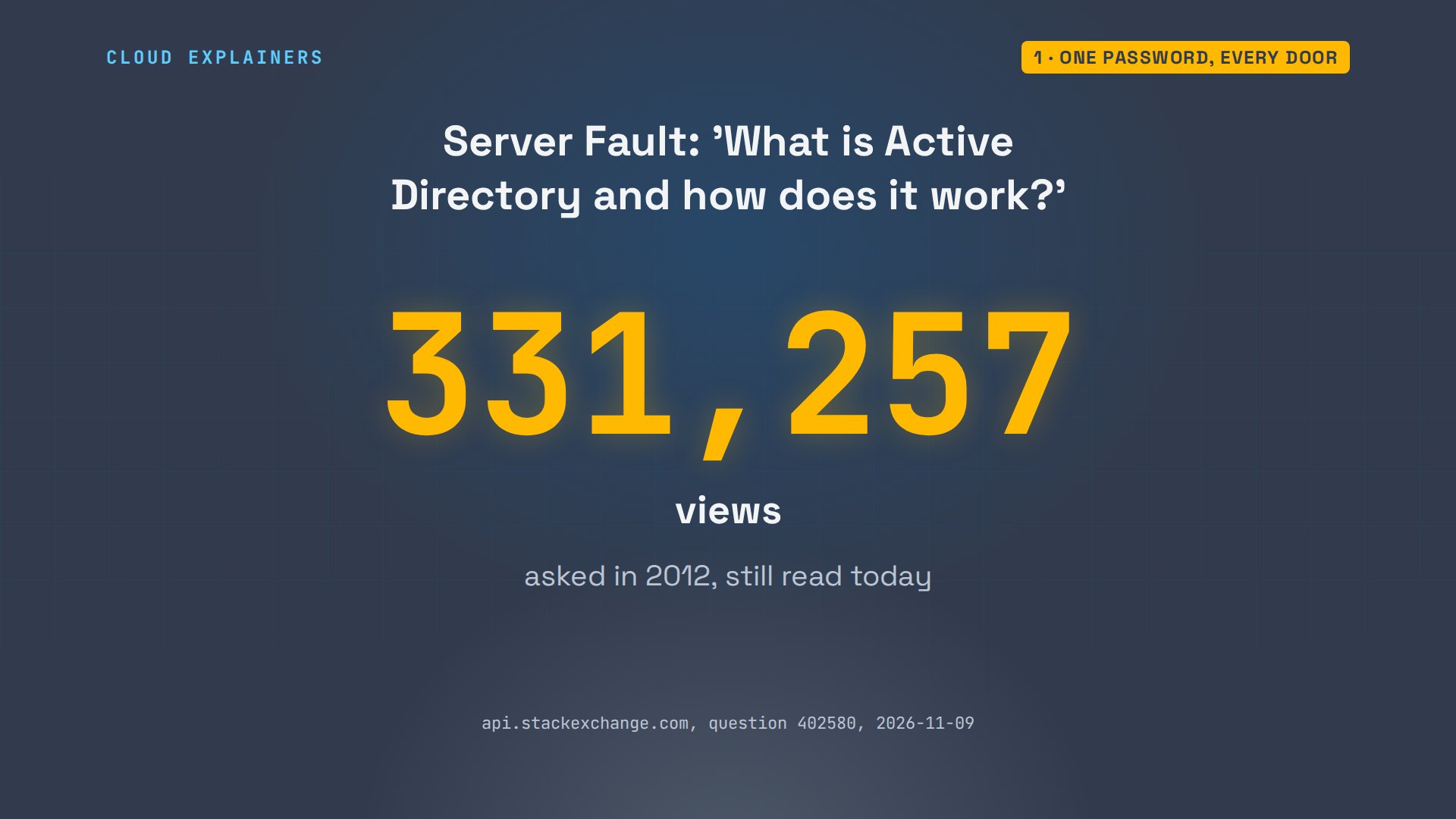
If it's always felt like magic, you're in good company. On Server Fault, the question 'What is Active Directory, and how does it work?' has over 331 thousand views. Let's answer it on a real domain.
The directory
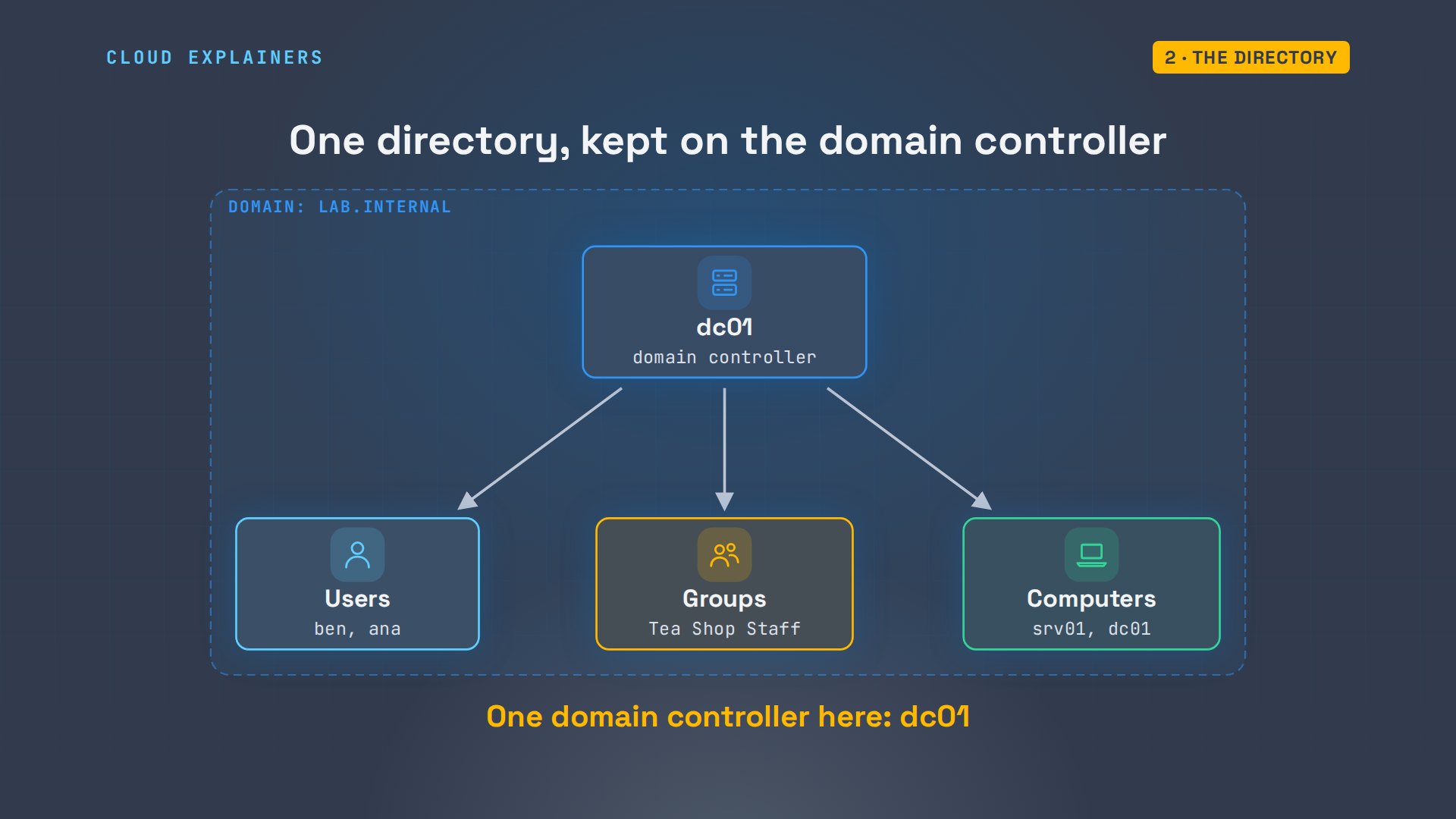
Where does Ben's account live? In a directory: one database of the organisation's users, groups and computers. It's kept on servers called domain controllers, and every computer in the domain asks them. Our lab's domain is lab.internal, with one domain controller, dc01.
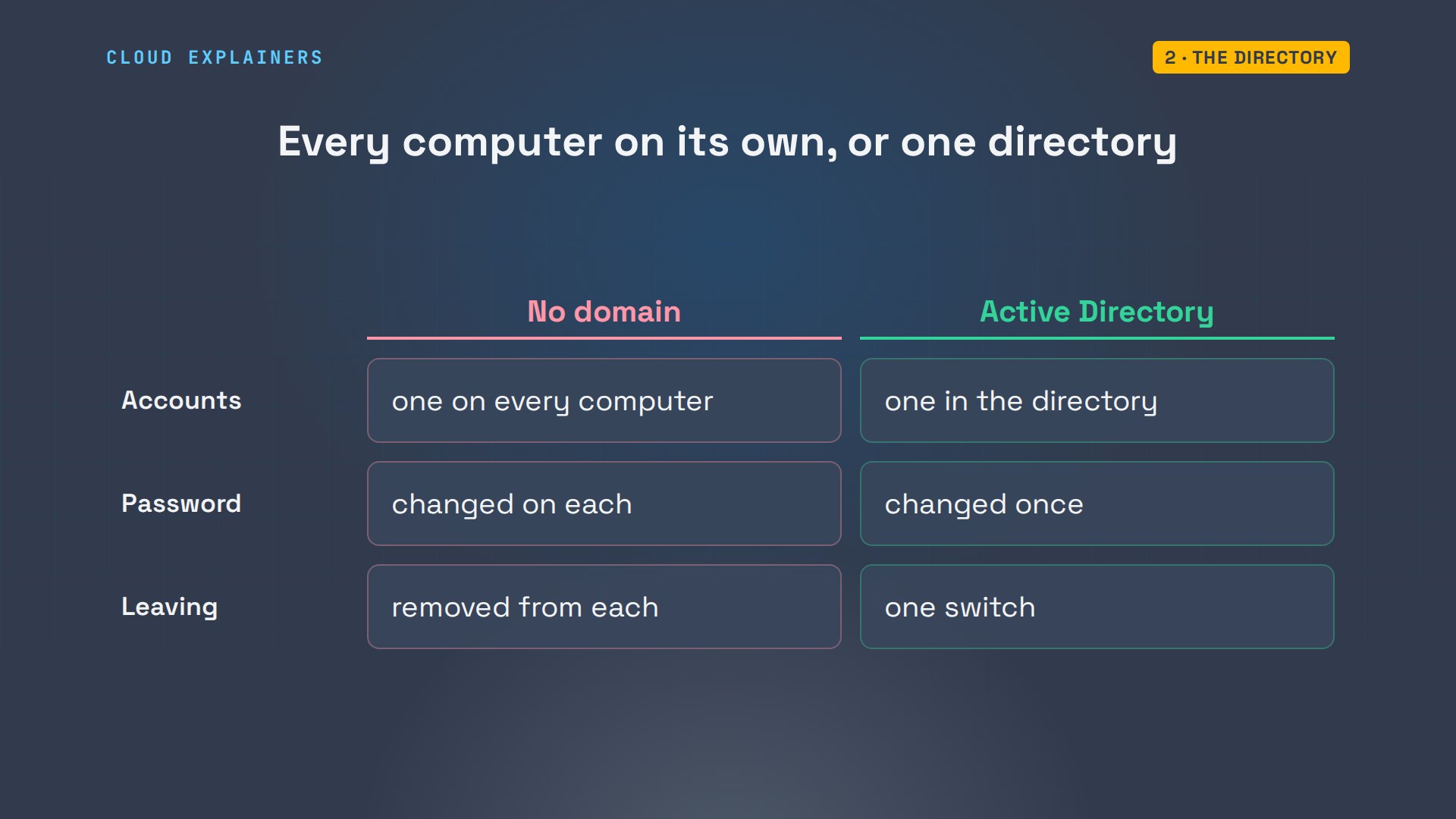
Why bother? Without a domain, every computer keeps its own list of users. Ben would need an account on each one, and a new password typed into each one. With Active Directory there's one account, one password, and when he leaves, one switch.
Ana, the shop's I T admin, works on that domain controller. She makes a folder for the shop, called an organisational unit, a group, Tea Shop Staff, and Ben's account, typing his first password once.
PS C:\TeaShop> New-ADOrganizationalUnit -Name TeaShop -Path 'DC=lab,DC=internal'
PS C:\TeaShop> New-ADGroup 'Tea Shop Staff' -GroupScope Global -Path 'OU=TeaShop,DC=lab,DC=internal'
PS C:\TeaShop> New-ADUser ben -GivenName Ben -Path 'OU=TeaShop,DC=lab,DC=internal' -AccountPassword (Read-Host -AsSecureString 'Password') -Enabled $truePassword:
***************
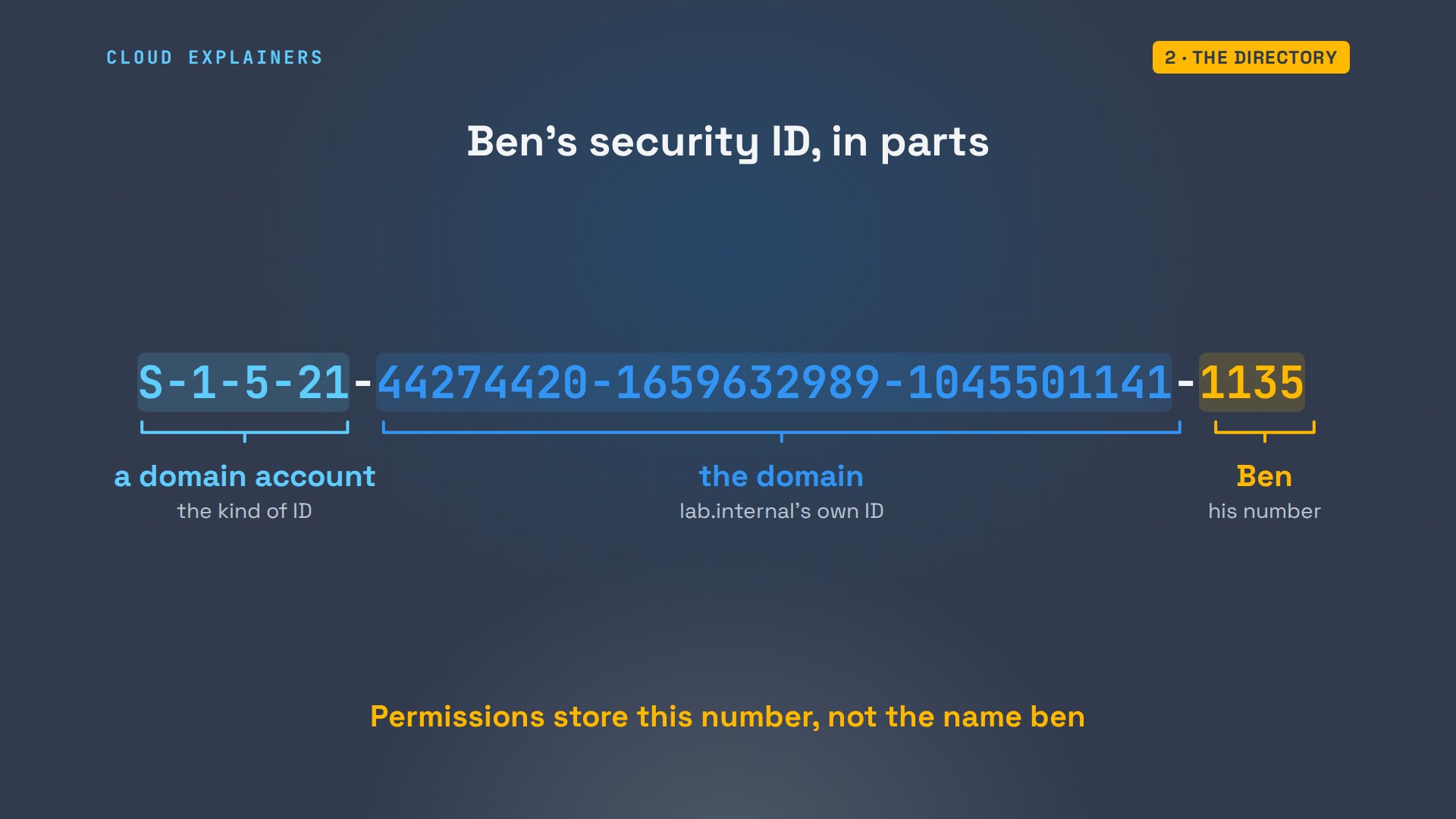
Here's Ben's entry. Enabled: true. A login name, ben, and a SID, a security ID: the number Windows really uses for Ben, so permissions follow him even if his name changes.
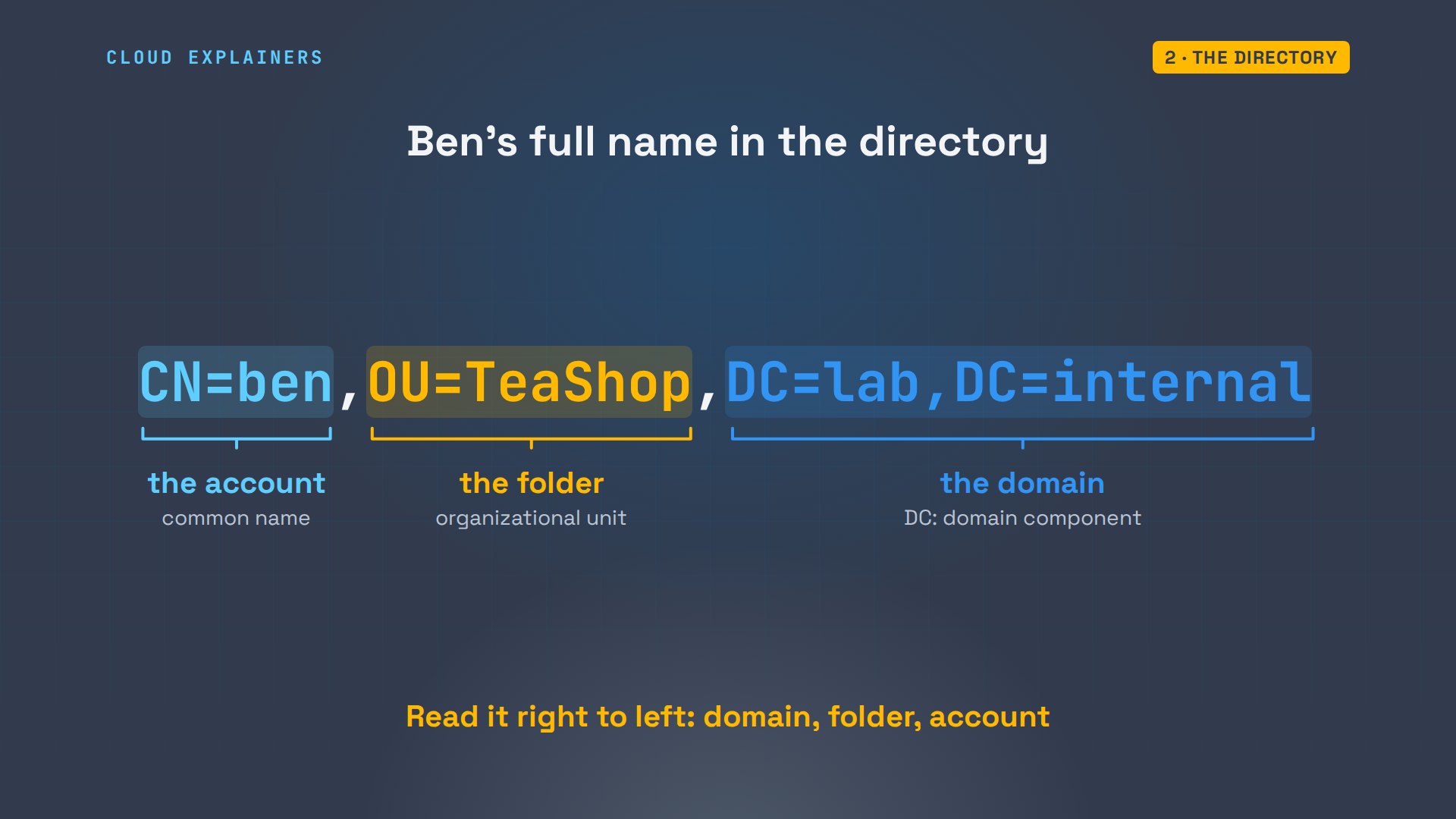
PS C:\TeaShop> Get-ADUser benDistinguishedName : CN=ben,OU=TeaShop,DC=lab,DC=internal
Enabled           : True
GivenName         : Ben
Name              : ben
ObjectClass       : user
ObjectGUID        : 49756274-7719-4b56-8f39-6284ab0213ac
SamAccountName    : ben
SID               : S-1-5-21-44274420-1659632989-1045501141-1135
Surname           :
UserPrincipalName :
That SID has parts too. S-1-5-21 says: an account made by a domain or a computer. The next three numbers identify the domain, lab.internal. And the last number is Ben's own, 1135, handed out by the domain controller and never reused.
His full name in the directory reads like an address, smallest part first. C N equals ben is the account. O U equals TeaShop is the shop's folder. And the two D C parts are the domain, lab dot internal.
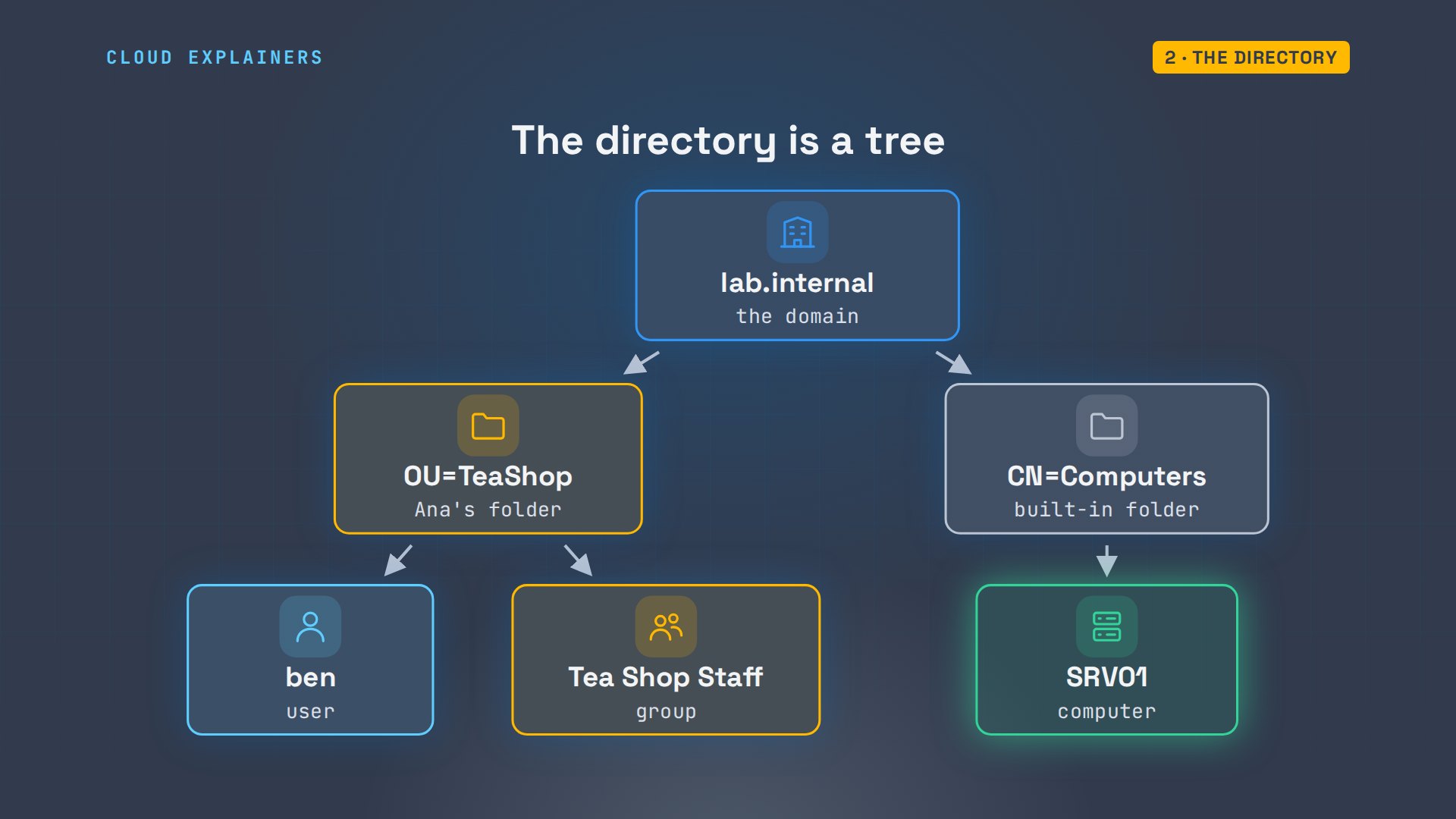
Computers are accounts too. srv01, the shop computer Ben signed in to, has its own entry in the Computers folder, made when it joined the domain. So the directory is a tree: the domain at the top, folders under it, and every user, group and computer in a folder.
Finding the domain controller
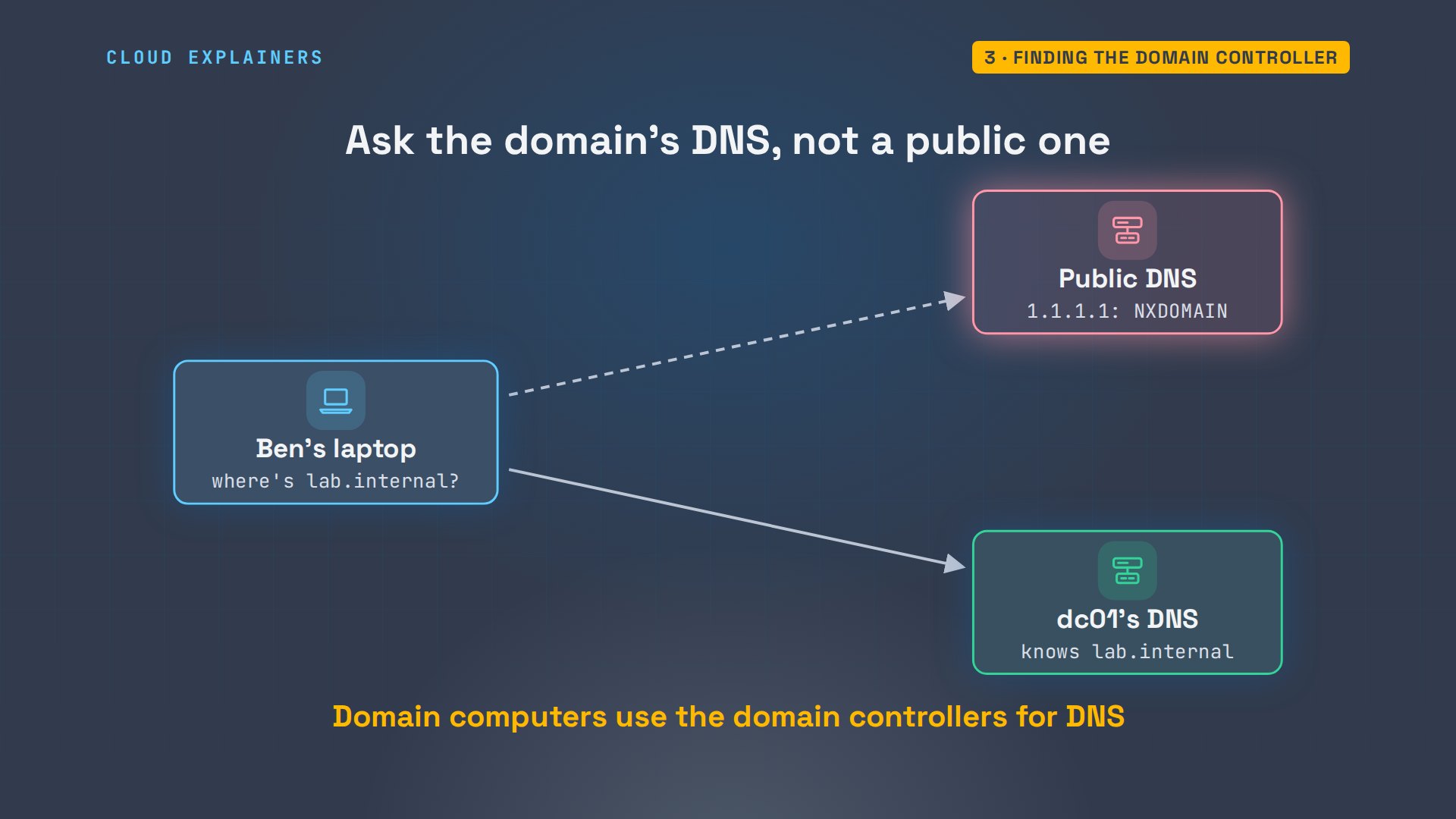
But how did the shop computer know where the domain controller is? It asked DNS, the network's phone book. Domain controllers list themselves there under service names, like: the el-dap service of lab.internal. el-dap is how programs read the directory. The answer is a name and a port, then the name becomes an address.
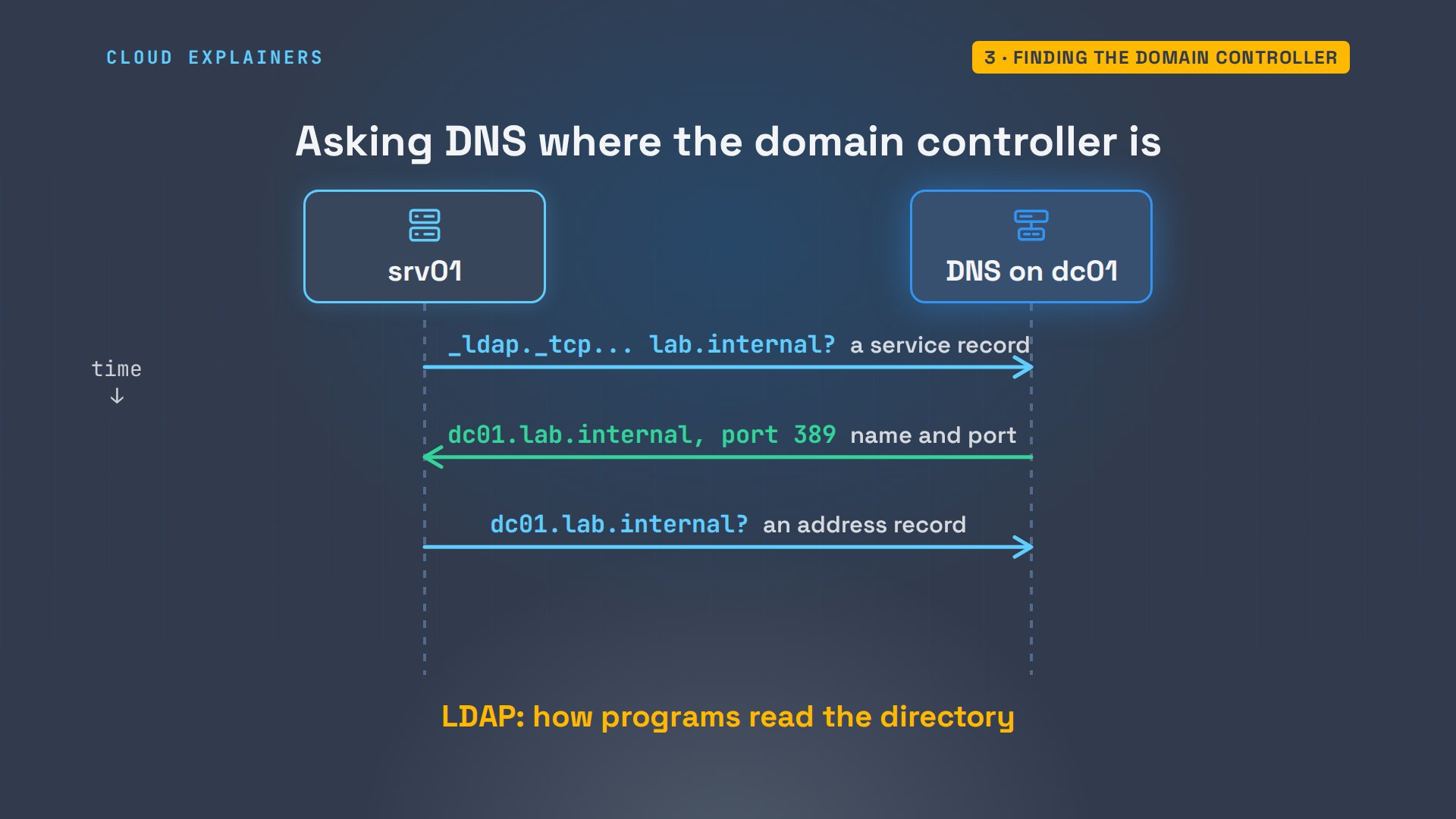
Ben's Ubuntu laptop can ask the same question with dig. Its DNS server is the domain controller itself, as on most domain networks. S R V, for service: dc01, port 389. And dc01's address: 192.168.1.50. Ask a public DNS server instead, and the answer is NXDOMAIN: no such name.
dig +short SRV _ldap._tcp.dc._msdcs.lab.internal0 100 389 dc01.lab.internal.
dig +short dc01.lab.internal192.168.1.50
dig SRV _ldap._tcp.dc._msdcs.lab.internal @1.1.1.1 | grep status;; ->>HEADER<<- opcode: QUERY, status: NXDOMAIN, id: 42534
That's a classic beginner trap. A computer that uses the router's or a public DNS server can't find the domain controller, so it can't join the domain or sign anyone in. lab.internal exists only in the domain's own DNS, which is why domain computers point their DNS at the domain controllers.
Signing in with tickets
Now the sign-in. Ben typed his password into srv01 once. srv01 doesn't send that password anywhere: it turns it into a key, and sends the domain controller proof made with it. The domain controller checks the proof against the directory, and hands back a ticket, the ticket-granting ticket. With that, srv01 asks for a ticket to each service Ben uses, without his password again. This is Kerberos.
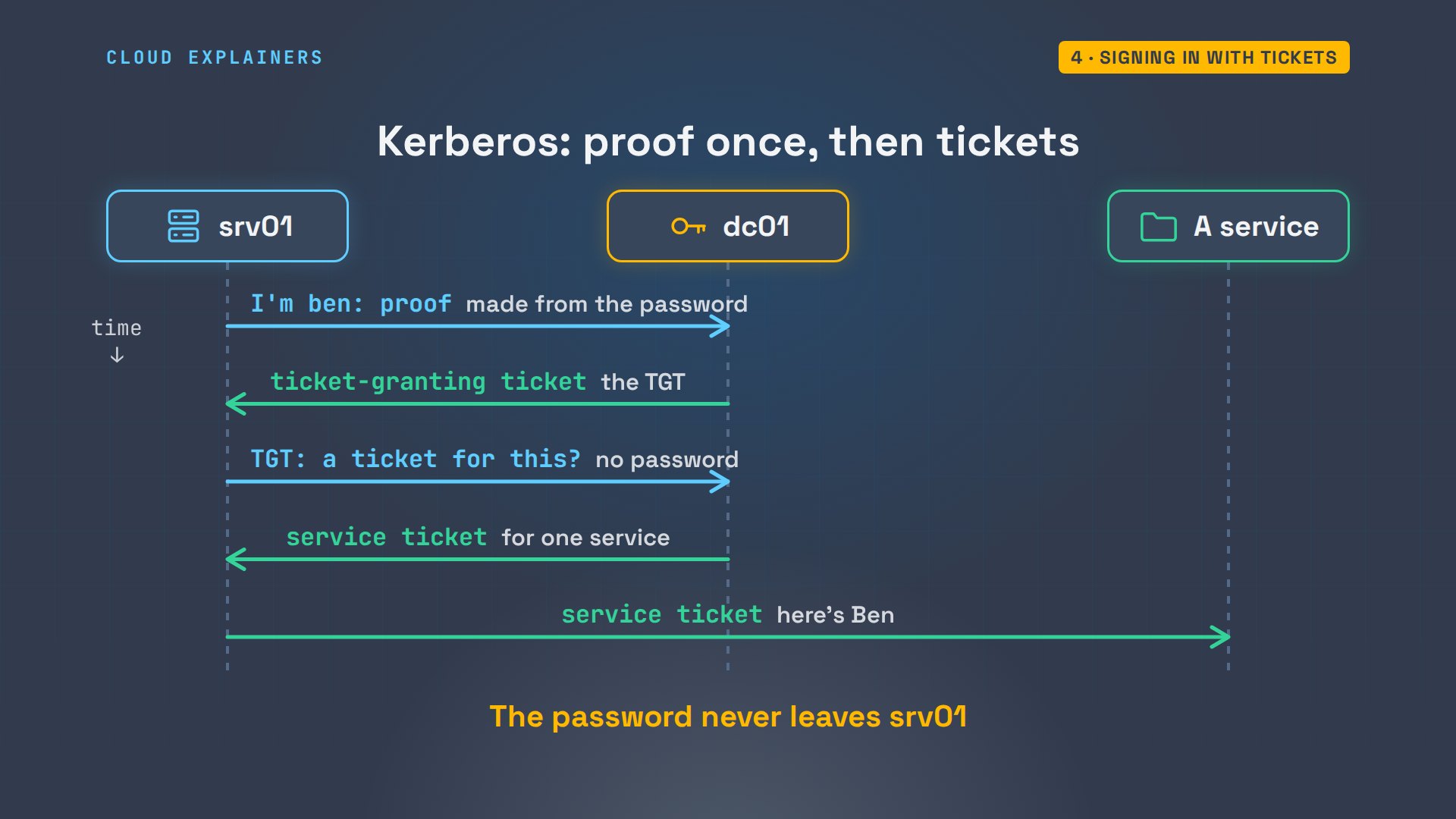
klist shows Ben's tickets. The first is the ticket-granting ticket, issued by dc01. Guess first: how long is it good for? Ten hours. After that, srv01 needs a fresh one.
PS C:\Users\ben> klistCurrent LogonId is 0:0x35c3ed

Cached Tickets: (2)

#0>Client: ben @ LAB.INTERNAL
Server: krbtgt/LAB.INTERNAL @ LAB.INTERNAL
KerbTicket Encryption Type: AES-256-CTS-HMAC-SHA1-96
Ticket Flags 0x40e10000 -> forwardable renewable initial pre_authent name_canonicalize
Start Time: 11/9/2026 14:33:15 (local)
End Time:   11/10/2026 0:33:15 (local)
Renew Time: 11/16/2026 14:33:15 (local)
Session Key Type: AES-256-CTS-HMAC-SHA1-96
Cache Flags: 0x1 -> PRIMARY
Kdc Called: dc01.lab.internal

#1>Client: ben @ LAB.INTERNAL
Server: LDAP/dc01.lab.internal/lab.internal @ LAB.INTERNAL
KerbTicket Encryption Type: AES-256-CTS-HMAC-SHA1-96
Ticket Flags 0x40a50000 -> forwardable renewable pre_authent ok_as_delegate name_canonicalize
Start Time: 11/9/2026 14:33:15 (local)
End Time:   11/10/2026 0:33:15 (local)
Renew Time: 11/16/2026 14:33:15 (local)
Session Key Type: AES-256-CTS-HMAC-SHA1-96
Cache Flags: 0
Kdc Called: dc01.lab.internal
So far, two of the four jobs. Computers find the domain controller through DNS, and Kerberos turns one password into tickets, all checked against the same directory.
Groups open the doors
Who may open what? The shop's share on srv01 doesn't list people. Its folder lock names one group: Tea Shop Staff. Ana manages who's in the group, and the lock never changes.
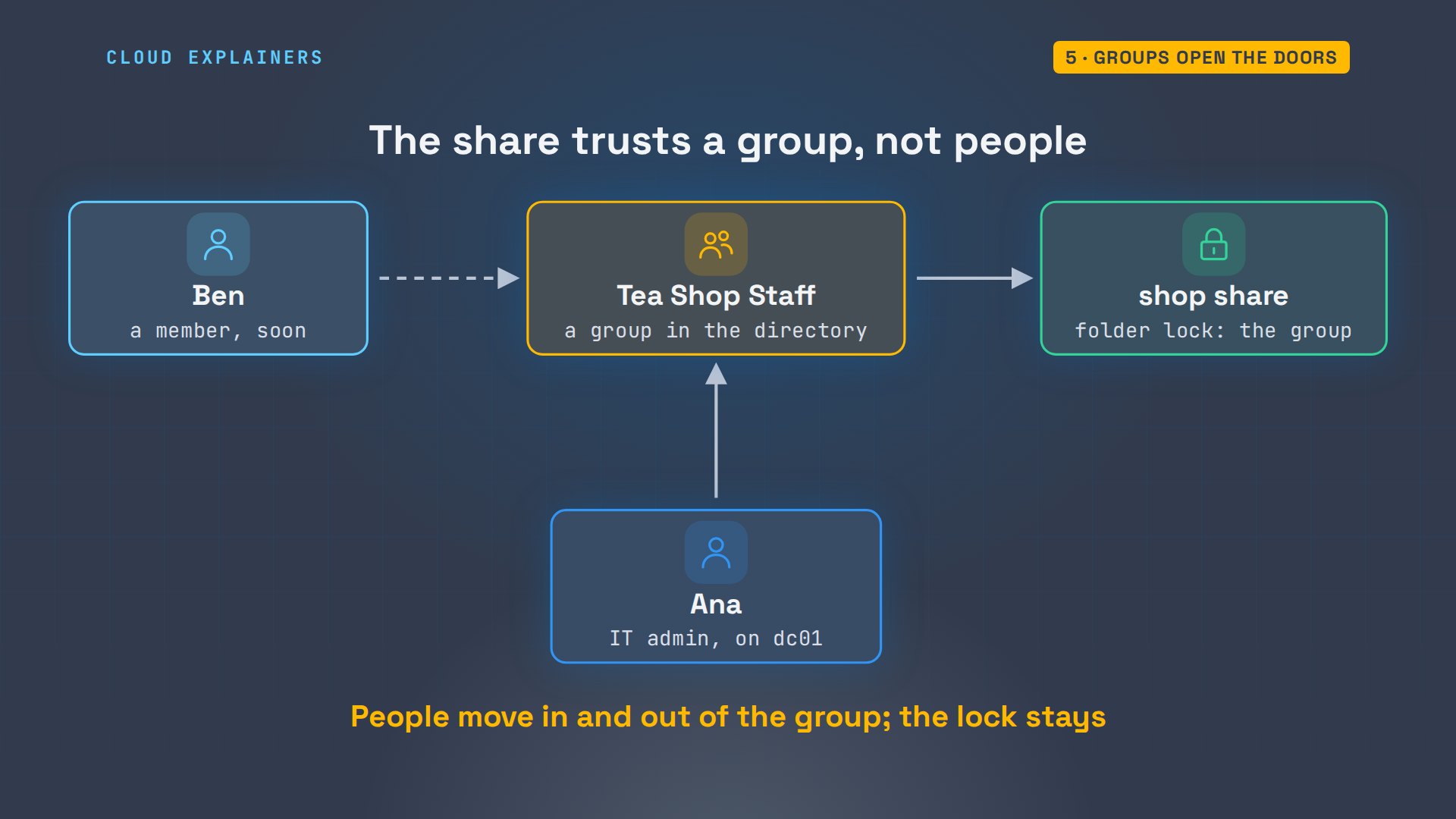
Ben isn't in it yet, so dir on the share says: access is denied. On the domain controller, Ana adds him to the group, and the group's member list shows ben.
PS C:\Users\ben> dir \\srv01\shopdir : Access to the path '\\srv01\shop' is denied.
At line:1 char:1
+ dir \\srv01\shop
+ ~~~~~~~~~~~~~~~~
    + CategoryInfo          : PermissionDenied: (\\srv01\shop:String) [Get-ChildItem], UnauthorizedAccessExc
   eption
    + FullyQualifiedErrorId : DirUnauthorizedAccessError,Microsoft.PowerShell.Commands.GetChildItemCommand
Add-ADGroupMember, then Get-ADGroupMember, which lists one member: ben, a user.
PS C:\TeaShop> Add-ADGroupMember 'Tea Shop Staff' -Members ben
PS C:\TeaShop> Get-ADGroupMember 'Tea Shop Staff' | Format-Table Name, ObjectClassName ObjectClass
---- -----------
ben  user
Ben, still signed in, tries the share again. Guess first: does it open now? No. Still denied, with the same message. And whoami, asked for Ben's groups, finds no Tea Shop Staff at all, though the directory lists him.
PS C:\Users\ben> dir \\srv01\shopdir : Access to the path '\\srv01\shop' is denied.
At line:1 char:1
+ dir \\srv01\shop
+ ~~~~~~~~~~~~~~~~
    + CategoryInfo          : PermissionDenied: (\\srv01\shop:String) [Get-ChildItem], UnauthorizedAccessExc
   eption
    + FullyQualifiedErrorId : DirUnauthorizedAccessError,Microsoft.PowerShell.Commands.GetChildItemCommand
PS C:\Users\ben> whoami /groups | Select-String 'Tea Shop'
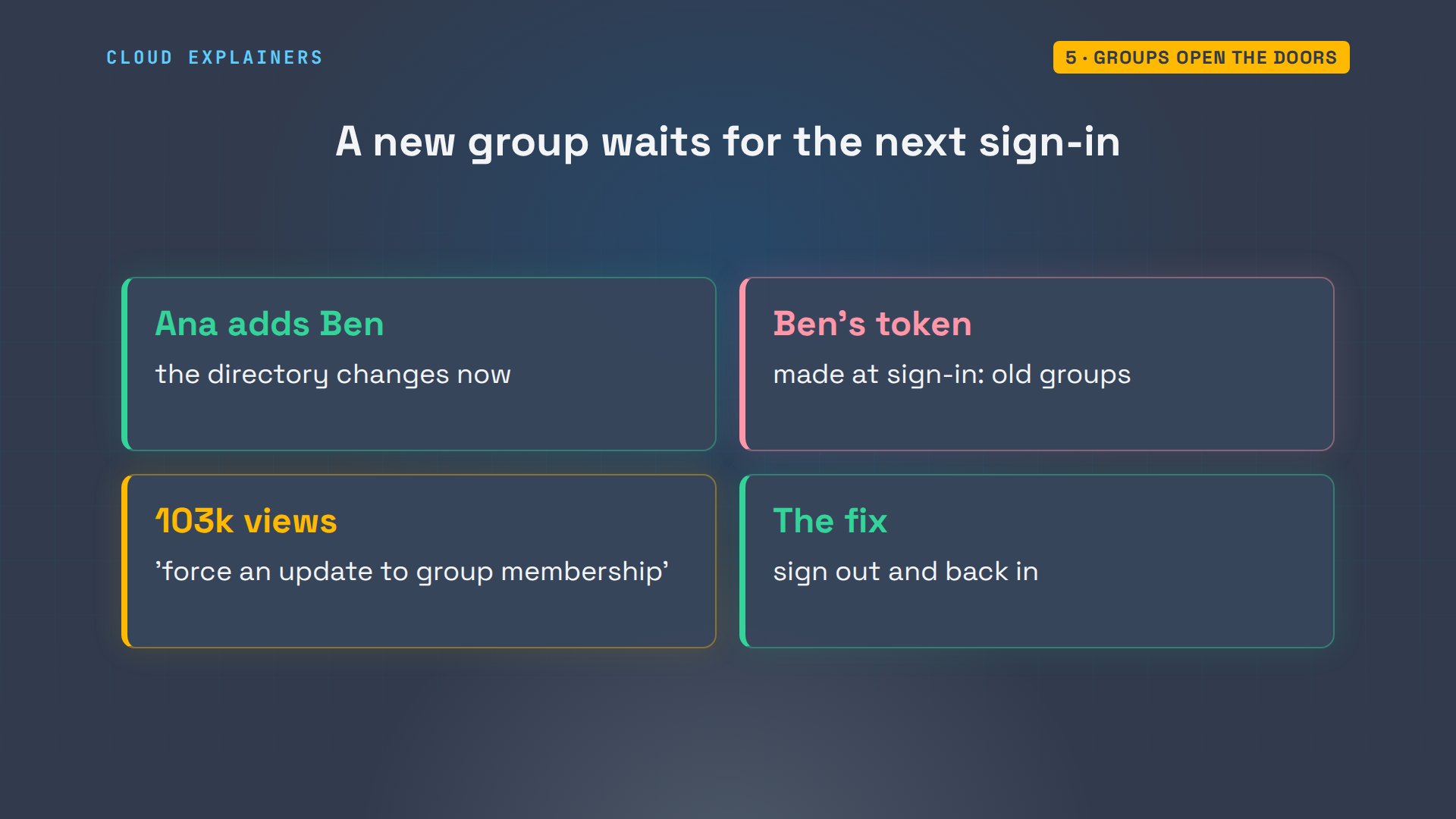
Here's why. When Ben signed in, Windows built him an access token: his SID, and the SIDs of every group he was in, at that moment. Every program he runs carries a copy, and the share checks the copy. Ana changed the directory, not the token Ben already holds.
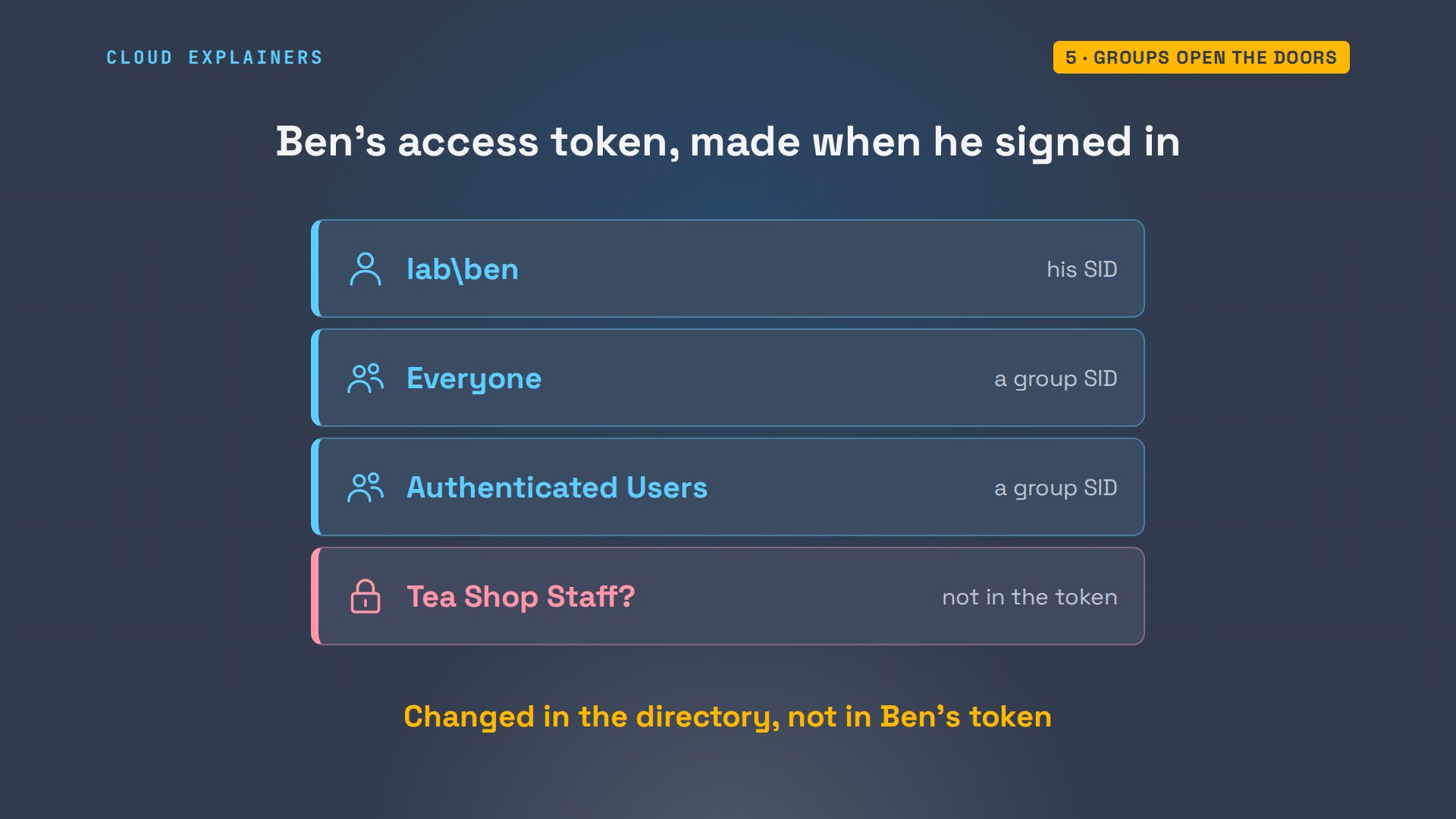
So Ben signs out, and signs in again. New sign-in, new token: whoami now lists lab, Tea Shop Staff, and dir shows the shop's stock file.
PS C:\Users\ben> exitConnection to srv01 closed.
ssh ben@lab.internal@srv01Windows PowerShell
Copyright (C) Microsoft Corporation. All rights reserved.

Install the latest PowerShell for new features and improvements! https://aka.ms/PSWindows
PS C:\Users\ben> whoami /groups | Select-String 'Tea Shop'LAB\Tea Shop Staff                         Group            S-1-5-21-44274420-1659632989-1045501141-1134
Mandatory group, Enabled by default, Enabled group
PS C:\Users\ben> dir \\srv01\shopDirectory: \\srv01\shop Mode LastWriteTime Length Name ---- ------------- ------ ---- -a---- 11/9/2026 2:33 PM 18 stock.txt
That's the change that doesn't reach Ben right away: a new group waits for his next sign-in. It catches everyone. A Server Fault question on forcing a group update without signing out has over 103 thousand views. The usual answer: sign out, and back in.
Rules in one place
The third job is rules. The domain's password policy lives on the domain controller: at least seven characters, with complexity on. So when Ana tries to give Ben the password tea1, the domain refuses it, for every computer at once.
PS C:\TeaShop> Get-ADDefaultDomainPasswordPolicy | Format-List MinPasswordLength, ComplexityEnabled, MaxPasswordAgeMinPasswordLength : 7
ComplexityEnabled : True
MaxPasswordAge    : 42.00:00:00
PS C:\TeaShop> Set-ADAccountPassword ben -Reset -NewPassword (ConvertTo-SecureString 'tea1' -AsPlainText -Force)Set-ADAccountPassword : The password does not meet the length, complexity, or history requirement of the
domain.
At line:1 char:1
+ Set-ADAccountPassword ben -Reset -NewPassword (ConvertTo-SecureString ...
+ ~~~~~~~~~~~~~~~~~~~~~~~~~~~~~~~~~~~~~~~~~~~~~~~~~~~~~~~~~~~~~~~~~~~~~
    + CategoryInfo          : InvalidData: (ben:ADAccount) [Set-ADAccountPassword], ADPasswordComplexityExce
   ption
    + FullyQualifiedErrorId : ActiveDirectoryServer:1325,Microsoft.ActiveDirectory.Management.Commands.SetAD
   AccountPassword
Most other rules travel as Group Policy. Each policy is stored on the domain controller, in a shared folder called SYSVOL. Every computer in the domain reads the policies that apply to it, when it starts and when someone signs in. And the policies can be linked to a folder, like Ana's TeaShop, so they cover only what's in it.
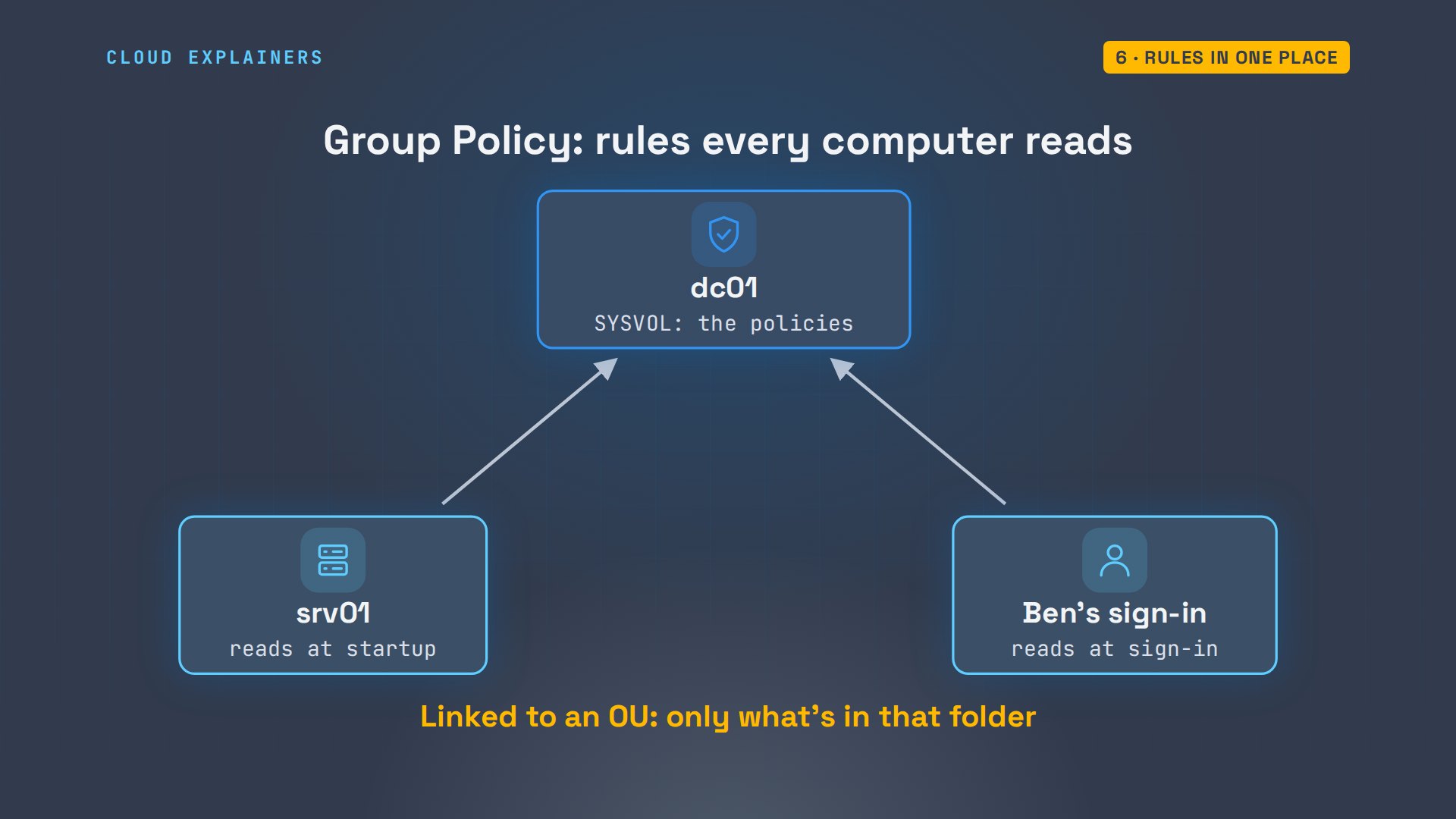
Ben can see that folder too. The first policy in it is the Default Domain Policy, which holds those password rules. And klist shows how he got in: a new service ticket, for the file service on dc01, with no password typed.
PS C:\Users\ben> dir \\dc01\sysvol\lab.internal\PoliciesDirectory: \\dc01\sysvol\lab.internal\Policies Mode LastWriteTime Length Name ---- ------------- ------ ---- d----- 8/31/2026 3:44 PM {31B2F340-016D-11D2-945F-00C04FB984F9} d----- 9/1/2026 8:40 AM {6AC1786C-016F-11D2-945F-00C04fB984F9}
PS C:\Users\ben> klist | Select-String 'Server:'Server: krbtgt/LAB.INTERNAL @ LAB.INTERNAL
Server: krbtgt/LAB.INTERNAL @ LAB.INTERNAL
Server: cifs/dc01 @ LAB.INTERNAL
When someone leaves
The last job is the one I T loves. On Ben's last day, Ana switches off one account. Enabled: false.
PS C:\TeaShop> Disable-ADAccount ben
PS C:\TeaShop> Get-ADUser ben | Format-List Name, EnabledName    : ben
Enabled : False
Ben tries to sign in, and srv01 closes the connection before it even asks for his password.
ssh ben@lab.internal@srv01Connection closed by 192.168.1.53 port 22
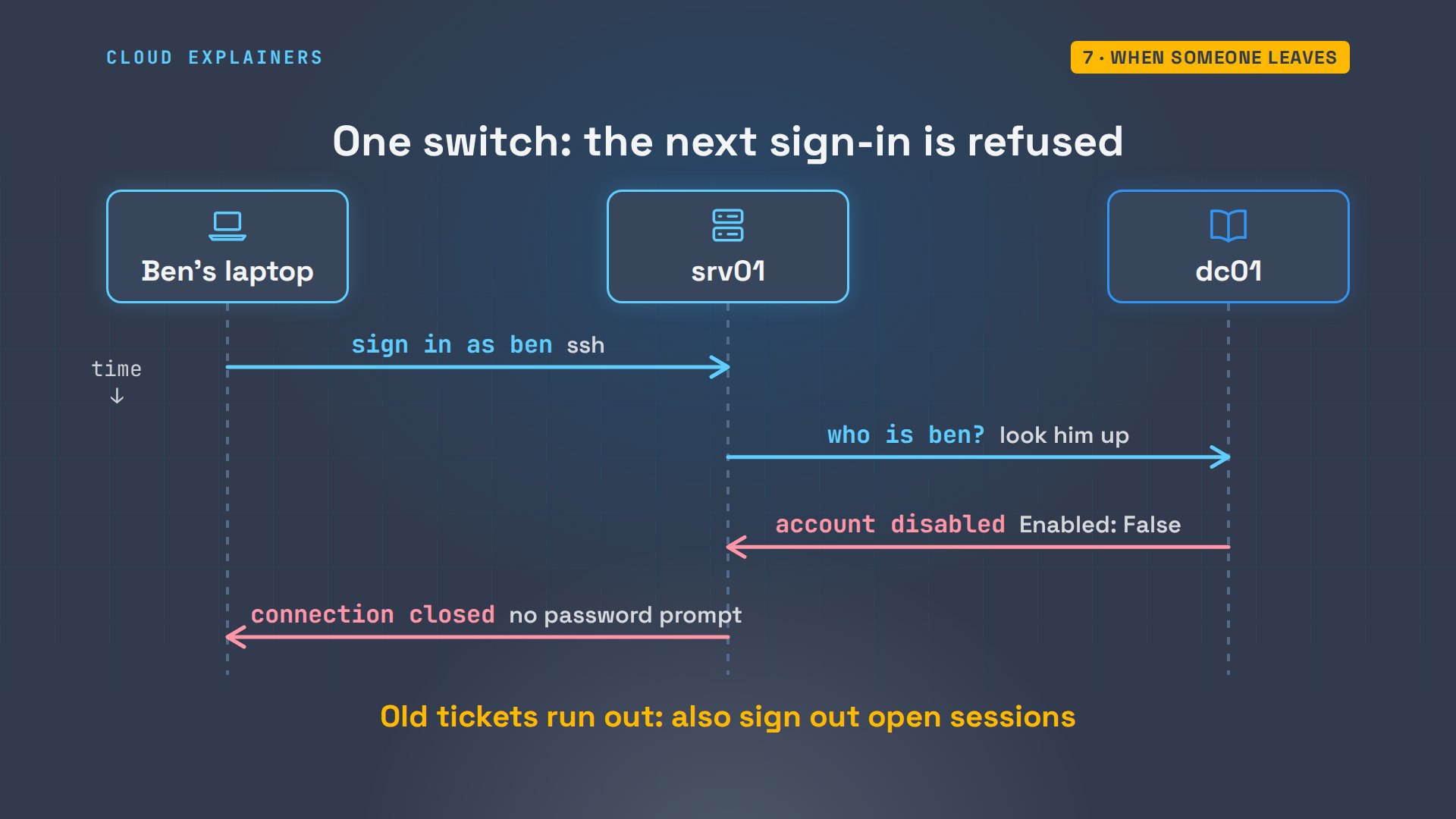
Connection closed. No tickets, no share. One switch in the directory, and every computer that checks the domain says no.
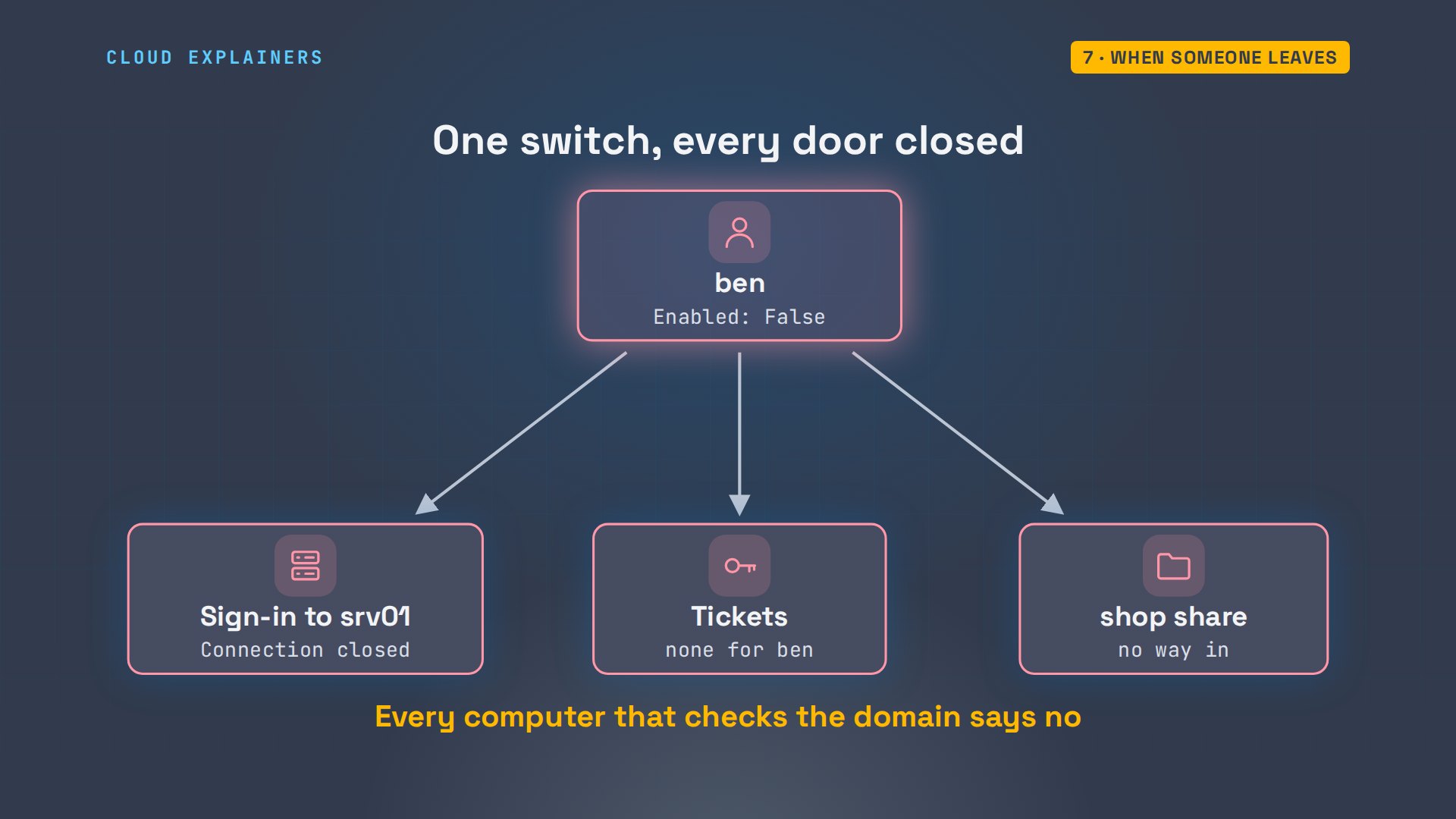
Here's what happened. srv01 looks Ben up in the directory, finds his account switched off, and doesn't even ask for a password. A ticket he already held would still run out within hours, which is why an admin also signs out the open sessions of someone who's leaving.
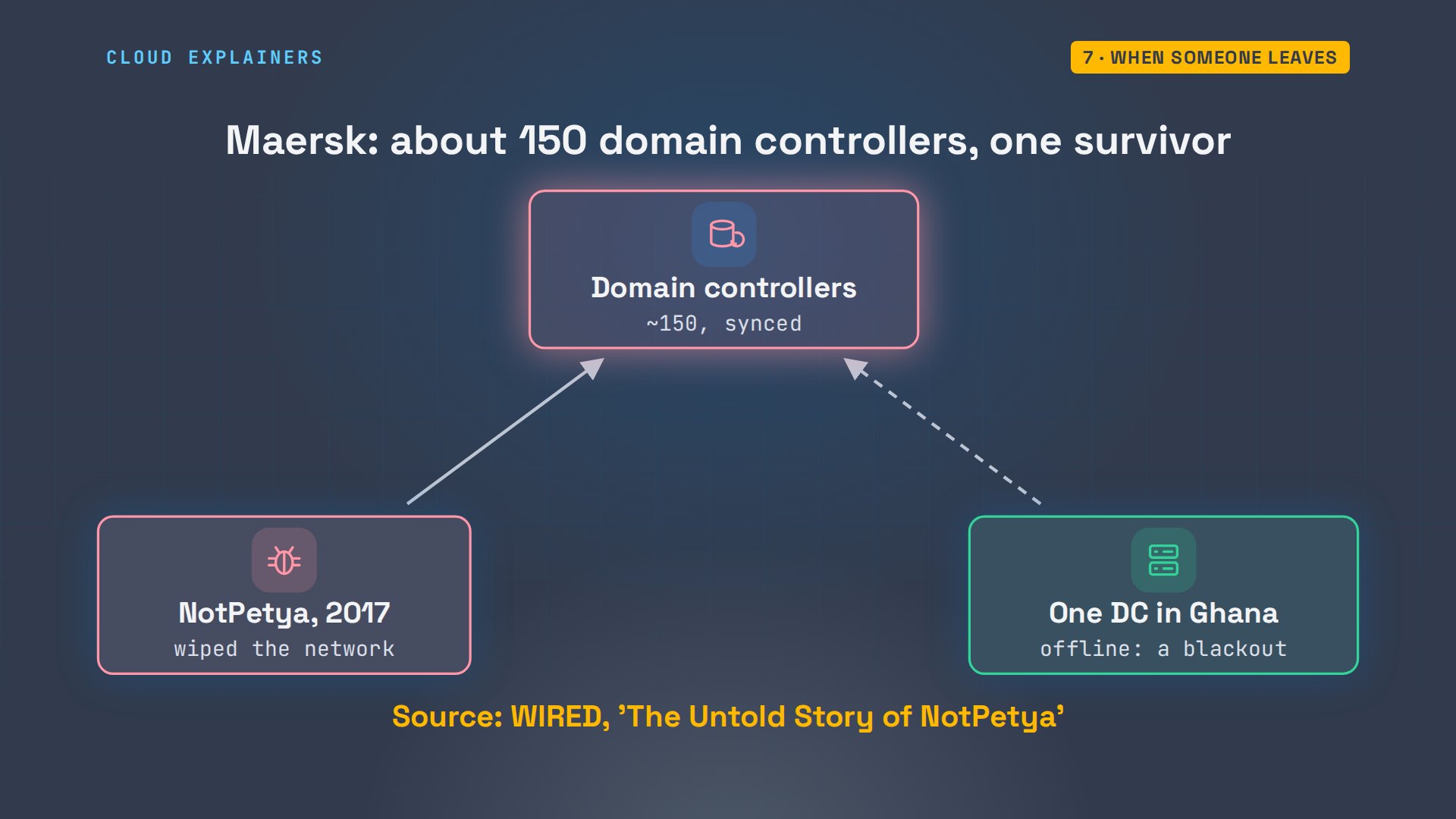
Because everything asks the domain controllers, big companies run many, and they copy changes to each other. WIRED reported that the shipping company Maersk had about 150. When the NotPetya malware wiped its network in 2017, one domain controller survived, in Ghana, because a blackout had knocked it offline. Maersk rebuilt its directory from that one copy.
Recap
So: a directory of accounts, found through DNS, tickets instead of passwords, and rules for every computer. The lab and every command are linked in the description.
If Active Directory finally clicked, subscribing helps another beginner find it.
Every command here ran for real, on Windows Server in our own lab. Thanks for watching Cloud Explainers.
Sources
- Microsoft Learn, Active Directory Domain Services overview (a directory stores information about objects on a network)
- Microsoft Learn, Domain controller location (DCs register SRV records; clients query _ldap._tcp. plus the domain name)
- Microsoft Learn, Kerberos authentication overview (the KDC runs on every domain controller; the TGT lets the client request access without the password again)
- Microsoft Learn, Access tokens (made at logon; hold the SIDs of the user's groups)
- Microsoft Learn, klist (purge, log off and log back on)
- Microsoft Learn, Group Policy overview (templates in SYSVOL on each DC; applied at startup and sign-in; linked to sites, domains and OUs)
- WIRED, The Untold Story of NotPetya (Maersk's ~150 domain controllers, the survivor in Ghana)
- Server Fault, 'What is Active Directory Domain Services and how does it work?' (question 402580, 331,257 views on 2026-11-09)
- Server Fault, 'How do you force an update to a user's group membership in Windows 7?' (question 336250, 102,769 views on 2026-11-09)
Demos: two Windows Server 2022 machines and an Ubuntu container in our own lab network; the OU, group, user and share were made for the video and removed afterwards; the tea shop is made up. Watch the full video on YouTube.
More videos

Linux Makefiles Will Finally Make Sense After This

SAML vs OAuth vs OpenID Connect: What's the Difference?

How to Fix Python cron Jobs That Never Run

Linux Bash Scripting: Full Tutorial for Beginners

How PXE Network Boot Works

How to Fix a Linux systemd Service That Won't Start

Linux Logs: syslog vs journald

JWT vs Session Cookies: Which One Should You Use?

Docker vs Docker Compose: Which One Should You Use?

How to Fix Docker Compose Containers That Can't Talk to Each Other

Django Full Tutorial for Beginners

How Linux systemd Works

How to Fix 'Windows Cannot Access' Network Share Errors (SMB)

REST vs gRPC: Which One Should You Use?

How to Fix SSL Certificate Chain Errors (Missing Intermediate)

Every Python Concept for Beginners in 10 Minutes

Every SQL Join Type in 10 Minutes

Why OpenRouter Free Models Hit Their Limit So Fast

Why Your Gemini API Free Tier Runs Out So Fast

OpenRouter Will Finally Make Sense After This

How Redis Caching Works

Gemini API vs Vertex AI: Which One Should You Use?

How to Fix a Leaked Gemini API Key

Why Golang Uses Goroutines Instead of Threads

How to Fix Gemini API Error 429: Resource Exhausted

Claude Token Pricing Will Finally Make Sense After This

Why Python Web Scraping Returns Nothing (and the Fix)

Python uv vs pip: Which One Should You Use?

Python Automation: Full Tutorial for Beginners

How OAuth Login Works

Google AI Studio Will Finally Make Sense After This

What Happens When You Run a Docker Container

How to Fix Claude Code Billing Your API Key Instead of Your Plan

Why Passkeys Can't Be Phished Like Passwords

PowerShell vs Bash: Which One Should You Learn?

The Linux Roadmap for Beginners

Django vs FastAPI: Which One Should You Use?

Why SQLite Is the Most Used Database in the World

How a NoSQL Database Like MongoDB Works

How to Fix Python pip error: externally-managed-environment

How to Fix MySQL Too Many Connections Database Errors

Golang Concurrency Will Finally Make Sense After This

How Amazon S3 Works

How Kubernetes Works

How Git Works

How to Fix Docker Port Already Allocated Errors

How PostgreSQL Works

How to Fix Git Merge Conflicts

How to Fix No Space Left on Device in Linux

How the Internet Works

SQL vs NoSQL: When Each One Wins

How to Fix JWT Token Expired Errors (401 Unauthorized)

Claude API vs Claude Pro: Why Your Subscription Doesn't Include It

Why AI Agent Skills Beat Giant Prompts

Linux Cron Jobs Will Finally Make Sense After This

Security Logs Will Finally Make Sense After This

How to Fix a Security Leak: An API Key Pushed to GitHub

DNS Will Finally Make Sense After This

Never Ignore a Security Update

Two-Factor Authentication Will Finally Make Sense

Never Expose a Database to the Internet

SSH Keys vs Passwords: Which Is Safer for Security?

The 5 Levels of Linux Boot: From Power On to Login

The 5 Levels of Network Firewalls

Password Security: Why Hackers Crack Weak Passwords

Why Your Linux Server Runs Out of Memory

HTTP vs HTTPS: What Actually Changes on Your Network

Every Linux File Permission You Need to Know

Linux Processes vs Threads: When Each One Wins

The OSI Model Will Finally Make Sense After This

The 7 Levels of Git

Every Network Troubleshooting Command You Need

Hashing vs Encryption in Cybersecurity: When Each One Wins

Why the Internet Ran Out of IP Addresses

Linux Package Managers: apt vs Snap vs Flatpak

Why Python Is Slow (and When It Doesn't Matter)

TCP vs UDP: When Each One Wins

Stop Running Linux as Root (Do This Instead)

Linux Users and Groups Will Finally Make Sense

Why Phishing Beats Good Security (and How to Spot It)

The 7 Levels of Docker

AI Agents Will Finally Make Sense After This

Stop Using git push --force (Use This Instead)

Agent Skills vs MCP: When Each One Wins

Networking Will Finally Make Sense After This

Every Linux Command You Actually Need

The 7 Levels of Cybersecurity

Every System Design Concept You Need, in One Diagram
