How to Fix a Kubernetes Pod Stuck in CrashLoopBackOff
CrashLoopBackOff means your container's program keeps exiting, and Kubernetes waits longer before each restart. On a real Kubernetes cluster we read the last run with kubectl logs --previous and kubectl describe, and fix four common causes: a missing environment variable, a memory limit that gets the container OOM killed, a liveness probe on the wrong port, and a one-off script run as a Deployment instead of a Job.
It runs on the laptop
Your pod is stuck in CrashLoopBackOff, and the restart count keeps climbing. Most people guess the image is broken. Jim's isn't: his lane booking board for Riverside Pool runs fine on his laptop. In Kubernetes, it restarts again and again. The pod isn't stuck, exactly. It's working very hard at failing. There are four common reasons a pod does this. In one of them, nothing is even wrong with the program. And two commands tell you which one you have.
kubectl get podsNAME  READY  STATUS  RESTARTS  AGE
lanes-f7669455-97s8v  0/1  Error  4 (2m ago)  2m43s
lanes-f7669455-p2pwk  0/1  CrashLoopBackOff  4 (68s ago)  2m43s
docker run -d --rm --name board -p 8080:8080 -e BOOKING_KEY="$(cat booking.key)" lanes:1.031f07c16f6085802f1400583c42aa62c6103f8b0b1c52f21e141d97336692b72
curl -s localhost:8080Riverside Pool lanes 1.0
Lane 1: early swim
Lane 2: lessons
Lane 3: open
served by 31f07c16f608
Missing variable: read the last run
The usual fix starts by reading the run that crashed. kubectl, the Kubernetes command line tool, has logs, and with dash dash previous it shows what the program printed the last time, before it died. Here, it's a Python KeyError: the program looked for a setting called BOOKING_KEY, and it wasn't there. The app reads that key from an environment variable. On the laptop, Jim passed it with dash e. The deployment, the file that tells Kubernetes how to run his app, never set it, so the program exits at once. The second command, kubectl describe pod, shows that exit; the grep part just keeps the Last State lines: reason Error, exit code 1, a program's way of saying it stopped on an error.
kubectl logs lanes-f7669455-p2pwk --previousTraceback (most recent call last):
  File "/app/app.py", line 7, in <module>
  KEY = os.environ["BOOKING_KEY"]  # the key the front desk's till checks
  ~~~~~~~~~~^^^^^^^^^^^^^^^
  File "<frozen os>", line 717, in __getitem__
KeyError: 'BOOKING_KEY'
kubectl describe pod lanes-f7669455-p2pwk | grep -A4 'Last State'Last State: Terminated Reason: Error Exit Code: 1 Started: Sat, 21 Nov 2026 16:05:13 +0000 Finished: Sat, 21 Nov 2026 16:05:14 +0000
So Jim stores the key in the cluster as a secret, Kubernetes' place for passwords and keys, and five lines in the deployment hand it to the container as BOOKING_KEY. kubectl apply sends the changed file, and the rollout finishes. Jim runs two copies of the app, and both are running with zero restarts.
kubectl create secret generic booking --from-file=key=booking.keysecret/booking created
grep -A5 env: deployment.yamlenv: - name: BOOKING_KEY valueFrom: secretKeyRef: name: booking key: key
kubectl apply -f deployment.yamldeployment.apps/lanes configured
kubectl rollout status deployment lanes --timeout=120sWaiting for deployment "lanes" rollout to finish: 1 out of 2 new replicas have been updated...
Waiting for deployment "lanes" rollout to finish: 1 old replicas are pending termination...
deployment "lanes" successfully rolled out
kubectl get podsNAME  READY  STATUS  RESTARTS  AGE
lanes-64976b6884-8ptql  1/1  Running  0  2s
lanes-64976b6884-97d5l  1/1  Running  0  2s
What CrashLoopBackOff means
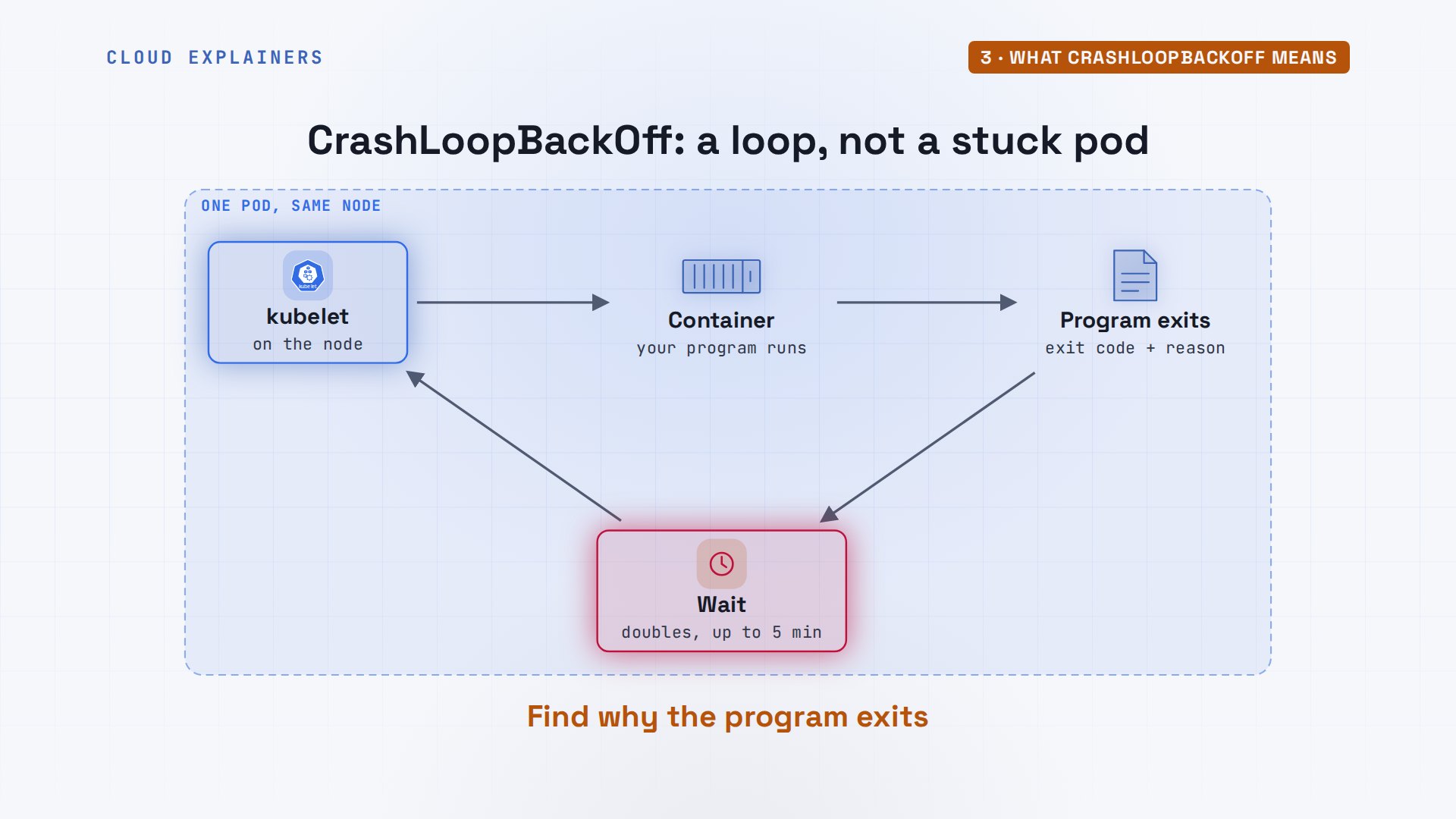
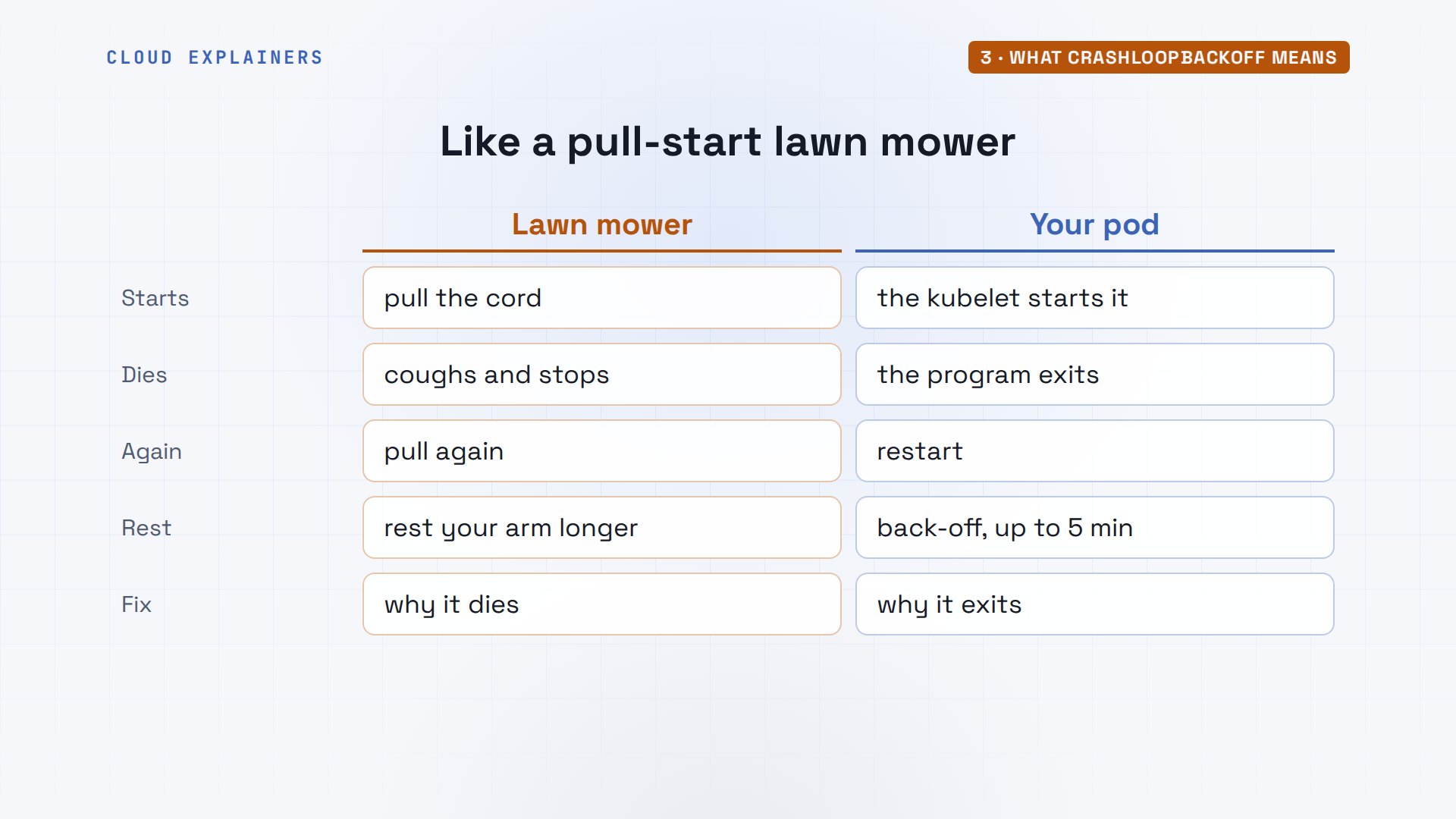
That was the easy case: the log named the problem. In the next three, it won't, so here's what the loop really is. Each machine in your cluster, called a node, runs a program called the kubelet, and the kubelet starts your container. When your program exits, the kubelet notes the reason and the exit code, waits, and starts it again. Each wait doubles. CrashLoopBackOff is the name for that wait. Right after a crash, the status says Error for a moment instead. Same loop. So the fix is never in the restart. It's in why the program exits.
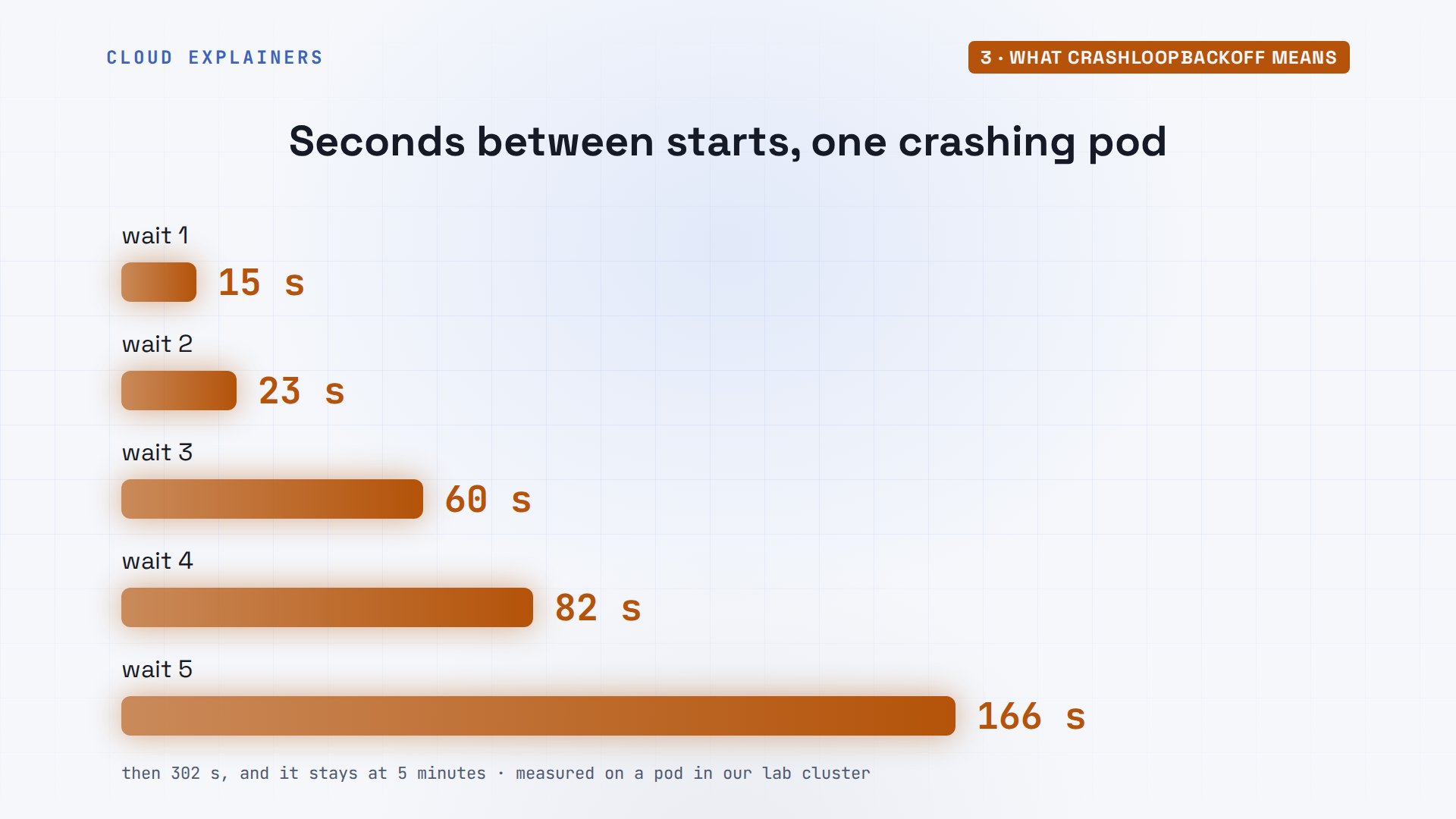
Why does that matter? We timed one crashing pod: the first restart came at once. Then the gaps grew: 15 seconds, then 23, then 60, roughly doubling each time, until they reached five minutes, and stayed there. So if your fix is outside the pod, like a missing database coming back, the pod may wait five minutes before it even tries again. Applying a changed deployment is different: it starts new pods right away.
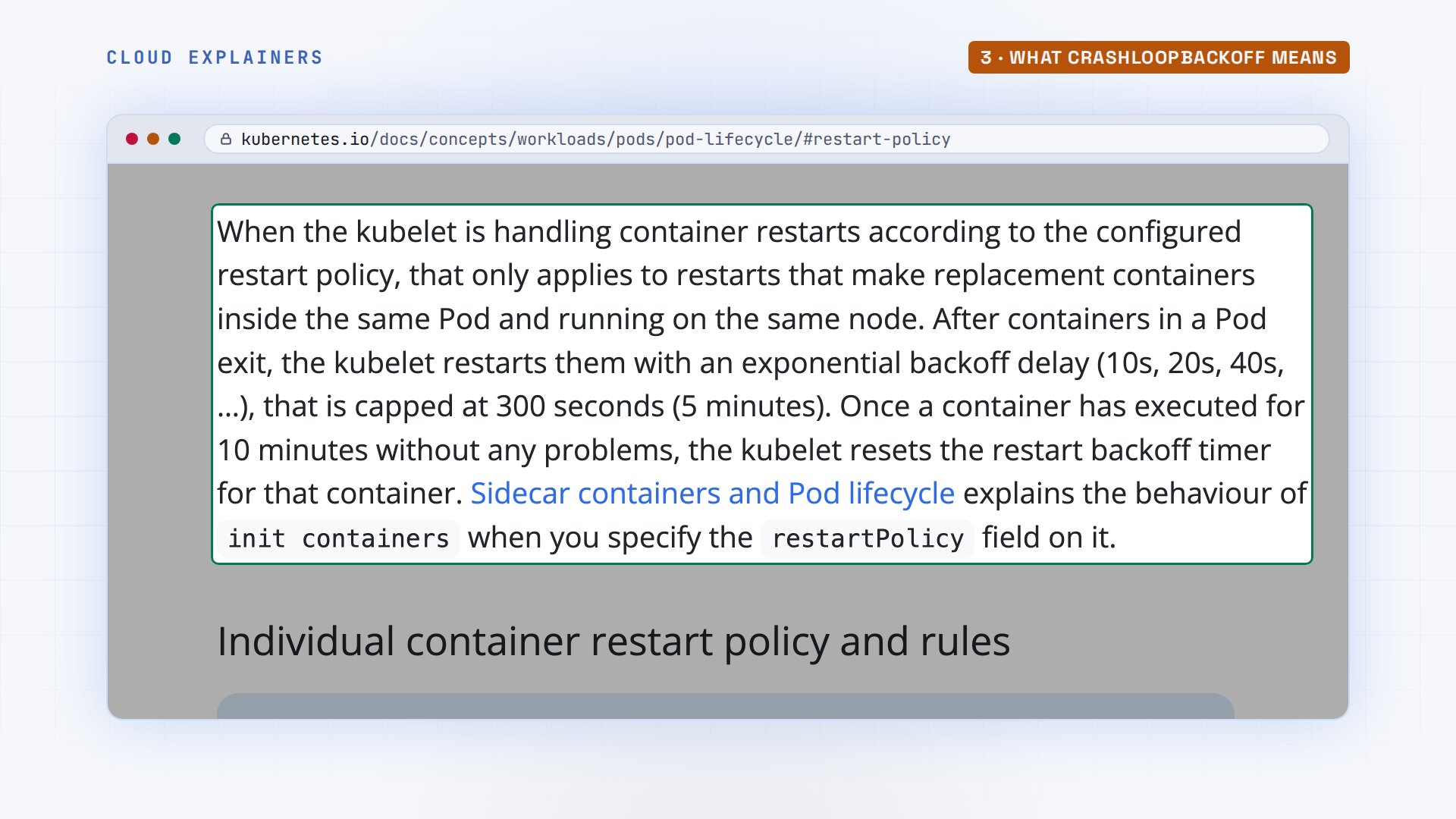
The Kubernetes documentation gives the same rule: start at ten seconds, double each time, and stop at three hundred, those five minutes. Ours ran a little later than that rule, never sooner. And once a container runs for ten minutes without a problem, the count starts over.
Think of a pull-start lawn mower that starts, coughs, and dies. Pulling the cord again is the restart. Resting your arm a bit longer each time is the back-off. But no number of pulls fixes it. You have to find out why it dies: no fuel, a choke set wrong, or a job that was already done.
Out of memory: no error in the log
What if the log has no error at all? Jim's version one point one keeps every member's photo in memory, so the front desk sees it at once. Its pods crash too. The last run printed loading member photos, and then nothing. No error, no traceback. Guess first: what stopped it? Memory. The status column says it this time: OOMKilled, short for out of memory, killed. And describe adds exit code 137.
kubectl logs lanes-85bd8d6ff8-bzqz6 --previousloading member photos into memory...
kubectl get podsNAME  READY  STATUS  RESTARTS  AGE
lanes-85bd8d6ff8-84gtl  0/1  CrashLoopBackOff  4 (70s ago)  2m28s
lanes-85bd8d6ff8-bzqz6  0/1  OOMKilled  4 (113s ago)  2m28s
kubectl describe pod lanes-85bd8d6ff8-bzqz6 | grep -A4 'Last State'Last State: Terminated Reason: OOMKilled Exit Code: 137 Started: Sat, 21 Nov 2026 16:07:52 +0000 Finished: Sat, 21 Nov 2026 16:07:53 +0000
Jim's deployment set a memory limit of 64Mi, sixty-four mebibytes, about sixty-seven megabytes. The photos alone are a hundred and fifty. When a container goes over its limit, the kernel, the core of Linux, kills it on the spot, so the program never gets to print an error. It sends signal 9, a force quit no program can catch. When a signal kills a program, Linux reports 128 plus the signal number. 128 plus 9 is 137. Jim raises the limit to 256Mi in the file, applies it, and both pods run.
grep -A2 limits: deployment.yamllimits: memory: 64Mi
kubectl apply -f deployment.yamldeployment.apps/lanes configured
kubectl rollout status deployment lanes --timeout=180sWaiting for deployment "lanes" rollout to finish: 1 out of 2 new replicas have been updated...
Waiting for deployment "lanes" rollout to finish: 1 old replicas are pending termination...
deployment "lanes" successfully rolled out
Liveness probe on the wrong port
Now a crash where the app is perfectly healthy. Jim adds a liveness probe from a guide: the kubelet asks the app every five seconds if it's alive, and restarts it when it doesn't answer. The pods crash loop again, but the last log just says listening on port 8080. At the bottom of kubectl describe, a list called Events tells the real story: Liveness probe failed, connection refused on port 8000. The guide's app used 8000. Jim's listens on 8080.
grep -A4 livenessProbe: deployment.yamllivenessProbe: httpGet: path: /healthz port: 8000 periodSeconds: 5
kubectl get podsNAME  READY  STATUS  RESTARTS  AGE
lanes-865db9459d-8qwkg  0/1  CrashLoopBackOff  5 (1s ago)  4m31s
lanes-865db9459d-ccjhz  1/1  Running  5 (46s ago)  4m31s
kubectl logs lanes-865db9459d-8qwkg --previousloading member photos into memory...
loaded 150 MB of member photos
lane board 1.1 listening on port 8080
kubectl describe pod lanes-865db9459d-8qwkg | grep -i livenessLiveness: http-get http://:8000/healthz delay=0s timeout=1s period=5s successThreshold=1 failureThreshold=3 Warning Unhealthy 31s (x18 over 4m26s) kubelet spec.containers{lanes}: Liveness probe failed: Get "http://10.244.1.11:8000/healthz": dial tcp 10.244.1.11:8000: connect: connection refused Normal Killing 31s (x6 over 4m16s) kubelet spec.containers{lanes}: Container lanes failed liveness probe, will be restarted
Each of those runs lasted 45 seconds: three missed checks, then the kubelet politely asks the program to stop, and gives it thirty seconds. Python ignores that request when it's the main program in a container, so the kubelet kills it with signal 9: exit code 137 again. But the reason says Error, not OOMKilled. Read the reason, not just the number.
kubectl describe pod lanes-865db9459d-8qwkg | grep -A4 'Last State'Last State: Terminated Reason: Error Exit Code: 137 Started: Sat, 21 Nov 2026 16:13:01 +0000 Finished: Sat, 21 Nov 2026 16:13:46 +0000
One number fixes it: the probe asks port 8080, where the app really listens.
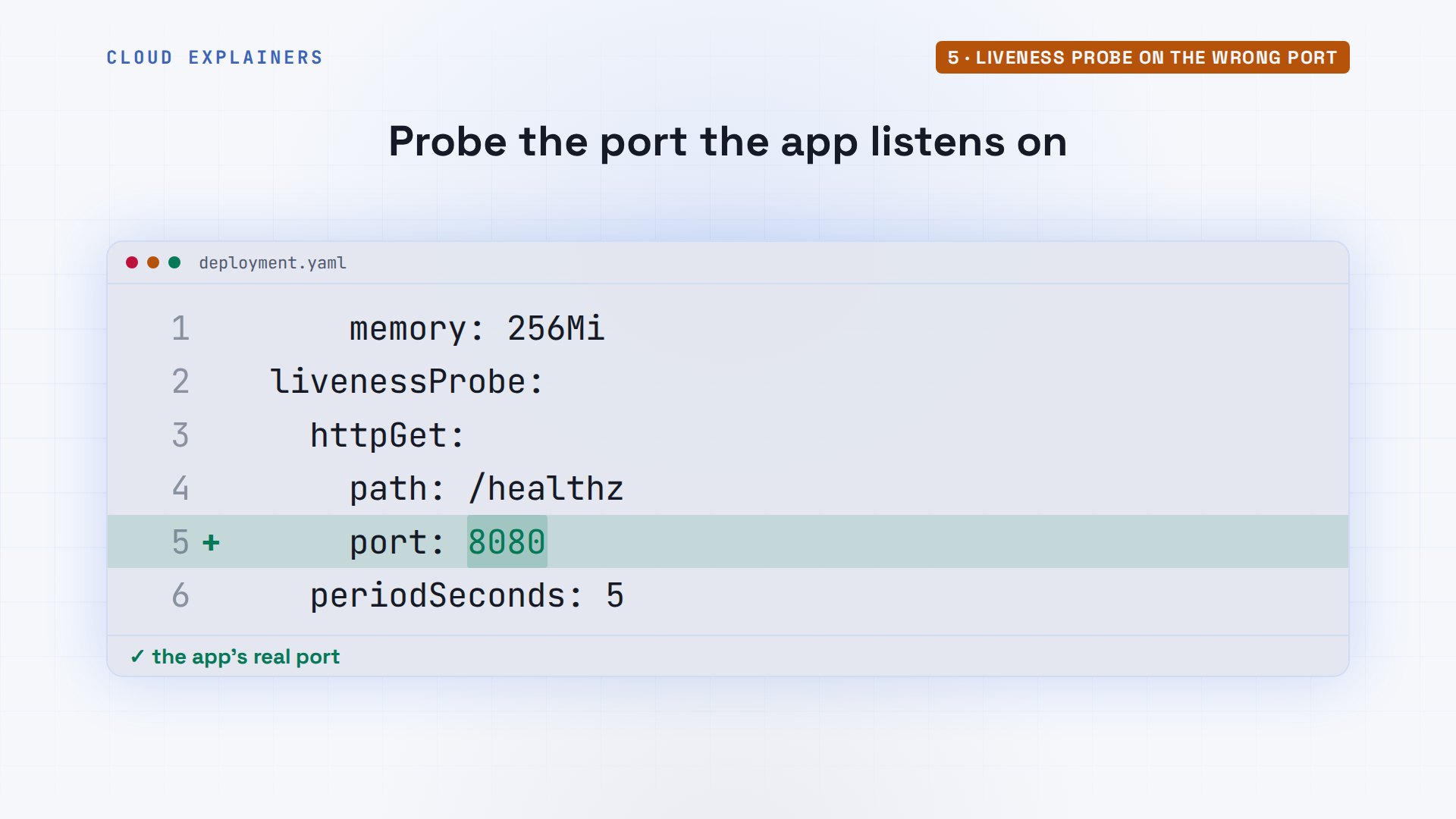
Apply the fixed file, wait a minute for the checks to run, and the restart count stays at zero.
kubectl apply -f deployment.yamldeployment.apps/lanes configured
kubectl get podsNAME  READY  STATUS  RESTARTS  AGE
lanes-6d8775bb8b-fpsk6  1/1  Running  0  43s
lanes-6d8775bb8b-w59vz  1/1  Running  0  43s
A script that finishes: use a Job
Last, a crash loop where nothing goes wrong at all. Every night, a small script reads the day's new members into the bookings, then finishes. Jim runs it as a second deployment, and it crash loops. The log ends with done. Describe says reason Completed, exit code zero: success.
kubectl get podsNAME  READY  STATUS  RESTARTS  AGE
import-8776d49f4-xh575  0/1  CrashLoopBackOff  4 (78s ago)  2m47s
lanes-6d8775bb8b-fpsk6  1/1  Running  0  3m30s
lanes-6d8775bb8b-w59vz  1/1  Running  0  3m30s
kubectl logs import-8776d49f4-xh575 --previousimporting today's new members...
imported 37 members, done
kubectl describe pod import-8776d49f4-xh575 | grep -A4 'Last State'Last State: Terminated Reason: Completed Exit Code: 0 Started: Sat, 21 Nov 2026 16:15:57 +0000 Finished: Sat, 21 Nov 2026 16:15:59 +0000
Why restart a success? Because a deployment exists to keep a program running, so any exit counts as a crash. For something that should run once and finish, Kubernetes has a Job. It's the mower with the lawn already cut: pulling the cord again helps nobody. A deployment can't be turned into a Job in place, so Jim deletes it first. The file's first two lines now say kind Job. He applies the same script as a Job, and kubectl get jobs shows complete: one of one runs finished. Its pod says Completed, and stays that way. To run it every night, the same idea becomes a CronJob: a Job on a schedule.
kubectl get podsNAME  READY  STATUS  RESTARTS  AGE
import-8776d49f4-xh575  0/1  CrashLoopBackOff  4 (78s ago)  2m47s
lanes-6d8775bb8b-fpsk6  1/1  Running  0  3m30s
lanes-6d8775bb8b-w59vz  1/1  Running  0  3m30s
kubectl delete deployment importdeployment.apps "import" deleted from default namespace
head -n 2 import.yamlapiVersion: batch/v1
kind: Job
kubectl apply -f import.yamljob.batch/import created
kubectl get jobsNAME  STATUS  COMPLETIONS  DURATION  AGE
import  Complete  1/1  4s  5s
Recap
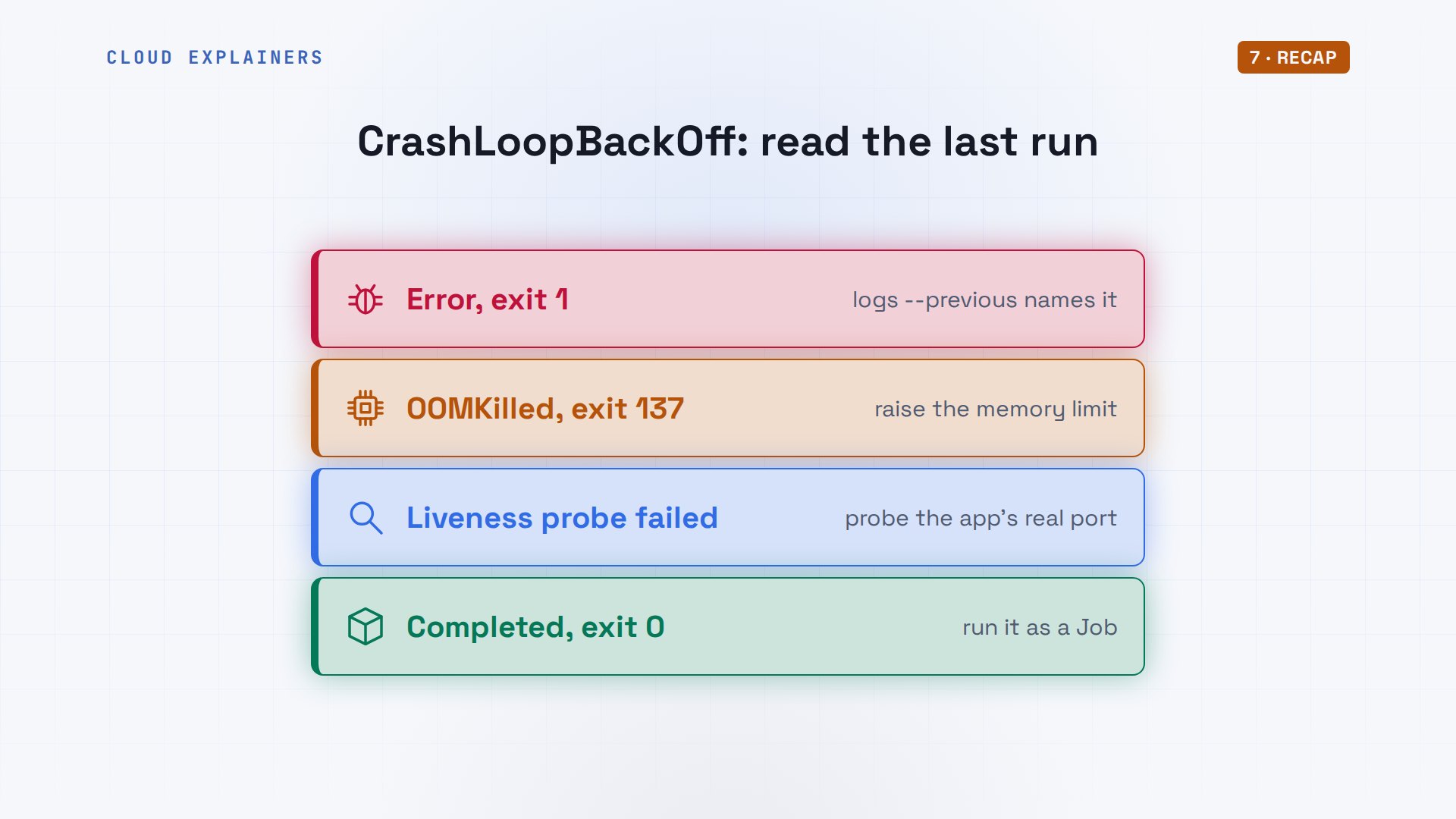
Read the last run: logs dash dash previous, then describe. An error in the log: fix what it names. OOMKilled: raise the memory limit. Liveness probe failed: fix the probe. Completed: make it a Job.
If your restart count finally stopped climbing, subscribing gets you more fixes tested on a real cluster.
Every crash in this video came from a real cluster, and every command and the lab files are linked in the description. Thanks for watching Cloud Explainers.
Sources
- Kubernetes docs, Pod Lifecycle (container restarts, back-off 10s/20s/40s capped at 300 s, reset after 10 minutes, CrashLoopBackOff)
- Kubernetes docs, Configure Liveness, Readiness and Startup Probes
- Kubernetes docs, Resource Management for Pods and Containers (memory limits, OOM kill)
- Kubernetes docs, Jobs
- Kubernetes docs, Secrets as environment variables
Demos: a container on our own Mac standing in for a laptop, running a real kind cluster; the swimming pool is made up. Every crash was the real cluster's. Watch the full video on YouTube.
More videos

How to Fix Python ModuleNotFoundError: No Module Named
Golang Pointers in 5 Minutes
How to Fix a Homelab ESXi Host Not Responding
PostgreSQL: Full Tutorial for Beginners
How a Load Balancer Works with HAProxy

How Python Virtual Environments Work
How to Fix Cloudflare Tunnel Errors in a Homelab
How to Fix API CORS Errors: No 'Access-Control-Allow-Origin'
How Authenticator App Login Codes Work (TOTP)
Git and GitHub: Full Tutorial for Beginners

How a Homelab Hypervisor Works (VMware ESXi)
How to Fix Kubernetes ImagePullBackOff Errors
How to Fix DNS 'Temporary Failure in Name Resolution' on Linux
How to Fix AWS CLI 'Unable to Locate Credentials'
Proxmox vs ESXi for Your Homelab: When Each One Wins
PostgreSQL UUID vs Auto Increment: Which Primary Key Should You Use?
Kubernetes: Full Tutorial for Beginners

How TCP Sockets Work

How to Fix PostgreSQL 'Could Not Connect to Server'
Claude Code Hooks Will Finally Make Sense After This
DevOps with Ansible Will Finally Make Sense After This
How SNMP Network Monitoring Works
How to Fix GitHub 'Permission Denied (publickey)' Errors
Docker: Full Tutorial for Beginners
How to Fix PostgreSQL 'Password Authentication Failed'
Why One Linux Server Handles More Users Than You Think
How to Fix Network 'Connection Refused' Errors
DevOps Pipelines: Jenkins vs GitHub Actions
Linux Nginx Reverse Proxy: Full Tutorial for Beginners
Every Networking Term a Beginner Needs in 12 Minutes
How to Fix Docker 'Permission Denied' on docker.sock
How to Fix Git 'Updates Were Rejected' When You Push
How to Fix nginx 502 Bad Gateway Errors on Linux
How to Fix Linux apt 'Could Not Get Lock' Errors (Ubuntu)

How Email Works on the Internet (SMTP) in 10 Minutes
The Python Roadmap for Beginners

Golang REST API with Gin: Full Tutorial for Beginners
How a WireGuard VPN Network Works

Linux Makefiles Will Finally Make Sense After This

SAML vs OAuth vs OpenID Connect: What's the Difference?
How to Fix Python cron Jobs That Never Run
Linux Bash Scripting: Full Tutorial for Beginners
How PXE Network Boot Works
How Active Directory Works

How to Fix a Linux systemd Service That Won't Start
Linux Logs: syslog vs journald
JWT vs Session Cookies: Which One Should You Use?
Docker vs Docker Compose: Which One Should You Use?
How to Fix Docker Compose Containers That Can't Talk to Each Other

Django Full Tutorial for Beginners
How Linux systemd Works

How to Fix 'Windows Cannot Access' Network Share Errors (SMB)
REST vs gRPC: Which One Should You Use?
How to Fix SSL Certificate Chain Errors (Missing Intermediate)
Every Python Concept for Beginners in 10 Minutes
Every SQL Join Type in 10 Minutes
Why OpenRouter Free Models Hit Their Limit So Fast
Why Your Gemini API Free Tier Runs Out So Fast
OpenRouter Will Finally Make Sense After This
How Redis Caching Works
Gemini API vs Vertex AI: Which One Should You Use?
How to Fix a Leaked Gemini API Key
Why Golang Uses Goroutines Instead of Threads
How to Fix Gemini API Error 429: Resource Exhausted

Claude Token Pricing Will Finally Make Sense After This
Why Python Web Scraping Returns Nothing (and the Fix)
Python uv vs pip: Which One Should You Use?
Python Automation: Full Tutorial for Beginners
How OAuth Login Works

Google AI Studio Will Finally Make Sense After This
What Happens When You Run a Docker Container
How to Fix Claude Code Billing Your API Key Instead of Your Plan
Why Passkeys Can't Be Phished Like Passwords
PowerShell vs Bash: Which One Should You Learn?
The Linux Roadmap for Beginners
Django vs FastAPI: Which One Should You Use?

Why SQLite Is the Most Used Database in the World
How a NoSQL Database Like MongoDB Works
How to Fix Python pip error: externally-managed-environment
How to Fix MySQL Too Many Connections Database Errors
Golang Concurrency Will Finally Make Sense After This
How Amazon S3 Works
How Kubernetes Works

How Git Works
How to Fix Docker Port Already Allocated Errors
How PostgreSQL Works
How to Fix Git Merge Conflicts

How to Fix No Space Left on Device in Linux
How the Internet Works
SQL vs NoSQL: When Each One Wins
How to Fix JWT Token Expired Errors (401 Unauthorized)
Claude API vs Claude Pro: Why Your Subscription Doesn't Include It
Why AI Agent Skills Beat Giant Prompts

Linux Cron Jobs Will Finally Make Sense After This

Security Logs Will Finally Make Sense After This
How to Fix a Security Leak: An API Key Pushed to GitHub
DNS Will Finally Make Sense After This
Never Ignore a Security Update
Two-Factor Authentication Will Finally Make Sense
Never Expose a Database to the Internet
SSH Keys vs Passwords: Which Is Safer for Security?
The 5 Levels of Linux Boot: From Power On to Login
The 5 Levels of Network Firewalls
Password Security: Why Hackers Crack Weak Passwords
Why Your Linux Server Runs Out of Memory
HTTP vs HTTPS: What Actually Changes on Your Network

Every Linux File Permission You Need to Know
Linux Processes vs Threads: When Each One Wins
The OSI Model Will Finally Make Sense After This
The 7 Levels of Git
Every Network Troubleshooting Command You Need
Hashing vs Encryption in Cybersecurity: When Each One Wins
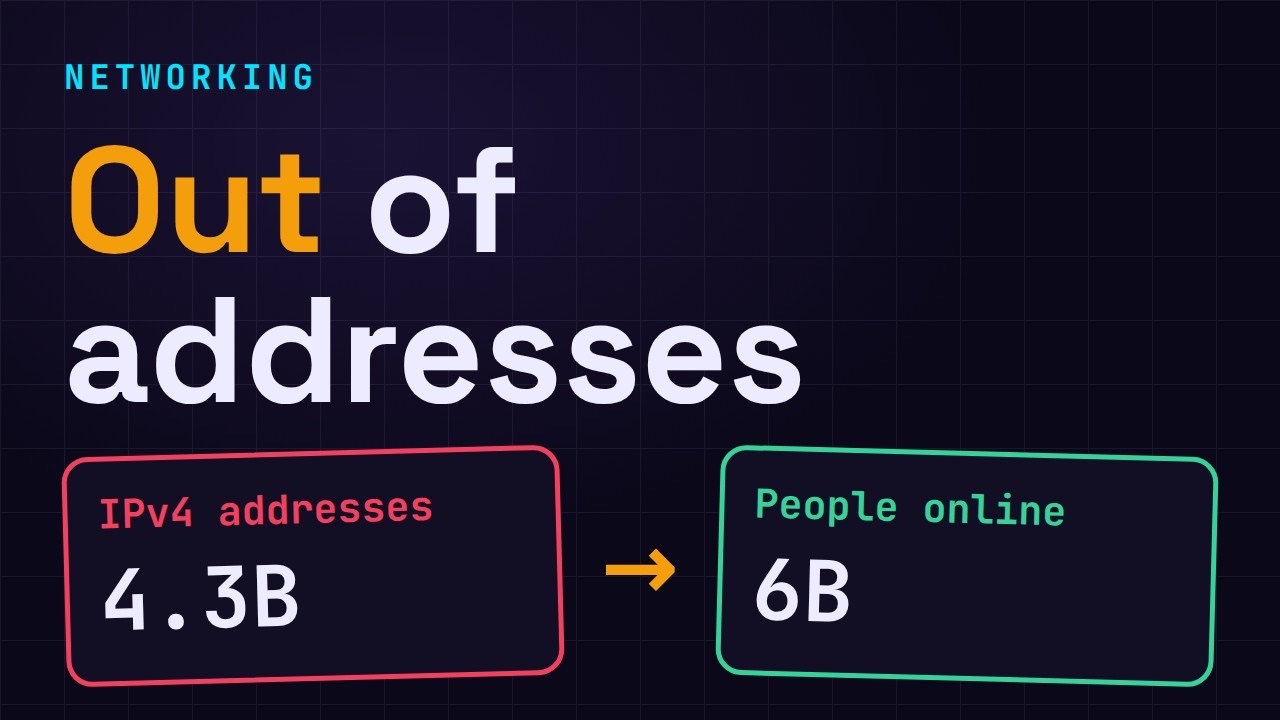
Why the Internet Ran Out of IP Addresses
Linux Package Managers: apt vs Snap vs Flatpak
Why Python Is Slow (and When It Doesn't Matter)
TCP vs UDP: When Each One Wins
Stop Running Linux as Root (Do This Instead)
Linux Users and Groups Will Finally Make Sense

Why Phishing Beats Good Security (and How to Spot It)
The 7 Levels of Docker

AI Agents Will Finally Make Sense After This

Stop Using git push --force (Use This Instead)
Agent Skills vs MCP: When Each One Wins
Networking Will Finally Make Sense After This
Every Linux Command You Actually Need
The 7 Levels of Cybersecurity
Every System Design Concept You Need, in One Diagram