
The 7 Levels of Git
Git for beginners, in 7 levels: commits, undo (restore and revert), branches, merging and merge conflicts, remotes (push, clone, pull), teamwork when your push is rejected (pull --rebase, never --force), and rescuing lost commits with the reflog. One small project, a kettle shop's website, from an empty folder to a team of two, every command a real run.
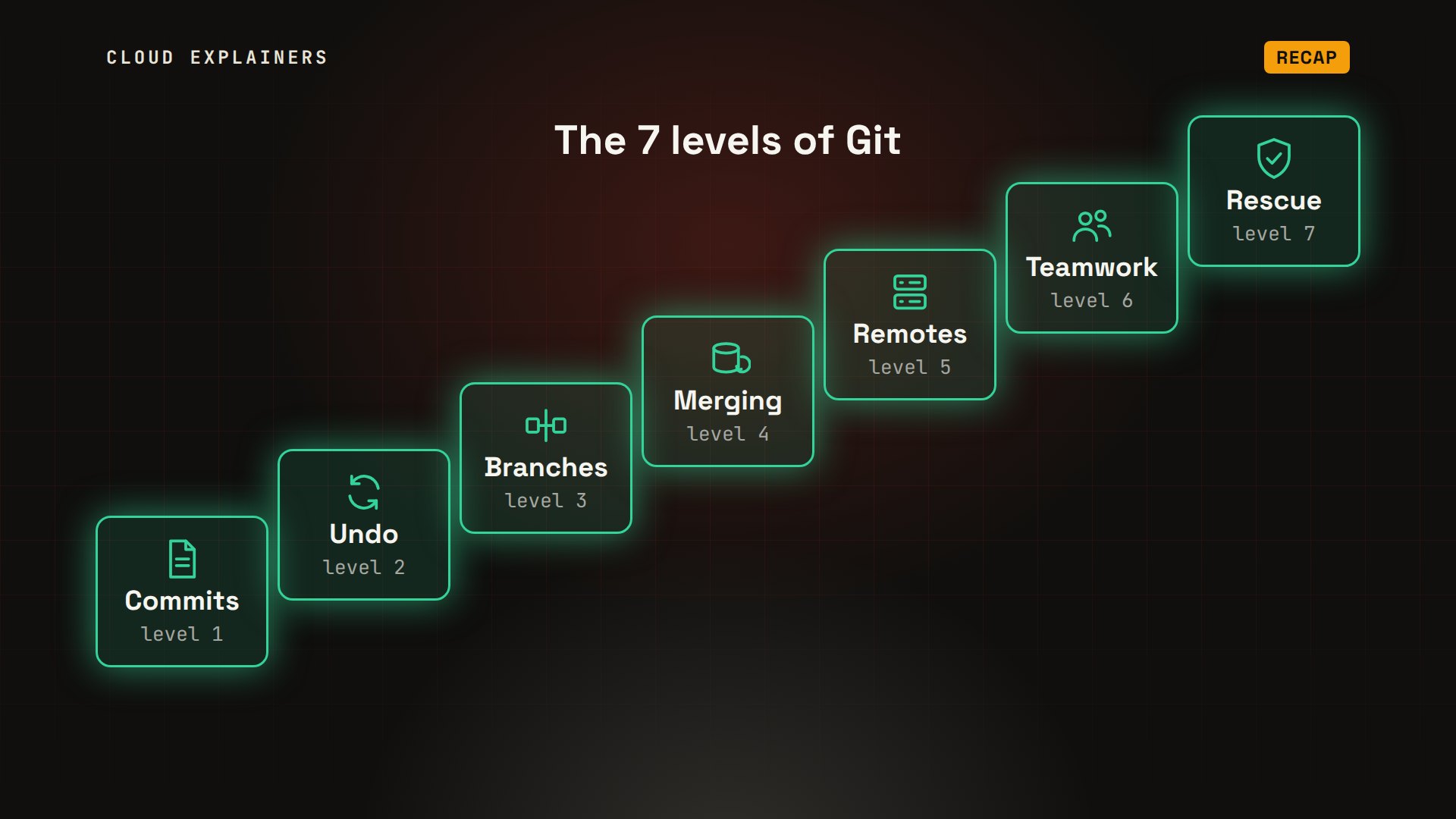
The 7 levels of Git
Your website worked yesterday. Today it's broken, and you can't remember what you changed. Git can tell you. git diff shows the one line that changed: the blue kettle's price went from 25 dollars to 2. And one more command, git restore, brings back the version that worked.
git diffdiff --git a/index.html b/index.html
index 6dfa3e4..9686fa9 100644
--- a/index.html
+++ b/index.html
@@ -1,3 +1,3 @@
 <h1>Kettle shop</h1>
-<p>Blue kettle: $25</p>
+<p>Blue kettle: $2</p>
 <p>Red kettle: $30</p>
git restore index.html
That's one level of Git. In this video we climb all seven, from your first commit to rescuing work you thought was gone: commits, undo, branches, merging, remotes, teamwork, and rescue. We follow one small project, Ana's kettle shop website, and every command is a real run, on a lab of three computers built for this video.
Level 1: Commits
Level one: commits. Git is a version control system. It keeps every saved version of your project, so you can compare them, and bring any of them back. Each saved version is called a commit: a snapshot of all your files at one moment.
So far, the shop's website is one file, index.html, with two kettles and their prices. git init turns the folder into a repository. It creates a hidden folder called dot git, where Git keeps the whole history. git status says index.html is untracked: Git can see the file, but it isn't saving it yet.
cat index.html<h1>Kettle shop</h1>
<p>Blue kettle: $25</p>
<p>Red kettle: $30</p>
git initInitialized empty Git repository in /home/ana/shop/.git/
ls -a. .. .git index.html
git statusOn branch main

No commits yet

Untracked files:
  (use "git add <file>..." to include in what will be committed)
	index.html

nothing added to commit but untracked files present (use "git add" to track)
Git has three places. The working folder holds the files you edit. The staging area holds what will go into the next commit. And the repository holds every commit ever made. git add copies a change from the working folder to the staging area. git commit saves everything staged as a new snapshot.
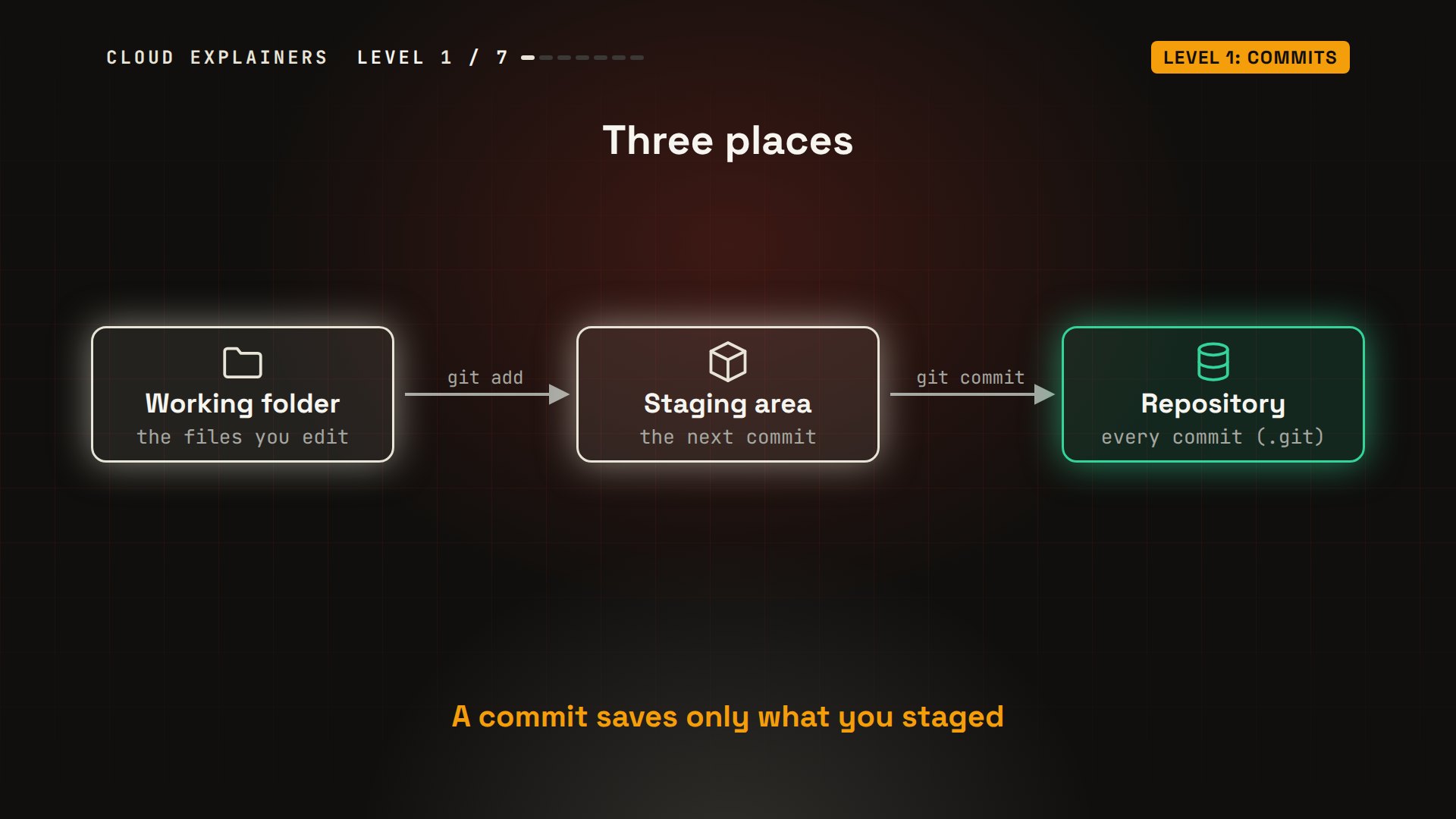
So Ana runs git add, and status now lists index.html under changes to be committed. git commit, with a short message, saves the snapshot. git log shows it: a long ID, the author, the date, and the message. Git computes that ID from the commit's contents, so every commit gets its own.
git add index.html
git statusOn branch main

No commits yet

Changes to be committed:
  (use "git rm --cached <file>..." to unstage)
	new file:   index.html
git commit -m "Create the shop homepage"[main (root-commit) 299d314] Create the shop homepage
 1 file changed, 3 insertions(+)
 create mode 100644 index.html
git logcommit 299d31416d2f47efd2dfad9c1effa6a31f650e3f (HEAD -> main)
Author: Ana <ana@example.com>
Date:   Wed Oct 28 17:03:16 2026 +0000

    Create the shop homepage
Level 2: Undo
Level two: undo. There are two kinds of mistake: a change you haven't committed yet, and a change you already committed. Git has a different command for each.
Back to the broken page from the start. The short form of git status marks index.html with an M: modified since the last commit. git diff compares the file with that commit. A line starting with minus was removed; a line starting with plus was added. Then the restore command throws the change away. Careful: that change is gone for good.
git status --shortM index.html
cat index.html<h1>Kettle shop</h1>
<p>Blue kettle: $25</p>
<p>Red kettle: $30</p>
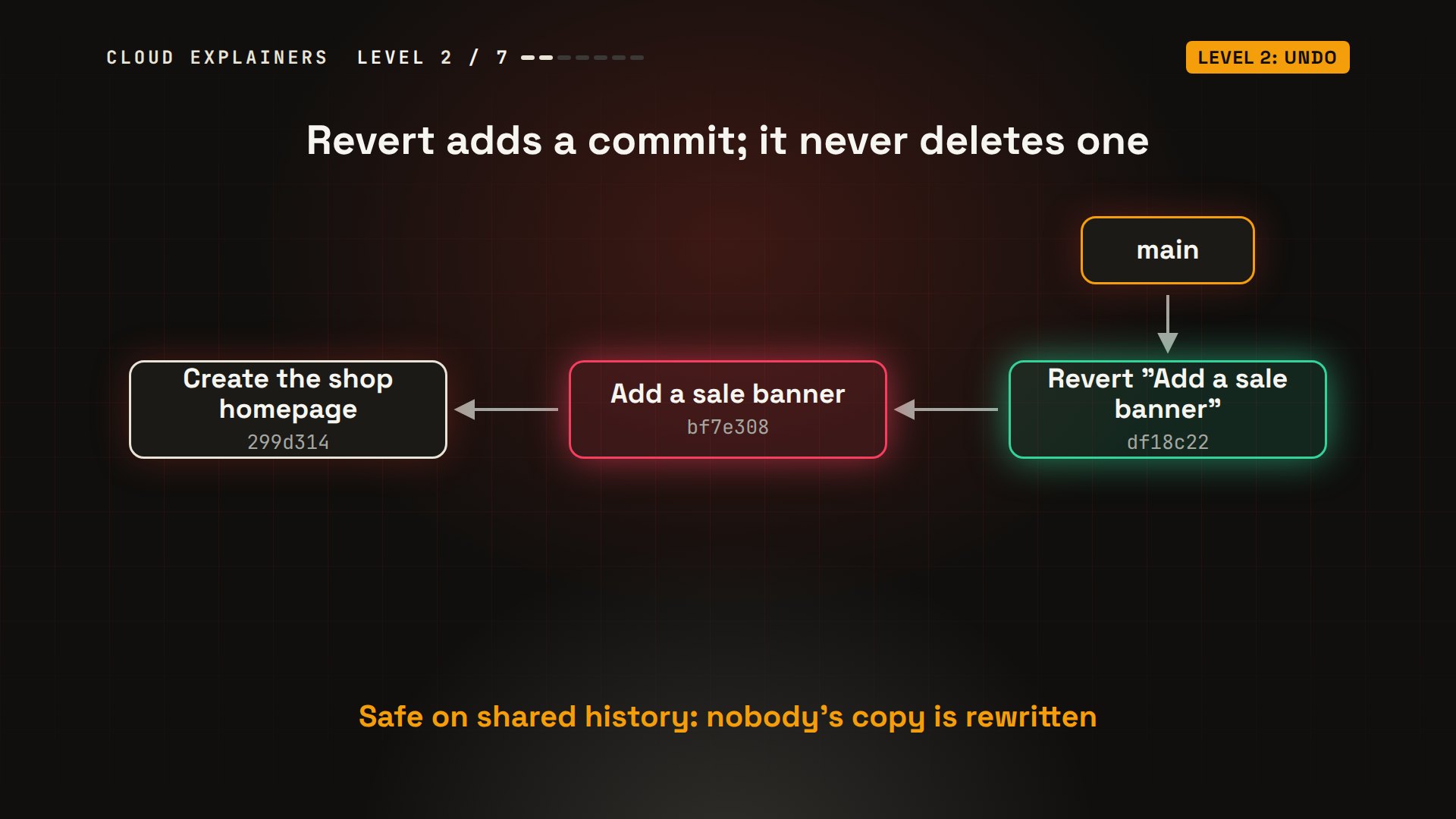
Now a mistake that did get committed. Ana opens the page in an editor, and adds a sale banner that says every kettle is free. Dash a stages every changed file Git already tracks, so add and commit happen in one step. To undo it: git revert HEAD. HEAD means where you are now: the newest commit on your branch. Dash dash no-edit keeps Git's usual message, so no editor opens. Revert doesn't delete anything. It makes a new commit that does the opposite. The log has all three commits, and the page is back to normal.
git commit -am "Add a sale banner"[main bf7e308] Add a sale banner
 1 file changed, 1 insertion(+)
git revert HEAD --no-edit[main df18c22] Revert "Add a sale banner"
 Date: Wed Oct 28 17:03:16 2026 +0000
 1 file changed, 1 deletion(-)
git log --onelinedf18c22 (HEAD -> main) Revert "Add a sale banner"
bf7e308 Add a sale banner
299d314 Create the shop homepage
cat index.html<h1>Kettle shop</h1>
<p>Blue kettle: $25</p>
<p>Red kettle: $30</p>
Here's that history as a picture. Each box is a commit, and each one points back to the commit before it. The mistake is still in the history, and the revert commit undoes it. That matters once other people have copies of the project: revert never rewrites the history they already have.
Level 3: Branches
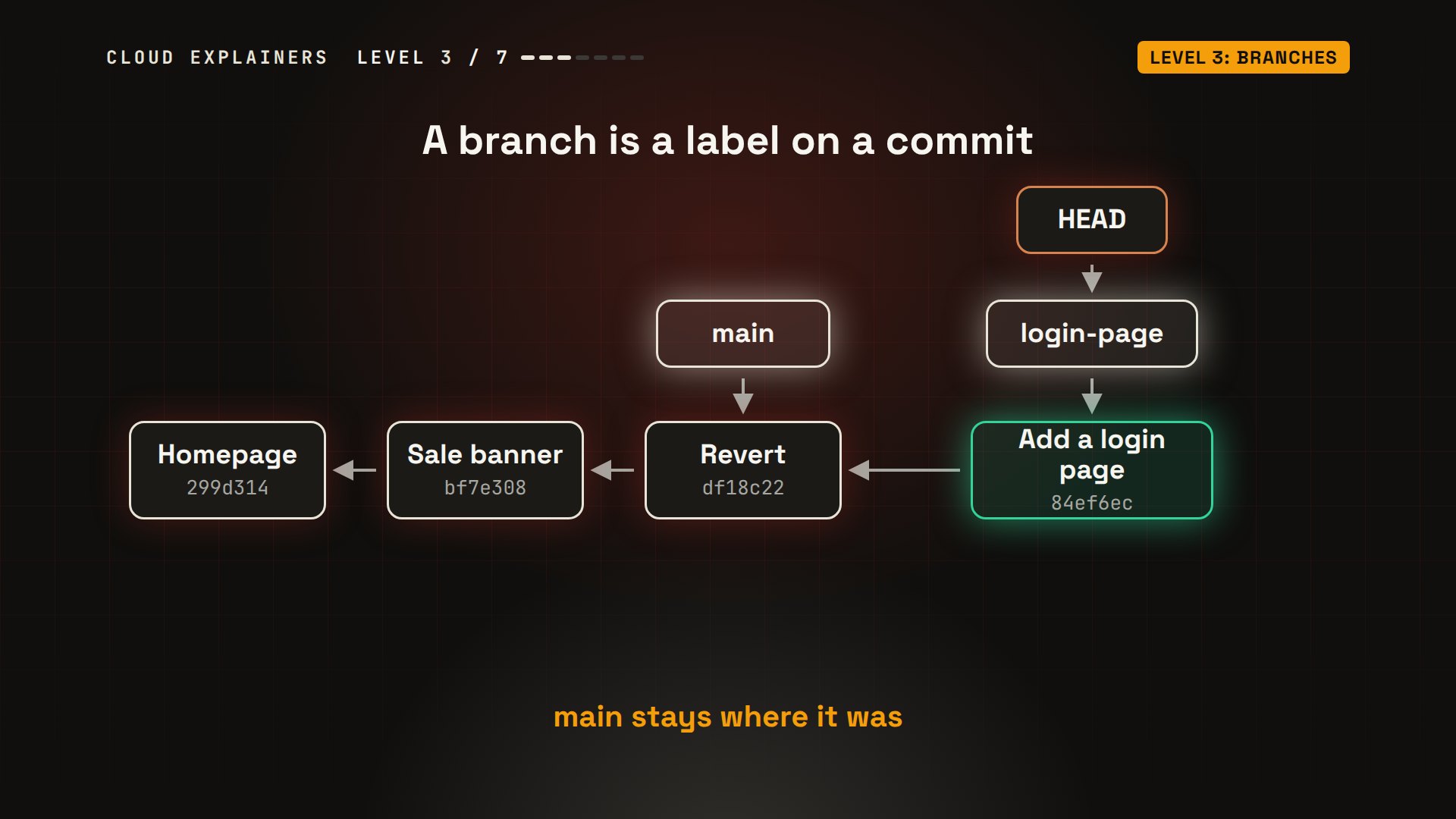
Level three: branches. Ana wants to build a login page without breaking the live shop while she works on it. A branch is a separate line of work. And in Git, a branch is just a label that points at one commit, and moves forward with each new commit.
Here's the history so far, with main pointing at the newest commit. git switch dash c login-page creates a new label, and moves Ana onto it. HEAD always marks the branch you're on. Her next commit moves login-page forward. main stays where it was.
On the laptop: switch dash c, add the new file, and commit. git branch lists the branches; the star marks the one you're on. Now switch back to main, and list the files: login.html is gone. It isn't deleted. It lives on the other branch. Switch back, and it's there again.
git switch -c login-pageSwitched to a new branch 'login-page'
git add login.html
git commit -m "Add a login page"[login-page 84ef6ec] Add a login page
 1 file changed, 4 insertions(+)
 create mode 100644 login.html
git branch* login-page
  main
git switch mainSwitched to branch 'main'
lsindex.html
git switch login-pageSwitched to branch 'login-page'
lsindex.html login.html
Level 4: Merging
Level four: merging. The login page works, so it should go into main. Merging brings the commits of one branch into another.
Ana switches to main and runs git merge login-page. Git says fast-forward. main had no new commits of its own, so Git simply moved the main label forward, onto the login page commit. No new commit needed.
git switch mainSwitched to branch 'main'
git merge login-pageUpdating df18c22..84ef6ec
Fast-forward
 login.html | 4 ++++
 1 file changed, 4 insertions(+)
 create mode 100644 login.html
That's the easy case. The other case is when both branches have new commits. Ana starts a summer-sale branch, and changes the blue kettle's price to 20 dollars. Back on main, she marks the same kettle as in stock. Now the two lines of work have split, and Git has to combine them with a merge: a new commit with two parents.
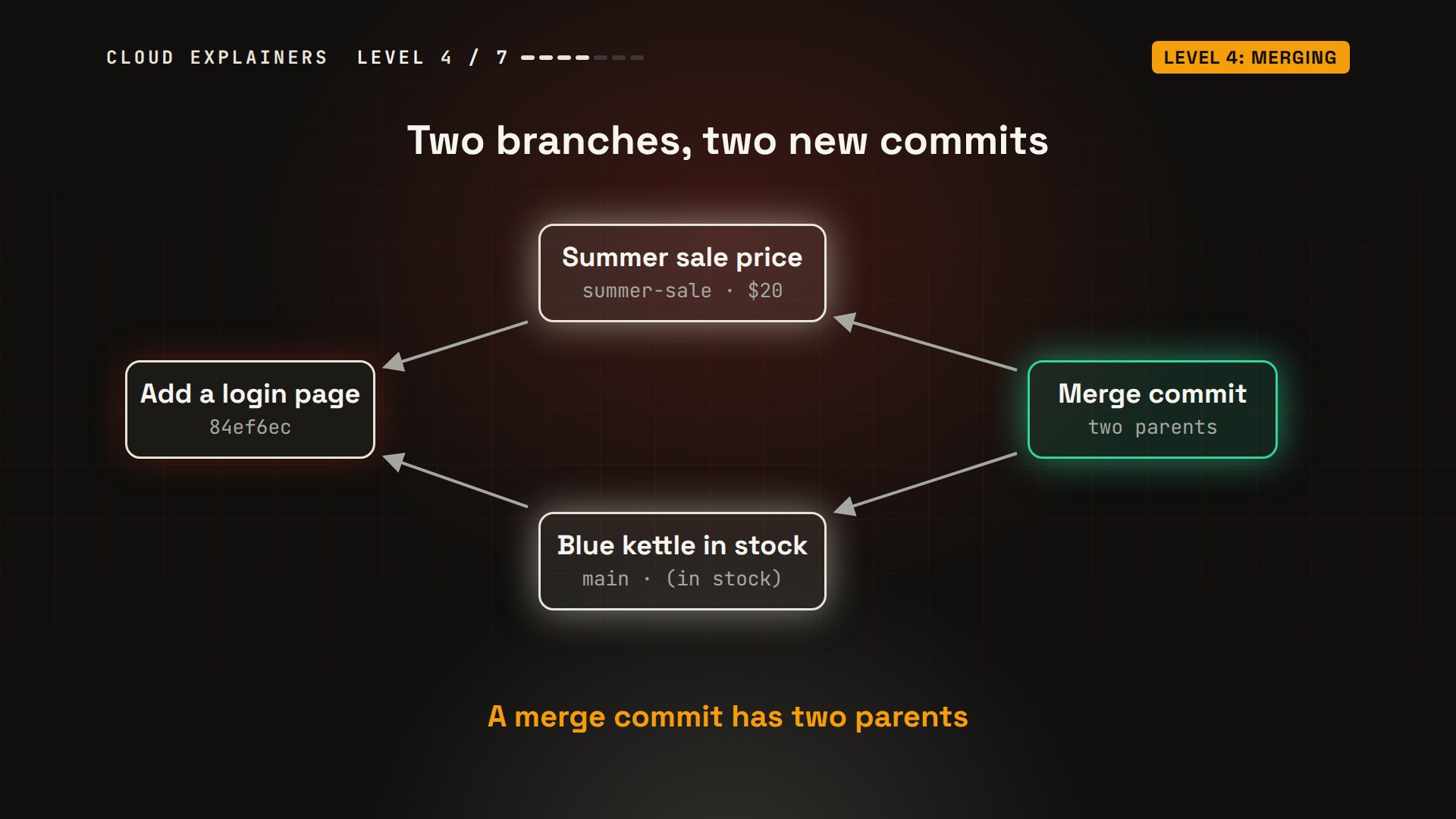
Here are those steps for real. And the merge stops: a conflict in index.html. Both branches changed the same line, and Git won't guess which change is right. So it writes both into the file. Above the equals signs is HEAD, Ana's main branch. Below them is the summer sale.
git switch -c summer-saleSwitched to a new branch 'summer-sale'
git commit -am "Summer sale price for the blue kettle"[summer-sale b613458] Summer sale price for the blue kettle
 1 file changed, 1 insertion(+), 1 deletion(-)
git switch mainSwitched to branch 'main'
git commit -am "Show that the blue kettle is in stock"[main fdab313] Show that the blue kettle is in stock
 1 file changed, 1 insertion(+), 1 deletion(-)
git merge summer-saleAuto-merging index.html
CONFLICT (content): Merge conflict in index.html
Automatic merge failed; fix conflicts and then commit the result.
cat index.html<h1>Kettle shop</h1>
<<<<<<< HEAD
<p>Blue kettle: $25 (in stock)</p>
=======
<p>Blue kettle: $20</p>
>>>>>>> summer-sale
<p>Red kettle: $30</p>
Ana opens the file in an editor, keeps both changes on that line, 20 dollars and in stock, and deletes the marker lines. git add tells Git the conflict is solved, and git commit finishes the merge. Then git log draws it as a graph: two lines of work, joined again by the merge commit.
cat index.html<h1>Kettle shop</h1>
<p>Blue kettle: $20 (in stock)</p>
<p>Red kettle: $30</p>
git add index.html
git commit -m "Merge the summer sale"[main 2193693] Merge the summer sale
git log --oneline --graph*   2193693 (HEAD -> main) Merge the summer sale
|\
| * b613458 (summer-sale) Summer sale price for the blue kettle
* | fdab313 Show that the blue kettle is in stock
|/
* 84ef6ec (login-page) Add a login page
* df18c22 Revert "Add a sale banner"
* bf7e308 Add a sale banner
* 299d314 Create the shop homepage
Level 5: Remotes
Level five: remotes. So far, everything lives on Ana's laptop. If the laptop dies, the shop's history dies with it. A remote is a copy of the repository on another computer, usually a hosting service like GitHub or GitLab. In our lab, a small Git server plays that part.
git push sends Ana's commits to the server. Then Ben joins the shop. git clone copies the whole repository to his laptop, every commit included. Ben makes a commit, and pushes it. And git pull brings his commit down to Ana.
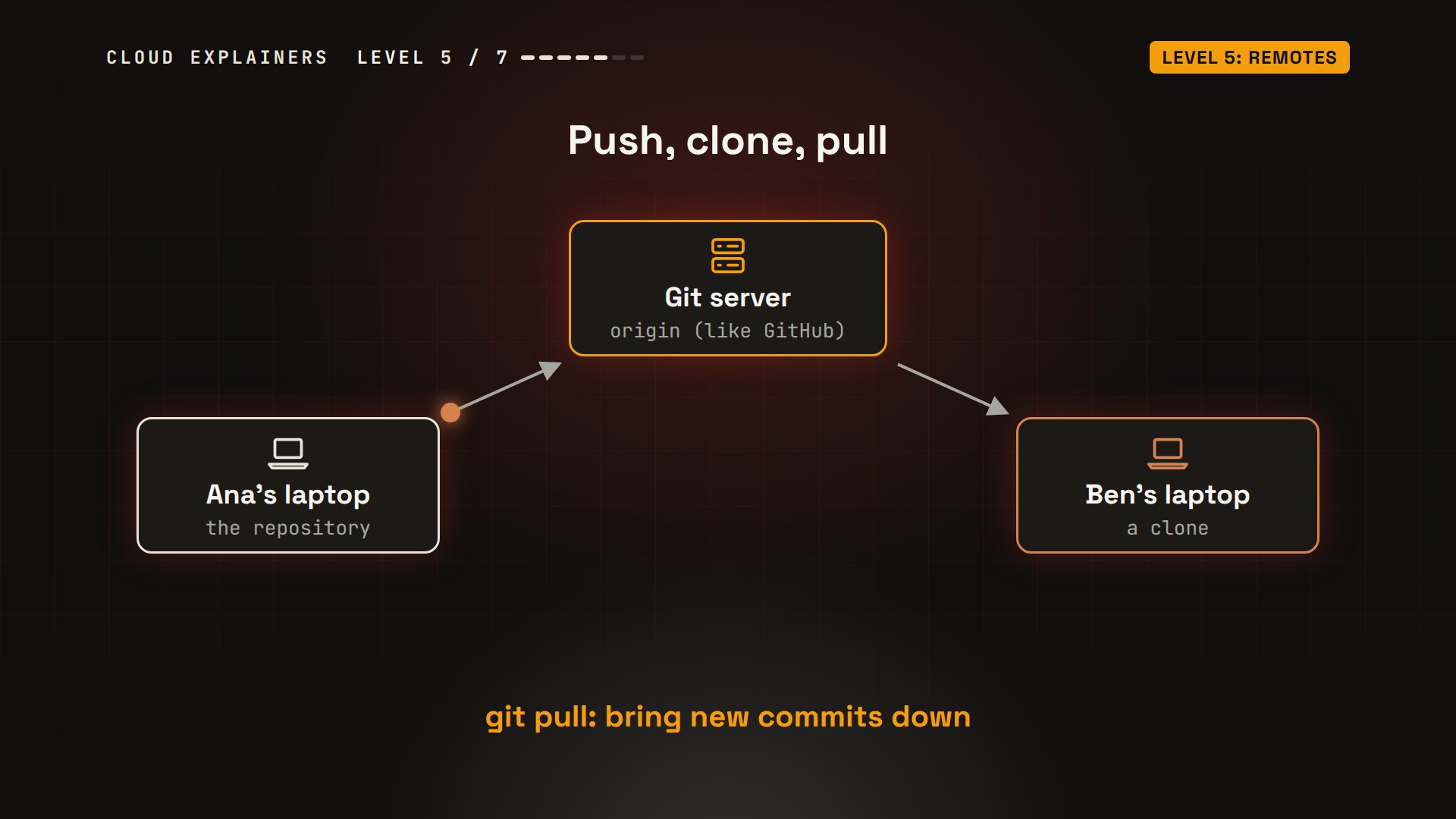
First, Ana tells her repository where the server is. origin is the usual name for your main remote. Then git push dash u origin main. Dash u remembers the pairing, so from now on, plain git push and git pull know where to go.
git remote add origin git@git-server:shop.git
git push -u origin mainEnumerating objects: 19, done.
Counting objects: 100% (19/19), done.
Delta compression using up to 10 threads
Compressing objects: 100% (17/17), done.
Writing objects: 100% (19/19), 1.77 KiB | 908.00 KiB/s, done.
Total 19 (delta 2), reused 0 (delta 0), pack-reused 0
To git-server:shop.git
 * [new branch]      main -> main
branch 'main' set up to track 'origin/main'.
On Ben's laptop: git clone. His log has all 7 of Ana's commits, and the label origin slash main: where the server's main branch was the last time they talked. Ben adds a contact email to the page, commits, and pushes.
git clone git@git-server:shop.gitCloning into 'shop'...
remote: Enumerating objects: 19, done.
remote: Counting objects: 100% (19/19), done.
remote: Compressing objects: 100% (17/17), done.
remote: Total 19 (delta 2), reused 0 (delta 0), pack-reused 0
Receiving objects: 100% (19/19), done.
Resolving deltas: 100% (2/2), done.
cd shop
git log --oneline2193693 (HEAD -> main, origin/main, origin/HEAD) Merge the summer sale
fdab313 Show that the blue kettle is in stock
b613458 Summer sale price for the blue kettle
84ef6ec Add a login page
df18c22 Revert "Add a sale banner"
bf7e308 Add a sale banner
299d314 Create the shop homepage
git commit -am "Add a contact email"[main 6bd81a2] Add a contact email
 1 file changed, 1 insertion(+)
git pushEnumerating objects: 5, done.
Counting objects: 100% (5/5), done.
Delta compression using up to 10 threads
Compressing objects: 100% (3/3), done.
Writing objects: 100% (3/3), 362 bytes | 362.00 KiB/s, done.
Total 3 (delta 0), reused 0 (delta 0), pack-reused 0
To git-server:shop.git
   2193693..6bd81a2  main -> main
Back on Ana's laptop: git pull. It's a fast-forward again, and the last line of the page is now Ben's contact email.
git pullremote: Enumerating objects: 5, done.
remote: Counting objects: 100% (5/5), done.
remote: Compressing objects: 100% (3/3), done.
remote: Total 3 (delta 0), reused 0 (delta 0), pack-reused 0
Unpacking objects: 100% (3/3), 342 bytes | 342.00 KiB/s, done.
From git-server:shop
   2193693..6bd81a2  main       -> origin/main
Updating 2193693..6bd81a2
Fast-forward
 index.html | 1 +
 1 file changed, 1 insertion(+)
tail -n 1 index.html<p>Questions? hello@kettleshop.example</p>
Level 6: Teamwork
Level six: teamwork, and the day your push is rejected. It happens to every beginner, and it looks scary, but it's Git protecting someone's work.
Ben adds an FAQ page, commits it, and pushes it to the server.
git add faq.html
git commit -m "Add an FAQ page"[main 73c7b85] Add an FAQ page
 1 file changed, 2 insertions(+)
 create mode 100644 faq.html
git pushEnumerating objects: 4, done.
Counting objects: 100% (4/4), done.
Delta compression using up to 10 threads
Compressing objects: 100% (3/3), done.
Writing objects: 100% (3/3), 371 bytes | 371.00 KiB/s, done.
Total 3 (delta 0), reused 0 (delta 0), pack-reused 0
To git-server:shop.git
   6bd81a2..73c7b85  main -> main
Meanwhile, Ana commits a log-in button, and runs git push. Rejected. The server has a commit she doesn't have yet: Ben's FAQ page. If her push went through, Ben's commit would be thrown away, so Git refuses, and tells her to pull first.
git commit -am "Add a log-in button"[main bf26074] Add a log-in button
 1 file changed, 1 insertion(+)
git pushTo git-server:shop.git
 ! [rejected]        main -> main (fetch first)
error: failed to push some refs to 'git-server:shop.git'
hint: Updates were rejected because the remote contains work that you do not
hint: have locally. This is usually caused by another repository pushing to
hint: the same ref. If you want to integrate the remote changes, use
hint: 'git pull' before pushing again.
hint: See the 'Note about fast-forwards' in 'git push --help' for details.
Here's what happened. Both of them built on the contact email commit. Ben's FAQ page is on the server, and Ana's button is only on her laptop. The history has split. Ana has to bring Ben's commit in first. A merge would join them with a merge commit, like level four. A rebase replays Ana's commit on top of Ben's instead, so the history stays one straight line.
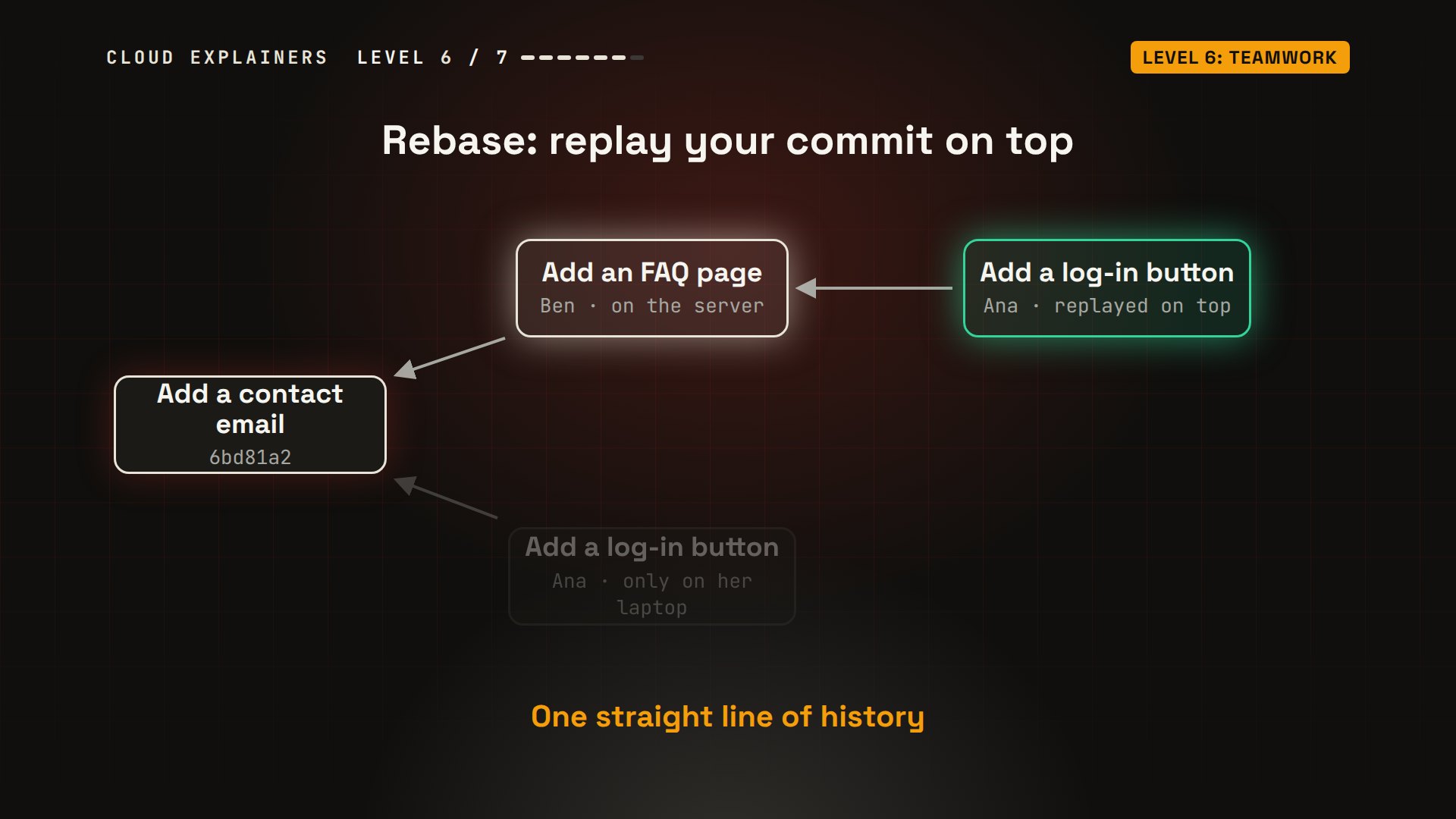
Ana runs git pull, and it stops: you have divergent branches, and you need to say how to combine them. Both sides have new commits, so Git won't choose for you. git pull dash dash rebase picks the rebase. Now the push works, and the log is one straight line: Ana's button on top of Ben's FAQ page.
git pullremote: Enumerating objects: 4, done.
remote: Counting objects: 100% (4/4), done.
remote: Compressing objects: 100% (3/3), done.
remote: Total 3 (delta 0), reused 0 (delta 0), pack-reused 0
Unpacking objects: 100% (3/3), 351 bytes | 351.00 KiB/s, done.
From git-server:shop
   6bd81a2..73c7b85  main       -> origin/main
hint: You have divergent branches and need to specify how to reconcile them.
hint: You can do so by running one of the following commands sometime before
hint: your next pull:
hint:
hint:   git config pull.rebase false  # merge
hint:   git config pull.rebase true   # rebase
hint:   git config pull.ff only       # fast-forward only
hint:
hint: You can replace "git config" with "git config --global" to set a default
hint: preference for all repositories. You can also pass --rebase, --no-rebase,
hint: or --ff-only on the command line to override the configured default per
hint: invocation.
fatal: Need to specify how to reconcile divergent branches.
git pull --rebaseSuccessfully rebased and updated refs/heads/main.
git pushEnumerating objects: 5, done.
Counting objects: 100% (5/5), done.
Delta compression using up to 10 threads
Compressing objects: 100% (3/3), done.
Writing objects: 100% (3/3), 330 bytes | 330.00 KiB/s, done.
Total 3 (delta 1), reused 0 (delta 0), pack-reused 0
To git-server:shop.git
   73c7b85..b30ff49  main -> main
git log --oneline -4b30ff49 (HEAD -> main, origin/main) Add a log-in button
73c7b85 Add an FAQ page
6bd81a2 Add a contact email
2193693 Merge the summer sale
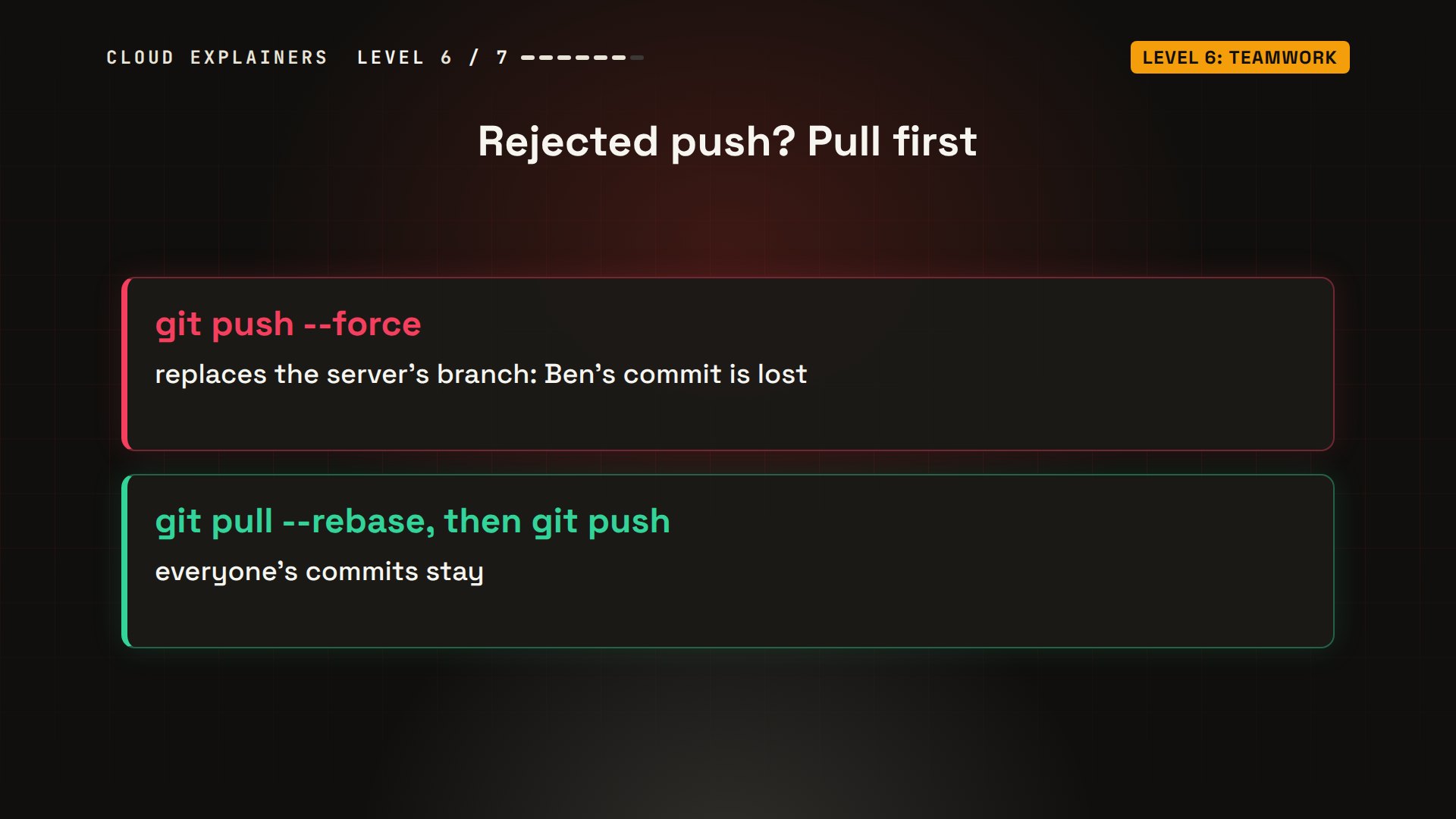
And never fix a rejected push with dash dash force. It replaces the server's branch with yours, and Ben's commit would be thrown away. Pull first, then push. We have a whole video on the safer way to force push.
Level 7: Rescue
Level seven: rescue. Ana wants to undo her last commit. HEAD tilde one means one commit back from HEAD. She types HEAD tilde three instead, three commits back, and adds dash dash hard.
git reset dash dash hard moves the branch back three commits, and makes the files match. The log now ends at the summer sale merge, so her log-in button, Ben's FAQ page and the contact email are gone from the history.
git reset --hard HEAD~3HEAD is now at 2193693 Merge the summer sale
git log --oneline -42193693 (HEAD -> main) Merge the summer sale
fdab313 Show that the blue kettle is in stock
b613458 (summer-sale) Summer sale price for the blue kettle
84ef6ec (login-page) Add a login page
But Git keeps a second record: the reflog. Every time HEAD moves, after a commit, a switch, a pull, or a reset, Git writes down where it was. Those three commits aren't deleted. Ana's main branch doesn't point at them any more, but the reflog still does. Here they're on the server too, because she pushed them; the reflog also saves commits you never pushed.
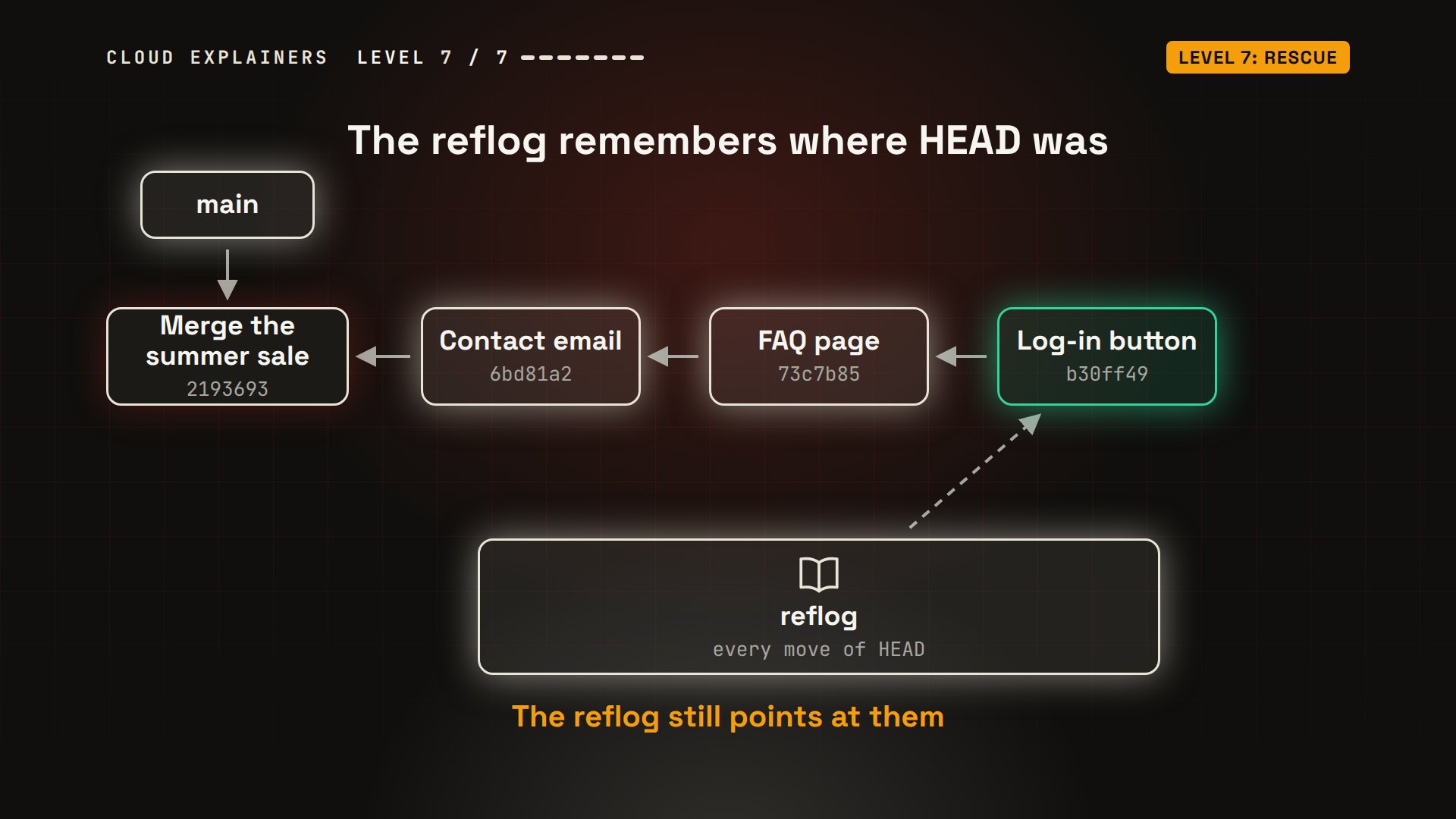
git reflog lists those moves, newest first. HEAD@{0} is the reset. HEAD@{1} is where Ana was just before it. git reset dash dash hard HEAD@{1} goes back there, and all three commits are back.
git reflog -52193693 (HEAD -> main) HEAD@{0}: reset: moving to HEAD~3
b30ff49 (origin/main) HEAD@{1}: pull --rebase (finish): returning to refs/heads/main
b30ff49 (origin/main) HEAD@{2}: pull --rebase (pick): Add a log-in button
73c7b85 HEAD@{3}: pull --rebase (start): checkout 73c7b85ed3b6f20750b3b5251e0d7baa037ea573
bf26074 HEAD@{4}: commit: Add a log-in button
git reset --hard HEAD@{1}HEAD is now at b30ff49 Add a log-in button
git log --oneline -4b30ff49 (HEAD -> main, origin/main) Add a log-in button
73c7b85 Add an FAQ page
6bd81a2 Add a contact email
2193693 Merge the summer sale
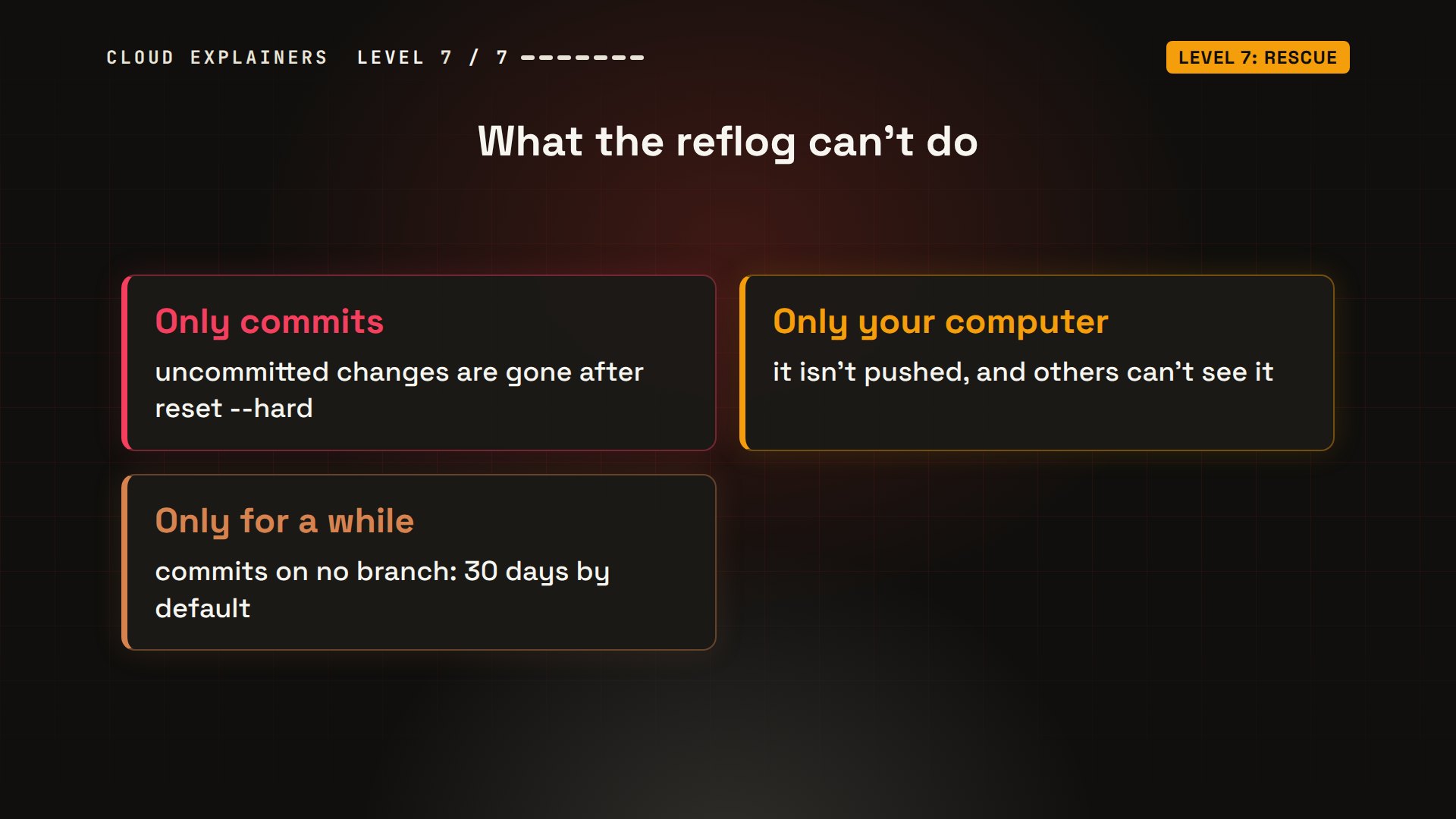
Two warnings. The reflog only rescues commits: a change you never committed is gone after a hard reset. And the reflog lives only on your own computer, for a limited time. By default, entries for commits that no branch points at are kept for 30 days.
Recap
So, the seven levels of Git. One: commits, snapshots of your project. Two: restore throws away a change you haven't committed, and revert undoes a commit. Three: branches, labels for separate lines of work. Four: merge them, and solve conflicts by hand. Five: push, clone and pull, to share through a remote. Six: a rejected push means pull first, never force. Seven: the reflog brings back lost commits.
A question for the comments: which Git mistake has cost you the most time? Tell me in the comments.
Every command in this video was a real run, on a lab built for this video.
Sources
Demos: real runs in a small lab of three Docker containers on one machine: a Git server standing in for GitHub, and two laptops. Git is a trademark of the Software Freedom Conservancy; this video is not made or endorsed by the Git project. Watch the full video on YouTube.
More videos
Linux Processes vs Threads: When Each One Wins
The OSI Model Will Finally Make Sense After This
Every Network Troubleshooting Command You Need
Hashing vs Encryption in Cybersecurity: When Each One Wins
Why the Internet Ran Out of IP Addresses
Linux Package Managers: apt vs Snap vs Flatpak
Why Python Is Slow (and When It Doesn't Matter)
TCP vs UDP: When Each One Wins
Stop Running Linux as Root (Do This Instead)
Linux Users and Groups Will Finally Make Sense

Why Phishing Beats Good Security (and How to Spot It)

The 7 Levels of Docker

AI Agents Will Finally Make Sense After This
Stop Using git push --force (Use This Instead)
Agent Skills vs MCP: When Each One Wins
Networking Will Finally Make Sense After This

Every Linux Command You Actually Need

The 7 Levels of Cybersecurity

Every System Design Concept You Need, in One Diagram
