How a Load Balancer Works with HAProxy
How a load balancer works, shown with HAProxy on real Ubuntu servers: one address shared by three web servers (about three times the pages a second of one), round robin, what runners get when a server stops and there are no health checks (a 503 after three seconds), health checks marking a stopped server DOWN in seconds, an HTTP check catching a server whose disk is full, a basket that empties until a sticky cookie, and X-Forwarded-For.
One address, three servers
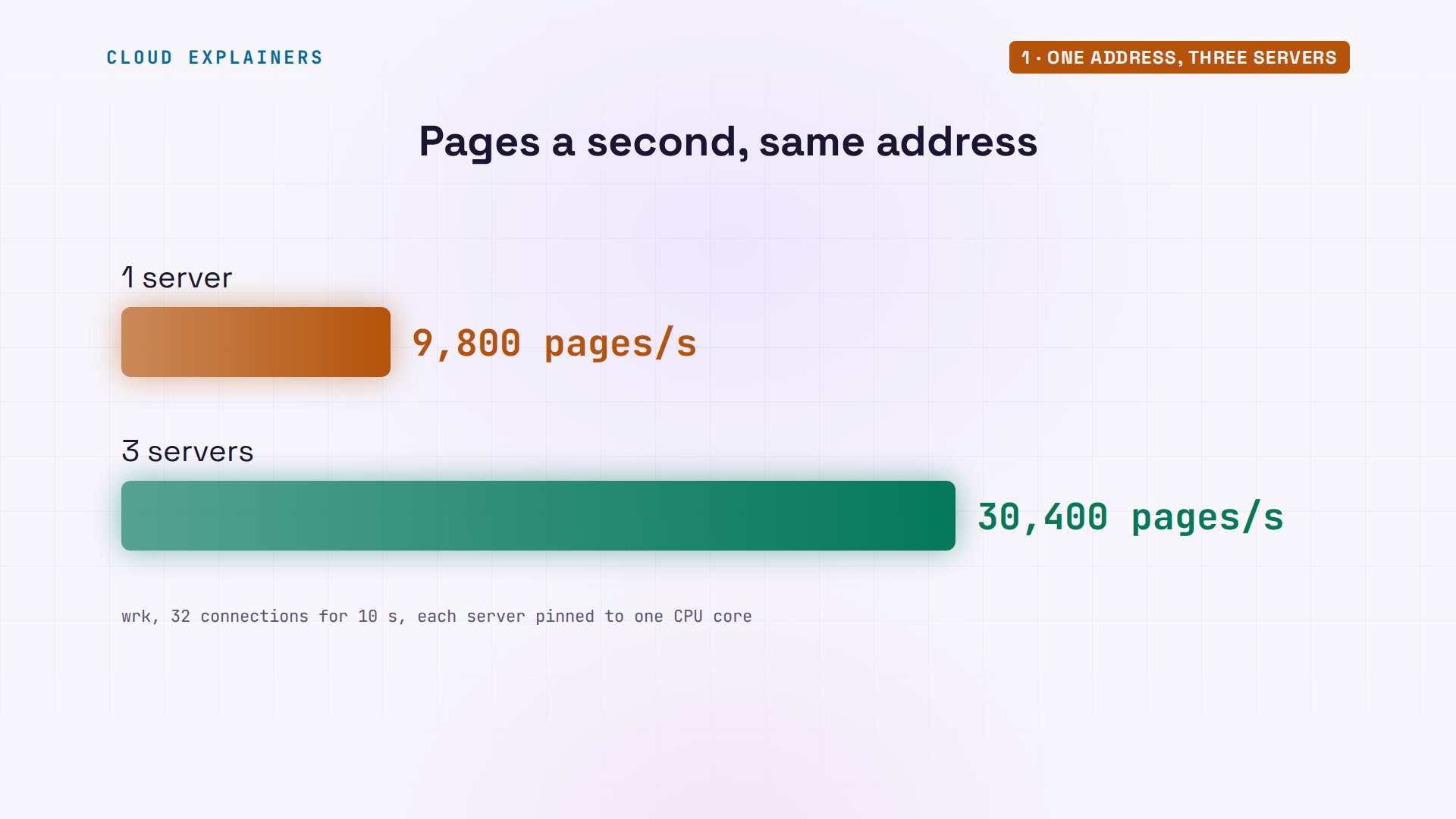
Your site runs on one server, and on a busy morning, one server isn't enough. Ana runs the sign-up site for a city marathon. Ben, a runner, points a load-testing tool, wrk, at its page: it keeps thirty-two connections busy for ten seconds. With one server behind the address: about 9,800 pages a second. Sign-ups open at nine. Everyone arrives at nine. So Ana puts two more servers behind the load balancer at that address: about 30,400.
wrk -t2 -c32 -d10s http://race.lan/Running 10s test @ http://race.lan/
  2 threads and 32 connections
  Thread Stats   Avg      Stdev     Max   +/- Stdev
    Latency     3.30ms    1.08ms  29.32ms   93.48%
    Req/Sec     4.94k   364.69     9.49k    97.51%
  98883 requests in 10.10s, 137.12MB read
Requests/sec:   9790.59
Transfer/sec:     13.58MB
wrk -t2 -c32 -d10s http://race.lan/Running 10s test @ http://race.lan/
  2 threads and 32 connections
  Thread Stats   Avg      Stdev     Max   +/- Stdev
    Latency     1.11ms  691.62us  16.79ms   89.51%
    Req/Sec    15.26k   688.14    16.14k    89.11%
  306812 requests in 10.10s, 425.44MB read
Requests/sec:  30376.90
Transfer/sec:     42.12MB
The load balancer here is HAProxy, free and open source, and it just tripled the pages. We'll watch it share the work and notice a dead server. But how can it spot a dead one, and still miss a broken one?
What a load balancer does
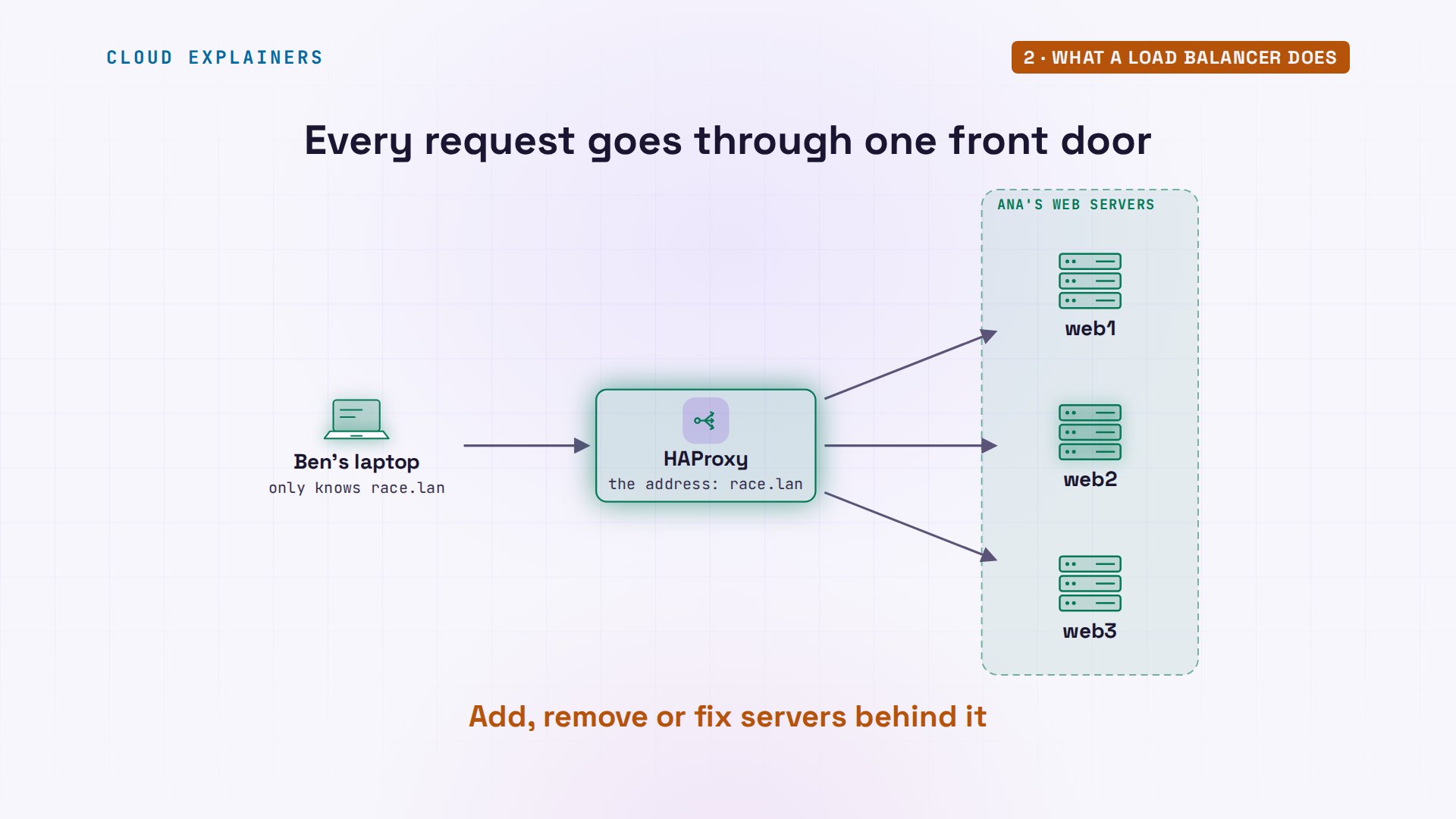
So what does a load balancer actually do? It stands at the one address runners use, race dot lan. Every request arrives there first. HAProxy picks a server from its list, passes the request on, and passes the answer back. Ben never talks to a server himself, so Ana can add one, remove one, or fix one, and the address never changes.
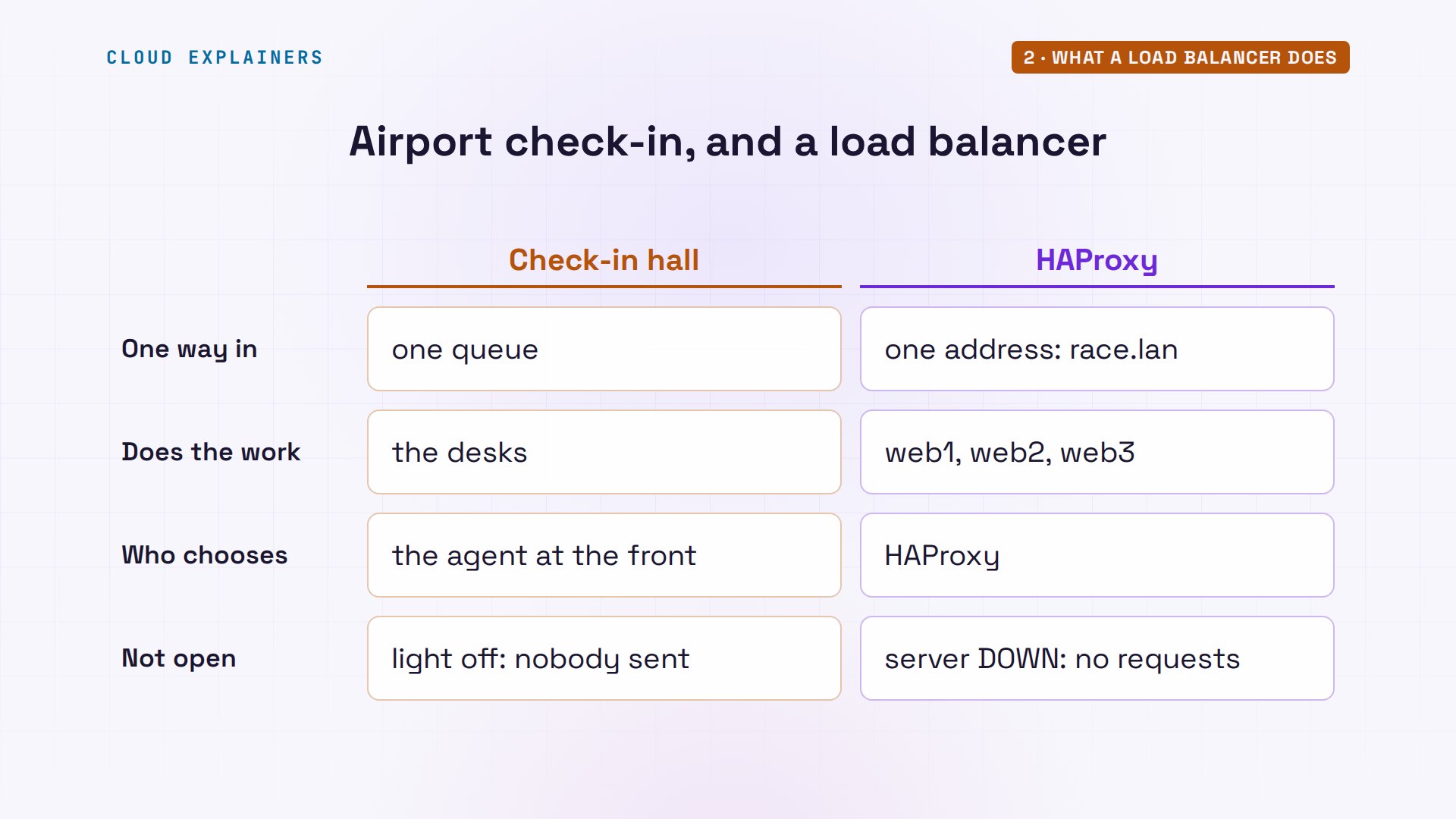
Think of airport check-in. One queue, many desks, and an agent at the front who points each traveller to the next desk. Travellers never pick a desk. And a desk with its light off gets nobody: hold on to that one.
Ana's HAProxy config
Here is Ana's whole setup, a few lines she added to HAProxy's config file. A port is a numbered door on a computer. The frontend is the front door: it listens on port eighty, the normal web port. It hands requests to a backend called web: the list of servers. Each server's app listens on its own door, eighty-eighty, which only HAProxy uses. Balance round robin means: take turns. Before HAProxy loads new settings, Ana runs haproxy dash c, which checks the file for mistakes.
sed -n '/^frontend/,/web3/p' /etc/haproxy/haproxy.cfgfrontend signup
    bind :80
    default_backend web

backend web
    balance roundrobin
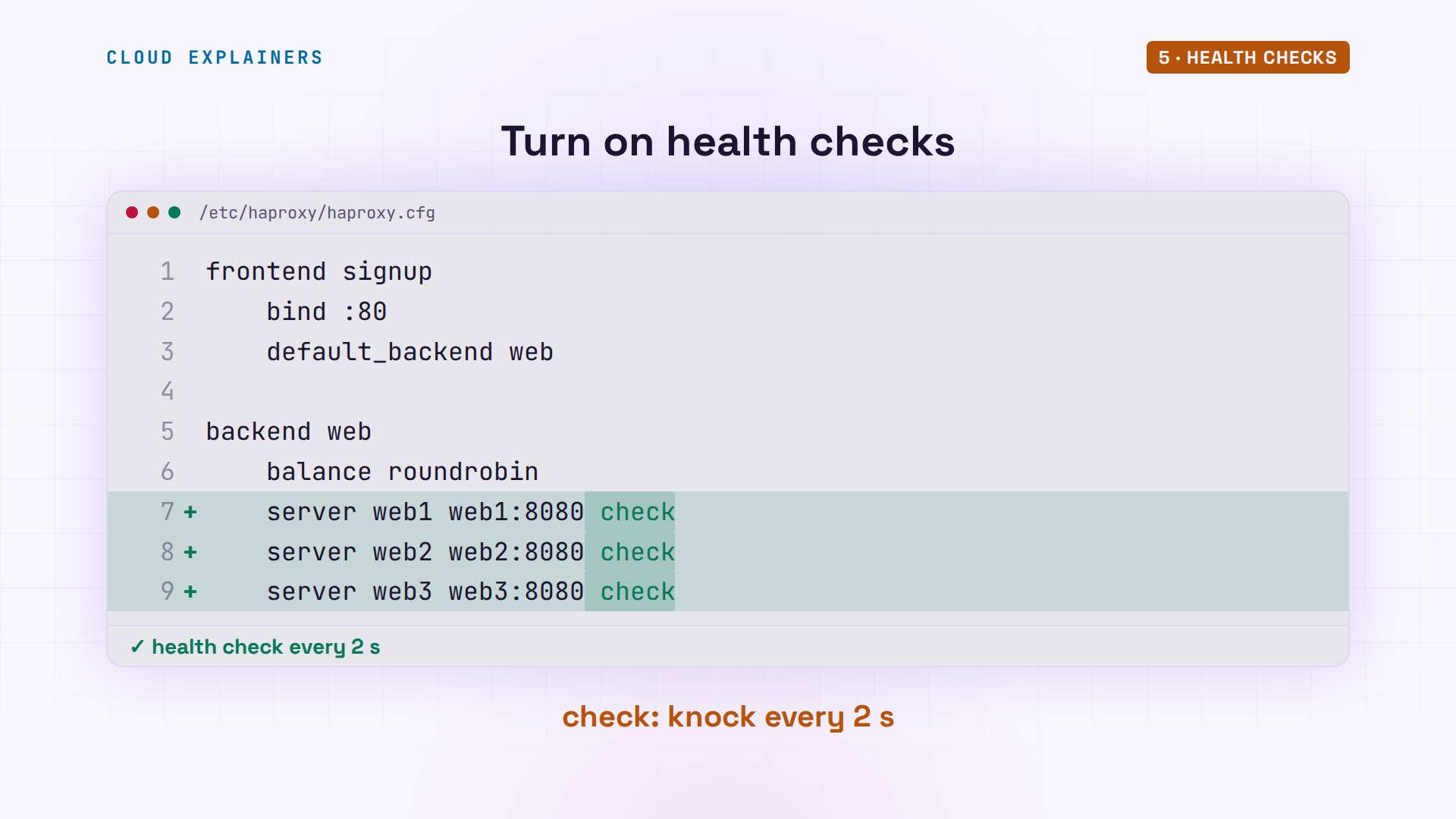
    server web1 web1:8080
    server web2 web2:8080
    server web3 web3:8080
sudo haproxy -c -f /etc/haproxy/haproxy.cfgConfiguration file is valid
Next, Ben uses curl to fetch a tiny test page, slash hello, where each server answers with its own name. Six times in a row: web1, web2, web3, and around again. That's round robin. Each server gets every third request, whoever sends it.
for i in 1 2 3 4 5 6; do curl -s race.lan/hello; doneHello from web1
Hello from web2
Hello from web3
Hello from web1
Hello from web2
Hello from web3
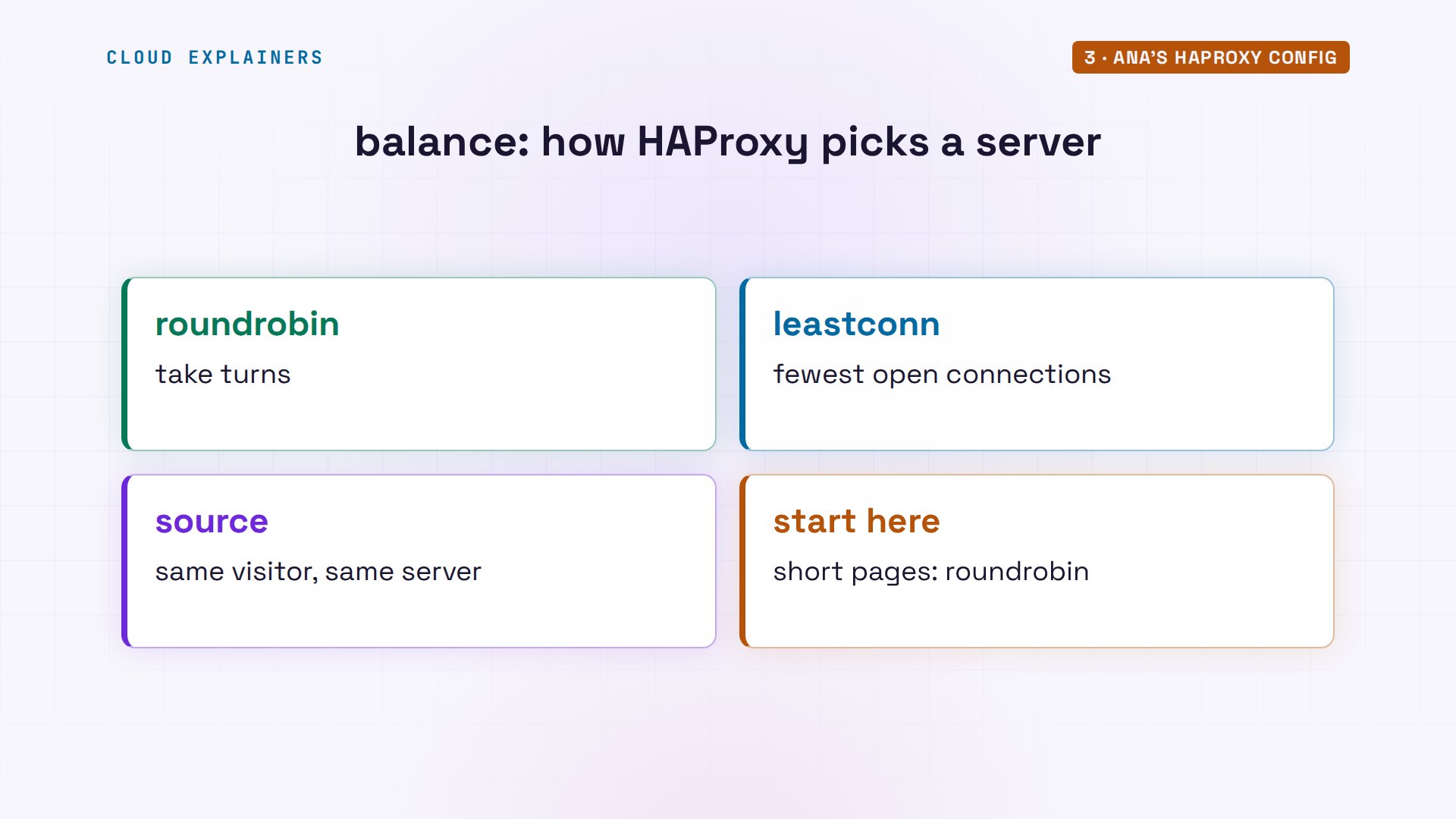
Round robin is the simplest way to share, and HAProxy has others. Least conn sends each request to the server with the fewest open connections, good when some requests take much longer than others. Source looks at each visitor's address and always sends that visitor to the same server. For short web pages, round robin is a fine start.
When a server goes down
Now web2 stops, the way a crash or an update would. HAProxy doesn't know. It just keeps following its list. Guess first: what does every third runner get now? An error. Five oh three, Service Unavailable, every time it's web2's turn.
sudo systemctl stop signup
for i in 1 2 3 4 5 6; do curl -s race.lan/hello | head -1; done<html><body><h1>503 Service Unavailable</h1>
Hello from web3
Hello from web1
<html><body><h1>503 Service Unavailable</h1>
Hello from web3
Hello from web1
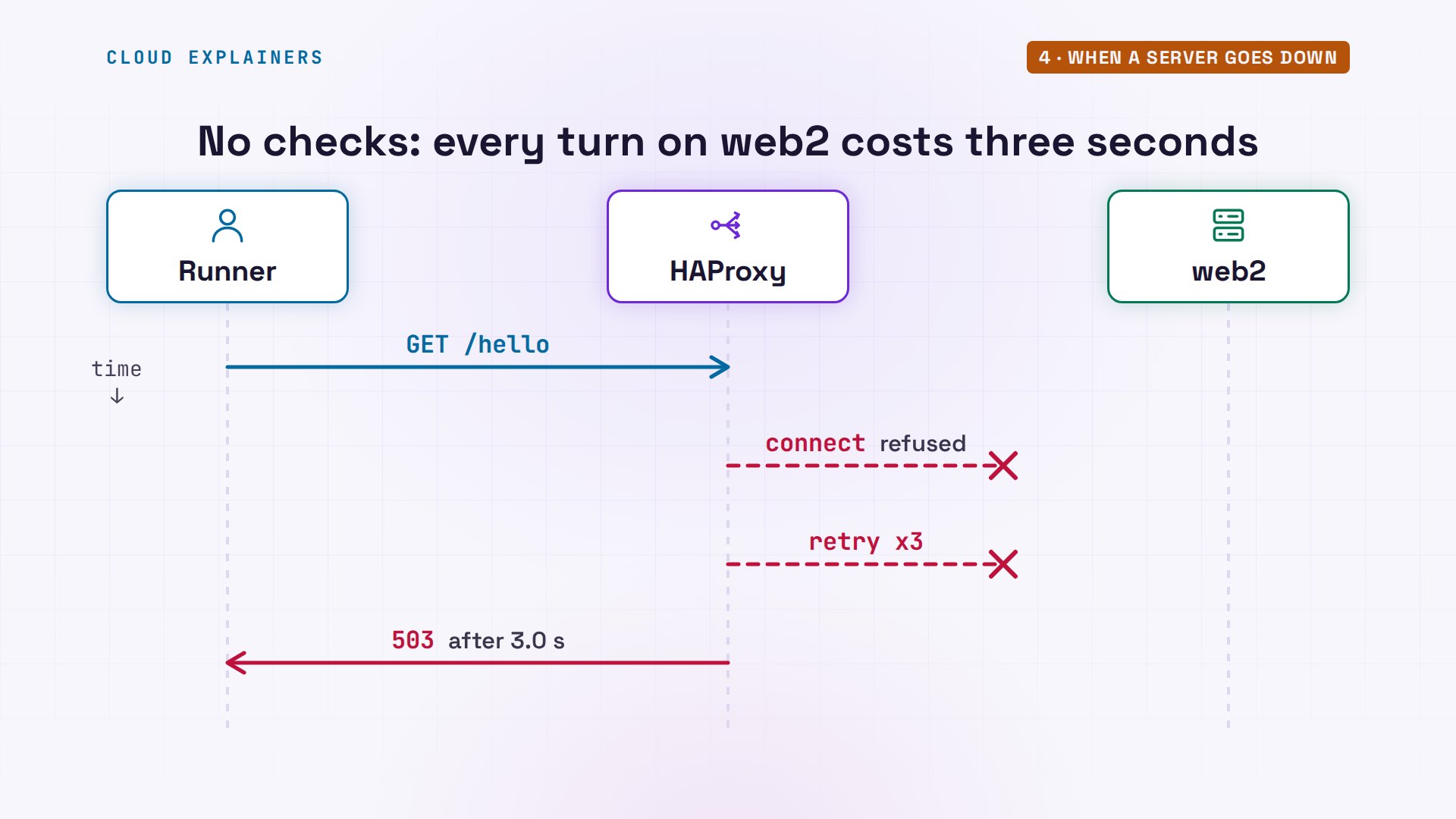
And it isn't quick. Ben times three requests. Two come back fine, status two hundred, in a couple of thousandths of a second. The one that lands on web2 takes three seconds, then fails. HAProxy's log names web2, and the last number on that line, three, is how many times it retried.
for i in 1 2 3; do curl -s -o /dev/null -w '%{http_code} after %{time_total} s\n' race.lan/hello; done503 after 3.013191 s
200 after 0.002095 s
200 after 0.001558 s
grep ' 503 ' /var/log/haproxy.log | tail -12026-11-20T18:52:18.835801+00:00 lb haproxy[222]: 10.13.0.50:54202 [20/Nov/2026:18:52:15.823] signup web/web2 0/0/-1/-1/3011 503 216 - - SC-- 1/1/0/0/3 0/0 "GET /hello HTTP/1.1"
Why three seconds? On web2's turn, HAProxy's connection is refused. By default it tries three more times, waiting up to a second between tries, then answers five oh three itself. Every runner whose turn lands on web2 pays that wait.
Health checks
The fix is one word on each server line: check. Now HAProxy knocks on each server by itself, every two seconds, instead of waiting for a runner to find out.
Ana starts web2, reloads HAProxy so it reads the new file, then stops web2 again and notes the time. Within five seconds, the log says: web2 is DOWN, connection refused, two active servers left. That's three missed knocks in a row: the first, then two more, two seconds apart. And Ben's six requests now go only to web1 and web3. All of them work.
sudo systemctl reload haproxy
sudo systemctl stop signup; date +%T18:52:25
grep 'web2 is DOWN' /var/log/haproxy.log2026-11-20T18:52:29.742177+00:00 lb haproxy[249]: [WARNING]  (249) : Server web/web2 is DOWN, reason: Layer4 connection problem, info: "Connection refused", check duration: 0ms. 2 active and 0 backup servers left. 0 sessions active, 0 requeued, 0 remaining in queue.
2026-11-20T18:52:29.742502+00:00 lb haproxy[249]: Server web/web2 is DOWN, reason: Layer4 connection problem, info: "Connection refused", check duration: 0ms. 2 active and 0 backup servers left. 0 sessions active, 0 requeued, 0 remaining in queue.
for i in 1 2 3 4 5 6; do curl -s race.lan/hello; doneHello from web1
Hello from web3
Hello from web1
Hello from web3
Hello from web1
Hello from web3
HAProxy also has its own stats page, which Ana turned on with four more lines in the same file. It shows the same thing: web1 and web3 up, web2 down, in red. When Ana starts web2 again, two good checks bring it back, about three seconds later.
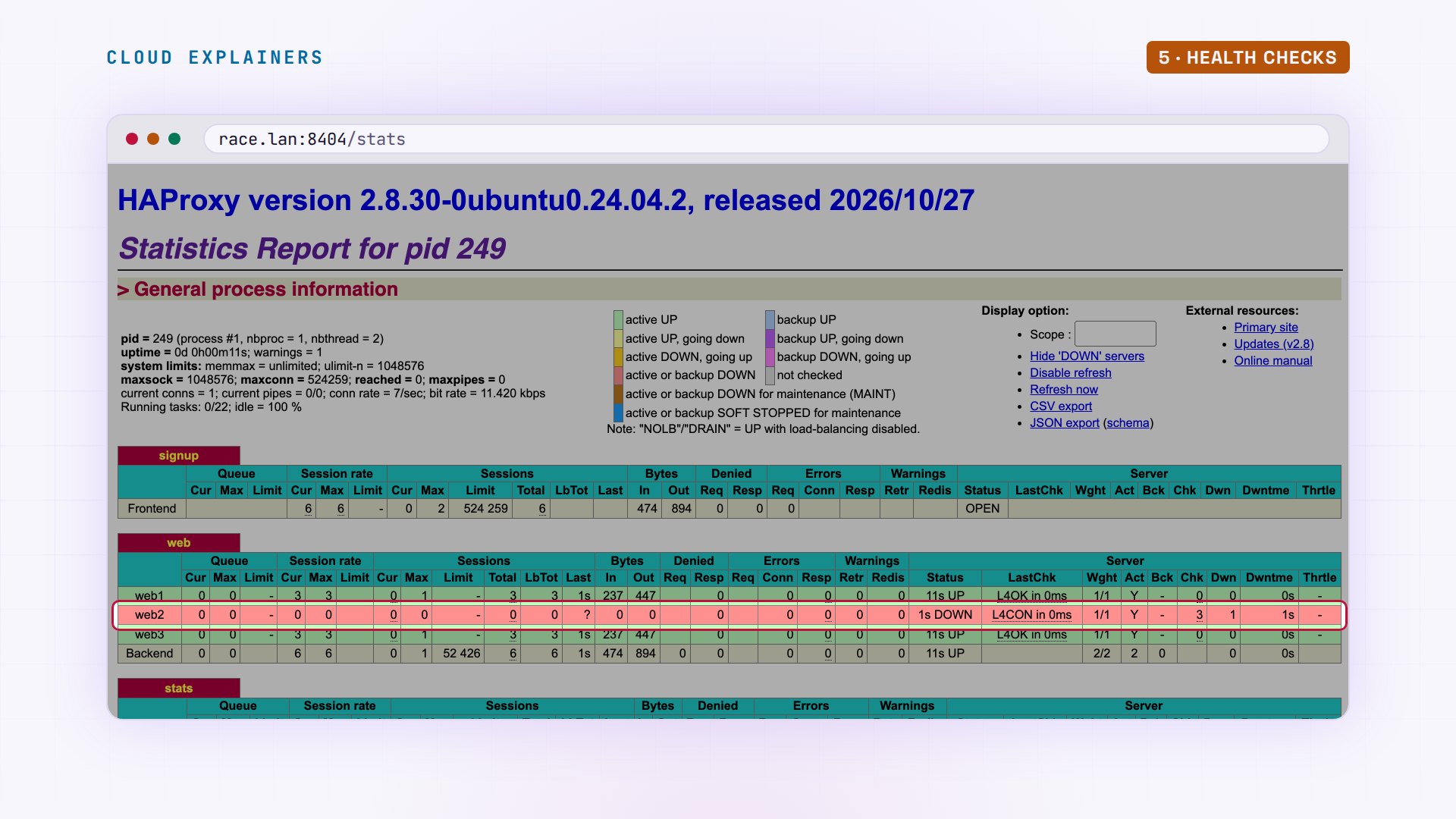
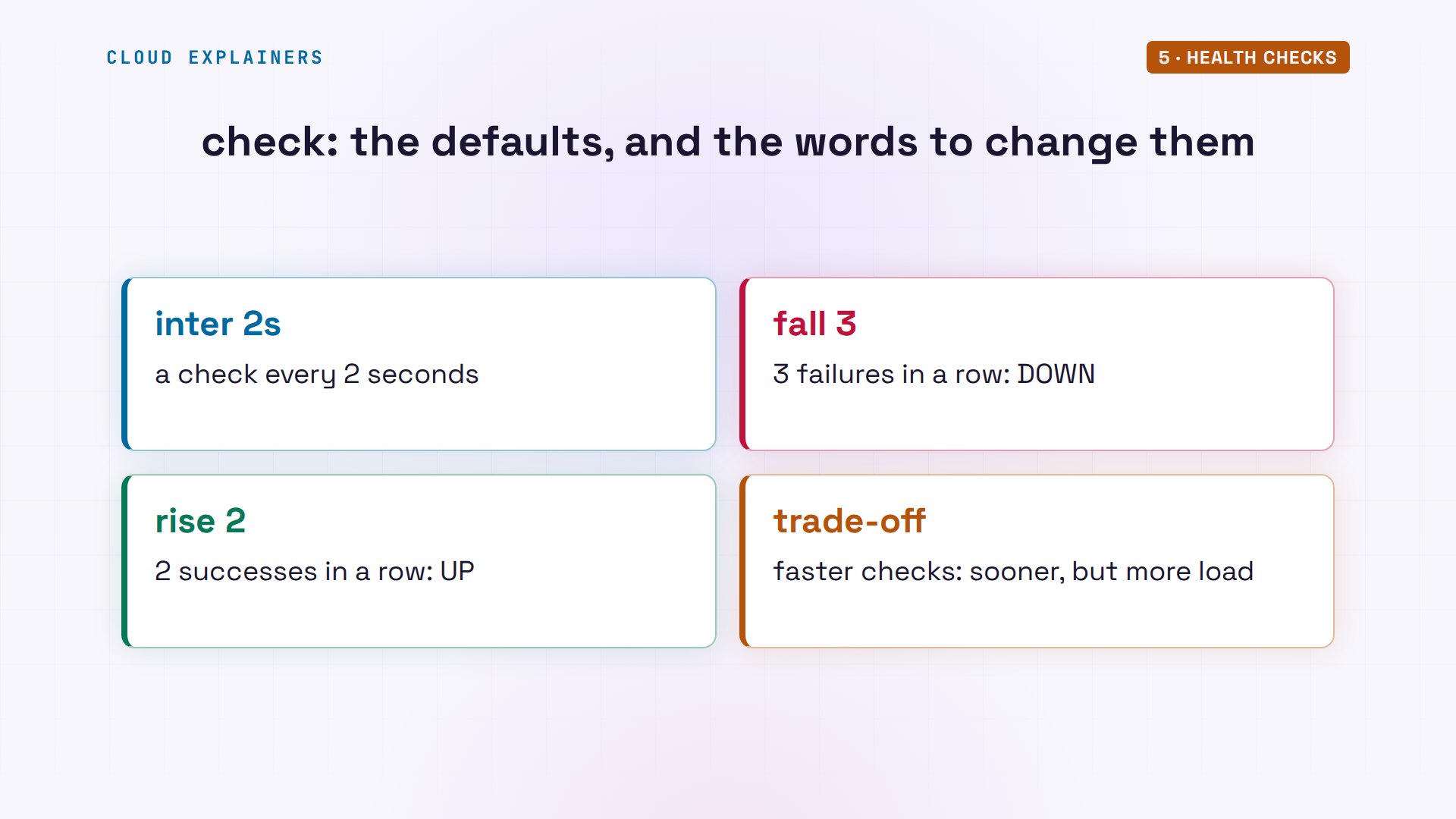
Those numbers are defaults. Inter is the two seconds between checks, fall is the three misses, rise is the two good checks, and you can change each one on the server line. Checking faster notices a dead server sooner, but every check is one more request each server has to answer.
Up, but broken
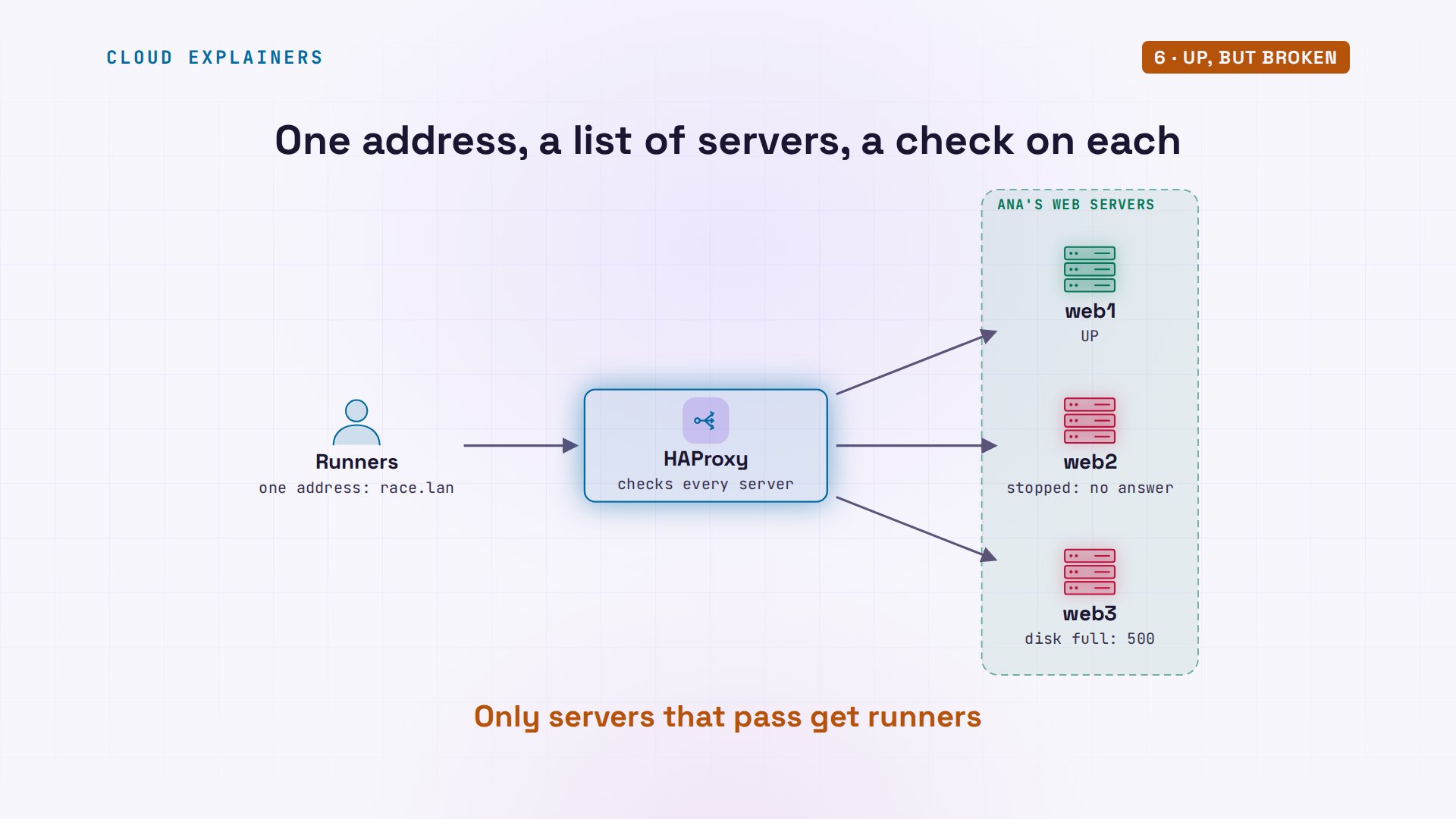
Now the break HAProxy can't see. Overnight, an export of the sign-ups filled web3's data disk: one hundred percent. Ben signs up three times, and the one on web3 fails: five hundred, database or disk is full. Yet HAProxy keeps sending runners to web3. Its knock only asks: is the port open? And it is.
df -h /var/lib/signupFilesystem      Size  Used Avail Use% Mounted on
tmpfs           4.0M  4.0M     0 100% /var/lib/signup
for i in 1 2 3; do curl -s -d name=Ben race.lan/signup; doneweb1: thanks Ben, you're signed up
web3: 500 sign-up failed: database or disk is full
web2: thanks Ben, you're signed up
So Ana asks a better question. One new line, option H T T P check, tells HAProxy to ask each server for a page called slash health. To answer, the app really tries to save a sign-up, then undoes it. After a reload: web3 is DOWN, wrong status, five hundred. Layer seven means the web answer itself, not just the open port. Ben's sign-ups all work again.
grep -n 'httpchk' /etc/haproxy/haproxy.cfg43: option httpchk GET /health
sudo systemctl reload haproxy
grep 'web3 is DOWN' /var/log/haproxy.log | tail -12026-11-20T18:52:35.551185+00:00 lb haproxy[422]: Server web/web3 is DOWN, reason: Layer7 wrong status, code: 500, info: "INTERNAL SERVER ERROR", check duration: 2ms. 2 active and 0 backup servers left. 0 sessions active, 0 requeued, 0 remaining in queue.
for i in 1 2 3; do curl -s -d name=Ben race.lan/signup; doneweb1: thanks Ben, you're signed up
web2: thanks Ben, you're signed up
web1: thanks Ben, you're signed up
So HAProxy keeps a list of servers, and a check on each. The plain check knocks: is the port, the door, open? That catches web2, which wasn't running at all. The HTTP check asks the app itself, and catches web3, answering five hundred. A runner's request skips both, like a desk with its light off.
The basket that empties
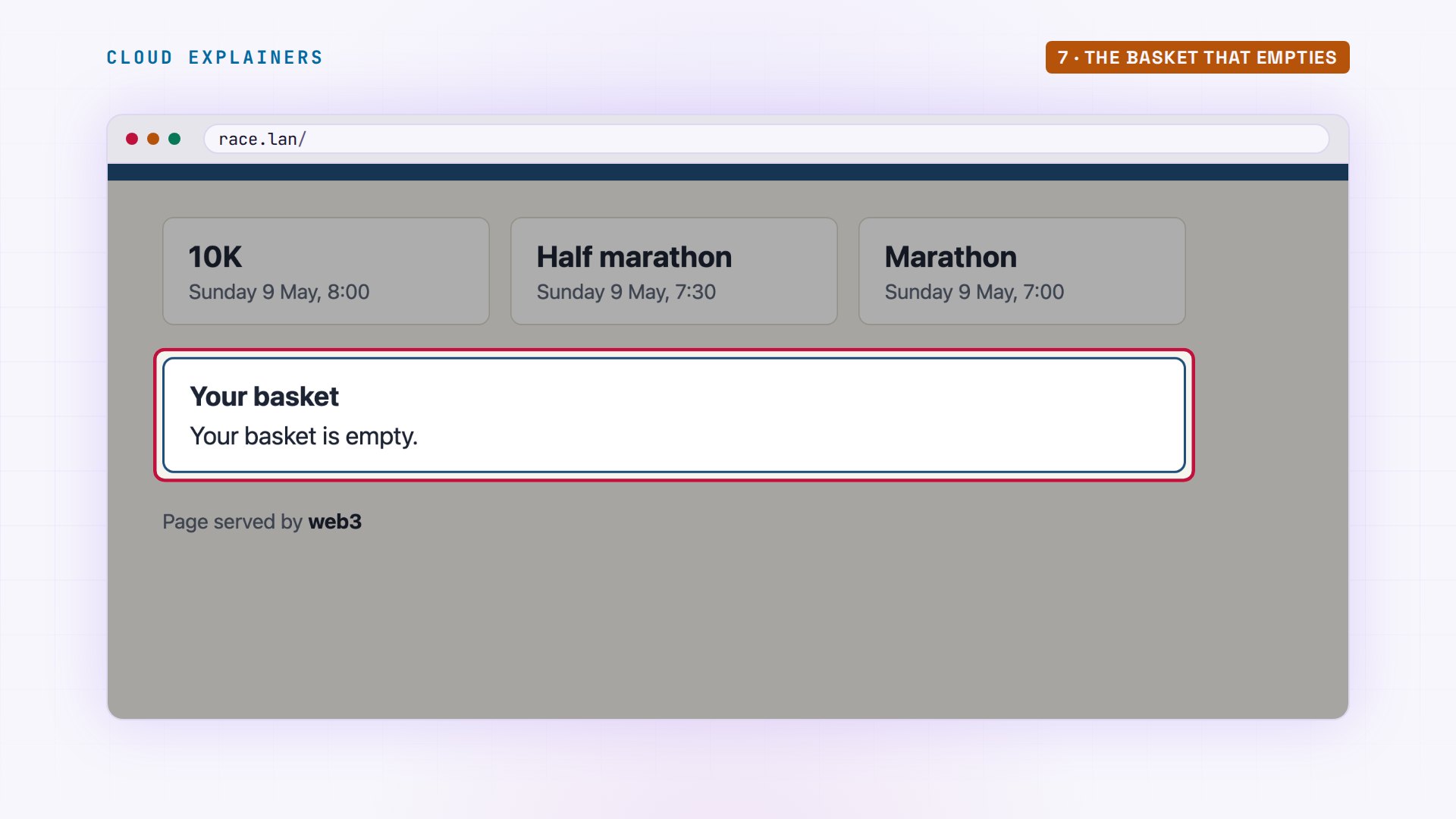
With all three servers healthy again: what breaks when requests take turns? Ben adds the ten K to his basket. His curl keeps cookies, small tags a site asks to get back, in a file, like a browser would. web2 takes it. Guess first: he opens his basket three times. What does he see? Empty, twice. Only one of the three servers has his basket.
curl -s -c jar -b jar 'race.lan/add?race=10K'web2: added 10K
for i in 1 2 3; do curl -s -b jar race.lan/basket; doneweb1: basket empty
web3: basket empty
web2: 10K
In a browser it's the same. A half marathon in the basket, reload, and the next server has never heard of it.
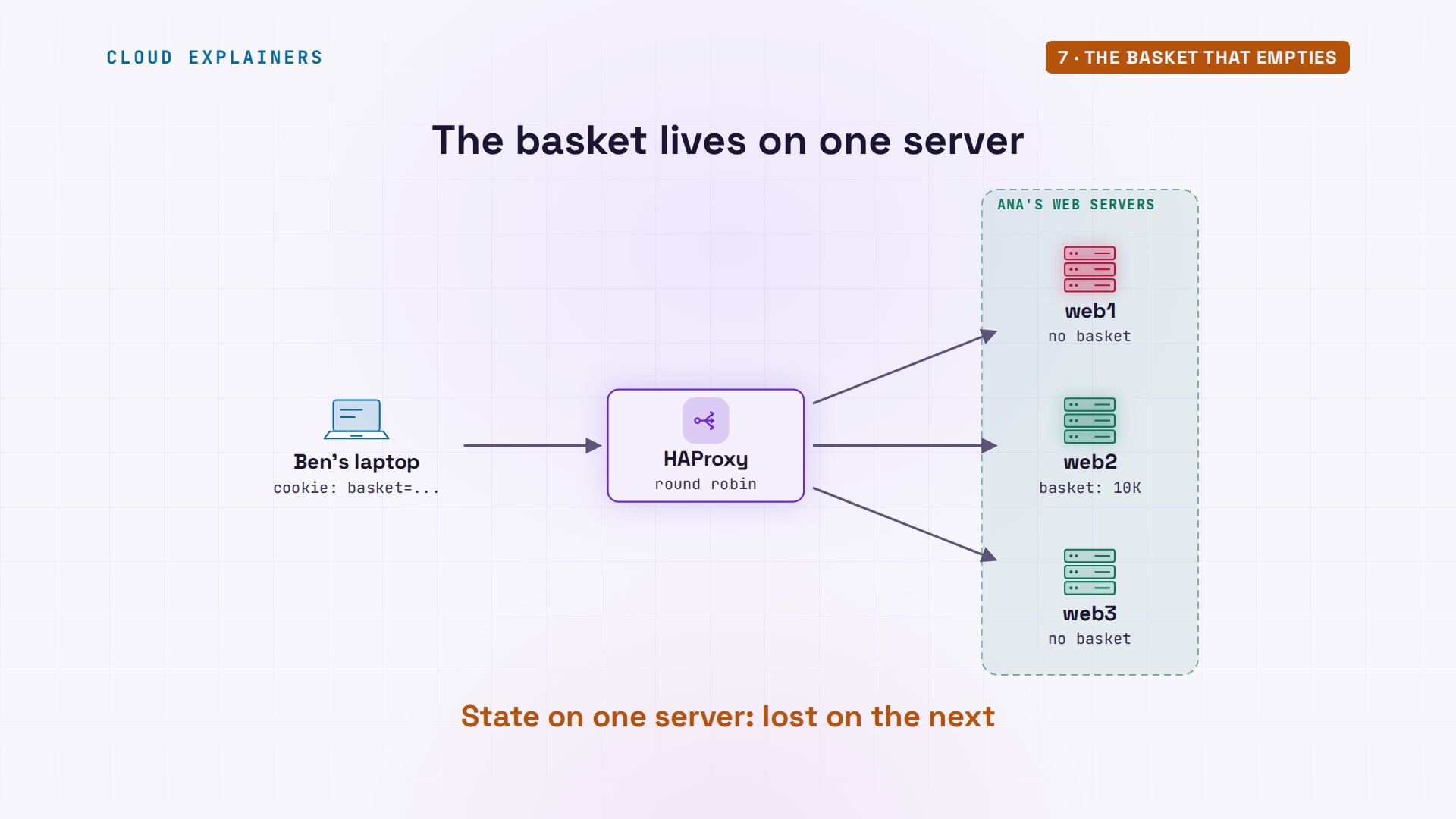
Each server keeps baskets in its own memory. Round robin sends Ben's next request somewhere else, to a server that has never seen him. Nothing is broken; the servers just don't share.
Two fixes. The lasting one: keep baskets somewhere every server can read, like a database. The quick one is in HAProxy: a cookie setting, and a name for each server. HAProxy tells Ben's browser which server he got, and sends him back there. Now all three answers come from web1, with his ten K.
grep -n 'cookie' /etc/haproxy/haproxy.cfg44:    cookie SERVERID insert indirect nocache
45:    server web1 web1:8080 check cookie web1
46:    server web2 web2:8080 check cookie web2
47:    server web3 web3:8080 check cookie web3
curl -s -c jar -b jar 'race.lan/add?race=10K'web1: added 10K
for i in 1 2 3; do curl -s -b jar race.lan/basket; doneweb1: 10K
web1: 10K
web1: 10K
grep -o 'SERVERID.*' jarSERVERID web1
Who sent this request?
One more surprise, and it matters the day Ana must block someone hammering the sign-up page: whose address does a server see? Ben's laptop is ten dot thirteen dot zero dot fifty. But web2's app log, read with journalctl, says the request came from ten dot thirteen dot zero dot ten: HAProxy. From a server's side, the load balancer is the visitor. One more line, option forward for, adds a note to every request, a header called X Forwarded For, with the runner's real address. After a reload, web2's log shows the forwarded-for address, and it's Ben's.
hostname -I10.13.0.50
journalctl -u signup -o cat | grep hello | tail -110.13.0.10 xff=- "GET /hello HTTP/1.1" 200
grep -n 'forwardfor' /etc/haproxy/haproxy.cfg45: option forwardfor
sudo systemctl reload haproxy
for i in 1 2 3; do curl -s race.lan/hello; doneHello from web1
Hello from web2
Hello from web3
journalctl -u signup -o cat | grep hello | tail -110.13.0.10 xff=10.13.0.50 "GET /hello HTTP/1.1" 200
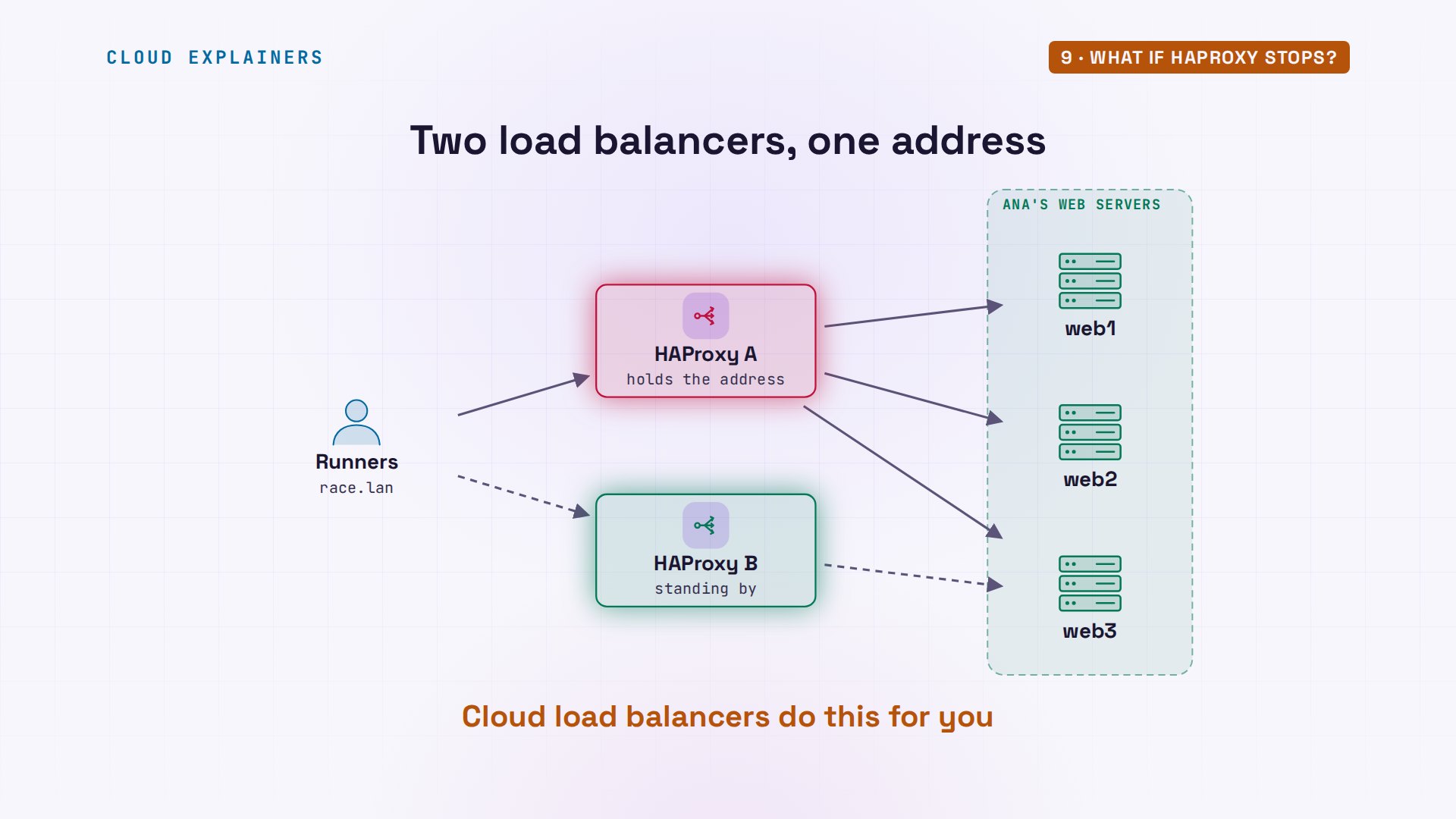
What if HAProxy stops?
And if every request goes through HAProxy, what if HAProxy itself stops? Then the whole site stops with it. So bigger sites run two load balancers sharing one address, the second one watches the first, and takes over the address if the first stops. A cloud provider's load balancer does that for you.
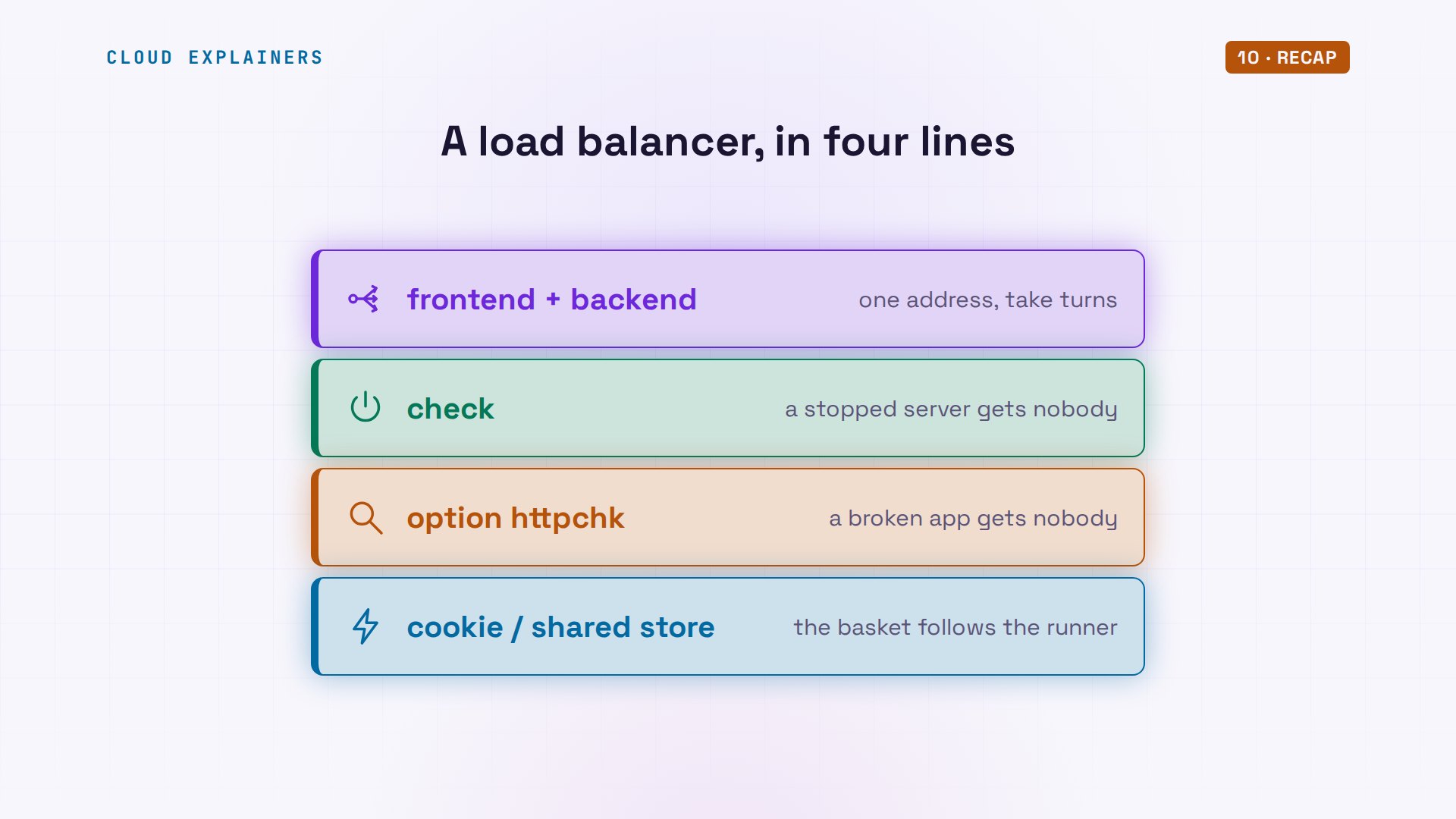
Recap
So: one address, a list of servers, taking turns. Health checks, so a dead server gets nobody. An HTTP check, so a broken one doesn't either. And don't keep things like baskets in one server's memory.
If Ben's sign-up went through, subscribing brings more of how the internet's plumbing works, tested on real machines.
Everything here ran on real Ubuntu servers with Ubuntu's own HAProxy 2.8, and every command and the lab files are linked in the description. Thanks for watching Cloud Explainers.
Sources
Demos: five containers on our own Mac standing in for a load balancer, three web servers and a runner's laptop; the marathon and its runners are made up. Every number, page and log line was real. Watch the full video on YouTube.
More videos

How to Fix Python ModuleNotFoundError: No Module Named
Golang Pointers in 5 Minutes
How to Fix a Kubernetes Pod Stuck in CrashLoopBackOff
How to Fix a Homelab ESXi Host Not Responding

PostgreSQL: Full Tutorial for Beginners

How Python Virtual Environments Work

How to Fix Cloudflare Tunnel Errors in a Homelab

How to Fix API CORS Errors: No 'Access-Control-Allow-Origin'

How Authenticator App Login Codes Work (TOTP)

Git and GitHub: Full Tutorial for Beginners

How a Homelab Hypervisor Works (VMware ESXi)

How to Fix Kubernetes ImagePullBackOff Errors

How to Fix DNS 'Temporary Failure in Name Resolution' on Linux
How to Fix AWS CLI 'Unable to Locate Credentials'
Proxmox vs ESXi for Your Homelab: When Each One Wins
PostgreSQL UUID vs Auto Increment: Which Primary Key Should You Use?
Kubernetes: Full Tutorial for Beginners

How TCP Sockets Work

How to Fix PostgreSQL 'Could Not Connect to Server'
Claude Code Hooks Will Finally Make Sense After This

DevOps with Ansible Will Finally Make Sense After This

How SNMP Network Monitoring Works

How to Fix GitHub 'Permission Denied (publickey)' Errors

Docker: Full Tutorial for Beginners
How to Fix PostgreSQL 'Password Authentication Failed'
Why One Linux Server Handles More Users Than You Think

How to Fix Network 'Connection Refused' Errors
DevOps Pipelines: Jenkins vs GitHub Actions
Linux Nginx Reverse Proxy: Full Tutorial for Beginners
Every Networking Term a Beginner Needs in 12 Minutes

How to Fix Docker 'Permission Denied' on docker.sock

How to Fix Git 'Updates Were Rejected' When You Push
How to Fix nginx 502 Bad Gateway Errors on Linux

How to Fix Linux apt 'Could Not Get Lock' Errors (Ubuntu)

How Email Works on the Internet (SMTP) in 10 Minutes

The Python Roadmap for Beginners

Golang REST API with Gin: Full Tutorial for Beginners

How a WireGuard VPN Network Works

Linux Makefiles Will Finally Make Sense After This

SAML vs OAuth vs OpenID Connect: What's the Difference?

How to Fix Python cron Jobs That Never Run

Linux Bash Scripting: Full Tutorial for Beginners

How PXE Network Boot Works

How Active Directory Works

How to Fix a Linux systemd Service That Won't Start

Linux Logs: syslog vs journald
JWT vs Session Cookies: Which One Should You Use?

Docker vs Docker Compose: Which One Should You Use?

How to Fix Docker Compose Containers That Can't Talk to Each Other

Django Full Tutorial for Beginners

How Linux systemd Works

How to Fix 'Windows Cannot Access' Network Share Errors (SMB)
REST vs gRPC: Which One Should You Use?

How to Fix SSL Certificate Chain Errors (Missing Intermediate)

Every Python Concept for Beginners in 10 Minutes

Every SQL Join Type in 10 Minutes

Why OpenRouter Free Models Hit Their Limit So Fast
Why Your Gemini API Free Tier Runs Out So Fast

OpenRouter Will Finally Make Sense After This
How Redis Caching Works
Gemini API vs Vertex AI: Which One Should You Use?

How to Fix a Leaked Gemini API Key

Why Golang Uses Goroutines Instead of Threads

How to Fix Gemini API Error 429: Resource Exhausted

Claude Token Pricing Will Finally Make Sense After This
Why Python Web Scraping Returns Nothing (and the Fix)

Python uv vs pip: Which One Should You Use?

Python Automation: Full Tutorial for Beginners

How OAuth Login Works

Google AI Studio Will Finally Make Sense After This
What Happens When You Run a Docker Container

How to Fix Claude Code Billing Your API Key Instead of Your Plan
Why Passkeys Can't Be Phished Like Passwords
PowerShell vs Bash: Which One Should You Learn?

The Linux Roadmap for Beginners
Django vs FastAPI: Which One Should You Use?

Why SQLite Is the Most Used Database in the World
How a NoSQL Database Like MongoDB Works

How to Fix Python pip error: externally-managed-environment
How to Fix MySQL Too Many Connections Database Errors

Golang Concurrency Will Finally Make Sense After This

How Amazon S3 Works
How Kubernetes Works

How Git Works
How to Fix Docker Port Already Allocated Errors
How PostgreSQL Works

How to Fix Git Merge Conflicts

How to Fix No Space Left on Device in Linux
How the Internet Works
SQL vs NoSQL: When Each One Wins
How to Fix JWT Token Expired Errors (401 Unauthorized)
Claude API vs Claude Pro: Why Your Subscription Doesn't Include It

Why AI Agent Skills Beat Giant Prompts

Linux Cron Jobs Will Finally Make Sense After This

Security Logs Will Finally Make Sense After This

How to Fix a Security Leak: An API Key Pushed to GitHub
DNS Will Finally Make Sense After This
Never Ignore a Security Update

Two-Factor Authentication Will Finally Make Sense
Never Expose a Database to the Internet
SSH Keys vs Passwords: Which Is Safer for Security?

The 5 Levels of Linux Boot: From Power On to Login
The 5 Levels of Network Firewalls

Password Security: Why Hackers Crack Weak Passwords

Why Your Linux Server Runs Out of Memory
HTTP vs HTTPS: What Actually Changes on Your Network

Every Linux File Permission You Need to Know
Linux Processes vs Threads: When Each One Wins

The OSI Model Will Finally Make Sense After This

The 7 Levels of Git
Every Network Troubleshooting Command You Need
Hashing vs Encryption in Cybersecurity: When Each One Wins
Why the Internet Ran Out of IP Addresses

Linux Package Managers: apt vs Snap vs Flatpak

Why Python Is Slow (and When It Doesn't Matter)
TCP vs UDP: When Each One Wins

Stop Running Linux as Root (Do This Instead)

Linux Users and Groups Will Finally Make Sense

Why Phishing Beats Good Security (and How to Spot It)

The 7 Levels of Docker

AI Agents Will Finally Make Sense After This

Stop Using git push --force (Use This Instead)
Agent Skills vs MCP: When Each One Wins

Networking Will Finally Make Sense After This

Every Linux Command You Actually Need
The 7 Levels of Cybersecurity

Every System Design Concept You Need, in One Diagram