How to Fix Network 'Connection Refused' Errors
'Connection refused' (Errno 111, ECONNREFUSED) means the machine answered and nothing was listening on that port. On two real Ubuntu 24.04 machines we show the reset in a capture, then the four causes in order: the app isn't running, it listens only on 127.0.0.1, the wrong port, and a firewall rule that rejects, plus why a firewall that drops gives a time-out instead.
Refused, but the server is up
Your app says: connection refused. At a bowling alley's front desk, Ana's booking screen asks the lanes server for free lanes, and gets Errno one eleven: connection refused. But the server is up. Ping, which sends two tiny test packets, gets answers in a fraction of a millisecond. So the server is there. It answered quickly. The answer was no. And before the end, we'll meet a refusal that doesn't come from the app at all.
python3 book.pyTraceback (most recent call last):
  File "/usr/lib/python3.12/urllib/request.py", line 1344, in do_open
    h.request(req.get_method(), req.selector, req.data, headers,
  File "/usr/lib/python3.12/http/client.py", line 1365, in request
    self._send_request(method, url, body, headers, encode_chunked)
  File "/usr/lib/python3.12/http/client.py", line 1411, in _send_request
    self.endheaders(body, encode_chunked=encode_chunked)
  File "/usr/lib/python3.12/http/client.py", line 1360, in endheaders
    self._send_output(message_body, encode_chunked=encode_chunked)
  File "/usr/lib/python3.12/http/client.py", line 1120, in _send_output
    self.send(msg)
  File "/usr/lib/python3.12/http/client.py", line 1064, in send
    self.connect()
  File "/usr/lib/python3.12/http/client.py", line 1030, in connect
    self.sock = self._create_connection(
                ^^^^^^^^^^^^^^^^^^^^^^^^
  File "/usr/lib/python3.12/socket.py", line 852, in create_connection
    raise exceptions[0]
  File "/usr/lib/python3.12/socket.py", line 837, in create_connection
    sock.connect(sa)
ConnectionRefusedError: [Errno 111] Connection refused

During handling of the above exception, another exception occurred:

Traceback (most recent call last):
  File "/home/ana/book.py", line 5, in <module>
    with urllib.request.urlopen("http://lanes:5000/lanes", timeout=10) as answer:
         ^^^^^^^^^^^^^^^^^^^^^^^^^^^^^^^^^^^^^^^^^^^^^^^^^^^^^^^^^^^^^
  File "/usr/lib/python3.12/urllib/request.py", line 215, in urlopen
    return opener.open(url, data, timeout)
           ^^^^^^^^^^^^^^^^^^^^^^^^^^^^^^^
  File "/usr/lib/python3.12/urllib/request.py", line 515, in open
    response = self._open(req, data)
               ^^^^^^^^^^^^^^^^^^^^^
  File "/usr/lib/python3.12/urllib/request.py", line 532, in _open
    result = self._call_chain(self.handle_open, protocol, protocol +
             ^^^^^^^^^^^^^^^^^^^^^^^^^^^^^^^^^^^^^^^^^^^^^^^^^^^^^^^
  File "/usr/lib/python3.12/urllib/request.py", line 492, in _call_chain
    result = func(*args)
             ^^^^^^^^^^^
  File "/usr/lib/python3.12/urllib/request.py", line 1373, in http_open
    return self.do_open(http.client.HTTPConnection, req)
           ^^^^^^^^^^^^^^^^^^^^^^^^^^^^^^^^^^^^^^^^^^^^^
  File "/usr/lib/python3.12/urllib/request.py", line 1347, in do_open
    raise URLError(err)
urllib.error.URLError: <urlopen error [Errno 111] Connection refused>
ping -n -c 2 lanesPING lanes (192.168.60.10) 56(84) bytes of data.
64 bytes from 192.168.60.10: icmp_seq=1 ttl=64 time=0.027 ms
64 bytes from 192.168.60.10: icmp_seq=2 ttl=64 time=0.139 ms

--- lanes ping statistics ---
2 packets transmitted, 2 received, 0% packet loss, time 1074ms
rtt min/avg/max/mdev = 0.027/0.083/0.139/0.056 ms
What refused really means
What does refused mean? Every connection starts with one small packet, a SYN: please open a line to port five thousand, the booking app's number. If a program is listening there, the server says yes. If nothing is, the server's own system answers at once with a reset: no.
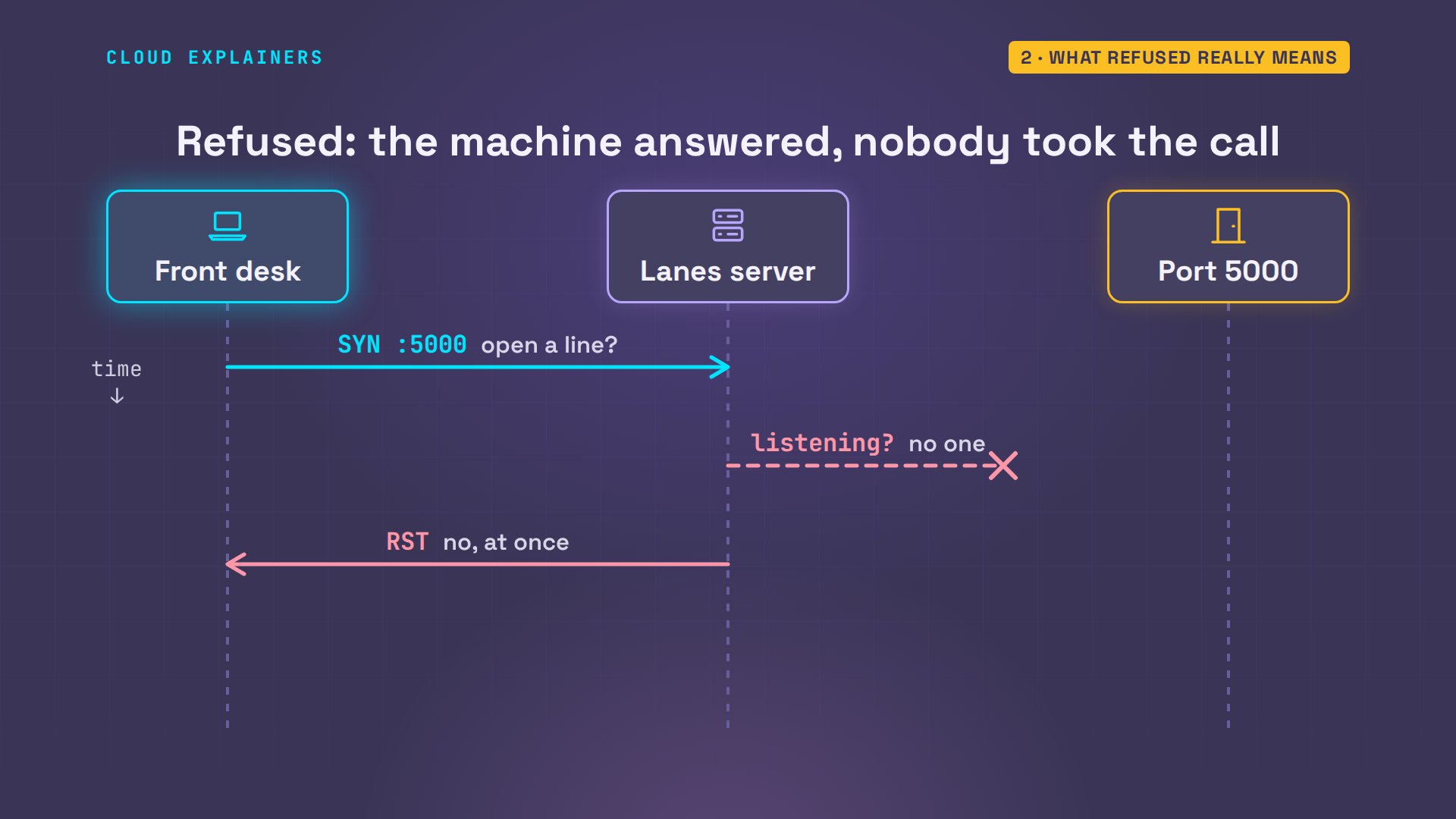
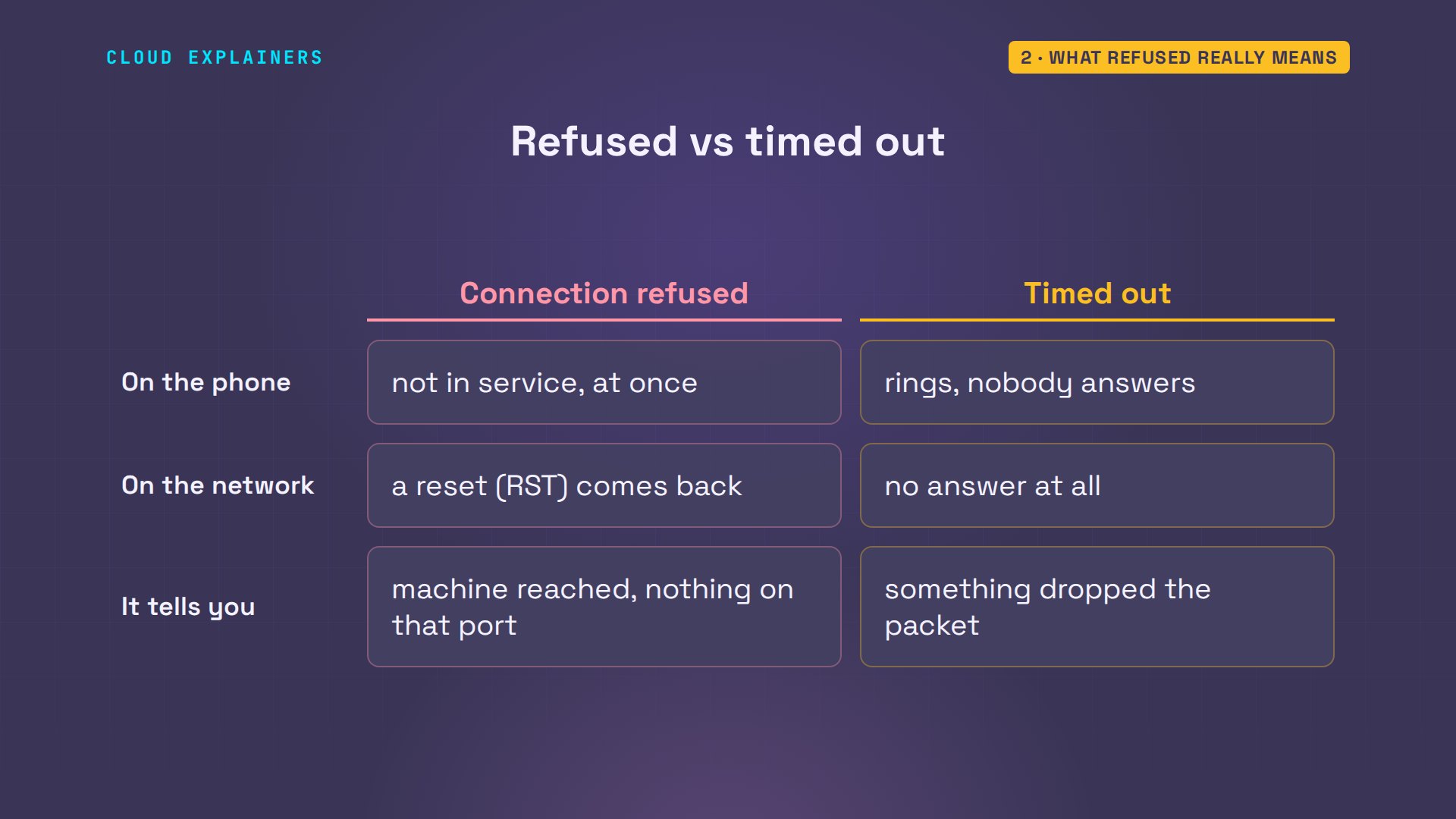
It's like calling a company's switchboard and asking for an extension nobody has: you hear the not-in-service message straight away. A time-out is a different failure: the phone just rings, and nobody answers. So refused is good news, in a way. You reached the right machine. Nothing on it took the call.
Is the app running?
So, the usual fix first: is the program even running? In a second window, on the lanes server, systemctl status asks the service manager about the booking app. Inactive, dead. And disabled, so it doesn't start at boot either. Enable, with dash dash now, turns it on for every boot and starts it right away; sudo runs that as the administrator. Status again: active, running.
systemctl status lanes○ lanes.service - Lane booking app
     Loaded: loaded (/etc/systemd/system/lanes.service; disabled; preset: enabled)
     Active: inactive (dead)
sudo systemctl enable --now lanesCreated symlink /etc/systemd/system/multi-user.target.wants/lanes.service → /etc/systemd/system/lanes.service.
systemctl status lanes● lanes.service - Lane booking app
     Loaded: loaded (/etc/systemd/system/lanes.service; enabled; preset: enabled)
     Active: active (running) since Sun 2026-11-15 21:41:40 UTC; 2s ago
   Main PID: 134 (python3)
      Tasks: 1 (limit: 9563)
     Memory: 19.9M (peak: 19.9M)
        CPU: 54ms
     CGroup: /system.slice/lanes.service
             └─134 /usr/bin/python3 /srv/lanes/app.py

Nov 15 21:41:40 lanes systemd[1]: Started lanes.service - Lane booking app.
Nov 15 21:41:40 lanes python3[134]:  * Serving Flask app 'app'
Nov 15 21:41:40 lanes python3[134]:  * Debug mode: off
Nov 15 21:41:40 lanes python3[134]: WARNING: This is a development server. …ead.
Nov 15 21:41:40 lanes python3[134]:  * Running on http://127.0.0.1:5000
Nov 15 21:41:40 lanes python3[134]: Press CTRL+C to quit
Hint: Some lines were ellipsized, use -l to show in full.
The app is running now. Guess first: does the front desk connect now? No. The same error, word for word. This is where most people get stuck, because the usual fix did work. It just wasn't the only problem.
python3 book.pyTraceback (most recent call last):
  File "/usr/lib/python3.12/urllib/request.py", line 1344, in do_open
    h.request(req.get_method(), req.selector, req.data, headers,
  File "/usr/lib/python3.12/http/client.py", line 1365, in request
    self._send_request(method, url, body, headers, encode_chunked)
  File "/usr/lib/python3.12/http/client.py", line 1411, in _send_request
    self.endheaders(body, encode_chunked=encode_chunked)
  File "/usr/lib/python3.12/http/client.py", line 1360, in endheaders
    self._send_output(message_body, encode_chunked=encode_chunked)
  File "/usr/lib/python3.12/http/client.py", line 1120, in _send_output
    self.send(msg)
  File "/usr/lib/python3.12/http/client.py", line 1064, in send
    self.connect()
  File "/usr/lib/python3.12/http/client.py", line 1030, in connect
    self.sock = self._create_connection(
                ^^^^^^^^^^^^^^^^^^^^^^^^
  File "/usr/lib/python3.12/socket.py", line 852, in create_connection
    raise exceptions[0]
  File "/usr/lib/python3.12/socket.py", line 837, in create_connection
    sock.connect(sa)
ConnectionRefusedError: [Errno 111] Connection refused

During handling of the above exception, another exception occurred:

Traceback (most recent call last):
  File "/home/ana/book.py", line 5, in <module>
    with urllib.request.urlopen("http://lanes:5000/lanes", timeout=10) as answer:
         ^^^^^^^^^^^^^^^^^^^^^^^^^^^^^^^^^^^^^^^^^^^^^^^^^^^^^^^^^^^^^
  File "/usr/lib/python3.12/urllib/request.py", line 215, in urlopen
    return opener.open(url, data, timeout)
           ^^^^^^^^^^^^^^^^^^^^^^^^^^^^^^^
  File "/usr/lib/python3.12/urllib/request.py", line 515, in open
    response = self._open(req, data)
               ^^^^^^^^^^^^^^^^^^^^^
  File "/usr/lib/python3.12/urllib/request.py", line 532, in _open
    result = self._call_chain(self.handle_open, protocol, protocol +
             ^^^^^^^^^^^^^^^^^^^^^^^^^^^^^^^^^^^^^^^^^^^^^^^^^^^^^^^
  File "/usr/lib/python3.12/urllib/request.py", line 492, in _call_chain
    result = func(*args)
             ^^^^^^^^^^^
  File "/usr/lib/python3.12/urllib/request.py", line 1373, in http_open
    return self.do_open(http.client.HTTPConnection, req)
           ^^^^^^^^^^^^^^^^^^^^^^^^^^^^^^^^^^^^^^^^^^^^^
  File "/usr/lib/python3.12/urllib/request.py", line 1347, in do_open
    raise URLError(err)
urllib.error.URLError: <urlopen error [Errno 111] Connection refused>
Listening, but on which address?
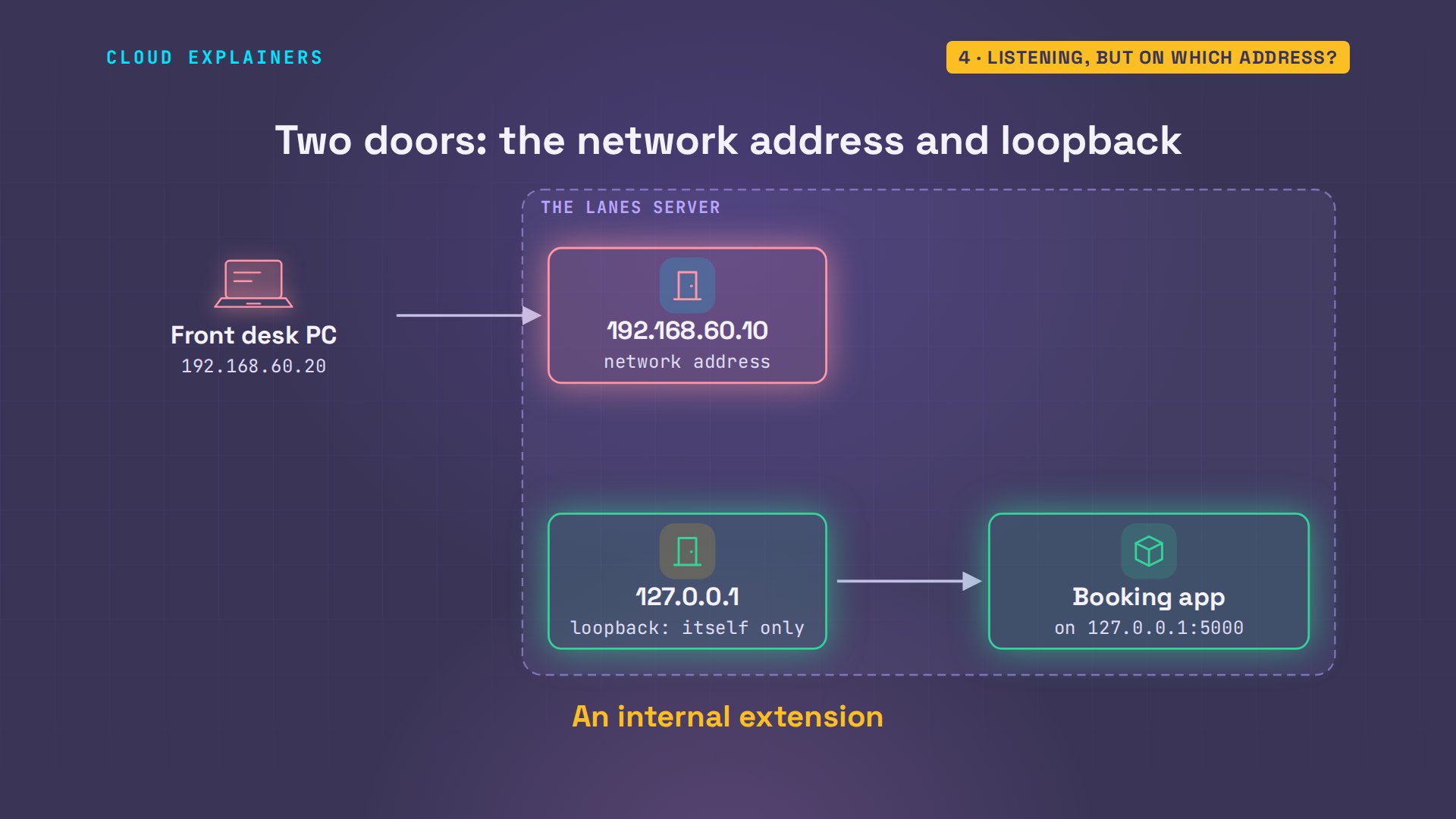
So it runs. But where is it listening? ss, with dash l t n p, lists the programs listening for TCP connections, with numbers and names. Port five thousand, yes, but on one two seven dot zero dot zero dot one. That address is loopback: the machine talking to itself. On the server, curl to localhost gets the lanes. At the desk, netcat, a tool that only tries to connect, asks localhost, and is refused: there, localhost means the desk itself.
sudo ss -ltnpState   Recv-Q   Send-Q     Local Address:Port      Peer Address:Port  Process
LISTEN  0        4096          127.0.0.11:38639          0.0.0.0:*
LISTEN  0        128            127.0.0.1:5000           0.0.0.0:*      users:(("python3",pid=134,fd=3))
curl -s localhost:5000/lanes{"free":[3,5,8]}
nc -vz localhost 5000nc: connect to localhost (127.0.0.1) port 5000 (tcp) failed: Connection refused
Here's the picture. The server has two doors. Its network address, that other machines use, and loopback, that only the server itself can reach. The app listens only behind the inside one, so the desk's SYN finds nobody, and gets the reset. At the switchboard, that's an internal extension: it never rings from outside.
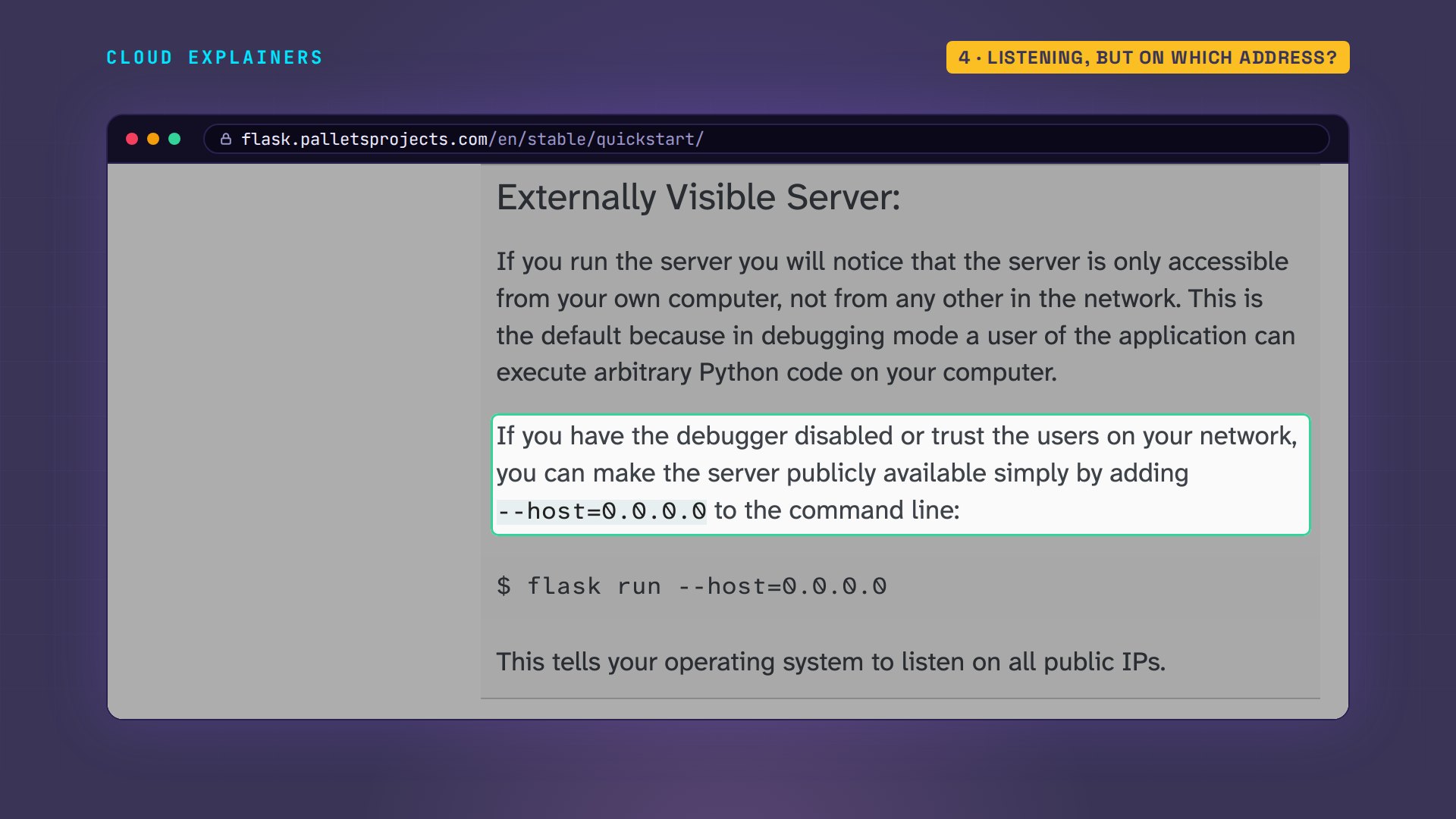
Flask, the framework this app is built on, says so in its own guide: the server is only reachable from your own computer, not from any other on the network. To open it, listen on zero dot zero dot zero dot zero. The same page explains why it's off by default: with the debugger on, anyone who can reach it can run code. Ana's runs with the debugger off.
The fix: listen on every address
So the fix is one line in the app's file, on the lanes server. app dot run, port five thousand, gains host equals zero dot zero dot zero dot zero, which means every address the server has. Other servers have the same switch under another name: a bind address, or a listen line.
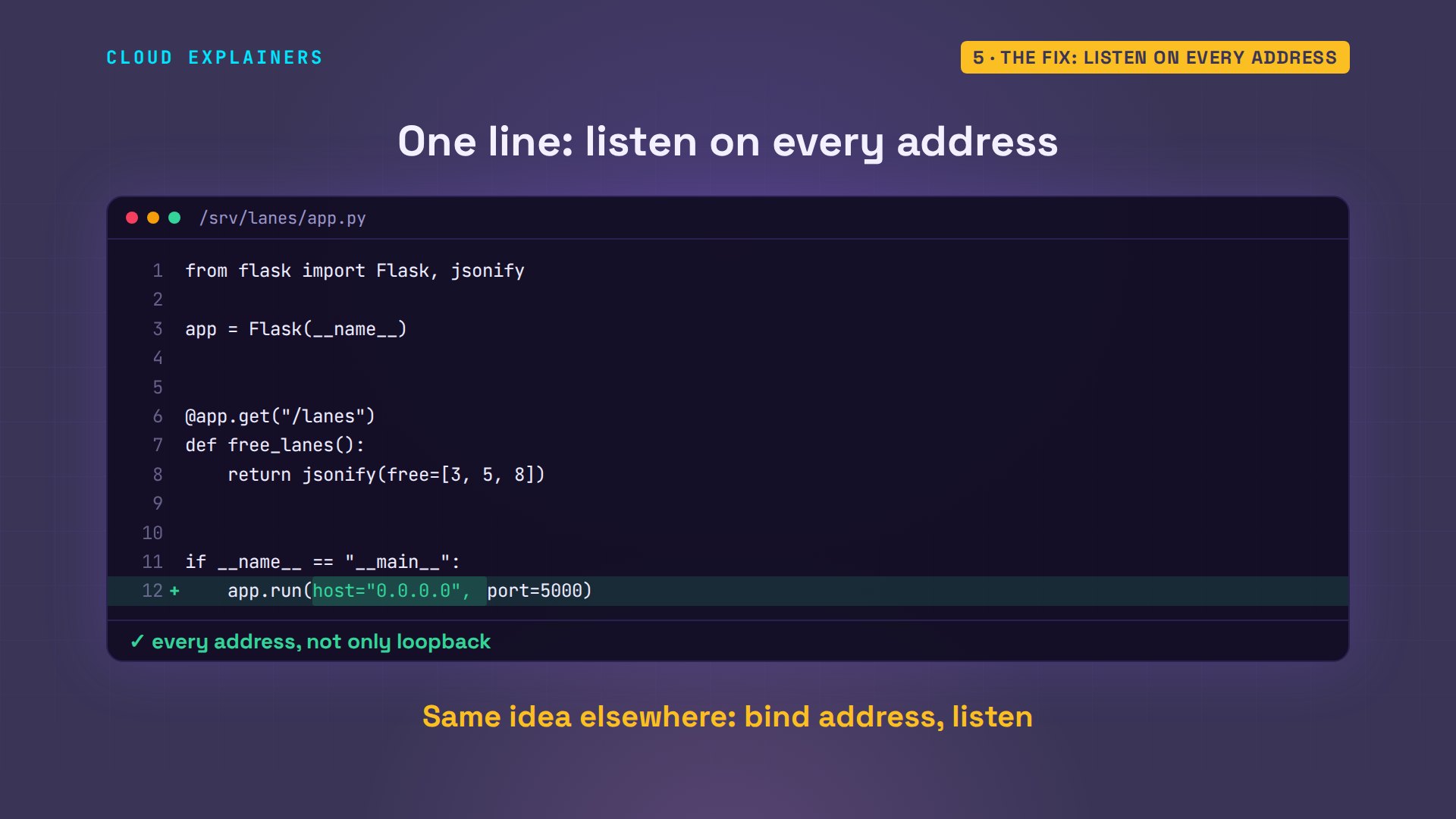
Restart it, and ss shows zero dot zero dot zero dot zero, port five thousand. The front desk asks again: lanes three, five and eight are free.
sudo systemctl restart lanes
sudo ss -ltnpState   Recv-Q   Send-Q     Local Address:Port      Peer Address:Port  Process
LISTEN  0        4096          127.0.0.11:38639          0.0.0.0:*
LISTEN  0        128              0.0.0.0:5000           0.0.0.0:*      users:(("python3",pid=158,fd=3))
python3 book.pyFree lanes: 3 5 8
Same error, other words
Every tool words this error its own way. Here, each one dials a port that nothing on the server uses. curl hides it: couldn't connect to server. Add dash v, and there it is: connection refused. ssh always dials port twenty-two, and this server has no SSH server installed, so it says it plainly. Different words, one meaning: the machine answered, and nobody was listening on that port.
curl http://lanes:8000/lanescurl: (7) Failed to connect to lanes port 8000 after 0 ms: Couldn't connect to server
curl -v http://lanes:8000/lanes* Host lanes:8000 was resolved.
* IPv6: (none)
* IPv4: 192.168.60.10
*   Trying 192.168.60.10:8000...
* connect to 192.168.60.10 port 8000 from 192.168.60.20 port 49636 failed: Connection refused
* Failed to connect to lanes port 8000 after 0 ms: Couldn't connect to server
* Closing connection
curl: (7) Failed to connect to lanes port 8000 after 0 ms: Couldn't connect to server
ssh lanesssh: connect to host lanes port 22: Connection refused
Right server, wrong port
One more check before you blame the server: the port number. The same server refuses port eight thousand, a port nothing uses, and accepts five thousand. So if ss shows your app on one port and your client dials another, that's your refusal.
nc -vz lanes 8000nc: connect to lanes (192.168.60.10) port 8000 (tcp) failed: Connection refused
nc -vz lanes 5000Connection to lanes (192.168.60.10) 5000 port [tcp/*] succeeded!
When the firewall says no
The next morning, the desk is refused again. But ss says the app is still listening on every address. This is the refusal that doesn't come from the app. ufw, Ubuntu's firewall, is on, with a rule left from an old setup: port five thousand, reject.
python3 book.pyTraceback (most recent call last):
  File "/usr/lib/python3.12/urllib/request.py", line 1344, in do_open
    h.request(req.get_method(), req.selector, req.data, headers,
  File "/usr/lib/python3.12/http/client.py", line 1365, in request
    self._send_request(method, url, body, headers, encode_chunked)
  File "/usr/lib/python3.12/http/client.py", line 1411, in _send_request
    self.endheaders(body, encode_chunked=encode_chunked)
  File "/usr/lib/python3.12/http/client.py", line 1360, in endheaders
    self._send_output(message_body, encode_chunked=encode_chunked)
  File "/usr/lib/python3.12/http/client.py", line 1120, in _send_output
    self.send(msg)
  File "/usr/lib/python3.12/http/client.py", line 1064, in send
    self.connect()
  File "/usr/lib/python3.12/http/client.py", line 1030, in connect
    self.sock = self._create_connection(
                ^^^^^^^^^^^^^^^^^^^^^^^^
  File "/usr/lib/python3.12/socket.py", line 852, in create_connection
    raise exceptions[0]
  File "/usr/lib/python3.12/socket.py", line 837, in create_connection
    sock.connect(sa)
ConnectionRefusedError: [Errno 111] Connection refused

During handling of the above exception, another exception occurred:

Traceback (most recent call last):
  File "/home/ana/book.py", line 5, in <module>
    with urllib.request.urlopen("http://lanes:5000/lanes", timeout=10) as answer:
         ^^^^^^^^^^^^^^^^^^^^^^^^^^^^^^^^^^^^^^^^^^^^^^^^^^^^^^^^^^^^^
  File "/usr/lib/python3.12/urllib/request.py", line 215, in urlopen
    return opener.open(url, data, timeout)
           ^^^^^^^^^^^^^^^^^^^^^^^^^^^^^^^
  File "/usr/lib/python3.12/urllib/request.py", line 515, in open
    response = self._open(req, data)
               ^^^^^^^^^^^^^^^^^^^^^
  File "/usr/lib/python3.12/urllib/request.py", line 532, in _open
    result = self._call_chain(self.handle_open, protocol, protocol +
             ^^^^^^^^^^^^^^^^^^^^^^^^^^^^^^^^^^^^^^^^^^^^^^^^^^^^^^^
  File "/usr/lib/python3.12/urllib/request.py", line 492, in _call_chain
    result = func(*args)
             ^^^^^^^^^^^
  File "/usr/lib/python3.12/urllib/request.py", line 1373, in http_open
    return self.do_open(http.client.HTTPConnection, req)
           ^^^^^^^^^^^^^^^^^^^^^^^^^^^^^^^^^^^^^^^^^^^^^
  File "/usr/lib/python3.12/urllib/request.py", line 1347, in do_open
    raise URLError(err)
urllib.error.URLError: <urlopen error [Errno 111] Connection refused>
sudo ss -ltnpState   Recv-Q   Send-Q     Local Address:Port      Peer Address:Port  Process
LISTEN  0        4096          127.0.0.11:38639          0.0.0.0:*
LISTEN  0        128              0.0.0.0:5000           0.0.0.0:*      users:(("python3",pid=158,fd=3))
sudo ufw statusStatus: active

To                         Action      From
--                         ------      ----
22/tcp                     ALLOW       Anywhere
5000/tcp                   REJECT      Anywhere
tcpdump, which prints every packet the server's network card sees, can't tell the difference. The desk's SYN comes in, and a reset goes back 27 millionths of a second later, the same as when nobody was listening. Reject means: the firewall answers no for the app, at the switchboard, before the call reaches anyone.
sudo tcpdump -ni eth0 -ttt -c 2 tcp port 5000tcpdump: verbose output suppressed, use -v[v]... for full protocol decode
listening on eth0, link-type EN10MB (Ethernet), snapshot length 262144 bytes
 00:00:00.000000 IP 192.168.60.20.50066 > 192.168.60.10.5000: Flags [S], seq 2631076826, win 64240, options [mss 1460,sackOK,TS val 2110611741 ecr 0,nop,wscale 10], length 0
 00:00:00.000027 IP 192.168.60.10.5000 > 192.168.60.20.50066: Flags [R.], seq 0, ack 2631076827, win 0, length 0
2 packets captured
2 packets received by filter
0 packets dropped by kernel
Ana changes the rule from reject to deny. Guess first: what does the desk get now? A time-out. Deny throws the SYN away without a word, so the desk waits the full ten seconds it allowed. The phone just rings. Allowing port five thousand ends it: the lanes are back.
sudo ufw deny 5000/tcpRule updated
time nc -vz -w 10 lanes 5000nc: connect to lanes (192.168.60.10) port 5000 (tcp) timed out: Operation now in progress

real	0m10.022s
user	0m0.000s
sys	0m0.001s
sudo ufw allow 5000/tcpRule updated
python3 book.pyFree lanes: 3 5 8
Before you call it fixed
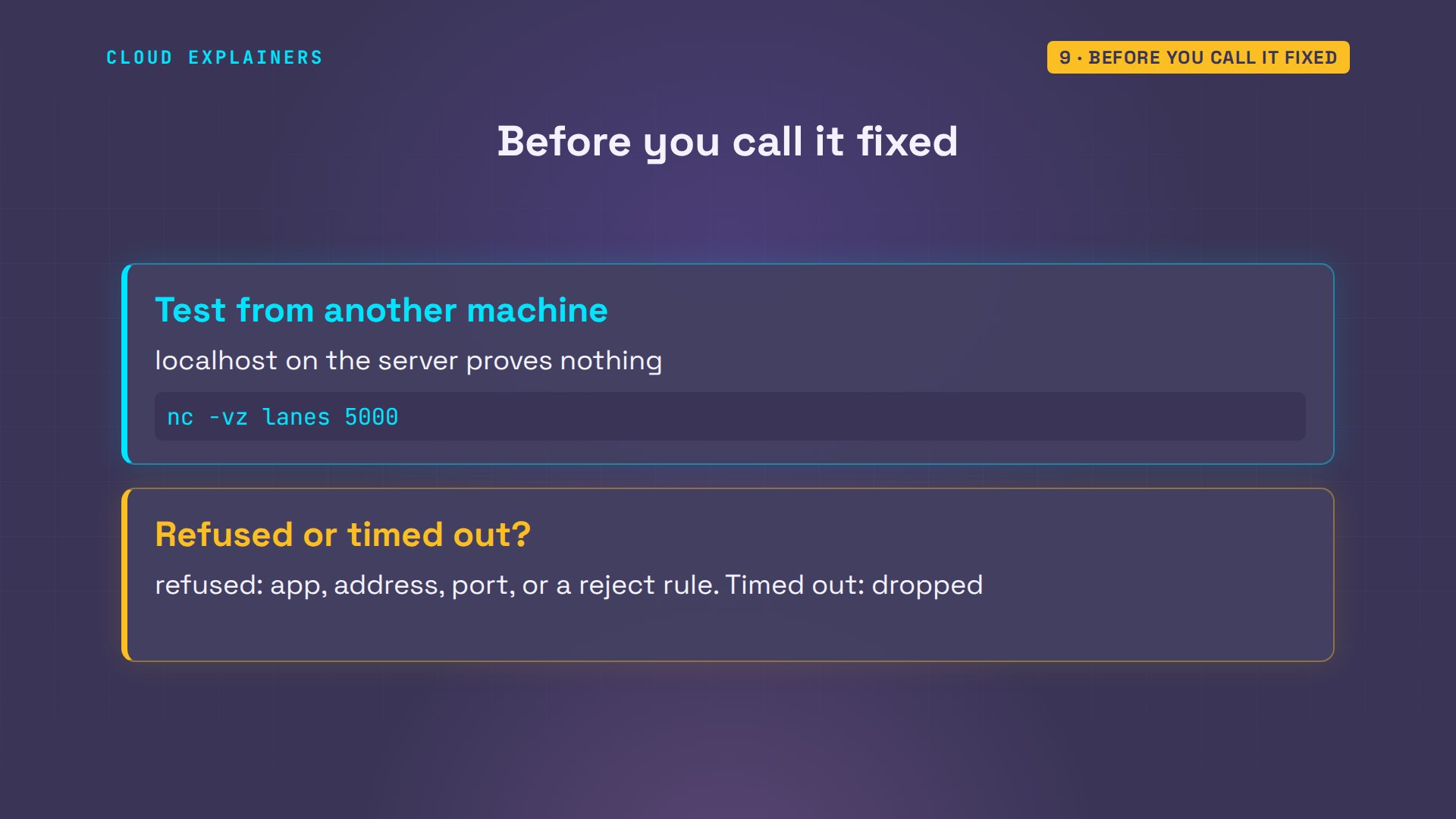
To catch this before the front desk does, test from another machine: on the server, localhost answered while the desk was refused. netcat with dash v z, a name and a port, tries one port in a second and says what happened. Refused points at the app, its address, its port, or a reject rule. A time-out points at a dropped packet.
Recap
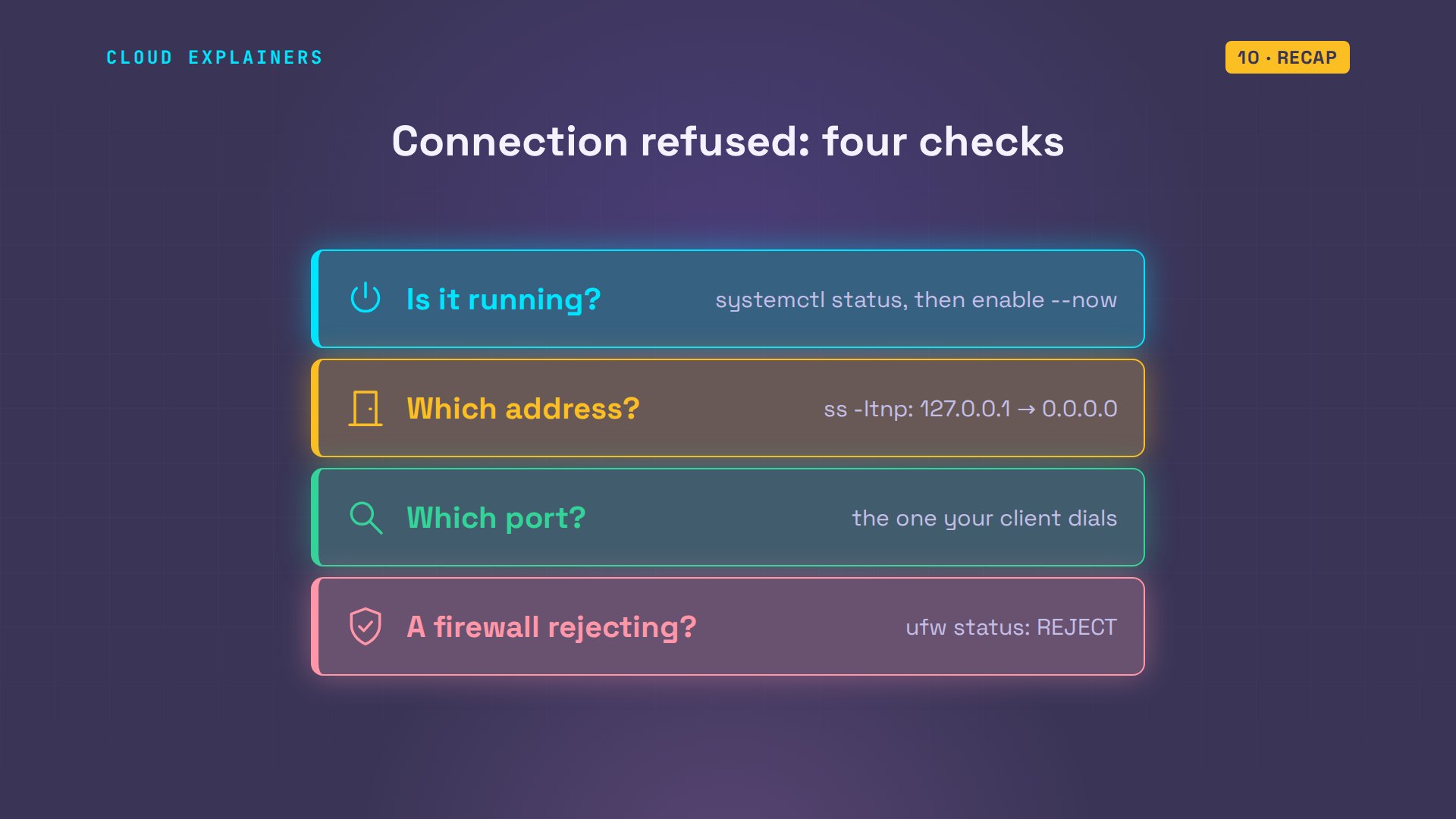
So, connection refused means the machine answered and nobody took the call. Check that the app runs, which address it listens on, which port, and whether a firewall rejects it.
If your desk finds its lanes now, subscribing brings more fixes, tested on real machines.
Every refusal in this video came from two real Ubuntu machines, and every command and the lab files are linked in the description. Thanks for watching Cloud Explainers.
Sources
- connect(2): ECONNREFUSED, no one listening on the remote address
- RFC 9293, Transmission Control Protocol (a SYN to a port with no listener is answered with a reset)
- ip(7): binding to INADDR_ANY (0.0.0.0) listens on all local addresses; 127.0.0.1 is loopback
- Flask quickstart, Externally Visible Server (only your own computer by default, --host=0.0.0.0, the debugger warning)
- ufw(8): deny drops the packet, reject answers the sender
- ss(8): -l listening sockets, -t TCP, -n numbers, -p the process
Demos: two containers on our own Mac standing in for a bowling alley's front desk PC and lanes server; the alley and its staff are made up. Every refusal, time-out and packet was real. Watch the full video on YouTube.
More videos

DevOps with Ansible Will Finally Make Sense After This
How SNMP Network Monitoring Works
How to Fix GitHub 'Permission Denied (publickey)' Errors
How to Fix PostgreSQL 'Password Authentication Failed'
Why One Linux Server Handles More Users Than You Think
DevOps Pipelines: Jenkins vs GitHub Actions
Every Networking Term a Beginner Needs in 12 Minutes
How to Fix Docker 'Permission Denied' on docker.sock
How to Fix Git 'Updates Were Rejected' When You Push
How to Fix nginx 502 Bad Gateway Errors on Linux

How to Fix Linux apt 'Could Not Get Lock' Errors (Ubuntu)

How Email Works on the Internet (SMTP) in 10 Minutes
The Python Roadmap for Beginners

Golang REST API with Gin: Full Tutorial for Beginners
How a WireGuard VPN Network Works

Linux Makefiles Will Finally Make Sense After This

SAML vs OAuth vs OpenID Connect: What's the Difference?

How to Fix Python cron Jobs That Never Run
Linux Bash Scripting: Full Tutorial for Beginners
How PXE Network Boot Works
How Active Directory Works

How to Fix a Linux systemd Service That Won't Start
Linux Logs: syslog vs journald
JWT vs Session Cookies: Which One Should You Use?
Docker vs Docker Compose: Which One Should You Use?
How to Fix Docker Compose Containers That Can't Talk to Each Other

Django Full Tutorial for Beginners

How Linux systemd Works

How to Fix 'Windows Cannot Access' Network Share Errors (SMB)
REST vs gRPC: Which One Should You Use?
How to Fix SSL Certificate Chain Errors (Missing Intermediate)

Every Python Concept for Beginners in 10 Minutes

Every SQL Join Type in 10 Minutes
Why OpenRouter Free Models Hit Their Limit So Fast
Why Your Gemini API Free Tier Runs Out So Fast

OpenRouter Will Finally Make Sense After This
How Redis Caching Works
Gemini API vs Vertex AI: Which One Should You Use?
How to Fix a Leaked Gemini API Key
Why Golang Uses Goroutines Instead of Threads
How to Fix Gemini API Error 429: Resource Exhausted

Claude Token Pricing Will Finally Make Sense After This
Why Python Web Scraping Returns Nothing (and the Fix)

Python uv vs pip: Which One Should You Use?

Python Automation: Full Tutorial for Beginners
How OAuth Login Works

Google AI Studio Will Finally Make Sense After This
What Happens When You Run a Docker Container
How to Fix Claude Code Billing Your API Key Instead of Your Plan
Why Passkeys Can't Be Phished Like Passwords
PowerShell vs Bash: Which One Should You Learn?
The Linux Roadmap for Beginners
Django vs FastAPI: Which One Should You Use?

Why SQLite Is the Most Used Database in the World
How a NoSQL Database Like MongoDB Works

How to Fix Python pip error: externally-managed-environment
How to Fix MySQL Too Many Connections Database Errors
Golang Concurrency Will Finally Make Sense After This
How Amazon S3 Works
How Kubernetes Works

How Git Works
How to Fix Docker Port Already Allocated Errors
How PostgreSQL Works

How to Fix Git Merge Conflicts

How to Fix No Space Left on Device in Linux
How the Internet Works
SQL vs NoSQL: When Each One Wins
How to Fix JWT Token Expired Errors (401 Unauthorized)
Claude API vs Claude Pro: Why Your Subscription Doesn't Include It
Why AI Agent Skills Beat Giant Prompts

Linux Cron Jobs Will Finally Make Sense After This

Security Logs Will Finally Make Sense After This

How to Fix a Security Leak: An API Key Pushed to GitHub
DNS Will Finally Make Sense After This
Never Ignore a Security Update
Two-Factor Authentication Will Finally Make Sense
Never Expose a Database to the Internet
SSH Keys vs Passwords: Which Is Safer for Security?

The 5 Levels of Linux Boot: From Power On to Login
The 5 Levels of Network Firewalls
Password Security: Why Hackers Crack Weak Passwords
Why Your Linux Server Runs Out of Memory
HTTP vs HTTPS: What Actually Changes on Your Network

Every Linux File Permission You Need to Know
Linux Processes vs Threads: When Each One Wins
The OSI Model Will Finally Make Sense After This

The 7 Levels of Git
Every Network Troubleshooting Command You Need
Hashing vs Encryption in Cybersecurity: When Each One Wins
Why the Internet Ran Out of IP Addresses
Linux Package Managers: apt vs Snap vs Flatpak

Why Python Is Slow (and When It Doesn't Matter)
TCP vs UDP: When Each One Wins
Stop Running Linux as Root (Do This Instead)
Linux Users and Groups Will Finally Make Sense

Why Phishing Beats Good Security (and How to Spot It)

The 7 Levels of Docker

AI Agents Will Finally Make Sense After This

Stop Using git push --force (Use This Instead)
Agent Skills vs MCP: When Each One Wins

Networking Will Finally Make Sense After This

Every Linux Command You Actually Need
The 7 Levels of Cybersecurity

Every System Design Concept You Need, in One Diagram