Docker: Full Tutorial for Beginners
A full Docker tutorial for beginners, on a real Ubuntu laptop whose Docker starts empty. We run a first container, a web server with a published port, look inside a container, build our own image from a Dockerfile (and fix the 127.0.0.1 trap that makes it unreachable), make rebuilds fast with the layer cache, keep a PostgreSQL database's data in a volume, connect two containers by name on a network, and put it all in one docker compose up.
One command, a whole app
Your app runs on your laptop, then breaks on someone else's: a different Python, no database. Docker fixes that, if you can get past its words. Here's where we're going. On Ana's laptop at a yoga studio, docker compose up starts a database and a web app, in 4 seconds. The longest part is typing it. One part kept taking ten seconds to stop; we'll see why.
time docker compose up -d[+] Running 0/1 ⠙ db Pulling 0.1s [+] Running 0/1 ⠹ db Pulling 0.2s [+] Running 0/1 ⠸ db Pulling 0.3s [+] Running 0/1 ⠼ db Pulling 0.4s [+] Running 0/1 ⠴ db Pulling 0.5s [+] Running 0/1 ⠦ db Pulling 0.6s [+] Running 0/11 ⠧ db [⠀⠀⠀⠀⠀⠀⠀⠀⠀⠀] Pulling 0.7s ⠋ 417d13870bbc Pulling fs layer 0.0s ⠋ efed2fb4d513 Pulling fs layer 0.0s ⠋ cc1103dc4f4a Pulling fs layer 0.0s ⠋ deb7e5f7c1e2 Pulling fs layer 0.0s ⠋ b90627b8f429 Pulling fs layer 0.0s ⠋ 4a08f65577d5 Pulling fs layer 0.0s ⠋ f1587904a1db Pulling fs layer 0.0s ⠋ dc4cf4299f4e Pulling fs layer 0.0s ⠋ f5d2b4da9164 Pulling fs layer 0.0s ⠋ d61cec070bc8 Pulling fs layer 0.0s [+] Running 0/11 ⠇ db [⠀⠀⠀⠀⠀⠀⠀⠀⠀⠀] Pulling 0.8s ⠙ 417d13870bbc Pulling fs layer 0.1s ⠙ efed2fb4d513 Pulling fs layer 0.1s ⠙ cc1103dc4f4a Pulling fs layer 0.1s ⠙ deb7e5f7c1e2 Pulling fs layer 0.1s ⠙ b90627b8f429 Pulling fs layer 0.1s ⠙ 4a08f65577d5 Pulling fs layer 0.1s ⠙ f1587904a1db Pulling fs layer 0.1s ⠙ dc4cf4299f4e Pulling fs layer 0.1s ⠙ f5d2b4da9164 Pulling fs layer 0.1s ⠙ d61cec070bc8 Pulling fs layer 0.1s [+] Running 8/13 ⠏ db [⣿⣿⣿⣿⣀⠀⣿⣿⠀⠀⣿⣿] Pulling 0.9s ✔ 417d13870bbc Download complete 0.1s ✔ efed2fb4d513 Download complete 0.1s ✔ cc1103dc4f4a Download complete 0.1s ✔ deb7e5f7c1e2 Download complete 0.1s ⠹ b90627b8f429 Downloading 1.049MB/4.191MB 0.2s ⠹ 4a08f65577d5 Pulling fs layer 0.2s ✔ f1587904a1db Download complete 0.1s ✔ dc4cf4299f4e Download complete 0.1s ⠹ f5d2b4da9164 Pulling fs layer 0.2s ⠹ d61cec070bc8 Pulling fs layer 0.2s ✔ 1179e39b1745 Download complete 0.0s ✔ 982bf3959446 Download complete 0.0s [+] Running 9/13 ⠋ db [⣿⣿⣿⣿⣿⣿⣿⣿⠀⠀⣿⣿] Pulling 1.0s ✔ 417d13870bbc Download complete 0.1s ✔ efed2fb4d513 Download complete 0.1s ✔ cc1103dc4f4a Download complete 0.1s ✔ deb7e5f7c1e2 Download complete 0.1s ⠸ b90627b8f429 Extracting 1 s 0.3s ✔ 4a08f65577d5 Download complete 0.2s ✔ f1587904a1db Download complete 0.1s ✔ dc4cf4299f4e Download complete 0.1s ⠸ f5d2b4da9164 Downloading 1.049MB/110.1MB 0.3s ⠸ d61cec070bc8 Pulling fs layer 0.3s ✔ 1179e39b1745 Download complete 0.0s ✔ 982bf3959446 Download complete 0.0s [+] Running 11/13 ⠙ db [⣿⣿⣿⣿⣿⣿⣿⣿⠀⣿⣿⣿] 9.437MB / 114.3MB Pulling 1.1s ✔ 417d13870bbc Download complete 0.1s ✔ efed2fb4d513 Download complete 0.1s ✔ cc1103dc4f4a Pull complete 0.1s ✔ deb7e5f7c1e2 Pull complete 0.1s ✔ b90627b8f429 Pull complete 0.3s ✔ 4a08f65577d5 Download complete 0.2s ✔ f1587904a1db Download complete 0.1s ✔ dc4cf4299f4e Download complete 0.1s ⠼ f5d2b4da9164 Downloading 8.389MB/110.1MB 0.4s ✔ d61cec070bc8 Pull complete 0.3s ✔ 1179e39b1745 Download complete 0.0s ✔ 982bf3959446 Download complete 0.0s [+] Running 11/13 ⠹ db [⣿⣿⣿⣿⣿⣿⣿⣿⡀⣿⣿⣿] 16.78MB / 114.3MB Pulling 1.2s ✔ 417d13870bbc Download complete 0.1s ✔ efed2fb4d513 Download complete 0.1s ✔ cc1103dc4f4a Pull complete 0.1s ✔ deb7e5f7c1e2 Pull complete 0.1s ✔ b90627b8f429 Pull complete 0.3s ✔ 4a08f65577d5 Download complete 0.2s ✔ f1587904a1db Download complete 0.1s ✔ dc4cf4299f4e Download complete 0.1s ⠴ f5d2b4da9164 Downloading 15.73MB/110.1MB 0.5s ✔ d61cec070bc8 Pull complete 0.3s ✔ 1179e39b1745 Download complete 0.0s ✔ 982bf3959446 Download complete 0.0s [+] Running 11/13 ⠸ db [⣿⣿⣿⣿⣿⣿⣿⣿⡀⣿⣿⣿] 24.12MB / 114.3MB Pulling 1.3s ✔ 417d13870bbc Download complete 0.1s ✔ efed2fb4d513 Download complete 0.1s ✔ cc1103dc4f4a Pull complete 0.1s ✔ deb7e5f7c1e2 Pull complete 0.1s ✔ b90627b8f429 Pull complete 0.3s ✔ 4a08f65577d5 Download complete 0.2s ✔ f1587904a1db Download complete 0.1s ✔ dc4cf4299f4e Download complete 0.1s ⠦ f5d2b4da9164 Downloading 23.07MB/110.1MB 0.6s ✔ d61cec070bc8 Pull complete 0.3s ✔ 1179e39b1745 Download complete 0.0s ✔ 982bf3959446 Download complete 0.0s [+] Running 11/13 ⠼ db [⣿⣿⣿⣿⣿⣿⣿⣿⣀⣿⣿⣿] 32.51MB / 114.3MB Pulling 1.4s ✔ 417d13870bbc Download complete 0.1s ✔ efed2fb4d513 Download complete 0.1s ✔ cc1103dc4f4a Pull complete 0.1s ✔ deb7e5f7c1e2 Pull complete 0.1s ✔ b90627b8f429 Pull complete 0.3s ✔ 4a08f65577d5 Download complete 0.2s ✔ f1587904a1db Download complete 0.1s ✔ dc4cf4299f4e Download complete 0.1s ⠧ f5d2b4da9164 Downloading 31.46MB/110.1MB 0.7s ✔ d61cec070bc8 Pull complete 0.3s ✔ 1179e39b1745 Download complete 0.0s ✔ 982bf3959446 Download complete 0.0s [+] Running 11/13 ⠴ db [⣿⣿⣿⣿⣿⣿⣿⣿⣀⣿⣿⣿] 39.85MB / 114.3MB Pulling 1.5s ✔ 417d13870bbc Download complete 0.1s ✔ efed2fb4d513 Download complete 0.1s ✔ cc1103dc4f4a Pull complete 0.1s ✔ deb7e5f7c1e2 Pull complete 0.1s ✔ b90627b8f429 Pull complete 0.3s ✔ 4a08f65577d5 Download complete 0.2s ✔ f1587904a1db Download complete 0.1s ✔ dc4cf4299f4e Download complete 0.1s ⠇ f5d2b4da9164 Downloading 38.8MB/110.1MB 0.8s ✔ d61cec070bc8 Pull complete 0.3s ✔ 1179e39b1745 Download complete 0.0s ✔ 982bf3959446 Download complete 0.0s [+] Running 11/13 ⠦ db [⣿⣿⣿⣿⣿⣿⣿⣿⣄⣿⣿⣿] 48.23MB / 114.3MB Pulling 1.6s ✔ 417d13870bbc Download complete 0.1s ✔ efed2fb4d513 Download complete 0.1s ✔ cc1103dc4f4a Pull complete 0.1s ✔ deb7e5f7c1e2 Pull complete 0.1s ✔ b90627b8f429 Pull complete 0.3s ✔ 4a08f65577d5 Download complete 0.2s ✔ f1587904a1db Download complete 0.1s ✔ dc4cf4299f4e Download complete 0.1s ⠏ f5d2b4da9164 Downloading 47.19MB/110.1MB 0.9s ✔ d61cec070bc8 Pull complete 0.3s ✔ 1179e39b1745 Download complete 0.0s ✔ 982bf3959446 Download complete 0.0s [+] Running 11/13 ⠧ db [⣿⣿⣿⣿⣿⣿⣿⣿⣤⣿⣿⣿] 56.62MB / 114.3MB Pulling 1.7s ✔ 417d13870bbc Download complete 0.1s ✔ efed2fb4d513 Download complete 0.1s ✔ cc1103dc4f4a Pull complete 0.1s ✔ deb7e5f7c1e2 Pull complete 0.1s ✔ b90627b8f429 Pull complete 0.3s ✔ 4a08f65577d5 Download complete 0.2s ✔ f1587904a1db Download complete 0.1s ✔ dc4cf4299f4e Download complete 0.1s ⠋ f5d2b4da9164 Downloading 55.57MB/110.1MB 1.0s ✔ d61cec070bc8 Pull complete 0.3s ✔ 1179e39b1745 Download complete 0.0s ✔ 982bf3959446 Download complete 0.0s [+] Running 11/13 ⠇ db [⣿⣿⣿⣿⣿⣿⣿⣿⣤⣿⣿⣿] 65.01MB / 114.3MB Pulling 1.8s ✔ 417d13870bbc Download complete 0.1s ✔ efed2fb4d513 Download complete 0.1s ✔ cc1103dc4f4a Pull complete 0.1s ✔ deb7e5f7c1e2 Pull complete 0.1s ✔ b90627b8f429 Pull complete 0.3s ✔ 4a08f65577d5 Download complete 0.2s ✔ f1587904a1db Download complete 0.1s ✔ dc4cf4299f4e Download complete 0.1s ⠙ f5d2b4da9164 Downloading 63.96MB/110.1MB 1.1s ✔ d61cec070bc8 Pull complete 0.3s ✔ 1179e39b1745 Download complete 0.0s ✔ 982bf3959446 Download complete 0.0s [+] Running 11/13 ⠏ db [⣿⣿⣿⣿⣿⣿⣿⣿⣦⣿⣿⣿] 73.4MB / 114.3MB Pulling 1.9s ✔ 417d13870bbc Download complete 0.1s ✔ efed2fb4d513 Download complete 0.1s ✔ cc1103dc4f4a Pull complete 0.1s ✔ deb7e5f7c1e2 Pull complete 0.1s ✔ b90627b8f429 Pull complete 0.3s ✔ 4a08f65577d5 Download complete 0.2s ✔ f1587904a1db Download complete 0.1s ✔ dc4cf4299f4e Download complete 0.1s ⠹ f5d2b4da9164 Downloading 72.35MB/110.1MB 1.2s ✔ d61cec070bc8 Pull complete 0.3s ✔ 1179e39b1745 Download complete 0.0s ✔ 982bf3959446 Download complete 0.0s [+] Running 11/13 ⠋ db [⣿⣿⣿⣿⣿⣿⣿⣿⣶⣿⣿⣿] 83.89MB / 114.3MB Pulling 2.0s ✔ 417d13870bbc Download complete 0.1s ✔ efed2fb4d513 Download complete 0.1s ✔ cc1103dc4f4a Pull complete 0.1s ✔ deb7e5f7c1e2 Pull complete 0.1s ✔ b90627b8f429 Pull complete 0.3s ✔ 4a08f65577d5 Download complete 0.2s ✔ f1587904a1db Download complete 0.1s ✔ dc4cf4299f4e Download complete 0.1s ⠸ f5d2b4da9164 Downloading 82.84MB/110.1MB 1.3s ✔ d61cec070bc8 Pull complete 0.3s ✔ 1179e39b1745 Download complete 0.0s ✔ 982bf3959446 Download complete 0.0s [+] Running 11/13 ⠙ db [⣿⣿⣿⣿⣿⣿⣿⣿⣶⣿⣿⣿] 93.32MB / 114.3MB Pulling 2.1s ✔ 417d13870bbc Download complete 0.1s ✔ efed2fb4d513 Download complete 0.1s ✔ cc1103dc4f4a Pull complete 0.1s ✔ deb7e5f7c1e2 Pull complete 0.1s ✔ b90627b8f429 Pull complete 0.3s ✔ 4a08f65577d5 Download complete 0.2s ✔ f1587904a1db Download complete 0.1s ✔ dc4cf4299f4e Download complete 0.1s ⠼ f5d2b4da9164 Downloading 92.27MB/110.1MB 1.4s ✔ d61cec070bc8 Pull complete 0.3s ✔ 1179e39b1745 Download complete 0.0s ✔ 982bf3959446 Download complete 0.0s [+] Running 11/13 ⠹ db [⣿⣿⣿⣿⣿⣿⣿⣿⣷⣿⣿⣿] 101.7MB / 114.3MB Pulling 2.2s ✔ 417d13870bbc Download complete 0.1s ✔ efed2fb4d513 Download complete 0.1s ✔ cc1103dc4f4a Pull complete 0.1s ✔ deb7e5f7c1e2 Pull complete 0.1s ✔ b90627b8f429 Pull complete 0.3s ✔ 4a08f65577d5 Download complete 0.2s ✔ f1587904a1db Download complete 0.1s ✔ dc4cf4299f4e Download complete 0.1s ⠴ f5d2b4da9164 Downloading 100.7MB/110.1MB 1.5s ✔ d61cec070bc8 Pull complete 0.3s ✔ 1179e39b1745 Download complete 0.0s ✔ 982bf3959446 Download complete 0.0s [+] Running 11/13 ⠸ db [⣿⣿⣿⣿⣿⣿⣿⣿⣿⣿⣿⣿] 111.2MB / 114.3MB Pulling 2.3s ✔ 417d13870bbc Download complete 0.1s ✔ efed2fb4d513 Download complete 0.1s ✔ cc1103dc4f4a Pull complete 0.1s ✔ deb7e5f7c1e2 Pull complete 0.1s ✔ b90627b8f429 Pull complete 0.3s ✔ 4a08f65577d5 Download complete 0.2s ✔ f1587904a1db Download complete 0.1s ✔ dc4cf4299f4e Download complete 0.1s ⠦ f5d2b4da9164 Downloading 110.1MB/110.1MB 1.6s ✔ d61cec070bc8 Pull complete 0.3s ✔ 1179e39b1745 Download complete 0.0s ✔ 982bf3959446 Download complete 0.0s [+] Running 11/13 ⠼ db [⣿⣿⣿⣿⣿⣿⣿⣿⣿⣿⣿⣿] 111.2MB / 114.3MB Pulling 2.4s ✔ 417d13870bbc Download complete 0.1s ✔ efed2fb4d513 Download complete 0.1s ✔ cc1103dc4f4a Pull complete 0.1s ✔ deb7e5f7c1e2 Pull complete 0.1s ✔ b90627b8f429 Pull complete 0.3s ✔ 4a08f65577d5 Download complete 0.2s ✔ f1587904a1db Download complete 0.1s ✔ dc4cf4299f4e Download complete 0.1s ⠧ f5d2b4da9164 Extracting 1 s 1.7s ✔ d61cec070bc8 Pull complete 0.3s ✔ 1179e39b1745 Download complete 0.0s ✔ 982bf3959446 Download complete 0.0s [+] Running 11/13 ⠴ db [⣿⣿⣿⣿⣿⣿⣿⣿⣿⣿⣿⣿] 111.2MB / 114.3MB Pulling 2.5s ✔ 417d13870bbc Download complete 0.1s ✔ efed2fb4d513 Download complete 0.1s ✔ cc1103dc4f4a Pull complete 0.1s ✔ deb7e5f7c1e2 Pull complete 0.1s ✔ b90627b8f429 Pull complete 0.3s ✔ 4a08f65577d5 Download complete 0.2s ✔ f1587904a1db Download complete 0.1s ✔ dc4cf4299f4e Download complete 0.1s ⠇ f5d2b4da9164 Extracting 1 s 1.8s ✔ d61cec070bc8 Pull complete 0.3s ✔ 1179e39b1745 Download complete 0.0s ✔ 982bf3959446 Download complete 0.0s [+] Running 11/13 ⠦ db [⣿⣿⣿⣿⣿⣿⣿⣿⣿⣿⣿⣿] 111.2MB / 114.3MB Pulling 2.6s ✔ 417d13870bbc Download complete 0.1s ✔ efed2fb4d513 Download complete 0.1s ✔ cc1103dc4f4a Pull complete 0.1s ✔ deb7e5f7c1e2 Pull complete 0.1s ✔ b90627b8f429 Pull complete 0.3s ✔ 4a08f65577d5 Download complete 0.2s ✔ f1587904a1db Download complete 0.1s ✔ dc4cf4299f4e Download complete 0.1s ⠏ f5d2b4da9164 Extracting 1 s 1.9s ✔ d61cec070bc8 Pull complete 0.3s ✔ 1179e39b1745 Download complete 0.0s ✔ 982bf3959446 Download complete 0.0s [+] Running 11/13 ⠧ db [⣿⣿⣿⣿⣿⣿⣿⣿⣿⣿⣿⣿] 111.2MB / 114.3MB Pulling 2.7s ✔ 417d13870bbc Download complete 0.1s ✔ efed2fb4d513 Download complete 0.1s ✔ cc1103dc4f4a Pull complete 0.1s ✔ deb7e5f7c1e2 Pull complete 0.1s ✔ b90627b8f429 Pull complete 0.3s ✔ 4a08f65577d5 Download complete 0.2s ✔ f1587904a1db Download complete 0.1s ✔ dc4cf4299f4e Download complete 0.1s ⠋ f5d2b4da9164 Extracting 1 s 2.0s ✔ d61cec070bc8 Pull complete 0.3s ✔ 1179e39b1745 Download complete 0.0s ✔ 982bf3959446 Download complete 0.0s [+] Running 11/13 ⠇ db [⣿⣿⣿⣿⣿⣿⣿⣿⣿⣿⣿⣿] 111.2MB / 114.3MB Pulling 2.8s ✔ 417d13870bbc Download complete 0.1s ✔ efed2fb4d513 Download complete 0.1s ✔ cc1103dc4f4a Pull complete 0.1s ✔ deb7e5f7c1e2 Pull complete 0.1s ✔ b90627b8f429 Pull complete 0.3s ✔ 4a08f65577d5 Download complete 0.2s ✔ f1587904a1db Download complete 0.1s ✔ dc4cf4299f4e Download complete 0.1s ⠙ f5d2b4da9164 Extracting 1 s 2.1s ✔ d61cec070bc8 Pull complete 0.3s ✔ 1179e39b1745 Download complete 0.0s ✔ 982bf3959446 Download complete 0.0s [+] Running 11/13 ⠏ db [⣿⣿⣿⣿⣿⣿⣿⣿⣿⣿⣿⣿] 111.2MB / 114.3MB Pulling 2.9s ✔ 417d13870bbc Download complete 0.1s ✔ efed2fb4d513 Download complete 0.1s ✔ cc1103dc4f4a Pull complete 0.1s ✔ deb7e5f7c1e2 Pull complete 0.1s ✔ b90627b8f429 Pull complete 0.3s ✔ 4a08f65577d5 Download complete 0.2s ✔ f1587904a1db Download complete 0.1s ✔ dc4cf4299f4e Download complete 0.1s ⠹ f5d2b4da9164 Extracting 1 s 2.2s ✔ d61cec070bc8 Pull complete 0.3s ✔ 1179e39b1745 Download complete 0.0s ✔ 982bf3959446 Download complete 0.0s [+] Running 11/13 ⠋ db [⣿⣿⣿⣿⣿⣿⣿⣿⣿⣿⣿⣿] 111.2MB / 114.3MB Pulling 3.0s ✔ 417d13870bbc Download complete 0.1s ✔ efed2fb4d513 Download complete 0.1s ✔ cc1103dc4f4a Pull complete 0.1s ✔ deb7e5f7c1e2 Pull complete 0.1s ✔ b90627b8f429 Pull complete 0.3s ✔ 4a08f65577d5 Download complete 0.2s ✔ f1587904a1db Download complete 0.1s ✔ dc4cf4299f4e Download complete 0.1s ⠸ f5d2b4da9164 Extracting 1 s 2.3s ✔ d61cec070bc8 Pull complete 0.3s ✔ 1179e39b1745 Download complete 0.0s ✔ 982bf3959446 Download complete 0.0s [+] Running 11/13 ⠙ db [⣿⣿⣿⣿⣿⣿⣿⣿⣿⣿⣿⣿] 111.2MB / 114.3MB Pulling 3.1s ✔ 417d13870bbc Download complete 0.1s ✔ efed2fb4d513 Download complete 0.1s ✔ cc1103dc4f4a Pull complete 0.1s ✔ deb7e5f7c1e2 Pull complete 0.1s ✔ b90627b8f429 Pull complete 0.3s ✔ 4a08f65577d5 Download complete 0.2s ✔ f1587904a1db Download complete 0.1s ✔ dc4cf4299f4e Download complete 0.1s ⠼ f5d2b4da9164 Extracting 1 s 2.4s ✔ d61cec070bc8 Pull complete 0.3s ✔ 1179e39b1745 Download complete 0.0s ✔ 982bf3959446 Download complete 0.0s [+] Running 11/13 ⠹ db [⣿⣿⣿⣿⣿⣿⣿⣿⣿⣿⣿⣿] 111.2MB / 114.3MB Pulling 3.2s ✔ 417d13870bbc Download complete 0.1s ✔ efed2fb4d513 Download complete 0.1s ✔ cc1103dc4f4a Pull complete 0.1s ✔ deb7e5f7c1e2 Pull complete 0.1s ✔ b90627b8f429 Pull complete 0.3s ✔ 4a08f65577d5 Download complete 0.2s ✔ f1587904a1db Download complete 0.1s ✔ dc4cf4299f4e Download complete 0.1s ⠴ f5d2b4da9164 Extracting 1 s 2.5s ✔ d61cec070bc8 Pull complete 0.3s ✔ 1179e39b1745 Download complete 0.0s ✔ 982bf3959446 Download complete 0.0s [+] Running 11/13 ⠸ db [⣿⣿⣿⣿⣿⣿⣿⣿⣿⣿⣿⣿] 111.2MB / 114.3MB Pulling 3.3s ✔ 417d13870bbc Download complete 0.1s ✔ efed2fb4d513 Download complete 0.1s ✔ cc1103dc4f4a Pull complete 0.1s ✔ deb7e5f7c1e2 Pull complete 0.1s ✔ b90627b8f429 Pull complete 0.3s ✔ 4a08f65577d5 Download complete 0.2s ✔ f1587904a1db Download complete 0.1s ✔ dc4cf4299f4e Download complete 0.1s ⠦ f5d2b4da9164 Extracting 1 s 2.6s ✔ d61cec070bc8 Pull complete 0.3s ✔ 1179e39b1745 Download complete 0.0s ✔ 982bf3959446 Download complete 0.0s [+] Running 11/13 ⠼ db [⣿⣿⣿⣿⣿⣿⣿⣿⣿⣿⣿⣿] 111.2MB / 114.3MB Pulling 3.4s ✔ 417d13870bbc Download complete 0.1s ✔ efed2fb4d513 Download complete 0.1s ✔ cc1103dc4f4a Pull complete 0.1s ✔ deb7e5f7c1e2 Pull complete 0.1s ✔ b90627b8f429 Pull complete 0.3s ✔ 4a08f65577d5 Download complete 0.2s ✔ f1587904a1db Download complete 0.1s ✔ dc4cf4299f4e Download complete 0.1s ⠧ f5d2b4da9164 Extracting 2 s 2.7s ✔ d61cec070bc8 Pull complete 0.3s ✔ 1179e39b1745 Download complete 0.0s ✔ 982bf3959446 Download complete 0.0s [+] Running 11/13 ⠴ db [⣿⣿⣿⣿⣿⣿⣿⣿⣿⣿⣿⣿] 111.2MB / 114.3MB Pulling 3.5s ✔ 417d13870bbc Download complete 0.1s ✔ efed2fb4d513 Download complete 0.1s ✔ cc1103dc4f4a Pull complete 0.1s ✔ deb7e5f7c1e2 Pull complete 0.1s ✔ b90627b8f429 Pull complete 0.3s ✔ 4a08f65577d5 Download complete 0.2s ✔ f1587904a1db Download complete 0.1s ✔ dc4cf4299f4e Download complete 0.1s ⠇ f5d2b4da9164 Extracting 2 s 2.8s ✔ d61cec070bc8 Pull complete 0.3s ✔ 1179e39b1745 Download complete 0.0s ✔ 982bf3959446 Download complete 0.0s [+] Running 13/13 ✔ db Pulled 3.5s ✔ 417d13870bbc Pull complete 0.1s ✔ efed2fb4d513 Pull complete 0.1s ✔ cc1103dc4f4a Pull complete 0.1s ✔ deb7e5f7c1e2 Pull complete 0.1s ✔ b90627b8f429 Pull complete 0.3s ✔ 4a08f65577d5 Pull complete 0.2s ✔ f1587904a1db Pull complete 0.1s ✔ dc4cf4299f4e Pull complete 0.1s ✔ f5d2b4da9164 Pull complete 2.8s ✔ d61cec070bc8 Pull complete 0.3s ✔ 1179e39b1745 Download complete 0.0s ✔ 982bf3959446 Download complete 0.0s #1 [internal] load local bake definitions #1 reading from stdin 471B done #1 DONE 0.0s #2 [internal] load build definition from Dockerfile #2 transferring dockerfile: 168B done #2 DONE 0.0s #3 [internal] load metadata for docker.io/library/python:3.13-slim #3 DONE 0.2s #4 [internal] load .dockerignore #4 transferring context: 48B done #4 DONE 0.0s #5 [internal] load build context #5 transferring context: 697B done #5 DONE 0.0s #6 [1/5] FROM docker.io/library/python:3.13-slim@sha256:e48f59cdba69a3cbd9ed2cf0f348d90d45a8d350d98134cf1070bc106ee9ed90 #6 resolve docker.io/library/python:3.13-slim@sha256:e48f59cdba69a3cbd9ed2cf0f348d90d45a8d350d98134cf1070bc106ee9ed90 0.0s done #6 DONE 0.0s #7 [2/5] WORKDIR /app #7 CACHED #8 [3/5] COPY requirements.txt . #8 CACHED #9 [4/5] RUN pip install -r requirements.txt #9 CACHED #10 [5/5] COPY . . #10 DONE 0.2s #11 exporting to image #11 exporting layers 0.0s done #11 exporting manifest sha256:864e83b7d079b8c3468137a29a441a6e61dff24de1fc8201d9313d8f5a05b8c8 done #11 exporting config sha256:b8e84c55618f6814cc1e7ce96af52cbfc803343cf3b85da12ca7b898aff29474 done #11 exporting attestation manifest sha256:996250f776e7d90fb47af6a7de99a62c1cf211216feba4ddbb3a43f6da89e97b done #11 exporting manifest list sha256:7037a5e678045f5826618d5749fa5083988a9f6f0643816be5f9598429ea9f21 done #11 naming to docker.io/library/studio-web:latest done #11 unpacking to docker.io/library/studio-web:latest #11 unpacking to docker.io/library/studio-web:latest 0.2s done #11 DONE 0.3s #12 resolving provenance for metadata file #12 DONE 0.0s [+] Running 3/4 ✔ studio-web Built 0.0s ✔ Network studio_default Created 0.0s ✔ Volume studio_studio-data Created 0.0s ⠋ Container studio-db-1 Creating 0.0s [+] Running 4/5 ✔ studio-web Built 0.0s ✔ Network studio_default Created 0.0s ✔ Volume studio_studio-data Created 0.0s ✔ Container studio-db-1 Started 0.1s ⠋ Container studio-web-1 Starting 0.1s [+] Running 5/5 ✔ studio-web Built 0.0s ✔ Network studio_default Created 0.0s ✔ Volume studio_studio-data Created 0.0s ✔ Container studio-db-1 Started 0.1s ✔ Container studio-web-1 Started 0.1s real 0m4.471s user 0m0.071s sys 0m0.046s
Her browser shows today's classes from that database. You'll build all of it, from an empty Docker.

What Docker is
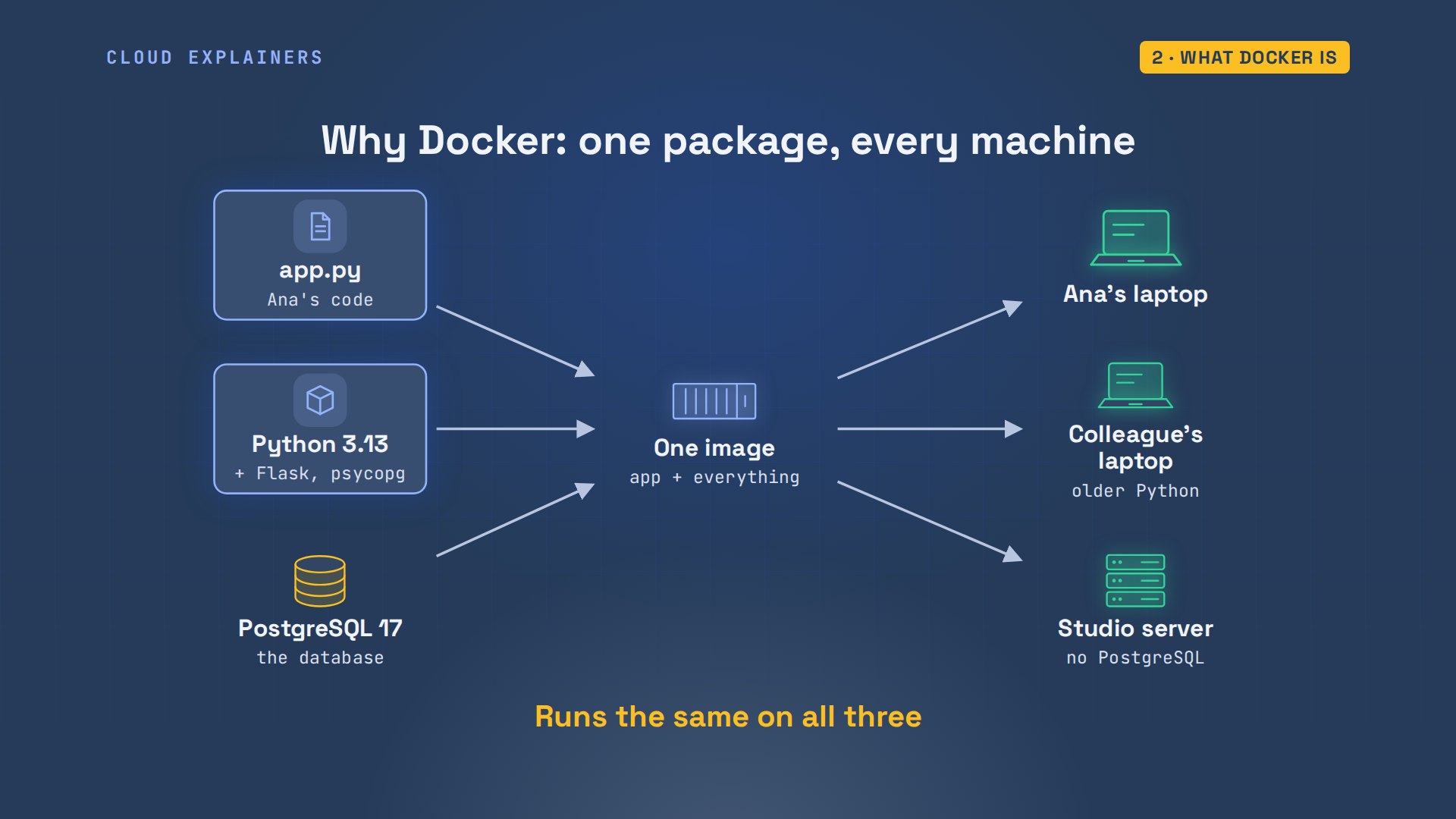
Why does anyone need this? Ana's app needs Python 3.13, two libraries and PostgreSQL 17. Her colleague's laptop has an older Python, and the studio's server has no PostgreSQL at all. Docker packs the app with everything it needs into one image, and that image runs the same on all three.
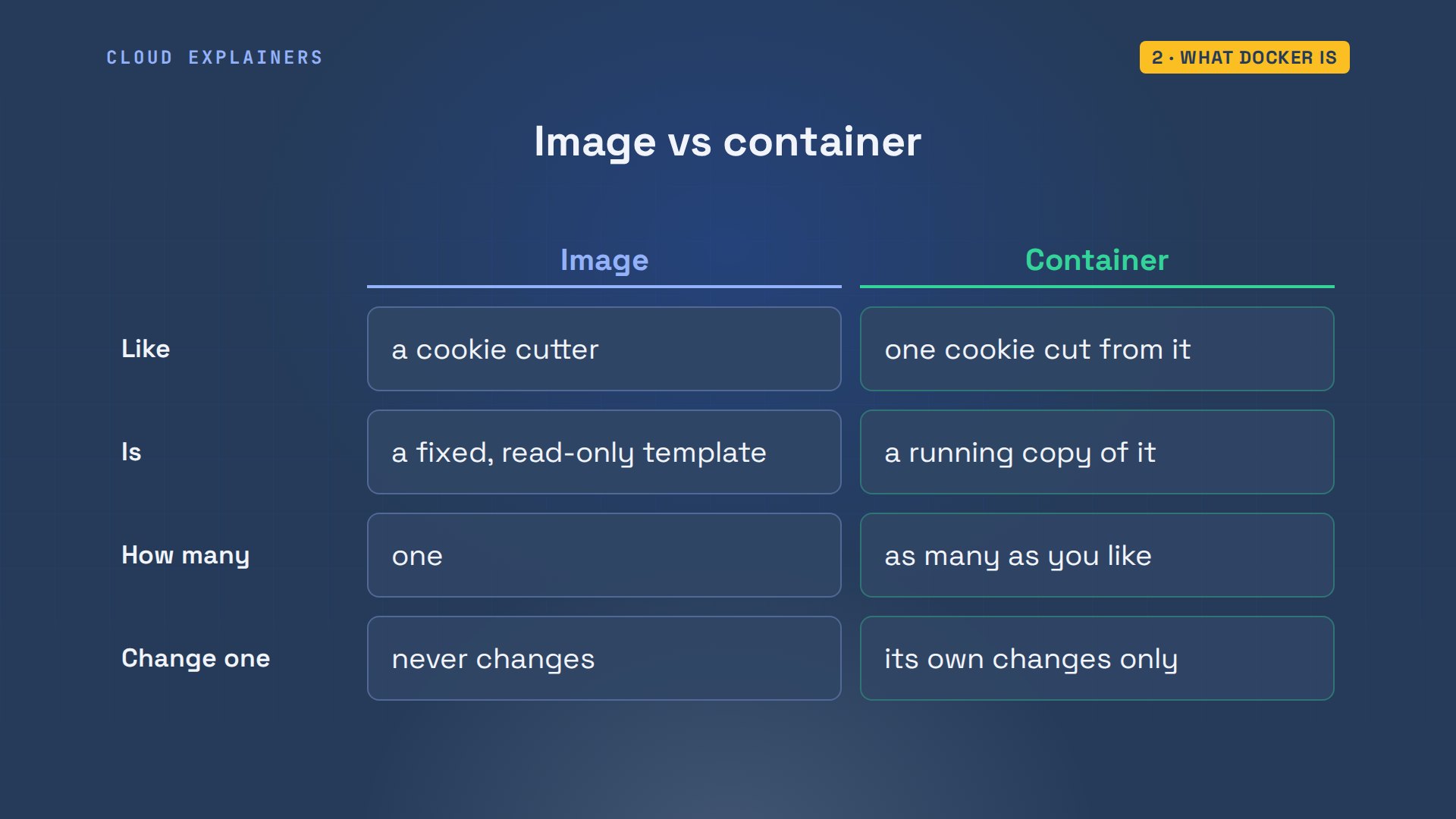
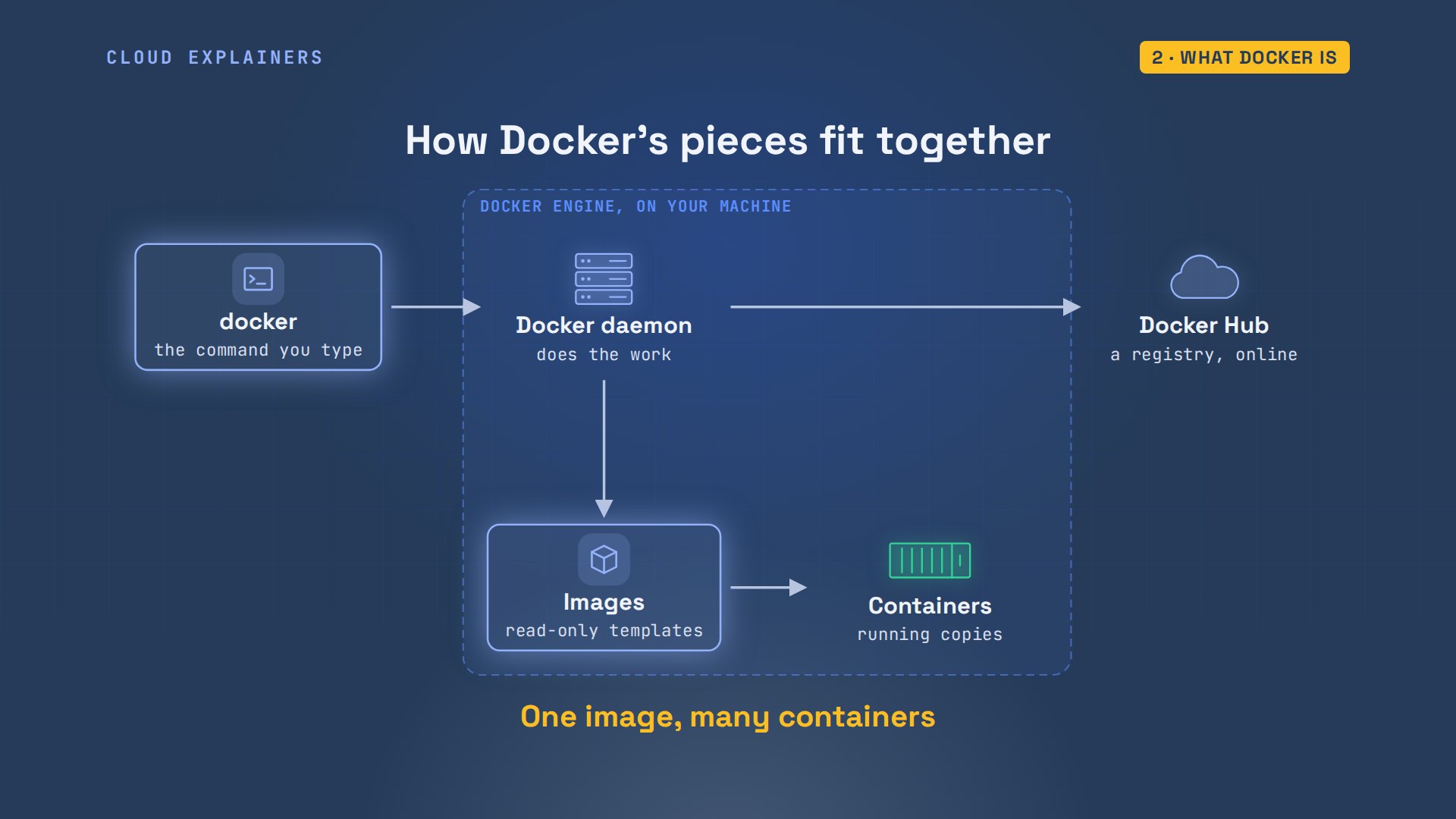
Two words matter most: image and container. Everything else in Docker is built around them. An image is like a cookie cutter: a fixed shape that never changes. A container is one cookie cut from it. You can cut as many as you like, and biting one leaves the cutter exactly as it was.
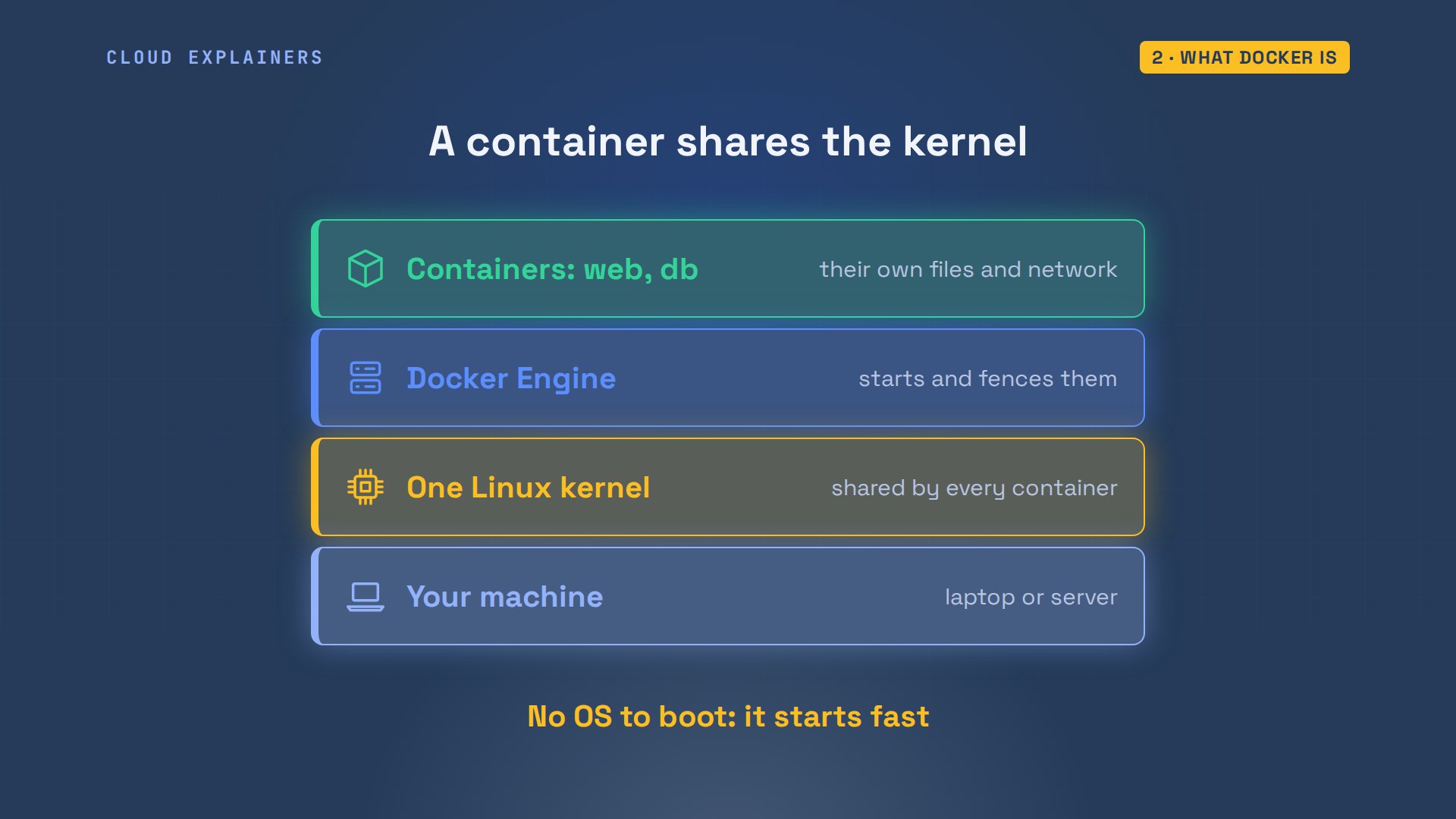
Isn't that just a virtual machine? No. A virtual machine boots a whole operating system of its own. A container is an ordinary process on your machine, fenced off with its own files and its own network, sharing your machine's Linux kernel, the core of the system. That's why it starts in a fraction of a second, and why one laptop can run dozens of them. On a Mac or Windows PC, Docker Desktop runs a small Linux virtual machine to provide that kernel. We'll prove the kernel part soon.
Here are the pieces. docker, the command you type, is only a client. It asks the Docker daemon, a background service, to do the work. The daemon downloads images from a registry like Docker Hub, stores them, and starts containers from them, as many as you ask for. The daemon, its images and its containers together are Docker Engine. Every command in this tutorial is the client asking the daemon for something.
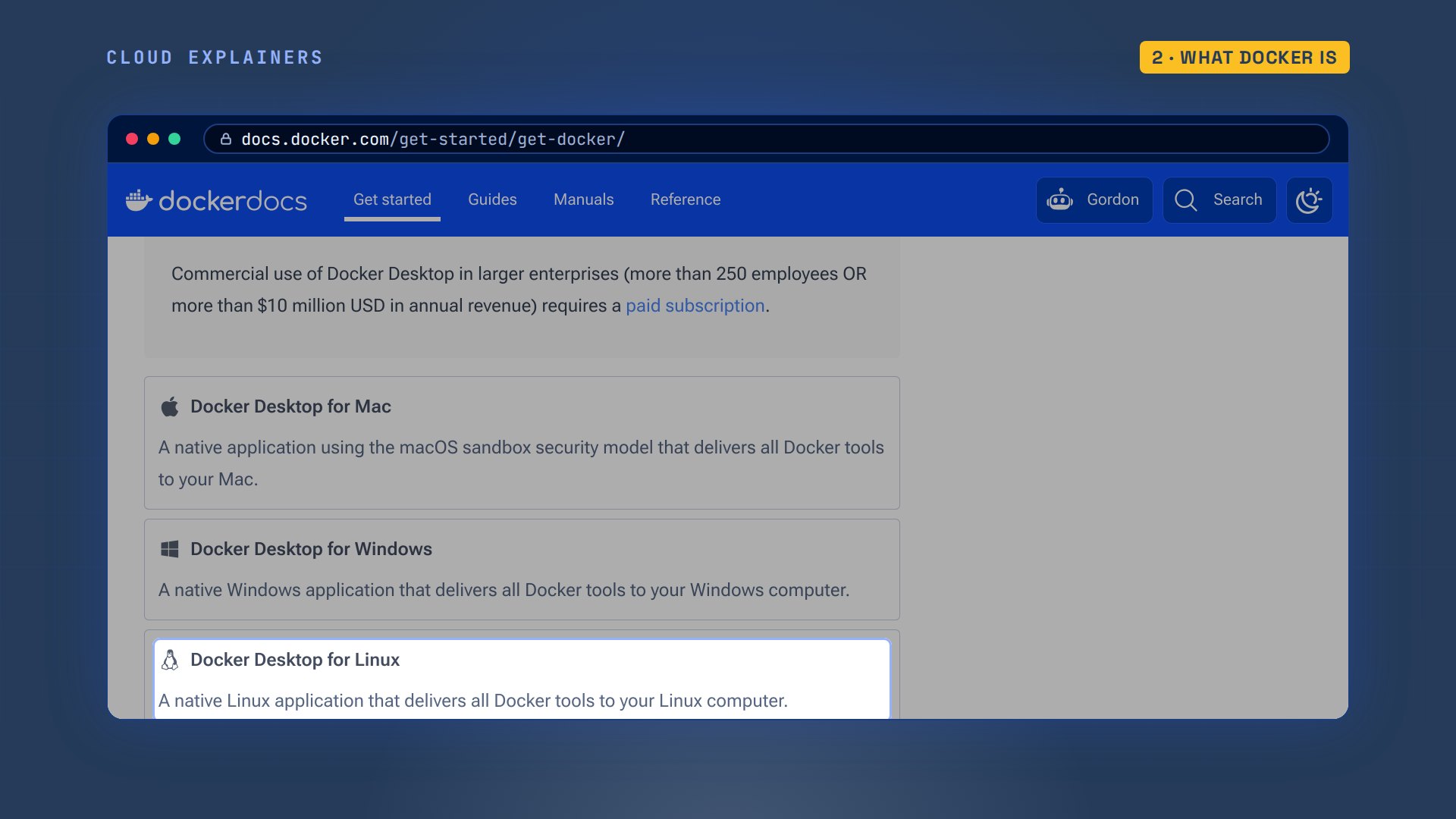
To install it, Docker's own page offers Docker Desktop for Mac, Windows and Linux. It runs the engine for you, free for personal use and small companies. On an Ubuntu server, the engine alone comes as a package: Ana installed Ubuntu's docker.io and added herself to the docker group, so she can run docker without sudo.
Is it working? docker version answers in two halves. Client: the docker command Ana types. Server: the engine, version 29, the daemon from the picture, answering. If the Server half is missing, the daemon isn't running.
docker versionClient:
 Version:           29.1.3
 API version:       1.52
 Go version:        go1.24.4
 Git commit:        29.1.3-0ubuntu3~24.04.2
 Built:             Wed Apr 29 16:41:06 2026
 OS/Arch:           linux/arm64
 Context:           default

Server:
 Engine:
  Version:          29.1.3
  API version:      1.52 (minimum version 1.44)
  Go version:       go1.24.4
  Git commit:       29.1.3-0ubuntu3~24.04.2
  Built:            Wed Apr 29 16:41:06 2026
  OS/Arch:          linux/arm64
  Experimental:     false
 containerd:
  Version:          2.2.1
  GitCommit:
 runc:
  Version:          1.3.4-0ubuntu1~24.04.1
  GitCommit:
 docker-init:
  Version:          0.19.0
  GitCommit:
Your first container
Ana's first container: docker run hello-world. She has no such image, so Docker pulls it from Docker Hub, creates a container from it, and runs it. It prints a greeting and lists those exact steps: the client asked the daemon, the daemon pulled the image, created a container, and sent its output back to Ana's terminal. Those are the arrows from the map. The name she typed had no version, so Docker used the tag called latest, the default.
docker run hello-worldUnable to find image 'hello-world:latest' locally
latest: Pulling from library/hello-world

58dee6a49ef1: Pulling fs layer
Digest: sha256:cf1b20a0c89a666b6950fecda7ccbc1b1a86520e7c53f908f3a21e79d0d60458
Status: Downloaded newer image for hello-world:latest

Hello from Docker!
This message shows that your installation appears to be working correctly.

To generate this message, Docker took the following steps:
 1. The Docker client contacted the Docker daemon.
 2. The Docker daemon pulled the "hello-world" image from the Docker Hub.
    (arm64v8)
 3. The Docker daemon created a new container from that image which runs the
    executable that produces the output you are currently reading.
 4. The Docker daemon streamed that output to the Docker client, which sent it
    to your terminal.

To try something more ambitious, you can run an Ubuntu container with:
 $ docker run -it ubuntu bash

Share images, automate workflows, and more with a free Docker ID:
 https://hub.docker.com/

For more examples and ideas, visit:
 https://docs.docker.com/get-started/
Where is that container now? docker ps lists running containers: none. Ana set it to show four columns, in a small settings file, so it fits the screen. docker ps dash a lists all of them: there it is, with a random name, exited, code zero. A container lives as long as its one main program. hello-world printed and finished, so its container stopped.
docker psNAMES IMAGE STATUS PORTS
cat ~/.docker/config.json{
 "psFormat": "table {{.Names}}\t{{.Image}}\t{{.Status}}\t{{.Ports}}"
}
docker ps -aNAMES              IMAGE         STATUS                              PORTS
gallant_chatelet   hello-world   Exited (0) Less than a second ago
hello-world's message suggested something bigger: a shell in Ubuntu. docker run dash i t connects Ana's keyboard to the container, dash dash rm deletes it when it ends, dash dash hostname just names it sandbox, and bash is the program to run. She's root, in a whole Ubuntu file system, a safe place to try things. She types exit, the container ends, and docker ps dash a shows only hello-world: dash dash rm cleaned up.
docker run -it --rm --hostname sandbox ubuntu:24.04 bash
whoamiroot
ls /bin boot dev etc home lib media mnt opt proc root run sbin srv sys tmp usr var
exitexit
docker ps -aNAMES              IMAGE         STATUS                     PORTS
gallant_chatelet   hello-world   Exited (0) 2 seconds ago
A web server and its port
Now something useful: a web server, nginx. docker pull downloads its image without running it. The part after the colon is a tag, a version label: alpine means it's built on Alpine, a very small Linux. The image arrives in layers, stacked pieces we'll open up soon, downloaded side by side. docker images lists what Ana has: 27.2MB to download, 94.1MB on disk once unpacked.
docker pull nginx:alpinealpine: Pulling from library/nginx

f4a8c3eaf855: Pulling fs layer
b90627b8f429: Pulling fs layer
66eb34db8c04: Pulling fs layer
a6fb6399df14: Pulling fs layer
5faf28e117a4: Pulling fs layer
b25486411ab9: Pulling fs layer
1b5b466c140b: Pulling fs layer
66eb34db8c04: Downloading  1.049MB/1.958MB
66eb34db8c04: Download complete
Digest: sha256:fed7e14be83cbd2661a75cdc5b872d936cf155d46c327084d30b8df19ae88d72
Status: Downloaded newer image for nginx:alpine
docker.io/library/nginx:alpine
docker imagesi Info → U In Use IMAGE ID DISK USAGE CONTENT SIZE EXTRA hello-world:latest cf1b20a0c89a 22.6kB 10.3kB U nginx:alpine fed7e14be83c 94.1MB 27.2MB ubuntu:24.04 73b999393d07 141MB 30.9MB
docker run dash d starts it in the background, and dash dash name calls it web. docker ps: up, listening on port 80. Detached means the container keeps running after the command returns, and Ana gets her prompt back. She tries port 8080 on her laptop with curl, a command-line browser: couldn't connect. Port 80 is inside the container, which has its own network. Nothing on the laptop leads to it yet.
docker run -d --name web nginx:alpine6bd2fdcd2c77c9ee3062e67deab31fe087de55bd5330e709e9cb96262988aa71
docker psNAMES     IMAGE          STATUS                  PORTS
web       nginx:alpine   Up Less than a second   80/tcp
curl localhost:8080curl: (7) Failed to connect to localhost port 8080 after 0 ms: Couldn't connect to server
Dash p publishes a port. Eight-oh-eight-oh colon eighty means: traffic to port 8080 on the laptop goes to port 80 in the container. Laptop port first, container port second.
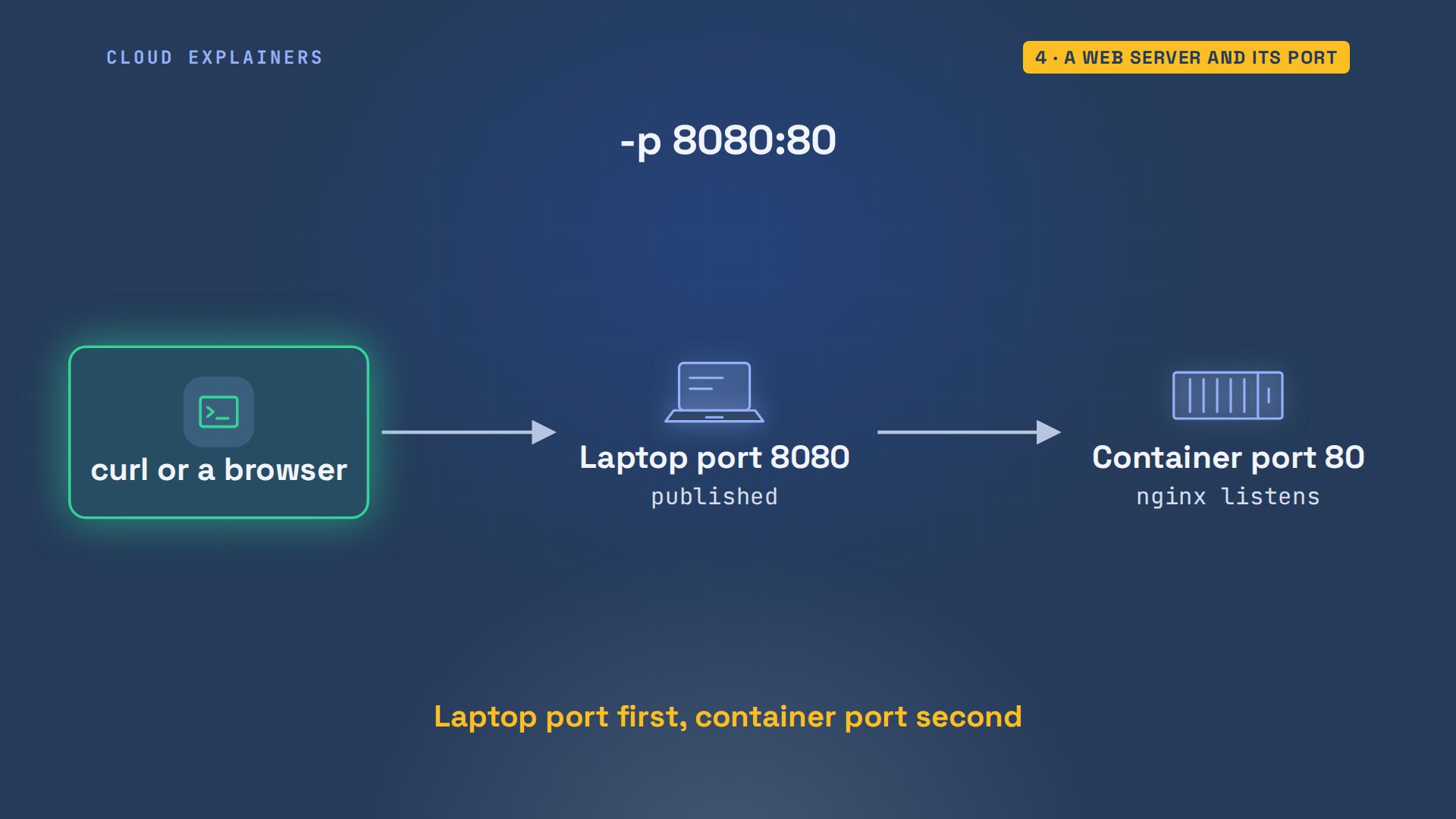
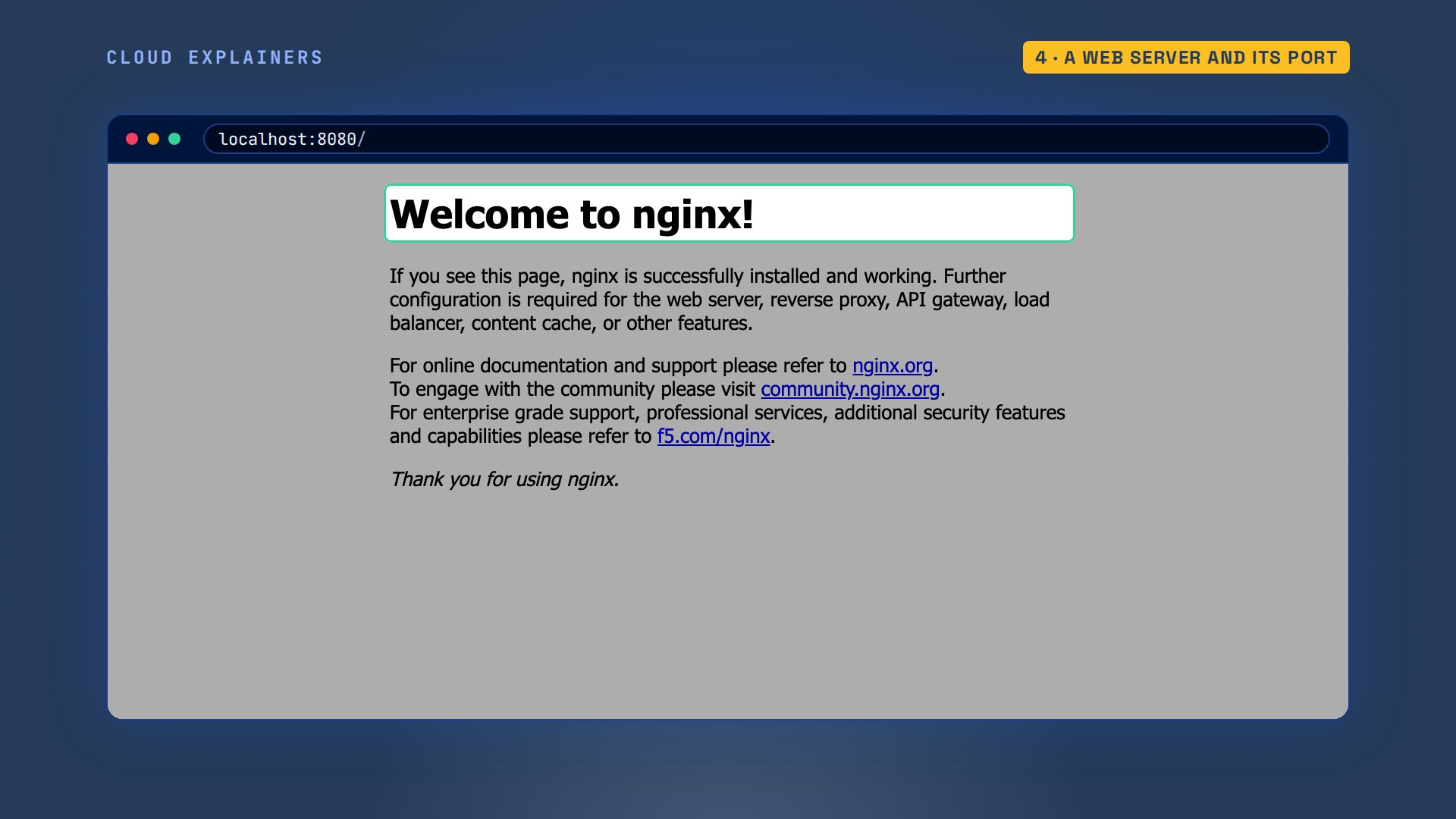
Ana removes the first one with docker rm dash f, which stops and deletes it, and runs it again with dash p. docker ps now shows the mapping, and curl gets nginx's welcome page.
docker rm -f webweb
docker run -d --name web -p 8080:80 nginx:alpine41ddf5bd85423ca5bebd1df1e4780c97d4d60ce760e0ce7767af73b032a51f20
docker psNAMES     IMAGE          STATUS                  PORTS
web       nginx:alpine   Up Less than a second   0.0.0.0:8080->80/tcp, [::]:8080->80/tcp
curl -s localhost:8080 | grep title<title>Welcome to nginx!</title>
In a browser, localhost 8080 shows the same page: the request went into the laptop's port, and came out of nginx in the container.
Dash d sent the program's output to Docker instead of Ana's terminal; docker logs reads it back. nginx's start-up lines, then its access log: a GET from curl, answered 200. Add dash f, and docker logs keeps following new lines as they arrive, until you press control C.
docker logs web/docker-entrypoint.sh: /docker-entrypoint.d/ is not empty, will attempt to perform configuration
/docker-entrypoint.sh: Looking for shell scripts in /docker-entrypoint.d/
/docker-entrypoint.sh: Launching /docker-entrypoint.d/10-listen-on-ipv6-by-default.sh
10-listen-on-ipv6-by-default.sh: info: Getting the checksum of /etc/nginx/conf.d/default.conf
10-listen-on-ipv6-by-default.sh: info: Enabled listen on IPv6 in /etc/nginx/conf.d/default.conf
/docker-entrypoint.sh: Sourcing /docker-entrypoint.d/15-local-resolvers.envsh
/docker-entrypoint.sh: Launching /docker-entrypoint.d/20-envsubst-on-templates.sh
/docker-entrypoint.sh: Launching /docker-entrypoint.d/30-tune-worker-processes.sh
/docker-entrypoint.sh: Configuration complete; ready for start up
2026/11/16 16:55:25 [notice] 1#1: using the "epoll" event method
2026/11/16 16:55:25 [notice] 1#1: nginx/1.31.8
2026/11/16 16:55:25 [notice] 1#1: built by gcc 15.2.0 (Alpine 15.2.0)
2026/11/16 16:55:25 [notice] 1#1: OS: Linux 7.0.14-linuxkit
2026/11/16 16:55:25 [notice] 1#1: getrlimit(RLIMIT_NOFILE): 1024:1048576
2026/11/16 16:55:25 [notice] 1#1: start worker processes
2026/11/16 16:55:25 [notice] 1#1: start worker process 30
2026/11/16 16:55:25 [notice] 1#1: start worker process 31
2026/11/16 16:55:25 [notice] 1#1: start worker process 32
2026/11/16 16:55:25 [notice] 1#1: start worker process 33
2026/11/16 16:55:25 [notice] 1#1: start worker process 34
2026/11/16 16:55:25 [notice] 1#1: start worker process 35
2026/11/16 16:55:25 [notice] 1#1: start worker process 36
2026/11/16 16:55:25 [notice] 1#1: start worker process 37
2026/11/16 16:55:25 [notice] 1#1: start worker process 38
2026/11/16 16:55:25 [notice] 1#1: start worker process 39
172.18.0.1 - - [16/Nov/2026:16:55:26 +0000] "GET / HTTP/1.1" 200 896 "-" "curl/8.5.0" "-"
Inside a container
What's inside a container? On her laptop, Ana runs Ubuntu, and uname shows its kernel, the core of the system. docker exec dash i t web sh, the same dash i t as before, opens a shell inside the running web container. In there, it's Alpine Linux v3.24: its own files. But uname inside shows the same kernel as the laptop, the proof from earlier: a container shares its machine's kernel. Its name says linuxkit because our lab laptop itself runs on Docker Desktop.
grep PRETTY /etc/os-releasePRETTY_NAME="Ubuntu 24.04.5 LTS"
uname -r7.0.14-linuxkit
docker exec -it web sh
/ # grep PRETTY /etc/os-releasePRETTY_NAME="Alpine Linux v3.24"
/ # uname -r7.0.14-linuxkit
ps inside lists nginx as process 1, its own first process, plus its workers and Ana's shell. She replaces nginx's start page, a file in its html folder, with one line for the studio, exits, and curl from the laptop shows her line.
/ # psPID   USER     TIME  COMMAND
    1 root      0:00 nginx: master process nginx -g daemon off;
   30 nginx     0:00 nginx: worker process
   31 nginx     0:00 nginx: worker process
   32 nginx     0:00 nginx: worker process
   33 nginx     0:00 nginx: worker process
   34 nginx     0:00 nginx: worker process
   35 nginx     0:00 nginx: worker process
   36 nginx     0:00 nginx: worker process
   37 nginx     0:00 nginx: worker process
   38 nginx     0:00 nginx: worker process
   39 nginx     0:00 nginx: worker process
   40 root      0:00 sh
   49 root      0:00 ps
/ # echo '<h1>Willow Yoga</h1>' > /usr/share/nginx/html/index.html
/ # exit
curl -s localhost:8080<h1>Willow Yoga</h1>
Now she deletes the container and starts a new one from the same image. Guess first: is her page still there? No. nginx's welcome page is back.
docker rm -f webweb
docker run -d --name web -p 8080:80 nginx:alpine568620582cf3c16f6907bee98b0bf3e3dbed82c7b7bfb7a5ccf0d6e1045dbe42
curl -s localhost:8080 | grep title<title>Welcome to nginx!</title>
Why? An image is a stack of read-only layers. Each container adds one thin writable layer on top, and Ana's edit went there. Deleting the container deletes that layer. The cookie was eaten; the cutter never changed.
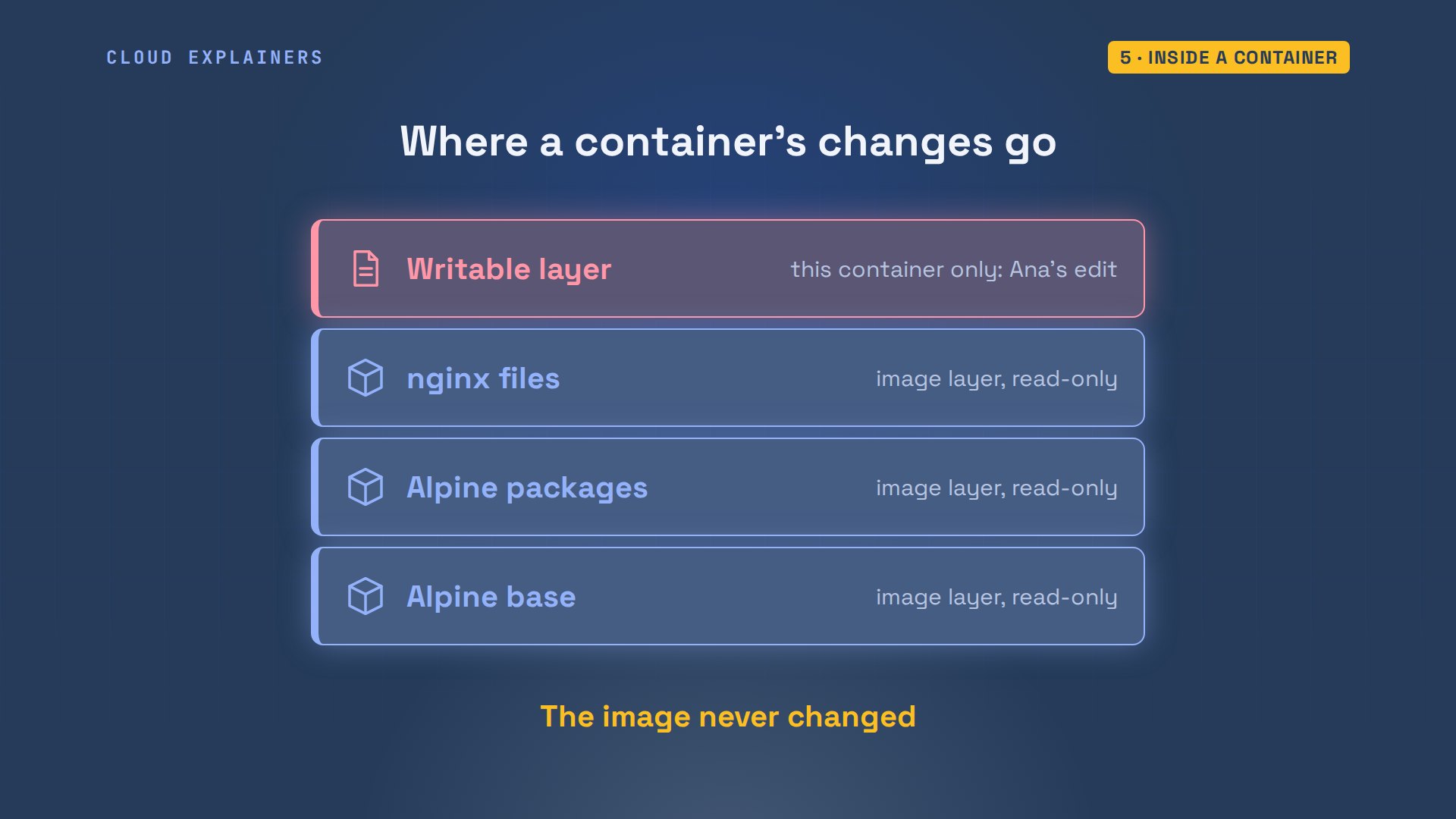
To end one gently: docker stop sends it a stop signal; docker ps dash a shows it exited, still there, and docker rm deletes it.
docker stop webweb
docker ps -aNAMES              IMAGE          STATUS                              PORTS
web                nginx:alpine   Exited (0) Less than a second ago
gallant_chatelet   hello-world    Exited (0) 10 seconds ago
docker rm webweb
Containers that come back
On a server, containers should come back after a reboot or a crash. A restart policy does that. Ana starts two nginx containers: always, with dash dash restart unless-stopped, and plain, without one. Then sudo systemctl restart docker restarts the Docker service itself, as a reboot would. always is up again; plain has exited and stays that way. unless-stopped means: restart it every time, unless I stopped it myself.
docker run -d --name always --restart unless-stopped nginx:alpine02952188be297a3677802597da26fe592865e24e827cb4e1f8802237015acde3
docker run -d --name plain nginx:alpine89d36bdedd18fe95b1ee14f07d45ec975c6ec2f59fd0d7096be459763bc3a10a
sudo systemctl restart docker[sudo] password for ana:
docker ps -aNAMES              IMAGE          STATUS                      PORTS
plain              nginx:alpine   Exited (0) 3 seconds ago
always             nginx:alpine   Up 3 seconds                80/tcp
gallant_chatelet   hello-world    Exited (0) 14 seconds ago
docker rm -f always plainalways
plain
Your own image: a Dockerfile
So far, other people's images. How do you package your own app? Ana's studio folder holds three files. app.py is a small web app in Flask, a Python web library: one page that lists three classes, on port 8000. requirements.txt names the two libraries it needs: Flask, and psycopg for PostgreSQL later.
cd studio
lsDockerfile app.py requirements.txt
cat app.pyfrom flask import Flask

app = Flask(__name__)
CLASSES = ["07:00  Sunrise flow", "12:15  Lunch stretch", "18:30  Evening yin"]


@app.route("/")
def home():
    items = "".join(f"<li>{c}</li>" for c in CLASSES)
    return f"<h1>Willow Yoga: today's classes</h1><ul>{items}</ul>"


if __name__ == "__main__":
    app.run(port=8000)
cat requirements.txtflask==3.1.3
psycopg[binary]==3.3.9
The third file is the Dockerfile: the recipe for an image, read top to bottom. FROM: start from Python's official slim image. WORKDIR: work in a folder called app. COPY dot dot: copy Ana's folder, the first dot, into the image's app folder, the second. RUN: install the libraries, once, while building. CMD: the program to start every time a container runs. Slim means Python with fewer extras, so the image stays smaller.
cat DockerfileFROM python:3.13-slim
WORKDIR /app
COPY . .
RUN pip install -r requirements.txt
CMD ["python", "app.py"]
docker build dash t yoga-web dot: build an image named yoga-web from this folder, the dot. Each Dockerfile line runs as a numbered step: the Python image is pulled, the folder copied, pip installs the libraries. 5.7 seconds, measured by time in front of the command, and the image is named. docker dot io slash library is the prefix Docker gives a name without a registry in it.
time docker build -t yoga-web .#0 building with "default" instance using docker driver

#1 [internal] load build definition from Dockerfile
#1 transferring dockerfile: 142B done
#1 DONE 0.0s

#2 [internal] load metadata for docker.io/library/python:3.13-slim
#2 DONE 0.5s

#3 [internal] load .dockerignore
#3 transferring context: 2B done
#3 DONE 0.0s

#4 [internal] load build context
#4 transferring context: 591B done
#4 DONE 0.0s

#5 [1/4] FROM docker.io/library/python:3.13-slim@sha256:e48f59cdba69a3cbd9ed2cf0f348d90d45a8d350d98134cf1070bc106ee9ed90
#5 resolve docker.io/library/python:3.13-slim@sha256:e48f59cdba69a3cbd9ed2cf0f348d90d45a8d350d98134cf1070bc106ee9ed90 done
#5 sha256:42ebab0032b11085076fe636a4286d0178552541033ccc92fb0397048dbedc12 250B / 250B 0.0s done
#5 sha256:174bfd419dd81cd676d1a8618deb0ba079dc16f9e053afe66908dd3727c3cc3f 3.15MB / 11.86MB 0.2s
#5 sha256:174bfd419dd81cd676d1a8618deb0ba079dc16f9e053afe66908dd3727c3cc3f 11.86MB / 11.86MB 0.2s done
#5 sha256:0e670227450615dd602171dd44b95920546465dfe6074f45e8a41a66b7723d83 1.27MB / 1.27MB 0.3s done
#5 sha256:acd43e9bebc37bc4ba7a5f47bd7598913337803e53d468f37d940f11f5d5f1ef 0B / 30.21MB 0.2s
#5 sha256:acd43e9bebc37bc4ba7a5f47bd7598913337803e53d468f37d940f11f5d5f1ef 3.15MB / 30.21MB 0.3s
#5 sha256:acd43e9bebc37bc4ba7a5f47bd7598913337803e53d468f37d940f11f5d5f1ef 14.68MB / 30.21MB 0.5s
#5 sha256:acd43e9bebc37bc4ba7a5f47bd7598913337803e53d468f37d940f11f5d5f1ef 30.21MB / 30.21MB 0.6s done
#5 extracting sha256:acd43e9bebc37bc4ba7a5f47bd7598913337803e53d468f37d940f11f5d5f1ef
#5 extracting sha256:acd43e9bebc37bc4ba7a5f47bd7598913337803e53d468f37d940f11f5d5f1ef 0.7s done
#5 DONE 1.3s

#5 [1/4] FROM docker.io/library/python:3.13-slim@sha256:e48f59cdba69a3cbd9ed2cf0f348d90d45a8d350d98134cf1070bc106ee9ed90
#5 extracting sha256:0e670227450615dd602171dd44b95920546465dfe6074f45e8a41a66b7723d83 0.1s done
#5 extracting sha256:174bfd419dd81cd676d1a8618deb0ba079dc16f9e053afe66908dd3727c3cc3f
#5 extracting sha256:174bfd419dd81cd676d1a8618deb0ba079dc16f9e053afe66908dd3727c3cc3f 0.3s done
#5 DONE 1.7s

#5 [1/4] FROM docker.io/library/python:3.13-slim@sha256:e48f59cdba69a3cbd9ed2cf0f348d90d45a8d350d98134cf1070bc106ee9ed90
#5 extracting sha256:42ebab0032b11085076fe636a4286d0178552541033ccc92fb0397048dbedc12 done
#5 DONE 1.7s

#6 [2/4] WORKDIR /app
#6 DONE 0.3s

#7 [3/4] COPY . .
#7 DONE 0.0s

#8 [4/4] RUN pip install -r requirements.txt
#8 0.920 Collecting flask==3.1.3 (from -r requirements.txt (line 1))
#8 0.967   Downloading flask-3.1.3-py3-none-any.whl.metadata (3.2 kB)
#8 0.986 Collecting psycopg==3.3.9 (from psycopg[binary]==3.3.9->-r requirements.txt (line 2))
#8 0.994   Downloading psycopg-3.3.9-py3-none-any.whl.metadata (4.4 kB)
#8 1.018 Collecting blinker>=1.9.0 (from flask==3.1.3->-r requirements.txt (line 1))
#8 1.028   Downloading blinker-1.9.0-py3-none-any.whl.metadata (1.6 kB)
#8 1.047 Collecting click>=8.1.3 (from flask==3.1.3->-r requirements.txt (line 1))
#8 1.054   Downloading click-8.5.1-py3-none-any.whl.metadata (2.6 kB)
#8 1.071 Collecting itsdangerous>=2.2.0 (from flask==3.1.3->-r requirements.txt (line 1))
#8 1.077   Downloading itsdangerous-2.2.0-py3-none-any.whl.metadata (1.9 kB)
#8 1.097 Collecting jinja2>=3.1.2 (from flask==3.1.3->-r requirements.txt (line 1))
#8 1.104   Downloading jinja2-3.1.6-py3-none-any.whl.metadata (2.9 kB)
#8 1.145 Collecting markupsafe>=2.1.1 (from flask==3.1.3->-r requirements.txt (line 1))
#8 1.156   Downloading markupsafe-3.0.4-cp313-cp313-manylinux2014_aarch64.manylinux_2_17_aarch64.manylinux_2_28_aarch64.whl.metadata (2.7 kB)
#8 1.173 Collecting werkzeug>=3.1.0 (from flask==3.1.3->-r requirements.txt (line 1))
#8 1.182   Downloading werkzeug-3.1.9-py3-none-any.whl.metadata (4.1 kB)
#8 1.260 Collecting psycopg-binary==3.3.9 (from psycopg[binary]==3.3.9->-r requirements.txt (line 2))
#8 1.267   Downloading psycopg_binary-3.3.9-cp313-cp313-manylinux_2_27_aarch64.manylinux_2_28_aarch64.whl.metadata (2.7 kB)
#8 1.279 Downloading flask-3.1.3-py3-none-any.whl (103 kB)
#8 1.304 Downloading psycopg-3.3.9-py3-none-any.whl (219 kB)
#8 1.327 Downloading psycopg_binary-3.3.9-cp313-cp313-manylinux_2_27_aarch64.manylinux_2_28_aarch64.whl (4.1 MB)
#8 1.394    ━━━━━━━━━━━━━━━━━━━━━━━━━━━━━━━━━━━━━━━━ 4.1/4.1 MB 60.9 MB/s  0:00:00
#8 1.403 Downloading blinker-1.9.0-py3-none-any.whl (8.5 kB)
#8 1.411 Downloading click-8.5.1-py3-none-any.whl (126 kB)
#8 1.427 Downloading itsdangerous-2.2.0-py3-none-any.whl (16 kB)
#8 1.437 Downloading jinja2-3.1.6-py3-none-any.whl (134 kB)
#8 1.448 Downloading markupsafe-3.0.4-cp313-cp313-manylinux2014_aarch64.manylinux_2_17_aarch64.manylinux_2_28_aarch64.whl (24 kB)
#8 1.458 Downloading werkzeug-3.1.9-py3-none-any.whl (228 kB)
#8 1.515 Installing collected packages: psycopg-binary, psycopg, markupsafe, itsdangerous, click, blinker, werkzeug, jinja2, flask
#8 1.985
#8 1.986 Successfully installed blinker-1.9.0 click-8.5.1 flask-3.1.3 itsdangerous-2.2.0 jinja2-3.1.6 markupsafe-3.0.4 psycopg-3.3.9 psycopg-binary-3.3.9 werkzeug-3.1.9
#8 1.986 WARNING: Running pip as the 'root' user can result in broken permissions and conflicting behaviour with the system package manager, possibly rendering your system unusable. It is recommended to use a virtual environment instead: https://pip.pypa.io/warnings/venv. Use the --root-user-action option if you know what you are doing and want to suppress this warning.
#8 1.987
#8 1.987 [notice] A new release of pip is available: 26.2.2 -> 26.3
#8 1.987 [notice] To update, run: pip install --upgrade pip
#8 DONE 2.1s

#9 exporting to image
#9 exporting layers
#9 exporting layers 0.7s done
#9 exporting manifest sha256:4fb5ab7be29a81b05ae676ff21301e98e0bcbd3cd9015e8faa2303291f38a93c done
#9 exporting config sha256:76a362fc5757b640ff0181c5e88882223ccf78307dbe3ac4cee23ded98bee759 done
#9 exporting attestation manifest sha256:9b70eec815e56ac707c254df4e7919be1225195fad23c77e525ce7722bcac296 done
#9 exporting manifest list sha256:270481d282d000e920b80e3f259ac3f69be04c2bd48ab709fa5768f60874e0b5 done
#9 naming to docker.io/library/yoga-web:latest done
#9 unpacking to docker.io/library/yoga-web:latest
#9 unpacking to docker.io/library/yoga-web:latest 0.3s done
#9 DONE 1.0s

real	0m5.714s
user	0m0.081s
sys	0m0.040s
Ana runs her image, publishing port 8000, and asks for the page. Guess first: does it load? No: connection reset. docker logs says why: the app is running on 127.0.0.1, inside the container.
docker run -d --name yoga -p 8000:8000 yoga-web3c46d14ee56c0a16d571c4c7fba58f20c43808156eb43fdab937f253dfb7e6f0
curl localhost:8000curl: (56) Recv failure: Connection reset by peer
docker logs yoga* Serving Flask app 'app' * Debug mode: off WARNING: This is a development server. Do not use it in a production deployment. Use a production WSGI server instead. * Running on http://127.0.0.1:8000 Press CTRL+C to quit
That address, also called localhost, means this same machine. Inside a container, that's the container itself. Docker forwards Ana's request to the container's own network address, where nothing listens, so the connection is dropped. Flask chose localhost to be safe on a laptop. In a container, it locks the door from the inside. The app has to listen on every address: 0.0.0.0.
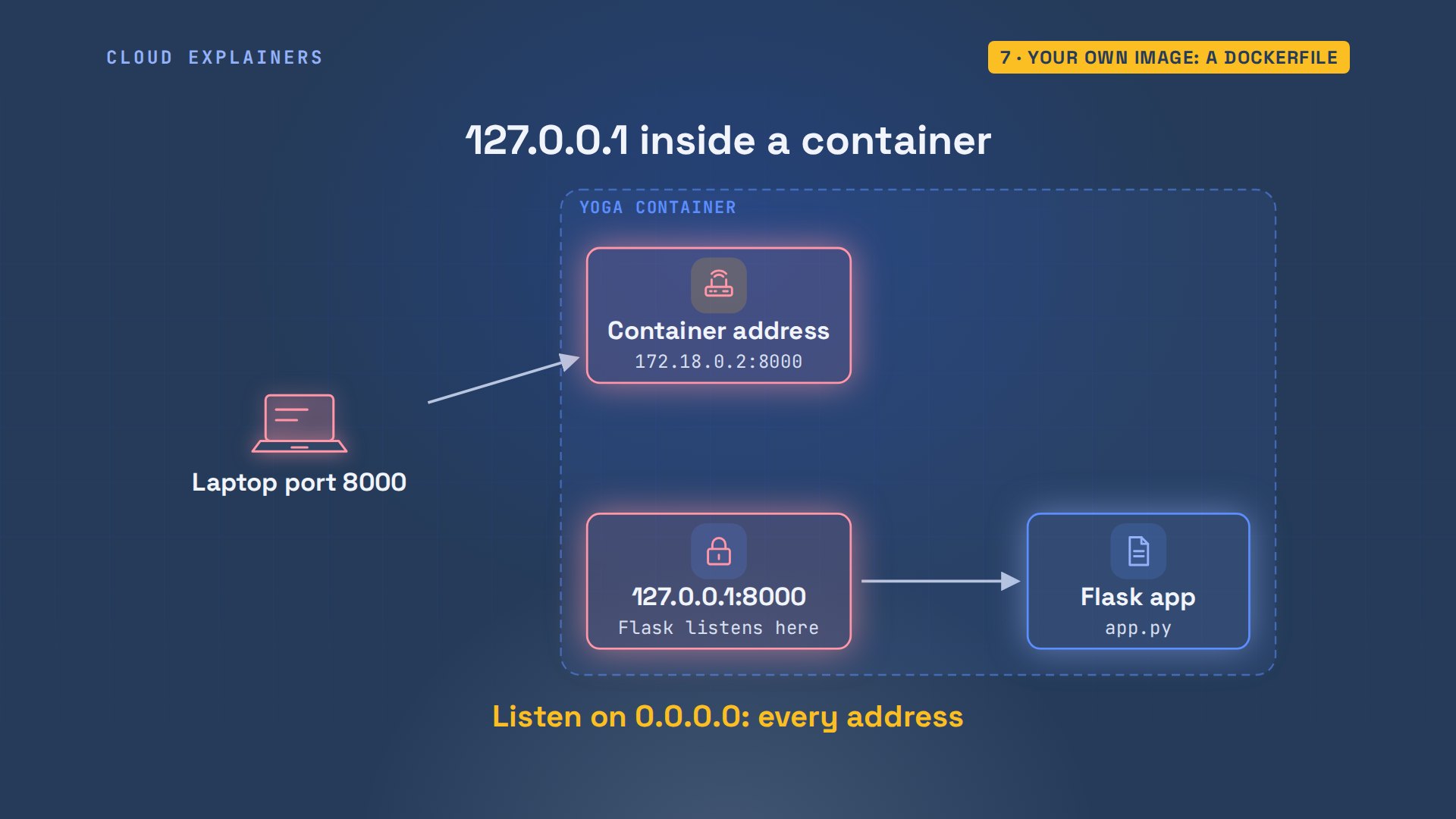
One line in app.py. app.run gets host equals 0.0.0.0: listen on every address the container has.
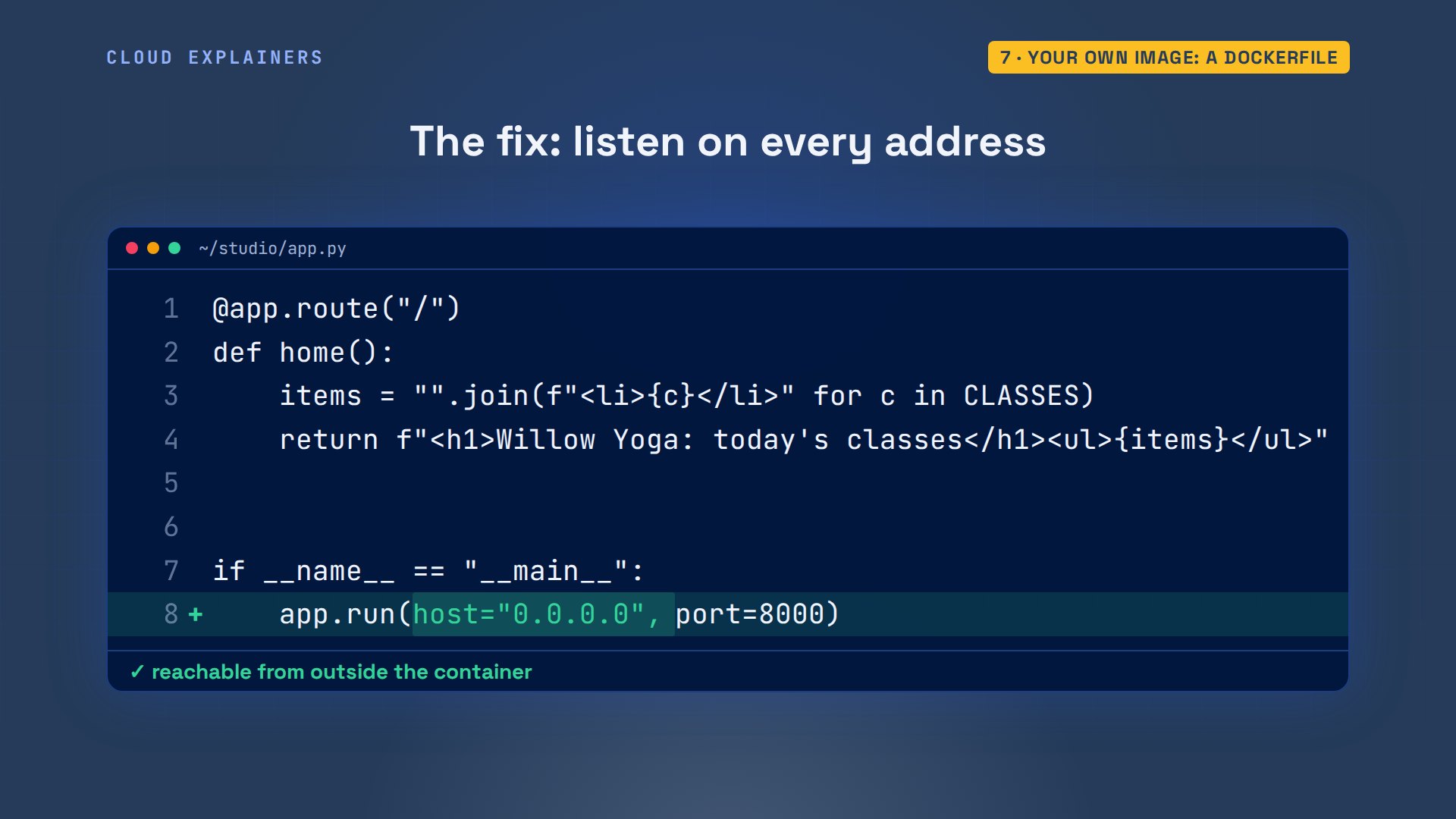
Rebuild, remove the old container, run the new image, and the page loads: three classes. The log now says running on all addresses.
time docker build -t yoga-web .#0 building with "default" instance using docker driver

#1 [internal] load build definition from Dockerfile
#1 transferring dockerfile: 142B done
#1 DONE 0.0s

#2 [internal] load metadata for docker.io/library/python:3.13-slim
#2 DONE 0.1s

#3 [internal] load .dockerignore
#3 transferring context: 2B done
#3 DONE 0.0s

#4 [internal] load build context
#4 DONE 0.0s

#5 [1/4] FROM docker.io/library/python:3.13-slim@sha256:e48f59cdba69a3cbd9ed2cf0f348d90d45a8d350d98134cf1070bc106ee9ed90
#5 resolve docker.io/library/python:3.13-slim@sha256:e48f59cdba69a3cbd9ed2cf0f348d90d45a8d350d98134cf1070bc106ee9ed90 done
#5 DONE 0.0s

#4 [internal] load build context
#4 transferring context: 450B done
#4 DONE 0.0s

#6 [2/4] WORKDIR /app
#6 CACHED

#7 [3/4] COPY . .
#7 DONE 0.0s

#8 [4/4] RUN pip install -r requirements.txt
#8 0.935 Collecting flask==3.1.3 (from -r requirements.txt (line 1))
#8 0.976   Downloading flask-3.1.3-py3-none-any.whl.metadata (3.2 kB)
#8 0.994 Collecting psycopg==3.3.9 (from psycopg[binary]==3.3.9->-r requirements.txt (line 2))
#8 1.001   Downloading psycopg-3.3.9-py3-none-any.whl.metadata (4.4 kB)
#8 1.023 Collecting blinker>=1.9.0 (from flask==3.1.3->-r requirements.txt (line 1))
#8 1.033   Downloading blinker-1.9.0-py3-none-any.whl.metadata (1.6 kB)
#8 1.050 Collecting click>=8.1.3 (from flask==3.1.3->-r requirements.txt (line 1))
#8 1.058   Downloading click-8.5.1-py3-none-any.whl.metadata (2.6 kB)
#8 1.077 Collecting itsdangerous>=2.2.0 (from flask==3.1.3->-r requirements.txt (line 1))
#8 1.085   Downloading itsdangerous-2.2.0-py3-none-any.whl.metadata (1.9 kB)
#8 1.128 Collecting jinja2>=3.1.2 (from flask==3.1.3->-r requirements.txt (line 1))
#8 1.143   Downloading jinja2-3.1.6-py3-none-any.whl.metadata (2.9 kB)
#8 1.189 Collecting markupsafe>=2.1.1 (from flask==3.1.3->-r requirements.txt (line 1))
#8 1.197   Downloading markupsafe-3.0.4-cp313-cp313-manylinux2014_aarch64.manylinux_2_17_aarch64.manylinux_2_28_aarch64.whl.metadata (2.7 kB)
#8 1.219 Collecting werkzeug>=3.1.0 (from flask==3.1.3->-r requirements.txt (line 1))
#8 1.228   Downloading werkzeug-3.1.9-py3-none-any.whl.metadata (4.1 kB)
#8 1.309 Collecting psycopg-binary==3.3.9 (from psycopg[binary]==3.3.9->-r requirements.txt (line 2))
#8 1.326   Downloading psycopg_binary-3.3.9-cp313-cp313-manylinux_2_27_aarch64.manylinux_2_28_aarch64.whl.metadata (2.7 kB)
#8 1.338 Downloading flask-3.1.3-py3-none-any.whl (103 kB)
#8 1.366 Downloading psycopg-3.3.9-py3-none-any.whl (219 kB)
#8 1.413 Downloading psycopg_binary-3.3.9-cp313-cp313-manylinux_2_27_aarch64.manylinux_2_28_aarch64.whl (4.1 MB)
#8 1.484    ━━━━━━━━━━━━━━━━━━━━━━━━━━━━━━━━━━━━━━━━ 4.1/4.1 MB 56.6 MB/s  0:00:00
#8 1.492 Downloading blinker-1.9.0-py3-none-any.whl (8.5 kB)
#8 1.506 Downloading click-8.5.1-py3-none-any.whl (126 kB)
#8 1.518 Downloading itsdangerous-2.2.0-py3-none-any.whl (16 kB)
#8 1.529 Downloading jinja2-3.1.6-py3-none-any.whl (134 kB)
#8 1.547 Downloading markupsafe-3.0.4-cp313-cp313-manylinux2014_aarch64.manylinux_2_17_aarch64.manylinux_2_28_aarch64.whl (24 kB)
#8 1.565 Downloading werkzeug-3.1.9-py3-none-any.whl (228 kB)
#8 1.639 Installing collected packages: psycopg-binary, psycopg, markupsafe, itsdangerous, click, blinker, werkzeug, jinja2, flask
#8 2.079
#8 2.080 Successfully installed blinker-1.9.0 click-8.5.1 flask-3.1.3 itsdangerous-2.2.0 jinja2-3.1.6 markupsafe-3.0.4 psycopg-3.3.9 psycopg-binary-3.3.9 werkzeug-3.1.9
#8 2.080 WARNING: Running pip as the 'root' user can result in broken permissions and conflicting behaviour with the system package manager, possibly rendering your system unusable. It is recommended to use a virtual environment instead: https://pip.pypa.io/warnings/venv. Use the --root-user-action option if you know what you are doing and want to suppress this warning.
#8 2.080
#8 2.080 [notice] A new release of pip is available: 26.2.2 -> 26.3
#8 2.080 [notice] To update, run: pip install --upgrade pip
#8 DONE 2.2s

#9 exporting to image
#9 exporting layers
#9 exporting layers 0.7s done
#9 exporting manifest sha256:fcc4b679de51fca60c861cd6e27cd3b5c86ed68b7f773a7514da0d21cac36e0c done
#9 exporting config sha256:0964ff962b1e9bc81b4be2a0bfb5f4630e7737c68873e600a2f27b54f75c0daa done
#9 exporting attestation manifest sha256:81bf68bf1d7ef31564001cd0e9c3ac083381e2274929cad8c9d6c023ca41ff37 done
#9 exporting manifest list sha256:ef6cbc1af47917d858dd8a15a5d43077f6dfa0c8658b43612e70619631493688 done
#9 naming to docker.io/library/yoga-web:latest done
#9 unpacking to docker.io/library/yoga-web:latest
#9 unpacking to docker.io/library/yoga-web:latest 0.3s done
#9 DONE 1.0s

real	0m3.412s
user	0m0.041s
sys	0m0.031s
docker rm -f yogayoga
docker run -d --name yoga -p 8000:8000 yoga-web976171dcd3a43927d30cdeafe65028ef4f9e55a645a6e2948a8f53b7dc2c6c88
curl -s localhost:8000<h1>Willow Yoga: today's classes</h1><ul><li>07:00 Sunrise flow</li><li>12:15 Lunch stretch</li><li>18:30 Evening yin</li></ul>
docker logs yoga* Serving Flask app 'app' * Debug mode: off WARNING: This is a development server. Do not use it in a production deployment. Use a production WSGI server instead. * Running on all addresses (0.0.0.0) * Running on http://127.0.0.1:8000 * Running on http://172.18.0.2:8000 Press CTRL+C to quit 172.18.0.1 - - [16/Nov/2026 16:55:48] "GET / HTTP/1.1" 200 -
Fast rebuilds: the layer cache
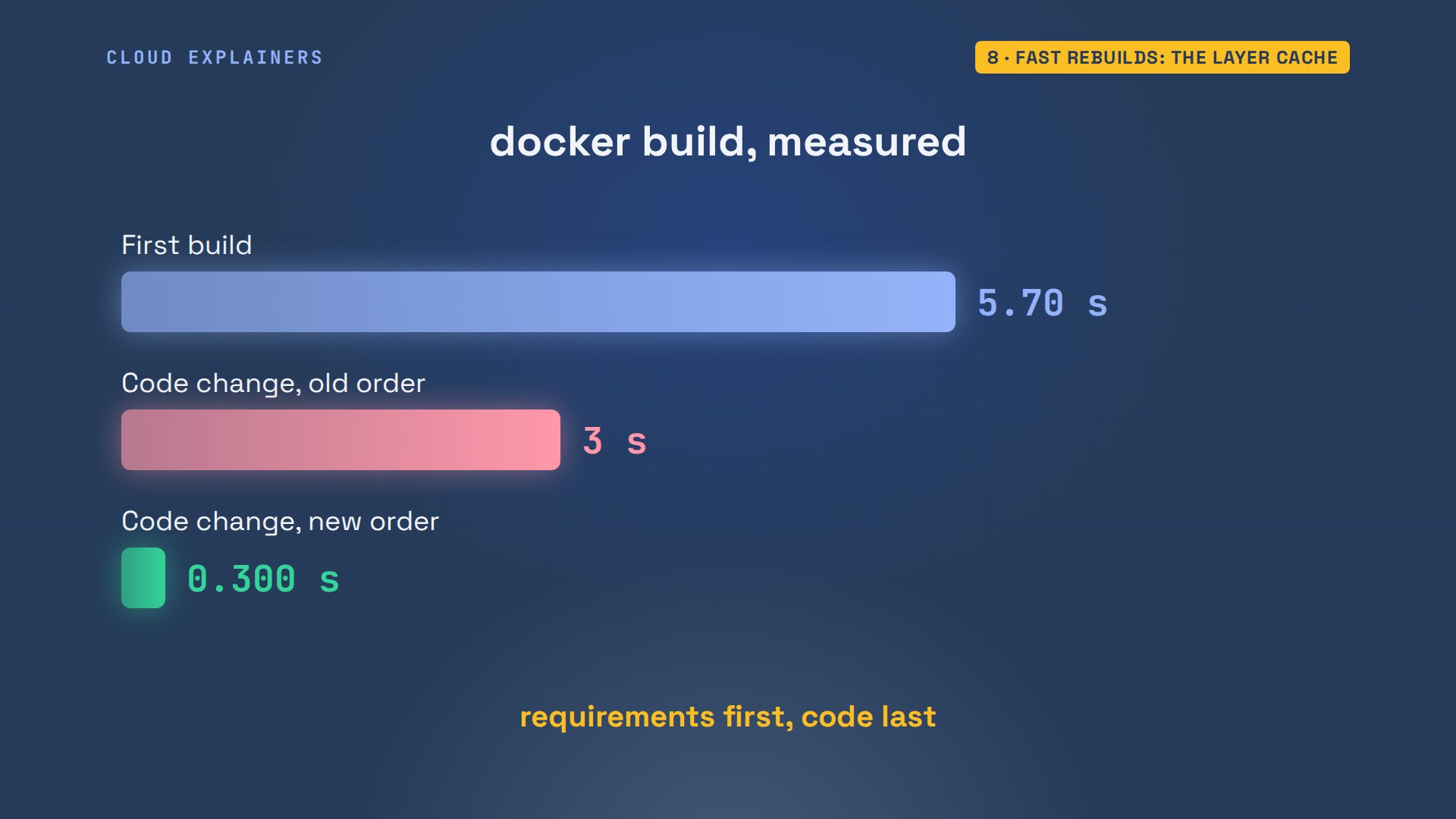
Ana changes one line of app.py, a class name, and builds again. Look at step four: pip installs every library again, 3.0 seconds. Docker keeps each step's result as a layer and reuses it, the cache, but once a step's input changes, that step and every step after it run again. COPY dot dot copied the changed app.py, so pip, after it, ran too.
time docker build -t yoga-web .#0 building with "default" instance using docker driver

#1 [internal] load build definition from Dockerfile
#1 transferring dockerfile: 142B done
#1 DONE 0.0s

#2 [internal] load metadata for docker.io/library/python:3.13-slim
#2 DONE 0.1s

#3 [internal] load .dockerignore
#3 transferring context: 2B done
#3 DONE 0.0s

#4 [1/4] FROM docker.io/library/python:3.13-slim@sha256:e48f59cdba69a3cbd9ed2cf0f348d90d45a8d350d98134cf1070bc106ee9ed90
#4 resolve docker.io/library/python:3.13-slim@sha256:e48f59cdba69a3cbd9ed2cf0f348d90d45a8d350d98134cf1070bc106ee9ed90 done
#4 DONE 0.0s

#5 [internal] load build context
#5 transferring context: 464B done
#5 DONE 0.0s

#6 [2/4] WORKDIR /app
#6 CACHED

#7 [3/4] COPY . .
#7 DONE 0.0s

#8 [4/4] RUN pip install -r requirements.txt
#8 0.913 Collecting flask==3.1.3 (from -r requirements.txt (line 1))
#8 0.949   Downloading flask-3.1.3-py3-none-any.whl.metadata (3.2 kB)
#8 0.966 Collecting psycopg==3.3.9 (from psycopg[binary]==3.3.9->-r requirements.txt (line 2))
#8 0.973   Downloading psycopg-3.3.9-py3-none-any.whl.metadata (4.4 kB)
#8 0.992 Collecting blinker>=1.9.0 (from flask==3.1.3->-r requirements.txt (line 1))
#8 1.000   Downloading blinker-1.9.0-py3-none-any.whl.metadata (1.6 kB)
#8 1.019 Collecting click>=8.1.3 (from flask==3.1.3->-r requirements.txt (line 1))
#8 1.027   Downloading click-8.5.1-py3-none-any.whl.metadata (2.6 kB)
#8 1.045 Collecting itsdangerous>=2.2.0 (from flask==3.1.3->-r requirements.txt (line 1))
#8 1.054   Downloading itsdangerous-2.2.0-py3-none-any.whl.metadata (1.9 kB)
#8 1.075 Collecting jinja2>=3.1.2 (from flask==3.1.3->-r requirements.txt (line 1))
#8 1.084   Downloading jinja2-3.1.6-py3-none-any.whl.metadata (2.9 kB)
#8 1.138 Collecting markupsafe>=2.1.1 (from flask==3.1.3->-r requirements.txt (line 1))
#8 1.145   Downloading markupsafe-3.0.4-cp313-cp313-manylinux2014_aarch64.manylinux_2_17_aarch64.manylinux_2_28_aarch64.whl.metadata (2.7 kB)
#8 1.161 Collecting werkzeug>=3.1.0 (from flask==3.1.3->-r requirements.txt (line 1))
#8 1.169   Downloading werkzeug-3.1.9-py3-none-any.whl.metadata (4.1 kB)
#8 1.241 Collecting psycopg-binary==3.3.9 (from psycopg[binary]==3.3.9->-r requirements.txt (line 2))
#8 1.251   Downloading psycopg_binary-3.3.9-cp313-cp313-manylinux_2_27_aarch64.manylinux_2_28_aarch64.whl.metadata (2.7 kB)
#8 1.262 Downloading flask-3.1.3-py3-none-any.whl (103 kB)
#8 1.289 Downloading psycopg-3.3.9-py3-none-any.whl (219 kB)
#8 1.354 Downloading psycopg_binary-3.3.9-cp313-cp313-manylinux_2_27_aarch64.manylinux_2_28_aarch64.whl (4.1 MB)
#8 1.425    ━━━━━━━━━━━━━━━━━━━━━━━━━━━━━━━━━━━━━━━━ 4.1/4.1 MB 57.4 MB/s  0:00:00
#8 1.433 Downloading blinker-1.9.0-py3-none-any.whl (8.5 kB)
#8 1.444 Downloading click-8.5.1-py3-none-any.whl (126 kB)
#8 1.454 Downloading itsdangerous-2.2.0-py3-none-any.whl (16 kB)
#8 1.464 Downloading jinja2-3.1.6-py3-none-any.whl (134 kB)
#8 1.476 Downloading markupsafe-3.0.4-cp313-cp313-manylinux2014_aarch64.manylinux_2_17_aarch64.manylinux_2_28_aarch64.whl (24 kB)
#8 1.491 Downloading werkzeug-3.1.9-py3-none-any.whl (228 kB)
#8 1.555 Installing collected packages: psycopg-binary, psycopg, markupsafe, itsdangerous, click, blinker, werkzeug, jinja2, flask
#8 1.851
#8 1.852 Successfully installed blinker-1.9.0 click-8.5.1 flask-3.1.3 itsdangerous-2.2.0 jinja2-3.1.6 markupsafe-3.0.4 psycopg-3.3.9 psycopg-binary-3.3.9 werkzeug-3.1.9
#8 1.852 WARNING: Running pip as the 'root' user can result in broken permissions and conflicting behaviour with the system package manager, possibly rendering your system unusable. It is recommended to use a virtual environment instead: https://pip.pypa.io/warnings/venv. Use the --root-user-action option if you know what you are doing and want to suppress this warning.
#8 1.852
#8 1.852 [notice] A new release of pip is available: 26.2.2 -> 26.3
#8 1.852 [notice] To update, run: pip install --upgrade pip
#8 DONE 1.9s

#9 exporting to image
#9 exporting layers
#9 exporting layers 0.6s done
#9 exporting manifest sha256:0152d4391c947dc7a33bd9e82967cb2291c24d5d2a93f9260fb2d11ab9ed134b done
#9 exporting config sha256:7b6c3c49f31e16252df435289db0da1d10f7e4ccfdcc005a161661b9314afa9e done
#9 exporting attestation manifest sha256:735f168193614ad66e5a33e55901c6d07b105670482472aa7b284d8059e52ea6 done
#9 exporting manifest list sha256:87f7bda2762c8920a2dcfc5eb0e415952df7e1b4e7e7362d3992dcc55e0f2d84 done
#9 naming to docker.io/library/yoga-web:latest done
#9 unpacking to docker.io/library/yoga-web:latest
#9 unpacking to docker.io/library/yoga-web:latest 0.3s done
#9 DONE 0.9s

real	0m3.011s
user	0m0.056s
sys	0m0.051s
The fix is the order. Copy requirements.txt alone first, install, and only then copy the rest. Now a code change only touches the last step. The rule: things that rarely change go first, things you edit every day go last.
cat DockerfileFROM python:3.13-slim
WORKDIR /app
COPY requirements.txt .
RUN pip install -r requirements.txt
COPY . .
CMD ["python", "app.py"]
After one build in the new order, she changes another line of app.py. Step four: cached. 0.3 seconds instead of 3.0. With a bigger app, that's minutes saved on every build. The image is 255MB on disk, mostly the Python base.
time docker build -t yoga-web .#0 building with "default" instance using docker driver

#1 [internal] load build definition from Dockerfile
#1 transferring dockerfile: 168B done
#1 DONE 0.0s

#2 [internal] load metadata for docker.io/library/python:3.13-slim
#2 DONE 0.1s

#3 [internal] load .dockerignore
#3 transferring context: 2B done
#3 DONE 0.0s

#4 [internal] load build context
#4 transferring context: 474B done
#4 DONE 0.0s

#5 [1/5] FROM docker.io/library/python:3.13-slim@sha256:e48f59cdba69a3cbd9ed2cf0f348d90d45a8d350d98134cf1070bc106ee9ed90
#5 resolve docker.io/library/python:3.13-slim@sha256:e48f59cdba69a3cbd9ed2cf0f348d90d45a8d350d98134cf1070bc106ee9ed90 0.0s done
#5 DONE 0.0s

#6 [2/5] WORKDIR /app
#6 CACHED

#7 [3/5] COPY requirements.txt .
#7 CACHED

#8 [4/5] RUN pip install -r requirements.txt
#8 CACHED

#9 [5/5] COPY . .
#9 DONE 0.1s

#10 exporting to image
#10 exporting layers 0.0s done
#10 exporting manifest sha256:541636a954cf64d67595b08adc437c92087f108507151b5524270ab670507158 done
#10 exporting config sha256:cccb810408d124a3f6a9f15d0b71f5396b455526fee45e8ad3d86f2563d161c5 done
#10 exporting attestation manifest sha256:5d755a3f99a91aec20772184a555864aa6461df774b6f145dad0a8b4138d7faf
#10 exporting attestation manifest sha256:5d755a3f99a91aec20772184a555864aa6461df774b6f145dad0a8b4138d7faf 0.0s done
#10 exporting manifest list sha256:6b64283517c5efeed372cb4fed7d3e084e218c3a3b5b94576cef8905e8d29624 done
#10 naming to docker.io/library/yoga-web:latest done
#10 unpacking to docker.io/library/yoga-web:latest done
#10 DONE 0.1s

real	0m0.322s
user	0m0.034s
sys	0m0.025s
docker images yoga-webi Info → U In Use IMAGE ID DISK USAGE CONTENT SIZE EXTRA yoga-web:latest 6b64283517c5 255MB 58.9MB
The three builds side by side: the first, with downloads; a code change in the old order; and the same change in the new order.
Keep files out: .dockerignore
A week later, Ana saves the studio's class photos in the same folder: 49 megabytes. She builds again. Look at load build context, the files sent to the daemon to build from: 50.34MB. COPY dot dot copies the whole folder, photos and all, so the image grows from 255MB to 356MB, for pictures the app never shows.
lsDockerfile app.py photos requirements.txt
du -sh photos49M photos
time docker build -t yoga-web .#0 building with "default" instance using docker driver

#1 [internal] load build definition from Dockerfile
#1 transferring dockerfile: 168B done
#1 DONE 0.0s

#2 [internal] load metadata for docker.io/library/python:3.13-slim
#2 DONE 0.1s

#3 [internal] load .dockerignore
#3 transferring context: 2B done
#3 DONE 0.0s

#4 [1/5] FROM docker.io/library/python:3.13-slim@sha256:e48f59cdba69a3cbd9ed2cf0f348d90d45a8d350d98134cf1070bc106ee9ed90
#4 resolve docker.io/library/python:3.13-slim@sha256:e48f59cdba69a3cbd9ed2cf0f348d90d45a8d350d98134cf1070bc106ee9ed90 0.0s done
#4 DONE 0.0s

#5 [internal] load build context
#5 transferring context: 50.34MB 0.1s done
#5 DONE 0.1s

#6 [3/5] COPY requirements.txt .
#6 CACHED

#7 [2/5] WORKDIR /app
#7 CACHED

#8 [4/5] RUN pip install -r requirements.txt
#8 CACHED

#9 [5/5] COPY . .
#9 DONE 0.1s

#10 exporting to image
#10 exporting layers
#10 exporting layers 0.7s done
#10 exporting manifest sha256:503980953daeff56547ecb77a212eb45ec6d681b55d473a7b286a7bae013396c done
#10 exporting config sha256:6c11009e22b9d71b6ef6c7b9cc419a7aaebe66a973dba28e977658cc8d9abe59 done
#10 exporting attestation manifest sha256:5ba3d475c8174ab14723f02ada53ecbce3cd2d32316187cdc4def6b572b464c3 done
#10 exporting manifest list sha256:397fcb1d43a7192721cdda43a6b3cc12e4c07425e2ac25b33be5d358bbb3c391 done
#10 naming to docker.io/library/yoga-web:latest done
#10 unpacking to docker.io/library/yoga-web:latest 0.1s done
#10 DONE 0.8s

real	0m1.189s
user	0m0.122s
sys	0m0.088s
docker images yoga-webi Info → U In Use IMAGE ID DISK USAGE CONTENT SIZE EXTRA yoga-web:latest 397fcb1d43a7 356MB 109MB
The fix is a file called dot dockerignore, next to the Dockerfile. Each line names something the build should never see, here, the photos folder. Build again: the context is 139B, and the image is back to 255MB. Put secrets, like a file of passwords, in it too, so they never end up inside an image.
cat .dockerignorephotos/
time docker build -t yoga-web .#0 building with "default" instance using docker driver

#1 [internal] load build definition from Dockerfile
#1 transferring dockerfile: 168B done
#1 DONE 0.0s

#2 [internal] load metadata for docker.io/library/python:3.13-slim
#2 DONE 0.1s

#3 [internal] load .dockerignore
#3 transferring context: 48B done
#3 DONE 0.0s

#4 [internal] load build context
#4 transferring context: 139B done
#4 DONE 0.0s

#5 [1/5] FROM docker.io/library/python:3.13-slim@sha256:e48f59cdba69a3cbd9ed2cf0f348d90d45a8d350d98134cf1070bc106ee9ed90
#5 resolve docker.io/library/python:3.13-slim@sha256:e48f59cdba69a3cbd9ed2cf0f348d90d45a8d350d98134cf1070bc106ee9ed90 done
#5 DONE 0.0s

#6 [3/5] COPY requirements.txt .
#6 CACHED

#7 [2/5] WORKDIR /app
#7 CACHED

#8 [4/5] RUN pip install -r requirements.txt
#8 CACHED

#9 [5/5] COPY . .
#9 DONE 0.0s

#10 exporting to image
#10 exporting layers 0.0s done
#10 exporting manifest sha256:807575e104f2be97d95745d5d056b4be95a3d63a20cba6bdbd40426adf00896f done
#10 exporting config sha256:3b62215c53a92be6b19afb08e7fba66dd4f1f800e459b22233c3a3de2565fadc done
#10 exporting attestation manifest sha256:e8b571175fb4f2b75643e5f9f084553cd0284aad50868690f88a621433caf2eb done
#10 exporting manifest list sha256:357b6f1b7a4b8b4171bbd42152615b69c175a3e3e8b96e66e9bdac16d8c43e22 done
#10 naming to docker.io/library/yoga-web:latest done
#10 unpacking to docker.io/library/yoga-web:latest done
#10 DONE 0.0s

real	0m0.255s
user	0m0.045s
sys	0m0.022s
docker images yoga-webi Info → U In Use IMAGE ID DISK USAGE CONTENT SIZE EXTRA yoga-web:latest 357b6f1b7a4b 255MB 58.9MB
Edit without rebuilding: bind mounts
Rebuilding after every small edit gets old fast. While developing, Ana can lend the container her folder instead. Dash v with a folder path, here the current folder, which the shell writes as dollar PWD, puts her real files at slash app inside the container: a bind mount. She also replaces the image's start command: everything after the image name runs instead of CMD, here Flask's own server in debug mode, which restarts itself when a file changes.
docker run -d --name dev -p 8000:8000 -v "$PWD":/app yoga-web flask --app app run --host 0.0.0.0 --port 8000 --debugd3e1466e7b443ade77421a8c63454dc19cf2e9ce68d2cba1deb5cc33d233e7ed
curl -s localhost:8000<h1>Willow Yoga: today's classes</h1><ul><li>07:00 Sunrise flow</li><li>12:15 Lunch stretch (30 min)</li><li>18:30 Evening yin (new teacher)</li></ul>
Ana adds a class in her editor and saves. No build, no restart. The container's log says it detected the change and reloaded, and the page shows Breathwork. A bind mount shares a folder from your laptop, made for code while you work. For a database's data, Docker has volumes; they come right after sharing images.
docker logs dev 2>&1 | tail -n 4* Detected change in '/app/app.py', reloading * Restarting with stat * Debugger is active! * Debugger PIN: 744-641-049
curl -s localhost:8000<h1>Willow Yoga: today's classes</h1><ul><li>07:00 Sunrise flow</li><li>12:15 Lunch stretch (30 min)</li><li>18:30 Evening yin (new teacher)</li><li>19:45 Breathwork</li></ul>
docker rm -f devdev
Share an image: registries
How does her colleague get this image? Through a registry, a server that stores images, like Docker Hub. An image's full name says where it lives: the registry's address, the image's name, and a tag, its version. Ana pushes it up once; anyone with access pulls the same layers.
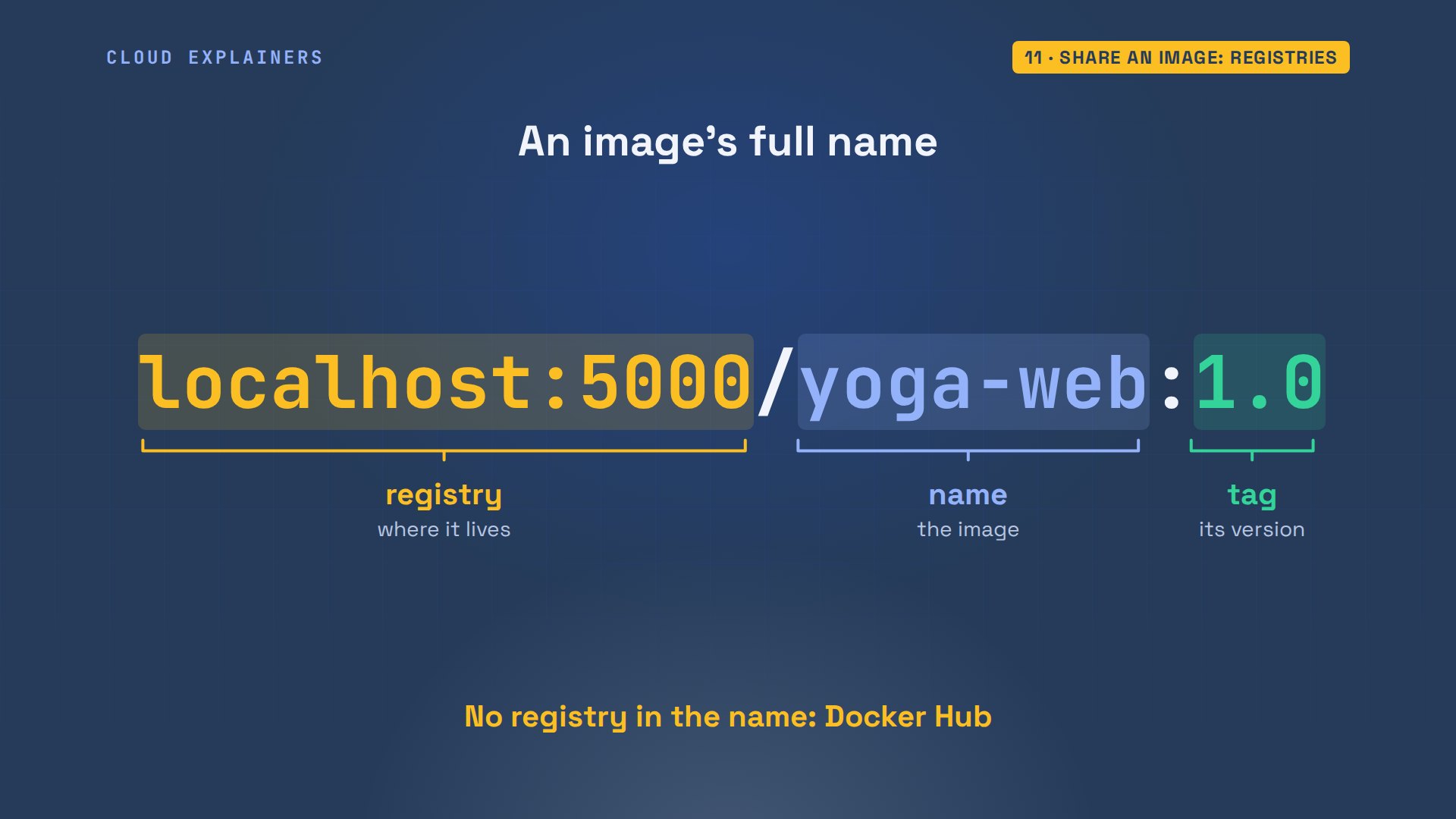
To try it without an account, Ana runs a registry of her own: it's an image too. docker tag gives yoga-web its full name, version 1.0. docker push uploads its layers. She deletes her local copy, and docker pull brings back the same image, the same digest, its unique fingerprint. With Docker Hub it's the same commands, after docker login.
Data that survives: volumes
The app needs a database. Ana runs PostgreSQL's official image, with dash e setting its password, creates a table, deletes the container and starts a fresh one. The table is gone: relation does not exist. The cookie again.
docker run -d --name db -e POSTGRES_PASSWORD=yoga-lab-only postgres:17-alpineUnable to find image 'postgres:17-alpine' locally
17-alpine: Pulling from library/postgres

417d13870bbc: Pulling fs layer
f5d2b4da9164: Pulling fs layer
cc1103dc4f4a: Pulling fs layer
d61cec070bc8: Pulling fs layer
f1587904a1db: Pulling fs layer
deb7e5f7c1e2: Pulling fs layer
dc4cf4299f4e: Pulling fs layer
efed2fb4d513: Pulling fs layer
f5d2b4da9164: Downloading  12.58MB/110.1MB
982bf3959446: Download complete
Digest: sha256:a77aa70e641402a21411b92b721c58d10f23b50ae5fdd2333efd22d166e1e5f7
Status: Downloaded newer image for postgres:17-alpine
89b02c32acf50b5d6b9944f2fd6b622148ec028213ec23b83beb7af7a75f499d
docker exec db psql -U postgres -c "CREATE TABLE classes (start text, name text)"CREATE TABLE
docker rm -f dbdb
docker run -d --name db -e POSTGRES_PASSWORD=yoga-lab-only postgres:17-alpinede81a24fff34eb62fcdedccf78aeda865d5c4de78cf46935edb26267198be4a1
docker exec db psql -U postgres -c "SELECT * FROM classes"ERROR:  relation "classes" does not exist
LINE 1: SELECT * FROM classes
                      ^
A database's files need to outlive the container. That's a volume: storage Docker keeps outside every container. Dash v studio-data colon, then PostgreSQL's data folder, puts that folder in the volume. Delete the container, start a new one with the same dash v, and it finds the same files.
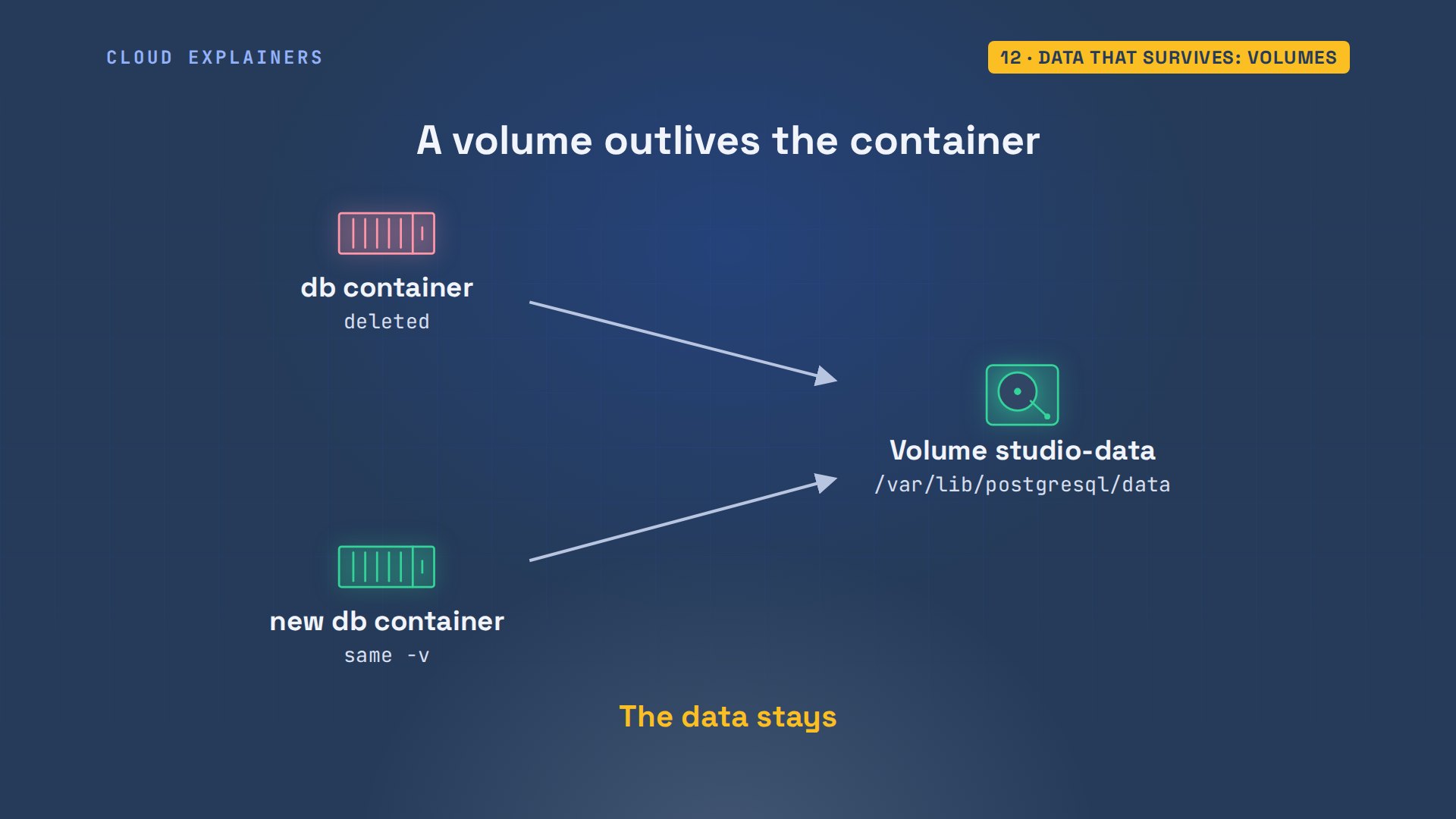
With the volume, Ana loads init.sql, a table and three classes, piping the file into psql in the container. Delete, start again with the volume, and all three rows are there, because they were never inside the container. docker volume ls lists studio-data, and two volumes with random names: the image always uses one, so the first two databases got one each, left behind.
docker run -d --name db -e POSTGRES_PASSWORD=yoga-lab-only -v studio-data:/var/lib/postgresql/data postgres:17-alpine5c167692bc6e5fb27d5c9058d546a1d5ae4fb6f5bb9bbdddb4d390a463dbd51a
cat init.sqlCREATE TABLE classes (start text, name text);
INSERT INTO classes VALUES ('07:00', 'Sunrise flow'), ('12:15', 'Lunch stretch'), ('18:30', 'Evening yin');
docker exec -i db psql -U postgres < init.sqlCREATE TABLE
INSERT 0 3
docker rm -f dbdb
docker run -d --name db -e POSTGRES_PASSWORD=yoga-lab-only -v studio-data:/var/lib/postgresql/data postgres:17-alpined3c517ccecd40224d2c1ae54d238808c5704d90a29bd8c91a492307cd083424a
docker exec db psql -U postgres -c "SELECT * FROM classes"start | name -------+--------------- 07:00 | Sunrise flow 12:15 | Lunch stretch 18:30 | Evening yin (3 rows)
docker volume lsDRIVER    VOLUME NAME
local     a4d491e5ccebe4904f1ef168bd8ba7ce493ed9c8a363751bb9f4339a85859b07
local     f8ed862e8c043b842d2c2bce5c9d707510052094733b200723314d944b438a46
local     studio-data
Containers talking: networks
Now the app reads its classes from that database. It finds it through a setting, the database URL, an address with the user, password, host and database name, passed in with dash e. Ana points it at localhost, where a database usually is on a laptop. The page fails, error 500, and the app's log says connection refused, at localhost's address.
cat app.pyimport os

import psycopg
from flask import Flask

app = Flask(__name__)
DB = os.environ["DATABASE_URL"]


@app.route("/")
def home():
    with psycopg.connect(DB) as conn:
        rows = conn.execute("SELECT start, name FROM classes ORDER BY start").fetchall()
    items = "".join(f"<li>{start}  {name}</li>" for start, name in rows)
    return f"<h1>Willow Yoga: today's classes</h1><ul>{items}</ul>"


if __name__ == "__main__":
    app.run(host="0.0.0.0", port=8000)
docker build -q -t yoga-web .sha256:26de91b6a8a5b74e77a0233db952fdadfd704ba0f6fb236d679685c55bcab671
docker run -d --name yoga -p 8000:8000 -e DATABASE_URL=postgresql://postgres:yoga-lab-only@localhost/postgres yoga-web531a98c77742f2ed02ecbc9273eaf48368dc90941c548debc20ae6af6956ebb2
curl -s localhost:8000 | grep title<title>500 Internal Server Error</title>
docker logs yoga 2>&1 | grep OperationalErrorpsycopg.OperationalError: connection failed: connection to server at "127.0.0.1", port 5432 failed: Connection refused
Same lesson as before: localhost inside a container is the container itself, and the database isn't in it. Containers reach each other through a Docker network. Every container starts on a default network, but that one doesn't give out names, so you make your own. On a network you create, Docker answers names too: the name db leads to the db container.
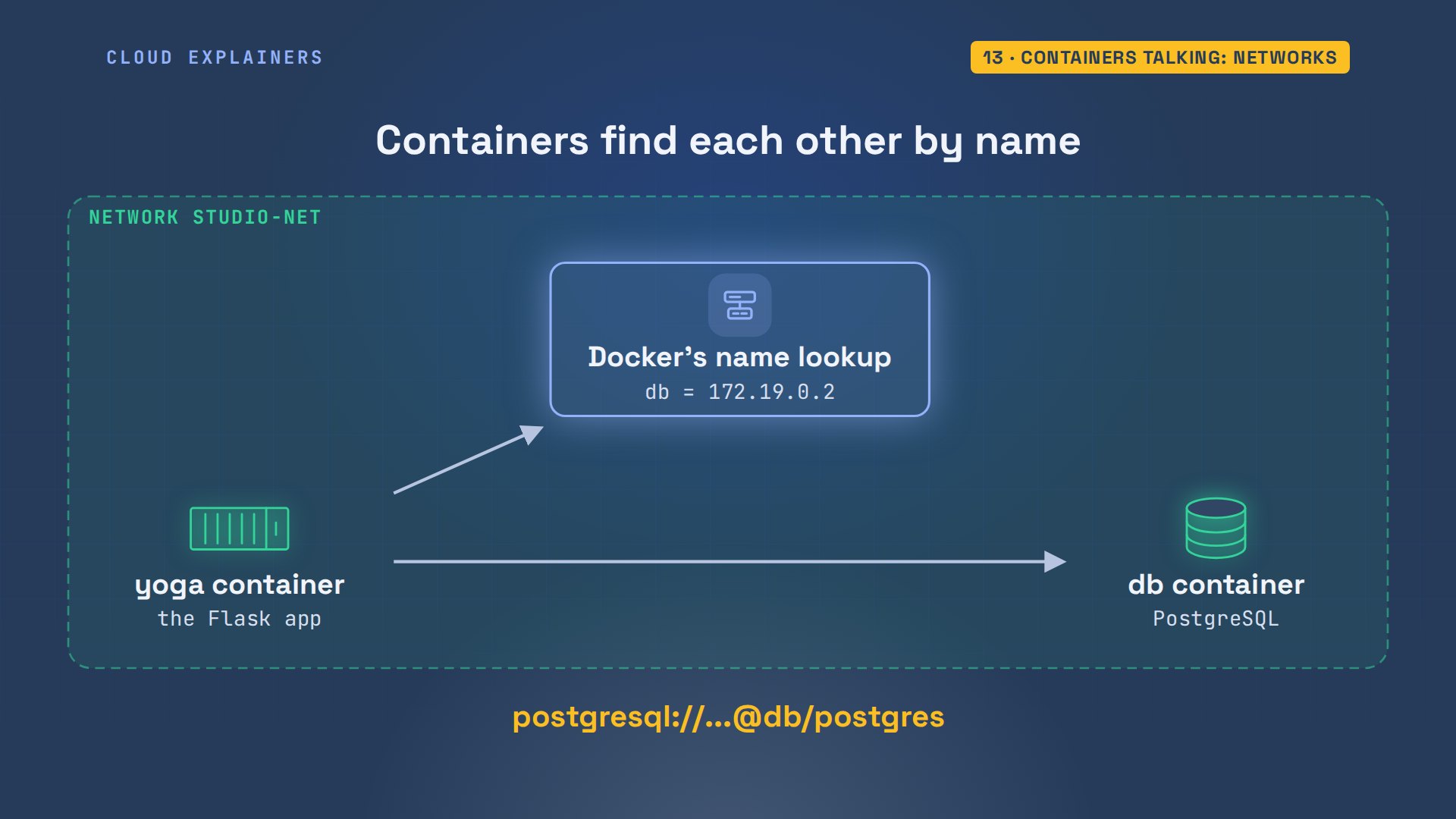
docker network create studio-net, connect the database to it, and run the app on it, with db in the address. The page lists the classes, now from PostgreSQL. Inside the app's container, the name db is 172.19.0.2.
docker network create studio-net27f32aee0d0917911fbe8da9701d2d5b4e8f7edd2f3676a47da742bbcde14bbd
docker network connect studio-net db
docker rm -f yogayoga
docker run -d --name yoga -p 8000:8000 --network studio-net -e DATABASE_URL=postgresql://postgres:yoga-lab-only@db/postgres yoga-web7cd417b55d6c8d10e8a162ebcb9e518a9200994fc47f23ea075b86a3db8498c5
curl -s localhost:8000<h1>Willow Yoga: today's classes</h1><ul><li>07:00 Sunrise flow</li><li>12:15 Lunch stretch</li><li>18:30 Evening yin</li></ul>
docker exec yoga getent hosts db172.19.0.2 db
Docker Compose: one file
That's a lot of flags to remember. Docker Compose writes them down in one file, compose.yaml. Two services: web, built from this folder, with its port and its database URL, and db, from the postgres image, with its password and a volume. init.sql goes in a special folder: the image runs it once, on its first start. depends on starts db before web, but it doesn't wait for PostgreSQL to be ready.
cat compose.yamlservices:
  web:
    build: .
    ports:
      - "8000:8000"
    environment:
      DATABASE_URL: postgresql://postgres:yoga-lab-only@db/postgres
    depends_on:
      - db
  db:
    image: postgres:17-alpine
    environment:
      POSTGRES_PASSWORD: yoga-lab-only
    volumes:
      - studio-data:/var/lib/postgresql/data
      - ./init.sql:/docker-entrypoint-initdb.d/init.sql

volumes:
  studio-data:
Every line has a docker run flag behind it. Dash p became ports. Dash e became environment. Dash v became volumes. docker build became build dot. And the network Ana made by hand? Compose makes one for every project, so the services find each other by name without asking.
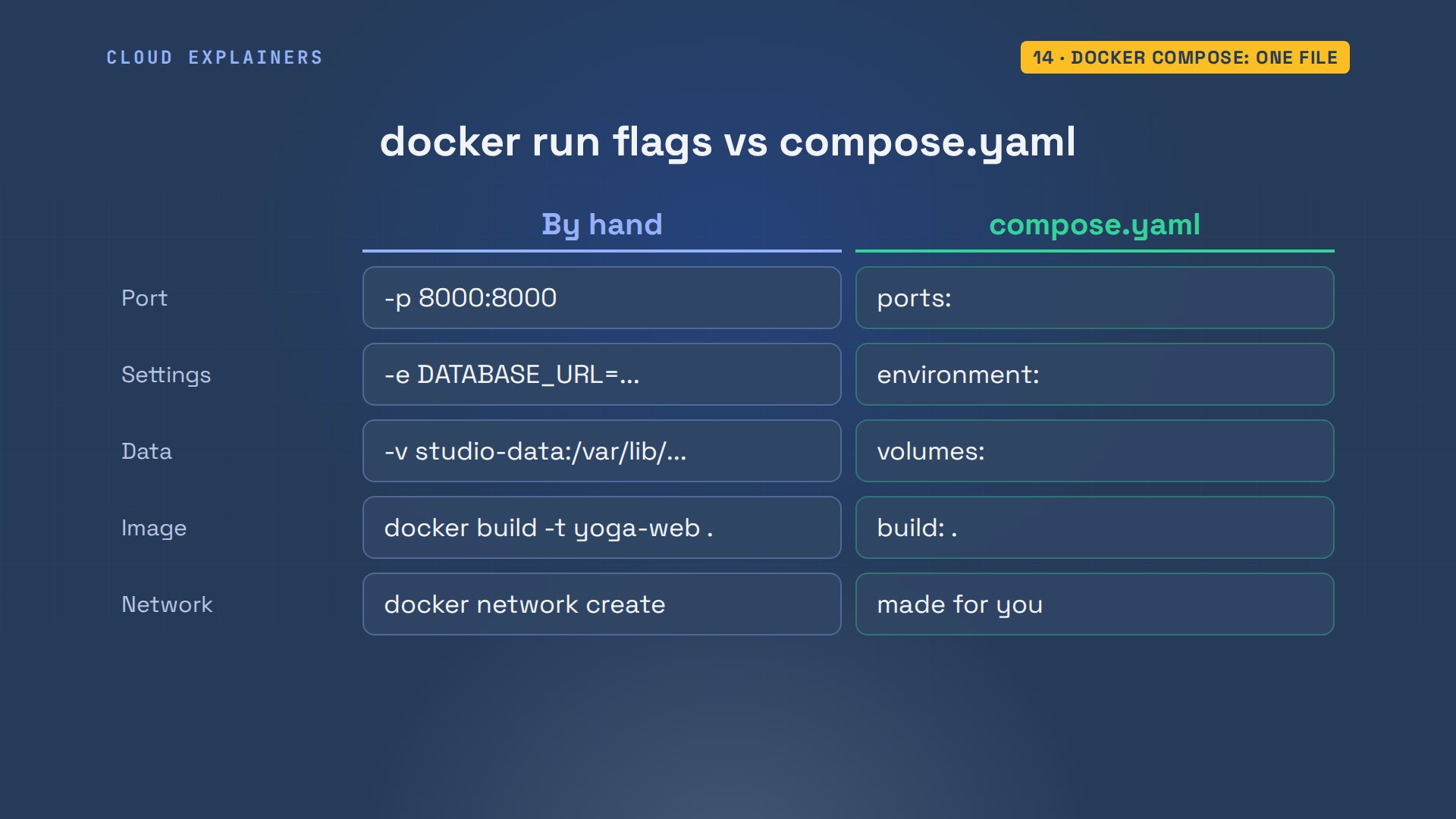
From that file, Compose makes a network for the project, a volume, and one container per service, named after the folder: studio. The names the services use, web and db, are the names they find each other by.
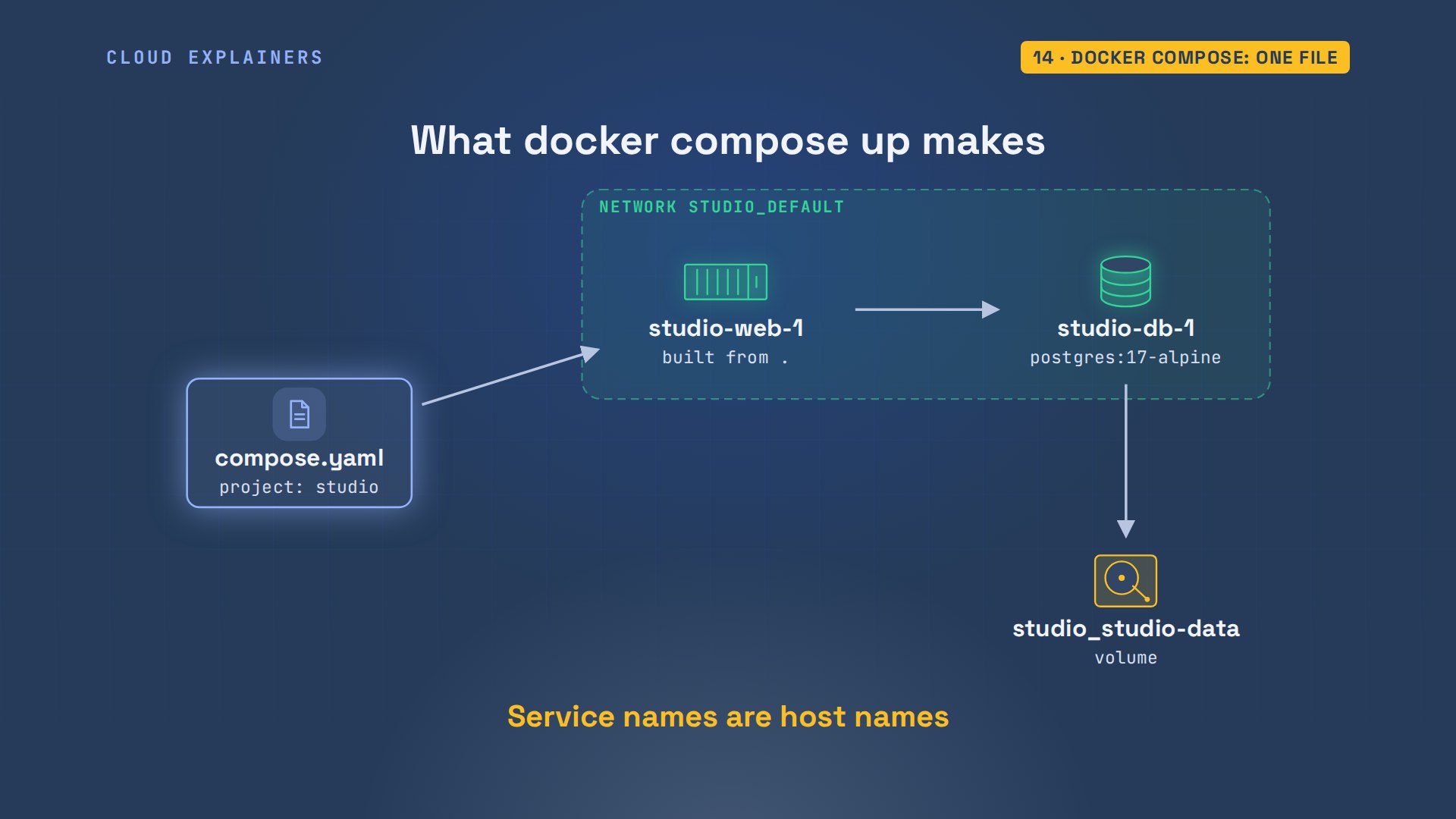
Ana deletes her hand-made containers, then runs docker compose up dash d. Built, network created, volume created, both started. docker ps shows the two containers, and the page works.
docker rm -f yoga dbyoga
db
docker compose up -d#1 [internal] load local bake definitions
#1 reading from stdin 471B done
#1 DONE 0.0s

#2 [internal] load build definition from Dockerfile
#2 transferring dockerfile: 168B done
#2 DONE 0.0s

#3 [internal] load metadata for docker.io/library/python:3.13-slim
#3 DONE 0.1s

#4 [internal] load .dockerignore
#4 transferring context: 48B done
#4 DONE 0.0s

#5 [internal] load build context
#5 transferring context: 682B done
#5 DONE 0.0s

#6 [1/5] FROM docker.io/library/python:3.13-slim@sha256:e48f59cdba69a3cbd9ed2cf0f348d90d45a8d350d98134cf1070bc106ee9ed90
#6 resolve docker.io/library/python:3.13-slim@sha256:e48f59cdba69a3cbd9ed2cf0f348d90d45a8d350d98134cf1070bc106ee9ed90 done
#6 DONE 0.0s

#7 [2/5] WORKDIR /app
#7 CACHED

#8 [3/5] COPY requirements.txt .
#8 CACHED

#9 [4/5] RUN pip install -r requirements.txt
#9 CACHED

#10 [5/5] COPY . .
#10 DONE 0.0s

#11 exporting to image
#11 exporting layers 0.0s done
#11 exporting manifest sha256:ea515bb7b97b1f6c3ce80110f933127b1e3d65577d538f318db3ceeb704be842 done
#11 exporting config sha256:9a986ccab660df81d5f28a5e4d295dc5de9fe05f4404e924d3490dc392ac32bd done
#11 exporting attestation manifest sha256:518ee6279e6a2cf50a9cca32f7010eef8eddef6cca3dbfd0957f1a1f603b41a2 done
#11 exporting manifest list sha256:54477ae4e250a8f251b91431eac2a0de15af67300fb492c09fcc4d20007be66f done
#11 naming to docker.io/library/studio-web:latest done
#11 unpacking to docker.io/library/studio-web:latest 0.0s done
#11 DONE 0.1s

#12 resolving provenance for metadata file
#12 DONE 0.0s
[+] Running 4/5
 ✔ studio-web                 Built                                                            0.0s
 ✔ Network studio_default     Created                                                          0.0s
 ✔ Volume studio_studio-data  Created                                                          0.0s
 ⠋ Container studio-db-1      Starting                                                         0.1s
 ✔ Container studio-web-1     Created                                                          0.0s
[+] Running 5/5
 ✔ studio-web                 Built                                                            0.0s
 ✔ Network studio_default     Created                                                          0.0s
 ✔ Volume studio_studio-data  Created                                                          0.0s
 ✔ Container studio-db-1      Started                                                          0.1s
 ✔ Container studio-web-1     Started                                                          0.1s
docker psNAMES          IMAGE                STATUS         PORTS
studio-web-1   studio-web           Up 2 seconds   0.0.0.0:8000->8000/tcp, [::]:8000->8000/tcp
studio-db-1    postgres:17-alpine   Up 2 seconds   5432/tcp
curl -s localhost:8000<h1>Willow Yoga: today's classes</h1><ul><li>07:00 Sunrise flow</li><li>12:15 Lunch stretch</li><li>18:30 Evening yin</li></ul>
She adds an evening class in the database, then docker compose down: containers and network removed. But look: removing web took 10.1 seconds, the ten seconds from the start. The database took a tenth of a second. We'll come back to that.
docker compose exec db psql -U postgres -c "INSERT INTO classes VALUES ('20:00', 'Candlelight flow')"INSERT 0 1
docker compose down[+] Running 0/1 ⠋ Container studio-web-1 Stopping 0.1s [+] Running 0/1 ⠙ Container studio-web-1 Stopping 0.2s [+] Running 0/1 ⠹ Container studio-web-1 Stopping 0.3s [+] Running 0/1 ⠸ Container studio-web-1 Stopping 0.4s [+] Running 0/1 ⠼ Container studio-web-1 Stopping 0.5s [+] Running 0/1 ⠴ Container studio-web-1 Stopping 0.6s [+] Running 0/1 ⠦ Container studio-web-1 Stopping 0.7s [+] Running 0/1 ⠧ Container studio-web-1 Stopping 0.8s [+] Running 0/1 ⠇ Container studio-web-1 Stopping 0.9s [+] Running 0/1 ⠏ Container studio-web-1 Stopping 1.0s [+] Running 0/1 ⠋ Container studio-web-1 Stopping 1.1s [+] Running 0/1 ⠙ Container studio-web-1 Stopping 1.2s [+] Running 0/1 ⠹ Container studio-web-1 Stopping 1.3s [+] Running 0/1 ⠸ Container studio-web-1 Stopping 1.4s [+] Running 0/1 ⠼ Container studio-web-1 Stopping 1.5s [+] Running 0/1 ⠴ Container studio-web-1 Stopping 1.6s [+] Running 0/1 ⠦ Container studio-web-1 Stopping 1.7s [+] Running 0/1 ⠧ Container studio-web-1 Stopping 1.8s [+] Running 0/1 ⠇ Container studio-web-1 Stopping 1.9s [+] Running 0/1 ⠏ Container studio-web-1 Stopping 2.0s [+] Running 0/1 ⠋ Container studio-web-1 Stopping 2.1s [+] Running 0/1 ⠙ Container studio-web-1 Stopping 2.2s [+] Running 0/1 ⠹ Container studio-web-1 Stopping 2.3s [+] Running 0/1 ⠸ Container studio-web-1 Stopping 2.4s [+] Running 0/1 ⠼ Container studio-web-1 Stopping 2.5s [+] Running 0/1 ⠴ Container studio-web-1 Stopping 2.6s [+] Running 0/1 ⠦ Container studio-web-1 Stopping 2.7s [+] Running 0/1 ⠧ Container studio-web-1 Stopping 2.8s [+] Running 0/1 ⠇ Container studio-web-1 Stopping 2.9s [+] Running 0/1 ⠏ Container studio-web-1 Stopping 3.0s [+] Running 0/1 ⠋ Container studio-web-1 Stopping 3.1s [+] Running 0/1 ⠙ Container studio-web-1 Stopping 3.2s [+] Running 0/1 ⠹ Container studio-web-1 Stopping 3.3s [+] Running 0/1 ⠸ Container studio-web-1 Stopping 3.4s [+] Running 0/1 ⠼ Container studio-web-1 Stopping 3.5s [+] Running 0/1 ⠴ Container studio-web-1 Stopping 3.6s [+] Running 0/1 ⠦ Container studio-web-1 Stopping 3.7s [+] Running 0/1 ⠧ Container studio-web-1 Stopping 3.8s [+] Running 0/1 ⠇ Container studio-web-1 Stopping 3.9s [+] Running 0/1 ⠏ Container studio-web-1 Stopping 4.0s [+] Running 0/1 ⠋ Container studio-web-1 Stopping 4.1s [+] Running 0/1 ⠙ Container studio-web-1 Stopping 4.2s [+] Running 0/1 ⠹ Container studio-web-1 Stopping 4.3s [+] Running 0/1 ⠸ Container studio-web-1 Stopping 4.4s [+] Running 0/1 ⠼ Container studio-web-1 Stopping 4.5s [+] Running 0/1 ⠴ Container studio-web-1 Stopping 4.6s [+] Running 0/1 ⠦ Container studio-web-1 Stopping 4.7s [+] Running 0/1 ⠧ Container studio-web-1 Stopping 4.8s [+] Running 0/1 ⠇ Container studio-web-1 Stopping 4.9s [+] Running 0/1 ⠏ Container studio-web-1 Stopping 5.0s [+] Running 0/1 ⠋ Container studio-web-1 Stopping 5.1s [+] Running 0/1 ⠙ Container studio-web-1 Stopping 5.2s [+] Running 0/1 ⠹ Container studio-web-1 Stopping 5.3s [+] Running 0/1 ⠸ Container studio-web-1 Stopping 5.4s [+] Running 0/1 ⠼ Container studio-web-1 Stopping 5.5s [+] Running 0/1 ⠴ Container studio-web-1 Stopping 5.6s [+] Running 0/1 ⠦ Container studio-web-1 Stopping 5.7s [+] Running 0/1 ⠧ Container studio-web-1 Stopping 5.8s [+] Running 0/1 ⠇ Container studio-web-1 Stopping 5.9s [+] Running 0/1 ⠏ Container studio-web-1 Stopping 6.0s [+] Running 0/1 ⠋ Container studio-web-1 Stopping 6.1s [+] Running 0/1 ⠙ Container studio-web-1 Stopping 6.2s [+] Running 0/1 ⠹ Container studio-web-1 Stopping 6.3s [+] Running 0/1 ⠸ Container studio-web-1 Stopping 6.4s [+] Running 0/1 ⠼ Container studio-web-1 Stopping 6.5s [+] Running 0/1 ⠴ Container studio-web-1 Stopping 6.6s [+] Running 0/1 ⠦ Container studio-web-1 Stopping 6.7s [+] Running 0/1 ⠧ Container studio-web-1 Stopping 6.8s [+] Running 0/1 ⠇ Container studio-web-1 Stopping 6.9s [+] Running 0/1 ⠏ Container studio-web-1 Stopping 7.0s [+] Running 0/1 ⠋ Container studio-web-1 Stopping 7.1s [+] Running 0/1 ⠙ Container studio-web-1 Stopping 7.2s [+] Running 0/1 ⠹ Container studio-web-1 Stopping 7.3s [+] Running 0/1 ⠸ Container studio-web-1 Stopping 7.4s [+] Running 0/1 ⠼ Container studio-web-1 Stopping 7.5s [+] Running 0/1 ⠴ Container studio-web-1 Stopping 7.6s [+] Running 0/1 ⠦ Container studio-web-1 Stopping 7.7s [+] Running 0/1 ⠧ Container studio-web-1 Stopping 7.8s [+] Running 0/1 ⠇ Container studio-web-1 Stopping 7.9s [+] Running 0/1 ⠏ Container studio-web-1 Stopping 8.0s [+] Running 0/1 ⠋ Container studio-web-1 Stopping 8.1s [+] Running 0/1 ⠙ Container studio-web-1 Stopping 8.2s [+] Running 0/1 ⠹ Container studio-web-1 Stopping 8.3s [+] Running 0/1 ⠸ Container studio-web-1 Stopping 8.4s [+] Running 0/1 ⠼ Container studio-web-1 Stopping 8.5s [+] Running 0/1 ⠴ Container studio-web-1 Stopping 8.6s [+] Running 0/1 ⠦ Container studio-web-1 Stopping 8.7s [+] Running 0/1 ⠧ Container studio-web-1 Stopping 8.8s [+] Running 0/1 ⠇ Container studio-web-1 Stopping 8.9s [+] Running 0/1 ⠏ Container studio-web-1 Stopping 9.0s [+] Running 0/1 ⠋ Container studio-web-1 Stopping 9.1s [+] Running 0/1 ⠙ Container studio-web-1 Stopping 9.2s [+] Running 0/1 ⠹ Container studio-web-1 Stopping 9.3s [+] Running 0/1 ⠸ Container studio-web-1 Stopping 9.4s [+] Running 0/1 ⠼ Container studio-web-1 Stopping 9.5s [+] Running 0/1 ⠴ Container studio-web-1 Stopping 9.6s [+] Running 0/1 ⠦ Container studio-web-1 Stopping 9.7s [+] Running 0/1 ⠧ Container studio-web-1 Stopping 9.8s [+] Running 0/1 ⠇ Container studio-web-1 Stopping 9.9s [+] Running 0/1 ⠏ Container studio-web-1 Stopping 10.0s [+] Running 0/1 ⠋ Container studio-web-1 Stopping 10.1s [+] Running 1/2 ✔ Container studio-web-1 Removed 10.1s ⠋ Container studio-db-1 Stopping 0.1s [+] Running 3/3 ✔ Container studio-web-1 Removed 10.1s ✔ Container studio-db-1 Removed 0.1s ✔ Network studio_default Removed 0.1s
The volume stayed. docker compose up again, and the evening class is still there: Candlelight flow. docker compose logs web shows the app's latest lines.
docker volume lsDRIVER    VOLUME NAME
local     a4d491e5ccebe4904f1ef168bd8ba7ce493ed9c8a363751bb9f4339a85859b07
local     f8ed862e8c043b842d2c2bce5c9d707510052094733b200723314d944b438a46
local     studio-data
local     studio_studio-data
docker compose up -d[+] Running 2/3
 ✔ Network studio_default  Created                                                             0.0s
 ⠋ Container studio-db-1   Starting                                                            0.1s
 ✔ Container studio-web-1  Created                                                             0.0s
[+] Running 3/3
 ✔ Network studio_default  Created                                                             0.0s
 ✔ Container studio-db-1   Started                                                             0.1s
 ✔ Container studio-web-1  Started                                                             0.1s
curl -s localhost:8000<h1>Willow Yoga: today's classes</h1><ul><li>07:00 Sunrise flow</li><li>12:15 Lunch stretch</li><li>18:30 Evening yin</li><li>20:00 Candlelight flow</li></ul>
docker compose logs web --tail 2web-1  | Press CTRL+C to quit
web-1  | 172.20.0.1 - - [16/Nov/2026 16:56:35] "GET / HTTP/1.1" 200 -
How much does this cost the laptop? docker stats shows each container's live use; dash dash no-stream prints one snapshot instead of updating every second. The web app: 32.33MiB of memory. PostgreSQL: 19.58MiB. Both near zero CPU while nobody visits. A container costs about what its program costs, because that's all it is.
docker stats --no-streamCONTAINER ID   NAME           CPU %     MEM USAGE / LIMIT     MEM %     NET I/O           BLOCK I/O     PIDS
3919a0381ba3   studio-web-1   0.04%     32.33MiB / 7.748GiB   0.41%     3.19kB / 2.04kB   0B / 0B       1
6aaf5cb25104   studio-db-1    0.06%     19.58MiB / 7.748GiB   0.25%     2.46kB / 1.66kB   0B / 28.7kB   6
Two errors you will meet
Two errors every beginner meets. With Compose running, Ana starts one more container on port 8000: port is already allocated. Only one thing can listen on a laptop port. Docker still created the container, so docker ps dash a shows it, and it needs a docker rm. And a typo in an image name, yogaweb without the dash, says pull access denied: Docker didn't find it here, asked Docker Hub, and no such image exists there either.
docker run -d --name extra -p 8000:8000 yoga-web619e9e52e7a4cf7a9ccdb9d791279a33455c53d29531e2144dfc8bcdbf790fe0
docker: Error response from daemon: failed to set up container networking: driver failed programming external connectivity on endpoint extra (c9f7d38bffffe66da02b41bb03a499b2c34dfe22fe19b6429100b3a187d2a694): Bind for :::8000 failed: port is already allocated

Run 'docker run --help' for more information
docker ps -aNAMES              IMAGE                STATUS                          PORTS
extra              yoga-web             Created
studio-web-1       studio-web           Up 3 seconds                    0.0.0.0:8000->8000/tcp, [::]:8000->8000/tcp
studio-db-1        postgres:17-alpine   Up 3 seconds                    5432/tcp
gallant_chatelet   hello-world          Exited (0) About a minute ago
docker rm extraextra
docker run yogawebUnable to find image 'yogaweb:latest' locally
docker: Error response from daemon: pull access denied for yogaweb, repository does not exist or may require 'docker login'

Run 'docker run --help' for more information
Why it took ten seconds
Back to the ten seconds. Every program in Linux is a process with a number; a container's first program is process 1. Stopping a container sends process 1 a signal, a polite stop, through the Linux kernel. Inside web, process 1 is Python, and Linux treats process 1 specially: a stop signal it has no handler for is ignored, so Docker waits ten seconds, then forces it out.
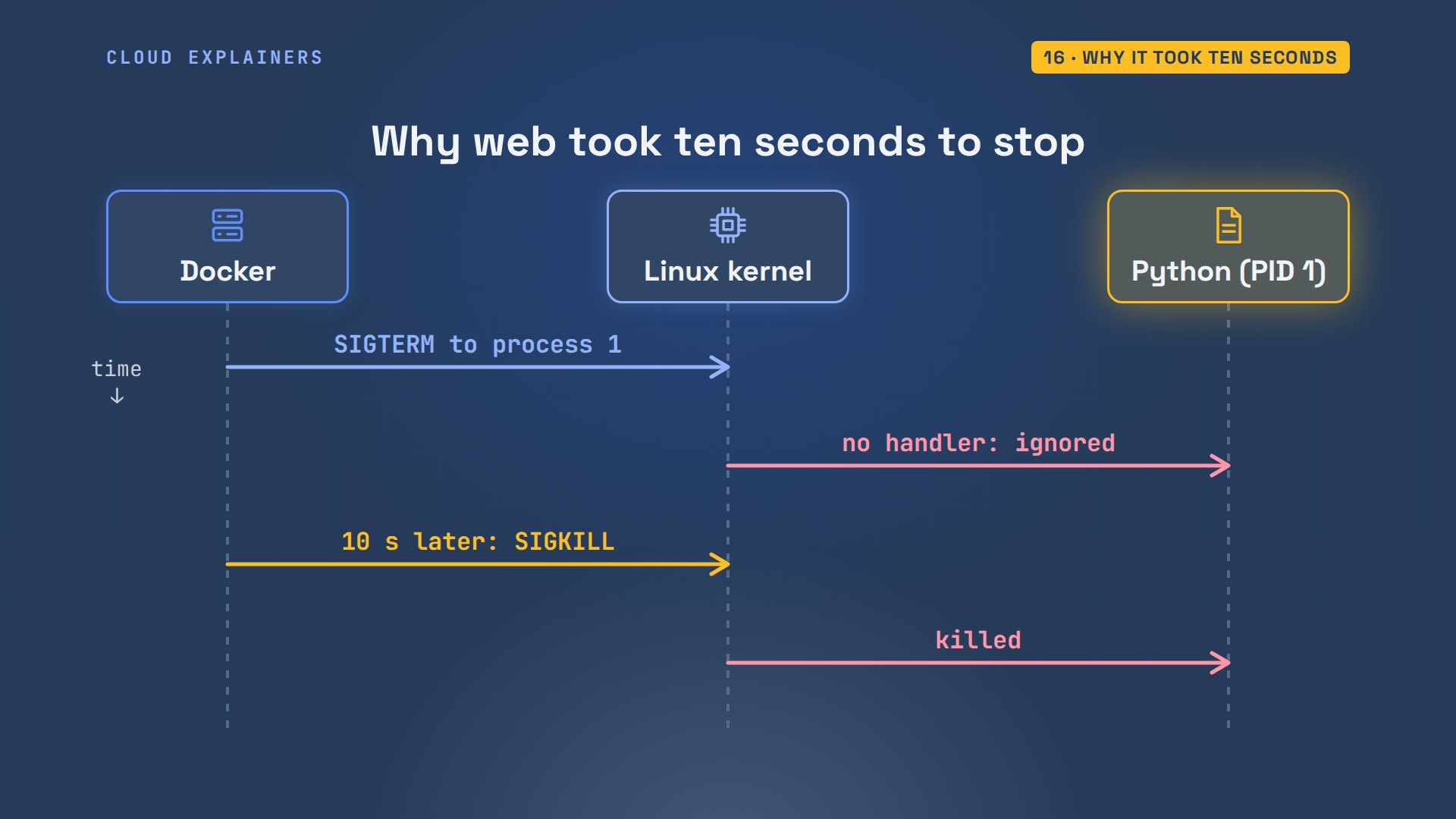
docker compose exec reads slash proc slash 1 slash comm, the name of process 1. Before the fix: python. The fix is one line in compose.yaml: init: true. Docker then starts a tiny init program as process 1, which passes the stop signal on to Python. After: docker-init. And docker compose down takes 0.3 seconds.
docker compose exec web cat /proc/1/commpython
grep -n init: compose.yaml4: init: true
docker compose exec web cat /proc/1/commdocker-init
time docker compose down[+] Running 1/2
 ✔ Container studio-web-1  Removed                                                             0.1s
 ⠋ Container studio-db-1   Stopping                                                            0.0s
[+] Running 2/3
 ✔ Container studio-web-1  Removed                                                             0.1s
 ✔ Container studio-db-1   Removed                                                             0.1s
 ⠋ Network studio_default  Removing                                                            0.0s
[+] Running 3/3
 ✔ Container studio-web-1  Removed                                                             0.1s
 ✔ Container studio-db-1   Removed                                                             0.1s
 ✔ Network studio_default  Removed                                                             0.1s

real	0m0.252s
user	0m0.030s
sys	0m0.015s
Cleaning up
Docker keeps everything until you delete it. docker system df shows the space: images, containers, volumes, and the build cache. docker compose down dash v also deletes the project's volume, and its data. docker image prune dash a removes every image no container uses, and dash f skips the are-you-sure question: 179.5MB back. Anything it removed is pulled or built again the next time it's needed, so pruning is safe, just slower next time.
docker system dfTYPE            TOTAL     ACTIVE    SIZE      RECLAIMABLE
Images          8         3         1.134GB   753.8MB (66%)
Containers      3         2         1.036MB   4.096kB (0%)
Local Volumes   4         1         161.8MB   121.3MB (74%)
Build Cache     22        0         517.5MB   262MB
docker compose down -v[+] Running 0/1
 ⠋ Container studio-web-1  Removing                                                            0.1s
[+] Running 3/4
 ✔ Container studio-web-1     Removed                                                          0.1s
 ✔ Container studio-db-1      Removed                                                          0.1s
 ✔ Volume studio_studio-data  Removed                                                          0.0s
 ⠋ Network studio_default     Removing                                                         0.0s
[+] Running 4/4
 ✔ Container studio-web-1     Removed                                                          0.1s
 ✔ Container studio-db-1      Removed                                                          0.1s
 ✔ Volume studio_studio-data  Removed                                                          0.0s
 ✔ Network studio_default     Removed                                                          0.1s
docker image prune -a -fDeleted Images:
untagged: postgres:17-alpine
deleted: sha256:a77aa70e641402a21411b92b721c58d10f23b50ae5fdd2333efd22d166e1e5f7
deleted: sha256:93f3c32bafb7d4d20965c4df530899ae40923f0ccd63deede2f36681fa0aeceb
deleted: sha256:8f688e69fe1bccd5b366f77806add766f9b5d17fd820de5420d40fa31d3b2486
untagged: registry:2
deleted: sha256:a3d8aaa63ed8681a604f1dea0aa03f100d5895b6a58ace528858a7b332415373
deleted: sha256:fa647fc1e5d5df7d8d923fb6332aab8e78783f8fca1a1394efb4011f68f5a793
deleted: sha256:1aa1079885b640a7fb6c01d680c6b50b7cbc9d0ef4905bf34d5099d8fa74dc50
untagged: studio-web:latest
deleted: sha256:54477ae4e250a8f251b91431eac2a0de15af67300fb492c09fcc4d20007be66f
deleted: sha256:ea515bb7b97b1f6c3ce80110f933127b1e3d65577d538f318db3ceeb704be842
deleted: sha256:518ee6279e6a2cf50a9cca32f7010eef8eddef6cca3dbfd0957f1a1f603b41a2
untagged: ubuntu:24.04
deleted: sha256:73b999393d07f2bf65a40373778a44dc9a6d54ad7718d29247d8ff9413c4d6a8
deleted: sha256:c92376659a7f14cc1f51615d73c9f4b7d8e18d59f370e02b4ed683ab4485c66c
deleted: sha256:d3aa5e985af4658d0b7d8f4230bdc72bf283a86b57f8e23db0f536fda32e2194
untagged: yoga-web:latest
deleted: sha256:26de91b6a8a5b74e77a0233db952fdadfd704ba0f6fb236d679685c55bcab671
deleted: sha256:2bbf542ad7213ebda70b6056c34ae7fd6ea388ad95a6c286e9d71c5a83068ebd
deleted: sha256:f64ff09e305483330924653962e5831c7fb173a87b8922b480ef7dcf2713f8e2
untagged: localhost:5000/yoga-web:1.0
deleted: sha256:357b6f1b7a4b8b4171bbd42152615b69c175a3e3e8b96e66e9bdac16d8c43e22
deleted: sha256:807575e104f2be97d95745d5d056b4be95a3d63a20cba6bdbd40426adf00896f
deleted: sha256:e8b571175fb4f2b75643e5f9f084553cd0284aad50868690f88a621433caf2eb
untagged: nginx:alpine
deleted: sha256:fed7e14be83cbd2661a75cdc5b872d936cf155d46c327084d30b8df19ae88d72
deleted: sha256:5e3f1baf6e6505e8bc2b7ba50c790f94bb189b5e96c0ab2298fc745081c519a3
deleted: sha256:96a98f731ec16368a3bd88c3842a559f6fc7cc553c6456df7c84843cfef7ece9

Total reclaimed space: 179.5MB
Where to go next
Where next? If two of your containers can't reach each other, our Compose networking fix walks through every cause. If docker says permission denied on its socket, that's the docker group, also in its own video. And when one machine isn't enough, Kubernetes runs these same images across many.
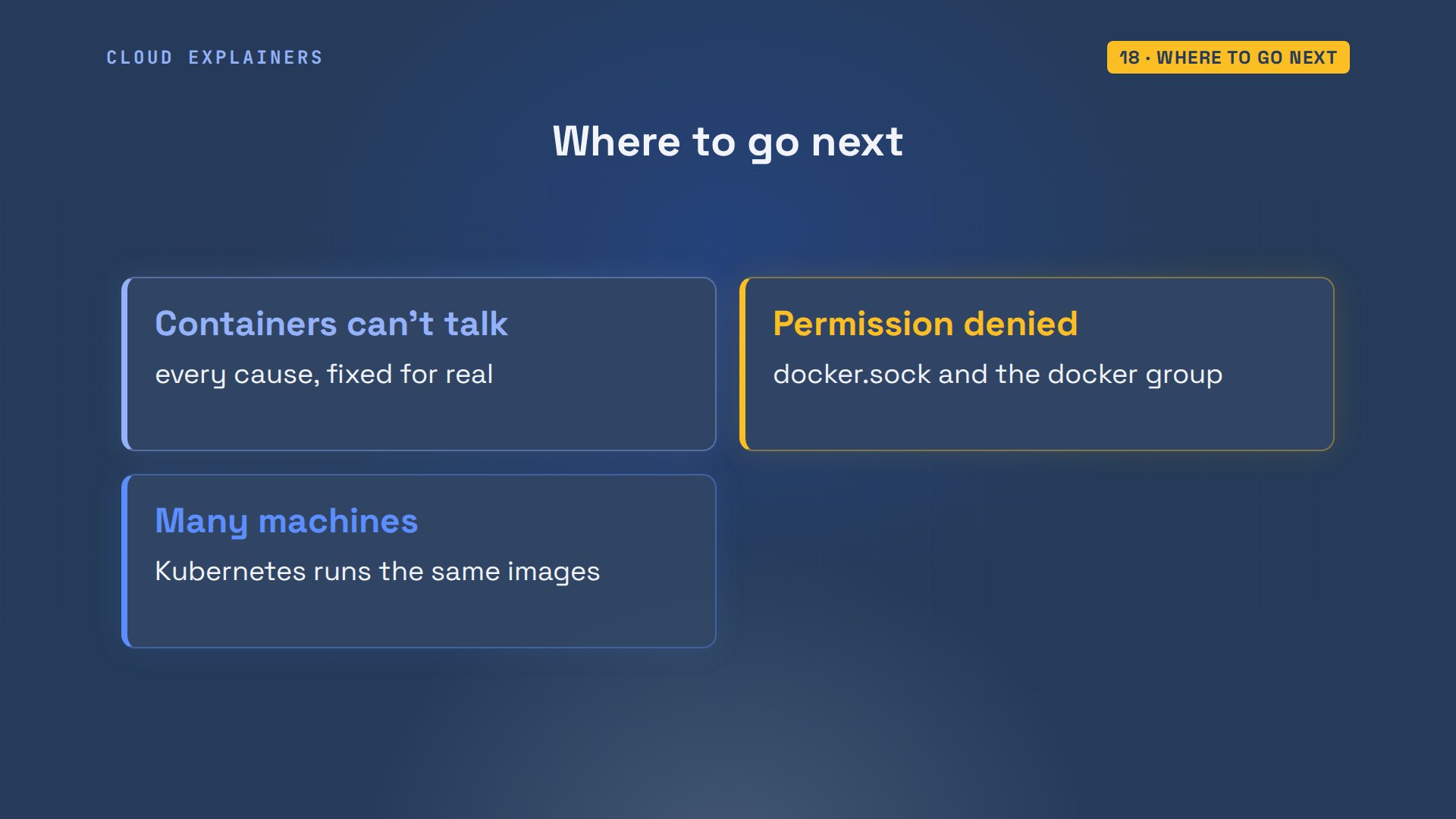
Recap
So: an image is the cutter, a container the cookie. Dash p opens a port, a Dockerfile builds your image, a volume keeps data, a network gives names, and Compose writes it all down.
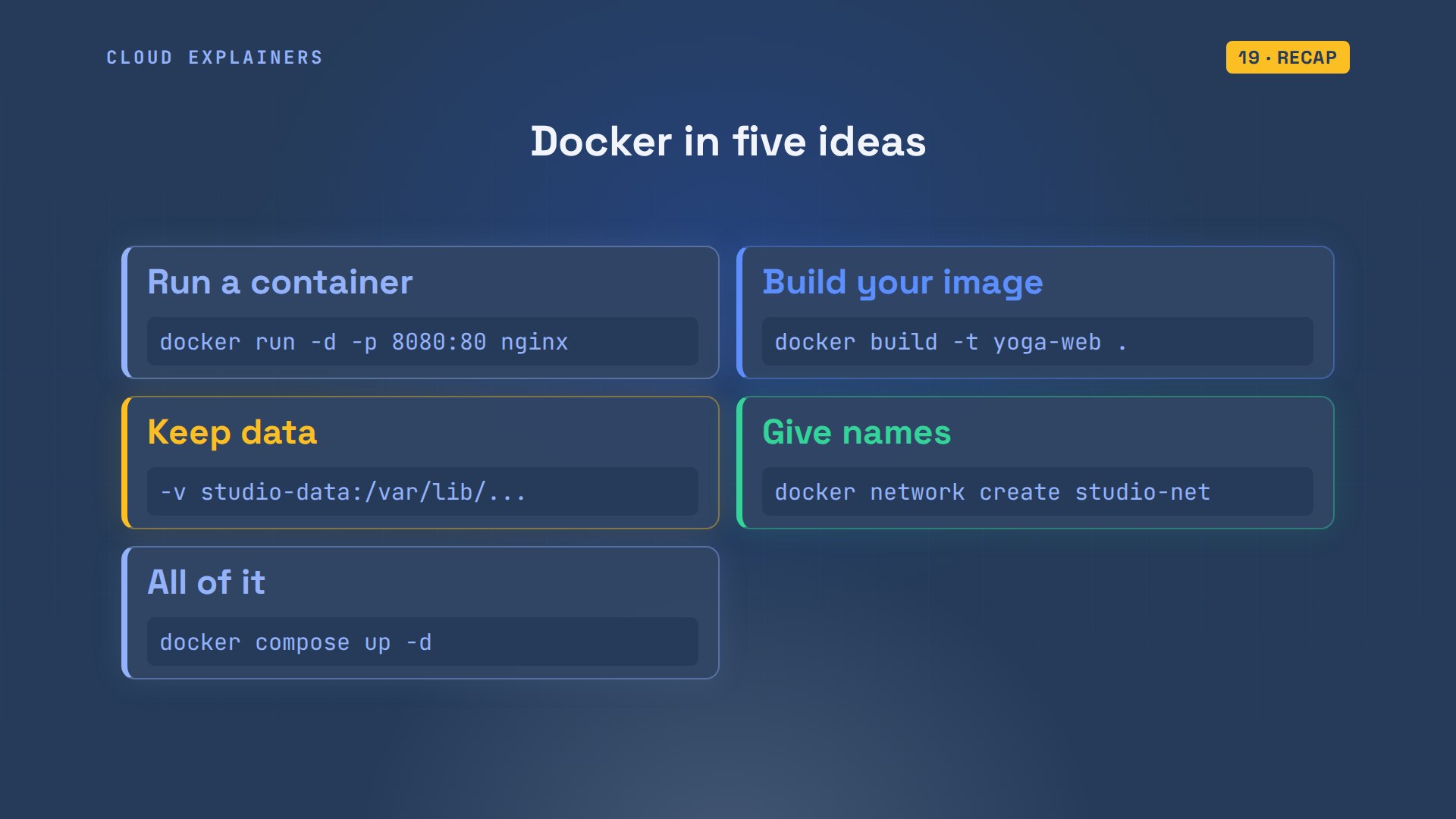
If you can build and run your own image now, a like helps another beginner find this, and subscribing brings more hands-on tutorials, every command run for real.
Every command in this video ran on a real Ubuntu laptop, and every command and the lab files are linked in the description. Thanks for watching Cloud Explainers.
Sources
- Docker docs, Get Docker (Docker Desktop for Mac, Windows and Linux)
- Docker docs, What is Docker? (client, daemon, registries, images, containers)
- Docker docs, Publishing and exposing ports (-p HOST:CONTAINER)
- Docker docs, Build cache (a changed layer rebuilds every later step)
- Docker docs, Volumes
- Docker docs, Bridge networks (user-defined networks resolve container names)
- Docker docs, docker container stop (SIGTERM, then SIGKILL after a grace period, 10 s for Linux containers)
- Docker docs, Compose file reference
- The postgres image on Docker Hub (POSTGRES_PASSWORD, /docker-entrypoint-initdb.d runs on an empty data directory)
- Flask docs, Application.run (host defaults to 127.0.0.1)
Demos: one container on our own Mac standing in for a yoga studio's laptop; the studio, its classes and its passwords are made up. Every command and output was real. Watch the full video on YouTube.
More videos

How to Fix Python ModuleNotFoundError: No Module Named
Golang Pointers in 5 Minutes
How to Fix a Kubernetes Pod Stuck in CrashLoopBackOff
How to Fix a Homelab ESXi Host Not Responding
PostgreSQL: Full Tutorial for Beginners
How a Load Balancer Works with HAProxy

How Python Virtual Environments Work
How to Fix Cloudflare Tunnel Errors in a Homelab
How to Fix API CORS Errors: No 'Access-Control-Allow-Origin'

How Authenticator App Login Codes Work (TOTP)

Git and GitHub: Full Tutorial for Beginners

How a Homelab Hypervisor Works (VMware ESXi)
How to Fix Kubernetes ImagePullBackOff Errors

How to Fix DNS 'Temporary Failure in Name Resolution' on Linux
How to Fix AWS CLI 'Unable to Locate Credentials'
Proxmox vs ESXi for Your Homelab: When Each One Wins
PostgreSQL UUID vs Auto Increment: Which Primary Key Should You Use?
Kubernetes: Full Tutorial for Beginners

How TCP Sockets Work

How to Fix PostgreSQL 'Could Not Connect to Server'
Claude Code Hooks Will Finally Make Sense After This
DevOps with Ansible Will Finally Make Sense After This
How SNMP Network Monitoring Works
How to Fix GitHub 'Permission Denied (publickey)' Errors
How to Fix PostgreSQL 'Password Authentication Failed'
Why One Linux Server Handles More Users Than You Think

How to Fix Network 'Connection Refused' Errors
DevOps Pipelines: Jenkins vs GitHub Actions
Linux Nginx Reverse Proxy: Full Tutorial for Beginners
Every Networking Term a Beginner Needs in 12 Minutes
How to Fix Docker 'Permission Denied' on docker.sock
How to Fix Git 'Updates Were Rejected' When You Push
How to Fix nginx 502 Bad Gateway Errors on Linux

How to Fix Linux apt 'Could Not Get Lock' Errors (Ubuntu)

How Email Works on the Internet (SMTP) in 10 Minutes

The Python Roadmap for Beginners

Golang REST API with Gin: Full Tutorial for Beginners
How a WireGuard VPN Network Works

Linux Makefiles Will Finally Make Sense After This

SAML vs OAuth vs OpenID Connect: What's the Difference?

How to Fix Python cron Jobs That Never Run
Linux Bash Scripting: Full Tutorial for Beginners
How PXE Network Boot Works

How Active Directory Works

How to Fix a Linux systemd Service That Won't Start
Linux Logs: syslog vs journald
JWT vs Session Cookies: Which One Should You Use?
Docker vs Docker Compose: Which One Should You Use?
How to Fix Docker Compose Containers That Can't Talk to Each Other

Django Full Tutorial for Beginners

How Linux systemd Works

How to Fix 'Windows Cannot Access' Network Share Errors (SMB)
REST vs gRPC: Which One Should You Use?

How to Fix SSL Certificate Chain Errors (Missing Intermediate)

Every Python Concept for Beginners in 10 Minutes

Every SQL Join Type in 10 Minutes
Why OpenRouter Free Models Hit Their Limit So Fast
Why Your Gemini API Free Tier Runs Out So Fast

OpenRouter Will Finally Make Sense After This
How Redis Caching Works
Gemini API vs Vertex AI: Which One Should You Use?
How to Fix a Leaked Gemini API Key
Why Golang Uses Goroutines Instead of Threads
How to Fix Gemini API Error 429: Resource Exhausted
Claude Token Pricing Will Finally Make Sense After This
Why Python Web Scraping Returns Nothing (and the Fix)
Python uv vs pip: Which One Should You Use?

Python Automation: Full Tutorial for Beginners

How OAuth Login Works

Google AI Studio Will Finally Make Sense After This
What Happens When You Run a Docker Container
How to Fix Claude Code Billing Your API Key Instead of Your Plan
Why Passkeys Can't Be Phished Like Passwords
PowerShell vs Bash: Which One Should You Learn?

The Linux Roadmap for Beginners
Django vs FastAPI: Which One Should You Use?

Why SQLite Is the Most Used Database in the World
How a NoSQL Database Like MongoDB Works

How to Fix Python pip error: externally-managed-environment
How to Fix MySQL Too Many Connections Database Errors
Golang Concurrency Will Finally Make Sense After This
How Amazon S3 Works
How Kubernetes Works

How Git Works
How to Fix Docker Port Already Allocated Errors
How PostgreSQL Works

How to Fix Git Merge Conflicts

How to Fix No Space Left on Device in Linux
How the Internet Works
SQL vs NoSQL: When Each One Wins
How to Fix JWT Token Expired Errors (401 Unauthorized)
Claude API vs Claude Pro: Why Your Subscription Doesn't Include It
Why AI Agent Skills Beat Giant Prompts

Linux Cron Jobs Will Finally Make Sense After This

Security Logs Will Finally Make Sense After This

How to Fix a Security Leak: An API Key Pushed to GitHub
DNS Will Finally Make Sense After This
Never Ignore a Security Update
Two-Factor Authentication Will Finally Make Sense
Never Expose a Database to the Internet
SSH Keys vs Passwords: Which Is Safer for Security?

The 5 Levels of Linux Boot: From Power On to Login
The 5 Levels of Network Firewalls
Password Security: Why Hackers Crack Weak Passwords
Why Your Linux Server Runs Out of Memory
HTTP vs HTTPS: What Actually Changes on Your Network

Every Linux File Permission You Need to Know
Linux Processes vs Threads: When Each One Wins
The OSI Model Will Finally Make Sense After This

The 7 Levels of Git
Every Network Troubleshooting Command You Need
Hashing vs Encryption in Cybersecurity: When Each One Wins
Why the Internet Ran Out of IP Addresses
Linux Package Managers: apt vs Snap vs Flatpak
Why Python Is Slow (and When It Doesn't Matter)
TCP vs UDP: When Each One Wins

Stop Running Linux as Root (Do This Instead)

Linux Users and Groups Will Finally Make Sense

Why Phishing Beats Good Security (and How to Spot It)

The 7 Levels of Docker

AI Agents Will Finally Make Sense After This

Stop Using git push --force (Use This Instead)
Agent Skills vs MCP: When Each One Wins
Networking Will Finally Make Sense After This
Every Linux Command You Actually Need
The 7 Levels of Cybersecurity
Every System Design Concept You Need, in One Diagram