
How a NoSQL Database Like MongoDB Works
How MongoDB works, for beginners, on a real three-server MongoDB replica set: a bookshop saves its books as documents (no table to design first), finds them by fields inside fields, turns a 200,000-document collection scan into a one-document index scan, sees WiredTiger store the data compressed on disk, and then we kill the primary server and watch the replica set elect a new one, with no data lost.
MongoDB
MongoDB is called a NoSQL database: no tables, no rows. So what does it actually do with your data? This bookshop's database is empty, and nobody created a table. One command saves a book, Dune, with its author and tags inside it. Ask again, and a books collection exists. Later, we'll crash the server holding this book, and still read it.
rs0 [primary] bookshop> show collections
rs0 [primary] bookshop> db.books.insertOne({title: "Dune", author: {name: "Frank Herbert", born: 1920}, year: 1965, tags: ["sci-fi", "classic"], price: 9.99, stock: 3}){
  acknowledged: true,
  insertedId: ObjectId('6aec58f23459ec0d6b631cf5')
}
rs0 [primary] bookshop> show collectionsbooks
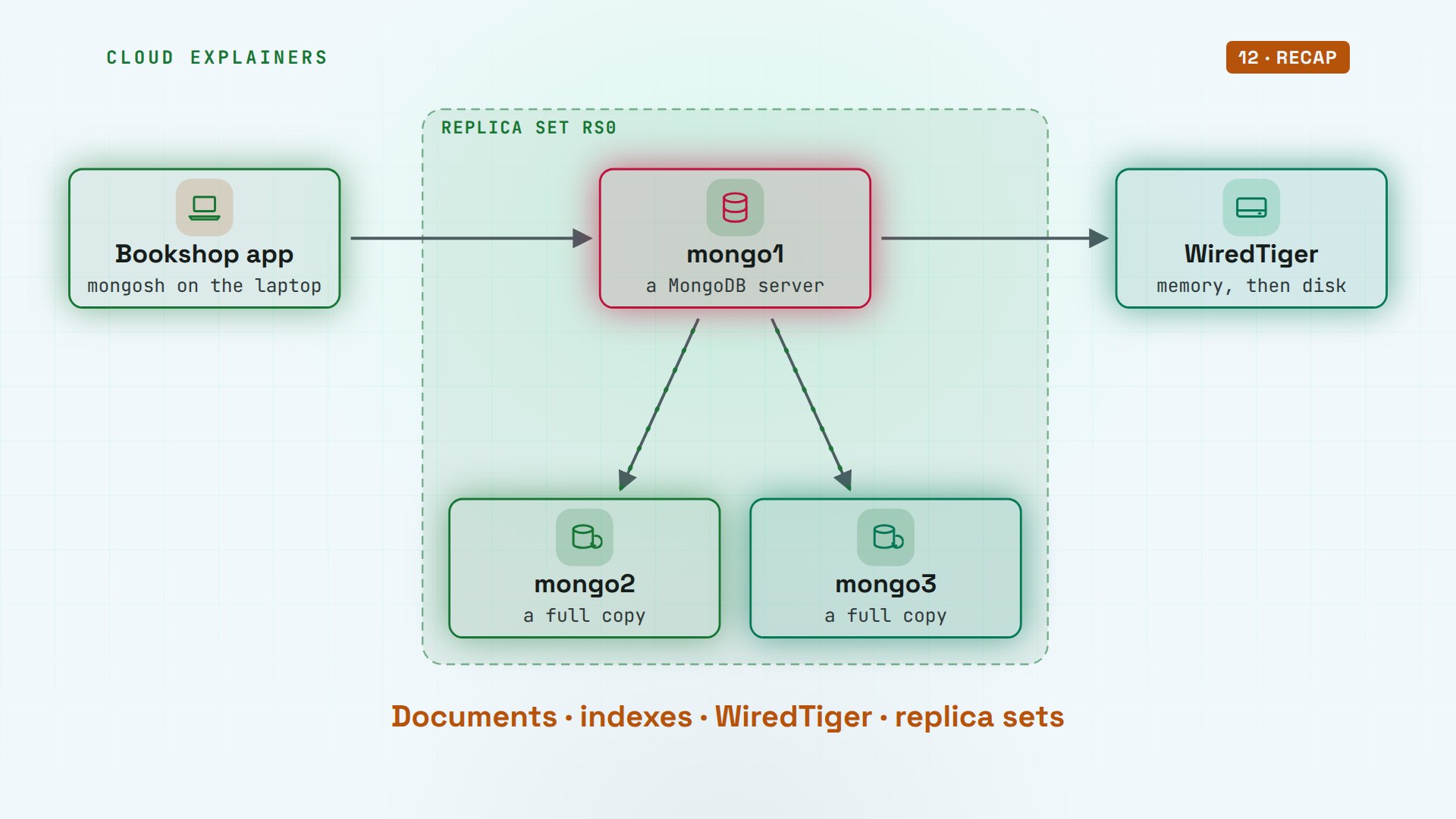
Here's the picture we'll build. The bookshop app talks to a MongoDB server, a program called mongod. It keeps the data in memory, and on disk, through its storage engine. And two more servers keep full copies, so one can fail. That's why the prompt says rs0, primary: a replica set, which we'll meet later.
Documents
Let's read the book back. find one returns a document: fields and values, written like JSON, the text format apps use to send data. The author is a smaller document, inside this one. And tags is a list.
rs0 [primary] bookshop> db.books.findOne({title: "Dune"}){
  _id: ObjectId('6aec58f23459ec0d6b631cf5'),
  title: 'Dune',
  author: { name: 'Frank Herbert', born: 1920 },
  year: 1965,
  tags: [ 'sci-fi', 'classic' ],
  price: 9.99,
  stock: 3
}
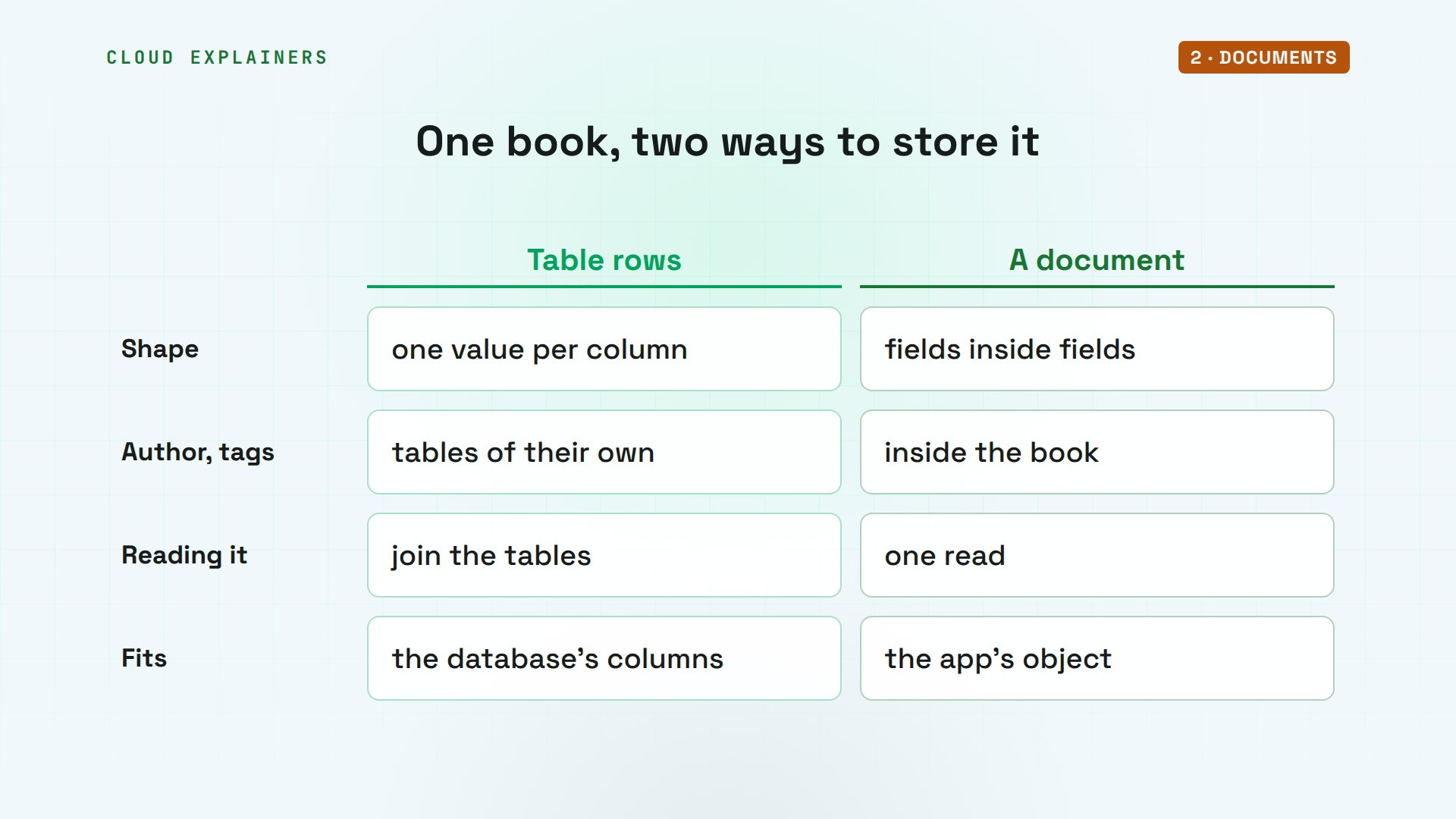
Compare that with a table in a relational database. A row has one value per column, so the author and the tags would go in tables of their own, joined back together when you read. A document keeps the whole book in one piece, the way the app already thinks about it. One read brings it all back.
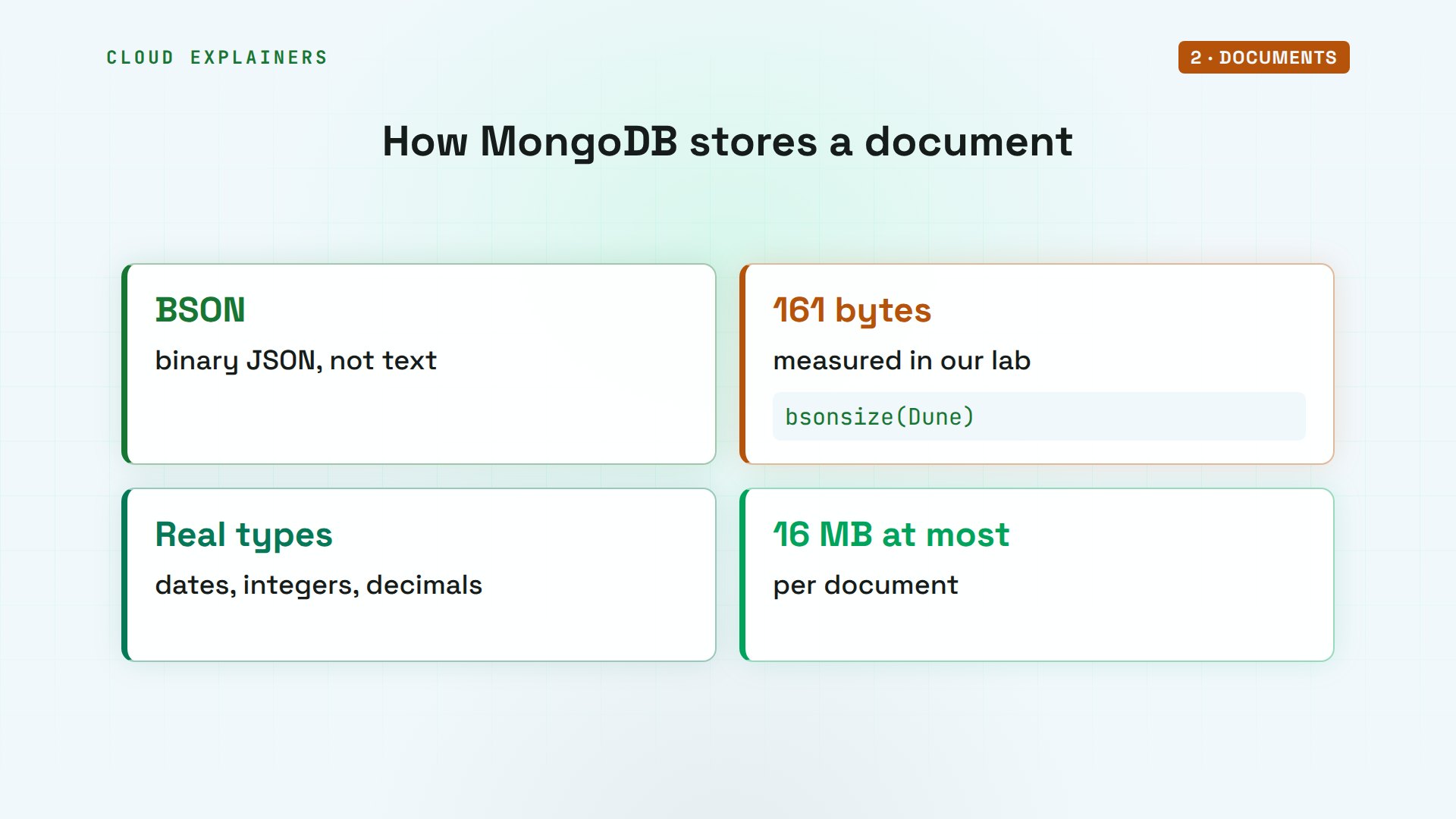
On the server, it isn't stored as text. MongoDB saves documents in BSON, short for binary JSON. This one takes 161 bytes. BSON also knows types JSON doesn't, like dates and exact integers. And one document can be at most 16 megabytes: plenty for a book.
Collections
Now a second book, The Hobbit, with no tags, but a field Dune doesn't have: signed. MongoDB takes it as it is. List both, where ones pick the fields to show, and each keeps its own shape.
rs0 [primary] bookshop> db.books.insertOne({title: "The Hobbit", author: {name: "J.R.R. Tolkien"}, year: 1937, stock: 5, signed: true}){
  acknowledged: true,
  insertedId: ObjectId('6aec58f48c8ec8a7dd0610a9')
}
rs0 [primary] bookshop> db.books.find({}, {_id: 0, title: 1, year: 1, stock: 1, signed: 1})[
  { title: 'Dune', year: 1965, stock: 3 },
  { title: 'The Hobbit', year: 1937, stock: 5, signed: true }
]
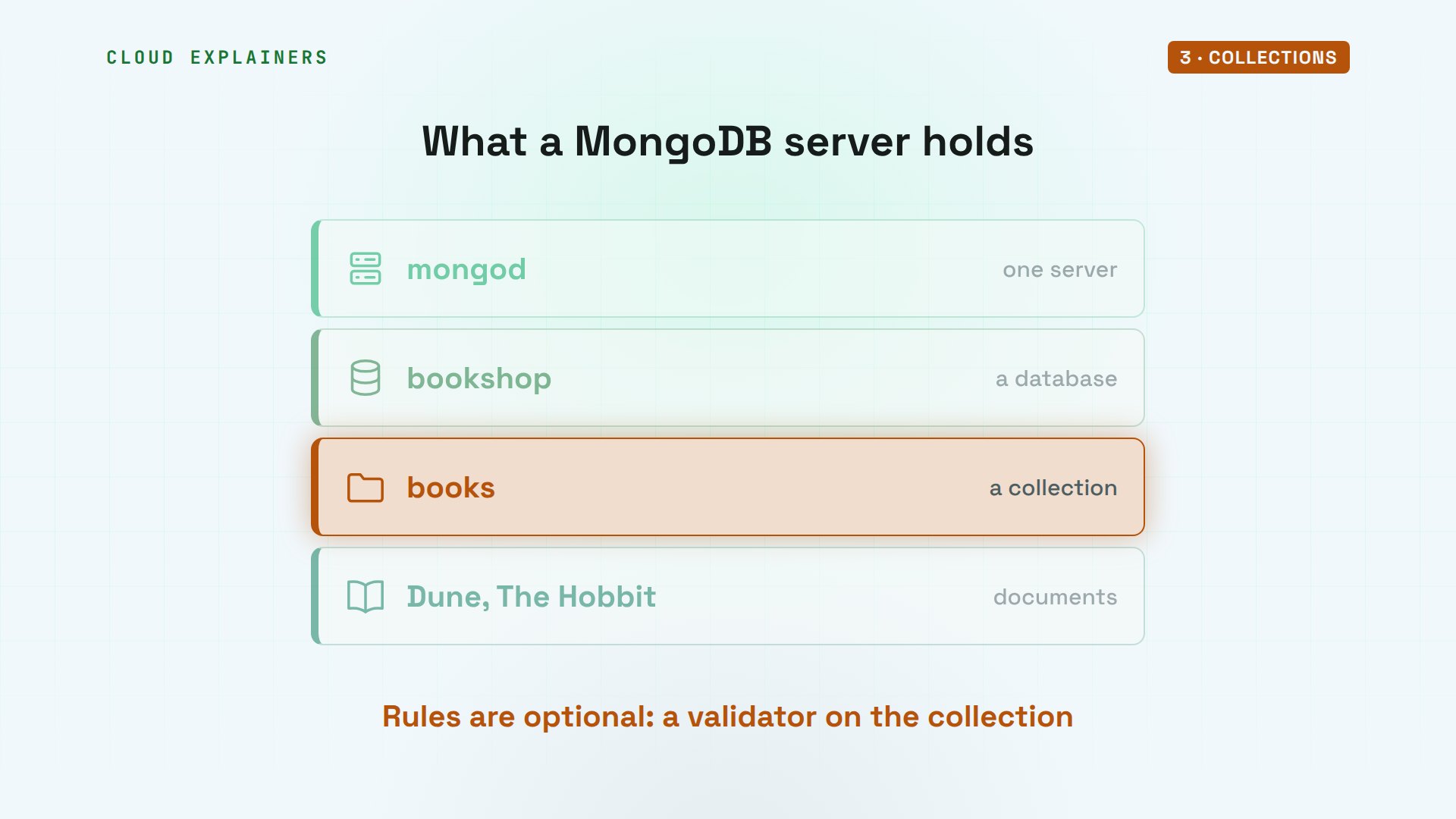
So the layers are simple. A MongoDB server holds databases, like bookshop. A database holds collections, like books. And a collection holds documents. Nobody has to describe the fields first. If you want rules, you can add a validator later, but it's your choice, not a requirement.
The ID
Every document needs an ID, in a field called underscore ID. We never gave Dune one, so the shell made an ObjectId for it. It also knows when it was made: get timestamp reads 10:22:42 out of it, in UTC.
rs0 [primary] bookshop> db.books.findOne({title: "Dune"})._idObjectId('6aec58f23459ec0d6b631cf5')
rs0 [primary] bookshop> db.books.findOne({title: "Dune"})._id.getTimestamp()ISODate('2026-11-05T10:22:42.000Z')
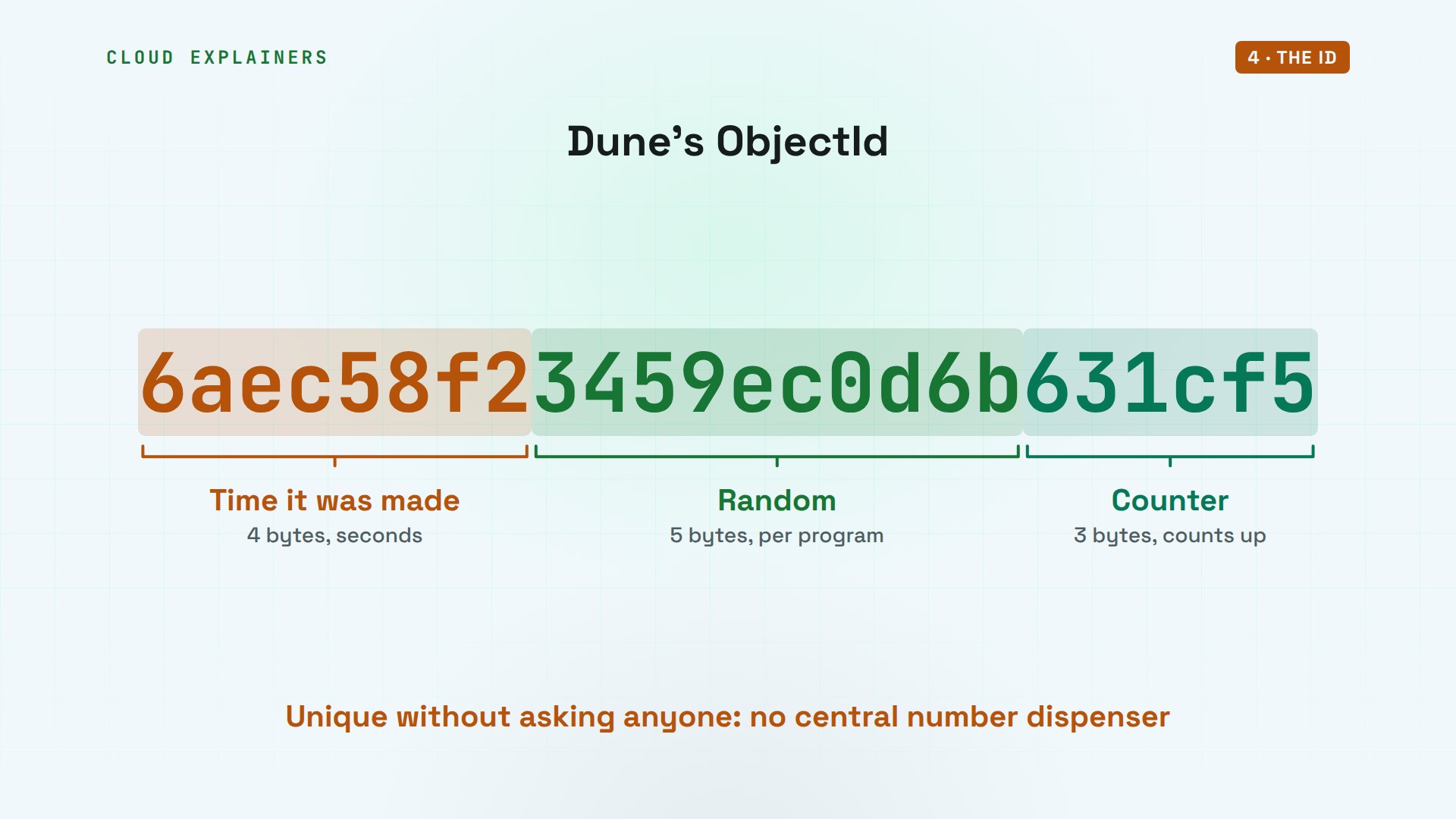
Here's how. An ObjectId is twelve bytes, written as 24 hex characters. The first four bytes are the time, in seconds. The next five are random, picked once per running program. The last three are a counter that goes up by one. So two programs can make IDs at the same moment, without asking each other, and never clash.
Queries
Queries are documents too. To find books by an author, give the path inside the document, author dot name. Matching a list looks for any item in it: tags sci-fi finds Dune. Operators start with a dollar sign: less than asks for a range, books from before 1950.
rs0 [primary] bookshop> db.books.find({"author.name": "Frank Herbert"}, {_id: 0, title: 1})[ { title: 'Dune' } ]
rs0 [primary] bookshop> db.books.find({tags: "sci-fi"}, {_id: 0, title: 1})[ { title: 'Dune' } ]
rs0 [primary] bookshop> db.books.find({year: {$lt: 1950}}, {_id: 0, title: 1, year: 1})[ { title: 'The Hobbit', year: 1937 } ]
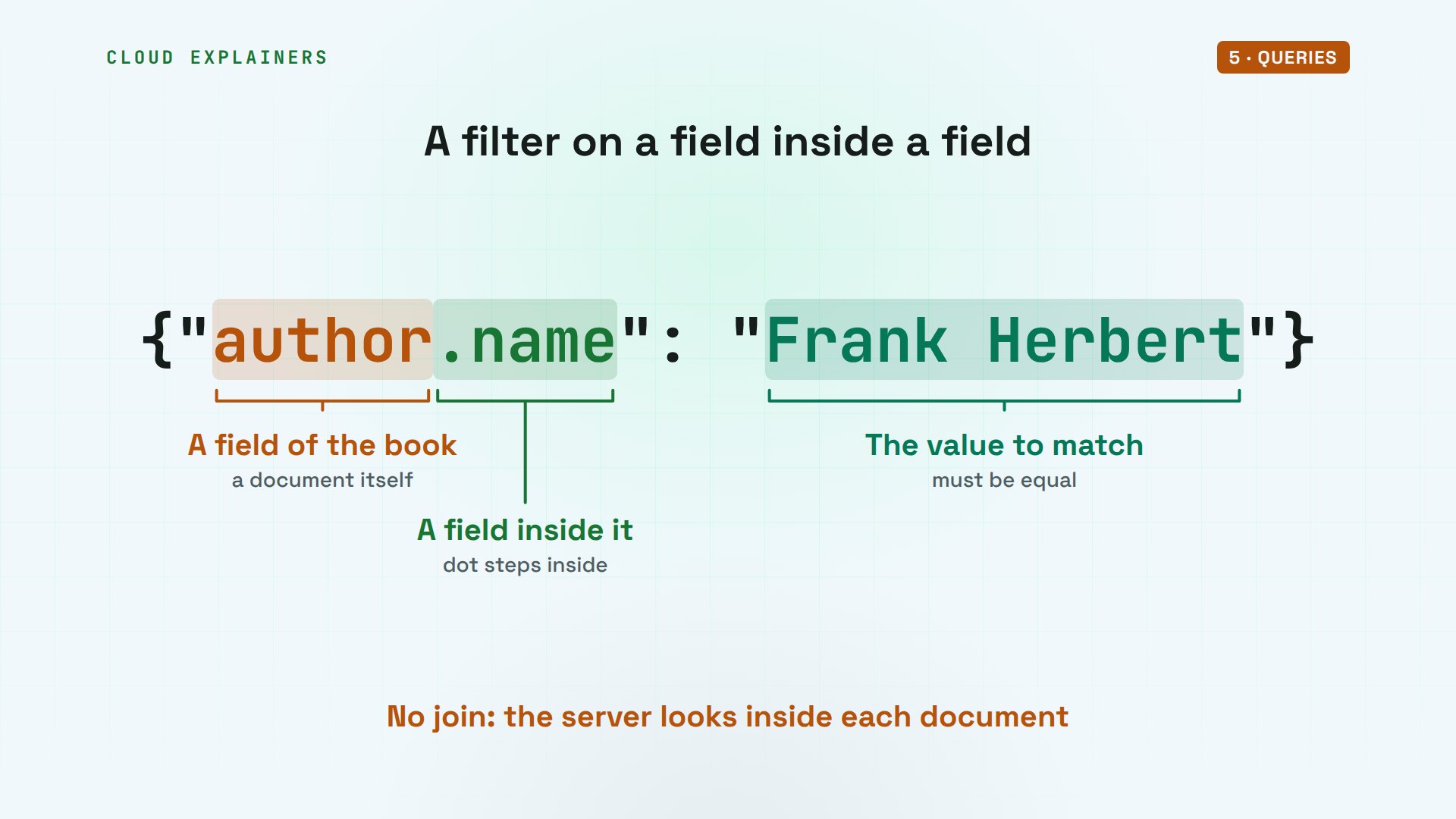
Read that first filter piece by piece. Author is a field of the book. Dot name steps inside it, to the author's own name field. And Frank Herbert is the value it must equal. No join, and no second table: the server looks inside each book.
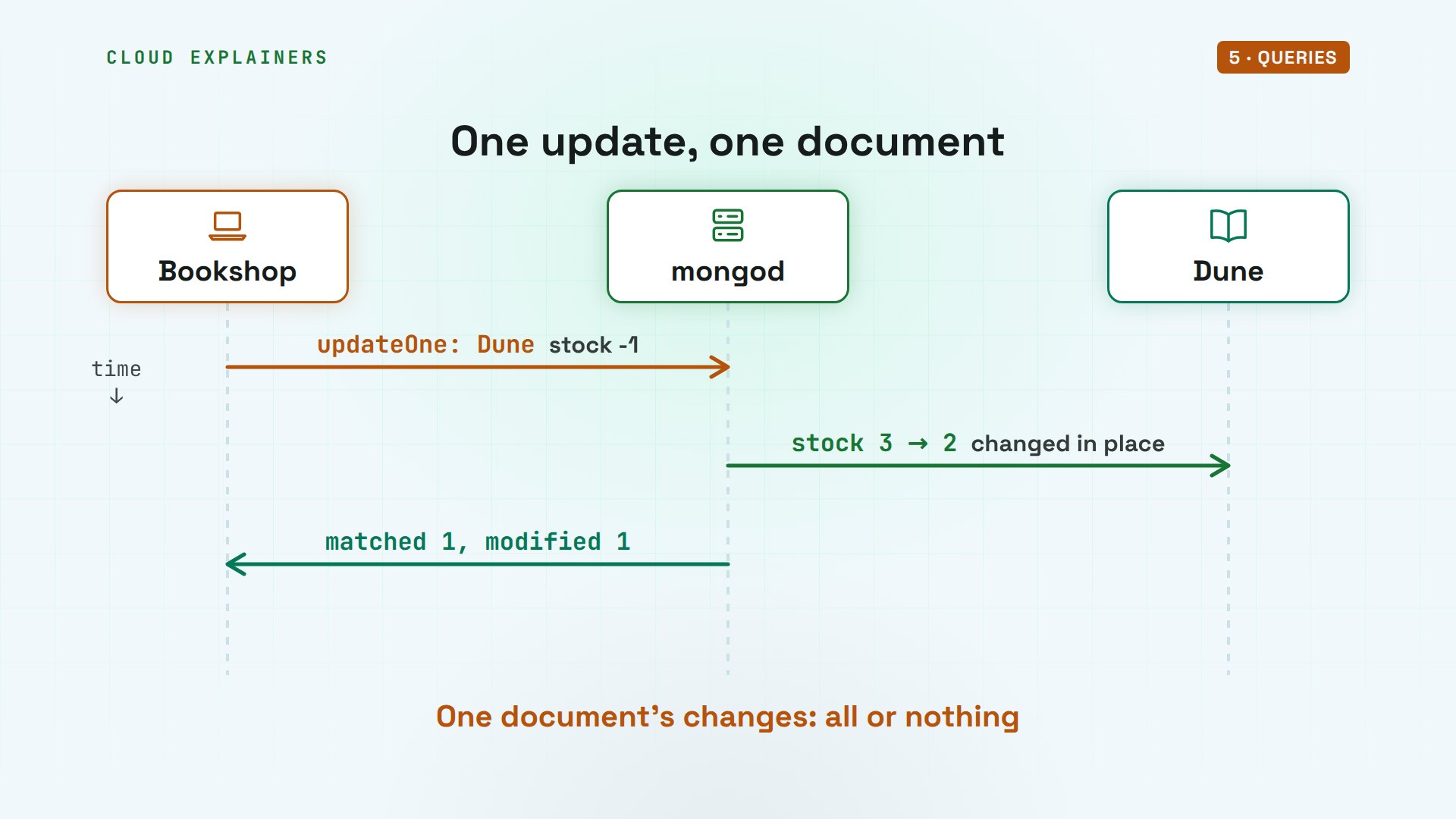
Changing a document works the same way. We sell one copy of Dune: update one finds it, and inc, short for increment, adds minus one to stock. Only that field changes. Dune had three, and now has two.
rs0 [primary] bookshop> db.books.updateOne({title: "Dune"}, {$inc: {stock: -1}}){
  acknowledged: true,
  insertedId: null,
  matchedCount: 1,
  modifiedCount: 1,
  upsertedCount: 0
}
rs0 [primary] bookshop> db.books.findOne({title: "Dune"}, {_id: 0, title: 1, stock: 1}){ title: 'Dune', stock: 2 }
Here's what happened. The app sends the filter and the change to the server. The server finds the one document that matches, changes it in place, and answers with counts: one matched, one modified. A single document is always changed all or nothing, even with several fields.
Indexes
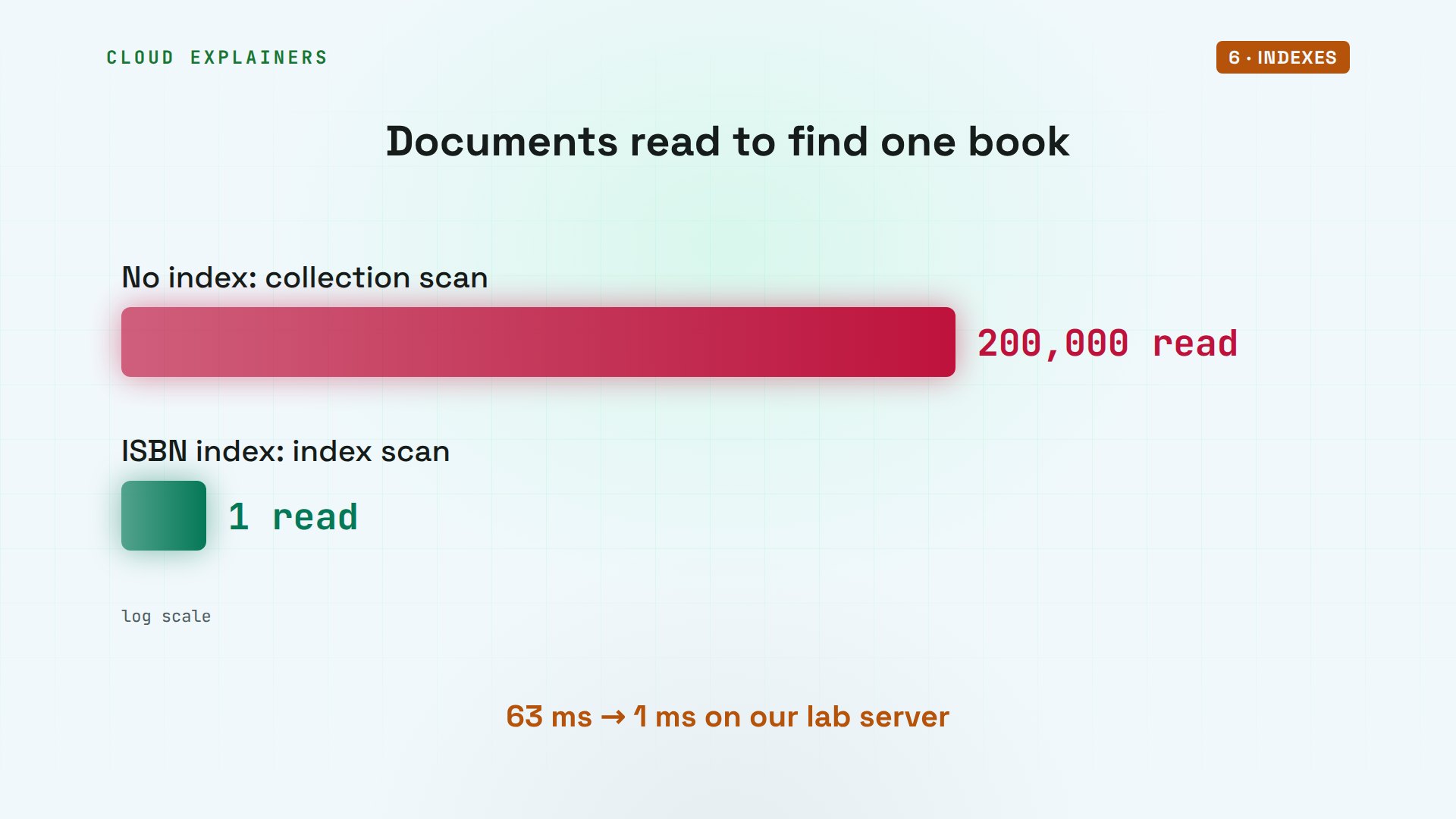
Two books are easy. So we loaded a catalogue of 200,000 made-up books, each with its own ISBN code. Find one by its ISBN, and ask MongoDB to explain how it did it. The plan was a collection scan: it read every one of the 200,000 documents, to return one, in 63 milliseconds.
rs0 [primary] bookshop> db.catalog.countDocuments()200000
rs0 [primary] bookshop> db.catalog.find({isbn: "978-1000864192"}).explain("executionStats").executionStats{
  executionSuccess: true,
  nReturned: 1,
  executionTimeMillis: 63,
  totalKeysExamined: 0,
  totalDocsExamined: 200000,
  executionStages: {
    isCached: false,
    stage: 'COLLSCAN',
    filter: { isbn: { '$eq': '978-1000864192' } },
    nReturned: 1,
    executionTimeMillisEstimate: 51,
    works: 200001,
    advanced: 1,
    needTime: 199999,
    needYield: 0,
    saveState: 3,
    restoreState: 3,
    isEOF: 1,
    nss: 'bookshop.catalog',
    direction: 'forward',
    docsExamined: 200000
  }
}
So what is an index? It's a sorted list of one field's values, each pointing at its document, like the index at the back of a book. MongoDB keeps it in a B-tree, a tree that stays sorted, so it can jump to one ISBN in a few steps, then fetch just that document. Without it, the only way is to read them all.
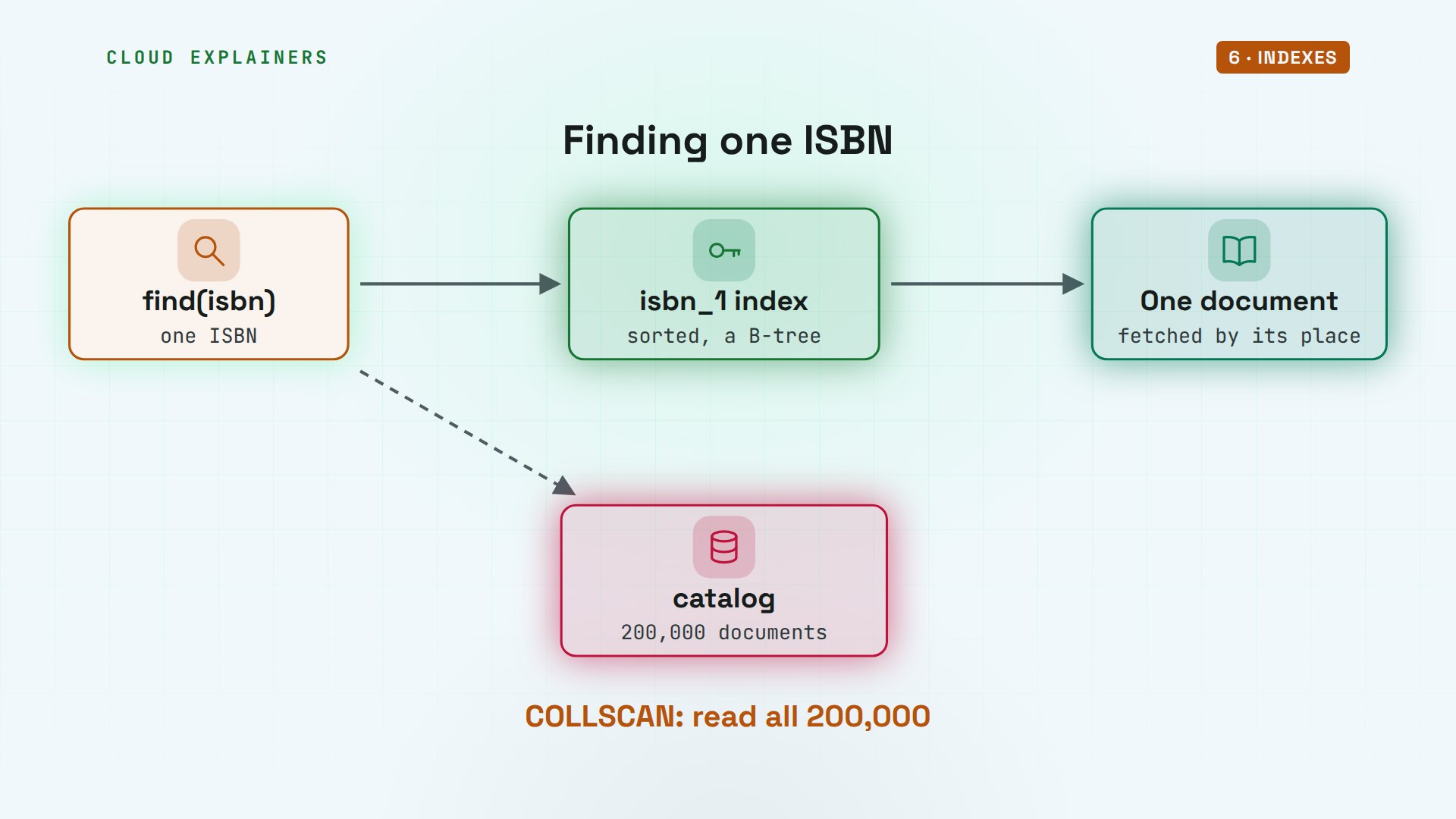
Now create an index on the ISBN field, the one means sorted in ascending order, and run the very same query. This time it's an index scan. It looked at 1 index entry, read 1 document, and took 1 millisecond.
rs0 [primary] bookshop> db.catalog.createIndex({isbn: 1})isbn_1
rs0 [primary] bookshop> db.catalog.find({isbn: "978-1000864192"}).explain("executionStats").executionStats{
  executionSuccess: true,
  nReturned: 1,
  executionTimeMillis: 1,
  totalKeysExamined: 1,
  totalDocsExamined: 1,
  executionStages: {
    isCached: false,
    stage: 'FETCH',
    nReturned: 1,
    executionTimeMillisEstimate: 1,
    works: 2,
    advanced: 1,
    needTime: 0,
    needYield: 0,
    saveState: 0,
    restoreState: 0,
    isEOF: 1,
    nss: 'bookshop.catalog',
    docsExamined: 1,
    alreadyHasObj: 0,
    inputStage: {
      stage: 'IXSCAN',
      nReturned: 1,
      executionTimeMillisEstimate: 1,
      works: 2,
      advanced: 1,
      needTime: 0,
      needYield: 0,
      saveState: 0,
      restoreState: 0,
      isEOF: 1,
      nss: 'bookshop.catalog',
      keyPattern: { isbn: 1 },
      indexName: 'isbn_1',
      isMultiKey: false,
      multiKeyPaths: { isbn: [] },
      isUnique: false,
      isSparse: false,
      isPartial: false,
      indexVersion: 2,
      direction: 'forward',
      indexBounds: { isbn: [ '["978-1000864192", "978-1000864192"]' ] },
      keysExamined: 1,
      seeks: 1,
      dupsTested: 0,
      dupsDropped: 0,
      peakTrackedMemBytes: 0
    }
  }
}
That's 200,000 documents read, against one. On our small lab server, 63 milliseconds became 1.
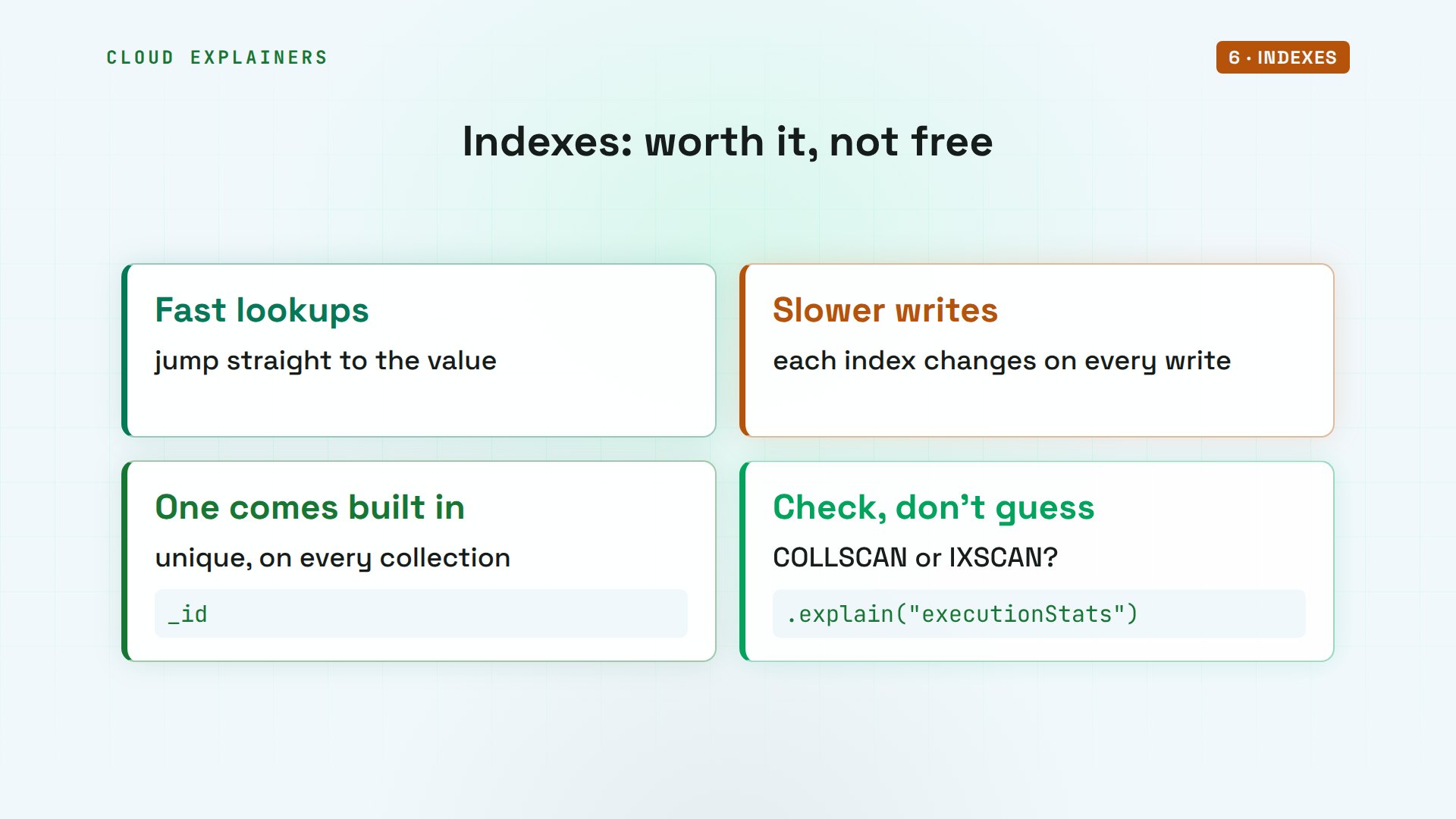
Indexes aren't free. Every insert and update must change each index too, and they take memory and disk. Every collection gets one on underscore ID by itself. Add others for the fields your app searches on, and check with explain.
On disk
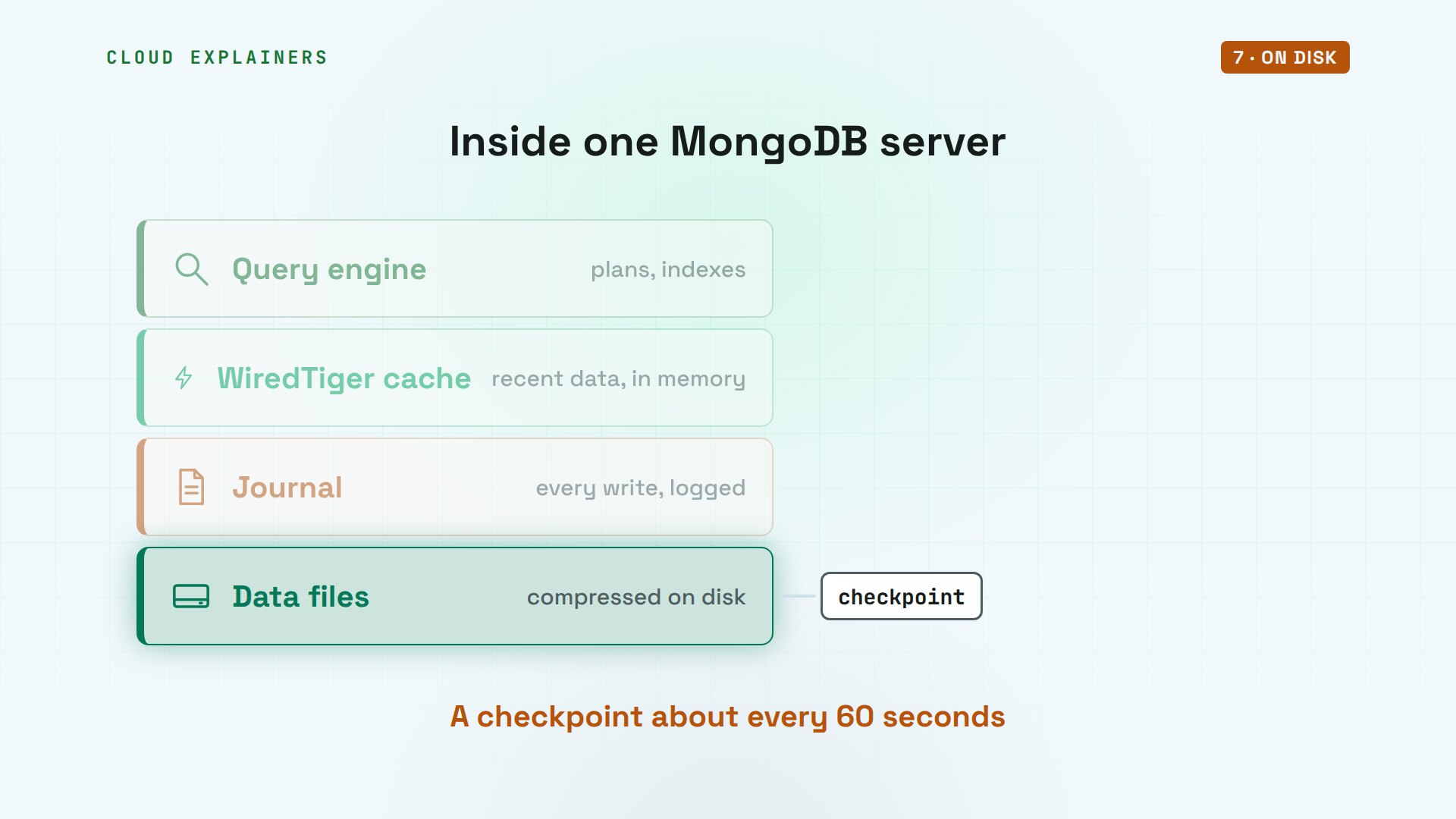
So where do the bytes go? Inside mongod, a storage engine called WiredTiger does that work. Recent data lives in its cache, in memory. Every write is also logged in a journal on disk, so after a crash, the server can replay what it missed. And about every 60 seconds, a checkpoint writes the data files themselves.
The server confirms it: WiredTiger. Data size counts the catalogue's documents in bytes: about 20.3 megabytes, but on disk the collection takes 5.2. WiredTiger compresses its files, here to about a quarter of the size.
rs0 [primary] bookshop> db.serverStatus().storageEngine.namewiredTiger
rs0 [primary] bookshop> db.catalog.dataSize()20288890
rs0 [primary] bookshop> db.catalog.storageSize()5226496
Replica sets
One server is one place to fail. So real MongoDB runs as a replica set: here, three servers called rs0. One is the primary, and every write goes to it. The other two are secondaries: they copy each change the primary makes, in the same order.
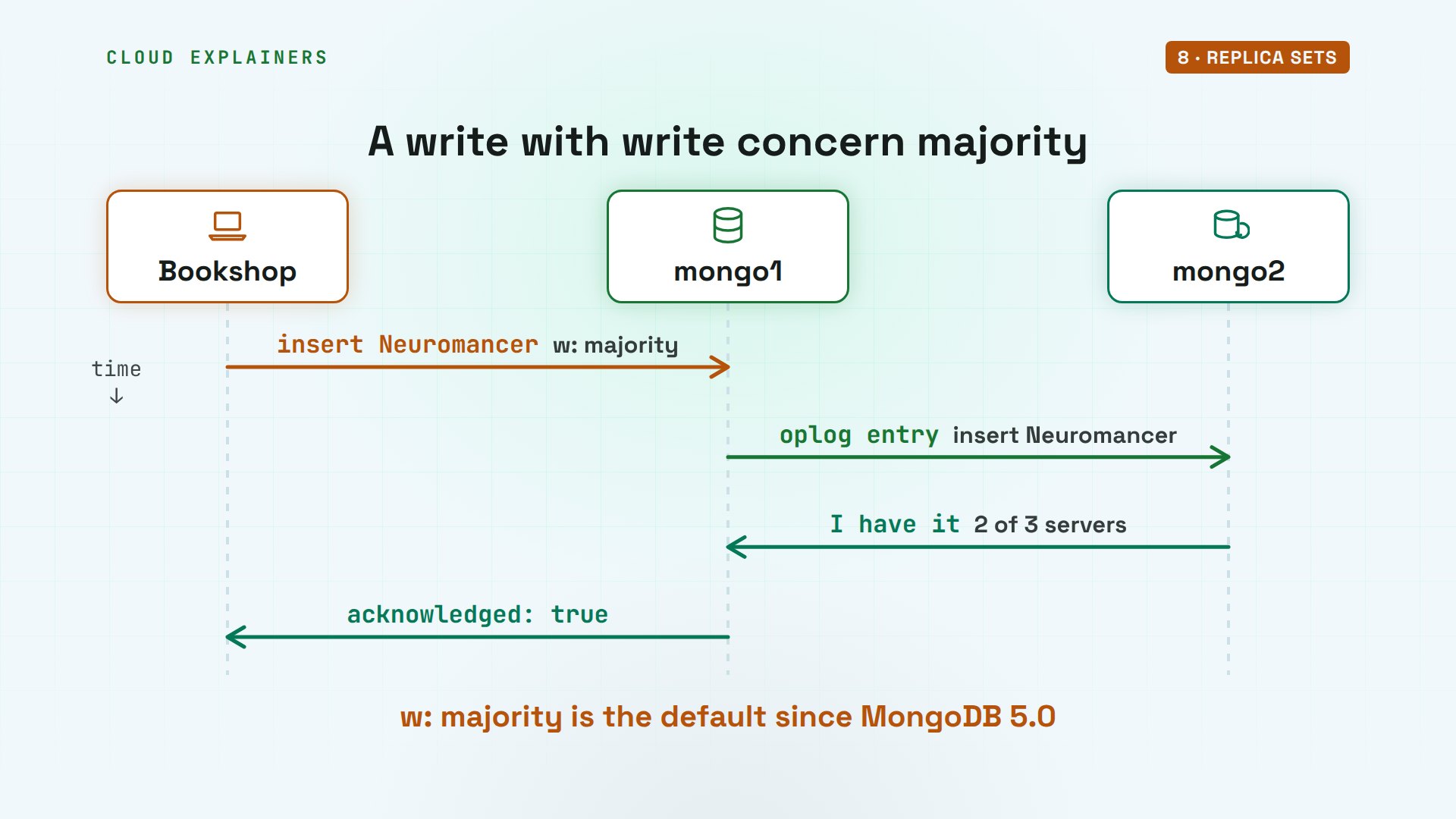
This status line lists each server's name and role: mongo1 is primary, mongo2 and mongo3 are secondaries. Now a third book, Neuromancer, with write concern majority. That means: don't say yes until most of the three servers have it.
rs0 [primary] bookshop> rs.status().members.map(m => m.name + "  " + m.stateStr)[
  'mongo1:27017  PRIMARY',
  'mongo2:27017  SECONDARY',
  'mongo3:27017  SECONDARY'
]
rs0 [primary] bookshop> db.books.insertOne({title: "Neuromancer", author: {name: "William Gibson"}, year: 1984, stock: 2}, {writeConcern: {w: "majority"}}){
  acknowledged: true,
  insertedId: ObjectId('6aec5901aa237189759865bb')
}
Step by step: the primary saves the book, and records the change in its oplog, the operations log. Each secondary reads that log and applies the same change. When one secondary confirms, two of three servers have it, a majority, and only then does the app hear yes. Since version 5.0, majority is MongoDB's default.
Here's that entry, read straight from mongo2, a secondary. The op field says i, for insert. ns names the database and collection. And o is the document itself, the same Neuromancer, with a timestamp to keep every change in order.
rs0 [direct: secondary] bookshop> db.getSiblingDB("local").oplog.rs.find({ns: "bookshop.books"}).sort({$natural: -1}).limit(1)[
  {
    lsid: {
      id: UUID('36e698f2-3b25-4f7c-9115-f93101e972bb'),
      uid: Binary.createFromBase64('47DEQpj8HBSa+/TImW+5JCeuQeRkm5NMpJWZG3hSuFU=', 0)
    },
    txnNumber: Long('1'),
    op: 'i',
    ns: 'bookshop.books',
    ui: UUID('91b55009-fc6b-485e-9d0e-b142e0165a88'),
    o: {
      _id: ObjectId('6aec5901aa237189759865bb'),
      title: 'Neuromancer',
      author: { name: 'William Gibson' },
      year: 1984,
      stock: 2
    },
    o2: { _id: ObjectId('6aec5901aa237189759865bb') },
    stmtId: 0,
    ts: Timestamp({ t: 1793874177, i: 1 }),
    t: Long('1'),
    v: Long('2'),
    wall: ISODate('2026-11-05T10:22:57.327Z'),
    prevOpTime: { ts: Timestamp({ t: 0, i: 0 }), t: Long('-1') }
  }
]
A server crashes
Now the test from the start. On the lab machine, docker kill stops mongo1 at once, like pulling its power cord. The primary is gone, with no chance to say goodbye.
docker kill mongo1mongo1
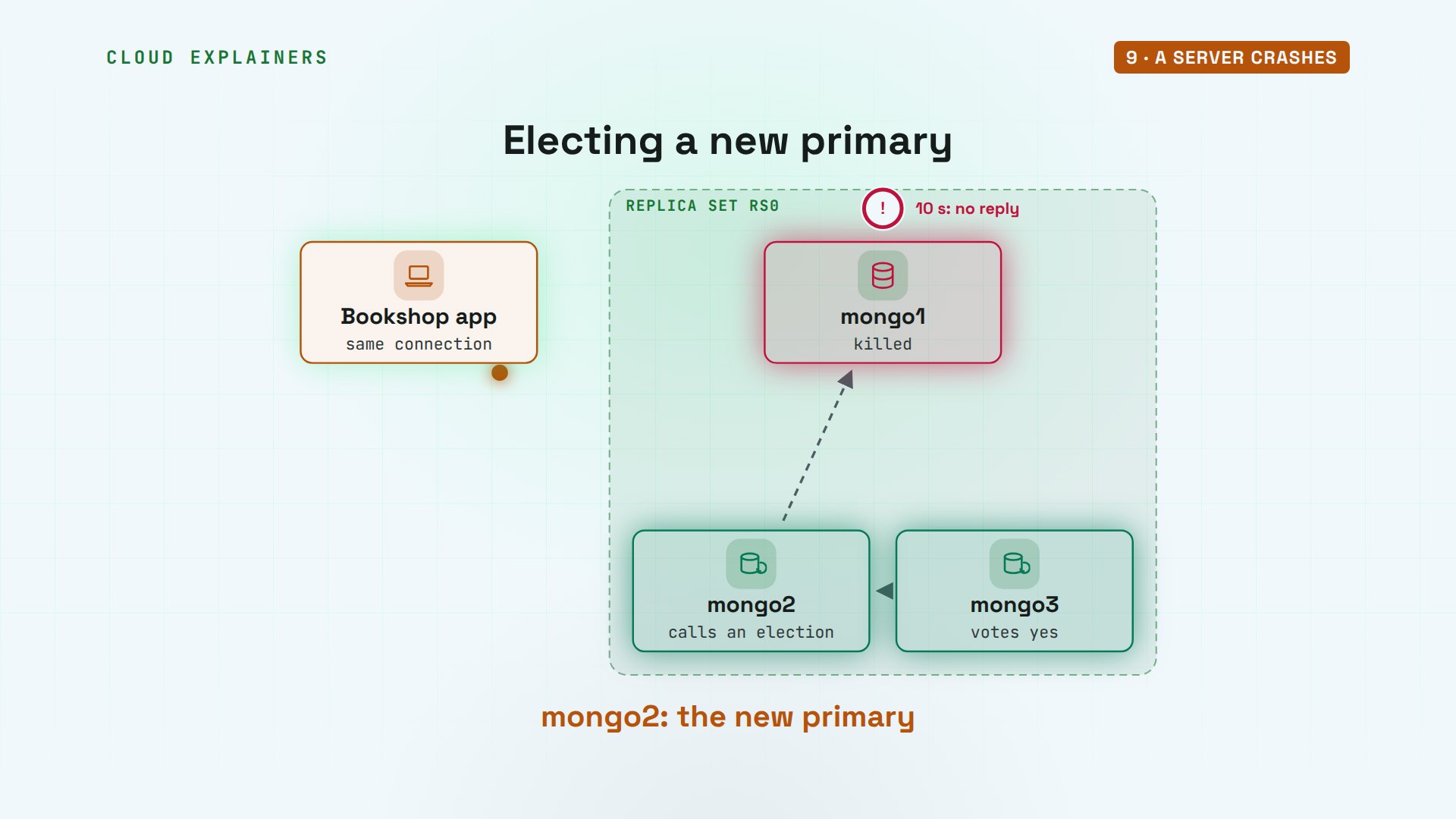
The servers check on each other every two seconds. When the secondaries hear nothing from the primary for ten seconds, one of them calls an election. It needs votes from a majority, two of three, and mongo3 votes for it. mongo2 becomes the new primary, and the app's connection finds it by itself.
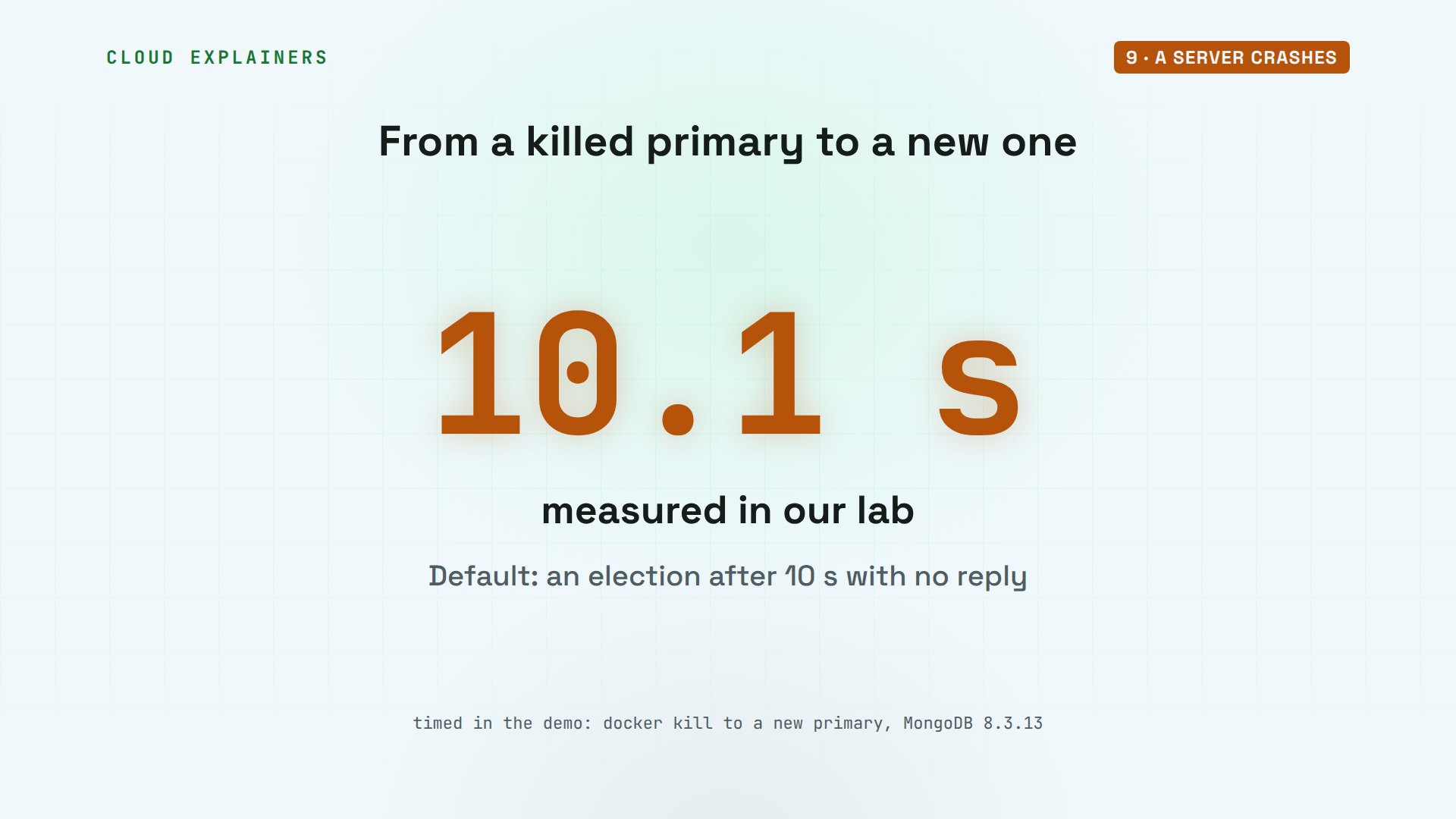
In our lab, the whole thing took 10.1 seconds, from the kill to a new primary taking writes. Most of that is the ten seconds of waiting, so a slow network isn't mistaken for a dead server.
Back on the laptop, the status now shows mongo1 not reachable, and mongo2 as primary. Neuromancer is still there, because a majority had it before the crash. And the app can keep selling: the update works.
rs0 [primary] bookshop> rs.status().members.map(m => m.name + "  " + m.stateStr)[
  'mongo1:27017  (not reachable/healthy)',
  'mongo2:27017  PRIMARY',
  'mongo3:27017  SECONDARY'
]
rs0 [primary] bookshop> db.books.findOne({title: "Neuromancer"}, {_id: 0, title: 1, year: 1}){ title: 'Neuromancer', year: 1984 }
rs0 [primary] bookshop> db.books.updateOne({title: "Neuromancer"}, {$inc: {stock: -1}}){
  acknowledged: true,
  insertedId: null,
  matchedCount: 1,
  modifiedCount: 1,
  upsertedCount: 0
}
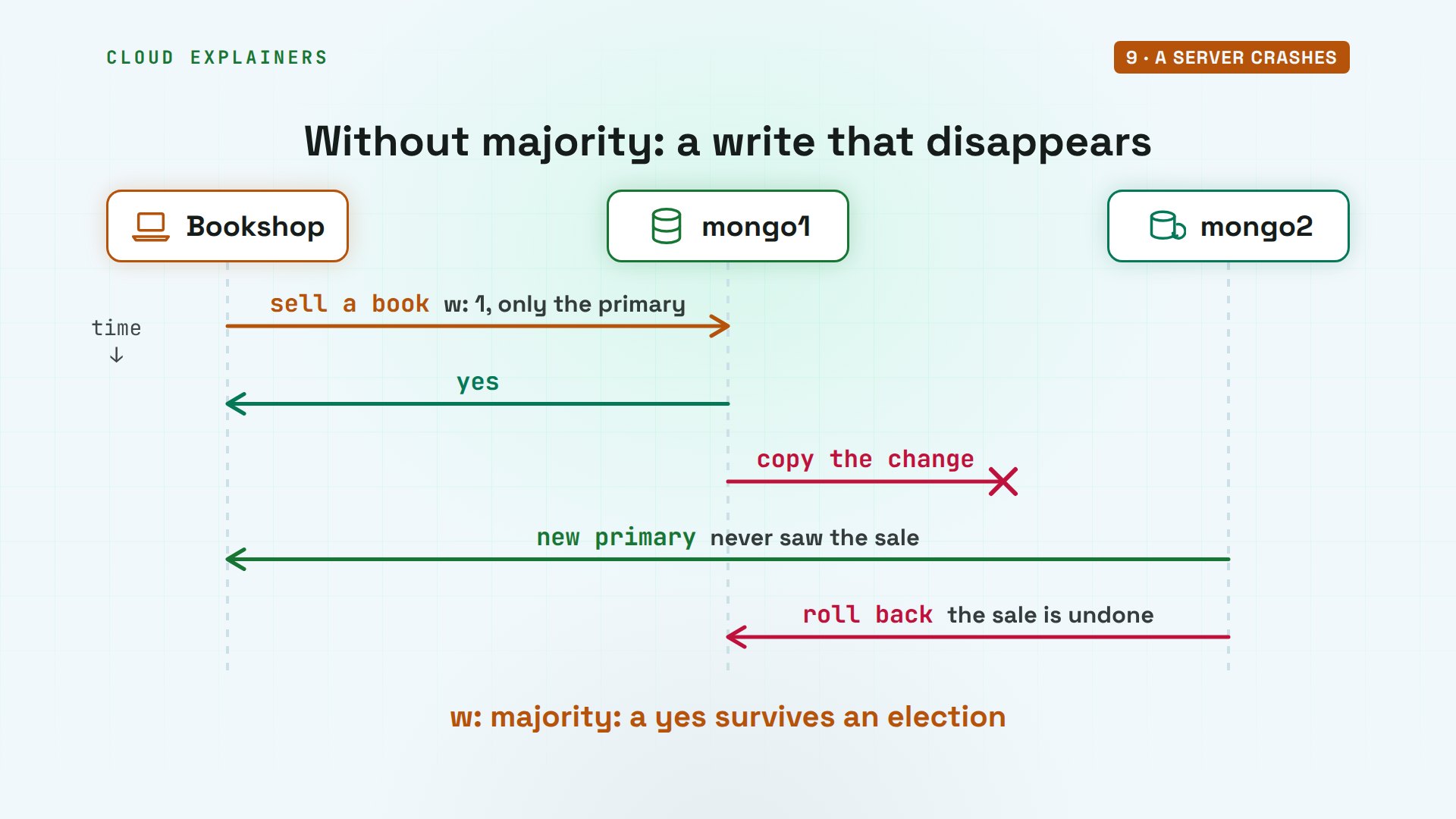
Why did majority matter? Suppose the app had only waited for mongo1. mongo1 says yes, then dies before any secondary copies the write. mongo2 is elected without it. When mongo1 comes back, it has to roll that write back, and a sale the customer was already told about is gone. With majority, a yes means the write survives an election.
Then we start mongo1 again. It doesn't take its old job back.
docker start mongo1mongo1
The status shows it rejoined as a secondary. It caught up by copying the changes it missed. Reading straight from the old primary, Neuromancer shows the sale it missed.
rs0 [primary] bookshop> rs.status().members.map(m => m.name + "  " + m.stateStr)[
  'mongo1:27017  SECONDARY',
  'mongo2:27017  PRIMARY',
  'mongo3:27017  SECONDARY'
]
rs0 [direct: secondary] bookshop> db.books.findOne({title: "Neuromancer"}, {_id: 0, title: 1, stock: 1}){ title: 'Neuromancer', stock: 1 }
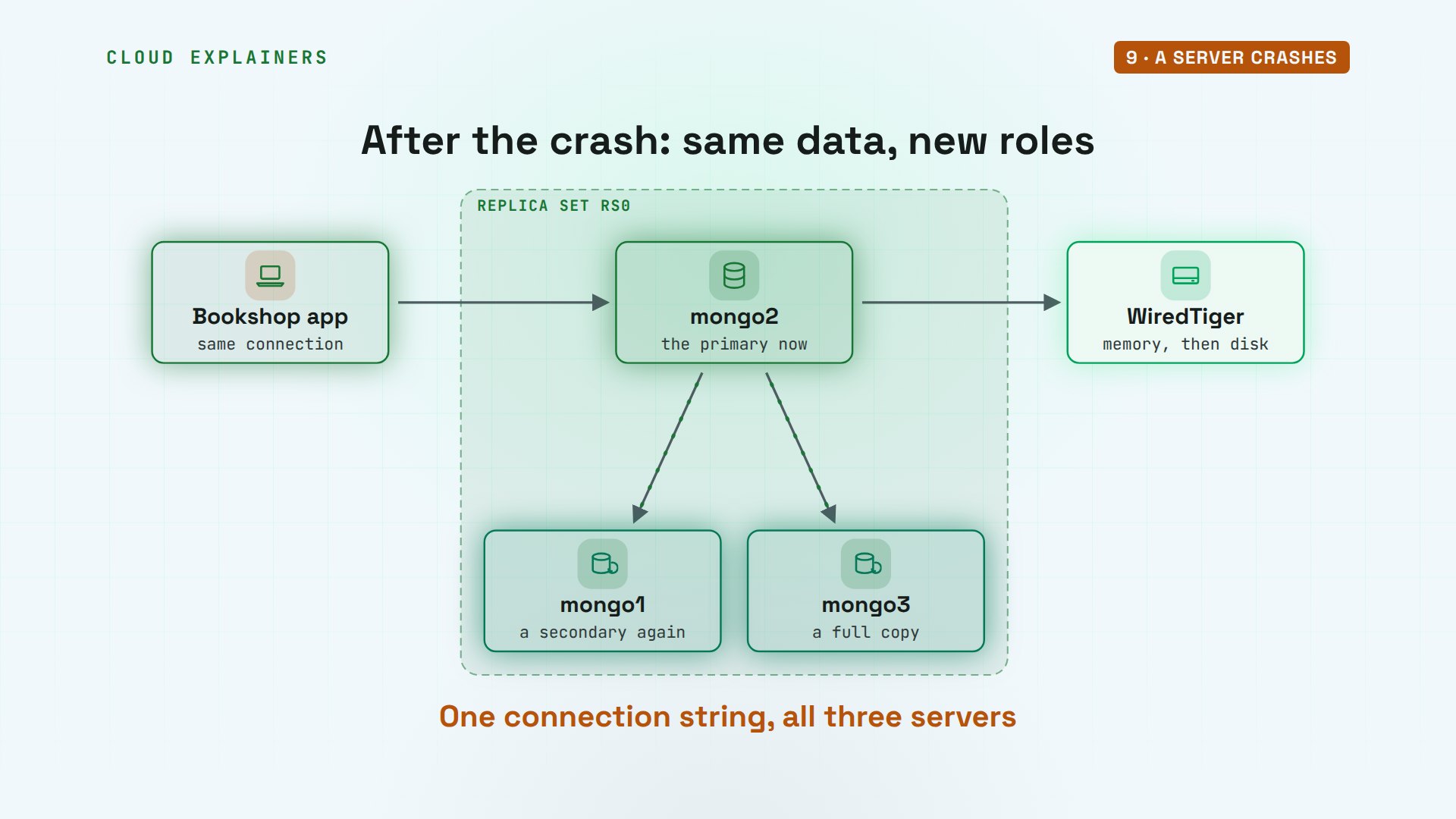
On the map, the roles moved, but nothing was lost. mongo2 now takes the writes, and mongo1 and mongo3 copy them. The app never changed its connection: it lists all three servers, and always finds the primary.
Sharding
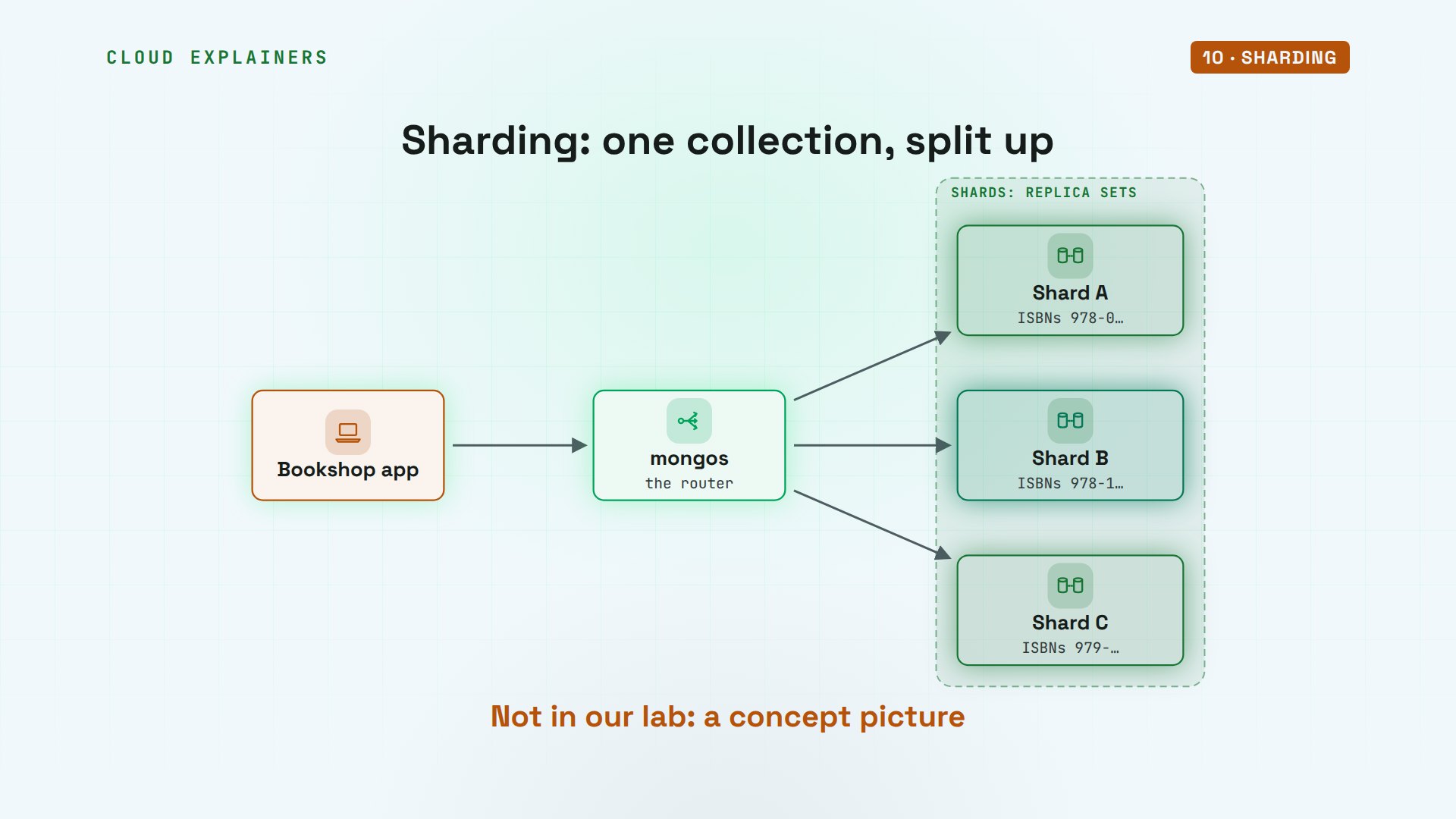
A replica set copies all the data to every server. When a collection grows too big for one, MongoDB can split it across several replica sets, called shards, by a field you choose, the shard key. A router called mongos sends each query to the shard that holds it. We didn't build shards in our lab: most apps never need them.
When it fits
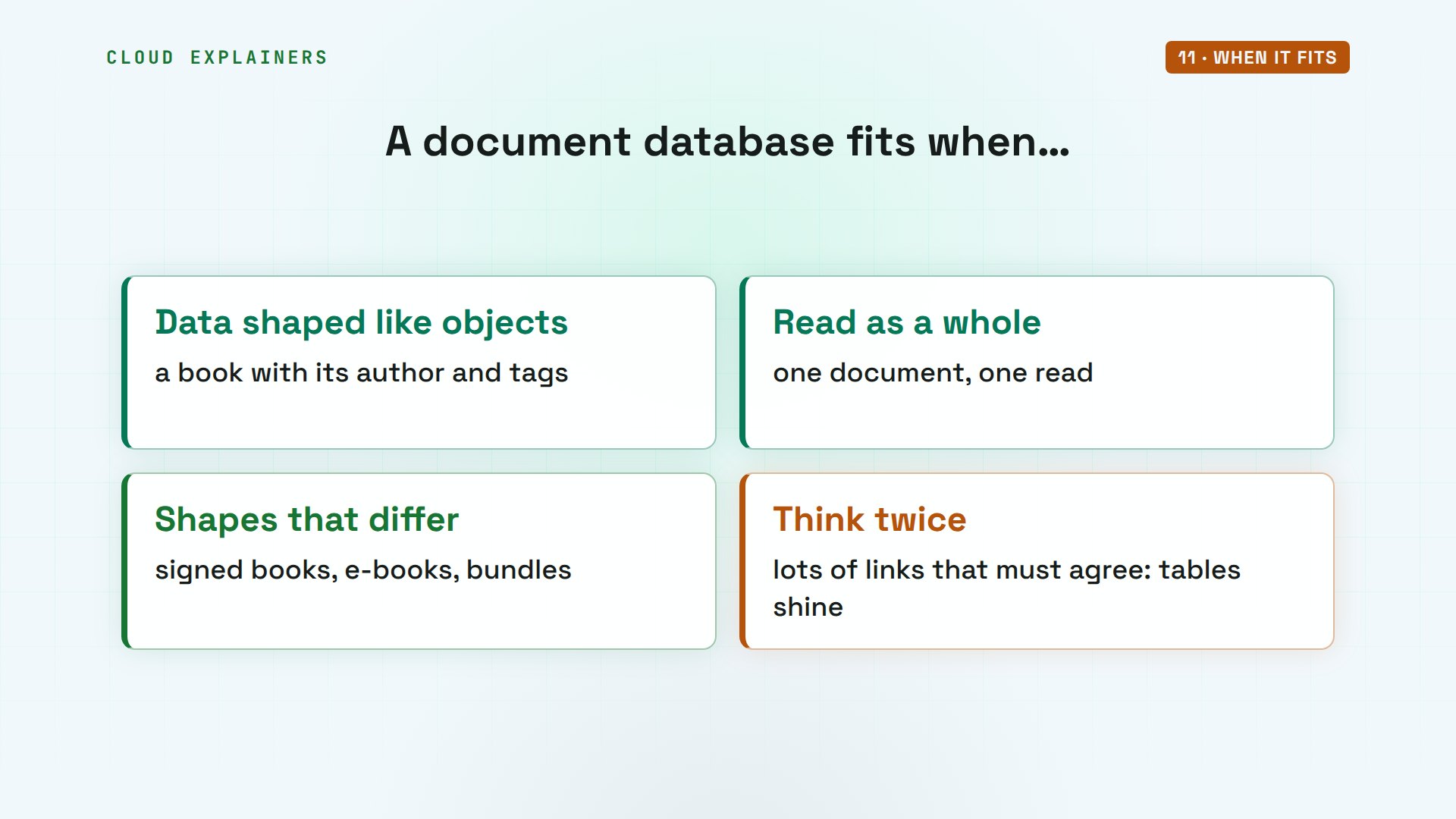
So when does a document database fit? When your data is shaped like objects, like a book with its author and tags, read and written as a whole. When different items need different fields. But think twice when your data is mostly links that must all agree, like orders and payments. A relational database shines in that case.
Recap
So: MongoDB stores documents, in BSON, inside collections, with no table to design first. Each one gets an ObjectId. Queries reach inside documents, and indexes keep them fast. WiredTiger journals every write and compresses the files. And a replica set keeps copies, so when the primary dies, another takes over in seconds.
If this made MongoDB clearer, subscribing helps us build more real database labs like this one.
Every command and output in this video came from a real run, on MongoDB 8.3.13. Thanks for watching Cloud Explainers.
Sources
Demos: a three-server MongoDB replica set and a laptop in Docker on our own lab machine; the bookshop, its stock and its catalogue are made up. MongoDB is a trademark of MongoDB, Inc.; this channel isn't affiliated with it. Watch the full video on YouTube.
More videos
How to Fix Python pip error: externally-managed-environment
How to Fix MySQL Too Many Connections Database Errors
Golang Concurrency Will Finally Make Sense After This
How Amazon S3 Works
How Kubernetes Works
How to Fix Docker Port Already Allocated Errors
How PostgreSQL Works
How to Fix Git Merge Conflicts
How to Fix No Space Left on Device in Linux
How the Internet Works
SQL vs NoSQL: When Each One Wins
How to Fix JWT Token Expired Errors (401 Unauthorized)

Claude API vs Claude Pro: Why Your Subscription Doesn't Include It

Why AI Agent Skills Beat Giant Prompts

Linux Cron Jobs Will Finally Make Sense After This

Security Logs Will Finally Make Sense After This

How to Fix a Security Leak: An API Key Pushed to GitHub

DNS Will Finally Make Sense After This

Never Ignore a Security Update

Two-Factor Authentication Will Finally Make Sense

Never Expose a Database to the Internet

SSH Keys vs Passwords: Which Is Safer for Security?

The 5 Levels of Linux Boot: From Power On to Login

The 5 Levels of Network Firewalls

Password Security: Why Hackers Crack Weak Passwords

Why Your Linux Server Runs Out of Memory

HTTP vs HTTPS: What Actually Changes on Your Network

Every Linux File Permission You Need to Know

Linux Processes vs Threads: When Each One Wins

The OSI Model Will Finally Make Sense After This

The 7 Levels of Git

Every Network Troubleshooting Command You Need

Hashing vs Encryption in Cybersecurity: When Each One Wins

Why the Internet Ran Out of IP Addresses

Linux Package Managers: apt vs Snap vs Flatpak

Why Python Is Slow (and When It Doesn't Matter)

TCP vs UDP: When Each One Wins

Stop Running Linux as Root (Do This Instead)

Linux Users and Groups Will Finally Make Sense

Why Phishing Beats Good Security (and How to Spot It)

The 7 Levels of Docker

AI Agents Will Finally Make Sense After This

Stop Using git push --force (Use This Instead)

Agent Skills vs MCP: When Each One Wins

Networking Will Finally Make Sense After This

Every Linux Command You Actually Need

The 7 Levels of Cybersecurity

Every System Design Concept You Need, in One Diagram
